
Fix «Set scan parameters failed: Input/output error» on Ubuntu 16.04
This error appears when you try scan bluetooth low energy devices with hcitool lescan.
The major blogs give similars solutions like:
hciconfig hci0 down
hciconfig hci0 up
or
service bluetooth restart
or
sudo hciconfig hci0 reset
but none gave me a solution…
The last bluez version (at this moment) available for Ubuntu 16.04 is version 5.37.
To solve this problem you must install the last version available from the bluez web page (version 5.41).
wget https://www.kernel.org/pub/linux/bluetooth/bluez-5.41.tar.xz
tar xvf bluez-5.41.tar.xz
sudo apt-get install libudev-dev libical-dev libreadline6-dev libdbus-1-dev libglib2.0-dev
./configure
make
sudo make install
sudo hcitool lescan
LE Scan …
Enjoy it!
Popular posts from this blog
from: can’t read /var/mail/ in Python scripts
If you add a Python file to your PATH, maybe you will see this error: from: can’t read /var/mail/$First_Library_Name This happend, because you need to be explicit with application you want to run your script. To fix it, just add in the first line of your script the following line: #! /usr/bin/python Enjoy it!
How to fix Android when developer options are not available for this user
I have an Android One with Oreo version and suddenly my Android rebooted and after that it started to behave strangely: 1) Notification section doesn’t work. I can’t see notifications from my apps and the arrow and the screw icon to settings access don’t work. 2) As I can’t access to the notification area, I can’t enable Use USB to Transfer Files to access to my phone memory. 3) I can’t access to developer mode (I before active it with a lot of taps over Build number). Clicking on developer options just shows developer options are not available to this user. 4) I can’t update or install the apps on google play. They freeze on Download pending… message 5) Home and Switch buttons don’t work. They light up and vibrate when I tap them but they do nothing. This issue is apparently related to a deconfiguration of user accounts. To fix it, you need re-setup the users. As you can’t access to the user manager (you are in guest mode
Exception: Could not find a default OpenFlow controller in Mininet
If you try to run a mininet script like this , maybe you will get this problem if you are under Ubuntu. Exception: Could not find a default OpenFlow controller This is trigger because your system don’t find a default controller . To enable it just add the first line and add the controller argument to net variable like the second line: from mininet.node import OVSController net = Mininet(topo=topo,host=CPULimitedHost, link=TCLink,controller = OVSController) Now, you will get the following error: c0 Cannot find required executable ovs-controller. Please make sure that it is installed and available in your $PATH: (/usr/local/sbin:/usr/local/bin:/usr/sbin:/usr/bin:/sbin:/bin:/snap/bin) ovs-controller is a legacy name. You need to be sure that you has it. sudo apt-get install openvswitch-testcontroller sudo cp /usr/bin/ovs-testcontroller /usr/bin/ovs-controller If you run it again, you should kill ovs-testcontroller first to avoid this: Exception: Please shut d
-
sethuraman447
- Posts: 10
- Joined: Sat Oct 17, 2015 8:55 am
Set scan parameters failed: Input/output error.
I’m trying to do a lescan using hcitool on the raspberry pi.
The command prints out
Set scan parameters failed: Input/output error.
I’m not sure, what exactly happens here.
I’m using a BLE dongle.
However, if I restart my machine, it shows the a MAC address after I issue the lescan command, and starts showing the same error after I issue the lescan command a couple of more times. Is it like, the lescan command cannot be issued more than once?
-
nirmankarta
- Posts: 1
- Joined: Fri Jun 03, 2016 4:55 pm
Re: Set scan parameters failed: Input/output error.
Fri Jun 03, 2016 5:00 pm
try:
Code: Select all
hciconfig hci0 down
hciconfig hci0 upand check the status afterwords.
if this doesn’t work or it hangs in DOWN status, try:
Code: Select all
service bluetooth restart
service dbus restart
(all commands as superuser)
And close all application that may access bluetooth. For example hcidump.
If that doesn’t work you normally have to unplug it. But there is another dirty hack to do this. It works by setting the authorized to 0 and than 1 again. This forces the usb dongle to init.
Code: Select all
lsusb
Bus 001 Device 001: ID 1d6b:0002 Linux Foundation 2.0 root hub
Bus 001 Device 002: ID 0424:9512 Standard Microsystems Corp.
Bus 001 Device 003: ID 0424:ec00 Standard Microsystems Corp.
Bus 001 Device 004: ID 0a5c:21e8 Broadcom Corp.


cd /sys/bus/usb/devices/

grep -i -s -r 0a5c *
…
1-1.2/idVendor:0a5c
…

cd 1-1.2

echo 0 > authorized
echo 1 > authorized
Source: http://stackoverflow.com/questions/2206 … -i-o-error
-
svoss
- Posts: 3
- Joined: Fri Aug 23, 2019 10:38 am
Re: Set scan parameters failed: Input/output error.
Fri Aug 23, 2019 3:38 pm
hello, iam getting the same error and another
as superuser, did
Code: Select all
hciconfig hci0 down
hciconfig hci0 up
did not change anything
Code: Select all
service bluetooth restart
service dbus restart
sudo hcitool lescan
thows:
Set scan parameters failed: File descriptor in Bad State
hcitool dev gives one MAC Adress
any ideas?
Return to “Troubleshooting”
My goal is to have hcitool lescan running on Ubuntu 18.04 with a BLE 5.0 radio.
I upgraded the internal WiFi/Bluetooth card in a Dell Precision 7520 laptop from the original Qualcomm QCA61x4A (BLE 4.2) to Intel AX200NGW (BLE 5.0). Before the swap, no issues with hcitool lescan. After the hardware swap,
 # hcitool lescan

Set scan parameters failed: Input/output error

 # hciconfig hci0 down && hciconfig hci0 up && hcitool lescan

Set scan parameters failed: Input/output error

 # hciconfig hci0 down && hciconfig hci0 up && service bluetooth restart && hcitool lescan

Could not open device: No such device

 # hciconfig hci0 down && hciconfig hci0 up && service bluetooth restart && sleep 1 && hcitool lescan

Set scan parameters failed: Input/output error

 # service bluetooth stop && hciconfig hci0 down && hciconfig hci0 up && hcitool lescan

Set scan parameters failed: Input/output error
Both before and after the hardware swap, both bluetoothctl and GUI interface work just fine.
 # bluetoothctl

[bluetooth]# menu scan

[bluetooth]# clear

SetDiscoveryFilter success

[bluetooth]# back

[bluetooth]# scan on

Discovery started
Ubuntu GUI Settings — Bluetooth
Some basic System Information after installing new Intel AX200NGW
 # hciconfig -a

hci0:   Type: Primary  Bus: USB

        BD Address: 5C:80:B6:58:52:D6  ACL MTU: 1021:4  SCO MTU: 96:6

        UP RUNNING PSCAN ISCAN INQUIRY

        RX bytes:284131 acl:758 sco:6 events:4443 errors:0

        TX bytes:747220 acl:72 sco:1 commands:3530 errors:0

        Features: 0xbf 0xfe 0x0f 0xfe 0xdb 0xff 0x7b 0x87

        Packet type: DM1 DM3 DM5 DH1 DH3 DH5 HV1 HV2 HV3

        Link policy: RSWITCH SNIFF

        Link mode: SLAVE ACCEPT

        Name: 'Ubuntu-1804-Laptop'

        Class: 0x1c010c

        Service Classes: Rendering, Capturing, Object Transfer

        Device Class: Computer, Laptop

        HCI Version: 5.0 (0x9)  Revision: 0x100

        LMP Version: 5.0 (0x9)  Subversion: 0x100

        Manufacturer: Intel Corp. (2)

 # uname -a

Linux Ubuntu-1804-Laptop 5.3.0-26-generic #28~18.04.1-Ubuntu SMP Wed Dec 18 16:40:14 UTC 2019 x86_64 x86_64 x86_64 GNU/Linux

 # bluetoothd -v

5.48
Hi,
after some testing with Ubuntu 20.04 beta I couldn’t get hcitool lescan working. I get the following error:
hcitool lescan
Set scan parameters failed: Input/output error
Bluetooth hardware:
hci0: Type: Primary Bus: USB
BD Address: 04:EA:56:21:xx:xx ACL MTU: 1021:4 SCO MTU: 96:6
UP RUNNING
RX bytes:1605 acl:0 sco:0 events:123 errors:0
TX bytes:5801 acl:0 sco:0 commands:123 errors:0
Features: 0xbf 0xfe 0x0f 0xfe 0xdb 0xff 0x7b 0x87
Packet type: DM1 DM3 DM5 DH1 DH3 DH5 HV1 HV2 HV3
Link policy: RSWITCH SNIFF
Link mode: SLAVE ACCEPT
Name: ‘xx’
Class: 0x200104
Service Classes: Audio
Device Class: Computer, Desktop workstation
HCI Version: 5.1 (0xa) Revision: 0x100
LMP Version: 5.1 (0xa) Subversion: 0x100
Manufacturer: Intel Corp. (2)
It is not hardware related, since I get the same error with a USB bluetooth dongle:
hcitool -i hci1 lescan
Set scan parameters failed: Input/output error
hcitool scan is working fine on both devices; bluetoothctl is also working and able to find ble devices.
I would normally prefer bluetoothctl, but I got a software which is based on hcitool.
dmesg shows this errors:
[ 138.152718] debugfs: File ‘le_min_key_size’ in directory ‘hci0’ already present!
[ 138.152722] debugfs: File ‘le_max_key_size’ in directory ‘hci0’ already present!
Bluez version:
bluez 5.53-0ubuntu2 amd64
System:
Distributor ID: Ubuntu
Description: Ubuntu Focal Fossa (development branch)
Release: 20.04
Codename: focal
—
ProblemType: Bug
ApportVersion: 2.20.11-0ubuntu22
Architecture: amd64
DistroRelease: Ubuntu 20.04
InstallationDate: Installed on 2020-04-01 (4 days ago)
InstallationMedia: Ubuntu-Server 20.04 LTS «Focal Fossa» — Beta amd64 (20200331)
InterestingModules: rfcomm bnep btusb bluetooth
Lsusb:
Bus 002 Device 001: ID 1d6b:0003 Linux Foundation 3.0 root hub
Bus 001 Device 003: ID 0463:ffff MGE UPS Systems UPS
Bus 001 Device 002: ID 0658:0200 Sigma Designs, Inc. Aeotec Z-Stick Gen5 (ZW090) — UZB
Bus 001 Device 004: ID 8087:0aaa Intel Corp.
Bus 001 Device 001: ID 1d6b:0002 Linux Foundation 2.0 root hub
MachineType: Intel(R) Client Systems NUC8i3BEH
Package: linux
PackageArchitecture: amd64
ProcKernelCmdLine: BOOT_IMAGE=/vmlinuz-5.4.0-21-generic root=/dev/mapper/vgcs2ubct-root ro
ProcVersionSignature: Ubuntu 5.4.0-21.25-generic 5.4.27
Tags: focal
Uname: Linux 5.4.0-21-generic x86_64
UpgradeStatus: No upgrade log present (probably fresh install)
UserGroups:
_MarkForUpload: True
dmi.bios.date: 10/23/2019
dmi.bios.vendor: Intel Corp.
dmi.bios.version: BECFL357.86A.0075.2019.1023.1448
dmi.board.name: NUC8BEB
dmi.board.vendor: Intel Corporation
dmi.board.version: J72693-306
dmi.chassis.type: 35
dmi.chassis.vendor: Intel Corporation
dmi.chassis.version: 2.0
dmi.modalias: dmi:bvnIntelCorp.:bvrBECFL357.86A.0075.2019.1023.1448:bd10/23/2019:svnIntel(R)ClientSystems:pnNUC8i3BEH:pvrJ72753-305:rvnIntelCorporation:rnNUC8BEB:rvrJ72693-306:cvnIntelCorporation:ct35:cvr2.0:
dmi.product.family: Intel NUC
dmi.product.name: NUC8i3BEH
dmi.product.sku: BOXNUC8i3BEH
dmi.product.version: J72753-305
dmi.sys.vendor: Intel(R) Client Systems
hciconfig:
hci0: Type: Primary Bus: USB
BD Address: 04:EA:56:21:1E:D3 ACL MTU: 1021:4 SCO MTU: 96:6
UP RUNNING
RX bytes:17030 acl:0 sco:0 events:2764 errors:0
TX bytes:677849 acl:0 sco:0 commands:2757 errors:0
В начале года я писал статью «Сравнение датчиков температуры и влажности (Bluetooth)», а сегодня я расскажу, как добавить эти датчики в HomeBridge (по аналогии можно добавить и в Home Assistant).
Далее необходимо установить библиотеки и их зависимости, необходимые для Noble и обеспечивающие доступ к подсистеме Bluetooth:
sudo apt-get install bluetooth bluez libbluetooth-dev libudev-dev
После чего, нам необходимо получить MAC-адреса наших датчиков, тут можно пойти по одному из двух путей.
- Посмотреть в приложении Mi Home. Для этого открываем приложение Mi Home, находим наш датчик, в правом верхнем углу три точки, About -> MAC adress.
- Отсканировать BLE устройства. Открываем терминал нашей малины, пишем команду:
sudo hcitool lescan
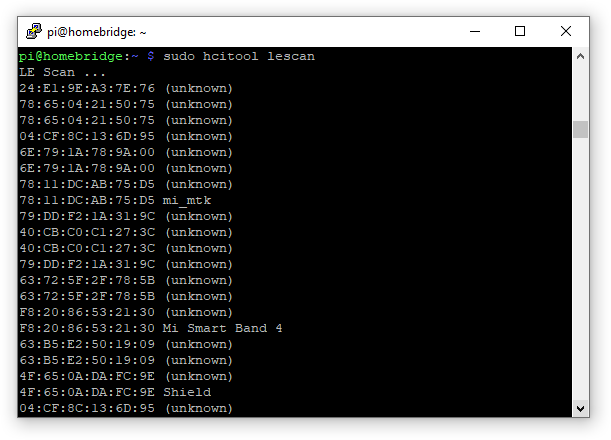
Видим перечень всех Bluetooth устройств в зоне видимости нашей Raspberry Pi.
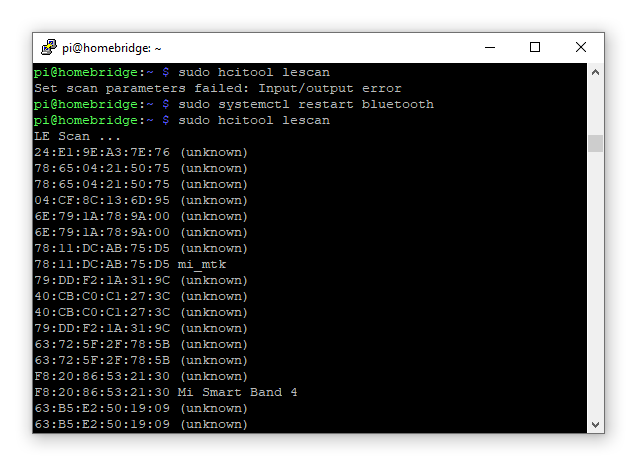
Если после ввода команды sudo hcitool lescan мы видим ошибку, а она возникает из-за того, что интерфейс Bluetooth занят, нам необходимо перезагрузить этот интерфейс.
Делается это командой:
sudo systemctl restart bluetooth
Итак, приступим к добавлению устройств в HomeBridge.
Пойдем по пути от простого к сложному. А простым у нас, как ни странно, является добавление часов LYWSD02MMC.
Часы LYWSD02MMC
Для добавления часов в HomeBridge, нам необходимо всего лишь знать его MAC-адрес. После чего добавляем в конфиг новый аксессуар:
{ «name»: «Часы Зал», «address»: «E1:1E:11:F1:64:36», «temperatureName»: «Часы Температура», «humidityName»: «Часы Влажность», «timeout»: 15, «accessory»: «Hygrotermograph» }
Далее перезагружаем HomeBridge и ждем, пока у устройства обновится температура, это происходит 1 раз в 10 минут.
Датчик LYWSD03MMC
Для добавления Датчика LYWSD03MMC, нам необходим не только MAC-адрес, но и bindKey.
Для получение bindKey необходимо проделать следующее.
Первое, что необходимо, — установить приложение Stream на наше iOS устройство. Далее:
Откройте Stream -> HTTPS Sniffing -> CA Install. Затем вы будете перенаправлены в браузер для загрузки профиля VPN. Перейдите в Общие -> Профиль -> Stream Generated CA… -> Установите профиль VPN.
После установки профиля VPN:
Открываем Stream -> HTTPS Sniffing -> нажимаем «CA Installed & Trusted».В настройках телефона: Основные -> Об этом устройстве -> Доверие сертификатам -> Stream Generated CA… в положение включено.
Второе. Открываем Mi Home, логинимся (если это еще не было сделано), обязательно указываем регион материковый Китай.
- Открываем приложение Stream, нажимаем «Sniff Now». Сразу же переходим в Mi Home, начинаем добавление датчика (процедура добавления стандартная). Дождитесь, пока в плагине отобразится температура и влажность.
- Возвращаемся в Stream и нажимаем «Stop Sniffing». На все про все у меня тратится чуть больше минуты.
-
Далее нажимаем «Sniff History» и выполняем поиск по ключевому слову «bltbind». Если поиск дал положительный результат, нажимаем «Edit» -> выделяем все файлы и нажимаем «Export HAR». Экспортируем любым привычным способом на свой компьютер.
Третье, уже на компьютере. На сайте Charles Proxy скачиваем свежую версию программы. Запускаем (триал версия на 30 дней).
- Файл -> открыть наш архив HAR, экспортированный с iOS.
- Далее в поиске пишем bind_key.
Чтобы не описывать, где и что нужно выбрать, приведу скриншот.
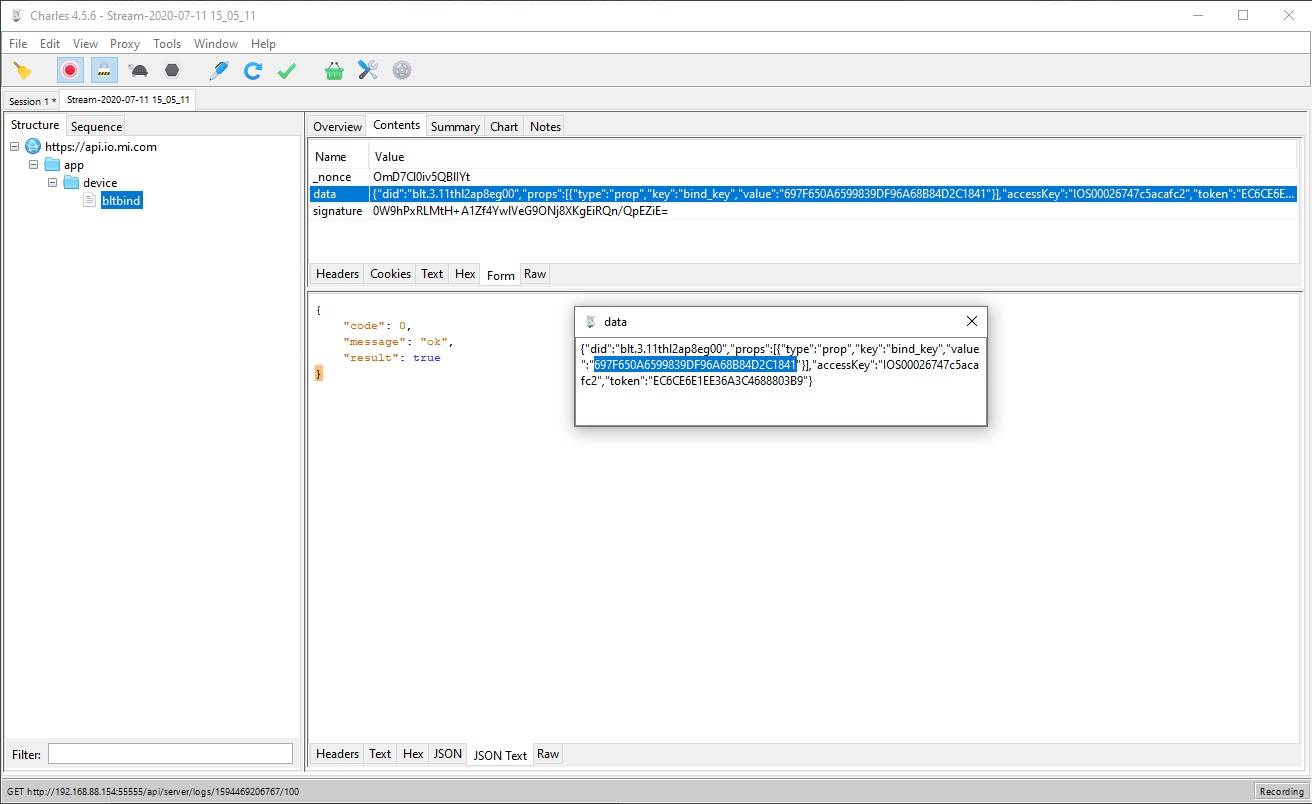
Я вас поздравляю, это было долгое и мучительное получение заветного ключа, но мы это сделали и можем приступать к добавлению датчика в HomeBridge.
Открываем конфиг и добавляем новый аксессуар.
{ «name»: «Температура BLE Спальня», «address»: «A4:C2:38:17:A6:6C», «temperatureName»: «Температура BLE Спальня», «humidityName»: «Влажность BLE Спальня», «timeout»: 15, «bindKey»: «697F650A6599839DF96A68B84D2C1841», «accessory»: «Hygrotermograph» }
Для добавление в Home Assistant, добавляем в конфиг:
— platform: mitemp_bt encryptors: ‘A4:C1:38:07:A6:6C’: ‘697F650A6599839DF96A68B84D2C1841’
Xiaomi ClearGrass CGD1
Будильник Xiaomi ClearGrass CGD1 добавляется абсолютно так же, как и предыдущее устройство (для добавления необходимо получить bindKey). В приложении Apple HomeKit отображается как датчик температуры/влажности.
Mi Home
Неоспоримым преимуществом является то, что эти датчики, после добавления в альтернативную систему автоматизации, остаются в приложении Mi Home и могут участвовать в автоматизациях.
Небольшая ложка дегтя
Не обошлось и без недостатков. Привязанные датчики в Raspberry Pi не могут создавать BLE Mesh, датчики подключаются напрямую к малине. Поэтому важно, чтобы малинка располагалась в непосредственной близости к датчикам.
Итог
У меня четыре датчика, расположенных в квартире, один из них находится в ванной. Малинка находится на балконе. Вот именно тот датчик, который в ванной, и не достает. В дальнейшем думаю решить проблему внешним Bluetooth — USB свистком. В остальном меня все устраивает, за три месяца не было ни одного сбоя. При этом в Mi Home они продолжают работать и участвовать в автоматизациях.