
Below is a comprehensive list of Qfil errors and how to fix them. We’ll keep building this list to ensure it captures all errors and proffers effective solutions. Ensure to see the tutorial on how to use Qfil to be sure you’re doing it right else you’ll keep running into error after error. Qualcomm Flash Image Loader (QFIL) is a windows software for flashing firmware to qualcomm devices.
List of Qualcomm Flash Image Loader (QFIL) error messages and their solutions
No Port Available
Solution:
Launch device manager and ensure that your phone is booted to EDL mode properly. It should get detected as «Qualcomm HS-USB QDLoader 9008» before Qfil will be able to detect & flash without problems
Download Fail: FireHose Fail: FHLoader Fail: Process Fail
Solution:
- Try using Qfil tool from within QPST; download QPST @ https://www.hovatek.com/forum/thread-22467.html
- Try a different version of Qfil @ https://www.hovatek.com/forum/thread-25314.html ; you can specifically try v1.0.0.2
Download Fail: FireHose Fail: FHLoader Fail: FHLoader Fail: The system cannot find the specified file
Solution:
Use Qfil tool from within QPST; download QPST @ https://www.hovatek.com/forum/thread-22467.html
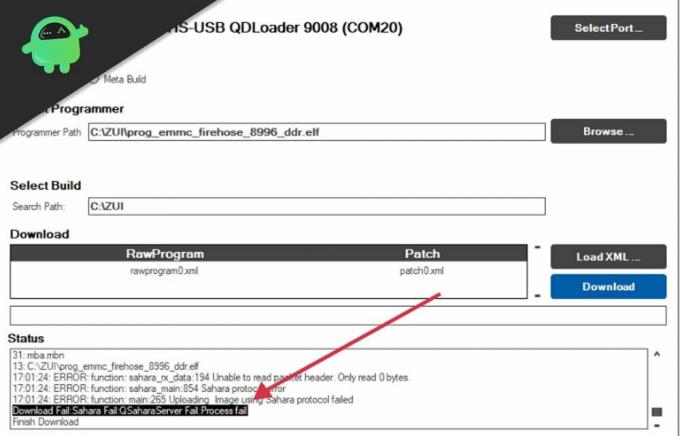
Download Fail: Sahara Fail: QSaharaServer Fail: Process Fail
Solution:
- Use a different firehose programmer file. You can try the collection @ https://www.hovatek.com/forum/thread-25696.html
- Ensure no space in folder / path name
- Ensure to use QPST instead of qfil standalone ; download QPST @ https://www.hovatek.com/forum/thread-22467.html
- Load all files before before entering EDL then click download immediately in EDL (i.e 9008 is displayed)
- Try using the latest version of QFIL
Download Fail:FireHose Fail:FHLoader Fail:Flash Information is not filled
Solution:
Use Qfil tool from within QPST v2.7.460; download @ https://www.hovatek.com/forum/thread-22467.html
ERROR: ReadPort: Could not read from ‘\.COM*’, Windows API ReadFile failed! Your device is probably *not* on this port
Solution
Try a different PC
(This post was last modified: 04-10-2021, 08:47 AM by hovatek.)

Posts: 1
Threads: 0
Joined: Aug 2021
Reputation:
0
These tips are really good and solved my problem.
I was struggling for 2 days before seeing this forum.
I have used Driver and latest QPST from the given links & connected phone just before entering EDL then click download immediately in EDL (i.e 9008 is displayed).
Thanks for your post.
Posts: 2
Threads: 0
Joined: Aug 2021
Reputation:
0
(12-08-2021, 12:19 PM)bobbyr01 Wrote: These tips are really good and solved my problem.
I was struggling for 2 days before seeing this forum.I have used Driver and latest QPST from the given links & connected phone just before entering EDL then click download immediately in EDL (i.e 9008 is displayed).
Thanks for your post.
Glad to hear that man!
How was your «prog» file called?
I’m having a really bad time trying to unbrick my Nubia Redmagic 6.
Thank you,
Francesco

Posts: 49,273
Threads: 1,347
Joined: Oct 2013
Reputation:
432
(12-08-2021, 04:23 PM)Sgnoogle Wrote: Glad to hear that man!
How was your «prog» file called?
I’m having a really bad time trying to unbrick my Nubia Redmagic 6.Thank you,
Francesco
You can create a thread for this by clicking Ask Question at the top
Note!
We have a reply schedule for Free Support. Please upgrade to Private Support if you can’t wait.
Posts: 2
Threads: 0
Joined: Sep 2022
Reputation:
0
não funcionou…… o erro persiste….
Posts: 49,273
Threads: 1,347
Joined: Oct 2013
Reputation:
432
(11-09-2022, 07:31 PM)alemorsan Wrote: não funcionou…… o erro persiste….
Please post in English
Note!
We have a reply schedule for Free Support. Please upgrade to Private Support if you can’t wait.
Posts: 2
Threads: 0
Joined: Sep 2022
Reputation:
0
(13-09-2022, 07:47 PM)hovatek Wrote:
(11-09-2022, 07:31 PM)alemorsan Wrote: Not function…… Error persist
Please post in English
Posts: 49,273
Threads: 1,347
Joined: Oct 2013
Reputation:
432
(11-09-2022, 07:31 PM)alemorsan Wrote: Not function…… Error persist
Create a thread by clicking Ask Question at the top
Note!
We have a reply schedule for Free Support. Please upgrade to Private Support if you can’t wait.
В этом руководстве мы покажем вам шаги по загрузке, установке и использованию инструмента QFIL для прошивки файла прошивки MBN и XML. Устройства Qualcomm занимают наибольшую долю в индустрии смартфонов, и это не изменится в ближайшее время. Не только для обычных пользователей, устройства с чипсетом Qualcomm Snapdragon также открывают множество возможностей для технических энтузиастов.
Однако, независимо от того, являетесь ли вы обычным пользователем или гиком, есть важный инструмент, которым вам нужно овладеть. И это собственный инструмент Qualcomm QFIL. В этом руководстве по прошивке мы покажем вам шаги по загрузке, установке и использованию инструмента QFIL для прошивки прошивки MBF и XML. Без дальнейших церемоний, давайте начнем.
Qualcomm Flash Image Loader, более известный как QFIL, используется для прошивки стоковой прошивки на устройства Qualcomm Snapdragon. Помимо этого, есть множество других функций, которые он видит. Давайте проверим их:
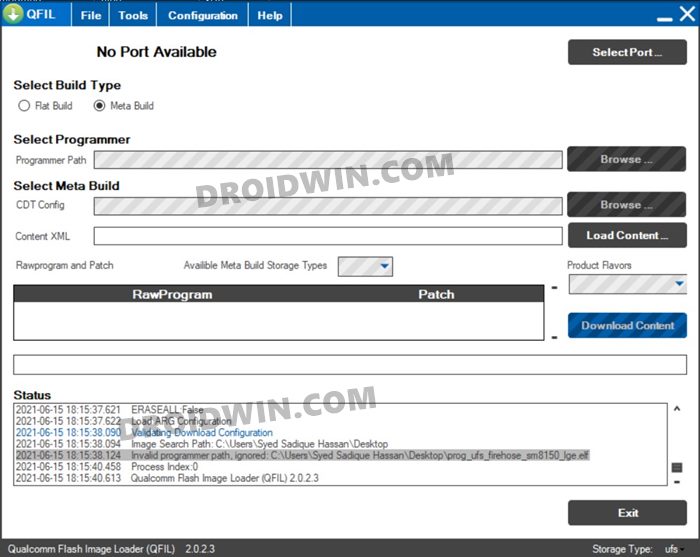
Разблокировать и исправить Bootloop
Перепрограммировав стандартное ПЗУ на свое устройство, вы можете разблокировать его, а также исправить проблемы с загрузкой.
Прошивка ELF и MBN
Что касается прошивки, то она поддерживает форматы прошивки ELF и MBN.
Портативное приложение
Поскольку это портативное приложение, вам не нужно устанавливать его на свой компьютер. Вы можете просто извлечь инструмент и сразу же приступить к работе.
Загрузить последнюю версию Qualcomm Flash Image Loader QFIL Tool
Теперь вы можете сразу загрузить последнюю версию QFIL Tool по ссылке ниже. Кроме того, мы поделились некоторыми более старыми сборками этого инструмента на случай, если он вам может понадобиться.
Скачать прошивку ELF/MBN
Теперь загрузите прошивку MBN или ELF, соответствующую вашему устройству. Затем этот файл будет загружен в QFIL Tool и прошит на вашем устройстве. Убедитесь, что вы загружаете прошивку, соответствующую номеру модели вашего устройства и региону. Что касается ссылок для скачивания, официального сайта как такового нет. Погуглите, и вы найдете множество сайтов, предлагающих эти прошивки.
Как установить инструмент QFIL
Как уже упоминалось, это портативное приложение, поэтому вам не нужно его устанавливать. Просто извлеките его в любое удобное место на вашем ПК и дважды щелкните файл QFIL.EXE, чтобы запустить инструмент. С учетом сказанного давайте теперь перейдем к следующему шагу, чтобы загрузить, установить и использовать инструмент QFIL для прошивки прошивки MBF и XML.
Как использовать инструмент QFIL
- Для начала выключите устройство.
- Затем нажмите и удерживайте клавишу увеличения громкости и подключите устройство к ПК через USB-кабель.
- Теперь дважды щелкните файл QFIL.exe, чтобы открыть инструмент.
- Прежде всего, выберите Flat Build в разделе Build Type.
- Затем нажмите кнопку «Обзор» в разделе «Выбор программиста» рядом с «Путь программиста».
- Перейдите к файлу прошивки MBN, присутствующему в стандартной прошивке, и выберите его. Имя файла будет примерно таким: prog_emmc_firehose_****.mbn.
- Затем нажмите кнопку «Загрузить XML», перейдите к прошивке и выберите присутствующий там файл rawprogram().
- Наконец, нажмите кнопку «Загрузить» и дождитесь завершения процесса, который может занять до 10-15 минут.
- После этого ваше устройство должно загрузиться в ОС. Теперь вы можете отключить устройство от ПК и закрыть инструмент.
Итак, все это было из этого руководства о том, как загрузить, установить и использовать QFIL Tool для прошивки файла прошивки MBF и XML. Если у вас есть какие-либо вопросы относительно вышеупомянутых шагов, сообщите нам об этом в комментариях. Мы вернемся к вам с решением в ближайшее время.
Исправить сбой загрузки QFIL сбой пожарного шланга сбой FHLoader сбой процесса
Если вы получаете сообщение об ошибке QFIL Download Fail Firehose Fail FHLoader Fail Process Fail, то исправить это довольно просто. Вам необходимо скачать и установить версию QPST v2.7.496. Остальные инструкции по перепрошивке такие же, как указано выше.
Hello friends from this post we would like to present how to use Qualcomm Flash Image Tool.Qualicom Flash Image Loader (QFIL) is tool that allows you to Flash qualcomm devices.
- Qualcomm Flash Image Tool is compatible with windows 10, windows 8.windows 8.1,windows 7, windows vista, windows XP.
- This tool is only support for the devices which have qualicomm chipsets. How to Check?
- Take a proper back up of your data before you start the process.
Read More :Rooted and Now what?
Steps for Flashing stock ROM using Qualcomm Flash Image Loader (QFIL)
Step 1 :
Download and install the qualcomm USB drivers on your PC.If you have already install it skip this step.
Step 2 :
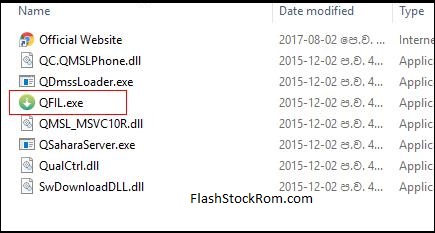
First download the Qalicom Flash Image Loader.Then extract it.After extracting you can able to see this. Read More : Stock Rom vs Custom Rom
Step 3 :
Now open QFIL.exe file. See above picture
Step 4 :
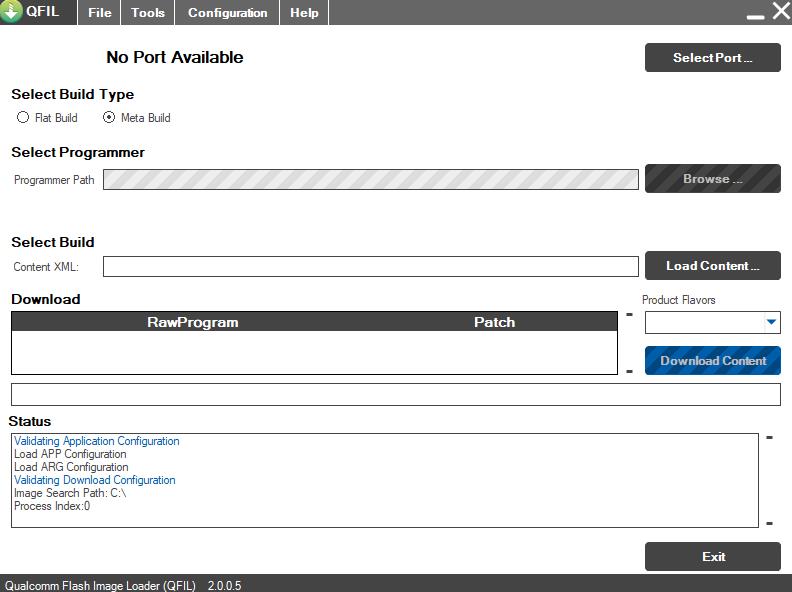
After QFIL launched you can see this dailog box.
Step 5 :
Power off your device. By Pressing power key

Step 6 :
Then connect the device into PC and press volume up or down button. Read More : Increase Ram Size on your Device
Step 7 :
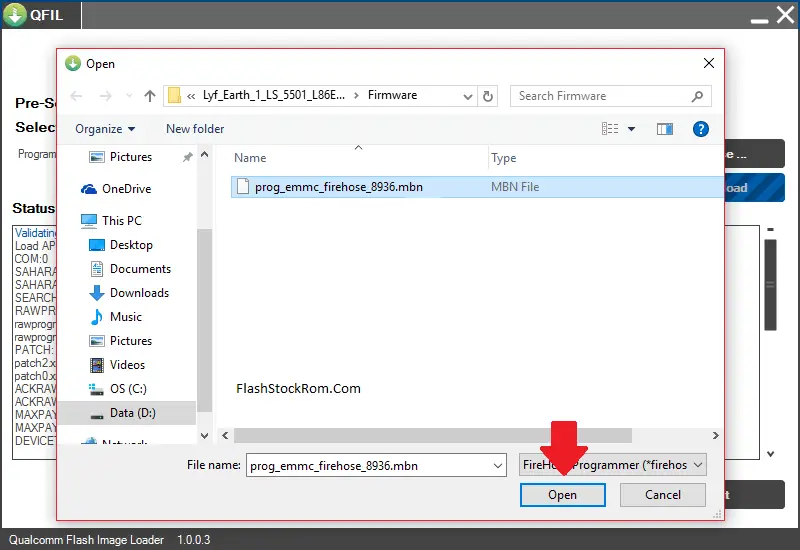
Then click the browse button.Then locate the .mbn file.
Step 8 :
when you add firmware file image loader will automatically take the rest of firmware data.
Step 9 :
Now click the download button. Read More : Enable OTG (pen) on Your Device
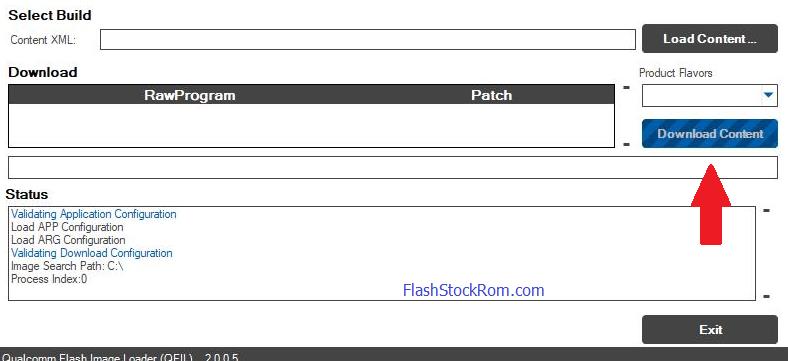
Step 10 :
The process will take 10 – 15 minitues. After completing the proces your device will be utomatically reboot. Read more: Increase Internal Memory Size on your Device
congratulations now you have successfully flashed your android device using Qualcomm Flash Image Loader.
Frequently Asked Questions Listed Below
Download Fail:FireHose Fail:FHLoader Fail:Process fail
- in QPST tool.. select flat build
- for “select programmer” select program_emmc
- for XML, select raw program & then patch0.
then “Download” option wil get highlighted.
press vol+ & connect flashing. do not leave vol+ key untill flashing complete.
one of our user help this “Pressed down button before plugging in with turned off smartphone. Then it only gave me one possible port choice and when I clicked download the name changed into Qualcomm 9008”
Download Fail: Unable to download Flash Programmer using Sahara Protocol
The most important part is you need to be connected to QDLoader 9008 port. not any other port!
To connect to 9008 port follow these instructions carefully:
- Turn you phone off and disconnect usb cable
- Press and hold Volume Up button and now plug the usb cable inn and at the same time press and hold power button for 3 second and then leave power and volume button. You will see logo blink for a second on your phone. Remember you have to press power button at the same time you plug inn usb cable. Keep trying and your computer will start installing drivers for Port 9008
no port available error
If you getting Sahara Fail error, Copy Firmware Folder to C:/Program File/qualicomm/QPST/bin as in where the QFIL is located
sahara fail error
If you getting Sahara Fail error, Copy Firmware Folder to C:/Program File/qualicomm/QPST/bin
Download Fail:System.Exception: Failed to Upload the emmc images to the phone using Firehose.
In error, the firmware file is damaged. Try to download and flash again.
Thank you for coming to our Page. If this page helped you , So then please share this website to all Social Medias like Facebook ,twitter and Reddit so then Others can find this post. Finally If you have any problem then don’t hesitate, feel free to Leave a Comment with Error Message.So one of team our team member will help you as soon as possible.
-
#1
i got three mobiles same error
how to slove

qpst tool reinstalled
drivers reinstalled
but same problem…….. any tested solucation…….
-

a6000.PNG
41.4 KB
· Views: 319

Last edited by a moderator: Oct 2, 2016

-
#2
Is detect com port as 9008 ?
-
#3
— 1. install QPST tool. and drivers.extract file also.
2. go to «run» and search for «QFIL», hit enter. it will open QPST tool.
3. in QPST tool.. select flat build
4. for «select programmer» select program_emmc
. 5. for XML, select raw program & then patch0.
then «Download» option wil get highlighted.
press vol+ & connect flashing. do not leave vol+ key untill flashing complete.

-
#5
i got three mobiles same error
how to slove

qpst tool reinstalled
drivers reinstalled
but same problem…….. any tested solucation…….
Give me team viewer id in pm
i can help u
-
#6
Please help me bro, i have the same error on the Huawei y530-u00 …Download Fail:FireHose Fail:FHLoader Failrocess fail…
-
#7
Please help me bro, i have the same error on the Huawei y530-u00 …Download Fail:FireHose Fail:FHLoader Fail
rocess fail…
Create ur own tread in right section…
-
#8
i have the same issue can somebody help me pls ?
-
#9
i have the same issue can somebody help me pls ?
read post no #7 carefully bro!
QFIL — это инструмент для прошивки, специально разработанный для смартфонов Qualcomm. Это потрясающий инструмент, предназначенный для прошивки файлов прошивки прямо у вас дома. Однако при неосторожном обращении это может привести к блокировке устройства и возникновению нескольких ошибок. Одна из недавних ошибок, с которыми сталкиваются пользователи, — это ошибка Sahara Fail в программном обеспечении QFIL.
Ошибка может появиться на вашем экране в другом контексте в зависимости от версии программного обеспечения QFIL. Некоторые из префиксов сообщений об ошибках: -Download Fail, Sahara Fail, QSaharaServer Fail, Process fail error соответственно. Эта проблема очень распространена и может быть вызвана множеством причин. Если вы столкнулись с подобной проблемой, то вот руководство по устранению неполадок, чтобы решить проблему с программным обеспечением для перепрошивки QFIL.
Содержание страницы
-
Как исправить ошибку Sahara Fail в QFIL
- Обновить версию QFIL
- Проблемы с USB-кабелем
- Несовместимый файл программатора
- Проблемы с путем к файлу
- Поврежденные файлы прошивки
- EDL проблемы
- Поврежденный драйвер Qualcomm
- Отключить принудительное использование подписи драйверов
- Заключение
Как исправить ошибку Sahara Fail в QFIL
Загрузчик изображений Qualcomm Flash, более известный как QFIL, представляет собой бесплатный инструмент, созданный специально для смартфонов Qualcomm. Он был очень популярен в сообществе разработчиков Android, поскольку с помощью QFIL можно легко прошить программное обеспечение на смартфонах Qualcomm. Вот несколько основных шагов по устранению неполадок, которые вы можете предпринять, чтобы избавиться от ошибки Sahara Fail Error в QFIL.
Обновить версию QFIL
QFIL все еще находится в бета-версии и имеет много проблем, но время от времени получает частые обновления. Если вы попытаетесь использовать флэш-память старой версии QFIL со смартфоном Qualcomm последнего поколения, на вашем экране может появиться сообщение об ошибке Sahara Fail. Поэтому лучше всего убедиться, что вы используете последнюю версию программного обеспечения QFIL.
Скачать QFil Flash Tool
Проблемы с USB-кабелем
Если USB-кабель, который вы используете для прошивки файлов прошивки на Qualcomm, дешевого качества или поврежден, это может создать проблемы в процессе прошивки. В худшем случае это может даже повредить ваше устройство или может возникнуть ошибка Sahara Fail Error в QFIL. Поэтому обязательно используйте качественный USB-кабель для передачи данных.
Несовместимый файл программатора
Каждый комплект прошивки поставляется с отдельным набором файлов программатора, предназначенных для использования с несколькими инструментами. Такие инструменты, как SP flash tool, Img flasher и QFIL, используют другой набор инструкций для прошивки файла программатора. Поэтому убедитесь, что выбрали совместимый файл программатора.
Примечание: Файлы программатора, совместимые с QFIL, часто содержат в своем имени QFIL или Qualcomm. Например, prog_emmc_qfil_qualcomm_8996_ddr.elf
Проблемы с путем к файлу
Путь к файлу очень важен, когда дело доходит до прошивки файлов прошивки с помощью программного обеспечения QFIL. Если путь к файлу указан неправильно, процесс перепрошивки не начнется или автоматически завершится, что приведет к ошибке перепрошивки Sahara.
Например, неверный путь к файлу: C: Users Rah Ver Desktop Flash files QFIL Qualcomm
Например, правильный путь к файлу: C: Users Rah_Ver Desktop Flash_files QFIL Qualcomm
Поврежденные файлы прошивки
Важно загрузить правильные файлы прошивки, чтобы успешно прошить эти файлы на ваше устройство. Если файлы прошивки, загруженные из Интернета, имеют проблемы с целостностью или повреждены, они будут отображать различные ошибки QFIL на экране журнала.
Обязательно загрузите файлы прошивки для QFIL из официальных источников. Кроме того, перепроверьте их «контрольную сумму» перед их прошивкой с помощью инструмента QFIL.
EDL проблемы
Перевод устройства в режим EDL до процесса перепрошивки может привести к ошибке Sahara Fail Error в QFIL из-за проблем с тайм-аутом. Для хорошей и успешной прошивки вы должны перевести устройство в режим EDL прямо перед началом процесса прошивки.
Поврежденный драйвер Qualcomm
Поскольку инструмент QFIL специально разработан для работы только со смартфонами Qualcomm, вы должны обязательно загрузить правильный драйвер для вашей конкретной модели. Установка неправильных драйверов или несовместимых драйверов приведет к неудачной перепрошивке и ошибкам.
Скачать драйверы Qualcomm USB
Отключить принудительное использование подписи драйверов
Принудительное использование подписи драйверов — это специальная функция Windows, которая запрещает пользователям устанавливать сторонние непроверенные драйверы. Это важно для защиты людей от любых вредоносных программ или вирусных атак. Но установка драйверов важна для правильной работы инструмента QFIL. Вот как вы можете отключить принудительное использование подписи драйверов в Windows 10.
Откройте командную строку в режиме администратора.
Введите эти команды и нажмите ввод
bcdedit.exe -set loadoptions DDISABLE_INTEGRITY_CHECKS bcdedit.exe -set TESTSIGNING ON
Перезагрузите компьютер и используйте инструмент QFIL в обычном режиме.
Заключение
QFIL — это просто инструмент для перепрошивки, и он может привести к ошибке Sahara или другим типам ошибок, если вы не будете обращаться с ней осторожно. Я предлагаю вам использовать кабель передачи хорошего качества и правильные файлы прошивки. Если вы это сделаете, вы не столкнетесь с ошибкой Sahara Fail в QFIL. По любым вопросам или запросам об инструменте QFIL оставляйте комментарии ниже.
Android devices running on Qualcomm processors have proven to be almost unbrickable. This is so because this guide has been tested and discovered not to work on some Qualcomm devices, the LG G series, for instance. So, if you’re currently reading this, have some faith. It might just work for you. But don’t bother trying it on the LG G series.
There’s a video guide at the end of this post to help you with unbricking your Qualcomm device. Refer to this guide to flash Qualcomm MBN firmware.
Unbricking Qualcomm Android Devices
Step One: Analyzing the Possible Cause of the Brick
In newer Qualcomm device firmware (not the HLOS part, but NON-Hlos, SBL1, TZ, HYP, RPM, and Aboot), especially ARMv8-A, Qualcomm diminished the famous “Qualcomm HS-USB Diagnostics 9006”, and introduced two types of “Qualcomm HS-USB QDLoader 9008”.
So, before attempting to unbrick your Qualcomm device, you need to figure out which 9008 mode your phone is in. This now brings us to
Step Two: Preparing your Computer
- Disconnect your PC’s internet connections and unplug your mobile device from the computer.
- Download and install the latest .NET Framework on your computer. Download here
- Uninstall all mobile-related drivers, as well as any Qualcomm drivers (if any). Uninstall from Device Manager first, then Program Manager.
- Alternatively, you can use REVOUninstaller to uninstall all driver related software, then use Device Remover to remove all device drivers.
- Now, run Command Prompt as Administrator and issue the following commands, followed by the Enter button.
bcdedit -set loadoptions DISABLE_INTEGRITY_CHECKS
bcdedit -set TESTSIGNING ON
- Reboot your computer, and it should now boot into test mode as shown in the screenshot below. (bottom-right of your screen)

- Download QualcommDrv.zip, extract it to an empty folder, then open the folder according to your Windows type (x64 or x86) and double click dpinst64.exe or dpinst32.exe (depending on your Windows installation) to install the Qualcomm driver.
- Now connect your phone to the computer. It should now be detected as “Qualcomm HS-USB QDLoader 9008” and the driver version 2.0.8.7 (you can check in “Device Manager”).
Step Three: Possible Cause of Brick (brick type)
If you were just messing with the system image, boot image, system’s framework or other things that do not relate to Qualcomm’s core files (modem-NON-HLOS.bin, aboot-emmc_appsboot.mbn, sbl1, hyp, tz, rpm partition, for example, installing sound patch, etc., your device will enter the new 9008 mode, which is a combination of the old “Qualcomm HS-USB Diagnostics 9006” and “Qualcomm HS-USB QDLoader 9008”. Symptoms of this brick mode include:
- The LED charging indicator near the phone speaker will display red.
- Your phone will vibrate endlessly, and this vibration will end only if you disconnect the phone from your PC and remove the battery.
If Device Manager is launched, you’ll see “Qualcomm HS-USB QDLoader 9008” under PORTS (COM & LPT) or “QHUSB_BULK” under Other devices, and “Qualcomm MMC Storage USB Device” under Disk drives. See screenshot below
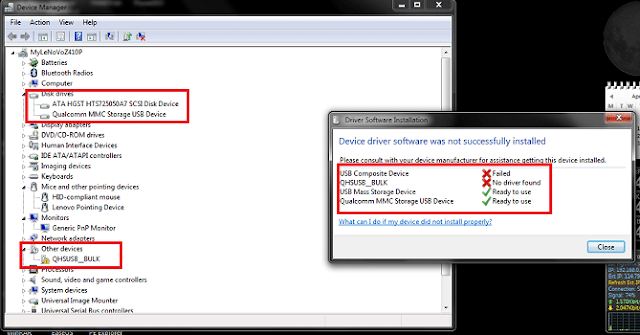
OR

However, if your mobile device’s Qualcomm partition is messed up while playing around with NON-HLOS.bin, emmc_appsboot.mbn, sbl1.mbn, hyp.mbn, tz.mbn, rpm.mbn, or by other means, messed up the whole Qualcomm eMMC partition, your device will most likely go into the OLD “Qualcomm HS-USB QDLoader 9008” mode. Symptoms
- The phone charging indicator would not light if you connect your mobile to Computer.
In Device Manager only “Qualcomm HS-USB QDLoader 9008” will be listed in PORTS (COM & LPT) or “QHUSB_BULK” in Other devices, but no “Qualcomm MMC Storage USB Device” in Disk drives. See screenshot below
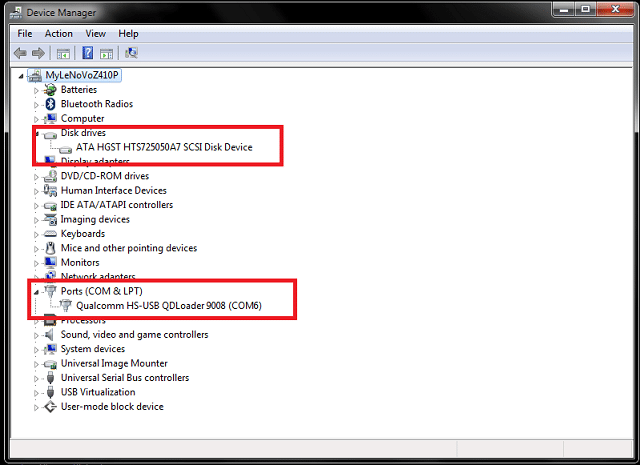
If you are reading this, you need to have followed the procedure above to discover the exact cause of your device’s brick and the brick mode it is in, whether it is in the OLD “9008” or NEW “9008” mode. This will help you proceed to the unbricking process below.
Step Four: Unbricking your Qualcomm device.
For devices in the NEW “Qualcomm HS-USB QDLoader 9008” MODE
If your device is in this mode, the unbricking process and the steps are a whole lot easier. You need someone who has the same phone as you to backup and upload their device’s complete eMMC image for you. The device needs to have root access. Learn how to root here.
To get such image, you or your friend needs to do the following:
- Get an external MicroSD card with an “exfat” system file, and the size of this SD card should be larger than 16 GB, which is the size of the whole partition.
- Do a complete factory reset on the phone. If a custom recovery is installed, use it to wipe the data, cache, and internal storage.
- While the sdcard is in the phone, run the following commands via adb
adb shell
su
dd if=/dev/block/mmcblk0 of=/storage/sdcard1/backup.img bs=512 count=30535646
The size of the backup.img is around 16 GB, but if compressed, it would be about 2 GB.
Let’s proceed…
- Download MiniTool Partition Wizard and HDD Raw Copy Tool.
- Copy the backup.img file to your computer.
- Connect the Qualcomm device to the computer via a USB cable and do not disconnect from here.
- Now launch the MiniTool Partition Wizard and you should see a drive with about 29 partitions. See sample screenshots below.

- Delete all 29 partitions and click Apply. Wait for the process to complete.
- Once the process is complete, launch the HDD Raw Copy Tool
- Now, select backup.img and click Continue.

- Select Qualcomm MMC Storage USB Device and click Continue
- Once on the next page, select everything, then click Start

Unfortunately, if you’re unable to get the backup.img file from anyone, you will need to force your device to enter the old Qualcomm HS-USB QDLoader 9008 mode. Read below to do this:
- Launch MiniTool Partition
- Delete all 29 partitions
- Click on Create Partition. Select Primary Partition and choose ext4 file system. Do not give this drive a name or label.
- Now click “Apply” and be patient for the process to complete
- Once complete, disconnect the phone from Computer and remove the battery. Insert it after a few seconds. Welcome to the old Qualcomm HS-USB QDLoader 9008 mode.
Unbricking devices in the old Qualcomm HS-USB QDLoader 9008 mode
- Download QPST 2.7 build 422 (QFIL) and 8675_W00.zip
- Extract the QPST and double-click on setup.exe to install
- Extract 8675_W00 to a different folder
- Download your phone’s stock firmware. It should not be a zip file, but a flashable single firmware extension.
- It is assumed that you’ve already installed QFIL on your computer before reaching this step.
- Launch QFIL from programs or the start menu
- Fill out the QFIL options as follows:
The programmer will be prog_emmc_firehose_8936.mbn
Use the rawprogram0.xml
Use the patch0.xml
Note: all these files are contained in extracted 8675_W00 folder
- Now click on Download button.
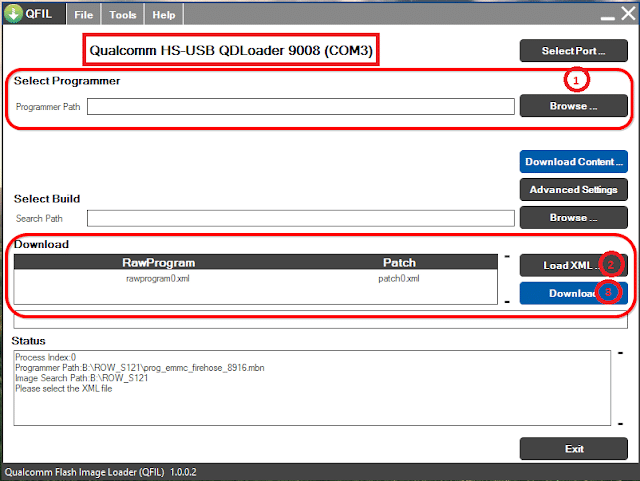
The phone should automatically reboot itself once the flashing process is complete and enter into a bootloop.
- Disconnect the device from the computer now.
- Once it’s about to boot up again, press the Volume Up button while reconnecting to the computer so as to put the device in Bootloader mode.
- Open the 8675_W00 folder now and double-click FlashAll(AfterQFil).bat.
- Your phone should now reboot to its stock firmware and boot completely into the system.
The SaharaDownload Fail related error can be fixed by following the instructions below:
If such error keeps showing up, disconnect the device from PC (USB) and remove battery (if detachable) then re-insert and reconnect to PC.
If using a non-detachable battery device, disconnect the phone from the PC, wait a few seconds, and reconnect.
Note: Do not waste too much time connecting the device to the PC after clicking the firmware flash button in QPST.
Congratulations, all done!
Consider watching the video tutorial below by Amar Gaikwad about unbricking Qualcomm devices. It’s 15 minutes long and should help you in this process.



-
#1
Предыстория телефона: поставили на автомобильную зарядку, он сдох. я заменил кп и контроллер заряда, он стал видится компом как HS-USB QDLoader 9008, решил попробовать прошить через QFIL
лог:
HTML:
Process Index:0
Programmer Path:C:123VIBEUI_V3.1_1627_5.419.1_ST_P1c72_Lenovoprog_emmc_firehose_8936.mbn
Image Search Path:C:123VIBEUI_V3.1_1627_5.419.1_ST_P1c72_Lenovo
Please select the XML file
Start Download
Program Path:C:123VIBEUI_V3.1_1627_5.419.1_ST_P1c72_Lenovoprog_emmc_firehose_8936.mbn
COM Port number:3
Sahara Connecting ...
Sahara Version:2
Start Sending Programmer
Sending Programmer Finished
Switch To FireHose
Max Payload Size to Target:49152 Bytes
Device Type:eMMC
Platform:8x26
Disable Ack Raw Data Every N Packets
Ack Raw Data:False
Skip Write:False
Always Validate:False
Use Verbose:False
COM Port number:3
Sending NOP
NOP: Fail Code: 10
Unable to send FireHose NOP, Device is not in Firehose mode !
Download Fail:System.Exception: Failed to send Firehose NOP to the phone.

в QC.QMSLPhone.Phone.QPHONEMS_FireHoseNOP()

в QC.SwDownloadDLL.SwDownload.FireHoseDownloadImage(Boolean bResetPhone, List`1 rawprogramFilesList, List`1 patchFilesList, Single& fImageSizeInMB, Single& fThroughput)
Download Fail:FireHose Fail FireHose Fail
Finish Download
Start Download
Program Path:C:123VIBEUI_V3.1_1627_5.419.1_ST_P1c72_Lenovoprog_emmc_firehose_8936.mbn
COM Port number:3
Sahara Connecting ...
Sahara Version:0
Start Sending Programmer
Download Fail:System.Exception: Unable to download Flash Programmer using Sahara Protocol

в QC.QMSLPhone.Phone.QPHONEMS_SaharaArmPrgDownload(String sFileName)

в QC.SwDownloadDLL.SwDownload.QPHONEMSSaharaDownloadArmPrg(UInt64& version, String armPrgPath)
Download Fail:Sahara FailSahara Fail
Finish Download
Собственно что предпринимал: менял дрова, версии прошивальщиков, прошивки, шнурки, компы с разными windows. на одном из компов на 10 windows он почти прошивается, но потом в самом конце вновь выпадает эта ошибка NOP: Fail Code: 10


-
#2
Так вы бы и приложили тот лог, где «почти прошивается».
купить чтобы получить доступ к скрытому контенту.
свежий QFIL. Попробуйте им. Что-то такое показывали, но не соображу..
-
#3
Так вы бы и приложили тот лог, где «почти прошивается».
купить чтобы получить доступ к скрытому контенту.
свежий QFIL. Попробуйте им. Что-то такое показывали, но не соображу..
попробовал зашить свежим QFIL , вот чего получилось (прошивка VIBEUI_V3.1_1627_5.419.1_ST_P1c72_Lenovo )
Код:
Start Download
Program Path:C:rrrVIBEUI_V3.1_1627_5.419.1_ST_P1c72_Lenovoprog_emmc_firehose_8936.mbn
***** Working Folder:C:UsersgrishaAppDataRoamingQualcommQFILCOMPORT_17
Binary build date: Mar 26 2017 @ 22:09:19
QSAHARASERVER CALLED LIKE THIS: 'C:Program Files (x86)QualcommQPSTbinQSaharaServer.ex'Current working dir: C:UsersgrishaAppDataRoamingQualcommQFILCOMPORT_17
Sahara mappings:
2: amss.mbn
6: apps.mbn
8: dsp1.mbn
10: dbl.mbn
11: osbl.mbn
12: dsp2.mbn
16: efs1.mbn
17: efs2.mbn
20: efs3.mbn
21: sbl1.mbn
22: sbl2.mbn
23: rpm.mbn
25: tz.mbn
28: dsp3.mbn
29: acdb.mbn
30: wdt.mbn
31: mba.mbn
13: C:rrrVIBEUI_V3.1_1627_5.419.1_ST_P1c72_Lenovoprog_emmc_firehose_8936.mbn
17:08:37: ERROR: function: sahara_rx_data:237 Unable to read packet header. Only read 0 bytes.
17:08:37: ERROR: function: sahara_main:924 Sahara protocol error
17:08:37: ERROR: function: main:303 Uploading  Image using Sahara protocol failed
Download Fail:Sahara Fail:QSaharaServer Fail:Process fail
Finish Download
Start Download
Program Path:C:rrrVIBEUI_V3.1_1627_5.419.1_ST_P1c72_Lenovoprog_emmc_firehose_8936.mbn
***** Working Folder:C:UsersgrishaAppDataRoamingQualcommQFILCOMPORT_17
Binary build date: Mar 26 2017 @ 22:09:19
QSAHARASERVER CALLED LIKE THIS: 'C:Program Files (x86)QualcommQPSTbinQSaharaServer.ex'Current working dir: C:UsersgrishaAppDataRoamingQualcommQFILCOMPORT_17
Sahara mappings:
2: amss.mbn
6: apps.mbn
8: dsp1.mbn
10: dbl.mbn
11: osbl.mbn
12: dsp2.mbn
16: efs1.mbn
17: efs2.mbn
20: efs3.mbn
21: sbl1.mbn
22: sbl2.mbn
23: rpm.mbn
25: tz.mbn
28: dsp3.mbn
29: acdb.mbn
30: wdt.mbn
31: mba.mbn
13: C:rrrVIBEUI_V3.1_1627_5.419.1_ST_P1c72_Lenovoprog_emmc_firehose_8936.mbn
17:09:07: Requested ID 13, file: "C:rrrVIBEUI_V3.1_1627_5.419.1_ST_P1c72_Lenovoprog_emmc_firehose_8936.mbn"
17:09:07: 95292 bytes transferred in 0.062000 seconds (1.4658MBps)
17:09:07: File transferred successfully
NOTE: Target requested image 13 which is DeviceProgrammer. Forcing QUIT. This is by design, ** All is well ** SUCCESS!!
17:09:07: Sahara protocol completed
Sending Programmer Finished
Switch To FireHose
Serial Number:97873860
Wait for 3 seconds...
Max Payload Size to Target:49152 Bytes
Device Type:eMMC
Platform:8x26
Disable Ack Raw Data Every N Packets
Skip Write:False
Always Validate:False
Use Verbose:False
***** Working Folder:C:UsersgrishaAppDataRoamingQualcommQFILCOMPORT_17
Base Version: 17.03.10.18.52
Binary build date: Mar 26 2017 @ 22:09:16
Incremental Build version: 17.03.26.22.09.16
17:09:11: INFO: FH_LOADER WAS CALLED EXACTLY LIKE THIS
************************************************
C:Program Files (x86)QualcommQPSTbinfh_loader.exe --port=\.COM17 --sendxml=rawprogram_unsparse.xml --search_path=C:rrrVIBEUI_V3.1_1627_5.419.1_ST_P1c72_Lenovo --noprompt --showpercentagecomplete --zlpawarehost=1 --memoryname=emmc
************************************************
17:09:11: INFO: Current working dir (cwd): C:UsersgrishaAppDataRoamingQualcommQFILCOMPORT_17
17:09:11: INFO: Showing network mappings to allow debugging
17:09:11: INFO:
17:09:11: INFO: Trying to store 'rawprogram_unsparse.xml' in string table
17:09:11: INFO: Looking for file 'rawprogram_unsparse.xml'
17:09:11: INFO: User wants to talk to port '\.COM17'
17:09:11: INFO: Took       0.00000000 seconds to open port
17:09:11: INFO: Sorting TAGS to ensure order is <configure>,<erase>, others, <patch>,<power>
17:09:11: INFO: If  you don't want this, use --dontsorttags
17:09:11: INFO: Looking for file 'NON-HLOS.bin'
17:09:11: INFO: Looking for file 'sbl1.mbn'
17:09:11: INFO: Looking for file 'sbl1.mbn'
17:09:11: INFO: Looking for file 'rpm.mbn'
17:09:11: INFO: Looking for file 'rpm.mbn'
17:09:11: INFO: Looking for file 'tz.mbn'
17:09:11: INFO: Looking for file 'tz.mbn'
17:09:11: INFO: Looking for file 'hyp.mbn'
17:09:11: INFO: Looking for file 'hyp.mbn'
17:09:11: INFO: Looking for file 'sec.dat'
17:09:11: INFO: Looking for file 'emmc_appsboot.mbn'
17:09:11: INFO: Looking for file 'emmc_appsboot.mbn'
17:09:11: INFO: Looking for file 'splash.img'
17:09:11: INFO: Looking for file 'boot.img'
17:09:11: INFO: Looking for file 'recovery.img'
17:09:11: INFO: Looking for file 'system_1.img'
17:09:11: INFO: Looking for file 'system_2.img'
17:09:11: INFO: Looking for file 'system_3.img'
17:09:11: INFO: Looking for file 'system_4.img'
17:09:11: INFO: Looking for file 'system_5.img'
17:09:11: INFO: Looking for file 'system_6.img'
17:09:11: INFO: Looking for file 'system_7.img'
17:09:11: INFO: Looking for file 'system_8.img'
17:09:11: INFO: Looking for file 'system_9.img'
17:09:11: INFO: Looking for file 'system_10.img'
17:09:11: INFO: Looking for file 'system_11.img'
17:09:11: INFO: Looking for file 'system_12.img'
17:09:11: INFO: Looking for file 'system_13.img'
17:09:11: INFO: Looking for file 'system_14.img'
17:09:11: INFO: Looking for file 'system_15.img'
17:09:11: INFO: Looking for file 'system_16.img'
17:09:11: INFO: Looking for file 'system_17.img'
17:09:11: INFO: Looking for file 'system_18.img'
17:09:11: INFO: Looking for file 'system_19.img'
17:09:11: INFO: Looking for file 'system_20.img'
17:09:11: INFO: Looking for file 'cache_1.img'
17:09:11: INFO: Looking for file 'cache_2.img'
17:09:11: INFO: Looking for file 'cache_3.img'
17:09:11: INFO: Looking for file 'cache_4.img'
17:09:11: INFO: Looking for file 'userdata_1.img'
17:09:11: INFO: Looking for file 'userdata_2.img'
17:09:11: INFO: Looking for file 'userdata_3.img'
17:09:11: INFO: Looking for file 'userdata_4.img'
17:09:11: INFO: Looking for file 'userdata_5.img'
17:09:11: INFO: Looking for file 'userdata_6.img'
17:09:11: INFO: Looking for file 'userdata_7.img'
17:09:11: INFO: Looking for file 'userdata_8.img'
17:09:11: INFO: Looking for file 'userdata_9.img'
17:09:11: INFO: Looking for file 'userdata_10.img'
17:09:11: INFO: Looking for file 'userdata_11.img'
17:09:11: INFO: Looking for file 'userdata_12.img'
17:09:11: INFO: Looking for file 'userdata_13.img'
17:09:11: INFO: Looking for file 'userdata_14.img'
17:09:11: INFO: Looking for file 'userdata_15.img'
17:09:11: INFO: Looking for file 'userdata_16.img'
17:09:11: INFO: Looking for file 'userdata_17.img'
17:09:11: INFO: Looking for file 'userdata_18.img'
17:09:11: INFO: Looking for file 'userdata_19.img'
17:09:11: INFO: Looking for file 'userdata_20.img'
17:09:11: INFO: Looking for file 'userdata_21.img'
17:09:11: INFO: Looking for file 'userdata_22.img'
17:09:11: INFO: Looking for file 'userdata_23.img'
17:09:11: INFO: Looking for file 'userdata_24.img'
17:09:11: INFO: Looking for file 'userdata_25.img'
17:09:11: INFO: Looking for file 'userdata_26.img'
17:09:11: INFO: Looking for file 'userdata_27.img'
17:09:11: INFO: Looking for file 'userdata_28.img'
17:09:11: INFO: Looking for file 'userdata_29.img'
17:09:11: INFO: Looking for file 'userdata_30.img'
17:09:11: INFO: Looking for file 'userdata_31.img'
17:09:11: INFO: Looking for file 'userdata_32.img'
17:09:11: INFO: Looking for file 'userdata_33.img'
17:09:11: INFO: Looking for file 'userdata_34.img'
17:09:11: INFO: Looking for file 'userdata_35.img'
17:09:11: INFO: Looking for file 'userdata_36.img'
17:09:11: INFO: Looking for file 'userdata_37.img'
17:09:11: INFO: Looking for file 'userdata_38.img'
17:09:11: INFO: Looking for file 'userdata_39.img'
17:09:11: INFO: Looking for file 'userdata_40.img'
17:09:11: INFO: Looking for file 'userdata_41.img'
17:09:11: INFO: Looking for file 'userdata_42.img'
17:09:11: INFO: Looking for file 'userdata_43.img'
17:09:11: INFO: Looking for file 'userdata_44.img'
17:09:11: INFO: Looking for file 'userdata_45.img'
17:09:11: INFO: Looking for file 'userdata_46.img'
17:09:11: INFO: Looking for file 'userdata_47.img'
17:09:11: INFO: Looking for file 'userdata_48.img'
17:09:11: INFO: Looking for file 'userdata_49.img'
17:09:11: INFO: Looking for file 'userdata_50.img'
17:09:11: INFO: Looking for file 'userdata_51.img'
17:09:11: INFO: Looking for file 'userdata_52.img'
17:09:11: INFO: Looking for file 'userdata_53.img'
17:09:11: INFO: Looking for file 'userdata_54.img'
17:09:11: INFO: Looking for file 'userdata_55.img'
17:09:11: INFO: Looking for file 'userdata_56.img'
17:09:11: INFO: Looking for file 'userdata_57.img'
17:09:11: INFO: Looking for file 'userdata_58.img'
17:09:11: INFO: Looking for file 'userdata_59.img'
17:09:11: INFO: Looking for file 'userdata_60.img'
17:09:11: INFO: Looking for file 'userdata_61.img'
17:09:11: INFO: Looking for file 'userdata_62.img'
17:09:11: INFO: Looking for file 'userdata_63.img'
17:09:11: INFO: Looking for file 'userdata_64.img'
17:09:11: INFO: Looking for file 'userdata_65.img'
17:09:11: INFO: Looking for file 'userdata_66.img'
17:09:11: INFO: Looking for file 'userdata_67.img'
17:09:11: INFO: Looking for file 'userdata_68.img'
17:09:11: INFO: Looking for file 'userdata_69.img'
17:09:11: INFO: Looking for file 'userdata_70.img'
17:09:11: INFO: Looking for file 'userdata_71.img'
17:09:11: INFO: Looking for file 'userdata_72.img'
17:09:11: INFO: Looking for file 'userdata_73.img'
17:09:11: INFO: Looking for file 'userdata_74.img'
17:09:11: INFO: Looking for file 'userdata_75.img'
17:09:11: INFO: Looking for file 'userdata_76.img'
17:09:11: INFO: Looking for file 'userdata_77.img'
17:09:11: INFO: Looking for file 'userdata_78.img'
17:09:11: INFO: Looking for file 'userdata_79.img'
17:09:11: INFO: Looking for file 'userdata_80.img'
17:09:11: INFO: Looking for file 'userdata_81.img'
17:09:11: INFO: Looking for file 'userdata_82.img'
17:09:11: INFO: Looking for file 'userdata_83.img'
17:09:11: INFO: Looking for file 'userdata_84.img'
17:09:11: INFO: Looking for file 'userdata_85.img'
17:09:11: INFO: Looking for file 'userdata_86.img'
17:09:11: INFO: Looking for file 'userdata_87.img'
17:09:11: INFO: Looking for file 'userdata_88.img'
17:09:11: INFO: Looking for file 'gpt_main0.bin'
17:09:11: INFO: Looking for file 'gpt_backup0.bin'
17:09:11: INFO:
Total to be tansferd with <program> or <read> is 2.74 GB
17:09:11: INFO: Sending <configure>
17:09:11: INFO: TARGET SAID: 'Host's payload to target size is too large'
17:09:11: INFO: TARGET SAID: 'logbuf@0x0801DC08 fh@0x0801AA70'
17:09:11: INFO: fh.attrs.MaxPayloadSizeToTargetInBytes = 16384
17:09:11: INFO: fh.attrs.MaxPayloadSizeToTargetInBytesSupported = 16384
17:09:11: INFO: Target returned NAK for your <configure> but it does not seem to be an error. This is ok, fh_loader.exe attributes updated
17:09:11: INFO: In handleProgram('NON-HLOS.bin')
17:09:11: INFO: Looking for file 'NON-HLOS.bin'
17:09:11: INFO: =======================================================
17:09:12: INFO: {<program> FILE: 'C:rrrVIBEUI_V3.1_1627_5.419.1_ST_P1c72_LenovoNON-HLOS.bin'}
17:09:12: INFO: {<program> (64.00 MB) 131072 sectors needed at location 131072 on LUN 0}
17:09:12: INFO: =======================================================
17:09:12: INFO: TARGET SAID: 'logbuf@0x0801DC08 fh@0x0801AA70'
17:09:12: INFO: TARGET SAID: 'start 131072, num 131072'
17:09:14: INFO: Overall to target  2.012 seconds (11.87 MBps)
17:09:14: INFO: {percent files transferred   0.85%}
17:09:16: INFO: Overall to target  4.025 seconds (11.85 MBps)
17:09:16: INFO: {percent files transferred   1.70%}
17:09:17: INFO: Overall to target  5.351 seconds (11.96 MBps)
17:09:17: INFO: {percent files transferred   2.28%}
17:09:17: INFO: TARGET SAID: 'Write failed Sector 131072, Errno 14'
17:09:17: INFO: TARGET SAID: 'Finished sector address 131072'
	 _____
	|  ___|
	| |__ _ __ _ __ ___  _ __
	|  __| '__| '__/ _ | '__|
	| |__| |  | | | (_) | |
	____/_|  |_|  ___/|_|
17:09:17: {ERROR: Please see log}
Writing log to 'C:UsersgrishaAppDataRoamingQualcommQFILCOMPORT_17port_trace.txt', might take a minute
Log is 'C:UsersgrishaAppDataRoamingQualcommQFILCOMPORT_17port_trace.txt'
Download Fail:FireHose Fail:FHLoader Fail:Process fail
Finish Download
-
#4
так же попробовал зашить прошивкой P1a42_S288_160721_ROW_RAW_QFIL
получилось примерно тоже самое:
Код:
Start Download
Program Path:C:rrr161022-联想P1c72_VIBEUI_V3.1_1627_6.0-电商prog_emmc_firehose_8936.mbn
***** Working Folder:C:UsersgrishaAppDataRoamingQualcommQFILCOMPORT_17
Binary build date: Mar 26 2017 @ 22:09:19
QSAHARASERVER CALLED LIKE THIS: 'C:Program Files (x86)QualcommQPSTbinQSaharaServer.ex'Current working dir: C:UsersgrishaAppDataRoamingQualcommQFILCOMPORT_17
Sahara mappings:
2: amss.mbn
6: apps.mbn
8: dsp1.mbn
10: dbl.mbn
11: osbl.mbn
12: dsp2.mbn
16: efs1.mbn
17: efs2.mbn
20: efs3.mbn
21: sbl1.mbn
22: sbl2.mbn
23: rpm.mbn
25: tz.mbn
28: dsp3.mbn
29: acdb.mbn
30: wdt.mbn
31: mba.mbn
13: C:rrr161022-??P1c72_VIBEUI_V3.1_1627_6.0-??prog_emmc_firehose_8936.mbn
17:11:25: ERROR: function: sahara_rx_data:237 Unable to read packet header. Only read 0 bytes.
17:11:25: ERROR: function: sahara_main:924 Sahara protocol error
17:11:25: ERROR: function: main:303 Uploading  Image using Sahara protocol failed
Download Fail:Sahara Fail:QSaharaServer Fail:Process fail
Finish Download
Programmer Path:C:rrrP1a42_S288_160721_ROW_RAW_QFILprog_emmc_firehose_8936.mbn
Image Search Path: C:rrrP1a42_S288_160721_ROW_RAW_QFIL
Invalid RAWPROGRAM file path ignored: C:rrrP1a42_S288_160721_ROW_RAW_QFILrawprogram_unsparse.xml Ignored
PATCH file path ignored: C:rrrP1a42_S288_160721_ROW_RAW_QFILpatch0.xml
PATCH file path:C:rrrP1a42_S288_160721_ROW_RAW_QFILpatch0.xml
Image Search Path: C:rrrP1a42_S288_160721_ROW_RAW_QFIL
RAWPROGRAM file path: C:rrrP1a42_S288_160721_ROW_RAW_QFILrawprogram0.xml
PATCH file path:C:rrrP1a42_S288_160721_ROW_RAW_QFILpatch0.xml
Start Download
Program Path:C:rrrP1a42_S288_160721_ROW_RAW_QFILprog_emmc_firehose_8936.mbn
***** Working Folder:C:UsersgrishaAppDataRoamingQualcommQFILCOMPORT_17
Binary build date: Mar 26 2017 @ 22:09:19
QSAHARASERVER CALLED LIKE THIS: 'C:Program Files (x86)QualcommQPSTbinQSaharaServer.ex'Current working dir: C:UsersgrishaAppDataRoamingQualcommQFILCOMPORT_17
Sahara mappings:
2: amss.mbn
6: apps.mbn
8: dsp1.mbn
10: dbl.mbn
11: osbl.mbn
12: dsp2.mbn
16: efs1.mbn
17: efs2.mbn
20: efs3.mbn
21: sbl1.mbn
22: sbl2.mbn
23: rpm.mbn
25: tz.mbn
28: dsp3.mbn
29: acdb.mbn
30: wdt.mbn
31: mba.mbn
13: C:rrrP1a42_S288_160721_ROW_RAW_QFILprog_emmc_firehose_8936.mbn
17:13:19: Requested ID 13, file: "C:rrrP1a42_S288_160721_ROW_RAW_QFILprog_emmc_firehose_8936.mbn"
17:13:19: 95292 bytes transferred in 0.093000 seconds (0.9772MBps)
17:13:19: File transferred successfully
NOTE: Target requested image 13 which is DeviceProgrammer. Forcing QUIT. This is by design, ** All is well ** SUCCESS!!
17:13:19: Sahara protocol completed
Sending Programmer Finished
Switch To FireHose
Serial Number:97873860
Wait for 3 seconds...
Max Payload Size to Target:49152 Bytes
Device Type:eMMC
Platform:8x26
Disable Ack Raw Data Every N Packets
Skip Write:False
Always Validate:False
Use Verbose:False
***** Working Folder:C:UsersgrishaAppDataRoamingQualcommQFILCOMPORT_17
Base Version: 17.03.10.18.52
Binary build date: Mar 26 2017 @ 22:09:16
Incremental Build version: 17.03.26.22.09.16
17:13:23: INFO: FH_LOADER WAS CALLED EXACTLY LIKE THIS
************************************************
C:Program Files (x86)QualcommQPSTbinfh_loader.exe --port=\.COM17 --sendxml=rawprogram0.xml --search_path=C:rrrP1a42_S288_160721_ROW_RAW_QFIL --noprompt --showpercentagecomplete --zlpawarehost=1 --memoryname=emmc
************************************************
17:13:23: INFO: Current working dir (cwd): C:UsersgrishaAppDataRoamingQualcommQFILCOMPORT_17
17:13:23: INFO: Showing network mappings to allow debugging
17:13:23: INFO:
17:13:23: INFO: Trying to store 'rawprogram0.xml' in string table
17:13:23: INFO: Looking for file 'rawprogram0.xml'
17:13:23: INFO: User wants to talk to port '\.COM17'
17:13:23: INFO: Took       0.00000000 seconds to open port
17:13:23: INFO: Sorting TAGS to ensure order is <configure>,<erase>, others, <patch>,<power>
17:13:23: INFO: If  you don't want this, use --dontsorttags
17:13:23: INFO: Looking for file 'NON-HLOS.bin'
17:13:23: INFO: Looking for file 'sbl1.mbn'
17:13:23: INFO: Looking for file 'sbl1.mbn'
17:13:23: INFO: Looking for file 'rpm.mbn'
17:13:23: INFO: Looking for file 'rpm.mbn'
17:13:23: INFO: Looking for file 'tz.mbn'
17:13:23: INFO: Looking for file 'tz.mbn'
17:13:23: INFO: Looking for file 'hyp.mbn'
17:13:23: INFO: Looking for file 'hyp.mbn'
17:13:23: INFO: Looking for file 'emmc_appsboot.mbn'
17:13:23: INFO: Looking for file 'emmc_appsboot.mbn'
17:13:23: INFO: Looking for file 'boot.img'
17:13:23: INFO: Looking for file 'recovery.img'
17:13:23: INFO: Looking for file 'system.img'
17:13:23: INFO: Looking for file 'cache.img'
17:13:23: INFO: Looking for file 'preload.img'
17:13:23: INFO: Looking for file 'userdata_1.img'
17:13:23: INFO: Looking for file 'userdata_2.img'
17:13:23: INFO: Looking for file 'userdata_3.img'
17:13:23: INFO: Looking for file 'userdata_4.img'
17:13:23: INFO: Looking for file 'userdata_5.img'
17:13:23: INFO: Looking for file 'userdata_6.img'
17:13:23: INFO: Looking for file 'userdata_7.img'
17:13:23: INFO: Looking for file 'userdata_8.img'
17:13:23: INFO: Looking for file 'userdata_9.img'
17:13:23: INFO: Looking for file 'userdata_10.img'
17:13:23: INFO: Looking for file 'userdata_11.img'
17:13:23: INFO: Looking for file 'userdata_12.img'
17:13:23: INFO: Looking for file 'userdata_13.img'
17:13:23: INFO: Looking for file 'userdata_14.img'
17:13:23: INFO: Looking for file 'userdata_15.img'
17:13:23: INFO: Looking for file 'userdata_16.img'
17:13:23: INFO: Looking for file 'userdata_17.img'
17:13:23: INFO: Looking for file 'userdata_18.img'
17:13:23: INFO: Looking for file 'userdata_19.img'
17:13:23: INFO: Looking for file 'userdata_20.img'
17:13:23: INFO: Looking for file 'userdata_21.img'
17:13:23: INFO: Looking for file 'userdata_22.img'
17:13:23: INFO: Looking for file 'userdata_23.img'
17:13:23: INFO: Looking for file 'userdata_24.img'
17:13:23: INFO: Looking for file 'userdata_25.img'
17:13:23: INFO: Looking for file 'userdata_26.img'
17:13:23: INFO: Looking for file 'userdata_27.img'
17:13:23: INFO: Looking for file 'userdata_28.img'
17:13:23: INFO: Looking for file 'userdata_29.img'
17:13:23: INFO: Looking for file 'userdata_30.img'
17:13:23: INFO: Looking for file 'userdata_31.img'
17:13:23: INFO: Looking for file 'userdata_32.img'
17:13:23: INFO: Looking for file 'userdata_33.img'
17:13:23: INFO: Looking for file 'userdata_34.img'
17:13:23: INFO: Looking for file 'userdata_35.img'
17:13:23: INFO: Looking for file 'userdata_36.img'
17:13:23: INFO: Looking for file 'userdata_37.img'
17:13:23: INFO: Looking for file 'userdata_38.img'
17:13:23: INFO: Looking for file 'userdata_39.img'
17:13:23: INFO: Looking for file 'userdata_40.img'
17:13:23: INFO: Looking for file 'userdata_41.img'
17:13:23: INFO: Looking for file 'userdata_42.img'
17:13:23: INFO: Looking for file 'userdata_43.img'
17:13:23: INFO: Looking for file 'userdata_44.img'
17:13:23: INFO: Looking for file 'userdata_45.img'
17:13:23: INFO: Looking for file 'userdata_46.img'
17:13:23: INFO: Looking for file 'userdata_47.img'
17:13:23: INFO: Looking for file 'userdata_48.img'
17:13:23: INFO: Looking for file 'userdata_49.img'
17:13:23: INFO: Looking for file 'userdata_50.img'
17:13:23: INFO: Looking for file 'userdata_51.img'
17:13:23: INFO: Looking for file 'userdata_52.img'
17:13:23: INFO: Looking for file 'userdata_53.img'
17:13:23: INFO: Looking for file 'userdata_54.img'
17:13:23: INFO: Looking for file 'userdata_55.img'
17:13:23: INFO: Looking for file 'userdata_56.img'
17:13:23: INFO: Looking for file 'userdata_57.img'
17:13:23: INFO: Looking for file 'userdata_58.img'
17:13:23: INFO: Looking for file 'userdata_59.img'
17:13:23: INFO: Looking for file 'userdata_60.img'
17:13:23: INFO: Looking for file 'userdata_61.img'
17:13:23: INFO: Looking for file 'userdata_62.img'
17:13:23: INFO: Looking for file 'userdata_63.img'
17:13:23: INFO: Looking for file 'userdata_64.img'
17:13:23: INFO: Looking for file 'userdata_65.img'
17:13:23: INFO: Looking for file 'userdata_66.img'
17:13:23: INFO: Looking for file 'userdata_67.img'
17:13:23: INFO: Looking for file 'userdata_68.img'
17:13:23: INFO: Looking for file 'userdata_69.img'
17:13:23: INFO: Looking for file 'userdata_70.img'
17:13:23: INFO: Looking for file 'userdata_71.img'
17:13:23: INFO: Looking for file 'userdata_72.img'
17:13:23: INFO: Looking for file 'userdata_73.img'
17:13:23: INFO: Looking for file 'userdata_74.img'
17:13:23: INFO: Looking for file 'userdata_75.img'
17:13:23: INFO: Looking for file 'userdata_76.img'
17:13:23: INFO: Looking for file 'userdata_77.img'
17:13:23: INFO: Looking for file 'userdata_78.img'
17:13:23: INFO: Looking for file 'userdata_79.img'
17:13:23: INFO: Looking for file 'userdata_80.img'
17:13:23: INFO: Looking for file 'userdata_81.img'
17:13:23: INFO: Looking for file 'userdata_82.img'
17:13:23: INFO: Looking for file 'userdata_83.img'
17:13:23: INFO: Looking for file 'userdata_84.img'
17:13:23: INFO: Looking for file 'userdata_85.img'
17:13:23: INFO: Looking for file 'userdata_86.img'
17:13:23: INFO: Looking for file 'userdata_87.img'
17:13:23: INFO: Looking for file 'userdata_88.img'
17:13:23: INFO: Looking for file 'gpt_main0.bin'
17:13:23: INFO: Looking for file 'gpt_backup0.bin'
17:13:23: INFO:
Total to be tansferd with <program> or <read> is 3.77 GB
17:13:23: INFO: Sending <configure>
17:13:23: INFO: TARGET SAID: 'Host's payload to target size is too large'
17:13:23: INFO: TARGET SAID: 'logbuf@0x0801DC08 fh@0x0801AA70'
17:13:23: INFO: fh.attrs.MaxPayloadSizeToTargetInBytes = 16384
17:13:23: INFO: fh.attrs.MaxPayloadSizeToTargetInBytesSupported = 16384
17:13:23: INFO: Target returned NAK for your <configure> but it does not seem to be an error. This is ok, fh_loader.exe attributes updated
17:13:23: INFO: In handleProgram('NON-HLOS.bin')
17:13:23: INFO: Looking for file 'NON-HLOS.bin'
17:13:23: INFO: =======================================================
17:13:23: INFO: {<program> FILE: 'C:rrrP1a42_S288_160721_ROW_RAW_QFILNON-HLOS.bin'}
17:13:23: INFO: {<program> (64.00 MB) 131072 sectors needed at location 131072 on LUN 0}
17:13:23: INFO: =======================================================
17:13:23: INFO: TARGET SAID: 'logbuf@0x0801DC08 fh@0x0801AA70'
17:13:23: INFO: TARGET SAID: 'start 131072, num 131072'
17:13:25: INFO: Overall to target  2.013 seconds (11.78 MBps)
17:13:25: INFO: {percent files transferred   0.61%}
17:13:27: INFO: Overall to target  4.025 seconds (12.17 MBps)
17:13:27: INFO: {percent files transferred   1.27%}
17:13:28: INFO: Overall to target  5.226 seconds (12.25 MBps)
17:13:28: INFO: {percent files transferred   1.66%}
17:13:28: INFO: TARGET SAID: 'Write failed Sector 131072, Errno 14'
17:13:28: INFO: TARGET SAID: 'Finished sector address 131072'
	 _____
	|  ___|
	| |__ _ __ _ __ ___  _ __
	|  __| '__| '__/ _ | '__|
	| |__| |  | | | (_) | |
	____/_|  |_|  ___/|_|
17:13:28: {ERROR: Please see log}
Writing log to 'C:UsersgrishaAppDataRoamingQualcommQFILCOMPORT_17port_trace.txt', might take a minute
Log is 'C:UsersgrishaAppDataRoamingQualcommQFILCOMPORT_17port_trace.txt'
Download Fail:FireHose Fail:FHLoader Fail:Process fail
Finish Download
-
#5
как доберусь до компа на котором «почти прошился» зашью новой версией QFIL и скину лог
-
#6
Попробуйте родную китайку поставить. Например эту P1c72_USR_ST1613_5.221.1_1603221223_Q202531.2_CN. Очень похоже что вы самопалки пытаетесь поставить и потому QFIL ругается. В аттаче лог загрузки оригинальной китайки (только что сделал).
Или что-то с флешкой. Есть еще один вариант для проверки, оставим на завтра.
-
8,4 КБ
Просмотры: 34
-
#7
прошил на другом компе, но там похоже все тоже самое, просто загрузочная полоска доходила до конца)). прошил на нем старым и новым QPST, вот логи:
-
39,9 КБ
Просмотры: 15 -
12,1 КБ
Просмотры: 6
-
#8
Попробуйте родную китайку поставить. Например эту P1c72_USR_ST1613_5.221.1_1603221223_Q202531.2_CN.
прошивка есть только здесь:
купить чтобы получить доступ к скрытому контенту.
но никак не могу зарегаться в этой китайской системе, не приходит код проверки в смс, если у Вас есть эта прошивка и возможность куда-нибудь залить её, буду очень признателен!
-
#9
Закинул
купить чтобы получить доступ к скрытому контенту.
(временно).
У вас затык в одном и том же месте, при загрузке модема (non-hlos). Или из-за его размера (а там 100% неродной модем, а бекап. родной модем <64MB) или что-то с флешкой.
-
#10
Закинул
купить чтобы получить доступ к скрытому контенту.
(временно).
У вас затык в одном и том же месте, при загрузке модема (non-hlos). Или из-за его размера (а там 100% неродной модем, а бекап. родной модем <64MB) или что-то с флешкой.
спасибо, но к сожалению все тоже самое
-
11,9 КБ
Просмотры: 7
-
#11
Надо флешку смотреть. Продолжим в ЛС.
-
#12
если кому интересно чем все закончилось, восстановить не удалось, предположительно проблема в дохлом nand.