
The Word Error Rate (short: WER) is a way to measure performance of an ASR. It compares a reference to an hypothesis and is defined like this:
$$mathit{WER} = frac{S+D+I}{N}$$
where
- S is the number of substitutions,
- D is the number of deletions,
- I is the number of insertions and
- N is the number of words in the reference
Examples
REF: What a bright day
HYP: What a day
In this case, a deletion happened. «Bright» was deleted by the ASR.
REF: What a day
HYP: What a bright day
In this case, an insertion happened. «Bright» was inserted by the ASR.
REF: What a bright day
HYP: What a light day
In this case, an substitution happened. «Bright» was substituted by «light» by
the ASR.
Range of values
As only addition and division with non-negative
numbers happen, WER cannot get negativ. It is 0 exactly when the hypothesis is
the same as the reference.
WER can get arbitrary large, because the ASR can insert an arbitrary amount of
words.
Interestingly, the WER is just the Levenshtein distance for words.
I’ve understood it after I saw this on the German Wikipedia:
begin{align}
m &= |r|\
n &= |h|\
end{align}
begin{align}
D_{0, 0} &= 0\
D_{i, 0} &= i, 1 leq i leq m\
D_{0, j} &= j, 1 leq j leq n
end{align}
$$
text{For } 1 leq ileq m, 1leq j leq n\
D_{i, j} = min begin{cases}
D_{i — 1, j — 1}&+ 0 {rm if} u_i = v_j\
D_{i — 1, j — 1}&+ 1 {rm(Replacement)} \
D_{i, j — 1}&+ 1 {rm(Insertion)} \
D_{i — 1, j}&+ 1 {rm(Deletion)}
end{cases}
$$
But I have written a piece of pseudocode to make it even easier to code this algorithm:
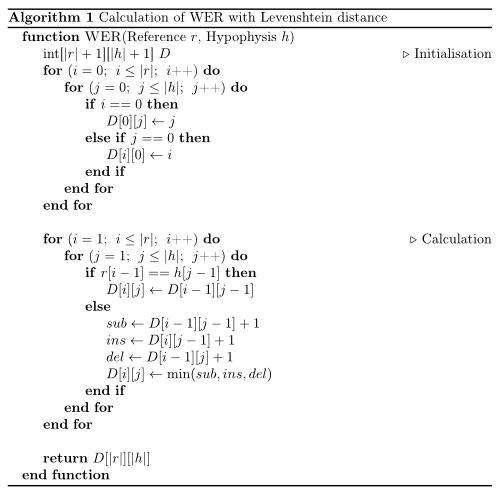
Python
#!/usr/bin/env python


def wer(r, h):
    """
    Calculation of WER with Levenshtein distance.

    Works only for iterables up to 254 elements (uint8).
    O(nm) time ans space complexity.

    Parameters
    ----------
    r : list
    h : list

    Returns
    -------
    int

    Examples
    --------
    >>> wer("who is there".split(), "is there".split())
    1
    >>> wer("who is there".split(), "".split())
    3
    >>> wer("".split(), "who is there".split())
    3
    """
    # initialisation
    import numpy

    d = numpy.zeros((len(r) + 1) * (len(h) + 1), dtype=numpy.uint8)
    d = d.reshape((len(r) + 1, len(h) + 1))
    for i in range(len(r) + 1):
        for j in range(len(h) + 1):
            if i == 0:
                d[0][j] = j
            elif j == 0:
                d[i][0] = i

    # computation
    for i in range(1, len(r) + 1):
        for j in range(1, len(h) + 1):
            if r[i - 1] == h[j - 1]:
                d[i][j] = d[i - 1][j - 1]
            else:
                substitution = d[i - 1][j - 1] + 1
                insertion = d[i][j - 1] + 1
                deletion = d[i - 1][j] + 1
                d[i][j] = min(substitution, insertion, deletion)

    return d[len(r)][len(h)]


if __name__ == "__main__":
    import doctest

    doctest.testmod()
Explanation
No matter at what stage of the code you are, the following is always true:
- If
r[i]equalsh[j]you don’t have to change anything. The error will be the same as it was forr[:i-1]andh[:j-1] - If its a substitution, you have the same number of errors as you had before when comparing the
r[:i-1]andh[:j-1] - If it was an insertion, then the hypothesis will be longer than the reference. So you can delete one from the hypothesis and compare the rest. As this is the other way around for deletion, you don’t have to worry when you have to delete something.
Word Error Rate (WER) and Word Recognition Rate (WRR) with Python
“WAcc(WRR) and WER as defined above are, the de facto standard most often used in speech recognition.”
WER has been developed and is used to check a speech recognition’s engine accuracy. It works by calculating the distance between the engine’s reults — called the hypothesis — and the real text — called the reference.
The distance function is based on the Levenshtein Distance (for finding the edit distance between words). The WER, like the Levenshtein distance, defines the distance by the amount of minimum operations that has to been done for getting from the reference to the hypothesis. Unlike the Levenshtein distance, however, the operations are on words and not on individual characters. The possible operations are:
Deletion: A word was deleted. A word was deleted from the reference.
Insertion: A word was added. An aligned word from the hypothesis was added.
Substitution: A word was substituted. A word from the reference was substituted with an aligned word from the hypothesis.
Also unlike the Levenshtein distance, the WER counts the deletions, insertion and substitutions done, instead of just summing up the penalties. To do that, we’ll have to first create the table for the Levenshtein distance algorithm, and then backtrace in it through the shortest route to [0,0], counting the operations on the way.
Then, we’ll use the formula to calculate the WER:
From this, the code is self explanatory:
def wer(ref, hyp ,debug=False):
    r = ref.split()
    h = hyp.split()
    #costs will holds the costs, like in the Levenshtein distance algorithm
    costs = [[0 for inner in range(len(h)+1)] for outer in range(len(r)+1)]
    # backtrace will hold the operations we've done.
    # so we could later backtrace, like the WER algorithm requires us to.
    backtrace = [[0 for inner in range(len(h)+1)] for outer in range(len(r)+1)]

    OP_OK = 0
    OP_SUB = 1
    OP_INS = 2
    OP_DEL = 3

    DEL_PENALTY=1 # Tact
    INS_PENALTY=1 # Tact
    SUB_PENALTY=1 # Tact
    # First column represents the case where we achieve zero
    # hypothesis words by deleting all reference words.
    for i in range(1, len(r)+1):
        costs[i][0] = DEL_PENALTY*i
        backtrace[i][0] = OP_DEL

    # First row represents the case where we achieve the hypothesis
    # by inserting all hypothesis words into a zero-length reference.
    for j in range(1, len(h) + 1):
        costs[0][j] = INS_PENALTY * j
        backtrace[0][j] = OP_INS

    # computation
    for i in range(1, len(r)+1):
        for j in range(1, len(h)+1):
            if r[i-1] == h[j-1]:
                costs[i][j] = costs[i-1][j-1]
                backtrace[i][j] = OP_OK
            else:
                substitutionCost = costs[i-1][j-1] + SUB_PENALTY # penalty is always 1
                insertionCost    = costs[i][j-1] + INS_PENALTY   # penalty is always 1
                deletionCost     = costs[i-1][j] + DEL_PENALTY   # penalty is always 1

                costs[i][j] = min(substitutionCost, insertionCost, deletionCost)
                if costs[i][j] == substitutionCost:
                    backtrace[i][j] = OP_SUB
                elif costs[i][j] == insertionCost:
                    backtrace[i][j] = OP_INS
                else:
                    backtrace[i][j] = OP_DEL

    # back trace though the best route:
    i = len(r)
    j = len(h)
    numSub = 0
    numDel = 0
    numIns = 0
    numCor = 0
    if debug:
        print("OPtREFtHYP")
        lines = []
    while i > 0 or j > 0:
        if backtrace[i][j] == OP_OK:
            numCor += 1
            i-=1
            j-=1
            if debug:
                lines.append("OKt" + r[i]+"t"+h[j])
        elif backtrace[i][j] == OP_SUB:
            numSub +=1
            i-=1
            j-=1
            if debug:
                lines.append("SUBt" + r[i]+"t"+h[j])
        elif backtrace[i][j] == OP_INS:
            numIns += 1
            j-=1
            if debug:
                lines.append("INSt" + "****" + "t" + h[j])
        elif backtrace[i][j] == OP_DEL:
            numDel += 1
            i-=1
            if debug:
                lines.append("DELt" + r[i]+"t"+"****")
    if debug:
        lines = reversed(lines)
        for line in lines:
            print(line)
        print("Ncor " + str(numCor))
        print("Nsub " + str(numSub))
        print("Ndel " + str(numDel))
        print("Nins " + str(numIns))
    return (numSub + numDel + numIns) / (float) (len(r))
    wer_result = round( (numSub + numDel + numIns) / (float) (len(r)), 3)
    return {'WER':wer_result, 'Cor':numCor, 'Sub':numSub, 'Ins':numIns, 'Del':numDel}
# Run:
ref='Tuan anh mot ha chin'
hyp='tuan anh mot hai ba bon chin'
wer(ref, hyp ,debug=True)

OP	REF	     HYP
SUB	Tuan     tuan
OK	anh	     anh
OK	mot	     mot
INS	****	 hai
INS	****	 ba
SUB	ha	     bon
OK	chin	 chin
Ncor 3
Nsub 2
Ndel 0
Nins 2
0.8
Ref
- https://martin-thoma.com/word-error-rate-calculation/
WER
Bản gốc tại đây
#!/usr/bin/env python

def wer(r, h):
    """
    Calculation of WER with Levenshtein distance.

    Works only for iterables up to 254 elements (uint8).
    O(nm) time ans space complexity.

    Parameters
    ----------
    r : list
    h : list

    Returns
    -------
    int

    Examples
    --------
    >>> wer("who is there".split(), "is there".split())
    1
    >>> wer("who is there".split(), "".split())
    3
    >>> wer("".split(), "who is there".split())
    3
    """
    # initialisation
    import numpy
    d = numpy.zeros((len(r)+1)*(len(h)+1), dtype=numpy.uint8)
    d = d.reshape((len(r)+1, len(h)+1))
    for i in range(len(r)+1):
        for j in range(len(h)+1):
            if i == 0:
                d[0][j] = j
            elif j == 0:
                d[i][0] = i

    # computation
    for i in range(1, len(r)+1):
        for j in range(1, len(h)+1):
            if r[i-1] == h[j-1]:
                d[i][j] = d[i-1][j-1]
            else:
                substitution = d[i-1][j-1] + 1
                insertion    = d[i][j-1] + 1
                deletion     = d[i-1][j] + 1
                d[i][j] = min(substitution, insertion, deletion)

    return d[len(r)][len(h)]

if __name__ == "__main__":
    import doctest
    doctest.testmod()
JiWER: Similarity measures for automatic speech recognition evaluation
This repository contains a simple python package to approximate the Word Error Rate (WER), Match Error Rate (MER), Word Information Lost (WIL) and Word Information Preserved (WIP) of a transcript.
It computes the minimum-edit distance between the ground-truth sentence and the hypothesis sentence of a speech-to-text API.
The minimum-edit distance is calculated using the Python C module Levenshtein.
For a comparison between WER, MER and WIL, see:
Morris, Andrew & Maier, Viktoria & Green, Phil. (2004). From WER and RIL to MER and WIL: improved evaluation measures for connected speech recognition.
Installation
You should be able to install this package using poetry:
$ poetry add jiwer
Or, if you prefer old-fashioned pip and you’re using Python >= 3.7:
$ pip install jiwer
Usage
The most simple use-case is computing the edit distance between two strings:
from jiwer import wer

ground_truth = "hello world"
hypothesis = "hello duck"

error = wer(ground_truth, hypothesis)
Similarly, to get other measures:
import jiwer

ground_truth = "hello world"
hypothesis = "hello duck"

wer = jiwer.wer(ground_truth, hypothesis)
mer = jiwer.mer(ground_truth, hypothesis)
wil = jiwer.wil(ground_truth, hypothesis)

# faster, because `compute_measures` only needs to perform the heavy lifting once:
measures = jiwer.compute_measures(ground_truth, hypothesis)
wer = measures['wer']
mer = measures['mer']
wil = measures['wil']
You can also compute the WER over multiple sentences:
from jiwer import wer

ground_truth = ["hello world", "i like monthy python"]
hypothesis = ["hello duck", "i like python"]

error = wer(ground_truth, hypothesis)
We also provide the character error rate:
from jiwer import cer

ground_truth = ["i can spell", "i hope"]
hypothesis = ["i kan cpell", "i hop"]

error = cer(ground_truth, hypothesis)
pre-processing
It might be necessary to apply some pre-processing steps on either the hypothesis or
ground truth text. This is possible with the transformation API:
import jiwer

ground_truth = "I like  python!"
hypothesis = "i like Python?n"

transformation = jiwer.Compose([
    jiwer.ToLowerCase(),
    jiwer.RemoveWhiteSpace(replace_by_space=True),
    jiwer.RemoveMultipleSpaces(),
    jiwer.ReduceToListOfListOfWords(word_delimiter=" ")
])

jiwer.wer(
    ground_truth,
    hypothesis,
    truth_transform=transformation,
    hypothesis_transform=transformation
)
By default, the following transformation is applied to both the ground truth and the hypothesis.
Note that is simply to get it into the right format to calculate the WER.
import jiwer

wer_default = jiwer.Compose([
    jiwer.RemoveMultipleSpaces(),
    jiwer.Strip(),
    jiwer.ReduceToListOfListOfWords(),
])
transforms
We provide some predefined transforms. See jiwer.transformations.
Compose
jiwer.Compose(transformations: List[Transform]) can be used to combine multiple transformations.
Example:
import jiwer

jiwer.Compose([
    jiwer.RemoveMultipleSpaces(),
    jiwer.ReduceToListOfListOfWords()
])
Note that each transformation needs to end with jiwer.ReduceToListOfListOfWords(), as the library internally computes the word error rate
based on a double list of words.
`
ReduceToListOfListOfWords
jiwer.ReduceToListOfListOfWords(word_delimiter=" ") can be used to transform one or more sentences into a list of lists of words.
The sentences can be given as a string (one sentence) or a list of strings (one or more sentences). This operation should be the final step
of any transformation pipeline as the library internally computes the word error rate
based on a double list of words.
Example:
import jiwer

sentences = ["hi", "this is an example"]

print(jiwer.ReduceToListOfListOfWords()(sentences))
# prints: [['hi'], ['this', 'is', 'an, 'example']]
ReduceToSingleSentence
jiwer.ReduceToSingleSentence(word_delimiter=" ") can be used to transform multiple sentences into a single sentence.
The sentences can be given as a string (one sentence) or a list of strings (one or more sentences).
This operation can be useful when the number of
ground truth sentences and hypothesis sentences differ, and you want to do a minimal
alignment over these lists. Note that this creates an invariance: wer([a, b], [a, b]) might not
be equal to wer([b, a], [b, a]).
Example:
import jiwer

sentences = ["hi", "this is an example"]

print(jiwer.ReduceToSingleSentence()(sentences))
# prints: ['hi this is an example']
RemoveSpecificWords
jiwer.RemoveSpecificWords(words_to_remove: List[str]) can be used to filter out certain words.
As words are replaced with a character, make sure to that jiwer.RemoveMultipleSpaces,
jiwer.Strip() and jiwer.RemoveEmptyStrings are present in the composition after jiwer.RemoveSpecificWords.
Example:
import jiwer

sentences = ["yhe awesome", "the apple is not a pear", "yhe"]

print(jiwer.RemoveSpecificWords(["yhe", "the", "a"])(sentences))
# prints: ['  awesome', '  apple is not   pear', ' ']
# note the extra spaces
RemoveWhiteSpace
jiwer.RemoveWhiteSpace(replace_by_space=False) can be used to filter out white space.
The whitespace characters are , t, n, r, x0b and x0c.
Note that by default space ( ) is also removed, which will make it impossible to split a sentence into a list of words by using ReduceToListOfListOfWords
or ReduceToSingleSentence.
This can be prevented by replacing all whitespace with the space character.
If so, make sure that jiwer.RemoveMultipleSpaces,
jiwer.Strip() and jiwer.RemoveEmptyStrings are present in the composition after jiwer.RemoveWhiteSpace.
Example:
import jiwer

sentences = ["this is an example", "hellotworldnr"]

print(jiwer.RemoveWhiteSpace()(sentences))
# prints: ["thisisanexample", "helloworld"]

print(jiwer.RemoveWhiteSpace(replace_by_space=True)(sentences))
# prints: ["this is an example", "hello world  "]
# note the trailing spaces
RemovePunctuation
jiwer.RemovePunctuation() can be used to filter out punctuation. The punctuation characters are defined as
all unicode characters whose catogary name starts with P. See https://www.unicode.org/reports/tr44/#General_Category_Values.
Example:
import jiwer

sentences = ["this is an example!", "hello. goodbye"]

print(jiwer.RemovePunctuation()(sentences))
# prints: ['this is an example', "hello goodbye"]
RemoveMultipleSpaces
jiwer.RemoveMultipleSpaces() can be used to filter out multiple spaces between words.
Example:
import jiwer

sentences = ["this is   an   example ", "  hello goodbye  ", "  "]

print(jiwer.RemoveMultipleSpaces()(sentences))
# prints: ['this is an example ', " hello goodbye ", " "]
# note that there are still trailing spaces
Strip
jiwer.Strip() can be used to remove all leading and trailing spaces.
Example:
import jiwer

sentences = [" this is an example ", "  hello goodbye  ", "  "]

print(jiwer.Strip()(sentences))
# prints: ['this is an example', "hello goodbye", ""]
# note that there is an empty string left behind which might need to be cleaned up
RemoveEmptyStrings
jiwer.RemoveEmptyStrings() can be used to remove empty strings.
Example:
import jiwer

sentences = ["", "this is an example", " ",  "                "]

print(jiwer.RemoveEmptyStrings()(sentences))
# prints: ['this is an example']
ExpandCommonEnglishContractions
jiwer.ExpandCommonEnglishContractions() can be used to replace common contractions such as let's to let us.
Currently, this method will perform the following replacements. Note that ␣ is used to indicate a space ( ) to get
around markdown rendering constrains.
| Contraction | transformed into |
|---|---|
won't |
␣will not |
can't |
␣can not |
let's |
␣let us |
n't |
␣not |
're |
␣are |
's |
␣is |
'd |
␣would |
'll |
␣will |
't |
␣not |
've |
␣have |
'm |
␣am |
Example:
import jiwer

sentences = ["she'll make sure you can't make it", "let's party!"]

print(jiwer.ExpandCommonEnglishContractions()(sentences))
# prints: ["she will make sure you can not make it", "let us party!"]
SubstituteWords
jiwer.SubstituteWords(dictionary: Mapping[str, str]) can be used to replace a word into another word. Note that
the whole word is matched. If the word you’re attempting to substitute is a substring of another word it will
not be affected.
For example, if you’re substituting foo into bar, the word foobar will NOT be substituted into barbar.
Example:
import jiwer

sentences = ["you're pretty", "your book", "foobar"]

print(jiwer.SubstituteWords({"pretty": "awesome", "you": "i", "'re": " am", 'foo': 'bar'})(sentences))

# prints: ["i am awesome", "your book", "foobar"]
SubstituteRegexes
jiwer.SubstituteRegexes(dictionary: Mapping[str, str]) can be used to replace a substring matching a regex
expression into another substring.
Example:
import jiwer

sentences = ["is the world doomed or loved?", "edibles are allegedly cultivated"]

# note: the regex string "b(w+)edb", matches every word ending in 'ed',
# and "1" stands for the first group ('w+). It therefore removes 'ed' in every match.
print(jiwer.SubstituteRegexes({r"doom": r"sacr", r"b(w+)edb": r"1"})(sentences))

# prints: ["is the world sacr or lov?", "edibles are allegedly cultivat"]
ToLowerCase
jiwer.ToLowerCase() can be used to convert every character into lowercase.
Example:
import jiwer

sentences = ["You're PRETTY"]

print(jiwer.ToLowerCase()(sentences))

# prints: ["you're pretty"]
ToUpperCase
jiwer.ToUpperCase() can be used to replace every character into uppercase.
Example:
import jiwer

sentences = ["You're amazing"]

print(jiwer.ToUpperCase()(sentences))

# prints: ["YOU'RE AMAZING"]
RemoveKaldiNonWords
jiwer.RemoveKaldiNonWords() can be used to remove any word between [] and <>. This can be useful when working
with hypotheses from the Kaldi project, which can output non-words such as [laugh] and <unk>.
Example:
import jiwer

sentences = ["you <unk> like [laugh]"]

print(jiwer.RemoveKaldiNonWords()(sentences))

# prints: ["you  like "]
# note the extra spaces
Содержание
- Evaluate OCR Output Quality with Character Error Rate (CER) and Word Error Rate (WER)
- Key concepts, examples, and Python implementation of measuring Optical Character Recognition output quality
- Contents
- Importance of Evaluation Metrics
- Error Rates and Levenshtein Distance
- Character Error Rate (CER)
- (i) Equation
- (ii) Illustration with Example
- (iii) CER Normalization
- (iv) What is a good CER value?
- Word Error Rate (WER)
- Python Example (with TesseractOCR and fastwer)
- Summing it up
- Char Error Rate
- Module Interface
- Functional Interface
- jiwer 2.5.1
- Навигация
- Ссылки проекта
- Статистика
- Метаданные
- Классификаторы
- Описание проекта
- JiWER: Similarity measures for automatic speech recognition evaluation
- Installation
- Usage
- pre-processing
- transforms
- Compose
- ReduceToListOfListOfWords
- ReduceToSingleSentence
- RemoveSpecificWords
- RemoveWhiteSpace
- RemovePunctuation
- RemoveMultipleSpaces
- Strip
- RemoveEmptyStrings
- ExpandCommonEnglishContractions
Evaluate OCR Output Quality with Character Error Rate (CER) and Word Error Rate (WER)
Key concepts, examples, and Python implementation of measuring Optical Character Recognition output quality
Contents
Importance of Evaluation Metrics
Great job in successfully generating output from your OCR model! You have done the hard work of labeling and pre-processing the images, setting up and running your neural network, and applying post-processing on the output.
The final step now is to assess how well your model has performed. Even if it gave high confidence scores, we need to measure performance with objective metrics. Since you cannot improve what you do not measure, these metrics serve as a vital benchmark for the iterative improvement of your OCR model.
In this article, we will look at two metrics used to evaluate OCR output, namely Character Error Rate (CER) and Word Error Rate (WER).
Error Rates and Levenshtein Distance
The usual way of evaluating prediction output is with the accuracy metric, where we indicate a match ( 1) or a no match ( 0). However, this does not provide enough granularity to assess OCR performance effectively.
We should instead use error rates to determine the extent to which the OCR transcribed text and ground truth text (i.e., reference text labeled manually) differ from each other.
A common intuition is to see how many characters were misspelled. While this is correct, the actual error rate calculation is more complex than that. This is because the OCR output can have a different length from the ground truth text.
Furthermore, there are three different types of error to consider:
- Substitution error: Misspelled characters/words
- Deletion error: Lost or missing characters/words
- Insertion error: Incorrect inclusion of character/words
The question now is, how do you measure the extent of errors between two text sequences? This is where Levenshtein distance enters the picture.
Levenshtein distance is a distance metric measuring the difference between two string sequences. It is the minimum number of single-character (or word) edits (i.e., insertions, deletions, or substitutions) required to change one word (or sentence) into another.
For example, the Levenshtein distance between “ mitten” and “ fitting” is 3 since a minimum of 3 edits is needed to transform one into the other.
The more different the two text sequences are, the higher the number of edits needed, and thus the larger the Levenshtein distance.
Character Error Rate (CER)
(i) Equation
CER calculation is based on the concept of Levenshtein distance, where we count the minimum number of character-level operations required to transform the ground truth text (aka reference text) into the OCR output.
It is represented with this formula:
- S = Number of Substitutions
- D = Number of Deletions
- I = Number of Insertions
- N = Number of characters in reference text (aka ground truth)
Bonus Tip: The denominator N can alternatively be computed with:
N = S + D + C (where C = number of correct characters)
The output of this equation represents the percentage of characters in the reference text that was incorrectly predicted in the OCR output. The lower the CER value (with 0 being a perfect score), the better the performance of the OCR model.
(ii) Illustration with Example
Let’s look at an example:
Several errors require edits to transform OCR output into the ground truth:
- g instead of 9 (at reference text character 3)
- Missing 1 (at reference text character 7)
- Z instead of 2 (at reference text character


With that, here are the values to input into the equation:
- Number of Substitutions (S) = 2
- Number of Deletions ( D) = 1
- Number of Insertions ( I) = 0
- Number of characters in reference text ( N) = 9
Based on the above, we get (2 + 1 + 0) / 9 = 0.3333. When converted to a percentage value, the CER becomes 33.33%. This implies that every 3rd character in the sequence was incorrectly transcribed.
We repeat this calculation for all the pairs of transcribed output and corresponding ground truth, and take the mean of these values to obtain an overall CER percentage.
(iii) CER Normalization
One thing to note is that CER values can exceed 100%, especially with many insertions. For example, the CER for ground truth ‘ ABC’ and a longer OCR output ‘ ABC12345’ is 166.67%.
It felt a little strange to me that an error value can go beyond 100%, so I looked around and managed to come across an article by Rafael C. Carrasco that discussed how normalization could be applied:
Sometimes the number of mistakes is divided by the sum of the number of edit operations ( i + s + d ) and the number c of correct symbols, which is always larger than the numerator.
The normalization technique described above makes CER values fall within the range of 0–100% all the time. It can be represented with this formula:
where C = Number of correct characters
(iv) What is a good CER value?
There is no single benchmark for defining a good CER value, as it is highly dependent on the use case. Different scenarios and complexity (e.g., printed vs. handwritten text, type of content, etc.) can result in varying OCR performances. Nonetheless, there are several sources that we can take reference from.
An article published in 2009 on the review of OCR accuracy in large-scale Australian newspaper digitization programs came up with these benchmarks (for printed text):
- Good OCR accuracy: CER 1‐2% (i.e. 98–99% accurate)
- Average OCR accuracy: CER 2-10%
- Poor OCR accuracy: CER >10% (i.e. below 90% accurate)
For complex cases involving handwritten text with highly heterogeneous and out-of-vocabulary content (e.g., application forms), a CER value as high as around 20% can be considered satisfactory.
Word Error Rate (WER)
If your project involves transcription of particular sequences (e.g., social security number, phone number, etc.), then the use of CER will be relevant.
On the other hand, Word Error Rate might be more applicable if it involves the transcription of paragraphs and sentences of words with meaning (e.g., pages of books, newspapers).
The formula for WER is the same as that of CER, but WER operates at the word level instead. It represents the number of word substitutions, deletions, or insertions needed to transform one sentence into another.
WER is generally well-correlated with CER (provided error rates are not excessively high), although the absolute WER value is expected to be higher than the CER value.
- Ground Truth: ‘my name is kenneth’
- OCR Output: ‘myy nime iz kenneth’
From the above, the CER is 16.67%, whereas the WER is 75%. The WER value of 75% is clearly understood since 3 out of 4 words in the sentence were wrongly transcribed.
Python Example (with TesseractOCR and fastwer)
We have covered enough theory, so let’s look at an actual Python code implementation.
In the demo notebook, I ran the open-source TesseractOCR model to extract output from several sample images of handwritten text. I then utilized the fastwer package to calculate CER and WER from the transcribed output and ground truth text (which I labeled manually).
Summing it up
In this article, we covered the concepts and examples of CER and WER and details on how to apply them in practice.
While CER and WER are handy, they are not bulletproof performance indicators of OCR models. This is because the quality and condition of the original documents (e.g., handwriting legibility, image DPI, etc.) play an equally (if not more) important role than the OCR model itself.
I welcome you to join me on a data science learning journey! Give this Medium page a follow to stay in the loop of more data science content, or reach out to me on LinkedIn. Have fun evaluating your OCR model!
Источник
Char Error Rate
Module Interface
Character Error Rate (CER) is a metric of the performance of an automatic speech recognition (ASR) system.
This value indicates the percentage of characters that were incorrectly predicted. The lower the value, the better the performance of the ASR system with a CharErrorRate of 0 being a perfect score. Character error rate can then be computed as:

 is the number of substitutions,
 is the number of deletions,
 is the number of insertions,
 is the number of correct characters,
 is the number of characters in the reference (N=S+D+C).
Compute CharErrorRate score of transcribed segments against references.
kwargs¶ ( Any ) – Additional keyword arguments, see Advanced metric settings for more info.
Character error rate score
Initializes internal Module state, shared by both nn.Module and ScriptModule.
Calculate the character error rate.
Character error rate score
Store references/predictions for computing Character Error Rate scores.
preds¶ ( Union [ str , List [ str ]]) – Transcription(s) to score as a string or list of strings
target¶ ( Union [ str , List [ str ]]) – Reference(s) for each speech input as a string or list of strings
Functional Interface
character error rate is a common metric of the performance of an automatic speech recognition system. This value indicates the percentage of characters that were incorrectly predicted. The lower the value, the better the performance of the ASR system with a CER of 0 being a perfect score.
preds¶ ( Union [ str , List [ str ]]) – Transcription(s) to score as a string or list of strings
target¶ ( Union [ str , List [ str ]]) – Reference(s) for each speech input as a string or list of strings
Источник
jiwer 2.5.1
pip install jiwer Скопировать инструкции PIP
Выпущен: 6 сент. 2022 г.
Evaluate your speech-to-text system with similarity measures such as word error rate (WER)
Навигация
Ссылки проекта
Статистика
Метаданные
Лицензия: Apache Software License (Apache-2.0)
Требует: Python >=3.7, nikvaessen
Классификаторы
- License
- OSI Approved :: Apache Software License
- Programming Language
- Python :: 3
- Python :: 3.7
- Python :: 3.8
- Python :: 3.9
- Python :: 3.10
Описание проекта
JiWER: Similarity measures for automatic speech recognition evaluation
This repository contains a simple python package to approximate the Word Error Rate (WER), Match Error Rate (MER), Word Information Lost (WIL) and Word Information Preserved (WIP) of a transcript. It computes the minimum-edit distance between the ground-truth sentence and the hypothesis sentence of a speech-to-text API. The minimum-edit distance is calculated using the Python C module Levenshtein.
Installation
You should be able to install this package using poetry:
Or, if you prefer old-fashioned pip and you’re using Python >= 3.7 :
Usage
The most simple use-case is computing the edit distance between two strings:
Similarly, to get other measures:
You can also compute the WER over multiple sentences:
We also provide the character error rate:
pre-processing
It might be necessary to apply some pre-processing steps on either the hypothesis or ground truth text. This is possible with the transformation API:
By default, the following transformation is applied to both the ground truth and the hypothesis. Note that is simply to get it into the right format to calculate the WER.
transforms
We provide some predefined transforms. See jiwer.transformations .
Compose
jiwer.Compose(transformations: List[Transform]) can be used to combine multiple transformations.
Note that each transformation needs to end with jiwer.ReduceToListOfListOfWords() , as the library internally computes the word error rate based on a double list of words. `
ReduceToListOfListOfWords
jiwer.ReduceToListOfListOfWords(word_delimiter=» «) can be used to transform one or more sentences into a list of lists of words. The sentences can be given as a string (one sentence) or a list of strings (one or more sentences). This operation should be the final step of any transformation pipeline as the library internally computes the word error rate based on a double list of words.
ReduceToSingleSentence
jiwer.ReduceToSingleSentence(word_delimiter=» «) can be used to transform multiple sentences into a single sentence. The sentences can be given as a string (one sentence) or a list of strings (one or more sentences). This operation can be useful when the number of ground truth sentences and hypothesis sentences differ, and you want to do a minimal alignment over these lists. Note that this creates an invariance: wer([a, b], [a, b]) might not be equal to wer([b, a], [b, a]) .
RemoveSpecificWords
jiwer.RemoveSpecificWords(words_to_remove: List[str]) can be used to filter out certain words. As words are replaced with a character, make sure to that jiwer.RemoveMultipleSpaces , jiwer.Strip() and jiwer.RemoveEmptyStrings are present in the composition after jiwer.RemoveSpecificWords .
RemoveWhiteSpace
jiwer.RemoveWhiteSpace(replace_by_space=False) can be used to filter out white space. The whitespace characters are , t , n , r , x0b and x0c . Note that by default space ( ) is also removed, which will make it impossible to split a sentence into a list of words by using ReduceToListOfListOfWords or ReduceToSingleSentence . This can be prevented by replacing all whitespace with the space character. If so, make sure that jiwer.RemoveMultipleSpaces , jiwer.Strip() and jiwer.RemoveEmptyStrings are present in the composition after jiwer.RemoveWhiteSpace .
RemovePunctuation
jiwer.RemovePunctuation() can be used to filter out punctuation. The punctuation characters are defined as all unicode characters whose catogary name starts with P . See https://www.unicode.org/reports/tr44/#General_Category_Values.
RemoveMultipleSpaces
jiwer.RemoveMultipleSpaces() can be used to filter out multiple spaces between words.
Strip
jiwer.Strip() can be used to remove all leading and trailing spaces.
RemoveEmptyStrings
jiwer.RemoveEmptyStrings() can be used to remove empty strings.
ExpandCommonEnglishContractions
jiwer.ExpandCommonEnglishContractions() can be used to replace common contractions such as let’s to let us .
Currently, this method will perform the following replacements. Note that ␣ is used to indicate a space ( ) to get around markdown rendering constrains.
Источник
I was given this dummy code for Microsoft Speech Recognition Lab.
I am trying to find word error rate(individually as well as sum) of all the sentences stored in the file.
I have loaded the files in memory using Numpy arrays now I am struggling to find the sentence error rate for each sentence present in the file. There are a total of three sentences and I want my program to go through each sentence and compute the word error rate. My loop runs thrice yet the result is only being accumulated for the first sentence. Have a look at my code and guide me where am I going wrong. Thanks.
Provided Code:
def string_edit_distance(ref="ref_data", hyp="hyp_data"):

    if ref is None or hyp is None:
        RuntimeError("ref and hyp are required, cannot be None")

    x = ref
    y = hyp
    tokens = len(x)
        if (len(hyp)==0):
            return (tokens, tokens, tokens, 0, 0)

    # p[ix,iy] consumed ix tokens from x, iy tokens from y
    p = np.PINF * np.ones((len(x) + 1, len(y) + 1)) # track total errors
    e = np.zeros((len(x)+1, len(y) + 1, 3), dtype=np.int) # track deletions, insertions, substitutions
    p[0] = 0
    for ix in range(len(x) + 1):
        for iy in range(len(y) + 1):
            cst = np.PINF*np.ones([3])
            s = 0
            if ix > 0:
                cst[0] = p[ix - 1, iy] + 1 # deletion cost
            if iy > 0:
                cst[1] = p[ix, iy - 1] + 1 # insertion cost
            if ix > 0 and iy > 0:
                s = (1 if x[ix - 1] != y[iy -1] else 0)
                cst[2] = p[ix - 1, iy - 1] + s # substitution cost
            if ix > 0 or iy > 0:
                idx = np.argmin(cst) # if tied, one that occurs first wins
                p[ix, iy] = cst[idx]

                if (idx==0): # deletion
                    e[ix, iy, :] = e[ix - 1, iy, :]
                    e[ix, iy, 0] += 1
                elif (idx==1): # insertion
                    e[ix, iy, :] = e[ix, iy - 1, :]
                    e[ix, iy, 1] += 1
                elif (idx==2): # substitution
                    e[ix, iy, :] = e[ix - 1, iy - 1, :]
                    e[ix, iy, 2] += s

edits = int(p[-1,-1])
deletions, insertions, substitutions = e[-1, -1, :]
What I have Tried Till Now:
with open("misc/hyp.trn") as f:
    hyp_data = f.readlines()
with open("misc/ref.trn") as f:
    ref_data = f.readlines()

hypData = []
refData = []

for lines in hyp_data:
    hypData.append(lines[:][:-20])

for line in ref_data:
    refData.append(line[:][:-20])

for i in range(len(hypData)):

    print("Line Number: ",i, refData[i], hypData[i])

    print("Total number of reference sentences in the test set: ", len(refData))

    print("Number of sentences with an error", len(hypData))

    print("Total number of reference words", tokens)

    print("Total number of word substitutions, insertions, and deletions: ")
    print("----------------------------------------------------------------")

    print("Scores: N="+str(tokens)+", S="+str(substitutions)+", D= "+str(deletions)+",
    I="+str(insertions))

    print("The percentage of total errors (WER) and percentage of substitutions, insertions, and
    deletions")

    wer = (deletions+insertions+substitutions)/tokens
    print("The percentage of total errors (WER): ", int((wer*100)*10 + 0.5)/10)
    print("Percentage of substitutions: ", int((substitutions*100 + 0.5)/10))
    print("Percentage of insertions: ", int((insertions*100 + 0.5)/10))
    print("Percentage of deletions: ",int((deletions*100 + 0.5)/10))

string_edit_distance()
«WAcc(WRR) and WER as defined above are, the de facto standard most often used in speech recognition.»
WER has been developed and is used to check a speech recognition’s engine accuracy. It works by calculating the distance between the engine’s reults — called the hypothesis — and the real text — called the reference.
The distance function is based on the Levenshtein Distance (for finding the edit distance between words). The WER, like the Levenshtein distance, defines the distance by the amount of minimum operations that has to been done for getting from the reference to the hypothesis. Unlike the Levenshtein distance, however, the operations are on words and not on individual characters. The possible operations are:
Deletion: A word was deleted. A word was deleted from the reference.
Insertion: A word was added. An aligned word from the hypothesis was added.
Substitution: A word was substituted. A word from the reference was substituted with an aligned word from the hypothesis.
Also unlike the Levenshtein distance, the WER counts the deletions, insertion and substitutions done, instead of just summing up the penalties. To do that, we’ll have to first create the table for the Levenshtein distance algorithm, and then backtrace in it through the shortest route to [0,0], counting the operations on the way.
Then, we’ll use the formula to calculate the WER:

From this, the code is self explanatory:
def wer(ref, hyp ,debug=False):
    r = ref.split()
    h = hyp.split()
    #costs will holds the costs, like in the Levenshtein distance algorithm
    costs = [[0 for inner in range(len(h)+1)] for outer in range(len(r)+1)]
    # backtrace will hold the operations we've done.
    # so we could later backtrace, like the WER algorithm requires us to.
    backtrace = [[0 for inner in range(len(h)+1)] for outer in range(len(r)+1)]

    OP_OK = 0
    OP_SUB = 1
    OP_INS = 2
    OP_DEL = 3

    # First column represents the case where we achieve zero
    # hypothesis words by deleting all reference words.
    for i in range(1, len(r)+1):
        costs[i][0] = DEL_PENALTY*i
        backtrace[i][0] = OP_DEL

    # First row represents the case where we achieve the hypothesis
    # by inserting all hypothesis words into a zero-length reference.
    for j in range(1, len(h) + 1):
        costs[0][j] = INS_PENALTY * j
        backtrace[0][j] = OP_INS

    # computation
    for i in range(1, len(r)+1):
        for j in range(1, len(h)+1):
            if r[i-1] == h[j-1]:
                costs[i][j] = costs[i-1][j-1]
                backtrace[i][j] = OP_OK
            else:
                substitutionCost = costs[i-1][j-1] + SUB_PENALTY # penalty is always 1
                insertionCost    = costs[i][j-1] + INS_PENALTY   # penalty is always 1
                deletionCost     = costs[i-1][j] + DEL_PENALTY   # penalty is always 1

                costs[i][j] = min(substitutionCost, insertionCost, deletionCost)
                if costs[i][j] == substitutionCost:
                    backtrace[i][j] = OP_SUB
                elif costs[i][j] == insertionCost:
                    backtrace[i][j] = OP_INS
                else:
                    backtrace[i][j] = OP_DEL

    # back trace though the best route:
    i = len(r)
    j = len(h)
    numSub = 0
    numDel = 0
    numIns = 0
    numCor = 0
    if debug:
        print("OPtREFtHYP")
        lines = []
    while i > 0 or j > 0:
        if backtrace[i][j] == OP_OK:
            numCor += 1
            i-=1
            j-=1
            if debug:
                lines.append("OKt" + r[i]+"t"+h[j])
        elif backtrace[i][j] == OP_SUB:
            numSub +=1
            i-=1
            j-=1
            if debug:
                lines.append("SUBt" + r[i]+"t"+h[j])
        elif backtrace[i][j] == OP_INS:
            numIns += 1
            j-=1
            if debug:
                lines.append("INSt" + "****" + "t" + h[j])
        elif backtrace[i][j] == OP_DEL:
            numDel += 1
            i-=1
            if debug:
                lines.append("DELt" + r[i]+"t"+"****")
    if debug:
        lines = reversed(lines)
        for line in lines:
            print(line)
        print("#cor " + str(numCor))
        print("#sub " + str(numSub))
        print("#del " + str(numDel))
        print("#ins " + str(numIns))
    return (numSub + numDel + numIns) / (float) (len(r))
    wer_result = round( (numSub + numDel + numIns) / (float) (len(r)), 3)
    return {'WER':wer_result, 'Cor':numCor, 'Sub':numSub, 'Ins':numIns, 'Del':numDel}
The code is based on the Java implementation of the algorithm by romanows.