
Im try to import users using LDIFDE. Below is from the error log any help would be great
Entry DN: OU=Offices,DC=dcorporate,DC=com
changetype: add
Attribute 0) objectClass:top organizationalUnit
Attribute 1) ou:Offices
Attribute 2) distinguishedName:OU=Offices,DC=dcorporate,DC=com
Attribute 3) instanceType:4
Attribute 4) whenCreated:20060516154057.0Z
Attribute 5) whenChanged:20101201164754.0Z
Attribute 6) uSNCreated:54398
Attribute 7) uSNChanged:54398
Attribute  name:Offices
Attribute 9) objectCategory:CN=Organizational-Unit,CN=Schema,CN=Configuration,DC=dcorporate,DC=com
Attribute 10) dSCorePropagationData:20110518135038.0Z 20110505174148.0Z 16010101000416.0Z
1: Entry already exists, entry skipped
Entry DN: CN=00728,OU=Offices,DC=dcorporate,DC=com
changetype: add
Attribute 0) objectClass:top person organizationalPerson user
Attribute 1) cn:00728
Attribute 2) c:IND
Attribute 3) l:Mumbai, India
Attribute 4) st: UNPRINTABLE BINARY(1)
Attribute 5) street:#225, 2nd. Floor, CTS 4207 (PT) Trace Centre, BKC Bandra E
Attribute 6) description:Mumbai, India
Attribute 7) postalCode:400051
Attribute telephoneNumber:91 22 42170400
Attribute 9) facsimileTelephoneNumber: UNPRINTABLE BINARY(1)
Attribute 10) distinguishedName:CN=00728,OU=Offices,DC=dcorporate,DC=com
Attribute 11) instanceType:4
Attribute 12) whenCreated:20070524025615.0Z
Attribute 13) whenChanged:20110322081430.0Z
Attribute 14) displayName:Office 00728
Attribute 15) uSNCreated:463425
Attribute 16) info:OFFICE_OBJECT
Attribute 17) uSNChanged:20391507
Attribute 18) co:IND
Attribute 19) company:TEK
Attribute 20) streetAddress:#225, 2nd. Floor, CTS 4207 (PT) Trace Centre, BKC Bandra E
Attribute 21) extensionAttribute3:OFFICE_OBJECT
Attribute 22) mailNickname:00728
Attribute 23) name:00728
Attribute 24) userAccountControl:546
Attribute 25) codePage:0
Attribute 26) countryCode:0
Attribute 27) accountExpires:0
Attribute 28) sAMAccountName:00728
Attribute 29) showInAddressBook:CN=Default Global Address List,CN=All Global Address Lists,CN=Address Lists Container,CN=dcorporate,CN=Microsoft Exchange,CN=Services,CN=Configuration,DC=dcorporate,DC=com CN=All Users,CN=All Address Lists,CN=Address Lists Container,CN=dcorporate,CN=Microsoft
Exchange,CN=Services,CN=Configuration,DC=dcorporate,DC=com
Attribute 30) userPrincipalName:00728@dcorporate.com
Attribute 31) objectCategory:CN=Person,CN=Schema,CN=Configuration,DC=dcorporate,DC=com
Attribute 32) dSCorePropagationData:20110505174148.0Z 16010101000001.0Z
Attribute 33) uid:00728
Attribute 34) textEncodedORAddress:c=US;a= ;p=dcorporate;o=Exchange;s=00728;
Attribute 35) mail:00728@dcorporate.com
Attribute 36) msExchALObjectVersion:53
Attribute 37) msExchPoliciesIncluded:{0CE3CC4B-8E7E-4E0E-85EA-4EFDACE073FF},{26491CFC-9E50-4857-861B-0CB8DF22B5D7}
Add error on entry starting on line 19: No Such Attribute
admin ~
Modified: 16-10-2017 ~ Exchange Server ~ 4 Minutes Reading
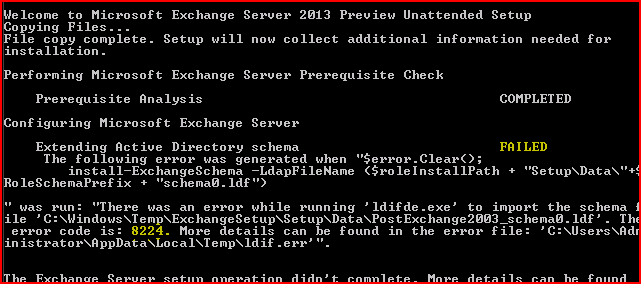
Summary:- Most of the time users have encountered the exchange server error 8224 and fail to the load’s Schema when trying to update or upgrade Exchange server version from lower versions to 2010, 2013 and 2016. The article highlights the cause of the connection cannot be established the error code is 8224 and explains the quick tips to fix exchange server error code 8224 precisely.
Brief Introduction About Exchange Server EDB Database
Exchange Server is the simply the email and calendaring server developed by the Microsoft Inc.
It runs on the top of the Windows Server and follows the client server architecture. It created EDB file in the back end to save the of clients into it. Due to its comprehensive security features which make it feasible to server the large as the well small organization to meet their internal communication needs.
Location of Exchange Server Database File in Different Versions.
The location of EDB file according to Versions of Exchange Server.
For Exchange Server Version 2000 & 2003
C:Program FilesExchsrvrmbdpriv.edb ( Private Folder)
C:Program FilesExchsrvrmbdpub1.edb ( Public Folder)
For Exchange Server Version 2007
C:Program FilesMicrosoftExchange ServerMailboxFirst Storage GroupMailbox Database.edb
C:ProgramFilesMicrosoftExchange ServerMailboxFirst Storage GroupPublic Folder Database.edb
For Exchange Server Version 2010
C:Program FilesMicrosoftExchange ServerV14Mailbox DatabaseMailbox Database.edb
C:Program FilesMicrosoftExchange ServerV14Public Folder DatabasePublic Folder Database.edb
For Exchange Server Version 2013
C:Program FilesMicrosoftExchange ServerV15MailboxMailbox database NameMailbox database Name.edb
For Exchange Server Version 2016
C:Program FilesMicrosoftExchange ServerV15MailboxMailbox Database Name.edb
The Possible Reasons For Exchange Server Error Code 8224
There might be many reasons for the Error there was an error while running ‘ldifde.exe’ to import the schema file exchange 2013/2010. Some of them are explained below:-
1. There might be the possibility that some corruption or damage occurs in the files of exchange server in the default installation location on Windows Server while upgrading or updating the Exchange server.
2. Domain Controller is in Offline state or decommissioned incorrectly causing replica issues
3. The Corrupted File System will also cause for error, the connection cannot be established the error code is 8224
4. Abnormal deletion of files
5. Incomplete installation or uninstallation
6. Malicious software or virus attack can also cause the exchange server error 8224
The Solution to Fix the Exchange Server Error Code 8224 -Ldifde.exe Failed to Import Schema
There are two ways to fix there was an error while running ‘ldifde.exe’ to import the schema file exchange 2013/2010.
1. Manual Solution
2. Professional Solution
The Manual Method to Fix Exchange Server 8224 Error While Running ‘ldifde.exe’ to Import The Schema File Exchange
- Locate FMSO Server on the network
- Put the Exchange DVD in the schema master or use it from the network and make sure it is available to connect with Schema Master Server
- By using the command line, change the directory of DVD in the same directory in which exchange files are installed.
- Run the Command X:Setup /PrepareSchema.
- Then after running this command X:Setup /PrepareAD
The Professional or the Alternative approach to fix Exchange Server Error Code 8224
- Delete the Domain Controllers which are not in use or in stale conditions.
- Then Run the AD Metadata clean up
- Delete State Domain Controllers from the Active directory sites and services
- After they delete the unused or stale domain name servers using the DNS properties
- Restart or reboot all the Domain controllers in the site and run the setup /PrepareAD /OrganizationName: XXX
- After completion of above setup run setup/preparealldomains
Note if above methods pop any error message then you need to specify the organization name and run X:Setup /PrepareAD /OrganizationName:” Your Organization Name”
The steps to Restore the Exchange Server after the completion of above methods
- Logged into your system using the Admin accounts
- Then after go to start >> All Programs >> System Tools >> System Restore
- Select Restore my computer to the earlier state and then click on next.
- Choose the most recent system restore points from the system restore
- Then click on the confirmation window and reboot the system
The Bottom Line
As far, we have discussed the common tips and tricks to fix exchange server 8224 error while running ‘ldifde.exe’ to import the schema file exchange. But the uncertainty always exists with the manual methods. This may cause the corruption issues in exchange database file. So make sure that you have the recent backup of exchange server database file. If any how exchange server database file gets corrupt then you can use Exchange EDB Repair tool for the same. It has the ability to fix all the issues related to exchange database file in quick time.
Walter Van Hecke
-
#1
Hi I’m beginning with the administration of windows2003
and try to import a simple user account on a test domain
contoso.com
I saved the file as test1.ldf
and it contains following lines:
dn: CN=GuyThomas, OU=Employees,DC=contoso, DC=com
changetype: add
cn: Guy Thomas
objectClass: user
samAccountName: Guy
givenName: Guy
sn: Thomas
I always get an error saying the the DN line is not properly written does
anybody sees a problem with this line?
Thx a lot,
Walter
Advertisements
Enkidu
-
#2
Hi I’m beginning with the administration of windows2003
and try to import a simple user account on a test domain
contoso.comI saved the file as test1.ldf
and it contains following lines:
dn: CN=GuyThomas, OU=Employees,DC=contoso, DC=com
changetype: add
cn: Guy Thomas
objectClass: user
samAccountName: Guy
givenName: Guy
sn: ThomasI always get an error saying the the DN line is not properly written does
anybody sees a problem with this line?
Do you have an OU called Employees?
Cheers,
Cliff
Advertisements
Ace Fekay [MVP]
-
#3
In
Walter Van Hecke said:
Hi I’m beginning with the administration of windows2003
and try to import a simple user account on a test domain
contoso.comI saved the file as test1.ldf
and it contains following lines:
dn: CN=GuyThomas, OU=Employees,DC=contoso, DC=com
changetype: add
cn: Guy Thomas
objectClass: user
samAccountName: Guy
givenName: Guy
sn: ThomasI always get an error saying the the DN line is not properly written
does anybody sees a problem with this line?Thx a lot,
Walter
In addition to Cliff’s question, you need a dash («-«), on the next line
after «sn:Thomas». I also see a space after «CN=GuyThomas, «. Also, the
«CN=GuyThomas», appears to be a first name and last name, therefore should
have a space between them indicating so.
See if this helps on how to use LDIFDE:
237677 — Using LDIFDE to Import and Export Directory Objects to Active
Directory:
http://support.microsoft.com/default.aspx?kbid=237677
—
Regards,
Ace
G O E A G L E S !!!
Please direct all replies ONLY to the Microsoft public newsgroups
so all can benefit.
This posting is provided «AS-IS» with no warranties or guarantees
and confers no rights.
Ace Fekay, MCSE 2003 & 2000, MCSA 2003 & 2000, MCSE+I, MCT, MVP
Microsoft Windows MVP — Windows Server — Directory Services
Security Is Like An Onion, It Has Layers
HAM AND EGGS: A day’s work for a chicken;
A lifetime commitment for a pig.
LDIFDE import error
-
Thread starterGuest
-
Start dateDec 7, 2004
Guest
Guest
-
#1
Hi I’m beginning with the administration of windows2003
and try to import a simple user account on a test domain
contoso.com
I saved the file as test1.ldf
and it contains following lines:
dn: CN=GuyThomas, OU=Employees,DC=contoso, DC=com
changetype: add
cn: Guy Thomas
objectClass: user
samAccountName: Guy
givenName: Guy
sn: Thomas
I always get an error saying the the DN line is not properly written does
anybody sees a problem with this line?
Thx a lot,
Walter
Guest
Guest
-
#2
In news:uLAxU8G3EHA.4064@tk2msftngp13.phx.gbl,
Walter Van Hecke <walter.van.hecke@pandora.be> made a post then I commented
below
> Hi I’m beginning with the administration of windows2003
> and try to import a simple user account on a test domain
> contoso.com
>
> I saved the file as test1.ldf
>
> and it contains following lines:
>
> dn: CN=GuyThomas, OU=Employees,DC=contoso, DC=com
> changetype: add
> cn: Guy Thomas
> objectClass: user
> samAccountName: Guy
> givenName: Guy
> sn: Thomas
>
> I always get an error saying the the DN line is not properly written
> does anybody sees a problem with this line?
>
> Thx a lot,
>
> Walter
In addition to Cliff’s question, you need a dash («-«), on the next line
after «sn:Thomas». I also see a space after «CN=GuyThomas, «. Also, the
«CN=GuyThomas», appears to be a first name and last name, therefore should
have a space between them indicating so.
See if this helps on how to use LDIFDE:
237677 — Using LDIFDE to Import and Export Directory Objects to Active
Directory:
http://support.microsoft.com/default.aspx?kbid=237677
—
Regards,
Ace
G O E A G L E S !!!
Please direct all replies ONLY to the Microsoft public newsgroups
so all can benefit.
This posting is provided «AS-IS» with no warranties or guarantees
and confers no rights.
Ace Fekay, MCSE 2003 & 2000, MCSA 2003 & 2000, MCSE+I, MCT, MVP
Microsoft Windows MVP — Windows Server — Directory Services
Security Is Like An Onion, It Has Layers
HAM AND EGGS: A day’s work for a chicken;
A lifetime commitment for a pig.
—
=================================
-
- Feb 28, 2002
-
- 251
-
- 0
-
- 18,780
- 0
-
#3
On Tue, 7 Dec 2004 16:14:39 +0100, «Walter Van Hecke»
<walter.van.hecke@pandora.be> wrote:
>Hi I’m beginning with the administration of windows2003
>and try to import a simple user account on a test domain
>contoso.com
>
>I saved the file as test1.ldf
>
>and it contains following lines:
>
>dn: CN=GuyThomas, OU=Employees,DC=contoso, DC=com
>changetype: add
>cn: Guy Thomas
>objectClass: user
>samAccountName: Guy
>givenName: Guy
>sn: Thomas
>
>I always get an error saying the the DN line is not properly written does
>anybody sees a problem with this line?
>
Do you have an OU called Employees?
Cheers,
Cliff
—
These twin-CPU hyperthreading computers are really
great! We can wait ten to a hundred times faster
these days.
- Advertising
- Cookies Policies
- Privacy
- Term & Conditions
- Topics

-
Forums
-
Microsoft Windows Boards
-
Windows Server 2012
You should upgrade or use an alternative browser.
LDIFDE Import errors
-
Thread starterRafael M. Santos
-
Start dateNov 26, 2019
-
#1
Rafael M. Santos
I am trying to recreate CN=Domain System Volume object with LDIFDE, but I am having some problems on import.
I used the following command to export:
LDIFDE –f output.txt –d «CN=Domain System Volume,CN=DFSR-LocalSettings,CN=AnotherDC,OU=Domain Controllers,DC=dom,DC=com» –p base
No problems occurs on exporting.
I got problems when I try to import using the following command:
Ldifde -i -f import.txt
Login as current user using SSPI
Importing directory from «output.txt» file
Loading entries.
Add input error starting at line 1: Unable to execute
The server error is: 0x20e7 Modification was not allowed for security reasons.
The extended server error is:
000020E7: SvcErr: DSID-03152D4B, problem 5003 (WILL_NOT_PERFORM), date 0
I also tried with .ldf extension and the error is the same.
Continue reading…
Similar threads
-
Forums
-
Microsoft Windows Boards
-
Windows Server 2012
-
This site uses cookies to help personalise content, tailor your experience and to keep you logged in if you register.
By continuing to use this site, you are consenting to our use of cookies.