
I am working on a Windows (Microsoft Visual C++ 2005) application that uses several processes
running on different hosts in an intranet.
Processes communicate with each other using TCP/IP. Different processes can be on the
same host or on different hosts (i.e. the communication can be both within the same
host or between different hosts).
We have currently a bug that appears irregularly. The communication seems to work
for a while, then it stops working. Then it works again for some time.
When the communication does not work, we get an error (apparently while a process
was trying to send data). The call looks like this:
send(socket, (char *) data, (int) data_size, 0);
By inspecting the error code we get from
WSAGetLastError()
we see that it is an error 10054. Here is what I found in the Microsoft documentation
(see here):
WSAECONNRESET
10054

Connection reset by peer.

An existing connection was forcibly closed by the remote host. This normally
results if the peer application on the remote host is suddenly stopped, the
host is rebooted, the host or remote network interface is disabled, or the
remote host uses a hard close (see setsockopt for more information on the
SO_LINGER option on the remote socket). This error may also result if a
connection was broken due to keep-alive activity detecting a failure while
one or more operations are in progress. Operations that were in progress
fail with WSAENETRESET. Subsequent operations fail with WSAECONNRESET.
So, as far as I understand, the connection was interrupted by the receiving process.
In some cases this error is (AFAIK) correct: one process has terminated and
is therefore not reachable. In other cases both the sender and receiver are running
and logging activity, but they cannot communicate due to the above error (the error
is reported in the logs).
My questions.
- What does the SO_LINGER option mean?
- What is a keep-alive activity and how can it break a connection?
- How is it possible to avoid this problem or recover from it?
Regarding the last question. The first solution we tried (actually, it is rather a
workaround) was resending the message when the error occurs. Unfortunately, the
same error occurs over and over again for a while (a few minutes). So this is not
a solution.
At the moment we do not understand if we have a software problem or a configuration
issue: maybe we should check something in the windows registry?
One hypothesis was that the OS runs out of ephemeral ports (in case connections are
closed but ports are not released because of TcpTimedWaitDelay), but by analyzing
this issue we think that there should be plenty of them: the problem occurs even
if messages are not sent too frequently between processes. However, we still are not
100% sure that we can exclude this: can ephemeral ports get lost in some way (???)
Another detail that might help is that sending and receiving occurs in each process
concurrently in separate threads: are there any shared data structures in the
TCP/IP libraries that might get corrupted?
What is also very strange is that the problem occurs irregularly: communication works
OK for a few minutes, then it does not work for a few minutes, then it works again.
Thank you for any ideas and suggestions.
EDIT
Thanks for the hints confirming that the only possible explanation was a connection closed error. By further analysis of the problem, we found out that the server-side process of the connection had crashed / had been terminated and had been restarted. So there was a new server process running and listening on the correct port, but the client had not detected this and was still trying to use the old connection. We now have a mechanism to detect such situations and reset the connection on the client side.
Symptoms
Consider the following scenario:
-
You have a computer that is running Windows 7 or Windows Server 2008 R2.
-
A Transport Driver Interface (TDI) filter driver is installed on the computer. For example, a TDI filter driver is installed when you install McAfee VirusScan.
-
An application opens a TCP listening port to receive connections.
In this scenario, the application may receive the following error message:
WSAECONNRESET (10054) Connection reset by peer.
A existing connection was forcibly closed by the remote host.
This issue occurs because the TCP/IP driver does not close an incomplete TCP connection. Instead, the TCP/IP driver sends a notification that the TCP/IP driver is ready to receive data when the incomplete TCP connection is created. Therefore, the application receives an instance of the 10054 error that indicates that a connection is reset when the application receives data from the connection.
Resolution
To resolve this issue, install this hotfix.
Note This hotfix temporarily resolves this issue for application vendors before they migrate their implementation to Windows Filtering Platform (WFP). These application vendors use the TDI filter driver or the TDI extension driver (TDX) on a computer that is running Windows 7 or Windows Server 2008 R2.
Hotfix information
A supported hotfix is available from Microsoft. However, this hotfix is intended to correct only the problem that is described in this article. Apply this hotfix only to systems that are experiencing the problem described in this article. This hotfix might receive additional testing. Therefore, if you are not severely affected by this problem, we recommend that you wait for the next software update that contains this hotfix.
If the hotfix is available for download, there is a «Hotfix download available» section at the top of this Knowledge Base article. If this section does not appear, contact Microsoft Customer Service and Support to obtain the hotfix.
Note If additional issues occur or if any troubleshooting is required, you might have to create a separate service request. The usual support costs will apply to additional support questions and issues that do not qualify for this specific hotfix. For a complete list of Microsoft Customer Service and Support telephone numbers or to create a separate service request, visit the following Microsoft Web site:
http://support.microsoft.com/contactus/?ws=supportNote The «Hotfix download available» form displays the languages for which the hotfix is available. If you do not see your language, it is because a hotfix is not available for that language.
Prerequisites
To apply this hotfix, you must be running Windows 7 or Windows Server 2008 R2.
Registry information
Important This section, method, or task contains steps that tell you how to modify the registry. However, serious problems might occur if you modify the registry incorrectly. Therefore, make sure that you follow these steps carefully. For added protection, back up the registry before you modify it. Then, you can restore the registry if a problem occurs. For more information about how to back up and restore the registry, click the following article number to view the article in the Microsoft Knowledge Base:
322756 How to back up and restore the registry in WindowsTo enable the hotfix in this package, follow these steps:
-
In Registry Editor, locate the following registry subkey:
HKEY_LOCAL_MACHINESYSTEMCurrentControlSetservicesTcpipParameters
-
If you are running a 32-bit operating system, perform the following step:
Right-click the Parameters registry subkey, point to New, and then click DWORD Value.If you are running a 64-bit operating system, perform the following step:
Right-click the Parameters registry subkey, point to New, and then click DWORD (32-bit) Value.
-
Rename the new registry entry to TdxPrematureConnectIndDisabled and set the value to 1.
Restart requirement
You may have to restart the computer after you apply this hotfix.
Hotfix replacement information
This hotfix does not replace a previously released hotfix.
File information
The global version of this hotfix installs files that have the attributes that are listed in the following tables. The dates and the times for these files are listed in Coordinated Universal Time (UTC). The dates and the times for these files on your local computer are displayed in your local time together with your current daylight saving time (DST) bias. Additionally, the dates and the times may change when you perform certain operations on the files.
Windows 7 and Windows Server 2008 R2 file information notes
Important Windows 7 hotfixes and Windows Server 2008 R2 hotfixes are included in the same packages. However, hotfixes on the Hotfix Request page are listed under both operating systems. To request the hotfix package that applies to one or both operating systems, select the hotfix that is listed under «Windows 7/Windows Server 2008 R2» on the page. Always refer to the «Applies To» section in articles to determine the actual operating system that each hotfix applies to.
-
The MANIFEST files (.manifest) and the MUM files (.mum) that are installed for each environment are listed separately in the «Additional file information for Windows Server 2008 R2 and for Windows 7» section. MUM and MANIFEST files, and the associated security catalog (.cat) files, are extremely important to maintain the state of the updated components. The security catalog files, for which the attributes are not listed, are signed with a Microsoft digital signature.
For all supported x86-based versions of Windows 7
|
File name |
File version |
File size |
Date |
Time |
Platform |
|---|---|---|---|---|---|
|
Tdx.sys |
6.1.7600.20796 |
74,752 |
09-Sep-2010 |
02:19 |
x86 |
For all supported x64-based versions of Windows 7 and of Windows Server 2008 R2
|
File name |
File version |
File size |
Date |
Time |
Platform |
|---|---|---|---|---|---|
|
Tdx.sys |
6.1.7600.20796 |
101,376 |
09-Sep-2010 |
02:52 |
x64 |
For all supported IA-64-based versions of Windows Server 2008 R2
|
File name |
File version |
File size |
Date |
Time |
Platform |
|---|---|---|---|---|---|
|
Tdx.sys |
6.1.7600.20796 |
236,032 |
09-Sep-2010 |
01:47 |
IA-64 |
Status
Microsoft has confirmed that this is a problem in the Microsoft products that are listed in the «Applies to» section.
More Information
For more information about WFP, visit the following Microsoft website:
General information about WFPFor more information about software update terminology, click the following article number to view the article in the Microsoft Knowledge Base:
824684 Description of the standard terminology that is used to describe Microsoft software updates
Additional file information
Additional file information for Windows 7 and for Windows Server 2008 R2
Additional files for all supported x86-based versions of Windows 7
|
File name |
Package_1_for_kb981344~31bf3856ad364e35~x86~~6.1.2.0.mum |
|
File version |
Not Applicable |
|
File size |
1,820 |
|
Date (UTC) |
09-Sep-2010 |
|
Time (UTC) |
18:48 |
|
Platform |
Not Applicable |
|
File name |
Package_2_for_kb981344~31bf3856ad364e35~x86~~6.1.2.0.mum |
|
File version |
Not Applicable |
|
File size |
1,825 |
|
Date (UTC) |
09-Sep-2010 |
|
Time (UTC) |
18:48 |
|
Platform |
Not Applicable |
|
File name |
Package_3_for_kb981344~31bf3856ad364e35~x86~~6.1.2.0.mum |
|
File version |
Not Applicable |
|
File size |
1,805 |
|
Date (UTC) |
09-Sep-2010 |
|
Time (UTC) |
18:48 |
|
Platform |
Not Applicable |
|
File name |
Package_for_kb981344_rtm~31bf3856ad364e35~x86~~6.1.2.0.mum |
|
File version |
Not Applicable |
|
File size |
2,421 |
|
Date (UTC) |
09-Sep-2010 |
|
Time (UTC) |
18:48 |
|
Platform |
Not Applicable |
|
File name |
X86_bfb7f2e54887b839240a44ae0de89137_31bf3856ad364e35_6.1.7600.20796_none_3f3df7432361a4c5.manifest |
|
File version |
Not Applicable |
|
File size |
702 |
|
Date (UTC) |
09-Sep-2010 |
|
Time (UTC) |
18:48 |
|
Platform |
Not Applicable |
|
File name |
X86_microsoft-windows-tdi-over-tcpip_31bf3856ad364e35_6.1.7600.20796_none_ea93f14a568e0aaf.manifest |
|
File version |
Not Applicable |
|
File size |
2,924 |
|
Date (UTC) |
09-Sep-2010 |
|
Time (UTC) |
04:58 |
|
Platform |
Not Applicable |
Additional files for all supported x64-based versions of Windows 7 and of Windows Server 2008 R2
|
File name |
Amd64_8e30a6e4951f89c20ce3f8a1c04b9f2a_31bf3856ad364e35_6.1.7600.20796_none_8d28eb4c99ddf2d4.manifest |
|
File version |
Not Applicable |
|
File size |
706 |
|
Date (UTC) |
09-Sep-2010 |
|
Time (UTC) |
18:48 |
|
Platform |
Not Applicable |
|
File name |
Amd64_microsoft-windows-tdi-over-tcpip_31bf3856ad364e35_6.1.7600.20796_none_46b28cce0eeb7be5.manifest |
|
File version |
Not Applicable |
|
File size |
2,926 |
|
Date (UTC) |
09-Sep-2010 |
|
Time (UTC) |
06:11 |
|
Platform |
Not Applicable |
|
File name |
Package_1_for_kb981344~31bf3856ad364e35~amd64~~6.1.2.0.mum |
|
File version |
Not Applicable |
|
File size |
1,830 |
|
Date (UTC) |
09-Sep-2010 |
|
Time (UTC) |
18:48 |
|
Platform |
Not Applicable |
|
File name |
Package_2_for_kb981344~31bf3856ad364e35~amd64~~6.1.2.0.mum |
|
File version |
Not Applicable |
|
File size |
2,057 |
|
Date (UTC) |
09-Sep-2010 |
|
Time (UTC) |
18:48 |
|
Platform |
Not Applicable |
|
File name |
Package_3_for_kb981344~31bf3856ad364e35~amd64~~6.1.2.0.mum |
|
File version |
Not Applicable |
|
File size |
1,815 |
|
Date (UTC) |
09-Sep-2010 |
|
Time (UTC) |
18:48 |
|
Platform |
Not Applicable |
|
File name |
Package_for_kb981344_rtm~31bf3856ad364e35~amd64~~6.1.2.0.mum |
|
File version |
Not Applicable |
|
File size |
2,659 |
|
Date (UTC) |
09-Sep-2010 |
|
Time (UTC) |
18:48 |
|
Platform |
Not Applicable |
Additional files for all supported IA-64-based versions of Windows Server 2008 R2
|
File name |
Ia64_0bb425f9d3502a4be9efc4af61147428_31bf3856ad364e35_6.1.7600.20796_none_09467879be47b542.manifest |
|
File version |
Not Applicable |
|
File size |
704 |
|
Date (UTC) |
09-Sep-2010 |
|
Time (UTC) |
18:48 |
|
Platform |
Not Applicable |
|
File name |
Ia64_microsoft-windows-tdi-over-tcpip_31bf3856ad364e35_6.1.7600.20796_none_ea959540568c13ab.manifest |
|
File version |
Not Applicable |
|
File size |
2,925 |
|
Date (UTC) |
09-Sep-2010 |
|
Time (UTC) |
05:48 |
|
Platform |
Not Applicable |
|
File name |
Package_1_for_kb981344~31bf3856ad364e35~ia64~~6.1.2.0.mum |
|
File version |
Not Applicable |
|
File size |
2,051 |
|
Date (UTC) |
09-Sep-2010 |
|
Time (UTC) |
18:48 |
|
Platform |
Not Applicable |
|
File name |
Package_for_kb981344_rtm~31bf3856ad364e35~ia64~~6.1.2.0.mum |
|
File version |
Not Applicable |
|
File size |
1,683 |
|
Date (UTC) |
09-Sep-2010 |
|
Time (UTC) |
18:48 |
|
Platform |
Not Applicable |
Need more help?
 |
Номер ошибки: | Ошибка 10054 |
| Название ошибки: | Windows Error Code 10054 | |
| Описание ошибки: | Ошибка 10054: Возникла ошибка в приложении Windows. Приложение будет закрыто. Приносим извинения за неудобства. | |
| Разработчик: | Microsoft Corporation | |
| Программное обеспечение: | Windows | |
| Относится к: | Windows XP, Vista, 7, 8, 10, 11 |
Определение «Windows Error Code 10054»
Это наиболее распространенное условие «Windows Error Code 10054», известное как ошибка времени выполнения (ошибка). Программисты работают через различные уровни отладки, пытаясь убедиться, что Windows как можно ближе к безошибочным. Хотя эти превентивные действия принимаются, иногда ошибки, такие как ошибка 10054, будут пропущены.
Ошибка 10054, рассматриваемая как «Windows Error Code 10054», может возникнуть пользователями Windows в результате нормального использования программы. Когда появится ошибка, пользователи компьютеров смогут уведомить разработчика о наличии ошибки 10054 через отчеты об ошибках. Разработчик сможет исправить свой исходный код и выпустить обновление на рынке. Чтобы исправить любые документированные ошибки (например, ошибку 10054) в системе, разработчик может использовать комплект обновления Windows.
В чем причина ошибки 10054?
Проблема с исходным кодом Windows приведет к этому «Windows Error Code 10054», чаще всего на этапе запуска. Проанализируем некоторые из наиболее распространенных причин ошибок ошибки 10054 во время выполнения:
Ошибка 10054 Crash — Ошибка 10054 может привести к полному замораживанию программы, что не позволяет вам что-либо делать. Обычно это происходит, когда Windows не может обрабатывать предоставленный ввод или когда он не знает, что выводить.
Утечка памяти «Windows Error Code 10054» — при утечке памяти Windows это может привести к медленной работе устройства из-за нехватки системных ресурсов. Повреждение памяти и другие потенциальные ошибки в коде могут произойти, когда память обрабатывается неправильно.
Error 10054 Logic Error — Ошибка программной логики возникает, когда, несмотря на точный ввод от пользователя, производится неверный вывод. Обычные причины этой проблемы связаны с ошибками в обработке данных.
Как правило, такие Microsoft Corporation ошибки возникают из-за повреждённых или отсутствующих файлов Windows Error Code 10054, а иногда — в результате заражения вредоносным ПО в настоящем или прошлом, что оказало влияние на Windows. Большую часть проблем, связанных с данными файлами, можно решить посредством скачивания и установки последней версии файла Microsoft Corporation. Помимо прочего, в качестве общей меры по профилактике и очистке мы рекомендуем использовать очиститель реестра для очистки любых недопустимых записей файлов, расширений файлов Microsoft Corporation или разделов реестра, что позволит предотвратить появление связанных с ними сообщений об ошибках.
Типичные ошибки Windows Error Code 10054
Частичный список ошибок Windows Error Code 10054 Windows:
- «Ошибка программы Windows Error Code 10054. «
- «Недопустимый файл Windows Error Code 10054. «
- «Windows Error Code 10054 должен быть закрыт. «
- «К сожалению, мы не можем найти Windows Error Code 10054. «
- «Windows Error Code 10054 не найден.»
- «Ошибка запуска программы: Windows Error Code 10054.»
- «Файл Windows Error Code 10054 не запущен.»
- «Отказ Windows Error Code 10054.»
- «Ошибка в пути к программному обеспечению: Windows Error Code 10054. «
Ошибки Windows Error Code 10054 EXE возникают во время установки Windows, при запуске приложений, связанных с Windows Error Code 10054 (Windows), во время запуска или завершения работы или во время установки ОС Windows. Выделение при возникновении ошибок Windows Error Code 10054 имеет первостепенное значение для поиска причины проблем Windows и сообщения о них вMicrosoft Corporation за помощью.
Причины проблем Windows Error Code 10054
Эти проблемы Windows Error Code 10054 создаются отсутствующими или поврежденными файлами Windows Error Code 10054, недопустимыми записями реестра Windows или вредоносным программным обеспечением.
В частности, проблемы Windows Error Code 10054 возникают через:
- Поврежденные ключи реестра Windows, связанные с Windows Error Code 10054 / Windows.
- Зазаражение вредоносными программами повредил файл Windows Error Code 10054.
- Windows Error Code 10054 ошибочно удален или злонамеренно программным обеспечением, не связанным с приложением Windows.
- Другая программа, конфликтующая с Windows Error Code 10054 или другой общей ссылкой Windows.
- Неполный или поврежденный Windows (Windows Error Code 10054) из загрузки или установки.
Продукт Solvusoft
Загрузка
WinThruster 2022 — Проверьте свой компьютер на наличие ошибок.
Совместима с Windows 2000, XP, Vista, 7, 8, 10 и 11
Установить необязательные продукты — WinThruster (Solvusoft) | Лицензия | Политика защиты личных сведений | Условия | Удаление
Computers are rife with potential errors and, of all of them, socket error 10054 is one of the easier ones to fix. This error is usually caused accidentally when the user shuts down the software or closes the connection while the computer is attempting to connect with a server. More serious causes of this error are the Internet connection suddenly dropping or a proxy server disabling server connections. As with all errors, the firewall also could be acting up and causing the connection to break.
The overall reason why this socket error occurs is because the server connection has been broken by something outside the server. Most of the time, this is an action caused, either purposefully or accidentally, by the user. When 10054 manifests, as with other errors, the first thing that the user should do is to temporarily disable the firewall, because firewalls sometimes break good connections, thinking they are bad.

If the problem occurred because of an accidental or manual shutdown of the program, then this will be even easier to fix than the firewall method. Sometimes, when a user is attempting to connect to a server, he or she will close the program. This may be because he no longer needs to connect to the server or because the program was closed mistakenly. In this instance, he can just start the program again and the connection should work.
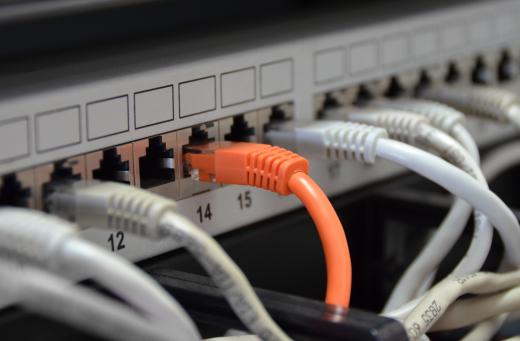
A break in the Internet connection also can cause a socket error 10054. As with the program, this can occur manually. If the user is not at fault for breaking the Internet connection, he should check the modem, router, and any internal device connecting to the Internet to ensure they are working. Manually resetting the device and calling the Internet service provider (ISP) can help get the Internet back online. In more serious cases, the device may have to be repaired or replaced.
Another reason for this error is that the user is using a proxy server to mask his computer address. This happens if the server is attempting to connect to the computer’s inherent address, and not the proxy server. If this occurs, the user can manually tell the server to connect to the proxy and not directly to the computer. Otherwise, the connection will keep breaking.
We have helped to fix numerous SQL related issues for our customers as part of our Server Support Services.
In this context, we shall look into the main reason why sql 10054 bug occurs and how to solve it.
What triggers SQL server error 10054?
The unique identifier of a service instance in an SQL server is known as a Service Principal Name (SPN).
In a Kerberos authentication process, SPNs helps to relate a service instance with a service logon user account. The association of a service on a server with an account which controls the service is made possible by an SPN mapping. This process allows interactive Kerberos authentication.
The main factors which triggers this error are;
* When a Service Principal Name (SPN) fails to register with an SQL Server Service.
* In the process where the SPNs is replicated.
* When the ports are Dynamic in nature.
* Due to SSL certificates issues at client side.
* When Windows Authentications option alone is selected when an SQL Server is Installed.
How to solve SQL server error 10054.
Whenever an SQL Server is started, an SPN for that instance is always created. This process could fail when the Read/Write ServicePrincipalName permission is not enabled in the service account leading to SQL error 10054.
Below, you will see how to fix this bug.
Checking the registration status of the SPN via SETSPN system tool
You can use the following command to know if the SPNs is registered or not;
setspn -L hostname - This Substitute the actual hostname for the computer.
setspn -L localhost- This checks the registration status of the account localhost.
In the case where the SPN is not registered, it needs to be and the Read/Write permission for the service account must be set. In the command below, lets say the domain is service.domain.com and the service account is service1 for computer named computer1, then run;
setspn -s http/computer1.service.domain.com helpservice1
Checking if the SPNs is replicated
Another cause of SQL error 10054 is due to a situation when the SPNs is replicated. We can use the following command to check for duplicates and list them if any;
setspn –X
As soon as you see duplicated SPNs, they need to be deleted and created again. The following command can be used in this case;
setspn -s service/namehostname // To add SPN
setspn -r hostname // To reset spn
setspn -d service/name hostname // To remove SPN
Other Solutions to fix SQL server error 10054
In some cases, this error can be solved when you disable SYN flooding attack protection. To do this, add the following registry key;
HKEY_LOCAL_MACHINESYSTEMCurrentControlSetServicesTcpipParametersSycAttackProtect{DWORD} = 0
After adding successfully, you must reboot the server to enable changes to be effected successfully.
Additionally, SSL certificate being present could lead to such issue triggering. In this case, a temporal removal of SSL could enable a quick fix to 10054 sql error.
Need support in solving SQL errors? We are available.

- Remove From My Forums
-
Question
-
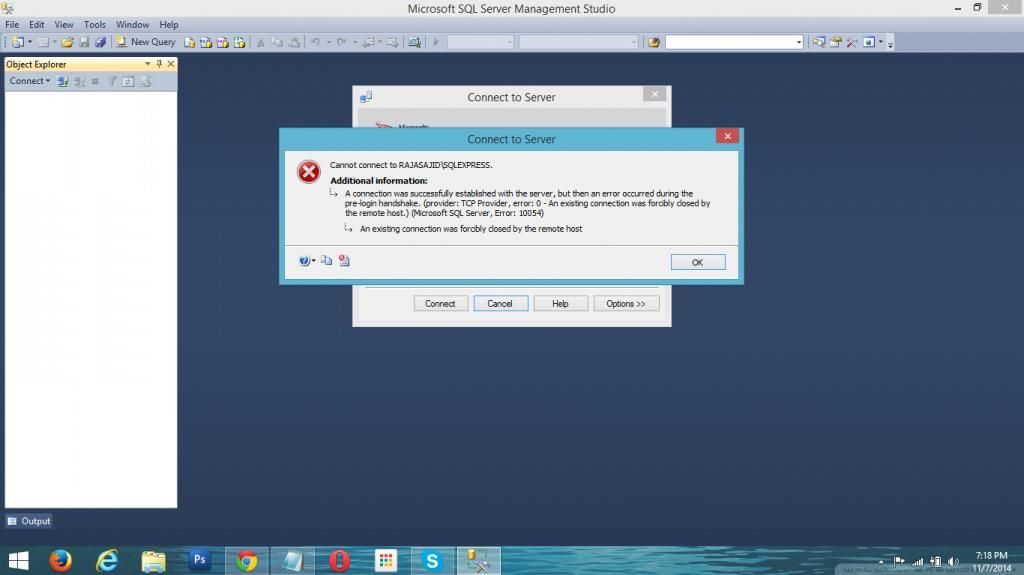
Cannot connect to RAJASAJIDSQLEXPRESS.
Hello
I am using SQL server management studio 2012. previously it was working fine but it is not working. When i connect server it shows following error
Sajid Manzoor
-
Moved by
Olaf HelperMVP
Friday, November 28, 2014 6:10 PM
Moved from «Database Engine» to a more related forum
-
Moved by
All replies
-
-
Edited by
Shanky_621MVP
Friday, November 7, 2014 2:39 PM
-
Edited by
-
hello
Please see attached file for sql config. i think every thing is fine there
Please suggest any solutions.
Sajid Manzoor
-
Ok fine please read the blogs shared you will find solution
Please mark this reply as answer if it solved your issue or vote as helpful if it helped so that other forum members can benefit from it
My Technet Wiki Article
MVP
-
Hello
I checked those blogs. They are also not useful. they are just a garbage. I have already created SynAttackProtect setting in Registery but that also not helped..
see below image
Sajid Manzoor
-
Hello
Here are my latest SQL error logs
2014-10-31 01:03:25.34 Server      Microsoft SQL Server 2012 - 11.0.2100.60 (X64)
	Feb 10 2012 19:39:15
	Copyright (c) Microsoft Corporation
	Express Edition (64-bit) on Windows NT 6.2 <X64> (Build 9200: )

2014-10-31 01:03:25.40 Server      (c) Microsoft Corporation.
2014-10-31 01:03:25.40 Server      All rights reserved.
2014-10-31 01:03:25.40 Server      Server process ID is 2052.
2014-10-31 01:03:25.43 Server      System Manufacturer: 'Dell Inc.', System Model: 'Inspiron N5110'.
2014-10-31 01:03:25.43 Server      Authentication mode is WINDOWS-ONLY.
2014-10-31 01:03:25.43 Server      Logging SQL Server messages in file 'c:Program FilesMicrosoft SQL ServerMSSQL10_50.SQLEXPRESSMSSQLLogERRORLOG'.
2014-10-31 01:03:25.43 Server      The service account is 'WORKGROUPRAJASAJID$'. This is an informational message; no user action is required.
2014-10-31 01:03:25.43 Server      Registry startup parameters:
	 -d c:Program FilesMicrosoft SQL ServerMSSQL10_50.SQLEXPRESSMSSQLDATAmaster.mdf
	 -e c:Program FilesMicrosoft SQL ServerMSSQL10_50.SQLEXPRESSMSSQLLogERRORLOG
	 -l c:Program FilesMicrosoft SQL ServerMSSQL10_50.SQLEXPRESSMSSQLDATAmastlog.ldf
2014-10-31 01:03:25.43 Server      Command Line Startup Parameters:
	 -s "SQLEXPRESS"
2014-10-31 01:03:27.36 Server      SQL Server detected 1 sockets with 2 cores per socket and 4 logical processors per socket, 4 total logical processors; using 4 logical processors based on SQL Server licensing. This is an informational message; no user action is required.
2014-10-31 01:03:27.36 Server      SQL Server is starting at normal priority base (=7). This is an informational message only. No user action is required.
2014-10-31 01:03:27.36 Server      Detected 8098 MB of RAM. This is an informational message; no user action is required.
2014-10-31 01:03:27.41 Server      Using conventional memory in the memory manager.
2014-10-31 01:03:32.56 Server      This instance of SQL Server last reported using a process ID of 1968 at 10/31/2014 1:01:10 AM (local) 10/30/2014 8:01:10 PM (UTC). This is an informational message only; no user action is required.
2014-10-31 01:03:32.59 Server      Node configuration: node 0: CPU mask: 0x000000000000000f:0 Active CPU mask: 0x000000000000000f:0. This message provides a description of the NUMA configuration for this computer. This is an informational message only. No user action is required.
2014-10-31 01:03:32.59 Server      Using dynamic lock allocation.  Initial allocation of 2500 Lock blocks and 5000 Lock Owner blocks per node.  This is an informational message only.  No user action is required.
2014-10-31 01:03:32.62 Server      Software Usage Metrics is disabled.
2014-10-31 01:03:32.82 spid4s      Starting up database 'master'.
2014-10-31 01:03:33.74 Server      CLR version v4.0.30319 loaded.
2014-10-31 01:03:34.73 spid4s      SQL Server Audit is starting the audits. This is an informational message. No user action is required.
2014-10-31 01:03:34.75 spid4s      SQL Server Audit has started the audits. This is an informational message. No user action is required.
2014-10-31 01:03:36.78 spid4s      SQL Trace ID 1 was started by login "sa".
2014-10-31 01:03:37.27 spid4s      Server name is 'RAJASAJIDSQLEXPRESS'. This is an informational message only. No user action is required.
2014-10-31 01:03:38.09 spid12s     A self-generated certificate was successfully loaded for encryption.
2014-10-31 01:03:38.13 spid4s      Failed to verify Authenticode signature on DLL 'c:Program FilesMicrosoft SQL ServerMSSQL11.SQLEXPRESSMSSQLBinnftimport.dll'.
2014-10-31 01:03:38.23 spid4s      Starting up database 'msdb'.
2014-10-31 01:03:38.23 spid9s      Starting up database 'mssqlsystemresource'.
2014-10-31 01:03:38.32 spid12s     Server is listening on [ 'any' <ipv6> 49159].
2014-10-31 01:03:38.32 spid12s     Server is listening on [ 'any' <ipv4> 49159].
2014-10-31 01:03:38.32 spid12s     Server local connection provider is ready to accept connection on [ \.pipeSQLLocalSQLEXPRESS ].
2014-10-31 01:03:38.32 spid12s     Server named pipe provider is ready to accept connection on [ \.pipeMSSQL$SQLEXPRESSsqlquery ].
2014-10-31 01:03:38.33 spid12s     Dedicated administrator connection support was not started because it is disabled on this edition of SQL Server. If you want to use a dedicated administrator connection, restart SQL Server using the trace flag 7806. This is an informational message only. No user action is required.
2014-10-31 01:03:38.38 spid9s      The resource database build version is 11.00.2100. This is an informational message only. No user action is required.
2014-10-31 01:03:38.46 spid12s     SQL Server is now ready for client connections. This is an informational message; no user action is required.
2014-10-31 01:03:38.46 Server      SQL Server is attempting to register a Service Principal Name (SPN) for the SQL Server service. Kerberos authentication will not be possible until a SPN is registered for the SQL Server service. This is an informational message. No user action is required.
2014-10-31 01:03:38.46 Server      The SQL Server Network Interface library could not register the Service Principal Name (SPN) [ MSSQLSvc/RajaSajid:SQLEXPRESS ] for the SQL Server service. Windows return code: 0xffffffff, state: 53. Failure to register a SPN might cause integrated authentication to use NTLM instead of Kerberos. This is an informational message. Further action is only required if Kerberos authentication is required by authentication policies and if the SPN has not been manually registered.
2014-10-31 01:03:38.46 Server      The SQL Server Network Interface library could not register the Service Principal Name (SPN) [ MSSQLSvc/RajaSajid:49159 ] for the SQL Server service. Windows return code: 0xffffffff, state: 53. Failure to register a SPN might cause integrated authentication to use NTLM instead of Kerberos. This is an informational message. Further action is only required if Kerberos authentication is required by authentication policies and if the SPN has not been manually registered.
2014-10-31 01:03:40.28 spid9s      Starting up database 'model'.
2014-10-31 01:03:40.89 spid9s      Clearing tempdb database.
2014-10-31 01:03:42.13 spid9s      Starting up database 'tempdb'.
2014-10-31 01:03:42.57 spid15s     The Service Broker endpoint is in disabled or stopped state.
2014-10-31 01:03:42.59 spid15s     The Database Mirroring endpoint is in disabled or stopped state.
2014-10-31 01:03:43.11 spid15s     Service Broker manager has started.
2014-10-31 01:03:43.11 spid4s      Recovery is complete. This is an informational message only. No user action is required.
2014-10-31 01:03:43.53 Server      Common language runtime (CLR) functionality initialized using CLR version v4.0.30319 from C:WindowsMicrosoft.NETFramework64v4.0.30319.
2014-10-31 01:04:36.98 spid51      Starting up database 'VehicleRecrodTracking'.
2014-10-31 01:04:41.35 spid51      Starting up database 'ResponsiveDemo'.
2014-10-31 01:04:43.17 spid51      Starting up database 'WareHouseInventory'.
2014-10-31 01:04:54.68 spid51      Starting up database 'WareHouseInventory'.
2014-10-31 01:05:00.89 spid51      Starting up database 'WareHouseInventory'.
2014-10-31 01:05:04.77 spid51      Starting up database 'WareHouseInventory'.
2014-10-31 01:05:10.90 spid51      Starting up database 'WareHouseInventory'.
2014-10-31 01:05:15.48 spid51      Starting up database 'WareHouseInventory'.
2014-10-31 01:05:21.75 spid51      Starting up database 'WareHouseInventory'.
2014-10-31 01:05:26.21 spid51      Starting up database 'WareHouseInventory'.
2014-10-31 01:05:30.70 spid51      Starting up database 'WareHouseInventory'.
2014-10-31 01:05:36.17 spid51      Starting up database 'WareHouseInventory'.
2014-10-31 01:05:41.18 spid51      Starting up database 'WareHouseInventory'.
2014-10-31 01:05:43.40 spid51      Starting up database 'WareHouseInventory'.
2014-10-31 01:05:47.82 spid51      Starting up database 'WareHouseInventory'.
2014-10-31 01:05:53.76 spid51      Starting up database 'WareHouseInventory'.
2014-10-31 01:05:56.58 spid51      Starting up database 'WareHouseInventory'.
2014-10-31 01:06:00.61 spid51      Starting up database 'WareHouseInventory'.
2014-10-31 01:06:04.03 spid51      Starting up database 'WareHouseInventory'.
2014-10-31 01:06:08.18 spid51      Starting up database 'WareHouseInventory'.
2014-10-31 01:06:12.45 spid51      Starting up database 'WareHouseInventory'.
2014-10-31 01:06:18.11 spid51      Starting up database 'WareHouseInventory'.
2014-10-31 01:06:25.16 spid51      Starting up database 'WareHouseInventory'.
2014-10-31 01:06:32.78 spid51      Starting up database 'WareHouseInventory'.
2014-10-31 01:06:36.87 spid51      Starting up database 'WareHouseInventory'.
2014-10-31 01:06:41.86 spid51      Starting up database 'WareHouseInventory'.
2014-10-31 01:06:43.46 spid51      Recovery completed for database WareHouseInventory (database ID 7) in 1 second(s) (analysis 518 ms, redo 0 ms, undo 303 ms.) This is an informational message only. No user action is required.
2014-10-31 01:06:45.38 spid51      Starting up database 'WareHouseInventory'.
2014-10-31 01:06:50.38 spid51      Starting up database 'WareHouseInventory'.
2014-10-31 01:06:53.21 spid51      Recovery completed for database WareHouseInventory (database ID 7) in 2 second(s) (analysis 381 ms, redo 0 ms, undo 1215 ms.) This is an informational message only. No user action is required.
2014-10-31 01:06:58.09 spid51      Starting up database 'WareHouseInventory'.
2014-10-31 01:07:07.76 spid51      Starting up database 'WareHouseInventory'.
2014-10-31 01:07:15.81 spid51      Attempting to load library 'xpstar.dll' into memory. This is an informational message only. No user action is required.
2014-10-31 01:07:16.28 spid51      Using 'xpstar.dll' version '2011.110.2100' to execute extended stored procedure 'xp_enum_oledb_providers'. This is an informational message only; no user action is required.
2014-10-31 01:07:19.29 spid51      Starting up database 'WareHouseInventory'.
2014-10-31 01:07:25.33 spid51      Starting up database 'WareHouseInventory'.
2014-10-31 01:07:30.53 spid51      Starting up database 'WareHouseInventory'.
2014-10-31 01:07:34.16 spid51      Starting up database 'WareHouseInventory'.
2014-10-31 01:07:38.06 spid51      Starting up database 'WareHouseInventory'.
2014-10-31 01:07:41.20 spid51      Starting up database 'WareHouseInventory'.
2014-10-31 01:07:43.22 spid51      Starting up database 'WareHouseInventory'.
2014-10-31 01:07:45.77 spid51      Starting up database 'WareHouseInventory'.
2014-10-31 01:07:47.51 spid51      Starting up database 'WareHouseInventory'.
2014-10-31 01:07:49.47 spid51      Starting up database 'WareHouseInventory'.
2014-10-31 01:07:50.76 spid51      Starting up database 'WareHouseInventory'.
2014-10-31 01:07:52.62 spid51      Starting up database 'WareHouseInventory'.
2014-10-31 01:07:55.10 spid51      Starting up database 'WareHouseInventory'.
2014-10-31 01:07:58.24 spid51      Starting up database 'WareHouseInventory'.
2014-10-31 01:08:02.98 spid51      Starting up database 'WareHouseInventory'.
2014-10-31 01:08:05.09 spid51      Starting up database 'WareHouseInventory'.
2014-10-31 01:08:08.55 spid51      Starting up database 'WareHouseInventory'.
2014-10-31 01:08:11.32 spid51      Starting up database 'WareHouseInventory'.
2014-10-31 01:08:15.39 spid51      Starting up database 'WareHouseInventory'.
2014-10-31 01:08:18.38 spid51      Starting up database 'WareHouseInventory'.
2014-10-31 01:08:20.59 spid51      Starting up database 'WareHouseInventory'.
2014-10-31 01:08:23.07 spid51      Starting up database 'WareHouseInventory'.
2014-10-31 01:08:24.99 spid51      Starting up database 'WareHouseInventory'.
2014-10-31 01:08:27.15 spid51      Starting up database 'WareHouseInventory'.
2014-11-02 13:43:01.35 spid5s      Server resumed execution after being idle 216433 seconds. Reason: timer event.
2014-11-04 15:16:13.45 spid51      Starting up database 'WareHouseInventory'.
2014-11-04 15:16:18.07 spid51      Starting up database 'WareHouseInventory'.
2014-11-04 15:16:20.01 spid51      Starting up database 'WareHouseInventory'.
2014-11-04 15:16:38.86 spid52      Starting up database 'WareHouseInventory'.
2014-11-04 23:12:35.53 spid51      Starting up database 'WareHouseInventory'.
2014-11-04 23:23:46.13 spid54      Starting up database 'WareHouseInventory'.
2014-11-04 23:23:47.83 spid54      Starting up database 'WareHouseInventory'.
2014-11-04 23:24:10.20 spid53      Starting up database 'WareHouseInventory'.
2014-11-04 23:46:36.89 Logon       Error: 18456, Severity: 14, State: 38.
2014-11-04 23:46:36.89 Logon       Login failed for user 'RajaSajidRaja Sajid'. Reason: Failed to open the explicitly specified database 'dbAccounts'. [CLIENT: <local machine>]
2014-11-04 23:49:36.39 spid51      Starting up database 'dbAccounts'.
2014-11-04 23:49:36.75 spid51      The tail of the log for database dbAccounts is being rewritten to match the new sector size of 4096 bytes.  3072 bytes at offset 459776 in file C:Program FilesMicrosoft SQL ServerMSSQL10_50.SQLEXPRESSMSSQLDATAdbAccounts_log.ldf will be written.
2014-11-04 23:50:16.20 spid51      Starting up database 'dbAccounts'.
2014-11-04 23:55:49.52 spid51      Starting up database 'dbAccounts'.
2014-11-04 23:55:57.66 spid51      Starting up database 'dbAccounts'.
2014-11-05 00:40:02.20 Server      Server resumed execution after being idle 613 seconds: user activity awakened the server. This is an informational message only. No user action is required.
2014-11-06 02:21:57.32 Server      SQL Server is terminating because of a system shutdown. This is an informational message only. No user action is required.
2014-11-06 02:22:07.62 spid4s      Server resumed execution after being idle 51795 seconds: user activity awakened the server. This is an informational message only. No user action is required.
2014-11-06 02:22:08.54 spid4s      Error: 17054, Severity: 16, State: 1.
2014-11-06 02:22:08.54 spid4s      The current event was not reported to the Windows Events log. Operating system error = (null). You may need to clear the Windows Events log if it is full.
2014-11-06 02:22:38.33 spid15s     Service Broker manager has shut down.
2014-11-06 02:22:48.94 spid4s      .NET Framework runtime has been stopped.
Please check and help me.
thanks
Sajid Manzoor
-
Hi SajiD,
According to your SQL Server error log, the issue could be due to the failure of registering a Service Principal Name (SPN) for the SQL Server service.
SQL Server always attempts to create an SPN for the instance upon startup. Unless the service account is specifically given the Read and Write ServicePrincipalName permissions, this will fail. Besides, other causes could be duplicated SPNs, or dynamic ports.
I recommend you to follow methods below to troubleshoot the issue.
Firstly, you could check if SPN is registered by SETSPN tool. If not, please give the service account permissions to read and write the SPN and register a SPN by running SETSPN with the -S option.
Secondly, to find if there are any duplicated SPN, you could check through “setspn –X”. If so, you could delete all of the duplicated SPN and recreate it.
Moreover, it is possible to bind SPN to instance when using dynamic ports. So I recommend you to use specific ports.
For more information about the process, please refer to the article:
http://www.seangallardy.com/2014/05/using-kerberos-with-sql-server-part-1-double-hop/
Regards,
Michelle Li-
Marked as answer by
Lydia ZhangMicrosoft contingent staff
Wednesday, November 19, 2014 1:30 AM -
Unmarked as answer by
SajiD designer
Friday, November 28, 2014 7:42 PM
-
Marked as answer by
-
-
Marked as answer by
Olaf HelperMVP
Friday, November 28, 2014 6:10 PM -
Unmarked as answer by
SajiD designer
Friday, November 28, 2014 7:42 PM
-
Marked as answer by
- Remove From My Forums
-
Question
-
All,
situation:
SSMS 2012 client — SS 2008R2 server
I can connect successfully to the database server using management studio but when I try to, for example, ask properties of a user database, I get the error below.
Some facts:
* connecting with SSMS on the server itself is no problem
* connecting to another SS2008 server is no problem
* no connection limits is set on the serverAny ideas?
Error message:
TITLE: Microsoft SQL Server Management Studio
——————————A connection was successfully established with the server, but then an error occurred during the login process. (provider: TCP Provider, error: 0 — An existing connection was forcibly closed by the remote host.) (Microsoft SQL Server, Error: 10054)
For help, click:
http://go.microsoft.com/fwlink?ProdName=Microsoft%20SQL%20Server&EvtSrc=MSSQLServer&EvtID=10054&LinkId=20476
Answers
-
Hi PVKERC,
First please try to make sure the username and password is correct. if you use the SQL Server authentication, then please make sure that it is enabled.
After that, because you can connect to the SQL Server, but failed with the logon, As the error:10054 says: An existing connection was forcibly closed by the remote host. Then I think we should try to fix the connection.
Please try to use the following method to fix the error:
Use the regedit.exe utility to add a new DWORD value named SynAttackProtect to the registry key:
HKEY_LOCAL_MACHINESYSTEMCurrentControlSetServicesTcpipParameters with value data of 00000000.Please pay attention to that setting this registry key may expose the server to a SYN flood, denial-of-service attack. Add this registry value only if necessary and with an understanding of the security risks. Remove this registry value when testing is complete.
Please refer to :
how to fix the error 10054:
http://msdn.microsoft.com/en-us/library/ms187005(SQL.105).aspx .Regards,
Amy Peng
Amy Peng
TechNet Community Support

-
Edited by
Tuesday, September 25, 2012 1:01 AM
-
Marked as answer by
Maggie Luo
Tuesday, September 25, 2012 2:22 AM
-
Edited by
-
Hello ,
Check if you see 17832 error in SQL Server errorlog.
#. Open Registry Editor (In the Sql Database Server) and add the following Key:
HKEY_LOCAL_MACHINESYSTEMControlSet001ControlLsaKerberosParametersMaxTokenSize
Type: REG_DWORD
Value (Decimal): 100000When connecting to the SQL servers using a domain account that is a member of a lot of groups (everyone on my team is) the server is running out of buffers to process the amount of security the token is passing is causing it to be «structurally invalid»
as we discovered in the SQL logs.Refer http://support.microsoft.com/kb/262177
Thank you,
Karthick P.K |My Facebook Page |My
Site| Blog space|
Twitterwww.mssqlwiki.com
-
Marked as answer by
Maggie Luo
Tuesday, September 25, 2012 2:22 AM
-
Marked as answer by
