
In this article, we are going to see how to replace the value in a List using Python. We can replace values in the list in serval ways. Below are the methods to replace values in the list.
- Using list indexing
- Using for loop
- Using while loop
- Using lambda function
- Using list slicing
Method 1: Using List Indexing
We can access items of the list using indexing. This is the simplest and easiest method to replace values in a list in python. If we want to replace the first item of the list we can di using index 0. Here below, the index is an index of the item that we want to replace and the new_value is a value that should replace the old value in the list.
Syntax: l[index]=new_value
Code:
Python3
l = [ 'Hardik','Rohit', 'Rahul', 'Virat', 'Pant']
l[0] = 'Shardul'
print(l)
Output:
['Shardul', 'Rohit', 'Rahul', 'Virat', 'Pant']
Method 2: Using For Loop
We can use for loop to iterate over the list and replace values in the list. Suppose we want to replace ‘Hardik’ and ‘Pant’ from the list with ‘Shardul’ and ‘Ishan’. We first find values in the list using for loop and if condition and then replace it with the new value.
Python3
l = ['Hardik', 'Rohit', 'Rahul', 'Virat', 'Pant']
for i in range(len(l)):
if l[i] == 'Hardik':
l[i] = 'Shardul'
if l[i] == 'Pant':
l[i] = 'Ishan'
print(l)
Output:
['Shardul', 'Rohit', 'Rahul', 'Virat', 'Ishan']
Method 3: Using While Loop
We can also use a while loop to replace values in the list. While loop does the same work as for loop. In the while loop first, we define a variable with value 0 and iterate over the list. If value matches to value that we want to replace then we replace it with the new value.
Python3
l = ['Hardik', 'Rohit', 'Rahul', 'Virat', 'Pant']
i = 0
while i < len(l):
if l[i] == 'Hardik':
l[i] = 'Shardul'
if l[i] == 'Pant':
l[i] = 'Ishan'
i += 1
print(l)
Output:
['Shardul', 'Rohit', 'Rahul', 'Virat', 'Ishan']
Method 4: Using Lambda Function
In this method, we use lambda and map function to replace the value in the list. map() is a built-in function in python to iterate over a list without using any loop statement. A lambda is an anonymous function in python that contains a single line expression. Here we gave one expression as a condition to replace value. Here we replace ‘Pant’ with ‘Ishan’ in the lambda function. Then using the list() function we convert the map object into the list.
Syntax: l=list(map(lambda x: x.replace(‘old_value’,’new_value’),l))
Python3
l = ['Hardik', 'Rohit', 'Rahul', 'Virat', 'Pant']
l = list(map(lambda x: x.replace('Pant', 'Ishan'), l))
print(l)
Output:
['Hardik', 'Rohit', 'Rahul', 'Virat', 'Ishan']
Method 5: Using List Slicing
Python allows us to do slicing inside a list. Slicing enables us to access some parts of the list. We can replace values inside the list using slicing. First, we find the index of variable that we want to replace and store it in variable ‘i’. Then, we replace that item with a new value using list slicing. Suppose we want to replace ‘Rahul’ with ‘Shikhar’ than we first find the index of ‘Rahul’ and then do list slicing and remove ‘Rahul’ and add ‘Shikhar’ in that place.
Syntax: l=l[:index]+[‘new_value’]+l[index+1:]
Python3
l = ['Hardik', 'Rohit', 'Rahul', 'Virat', 'Pant']
i = l.index('Rahul')
l = l[:i]+['Shikhar']+l[i+1:]
print(l)
Output:
['Hardik', 'Rohit', 'Shikhar', 'Virat', 'Pant']
In this article, we are going to see how to replace the value in a List using Python. We can replace values in the list in serval ways. Below are the methods to replace values in the list.
- Using list indexing
- Using for loop
- Using while loop
- Using lambda function
- Using list slicing
Method 1: Using List Indexing
We can access items of the list using indexing. This is the simplest and easiest method to replace values in a list in python. If we want to replace the first item of the list we can di using index 0. Here below, the index is an index of the item that we want to replace and the new_value is a value that should replace the old value in the list.
Syntax: l[index]=new_value
Code:
Python3
l = [ 'Hardik','Rohit', 'Rahul', 'Virat', 'Pant']
l[0] = 'Shardul'
print(l)
Output:
['Shardul', 'Rohit', 'Rahul', 'Virat', 'Pant']
Method 2: Using For Loop
We can use for loop to iterate over the list and replace values in the list. Suppose we want to replace ‘Hardik’ and ‘Pant’ from the list with ‘Shardul’ and ‘Ishan’. We first find values in the list using for loop and if condition and then replace it with the new value.
Python3
l = ['Hardik', 'Rohit', 'Rahul', 'Virat', 'Pant']
for i in range(len(l)):
if l[i] == 'Hardik':
l[i] = 'Shardul'
if l[i] == 'Pant':
l[i] = 'Ishan'
print(l)
Output:
['Shardul', 'Rohit', 'Rahul', 'Virat', 'Ishan']
Method 3: Using While Loop
We can also use a while loop to replace values in the list. While loop does the same work as for loop. In the while loop first, we define a variable with value 0 and iterate over the list. If value matches to value that we want to replace then we replace it with the new value.
Python3
l = ['Hardik', 'Rohit', 'Rahul', 'Virat', 'Pant']
i = 0
while i < len(l):
if l[i] == 'Hardik':
l[i] = 'Shardul'
if l[i] == 'Pant':
l[i] = 'Ishan'
i += 1
print(l)
Output:
['Shardul', 'Rohit', 'Rahul', 'Virat', 'Ishan']
Method 4: Using Lambda Function
In this method, we use lambda and map function to replace the value in the list. map() is a built-in function in python to iterate over a list without using any loop statement. A lambda is an anonymous function in python that contains a single line expression. Here we gave one expression as a condition to replace value. Here we replace ‘Pant’ with ‘Ishan’ in the lambda function. Then using the list() function we convert the map object into the list.
Syntax: l=list(map(lambda x: x.replace(‘old_value’,’new_value’),l))
Python3
l = ['Hardik', 'Rohit', 'Rahul', 'Virat', 'Pant']
l = list(map(lambda x: x.replace('Pant', 'Ishan'), l))
print(l)
Output:
['Hardik', 'Rohit', 'Rahul', 'Virat', 'Ishan']
Method 5: Using List Slicing
Python allows us to do slicing inside a list. Slicing enables us to access some parts of the list. We can replace values inside the list using slicing. First, we find the index of variable that we want to replace and store it in variable ‘i’. Then, we replace that item with a new value using list slicing. Suppose we want to replace ‘Rahul’ with ‘Shikhar’ than we first find the index of ‘Rahul’ and then do list slicing and remove ‘Rahul’ and add ‘Shikhar’ in that place.
Syntax: l=l[:index]+[‘new_value’]+l[index+1:]
Python3
l = ['Hardik', 'Rohit', 'Rahul', 'Virat', 'Pant']
i = l.index('Rahul')
l = l[:i]+['Shikhar']+l[i+1:]
print(l)
Output:
['Hardik', 'Rohit', 'Shikhar', 'Virat', 'Pant']
The answers for this old but relevant question are wildly variable in speed.
The fastest of the solution posted by kxr.
However, this is even faster and otherwise not here:
def f1(arr, find, replace):
    # fast and readable
    base=0
    for cnt in range(arr.count(find)):
        offset=arr.index(find, base)
        arr[offset]=replace
        base=offset+1
Here is timing for the various solutions. The faster ones are 3X faster than accepted answer and 5X faster than the slowest answer here.
To be fair, all methods needed to do inlace replacement of the array sent to the function.
Please see timing code below:
def f1(arr, find, replace):
    # fast and readable
    base=0
    for cnt in range(arr.count(find)):
        offset=arr.index(find, base)
        arr[offset]=replace
        base=offset+1

def f2(arr,find,replace):
    # accepted answer
    for i,e in enumerate(arr):
        if e==find:
            arr[i]=replace

def f3(arr,find,replace):
    # in place list comprehension
    arr[:]=[replace if e==find else e for e in arr]

def f4(arr,find,replace):
    # in place map and lambda -- SLOW
    arr[:]=list(map(lambda x: x if x != find else replace, arr))

def f5(arr,find,replace):
    # find index with comprehension
    for i in [i for i, e in enumerate(arr) if e==find]:
        arr[i]=replace

def f6(arr,find,replace):
    # FASTEST but a little les clear
    try:
        while True:
            arr[arr.index(find)]=replace
    except ValueError:
        pass

def f7(lst, old, new):
    """replace list elements (inplace)"""
    i = -1
    try:
        while 1:
            i = lst.index(old, i + 1)
            lst[i] = new
    except ValueError:
        pass


import time

def cmpthese(funcs, args=(), cnt=1000, rate=True, micro=True):
    """Generate a Perl style function benchmark"""
    def pprint_table(table):
        """Perl style table output"""
        def format_field(field, fmt='{:,.0f}'):
            if type(field) is str: return field
            if type(field) is tuple: return field[1].format(field[0])
            return fmt.format(field)

        def get_max_col_w(table, index):
            return max([len(format_field(row[index])) for row in table])

        col_paddings=[get_max_col_w(table, i) for i in range(len(table[0]))]
        for i,row in enumerate(table):
            # left col
            row_tab=[row[0].ljust(col_paddings[0])]
            # rest of the cols
            row_tab+=[format_field(row[j]).rjust(col_paddings[j]) for j in range(1,len(row))]
            print(' '.join(row_tab))

    results={}
    for i in range(cnt):
        for f in funcs:
            start=time.perf_counter_ns()
            f(*args)
            stop=time.perf_counter_ns()
            results.setdefault(f.__name__, []).append(stop-start)
    results={k:float(sum(v))/len(v) for k,v in results.items()}
    fastest=sorted(results,key=results.get, reverse=True)
    table=[['']]
    if rate: table[0].append('rate/sec')
    if micro: table[0].append('u03bcsec/pass')
    table[0].extend(fastest)
    for e in fastest:
        tmp=[e]
        if rate:
            tmp.append('{:,}'.format(int(round(float(cnt)*1000000.0/results[e]))))

        if micro:
            tmp.append('{:,.1f}'.format(results[e]/float(cnt)))

        for x in fastest:
            if x==e: tmp.append('--')
            else: tmp.append('{:.1%}'.format((results[x]-results[e])/results[e]))
        table.append(tmp)

    pprint_table(table)


if __name__=='__main__':
    import sys
    import time
    print(sys.version)
    cases=(
        ('small, found', 9, 100),
        ('small, not found', 99, 100),
        ('large, found', 9, 1000),
        ('large, not found', 99, 1000)
    )
    for txt, tgt, mul in cases:
        print(f'n{txt}:')
        arr=[1,2,3,4,5,6,7,8,9,0]*mul
        args=(arr,tgt,'X')
        cmpthese([f1,f2,f3, f4, f5, f6, f7],args)
And the results:
3.9.1 (default, Feb  3 2021, 07:38:02)
[Clang 12.0.0 (clang-1200.0.32.29)]

small, found:
   rate/sec μsec/pass     f4     f3     f5     f2     f6     f7     f1
f4  133,982       7.5     -- -38.8% -49.0% -52.5% -78.5% -78.6% -82.9%
f3  219,090       4.6  63.5%     -- -16.6% -22.4% -64.8% -65.0% -72.0%
f5  262,801       3.8  96.1%  20.0%     --  -6.9% -57.8% -58.0% -66.4%
f2  282,259       3.5 110.7%  28.8%   7.4%     -- -54.6% -54.9% -63.9%
f6  622,122       1.6 364.3% 184.0% 136.7% 120.4%     --  -0.7% -20.5%
f7  626,367       1.6 367.5% 185.9% 138.3% 121.9%   0.7%     -- -19.9%
f1  782,307       1.3 483.9% 257.1% 197.7% 177.2%  25.7%  24.9%     --

small, not found:
   rate/sec μsec/pass     f4     f5     f2     f3     f6     f7     f1
f4   13,846      72.2     -- -40.3% -41.4% -47.8% -85.2% -85.4% -86.2%
f5   23,186      43.1  67.5%     --  -1.9% -12.5% -75.2% -75.5% -76.9%
f2   23,646      42.3  70.8%   2.0%     -- -10.8% -74.8% -75.0% -76.4%
f3   26,512      37.7  91.5%  14.3%  12.1%     -- -71.7% -72.0% -73.5%
f6   93,656      10.7 576.4% 303.9% 296.1% 253.3%     --  -1.0%  -6.5%
f7   94,594      10.6 583.2% 308.0% 300.0% 256.8%   1.0%     --  -5.6%
f1  100,206      10.0 623.7% 332.2% 323.8% 278.0%   7.0%   5.9%     --

large, found:
   rate/sec μsec/pass     f4     f2     f5     f3     f6     f7     f1
f4      145   6,889.4     -- -33.3% -34.8% -48.6% -85.3% -85.4% -85.8%
f2      218   4,593.5  50.0%     --  -2.2% -22.8% -78.0% -78.1% -78.6%
f5      223   4,492.4  53.4%   2.3%     -- -21.1% -77.5% -77.6% -78.2%
f3      282   3,544.0  94.4%  29.6%  26.8%     -- -71.5% -71.6% -72.3%
f6      991   1,009.5 582.4% 355.0% 345.0% 251.1%     --  -0.4%  -2.8%
f7      995   1,005.4 585.2% 356.9% 346.8% 252.5%   0.4%     --  -2.4%
f1    1,019     981.3 602.1% 368.1% 357.8% 261.2%   2.9%   2.5%     --

large, not found:
   rate/sec μsec/pass     f4     f5     f2     f3     f6     f7     f1
f4      147   6,812.0     -- -35.0% -36.4% -48.9% -85.7% -85.8% -86.1%
f5      226   4,424.8  54.0%     --  -2.0% -21.3% -78.0% -78.1% -78.6%
f2      231   4,334.9  57.1%   2.1%     -- -19.6% -77.6% -77.7% -78.2%
f3      287   3,484.0  95.5%  27.0%  24.4%     -- -72.1% -72.2% -72.8%
f6    1,028     972.3 600.6% 355.1% 345.8% 258.3%     --  -0.4%  -2.7%
f7    1,033     968.2 603.6% 357.0% 347.7% 259.8%   0.4%     --  -2.3%
f1    1,057     946.2 619.9% 367.6% 358.1% 268.2%   2.8%   2.3%     --
In this tutorial, you’ll learn how to use Python to replace an item or items in a list. You’l learn how to replace an item at a particular index, how to replace a particular value, how to replace multiple values, and how to replace multiple values with multiple values.
Being able to work with lists is an important skill for any Python developer, given how prevalent and understandable these Python data structures are.
By the end of this tutorial, you’ll have learned:
- How to use list assignment to replace an item in a Python list
- How to use for loops and while loops to replace an item in a Python list
- How to replace multiple items in a list
Replace an Item in a Python List at a Particular Index
Python lists are ordered, meaning that we can access (and modify) items when we know their index position. Python list indices start at 0 and go all the way to the length of the list minus 1.
You can also access items from their negative index. The negative index begins at -1 for the last item and goes from there. To learn more about Python list indexing, check out my in-depth overview here.
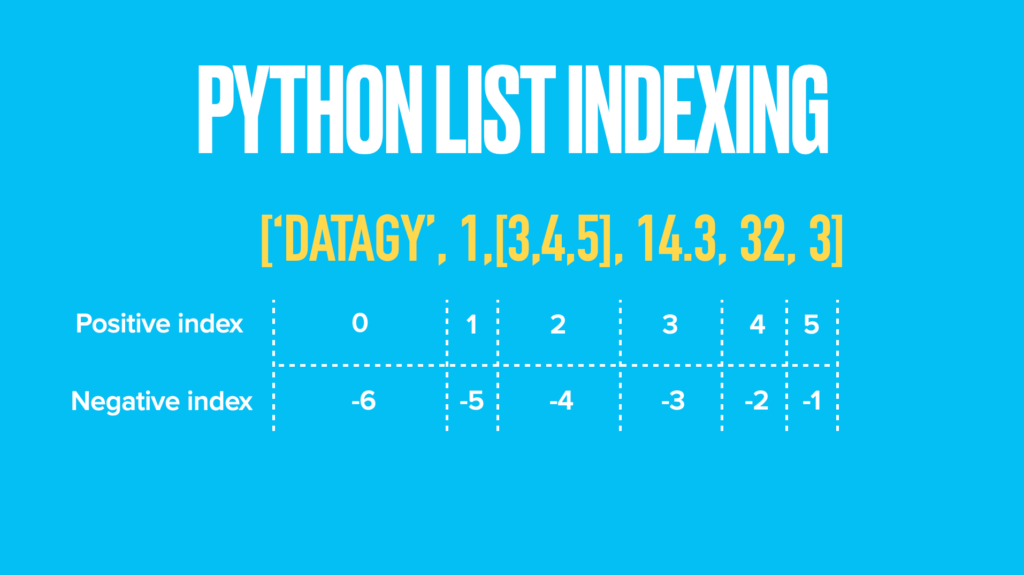
If we want to replace a list item at a particular index, we can simply directly assign new values to those indices.
Let’s take a look at what that looks like:
# Replace an item at a particular index in a Python list
a_list = [1, 2, 3, 4, 5, 6, 7, 8, 9]

# Mofidy first item
a_list[0] = 10
print(a_list)
# Returns: [10, 2, 3, 4, 5, 6, 7, 8, 9]

# Modify last item
a_list[-1] = 99
print(a_list)
# Returns: [10, 2, 3, 4, 5, 6, 7, 8, 99]
In the next section, you’ll learn how to replace a particular value in a Python list using a for loop.
Want to learn how to use the Python zip() function to iterate over two lists? This tutorial teaches you exactly what the zip() function does and shows you some creative ways to use the function.
Replace a Particular Value in a List in Python Using a For Loop
Python lists allow us to easily also modify particular values. One way that we can do this is by using a for loop.
One of the key attributes of Python lists is that they can contain duplicate values. Because of this, we can loop over each item in the list and check its value. If the value is one we want to replace, then we replace it.
Let’s see what this looks like. In our list, the word apple is misspelled. We want to replace the misspelled version with the corrected version.
# Replace a particular item in a Python list
a_list = ['aple', 'orange', 'aple', 'banana', 'grape', 'aple']

for i in range(len(a_list)):
    if a_list[i] == 'aple':
        a_list[i] = 'apple'

print(a_list)

# Returns: ['apple', 'orange', 'apple', 'banana', 'grape', 'apple']
Let’s take a look at what we’ve done here:
- We loop over each index in the list
- If the index position of the list is equal to the item we want to replace, we re-assign its value
In the next section, you’ll learn how to turn this for loop into a Python list comprehension.
Want to learn more about Python for-loops? Check out my in-depth tutorial that takes your from beginner to advanced for-loops user! Want to watch a video instead? Check out my YouTube tutorial here.
Replace a Particular Value in a List in Python Using a List Comprehension
One of the key attributes of Python list comprehensions is that we can often turn for loops into much shorter comprehensions. Let’s see how we can use a list comprehension in Python to replace an item in a list.
We’ll use the same example we used in the for loop, to help demonstrate how elegant a Python list comprehension can be:
# Replace a particular item in a Python list using a list comprehension
a_list = ['aple', 'orange', 'aple', 'banana', 'grape', 'aple']

a_list = ['apple' if item == 'aple' else item for item in a_list]
print(a_list)

# Returns: ['apple', 'orange', 'apple', 'banana', 'grape', 'apple']
We can see here that there are two main benefits of list comprehensions compared to for loops:
- We don’t need to initialize an empty list
- The comprehension reads in a relatively plain English
In the next section, you’ll learn how to change all values in a list using a formula.
Want to learn more about Python list comprehensions? Check out this in-depth tutorial that covers off everything you need to know, with hands-on examples. More of a visual learner, check out my YouTube tutorial here.
Change All Values in a List in Python Using a Function
Neither of the approaches above are immediately clear as to what they are doing. Because of this, developing a formula to do this is a helpful approach to help readers of your code understand what it is you’re doing.
Let’s take a look at how we can use the list comprehension approach and turn it into a formula:
# Replace a particular item in a Python list using a function
a_list = ['aple', 'orange', 'aple', 'banana', 'grape', 'aple']

def replace_values(list_to_replace, item_to_replace, item_to_replace_with):
    return [item_to_replace_with if item == item_to_replace else item for item in list_to_replace]

replaced_list = replace_values(a_list, 'aple', 'apple')
print(replaced_list)

# Returns: ['apple', 'orange', 'apple', 'banana', 'grape', 'apple']
Here, we simply need to pass in the list, the item we want to replace, and the item we want to replace it with. The function name makes it easy to understand what we’re doing, guiding our readers to better understand our actions.
In the next section, you’ll learn how to replace multiple values in a Python list.
Replace Multiple Values in a Python List
There may be many times when you want to replace not just a single item, but multiple items. This can be done quite simply using the for loop method shown earlier.
Let’s take a look at an example where we want to replace all known typos in a list with the word typo.
# Replace multiple items in a Python list with the same value
a_list = ['aple', 'ornge', 'aple', 'banana', 'grape', 'aple']
for i in range(len(a_list)):
    if a_list[i] in ['aple', 'ornge']:
        a_list[i] = 'typo'

print(a_list)
# Returns: ['typo', 'typo', 'typo', 'banana', 'grape', 'typo']
Similar to the for loop method shown earlier, we check whether or not an item is a typo or not and replace its value.
In the next section, you’ll learn how to replace multiple values in a Python list with different values.
Replace Multiple Values with Multiple Values in a Python List
The approach above is helpful if we want to replace multiple values with the same value. There may be times where you want to replace multiple values with different values.
Looking again at our example, we may want to replace all instances of our typos with their corrected spelling. We can again use a for loop to illustrate how to do this.
Instead of using a single if statement, we’ll nest in some elif statements that check for a value’s value before replacing.
# Replace multiple items in a Python list with the different values
a_list = ['aple', 'ornge', 'aple', 'banana', 'grape', 'aple']
for i in range(len(a_list)):
    if a_list[i] == 'aple':
        a_list[i] = 'apple'
    elif a_list[i] == 'ornge':
        a_list[i] = 'orange'

print(a_list)
# Returns: ['apple', 'orange', 'apple', 'banana', 'grape', 'apple']
Need to check if a key exists in a Python dictionary? Check out this tutorial, which teaches you five different ways of seeing if a key exists in a Python dictionary, including how to return a default value.
Conclusion
In this tutorial, you learned how to use Python to replace items in a list. You learned how to use Python to replace an item at a particular index, how to replace a particular value, how to modify all values in a list, and how to replace multiple values in a list.
To learn more about Python list indexing, check out the official documentation here.
Additional Resources
To learn more about related topics, check out the tutorials below:
- Pandas Replace: Replace Values in Pandas Dataframe
- Python: Select Random Element from a List
- Python: Combine Lists – Merge Lists (8 Ways)
- Python: Count Number of Occurrences in List (6 Ways)
Существует три способа заменить элемент в списке на Python. Для этого можно использовать обращение к элементу по индексу или перебор всего списка в цикле for. Если вы хотите создать новый список на основе существующего и внести в него изменения, вы также можете использовать list comprehension (генератор списка).
В повседневной практике необходимость изменить одно или несколько значений в списке возникает довольно часто. Предположим, вы создаете меню для ресторана и замечаете, что неправильно определили один из пунктов. Чтобы исправить подобную ошибку, вам нужно просто заменить существующий элемент в списке.
Вы можете заменить элемент в списке на Python, используя цикл for, обращение по индексу или list comprehension. Первые два метода изменяют существующий список, а последний создает новый с заданными изменениями.
Давайте кратко опишем каждый метод:
- Обращение по индексу: мы используем порядковый номер элемента списка для изменения его значения. Знак равенства используется для присвоения нового значения выбранному элементу.
- List comprehension или генератор списка создает новый список из существующего. Синтаксис list comprehension позволяет добавлять различные условия для определения значений в новом списке.
- Цикл For выполняет итерацию по элементам списка. Для внесения изменений в данном случае используется обращение по индексу. Мы применяем метод enumerate() для создания двух списков: с индексами и с соответствующими значениями элементов — и итерируем по ним.
В этом руководстве мы рассмотрим каждый из этих методов. Для более полного понимания приведенных подходов мы также подготовили примеры использования каждого из них.
Замена элемента в списке на Python: обращение по индексу
Самый простой способ заменить элемент в списке — это использовать синтаксис обращения к элементам по индексу. Такой способ позволяет выбрать один элемент или диапазон последовательных элементов, а с помощью оператора присваивания вы можете изменить значение в заданной позиции списка.
Представим, что мы создаем программу, которая хранит информацию о ценах в магазине одежды. Цена первого товара в нашем списке должна быть увеличена на $2.
Начнем с создания списка, который содержит цены на наши товары:
prices = [29.30, 10.20, 44.00, 5.99, 81.90]
Мы используем обращение по индексу для выбора и изменения первого элемента в нашем списке 29.30. Данное значение имеет нулевой индекс. Это связано с тем, что списки индексируются, начиная с нуля.
prices[0] = 31.30
print(prices)
Наш код выбирает элемент в нулевой позиции и устанавливает его значение равным 31.30, что на $2 больше прежней цены. Далее мы возвращаем список со скорректированной ценой первого товара:
[31.30, 10.20, 44.00, 5.99, 81.90]
Мы также можем изменить наш список, добавив два к текущему значению prices[0]:
prices[0] = prices[0] + 2
print(prices)
prices[0] соответствует первому элементу в нашем списке (тот, который находится в позиции с нулевым индексом).
Этот код выводит список с теми же значениями, что и в первом случае:
[31.30, 10.20, 44.00, 5.99, 81.90]
Замена элемента в списке на Python: list comprehension
Применение генератора списка в Python может быть наиболее изящным способом поиска и замены элемента в списке. Этот метод особенно полезен, если вы хотите создать новый список на основе значений существующего.
Использование list comprehension позволяет перебирать элементы существующего списка и образовывать из них новый список на основе определенного критерия. Например, из последовательности слов можно скомпоновать новую, выбрав только те, которые начинаются на «C».
Здесь мы написали программу, которая рассчитывает 30% скидку на все товары в магазине одежды, стоимость которых превышает $40. Мы используем представленный ранее список цен на товары:
prices = [29.30, 10.20, 44.00, 5.99, 81.90]
Далее мы применяем list comprehension для замены элементов в нашем списке:
sale_prices = [round(price - (price * 30 / 100), 2) if price > 40 else price for price in prices]
print(sale_prices)
Таким образом, наш генератор проходит по списку «prices» и ищет значения стоимостью более 40 долларов. К найденным товарам применяется скидка в 30%. Мы округляем полученные значения цен со скидкой до двух десятичных знаков после точки с помощью метода round().
Наш код выводит следующий список с новыми ценами:
[29.3, 10.2, 30.8, 5.99, 57.33]
Замена элемента в списке на Python: цикл for
Вы можете изменить элементы списка с помощью цикла for. Для этого нам понадобится функция Python enumerate(). Эта функция возвращает два списка: список с номерами индексов и список со значениями соответствующих элементов. Мы можем выполнить необходимые итерации по этим двум последовательностям с помощью единственного цикла for.
В этом примере мы будем использовать тот же список цен:
prices = [29.30, 10.20, 44.00, 5.99, 81.90]
Затем мы определим цикл for, который проходит по данному списку с помощью функции enumerate():
for index, item in enumerate(prices):
	if item > 40:
		prices[index] = round(prices[index] - (prices[index] * 30 / 100), 2)

print(prices)
В коде выше переменная «index» содержит позиционный номер элемента. В свою очередь «item» — это значение, хранящееся в элементе списка на данной позиции. Индекс и соответствующее значение, возвращаемые методом enumerate(), разделяются запятой.
Подобное получение двух или более значений из возвращаемого функцией кортежа называется распаковкой. Мы «распаковали» элементы двух списков из метода enumerate().
Здесь мы используем ту же формулу, что и ранее, для расчета 30% скидки на товары стоимостью более 40 долларов. Давайте запустим наш код и посмотрим, что получится:
[29.3, 10.2, 30.8, 5.99, 57.33]
Наш код успешно изменяет товары в списке «prices» в соответствии с нашей скидкой.
Заключение
Вы можете заменить элементы в списке на Python с помощью обращения по индексу, list comprehension или цикла for.
Если вы хотите изменить одно значение в списке, то наиболее подходящим будет обращение по индексу. Для замены нескольких элементов в списке, удовлетворяющих определенному условию, хорошим решением будет использование list comprehension. Хотя циклы for более функциональны, они менее элегантны, чем генераторы списков.
Lists in python are data structures used to store items of multiple types together under the same list. Using a list, we can store several data types such as string values, integer, float, sets, nested lists, etc. The items are stored inside square brackets ‘[ ]’. They are mutable data types, i.e., they can be changed even after they have been created. We can access list elements using indexing. In this article, we shall look into 7 efficient ways to replace items in a python list.
Lists are compelling and versatile data structures. As mentioned above, lists are mutable data types. Even after a list has been created, we can make changes in the list items. This property of lists makes them very easy to work with. Here, we shall be looking into 7 different ways in order to replace item in a list in python.
- Using list indexing
- Looping using for loop
- Using list comprehension
- With map and lambda function
- Executing a while loop
- Using list slicing
- Replacing list item using numpy
1. Using list indexing
The list elements can be easily accessed with the help of indexing. This is the most basic and the easiest method of accessing list elements. Since all the elements inside a list are stored in an ordered fashion, we can sequentially retrieve its elements. The first element is stored at index 0, and the last element is stored at index ‘len(list)-1’.
Let us take a list named ‘my_list’, which stores names of colors. Now, if we want to replace the first item inside the list from ‘Red’ to ‘Black’, we can do that using indexing. We assign the element stored at the 0th index to a new value. Then the list printed would contain the replaced item.
my_list = ['Red', 'Blue', 'Orange', 'Gray', 'White']
my_list[0] = 'Black'
print(my_list)
Output:
['Black', 'Blue', 'Orange', 'Gray', 'White']
2. Looping using for loop
We can also execute a for loop to iterate over the list items. When a certain condition is fulfilled inside the for loop, we will then replace that list item using indexing.
We shall take the same ‘my_list’ as in the above example. Then, we shall run the for loop for the length of the list ‘my_list’. Inside the loop, we have placed the condition that when the list element equals ‘Orange’, we will replace the item at that index with ‘Black’. Then after the for loop ends, we shall print that list.
my_list = ['Red', 'Blue', 'Orange', 'Gray', 'White']
for i in range(len(my_list)):
  if my_list[i] == 'Orange':
    my_list[i] = 'Black'
print(my_list)
The output prints the list with the replaced value.
['Red', 'Blue', 'Black', 'Gray', 'White']
3. Using list comprehension
List Comprehension in python is a compact piece of code. Using list comprehension, we can generate new sequences from already existing sequences. Instead of writing an entire block of code for executing a for loop or an if-else loop, we can write a single line code for the same.
The syntax for list comprehension is:
[expression for item in list]
It consists of the expression which has to be printed into the new list, the loop statement, and the original list from which the new values will be obtained.
We shall use list comprehension to append the string ‘ color’ to all the list elements of my_list. We shall replace the old values with the updated values.
my_list = ['Red', 'Blue', 'Orange', 'Gray', 'White']
my_list = [(item+' color') for item in my_list ]
print(my_list)
The list with replaced values is:
['Red color', 'Blue color', 'Orange color', 'Gray color', 'White color']
4. With map and lambda function
Map() is a built-in function in python using which we can iterate over an iterable sequence without having to write a loop statement.
The syntax of the map is:
map(function, iterable)
Here, every value inside the iterable will be passed into a function, and the map() function will output the inside function’s return value. Inside the map() function, we have taken a lambda function as the first argument.
A lambda function is an anonymous function containing a single line expression. It can have any number of arguments, but only one expression can be evaluated. Here, the lambda function will append the string ‘ color’ for all the items present in the list and return the new value. Then using the list() function, we shall convert the map object returned by the map() function into a list.
my_list = ['Red', 'Blue', 'Orange', 'Gray', 'White']
my_list = list(map(lambda item: (item +' color'), my_list))
print(my_list)
The output is:
['Red color', 'Blue color', 'Orange color', 'Gray color', 'White color']
If we want to replace a particular item in the list, then the code for that will be:
my_list = ['Red', 'Blue', 'Orange', 'Gray', 'White']
my_list = list(map(lambda item: item.replace("Orange","Black"), my_list))
print(my_list)
We have used the replace() method to replace the value ‘Orange’ from my_list to ‘Black.’ The output is:
['Red', 'Blue', 'Black', 'Gray', 'White']
5. Executing a while loop
We can also have a while loop in order to replace item in a list in python. We shall take a variable ‘i’ which will be initially set to zero. The while loop shall execute while the value of ‘i’ is less than the length of the list my_list. We shall use the replace() method to replace the list item ‘Gray’ with ‘Green.’ The variable ‘i’ shall be incremented at the end of the loop.
my_list = ['Red', 'Blue', 'Orange', 'Gray', 'White']
i = 0
while i < len(my_list):
  my_list[i] = my_list[i].replace('Gray','Green')
  i = i + 1
print(my_list)
The updated list is:
['Red', 'Blue', 'Orange', 'Green', 'White']
6. Using list slicing
We can also perform slicing inside a list. Using slicing enables us to access only a certain part of a list.
The syntax of the list is:
List[ Start : End : Jump ]
Using list slicing, we can replace a given item inside a list. First, we shall store the index of the item to be replaced into a variable named ‘index.’ Then, using list slicing, we will replace that item with a new value, ‘Green.’
my_list = ['Red', 'Blue', 'Orange', 'Gray', 'White']
index = my_list.index('Gray')
my_list = my_list[:index] + ['Green'] + my_list[index+1:]
print(my_list)
The output is:
['Red', 'Blue', 'Orange', 'Green', 'White']
Also, Read | Python Trim Using strip(), rstrip() and lstrip()
7. Replacing list item using numpy
We can also replace a list item using python’s numpy library. First, we will convert the list into a numpy array. Then using numpy’s where() function, we specify a condition according to which we will replace the value. We shall replace the value ‘Gray’ with ‘Green.’ Else, the value will be the same.
import numpy as np
my_list = ['Red', 'Blue', 'Orange', 'Gray', 'White']
my_list = np.array(my_list)
my_list = np.where(my_list == 'Gray', 'Green', my_list)
print(my_list)
The output is:
['Red' 'Blue' 'Orange' 'Green' 'White']
Is there any way to replace items in place?
Using list comprehension, map-lambda function, replace function, etc., we can perform in-place replacement of list items.
This sums up five different ways of replacing an item in a list. If you have any questions in your mind, then let us know in the comments below.
Until next time, Keep Learning!
Must Read
-
“Other Commands Don’t Work After on_message” in Discord Bots
-
Botocore.Exceptions.NoCredentialsError: Unable to Locate Credentials
-
[Resolved] NameError: Name _mysql is Not Defined
-
Best Ways to Implement Regex New Line in Python

17 авг. 2022 г.
читать 1 мин
Вы можете использовать следующие методы для замены элементов в массиве NumPy:
Метод 1: заменить элементы, равные некоторому значению
#replace all elements equal to 8 with a new value of 20
my_array[my_array == 8 ] = 20
Способ 2: замена элементов на основе одного условия
#replace all elements greater than 8 with a new value of 20
my_array[my_array > 8 ] = 20
Способ 3: замена элементов на основе нескольких условий
#replace all elements greater than 8 or less than 6 with a new value of 20
my_array[(my_array > 8 ) | (my_array < 6 )] = 20
В следующих примерах показано, как использовать каждый метод на практике со следующим массивом NumPy:
import numpy as np

#create array
my_array = np.array([4, 5, 5, 7, 8, 8, 9, 12])

#view array
print(my_array)

[ 4 5 5 7 8 8 9 12]
Метод 1: заменить элементы, равные некоторому значению
В следующем коде показано, как заменить все элементы массива NumPy, равные 8 , новым значением 20 :
#replace all elements equal to 8 with 20
my_array[my_array == 8 ] = 20

#view updated array
print(my_array)

[ 4 5 5 7 20 20 9 12]
Способ 2: замена элементов на основе одного условия
В следующем коде показано, как заменить все элементы в массиве NumPy больше 8 новым значением 20 :
#replace all elements greater than 8 with 20
my_array[my_array > 8 ] = 20

#view updated array
print(my_array)

[ 4 5 5 7 8 8 20 20]
Способ 3: замена элементов на основе нескольких условий
В следующем коде показано, как заменить все элементы в массиве NumPy больше 8 или меньше 6 новым значением 20 :
#replace all elements greater than 8 or less than 6 with a new value of 20
my_array[(my_array > 8 ) | (my_array < 6 )] = 20

#view updated array
print(my_array)

[20 20 20 7 8 8 20 20]
Дополнительные ресурсы
В следующих руководствах объясняется, как выполнять другие распространенные операции в NumPy:
Как рассчитать режим массива NumPy
Как найти индекс значения в массиве NumPy
Как сопоставить функцию с массивом NumPy
Синтаксис:
Параметры:
sequence— изменяемая последовательность,listилиbytearray,x— произвольный объект, удовлетворяющий любым ограничениям типа и значения, наложенным sequence.i— целое число, индекс элемента
Результат:
- новое значение элемента
Описание:
В результате элемент с индексом i из последовательности sequence получит новое значение (заменится) на объект x.
Если индекс i отрицателен, то индекс будет считаться относительно конца последовательности sequence. В этом случае положительный индекс можно посчитать по формуле len(sequence) - i.
Обратите внимание, что -0 по-прежнему будет 0.
При попытке заменить значение элемента с индексом, превышающим длину последовательности len(sequence) поднимается исключение IndexError.
Примеры изменения элемента списка по индексу.
>>> x = [2, 5, 8, 11, 14, 17]
>>> x[1] = 150
>>> x
# [2, 150, 8, 11, 14, 17]
>>> x[-1] = 100
>>> x
# [2, 150, 8, 11, 14, 100]

x = ['el_1', 'el_2', 'el_3']
>>> x[2] = 'lorem'
>>> x
# ['el_1', 'el_2', 'lorem']

# замена элемента неизменяемой
# последовательности невозможна
>>> x[3] = 'foo'
# Traceback (most recent call last):
#   File "<stdin>", line 1, in <module>
# IndexError: list assignment index out of range
Замена элементов в списке по условию.
Например, имеем числовой список, в котором присутствуют как целые, так и вещественные числа. Необходимо получить тот же список, в котором вещественные числа округлены до целых.
В данном случае можно поступить 2-мя способами: первый — это создать новый пустой список и в цикле for/in добавлять в него значения, округляя все элементы до целого, из первого списка. Недостаток такого способа: если список огромный то столкнемся с не экономным расходом памяти.
Второй подход — это при каждой итерации по списку, проверять тип числа и если это вещественное число то округлять его до целого и на лету изменять значение в списке по его индексу. Недостаток: скорость обработки списка незначительно уменьшиться.
И так, смотрим:
# имеем числовой список
lst = [1, 5.5, 3, 8.2, 11.1, 10, 4, 5.6, 9]
# используем функцию `enumerate()`
# для определения индекса элемента
# при каждой итерации
for n, i in enumerate(lst, 0):
    # проверяем тип числа
    if type(i) == float:
        # если float, то округляем
        i = round(i)
        # изменяем элемент по индексу
        lst[n] = i

>>> lst
# [1, 6, 3, 8, 11, 10, 4, 6, 9]
Замена элементов вложенных списков.
>>> x = [[2, 150], [11, 14, 17]]
>>> x[0] = [0, 0]
>>> x
# [[0, 0], [11, 14, 17]]

>>> x[1][1] = 1000
>>> x
# [[0, 0], [11, 1000, 17]]

>>> x[0][1] = 'foo'
>>> x
# [[0, 'foo'], [11, 1000, 17]]

>>> x[1] = 'replace'
>>> x
# [[0, 'foo'], 'replace']
#статьи
- 30 ноя 2022
-

0

Рассказали всё самое важное о списках для тех, кто только становится «змееустом».
Иллюстрация: Оля Ежак для Skillbox Media

Любитель научной фантастики и технологического прогресса. Хорошо сочетает в себе заумного технаря и утончённого гуманитария. Пишет про IT и радуется этому.
Сегодня мы подробно поговорим о, пожалуй, самых важных объектах в Python — списках. Разберём, зачем они нужны, как их использовать и какие удобные функции есть для работы с ними.
Список (list) — это упорядоченный набор элементов, каждый из которых имеет свой номер, или индекс, позволяющий быстро получить к нему доступ. Нумерация элементов в списке начинается с 0: почему-то так сложилось в C, а C — это база. Теорий на этот счёт много — на «Хабре» даже вышло большое расследование 
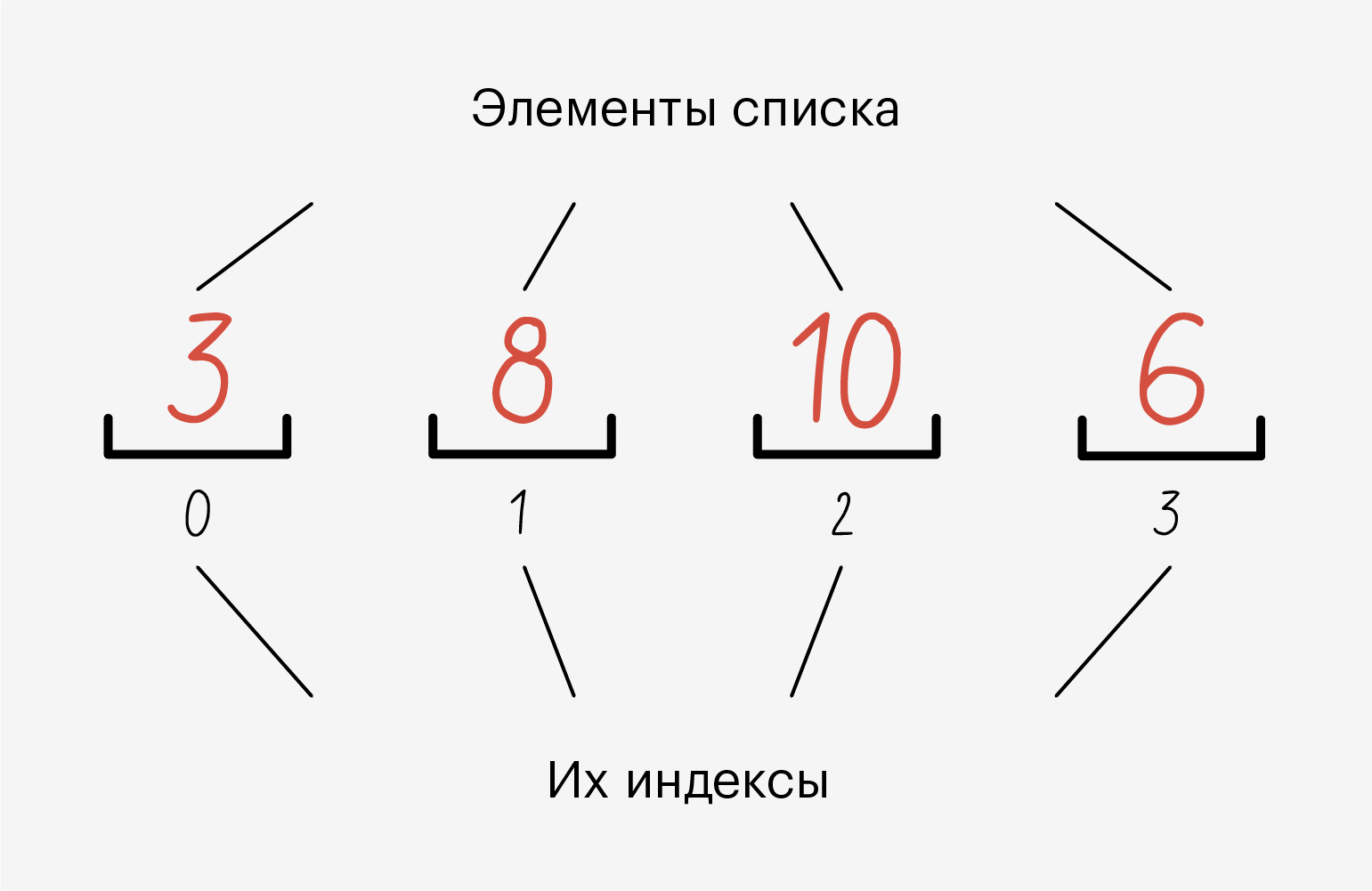
Иллюстрация: Оля Ежак для Skillbox Media
В одном списке одновременно могут лежать данные разных типов — например, и строки, и числа. А ещё в один список можно положить другой и ничего не сломается:
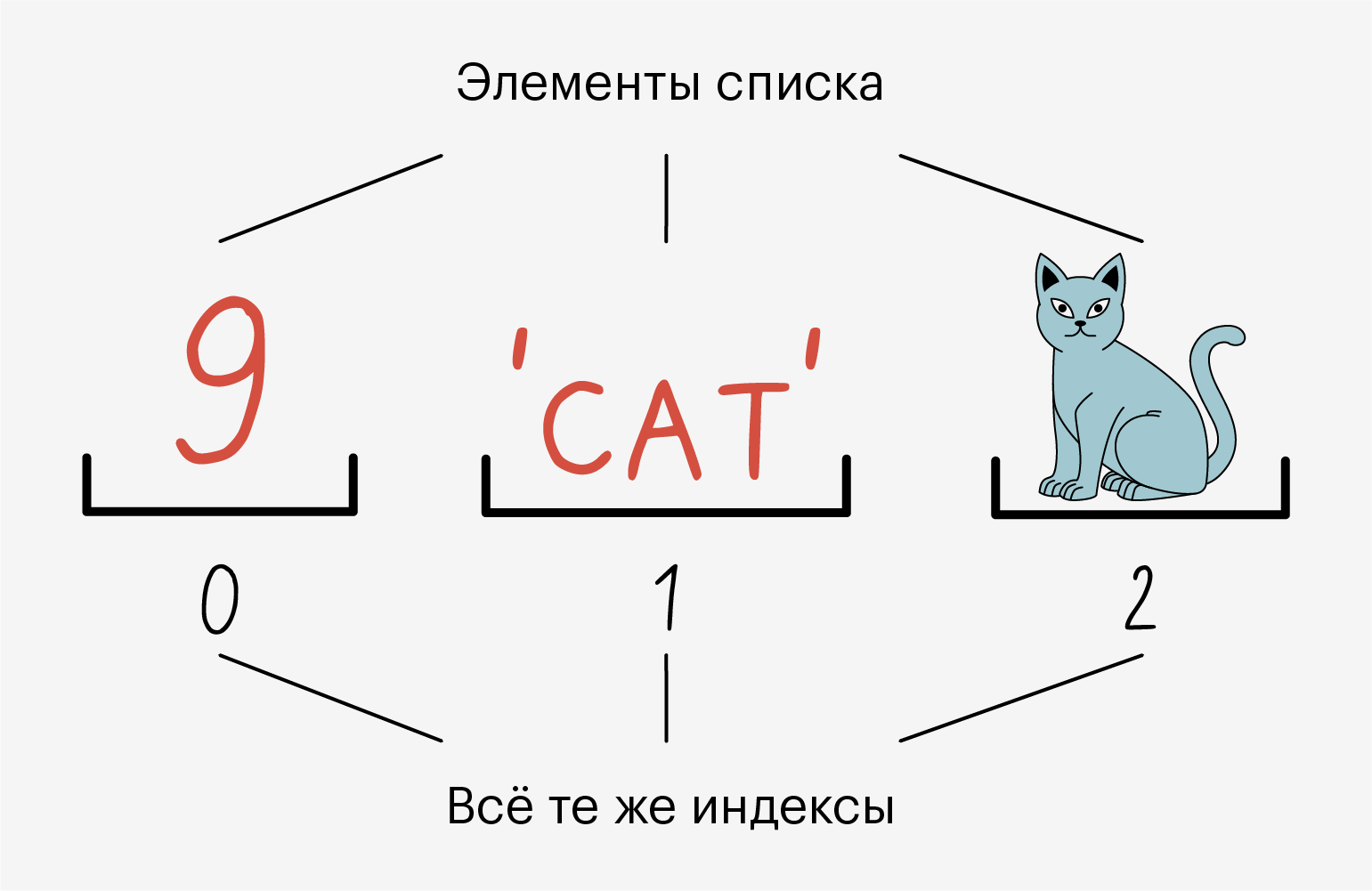
Иллюстрация: Оля Ежак для Skillbox Media
Все элементы в списке пронумерованы. Мы можем без проблем узнать индекс элемента и обратиться по нему.
Списки называют динамическими структурами данных, потому что их можно менять на ходу: удалить один или несколько элементов, заменить или добавить новые.
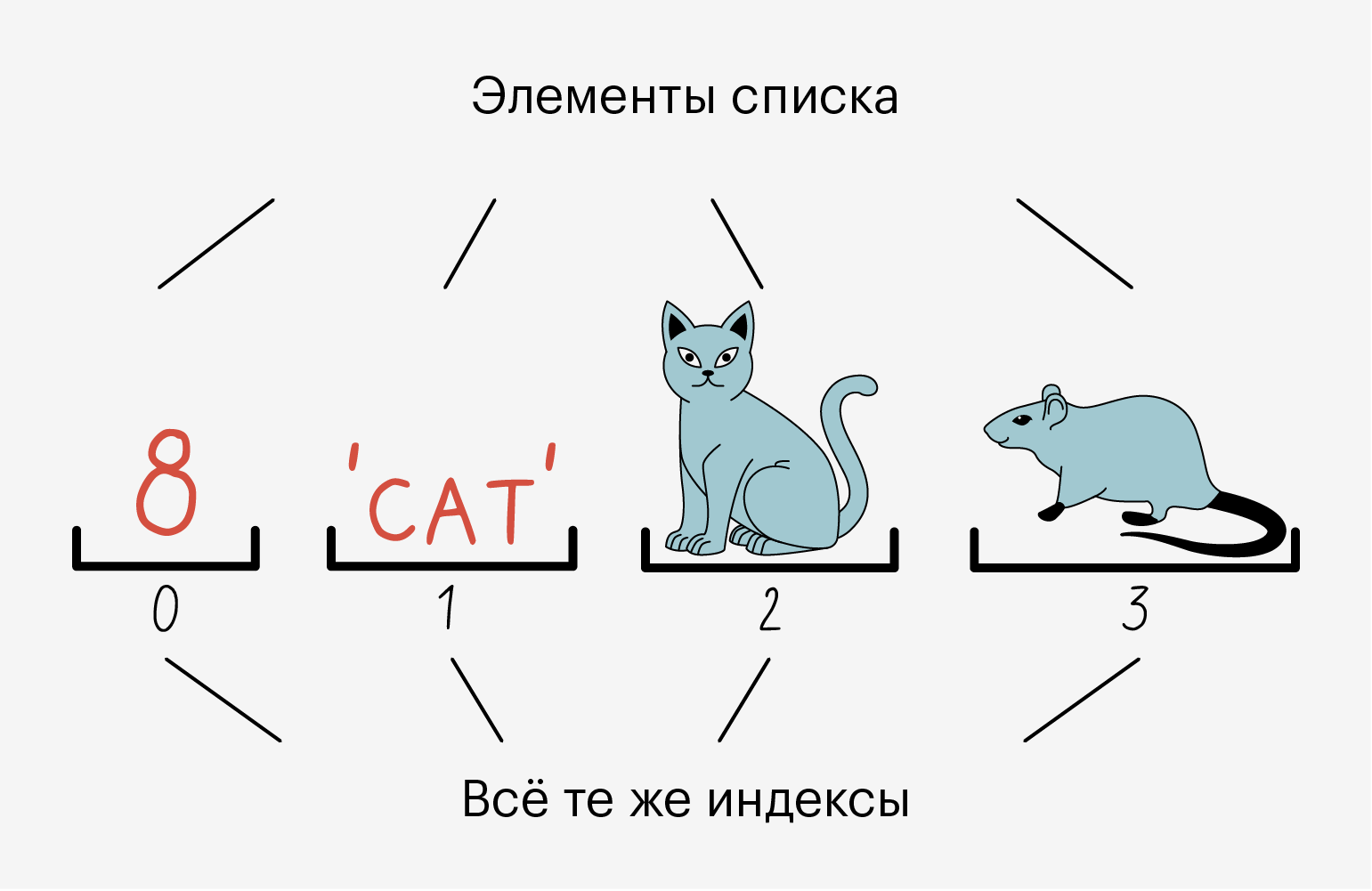
Иллюстрация: Оля Ежак для Skillbox Media
Когда мы создаём объект list, в памяти компьютера под него резервируется место. Нам не нужно переживать о том, сколько выделяется места и когда оно освобождается — Python всё сделает сам. Например, когда мы добавляем новые элементы, он выделяет память, а когда удаляем старые — освобождает.
Под капотом списков в Python лежит структура данных под названием «массив». У массива есть два важных свойства: под каждый элемент он резервирует одинаковое количество памяти, а все элементы следуют друг за другом, без «пробелов».
Однако в списках Python можно хранить объекты разного размера и типа. Более того, размер массива ограничен, а размер списка в Python — нет. Но всё равно мы знаем, сколько у нас элементов, а значит, можем обратиться к любому из них с помощью индексов.
И тут есть небольшой трюк: списки в Python представляют собой массив ссылок. Да-да, решение очень элегантное — каждый элемент такого массива хранит не сами данные, а ссылку на их расположение в памяти компьютера!
Чтобы создать объект list, в Python используют квадратные скобки — []. Внутри них перечисляют элементы через запятую:
a = [1, 2, 3]
Мы создали список a и поместили в него три числа, которые разделили запятыми. Давайте выведем его с помощью функции print():
print(a)

>>> [1, 2, 3]
Python выводит элементы в квадратных скобках, чтобы показать, что это list, а также ставит запятые между элементами.
Мы уже говорили, что списки могут хранить данные любого типа. В примере ниже объект b хранит: строку — cat, число — 123 и булево значение — True:
b = ['cat', 123, True]

print(b)

>>> ['cat', 123, True]
Также в Python можно создавать вложенные списки:
c = [1, 2, [3, 4]]

print(c)

>>> [1, 2, [3, 4]]
Мы получили объект, состоящий из двух чисел — 1 и 2, и вложенного list с двумя элементами — [3, 4].
Если просто хранить данные в списках, то от них будет мало толку. Поэтому давайте рассмотрим, какие операции они позволяют выполнить.
Доступ к элементам списка получают по индексам, через квадратные скобки []:
a = [1, 2, 3]

print(a[1])

>>> 2
Мы обратились ко второму элементу и вывели его с помощью print().
Здесь важно помнить две вещи:
- у каждого элемента есть свой индекс;
- индексы начинаются с 0.
Давайте ещё поиграем с индексами:
a = [1, 2, 3, 4]

a[0] # Обратится к 1
a[2] # Обратится к 3
a[3] # Обратится к 4
a[4] # Выведет ошибку
В последней строке мы обратились к несуществующему индексу, поэтому Python выдал ошибку.
Кроме того, Python поддерживает обращение к нескольким элементам сразу — через интервал. Делается это с помощью двоеточия — :.
a = [1, 2, 3, 4]

a[0:2] # Получим [1, 2]
Двоеточие позволяет получить срез списка. Полная форма оператора выглядит так: начальный_индекс:конечный_индекс:шаг.
Здесь мы указываем, с какого индекса начинается «срез», на каком заканчивается и с каким шагом берутся элементы — по умолчанию 1. Единственный нюанс с конечным индексом: хоть мы и можем подумать, что закончим именно на нём, на самом деле Python остановится на элементе с индексом конечный_индекс — 1. Почему создатели языка решили так сделать? Кто их знает.
В примере выше мы начали с индекса 0, а закончили на 1, потому что последний индекс не включается. Наш шаг был 1, то есть мы прошлись по каждому элементу.
Усложним пример:
a = [1, 2, 3, 4, 5]

a[1:6:2] # Получим [2, 4]
Здесь мы шли по элементам с шагом 2. Начали с индекса 1 — это первое число внутри скобок, а закончили на индексе 6, не включая его. Двигались с шагом 2, то есть через один элемент, и получили — [2, 4].
Протестируйте этот тип индексации сами, чтобы лучше понять, как работают срезы в Python.
Списки — это динамическая структура данных. А значит, мы можем менять их уже после создания.
Например, можно заменить один элемент на другой:
a = [1, 2, 3]
a[1] = 4

print(a)

>>> [1, 4, 3]
Мы обратились к элементу по индексу и заменили его на число 4. Всё прошло успешно, список изменился.
Но нужно быть осторожными, потому что может случиться такое:
a = [1, 2]
b = a
a[0] = 5

print(a)
print(b)

>> [5, 2]
>> [5, 2]
Сначала мы создали список a с двумя элементами — 1 и 2. Затем объявили переменную b и присвоили ей содержимое a. Потом заменили первый элемент в a и… удивились, что он заменился и в b.
Проблема в том, что a — это ссылка на область в памяти компьютера, где хранится первый элемент списка, а также на следующий его элемент. Вот как всё это устроено в памяти компьютера:
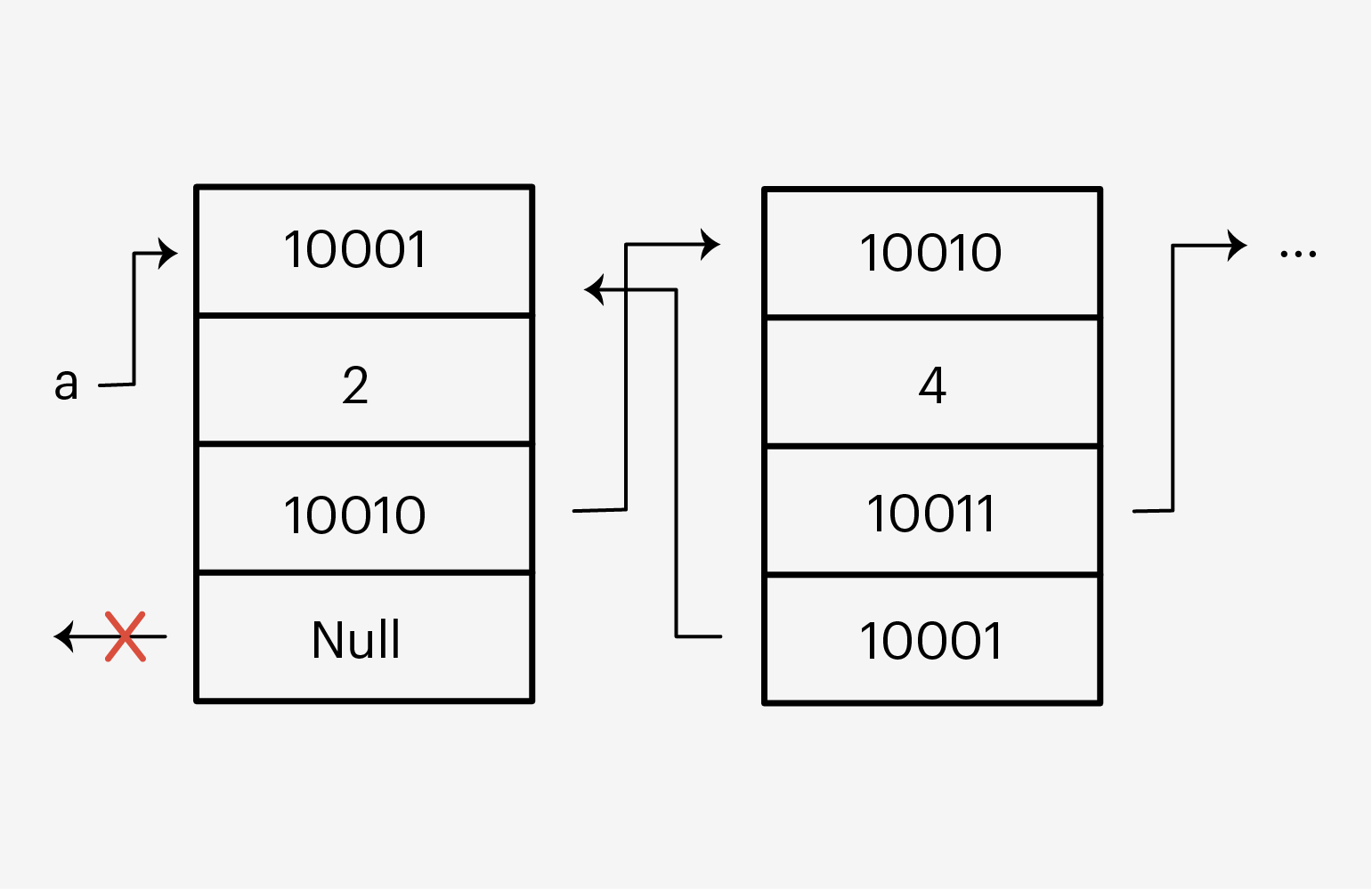
Иллюстрация: Оля Ежак для Skillbox Media
Каждый элемент списка имеет четыре секции: свой адрес, данные, адрес следующего элемента и адрес предыдущего. Если мы получили доступ к какому-то элементу, мы без проблем можем двигаться вперёд-назад по этому списку и менять его данные.
Поэтому, когда мы присвоили списку b список a, то на самом деле присвоили ему ссылку на первый элемент — по сути, сделав их одним списком.
Иногда полезно объединить два списка. Чтобы это сделать, используют оператор +:
a = [1, 2]
b = [3, 4]
с = a + b

print(с)

>>> [1, 2, 3, 4]
Мы создали два списка — a и b. Затем переприсвоили a новым списком, который стал объединением старого a и b.
Элементы списка можно присвоить отдельным переменным:
a = [1, 2, 3]
d1, d2, d3 = a

print(d1)
print(d2)
print(d3)

>>> 1
>>> 2
>>> 3
Здесь из списка a поочерёдно достаются элементы, начиная с индекса 0, и присваиваются переменным. И в отличие от присвоения одного списка другому, в этом случае Python создаст три отдельных целых числа, которые никак не будут связаны с элементами списка, и присвоит их трём переменным. Поэтому, если мы изменим, например, переменную d2, со списком a ничего не случится.
Мы можем перебирать элементы списка с помощью циклов for и while.
Так выглядит перебор через for:
animals = ['cat', 'dog', 'bat']
for animal in animals:
  print(animal)

>>> cat
>>> dog
>>> bat
Здесь мы перебираем каждый элемент списка и выводим их с помощью функции print().
А вот так выглядит перебор через цикл while:
animals = ['cat', 'dog', 'bat']
i = 0
while i < len(animals):
  print(animals[i])
  i += 1

>>> cat
>>> dog
>>> bat
Этот перебор чуть сложнее, потому что мы используем дополнительную переменную i, чтобы обращаться к элементам списка. Также мы использовали встроенную функцию len(), чтобы узнать размер нашего списка. А ещё в условии цикла while мы указали знак «меньше» (<), потому что индексация элементов идёт до значения количество элементов списка — 1. Как и в прошлом примере, все элементы по очереди выводятся с помощью функции print().
Python поддерживает сравнение списков. Два списка считаются равными, если они содержат одинаковые элементы. Функция возвращает булево значение — True или False:
a = [1, 2, 3]
b = [1, 2, 3]
print(a == b)

>>> True
Получили, что списки равны.
В некоторых языках равенство ещё проверяется и по тому, ссылаются ли переменные на один и тот же объект. Обычно это делается через оператор ===. В Python это можно сделать через оператор is, который проверяет, имеют ли две переменные один и тот же адрес в памяти:
a = [1, 2, 3]
b = a
print(a is b)

>>> True
Получили, что две переменные ссылаются на один и тот же адрес в памяти.
В Python есть четыре функции, которые позволяют узнавать длину списка, сортировать его и возвращать максимальное и минимальное значение.
Возвращает длину списка:
a = [5, 3, 1]
len(a) # 3
Возвращает отсортированный список:
a = [8, 1, 3, 2]
sorted(a) # [1, 2, 3, 8]
Возвращают наименьший и наибольший элемент списка:
a = [1, 9, -2, 3]
min(a) # -2
max(a) # 9
Чтобы проще управлять элементами списка, в стандартной библиотеке Python есть набор популярных методов для списков. Разберём основные из них.
Добавляет новый элемент в конец списка:
a = [1, 2, 3]
a.append(4)
print(a)

>>> [1, 2, 3, 4]
Добавляет новый элемент по индексу:
a = [1, 2, 3]
a.insert(0, 4)
print(a)

>>> [4, 1, 2, 3]
Сначала мы передаём индекс, по которому хотим вставить новый элемент, а затем сам элемент.
Добавляет набор элементов в конец списка:
a = [1, 2, 3]
a.extend([4, 5])
print(a)

>>> [1, 2, 3, 4, 5]
Внутрь метода extend() нужно передать итерируемый объект — например, другой list или строку.
Вот так метод extend() добавит строку:
a = ['cat', 'dog', 'bat']
a.extend('mouse')
print(a)

>>> ['cat', 'dog', 'bat', 'm', 'o', 'u', 's', 'e']
Заметьте, что строка добавилась посимвольно.
Удаляет элемент из списка:
a = [1, 2, 3, 1]
a.remove(1)
print(a)

>>> [2, 3, 1]
Метод удаляет только первое вхождение элемента. Остальные остаются нетронутыми.
Если элемента нет в списке, Python вернёт ошибку и программа прервётся:
a = [1, 2, 3, 1]
a.remove(5)
Traceback (most recent call last):
  File "<stdin>", line 1, in <module>
ValueError: list.remove(x): x not in list
Ошибка говорит, что элемента нет в списке.
Удаляет все элементы из списка и делает его пустым:
a = [1, 2, 3]
a.clear()
print(a)

>>> []
Возвращает индекс элемента списка в Python:
a = [1, 2, 3]
print(a.index(2))

>>> 1
Если элемента нет в списке, выведется ошибка:
a = [1, 2, 3]
print(a.index(4))
Traceback (most recent call last):
  File "<stdin>", line 1, in <module>
ValueError: 4 is not in list
Удаляет элемент по индексу и возвращает его как результат:
a = [1, 2, 3]
print(a.pop())
print(a)

>>> 3
>>> [1, 2]
Мы не передали индекс в метод, поэтому он удалил последний элемент списка. Если передать индекс, то получится так:
a = [1, 2, 3]
print(a.pop(1))
print(a)

>>> 2
>>> [1, 3]
Считает, сколько раз элемент повторяется в списке:
a = [1, 1, 1, 2]
print(a.count(1))

>>> 3
Сортирует список:
a = [4, 1, 5, 2]
a.sort() # [1, 2, 4, 5]
Если нам нужно отсортировать в обратном порядке — от большего к меньшему, — в методе есть дополнительный параметр reverse:
a = [4, 1, 5, 2]
a.sort(reverse=True) # [5, 4, 2, 1]
Переставляет элементы в обратном порядке:
a = [1, 3, 2, 4]
a.reverse() # [4, 2, 3, 1]
Копирует список:
a = [1, 2, 3]
b = a.copy()

print(b)

>>> [1, 2, 3]
Лучше не учить это всё, а применять на практике. А ещё лучше — попытаться написать каждый метод самостоятельно, не используя никакие встроенные функции.
Сколько бы вы ни писали код на Python, всё равно придётся подсматривать в документацию и понимать, какой метод что делает. И для этого есть разные удобные сайты — например, полный список методов можно посмотреть на W3Schools.

Учись бесплатно:
вебинары по программированию, маркетингу и дизайну.
Участвовать

Школа дронов для всех
Учим программировать беспилотники и управлять ими.
Узнать больше
Объекты Python можно разделить на две основные категории — изменяемые и неизменяемые объекты. Мутабельные объекты — это те, которые могут быть изменены или модифицированы после их создания, в то время как неизменяемые объекты не могут быть изменены после их создания. Массивы относятся к категории изменяемых объектов. В этой статье мы узнаем о массивах и их изменяемости, а также об операциях, которые можно выполнять над массивами. Итак, давайте приступим!
Что такое массивы в Python?
Массив — это структура данных в Python, которая хранит коллекцию объектов схожих типов. Объекты в массиве индексируются кортежем целых положительных чисел. Они могут быть многомерными и очень полезны для научных вычислений. Например:
import numpy as np list=[1,2,3,4] arr = np.array(list) print(arr)
Вывод:
В приведенном выше примере мы создали одномерный массив из списка. Вы можете получить доступ к элементам массива следующим методом.
import numpy as np list=[1,2,3,4] arr = np.array(list) print("First element of array is:",arr[0]) print("Last element of array is:",arr[-1])
Вывод:
First element of array is: 1 Last element of array is: 4
Теперь мы рассмотрим изменяемые свойства массива.
Изменяемые свойства массива
Теперь мы посмотрим на примерах, какие изменения можно производить в массиве.
Вставка элементов в массив
Функция insert помогает вставлять элементы в массив. Функция принимает два аргумента — индексную позицию, в которую вы хотите вставить элемент, и значение элемента.
import array as np a = np.array('i', [1, 2, 3]) #using insert function a.insert(1, 4) print(a)
Выход:
Изменение элементов в массиве
Вы можете изменять элементы в массиве с помощью следующего кода.
import array as np a = np.array('i', [1, 2, 3]) #using insert function a[1]=9 print(a)
Вывод:
Необходимо указать позицию индекса элемента, который вы хотите изменить.
Выталкивание элемента из массива
Функция pop() поможет вам извлечь элемент. Вам нужно указать индексную позицию элемента, который вы хотите вынуть. Эта функция действует аналогично операции delete.
import array as np a = np.array('i', [1, 2, 3]) #using pop function a.pop(1) print(a)
Выход:
Удаление или извлечение элементов из массива
Функция remove() поможет вам удалить элементы из массива. Вам необходимо указать значение элемента, который вы хотите удалить.
import array as np a = np.array('i', [1, 2, 3]) #using remove function a.reverse() print(a)
Вывод:
Обращение массива вспять
Простая функция reverse() поможет вам перевернуть массив.
import array as np a = np.array('i', [1, 2, 3]) #using remove function a.reverse() print(a)
Вывод:
Заключение
Подводя итог, мы узнали, что массивы являются изменяемыми и могут быть изменены или модифицированы после их создания. Очень важно, чтобы вы понимали основные операции с массивами, поскольку массивы могут быть чрезвычайно полезны в научных вычислениях.
Алексей
Меня зовут Алексей Красовский, я ведущий программист, сертифицированный специалист по Python и, одновременно, автор этого блога.