
Время прочтения
6 мин
Просмотры 112K
В процессе разработки очень часто возникает необходимость запустить из powershell скрипта консольное приложение. Что может быть проще?
#test.ps1
& $PSScriptRootConsoleApp.exe
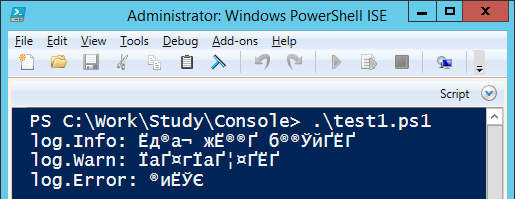
Изучим поведение консольных приложений при запуске их из командной строки, через PowerShell и через PowerShell ISE:
Результат выполнения

В PowerShell ISE возникла проблема с кодировкой, так как ISE ожидает вывод в кодировке 1251. Воспользуемся гуглом и найдем два решения проблемы: c использованием [Console]::OutputEncoding и через powershell pipeline. Воспользуемся первым решением:
test2.ps1
$ErrorActionPreference = "Stop"

function RunConsole($scriptBlock)
{
    $encoding = [Console]::OutputEncoding
    [Console]::OutputEncoding = [System.Text.Encoding]::GetEncoding("cp866")
    try
    {
        &$scriptBlock
    }
    finally
    {
        [Console]::OutputEncoding = $encoding
    }
}

RunConsole {
    & $PSScriptRootConsoleApp1.exe
}
Результат выполнения

В командной строке все хорошо, а вот в ISE ошибка. Exception setting «OutputEncoding»: «The handle is invalid.». Снова берем в руки гугл, и в первом же результате находим решение — надо запустить какое-нибудь консольное приложение для создания консоли. Ну что-же, попробуем.
test3.ps1
$ErrorActionPreference = "Stop"

function RunConsole($scriptBlock)
{
    # Популярное решение "устранения" ошибки: Exception setting "OutputEncoding": "The handle is invalid."
    & cmd /c ver | Out-Null

    $encoding = [Console]::OutputEncoding
    [Console]::OutputEncoding = [System.Text.Encoding]::GetEncoding("cp866")
    try
    {
        &$scriptBlock
    }
    finally
    {
        [Console]::OutputEncoding = $encoding
    }
}

RunConsole {
    & $PSScriptRootConsoleApp1.exe
}
Результат выполнения
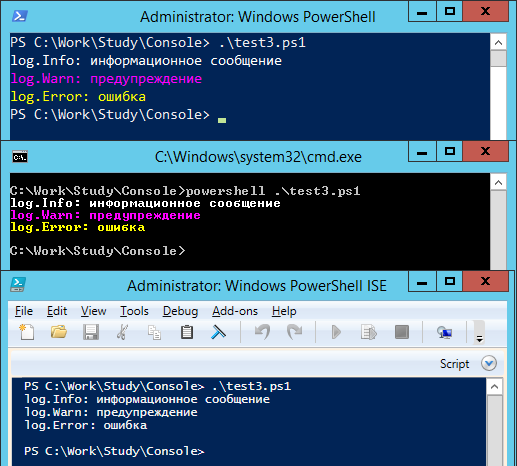
Все красиво, все работает. Кто читал мою прошлую заметку, обратил внимание, что WinRM приносит нам много острых впечатлений. Попробуем запустить тест через WinRM. Для запуска воспользуемся вот таким скриптом:
remote1.ps1
param($script)

$ErrorActionPreference = "Stop"

$s = New-PSSession "."
try
{
    $path = "$PSScriptRoot$script"
    Invoke-Command -Session $s -ScriptBlock { &$using:path }
}
finally
{
    Remove-PSSession -Session $s
}
Результат выполнения

Что-то пошло не так. Решение с созданием консоли не работает. Ранее мы находили два решения проблемы кодировки. Попробуем второй:
test4.ps1
$ErrorActionPreference = "Stop"
#$VerbosePreference = "Continue"

function RunConsole($scriptBlock)
{
    function ConvertTo-Encoding ([string]$From, [string]$To)
    {
        Begin
        {
            $encFrom = [System.Text.Encoding]::GetEncoding($from)
            $encTo = [System.Text.Encoding]::GetEncoding($to)
        }
        Process
        {
            $bytes = $encTo.GetBytes($_)
            $bytes = [System.Text.Encoding]::Convert($encFrom, $encTo, $bytes)
            $encTo.GetString($bytes)
        }
    }

    Write-Verbose "RunConsole: Pipline mode"
    &$scriptBlock | ConvertTo-Encoding cp866 windows-1251
}

RunConsole {
    & $PSScriptRootConsoleApp1.exe
}
Результат выполнения

В ISE и через WinRM решение работает, а вот через командную строку и shell — нет.
Надо объединить эти два способа и проблема будет решена!
test5.ps1
$ErrorActionPreference = "Stop"
#$VerbosePreference = "Continue"

function RunConsole($scriptBlock)
{
    if([Environment]::UserInteractive)
    {
        # Популярное решение "устранения" ошибки: Exception setting "OutputEncoding": "The handle is invalid."
        & cmd /c ver | Out-Null

        $encoding = [Console]::OutputEncoding
        [Console]::OutputEncoding = [System.Text.Encoding]::GetEncoding("cp866")

        try
        {
            Write-Verbose "RunConsole: Console.OutputEncoding mode"
            &$scriptBlock
            return
        }
        finally
        {
            [Console]::OutputEncoding = $encoding
        }
    }

    function ConvertTo-Encoding ([string]$From, [string]$To)
    {
        Begin
        {
            $encFrom = [System.Text.Encoding]::GetEncoding($from)
            $encTo = [System.Text.Encoding]::GetEncoding($to)
        }
        Process
        {
            $bytes = $encTo.GetBytes($_)
            $bytes = [System.Text.Encoding]::Convert($encFrom, $encTo, $bytes)
            $encTo.GetString($bytes)
        }
    }

    Write-Verbose "RunConsole: Pipline mode"
    &$scriptBlock | ConvertTo-Encoding cp866 windows-1251
}

RunConsole {
    & $PSScriptRootConsoleApp1.exe
}
Результат выполнения

Кажется, что проблема решена, но продолжим исследование и усложним наше консольное приложение, добавив в него вывод в stdError.
Результат выполнения

Становится все веселее  В ISE исполнение скрипта прервалось на середине, а через WinRM мало того, что прервалось, так еще сообщение из stdErr прочитать невозможно. Первым шагом решим проблему с остановкой запускаемого из скрипта приложения, для этого перед запуском приложения изменим значение глобальной переменной $ErrorActionPreference.
test7.ps1
$ErrorActionPreference = "Stop"
#$VerbosePreference = "Continue"

function RunConsole($scriptBlock)
{
    if([Environment]::UserInteractive)
    {
        # Популярное решение "устранения" ошибки: Exception setting "OutputEncoding": "The handle is invalid."
        & cmd /c ver | Out-Null

        $encoding = [Console]::OutputEncoding
        [Console]::OutputEncoding = [System.Text.Encoding]::GetEncoding("cp866")

        try
        {
            Write-Verbose "RunConsole: Console.OutputEncoding mode"
            $prevErrAction = $ErrorActionPreference
            $ErrorActionPreference = "Continue"
            try
            {
                &$scriptBlock
                return
            }
            finally
            {
                $ErrorActionPreference = $prevErrAction
            }
        }
        finally
        {
            [Console]::OutputEncoding = $encoding
        }
    }

    function ConvertTo-Encoding ([string]$From, [string]$To)
    {
        Begin
        {
            $encFrom = [System.Text.Encoding]::GetEncoding($from)
            $encTo = [System.Text.Encoding]::GetEncoding($to)
        }
        Process
        {
            $bytes = $encTo.GetBytes($_)
            $bytes = [System.Text.Encoding]::Convert($encFrom, $encTo, $bytes)
            $encTo.GetString($bytes)
        }
    }

    Write-Verbose "RunConsole: Pipline mode"
    $prevErrAction = $ErrorActionPreference
    $ErrorActionPreference = "Continue"
    try
    {
        &$scriptBlock | ConvertTo-Encoding cp866 windows-1251
        return
    }
    finally
    {
        $ErrorActionPreference = $prevErrAction
    }
}

RunConsole {
    & $PSScriptRootConsoleApp2.exe
}
Write-Host "ExitCode = $LASTEXITCODE"
Результат выполнения

Для тех что знает о существовании параметра -ErrorAction
error.cmd
echo error message 1>&2
errorActionTest.ps1
#error.cmd
#echo error message 1>&2

#errorActionTest.ps1
$ErrorActionPreference = "Stop"
Write-Host "before"
Invoke-Expression -ErrorAction SilentlyContinue -Command $PSScriptRooterror.cmd
Write-Host "after"
Какой будет результат выполнения такого скрипта?
Вторым шагом доработаем скрипт удаленного запуска через WinRM, чтобы он не падал:
remote2.ps1
param($script)

$ErrorActionPreference = "Stop"

$s = New-PSSession "."
try
{
    $path = "$PSScriptRoot$script"

    $err = @()
    $r = Invoke-Command -Session $s -ErrorAction Continue -ErrorVariable err -ScriptBlock `
    {
        $ErrorActionPreference = "Stop"
        & $using:path | Out-Host
        return $true
    }

    if($r -ne $true)
    {
        Write-Error "The remote script was completed with an error"
    }

    if($err.length -ne 0)
    {
        Write-Warning "Error occurred on remote host"
    }
}
finally
{
    Remove-PSSession -Session $s
}
Результат выполнения

И осталось самое сложное — скорректировать сообщение формируемое через stdErr и при этом не изменить его положение в логе. В процессе решения этой задачи коллеги предложили самостоятельно создать консоль, воспользовавшись win api функцией AllocConsole.
test8.ps1
$ErrorActionPreference = "Stop"
#$VerbosePreference = "continue"

$consoleAllocated = [Environment]::UserInteractive
function AllocConsole()
{
    if($Global:consoleAllocated)
    {
        return
    }

    &cmd /c ver | Out-Null
    $a = @'
[DllImport("kernel32", SetLastError = true)]
public static extern bool AllocConsole();
'@

    $params = New-Object CodeDom.Compiler.CompilerParameters
    $params.MainClass = "methods"
    $params.GenerateInMemory = $true
    $params.CompilerOptions = "/unsafe"

    $r = Add-Type -MemberDefinition $a -Name methods -Namespace kernel32 -PassThru -CompilerParameters $params

    Write-Verbose "Allocating console"
    [kernel32.methods]::AllocConsole() | Out-Null
    Write-Verbose "Console allocated"
    $Global:consoleAllocated = $true
}

function RunConsole($scriptBlock)
{
    AllocConsole

    $encoding = [Console]::OutputEncoding
    [Console]::OutputEncoding = [System.Text.Encoding]::GetEncoding("cp866")
    $prevErrAction = $ErrorActionPreference
    $ErrorActionPreference = "Continue"
    try
    {
        & $scriptBlock
    }
    finally
    {
        $ErrorActionPreference = $prevErrAction
        [Console]::OutputEncoding = $encoding
    }
}

RunConsole {
    & $PSScriptRootConsoleApp2.exe
}
Write-Host "ExitCode = $LASTEXITCODE"

Избавится от информации, которую добавляет powershell к stdErr мне так и не удалось.
Надеюсь, что эта информация окажется полезной не только мне!
update 1
В некоторых сценариях использования создавалась дополнительная консоль, в которую выдавался результат выполнения скриптов. В скрипт test8.ps1 внесены исправления.
update 2
Так как у многих комментаторов статьи возникла путаница между понятиями набор символов (char set) и кодировка (encoding) хотел бы еще раз обратить внимание, что в статье решается проблема именно несоответствия кодировок консоли и вызываемого приложения.
Как можно увидеть из скрипта test8.ps1, кодировка указывается в статическом свойстве [Console]::OutputEncoding, и никто не мешает указать в нем одну из кодировок семейства unicode:
[Console]::OutputEncoding = [System.Text.Encoding]::GetEncoding("utf-8")
Но, для работы скрипта в стандартной консоли windows (aka cmd.exe) необходимо изменить шрифт консоли со стандартного «Rasters Fonts» на Consolas или «Lucida Console». Если бы данные скрипты мы использовали только на собственных рабочих станциях или серверах, то такое изменение было бы допустимо, но так как нам приходится распространять наши решения заказчикам, вмешиваться в системные настройки серверов мы не имеем права. Именно по этой причине в скриптах используется cp866, как кодировка настроенная по умолчанию для консоли.
Note:
-
The next section applies primarily to Windows PowerShell.
- See the section after it for the cross-platform PowerShell Core (v6+) edition.
-
In both cases, the information applies to making PowerShell use UTF-8 for reading and writing files.
- By contrast, for information on how to send and receive UTF-8-encoded strings to and from external programs, see this answer.
-
A system-wide switch to UTF-8 is possible nowadays (since recent versions of Windows 10): see this answer, but note the following caveats:
- The feature has far-reaching consequences, because both the OEM and the ANSI code page are then set to
65001, i.e. UTF-8; also the feature is still considered a beta feature as of this writing. - In Windows PowerShell, this takes effect only for those cmdlets that default to the ANSI code page, notably
Set-Content, but notOut-File/>, and it also applies to reading files, notably includingGet-Contentand how PowerShell itself reads source code.
- The feature has far-reaching consequences, because both the OEM and the ANSI code page are then set to
The Windows PowerShell perspective:
-
In PSv5.1 or higher, where
>and>>are effectively aliases ofOut-File, you can set the default encoding for>/>>/Out-Filevia the$PSDefaultParameterValuespreference variable:$PSDefaultParameterValues['Out-File:Encoding'] = 'utf8'- Note:
-
In Windows PowerShell (the legacy edition whose latest and final version is v5.1), this invariably creates UTF-8 file with a (pseudo) BOM.
- Many Unix-based utilities do not recognize this BOM (see bottom); see this post for workarounds that create BOM-less UTF-8 files.
-
In PowerShell (Core) v6+, BOM-less UTF-8 is the default (see next section), but if you do want a BOM there, you can use
'utf8BOM'
-
-
In PSv5.0 or below, you cannot change the encoding for
>/>>, but, on PSv3 or higher, the above technique does work for explicit calls toOut-File.
(The$PSDefaultParameterValuespreference variable was introduced in PSv3.0). -
In PSv3.0 or higher, if you want to set the default encoding for all cmdlets that support
an-Encodingparameter (which in PSv5.1+ includes>and>>), use:$PSDefaultParameterValues['*:Encoding'] = 'utf8'
If you place this command in your $PROFILE, cmdlets such as Out-File and Set-Content will use UTF-8 encoding by default, but note that this makes it a session-global setting that will affect all commands / scripts that do not explicitly specify an encoding via their -Encoding parameter.
Similarly, be sure to include such commands in your scripts or modules that you want to behave the same way, so that they indeed behave the same even when run by another user or a different machine; however, to avoid a session-global change, use the following form to create a local copy of $PSDefaultParameterValues:
$PSDefaultParameterValues = @{ '*:Encoding' = 'utf8' }
For a summary of the wildly inconsistent default character encoding behavior across many of the Windows PowerShell standard cmdlets, see the bottom section.
The automatic $OutputEncoding variable is unrelated, and only applies to how PowerShell communicates with external programs (what encoding PowerShell uses when sending strings to them) — it has nothing to do with the encoding that the output redirection operators and PowerShell cmdlets use to save to files.
Optional reading: The cross-platform perspective: PowerShell Core:
PowerShell is now cross-platform, via its PowerShell Core edition, whose encoding — sensibly — defaults to BOM-less UTF-8, in line with Unix-like platforms.
-
This means that source-code files without a BOM are assumed to be UTF-8, and using
>/Out-File/Set-Contentdefaults to BOM-less UTF-8; explicit use of theutf8-Encodingargument too creates BOM-less UTF-8, but you can opt to create files with the pseudo-BOM with theutf8bomvalue. -
If you create PowerShell scripts with an editor on a Unix-like platform and nowadays even on Windows with cross-platform editors such as Visual Studio Code and Sublime Text, the resulting
*.ps1file will typically not have a UTF-8 pseudo-BOM:- This works fine on PowerShell Core.
- It may break on Windows PowerShell, if the file contains non-ASCII characters; if you do need to use non-ASCII characters in your scripts, save them as UTF-8 with BOM.
Without the BOM, Windows PowerShell (mis)interprets your script as being encoded in the legacy «ANSI» codepage (determined by the system locale for pre-Unicode applications; e.g., Windows-1252 on US-English systems).
-
Conversely, files that do have the UTF-8 pseudo-BOM can be problematic on Unix-like platforms, as they cause Unix utilities such as
cat,sed, andawk— and even some editors such asgedit— to pass the pseudo-BOM through, i.e., to treat it as data.- This may not always be a problem, but definitely can be, such as when you try to read a file into a string in
bashwith, say,text=$(cat file)ortext=$(<file)— the resulting variable will contain the pseudo-BOM as the first 3 bytes.
- This may not always be a problem, but definitely can be, such as when you try to read a file into a string in
Inconsistent default encoding behavior in Windows PowerShell:
Regrettably, the default character encoding used in Windows PowerShell is wildly inconsistent; the cross-platform PowerShell Core edition, as discussed in the previous section, has commendably put and end to this.
Note:
-
The following doesn’t aspire to cover all standard cmdlets.
-
Googling cmdlet names to find their help topics now shows you the PowerShell Core version of the topics by default; use the version drop-down list above the list of topics on the left to switch to a Windows PowerShell version.
-
Historically, the documentation frequently incorrectly claimed that ASCII is the default encoding in Windows PowerShell; fortunately, this has since been corrected.
Cmdlets that write:
Out-File and > / >> create «Unicode» — UTF-16LE — files by default — in which every ASCII-range character (too) is represented by 2 bytes — which notably differs from Set-Content / Add-Content (see next point); New-ModuleManifest and Export-CliXml also create UTF-16LE files.
Set-Content (and Add-Content if the file doesn’t yet exist / is empty) uses ANSI encoding (the encoding specified by the active system locale’s ANSI legacy code page, which PowerShell calls Default).
Export-Csv indeed creates ASCII files, as documented, but see the notes re -Append below.
Export-PSSession creates UTF-8 files with BOM by default.
New-Item -Type File -Value currently creates BOM-less(!) UTF-8.
The Send-MailMessage help topic also claims that ASCII encoding is the default — I have not personally verified that claim.
Start-Transcript invariably creates UTF-8 files with BOM, but see the notes re -Append below.
Re commands that append to an existing file:
>> / Out-File -Append make no attempt to match the encoding of a file’s existing content.
That is, they blindly apply their default encoding, unless instructed otherwise with -Encoding, which is not an option with >> (except indirectly in PSv5.1+, via $PSDefaultParameterValues, as shown above).
In short: you must know the encoding of an existing file’s content and append using that same encoding.
Add-Content is the laudable exception: in the absence of an explicit -Encoding argument, it detects the existing encoding and automatically applies it to the new content.Thanks, js2010. Note that in Windows PowerShell this means that it is ANSI encoding that is applied if the existing content has no BOM, whereas it is UTF-8 in PowerShell Core.
This inconsistency between Out-File -Append / >> and Add-Content, which also affects PowerShell Core, is discussed in GitHub issue #9423.
Export-Csv -Append partially matches the existing encoding: it blindly appends UTF-8 if the existing file’s encoding is any of ASCII/UTF-8/ANSI, but correctly matches UTF-16LE and UTF-16BE.
To put it differently: in the absence of a BOM, Export-Csv -Append assumes UTF-8 is, whereas Add-Content assumes ANSI.
Start-Transcript -Append partially matches the existing encoding: It correctly matches encodings with BOM, but defaults to potentially lossy ASCII encoding in the absence of one.
Cmdlets that read (that is, the encoding used in the absence of a BOM):
Get-Content and Import-PowerShellDataFile default to ANSI (Default), which is consistent with Set-Content.
ANSI is also what the PowerShell engine itself defaults to when it reads source code from files.
By contrast, Import-Csv, Import-CliXml and Select-String assume UTF-8 in the absence of a BOM.
I’m trying to use Process.Start with redirected I/O to call PowerShell.exe with a string, and to get the output back, all in UTF-8. But I don’t seem to be able to make this work.
What I’ve tried:
- Passing the command to run via the
-Commandparameter - Writing the PowerShell script as a file to disk with UTF-8 encoding
- Writing the PowerShell script as a file to disk with UTF-8 with BOM encoding
- Writing the PowerShell script as a file to disk with UTF-16
- Setting
Console.OutputEncodingin both my console application and in the PowerShell script - Setting
$OutputEncodingin PowerShell - Setting
Process.StartInfo.StandardOutputEncoding - Doing it all with
Encoding.Unicodeinstead ofEncoding.UTF8
In every case, when I inspect the bytes I’m given, I get different values to my original string. I’d really love an explanation as to why this doesn’t work.
Here is my code:
static void Main(string[] args)
{
    DumpBytes("Héllo");

    ExecuteCommand("PowerShell.exe", "-Command "$OutputEncoding = [System.Text.Encoding]::UTF8 ; Write-Output 'Héllo';"",
        Environment.CurrentDirectory, DumpBytes, DumpBytes);

    Console.ReadLine();
}

static void DumpBytes(string text)
{
    Console.Write(text + " " + string.Join(",", Encoding.UTF8.GetBytes(text).Select(b => b.ToString("X"))));
    Console.WriteLine();
}

static int ExecuteCommand(string executable, string arguments, string workingDirectory, Action<string> output, Action<string> error)
{
    try
    {
        using (var process = new Process())
        {
            process.StartInfo.FileName = executable;
            process.StartInfo.Arguments = arguments;
            process.StartInfo.WorkingDirectory = workingDirectory;
            process.StartInfo.UseShellExecute = false;
            process.StartInfo.CreateNoWindow = true;
            process.StartInfo.RedirectStandardOutput = true;
            process.StartInfo.RedirectStandardError = true;
            process.StartInfo.StandardOutputEncoding = Encoding.UTF8;
            process.StartInfo.StandardErrorEncoding = Encoding.UTF8;

            using (var outputWaitHandle = new AutoResetEvent(false))
            using (var errorWaitHandle = new AutoResetEvent(false))
            {
                process.OutputDataReceived += (sender, e) =>
                {
                    if (e.Data == null)
                    {
                        outputWaitHandle.Set();
                    }
                    else
                    {
                        output(e.Data);
                    }
                };

                process.ErrorDataReceived += (sender, e) =>
                {
                    if (e.Data == null)
                    {
                        errorWaitHandle.Set();
                    }
                    else
                    {
                        error(e.Data);
                    }
                };

                process.Start();

                process.BeginOutputReadLine();
                process.BeginErrorReadLine();

                process.WaitForExit();
                outputWaitHandle.WaitOne();
                errorWaitHandle.WaitOne();

                return process.ExitCode;
            }
        }
    }
    catch (Exception ex)
    {
        throw new Exception(string.Format("Error when attempting to execute {0}: {1}", executable, ex.Message),
            ex);
    }
}
Update 1
I found that if I make this script:
[Console]::OutputEncoding = [System.Text.Encoding]::UTF8
Write-Host "Héllo!"
[Console]::WriteLine("Héllo")
Then invoke it via:
ExecuteCommand("PowerShell.exe", "-File C:\Users\Paul\Desktop\Foo.ps1",
  Environment.CurrentDirectory, DumpBytes, DumpBytes);
The first line is corrupted, but the second isn’t:
H?llo! 48,EF,BF,BD,6C,6C,6F,21
Héllo 48,C3,A9,6C,6C,6F
This suggests to me that my redirection code is all working fine; when I use Console.WriteLine in PowerShell I get UTF-8 as I expect.
This means that PowerShell’s Write-Output and Write-Host commands must be doing something different with the output, and not simply calling Console.WriteLine.
Update 2
I’ve even tried the following to force the PowerShell console code page to UTF-8, but Write-Host and Write-Output continue to produce broken results while [Console]::WriteLine works.
$sig = @'
[DllImport("kernel32.dll")]
public static extern bool SetConsoleCP(uint wCodePageID);

[DllImport("kernel32.dll")]
public static extern bool SetConsoleOutputCP(uint wCodePageID);
'@

$type = Add-Type -MemberDefinition $sig -Name Win32Utils -Namespace Foo -PassThru

$type::SetConsoleCP(65001)
$type::SetConsoleOutputCP(65001)

Write-Host "Héllo!"

& chcp    # Tells us 65001 (UTF-8) is being used
I’m trying to use Process.Start with redirected I/O to call PowerShell.exe with a string, and to get the output back, all in UTF-8. But I don’t seem to be able to make this work.
What I’ve tried:
- Passing the command to run via the
-Commandparameter - Writing the PowerShell script as a file to disk with UTF-8 encoding
- Writing the PowerShell script as a file to disk with UTF-8 with BOM encoding
- Writing the PowerShell script as a file to disk with UTF-16
- Setting
Console.OutputEncodingin both my console application and in the PowerShell script - Setting
$OutputEncodingin PowerShell - Setting
Process.StartInfo.StandardOutputEncoding - Doing it all with
Encoding.Unicodeinstead ofEncoding.UTF8
In every case, when I inspect the bytes I’m given, I get different values to my original string. I’d really love an explanation as to why this doesn’t work.
Here is my code:
static void Main(string[] args)
{
    DumpBytes("Héllo");

    ExecuteCommand("PowerShell.exe", "-Command "$OutputEncoding = [System.Text.Encoding]::UTF8 ; Write-Output 'Héllo';"",
        Environment.CurrentDirectory, DumpBytes, DumpBytes);

    Console.ReadLine();
}

static void DumpBytes(string text)
{
    Console.Write(text + " " + string.Join(",", Encoding.UTF8.GetBytes(text).Select(b => b.ToString("X"))));
    Console.WriteLine();
}

static int ExecuteCommand(string executable, string arguments, string workingDirectory, Action<string> output, Action<string> error)
{
    try
    {
        using (var process = new Process())
        {
            process.StartInfo.FileName = executable;
            process.StartInfo.Arguments = arguments;
            process.StartInfo.WorkingDirectory = workingDirectory;
            process.StartInfo.UseShellExecute = false;
            process.StartInfo.CreateNoWindow = true;
            process.StartInfo.RedirectStandardOutput = true;
            process.StartInfo.RedirectStandardError = true;
            process.StartInfo.StandardOutputEncoding = Encoding.UTF8;
            process.StartInfo.StandardErrorEncoding = Encoding.UTF8;

            using (var outputWaitHandle = new AutoResetEvent(false))
            using (var errorWaitHandle = new AutoResetEvent(false))
            {
                process.OutputDataReceived += (sender, e) =>
                {
                    if (e.Data == null)
                    {
                        outputWaitHandle.Set();
                    }
                    else
                    {
                        output(e.Data);
                    }
                };

                process.ErrorDataReceived += (sender, e) =>
                {
                    if (e.Data == null)
                    {
                        errorWaitHandle.Set();
                    }
                    else
                    {
                        error(e.Data);
                    }
                };

                process.Start();

                process.BeginOutputReadLine();
                process.BeginErrorReadLine();

                process.WaitForExit();
                outputWaitHandle.WaitOne();
                errorWaitHandle.WaitOne();

                return process.ExitCode;
            }
        }
    }
    catch (Exception ex)
    {
        throw new Exception(string.Format("Error when attempting to execute {0}: {1}", executable, ex.Message),
            ex);
    }
}
Update 1
I found that if I make this script:
[Console]::OutputEncoding = [System.Text.Encoding]::UTF8
Write-Host "Héllo!"
[Console]::WriteLine("Héllo")
Then invoke it via:
ExecuteCommand("PowerShell.exe", "-File C:\Users\Paul\Desktop\Foo.ps1",
  Environment.CurrentDirectory, DumpBytes, DumpBytes);
The first line is corrupted, but the second isn’t:
H?llo! 48,EF,BF,BD,6C,6C,6F,21
Héllo 48,C3,A9,6C,6C,6F
This suggests to me that my redirection code is all working fine; when I use Console.WriteLine in PowerShell I get UTF-8 as I expect.
This means that PowerShell’s Write-Output and Write-Host commands must be doing something different with the output, and not simply calling Console.WriteLine.
Update 2
I’ve even tried the following to force the PowerShell console code page to UTF-8, but Write-Host and Write-Output continue to produce broken results while [Console]::WriteLine works.
$sig = @'
[DllImport("kernel32.dll")]
public static extern bool SetConsoleCP(uint wCodePageID);

[DllImport("kernel32.dll")]
public static extern bool SetConsoleOutputCP(uint wCodePageID);
'@

$type = Add-Type -MemberDefinition $sig -Name Win32Utils -Namespace Foo -PassThru

$type::SetConsoleCP(65001)
$type::SetConsoleOutputCP(65001)

Write-Host "Héllo!"

& chcp    # Tells us 65001 (UTF-8) is being used
- Unicode in PowerShell
- Change System Locale to Use
UTF-8Encoding in Windows PowerShell - Set Encoding in
$PSDefaultParameterValuesVariable to UseUTF-8Encoding in Windows PowerShell

This tutorial will teach you to use UTF-8 encoding in Windows PowerShell.
Unicode in PowerShell
Unicode is a worldwide character encoding standard. It defines how characters in text files, web pages, and other documents are represented.
The computer system uses Unicode to manipulate characters and strings. The default encoding in PowerShell is Windows-1252.
Unicode was developed to support characters from all languages of the world. PowerShell supports a Unicode character encoding by default.
UTF-8 and UTF-16 are the most common Unicode encodings. PowerShell always uses BOM in all Unicode encodings except UTF7.
The BOM (byte-order-mark) is a Unicode signature included at the first few bytes of a file or text stream that indicates the Unicode encoding.
Change System Locale to Use UTF-8 Encoding in Windows PowerShell
There is an option to change the system locale (current language for non-Unicode programs) in Windows. But this feature is still in beta.
Go to Region Settings from the Control Panel or open intl.cpl from the Run program.

Open the Administrative tab and click Change system locale. Then check the Beta option as shown in the image below.
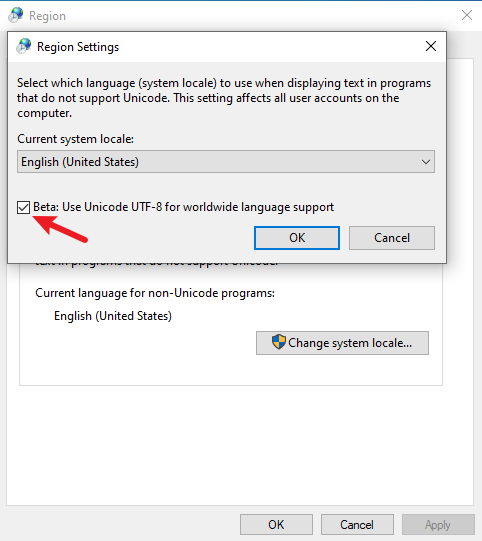
After that, press OK and restart the computer to apply the settings.
After restarting the computer, you can check the $OutputEncoding variable to view the current encoding.
Output:
As you can see, the current encoding is Unicode (UTF-8).
BodyName          : utf-8
EncodingName      : Unicode (UTF-8)
HeaderName        : utf-8
WebName           : utf-8
WindowsCodePage   : 1200
IsBrowserDisplay  : True
IsBrowserSave     : True
IsMailNewsDisplay : True
IsMailNewsSave    : True
IsSingleByte      : False
EncoderFallback   : System.Text.EncoderReplacementFallback
DecoderFallback   : System.Text.DecoderReplacementFallback
IsReadOnly        : True
CodePage          : 65001
Now, you can view the characters of other languages in PowerShell.
Output:
Set Encoding in $PSDefaultParameterValues Variable to Use UTF-8 Encoding in Windows PowerShell
You can run the following command to activate the UTF-8 encoding in PowerShell.
$PSDefaultParameterValues = @{'*:Encoding' = 'utf8'}
It is only valid for the current PowerShell console. It will be reset to default after you exit the PowerShell window.
Output:
Several cmdlets in PowerShell have the -Encoding parameter to specify the encoding for different character sets. Some of them are Add-Content, Set-Content, Get-Content, Export-Csv, Out-File, etc.
The -Encoding parameter supports these values: ascii, bigendianunicode, oem, unicode, utf7, utf8 ,utf8BOM, utf8NoBOM, utf32.
We hope this tutorial gave you an idea of using UTF-8 Encoding (CHCP 65001) in Windows PowerShell.
Какая кодировка используется в PowerShell по умолчанию. Как в PowerShell поменять кодировку вывода по умолчанию на UTF-8
Если вы выполните следующую команду в PowerShell 5:
"Testing" > test.file
И проверите кодировку в только что созданном файле test.file, то окажется, что это UTF-16LE.
Если вы выполните следующую команду в PowerShell 7:
"Testing" > test.file
И проверите кодировку в только что созданном файле test.file, то окажется, что это UTF-8.
Следующая команда, выполненная в PowerShell 5:
.mysqldump.exe -u root --all-databases > all-databases_ps5.sql
Создаст файл all-databases_ps5.sql в кодировке UTF-16LE в который с помощью mysqldump будут экспортированы все базы данных MySQL (с целью создания резервной копии). В этих базах данных будут безвозвратно испорчены ВСЕ не латинские символы!
То есть вместо кириллицы будет примерно следующее:
‘╨Р╤А╨▒╨╕╤В╤А╨░╨╢╨╜╤Л╨╣ ╨┐╤А╨╛╤Ж╨╡╤Б╤Б: ╤Г╤З╨╡╨▒╨╜╨╕╨║ / ╨Ъ.╨Ь. ╨Р╤А╤Б╨╗╨░╨╜╨╛╨▓, ╨Ф.╨е. ╨Т╨░╨╗╨╡╨╡╨▓, ╨а.╨Э. ╨У╨╕╨╝╨░╨╖╨

Следующая команда, выполненная в PowerShell 7:
.mysqldump.exe -u root --all-databases > all-databases_ps7.sql
Создаст файл all-databases_ps7.sql в кодировке UTF-8 в который с помощью mysqldump будут экспортированы все базы данных MySQL (с целью создания резервной копии). Но в этих базах данных ВНОВЬ будут безвозвратно испорчены ВСЕ нелатинские символы!
То есть казалось бы, кодировка по умолчанию изменилась на UTF-8, но проблема с полностью испорченными резервными копиями баз данных никуда не делась.
Как в PowerShell сохранить выходные из сторонних программ данные в кодировке UTF-8
Показанное выше поведение, при котором портится вывод команд в PowerShell, является недопустимым. Рассмотрим, как гарантировать, что вывод в PowerShell будет сохранён в кодировке UTF-8.
Для сохранения вывода в PowerShell в кодировке UTF-8 используйте комнадлет Out-File
Смотрите также: Как в PowerShell сохранить вывод в файл (аналоги > и >>)
Рассмотрим следующую команду:
.mysqldump.exe -u root --all-databases > all-databases.sql
Как уже показано выше, она портит нелатинские символы из-за неверной кодировке.
В некоторых источниках в качестве решения проблемы рекомендуют заменить символ «>» на «Out-File», и также указать кодировку с помощью опции «-Encoding UTF8». То есть использовать примерно следующую команду:
.mysqldump.exe -u root --all-databases | Out-File -Encoding UTF8 all-databases_fixed.sql
На самом деле, что в PowerShell 7, что в PowerShell 5 эта команда мало что меняет. Во-первых, команда является аналогом символа перенаправления вывода «>». Во-вторых, по умолчанию командлет Out-File использует кодировку UTF-8, то есть указывать её специально необязательно.
Но самое главное в том, что несмотря на то, что данные сохраняются в файл с кодировкой UTF-8 (в предыдущей команде это файл all-databases_fixed.sql), нелатинские символы в этом файле всё равно испорчены! Всё дело в том, что командлет Out-File полученные данные изначально обрабатывает в неверной кодировке. Поэтому уже не имеет значение, как именно Out-File сохраняет данные — данные испорчены уже в момент поступления в данный командлет.
Проблему удалось решить с помощью явного указания кодировки для получаемых данных:
[Console]::OutputEncoding = [System.Text.Encoding]::GetEncoding("UTF-8")
Последующий запуск команды сохранил все данные в правильной кодировке:
.mysqldump.exe -u root --all-databases | Out-File -Encoding UTF8 all-databases_fixed.sql

Этот метод одинаково хорошо работает в PowerShell 7 и PowerShell 5.
Кстати, исходная команда с помощью этого метода также сохраняет данные в правильной кодировке:
[Console]::OutputEncoding = [System.Text.Encoding]::GetEncoding("UTF-8")
.mysqldump.exe -u root --all-databases > all-databases.sql
Сохранение вывода сторонними утилитами
Во всех предыдущих командах мы перенаправляли вывод утилиты mysqldump в файл, либо в командлет Out-File. Но утилита mysqldump имеет опцию —result-file после которой можно указать имя файла для вывода. То есть в результате использования данной опции не нужно задействовать перенаправление вывода или командлеты PowerShell.
Следующая команда сохранит базу данных в правильной кодировке:
.mysqldump.exe -u root --all-databases --result-file=all-databases.sql
Связанные статьи:
- Ошибки «Оператор «<» зарезервирован для использования в будущем» и «The ‘<‘ operator is reserved for future use.» (РЕШЕНО) (100%)
- Как в PowerShell сохранить вывод в файл (аналоги > и >>) (94.2%)
- Аналог echo в PowerShell (55.3%)
- Как в PowerShell менять набор выводимых по умолчанию данных (55.3%)
- Как выводить данные без таблицы в PowerShell (55.3%)
- Как запустить PowerShell с правами администратора (RANDOM — 5.9%)