
How do I change the file creation date of a Windows file from Python?

martineau
117k25 gold badges161 silver badges290 bronze badges
asked Feb 14, 2011 at 19:30

5
Yak shaving for the win.
import pywintypes, win32file, win32con
def changeFileCreationTime(fname, newtime):
    wintime = pywintypes.Time(newtime)
    winfile = win32file.CreateFile(
        fname, win32con.GENERIC_WRITE,
        win32con.FILE_SHARE_READ | win32con.FILE_SHARE_WRITE | win32con.FILE_SHARE_DELETE,
        None, win32con.OPEN_EXISTING,
        win32con.FILE_ATTRIBUTE_NORMAL, None)

    win32file.SetFileTime(winfile, wintime, None, None)

    winfile.close()
answered Feb 14, 2011 at 19:31
ClaudiuClaudiu
221k161 gold badges474 silver badges676 bronze badges
4
I did not want to bring the whole pywin32 / win32file library solely to set the creation time of a file, so I made the win32-setctime package which does just that.
pip install win32-setctime
And then use it like that:
from win32_setctime import setctime

setctime("my_file.txt", 1561675987.509)
Basically, the function can be reduced to just a few lines without needing any dependency other that the built-in ctypes Python library:
from ctypes import windll, wintypes, byref

# Arbitrary example of a file and a date
filepath = "my_file.txt"
epoch = 1561675987.509

# Convert Unix timestamp to Windows FileTime using some magic numbers
# See documentation: https://support.microsoft.com/en-us/help/167296
timestamp = int((epoch * 10000000) + 116444736000000000)
ctime = wintypes.FILETIME(timestamp & 0xFFFFFFFF, timestamp >> 32)

# Call Win32 API to modify the file creation date
handle = windll.kernel32.CreateFileW(filepath, 256, 0, None, 3, 128, None)
windll.kernel32.SetFileTime(handle, byref(ctime), None, None)
windll.kernel32.CloseHandle(handle)
For advanced management (like error handling), see the source code of win32_setctime.py.
answered Jun 28, 2019 at 10:45

DelganDelgan
17.9k10 gold badges89 silver badges138 bronze badges
9
install pywin32 extension first https://sourceforge.net/projects/pywin32/files/pywin32/Build%20221/
import win32file
import pywintypes

# main logic function
def changeFileCreateTime(path, ctime):
    # path: your file path
    # ctime: Unix timestamp

    # open file and get the handle of file
    # API: http://timgolden.me.uk/pywin32-docs/win32file__CreateFile_meth.html
    handle = win32file.CreateFile(
        path,                          # file path
        win32file.GENERIC_WRITE,       # must opened with GENERIC_WRITE access
        0,
        None,
        win32file.OPEN_EXISTING,
        0,
        0
    )

    # create a PyTime object
    # API: http://timgolden.me.uk/pywin32-docs/pywintypes__Time_meth.html
    PyTime = pywintypes.Time(ctime)

    # reset the create time of file
    # API: http://timgolden.me.uk/pywin32-docs/win32file__SetFileTime_meth.html
    win32file.SetFileTime(
        handle,
        PyTime
    )

# example
changeFileCreateTime('C:/Users/percy/Desktop/1.txt',1234567789)
answered Jun 8, 2017 at 8:12

percy507percy507
7019 silver badges11 bronze badges
2
Here’s a more robust version of the accepted answer. It also has the opposing getter function. This addresses created, modified, and accessed datetimes. It handles having the datetimes parameters provided as either datetime.datetime objects, or as «seconds since the epoch» (what the getter returns). Further, it adjusts for Day Light Saving time, which the accepted answer does not. Without that, your times will not be set correctly when you set a winter or summer time during the opposing phase of your actual system time.
The major weakness of this answer is that it is for Windows only (which answers the question posed). In the future, I’ll try to post a cross platform solution.
def isWindows() :
  import platform
  return platform.system() == 'Windows'

def getFileDateTimes( filePath ):
    return ( os.path.getctime( filePath ),
             os.path.getmtime( filePath ),
             os.path.getatime( filePath ) )

def setFileDateTimes( filePath, datetimes ):
    try :
        import datetime
        import time
        if isWindows() :
            import win32file, win32con
            ctime = datetimes[0]
            mtime = datetimes[1]
            atime = datetimes[2]
            # handle datetime.datetime parameters
            if isinstance( ctime, datetime.datetime ) :
                ctime = time.mktime( ctime.timetuple() )
            if isinstance( mtime, datetime.datetime ) :
                mtime = time.mktime( mtime.timetuple() )
            if isinstance( atime, datetime.datetime ) :
                atime = time.mktime( atime.timetuple() )
            # adjust for day light savings
            now = time.localtime()
            ctime += 3600 * (now.tm_isdst - time.localtime(ctime).tm_isdst)
            mtime += 3600 * (now.tm_isdst - time.localtime(mtime).tm_isdst)
            atime += 3600 * (now.tm_isdst - time.localtime(atime).tm_isdst)
            # change time stamps
            winfile = win32file.CreateFile(
                filePath, win32con.GENERIC_WRITE,
                win32con.FILE_SHARE_READ | win32con.FILE_SHARE_WRITE | win32con.FILE_SHARE_DELETE,
                None, win32con.OPEN_EXISTING,
                win32con.FILE_ATTRIBUTE_NORMAL, None)
            win32file.SetFileTime( winfile, ctime, atime, mtime )
            winfile.close()
        else : """MUST FIGURE OUT..."""
    except : pass

answered Mar 27, 2017 at 13:10

BuvinJBuvinJ
9,8435 gold badges79 silver badges93 bronze badges
import os
os.utime(path, (accessed_time, modified_time))
http://docs.python.org/library/os.html
At least it changes the modification time, without using win32 module.

answered Dec 1, 2011 at 16:10

DeltaDelta
1,9863 gold badges24 silver badges33 bronze badges
3
This code works on python 3 without
ValueError: astimezone() cannot be applied to a naive datetime:
wintime = datetime.datetime.utcfromtimestamp(newtime).replace(tzinfo=datetime.timezone.utc)
winfile = win32file.CreateFile(
    fname, win32con.GENERIC_WRITE,
    win32con.FILE_SHARE_READ | win32con.FILE_SHARE_WRITE | win32con.FILE_SHARE_DELETE,
    None, win32con.OPEN_EXISTING,
    win32con.FILE_ATTRIBUTE_NORMAL, None)
win32file.SetFileTime(winfile, wintime)
winfile.close()
answered Apr 8, 2016 at 8:08

panda-34panda-34
4,00719 silver badges24 bronze badges
3
My simple and clear filedate module might accommodate your needs.
Advantages:
- Very simple interface
- Platform independent
- Fancy string dates support
- Date Holder utility
Installation
pip install filedate
Usage
import filedate
Path = "~/Documents/File.txt"

filedate.File(Path).set(
    created = "1st February 2003, 12:30",
    modified = "3:00 PM, 04 May 2009",
    accessed = "08/07/2014 18:30:45"
)
answered Dec 5, 2021 at 12:52

1
Here is a solution that works on Python 3.5 and windows 7. Very easy. I admit it’s sloppy coding… but it works. You’re welcome to clean it up. I just needed a quick soln.
import pywintypes, win32file, win32con, datetime, pytz

def changeFileCreationTime(fname, newtime):
    wintime = pywintypes.Time(newtime)
    winfile = win32file.CreateFile(fname, win32con.GENERIC_WRITE,
                                   win32con.FILE_SHARE_READ |
                                   win32con.FILE_SHARE_WRITE |
                                   win32con.FILE_SHARE_DELETE,
                                   None,
                                   win32con.OPEN_EXISTING,
                                   win32con.FILE_ATTRIBUTE_NORMAL,
                                   None)

    win32file.SetFileTime(      winfile,  wintime,  wintime,     wintime)
    # None doesnt change args = file,     creation, last access, last write
    # win32file.SetFileTime(None, None, None, None) # does nonething
    winfile.close()

if __name__ == "__main__":
    local_tz = pytz.timezone('Antarctica/South_Pole')
    start_date = local_tz.localize(datetime.datetime(1776,7,4), is_dst=None)
    changeFileCreationTime(r'C:homemade.pr0n', start_date )
answered Jun 9, 2017 at 6:26

Kardo PaskaKardo Paska
4847 silver badges15 bronze badges
1
If you want to put a date instead of an epoch you can grab this code. I used win32-setctime and attrs packages so firstly install:
pip install win32-setctime
pip install attrs
Then you can run my code, remember to update FILEPATH, DATE, MONTH and YEAR.
from datetime import datetime

import attr
from win32_setctime import setctime

FILEPATH = r'C:UsersjakubPycharmProjectsdate_creation_changedoc.docx'
DAY, MONTH, YEAR = (9, 5, 2020)


@attr.s
class TimeCounter:
    """
    Class calculates epochs
    """
    day = attr.ib(converter=str)
    month = attr.ib(converter=str)
    year = attr.ib(converter=str)

    def create_datetime(self):
        date_time_obj = datetime.strptime(r'{}/{}/{}'.format(self.day,
                                                             self.month,
                                                             self.year), '%d/%m/%Y')

        unix_start = datetime(1970, 1, 1)
        return (date_time_obj - unix_start).days

    def count_epoch(self):
        days = self.create_datetime()
        return days * 86400


@attr.s
class DateCreatedChanger:
    """
    Class changes the creation date of the file
    """
    file_path = attr.ib()

    def change_creation_date(self):
        epoch_obj = TimeCounter(day=DAY,
                                month=MONTH,
                                year=YEAR)
        epoch = epoch_obj.count_epoch()
        setctime(self.file_path, epoch)


if __name__ == '__main__':
    changer = DateCreatedChanger(FILEPATH)
    changer.change_creation_date()
answered Nov 2, 2021 at 18:30

KubaAdamKubaAdam
511 silver badge3 bronze badges
A small solution without dependencies inspired by Delgan’s answer.
It supports unix timestamps up to nano precision (like the values returned by os.stat(...).st_ctime_ns as an example).
Modified, accessed and created timestamps are supported.
Unpassed/noned parameters are being ignored by the Win32 api call (those file properties won’t be changed).
It requires python 3.10 for the multi-type hints used on the parameters. Just remove the hints if you want it to work for older python versions.
from ctypes import wintypes, byref, WinDLL, WinError, get_last_error


def __unix_ts_to_win_filetime(self, timestamp: int | None) -> wintypes.FILETIME:
    if not timestamp:
        return wintypes.FILETIME(0xFFFFFFFF, 0xFFFFFFFF)

    # difference in ticks between 16010101 and 19700101 (leapseconds were introduced in 1972 so we're fine)
    _EPOCH_OFFSET_TICKS = 116444736000000000
    # truncate timestamp to 19 decimals or fill it up with zeroes
    timestamp = int(str(timestamp)[:19].rjust(19, '0'))
    timestamp_in_ticks = int(timestamp / 100)
    # add epoch offset to timestamp ticks
    timestamp_in_ticks += _EPOCH_OFFSET_TICKS
    # convert to wintypes.FILETIME by filling higher (32-bit masked) and lower number (shifted by 32 bits)
    return wintypes.FILETIME(timestamp_in_ticks & 0xFFFFFFFF, timestamp_in_ticks >> 32)

def __set_times_on_file(self, path: str, created_timestamp: int = None, access_timestamp: int = None, modify_timestamp: int = None) -> bool:
    created_timestamp = self.__unix_ts_to_win_filetime(timestamp=created_timestamp)
    access_timestamp = self.__unix_ts_to_win_filetime(timestamp=access_timestamp)
    modify_timestamp = self.__unix_ts_to_win_filetime(timestamp=modify_timestamp)

    # Win32 API call for CreateFileW and SetFileTime
    kernel32 = WinDLL("kernel32", use_last_error=True)
    hndl = kernel32.CreateFileW(path, 256, 0, None, 3, 128, None)
    if hndl == -1:
        print(WinError(get_last_error()))
        return False

    if not wintypes.BOOL(kernel32.SetFileTime(hndl, byref(created_timestamp), byref(access_timestamp), byref(modify_timestamp))):
        print(WinError(get_last_error()))
        return False

    if not wintypes.BOOL(kernel32.CloseHandle(hndl)):
        print(WinError(get_last_error()))
        return False

    return True
Usage example
if __set_times_on_file(path='C:WindowsTempfoo.bar', created_timestamp=1657101345298000000):
    print("file timestamps could be set")
else:
    print("file timestamps could not be set")
answered Jul 6, 2022 at 10:01

0x4460x446
213 bronze badges
I could not find a straight answer for python exactly, so i am leaving an answer for anyone searching how to modify the dates for a directory (or a file, thanks to the answers in this thread).
import os, win32con, win32file, pywintypes


def changeCreationTime(path, time):

    try:
        wintime = pywintypes.Time(time)
        # File
        if os.path.isfile(path):
            winfile = win32file.CreateFile(path,
                                           win32con.GENERIC_WRITE,
                                           win32con.FILE_SHARE_READ |
                                           win32con.FILE_SHARE_WRITE |
                                           win32con.FILE_SHARE_DELETE,
                                           None,
                                           win32con.OPEN_EXISTING,
                                           win32con.FILE_ATTRIBUTE_NORMAL,
                                           None)
            win32file.SetFileTime(winfile, wintime, wintime, wintime)
            winfile.close()
            print(f'File {path} modified')
        # Directory
        elif os.path.isdir(path):
            windir = win32file.CreateFile(path,
                                          win32con.GENERIC_WRITE,
                                          win32con.FILE_SHARE_WRITE |
                                          win32con.FILE_SHARE_DELETE |
                                          win32con.FILE_SHARE_READ,
                                          None,
                                          win32con.OPEN_EXISTING,
                                          win32con.FILE_FLAG_BACKUP_SEMANTICS,
                                          None)
            win32file.SetFileTime(windir, wintime, wintime, wintime)
            windir.close()
            print(f"Directory {path} modified")
    except BaseException as err:
        print(err)
Example:
# Create a folder named example and a text file named example.txt in C:example
changeCreationTime(r'C:example', 1338587789)
changeCreationTime(r'C:exampleexample.txt', 1338587789)
answered Jul 20, 2022 at 16:51

How do I change the file creation date of a Windows file from Python?
martineau
117k25 gold badges161 silver badges290 bronze badges
asked Feb 14, 2011 at 19:30
5
Yak shaving for the win.
import pywintypes, win32file, win32con
def changeFileCreationTime(fname, newtime):
    wintime = pywintypes.Time(newtime)
    winfile = win32file.CreateFile(
        fname, win32con.GENERIC_WRITE,
        win32con.FILE_SHARE_READ | win32con.FILE_SHARE_WRITE | win32con.FILE_SHARE_DELETE,
        None, win32con.OPEN_EXISTING,
        win32con.FILE_ATTRIBUTE_NORMAL, None)

    win32file.SetFileTime(winfile, wintime, None, None)

    winfile.close()
answered Feb 14, 2011 at 19:31
ClaudiuClaudiu
221k161 gold badges474 silver badges676 bronze badges
4
I did not want to bring the whole pywin32 / win32file library solely to set the creation time of a file, so I made the win32-setctime package which does just that.
pip install win32-setctime
And then use it like that:
from win32_setctime import setctime

setctime("my_file.txt", 1561675987.509)
Basically, the function can be reduced to just a few lines without needing any dependency other that the built-in ctypes Python library:
from ctypes import windll, wintypes, byref

# Arbitrary example of a file and a date
filepath = "my_file.txt"
epoch = 1561675987.509

# Convert Unix timestamp to Windows FileTime using some magic numbers
# See documentation: https://support.microsoft.com/en-us/help/167296
timestamp = int((epoch * 10000000) + 116444736000000000)
ctime = wintypes.FILETIME(timestamp & 0xFFFFFFFF, timestamp >> 32)

# Call Win32 API to modify the file creation date
handle = windll.kernel32.CreateFileW(filepath, 256, 0, None, 3, 128, None)
windll.kernel32.SetFileTime(handle, byref(ctime), None, None)
windll.kernel32.CloseHandle(handle)
For advanced management (like error handling), see the source code of win32_setctime.py.
answered Jun 28, 2019 at 10:45
DelganDelgan
17.9k10 gold badges89 silver badges138 bronze badges
9
install pywin32 extension first https://sourceforge.net/projects/pywin32/files/pywin32/Build%20221/
import win32file
import pywintypes

# main logic function
def changeFileCreateTime(path, ctime):
    # path: your file path
    # ctime: Unix timestamp

    # open file and get the handle of file
    # API: http://timgolden.me.uk/pywin32-docs/win32file__CreateFile_meth.html
    handle = win32file.CreateFile(
        path,                          # file path
        win32file.GENERIC_WRITE,       # must opened with GENERIC_WRITE access
        0,
        None,
        win32file.OPEN_EXISTING,
        0,
        0
    )

    # create a PyTime object
    # API: http://timgolden.me.uk/pywin32-docs/pywintypes__Time_meth.html
    PyTime = pywintypes.Time(ctime)

    # reset the create time of file
    # API: http://timgolden.me.uk/pywin32-docs/win32file__SetFileTime_meth.html
    win32file.SetFileTime(
        handle,
        PyTime
    )

# example
changeFileCreateTime('C:/Users/percy/Desktop/1.txt',1234567789)
answered Jun 8, 2017 at 8:12
percy507percy507
7019 silver badges11 bronze badges
2
Here’s a more robust version of the accepted answer. It also has the opposing getter function. This addresses created, modified, and accessed datetimes. It handles having the datetimes parameters provided as either datetime.datetime objects, or as «seconds since the epoch» (what the getter returns). Further, it adjusts for Day Light Saving time, which the accepted answer does not. Without that, your times will not be set correctly when you set a winter or summer time during the opposing phase of your actual system time.
The major weakness of this answer is that it is for Windows only (which answers the question posed). In the future, I’ll try to post a cross platform solution.
def isWindows() :
  import platform
  return platform.system() == 'Windows'

def getFileDateTimes( filePath ):
    return ( os.path.getctime( filePath ),
             os.path.getmtime( filePath ),
             os.path.getatime( filePath ) )

def setFileDateTimes( filePath, datetimes ):
    try :
        import datetime
        import time
        if isWindows() :
            import win32file, win32con
            ctime = datetimes[0]
            mtime = datetimes[1]
            atime = datetimes[2]
            # handle datetime.datetime parameters
            if isinstance( ctime, datetime.datetime ) :
                ctime = time.mktime( ctime.timetuple() )
            if isinstance( mtime, datetime.datetime ) :
                mtime = time.mktime( mtime.timetuple() )
            if isinstance( atime, datetime.datetime ) :
                atime = time.mktime( atime.timetuple() )
            # adjust for day light savings
            now = time.localtime()
            ctime += 3600 * (now.tm_isdst - time.localtime(ctime).tm_isdst)
            mtime += 3600 * (now.tm_isdst - time.localtime(mtime).tm_isdst)
            atime += 3600 * (now.tm_isdst - time.localtime(atime).tm_isdst)
            # change time stamps
            winfile = win32file.CreateFile(
                filePath, win32con.GENERIC_WRITE,
                win32con.FILE_SHARE_READ | win32con.FILE_SHARE_WRITE | win32con.FILE_SHARE_DELETE,
                None, win32con.OPEN_EXISTING,
                win32con.FILE_ATTRIBUTE_NORMAL, None)
            win32file.SetFileTime( winfile, ctime, atime, mtime )
            winfile.close()
        else : """MUST FIGURE OUT..."""
    except : pass
answered Mar 27, 2017 at 13:10
BuvinJBuvinJ
9,8435 gold badges79 silver badges93 bronze badges
import os
os.utime(path, (accessed_time, modified_time))
http://docs.python.org/library/os.html
At least it changes the modification time, without using win32 module.
answered Dec 1, 2011 at 16:10
DeltaDelta
1,9863 gold badges24 silver badges33 bronze badges
3
This code works on python 3 without
ValueError: astimezone() cannot be applied to a naive datetime:
wintime = datetime.datetime.utcfromtimestamp(newtime).replace(tzinfo=datetime.timezone.utc)
winfile = win32file.CreateFile(
    fname, win32con.GENERIC_WRITE,
    win32con.FILE_SHARE_READ | win32con.FILE_SHARE_WRITE | win32con.FILE_SHARE_DELETE,
    None, win32con.OPEN_EXISTING,
    win32con.FILE_ATTRIBUTE_NORMAL, None)
win32file.SetFileTime(winfile, wintime)
winfile.close()
answered Apr 8, 2016 at 8:08
panda-34panda-34
4,00719 silver badges24 bronze badges
3
My simple and clear filedate module might accommodate your needs.
Advantages:
- Very simple interface
- Platform independent
- Fancy string dates support
- Date Holder utility
Installation
pip install filedate
Usage
import filedate
Path = "~/Documents/File.txt"

filedate.File(Path).set(
    created = "1st February 2003, 12:30",
    modified = "3:00 PM, 04 May 2009",
    accessed = "08/07/2014 18:30:45"
)
answered Dec 5, 2021 at 12:52
1
Here is a solution that works on Python 3.5 and windows 7. Very easy. I admit it’s sloppy coding… but it works. You’re welcome to clean it up. I just needed a quick soln.
import pywintypes, win32file, win32con, datetime, pytz

def changeFileCreationTime(fname, newtime):
    wintime = pywintypes.Time(newtime)
    winfile = win32file.CreateFile(fname, win32con.GENERIC_WRITE,
                                   win32con.FILE_SHARE_READ |
                                   win32con.FILE_SHARE_WRITE |
                                   win32con.FILE_SHARE_DELETE,
                                   None,
                                   win32con.OPEN_EXISTING,
                                   win32con.FILE_ATTRIBUTE_NORMAL,
                                   None)

    win32file.SetFileTime(      winfile,  wintime,  wintime,     wintime)
    # None doesnt change args = file,     creation, last access, last write
    # win32file.SetFileTime(None, None, None, None) # does nonething
    winfile.close()

if __name__ == "__main__":
    local_tz = pytz.timezone('Antarctica/South_Pole')
    start_date = local_tz.localize(datetime.datetime(1776,7,4), is_dst=None)
    changeFileCreationTime(r'C:homemade.pr0n', start_date )
answered Jun 9, 2017 at 6:26
Kardo PaskaKardo Paska
4847 silver badges15 bronze badges
1
If you want to put a date instead of an epoch you can grab this code. I used win32-setctime and attrs packages so firstly install:
pip install win32-setctime
pip install attrs
Then you can run my code, remember to update FILEPATH, DATE, MONTH and YEAR.
from datetime import datetime

import attr
from win32_setctime import setctime

FILEPATH = r'C:UsersjakubPycharmProjectsdate_creation_changedoc.docx'
DAY, MONTH, YEAR = (9, 5, 2020)


@attr.s
class TimeCounter:
    """
    Class calculates epochs
    """
    day = attr.ib(converter=str)
    month = attr.ib(converter=str)
    year = attr.ib(converter=str)

    def create_datetime(self):
        date_time_obj = datetime.strptime(r'{}/{}/{}'.format(self.day,
                                                             self.month,
                                                             self.year), '%d/%m/%Y')

        unix_start = datetime(1970, 1, 1)
        return (date_time_obj - unix_start).days

    def count_epoch(self):
        days = self.create_datetime()
        return days * 86400


@attr.s
class DateCreatedChanger:
    """
    Class changes the creation date of the file
    """
    file_path = attr.ib()

    def change_creation_date(self):
        epoch_obj = TimeCounter(day=DAY,
                                month=MONTH,
                                year=YEAR)
        epoch = epoch_obj.count_epoch()
        setctime(self.file_path, epoch)


if __name__ == '__main__':
    changer = DateCreatedChanger(FILEPATH)
    changer.change_creation_date()
answered Nov 2, 2021 at 18:30
KubaAdamKubaAdam
511 silver badge3 bronze badges
A small solution without dependencies inspired by Delgan’s answer.
It supports unix timestamps up to nano precision (like the values returned by os.stat(...).st_ctime_ns as an example).
Modified, accessed and created timestamps are supported.
Unpassed/noned parameters are being ignored by the Win32 api call (those file properties won’t be changed).
It requires python 3.10 for the multi-type hints used on the parameters. Just remove the hints if you want it to work for older python versions.
from ctypes import wintypes, byref, WinDLL, WinError, get_last_error


def __unix_ts_to_win_filetime(self, timestamp: int | None) -> wintypes.FILETIME:
    if not timestamp:
        return wintypes.FILETIME(0xFFFFFFFF, 0xFFFFFFFF)

    # difference in ticks between 16010101 and 19700101 (leapseconds were introduced in 1972 so we're fine)
    _EPOCH_OFFSET_TICKS = 116444736000000000
    # truncate timestamp to 19 decimals or fill it up with zeroes
    timestamp = int(str(timestamp)[:19].rjust(19, '0'))
    timestamp_in_ticks = int(timestamp / 100)
    # add epoch offset to timestamp ticks
    timestamp_in_ticks += _EPOCH_OFFSET_TICKS
    # convert to wintypes.FILETIME by filling higher (32-bit masked) and lower number (shifted by 32 bits)
    return wintypes.FILETIME(timestamp_in_ticks & 0xFFFFFFFF, timestamp_in_ticks >> 32)

def __set_times_on_file(self, path: str, created_timestamp: int = None, access_timestamp: int = None, modify_timestamp: int = None) -> bool:
    created_timestamp = self.__unix_ts_to_win_filetime(timestamp=created_timestamp)
    access_timestamp = self.__unix_ts_to_win_filetime(timestamp=access_timestamp)
    modify_timestamp = self.__unix_ts_to_win_filetime(timestamp=modify_timestamp)

    # Win32 API call for CreateFileW and SetFileTime
    kernel32 = WinDLL("kernel32", use_last_error=True)
    hndl = kernel32.CreateFileW(path, 256, 0, None, 3, 128, None)
    if hndl == -1:
        print(WinError(get_last_error()))
        return False

    if not wintypes.BOOL(kernel32.SetFileTime(hndl, byref(created_timestamp), byref(access_timestamp), byref(modify_timestamp))):
        print(WinError(get_last_error()))
        return False

    if not wintypes.BOOL(kernel32.CloseHandle(hndl)):
        print(WinError(get_last_error()))
        return False

    return True
Usage example
if __set_times_on_file(path='C:WindowsTempfoo.bar', created_timestamp=1657101345298000000):
    print("file timestamps could be set")
else:
    print("file timestamps could not be set")
answered Jul 6, 2022 at 10:01
0x4460x446
213 bronze badges
I could not find a straight answer for python exactly, so i am leaving an answer for anyone searching how to modify the dates for a directory (or a file, thanks to the answers in this thread).
import os, win32con, win32file, pywintypes


def changeCreationTime(path, time):

    try:
        wintime = pywintypes.Time(time)
        # File
        if os.path.isfile(path):
            winfile = win32file.CreateFile(path,
                                           win32con.GENERIC_WRITE,
                                           win32con.FILE_SHARE_READ |
                                           win32con.FILE_SHARE_WRITE |
                                           win32con.FILE_SHARE_DELETE,
                                           None,
                                           win32con.OPEN_EXISTING,
                                           win32con.FILE_ATTRIBUTE_NORMAL,
                                           None)
            win32file.SetFileTime(winfile, wintime, wintime, wintime)
            winfile.close()
            print(f'File {path} modified')
        # Directory
        elif os.path.isdir(path):
            windir = win32file.CreateFile(path,
                                          win32con.GENERIC_WRITE,
                                          win32con.FILE_SHARE_WRITE |
                                          win32con.FILE_SHARE_DELETE |
                                          win32con.FILE_SHARE_READ,
                                          None,
                                          win32con.OPEN_EXISTING,
                                          win32con.FILE_FLAG_BACKUP_SEMANTICS,
                                          None)
            win32file.SetFileTime(windir, wintime, wintime, wintime)
            windir.close()
            print(f"Directory {path} modified")
    except BaseException as err:
        print(err)
Example:
# Create a folder named example and a text file named example.txt in C:example
changeCreationTime(r'C:example', 1338587789)
changeCreationTime(r'C:exampleexample.txt', 1338587789)
answered Jul 20, 2022 at 16:51
How do I change the file creation date of a Windows file from Python?
martineau
117k25 gold badges161 silver badges290 bronze badges
asked Feb 14, 2011 at 19:30
5
Yak shaving for the win.
import pywintypes, win32file, win32con
def changeFileCreationTime(fname, newtime):
    wintime = pywintypes.Time(newtime)
    winfile = win32file.CreateFile(
        fname, win32con.GENERIC_WRITE,
        win32con.FILE_SHARE_READ | win32con.FILE_SHARE_WRITE | win32con.FILE_SHARE_DELETE,
        None, win32con.OPEN_EXISTING,
        win32con.FILE_ATTRIBUTE_NORMAL, None)

    win32file.SetFileTime(winfile, wintime, None, None)

    winfile.close()
answered Feb 14, 2011 at 19:31
ClaudiuClaudiu
221k161 gold badges474 silver badges676 bronze badges
4
I did not want to bring the whole pywin32 / win32file library solely to set the creation time of a file, so I made the win32-setctime package which does just that.
pip install win32-setctime
And then use it like that:
from win32_setctime import setctime

setctime("my_file.txt", 1561675987.509)
Basically, the function can be reduced to just a few lines without needing any dependency other that the built-in ctypes Python library:
from ctypes import windll, wintypes, byref

# Arbitrary example of a file and a date
filepath = "my_file.txt"
epoch = 1561675987.509

# Convert Unix timestamp to Windows FileTime using some magic numbers
# See documentation: https://support.microsoft.com/en-us/help/167296
timestamp = int((epoch * 10000000) + 116444736000000000)
ctime = wintypes.FILETIME(timestamp & 0xFFFFFFFF, timestamp >> 32)

# Call Win32 API to modify the file creation date
handle = windll.kernel32.CreateFileW(filepath, 256, 0, None, 3, 128, None)
windll.kernel32.SetFileTime(handle, byref(ctime), None, None)
windll.kernel32.CloseHandle(handle)
For advanced management (like error handling), see the source code of win32_setctime.py.
answered Jun 28, 2019 at 10:45
DelganDelgan
17.9k10 gold badges89 silver badges138 bronze badges
9
install pywin32 extension first https://sourceforge.net/projects/pywin32/files/pywin32/Build%20221/
import win32file
import pywintypes

# main logic function
def changeFileCreateTime(path, ctime):
    # path: your file path
    # ctime: Unix timestamp

    # open file and get the handle of file
    # API: http://timgolden.me.uk/pywin32-docs/win32file__CreateFile_meth.html
    handle = win32file.CreateFile(
        path,                          # file path
        win32file.GENERIC_WRITE,       # must opened with GENERIC_WRITE access
        0,
        None,
        win32file.OPEN_EXISTING,
        0,
        0
    )

    # create a PyTime object
    # API: http://timgolden.me.uk/pywin32-docs/pywintypes__Time_meth.html
    PyTime = pywintypes.Time(ctime)

    # reset the create time of file
    # API: http://timgolden.me.uk/pywin32-docs/win32file__SetFileTime_meth.html
    win32file.SetFileTime(
        handle,
        PyTime
    )

# example
changeFileCreateTime('C:/Users/percy/Desktop/1.txt',1234567789)
answered Jun 8, 2017 at 8:12
percy507percy507
7019 silver badges11 bronze badges
2
Here’s a more robust version of the accepted answer. It also has the opposing getter function. This addresses created, modified, and accessed datetimes. It handles having the datetimes parameters provided as either datetime.datetime objects, or as «seconds since the epoch» (what the getter returns). Further, it adjusts for Day Light Saving time, which the accepted answer does not. Without that, your times will not be set correctly when you set a winter or summer time during the opposing phase of your actual system time.
The major weakness of this answer is that it is for Windows only (which answers the question posed). In the future, I’ll try to post a cross platform solution.
def isWindows() :
  import platform
  return platform.system() == 'Windows'

def getFileDateTimes( filePath ):
    return ( os.path.getctime( filePath ),
             os.path.getmtime( filePath ),
             os.path.getatime( filePath ) )

def setFileDateTimes( filePath, datetimes ):
    try :
        import datetime
        import time
        if isWindows() :
            import win32file, win32con
            ctime = datetimes[0]
            mtime = datetimes[1]
            atime = datetimes[2]
            # handle datetime.datetime parameters
            if isinstance( ctime, datetime.datetime ) :
                ctime = time.mktime( ctime.timetuple() )
            if isinstance( mtime, datetime.datetime ) :
                mtime = time.mktime( mtime.timetuple() )
            if isinstance( atime, datetime.datetime ) :
                atime = time.mktime( atime.timetuple() )
            # adjust for day light savings
            now = time.localtime()
            ctime += 3600 * (now.tm_isdst - time.localtime(ctime).tm_isdst)
            mtime += 3600 * (now.tm_isdst - time.localtime(mtime).tm_isdst)
            atime += 3600 * (now.tm_isdst - time.localtime(atime).tm_isdst)
            # change time stamps
            winfile = win32file.CreateFile(
                filePath, win32con.GENERIC_WRITE,
                win32con.FILE_SHARE_READ | win32con.FILE_SHARE_WRITE | win32con.FILE_SHARE_DELETE,
                None, win32con.OPEN_EXISTING,
                win32con.FILE_ATTRIBUTE_NORMAL, None)
            win32file.SetFileTime( winfile, ctime, atime, mtime )
            winfile.close()
        else : """MUST FIGURE OUT..."""
    except : pass
answered Mar 27, 2017 at 13:10
BuvinJBuvinJ
9,8435 gold badges79 silver badges93 bronze badges
import os
os.utime(path, (accessed_time, modified_time))
http://docs.python.org/library/os.html
At least it changes the modification time, without using win32 module.
answered Dec 1, 2011 at 16:10
DeltaDelta
1,9863 gold badges24 silver badges33 bronze badges
3
This code works on python 3 without
ValueError: astimezone() cannot be applied to a naive datetime:
wintime = datetime.datetime.utcfromtimestamp(newtime).replace(tzinfo=datetime.timezone.utc)
winfile = win32file.CreateFile(
    fname, win32con.GENERIC_WRITE,
    win32con.FILE_SHARE_READ | win32con.FILE_SHARE_WRITE | win32con.FILE_SHARE_DELETE,
    None, win32con.OPEN_EXISTING,
    win32con.FILE_ATTRIBUTE_NORMAL, None)
win32file.SetFileTime(winfile, wintime)
winfile.close()
answered Apr 8, 2016 at 8:08
panda-34panda-34
4,00719 silver badges24 bronze badges
3
My simple and clear filedate module might accommodate your needs.
Advantages:
- Very simple interface
- Platform independent
- Fancy string dates support
- Date Holder utility
Installation
pip install filedate
Usage
import filedate
Path = "~/Documents/File.txt"

filedate.File(Path).set(
    created = "1st February 2003, 12:30",
    modified = "3:00 PM, 04 May 2009",
    accessed = "08/07/2014 18:30:45"
)
answered Dec 5, 2021 at 12:52
1
Here is a solution that works on Python 3.5 and windows 7. Very easy. I admit it’s sloppy coding… but it works. You’re welcome to clean it up. I just needed a quick soln.
import pywintypes, win32file, win32con, datetime, pytz

def changeFileCreationTime(fname, newtime):
    wintime = pywintypes.Time(newtime)
    winfile = win32file.CreateFile(fname, win32con.GENERIC_WRITE,
                                   win32con.FILE_SHARE_READ |
                                   win32con.FILE_SHARE_WRITE |
                                   win32con.FILE_SHARE_DELETE,
                                   None,
                                   win32con.OPEN_EXISTING,
                                   win32con.FILE_ATTRIBUTE_NORMAL,
                                   None)

    win32file.SetFileTime(      winfile,  wintime,  wintime,     wintime)
    # None doesnt change args = file,     creation, last access, last write
    # win32file.SetFileTime(None, None, None, None) # does nonething
    winfile.close()

if __name__ == "__main__":
    local_tz = pytz.timezone('Antarctica/South_Pole')
    start_date = local_tz.localize(datetime.datetime(1776,7,4), is_dst=None)
    changeFileCreationTime(r'C:homemade.pr0n', start_date )
answered Jun 9, 2017 at 6:26
Kardo PaskaKardo Paska
4847 silver badges15 bronze badges
1
If you want to put a date instead of an epoch you can grab this code. I used win32-setctime and attrs packages so firstly install:
pip install win32-setctime
pip install attrs
Then you can run my code, remember to update FILEPATH, DATE, MONTH and YEAR.
from datetime import datetime

import attr
from win32_setctime import setctime

FILEPATH = r'C:UsersjakubPycharmProjectsdate_creation_changedoc.docx'
DAY, MONTH, YEAR = (9, 5, 2020)


@attr.s
class TimeCounter:
    """
    Class calculates epochs
    """
    day = attr.ib(converter=str)
    month = attr.ib(converter=str)
    year = attr.ib(converter=str)

    def create_datetime(self):
        date_time_obj = datetime.strptime(r'{}/{}/{}'.format(self.day,
                                                             self.month,
                                                             self.year), '%d/%m/%Y')

        unix_start = datetime(1970, 1, 1)
        return (date_time_obj - unix_start).days

    def count_epoch(self):
        days = self.create_datetime()
        return days * 86400


@attr.s
class DateCreatedChanger:
    """
    Class changes the creation date of the file
    """
    file_path = attr.ib()

    def change_creation_date(self):
        epoch_obj = TimeCounter(day=DAY,
                                month=MONTH,
                                year=YEAR)
        epoch = epoch_obj.count_epoch()
        setctime(self.file_path, epoch)


if __name__ == '__main__':
    changer = DateCreatedChanger(FILEPATH)
    changer.change_creation_date()
answered Nov 2, 2021 at 18:30
KubaAdamKubaAdam
511 silver badge3 bronze badges
A small solution without dependencies inspired by Delgan’s answer.
It supports unix timestamps up to nano precision (like the values returned by os.stat(...).st_ctime_ns as an example).
Modified, accessed and created timestamps are supported.
Unpassed/noned parameters are being ignored by the Win32 api call (those file properties won’t be changed).
It requires python 3.10 for the multi-type hints used on the parameters. Just remove the hints if you want it to work for older python versions.
from ctypes import wintypes, byref, WinDLL, WinError, get_last_error


def __unix_ts_to_win_filetime(self, timestamp: int | None) -> wintypes.FILETIME:
    if not timestamp:
        return wintypes.FILETIME(0xFFFFFFFF, 0xFFFFFFFF)

    # difference in ticks between 16010101 and 19700101 (leapseconds were introduced in 1972 so we're fine)
    _EPOCH_OFFSET_TICKS = 116444736000000000
    # truncate timestamp to 19 decimals or fill it up with zeroes
    timestamp = int(str(timestamp)[:19].rjust(19, '0'))
    timestamp_in_ticks = int(timestamp / 100)
    # add epoch offset to timestamp ticks
    timestamp_in_ticks += _EPOCH_OFFSET_TICKS
    # convert to wintypes.FILETIME by filling higher (32-bit masked) and lower number (shifted by 32 bits)
    return wintypes.FILETIME(timestamp_in_ticks & 0xFFFFFFFF, timestamp_in_ticks >> 32)

def __set_times_on_file(self, path: str, created_timestamp: int = None, access_timestamp: int = None, modify_timestamp: int = None) -> bool:
    created_timestamp = self.__unix_ts_to_win_filetime(timestamp=created_timestamp)
    access_timestamp = self.__unix_ts_to_win_filetime(timestamp=access_timestamp)
    modify_timestamp = self.__unix_ts_to_win_filetime(timestamp=modify_timestamp)

    # Win32 API call for CreateFileW and SetFileTime
    kernel32 = WinDLL("kernel32", use_last_error=True)
    hndl = kernel32.CreateFileW(path, 256, 0, None, 3, 128, None)
    if hndl == -1:
        print(WinError(get_last_error()))
        return False

    if not wintypes.BOOL(kernel32.SetFileTime(hndl, byref(created_timestamp), byref(access_timestamp), byref(modify_timestamp))):
        print(WinError(get_last_error()))
        return False

    if not wintypes.BOOL(kernel32.CloseHandle(hndl)):
        print(WinError(get_last_error()))
        return False

    return True
Usage example
if __set_times_on_file(path='C:WindowsTempfoo.bar', created_timestamp=1657101345298000000):
    print("file timestamps could be set")
else:
    print("file timestamps could not be set")
answered Jul 6, 2022 at 10:01
0x4460x446
213 bronze badges
I could not find a straight answer for python exactly, so i am leaving an answer for anyone searching how to modify the dates for a directory (or a file, thanks to the answers in this thread).
import os, win32con, win32file, pywintypes


def changeCreationTime(path, time):

    try:
        wintime = pywintypes.Time(time)
        # File
        if os.path.isfile(path):
            winfile = win32file.CreateFile(path,
                                           win32con.GENERIC_WRITE,
                                           win32con.FILE_SHARE_READ |
                                           win32con.FILE_SHARE_WRITE |
                                           win32con.FILE_SHARE_DELETE,
                                           None,
                                           win32con.OPEN_EXISTING,
                                           win32con.FILE_ATTRIBUTE_NORMAL,
                                           None)
            win32file.SetFileTime(winfile, wintime, wintime, wintime)
            winfile.close()
            print(f'File {path} modified')
        # Directory
        elif os.path.isdir(path):
            windir = win32file.CreateFile(path,
                                          win32con.GENERIC_WRITE,
                                          win32con.FILE_SHARE_WRITE |
                                          win32con.FILE_SHARE_DELETE |
                                          win32con.FILE_SHARE_READ,
                                          None,
                                          win32con.OPEN_EXISTING,
                                          win32con.FILE_FLAG_BACKUP_SEMANTICS,
                                          None)
            win32file.SetFileTime(windir, wintime, wintime, wintime)
            windir.close()
            print(f"Directory {path} modified")
    except BaseException as err:
        print(err)
Example:
# Create a folder named example and a text file named example.txt in C:example
changeCreationTime(r'C:example', 1338587789)
changeCreationTime(r'C:exampleexample.txt', 1338587789)
answered Jul 20, 2022 at 16:51
This post demonstrates how to change a file modification time in Python. No third party modules are required and it will work on Windows, Mac and Linux.
- File Modification Times
- Setting File Modification Times
- Final Code
- FAQ
- But how do I change creation time?
File Modification Times
File modification times show when a file was last edited. This can sometimes be confused with creation time but these are very different. Creation time is normally held by the operating system and states when a file was created. This means if you download a file from the internet, the creation time will change and be the time it was downloaded. Thus the creation time isn’t very helpful.
File modification time is different however as it is stored in the file. Even though the operating system still manages these, they can still be easily changed as opposed to creation time.
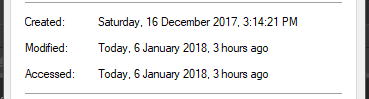
The modification date can be found by right-clicking on a file and selecting properties.
Setting File Modification Times
First, you will want to import os, time and datetime.
import os
import time
import datetime
You will now need to locate the file you want to edit and create a time object to set to the file. To create one, we will first break it down into its simpler parts.
fileLocation = r""
year = 2017
month = 11
day = 5
hour = 19
minute = 50
second = 0
fileLocation is a string and the rest of the variables above are integers.
Next, we will create our datetime object using the data given and then convert it to seconds since epoch; this is what will be stored.
date = datetime.datetime(year=year, month=month, day=day, hour=hour, minute=minute, second=second)
modTime = time.mktime(date.timetuple())
Now we can do a simple os.utime call passing the file and modification time to set the new times.
os.utime(fileLocation, (modTime, modTime))
Now if you go back and check the modification date it should be changed.
Final Code
import os
import time
import datetime

fileLocation = r""
year = 2017
month = 11
day = 5
hour = 19
minute = 50
second = 0

date = datetime.datetime(year=year, month=month, day=day, hour=hour, minute=minute, second=second)
modTime = time.mktime(date.timetuple())

os.utime(fileLocation, (modTime, modTime))
FAQ
But how do I change creation time?
The solution is platform-specific but for Windows you can look at this.
Изменить время доступа и модификации файла.
Синтаксис:
import os

os.utime(path, times=None, *, [ns, ]dir_fd=None, follow_symlinks=True)
Параметры:
path—str, путь в файловой системе до файла,times=None— кортеж в форме(atime, mtime)ns— кортеж в форме(atime_ns, mtime_ns),dir_fd=None—int, дескриптор каталога,follow_symlinks=True—bool, переходить ли по ссылкам.
Возвращаемое значение:
- None
Описание:
Функция utime() модуля os устанавливает/изменяет время доступа к файлу и время изменения файла, указанного в path.
Аргумент path может принимать объекты, представляющие путь файловой системы, такие как pathlib.PurePath.
Функция os.utime() принимает два необязательных параметра: times и ns. Они определяют время, которое устанавливается на файл и используются следующим образом:
- Если указано
ns, то это должен быть двойной кортеж в форме(atime_ns, mtime_ns), где каждый член является целым числом, выражающим наносекунды. - Если
timesне равноNone, то это должен двойной кортеж в форме(atime, mtime), где каждый член является целым числом илиfloatв секундах. - Если
timesравноNone, аnsне указано, то это эквивалентно указаниюns=(atime_ns, mtime_ns), где оба элемента — текущее время. - Указывать кортежи как для
times, так и дляns— это ошибка.
Обратите внимание, что точное время, установленное здесь, может не быть возвращено последующим вызовом функцией os.stat(), в зависимости от разрешения, с которым ваша операционная система записывает время доступа и изменения. Лучший способ сохранить точное время — это использовать поля st_atime_ns и st_mtime_ns из объекта результата os.stat() с параметром ns для utime.
Вызывает событие аудита os.utime с аргументами path, times, ns, dir_fd.
Примеры использования:
>>> import os, time
>>> f = 'test_utime.txt'
>>> fp = open(f, 'w')
>>> fp.write('content')
>>> fp.close()
>>> atime = os.stat(f).st_atime
>>> mtime = os.stat(f).st_mtime
>>> print(time.ctime(atime), time.ctime(mtime))
# Thu Mar 19 12:20:05 2020, Thu Mar 19 12:20:14 2020

# изменим время
>>> delta = 60*60*24*15
>>> new_atime = atime - delta
>>> new_mtime = mtime - delta
>>> os.utime(f, times=(new_atime, new_mtime))
>>> atime = os.stat(f).st_atime
>>> mtime = os.stat(f).st_mtime
>>> print(time.ctime(atime), time.ctime(mtime))
# Wed Mar  4 12:20:05 2020, Wed Mar  4 12:20:14 2020

# Очистка
>>> os.unlink(f)
Здесь более надежная версия принятого ответа. Он также имеет противоположную функцию геттера. Эти адреса создавали, изменяли и получали доступ к датам. Он обрабатывает параметры datetimes, предоставляемые как объекты datetime.datetime, так и как «секунды с эпохи» (что возвращает геттер). Кроме того, он регулирует время дневного света, на которое не отвечает принятый ответ. Без этого ваши времена не будут установлены правильно, если вы установите зимнее или летнее время в течение противоположной фазы вашего фактического системного времени.
Основная слабость этого ответа заключается в том, что он предназначен только для Windows (который отвечает на поставленный вопрос). В будущем я постараюсь разместить кросс-платформенное решение.
def isWindows() :
  import platform
  return platform.system() == 'Windows'

def getFileDateTimes( filePath ):
    return ( os.path.getctime( filePath ),
             os.path.getmtime( filePath ),
             os.path.getatime( filePath ) )

def setFileDateTimes( filePath, datetimes ):
    try :
        import datetime
        import time
        if isWindows() :
            import win32file, win32con
            ctime = datetimes[0]
            mtime = datetimes[1]
            atime = datetimes[2]
            # handle datetime.datetime parameters
            if isinstance( ctime, datetime.datetime ) :
                ctime = time.mktime( ctime.timetuple() )
            if isinstance( mtime, datetime.datetime ) :
                mtime = time.mktime( mtime.timetuple() )
            if isinstance( atime, datetime.datetime ) :
                atime = time.mktime( atime.timetuple() )
            # adjust for day light savings
            now = time.localtime()
            ctime += 3600 * (now.tm_isdst - time.localtime(ctime).tm_isdst)
            mtime += 3600 * (now.tm_isdst - time.localtime(mtime).tm_isdst)
            atime += 3600 * (now.tm_isdst - time.localtime(atime).tm_isdst)
            # change time stamps
            winfile = win32file.CreateFile(
                filePath, win32con.GENERIC_WRITE,
                win32con.FILE_SHARE_READ | win32con.FILE_SHARE_WRITE | win32con.FILE_SHARE_DELETE,
                None, win32con.OPEN_EXISTING,
                win32con.FILE_ATTRIBUTE_NORMAL, None)
            win32file.SetFileTime( winfile, ctime, atime, mtime )
            winfile.close()
        else : """MUST FIGURE OUT..."""
    except : pass
Как изменить дату создания файла Windows из Python?
7 ответов
Лучший ответ
Як для бритья для победы.
import pywintypes, win32file, win32con
def changeFileCreationTime(fname, newtime):
    wintime = pywintypes.Time(newtime)
    winfile = win32file.CreateFile(
        fname, win32con.GENERIC_WRITE,
        win32con.FILE_SHARE_READ | win32con.FILE_SHARE_WRITE | win32con.FILE_SHARE_DELETE,
        None, win32con.OPEN_EXISTING,
        win32con.FILE_ATTRIBUTE_NORMAL, None)

    win32file.SetFileTime(winfile, wintime, None, None)

    winfile.close()
32
Claudiu
14 Фев 2011 в 21:59
сначала установите расширение pywin32 https://sourceforge.net / проекты / pywin32 / файлы / pywin32 / Сложение % 20221 /
import win32file
import pywintypes

# main logic function
def changeFileCreateTime(path, ctime):
    # path: your file path
    # ctime: Unix timestamp

    # open file and get the handle of file
    # API: http://timgolden.me.uk/pywin32-docs/win32file__CreateFile_meth.html
    handle = win32file.CreateFile(
        path,                          # file path
        win32file.GENERIC_WRITE,       # must opened with GENERIC_WRITE access
        0,
        None,
        win32file.OPEN_EXISTING,
        0,
        0
    )

    # create a PyTime object
    # API: http://timgolden.me.uk/pywin32-docs/pywintypes__Time_meth.html
    PyTime = pywintypes.Time(ctime)

    # reset the create time of file
    # API: http://timgolden.me.uk/pywin32-docs/win32file__SetFileTime_meth.html
    win32file.SetFileTime(
        handle,
        PyTime
    )

# example
changeFileCreateTime('C:/Users/percy/Desktop/1.txt',1234567789)
6
percy507
8 Июн 2017 в 08:12
Этот код работает на Python 3 без {{Х0}} :
wintime = datetime.datetime.utcfromtimestamp(newtime).replace(tzinfo=datetime.timezone.utc)
winfile = win32file.CreateFile(
    fname, win32con.GENERIC_WRITE,
    win32con.FILE_SHARE_READ | win32con.FILE_SHARE_WRITE | win32con.FILE_SHARE_DELETE,
    None, win32con.OPEN_EXISTING,
    win32con.FILE_ATTRIBUTE_NORMAL, None)
win32file.SetFileTime(winfile, wintime)
winfile.close()
2
panda-34
8 Апр 2016 в 08:08
import os
os.utime(path, (accessed_time, modified_time))
http://docs.python.org/library/os.html
По крайней мере, это меняет время модификации, без использования модуля win32.
2
Jean-François Fabre
18 Июл 2019 в 08:51
Вот решение, которое работает на Python 3.5 и Windows 7. Очень просто. Я признаю, что это неаккуратное кодирование … но это работает. Вы можете очистить это. Мне просто нужен был быстрый Soln.
import pywintypes, win32file, win32con, datetime, pytz

def changeFileCreationTime(fname, newtime):
    wintime = pywintypes.Time(newtime)
    winfile = win32file.CreateFile(fname, win32con.GENERIC_WRITE,
                                   win32con.FILE_SHARE_READ |
                                   win32con.FILE_SHARE_WRITE |
                                   win32con.FILE_SHARE_DELETE,
                                   None,
                                   win32con.OPEN_EXISTING,
                                   win32con.FILE_ATTRIBUTE_NORMAL,
                                   None)

    win32file.SetFileTime(      winfile,  wintime,  wintime,     wintime)
    # None doesnt change args = file,     creation, last access, last write
    # win32file.SetFileTime(None, None, None, None) # does nonething
    winfile.close()

if __name__ == "__main__":
    local_tz = pytz.timezone('Antarctica/South_Pole')
    start_date = local_tz.localize(datetime.datetime(1776,7,4), is_dst=None)
    changeFileCreationTime(r'C:homemade.pr0n', start_date )
1
Kardo Paska
9 Июн 2017 в 16:41
Вот более надежная версия принятого ответа. Он также имеет противоположную функцию получения. Это адреса, созданные, измененные и доступные datetime. Он обрабатывает параметры datetime, предоставляемые либо как объекты datetime.datetime, либо как «секунды с начала эпохи» (что возвращает геттер). Кроме того, он настраивается на летнее время, а принятый ответ — нет. Без этого ваше время не будет установлено правильно, если вы установите зимнее или летнее время на противоположной фазе вашего фактического системного времени.
Основным недостатком этого ответа является то, что он предназначен только для Windows (который отвечает на поставленный вопрос). В будущем я постараюсь опубликовать кроссплатформенное решение.
def isWindows() :
  import platform
  return platform.system() == 'Windows'

def getFileDateTimes( filePath ):
    return ( os.path.getctime( filePath ),
             os.path.getmtime( filePath ),
             os.path.getatime( filePath ) )

def setFileDateTimes( filePath, datetimes ):
    try :
        import datetime
        import time
        if isWindows() :
            import win32file, win32con
            ctime = datetimes[0]
            mtime = datetimes[1]
            atime = datetimes[2]
            # handle datetime.datetime parameters
            if isinstance( ctime, datetime.datetime ) :
                ctime = time.mktime( ctime.timetuple() )
            if isinstance( mtime, datetime.datetime ) :
                mtime = time.mktime( mtime.timetuple() )
            if isinstance( atime, datetime.datetime ) :
                atime = time.mktime( atime.timetuple() )
            # adjust for day light savings
            now = time.localtime()
            ctime += 3600 * (now.tm_isdst - time.localtime(ctime).tm_isdst)
            mtime += 3600 * (now.tm_isdst - time.localtime(mtime).tm_isdst)
            atime += 3600 * (now.tm_isdst - time.localtime(atime).tm_isdst)
            # change time stamps
            winfile = win32file.CreateFile(
                filePath, win32con.GENERIC_WRITE,
                win32con.FILE_SHARE_READ | win32con.FILE_SHARE_WRITE | win32con.FILE_SHARE_DELETE,
                None, win32con.OPEN_EXISTING,
                win32con.FILE_ATTRIBUTE_NORMAL, None)
            win32file.SetFileTime( winfile, ctime, atime, mtime )
            winfile.close()
        else : """MUST FIGURE OUT..."""
    except : pass
2
landfill baby
26 Апр 2017 в 11:30
Я не хотел приносить всю библиотеку pywin32 / win32file исключительно для установки времени создания файла, поэтому я сделал win32-setctime, который делает именно это.
pip install win32-setctime
А потом используйте это так:
from win32_setctime import setctime

setctime("my_file.txt", 1561675987.509)
По сути, функция может быть уменьшена до нескольких строк без какой-либо зависимости, кроме встроенной ctypes Библиотека Python:
from ctypes import windll, wintypes, byref

# Arbitrary example of a file and a date
filepath = "my_file.txt"
epoch = 1561675987.509

# Convert Unix timestamp to Windows FileTime using some magic numbers
# See documentation: https://support.microsoft.com/en-us/help/167296
timestamp = int((epoch * 10000000) + 116444736000000000)
ctime = wintypes.FILETIME(timestamp & 0xFFFFFFFF, timestamp >> 32)

# Call Win32 API to modify the file creation date
handle = windll.kernel32.CreateFileW(filepath, 256, 0, None, 3, 128, None)
windll.kernel32.SetFileTime(handle, byref(ctime), None, None)
windll.kernel32.CloseHandle(handle)
Для расширенного управления (например, обработки ошибок) см. исходный код {{ X0 } }.
7
Delgan
2 Фев 2020 в 08:50