
Этот материал посвящен использованию запроса UPDATE для обновления SQLite-таблицы из приложения, написанного на Python. Вы узнаете, как использовать встроенный модуль sqlite3 для обновления SQLite-таблицы.
В этой статье мы рассмотрим:
- Обновление одной или нескольких колонок.
- Использование запроса с параметрами для передачи значения во время работы программы при запросе Update.
- Коммит и откат операции обновления.
- Обновление колонки с помощью значений date-time и timestamp.
- Выполнение массового обновления в одном запросе.
Подготовка
Перед выполнением следующих операций обновления таблицы SQLite нужно убедиться, что вам известно ее название, а также названия колонок.
В этом примере будет использоваться таблица sqlitedb_developers. Она была создана в первой части руководства по sqlite3 и заполнена во второй.
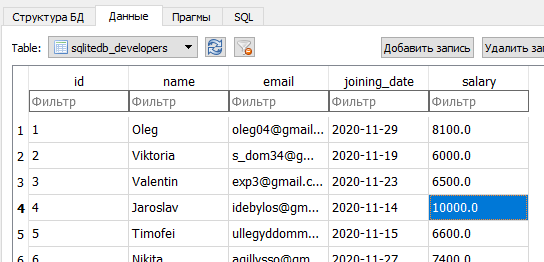
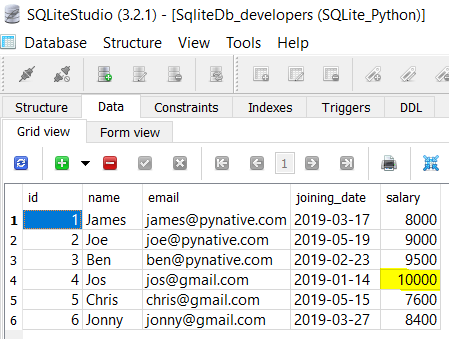
Сейчас таблица sqlitedb_developers содержит шесть строк, поэтому обновим зарплату разработчика с id 4. Для выполнения запроса UPDATE из Python нужно выполнить следующие шаги:
- Сперва нужно установить SQLite-соединение из Python.
- Дальше необходимо создать объект
cursorс помощью объекта соединения. - После этого – создать запрос UPDATE. Для этого нужно знать названия таблицы и колонки, которую потребуется обновить.
- Дальше запрос выполняется с помощью
cursor.execute(). - После успешного завершения запроса нужно не забыть закоммитить изменения в базу данных.
- Соединение с базой данных закрывается.
- Также важно не забыть перехватывать все исключения SQLite.
- Наконец, нужно убедиться, что операция прошло успешно, получив данные из таблицы.
Посмотрим на программу.
import sqlite3
def update_sqlite_table():
try:
sqlite_connection = sqlite3.connect('sqlite_python.db')
cursor = sqlite_connection.cursor()
print("Подключен к SQLite")
sql_update_query = """Update sqlitedb_developers set salary = 10000 where id = 4"""
cursor.execute(sql_update_query)
sqlite_connection.commit()
print("Запись успешно обновлена")
cursor.close()
except sqlite3.Error as error:
print("Ошибка при работе с SQLite", error)
finally:
if sqlite_connection:
sqlite_connection.close()
print("Соединение с SQLite закрыто")
update_sqlite_table()
Вывод: таблица sqlitedb_developers после обновления строки из Python.
Подключен к SQLite
Запись успешно обновлена
Соединение с SQLite закрыто
Проверить результат можно, посмотрев данные из таблицы.
Разбор примера в подробностях
import sqlite3:
- Эта строка импортирует модуль sqlite3 в программу.
- С помощью классов и методов из модуля можно взаимодействовать с базой данных.
sqlite3.connect() и connection.cursor():
- С помощью
sqlite3.connect()устанавливается соединение с базой данных SQLite из Python. - Дальше метод
connection.cursor()используется для получения объектасursorиз объекта соединения.
После этого создается запрос UPDATE для обновления строки в таблицы. В нем указываются название колонки и новое значение. В таблице пять колонок, но код обновляет только одну из них – ту, что содержит данные о зарплате.
cursor.execute():
- Операция, сохраненная в запросе UPDATE, выполняется с помощью метода
execute()объектасursor. connection.commit()применяется для сохранения в базе данных.
Наконец, закрываются объекты сursor и соединение в блоке finally после завершения операции обновления.
Примечание: если выполняется операция массового обновления и есть необходимость откатить изменения в случае ошибки хотя бы при одном, нужно использовать функцию
rollback()классаconnection. Ее необходимо применить в блокеexcept.
Использование переменных Python в запросе UPDATE
Большую часть времени обновление таблицы нужно выполнять с помощью значений, получаемых при работе программы. Например, когда пользователи обновляют свой профиль через графический интерфейс, нужно обновить заданные ими значения в соответствующей таблице.
В таком случае рекомендуется использовать запрос с параметрами. Такие запросы используют заполнители (?) прямо внутри инструкций SQL. Это помогает обновлять значения с помощью переменных, а также предотвращать SQL-инъекции.
import sqlite3

def update_sqlite_table(dev_id, salary):

    try:

        sqlite_connection = sqlite3.connect('sqlite_python.db')

        cursor = sqlite_connection.cursor()

        print("Подключен к SQLite")

        sql_update_query = """Update sqlitedb_developers set salary = ? where id = ?"""

        data = (salary, dev_id)

        cursor.execute(sql_update_query, data)

        sqlite_connection.commit()

        print("Запись успешно обновлена")

        cursor.close()

    except sqlite3.Error as error:

        print("Ошибка при работе с SQLite", error)

    finally:

        if sqlite_connection:

            sqlite_connection.close()

            print("Соединение с SQLite закрыто")

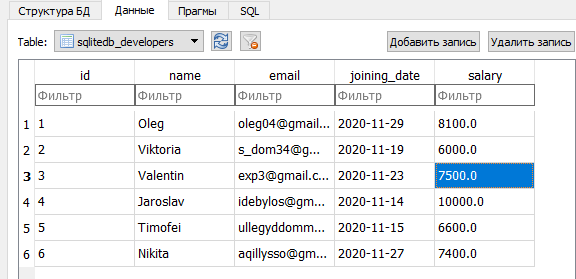
update_sqlite_table(3, 7500)
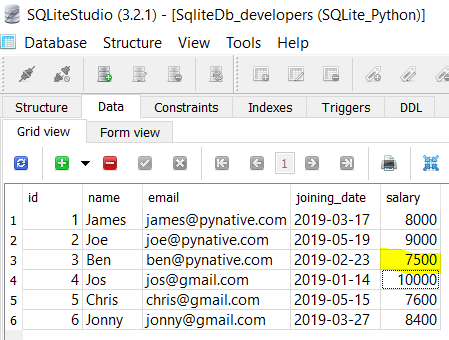
Вывод: таблица sqlitedb_deveopers после обновления с помощью переменной Python и запроса с параметрами.
Подключен к SQLite
Запись успешно обновлена
Соединение с SQLite закрыто
Подтвердить операцию можно, получив данные из SQLite-таблицы из Python.
Разберем код:
- Запрос с параметрами был использован для того, чтобы получить значения при работе программы и установить их на места заполнителей. В этом случае один из них отвечает за колонку «salary», а второй – колонку
id. - После этого готовится кортеж с данными из двух переменных Python в определенном порядке. Этот кортеж вместе с запросом передается в метод
cursor.execute(). Важно помнить, что в данном случае порядок переменных в кортеже играет значение. - В конце изменения закрепляются с помощью метода
commitклассаconnection.
Обновление нескольких строк SQLite-таблицы
В последнем примере использовался метод execute() объекта cursor для обновления одного значения, но иногда в приложениях Python нужно обновить несколько строк. Например, нужно увеличить зарплату большинства разработчиков на 20%.
Вместе выполнения операции UPDATE каждый раз для каждой записи можно выполнить массовое обновление в один запрос. Изменить несколько записей в таблице SQLite в один запрос можно с помощью метода cursor.executemany().
Метод cursor.executemany(query, seq_param) принимает два аргумента: SQL-запрос и список записей для обновления.
Посмотрим на примере. Здесь обновляется зарплата 3 разработчиков.
import sqlite3

def update_multiple_records(record_list):

    try:

        sqlite_connection = sqlite3.connect('sqlite_python.db')

        cursor = sqlite_connection.cursor()

        print("Подключен к SQLite")

        sqlite_update_query = """Update sqlitedb_developers set salary = ? where id = ?"""

        cursor.executemany(sqlite_update_query, record_list)

        sqlite_connection.commit()

        print("Записей", cursor.rowcount, ". Успешно обновлены")

        sqlite_connection.commit()

        cursor.close()

    except sqlite3.Error as error:

        print("Ошибка при работе с SQLite", error)

    finally:

        if sqlite_connection:

            sqlite_connection.close()

            print("Соединение с SQLite закрыто")

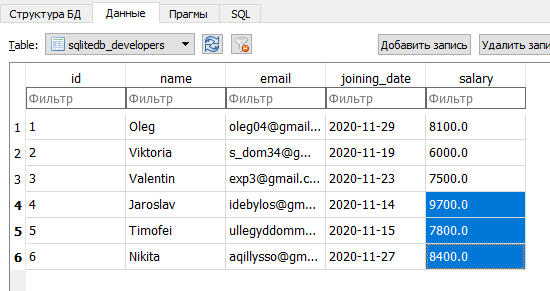
records_to_update = [(9700, 4), (7800, 5), (8400, 6)]

update_multiple_records(records_to_update)
Вывод: таблица sqlitedb_developers после обновления нескольких строк из Python.
Подключен к SQLite
Записей 3 . Успешно обновлены
Соединение с SQLite закрыто
Проверить результат можно, получив данные из таблицы из Python.
Разберем код:
- После подключения к таблице SQLite готовится SQLite-запрос с двумя заполнителями (колонки salary и id), а также список записей для обновления в формате кортежа.
- Каждый элемент – это кортеж для каждой записи. Каждый кортеж содержит два значения: зарплату и id разработчика.
- Функция
cursor.executemany(sqlite_update_query, record_list)вызывается для обновления нескольких строк таблицы SQLite. - Чтобы узнать, какое количество записей было изменено, используется функция
cursor.rowcount. Наконец, данные сохраняются в базу данных с помощью методаcommitклассаconnection.
Обновление нескольких колонок таблицы SQLite
Можно обновить несколько колонок таблицы SQLite в один запрос. Для этого нужно лишь подготовить запрос с параметрами и заполнителями. Посмотрим на примере.
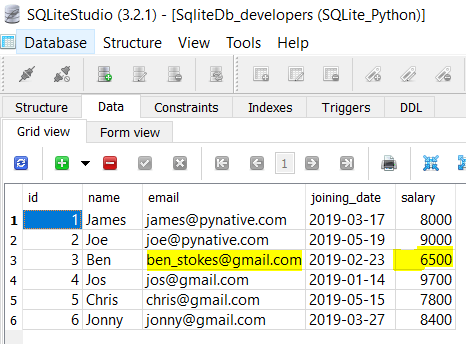
Вывод: таблица sqlitedb_developers после обновления нескольких колонок.
import sqlite3

def update_multiple_columns(dev_id, salary, email):

    try:

        sqlite_connection = sqlite3.connect('sqlite_python.db')

        cursor = sqlite_connection.cursor()

        print("Подключен к SQLite")

        sqlite_update_query = """Update sqlitedb_developers set salary = ?, email = ? where id = ?"""

        column_values = (salary, email, dev_id)

        cursor.execute(sqlite_update_query, column_values)

        sqlite_connection.commit()

        print("Несколько столбцов успешно обновлены")

        sqlite_connection.commit()

        cursor.close()

    except sqlite3.Error as error:

        print("Ошибка при работе с SQLite", error)

    finally:

        if sqlite_connection:

            sqlite_connection.close()

            print("Соединение с SQLite закрыто")

update_multiple_columns(3, 2500, 'bec9988@gmail.com')
Подключен к SQLite
Несколько столбцов успешно обновлены
Соединение с SQLite закрытоIn this article, we will discuss how we can update data in tables in the SQLite database using Python – sqlite3 module.
The UPDATE statement in SQL is used to update the data of an existing table in the database. We can update single columns as well as multiple columns using UPDATE statement as per our requirement.
Syntax:
UPDATE table_name SET column1 = value1, column2 = value2,…
WHERE condition;
In the above syntax, the SET statement is used to set new values to the particular column, and the WHERE clause is used to select the rows for which the columns are needed to be updated.
Below are some examples which depict how to update data in an SQLite table.
Example 1: Python SQLite program to update a particular column. In this example, we are first going to create an EMPLOYEE table and insert values into it. Then we are going to set the income of employees to 5000 whose age is less than 25
Python3
import sqlite3
conn = sqlite3.connect('gfg1.db')
cursor = conn.cursor()
table =
cursor.execute(table)
cursor.execute(
)
cursor.execute(
)
cursor.execute(
)
cursor.execute(
)
cursor.execute(
)
print("EMPLOYEE Table: ")
data = cursor.execute()
for row in data:
print(row)
cursor.execute()
print('nAfter Updating...n')
print("EMPLOYEE Table: ")
data = cursor.execute()
for row in data:
print(row)
conn.commit()
conn.close()
Output:

SQLite:

Example 2: In this program, we create a similar table as that of the previous example. Here we assign the age of the female employees to 0.
Python3
import sqlite3
conn = sqlite3.connect('geeks1.db')
cursor = conn.cursor()
table =
cursor.execute(table)
cursor.execute(
)
cursor.execute(
)
cursor.execute(
)
cursor.execute(
)
cursor.execute(
)
print("EMPLOYEE Table: ")
data = cursor.execute()
for row in data:
print(row)
cursor.execute()
print('nAfer Updating...n')
print("EMPLOYEE Table: ")
data = cursor.execute()
for row in data:
print(row)
conn.commit()
conn.close()
Output:

SQLite:

Example 3: In the below program we update multiple columns using the UPDATE statement. In this example, we are first going to create a STAFF table and insert values into it. Then we are going to update all the columns i.e. all the attributes of the staff whose department is Computer.
Python3
import sqlite3
conn = sqlite3.connect('gfg3.db')
cursor = conn.cursor()
table =
cursor.execute(table)
cursor.execute()
cursor.execute()
cursor.execute()
cursor.execute()
print("STAFF Table: ")
data=cursor.execute()
for row in data:
print(row)
cursor.execute(
)
print('nAfter Updating...n')
print("STAFF Table: ")
data=cursor.execute()
for row in data:
print(row)
conn.commit()
conn.close()
Output:

SQLite:

Example 4: In the below program we create the previous table and update the name and age of the staff whose department is Chemistry.
Python3
import sqlite3
conn = sqlite3.connect('gfg4.db')
cursor = conn.cursor()
table =
cursor.execute(table)
cursor.execute()
cursor.execute()
cursor.execute()
cursor.execute()
print("STAFF Table: ")
data=cursor.execute()
for row in data:
print(row)
cursor.execute(
)
print('nAfter Updating...n')
print("STAFF Table: ")
data=cursor.execute()
for row in data:
print(row)
conn.commit()
conn.close()
Output:

SQLite:

Example 5: Below program depicts the use of the UPDATE statement without the WHERE statement. In this program, we create the STUDENT table and insert values into it. After that, we update the SECTION column of all the students by assigning it to X.
Python3
import sqlite3
conn = sqlite3.connect('gfg5.db')
cursor = conn.cursor()
table =
cursor.execute(table)
cursor.execute()
cursor.execute()
cursor.execute()
print("STUDENT Table: ")
data=cursor.execute()
for row in data:
print(row)
cursor.execute()
print('nAfter Updating...n')
print("STUDENT Table: ")
data=cursor.execute()
for row in data:
print(row)
conn.commit()
conn.close()
Output:

SQLite:

Example 6: In the below program we create a simple STUDENT table and update all the data into it using only UPDATE and SET query.
Python3
import sqlite3
conn = sqlite3.connect('gfg6.db')
cursor = conn.cursor()
table =
cursor.execute(table)
cursor.execute()
cursor.execute()
cursor.execute()
print("STUDENT Table: ")
data=cursor.execute()
for row in data:
print(row)
cursor.execute(
)
print('nAfter Updating...n')
print("STUDENT Table: ")
data=cursor.execute()
for row in data:
print(row)
conn.commit()
conn.close()
Output:

SQLite:

In this article, we will discuss how we can update data in tables in the SQLite database using Python – sqlite3 module.
The UPDATE statement in SQL is used to update the data of an existing table in the database. We can update single columns as well as multiple columns using UPDATE statement as per our requirement.
Syntax:
UPDATE table_name SET column1 = value1, column2 = value2,…
WHERE condition;
In the above syntax, the SET statement is used to set new values to the particular column, and the WHERE clause is used to select the rows for which the columns are needed to be updated.
Below are some examples which depict how to update data in an SQLite table.
Example 1: Python SQLite program to update a particular column. In this example, we are first going to create an EMPLOYEE table and insert values into it. Then we are going to set the income of employees to 5000 whose age is less than 25
Python3
import sqlite3
conn = sqlite3.connect('gfg1.db')
cursor = conn.cursor()
table =
cursor.execute(table)
cursor.execute(
)
cursor.execute(
)
cursor.execute(
)
cursor.execute(
)
cursor.execute(
)
print("EMPLOYEE Table: ")
data = cursor.execute()
for row in data:
print(row)
cursor.execute()
print('nAfter Updating...n')
print("EMPLOYEE Table: ")
data = cursor.execute()
for row in data:
print(row)
conn.commit()
conn.close()
Output:
SQLite:
Example 2: In this program, we create a similar table as that of the previous example. Here we assign the age of the female employees to 0.
Python3
import sqlite3
conn = sqlite3.connect('geeks1.db')
cursor = conn.cursor()
table =
cursor.execute(table)
cursor.execute(
)
cursor.execute(
)
cursor.execute(
)
cursor.execute(
)
cursor.execute(
)
print("EMPLOYEE Table: ")
data = cursor.execute()
for row in data:
print(row)
cursor.execute()
print('nAfer Updating...n')
print("EMPLOYEE Table: ")
data = cursor.execute()
for row in data:
print(row)
conn.commit()
conn.close()
Output:
SQLite:
Example 3: In the below program we update multiple columns using the UPDATE statement. In this example, we are first going to create a STAFF table and insert values into it. Then we are going to update all the columns i.e. all the attributes of the staff whose department is Computer.
Python3
import sqlite3
conn = sqlite3.connect('gfg3.db')
cursor = conn.cursor()
table =
cursor.execute(table)
cursor.execute()
cursor.execute()
cursor.execute()
cursor.execute()
print("STAFF Table: ")
data=cursor.execute()
for row in data:
print(row)
cursor.execute(
)
print('nAfter Updating...n')
print("STAFF Table: ")
data=cursor.execute()
for row in data:
print(row)
conn.commit()
conn.close()
Output:
SQLite:
Example 4: In the below program we create the previous table and update the name and age of the staff whose department is Chemistry.
Python3
import sqlite3
conn = sqlite3.connect('gfg4.db')
cursor = conn.cursor()
table =
cursor.execute(table)
cursor.execute()
cursor.execute()
cursor.execute()
cursor.execute()
print("STAFF Table: ")
data=cursor.execute()
for row in data:
print(row)
cursor.execute(
)
print('nAfter Updating...n')
print("STAFF Table: ")
data=cursor.execute()
for row in data:
print(row)
conn.commit()
conn.close()
Output:
SQLite:
Example 5: Below program depicts the use of the UPDATE statement without the WHERE statement. In this program, we create the STUDENT table and insert values into it. After that, we update the SECTION column of all the students by assigning it to X.
Python3
import sqlite3
conn = sqlite3.connect('gfg5.db')
cursor = conn.cursor()
table =
cursor.execute(table)
cursor.execute()
cursor.execute()
cursor.execute()
print("STUDENT Table: ")
data=cursor.execute()
for row in data:
print(row)
cursor.execute()
print('nAfter Updating...n')
print("STUDENT Table: ")
data=cursor.execute()
for row in data:
print(row)
conn.commit()
conn.close()
Output:
SQLite:
Example 6: In the below program we create a simple STUDENT table and update all the data into it using only UPDATE and SET query.
Python3
import sqlite3
conn = sqlite3.connect('gfg6.db')
cursor = conn.cursor()
table =
cursor.execute(table)
cursor.execute()
cursor.execute()
cursor.execute()
print("STUDENT Table: ")
data=cursor.execute()
for row in data:
print(row)
cursor.execute(
)
print('nAfter Updating...n')
print("STUDENT Table: ")
data=cursor.execute()
for row in data:
print(row)
conn.commit()
conn.close()
Output:
SQLite:
In this lesson, learn to execute an UPDATE Query from a Python application to update the SQLite table’s data. You’ll learn how to use Python’s sqlite3 module to update the SQLite table.
Table of contents
- Prerequisites
- Steps to update a single row of SQLite table
- Using Python variables in SQLite UPDATE query
- Update multiple rows of SQLite table using cursor’s executemany()
- Update multiple Columns of SQLite table
- Next Steps:
Prerequisites
Before executing the following program, please make sure you know the SQLite table name and its column details.
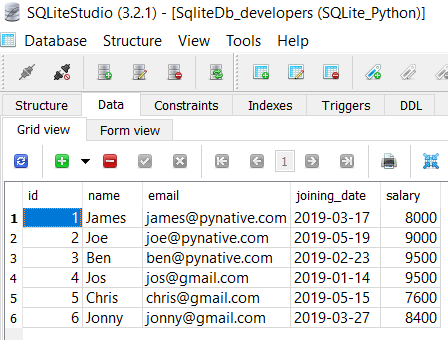
For this lesson, I am using the ‘SqliteDb_developers’ table present in my SQLite database.
If a table is not present in your SQLite database, then please refer to the following articles: –
- Create SQLite table from Python.
- Insert data into SQLite Table from Python
Steps to update a single row of SQLite table
As of now, the ‘SqliteDb_developers’ table contains six rows, so let’s update the salary of a developer whose id is 4. To perform SQLite UPDATE query from Python, you need to follow these simple steps:
How to Update SQLite Table in Python
- Connect to MySQL from Python
Refer to Python SQLite database connection to connect to SQLite database from Python using sqlite3 module.
- Prepare a SQL Update Query
Prepare an update statement query with data to update. Mention the column name we want to update and its new value. For example,
UPDATE table_name SET column1 = value1, column2 = value2...., columnN = valueN WHERE [condition]; - Execute the UPDATE query, using cursor.execute()
This method executes the operation stored in the UPDATE query.
- Commit your changes
After the successful execution of the SQLite update query, Don’t forget to commit your changes to the database using
connection.comit(). - Extract the number of rows affected
After a successful update operation, use a
cursor.rowcountmethod to get the number of rows affected. The count depends on how many rows you are updating. - Verify result using the SQL SELECT query
Execute a SQLite select query from Python to see the new changes
- Close the cursor object and database connection object
use
cursor.clsoe()andconnection.clsoe()method to close SQLite connections once the update operation completes.
Example
import sqlite3

def updateSqliteTable():
    try:
        sqliteConnection = sqlite3.connect('SQLite_Python.db')
        cursor = sqliteConnection.cursor()
        print("Connected to SQLite")

        sql_update_query = """Update SqliteDb_developers set salary = 10000 where id = 4"""
        cursor.execute(sql_update_query)
        sqliteConnection.commit()
        print("Record Updated successfully ")
        cursor.close()

    except sqlite3.Error as error:
        print("Failed to update sqlite table", error)
    finally:
        if sqliteConnection:
            sqliteConnection.close()
            print("The SQLite connection is closed")

updateSqliteTable()
Output
Connected to SQLite Record Updated successfully The SQLite connection is closed
Note: Note: If you are doing multiple update operations and wanted to revert your change in case of failure of any operations, use the rollback() method of a connection class to revert the changes. Use the rollback() method of a connection class. in except block.
Using Python variables in SQLite UPDATE query
Most of the time, we need to update a table with some runtime values. For example, when users update their profile or any other details through a user interface, we need to update a table with those new values. In such cases, It is always best practice to use a parameterized query.
The parameterized query uses placeholders (?) inside SQL statements that contain input from users. It helps us to update runtime values and prevent SQL injection concerns.
import sqlite3

def updateSqliteTable(id, salary):
    try:
        sqliteConnection = sqlite3.connect('SQLite_Python.db')
        cursor = sqliteConnection.cursor()
        print("Connected to SQLite")

        sql_update_query = """Update SqliteDb_developers set salary = ? where id = ?"""
        data = (salary, id)
        cursor.execute(sql_update_query, data)
        sqliteConnection.commit()
        print("Record Updated successfully")
        cursor.close()

    except sqlite3.Error as error:
        print("Failed to update sqlite table", error)
    finally:
        if sqliteConnection:
            sqliteConnection.close()
            print("The sqlite connection is closed")

updateSqliteTable(3, 7500)
Output
Let’s understand the above program
- We used two placeholders in the update query, one for the salary column and the other is for the id column.
- Next, We prepared a data tuple by specifying two Python variables in sequential order.
- Next, we passed the SQL update query and data tuple to the
cursor.execute()method. Remember variables order in the tuple is sequential as per column placeholders order.
Note: If you have a date column in the SQLite table, and you want to update the Python DateTime variable into a column, then please refer to working with SQLite data time values in Python.
Update multiple rows of SQLite table using cursor’s executemany()
In the above example, we have used execute() method of cursor object to update a single record. But sometimes, we need to update multiple rows of the SQLite table. For example, you want to increase the salary of developers by 20%.
Instead of executing the UPDATE query every time to update each record, you can perform bulk update operations in a single query using the cursor.executemany() method.
The executemany(query, seq_param) method accepts the following two parameters
- SQL query
- list of records to be updated.
Now, let see the example. In this example, we are updating three rows.
import sqlite3

def updateMultipleRecords(recordList):
    try:
        sqliteConnection = sqlite3.connect('SQLite_Python.db')
        cursor = sqliteConnection.cursor()
        print("Connected to SQLite")

        sqlite_update_query = """Update SqliteDb_developers set salary = ? where id = ?"""
        cursor.executemany(sqlite_update_query, recordList)
        sqliteConnection.commit()
        print("Total", cursor.rowcount, "Records updated successfully")
        sqliteConnection.commit()
        cursor.close()

    except sqlite3.Error as error:
        print("Failed to update multiple records of sqlite table", error)
    finally:
        if sqliteConnection:
            sqliteConnection.close()
            print("The SQLite connection is closed")

records_to_update = [(9700, 4), (7800, 5), (8400, 6)]
updateMultipleRecords(records_to_update)
Output:
Connected to SQLite Total 3 Records updated successfully The SQLite connection is closed
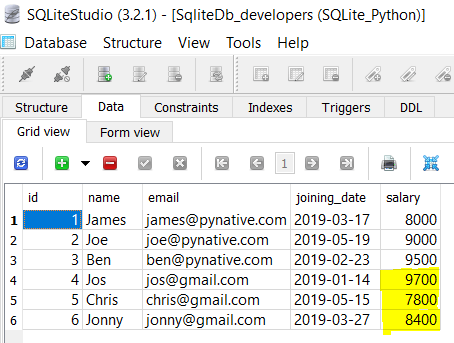
You can verify the result by selecting data from a SQLite table using Python.
Let’s understand the above example
- We prepared the SQLite update query with two placeholders (“salary” and “Id” column ) and a list of records to update in tuple format.
- Each element of a list is nothing but a tuple for each row. Each tuple contains two values, i.e., salary and id of a developer.
- We passed SQLite update query and record list to
executemany()as arguments. - To get to know the number of records updated, we used a
cursor.rowcountfunction.
Update multiple Columns of SQLite table
We can also update multiple columns of an SQLite table in a single query. Just prepare a parameterized query using a placeholder to update multiple columns. Let see this with an example program.
import sqlite3

def updateMultipleColumns(id, salary, email):
    try:
        sqliteConnection = sqlite3.connect('SQLite_Python.db')
        cursor = sqliteConnection.cursor()
        print("Connected to SQLite")

        sqlite_update_query = """Update new_developers set salary = ?, email = ? where id = ?"""
        columnValues = (salary, email, id)
        cursor.execute(sqlite_update_query, columnValues)
        sqliteConnection.commit()
        print("Multiple columns updated successfully")
        sqliteConnection.commit()
        cursor.close()

    except sqlite3.Error as error:
        print("Failed to update multiple columns of sqlite table", error)
    finally:
        if sqliteConnection:
            sqliteConnection.close()
            print("sqlite connection is closed")

updateMultipleColumns(3, 6500, 'ben_stokes@gmail.com')
Output
Connected to SQLite Multiple columns updated successfully sqlite connection is closed
Next Steps:
To practice what you learned in this article, Please solve a Python Database Exercise project to Practice and master the Python Database operations.
Python Exercises and Quizzes
Free coding exercises and quizzes cover Python basics, data structure, data analytics, and more.
- 15+ Topic-specific Exercises and Quizzes
- Each Exercise contains 10 questions
- Each Quiz contains 12-15 MCQ
I have created a table, and have inserted data into the table. I wanted to know how I could update/edit the data. For example, if I have multiple columns in the table, of which one is named ‘age’ and the data for the column is = ’17’, and I now wanted to replace ’17’ with ’18’, would I do the following?
import sqlite3 as lite
import sys

con = lite.connect('Records.db')

with con:
    cur = con.cursor()
    cur.execute("INSERT INTO ExampleTable(Age) VALUES(18) WHERE (Age = 17)")

neminem
2,6485 gold badges29 silver badges36 bronze badges
asked Apr 4, 2014 at 20:53

Hamzah AkhtarHamzah Akhtar
5055 gold badges13 silver badges24 bronze badges
1
In sqlite3 with Python3.x works to me something like this:
newPrice = '$19.99'
book_id = 4
cursor.execute('''UPDATE books SET price = ? WHERE id = ?''', (newPrice, book_id))

Stephen Rauch♦
46.7k31 gold badges109 silver badges131 bronze badges
answered Aug 25, 2018 at 23:53

To update values in a SQL database using the SQLite library in Python, use a statement like this one.
cur.execute("UPDATE ExampleTable SET Age = 18 WHERE Age = 17")
For a great introduction to using SQLite in Python, see this tutorial.
answered Apr 4, 2014 at 20:56

Gyan VedaGyan Veda
6,13911 gold badges41 silver badges65 bronze badges
0
I’m not into Python, but i think i can help, so
cur.execute("UPDATE ExampleTable SET age = 18 WHERE age = 17")
If i’m wrong, sorry then
answered Apr 4, 2014 at 20:56

0
with con:
    cur = con.cursor()
    cur.execute("UPDATE Table_Name SET Age='18' WHERE Age='17'")
answered Apr 4, 2014 at 21:02
Hamzah AkhtarHamzah Akhtar
5055 gold badges13 silver badges24 bronze badges
you must use update operation Instead of insert operation to change records.
the program would be as follows
cur=con.cursor()
com="update ExampleTable set age=1 where age=17"

try:
    cur.execute(com)

    con.commit()

except:

    print('error')
    con.rollback()

con.close()

answered May 1, 2021 at 10:05

Update Data from Database in Python using SQLite
In this tutorial, we will learn how to execute an UPDATE Query in Python program to update the data of SQLite’s table. we’ll also learn how to use Python’s built-in sqlite3 module to update the SQLite table.

This tutorial mainly focuses on:
- How to update single row and column of SQLite table in Python
- Using Parameterized query to Update records
- Update multiple rows of SQLite table in Python
- Update multiple columns of SQLite table in Python
In previous tutorial, we have already learnt about how to insert data and read data in python using SQLite? In this tutorial, we will learn to update records from database in SQLite in Python.
Our database, and table present inside the database looks like:
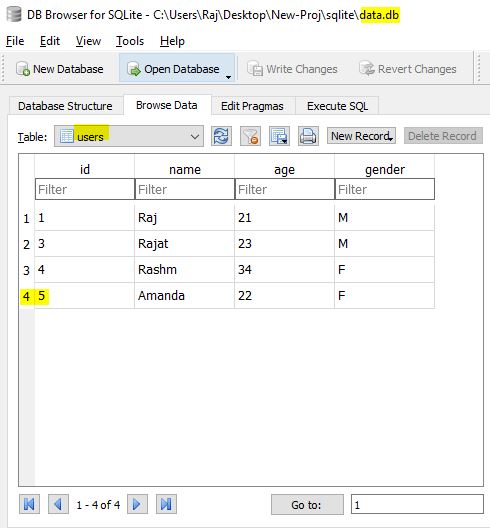
database name: “data.db”
table name: “users”
table columns: “id“, “name“, “age“, “gender”
Note: We have four records in our database table. We will update these records.
Single Row & Column – Updating Records of SQLite table in Python
#Importing Database Library
import sqlite3

# Database Connectivity

try:
    con = sqlite3.connect("data.db")
    cursor = con.cursor()
    print("Connected to Database Successfully")
    #Data Updating Process-(Single Row & Column)
    query = "Update USERS set age = 26 where id = 3"
    cursor.execute(query)
    con.commit()
    cursor.close()
except:
    print("Database Error")

#END
Output: USERS table after updation of row:-
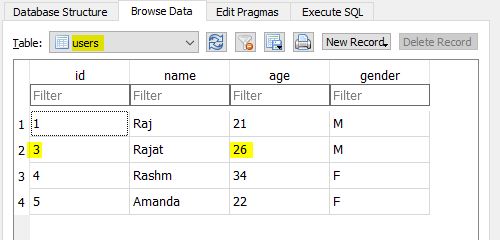
Explanation: I will only explain the main points or the points which are totally new for us. Because as we are working with databases, so I’m assuming that you guys are aware of core concepts of python.
- At line 3 we have imported our sqlite3 library, because the functions we used in our program is already pre-defined in sqlite3 library.
- At line 7 & 16 we used try: & except: method which is useful for handling sql exception.
- At line 8 & 9 we initialized “con” variable with connect() method with our database name “data.db“. The connect() method used here is pre-defined in sqlite3 library.
- At line 12 we initialized variable “query” with sql query for updating data. Here “users” is the name of our table present inside our database “data.db”.
- At line 13 cursor.execute(query) here cursor storing the database connection & execute() is the function defined in sqlite3 library. The function execute() takes one parameter “sql-query” to update data from database table.
- At line 14 it is necessary to call commit() function after making changes to our database.
- At line 15 it is also necessary to close() our cursor. Basically cursor acts as pointer.
Using Parameterized Query – Updating Records of SQLite table in Python
#Importing Database Library
import sqlite3

# Database Connectivity
def updation(names,idd):
    try:
        con = sqlite3.connect("data.db")
        cursor = con.cursor()
        print("Connected to Database Successfully")
        #Data Updating Process-(Single Row & Column)
        query = "Update USERS set name = ? where id = ?"
        cursor.execute(query,(names,idd,))
        con.commit()
        cursor.close()
    except:
        print("Database Error")

updation("Newton",3)

#END
Output: USERS table after updation of row:-
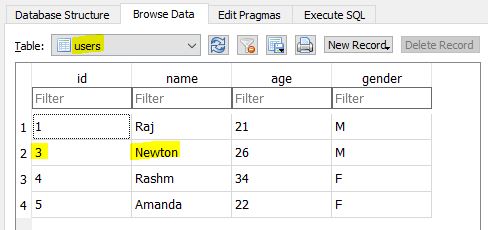
Explanation: Program explanation is same as I have discussed above. Only difference is that here we have used parameterized function in which we have passed the data & some basic concepts of Core Python.
Multiple Rows – Updating Records of SQLite table in Python
#Importing Database Library
import sqlite3

# Database Connectivity
def updation(data):
    try:
        con = sqlite3.connect("data.db")
        cursor = con.cursor()
        print("Connected to Database Successfully")
        #Data Updating Process-(multiple-rows)
        query = "Update USERS set name = ? where id = ?"
        cursor.executemany(query,data)
        con.commit()
        cursor.close()
    except:
        print("Database Error")

data = [("Newton",3), ("Ricky",4)]
updation(data)

#END
Output: USERS table after updation of rows:-
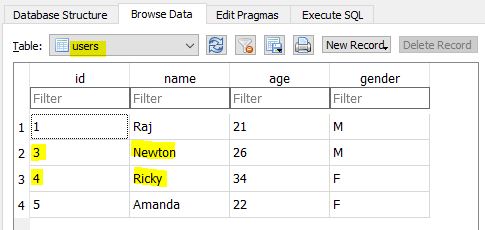
Explanation: Program explanation is same as I have discussed above. Only difference is that here we have used executemany() function instead of execute() function. And also we have passed list in function parameter as arguments to update multiple records.
Multiple Columns – Updating Records of SQLite table in Python
#Importing Database Library
import sqlite3

# Database Connectivity

try:
    con = sqlite3.connect("data.db")
    cursor = con.cursor()
    print("Connected to Database Successfully")
    #Data Updating Process-(multiple-columns)
    query = "Update USERS set name = ?, age = ? where id = ?"
    cursor.execute(query,("Jordan",28,4,))
    con.commit()
    cursor.close()
except:
    print("Database Error")

#END
Output: USERS table after updation of columns:-
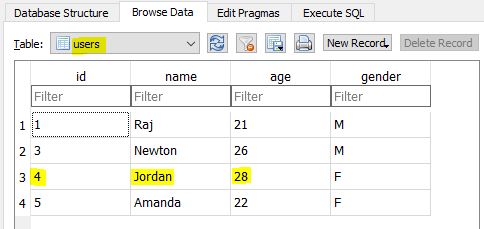
Explanation: Program explanation is same as I have discussed above. Only difference is that here we have used query for updating more than one column .
В этой статье мы обсудим, как мы можем обновлять данные в таблицах базы данных SQLite с помощью модуля Python – sqlite3.
Инструкция UPDATE в SQL используется для обновления данных существующей таблицы в базе данных. Мы можем обновлять как отдельные столбцы, так и несколько столбцов, используя инструкцию UPDATE в соответствии с нашими требованиями.
Синтаксис:
UPDATE table_name SET column1 = value1, column2 = value2,…

WHERE condition;
В приведенном выше синтаксисе оператор SET используется для задания новых значений для конкретного столбца, а предложение WHERE используется для выбора строк, для которых необходимо обновить столбцы.
Ниже приведены некоторые примеры, в которых показано, как обновлять данные в таблице SQLite.
Пример 1:
Программа Python SQLite для обновления определенного столбца. В этом примере мы сначала создадим таблицу СОТРУДНИКОВ и вставим в нее значения. Затем мы установим доход сотрудников до 5000, чей возраст менее 25 лет
# Import module
import sqlite3

# Connecting to sqlite
conn = sqlite3.connect('gfg1.db')

# Creating a cursor object using
# the cursor() method
cursor = conn.cursor()

# Creating table
table =
"""CREATE TABLE EMPLOYEE(FIRST_NAME VARCHAR(255),
LAST_NAME VARCHAR(255),AGE int, SEX VARCHAR(255), INCOME int);"""
cursor.execute(table)

# Queries to INSERT records.
cursor.execute(
	'''INSERT INTO EMPLOYEE(FIRST_NAME, LAST_NAME, AGE, SEX, INCOME)
	VALUES ('Anand', 'Choubey', 25, 'M', 10000)''')

cursor.execute(
	'''INSERT INTO EMPLOYEE(FIRST_NAME, LAST_NAME, AGE, SEX, INCOME)
	VALUES ('Mukesh', 'Sharma', 20, 'M', 9000)''')

cursor.execute(
	'''INSERT INTO EMPLOYEE(FIRST_NAME, LAST_NAME, AGE, SEX, INCOME)
	VALUES ('Ankit', 'Pandey', 24, 'M', 6300)''')

cursor.execute(
	'''INSERT INTO EMPLOYEE(FIRST_NAME, LAST_NAME, AGE, SEX, INCOME)
	VALUES ('Subhdra ', 'Singh', 26, 'F', 8000)''')

cursor.execute(
	'''INSERT INTO EMPLOYEE(FIRST_NAME, LAST_NAME, AGE, SEX, INCOME)
	VALUES ('Tanu', 'Mishra', 24, 'F', 6500)''')

# Display data inserted
print("EMPLOYEE Table: ")
data = cursor.execute('''SELECT * FROM EMPLOYEE''')
for row in data:
	print(row)

# Updating
cursor.execute('''UPDATE EMPLOYEE SET INCOME = 5000 WHERE Age<25;''')
print('nAfter Updating...n')

# Display data
print("EMPLOYEE Table: ")
data = cursor.execute('''SELECT * FROM EMPLOYEE''')
for row in data:
	print(row)


# Commit your changes in the database
conn.commit()

# Closing the connection
conn.close()
Выход:

SQLite:

Пример 2:
В этой программе мы создаем таблицу, аналогичную таблице в предыдущем примере. Здесь мы присваиваем возрасту сотрудниц значение 0.
# Import module
import sqlite3

# Connecting to sqlite
conn = sqlite3.connect('geeks1.db')

# Creating a cursor object using the cursor() method
cursor = conn.cursor()

# Creating table
table = """CREATE TABLE EMPLOYEE(FIRST_NAME VARCHAR(255),
LAST_NAME VARCHAR(255),AGE int, SEX VARCHAR(255), INCOME int);"""
cursor.execute(table)

# Queries to INSERT records.
cursor.execute(
	'''INSERT INTO EMPLOYEE(FIRST_NAME, LAST_NAME, AGE, SEX, INCOME)
	VALUES ('Anand', 'Choubey', 25, 'M', 10000)''')

cursor.execute(
	'''INSERT INTO EMPLOYEE(FIRST_NAME, LAST_NAME, AGE, SEX, INCOME)
	VALUES ('Mukesh', 'Sharma', 20, 'M', 9000)''')

cursor.execute(
	'''INSERT INTO EMPLOYEE(FIRST_NAME, LAST_NAME, AGE, SEX, INCOME)
	VALUES ('Ankit', 'Pandey', 24, 'M', 6300)''')

cursor.execute(
	'''INSERT INTO EMPLOYEE(FIRST_NAME, LAST_NAME, AGE, SEX, INCOME)
	VALUES ('Subhdra ', 'Singh', 26, 'F', 8000)''')

cursor.execute(
	'''INSERT INTO EMPLOYEE(FIRST_NAME, LAST_NAME, AGE, SEX, INCOME)
	VALUES ('Tanu', 'Mishra', 24, 'F', 6500)''')

# Display data inserted
print("EMPLOYEE Table: ")
data = cursor.execute('''SELECT * FROM EMPLOYEE''')
for row in data:
	print(row)

# Updating
cursor.execute('''UPDATE EMPLOYEE SET AGE = 0 WHERE SEX='F';''')
print('nAfer Updating...n')

# Display data
print("EMPLOYEE Table: ")
data = cursor.execute('''SELECT * FROM EMPLOYEE''')
for row in data:
	print(row)


# Commit your changes in the database
conn.commit()

# Closing the connection
conn.close()
Выход:

SQLite:

Пример 3:
В приведенной ниже программе мы обновляем несколько столбцов с помощью инструкции UPDATE.
# Import module
import sqlite3

# Connecting to sqlite
conn = sqlite3.connect('gfg3.db')

# Creating a cursor object using the cursor() method
cursor = conn.cursor()

# Creating table
table ="""CREATE TABLE STAFF(NAME VARCHAR(255), AGE int,
DEPARTMENT VARCHAR(255));"""
cursor.execute(table)

# Queries to INSERT records.
cursor.execute('''INSERT INTO STAFF VALUES('Anand', 45, 'Chemistry')''')
cursor.execute('''INSERT INTO STAFF VALUES('Ravi', 32, 'Physics')''')
cursor.execute('''INSERT INTO STAFF VALUES('Chandini', 32, 'Computer')''')
cursor.execute('''INSERT INTO STAFF VALUES('Latika', 40, 'Maths')''')

# Display data inserted
print("STAFF Table: ")
data=cursor.execute('''SELECT * FROM STAFF''')
for row in data:
	print(row)

# Updating
cursor.execute('''UPDATE STAFF SET NAME = 'Ram', AGE = 30,
DEPARTMENT = 'Biology' WHERE DEPARTMENT = 'Computer';''')
print('nAfter Updating...n')

# Display data
print("STAFF Table: ")
data=cursor.execute('''SELECT * FROM STAFF''')
for row in data:
	print(row)

# Commit your changes in the database
conn.commit()

# Closing the connection
conn.close()
Выход:

SQLite:

Пример 4:
В приведенной ниже программе мы создаем предыдущую таблицу и обновляем имя и возраст сотрудников, кафедра которых является химической.
# Import module
import sqlite3

# Connecting to sqlite
conn = sqlite3.connect('gfg4.db')

# Creating a cursor object using the cursor() method
cursor = conn.cursor()

# Creating table
table ="""CREATE TABLE STAFF(NAME VARCHAR(255), AGE int,
DEPARTMENT VARCHAR(255));"""
cursor.execute(table)

# Queries to INSERT records.
cursor.execute('''INSERT INTO STAFF VALUES('Anand', 45, 'Chemistry')''')
cursor.execute('''INSERT INTO STAFF VALUES('Ravi', 32, 'Physics')''')
cursor.execute('''INSERT INTO STAFF VALUES('Chandini', 32, 'Computer')''')
cursor.execute('''INSERT INTO STAFF VALUES('Latika', 40, 'Maths')''')

# Display data inserted
print("STAFF Table: ")
data=cursor.execute('''SELECT * FROM STAFF''')
for row in data:
	print(row)

# Updating
cursor.execute('''UPDATE STAFF SET NAME = 'Chandini',
AGE = 32 WHERE DEPARTMENT = 'Chemistry';''')
print('nAfter Updating...n')

# Display data
print("STAFF Table: ")
data=cursor.execute('''SELECT * FROM STAFF''')
for row in data:
	print(row)

# Commit your changes in the database
conn.commit()

# Closing the connection
conn.close()
Выход:

SQLite:

Пример 5:
Ниже программа описывает использование оператора UPDATE без оператора WHERE. В этой программе мы создаем таблицу STUDENT и вставляем в нее значения. После этого мы обновим столбец SECTION всех студентов, присвоив ему значение X.
# Import module
import sqlite3

# Connecting to sqlite
conn = sqlite3.connect('gfg5.db')

# Creating a cursor object using the cursor() method
cursor = conn.cursor()

# Creating table
table ="""CREATE TABLE STUDENT(NAME VARCHAR(255), CLASS VARCHAR(255),
SECTION VARCHAR(255));"""
cursor.execute(table)

# Queries to INSERT records.
cursor.execute('''INSERT INTO STUDENT VALUES ('Raju', '7th', 'A')''')
cursor.execute('''INSERT INTO STUDENT VALUES ('Shyam', '8th', 'B')''')
cursor.execute('''INSERT INTO STUDENT VALUES ('Baburao', '9th', 'C')''')

# Display data inserted
print("STUDENT Table: ")
data=cursor.execute('''SELECT * FROM STUDENT''')
for row in data:
	print(row)

# Updating
cursor.execute('''UPDATE STUDENT SET SECTION = 'X';''')
print('nAfter Updating...n')

# Display data
print("STUDENT Table: ")
data=cursor.execute('''SELECT * FROM STUDENT''')
for row in data:
	print(row)

# Commit your changes in the database
conn.commit()

# Closing the connection
conn.close()
Выход:

SQLite:

Пример 6:
В приведенной ниже программе мы создаем простую таблицу STUDENT и обновляем в нее все данные, используя только запрос UPDATE и SET.
# Import module
import sqlite3

# Connecting to sqlite
conn = sqlite3.connect('gfg6.db')

# Creating a cursor object using the cursor() method
cursor = conn.cursor()

# Creating table
table ="""CREATE TABLE STUDENT(NAME VARCHAR(255), CLASS VARCHAR(255),
SECTION VARCHAR(255));"""
cursor.execute(table)

# Queries to INSERT records.
cursor.execute('''INSERT INTO STUDENT VALUES ('Raju', '7th', 'A')''')
cursor.execute('''INSERT INTO STUDENT VALUES ('Shyam', '8th', 'B')''')
cursor.execute('''INSERT INTO STUDENT VALUES ('Baburao', '9th', 'C')''')

# Display data inserted
print("STUDENT Table: ")
data=cursor.execute('''SELECT * FROM STUDENT''')
for row in data:
	print(row)

# Updating
cursor.execute('''UPDATE STUDENT SET NAME = 'X',
CLASS = 'Y', SECTION = 'Z';''')
print('nAfter Updating...n')

# Display data
print("STUDENT Table: ")
data=cursor.execute('''SELECT * FROM STUDENT''')
for row in data:
	print(row)

# Commit your changes in the database
conn.commit()

# Closing the connection
conn.close()
Выход:

SQLite:

Summary: in this tutorial, we will show you how to update data in the SQLite database from a Python program using the sqlite3 module.
To update data in a table from a Python program, you follow these steps:
- First, create a database connection to the SQLite database using the
connect()function. Once the database connection created, you can access the database using theConnectionobject. - Second, create a
Cursorobject by calling thecursor()method of theConnectionobject. - Third, execute the
UPDATEstatement by calling theexecute()method of theCursorobject.
In this example we will update the priority, begin date, and end date of a specific task in the tasks table.
To create a database connection, you use the following create_connection() function:
Code language: SQL (Structured Query Language) (sql)
def create_connection(db_file): """ create a database connection to the SQLite database specified by the db_file :param db_file: database file :return: Connection object or None """ conn = None try: conn = sqlite3.connect(db_file) except Error as e: print(e) return conn
This update_task() function update a specific task:
Code language: Python (python)
def update_task(conn, task): """ update priority, begin_date, and end date of a task :param conn: :param task: :return: project id """ sql = ''' UPDATE tasks SET priority = ? , begin_date = ? , end_date = ? WHERE id = ?''' cur = conn.cursor() cur.execute(sql, task) conn.commit()
The following main() function creates a connection to the database located in C:sqlitedbpythonsqlite.db folder and call the update_task() function to update a task with id 2:
Code language: Python (python)
def main(): database = r"C:sqlitedbpythonsqlite.db" # create a database connection conn = create_connection(database) with conn: update_task(conn, (2, '2015-01-04', '2015-01-06', 2)) if __name__ == '__main__': main()
Here is the full program:
Code language: Python (python)
import sqlite3 from sqlite3 import Error def create_connection(db_file): """ create a database connection to the SQLite database specified by the db_file :param db_file: database file :return: Connection object or None """ conn = None try: conn = sqlite3.connect(db_file) except Error as e: print(e) return conn def update_task(conn, task): """ update priority, begin_date, and end date of a task :param conn: :param task: :return: project id """ sql = ''' UPDATE tasks SET priority = ? , begin_date = ? , end_date = ? WHERE id = ?''' cur = conn.cursor() cur.execute(sql, task) conn.commit() def main(): database = r"C:sqlitedbpythonsqlite.db" # create a database connection conn = create_connection(database) with conn: update_task(conn, (2, '2015-01-04', '2015-01-06', 2)) if __name__ == '__main__': main()
After executing the program, you can connect to the database via sqlite3 command shell:
Use these command to format the output:
Code language: CSS (css)
sqlite> .header on sqlite> .mode column
And use the following statement to get the task with id 2:
Code language: SQL (Structured Query Language) (sql)
SELECT * FROM tasks WHERE id = 2;

As shown clearly from the screenshot, the task with id 2 has been updated successfully.
In this tutorial, you have learned how to update data in a table from a Python program.
Was this tutorial helpful ?
26 апреля, 2021 11:42 дп
4 670 views
| Комментариев нет
Development, Python
SQLite – это файловая база данных SQL, которая поставляется в комплекте с Python и может использоваться в приложениях Python, устраняя необходимость устанавливать дополнительное программное обеспечение.
В этом руководстве мы поговорим о модуле sqlite3 в Python 3. Чтобы потренироваться, мы создадим соединение с базой данных SQLite, добавим в эту БД таблицу, вставим данные, а также извлечем и отредактируем их.
Предположим, у нас есть аквариум и мы хотим создать БД, чтобы хранить в ней данные о рыбах, которые в нем живут.
Требования
Чтобы получить максимальную пользу от этого руководства, вы должны иметь некоторое представление о работе с Python и некоторый базовый опыт работы с SQL.
Для получения необходимой справочной информации вы можете просмотреть эти ресурсы:
- Раздел о Python3
- Запросы в MySQL
1: Создание подключения к базе данных SQLite
Базы данных SQLite – это полнофункциональные механизмы SQL, которые можно использовать для многих целей. Подключаясь к БД SQLite, мы получаем доступ к данным, которые находятся в файле на нашем компьютере. В данном разделе для примера мы рассмотрим базу данных, которая помогает нам отслеживать количество рыб в воображаемом аквариуме.
Подключиться к базе данных SQLite можно с помощью модуля sqlite3:
import sqlite3

connection = sqlite3.connect("aquarium.db")
Строка import sqlite3 дает программе Python доступ к модулю sqlite3. Функция sqlite3.connect () возвращает объект Connection, который мы будем использовать для взаимодействия с базой данных SQLite, хранящейся в файле aquarium.db. Файл aquarium.db создается функцией sqlite3.connect() автоматически (если такой файл еще не существует на компьютере).
Чтобы убедиться, что объект connection создан успешно, запустите:
print(connection.total_changes)
Если мы запустим этот код Python, мы увидим такой результат:
0
connection.total_changes в команде выше – это общее количество строк базы данных, которые были изменены объектом connection. Поскольку мы еще не выполнили ни одной команды SQL, мы ожидаем получить 0.
Если в какой-то момент вы захотите начать это руководство сначала, вы можете удалить файл aquarium.db с компьютера.
Примечание: Также можно подключиться к базе данных SQLite, которая находится строго в памяти (а не в файле), передав функции sqlite3.connect()специальную строку “:memory:”. Например:
sqlite3.connect(“:memory:”)
Помните: такая база данных SQLite исчезнет, как только Python завершит работу. Это может быть удобно, если вам нужна временная песочница, в которой вы могли бы опробовать какие-то функции, и вы не хотите сохранять данные после выхода из программы.
2: Добавление данных в БД SQLite
После того как мы подключились к базе данных aquarium.db, мы можем попробовать вставить в нее данные и извлечь их.
В базах SQL данные хранятся в таблицах. Таблицы определяют набор столбцов и содержат 0 или более строк с данными для каждого столбца.
Давайте создадим таблицу fish, в которой будут такие данные:
| name | species | tank_number |
| Willy | shark | 1 |
| Jamie | cuttlefish | 7 |
Итак, таблица fish будет содержать имя (столбец name), вид (species) и номер резервуара (tank_number) для каждой рыбы в аквариуме. Согласно записям, пока что в аквариуме есть два жителя: акула Вилли и каракатица по имени Джейми.
Создать эту таблицу рыб в SQLite можно при помощи соединения, которое мы установили в разделе 1:
cursor = connection.cursor()

cursor.execute("CREATE TABLE fish (name TEXT, species TEXT, tank_number INTEGER)")
connection.cursor() возвращает объект Cursor. Такие объекты позволяют отправлять SQL-операторы в базу данных SQLite с помощью cursor.execute(). Строка “CREATE TABLE fish …” – это SQL-оператор, который создает таблицу fish с тремя описанными столбцами: name (с типом данных TEXT), species (также с типом TEXT) и tank_number (с типом INTEGER).
Теперь, когда мы создали таблицу, мы можем вставить в нее строки данных:
cursor.execute("INSERT INTO fish VALUES ('Willy', 'shark', 1)")

cursor.execute("INSERT INTO fish VALUES ('Jamie', 'cuttlefish', 7)")
Мы вызываем cursor.execute() дважды: один раз, чтобы вставить строку об акуле Вилли из резервуара 1, и еще раз, чтобы вставить строку о каракатице Джейми из резервуара 7. “INSERT INTO fish VALUES …” – это SQL-оператор, который позволяет добавлять строки в таблицу.
В следующем разделе мы познакомимся с SQL-оператором SELECT:он поможет нам проверить строки, которые мы только что вставили в нашу таблицу.
3: Извлечение данных из БД SQLite
В разделе 2 мы добавили в таблицу по имени fish две строки. Извлечь эти строки можно с помощью оператора SELECT:
rows = cursor.execute("SELECT name, species, tank_number FROM fish").fetchall()

print(rows)
Если запустить этот код, мы получим такой результат:
[('Willy', 'shark', 1), ('Jamie', 'cuttlefish', 7)]
Функция cursor.execute() запускает оператор SELECT для получения значений столбцов name, species и tank_number в таблице fish. Функция fetchall() извлекает все результаты оператора SELECT. Когда мы с помощью print(rows) выводим строки на экран, мы видим список из двух кортежей. Каждый кортеж состоит из трех записей – по одной записи для каждого столбца из таблицы. Оба кортежа содержат данные, которые мы вставили в таблицу в предыдущем разделе.
Допустим, нам нужно извлечь из таблицы только строки, которые соответствуют определенному набору критериев. Тогда мы можем использовать оператор WHERE:
target_fish_name = "Jamie"

rows = cursor.execute(

"SELECT name, species, tank_number FROM fish WHERE name = ?",

(target_fish_name,),

).fetchall()

print(rows)

Это даст следующий результат:

[('Jamie', 'cuttlefish', 7)]
Как и в предыдущем примере, cursor.execute(<SQL statement>).fetchall() позволяет извлечь все результаты оператора SELECT. Оператор WHERE в SELECT фильтрует данные и выбирает строки, в которых значение name равно искомому target_fish_name. Обратите внимание: мы используем символ «?», чтобы заменить значение переменной target_fish_name в операторе SELECT. Мы ожидаем, что заданному фильтру будет соответствовать только одна строка, и в результате действительно видим только строку Jamie, cuttlefish, 7.
Важно! Никогда не используйте строковые операции Python, чтобы динамически создать строку оператора SQL. Использование строковых операций Python для сборки операторов SQL открывает все двери атакам на основе SQL-инъекций. Подобные атаки могут использоваться для кражи или изменения данных, хранящихся в вашей БД. Для динамической замены всегда используйте заполнитель «?» в SQL-операторах. Передайте функции Cursor.execute() кортеж значений в качестве второго аргумента, чтобы привязать ваши значения к оператору. Такой подход используется в этом руководстве.
4: Изменение данных в БД SQLite
Строки в базе данных SQLite можно изменять с помощью SQL-операторов UPDATE и DELETE.
Предположим, что акула Вилли переехала в резервуар №2. Следовательно, нам нужно изменить строку в таблице, чтобы отразить это изменение:
new_tank_number = 2

moved_fish_name = "Willy"

cursor.execute(

"UPDATE fish SET tank_number = ? WHERE name = ?",

(new_tank_number, moved_fish_name)

)
SQL-оператор UPDATE изменит значение tank_number для записи Willy на 2. Оператор WHERE внутри UPDATE отфильтрует все остальные записи: значение tank_number изменится только в том случае, если name = “Willy”.
Давайте запустим следующий оператор SELECT, чтобы подтвердить, что данные обновлены правильно:
rows = cursor.execute("SELECT name, species, tank_number FROM fish").fetchall()

print(rows)
Мы увидим следующий результат:
[('Willy', 'shark', 2), ('Jamie', 'cuttlefish', 7)]
Обратите внимание, в строке для Willy столбец tank_number теперь имеет значение 2.
Допустим, акула Вилли была выпущена в дикую природу и больше не живет в нашем аквариуме. Значит, имеет смысл удалить эту строку из таблицы.
Выполните SQL-оператор DELETE, чтобы удалить строку:
released_fish_name = "Willy"

cursor.execute(

"DELETE FROM fish WHERE name = ?",

(released_fish_name,)

)
SQL-оператор DELETE удалит строку, а оператор WHERE поможет ему найти необходимую: строка будет удалена только в том случае, если name = “Willy”.
Следующий оператор SELECT подтвердит, что удаление выполнено правильно:
rows = cursor.execute("SELECT name, species, tank_number FROM fish").fetchall()

print(rows)
Мы получим следующий результат:
[('Jamie', 'cuttlefish', 7)]
Обратите внимание, строки про акулу Вилли больше нет в таблице, остается только каракатица Джейми.
5: Оператор with
В течение работы с этим руководством мы использовали два основных объекта для взаимодействия с базой данных aquarium.db: объект Connection по имени connection и объект Cursor по имени cursor.
Когда файлы Python больше не используются, их нужно закрывать – точно так же следует закрыть и объекты Connection и Cursor, когда они больше не нужны.
Автоматически закрывать объекты Connection и Cursor можно при помощи оператора with.
from contextlib import closing

with closing(sqlite3.connect("aquarium.db")) as connection:

with closing(connection.cursor()) as cursor:

rows = cursor.execute("SELECT 1").fetchall()

print(rows)
closing – это удобная функция, предоставляемая модулем contextlib. Когда оператор with завершает работу, closing вызывает функцию close()для любого переданного ему объекта. В этом примере closing используется дважды: один раз для объекта Connection, второй раз – для объекта Cursor.
Этот код даст нам следующий результат:
[(1,)]
Поскольку оператор SELECT 1 всегда возвращает одну строку с одним столбцом со значением 1, в результате мы получаем кортеж с единственным значением 1.
Заключение
Модуль sqlite3 – мощная часть стандартной библиотеки Python; он позволяет работать с полнофункциональной базой данных SQL, не устанавливая никакого дополнительного программного обеспечения.
В этом руководстве вы узнали, как использовать sqlite3 для подключения к базе данных SQLite, добавлять данные в эту БД, а также читать и изменять эти данные. Попутно мы также кратко поговорили об опасности SQL-инъекций и о том, как использовать contextlib.closing, чтобы автоматически закрыть объекты Python.
Читайте также: Краткий обзор реляционных систем управления базами данных
Tags: Python, Python 3, SQL, SQLite