
Некоторые пользователи Windows сообщают, что они всегда видят предупреждение (Ultra DMA CRC Error Count) при анализе жесткого диска с помощью утилиты HD Tune. В то время как некоторые затронутые пользователи видят это с использованными жесткими драйверами, другие сообщают об этой проблеме с новыми жесткими дисками.
Счетчик ошибок CRC интерфейса внутри HD Tune
Что такое счетчик ошибок CRC Ultra DMA?
Это параметр SMART (технология самоконтроля, анализа и отчетности), который указывает общее количество ошибок CRC в режиме UltraDMA. Необработанное значение этого атрибута указывает количество ошибок, обнаруженных ICRC (интерфейс CRC) во время передачи данных в режиме UltraDMA.
Но имейте в виду, что этот параметр считается информационным у большинства производителей оборудования. Хотя ухудшение этого параметра можно рассматривать как индикатор устаревания привода с потенциальными электромеханическими проблемами, оно НЕ указывает напрямую на неизбежный отказ драйвера.
Чтобы получить полную картину состояния вашего жесткого диска, вам нужно обратить внимание на другие параметры и общее состояние накопителя.
После тщательного изучения этой проблемы выясняется, что существует несколько различных основных причин, которые могут привести к возникновению этого конкретного кода ошибки:
- Общий ложноположительный результат — имейте в виду, что предупреждение, выдаваемое утилитой HD Tune, не обязательно означает, что ваш жесткий диск выходит из строя. Эта утилита использует обобщенные данные от каждого производителя, поэтому данные от одного производителя могут не иметь значения для другого. Чтобы получить более точный результат, вам нужно будет запустить диагностический инструмент для конкретной марки и посмотреть, появляется ли такое же предупреждение.
- Несовместимость между SSD Samsung и контроллером SATA. Если вы столкнулись с этой проблемой с SSD, скорее всего, это связано с конфликтом между твердотельным накопителем и драйвером контроллера SATA Microsoft или AMD. Чтобы исправить эту несовместимость, вам нужно использовать редактор реестра, чтобы отключить NCQ (собственная очередь команд).
- Неисправный кабель SATA или порт SATA. Как оказалось, вы также можете ожидать столкнуться с проблемой этого типа, если имеете дело с неисправным портом SATA или несовместимым кабелем SATA. В этом случае вы можете определить виновника, протестировав жесткий диск на другом компьютере и заменив текущий кабель SATA.
- Отказ жесткого диска или твердотельного накопителя — при определенных обстоятельствах вы можете ожидать увидеть это предупреждение об ошибке на ранних стадиях отказа диска. В этом случае единственное, что вы можете сделать, — это создать резервную копию данных до того, как диск выйдет из строя навсегда, и начать поиск замены.
Теперь, когда вы знаете очень потенциальный сценарий, который может вызвать этот код ошибки, вот список методов, которые помогут вам определить и устранить ошибку счетчика ошибок CRC Ultra DMA:
Метод 1. Запуск диагностического инструмента для конкретной марки
Имейте в виду, что HD Tune Utility — это сторонний инструмент, который будет «оценивать» состояние жесткого диска исключительно путем сравнения их с набором общих значений.
Из-за этого настоятельно рекомендуется избегать принятия решений, основанных только на HD Tune Utility, и вместо этого запускать диагностический инструмент для конкретной марки — официальные инструменты тестирования специально разработаны для продуктов их брендов.
В зависимости от производителя жесткого диска установите и просканируйте жесткий диск с помощью специальной диагностической утилиты. Чтобы упростить вам задачу, мы составили список самых популярных инструментов диагностики для конкретных брендов:
Примечание. Если производитель вашего жесткого диска не включен в список выше, поищите в Интернете конкретные шаги с помощью диагностического инструмента для вашего бренда, затем установите и запустите его, чтобы проверить, не отключен ли счетчик ошибок CRC Ultra DMA.
Если диагностический инструмент, специфичный для производителя, не вызывает никаких опасений в отношении значения Ultra DMA CRC Error Count, вы можете спокойно игнорировать предупреждение, выдаваемое HD Tune.
Однако, если предупреждение также отображается в инструменте анализа, зависящем от производителя, перейдите к следующему потенциальному исправлению ниже.
Метод 2: устранение несовместимости между SSD Samsung и контроллером SATA (если применимо)
Как оказалось, ошибка Ultra DMA CRC Error Count не ограничивается жестким диском и также может возникать, если вы используете SSD.
Но если вы видите эту ошибку с SSD Samsung, высока вероятность, что проблема не связана с плохим кабелем или работоспособностью твердотельного накопителя — скорее всего, это связано с несовместимостью между вашим SSD Samsung и контроллером Sata вашего чипсета. .
Если вы оказались в этом конкретном сценарии, вы можете решить проблему и предотвратить появление этого предупреждения, отключив NCQ (собственная очередь команд) в драйвере SATA.
Примечание. Это не повлияет на работу вашего диска SATA.
Если этот сценарий применим, приведенные ниже инструкции по устранению несовместимости между твердотельным накопителем Samsung и контроллером Sata:
- Нажмите клавишу Windows + R, чтобы открыть диалоговое окно «Выполнить». Затем в текстовом поле введите «regedit», затем нажмите Ctrl + Shift + Enter, чтобы открыть редактор реестра с правами администратора. Когда вам будет предложено UAC (Контроль учетных записей пользователей), нажмите Да, чтобы предоставить административный доступ.
Открытие Regedit
- Как только вы войдете в редактор реестра, используйте левое меню для перехода к следующим местоположениям, в зависимости от того, используете ли вы драйвер контроллера Microsoft SATA или драйвер контроллера AMD SATA: Расположение контроллера Microsoft SATA: HKEY_LOCAL_MACHINE SYSTEM CurrentControlSet Services storahci Parameters Device Расположение драйвера контроллера AMD SATA:[HKEY_LOCAL_MACHINE SYSTEM CurrentControlSet services amd_sata Parameters Device
[HKEY_LOCAL_MACHINESYSTEMCurrentControlSetservicesamd_sataParametersDeviceПримечание. Вы можете перейти сюда вручную или вставить местоположение прямо в панель навигации.
- Как только вы окажетесь в нужном месте, щелкните правой кнопкой мыши «Устройство», затем выберите «Создать»> «Значение Dword (32-бит)» в появившемся контекстном меню.
Создание нового значения Dword в меню устройства
- Затем назовите вновь созданный DWORD NcqDisabled, если вы используете драйвер Microsoft SATA Controller, или назовите его AmdSataNCQDisabled, если вы используете драйвер AMD SATA Controller.
- Наконец, дважды щелкните DWORD, который вы только что создали, затем установите для Base значение Hexadecimal и значение 1, чтобы отключить NCQ и предотвратить такую же несовместимость с созданием ошибки Ultra DMA CRC Error Count.
Если та же проблема все еще возникает даже после выполнения приведенных выше инструкций или этот сценарий неприменим, перейдите к следующему потенциальному исправлению ниже.
Способ 3. Замените кабель питания и SATA.
Как подтвердили несколько затронутых пользователей, эта конкретная проблема также может быть связана с неисправным кабелем SATA или неисправным портом SATA. Из-за этого ошибка счетчика ошибок CRC Ultra DMA также может быть признаком несовместимого кабеля.
Чтобы проверить эту теорию, вы можете подключить свой жесткий диск к другому компьютеру (или, по крайней мере, использовать другой порт SATA + кабель), если у вас нет второй машины для тестирования.
Пример порта SATA на материнской плате
После замены порта SATA повторите сканирование внутри утилиты HD Tune и посмотрите, возникает ли ошибка счетчика ошибок CRC Ultra DMA. Если проблема перестала возникать, подумайте о том, чтобы обратиться к ИТ-специалисту с материнской платой для исследования на предмет ослабленных контактов.
С другой стороны, если проблема не возникает, когда вы используете другой кабель SATA, вам просто удалось идентифицировать виновника.
Если вы исключили и кабель SATA, и порт SATA из списка виновных, перейдите к следующему потенциальному исправлению ниже, поскольку проблема определенно возникает из-за неисправного диска.
Метод 4: сделайте резервную копию данных жесткого диска
Если вы ранее убедились, что были правы, обеспокоившись ошибкой Ultra DMA CRC Error Count, первое, что вам следует сделать, это сделать резервную копию своих данных, чтобы убедиться, что вы ничего не потеряете в случае выхода диска из строя.
Если вы хотите создать резервную копию данных жесткого диска, пока решаете, какую замену получить, имейте в виду, что у вас есть два пути вперед: вы можете сделать резервную копию жесткого диска с помощью встроенной функции или использовать стороннюю утилиту. .
A. Резервное копирование файлов на жестком диске через командную строку
Если вам удобно использовать терминал CMD с повышенными правами, вы можете создать резервную копию и сохранить ее на внешнем хранилище без необходимости установки стороннего программного обеспечения.
Но имейте в виду, что в зависимости от вашего предпочтительного подхода вам может потребоваться вставить установочный носитель, совместимый с плагинами.
Если вас устраивает такой подход, вот инструкции по резервному копированию файлов из командной строки с повышенными правами.
Б. Резервное копирование файлов на жестком диске с помощью стороннего программного обеспечения для обработки изображений.
С другой стороны, если вам удобно доверять стороннюю утилиту для резервного копирования жесткого диска, у вас будет много дополнительных функций, которые просто недоступны при создании регулярной резервной копии через командную строку.
Вы можете использовать стороннее программное обеспечение для резервного копирования, чтобы клонировать или создать образ жесткого диска и сохранить его на внешнем сервере или в облаке. Вот список лучших программ для клонирования и обработки изображений, которые вам следует рассмотреть.
Метод 5: отправьте жесткий диск на замену или закажите замену
Если вы убедились, что предупреждение Ultra DMA CRC Error Count, которое вы видите, является подлинным, и заранее успешно создали резервную копию данных жесткого диска, единственное, что вы можете сделать прямо сейчас, — это поискать замену.
Конечно, если на ваш жесткий диск по-прежнему распространяется гарантия, вам следует сразу же отправить его в ремонт.
Но если срок гарантии истек или у вас есть возможность вернуть его, мы рекомендуем держаться подальше от устаревшего жесткого диска (жесткого диска) и вместо этого выбрать SSD (твердотельный накопитель).
Хотя SSD по-прежнему дороже традиционных жестких дисков, они гораздо менее подвержены поломкам, а скорость несопоставима с SSD (в 10 раз больше скорости записи и чтения).
Если вы ищете твердотельный накопитель, вот наше расширенное руководство по покупке лучшего твердотельного накопителя для ваших нужд.
Содержание
- How to Fix ‘Interface CRC Error Count’ inside HD Tune
- What is Ultra DMA CRC Error Count?
- Method 1: Running the brand-specific diagnostic tool
- Method 2: Fix the Incompatibility between Samsung SSD and SATA Controller (if applicable)
- Method 3: Replace the power and SATA cable
- Method 4: Backup your HDD data
- A. Backing up the files on your HDD via Command Prompt
- B. Backing up the files on your HDD via an Imaging 3rd party software
- Method 5: Send your HDD for replacement or order a replacement
- Interface CRC error count attention, hd tune (people say not to worry. )
- CostaP
- HDtune Interface crc error count?
- Jalvin
- SuperSoph_WD
- SuperSoph_WD
- Jalvin
- SuperSoph_WD
- Jalvin
- SuperSoph_WD
- Jalvin
How to Fix ‘Interface CRC Error Count’ inside HD Tune
Some Windows users are reporting that they always end up seeing a warning (Ultra DMA CRC Error Count) when analyzing their HDD using the HD Tune utility. While some affected users are seeing this with used hard drivers, others are reporting this issue with brand new HDDs.
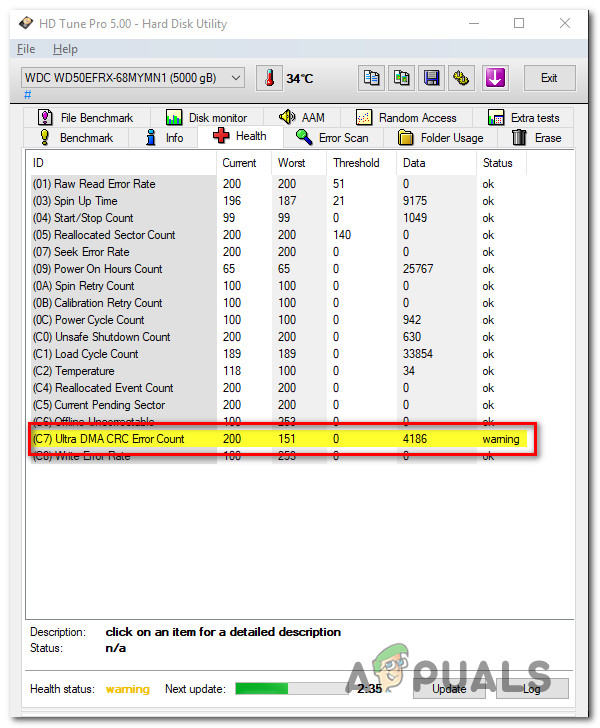 Interface CRC Error Count inside HD Tune
What is Ultra DMA CRC Error Count?
This is a S.M.A.R.T. (Self-Monitoring, Analysis, and Reporting Technology) parameter that indicates the total quantity of CRC errors during UltraDMA mode. The raw value of this attribute indicates the number of errors found during data transfer in UltraDMA mode by ICRC (Interface CRC).
But keep in mind that this parameter is considered informational by most hardware vendors. Although the degradation of this parameter can be regarded as an indicator of an aging drive with potential electromechanical problems, it does NOT directly indicate imminent driver failure.
To get the complete picture of the health of your HDD, you need to pay attention to other parameters and the overall drive health.
After investigating this issue thoroughly, it turns out that there are several different underlying causes that might end up produce this particular error code:
- Generic False Positive – Keep in mind that a warning thrown around by the HD Tune utility does not necessarily mean that your HDD is failing. This utility uses generic aggregated from every manufacturer, so concerning data from one manufacturer might not be concerning for another. To get a more accurate result, you will need to run the brand-specific diagnostic tool and see if the same kind of warning occurs.
- Incompatibility between Samsung SSD and SATA Controller – If you’re encountering this issue with an SSD, chances are it’s due to a conflict between your solid-state drive and the Microsoft or AMD SATA controller driver. To fix this incompatibility, you’ll need to use Registry Editor to disable NCQ (Native Command Queue).
- Faulty SATA Cable or SATA port – As it turns out, you can also expect to encounter this type of issue if you’re dealing with a faulty SATA port or a non-congruent SATA cable. In this case, you can identify the culprit by testing the HDD on a different machine and replacing the current SATA cable.
- Failing HDD or SSD – Under certain circumstances, you can expect to see this error warning in the early stages of a failing drive. In this case, the only thing you can do is back up your data before the drive breaks up for good and start looking for a replacement.
Now that you know the very potential scenario that might cause this error code, here’s a list of methods that will help you identify and resolve the Ultra DMA CRC Error Count error:
Method 1: Running the brand-specific diagnostic tool
Keep in mind that the HD Tune Utility is a 3rd party tool that will ‘judge’ the heath of an HDD solely by comparing them against a set of generic values.
Because of this, it’s highly recommended to avoid making a decision based on HD Tune Utility alone and instead run the brand-specific diagnostic tool – The official testing tools are specifically designed for their brand products.
Depending on your HDD manufacturer, install and scan your hard drive with the proprietary diagnostic utility. To make matters easier for you, we’ve made a list of the most popular brand-specific diagnostic tools:
Note: If your HDD manufacturer is not included in the list above, search online for specific steps on your brand-specific diagnostic tool, then install and run it to see if the Ultra DMA CRC Error Count is still off.
If the manufacturer-specific diagnostic tool doesn’t raise any concerns in relation to the value of Ultra DMA CRC Error Count, then you can safely ignore the warning thrown by HD Tune.
However, if the warning is also displayed in the manufacturer-specific analysis tool, move down to the next potential fix below.
Method 2: Fix the Incompatibility between Samsung SSD and SATA Controller (if applicable)
As it turns out, the Ultra DMA CRC Error Count error is not restricted to an HDD and can also occur if you’re using an SSD.
But if you’re seeing this error with a Samsung SSD, there’s a high chance that the issue has nothing to do with a bad cable or solid-state health – It’s most likely due to an incompatibility between your Samsung SSD and your chipset Sata controller.
If you find yourself in this particular scenario, you can fix the issue and prevent this warning from appearing by disabling NCQ (Native Command Queue) in your SATA driver.
Note: This will not affect the functionality of your SATA drive.
If this scenario is applicable, the instructions below to fix the incompatibility between your Samsung SSD and the Sata Controller:
- Press Windows key + R to open up a Run dialog box. Next, inside the text box, type ‘regedit’, then press Ctrl + Shift + Enter to open up the Registry Editor with admin access. When you’re prompted by the UAC (User Account Control), click Yes to grant administrative access.
 Opening Regedit
 - Once you’re inside the Registry Editor, use the left-hand menu to navigate to the following locations, depending on if you’re using a Microsoft SATA Controller driver or a AMD SATA Controller driver:
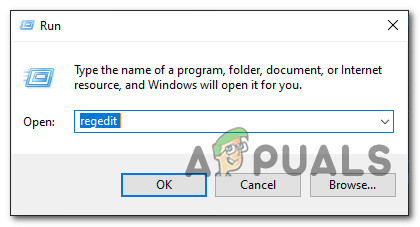 Opening Regedit
Note: You can either navigate here manually or you can paste the location directly into the navigation bar
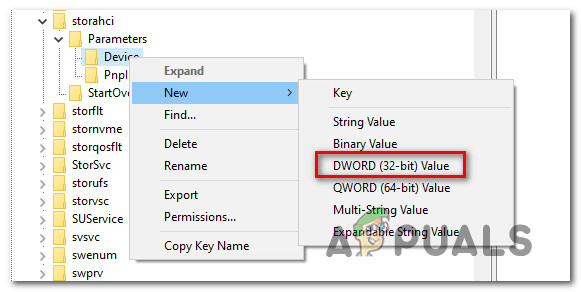 Creating a new Dword value inside the Device menu
If the same issue is still occurring even after following the instructions above or this scenario was not applicable, move down to the next potential fix below.
Method 3: Replace the power and SATA cable
As several affected users have confirmed, this particular issue can also be associated with a faulty SATA cable or a faulty SATA port. Because of this, the Ultra DMA CRC Error Count error can also be a symptom of a non-congruent cable.
To test this theory, you can connect your HDD to a different computer (or at least use a different SATA port + cable) if you don’t have a second machine to do some testing on.
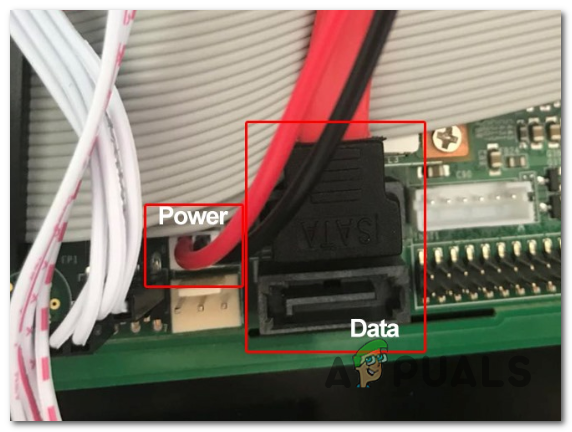 Example of a SATA Port on the motherboard
After you replaced the SATA port, repeat the scan inside HD Tune utility and see if the Ultra DMA CRC Error Count error is still occurring – If the issue has stopped occurring, consider taking your motherboard to an IT technician to investigate for loose pins.
On the other hand, if the issue doesn’t occur while you use a different SATA cable, you’ve just managed to identify your culprit.
In case you’ve eliminated both the SATA cable and the SATA port from the list of culprits, move down to the next potential fix below as the issue is definitely occurring due to a failing drive.
Method 4: Backup your HDD data
If you’ve previously made sure that you were right to concern yourself with the Ultra DMA CRC Error Count error, the first thing you should do is backup your data to ensure that you’re not losing anything in case the drive goes bad.
If you’re looking to back up your HDD data while you figure out which replacement to get, keep in mind that you have two ways forward – You can either backup your HDD using the built-in feature or you can use a 3rd party utility.
A. Backing up the files on your HDD via Command Prompt
If you’re comfortable with using an elevated CMD terminal, you can create a backup and save it on external storage without the need to install a 3rd party software.
But keep in mind that depending on your preferred approach, you might need to insert or plugin-compatible installation media.
If you’re comfortable with this approach, here are the instructions for backup your files from an Elevated Command prompt.
B. Backing up the files on your HDD via an Imaging 3rd party software
On the other hand, if you’re comfortable with trusting a 3rd party utility with your HDD backup, you’ll have a lot of extra features that are simply not available when creating a regular backup via Command Prompt.
You can use a 3rd party backup software to either clone or create an image of your HDD and save it externally or on the cloud. Here’s a list of the best cloning & imaging software that you should consider using.
Method 5: Send your HDD for replacement or order a replacement
If you’ve made sure that the Ultra DMA CRC Error Count warning you’re seeing is genuine and you have successfully backed up your HDD data in advance, the only thing you can do right now is to look for a replacement.
Of course, if your HDD is still protected by the warranty, you should send it in for repair right away.
But if the warranty has expired or you have the option to return it still, our recommendation is to stay away from the legacy HDD (Hard Disk Drive) and go for SSD (Solid State Drive) instead.
Although SSD is still more expensive than traditional HDD, there are much less prone to break and the speed is incomparable in favor of SSD (10x more writing and reading speeds).
If you’re in the market for an SSD, here’s our advanced guide to buying the best solid-state drive for your needs.
Источник
Interface CRC error count attention, hd tune (people say not to worry. )
CostaP
Distinguished










I just installed the HD Tune pro 5.60, as Seatools could not detect my Seagate HDD (I phoned Seagate and they said it is not always compatible for W10 but it can sometimes work. ).
I ran the HD Tune scan to check my internal Seagate HDD.
Reason to Scan HDD: Saturday morning my screen froze and received a “Reboot and Select proper Boot device” which was completely random and has never happened before. I mean, I was defragging that night as well. I phoned Cyperpower PC (today) and they said it is most likely that a file was moved during defrag. He said its nothing to worry about, as its a moved file or something? My PC and HDD are working completely fine since I restarted from the message.
Not sure if you know more about this issue?
HD Tune Scan: Anyway, I ran a scan using HD Tune and received an ‘attention’ for the ‘Interface CRC Error Count’. Could you let me know what this is and if I should worry about upgrading? (Please find attached the screenshots).
Healthcheck with ‘attention sign: http://imgur.com/a/8zjRF
Nearly all threads online said not to worry (unless it increases/decreases), especially as my ‘Data’ is only 1, so that means 1 file is missing?
This file might have been moved from defrag and caused the issue?
People also say it could be SATA cable?
For the “Reboot and Select proper Boot device”, I have been advised on this forum and also from Seagate and Cyperpower to backup. They told me my HDD should be fine but backup anway. So will purchase an external HDD for backup and also a new internal HDD (can you recommended any?) to Clone my Current files/HDD.
Источник
HDtune Interface crc error count?
Jalvin
Reputable
So I got HDtune (Attention) Interface crc error count value of 2 in my new hard drive, I try to change SATA cables, hooking the hdd to other computer still gets the «Attention» message in HDtune still the same value. But i try to S.M.A.R.T. test in 4 different program and i got a good result.
Result S.M.A.R.T. CRC error count: Western Digital Caviar 1tb — WD10EZEX-60M2NA0
Harddisk Sentinel Pro: 199 Ultra ATA crc error count (0000000000002) OK
PassMark Disk Chekup: C7 Ultra DMA crc error count (2) OK
CrytaldiskInfo: C7 Ultra DMA crc error count (0000000000002) OK
Acronis Drive Monitor: Ultra DMA crc error count (2) OK
This program is installed to a same computer
Is HDtune is Accurate?
Should i ignore Hdtune?
Thanks!
So i got this screenshot of my test:


SuperSoph_WD
Glorious
















Hi again, Jalvin!
I don’t think you have anything to worry about until the current value starts decreasing. The raw value here indicates the number of errors found during a data transfer, since it’s the only «attention» mark (with only 2 communication errors) that appears in the SMART data results, I’d recommend you again to change the SATA cable and test the HDD afterwards. I’d also suggest you to check it on another computer and see if the SMART attribute error appears there.
Whenever it comes to hard drives or any hardware for that matter, it’s highly recommended to trust the brand-specific diagnostic tool for that component rather than any third-party utility! The official testing tools are specifically designed for their brand products.
The most important thing to do in order to keep your peace of mind, is to do regular backups of your data on more than one location (storage device). Even if a hard drive fails, you’d have the data safe and sound. Sending an RMA request and getting a replacement is easy, but data sometimes is irreplaceable.
So, no. I don’t think you should replace the HDD because of this particular error that occurs in just one particular utility, since all the other SMART attributes and tools are good, and they show no problematic or weak sectors.
However, let me know if you have any other concerns regarding the WD Blue drive!
Hope I was helpful! 
SuperSoph_WD
SuperSoph_WD
Glorious
Hey there, Jalvin!
I’d recommend you to keep constant backups of the data stored on this WD Blue drive. This is the best way to avoid any data loss in the future. I’d also recommend testing it with WD’s brand-specific diagnostics tool — Data LifeGuard. Make sure you run the QUICK and EXTENDED test from the utility and view the SMART results afterwards. Here’s a link to it: http://products.wdc.com/support/kb.ashx?id=JLzZvC
Either way , I don’t think you have to worry about anything just yet. I’d even suggest trying a different SATA cable and checking that it’s properly connected to the HDD. This error is usually caused by a miscommunication between the drive and the southbridge (host), but unless the current value starts decreasing I don’t think you should be panicking.
However, keeping backups in several different locations (drives) is always a good idea to avoid any headaches later on.
Hope I helped. Good luck!
SuperSoph_WD
Jalvin
Reputable
Hey there, Jalvin!
I’d recommend you to keep constant backups of the data stored on this WD Blue drive. This is the best way to avoid any data loss in the future. I’d also recommend testing it with WD’s brand-specific diagnostics tool — Data LifeGuard. Make sure you run the QUICK and EXTENDED test from the utility and view the SMART results afterwards. Here’s a link to it: http://products.wdc.com/support/kb.ashx?id=JLzZvC
Either way , I don’t think you have to worry about anything just yet. I’d even suggest trying a different SATA cable and checking that it’s properly connected to the HDD. This error is usually caused by a miscommunication between the drive and the southbridge (host), but unless the current value starts decreasing I don’t think you should be panicking.
However, keeping backups in several different locations (drives) is always a good idea to avoid any headaches later on.
Hope I helped. Good luck!
SuperSoph_WD
Thank you for the answer SuperSoph_WD, i just finish my test using WD-Data LifeGuard I run both QUICK and EXTENDED test, the result on both tests are PASS.
I already tried changing SATA cables, and tried to attach the HDD on my other 2 desktop PC, still HDtune gives me Warning on CRC error count.
Can I ignore the HDtune warning, since the WD-Data LifeGuard S.M.A.R.T. test is PASS.
By the way this is my screenshot of the result of WD-Data LifeGuard

SuperSoph_WD
Glorious
Hi again, Jalvin!
Can you please click on the «to view SMART data Right-click for more options.» This will get you to view the actual SMART data results and check the CRC error count there. I’d trust the majority of tools saying the drive is okay. However, I’d monitor the drive using SMART diagnostic tools every once in awhile.
Don’t forget that having a backup on at least two different storage devices is recommended, in order to avoid the headaches of data loss!
Good luck!
SuperSoph_WD
Jalvin
Reputable
Hi again, Jalvin!
Can you please click on the «to view SMART data Right-click for more options.» This will get you to view the actual SMART data results and check the CRC error count there. I’d trust the majority of tools saying the drive is okay. However, I’d monitor the drive using SMART diagnostic tools every once in awhile.
Don’t forget that having a backup on at least two different storage devices is recommended, in order to avoid the headaches of data loss!
Good luck!
SuperSoph_WD
Sorry for my very late reply. this is my screenshot for Data Lifeguard Diagnostic for Windows.


I try again to run HDtune Pro but still gives again a warning on this HDD

So please help, do i need to replace this drive?
SuperSoph_WD
Glorious
Hi again, Jalvin!
I don’t think you have anything to worry about until the current value starts decreasing. The raw value here indicates the number of errors found during a data transfer, since it’s the only «attention» mark (with only 2 communication errors) that appears in the SMART data results, I’d recommend you again to change the SATA cable and test the HDD afterwards. I’d also suggest you to check it on another computer and see if the SMART attribute error appears there.
Whenever it comes to hard drives or any hardware for that matter, it’s highly recommended to trust the brand-specific diagnostic tool for that component rather than any third-party utility! The official testing tools are specifically designed for their brand products.
The most important thing to do in order to keep your peace of mind, is to do regular backups of your data on more than one location (storage device). Even if a hard drive fails, you’d have the data safe and sound. Sending an RMA request and getting a replacement is easy, but data sometimes is irreplaceable.
So, no. I don’t think you should replace the HDD because of this particular error that occurs in just one particular utility, since all the other SMART attributes and tools are good, and they show no problematic or weak sectors.
However, let me know if you have any other concerns regarding the WD Blue drive!
Hope I was helpful!
SuperSoph_WD
Jalvin
Reputable
Hi again, Jalvin!
I don’t think you have anything to worry about until the current value starts decreasing. The raw value here indicates the number of errors found during a data transfer, since it’s the only «attention» mark (with only 2 communication errors) that appears in the SMART data results, I’d recommend you again to change the SATA cable and test the HDD afterwards. I’d also suggest you to check it on another computer and see if the SMART attribute error appears there.
Whenever it comes to hard drives or any hardware for that matter, it’s highly recommended to trust the brand-specific diagnostic tool for that component rather than any third-party utility! The official testing tools are specifically designed for their brand products.
The most important thing to do in order to keep your peace of mind, is to do regular backups of your data on more than one location (storage device). Even if a hard drive fails, you’d have the data safe and sound. Sending an RMA request and getting a replacement is easy, but data sometimes is irreplaceable.
So, no. I don’t think you should replace the HDD because of this particular error that occurs in just one particular utility, since all the other SMART attributes and tools are good, and they show no problematic or weak sectors.
However, let me know if you have any other concerns regarding the WD Blue drive!
Hope I was helpful!
SuperSoph_WD
ok, many thanks for your help, but i will try to run Data Lifeguard, at least once month to monitor this hard drive. thats it for now, thanks again!
Источник
Some Windows users are reporting that they always end up seeing a warning (Ultra DMA CRC Error Count) when analyzing their HDD using the HD Tune utility. While some affected users are seeing this with used hard drivers, others are reporting this issue with brand new HDDs.
What is Ultra DMA CRC Error Count?
This is a S.M.A.R.T. (Self-Monitoring, Analysis, and Reporting Technology) parameter that indicates the total quantity of CRC errors during UltraDMA mode. The raw value of this attribute indicates the number of errors found during data transfer in UltraDMA mode by ICRC (Interface CRC).
But keep in mind that this parameter is considered informational by most hardware vendors. Although the degradation of this parameter can be regarded as an indicator of an aging drive with potential electromechanical problems, it does NOT directly indicate imminent driver failure.
To get the complete picture of the health of your HDD, you need to pay attention to other parameters and the overall drive health.
After investigating this issue thoroughly, it turns out that there are several different underlying causes that might end up produce this particular error code:
- Generic False Positive – Keep in mind that a warning thrown around by the HD Tune utility does not necessarily mean that your HDD is failing. This utility uses generic aggregated from every manufacturer, so concerning data from one manufacturer might not be concerning for another. To get a more accurate result, you will need to run the brand-specific diagnostic tool and see if the same kind of warning occurs.
- Incompatibility between Samsung SSD and SATA Controller – If you’re encountering this issue with an SSD, chances are it’s due to a conflict between your solid-state drive and the Microsoft or AMD SATA controller driver. To fix this incompatibility, you’ll need to use Registry Editor to disable NCQ (Native Command Queue).
- Faulty SATA Cable or SATA port – As it turns out, you can also expect to encounter this type of issue if you’re dealing with a faulty SATA port or a non-congruent SATA cable. In this case, you can identify the culprit by testing the HDD on a different machine and replacing the current SATA cable.
- Failing HDD or SSD – Under certain circumstances, you can expect to see this error warning in the early stages of a failing drive. In this case, the only thing you can do is back up your data before the drive breaks up for good and start looking for a replacement.
Now that you know the very potential scenario that might cause this error code, here’s a list of methods that will help you identify and resolve the Ultra DMA CRC Error Count error:
Method 1: Running the brand-specific diagnostic tool
Keep in mind that the HD Tune Utility is a 3rd party tool that will ‘judge’ the heath of an HDD solely by comparing them against a set of generic values.
Because of this, it’s highly recommended to avoid making a decision based on HD Tune Utility alone and instead run the brand-specific diagnostic tool – The official testing tools are specifically designed for their brand products.
Depending on your HDD manufacturer, install and scan your hard drive with the proprietary diagnostic utility. To make matters easier for you, we’ve made a list of the most popular brand-specific diagnostic tools:
- SeaTools (Seagate)
- Samsung Magician (Samsung)
- Data Lifeguard Diagnostic (WD)
- PC Diagnostic Tool (Toshiba)
- G-Technology Assistant (G-Tech)
Note: If your HDD manufacturer is not included in the list above, search online for specific steps on your brand-specific diagnostic tool, then install and run it to see if the Ultra DMA CRC Error Count is still off.
If the manufacturer-specific diagnostic tool doesn’t raise any concerns in relation to the value of Ultra DMA CRC Error Count, then you can safely ignore the warning thrown by HD Tune.
However, if the warning is also displayed in the manufacturer-specific analysis tool, move down to the next potential fix below.
Method 2: Fix the Incompatibility between Samsung SSD and SATA Controller (if applicable)
As it turns out, the Ultra DMA CRC Error Count error is not restricted to an HDD and can also occur if you’re using an SSD.
But if you’re seeing this error with a Samsung SSD, there’s a high chance that the issue has nothing to do with a bad cable or solid-state health – It’s most likely due to an incompatibility between your Samsung SSD and your chipset Sata controller.
If you find yourself in this particular scenario, you can fix the issue and prevent this warning from appearing by disabling NCQ (Native Command Queue) in your SATA driver.
Note: This will not affect the functionality of your SATA drive.
If this scenario is applicable, the instructions below to fix the incompatibility between your Samsung SSD and the Sata Controller:
- Press Windows key + R to open up a Run dialog box. Next, inside the text box, type ‘regedit’, then press Ctrl + Shift + Enter to open up the Registry Editor with admin access. When you’re prompted by the UAC (User Account Control), click Yes to grant administrative access.

Opening Regedit - Once you’re inside the Registry Editor, use the left-hand menu to navigate to the following locations, depending on if you’re using a Microsoft SATA Controller driver or a AMD SATA Controller driver:
Microsoft SATA Controller location:
HKEY_LOCAL_MACHINESYSTEMCurrentControlSetServicesstorahciParametersDevice
AMD SATA Controller driver location:
[HKEY_LOCAL_MACHINESYSTEMCurrentControlSetservicesamd_sataParametersDevice
Note: You can either navigate here manually or you can paste the location directly into the navigation bar
- Once you’re inside the correct location, right-click on Device, then choose New > Dword (32-bit) Value from the context menu that just appeared.

Creating a new Dword value inside the Device menu - Next, name the newly created DWORD NcqDisabled if you’re using the Microsoft SATA Controller driver, or name it AmdSataNCQDisabled if you’re using the AMD SATA Controller driver.
- Finally, double-click on the DWORD that you’ve just created then set the Base to Hexadecimal and the value to 1 to disable NCQ and prevent the same incompatibility from creating the Ultra DMA CRC Error Count error.
If the same issue is still occurring even after following the instructions above or this scenario was not applicable, move down to the next potential fix below.
Method 3: Replace the power and SATA cable
As several affected users have confirmed, this particular issue can also be associated with a faulty SATA cable or a faulty SATA port. Because of this, the Ultra DMA CRC Error Count error can also be a symptom of a non-congruent cable.
To test this theory, you can connect your HDD to a different computer (or at least use a different SATA port + cable) if you don’t have a second machine to do some testing on.
After you replaced the SATA port, repeat the scan inside HD Tune utility and see if the Ultra DMA CRC Error Count error is still occurring – If the issue has stopped occurring, consider taking your motherboard to an IT technician to investigate for loose pins.
On the other hand, if the issue doesn’t occur while you use a different SATA cable, you’ve just managed to identify your culprit.
In case you’ve eliminated both the SATA cable and the SATA port from the list of culprits, move down to the next potential fix below as the issue is definitely occurring due to a failing drive.
Method 4: Backup your HDD data
If you’ve previously made sure that you were right to concern yourself with the Ultra DMA CRC Error Count error, the first thing you should do is backup your data to ensure that you’re not losing anything in case the drive goes bad.
If you’re looking to back up your HDD data while you figure out which replacement to get, keep in mind that you have two ways forward – You can either backup your HDD using the built-in feature or you can use a 3rd party utility.
A. Backing up the files on your HDD via Command Prompt
If you’re comfortable with using an elevated CMD terminal, you can create a backup and save it on external storage without the need to install a 3rd party software.
But keep in mind that depending on your preferred approach, you might need to insert or plugin-compatible installation media.
If you’re comfortable with this approach, here are the instructions for backup your files from an Elevated Command prompt.
B. Backing up the files on your HDD via an Imaging 3rd party software
On the other hand, if you’re comfortable with trusting a 3rd party utility with your HDD backup, you’ll have a lot of extra features that are simply not available when creating a regular backup via Command Prompt.
You can use a 3rd party backup software to either clone or create an image of your HDD and save it externally or on the cloud. Here’s a list of the best cloning & imaging software that you should consider using.
Method 5: Send your HDD for replacement or order a replacement
If you’ve made sure that the Ultra DMA CRC Error Count warning you’re seeing is genuine and you have successfully backed up your HDD data in advance, the only thing you can do right now is to look for a replacement.
Of course, if your HDD is still protected by the warranty, you should send it in for repair right away.
But if the warranty has expired or you have the option to return it still, our recommendation is to stay away from the legacy HDD (Hard Disk Drive) and go for SSD (Solid State Drive) instead.
Although SSD is still more expensive than traditional HDD, there are much less prone to break and the speed is incomparable in favor of SSD (10x more writing and reading speeds).
If you’re in the market for an SSD, here’s our advanced guide to buying the best solid-state drive for your needs.
-
- Aug 26, 2014
-
- 20
-
- 0
-
- 4,510
- 0
-
#1
Result S.M.A.R.T. CRC error count: Western Digital Caviar 1tb — WD10EZEX-60M2NA0
Harddisk Sentinel Pro: 199 Ultra ATA crc error count (0000000000002) OK
PassMark Disk Chekup: C7 Ultra DMA crc error count (2) OK
CrytaldiskInfo: C7 Ultra DMA crc error count (0000000000002) OK
Acronis Drive Monitor: Ultra DMA crc error count (2) OK
This program is installed to a same computer
Is HDtune is Accurate?
Should i ignore Hdtune?
Thanks!
So i got this screenshot of my test:
Other Screenshot:

-
- Jul 30, 2014
-
- 6,758
-
- 3
-
- 45,960
- 3,002
-
#6
I don’t think you have anything to worry about until the current value starts decreasing. The raw value here indicates the number of errors found during a data transfer, since it’s the only «attention» mark (with only 2 communication errors) that appears in the SMART data results, I’d recommend you again to change the SATA cable and test the HDD afterwards. I’d also suggest you to check it on another computer and see if the SMART attribute error appears there.
Whenever it comes to hard drives or any hardware for that matter, it’s highly recommended to trust the brand-specific diagnostic tool for that component rather than any third-party utility! The official testing tools are specifically designed for their brand products.
The most important thing to do in order to keep your peace of mind, is to do regular backups of your data on more than one location (storage device). Even if a hard drive fails, you’d have the data safe and sound. Sending an RMA request and getting a replacement is easy, but data sometimes is irreplaceable.
So, no. I don’t think you should replace the HDD because of this particular error that occurs in just one particular utility, since all the other SMART attributes and tools are good, and they show no problematic or weak sectors.
However, let me know if you have any other concerns regarding the WD Blue drive!
Hope I was helpful!
SuperSoph_WD
-
- Jul 30, 2014
-
- 6,758
-
- 3
-
- 45,960
- 3,002
-
#2
I’d recommend you to keep constant backups of the data stored on this WD Blue drive. This is the best way to avoid any data loss in the future. I’d also recommend testing it with WD’s brand-specific diagnostics tool — Data LifeGuard. Make sure you run the QUICK and EXTENDED test from the utility and view the SMART results afterwards. Here’s a link to it: http://products.wdc.com/support/kb.ashx?id=JLzZvC
Either way , I don’t think you have to worry about anything just yet. I’d even suggest trying a different SATA cable and checking that it’s properly connected to the HDD. This error is usually caused by a miscommunication between the drive and the southbridge (host), but unless the current value starts decreasing I don’t think you should be panicking.
However, keeping backups in several different locations (drives) is always a good idea to avoid any headaches later on.
Hope I helped. Good luck!
SuperSoph_WD
-
- Aug 26, 2014
-
- 20
-
- 0
-
- 4,510
- 0
-
#3
I’d recommend you to keep constant backups of the data stored on this WD Blue drive. This is the best way to avoid any data loss in the future. I’d also recommend testing it with WD’s brand-specific diagnostics tool — Data LifeGuard. Make sure you run the QUICK and EXTENDED test from the utility and view the SMART results afterwards. Here’s a link to it: http://products.wdc.com/support/kb.ashx?id=JLzZvC
Either way , I don’t think you have to worry about anything just yet. I’d even suggest trying a different SATA cable and checking that it’s properly connected to the HDD. This error is usually caused by a miscommunication between the drive and the southbridge (host), but unless the current value starts decreasing I don’t think you should be panicking.
However, keeping backups in several different locations (drives) is always a good idea to avoid any headaches later on.
Hope I helped. Good luck!
SuperSoph_WD
Thank you for the answer SuperSoph_WD, i just finish my test using WD-Data LifeGuard I run both QUICK and EXTENDED test, the result on both tests are PASS.
I already tried changing SATA cables, and tried to attach the HDD on my other 2 desktop PC, still HDtune gives me Warning on CRC error count.
Can I ignore the HDtune warning, since the WD-Data LifeGuard S.M.A.R.T. test is PASS.
By the way this is my screenshot of the result of WD-Data LifeGuard
THanks!
-
- Jul 30, 2014
-
- 6,758
-
- 3
-
- 45,960
- 3,002
-
#4
Can you please click on the «to view SMART data Right-click for more options.» This will get you to view the actual SMART data results and check the CRC error count there. I’d trust the majority of tools saying the drive is okay. However, I’d monitor the drive using SMART diagnostic tools every once in awhile.
Don’t forget that having a backup on at least two different storage devices is recommended, in order to avoid the headaches of data loss!
Good luck!
SuperSoph_WD
-
- Aug 26, 2014
-
- 20
-
- 0
-
- 4,510
- 0
-
#5
Can you please click on the «to view SMART data Right-click for more options.» This will get you to view the actual SMART data results and check the CRC error count there. I’d trust the majority of tools saying the drive is okay. However, I’d monitor the drive using SMART diagnostic tools every once in awhile.
Don’t forget that having a backup on at least two different storage devices is recommended, in order to avoid the headaches of data loss!
Good luck!
SuperSoph_WD
Sorry for my very late reply. this is my screenshot for Data Lifeguard Diagnostic for Windows.
I try again to run HDtune Pro but still gives again a warning on this HDD
So please help, do i need to replace this drive?
-
- Jul 30, 2014
-
- 6,758
-
- 3
-
- 45,960
- 3,002
-
#6
I don’t think you have anything to worry about until the current value starts decreasing. The raw value here indicates the number of errors found during a data transfer, since it’s the only «attention» mark (with only 2 communication errors) that appears in the SMART data results, I’d recommend you again to change the SATA cable and test the HDD afterwards. I’d also suggest you to check it on another computer and see if the SMART attribute error appears there.
Whenever it comes to hard drives or any hardware for that matter, it’s highly recommended to trust the brand-specific diagnostic tool for that component rather than any third-party utility! The official testing tools are specifically designed for their brand products.
The most important thing to do in order to keep your peace of mind, is to do regular backups of your data on more than one location (storage device). Even if a hard drive fails, you’d have the data safe and sound. Sending an RMA request and getting a replacement is easy, but data sometimes is irreplaceable.
So, no. I don’t think you should replace the HDD because of this particular error that occurs in just one particular utility, since all the other SMART attributes and tools are good, and they show no problematic or weak sectors.
However, let me know if you have any other concerns regarding the WD Blue drive!
Hope I was helpful!
SuperSoph_WD
-
- Aug 26, 2014
-
- 20
-
- 0
-
- 4,510
- 0
-
#7
I don’t think you have anything to worry about until the current value starts decreasing. The raw value here indicates the number of errors found during a data transfer, since it’s the only «attention» mark (with only 2 communication errors) that appears in the SMART data results, I’d recommend you again to change the SATA cable and test the HDD afterwards. I’d also suggest you to check it on another computer and see if the SMART attribute error appears there.
Whenever it comes to hard drives or any hardware for that matter, it’s highly recommended to trust the brand-specific diagnostic tool for that component rather than any third-party utility! The official testing tools are specifically designed for their brand products.
The most important thing to do in order to keep your peace of mind, is to do regular backups of your data on more than one location (storage device). Even if a hard drive fails, you’d have the data safe and sound. Sending an RMA request and getting a replacement is easy, but data sometimes is irreplaceable.
So, no. I don’t think you should replace the HDD because of this particular error that occurs in just one particular utility, since all the other SMART attributes and tools are good, and they show no problematic or weak sectors.
However, let me know if you have any other concerns regarding the WD Blue drive!
Hope I was helpful!
SuperSoph_WD
ok, many thanks for your help, but i will try to run Data Lifeguard, at least once month to monitor this hard drive. thats it for now, thanks again!
-
#8
link of screenshots: http://pho.to/A4C1J
I would really appreciate if someone could help me determine what’s the problem with this one. (Or is it just okay to leave it like this?)
Sorry for bumping a 2015 post.
-
- Jul 30, 2014
-
- 6,758
-
- 3
-
- 45,960
- 3,002
-
#9
In the future, I’d advise you to create your own thread so that more people would be able to see your issue! A lot of people could lend a hand with the solution in the Tom’s Hardware community.
Keep in mind that the best way to avoid any potential data loss is to always have, at least, two copies of your files backed up to an off-site location.
This CRC error could be caused by a faulty power connection to the HDD. I’d advise you to try your WD AV-GP in a different SATA port on the mobo and using a different SATA cable. If you have access to another PC, you might also want to plug it there and check how it will get recognized.
This SMART attribute indicates errors that are caused by a faulty/corrupted communication between the HDD and the host (southbridge) and usually involves an issue with the SATA HDD connector, the SATA cable or the motherboard’s ports.
Keep me posted if you see any changes in the SMART results after these troubleshooting steps.
Good luck!
SuperSoph_WD
-
- May 26, 2015
-
- 135
-
- 2
-
- 10,715
- 6
-
#10
-
- Jul 30, 2014
-
- 6,758
-
- 3
-
- 45,960
- 3,002
-
#11
Hey there, @Charseza!
I’m really sorry to hear about your issues with a WD HDD. It would be really helpful if you share some screenshots from the SMART data you got for your WD drive. I’d still advise you to back up as much of your data as you can from this HDD to another working storage drive/location. If the health of the HDD is degrading, it would affect the whole system performance. I’d strongly recommend you check the warranty here . If it’s still covered by us, you should be able to send an RMA request to our Customer Support and get a replacement soon enough that you can install and run the programs smoothly then. You won’t benefit from keeping the hard drive in your system as it would still affect the performance, even if it’s just a secondary (non-OS) HDD. The sooner you replace it, the better your PC behavior will be.
Let me know if you have any additional questions.
SuperSoph_WD
| Thread starter | Similar threads | Forum | Replies | Date |
|---|---|---|---|---|
|
T
|
Question adding a new M.2 SSD to my motherboard causes PC to receive a boot error | Storage | 6 | Feb 1, 2023 |
|
|
[SOLVED] Repairing Disc Errors This May Take Over an Hour to Complete? | Storage | 22 | Jan 31, 2023 |
|
R
|
Question Seagate HDD in intermittent state (can’t initialize) (I/O ERROR) after I cancelled their software’s sanitization progress | Storage | 0 | Jan 26, 2023 |
|
D
|
Question Standard NVM Express Controller error — NVMe drive not detected in BIOS ? | Storage | 2 | Jan 14, 2023 |
|
S
|
[SOLVED] Is there a way to fix HDD CRC error | Storage | 1 | Jan 2, 2023 |
|
J
|
Question Really struggling to clone my hard disk on to SSD with Macrium Reflect , Error 0 and 23 | Storage | 9 | Dec 8, 2022 |
|
I
|
Question Why do we erratically get BSOD 14c error only on multiple HDD/SSD, with M.2 SSD as Boot drive ? | Storage | 5 | Dec 2, 2022 |
|
|
Question HDD i/o error | Storage | 2 | Nov 29, 2022 |
|
T
|
Question Whea uncorrectable error Stop Code Bluescreen | Storage | 3 | Nov 24, 2022 |
|
|
Question New SSD (Kingston A400 240gb) with a «Interface CRC Error Count». | Storage | 7 | Sep 5, 2022 |


- Advertising
- Cookies Policies
- Privacy
- Term & Conditions
- Topics
-
MaXimus
- Posts: 2
- Joined: 2014.06.24. 22:50
- Location: Dubai
Resetting Interface CRC Error Count
I have an Alienware 18 one month old laptop
I also have two Samsung 840 EVO 1TB SSDs
The first SSD shows an Interface CRC Error Count with a value of 76 in HD Tune. That number never changes so it means there is no current problem, maybe in my previous laptop where I had the SSD installed there was a problem.

I searched on Google on how to reset the error count and got this link: http://www.hdsentinel.com/hard_disk_cas … _error.php
That made me purchase Hard Disk Sentinel just to reset that bugging error.
I did set the value to -76 and waited for a while but upon checking HD Tune it still shows the same, how can I actually make that change happen??

ALIENWARE 18 Laptop
CPU: Intel Core i7-4800MQ CPU @ 3.60 GHz
Memory: 32 GB Kingston HyperX 1866MHz DDR3 PC3-14900 RAM
Graphics: Dual GeForce GTX 770M SLI 6 GB GDDR5 RAM + Intel HD Graphics 4600
Storage: Samsung 840 EVO 1TB mSATA SSD + 2 x Samsung 840 EVO 1TB SSD
-

hdsentinel
- Site Admin
- Posts: 2801
- Joined: 2008.07.27. 17:00
- Location: Hungary
- Contact:

Re: Resetting Interface CRC Error Count
Post
by hdsentinel » 2014.06.25. 08:50
Thanks for your message and question.
Yes, exactly as you wrote, http://www.hdsentinel.com/hard_disk_cas … _error.php shows how it is possible to acknowledge the problems by clearing the error counter. This way Hard Disk Sentinel will no longer report the problems previously detected and reported by the drive and will notify you only about any future issues.
Generally, hard disks record problem(s) occured in their lifetime and these error counters do not clear automatically (for example when you check/replace data cables or connections). These counters can’t be physically cleared/removed from the S.M.A.R.T. attribute list of the drive.
This is why it is important to use the proper hard disk monitoring software (Hard Disk Sentinel) which offers the ability to perform a way to acknowledge the errors related to the past and manually clear these errors: to be notified only about possible new issues which may really cause performance degradations or even lead to data corruption/data loss.
I’m afraid the other tool you used (as all other hard disk monitoring software except Hard Disk Sentinel) does not have this feature, so it will still display problems.
-
MaXimus
- Posts: 2
- Joined: 2014.06.24. 22:50
- Location: Dubai
Re: Resetting Interface CRC Error Count
Post
by MaXimus » 2014.06.25. 09:12
hdsentinel wrote:Thanks for your message and question.
Yes, exactly as you wrote, http://www.hdsentinel.com/hard_disk_cas … _error.php shows how it is possible to acknowledge the problems by clearing the error counter. This way Hard Disk Sentinel will no longer report the problems previously detected and reported by the drive and will notify you only about any future issues.
Generally, hard disks record problem(s) occured in their lifetime and these error counters do not clear automatically (for example when you check/replace data cables or connections). These counters can’t be physically cleared/removed from the S.M.A.R.T. attribute list of the drive.
This is why it is important to use the proper hard disk monitoring software (Hard Disk Sentinel) which offers the ability to perform a way to acknowledge the errors related to the past and manually clear these errors: to be notified only about possible new issues which may really cause performance degradations or even lead to data corruption/data loss.
I’m afraid the other tool you used (as all other hard disk monitoring software except Hard Disk Sentinel) does not have this feature, so it will still display problems.
Ah I see, I understand it wrong I though Hard Disk Sentinel can really reset those error counts. Oh well, I’ll keep my license still just because of your good reply and detailed explanation.
All the best to you.
ALIENWARE 18 Laptop
CPU: Intel Core i7-4800MQ CPU @ 3.60 GHz
Memory: 32 GB Kingston HyperX 1866MHz DDR3 PC3-14900 RAM
Graphics: Dual GeForce GTX 770M SLI 6 GB GDDR5 RAM + Intel HD Graphics 4600
Storage: Samsung 840 EVO 1TB mSATA SSD + 2 x Samsung 840 EVO 1TB SSD
-
hdsentinel
- Site Admin
- Posts: 2801
- Joined: 2008.07.27. 17:00
- Location: Hungary
- Contact:
Re: Resetting Interface CRC Error Count
Post
by hdsentinel » 2014.06.29. 07:51
Thanks for your answer.
I hope Hard Disk Sentinel can be found useful to protect sensitive daa, for example because of the
— constant hard disk monitoring to report problems and the way as errors related to the past can be acknowledged, so it can report only changes/new problems
— option to alert you when a such problem detected
— numerous, intensive hard disk testing methods to reveal and fix problems (for example as described at http://www.hdsentinel.com/faq.php#tests )
— special functions like the status report remotely in a web browser, daily reports, backup project, etc.
Куратор(ы):
KT
| Автор | Сообщение | |||
|---|---|---|---|---|
|
||||

Member Статус: Не в сети |
ПРОСЯ О ПОМОЩИ, ВЫКЛАДЫВАЙТЕ S.M.A.R.T. ПРОБЛЕМНОГО НАКОПИТЕЛЯ! Его можно посмотреть программами Everest, AIDA 64, Victoria 4.x, Dtemp, HDDScan, HD Tune, Crystal Disk Info, SpeedFan… Обращайте внимание на DATA/RAW-параметры, это главные и основные показатели здоровья диска. >>>При использовании Crystal Disk Info в меню Сервис>Дополнительно>Raw-значения выберите вариант «10 [DEC]» это несколько упростит восприятие информации утилиты форумчанами.<<< <<Скриншоты>> При выкладке скриншотов не забываем ограничения накладываемы пунктом 3.12 правил конференции. А именно: «Размещать в тегах «Img» картинки объемом свыше 500 кБ на сообщение. Допускаются картинки до 2 МБ под тегом «spoiler=«, а также прямые ссылки на картинки любого размера. Ссылки на страницы, где картинка отображается среди рекламы, запрещены, применяющие их сайты блокируются автоцензором.» Для лучшего понимания сути вопроса смотрите информацию на первой странице темы, составленную камрадом Ing-Syst. Так же помочь разобраться в показаниях СМАРТ может очень подробный материал размещенный на сайте ixbt.com: Оцениваем состояние дисков при помощи S.M.A.R.T. Возможно, для решения Вашей проблемы потребуется провести цикл процедур утилитами Виктория и MHDD. Ссылки на инструкции по работе с программами можно найти на первой странице темы. Связанные темы [FAQ] Всё о винчестерах Western Digital Восстановление данных Сигейт официально признал проблему с 7200.11 Полезные сообщения участников этой темы: Обнуление некоторых параметров СМАРТ на винчестерах Samsung ShutUp — программа камрада CoolCMD для предотвращения частых парковок HDD. https://disk.yandex.ru/d/x3UITAgo3EGqub Программа считывает один сектор через определенный пользователем промежуток времени. Учёт и поиск запчастей к жестким дискам — R.baza. Последний раз редактировалось KT 29.11.2021 18:36, всего редактировалось 15 раз(а). |

 Добавлено: 05.09.2005 22:35
 | Реклама | |
|
Партнер |
|
Suhoff |
|
|
Junior Статус: Не в сети |
Господа, всем доброго времени суток и прошу помощи. |
|
Sania. |
|
|
Member Статус: Не в сети |
Suhoff писал(а): Насколько существенна эта ошибка при эксплуатации этого SSD в нормальном компе? Если это не проблема самого интерфейса, а самого диска, тоже самое будет по симптомам. Suhoff писал(а): Возможен ли сброс этой ошибки, как, к примеру, на HDD Seagate? Разве у сегейта есть такая кнопка? Suhoff писал(а): Является ли этот случай гарантийным для замены (с момента покупки прошла неделя)? Если это не проблема диска, не гарантийный. |
|
Suhoff |
|
|
Junior Статус: Не в сети |
Sania. писал(а): Если это не проблема самого интерфейса, а самого диска, тоже самое будет по симптомам. На другом компьютере, при тестах на запись/чтение и просто записи/удалении файлов параметр не меняется. Отсюда делаю вывод, что с контроллером HDD того ноутбука была некая несовместимость. Вопрос состоял в том, насколько опасно накопление этой ошибки и как она отразится на функционировании SSD. Sania. писал(а): Разве у сегейта есть такая кнопка? Кнопки такой у Seagate, естественно, нет, но с помощью интерфейса USB-TTL и HyperTerminal можно обнулить его SMART. Возможно ли сбросить параметры SMART SSD — неясно, так как у SSD некуда подключать интерфейс, во всяком случае, снаружи. |
|
Sania. |
|
|
Member Статус: Не в сети |
Suhoff писал(а): Отсюда делаю вывод, что с контроллером HDD того ноутбука была некая несовместимость. Или грязь на контактах. Suhoff писал(а): Вопрос состоял в том, насколько опасно накопление этой ошибки и как она отразится на функционировании SSD. Она не растут на другом устройстве, никакой и проблемы не будет, когда начнут, тогда можно беспокоится. Suhoff писал(а): Кнопки такой у Seagate, естественно, нет, но с помощью интерфейса USB-TTL и HyperTerminal можно обнулить его SMART. Возможно ли сбросить параметры SMART SSD — неясно, так как у SSD некуда подключать интерфейс, во всяком случае, снаружи. Команды от сегейта никакому кроме сегейта не подойдут, даже если бы были у всех такие интерфейсы как у сегейта. |
|
Suhoff |
|
|
Junior Статус: Не в сети |
Sania. писал(а): Или грязь на контактах. Грязи нет — девайс новый, из коробки, в разъеме ноута тоже все чисто. Здесь налицо несовместимость контроллеров ноута и SSD. Sania. писал(а): Она не растут на другом устройстве, никакой и проблемы не будет, когда начнут, тогда можно беспокоится. Беспокоюсь оттого, что этот параметр может иметь конечное значение, после чего SSD перестанет работать, как HDD некоторых производителей. Ведь нет гарантий того, что в период эксплуатации контакты не станут менее надежными и эта ошибка начнет снова расти, но теперь уже по вине интерфейсного кабеля. Sania. писал(а): Команды от сегейта никакому кроме сегейта не подойдут, даже если бы были у всех такие интерфейсы как у сегейта. Это понятно, поэтому и задан вопрос — вдруг у кого-то есть опыт работы со SMART на SSD и вдруг кто-то знает, где взять сервисный софт для конкретной серии. Хотя, сомневаюсь — серия только недавно появилась в продаже. |
|
Sania. |
|
|
Member Статус: Не в сети |
Suhoff писал(а): Грязи нет — девайс новый, из коробки, в разъеме ноута тоже все чисто. Вы бы удивились бы какие грязные контакты бывают если бы грязь не была прозрачной у совершенно нового девайса, да и где вы могли достать ноут новым вообще не понятно, забыли на полочке запакованным на несколько лет? Suhoff писал(а): Беспокоюсь оттого, что этот параметр может иметь конечное значение, после чего SSD перестанет работать, как HDD некоторых производителей. Но не имеет, как и у всех производителей HDD. Suhoff писал(а): Ведь нет гарантий того, что в период эксплуатации контакты станут менее надежными и эта ошибка начнет снова расти, но теперь уже по вине интерфейсного кабеля. Поменяете интерфейсный кабель, нашли трагедию. Suhoff писал(а): Это понятно, поэтому и задан вопрос — вдруг у кого-то есть опыт работы со SMART на SSD и вдруг кто-то знает, где взять сервисный софт для конкретной серии. У производителя можно взять, а все остальные работающие со смартом не работают с ними, у вас поверхносные знания о работе с накопителями. Suhoff писал(а): Хотя, сомневаюсь — серия только недавно появилась в продаже. Ну да, может и через 20 лет ничего не будет. |
|
Tomset |
|
|
Advanced member Статус: Не в сети |
Suhoff |
|
kolyan1980-08-11 |
|
|
Member Статус: Не в сети |
Suhoff Можно сослаться на несовместимость, я так оперативку в Ситилинк сдал. |
|
Suhoff |
|
|
Junior Статус: Не в сети |
Tomset писал(а): Вообще не туда смотрите. Interface CRC Error Count- накопительный атрибут, который не сбрасывается. Смотрят на текущее и наихудшие значения. Если не меняются, ошибок сейчас нет. Вообще-то сбрасывается, во всяком случае на жестких дисках Seagate я сам это делал. Опасность больших значений Interface CRC Error Count в том, что при накоплении этой ошибки операционка может перевести канал накопителя в режим PIO, а чем это чревато, известно — многократное падение скорости чтения/записи и 100% загрузка процессора. Говоря проще, накопитель можно считать негодным. kolyan1980-08-11 писал(а): Suhoff Можно сослаться на несовместимость, я так оперативку в Ситилинк сдал. Спасибо за поддержку, но тут разные истории — в вашем случае память просто не подошла, а здесь изменения в SMART от внешнего воздействия. |
|
Tomset |
|
|
Advanced member Статус: Не в сети |
Suhoff писал(а): что при накоплении этой ошибки операционка может перевести канал накопителя в режим PIO, Только не по смарту, а по записям в журнале ошибок системы при работе с диском, например при частых повторах операций. Добавлено спустя 15 минут 35 секунд: |
|
Sania. |
|
|
Member Статус: Не в сети |
Suhoff писал(а): Опасность больших значений Interface CRC Error Count в том, что при накоплении этой ошибки операционка может перевести канал накопителя в режим PIO Никогда такого не было, только когда ошибки росли, то есть происходили ошибки в данный момент, подключал диски с невероятным количеством ошибек в этом атрибуте диск работал как обычно, ваши выводы ошибочны. |
|
Kit_rus |
|
|
Member Статус: Не в сети |
Господа, подскажите по гнусу hm321hi. Дали на посмотреть, починить ноут. Симптомы — тупит жёстко. Больше я не смог выудить инфы, т.к. пользователь ноута совсем ничё не понимает в этом)) Вытащил винт, подцепил через usb. |
|
Sania. |
|
|
Member Статус: Не в сети |
Ну хотя бы к компу напрямую подключить и тест провести викой. Так же скрин смарта не помешает, может там ещё что есть. |
|
Kit_rus |
|
|
Member Статус: Не в сети |
Sania. На прямую подключал, тож самое. Потестю, смарт по позже выложу, если он на тесте не помрёт)) Он один хрен уже мал по объёму, а места там под второй нету. |
|
Sania. |
|
|
Member Статус: Не в сети |
Что тоже самое, пединги не убираются и диск сам не чинится? |
|
Kit_rus |
|
|
Member Статус: Не в сети |
Sania. Тож самое — симптомы одинаковые. Даже возиться с ним не буду, отдам кому нить. Сколько винтов не помирало, ни один вика не спасла. Не верю я ей больше, проще новый купить и не ждать сюрпризов. |
|
MiG73 |
|
|
Member Статус: Не в сети |
Kit_rus |
|
Sania. |
|
|
Member Статус: Не в сети |
Kit_rus писал(а): Сколько винтов не помирало, ни один вика не спасла. Не верю я ей больше, проще новый купить и не ждать сюрпризов. А вы думали она лечит всё что угодно и рак, нет, это диагностический больше комплекс, немного подшаманить если можно, как новый она не сделает. MiG73 писал(а): Да что ты, тут в этой теме нет стоящих соответствующих советов, как будто одни школьники собрались. Ну-ка, подсоветуйте что стоящего, научите школьников, или это что далее и есть что то стоящее, |
 которое уже советовали до вашей регистрации
  .
.|
Tomset |
|
|
Advanced member Статус: Не в сети |
Цитата: Сколько винтов не помирало, ни один вика не спасла. Не верю я ей больше, проще новый купить и не ждать сюрпризов. А чего вы от нее ждете? Кроме записи и чтения стандартными АТА командами с замером задержек. В ней ничего ремонтного совершенно нет. |
|
kolyan1980-08-11 |
|
|
Member Статус: Не в сети |
Tomset Мне вот Victoria 3.5 помогла буквально вчера, заремапила всего лишь один битый сектор. |
—
Кто сейчас на конференции |
|
Сейчас этот форум просматривают: Guzz, mol61, z_mashine и гости: 7 |
| Вы не можете начинать темы Вы не можете отвечать на сообщения Вы не можете редактировать свои сообщения Вы не можете удалять свои сообщения Вы не можете добавлять вложения |