
Ошибка avrdude: stk500_getsync(): not in sync: resp=0x00 и как ее решить?
Данная ошибка периодически появляется практически у всех, чаще всего у новичков, хотя и не только, что же с ней делать? Давайте разбираться.
- Для начала нужно убедиться что в диспетчере устройств ваша плата отображается правильно, и там нету никаких красных крестиков или желтых кружочков с восклицательным знаком, то есть у вас должно быть что-то вроде этого (так должна определяться плата Arduino Uno на чипе CH340T):
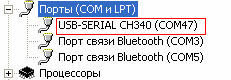
или этого:
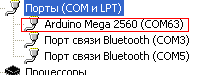
Если у вас есть тут восклицательный знак или вообще неопознанное устройство, то проблема скорее всего с драйверами, пробуйте их найти и переустановить или попробуйте подключить плату к другому выходу USB. Если тут все хорошо, идем далее
- В среде разработки ардуино нужно убедиться что у вас правильно выбрана плата, и ком-порт. Новичком я часто сталкивался с этой проблемой, когда отключив плату, я поправлял код программы, затем подключал плату, пытался ее прошить и видел эту ошибку, а дело в том что просто слетала галка с нужного ком-порта, как здесь:
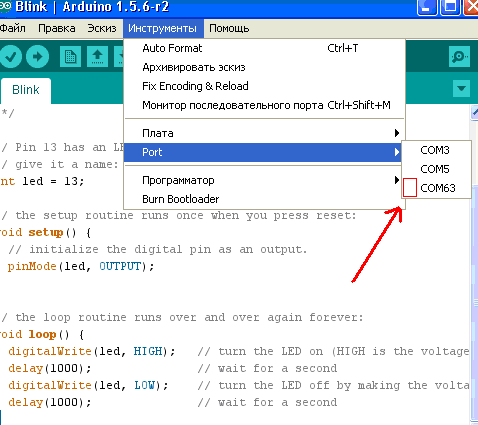
Это самая частая причина данной ошибки – просто ставим галочку, убеждаемся, что сама плата выбрана правильно, запускаем заливку и скетч успешно заливается, но на этом не все, если тут у вас все ок – идем далее.
3. Иногда помогает нажатие кнопки Reset на плате в момент заливки скетча. Было у меня такое при работе с платой Arduino Pro Mini при прошивке ее через модуль cp2102 — usb. Запускаем заливку скетча и следим за статусной строкой в среде Arduino.

Как только после надписи «Компиляция скетча» появится надпись «Вгружаем» — необходимо в течение секунды клацнуть кнопочку «Reset» на плате , и вместо ошибки «avrdude: stk500_getsync(): not in sync: resp=0x00» можем получить благополучное «Вгрузили»
4. Для некоторых плат, например Arduino Nano, Arduino Pro Micro и некоторых других бывает такая ситуация, что вы думаете что прошиваете один чип , а на самом деле на плате он другой (Вместо atmega328 может быть atmega168). Необходимо присмотреться на чип, возможно посветить фонариком, либо сфотографировать.
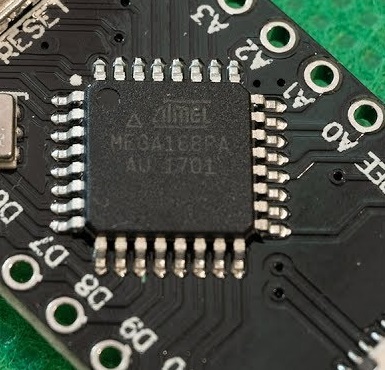
И если чип действительно другой, необходимо выбрать именно его в выборе процессора

5. Был у меня один случай, когда плата нивкакую не хотела шиться имея сетевой шилд на борту. Простой скетч моргалки без шилда – льется, с шилдом тот же скетч – злополучный avrdude: stk500_getsync(): not in sync . Долго мы с товарищем ломали голову над данной проблемой, пока я не вычитал что на этой неудачной китайской копии ATmega328P UNO R3 CH340T Instead 16U2 неправильно впаян ICSP разъём, если у вас та же ситуация, то вам сюда

Хорошо если у вас есть точно такая же плата, на которой у вас происходит ошибка. Тогда просто подключаем ее , убеждаемся что в среде ардуино стоит галка на правильном ком-порте и пытаемся шить, если же она успешно шьётся, значит проблема таки в плате, если же тоже шиться не хочет, то это либо драйвер, либо кабель, либо usb-порт.
Итак если проблема осталась, а вышеперечисленные пункты вам не помогли то нужно разбираться дальше. У меня такая проблема была как раз в упомянутой плате ATmega328P UNO R3 CH340T Instead 16U2 . У меня их две, и как раз была ситуация, когда с одной платой скетчи не хотели литься, но подменив на другую такую же плату, скетч легко залился, и так я понял что проблема точно в плате (отсекая разные варианты с драйверами или низкой скоростью ком-порта о которой часто пишут, также ктото писал что кому-то помогала перезагрузка, но тут мы видим сразу – эта шьется, эта нет, и голову ломать не нужно о дровах, кабелях, скорости, статическом электричестве и т п). Нагуглив что же делать в такой ситуации я выяснил, что необходимо проверить возвращение данных при замыкании rx-tx. То есть нужно перемычкой замкнуть каналы RX и TX – это digital 0 и digital 1 (они обычно подписаны) и далее нужно найти какую-нибудь программу-терминал, например Putty.
Итак, замыкаем эти контакты, подключаем плату, открываем putty, выбираем Serial, указываем порт на котором висит наша ардуина и жмем open.

Появляется терминальое окно, и тут нам просто необходимо что-то написать, если мы видим написанные символы, это хорошо – пути на ардуине до главной микросхемы целы и прошив контроллер есть шанс вернуть плату к жизни. Если же мы пишем, а символы в окне не появляются, значит похоже обрыв на дорожках самой платы, либо неисправны какие-либо другие элементы платы, то есть проблема не в микросхеме (с таким я не сталкивался, но полагаю нужно найти принципиальную схему ардуины, например тут, вооружиться тестером и прозванивать). У меня написанные символы отобразились, то есть дело в микросхеме. Посмотрев что на плате эта микросхема относительно легко достается, я поменял эти микросхемы местами с другой платой и убедился что с другой рабочей микросхемой ардуинка благополучно шьётся. Что же дальше? Конечно, можно заказать эту микросхему, стоит она вчетверо дешевле самой ардуины, и проблема решена, но ведь есть вариант прошить. Есть много способов прошивки, для коих нужны разные программаторы и прочее, но есть способ прошития ардуины другой ардуиной, вот им я и заинтересовался. На официальном сайте есть подробная инструкция, вот что там примерно говорится:
Возьмите плату прошивальщик, то есть рабочую, которой будете прошивать, подключите ее, выберите правильно сом-порт, и залейте в нее скетч ArduinoISP (этот скетч есть в стандартном наборе программ)

Далее необходимо соединить плату прошивальщик с прошиваемой платой, вот эта схема для моей ардуино уно и совместимых с ней:
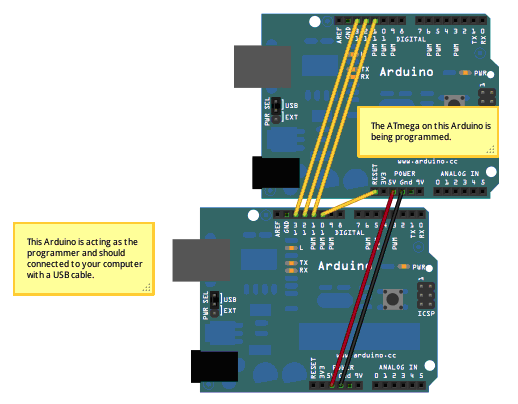
Снизу плата-прошивальщик , к ней подключается юсб-кабель, сверху плата-пациент, которую мы прошиваем. Также далее в инструкции написано, что если плата уно, то к ней необходимо повесить конденсатор на 10uF между reset и ground , но вот к донору или прошивальщику – непонятно. В итоге оказалось что к прошивальщику. Благо конденсатор такой у меня нашелся, обычный электролитический, из какой-то материнки. Далее необходимо в среде ардуино выбрать программатор Arduino as ISP
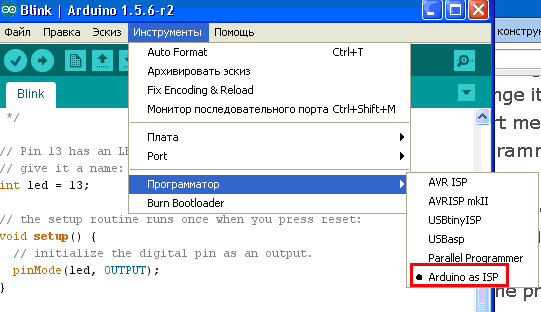
И после этого можно прошивать – инструменты – burn bootloader
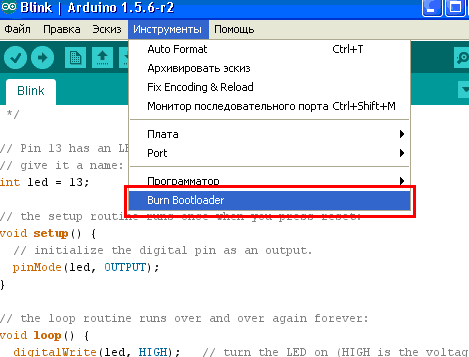
Итак, я подключил проводки, поставил между землей и резетом конденсатор, но сначала методом тыка я поставил конденсатор на донора, подключил юсб кабель к прошевающей плате и увидел как на моем пациенте засветились огоньки одновременно с огоньками прошивальщика (так они не мигали совсем, тупо горел только индикатор питания), это меня уже порадовало, убедившись что скетч ArduinoISP у меня залит, выбрана правильная плата, ком-порт и программатор я нажал Burn Bootloader и увидел ошибку. Расстроился конечно, подумал что придется таки заказывать эту микруху, но вспомнил о кондесаторе и пересадил его с пациента на прошивальщика (отключив естественно предварительно кабель). Итак, подключив кабель я снова нажал Burn Bootloader и о чудо! На обеих платах начали быстро моргать огоньки, и гдето через минуту среда ардуино сказала мне что прошивка завершена. Отключив питание, я отключил все проводки и для начала проверил все ли в порядке с платой прошивальщиком – подключил ее, залил самый простой скетч блинк и он благополучо заработал. Отключив плату, я подключил пациента, и попробовал залить скетч в нее. Ошибку он не выдал! Скетч благополучно залился и начал успешно моргать раз в секунду! Вот и все, оказалось ничего сложного в этой прошивке нету. Очень надеюсь, что эта инструкция поможет кому-то еще, удачи!
Если вам эта информация не помогла, почитайте инструкцию по подробной диагностике чипов Ардуино с помощью второй ардуино платы. По всем вопросам пишите на arduinos.by@gmail.com
I have a Arduino Nano (Sainsmart) that I’m trying to upload a sketch to. Under the Arduino IDE, the device selected was Arduino Nano w/ ATmega328.
However uploading the sketch gives me the error
avrdude: stk500_recv(): programmer is not responding
I tried both USB ports (/dev/tty.usbserial & /dev/cu.usbserial) but the same error persist. The Arduino is connected to a Macbook Air via the USB cable, and the PWR LED indicator light on the Arduino is turned on and the L indicator LED blinks. There was no problem uploading to a Arduino Uno.
Retried after installing the latest FTDI drivers (MAC OSX, x64, v2.2.18, FTDIUSBSerialDriver_10_4_10_5_10_6_10_7.mpkg) from http://www.ftdichip.com/Drivers/VCP.htm. However that did not help.
What could have gone wrong?
asked Mar 18, 2014 at 21:01

NyxynyxNyxynyx
1,3194 gold badges20 silver badges25 bronze badges
0
This error message basically shows up for any communication problem, so by itself, it is not all that instructive. The Arduino Nano is supposed to have auto-reset, but maybe your clone does not? In that case, you’d have to press the reset key on the board just before starting an upload.
answered Mar 18, 2014 at 22:05

microtherionmicrotherion
1,4928 silver badges19 bronze badges
4
Know this is old but I ran onto it during my search for Nano(V3)’s not uploading so thought might help someone else. Problem is the bootloader — Arduino IDE BUT I Found an easy solution (right under my nose).
I realized that my nano’s had been uploading just fine then I had finally updated the Arduino AVR Boards from 1.6.20 to 1.6.21. I didn’t think there was any problems because it still showed my Nano and ATmega328 etc in the board manager after the change.
But the new boards manager has a new ATmega328 processor choice for the Nano. I changed processor: In the Arduino IDE select TOOLS > PROCESSOR > pulldown menu from ATmega328P to "ATmega328P (Old Bootloader)".
Since then, I have uploaded many programs to several different Nano’s V3 (Prolofic interace Chipset) without issue.

answered Apr 19, 2018 at 14:49

7
I was having the same problem and got the same error message. Turns out these boards don’t come with a bootloader preinstalled. If you have some jumper wires and another working arduino you can use this tutorial to install the bootloader and it should work great, mine did at least! 
answered May 14, 2015 at 23:57

Having a similar issue with my Sainsmart Nano.
Under Preferences check «Show verbose output during [x] upload, then when uploading, you should get a red trace like this:
avrdude: Version 5.11, compiled on Sep  2 2011 at 18:52:52
         Copyright (c) 2000-2005 Brian Dean, http://www.bdmicro.com/
         Copyright (c) 2007-2009 Joerg Wunsch

         System wide configuration file is "/Applications/Arduino.app/Contents/Resources/Java/hardware/tools/avr/etc/avrdude.conf"
         User configuration file is "/Users/johannes/.avrduderc"
         User configuration file does not exist or is not a regular file, skipping

         Using Port                    : /dev/tty.usbserial-A403MRTP
         Using Programmer              : arduino
         Overriding Baud Rate          : 57600
avrdude: Send: 0 [30]   [20]
avrdude: Send: 0 [30]   [20]
avrdude: Send: 0 [30]   [20]
You’ll notice a little «pause» just before the first line of avrdude: Send: 0 [30] [20]. Try uploading again and have you finger ready on the physical reset button of your Nano. Just the moment before the first avrdude: ... appears, press the reset button.
When you succeed, you’ll see the screen filling with all sort of gibberish, and ending something like this after a few seconds:
[78] . [00] S [53] h [68] o [6f] u [75] l [6c] d [64]   [20] b [62] e [65]   [20] 0 [30] x [78] 4 [34] 9 [39] D [44] 4 [34] . [00] . [01] . [00] . [00] . [00] . [02] . [00] . [03] . [00] . [04] . [00] . [00] . [00] . [00] . [00] . [e6] . [06] . [b5] . [06] n [6e] . [06] w [77] . [06] . [8c] . [06] . [9d] . [06] . [00] . [00] . [00] . [00] . [02] . [0d] . [aa] . [0d] . [95] . [0c] . [c9] . [0c] . [a9] . [0c] . [f2] . [0c] . [00]
avrdude: Recv: . [10]
# | 100% 3.71s

avrdude: verifying ...
avrdude: 8824 bytes of flash verified
avrdude: Send: Q [51]   [20]
avrdude: Recv: . [14]
avrdude: Recv: . [10]

avrdude done.  Thank you.
answered Feb 19, 2015 at 12:51

konturkontur
1731 silver badge8 bronze badges
1
I recently had the same issue with 3 Nano boards I just purchased from Amazon. I can confirm that the suggested fix (changing to «old bootloader») solved my problem.
I think the main problem is the upload speed. The «old bootloader» version successfully uploads at 57600, but the default «new» version tries to upload at 115200 and fails.

sa_leinad
3,1201 gold badge20 silver badges49 bronze badges
answered May 8, 2018 at 1:54

CurtgCurtg
572 bronze badges
2
Did you remember to tell the IDE that the board type is a Nano?
Tools -> Board => Arduino Nano ...
This gets me every time I swap between my Nano and Uno.
answered Jun 25, 2014 at 8:00

KingsleyKingsley
7735 silver badges12 bronze badges
I also had that error message. I think there are many possible causes, so I haste to specify my special case.
I have a hackintosh with OS X Yosemite 10.10.2, Arduino software 1.0.6 and Funduino UNO. Uploading the example for Serial.write() succeeded the first time. Thereafter most uploads failed. Even when the upload succeeded the serial monitor would not always show output.
This seemed to me to be due to miscommunication on the USB port. I had to repeatedly reset the funduino, unplug and replug the USB cable or even restart the system. When replugging the USB cable sometimes my system would freeze.
By googling I found a solution to «Inserting USB device causes Mavericks 10.9.1 to freeze».
Answer no 12 on tonymacx86.com basically instructs you to remove GenericUSBXHCI.kext from /System/Library/Extensions.
I am happy to report that after removing this kext I have no problems uploading the example and monitoring the output. Because I don’t need to replug the USB cable I don’t know whether this solves my system freeze. I’m not even sure it was a system freeze, because my system may only have become unresponsive to my USB keyboard and mouse.
answered Feb 7, 2015 at 23:35

Had same issue and solution was as follows:
- identified my arduino as CH340/ATmega168P (written on PCB)
- went to IDE and picked from list not UNO but «Arduino Pro or Pro Mini»
- when this option is selected new menu «Processor» selection is available (just under Board selection)
- selected my processor ATmega168P there and upload worked like a charm!
sa_leinad
3,1201 gold badge20 silver badges49 bronze badges
answered Jan 28, 2017 at 20:52

1
The Arduino IDE version 1.8.5 gave the same error every time I tried to connect it to my OSEPP Nano. I tried with multiple nano boards with different versions of the IDE. I had the board set to «Arduino Nano».
The solution was: Instead of Nano choose Arduino/Genuino Uno. This worked for me.

answered Dec 3, 2017 at 21:05

If this doesn’t work you will have to use spi to program the nano. You’ll need to look up the connection and use a uno since it has a serial chip at16u2 with a driver that recognizes all atmel products. After connections setting uno as a programmer by flashing the uno as isp set the programmer as Arduino as isp and flash the chip. Double check. The benefit is it is less error prone than uart and has better timing but is a hassle to wire up. Good Luck
answered Dec 10, 2017 at 22:59

That problem, ocurred to me when I upgraded the Arduino IDE. I solved it by changing the processor to «old»
Tools->Processor->»ATmega328P (old bootloader)»
thanks!!!!
answered May 2, 2018 at 12:14

1
Ok. I had the same programmer is not responding error on Arduino Nano on Atmel MEGA168PA, USB chip: CH340G. Macbook Pro under macOS 10.14.2.
It hand Blink example installed and the port wasn’t visible in the list.
I was trying to figured out, whats wrong and connected my Arduino Due through the programming port. After 2 attempts the sketch was uploaded… Then I connected the Nano back, the port was visible this time (actually two of them: /dev/cu.wchusbserial14120 and /dev/cu.usbserial-14120) and guess what, the upload had been successful!
Magic!
answered Jan 10, 2019 at 17:25

kelinkelin
1471 silver badge14 bronze badges
-
#1
АХТУНГ!
Вставка от модератора:
Подробное руководство по загрузке прошивки в Ардуино от Алекса Гайвера:
Прежде чем строчить сообщения, внимательно ознакомьтесь!!!
=================================================================================================
Arduino: 1.8.8 (Windows 7), Плата:»Arduino Nano, ATmega328P»
Скетч использует 14462 байт (47%) памяти устройства. Всего доступно 30720 байт.
Глобальные переменные используют 776 байт (37%) динамической памяти, оставляя 1272 байт для локальных переменных. Максимум: 2048 байт.
Неверная библиотека найдена в C:UsersДимаDocumentsArduinolibrariesconvert: нет заголовочных файлов (.h), найденных в C:UsersДимаDocumentsArduinolibrariesconvert
Неверная библиотека найдена в C:UsersДимаDocumentsArduinolibrariesexamples: нет заголовочных файлов (.h), найденных в C:UsersДимаDocumentsArduinolibrariesexamples
avrdude: stk500_recv(): programmer is not responding
avrdude: stk500_getsync() attempt 1 of 10: not in sync: resp=0x83
avrdude: stk500_recv(): programmer is not responding
avrdude: stk500_getsync() attempt 2 of 10: not in sync: resp=0x83
avrdude: stk500_recv(): programmer is not responding
avrdude: stk500_getsync() attempt 3 of 10: not in sync: resp=0x83
avrdude: stk500_recv(): programmer is not responding
avrdude: stk500_getsync() attempt 4 of 10: not in sync: resp=0x83
avrdude: stk500_recv(): programmer is not responding
avrdude: stk500_getsync() attempt 5 of 10: not in sync: resp=0x83
avrdude: stk500_recv(): programmer is not responding
avrdude: stk500_getsync() attempt 6 of 10: not in sync: resp=0x83
avrdude: stk500_recv(): programmer is not responding
avrdude: stk500_getsync() attempt 7 of 10: not in sync: resp=0x83
avrdude: stk500_recv(): programmer is not responding
avrdude: stk500_getsync() attempt 8 of 10: not in sync: resp=0x83
avrdude: stk500_recv(): programmer is not responding
avrdude: stk500_getsync() attempt 9 of 10: not in sync: resp=0x83
avrdude: stk500_recv(): programmer is not responding
avrdude: stk500_getsync() attempt 10 of 10: not in sync: resp=0x83
Проблема загрузки в плату. Помощь по загрузке: http://www.arduino.cc/en/Guide/Troubleshooting#upload .
Неверная библиотека найдена в C:UsersДимаDocumentsArduinolibrariesconvert: нет заголовочных файлов (.h), найденных в C:UsersДимаDocumentsArduinolibrariesconvert
Неверная библиотека найдена в C:UsersДимаDocumentsArduinolibrariesexamples: нет заголовочных файлов (.h), найденных в C:UsersДимаDocumentsArduinolibrariesexamples
Неверная библиотека найдена в C:UsersДимаDocumentsArduinolibrariesconvert: нет заголовочных файлов (.h), найденных в C:UsersДимаDocumentsArduinolibrariesconvert
Неверная библиотека найдена в C:UsersДимаDocumentsArduinolibrariesexamples: нет заголовочных файлов (.h), найденных в C:UsersДимаDocumentsArduinolibrariesexamples
Изменено: 19 Мар 2020


-
#3
При загрузке скетча,выдает ошибку загрузки в плату — что делать? (пытаюсь собрать подсветку монитора)
Arduino: 1.8.8 (Windows 7), Плата:»Arduino Nano, ATmega328P»
In file included from C:AmbilightGyver_Ambilight_v1.2Gyver_Ambilight_v1.2.ino:26:0:
C:Program Files (x86)ArduinolibrariesFastLED-master/FastLED.h:17:21: note: #pragma message: FastLED version 3.001.005
# pragma message «FastLED version 3.001.005»
^
Скетч использует 6000 байт (19%) памяти устройства. Всего доступно 30720 байт.
Глобальные переменные используют 577 байт (28%) динамической памяти, оставляя 1471 байт для локальных переменных. Максимум: 2048 байт.
avrdude: ser_open(): can’t open device «\.COM3»: Отказано в доступе.
Проблема загрузки в плату. Помощь по загрузке: http://www.arduino.cc/en/Guide/Troubleshooting#upload .
Этот отчёт будет иметь больше информации с
включенной опцией Файл -> Настройки ->
«Показать подробный вывод во время компиляции»
-
#4
@Devastator, порт занят другой программой, возможно Ардулайт или как там её
-
#5
Подскажите,что делать
Сменил порт,попытался снова загрузить скетч — Теперь выдало вот это:
Arduino: 1.8.8 (Windows 7), Плата:»Arduino Nano, ATmega328P»
In file included from C:AmbilightGyver_Ambilight_v1.2Gyver_Ambilight_v1.2.ino:26:0:
C:Program Files (x86)ArduinolibrariesFastLED-master/FastLED.h:17:21: note: #pragma message: FastLED version 3.001.005
# pragma message «FastLED version 3.001.005»
^
Скетч использует 6000 байт (19%) памяти устройства. Всего доступно 30720 байт.
Глобальные переменные используют 577 байт (28%) динамической памяти, оставляя 1471 байт для локальных переменных. Максимум: 2048 байт.
avrdude: stk500_getsync() attempt 1 of 10: not in sync: resp=0x00
avrdude: stk500_getsync() attempt 2 of 10: not in sync: resp=0x00
avrdude: stk500_getsync() attempt 3 of 10: not in sync: resp=0x00
avrdude: stk500_getsync() attempt 4 of 10: not in sync: resp=0x00
avrdude: stk500_getsync() attempt 5 of 10: not in sync: resp=0x00
avrdude: stk500_getsync() attempt 6 of 10: not in sync: resp=0x00
avrdude: stk500_getsync() attempt 7 of 10: not in sync: resp=0x00
avrdude: stk500_getsync() attempt 8 of 10: not in sync: resp=0x00
avrdude: stk500_getsync() attempt 9 of 10: not in sync: resp=0x00
avrdude: stk500_getsync() attempt 10 of 10: not in sync: resp=0x00
Произошла ошибка при загрузке скетча
Этот отчёт будет иметь больше информации с
включенной опцией Файл -> Настройки ->
«Показать подробный вывод во время компиляции»
Справился,в место Arduino: 1.8.8 поставил Arduino: 1.8.2

-
#8
Всем доброго времени суток.
Решил сделать систему автополива, собрал и стал загружать прогу на ардуино нано, а он мне вот такую ошибку.
Помогите пожалуйста
-

162.2 KB
Просмотры: 268
-
#10
Изменил, теперь только черные буквы и сверху надпись завершена. А дисплей по прежнему Синий, но после покрутил и теперь на синем фоне белые квадраты в две строчки. Энкодер ещё не ставил.
Что делать не знаю
-
#12
Спасибо, уже нашёл.
Сейчас пойду рыться в коде
-
#13
Привет! Пробую сделать цветомузыку по твоей схеме. Сперва при загрузке скетча вылезла такая ошибка:
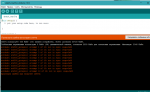
Разобрался с ней через переключение процессора на версию Old Bootloader.
Но далее при компиляции прошивки выскакивают такие строки:
In file included from D:ColorMusic-masterfirmwarecolorMusic_v2.9colorMusic_v2.9.ino:200:0:
C:UsersProfessionalDocumentsArduinolibrariesFastLED/FastLED.h:17:21: note: #pragma message: FastLED version 3.001.008
# pragma message «FastLED version 3.001.008»
^
Скетч использует 20990 байт (68%) памяти устройства. Всего доступно 30720 байт.
Глобальные переменные используют 972 байт (47%) динамической памяти, оставляя 1076 байт для локальных переменных. Максимум: 2048 байт.
Это норм или снова что-то не в порядке?
Заранее спасибо!
Изменено: 1 Апр 2019
-
#14
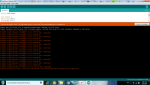
Не могу понять почему не могу прошить , вроде драйвер 340 поставил
-
#16
@long, плату arduino nano выбрал?
да , поставил
-
#18
@long, не знаю. Я всегда драйвера качаю с сайтов производителей
-
#19
@long, не знаю. Я всегда драйвера качаю с сайтов производителей
а можешь скинуть сайт ?
-
#21
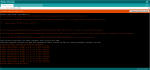
Кто-то сталкивался с проблемой
avrdude: stk500_getsync() attempt 10 of 10: not in sync: resp=0xe0 ??
-
175.9 KB
Просмотры: 70

-
#22
Что делать ?
Arduino: 1.8.8 (Windows 7), Плата:»Arduino Nano, ATmega328P»
In file included from E:игры пашиARDUINOбиблиотекиColorMusic-masterfirmwarecolorMusic_v2.9colorMusic_v2.9.ino:200:0:
C:Program Files (x86)ArduinolibrariesFastLED-master/FastLED.h:17:21: note: #pragma message: FastLED version 3.001.008
# pragma message «FastLED version 3.001.008»
^
Скетч использует 20996 байт (68%) памяти устройства. Всего доступно 30720 байт.
Глобальные переменные используют 966 байт (47%) динамической памяти, оставляя 1082 байт для локальных переменных. Максимум: 2048 байт.
avrdude: stk500_getsync() attempt 1 of 10: not in sync: resp=0x00
avrdude: stk500_getsync() attempt 2 of 10: not in sync: resp=0x00
avrdude: stk500_getsync() attempt 3 of 10: not in sync: resp=0x00
avrdude: stk500_getsync() attempt 4 of 10: not in sync: resp=0x00
avrdude: stk500_getsync() attempt 5 of 10: not in sync: resp=0x00
avrdude: stk500_getsync() attempt 6 of 10: not in sync: resp=0x00
avrdude: stk500_getsync() attempt 7 of 10: not in sync: resp=0x00
avrdude: stk500_getsync() attempt 8 of 10: not in sync: resp=0x00
avrdude: stk500_getsync() attempt 9 of 10: not in sync: resp=0x00
avrdude: stk500_getsync() attempt 10 of 10: not in sync: resp=0x00
Произошла ошибка при загрузке скетча
Этот отчёт будет иметь больше информации с
включенной опцией Файл -> Настройки ->
«Показать подробный вывод во время компиляции»
-
#23
У меня тоже самое, проект светомузыка от Алекса Гувера
In file included from C:ColorMusic-masterfirmwarecolorMusic_v2.10colorMusic_v2.10.ino:200:0: C:Program FilesArduinolibrariesFastLED-master/FastLED.h:17:21
Что делать,то?

-
#24
У меня тоже самое, проект светомузыка от Алекса Гувера
In file included from C:ColorMusic-masterfirmwarecolorMusic_v2.10colorMusic_v2.10.ino:200:0: C:Program FilesArduinolibrariesFastLED-master/FastLED.h:17:21Что делать,то?
https://vk.com/topic-97877471_36099125
-
#25
In file included from C:ColorMusic-masterfirmwareOld versionscolorMusic_v2.9colorMusic_v2.9.ino:200:0:
C:Program FilesArduinolibrariesFastLED-master/FastLED.h:17:21: note: #pragma message: FastLED version 3.001.008
# pragma message «FastLED version 3.001.008»
Проект светомузыка Алекса.
Проекты другие без проблем заливаю а на этом проекте (pragma message «FastLED version 3.001.008»)
что делать то? Два часа бьюсь(((((
Эта ошибка возникает, когда компонент Arduino IDE не может связаться с платой. Причины могут быть следующие:
Физическая проблема с подключением
-
Выключите и включите плату. Если контакт был плохой, это поможет исправить ситуацию.
-
Замените USB-кабель. Иногда попадаются некачественные провода, где нет жил для передачи данных.
-
Убедитесь, что провод не болтается в разъёме, контакт есть, на плату поступает питание.
Неправильные настройки в Arduino IDE
-
Убедитесь, что выбрана правильная модель платы в Tools → Boards.
-
Убедитесь, что выбран правильный порт в Tools → Port. Если вариантов несколько, попробуйте другие.
-
Попробуйте другие USB-порты: иногда один внутренний USB-концентратор компьютера настроен неверно, а другой нормально. Также можно попробовать подключить плату через внешний USB-расширитель.
-
Аккурат в момент перед прошивкой, или одновременно, или на полсекунды позже попробуйте нажать Reset на плате. Иногда по USB сброс не работает, и приходится сбрасывать плату вручную.
-
Откройте диспетчер устройств.
-
Переподключите плату.
-
Подождите несколько секунд. В диспетчере устройств появится новый COM-порт с именем платы. Запомните номер порта.
Если вместо COM-порта у вас появилось неизвестное устройство, попробуйте обновить драйвера или прошить загрузчик. -
В Arduino IDE выбирайте тот номер порта, который увидели в предыдущем пункте.
-
Проверьте, что у вас нет других открытых программ, которые используют COM-порт. Например, CURA, Serial Projector или монитор порта.
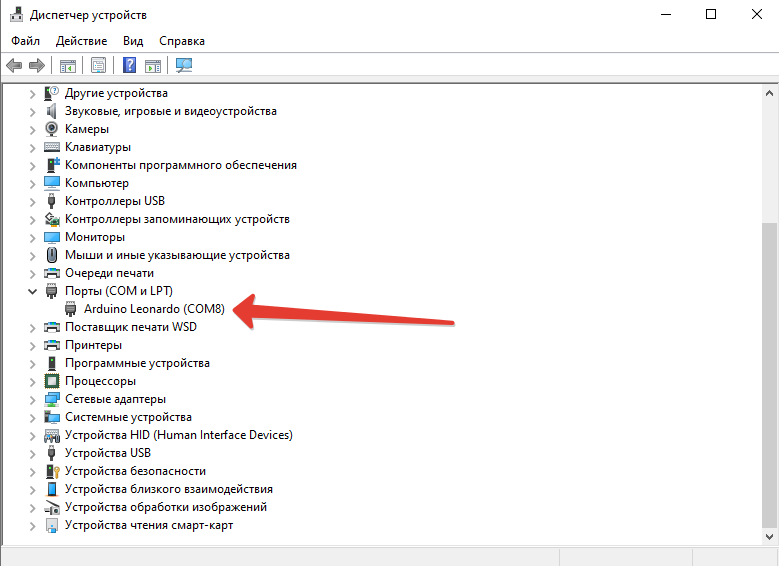 Если вместо COM-порта у вас появилось неизвестное устройство, попробуйте обновить драйвера или прошить загрузчик.
Проблема с загрузчиком на плате
Если предыдущие пункты не помогли, то проблема может быть с загрузчиком. Эта особая подпрограмма, которая позволяет загружать прошивку по USB без использования особых ISP-программаторов. Она работает первые секунды при включении платы. Если эта программа стирается или повреждается, то загрузчик надо перезаписать.
Для прошивки загрузчика есть специальная инструкция.
Понять, что сейчас работает загрузчик, можно по плавному миганию светодиода L на платах Iskra Neo и Arduino Leonardo. На них проблема поломанного загрузчика особенно актуальна, так как чип подключается к контактам USB напрямую, без преобразователя USB-UART.
I have a Arduino Nano (Sainsmart) that I’m trying to upload a sketch to. Under the Arduino IDE, the device selected was Arduino Nano w/ ATmega328.
However uploading the sketch gives me the error
avrdude: stk500_recv(): programmer is not responding
I tried both USB ports (/dev/tty.usbserial & /dev/cu.usbserial) but the same error persist. The Arduino is connected to a Macbook Air via the USB cable, and the PWR LED indicator light on the Arduino is turned on and the L indicator LED blinks. There was no problem uploading to a Arduino Uno.
Retried after installing the latest FTDI drivers (MAC OSX, x64, v2.2.18, FTDIUSBSerialDriver_10_4_10_5_10_6_10_7.mpkg) from http://www.ftdichip.com/Drivers/VCP.htm. However that did not help.
What could have gone wrong?
asked Mar 18, 2014 at 21:01
NyxynyxNyxynyx
1,3194 gold badges20 silver badges25 bronze badges
0
This error message basically shows up for any communication problem, so by itself, it is not all that instructive. The Arduino Nano is supposed to have auto-reset, but maybe your clone does not? In that case, you’d have to press the reset key on the board just before starting an upload.
answered Mar 18, 2014 at 22:05
microtherionmicrotherion
1,4928 silver badges19 bronze badges
4
Know this is old but I ran onto it during my search for Nano(V3)’s not uploading so thought might help someone else. Problem is the bootloader — Arduino IDE BUT I Found an easy solution (right under my nose).
I realized that my nano’s had been uploading just fine then I had finally updated the Arduino AVR Boards from 1.6.20 to 1.6.21. I didn’t think there was any problems because it still showed my Nano and ATmega328 etc in the board manager after the change.
But the new boards manager has a new ATmega328 processor choice for the Nano. I changed processor: In the Arduino IDE select TOOLS > PROCESSOR > pulldown menu from ATmega328P to "ATmega328P (Old Bootloader)".
Since then, I have uploaded many programs to several different Nano’s V3 (Prolofic interace Chipset) without issue.
answered Apr 19, 2018 at 14:49
7
I was having the same problem and got the same error message. Turns out these boards don’t come with a bootloader preinstalled. If you have some jumper wires and another working arduino you can use this tutorial to install the bootloader and it should work great, mine did at least!
answered May 14, 2015 at 23:57
Having a similar issue with my Sainsmart Nano.
Under Preferences check «Show verbose output during [x] upload, then when uploading, you should get a red trace like this:
avrdude: Version 5.11, compiled on Sep  2 2011 at 18:52:52
         Copyright (c) 2000-2005 Brian Dean, http://www.bdmicro.com/
         Copyright (c) 2007-2009 Joerg Wunsch

         System wide configuration file is "/Applications/Arduino.app/Contents/Resources/Java/hardware/tools/avr/etc/avrdude.conf"
         User configuration file is "/Users/johannes/.avrduderc"
         User configuration file does not exist or is not a regular file, skipping

         Using Port                    : /dev/tty.usbserial-A403MRTP
         Using Programmer              : arduino
         Overriding Baud Rate          : 57600
avrdude: Send: 0 [30]   [20]
avrdude: Send: 0 [30]   [20]
avrdude: Send: 0 [30]   [20]
You’ll notice a little «pause» just before the first line of avrdude: Send: 0 [30] [20]. Try uploading again and have you finger ready on the physical reset button of your Nano. Just the moment before the first avrdude: ... appears, press the reset button.
When you succeed, you’ll see the screen filling with all sort of gibberish, and ending something like this after a few seconds:
[78] . [00] S [53] h [68] o [6f] u [75] l [6c] d [64]   [20] b [62] e [65]   [20] 0 [30] x [78] 4 [34] 9 [39] D [44] 4 [34] . [00] . [01] . [00] . [00] . [00] . [02] . [00] . [03] . [00] . [04] . [00] . [00] . [00] . [00] . [00] . [e6] . [06] . [b5] . [06] n [6e] . [06] w [77] . [06] . [8c] . [06] . [9d] . [06] . [00] . [00] . [00] . [00] . [02] . [0d] . [aa] . [0d] . [95] . [0c] . [c9] . [0c] . [a9] . [0c] . [f2] . [0c] . [00]
avrdude: Recv: . [10]
# | 100% 3.71s

avrdude: verifying ...
avrdude: 8824 bytes of flash verified
avrdude: Send: Q [51]   [20]
avrdude: Recv: . [14]
avrdude: Recv: . [10]

avrdude done.  Thank you.
answered Feb 19, 2015 at 12:51
konturkontur
1731 silver badge8 bronze badges
1
I recently had the same issue with 3 Nano boards I just purchased from Amazon. I can confirm that the suggested fix (changing to «old bootloader») solved my problem.
I think the main problem is the upload speed. The «old bootloader» version successfully uploads at 57600, but the default «new» version tries to upload at 115200 and fails.
sa_leinad
3,1201 gold badge20 silver badges49 bronze badges
answered May 8, 2018 at 1:54
CurtgCurtg
572 bronze badges
2
Did you remember to tell the IDE that the board type is a Nano?
Tools -> Board => Arduino Nano ...
This gets me every time I swap between my Nano and Uno.
answered Jun 25, 2014 at 8:00
KingsleyKingsley
7735 silver badges12 bronze badges
I also had that error message. I think there are many possible causes, so I haste to specify my special case.
I have a hackintosh with OS X Yosemite 10.10.2, Arduino software 1.0.6 and Funduino UNO. Uploading the example for Serial.write() succeeded the first time. Thereafter most uploads failed. Even when the upload succeeded the serial monitor would not always show output.
This seemed to me to be due to miscommunication on the USB port. I had to repeatedly reset the funduino, unplug and replug the USB cable or even restart the system. When replugging the USB cable sometimes my system would freeze.
By googling I found a solution to «Inserting USB device causes Mavericks 10.9.1 to freeze».
Answer no 12 on tonymacx86.com basically instructs you to remove GenericUSBXHCI.kext from /System/Library/Extensions.
I am happy to report that after removing this kext I have no problems uploading the example and monitoring the output. Because I don’t need to replug the USB cable I don’t know whether this solves my system freeze. I’m not even sure it was a system freeze, because my system may only have become unresponsive to my USB keyboard and mouse.
answered Feb 7, 2015 at 23:35
Had same issue and solution was as follows:
- identified my arduino as CH340/ATmega168P (written on PCB)
- went to IDE and picked from list not UNO but «Arduino Pro or Pro Mini»
- when this option is selected new menu «Processor» selection is available (just under Board selection)
- selected my processor ATmega168P there and upload worked like a charm!
sa_leinad
3,1201 gold badge20 silver badges49 bronze badges
answered Jan 28, 2017 at 20:52
1
The Arduino IDE version 1.8.5 gave the same error every time I tried to connect it to my OSEPP Nano. I tried with multiple nano boards with different versions of the IDE. I had the board set to «Arduino Nano».
The solution was: Instead of Nano choose Arduino/Genuino Uno. This worked for me.
answered Dec 3, 2017 at 21:05
If this doesn’t work you will have to use spi to program the nano. You’ll need to look up the connection and use a uno since it has a serial chip at16u2 with a driver that recognizes all atmel products. After connections setting uno as a programmer by flashing the uno as isp set the programmer as Arduino as isp and flash the chip. Double check. The benefit is it is less error prone than uart and has better timing but is a hassle to wire up. Good Luck
answered Dec 10, 2017 at 22:59
That problem, ocurred to me when I upgraded the Arduino IDE. I solved it by changing the processor to «old»
Tools->Processor->»ATmega328P (old bootloader)»
thanks!!!!
answered May 2, 2018 at 12:14
1
Ok. I had the same programmer is not responding error on Arduino Nano on Atmel MEGA168PA, USB chip: CH340G. Macbook Pro under macOS 10.14.2.
It hand Blink example installed and the port wasn’t visible in the list.
I was trying to figured out, whats wrong and connected my Arduino Due through the programming port. After 2 attempts the sketch was uploaded… Then I connected the Nano back, the port was visible this time (actually two of them: /dev/cu.wchusbserial14120 and /dev/cu.usbserial-14120) and guess what, the upload had been successful!
Magic!
answered Jan 10, 2019 at 17:25
kelinkelin
1471 silver badge14 bronze badges
I have a Arduino Nano (Sainsmart) that I’m trying to upload a sketch to. Under the Arduino IDE, the device selected was Arduino Nano w/ ATmega328.
However uploading the sketch gives me the error
avrdude: stk500_recv(): programmer is not responding
I tried both USB ports (/dev/tty.usbserial & /dev/cu.usbserial) but the same error persist. The Arduino is connected to a Macbook Air via the USB cable, and the PWR LED indicator light on the Arduino is turned on and the L indicator LED blinks. There was no problem uploading to a Arduino Uno.
Retried after installing the latest FTDI drivers (MAC OSX, x64, v2.2.18, FTDIUSBSerialDriver_10_4_10_5_10_6_10_7.mpkg) from http://www.ftdichip.com/Drivers/VCP.htm. However that did not help.
What could have gone wrong?
asked Mar 18, 2014 at 21:01
NyxynyxNyxynyx
1,3194 gold badges20 silver badges25 bronze badges
0
This error message basically shows up for any communication problem, so by itself, it is not all that instructive. The Arduino Nano is supposed to have auto-reset, but maybe your clone does not? In that case, you’d have to press the reset key on the board just before starting an upload.
answered Mar 18, 2014 at 22:05
microtherionmicrotherion
1,4928 silver badges19 bronze badges
4
Know this is old but I ran onto it during my search for Nano(V3)’s not uploading so thought might help someone else. Problem is the bootloader — Arduino IDE BUT I Found an easy solution (right under my nose).
I realized that my nano’s had been uploading just fine then I had finally updated the Arduino AVR Boards from 1.6.20 to 1.6.21. I didn’t think there was any problems because it still showed my Nano and ATmega328 etc in the board manager after the change.
But the new boards manager has a new ATmega328 processor choice for the Nano. I changed processor: In the Arduino IDE select TOOLS > PROCESSOR > pulldown menu from ATmega328P to "ATmega328P (Old Bootloader)".
Since then, I have uploaded many programs to several different Nano’s V3 (Prolofic interace Chipset) without issue.
answered Apr 19, 2018 at 14:49
7
I was having the same problem and got the same error message. Turns out these boards don’t come with a bootloader preinstalled. If you have some jumper wires and another working arduino you can use this tutorial to install the bootloader and it should work great, mine did at least!
answered May 14, 2015 at 23:57
Having a similar issue with my Sainsmart Nano.
Under Preferences check «Show verbose output during [x] upload, then when uploading, you should get a red trace like this:
avrdude: Version 5.11, compiled on Sep  2 2011 at 18:52:52
         Copyright (c) 2000-2005 Brian Dean, http://www.bdmicro.com/
         Copyright (c) 2007-2009 Joerg Wunsch

         System wide configuration file is "/Applications/Arduino.app/Contents/Resources/Java/hardware/tools/avr/etc/avrdude.conf"
         User configuration file is "/Users/johannes/.avrduderc"
         User configuration file does not exist or is not a regular file, skipping

         Using Port                    : /dev/tty.usbserial-A403MRTP
         Using Programmer              : arduino
         Overriding Baud Rate          : 57600
avrdude: Send: 0 [30]   [20]
avrdude: Send: 0 [30]   [20]
avrdude: Send: 0 [30]   [20]
You’ll notice a little «pause» just before the first line of avrdude: Send: 0 [30] [20]. Try uploading again and have you finger ready on the physical reset button of your Nano. Just the moment before the first avrdude: ... appears, press the reset button.
When you succeed, you’ll see the screen filling with all sort of gibberish, and ending something like this after a few seconds:
[78] . [00] S [53] h [68] o [6f] u [75] l [6c] d [64]   [20] b [62] e [65]   [20] 0 [30] x [78] 4 [34] 9 [39] D [44] 4 [34] . [00] . [01] . [00] . [00] . [00] . [02] . [00] . [03] . [00] . [04] . [00] . [00] . [00] . [00] . [00] . [e6] . [06] . [b5] . [06] n [6e] . [06] w [77] . [06] . [8c] . [06] . [9d] . [06] . [00] . [00] . [00] . [00] . [02] . [0d] . [aa] . [0d] . [95] . [0c] . [c9] . [0c] . [a9] . [0c] . [f2] . [0c] . [00]
avrdude: Recv: . [10]
# | 100% 3.71s

avrdude: verifying ...
avrdude: 8824 bytes of flash verified
avrdude: Send: Q [51]   [20]
avrdude: Recv: . [14]
avrdude: Recv: . [10]

avrdude done.  Thank you.
answered Feb 19, 2015 at 12:51
konturkontur
1731 silver badge8 bronze badges
1
I recently had the same issue with 3 Nano boards I just purchased from Amazon. I can confirm that the suggested fix (changing to «old bootloader») solved my problem.
I think the main problem is the upload speed. The «old bootloader» version successfully uploads at 57600, but the default «new» version tries to upload at 115200 and fails.
sa_leinad
3,1201 gold badge20 silver badges49 bronze badges
answered May 8, 2018 at 1:54
CurtgCurtg
572 bronze badges
2
Did you remember to tell the IDE that the board type is a Nano?
Tools -> Board => Arduino Nano ...
This gets me every time I swap between my Nano and Uno.
answered Jun 25, 2014 at 8:00
KingsleyKingsley
7735 silver badges12 bronze badges
I also had that error message. I think there are many possible causes, so I haste to specify my special case.
I have a hackintosh with OS X Yosemite 10.10.2, Arduino software 1.0.6 and Funduino UNO. Uploading the example for Serial.write() succeeded the first time. Thereafter most uploads failed. Even when the upload succeeded the serial monitor would not always show output.
This seemed to me to be due to miscommunication on the USB port. I had to repeatedly reset the funduino, unplug and replug the USB cable or even restart the system. When replugging the USB cable sometimes my system would freeze.
By googling I found a solution to «Inserting USB device causes Mavericks 10.9.1 to freeze».
Answer no 12 on tonymacx86.com basically instructs you to remove GenericUSBXHCI.kext from /System/Library/Extensions.
I am happy to report that after removing this kext I have no problems uploading the example and monitoring the output. Because I don’t need to replug the USB cable I don’t know whether this solves my system freeze. I’m not even sure it was a system freeze, because my system may only have become unresponsive to my USB keyboard and mouse.
answered Feb 7, 2015 at 23:35
Had same issue and solution was as follows:
- identified my arduino as CH340/ATmega168P (written on PCB)
- went to IDE and picked from list not UNO but «Arduino Pro or Pro Mini»
- when this option is selected new menu «Processor» selection is available (just under Board selection)
- selected my processor ATmega168P there and upload worked like a charm!
sa_leinad
3,1201 gold badge20 silver badges49 bronze badges
answered Jan 28, 2017 at 20:52
1
The Arduino IDE version 1.8.5 gave the same error every time I tried to connect it to my OSEPP Nano. I tried with multiple nano boards with different versions of the IDE. I had the board set to «Arduino Nano».
The solution was: Instead of Nano choose Arduino/Genuino Uno. This worked for me.
answered Dec 3, 2017 at 21:05
If this doesn’t work you will have to use spi to program the nano. You’ll need to look up the connection and use a uno since it has a serial chip at16u2 with a driver that recognizes all atmel products. After connections setting uno as a programmer by flashing the uno as isp set the programmer as Arduino as isp and flash the chip. Double check. The benefit is it is less error prone than uart and has better timing but is a hassle to wire up. Good Luck
answered Dec 10, 2017 at 22:59
That problem, ocurred to me when I upgraded the Arduino IDE. I solved it by changing the processor to «old»
Tools->Processor->»ATmega328P (old bootloader)»
thanks!!!!
answered May 2, 2018 at 12:14
1
Ok. I had the same programmer is not responding error on Arduino Nano on Atmel MEGA168PA, USB chip: CH340G. Macbook Pro under macOS 10.14.2.
It hand Blink example installed and the port wasn’t visible in the list.
I was trying to figured out, whats wrong and connected my Arduino Due through the programming port. After 2 attempts the sketch was uploaded… Then I connected the Nano back, the port was visible this time (actually two of them: /dev/cu.wchusbserial14120 and /dev/cu.usbserial-14120) and guess what, the upload had been successful!
Magic!
answered Jan 10, 2019 at 17:25
kelinkelin
1471 silver badge14 bronze badges
Совершенно неожиданно у меня возникла проблема с добавлением нового скетча в Arduino. Arduino IDE стал зависать на моменте загрузки скетч в микроконтроллер на долгое время и потом выдавать множественные ошибки вида:
Код: Выделить всё
avrdude: stk500_recv(): programmer is not responding
avrdude: stk500_getsync() attempt 1 of 10: not in sync: resp=0x45
avrdude: stk500_recv(): programmer is not responding
avrdude: stk500_getsync() attempt 2 of 10: not in sync: resp=0x45
avrdude: stk500_recv(): programmer is not responding
.....
avrdude: stk500_getsync() attempt 9 of 10: not in sync: resp=0x45
avrdude: stk500_recv(): programmer is not responding
avrdude: stk500_getsync() attempt 10 of 10: not in sync: resp=0x45
У меня была китайская Arduino Uno rev3, с которой я работал уже полгода без проблем. Покупал тут в составе набора для изучения (Starter Kit), и ей даже китайский драйвер CH340 не понадобился, заработала с фирменным из состава IDE. И внезапная ошибка «avrdude: stk500_recv(): programmer is not responding» меня — неопытного новичка, немного напугала. Четких инструкций для решения я не смог найти: либо старая версия IDE с несуществующими командами, либо не мой случай. Но вот, что случилось у меня. У китайцев для прошивки контролеров без USB (типа Arduino Mini) я прикупил программатора USBasp, который надо подключать к разъему ICSP на плате и немного «поиграл» с ним для проверки, заливая программу в большую Arduino Uno.
Разъемов, кстати, две штуки на плате, еще один для прошивки самого контролера USB интерфейса. Но нам это не нужно.
И я так понял: при использовании программатора напрямую в ATmega заливается только сам скомпилированный код HEX, что позволяет сэкономить немного памяти для больших программ. А для работы через USB нужен еще и загрузчик Bootloader, который стирается программатором. И поэтому его нужно восстановить. Отключаем USB, подключаем назад USBasp и выбираем пункт Burn Bootloader, очень быстро внизу появится сообщение, что загрузчик успешно загружен и все! Можно снова подключаться по USB и работать как раньше.
Обратите внимание, что у меня выбран тип программатора USBasp (programmer), тип платы Arduino/Genuino Uno, а виртуального порта подключения нет, потому что USB отключен.
А вот если в меню выбрать пункт Export compiled Binary, то в папке проекта мы получи два файла:
- test.ino.with_bootloader.standard.hex
- test.ino.standard.hex
Которые будут отличаться небольшим куском кода, добавленным в конце.
Эти файлы нужно прошивать опять же программатором, использую специальные программы. Например, тот же AVRDude, название которого мы видим в ошибке.
Но это уже другая история, свою проблему я решил, чего и вам желаю.
Вот нашел такое упоминание этого процесса в разделе про доступную память устройства.
https://arduinomaster.ru/platy-arduino/ … duino-uno/
Когда вы прошиваете контроллер своим скетчем, он записывается именно сюда. 2кБ из данного пула памяти отводится на bootloader- программу, которая занимается инициализацией системы, загрузки через USB и запуска скетча.
Драйвер USBasp-win-driver-x86-x64-v3.0.7.zip для своего китайского USBasp программатора я скачал отсюда USBasp AVR Programmer, Program Atmel AVR microcontrollers:
https://protostack.com.au/shop/accessor … -downloads
Ставил его на Windows 7 SP1 x64, устройство в системе появилось с названием libusbK Usb Devices. Драйверы есть еще у Zadig, на его сайт ссылается сам Thomas Fischl.