
Доброго времени суток, геймеры! Бывало ли у вас такое, что при покупке игрушки выскакивала ошибка an unidentified error occurred PS5? Или по-другому «неопознанная ошибка».
Почему она появляется, а главное, как от неё избавиться? Давайте вместе разбираться.
Содержание
- Причина появления
- Как лечить. 5 главных способов
- Заново совершить покупку
- Проверка доступа к ПСН
- Проверить способ оплаты
- Оплатить через кошелёк
- Перезапуск консоли
- Что делать, если не помогло
Причина появления
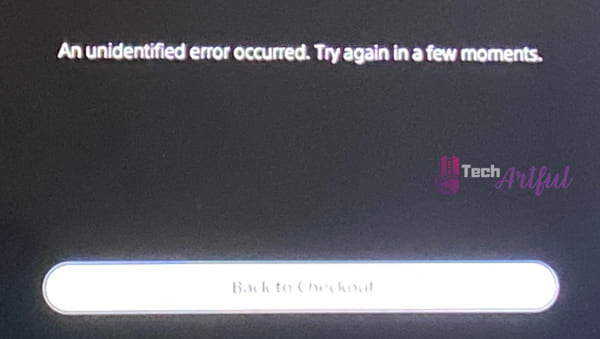
Обычно такой баг возникает, когда собираетесь оплатить покупку. Вылетает фраза «An unidentified error occurred. Try again in a few moments.»
Это означает, что по какой-то причине PS5 не смогла получить доступ к информации о платеже.
С проблемой сталкивалось достаточно много пользователей. Поэтому мы решили помочь вам, и написали отдельный пошаговый гайд.
Как лечить. 5 главных способов
Это не критичная ошибка. Иногда справиться с ней можно простыми способами. Всего мы нашли пять решений. Начнём с самого простого.
Заново совершить покупку
На самом деле, ответ на вопрос содержится в тексте самого бага.
Если не удалось совершить покупку, просто подождите некоторое время и попробуйте купить игрушку чуть позже.
Чаще всего это срабатывает.
Проверка доступа к ПСН
Если предыдущий метод не сработал, можно попробовать следующий. Проверьте доступ к службам PSN. Это делается просто.
На приставке зайдите в настройки сети, там будет отдельная опция. Она так и называется «Проверка статуса сети».
Это же можно сделать просто на сайте PS.
Если доступа нет, просто подождите, пока техслужба не устранит неполадки.
Проверить способ оплаты
Если все службы PS Network работают исправно, то проверьте свой способ оплаты. У вас должен быть один регион учётной записи с картой или электронным кошельком.
Если он не совпадает, попробуйте сменить регион.
Если данные привязанной карты заполнены неправильно, перепривяжите карту заново. Или попробуйте просто поменять способ оплаты.
Имейте в виду, что форма данных карты должна быть заполнена верно. Она не должна содержать специальные символы. Вместо косой черты используйте дефис или точку.
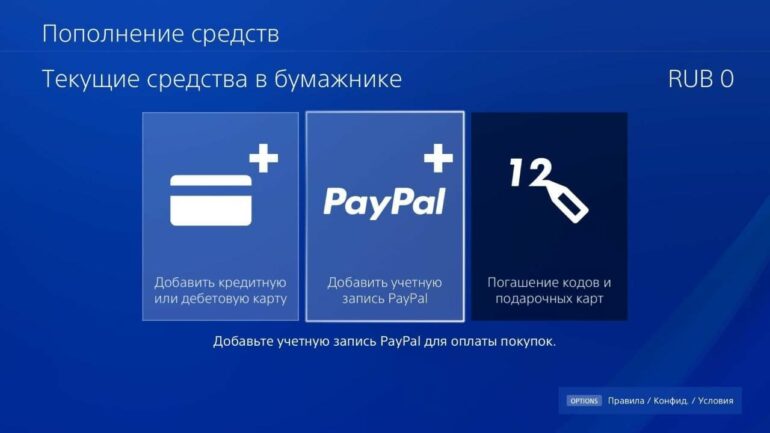
Оплатить через кошелёк
Если не получается оплатить картой, есть ещё метод.
Можно оплатить напрямую с кошелька. Просто пополните его на нужную сумму.
Мы написали отдельную подробную инструкцию, как его пополнить. Смотрите здесь.
Перезапуск консоли
Если ошибка по-прежнему вылетает, а вы перепробовали все варианты, остаётся одно. Просто перезагрузите заново свою PS5.
Выключайте через кнопочку PS на дуалсенсе или любым другим удобным способом.
Помните! Неправильное выключение приставки может привести к другим багам.

Что делать, если не помогло
Что делать, если ни один из способов не помогает? Ошибка an unidentified error occurred PS5 продолжает выскакивать, что бы вы ни делали.
В таком случае, поможет только обращение в службу помощи Sony Playstation.
Перед этим ещё раз убедитесь, что данные карты верны. Регионы аккаунта PSN совпадают с регионом карты. Должна как минимум быть одна страна.
- Убедитесь, что на сайте PS Store не ведутся технические работы.
- Проверьте подключение к сети и службам ПСН.
Можно попробовать кроме консоли перезагрузить роутер.
- В крайнем случае просто подождите минут 15-20. После чего попробуйте купить игру заново.
Надеемся, наши советы помогли. Если так, то прожмите лайк под статьёй. Если нет, то кликайте по дизлайку, но тогда опишите проблему в комментариях. Мы постараемся помочь.
Поддержать нас можно также репостом и подпиской на рассылки. Спасибо, что посещаете наш сайт. Играйте без багов! До скорых встреч!
Every time you try to buy a game from the PlayStation Store, a message appears saying an unidentified error occurred. It is possible for sure PlayStation 5 owners to receive occasional reports of an unexplained defect from the device; nevertheless, one of the most annoying technical concerns is when the console cannot be accessed to obtain insight into the condition.
Most of the time, purchases made through the PlayStation Store appear to be the root of the problem.
To resolve the mysterious issue and complete your PlayStation Store transaction, you can try one of the options listed in the following section. According to Sony, several unexpected problems and malfunctions have been encountered by consumers since the PlayStation 5’s release in November of last year.
The PlayStation 5 is a next-generation gaming system that provides a terrific gaming experience. However, it appears that many buyers are experiencing troubles such as ‘An Unidentified Error Occurred on the PS5 PlayStation Store.’ It is still unknown why this is taking place.
Consumers will face this issue if they attempt to finish purchasing any game from the PlayStation Store on their PlayStation. If you or someone you know is suffering from this issue, you may want to look into some of the most basic solutions to the problem.
An unidentified error that occurred while purchasing material from the PlayStation Store is commonly displayed on your screen when purchasing content from the store. Every few seconds, the notification system on your computer will remind you to try again in a few seconds. Retrying the transaction several times may be sufficient to fix the issue at hand in some scarce instances and may be required to switch to another payment method.
It has recently been reported that certain PlayStation 5 users have gotten an error message stating that the fault cannot be detected. When users who own a PlayStation 5 purchase something from the PlayStation Store, this issue becomes more apparent.
Because this is not a significant issue but quite simple to remedy, even though this error message is somewhat ambiguous, it isn’t easy to discern what is intended to suggest by looking at it. However, it is clear that every time you attempt to purchase a game or DLC, this error message shows, indicating an issue with the PS Store servers or with the purchase attempt itself, as previously indicated.
Neither of these possibilities is correct. Several high-end titles are purchased as part of a bundle that must be purchased and downloaded directly from the PlayStation Store to be played.
The fact that this error message does not provide any information about the real cause of the issue should also be pointed out. Even while PS5 error codes appear to occur at random and appear to have no reason to exist, new games on the market are frequently the result of PS5 error codes occurring.
It is difficult to find out what this error message is trying to tell you about your PS because it is so ambiguous. However, it appears that the problem happens more frequently when games or DLC are purchased through the PlayStation Store than when other methods are used.
Because the problem is probably related to either the PS Store servers or the process of attempting to purchase a game on the PlayStation Store.
How To Fix Unidentified Error On PS5
Every time you attempt to purchase from the PlayStation Store, a purchase error message is shown. After further investigation, something discovered that the PlayStation Twitter account had been alerted to the problem, which has subsequently been addressed.
Customers were urged to double-check that the location of their payment method corresponded to the area of their PlayStation Network accounts during a discussion session with PlayStation support representatives. To put it another way, if you try to obtain anything from a different source, you will very definitely run into an unsolved problem.
There is, however, a different approach to take. Few people have stated that they could avoid the weird issue alert by immediately hitting the X button as soon as the question appeared, but this is a minority opinion. Overall, this is a brute-force strategy, which most likely involves repeatedly completing the transaction until it succeeds.
If the PS Store displays an unknown issue, examine the PS5’s payment details. The problem may be with your card or the item you’re trying to buy. If everything else fails, you might always wait and try again later. This is especially true if PlayStation servers are down. If nothing works, keep trying to complete the transaction by repeatedly pressing the X button.
Several PS5 users have reported that this strategy worked for them as well. It’s important to note that while this strategy is potentially beneficial, you should be aware that it may result in several changes to your account.
That is, assuming that the transaction is effectively performed as planned. It is possible that attempting to finish the trade a couple of times will be successful for some people, but this may not be the case for everyone else. It is possible that using a different payment method will assist in resolving the situation at hand.
If you get an error message when attempting to purchase a game or DLC pack from the PlayStation Store, it is possible that there is an issue with the PlayStation Network servers that must be resolved.
1. Check PSN Status
A server issue is likely occurring in the background, preventing the payment process from being completed throughout the purchase process. It is recommended that you wait a few hours before performing the task again.
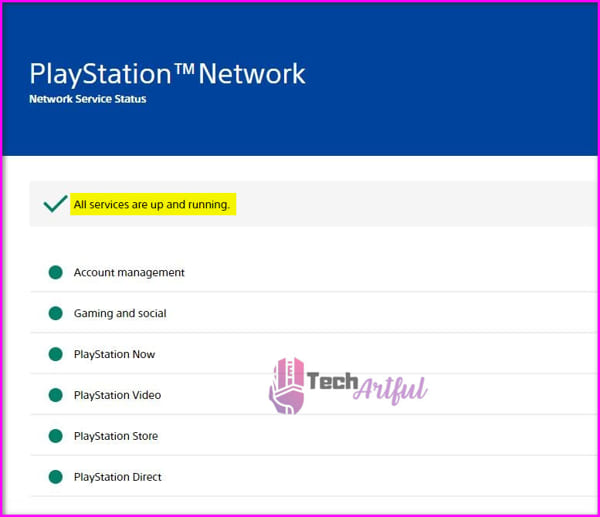
Those who don’t want to wait much longer might check the PlayStation Network Server Status page to see if there is a server outage in the meantime.
Here are the steps to verify the status of your PSN server:
- Start by going to your web browser and clicking on it.
- Log in to your PlayStation Network account.
- Go to the PlayStation website by clicking here.
- Enter your PlayStation Network user name and password in the appropriate fields.
- And enter the name of your city.
- To proceed, press the OK button.
For checking the same PSN server status, you may also visit the DownDetector website, which provides real-time information, the most often reported troubles, a live outage map, details from the preceding 24 hours, and other helpful information. If no service interruption or outage occurs, on the other hand, go to the next option.
2. Verify the Payment Method
Multiple complaints on forums and the PlayStation Support Twitter account advise that PS5 users should first confirm that they are in the proper country/region before proceeding with any payment option. It should be in the same area as your PSN (PlayStation Network) account to make things easy for yourself.
If you’re experiencing trouble entering your credit card or debit card information into the PS Store, follow these steps to verify the payment method on PS5:
- Navigate to the PS5 Store.
- From the drop-down box, choose Payment Methods.
- Fill up the blanks with your credit card details.
If you recently lost or received a new credit card and attempted to purchase using your old card, the error may occur. As a result, you must change your card details.
Follow these methods for updating the payment method on PlayStation 5:
- Go to the Settings option.
- Navigate to the User Account page.
- Account Information is the first option, followed by Payment Methods.
- Fill up the fields with the information from your new credit card.
- Enter the password for your PSN account.
- Save the payment method as the default by clicking the Save button.
- Now go to the store and try to buy anything. Hopefully, your issue will be resolved.
As a result, updating the payment method on the PlayStation Store might resolve the issue. Using a different credit card or having PS Store credit from another seller can also work, but it will take more time and effort. Another method is to fund the PS Store by heading to the Settings menu and then utilizing the funds available for purchase. Even PayPal users can try to pay for the transaction directly, which should result in a smoother experience for them as well.
3. Contact Sony Support
If all other choices have been considered, this is your last resort. That would be ideal if you spoke to Sony. Due to the possibility of being banned from the PS Shop, you will initially be unable to purchase anything from the shop. Additionally, the stuff you desire to purchase from the shop may be region-locked. So you will be unable to purchase content from the PlayStation Store regardless of how hard you try.
4. Reboot Your Console
You need to maintain the functionality of our PlayStation 5 for a lengthy period. Which, in the end, may create some problems. Therefore it’s better to give your console a rest now and again.
To restart PS5, perform the following steps:
- For a few seconds, press and hold the DualSense PS button.
- Select a power symbol.
- Select the option to restart PS5.
- Allow for a short period for the console to resume.
- Proceed to the store following the restart and make an effort to purchase something.
If the PS Store displays an unknown issue, examine the PS5’s payment details. That’s either your card or the thing you’re buying. If everything else fails, you may always try again later. Even if PlayStation servers are offline, if nothing works, keep hitting the X button. Hopefully, you have fixed the purchase error issue after following this guide.
FAQ
Why is my PS5 Playstation Store Not Working?
A poor internet connection may potentially prevent access to the Playstation Store on PS4 or PS5.
Does PS5 overheat?
Despite a smaller heatsink, the new PS5 does not overheat.
-
Partition Wizard
-
Partition Manager
- How to Fix an Unidentified Error Occurred – PS5 Purchase Error
By Sherry | Follow |
Last Updated June 30, 2022
In this post from the MiniTool Partition Wizard website, you can learn about how to fix “an unidentified error occurred PS5” purchase error. If you encounter the same error message while buying a game in PlayStation Store, you can have a try.
PS5 is short for PlayStation 5, a home video game console released by Sony Interactive Entertainment in 2020. It is the successor to PS4 (PlayStation 4), the game console released in 2013.
With a PS5 console, you can play most PS4 games and a huge number of new PS5 games. Some of them are free-to-play, and some need to be paid. You can buy PS5 games in the PlayStation Store. If you are using the PS5 Disc Edition, you can also get a new game through a game disc.
Unfortunately, it has been reported that some users encountered the following error message along with a “Back to Checkout” button while trying to purchase a game in the PlayStation Store: An unidentified error occurred. Try again in a few moments.
Why does the problem happen? How to solve it? Don’t worry if you are bothered by the same issue. You can find some effective solutions in the following content.
Fix 1: Try to Purchase the Game Again
As the error message suggested, you can try to purchase the game again in a few moments (about 15 minutes) after receiving “an unidentified error PS5”. It works for some users.
If you still encounter the problem, you should move on to the next fix.
Fix 2: Check for PSN Server Issues
“An unidentified error occurred PS5” purchase error could happen when the PlayStation Network (PSN) server status is down. You can check it on the official PlayStation website.
If all the services are up and running, you can continue with the next fix. However, if any service is down, you need to wait until the developers solve the problem before you try to purchase the game again.
Fix 3: Check Your Payment Method
Please note that your payment method region should match your PSN account area. Before you pay for your game, you’d better check for the selected country/region first.
You can go to the PlayStation Store, select Payment Methods, and then fill out your credit card information to verify your payment method. By the way, if you encounter a problem while adding a card, you can refer to this tutorial from PlayStation.
You can also try to buy the game with another credit card.
Fix 4: Purchase with Funds in Your PSN Account
Some users have solved the PlayStation Store purchase error by using the funds in the PSN wallet and you can also have a try. If you don’t have funds in your wallet, you can follow the steps below to top up it.
Step 1: On your PS5, Navigate to Settings > Users and Accounts.
Step 2: Select Account > Payment and Subscriptions > Add Funds.
Step 3: Then select your account, how much you want to add, and the payment method.
Alternatively, you can go to a web browser and sign in to your PlayStation Store. Then select the Online ID > Payment Management > Add Funds and choose your payment method.
However, if you don’t want to purchase the game with the funds in your PSN account, you can ignore this fix.
Fix 5: Restart Your PS5 Console
The last thing you can try is to restart your PS5 console. You can press the PS button on your PS5 controller and select the power icon and then Restart PS5.
You can also contact PlayStation Support to ask for help. They might offer you more solutions.
About The Author

Position: Columnist
Sherry has been a staff editor of MiniTool for a year. She has received rigorous training about computer and digital data in company. Her articles focus on solutions to various problems that many Windows users might encounter and she is excellent at disk partitioning.
She has a wide range of hobbies, including listening to music, playing video games, roller skating, reading, and so on. By the way, she is patient and serious.
Содержание
- Что делать с «Nvidia An unknown error has occurred»?
- Решение
- Неопознанная ошибка на PS5. Почему возникает и что делать
- Причина появления
- Как лечить. 5 главных способов
- Заново совершить покупку
- Проверка доступа к ПСН
- Проверить способ оплаты
- Оплатить через кошелёк
- Перезапуск консоли
- Что делать, если не помогло
- [SOLVED] PS5 An Unidentified Error Occurred
- Why Has An Unidentified Error Occurred On PS5
- How To Fix Unidentified Error On PS5
- 1. Check PSN Status
- 2. Verify the Payment Method
- 3. Contact Sony Support
- 4. Reboot Your Console
- FAQ
Что делать с «Nvidia An unknown error has occurred»?
Вылетает ошибка Nvidia An unknown error has occurred, когда пытаюсь поставить драйвера на свою видеокарту. Установку запускаю через отдельный инсталлятор GeForce Expirience, который скачан на компьютере. Думал, что поврежден скачанный установщик, а поэтому решил перекачать — не помогло. Пробовал запускать от имени администратора — не помогло. Теперь вот обращаюсь за помощью к вам.
Решение
«Nvidia An unknown error has occurred» остается актуальной проблемой и по сей день — с ней сталкиваются на ежедневной основе многие обладатели «зеленых» видеокарт. К счастью, данную ошибку довольно просто исправить (или хотя бы обойти), воспользовавшись проверенными решениями.
- Как только перед вами покажется окошко с ошибкой, не закрывайте его (!);
- откройте диспетчер устройств (WIN+R→devmgmt.msc);
- раскройте раздел «Видеоадаптеры»;
- кликните ПКМ на свою видеокарту и выберите «Обновить»;
- выберите пункты «Найти драйверы на этом компьютере» и «Выбрать драйвер из списка доступных драйверов на компьютере»;
- выберите в списке на свою видеокарту и кликните «Далее»;
- подождите окончания установки драйвера и перезагрузите ПК.
Если такой метод не помог, то можно прибегнуть к помощи GeForce Experience.
- перейдите на официальную страничку GeForce Experience;
- загрузите установщик GeForce Experience;
- следуйте инструкции по установке и войдите в аккаунт Nvidia (создайте таковой, если в этом есть необходимость);
- в окошке, где указывается отсутствие видеодрайвера, нажмите «Продолжить»;
- в параметрах установки кликните на «Выборочная установка»;
- обязательно выберите в следующем окошке «Чистую установку» (!);
- и наконец, кликните на кнопку «Установить»;
- после установки драйвера через GeForce Experience перезагрузите ПК.
И последнее, что можно попробовать — это полностью удалить все драйвера и файлы, относящиеся к ним, со своего компьютера с помощью DDU (Display Driver Uninstaller) и установить актуальную версию видеодрайвера привычным образом.
После применения DDU сообщение гарантировано «Nvidia An unknown error has occurred» исчезнет.
Источник
Неопознанная ошибка на PS5. Почему возникает и что делать
Доброго времени суток, геймеры! Бывало ли у вас такое, что при покупке игрушки выскакивала ошибка an unidentified error occurred PS5? Или по-другому «неопознанная ошибка».
Почему она появляется, а главное, как от неё избавиться? Давайте вместе разбираться.
Причина появления
Обычно такой баг возникает, когда собираетесь оплатить покупку. Вылетает фраза «An unidentified error occurred. Try again in a few moments.»
Это означает, что по какой-то причине PS5 не смогла получить доступ к информации о платеже.
С проблемой сталкивалось достаточно много пользователей. Поэтому мы решили помочь вам, и написали отдельный пошаговый гайд.
Как лечить. 5 главных способов
Это не критичная ошибка. Иногда справиться с ней можно простыми способами. Всего мы нашли пять решений. Начнём с самого простого.
Заново совершить покупку
На самом деле, ответ на вопрос содержится в тексте самого бага.
Если не удалось совершить покупку, просто подождите некоторое время и попробуйте купить игрушку чуть позже.
Чаще всего это срабатывает.
Проверка доступа к ПСН
Если предыдущий метод не сработал, можно попробовать следующий. Проверьте доступ к службам PSN. Это делается просто.
На приставке зайдите в настройки сети, там будет отдельная опция. Она так и называется «Проверка статуса сети».
Это же можно сделать просто на сайте PS.
Если доступа нет, просто подождите, пока техслужба не устранит неполадки.
Проверить способ оплаты
Если все службы PS Network работают исправно, то проверьте свой способ оплаты. У вас должен быть один регион учётной записи с картой или электронным кошельком.
Если он не совпадает, попробуйте сменить регион.
Если данные привязанной карты заполнены неправильно, перепривяжите карту заново. Или попробуйте просто поменять способ оплаты.
Имейте в виду, что форма данных карты должна быть заполнена верно. Она не должна содержать специальные символы. Вместо косой черты используйте дефис или точку.
Оплатить через кошелёк
Если не получается оплатить картой, есть ещё метод.
Можно оплатить напрямую с кошелька. Просто пополните его на нужную сумму.
Мы написали отдельную подробную инструкцию, как его пополнить. Смотрите здесь.
Перезапуск консоли
Если ошибка по-прежнему вылетает, а вы перепробовали все варианты, остаётся одно. Просто перезагрузите заново свою PS5.
Выключайте через кнопочку PS на дуалсенсе или любым другим удобным способом.
Помните! Неправильное выключение приставки может привести к другим багам.
Что делать, если не помогло
Что делать, если ни один из способов не помогает? Ошибка an unidentified error occurred PS5 продолжает выскакивать, что бы вы ни делали.
В таком случае, поможет только обращение в службу помощи Sony Playstation.
Перед этим ещё раз убедитесь, что данные карты верны. Регионы аккаунта PSN совпадают с регионом карты. Должна как минимум быть одна страна.
- Убедитесь, что на сайте PS Store не ведутся технические работы.
- Проверьте подключение к сети и службам ПСН.
Можно попробовать кроме консоли перезагрузить роутер.
Надеемся, наши советы помогли. Если так, то прожмите лайк под статьёй. Если нет, то кликайте по дизлайку, но тогда опишите проблему в комментариях. Мы постараемся помочь.
Поддержать нас можно также репостом и подпиской на рассылки. Спасибо, что посещаете наш сайт. Играйте без багов! До скорых встреч!
Источник
[SOLVED] PS5 An Unidentified Error Occurred
Every time you try to buy a game from the PlayStation Store, a message appears saying an unidentified error occurred. It is possible for sure PlayStation 5 owners to receive occasional reports of an unexplained defect from the device; nevertheless, one of the most annoying technical concerns is when the console cannot be accessed to obtain insight into the condition.
Most of the time, purchases made through the PlayStation Store appear to be the root of the problem.
To resolve the mysterious issue and complete your PlayStation Store transaction, you can try one of the options listed in the following section. According to Sony, several unexpected problems and malfunctions have been encountered by consumers since the PlayStation 5’s release in November of last year.
The PlayStation 5 is a next-generation gaming system that provides a terrific gaming experience. However, it appears that many buyers are experiencing troubles such as ‘An Unidentified Error Occurred on the PS5 PlayStation Store.’ It is still unknown why this is taking place.
Consumers will face this issue if they attempt to finish purchasing any game from the PlayStation Store on their PlayStation. If you or someone you know is suffering from this issue, you may want to look into some of the most basic solutions to the problem.
An unidentified error that occurred while purchasing material from the PlayStation Store is commonly displayed on your screen when purchasing content from the store. Every few seconds, the notification system on your computer will remind you to try again in a few seconds. Retrying the transaction several times may be sufficient to fix the issue at hand in some scarce instances and may be required to switch to another payment method.
Why Has An Unidentified Error Occurred On PS5
It has recently been reported that certain PlayStation 5 users have gotten an error message stating that the fault cannot be detected. When users who own a PlayStation 5 purchase something from the PlayStation Store, this issue becomes more apparent.
Because this is not a significant issue but quite simple to remedy, even though this error message is somewhat ambiguous, it isn’t easy to discern what is intended to suggest by looking at it. However, it is clear that every time you attempt to purchase a game or DLC, this error message shows, indicating an issue with the PS Store servers or with the purchase attempt itself, as previously indicated.
Neither of these possibilities is correct. Several high-end titles are purchased as part of a bundle that must be purchased and downloaded directly from the PlayStation Store to be played.
The fact that this error message does not provide any information about the real cause of the issue should also be pointed out. Even while PS5 error codes appear to occur at random and appear to have no reason to exist, new games on the market are frequently the result of PS5 error codes occurring.
It is difficult to find out what this error message is trying to tell you about your PS because it is so ambiguous. However, it appears that the problem happens more frequently when games or DLC are purchased through the PlayStation Store than when other methods are used.
Because the problem is probably related to either the PS Store servers or the process of attempting to purchase a game on the PlayStation Store.
How To Fix Unidentified Error On PS5
Every time you attempt to purchase from the PlayStation Store, a purchase error message is shown. After further investigation, something discovered that the PlayStation Twitter account had been alerted to the problem, which has subsequently been addressed.
Customers were urged to double-check that the location of their payment method corresponded to the area of their PlayStation Network accounts during a discussion session with PlayStation support representatives. To put it another way, if you try to obtain anything from a different source, you will very definitely run into an unsolved problem.
There is, however, a different approach to take. Few people have stated that they could avoid the weird issue alert by immediately hitting the X button as soon as the question appeared, but this is a minority opinion. Overall, this is a brute-force strategy, which most likely involves repeatedly completing the transaction until it succeeds.
If the PS Store displays an unknown issue, examine the PS5’s payment details. The problem may be with your card or the item you’re trying to buy. If everything else fails, you might always wait and try again later. This is especially true if PlayStation servers are down. If nothing works, keep trying to complete the transaction by repeatedly pressing the X button.
Several PS5 users have reported that this strategy worked for them as well. It’s important to note that while this strategy is potentially beneficial, you should be aware that it may result in several changes to your account.
That is, assuming that the transaction is effectively performed as planned. It is possible that attempting to finish the trade a couple of times will be successful for some people, but this may not be the case for everyone else. It is possible that using a different payment method will assist in resolving the situation at hand.
If you get an error message when attempting to purchase a game or DLC pack from the PlayStation Store, it is possible that there is an issue with the PlayStation Network servers that must be resolved.
1. Check PSN Status
A server issue is likely occurring in the background, preventing the payment process from being completed throughout the purchase process. It is recommended that you wait a few hours before performing the task again.
Those who don’t want to wait much longer might check the PlayStation Network Server Status page to see if there is a server outage in the meantime.
Here are the steps to verify the status of your PSN server:
- Start by going to your web browser and clicking on it.
- Log in to your PlayStation Network account.
- Go to the PlayStation website by clicking here.
- Enter your PlayStation Network user name and password in the appropriate fields.
- And enter the name of your city.
- To proceed, press the OK button.
For checking the same PSN server status, you may also visit the DownDetector website, which provides real-time information, the most often reported troubles, a live outage map, details from the preceding 24 hours, and other helpful information. If no service interruption or outage occurs, on the other hand, go to the next option.
2. Verify the Payment Method
Multiple complaints on forums and the PlayStation Support Twitter account advise that PS5 users should first confirm that they are in the proper country/region before proceeding with any payment option. It should be in the same area as your PSN (PlayStation Network) account to make things easy for yourself.
If you’re experiencing trouble entering your credit card or debit card information into the PS Store, follow these steps to verify the payment method on PS5:
- Navigate to the PS5 Store.
- From the drop-down box, choose Payment Methods.
- Fill up the blanks with your credit card details.
If you recently lost or received a new credit card and attempted to purchase using your old card, the error may occur. As a result, you must change your card details.
Follow these methods for updating the payment method on PlayStation 5:
- Go to the Settings option.
- Navigate to the User Account page.
- Account Information is the first option, followed by Payment Methods.
- Fill up the fields with the information from your new credit card.
- Enter the password for your PSN account.
- Save the payment method as the default by clicking the Save button.
- Now go to the store and try to buy anything. Hopefully, your issue will be resolved.
As a result, updating the payment method on the PlayStation Store might resolve the issue. Using a different credit card or having PS Store credit from another seller can also work, but it will take more time and effort. Another method is to fund the PS Store by heading to the Settings menu and then utilizing the funds available for purchase. Even PayPal users can try to pay for the transaction directly, which should result in a smoother experience for them as well.
3. Contact Sony Support
If all other choices have been considered, this is your last resort. That would be ideal if you spoke to Sony. Due to the possibility of being banned from the PS Shop, you will initially be unable to purchase anything from the shop. Additionally, the stuff you desire to purchase from the shop may be region-locked. So you will be unable to purchase content from the PlayStation Store regardless of how hard you try.
4. Reboot Your Console
You need to maintain the functionality of our PlayStation 5 for a lengthy period. Which, in the end, may create some problems. Therefore it’s better to give your console a rest now and again.
To restart PS5, perform the following steps:
- For a few seconds, press and hold the DualSense PS button.
- Select a power symbol.
- Select the option to restart PS5.
- Allow for a short period for the console to resume.
- Proceed to the store following the restart and make an effort to purchase something.
If the PS Store displays an unknown issue, examine the PS5’s payment details. That’s either your card or the thing you’re buying. If everything else fails, you may always try again later. Even if PlayStation servers are offline, if nothing works, keep hitting the X button. Hopefully, you have fixed the purchase error issue after following this guide.
FAQ
Why is my PS5 Playstation Store Not Working?
A poor internet connection may potentially prevent access to the Playstation Store on PS4 or PS5.
Does PS5 overheat?
Despite a smaller heatsink, the new PS5 does not overheat.
Источник
Create an account to follow your favorite communities and start taking part in conversations.
r/PS5
Posted by2 years ago


Does anyone else get this error? I’ve restarted PS5 and wifi.
level 1
Ok so I figured out the fix to this, my PS5 was doing the same error when going to check out and purchasing. All you have to do is go to settings then add funds into your account then you can use the funds for you next purchases! Hope this helped!
level 2
That doesnt help people using paypal or people trying to pay for it directly off a card lol.
level 2
I couldn’t add funds to my account either! WTF Sony!
level 2
thanks a lot , you saved me
level 2
been a year but thank you so much saved me,was about to eradicate my ps5
level 2
i did this and it added $5 to my wallet so ik its not a problem with the card. but even when i try to buy ps now from my wallet it still doesnt work. the servers arent down either so idek.
level 2
Almost 300 days later and here you are still saving lives at 1am
level 2
Your solution saved me a day of checking my card balance over and over, thanks so much!
level 2
Always remember that you are a fuckin genius
level 2
How do I get to add funds
level 2
A little late but try using a different card if available. For some reason I would get an error using my debit card. Once I changed over to my credit card I had no problem. Hope this helps someone
level 2
Where is the add funds thing is settings?
level 1
Guys i know that im 137 days late but please I’ve been having this problem for a day now and I’m spamming (X) and it’s not working tried to pit money in the wallet and that didn’t worl too, restored the purchase and it didn’t work, if someone knows something please tell me thank you
About Community

The Reddit home for PlayStation 5. Your hub for everything related to PS5 including news, games and discussion. Consider joining r/PlayStation for a «lighter» more community focused subreddit.
The worst technical issues are the ones that don’t provide any insight into the problem. Unfortunately for some PlayStation 5 owners, the system will occasionally say that an unidentified error occurred. This seems to happen most frequently when making purchases from the PS Store. Thankfully, there are a few ways you can fix the unidentified error and complete your PlayStation Store purchase.
PS5 | An unidentified error occurred fix
The “an unidentified error occurred” message typically appears when trying to purchase content from the PS Store. The message will often advise you to try again in a few moments. In some cases, the error can be resolved by making repeated attempts to complete the purchase. Other times, the only fix to the unidentified error is to use a different payment type.
Because this error message is so vague, there’s really no telling what it’s supposed to mean. However, it mainly seems to appear when buying games or DLC from the PlayStation Store. This means the problem somehow ties into either the PS Store servers or simply the act of trying to make a purchase.
Verify your payment method
As it turns out, this problem has been brought to the attention of the Ask PlayStation Twitter account. In one thread, PlayStation representatives advised that users should make sure the region of their payment method matched the region of their PSN account. In other words, if you try to purchase content from another region, you will likely find that an unidentified error has occurred.
That’s not to say that’s the only cause of the problem, however. Users on the PS5 subreddit have reported this error appearing during what should be valid purchases. One post garnered nearly 60 replies where users stated they were able to get around the problem by changing their payment method. It’s a bit of a hassle, but using a different credit card (or simply purchasing PS Store credit from another vendor) seems to do the trick.
There is one other solution, though. A few users have reported getting around the unidentified error message by simply spamming the X button after the prompt appears. It’s sort of a brute-force method, presumably one that involves retrying the purchase over and over again until it goes through. This may work, but be advised that this method could result in multiple charges to your account. Assuming the purchase actually goes through, that is.
If the PS Store is saying an unidentified error occurred, double check the payment information saved to the PS5. The issue may come down to the region of your card or of the content you’re trying to buy. Barring anything else, you may simply take the advice to wait and try again later. This is especially true if there’s any kind of service interruption to PlayStation servers.