
I have the following code:
try {
  phpDoc(vscode.window.activeTextEditor);
} catch (err) {
  console.error(err);
  vscode.window.showErrorMessage(err.message);
}
however err.message gets the error Object is of type 'unknown'.ts(2571) on err., but I cannot type the object in catch (err: Error).
What should I do?

asked Jul 4, 2021 at 0:37

Mathias HillmannMathias Hillmann
1,3271 gold badge11 silver badges24 bronze badges
2
As a supplementary answer to CertainPerformance’s one:
Up until TypeScript 4.0, the catch clause bindings were set to any thus allowing easy access to the message property. This is unsafe because it is not guaranteed that what’s thrown will be inheriting from the Error prototype — it just happens that we don’t throw anything but errors as best practice:
(() => {
    try {
        const myErr = { code: 42, reason: "the answer" };
        throw myErr; //don't do that in real life
    } catch(err) {
        console.log(err.message); //undefined
    }
})();
TypeScript 4.0 introduced an option for a safer catch clause by allowing you to annotate the parameter as unknown, forcing you to either do an explicit type assertion or, even better, to type guard (which makes the clause both compile-time and runtime-safe).
However, to avoid breaking most of the codebases out there, you had to explicitly opt-in for the new behavior:
(() => {
    try {
        throw new Error("ouch!");
    } catch(err: unknown) {
        console.log(err.message); //Object is of type 'unknown'
    }
})();
TypeScript 4.4 introduced a new compiler option called useUnknownInCatchVariables that makes this behavior mandatory. It is false by default, but if you have the strict option turned on (as you should), it is turned on which is most likely the reason why you got the error in the first place.
answered Jul 5, 2021 at 14:02

3
If you don’t want to change all your code after upgrading your TypeScript but are in strict mode, you can add the following compiler option after the strict option to overwrite it, as was hinted in Oleg’s answer:
tsconfig.json
{
  "compilerOptions": {
    [...]
    "strict": true,
    "useUnknownInCatchVariables": false,
    [...]
    },
  },
}
"strict": true, sets useUnknownInCatchVariables to true, and then "useUnknownInCatchVariables": false, overrides that and sets it back to false.
answered Aug 30, 2021 at 12:36

5
It’s because anything can be thrown, hence unknown.
const fn = () => {
  throw 'foo';
};
try {
  fn();
} catch(e) {
  console.log(e);
  console.log(e instanceof Error);
  console.log(e === 'foo');
}
You’ll need to check that the err actually is an error to narrow it down before accessing the message property.
try {
  phpDoc(vscode.window.activeTextEditor);
} catch (err) {
  console.error(err);
  if (err instanceof Error) {
    vscode.window.showErrorMessage(err.message);
  } else {
    // do something else with what was thrown, maybe?
    // vscode.window.showErrorMessage(String(err));
  }
}
answered Jul 4, 2021 at 0:39

4
My TypeScript version is under 4.0, and I can’t make it work again, then I created an auxiliar function to normalize the errors, like following:
interface INormalizedError {
  /**
   * Original error.
   */
  err: unknown;

  /**
   * Is error instance?
   */
  isError: boolean;

  /**
   * Error object.
   */
  error?: Error;

  /**
   * Call stack.
   */
  stack?: Error['stack'];

  /**
   * Error message.
   */
  message: string;

  toString(): string;
}

/**
 * Normalize error.
 *
 * @param err Error instance.
 * @returns Normalized error object.
 */
function normalizeError(err: unknown): Readonly<INormalizedError> {
  const result: INormalizedError = {
    err,
    message: '',
    isError: false,
    toString() {
      return this.message;
    }
  };

  if (err instanceof Error) {
    result.error = err;
    result.message = err.message;
    result.stack = err.stack;
    result.isError = true;
    result.toString = () => err.toString();
  } else if (typeof err === 'string') {
    result.error = new Error(err);
    result.message = err;
    result.stack = result.error.stack;
  } else {
    const aErr = err as any;

    if (typeof err === 'object') {
      result.message = aErr?.message ? aErr.message : String(aErr);
      result.toString = () => {
        const m = typeof err.toString === 'function' ? err.toString() : result.message;
        return (m === '[object Object]') ? result.message : m;
      };
    } else if (typeof err === 'function') {
      return normalizeError(err());
    } else {
      result.message = String(`[${typeof err}] ${aErr}`);
    }

    result.error = new Error(result.message);
    result.stack = aErr?.stack ? aErr.stack : result.error.stack;
  }

  return result;
}
An usage example:
try {
  phpDoc(vscode.window.activeTextEditor);
} catch (err) {
  const e = normalizeError(err);
  console.error(err);
  vscode.window.showErrorMessage(e.message);
}
answered Oct 27, 2021 at 20:26

Eduardo CuomoEduardo Cuomo
17.1k6 gold badges110 silver badges92 bronze badges
You cannot write a specific annotation for the catch clause variable in typescript, this is because in javascript a catch clause will catch any exception that is thrown, not just exceptions of a specified type.
In typescript, if you want to catch just a specific type of exception, you have to catch whatever is thrown, check if it is the type of exception you want to handle, and if not, throw it again.
meaning: make sure the error that is thrown is an axios error first, before doing anything.
solution 1
using type assertion
Use AxiosError to cast error
import  { AxiosError } from 'axios';

try {
    // do some api fetch
    } catch (error) {
    const err = error as AxiosError
    // console.log(err.response?.data)
    if (!err?.response) {
        console.log("No Server Response");
    } else if (err.response?.status === 400) {
        console.log("Missing Username or Password");
    } else {
        console.log("Login Failed");
    }
}
solution 2
check if the error is an axios error first, before doing anything
import axios from "axios"

try {
    // do something
} catch (err) {
    // check if the error is an axios error
    if (axios.isAxiosError(err)) {
        // console.log(err.response?.data)
        if (!err?.response) {
            console.log("No Server Response");
        } else if (err.response?.status === 400) {
            console.log("Missing Username or Password");
        } else {
            console.log("Login Failed");
        }
    }
}

Dharman♦
29.3k21 gold badges80 silver badges131 bronze badges
answered May 19, 2022 at 18:08

neilneil
1191 gold badge2 silver badges12 bronze badges
Alrighty, let’s talk about this:
const reportError = ({message}) => {
  // send the error to our logging service...
}

try {
  throw new Error('Oh no!')
} catch (error) {
  // we'll proceed, but let's report it
  reportError({message: error.message})
}
Good so far? Well, that’s because this is JavaScript. Let’s throw TypeScript at
this:
const reportError = ({message}: {message: string}) => {
  // send the error to our logging service...
}

try {
  throw new Error('Oh no!')
} catch (error) {
  // we'll proceed, but let's report it
  reportError({message: error.message})
}
That reportError call there isn’t happy. Specifically it’s the error.message
bit. It’s because (as of recently) TypeScript defaults our error type to
unknown. Which is truly what it is! In the world of errors, there’s not much
guarantees you can offer about the types of errors that are thrown. In fact,
this is the same reason you can’t provide the type for the .catch(error => {})
of a promise rejection with the promise generic
(Promise<ResolvedValue, NopeYouCantProvideARejectedValueType>). In fact, it
might not even be an error that’s thrown at all. It could be just about
anything:
throw 'What the!?'
throw 7
throw {wut: 'is this'}
throw null
throw new Promise(() => {})
throw undefined
Seriously, you can throw anything of any type. So that’s easy right? We could
just add a type annotation for the error to say this code will only throw an
error right?
try {
  throw new Error('Oh no!')
} catch (error: Error) {
  // we'll proceed, but let's report it
  reportError({message: error.message})
}
Not so fast! With that you’ll get the following TypeScript compilation error:
Catch clause variable type annotation must be 'any' or 'unknown' if specified. ts(1196)The reason for this is because even though in our code it looks like there’s no
way anything else could be thrown, JavaScript is kinda funny and so its
perfectly possible for a third party library to do something funky like
monkey-patching the error constructor to throw something different:
Error = function () {
  throw 'Flowers'
} as any
So what’s a dev to do? The very best they can! So how about this:
try {
  throw new Error('Oh no!')
} catch (error) {
  let message = 'Unknown Error'
  if (error instanceof Error) message = error.message
  // we'll proceed, but let's report it
  reportError({message})
}
There we go! Now TypeScript isn’t yelling at us and more importantly we’re
handling the cases where it really could be something completely unexpected.
Maybe we could do even better though:
try {
  throw new Error('Oh no!')
} catch (error) {
  let message
  if (error instanceof Error) message = error.message
  else message = String(error)
  // we'll proceed, but let's report it
  reportError({message})
}
So here if the error isn’t an actual Error object, then we’ll just stringify
the error and hopefully that will end up being something useful.
Then we can turn this into a utility for use in all our catch blocks:
function getErrorMessage(error: unknown) {
  if (error instanceof Error) return error.message
  return String(error)
}

const reportError = ({message}: {message: string}) => {
  // send the error to our logging service...
}

try {
  throw new Error('Oh no!')
} catch (error) {
  // we'll proceed, but let's report it
  reportError({message: getErrorMessage(error)})
}
This has been helpful for me in my projects. Hopefully it helps you as well.
Update: Nicolas had
a nice suggestion for
handling situations where the error object you’re dealing with isn’t an actual
error. And then Jesse had
a suggestion
to stringify the error object if possible. So all together the combined
suggestions looks like this:
type ErrorWithMessage = {
  message: string
}

function isErrorWithMessage(error: unknown): error is ErrorWithMessage {
  return (
    typeof error === 'object' &&
    error !== null &&
    'message' in error &&
    typeof (error as Record<string, unknown>).message === 'string'
  )
}

function toErrorWithMessage(maybeError: unknown): ErrorWithMessage {
  if (isErrorWithMessage(maybeError)) return maybeError

  try {
    return new Error(JSON.stringify(maybeError))
  } catch {
    // fallback in case there's an error stringifying the maybeError
    // like with circular references for example.
    return new Error(String(maybeError))
  }
}

function getErrorMessage(error: unknown) {
  return toErrorWithMessage(error).message
}
Handy!
Conclusion
I think the key takeaway here is to remember that while TypeScript has its funny
bits, don’t dismiss a compilation error or warning from TypeScript just because
you think it’s impossible or whatever. Most of the time it absolutely is
possible for the unexpected to happen and TypeScript does a pretty good job of
forcing you to handle those unlikely cases… And you’ll probably find they’re
not as unlikely as you think.
When you are coming from languages like Java, C++, or C#, you are used to doing your error handling by throwing exceptions. And subsequently, catching them in a cascade of catch clauses. There are arguably better ways to do error handling, but this one has been around for ages and given history and influences, has also found its way into JavaScript.
So, this is a valid way of doing error handling in JavaScript and TypeScript. But try to follow the same flow as with other programming languages, and annotate the error in your catch clause.
try {
  // something with Axios, for example
} catch(e: AxiosError) {
//         ^^^^^^^^^^ Error 1196 💥
}
TypeScript will error with TS1196: Catch clause variable type annotation must be ‘any’ or ‘unknown’ if specified.
There are a couple of reasons for this:
1. Any type can be thrown #
In JavaScript, you are allowed to throw every expression. Of course, you can throw “exceptions” (or errors, as we call them in JavaScript), but it’s also possible to throw any other value:
throw "What a weird error"; // 👍
throw 404; // 👍
throw new Error("What a weird error"); // 👍
Since any valid value can be thrown, the possible values to catch are already broader than your usual sub-type of Error.
2. There is only one catch clause in JavaScript #
JavaScript only has one catch clause per try statement. There have been proposals for multiple catch clauses and even conditional expressions in the distant past, but they never manifested. See JavaScript — the definitive guide for – hold it! – JavaScript 1.5 – what?!?
Instead, you should use this one catch clause and do instanceof and typeof checks (Source):
try {
  myroutine(); // There's a couple of errors thrown here
} catch (e) {
  if (e instanceof TypeError) {
    // A TypeError
  } else if (e instanceof RangeError) {
    // Handle the RangeError
  } else if (e instanceof EvalError) {
    // you guessed it: EvalError
  } else if (typeof e === "string") {
    // The error is a string
  } else if (axios.isAxiosError(e)) {
    // axios does an error check for us!
  } else {
    // everything else
    logMyErrors(e);
  }
}Note: The example above is also the only correct way to narrow down types for catch clauses in TypeScript.
And since all possible values can be thrown, and we only have one catch clause per try statement to handle them, the type range of e is exceptionally broad.
3. Any exception can happen #
But hey, since you know about every error that can happen, wouldn’t be a proper union type with all possible “throwables” work just as well? In theory, yes. In practice, there is no way to tell which types the exception will have.
Next to all your user-defined exceptions and errors, the system might throw errors when something is wrong with the memory when it encountered a type mismatch or one of your functions has been undefined. A simple function call could exceed your call stack and cause the infamous stack overflow.
The broad set of possible values, the single catch clause, and the uncertainty of errors that happen only allow two possible types for e: any and unknown.
What about Promise rejections? #
The same is true if you reject a Promise. The only thing TypeScript allows you to specify is the type of a fulfilled Promise. A rejection can happen on your behalf, or through a system error:
const somePromise = () => new Promise((fulfil, reject) => {
if (someConditionIsValid()) {
fulfil(42);
} else {
reject("Oh no!");
}
});somePromise()
.then(val => console.log(val)) // val is number
.catch(e => {
console.log(e) // e can be anything, really.
})
It becomes clearer if you call the same promise in an asnyc/await flow:
try {
  const z = await somePromise(); // z is number
} catch(e) {
  // same thing, e can be anything!
}
Bottom line #
Error handling in JavaScript and TypeScript can be a “false friend” if you come from other programming languages with similar features. Be aware of the differences, and trust the TypeScript team and type checker to give you the correct control flow to make sure your errors are handled well enough.

In this blog post, we’ll dive deep into what any and unknown types are, what are their similarities and differences, and when (not) to use them.
(You can find a video version of this article on YouTube! 📺)
TLDR;
// ANY
const anyValue: any = 'whatever'

// OK in TypeScript (error in runtime!) 👇
anyValue.do.something.stupid()


// UNKNOWN
const unknownValue: unknown = 'whatever, too'

// Fails TypeScript check (prevents runtime error) 👇
unknownValue.do.something.stupid()
Enter fullscreen mode
Exit fullscreen mode
Mnemonics to help you remember the difference 👇
-
any-> first letter is an «A» -> Avoid TypeScript -
unknown-> first letter is a «U» -> Use TypeScript
Table of Contents
- The
anyType - The
unknownType - Use Cases
The any Type
The any type is something like an escape hatch from TypeScript.
What does that mean?
If your variable is of type any, you can:
1. Assign whatever you want to it 👇
let anyValue: any

anyValue = 'hi, how is you? :)'
anyValue = { login: () => { alert('password?') } }
Enter fullscreen mode
Exit fullscreen mode
2. «Do» whatever you want with it 👇
let anyValue: any = false

// OK in TypeScript but error in runtime
// ("...is not a function")
anyValue.toUpperCase()

// OK in TypeScript but error in runtime
// ("...Cannot read properties of undefined")
anyValue.messages.hey(':)')
Enter fullscreen mode
Exit fullscreen mode
Generally speaking, using any allows you to use variables without type checking.

(https://devrant.com/rants/3015646/i-dont-usually-post-memes-but-this-one-is-just-a-little-too-on-the-nose)
This means that you lose the main benefit TypeScript has to offer–preventing runtime errors due to accessing non-existing properties.
You might now wonder why the heck would I even use any if it means giving up type checking altogether?
Generally speaking, you should strive to avoid it. To do that, I’d advise you to:
1) Use "strict": true in your tsconfig.json file to disable implicit any types
Implicit any means that if you don’t annotate a variable or a function parameter in TypeScript, it’ll be
anyby default. With"strict": true, the TypeScript compiler will throw an error if you’ve got an unannotated variable of typeany.
2) Use the no-explicit-any rule in TypeScript ESLint. This will give you an ESLint warning whenever you use any.
However, there are some situations where any is helpful. We’ll cover the main use cases in the final section in depth. Nonetheless, it can be useful when migrating JavaScript code to TypeScript or when dealing with untyped external libraries.
Careful! Some built-in TypeScript types use any
When using functions like JSON.parse(...) or fetch(...).then(res => res.json()), the type of the result is any by default.
You can use something like JSON.parse(...) as { message: string } to give it a proper type. Nonetheless, it’s useful to know about these as it’s very easy to accidentally use any without even knowing about it.
You can use rules such as
no-unsafe-assingmentin TypeScript ESLint to get warnings in such scenarios.
Why does TypeScript behave in this not type-safe manner? Well, one of the possible explanations is that there was no other way to type these built-in JavaScript functions as there was no unknown type that would be better suited for this job. Let’s have a look at what it does and how it differs from the any type.
The unknown Type
The unknown type was added to TypeScript in 2018 with its version 3.0 release. Its purpose was to provide a type-safe alternative to any.
From the official docs:
TypeScript 3.0 introduces a new top typeunknown.unknownis the type-safe counterpart ofany. (https://www.typescriptlang.org/docs/handbook/release-notes/typescript-3-0.html#new-unknown-top-type)
What does that mean?
As the phrase «type-safe counterpart of any» suggests, the unknown type is similar to the any type in some way but different in others (namely, unlike any, it’s type-safe).
Let’s first examine the similarities.
You can assign whatever you want to an unknown type
This works pretty much the same way as the any type 👇
let unknownValue: unknown

unknownValue = 'hey, how're you doing? :)'
unknownValue = { signUp: () => { alert('email?') } }
Enter fullscreen mode
Exit fullscreen mode
With variables of type any you could do anything with such variables (call them, access random properties on them, etc.). This is not the case with unknown.
With unknown, TypeScript makes no assumptions about your variables.
let unknownVariable: unknown

// Error in TypeScript 👇
unknownVariable.toUpperCase()

// Error in TypeScript 👇
unknownVariable.how.are.you('today?')

// Error in TypeScript 👇
const newVariable = unknownVariable + 10
Enter fullscreen mode
Exit fullscreen mode
This is very helpful as it prevents you from accidentally accessing non-existent properties, treating strings like functions etc.
You can think of the unknown type as of something like
type unknown = string | number | boolean | object | null | ...
Enter fullscreen mode
Exit fullscreen mode
Disclaimer: this is not the actual definition of the
unknowntype. It’s just a simplified model to give you a better intuition.
Type narrowing with unknown
As we saw in the code snippet above, TypeScript doesn’t allow you to do almost anything with the unknown type.
On one hand, it’s very useful as it keeps your code type-safe and prevents you from the dreaded runtime JavaScript TypeErrors.
On the other hand, it’s quite limiting as we’d like to be able to manipulate our variables, call properties on them, etc.
We’ve got 2 options for how to do that.
1) Type Guards
We can use type guards to narrow down the possible types. You can use if statements or custom type predicates to do that.
function logSecretMessage(message: unknown) {
  if (typeof message === 'string') {
    // in this if-block we know `message` is of type string
    // so we can call the `toLowerCase()` method on it
    console.log(message.toLowerCase())
  } else {
    console.log(message)
  }
}
Enter fullscreen mode
Exit fullscreen mode
2) Type Assertions (not type-safe)
Alternatively, we can always use type assertions. This is way easier but we lose the type-safety as we use whatever type we want and TypeScript will just «trust» us that we made no mistake:
const unknownVariable: unknown = 'hello';

// OK 👇
(unknownVariable as string).toUpperCase();

// OK in TypeScript but it *fails* in runtime 👇
(unknownVariable as number).toFixed(2)
Enter fullscreen mode
Exit fullscreen mode
Use Cases for any and unknown Types
Now that we’ve got understanding of what the any and unknown types mean, let’s have a look at when (not) to use each of them.
The rule of thumb is that any should be avoided since using it makes you lose most of the TypeScript benefits. If you don’t know what type a certain variable or a function parameter is, always prefer unknown.
With that being said, there are some valid use cases for any.
Migrating to TypeScript (from JavaScript)
any is very useful when migrating JavaScript codebase into TypeScript.
Let’s say you’ve got a large JavaScript file which exports many functions and you want to convert it to TypeScript. Without using any, you’d need to type every single function in this file.
That’s a lot of work and you might just be interested in typing one of the exported functions.
In this case, you can use any to quickly type the functions you’re not interested in and only give proper types to the one function you’re currently working with.
It might be also useful to create an alias for any (such as type TODO = any) so that you can later come back to your temporarily typed functions and give them proper types.
// auth.ts (migrating from auth.js)
type TODO = any

// We can just type the `signUp` function
export function signUp(options: {
  email: string
  password: string
}) { /* ... */ }

// Use `TODO` to quickly type the `resetPassword` function
export function resetPassword(options: TODO) { /* ... */ }

// Use `TODO` to quickly type the `logIn` function
export function logIn(options: TODO) { /* ... */ }
Enter fullscreen mode
Exit fullscreen mode
Functions with unknown arguments
As previously stated, the unknown type should be preferred when dealing with variables which types we can’t determine.
An example could be a generic logger function 👇
function logger(message: unknown) {
  if (development) {
    console.log(message)
  } else {
    sendMessageToAPI(message)
  }
}
Enter fullscreen mode
Exit fullscreen mode
Had we used any instead, we could have accidentally tried to use properties such as .toLowerCase() (wrongly) assuming that message is of type string.
Thus, using unknown instead keeps things safe for us 😇
Comments

elibarzilay
added a commit
to elibarzilay/TypeScript
that referenced
this issue
Jun 10, 2020

In addition, allow an explicit `any`; anything else throws an error.

Also adjust and reorganize existing tests.

Fixes microsoft#36775.
elibarzilay
added a commit
that referenced
this issue
Jun 10, 2020
In addition, allow an explicit `any`; anything else throws an error.

Also adjust and reorganize existing tests.

Fixes #36775.
phiresky
added a commit
to phiresky/typescript-eslint
that referenced
this issue
Jun 10, 2020

phiresky
added a commit
to phiresky/typescript-eslint
that referenced
this issue
Jun 22, 2020
mslosarek
added a commit
to mslosarek/lambda-backend-challenge
that referenced
this issue
Feb 28, 2021

FossPrime
added a commit
to FossPrime/feathers-saml
that referenced
this issue
Sep 27, 2021

The catch blocks have some "new" syntax we need to adhere to: microsoft/TypeScript#36775

As of Feathers 4, the request and response body are actually of type any, but we have to specify that explicitly.

We can probably get rid of this `// @ts-ignore` now.
TypeScript provides a variety of type definitions. Some of them are common such as strings, numbers, arrays, booleans to more custom interfaces and classes. New types came with the release of TypeScript 3.0. One of them is the unknown type which we will cover in this article.
What is the Unknown Type?
Let’s first take a look at the documentation. According to TypeScript
unknownis the type-safe counterpart ofany. Anything is assignable tounknown, butunknownisn’t assignable to anything but itself andanywithout a type assertion or a control flow based narrowingTypeScript docs
In other words, the unknown type is a restrictive version of the type any. To make things simple, let’s break the definition down in pieces and illustrate it with some code.
Anything is assignable to unknown.
As it says, absolutely anything can be assigned to an unknonwn variable type. This means everything will work at the moment of compiling the following code.
let random:unknown;

random = 'Hello World!';
random = {};
random = 7;
random = null;
random = Math.random();
random = ['USA', 'Colombia', 'India', 'Canada'];
random = new Country();
random = undefined;
Unknown isn’t Assignable to Anything
We cannot assign the value of an unknown variable type to another typed variable different from unknown and any. We are going to use the random variable from the previous example.
let random: unknown;
let foo: unknown;
let bar: any;

foo = random;  // Correct
bar = random;  // Correct
Attempting to assign random to another typed variable will fail.
let stringValue: string;
let numberValue: number;
let arrayValue: [];
let countryValue: Country;

stringValue = random;  // fail
numberValue = random;  // fail
arrayValue = random;   // fail
countryValue = random; // fail
Also, you will see the following error messages:
Type 'unknown' is not assignable to type 'string'.ts(2322)
Type 'unknown' is not assignable to type 'number'.ts(2322)
Type 'unknown' is not assignable to type '[]'.ts(2322)
Type '{}' is missing the following properties from type 'Country': name, population, continent ts(2739)
Unknown is Assignable to Object
If you are curious and start testing whether or not you cannot assign unknown to any other type, you probably notice the previous example didn’t include the scenario of assigning random to an object typed variable.
let objectValue: {};  // this is the same as "let objectValue: Object;"
objectValue = random; // Won't fail
Attempting to compile the previous code snippet will work and won’t throw any errors.
How is this possible?
In JavaScript, just about anything is an object with the exception of the following primitive types: string, number, bigint, boolean, undefined, symbol, and null. Therefore, when defining a variable the Object type, we expose the functions and properties defined by the Object type. However, since there is not a specific interface or set of properties for the Object type, we could assign just about anything to the object, including an unknown typed variable.
let objectValue: Object;
objectValue = random;
objectValue = 'asf';
objectValue = null;
objectValue = undefined;
objectValue = 14;
objectValue = new Country();
Using the unknown Type in Intersections Types
It is time to look at other behaviors the unknown type has that you might not be aware of. We are going to start with using the unknown type in intersection types.
If using the unknown type with intersection types, you will see everything “absorbs” or takes precedence over unknown.
type Type1 = unknown & string; // string
type Type2 = unknown & string[]; // string[]
type Type3 = unknown & unknown; // unknown
type Type4 = unknown & any; // any
type Type5 = unknown & null; // null
type Type6 = unknown & undefined; // undefined
That means, no matter the position where you use the unknown type, whether it is at the beginning or at the end in an intersection, the type will never be unknown unless the only types used in the intersection is unknown, making the usage of intersections unnecessary.
type Type7 = unknown & unknown;Using the unknown Type in Unions Types
The behavior of the unknown type in union types is the opposite as if it were used in intersection types.
When using union types, the unknown type absorbs all the other types.
type Type1 = unknown | string; // unknown
type Type2 = unknown | string[]; // unknown
type Type3 = unknown | unknown; // unknown
type Type4 = unknown | any; // unknown
type Type5 = unknown | null; // unknown
type Type6 = unknown | undefined; // unknown
That means, no matter the position where you use the unknown type, whether it is at the beginning or at the end in a union, the type will always be unknown. Therefore, it becomes pointless to define a union type containing the unknown type as it will default to unknown.
Difference Between unknown Type and any Type
As previously mentioned, the unknown type is a more strict implementation of the type any. Although they seem to be similar at first, there are a few differences to take into account:
The Type any is Assignable to Anything
The type any provides more flexibility at the moment of assigning a value to other types of variables. It is possible to assign the value stored in an any typed variable to a string, boolean, number, interface, class, etc.
// examples of assigning values from an "any" typed variable to other
// variables with different types
let anyRandom: any;

let textAny: string = anyRandom;                // no errors
let numberAny: number = anyRandom;              // no errors
let booleanAny: boolean = anyRandom;            // no errors

interface MyInterface {
  id: string;
}
let interfaceAny: MyInterface;
interfaceAny = anyRandom;                       // no errors

class Entity {
  id: string;
}
let entityAny: Entity;
entityAny = anyRandom;                          // no errors
On the other hand, the unknown typed variable can only assign its value to another unknown or any type.
// None of the following examples will work
let unknownRandom: unknown;


let textUnknown: string = unknownRandom;         // fail
let numberUnknown: number = unknownRandom;       // fail
let booleanUnknown: boolean = unknownRandom;     // fail

interface MyInterface {
  id: string;
}
let interfaceUnknown: MyInterface;
interfaceUnknown = unknownRandom;                // fail

class MyEntity {
  id: string;
}
let entityUnknown: MyEntity;
entityUnknown = unknownRandom;                   // fail
The Type any Can Call Methods or Constructors
When you use an object type such as a String, you can create a new instance of a String as well as calling String internal methods such as trim(), replace(), split(), or the most common toLowerCase().
When using any and unknown types, the type can be anything. However, any allows you to call itself, call internal methods or generate new instances of itself without getting any compilation errors:
let anyRandom: any;

// None of the following examples will not error during compilation even though
// we new the anyRandom variable is not a function or a custom object
anyRandom.myMethod();   // no compilation errors
anyRandom();            // no compilation errors
unknownRandom.length;   // no compilation errors
Not getting compilation errors doesn’t mean the logic in the example above won’t fail during execution. To prevent unexpected errors during runtime, use the unknown type as it will immediately fail during compilation.
let unknownRandom: unknown;

// None of the following examples will error during compilation
unknownRandom.myMethod();   // will have compilation errors
unknownRandom();            // will have compilation errors
unknownRandom.length;       // will have compilation errors
When to use unknown and any
In short, TypeScript is JavaScript with types. Simple and powerful concept. JavaScript provides a lot of flexibility, and that much flexibility comes with problems that could have been prevented during build time rather than during the execution of JavaScript code.
The purpose of TypeScript, besides providing types, is to be a guide to prevent unexpected behaviors that could have been prevented during development. This will feel more restrictive for many and will lose some of that flexibility. However, with TypeScript, you are still able to determine the level of flexibility you want to have during development.
The best way to think about using any is if you want to keep that flexibility. That flexibility is valuable for those looking to develop much quicker at the expense of running into errors that could have been prevented. Also, it is encouraged to use any when the developer has a good idea of what kind of values will be assigned to the any typed variable. However, this will make it complex for new developers in a project to determine what kind of values are used.
On the other hand, using unknown is a way to provide a level of flexibility, but making aware the developer that not everything can be attempted such as calling a toString() method even if the values inside the unknown allows it. This removes the number of unexpected errors that could happen when executing code.
In short, It is recommended to use unknown instead of any if you are looking to have a more predictable code.
Convert unknown Type to interface Type
The easiest way to tell TypeScript an unknown type is an interface is by using assertions.
interface Car {
  model: string;
  brand: string;
}

let random: unknown = { brand: 'Ford', model: 'Mustang' };
let car: Car = <Car>random;
However, this might not be the best way as it is possible the unknown object has properties that are not part of an interface. In case you are looking to check all properties of an unknown object are in an interface, it is recommended to generate a class off of the interface, generate a new instance of that class, extract the keys and do a check against each of the unknown‘s object properties. This should look something like the following example:
interface ICar {
  model: string;
  brand: string;
}

class Car implements ICar {
  model: string;
  brand: string;

  constructor(values?: Partial<Car>) {
    if (values) Object.assign(this, values);
  }

  static isCar(unknownObject: unknown): boolean {
    const carKeys = Object.keys(new Car({ model: 'test', brand: 'test' }));

    if (typeof unknownObject !== 'object') return false;

    for (const unknownKey in unknownObject) {
      const hasKey = carKeys.some((k) => k === unknownKey);

      if (!hasKey) return false;
    }

    return true;
  }
}

console.log(Car.isCar(<unknown>{ brand: 'Ford' })); // true
console.log(Car.isCar(<unknown>{ brand: 'Ford', model: 'Mustang' })); // true
console.log(Car.isCar(<unknown>{ brand: 'Ford', year: 2008 })); // false
Convert unknown Type to string
Depending on what you are looking to accomplish, there are a couple of alternatives.
Using String Assertions
Using assertions are the quickest way to tell TypeScript you know the unknown typed variable has a string value.
// Example to convert unknown type to string: using string assertion
let random: unknown = 'Hello World!';
let stringValue: string = random as string;
In theory, we are not converting anything as there is no reason to convert a value into a string value when it is already a string value.
Using the String Constructor
Another alternative is to use the String constructor. This will return a string primitive of any value provided in the constructor. Therefore, we could do the same with the an unknown typed variable.
// Example to convert unknown type to string: using String Constructor
let random: unknown = 'Hello World!';
let stringValue: string = String(random);Caveat: Be careful when using String constructor, as anything will be converted into a string, whether it is a string, a boolean, a number, or even a function!
String(false); // it will be converted to 'false'
String(4); // it will be converted to '4'
String(function test() { }); // it will be converted to 'function test() {}'
String(undefined) // it will be converted to 'undefined'
String(null) // it will be converted to 'null'
Recommendation: Check the typeof the unknown typed variable
If your intention is to always assign the value of the unknown typed variable to a string variable, using the String constructor will be your best bet. However, it is recommended to check the type of the value of the unknown variable prior to using string assertions or String constructor to convert to a string. Therefore, it won’t be necessary to use those two techniques as we already checked the unknown type is a string.
let random: unknown = 'Hello World!';
let stringValue: string;

if (typeof random === 'string') {
  stringValue = random; // no need to use string assertions or String constructor
}
More TypeScript Tips!
There is a list of TypeScript tips you might be interested in checking out
- TypeScript | The Unknown Type Guide
- TypeScript | Organizing and Storing Types and Interfaces
- TypeScript | Double Question Marks (??) – What it Means
- TypeScript | Objects with Unknown Keys and Known Values
- TypeScript | Union Types – Defining Multiple Types
- TypeScript | Declare an Empty Object for a Typed Variable
- TypeScript | Union Types vs Enums
- TypeScript | Convert Enums to Arrays
Did you like this TypeScript tip?
Share your thoughts by replying on Twitter of Become A Better Programmer or to personal my Twitter account.
TypeScript 3.0! Да, он вышел, и в нем по-настоящему много нововведений. Под катом вы найдете подробное описание всех новинок последней версии, среди которых режим build, новый тип unknown, значительные изменения в API, улучшения производительности и многое другое. Присоединяйтесь!

Вышел TypeScript 3.0! Началась новая веха на пути разработки языка TypeScript, помощника всех пользователей JavaScript.
Если вы еще не знакомы с языком TypeScript, не поздно узнать о нем сейчас! TypeScript представляет собой расширение JavaScript, разработанное для использования в современном варианте этого языка статических типов. Компилятор TypeScript читает код на языке TypeScript, содержащий, в частности, объявления и аннотации типов, и выдает чистый, легко читаемый код JavaScript, в котором эти конструкции преобразованы и удалены. Полученный код запускается в любой среде выполнения, соответствующей стандарту ECMAScript, например в вашем любимом браузере или на серверной платформе Node.js.
Использование подобной среды означает, что код будет проанализирован на предмет наличия ошибок или опечаток, прежде чем будет запущен пользователями, но его преимущества этим не ограничиваются. Благодаря всей этой информации и результатам анализа TimeScript повышает удобство работы, предоставляя возможность автоматического завершения кода и такие средства навигации, как Find all References (Найти все ссылки), Go to Definition (Перейти к определению) и Rename (Переименовать), в вашем любимом редакторе.
Чтобы начать работу с языком и получить дополнительную информацию, перейдите по ссылке. Если вы хотите попробовать TypeScript 3.0 прямо сейчас, можете скачать его из NuGet или через npm, введя команду
npm install -g typescriptКроме того, доступна поддержка в следующих редакторах:
- Visual Studio 2017 (версия 15.2 и более поздние);
- Visual Studio 2015 (требуется обновление 3);
- Visual Studio Code (нужно установить предварительный выпуск, пока эта возможность не поддерживается в главном);
- Sublime Text 3 на сайте PackageControl.
Другие редакторы обновляются согласно собственному графику, но в скором времени все они будут иметь отличную поддержку TypeScript.
Обзор версии 3.0
После выхода TypeScript 2.0 мы сделали краткий обзор вклада предшествующих версий в его нынешнее состояние. Между выпусками TypeScript 1.0 и 2.0 в язык вошли типы объединений, условия типов (type guards), поддержка современного стандарта ECMAScript, псевдонимы типов, поддержка JSX, литеральные и полиморфные типы this. Если сюда же включить привнесенные TypeScript 2.0 типы, не допускающие значение «null», анализ потока управления, поддержку размеченных объединений (tagged unions), типы this и упрощенную модель получения файлов .d.ts, то можно сказать, что этот период полностью определил основы работы TypeScript.
Итак, что было сделано с тех пор? Что привело нас к TypeScript 3.0, помимо новых возможностей стандарта ECMAScript вроде асинхронных функций async/await, генераторов и оператора расширения/остатка (rest/spread)?
TypeScript 2.1 стал фундаментальным выпуском, в котором была представлена статическая модель метапрограммирования в JavaScript. Запрос ключа (keyof), индексный доступ (T[K]) и типы сопоставленных объектов ({ [K in keyof T]: } T[K]}) — вот список инструментов, которые использовались для более эффективного моделирования библиотек React, Ember, Lodash и других.
В выпусках TypeScript 2.2 и 2.3 появилась поддержка шаблонов классов mixin, тип object (представляет объект, не являющийся примитивом) и значения по умолчанию для универсальных типов. Эти возможности использовались в ряде проектов, например в Angular Material и Polymer. Кроме того, в TypeScript 2.3 была реализована возможность детального управления типами this, позволяющая языку хорошо работать с такими библиотеками, как Vue, и добавлен флаг checkJs, позволяющий проверять типы в файлах JavaScript.
В выпусках TypeScript 2.4 и 2.6 продолжается история о повышении строгости проверки типов функций, связанная с некоторыми из самых давних отзывов о нашей системе типов. Был введен флаг --strictFunctionTypes, принудительно устанавливающий контравариантность параметров. В выпуске 2.7 тенденция к строгости сохранилась и выразилась в проверке в классах с помощью флага --strictPropertyInitialization.
В TypeScript 2.8 вводятся условные типы, мощный инструмент статического выражения решений на основе типов, а в выпуске 2.9 обобщается оператор keyof и упрощается импорт для типов.
И это приводит нас к TypeScript 3.0! Несмотря на новое целое число в номере, в выпуске 3.0 изменилось немногое (что предполагает очень легкое обновление). В нем представлен новый гибкий и масштабируемый способ структурирования проектов, мощная новая поддержка работы со списками параметров, новые типы для обеспечения явных проверок, улучшенная поддержка JSX, существенно более удобная для пользователя диагностика ошибок и многое другое.
Что нового?
- Ссылки на проекты
- Режим
--build - Управление структурой вывода
- Планы на будущее
- Режим
- Извлечение и распространение списков параметров с помощью кортежей
- Новые возможности кортежных типов
- Тип
unknown - Улучшенная диагностика ошибок и среда пользователя
- Связанные диапазоны ошибок
- Улучшенная диагностика и обработка ошибок
- Поддержка свойства
defaultPropsв JSX - Директивы
/// <reference lib="..." /> - Повышение скорости работы в редакторе
- Рефакторинг именованных операторов импорта
- Завершение конечных тегов и рамки с контуром
- Быстрые исправления для недостижимого кода и неиспользуемых меток
- Критические изменения
unknownявляется зарезервированным именем типа- Критические изменения в API
Ссылки на проекты
Довольно часто для сборки библиотеки или приложения нужно выполнить несколько шагов. Допустим, ваша база кода содержит каталоги src и test. Предположим, у вас имеется папка client, где хранится код клиентской части приложения, и папка server, содержащая код серверной части на платформе Node.js, и каждый из них заимствует часть кода из папки shared. Возможно, вы используете так называемый «единый репозиторий» и имеете множество проектов, которые находятся в сложной зависимости друг от друга.
Одна из самых главных функций, над которыми мы работали при выпуске TypeScript 3.0, получила название «ссылки на проект», и она призвана упрощать работу с подобными сценариями.
Благодаря ссылкам на проект одни проекты на языке TypeScript могут зависеть от других. В частности, файлам tsconfig.json разрешено ссылаться на другие файлы tsconfig.json. Задание этих зависимостей упрощает разделение кода на более мелкие проекты, поскольку компилятор TypeScript (и его инструментарий) получают возможность понять порядок сборки и структуру выходных данных. Это означает, что сборка происходит быстрее и выполняется инкрементно (поэтапно), поддерживаются прозрачная навигация, редактирование и рефакторинг по различным проектам. Поскольку TypeScript 3.0 закладывает основу проекта и предоставляет API, любой инструмент сборки должен быть в состоянии это обеспечить.
Как это выглядит?
В качестве простого примера здесь приводится файл tsconfig.json, содержащий ссылки на проекты.
// ./src/bar/tsconfig.json
{
    "compilerOptions": {
        // Needed for project references.
        "composite": true,
        "declaration": true,

        // Other options...
        "outDir": "../../lib/bar",
        "strict": true, "module": "esnext", "moduleResolution": "node",
    },
    "references": [
        { "path": "../foo" }
    ]
}
В нем есть два новых поля: composite и references.
Поле references просто указывает на другие файлы tsconfig.json (или папки, в которых они содержатся). Каждая ссылка здесь представляет собой просто объект с полем path («путь») и указывает компилятору TypeScript, что для сборки данного проекта требуется сначала собрать другой проект, на который он ссылается.
По-видимому, такую же важность имеет поле composite. Поле composite гарантирует, что будут включены определенные параметры, позволяющие любому проекту, зависящему от данного, ссылаться на него и включать его в себя при инкрементной сборке. Важное значение имеет возможность интеллектуальной и инкрементной сборки, поскольку одной из главных причин, по которой вы можете отказаться от проекта, является скорость сборки.
Например, если проект front-end зависит от проекта shared, а shared — от core, то наши API, касающиеся ссылок на проекты, помогут определить изменения в core, но вновь собрать только shared, если изменились типы, произведенные проектом core (т. е. файлы .d.ts). Это значит, что изменение в core не влечет за собой глобальную повторную сборку всех проектов. По этой причине установка флага composite порождает также установку и флага declaration.
Режим —build
В TypeScript 3.0 появится набор API для ссылок на проекты, чтобы и другие инструменты могли обеспечить этот быстрый инкрементный способ сборки. В частности, в подключаемом модуле gulp-typescript эти API уже используются! Таким образом, позднее ссылки на проекты будут интегрированы с выбранными вами оркестраторами сборки.
Однако для многих простых приложений и библиотек желательно не использовать внешние инструменты. Вот почему в команде tsc теперь устанавливается новый флаг --build.
Команда tsc --build (или ее псевдоним, tsc -b) берет набор проектов и выполняет их сборку, а также сборку зависимых проектов. При использовании нового режима сборки, во-первых, должен быть установлен флаг --build, и он может сочетаться с некоторыми другими флагами:
--verbose: показывает каждый этап, требуемый процессом сборки.--dry: выполняет сборку, не порождая выходных файлов (полезно в сочетании с параметром--verbose).–clean: пытается удалить выходные файлы, соответствующие заданным входным.--force: принудительно выполняет полную, неинкрементную сборку проекта.
Управление структурой вывода
Одно тонкое, но невероятно полезное преимущество ссылок на проекты состоит в логической способности сопоставлять входные файлы соответствующим выходным.
Если вы когда-либо пробовали разделить клиентскую и серверную части приложения, то могли столкнуться с проблемами управления выходной структурой.
Например, если оба файла client/index.ts и server/index.ts ссылаются на shared/index.ts для следующих проектов:

… то при попытке собрать проекты client и server мы получим…

…а не…

Заметьте, что после сборки мы получили копии папки shared как в client, так и в server. Мы потратили лишнее время на двукратную сборку shared и добавили нежелательный уровень вложенности в lib / client / client и lib / server / server.
Проблема состоит в том, что TypeScript с жадностью ищет файлы .ts и пытается включить их в данную компиляцию. В идеале TypeScript должен был понять, что эти файлы не должны участвовать в сборке в одной и той же компиляции, и вместо этого обратиться к файлам .d.ts за информацией о типах.
Создание файла tsconfig.json для shared приводит именно к этому результату. Он сигнализирует компилятору TypeScript:
- что проект shared должен собираться независимо
- и что при импорте из ../shared мы должны искать файлы .d.ts в его выходном каталоге.
Это позволяет избежать запуска двукратной сборки, а также случайного включения всего содержимого shared.
Планы на будущее
Чтобы глубже разобраться с проектными ссылками и возможностями их использования, прочтите о них более подробно в трекере данного выпуска. В ближайшее время мы подготовим документацию по ссылкам на проекты и режиму build.
Мы стремимся, чтобы авторы других инструментов программирования могли поддерживать ссылки на проекты и продолжали улучшать среду редактирования в том, что касается этой функции. Мы намерены добиться того, чтобы работа со ссылками на проекты шла так же гладко, как и разработка кода с одним единственным файлом tsconfig.json. Если вы в конечном итоге начнете использовать ссылки на проекты, мы будем благодарны за любые отзывы.
Извлечение и распространение списков параметров с помощью кортежей
Мы часто принимаем это как должное, но JavaScript позволяет нам считать списки параметров значениями первого класса — с помощью либо arguments, либо параметров типа rest (например, …rest).
function call(fn, ...args) {
    return fn(...args);
}
Заметьте, что call работает для функций с любым числом параметров. В отличие от других языков, JavaScript не заставляет нас определять call0, call1, call2 и т. д. следующим образом:
function call0(fn) {
    return fn();
}

function call1(fn, param1) {
    return fn(param1);
}

function call2(fn, param1, param2) {
    return fn(param1, param2);
}

function call3(fn, param1, param2, param3) {
    return fn(param1, param2, param3);
}
К сожалению, в течение некоторого времени не было хорошего способа выразить это в языке TypeScript без объявления конечного числа перегрузок:
// TODO (billg): 5 overloads should *probably* be enough for anybody?
function call<T1, T2, T3, T4, R>(fn: (param1: T1, param2: T2, param3: T3, param4: T4) => R, param1: T1, param2: T2, param3: T3, param4: T4): R
function call<T1, T2, T3, R>(fn: (param1: T1, param2: T2, param3: T3) => R, param1: T1, param2: T2, param3: T3): R
function call<T1, T2, R>(fn: (param1: T1, param2: T2) => R, param1: T1, param2: T2): R
function call<T1, R>(fn: (param1: T1) => R, param1: T1): R;
function call<R>(fn: () => R, param1: T1): R;
function call(fn: (...args: any[]) => any, ...args: any[]) {
    return fn(...args);
}
Уф! Еще один смертельный случай с тысячей перегрузок! Или, по крайней мере, стольких перегрузок, сколько потребуется пользователям.
TypeScript 3.0 позволяет лучше моделировать подобные сценарии, поскольку теперь параметры вида rest могут быть универсальными, и их тип определяется как кортежный. Вместо того чтобы объявлять каждую из этих перегрузок, мы говорим, что rest-параметр …args из функции fn должен быть параметром-типом, который расширяет массив, и затем повторно используем это для параметра…args, который передает функция call:
function call<TS extends any[], R>(fn: (...args: TS) => R, ...args: TS): R {
    return fn(...args);
}
Когда мы вызываем функцию call, TypeScript пытается извлечь список параметров из того, что мы передаем в fn, и превратить это в кортеж:
function foo(x: number, y: string): string {
    return (x + y).toLowerCase();
}

// The `TS` type parameter is inferred as `[number, string]`
call(foo, 100, "hello");
Когда TypeScript определяет TS как [число, строка], и мы завершаем повторное использование TS на rest-параметре функции call, экземпляр функции выглядит следующим образом:
function call(fn: (...args: [number, string]) => string, ...args: [number, string]): stringА в TypeScript 3.0 при использовании кортежа в rest параметр сворачивается в оставшуюся часть списка параметров! Приведенный выше экземпляр сводится к простым параметрам без кортежей:
function call(fn: (arg1: number, arg2: string) => string, arg1: number, arg2: string): stringИтак, в дополнение к вылавливанию ошибок преобразования типа при передаче неправильных аргументов:
function call<TS extends any[], R>(fn: (...args: TS) => R, ...args: TS): R {
    return fn(...args);
}

call((x: number, y: string) => y, "hello", "world");
//                                ~~~~~~~
// Error! `string` isn't assignable to `number`!
…и определению типа из других аргументов:
call((x, y) => { /* .... */ }, "hello", 100);
//    ^  ^
// `x` and `y` have their types inferred as `string` and `number` respectively.
…мы также можем увидеть кортежные типы, которые эти функции определяют извне:
function tuple<TS extends any[]>(...xs: TS): TS {
    return xs;
}

let x = tuple(1, 2, "hello"); // has type `[number, number, string]`
Но обратите внимание на один нюанс. Чтобы проделать всю эту работу, нам пришлось расширить возможности кортежей…
Новые возможности кортежных типов
Чтобы можно было моделировать список параметров в виде кортежа (как мы только что обсуждали), нам пришлось немного переосмыслить кортежные типы. До выпуска TypeScript 3.0 лучшим из того, что разрешалось моделировать с помощью кортежей, были порядок и длина набора параметров.
Однако списки параметров — это не просто упорядоченные списки типов. Например, параметры в конце могут быть необязательными:
// Both `y` and `z` are optional here.
function foo(x: boolean, y = 100, z?: string) {
    // ...
}

foo(true);
foo(true, undefined, "hello");
foo(true, 200);
Последний параметр может быть rest-параметром.
// `rest` accepts any number of strings - even none!
function foo(...rest: string[]) {
    // ...
}

foo();
foo("hello");
foo("hello", "world");
И наконец, есть одно довольно интересное свойство списков параметров — они могут быть пустыми:
// Accepts no parameters.
function foo() {
    // ...
}

foo();
Поэтому, чтобы кортежи соответствовали спискам параметров, нам нужно было смоделировать каждый из этих сценариев.
Во-первых, теперь в конце кортежи могут находиться необязательные элементы:
/**
 * 2D, or potentially 3D, coordinate.
 */
type Coordinate = [number, number, number?];
Тип Coordinate создает кортеж с необязательным свойством с именем 2 — элемент с индексом 2 может и не быть определенным! Интересно, что, поскольку кортежи используют числовой литеральный типы для своего свойства length (длина), свойство length кортежа Coodinate имеет тип 2 | 3.
Во-вторых, в конце кортежа теперь может присутствовать элемент rest.
type OneNumberAndSomeStrings = [number, ...string[]];Благодаря элементам rest кортежи демонстрируют очень интересное поведение «неограниченности с конца». В приведенном выше примере типа OneNumberAndSomeStrings требуется, чтобы тип его первого свойства был number, и допускается одно или более свойств типа string. Индексирование этого типа кортежа произвольным числом number возвращает тип string | number, поскольку значение индекса неизвестно. Аналогично, поскольку длина кортежа неизвестна, значение свойства length — просто number.
Следует отметить, что в отсутствие других элементов элемент rest в кортеже идентичен самому себе:
type Foo = [...number[]]; // Equivalent to `number[]`.Наконец, кортежи теперь могут быть пустыми! Хотя это не слишком полезно при использовании вне списков параметров, пустой тип кортежа можно определить как []:
type EmptyTuple = [];Как и можно было ожидать, пустой кортеж имеет свойство length, равное 0, а индексация числом number возвращает тип never.
Улучшенная диагностика ошибок и среда пользователя
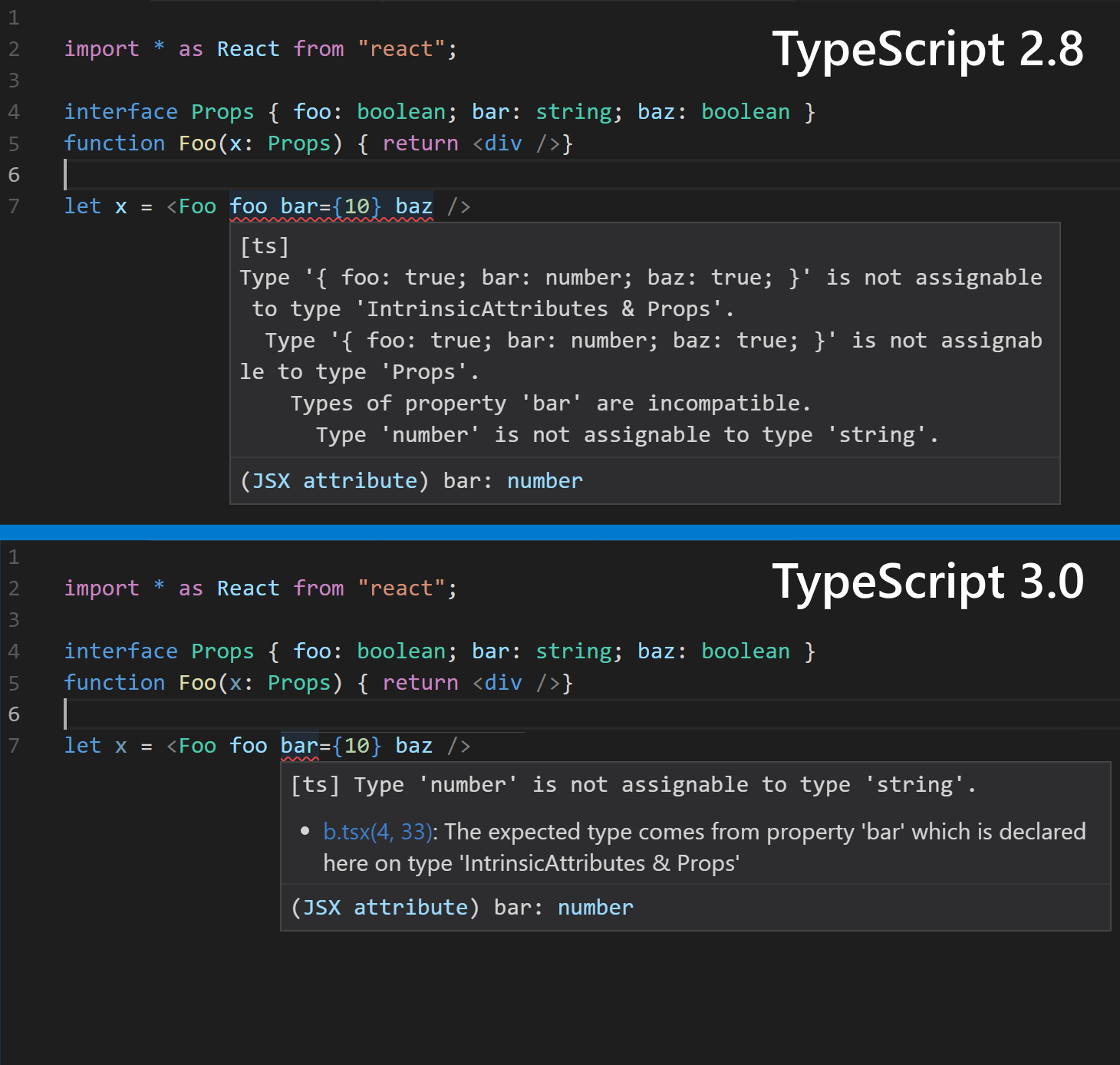
С течением времени мы получаем все больше и больше запросов от членов нашего сообщества относительно улучшения сообщений об ошибках. Хотя эта работа далека от завершения, мы вас услышали и сделали в выпуске TypeScript 3.0 ряд улучшений.
Связанные диапазоны ошибок
Отчасти цель хорошего сообщения об ошибке состоит в том, чтобы указать пользователю также и способ ее исправления или, в первую очередь, дать понять, почему это сообщение появилось. В большинстве случаев в нем содержится много информации или указывается несколько причин его появления. Из анализа этих причин мы можем заключить, что ошибки проистекают из разных частей кода.
Связанные диапазоны ошибок — это новый способ предоставления данной информации пользователям. В TypeScript 3.0 сообщения об ошибках могут порождать сообщения в других местах кода, чтобы пользователи могли выяснить причины и следствия ошибки.

В некотором смысле связанные сообщения об ошибках могут не просто дать пользователю объяснение, но и указать путь к месту, где все пошло не так.

Эти интервалы появятся также в режиме терминала при выполнении команды tsc с включенным режимом —pretty, хотя мы все еще занимаемся улучшением пользовательского интерфейса и учтем ваши отзывы!
Улучшенная диагностика и обработка ошибок
При подготовке выпуска TypeScript 2.9 мы начали уделять больше внимания сообщениям об ошибках, а в выпуске 3.0 мы действительно попытались решить основные задачи, которые позволили бы выполнить интеллектуальную, ясную и точную диагностику ошибки. Сюда относятся, в частности, подбор соответствующих типов при несоответствиях в типах объединения и выход непосредственно на источник ошибки для определенных типов сообщений.
Мы считаем, что наши усилия оправдались, и в итоге вы получите более короткие и ясные сообщения об ошибках.

Тип unknown
Тип any (любой) — это тип в TypeScript, подходящий к чему угодно. Поскольку он охватывает типы всех возможных значений, то не заставляет нас делать какие-либо проверки, прежде чем мы попытаемся эти значения вызывать, конструировать или получать доступ к их свойствам. Он также позволяет присвоить значения типа any переменным, которые ожидают значений любого другого типа.
Эта возможность в целом полезна, но не может обеспечить достаточную строгость.
let foo: any = 10;

// All of these will throw errors, but TypeScript
// won't complain since `foo` has the type `any`.
foo.x.prop;
foo.y.prop;
foo.z.prop;
foo();
new foo();
upperCase(foo);
foo `hello world!`;

function upperCase(x: string) {
    return x.toUpperCase();
}
Иногда в TypeScript хочется описать тип, не подходящий ни к чему. Это бывает полезно для API, который хочет просигнализировать: «здесь может быть любое значение, поэтому вы должны произвести некоторую проверку перед тем, как его использовать». И пользователи вынуждены анализировать возвращаемые значения в целях безопасности.
В TypeScript 3.0 вводится новый тип с названием unknown, который делает именно это. Подобно типу any, типу unknown присваивается любое значение, однако, в отличие от any, тип unknown не может быть присвоен почти никакому другому без утверждения типа. Вы не можете получать доступ к объектам типа unknown, а также вызывать их или конструировать.
Если в приведенном выше примере подставить unknown вместо any, все случаи использования объекта foo приведут к ошибке:
let foo: unknown = 10;

// Since `foo` has type `unknown`, TypeScript
// errors on each of these locations.
foo.x.prop;
foo.y.prop;
foo.z.prop;
foo();
new foo();
upperCase(foo);
foo `hello world!`;

function upperCase(x: string) {
    return x.toUpperCase();
}
Вместо этого мы вынуждены либо выполнять проверку, либо использовать утверждение типа и убедить систему проверки типов в том, что мы лучше знаем, что надо делать.
let foo: unknown = 10;

function hasXYZ(obj: any): obj is { x: any, y: any, z: any } {
    return !!obj &&
        typeof obj === "object" &&
        "x" in obj && "y" in obj && "z" in obj
}

// Using a user-defined type guard...
if (hasXYZ(foo)) {
    // ...we're allowed to access certain properties again.
    foo.x.prop;
    foo.y.prop;
    foo.z.prop;
}

// We can also just convince TypeScript we know what we're doing
// by using a type assertion.
upperCase(foo as string);

function upperCase(x: string) {
    return x.toUpperCase();
}
Заметьте: если вы, чтобы достичь аналогичного поведения, используете такой тип, как {} | null | undefined, то тип unknown в конструкциях вроде условных типов обычно ведет себя более желаемым образом, поскольку условные типы распространяются на типы объединения:
type Arrayify<T> = T extends any ? Array<T> : never;

type A = Arrayify<{} | null | undefined>; // null[] | undefined[] | {}[]
type B = Arrayify<unknown>;               // unknown[]
Поддержка defaultProps в JSX
Обратите внимание: файлы .d.ts библиотеки React в период их написания, возможно, еще не поддерживали этой функциональности.
Если вы когда-либо использовали в современном языке TypeScript/JavaScript инициализаторы по умолчанию, то должны знать, как удобны они бывают при написании операторов вызовов функций. Они дают нам полезные синтаксические средства вызова функций более легким способом, позволяющим не указывать конкретные аргументы. При этом авторы функций получают возможность убедиться, что значения аргументов всегда четко определены.
function loudlyGreet(name = "world") {
    // Thanks to the default initializer, `name` will always have type `string` internally.
    // We don't have to check for `undefined` here.
    console.log("HELLO", name.toUpperCase());
}

// Externally, `name` is optional, and we can potentially pass `undefined` or omit it entirely.
loudlyGreet();
loudlyGreet(undefined);
В библиотеке React существует аналогичная концепция для компонентов и их свойств (props). При создании нового элемента с использованием компонента React ищет свойство, называемое defaultProps, для заполнения опущенных значений для props.
// Some non-TypeScript JSX file

import * as React from "react";
import * as ReactDOM from "react-dom";

export class Greet extends React.Component {
    render() {
        const { name } = this.props;
        return <div>Hello ${name.toUpperCase()}!</div>;
    }

    static defaultProps = {
        name: "world",
    };
}

//      Notice no `name` attribute was specified!
//                                     vvvvvvvvv
const result = ReactDOM.renderToString(<Greet />);
console.log(result);
Обратите внимание, что в <Greet /> не указано значение name. Когда создается элемент Greet, константа name будет инициализирована значением «world», и этот код напечатает: Hello world!.
К сожалению, TypeScript не понимал, что defaultProps имеет какое-либо отношение к вызовам JSX. Вместо этого пользователи часто были вынуждены объявлять свойства необязательными и использовать ненулевые утверждения внутри функции render:
export interface Props { name?: string }
export class Greet extends React.Component<Props> {
    render() {
        const { name } = this.props;

        // Notice the `!` ------v
        return <div>Hello ${name!.toUpperCase()}!</div>;
    }
    static defaultProps = { name: "world"}
}
Или применять некие изощренные утверждения типа, чтобы исправить тип компонента перед его экспортом.
Вот почему язык TypeScript 3.0 поддерживает новый псевдоним типа в пространстве имен JSX, называемом LibraryManagedAttributes. Несмотря на длинное имя, это всего лишь вспомогательный тип, который сообщает TypeScript, какие атрибуты принимает тег JSX. Короче говоря, используя этот общий тип, мы можем моделировать определенное поведение React для defaultProps и, в некоторой степени, для propTypes.
export interface Props {
    name: string
}

export class Greet extends React.Component<Props> {
    render() {
        const { name } = this.props;
        return <div>Hello ${name.toUpperCase()}!</div>;
    }
    static defaultProps = { name: "world"}
}

// Type-checks! No type assertions needed!
let el = <Greet />
Имейте в виду, что существуют ограничения. Для defaultProps, которые явно указывают свой тип как нечто вроде Partial , или компонентов-функций без состояния (stateless function components, SFC), для которых defaultProps объявлены как Partial , все свойства станут необязательными. В качестве обходного пути можно полностью исключить аннотацию типа для defaultProps как компонента класса (см. пример выше) или использовать инициализаторы по умолчанию для SFC по стандарту ES2015:
function Greet({ name = "world" }: Props) {
    return <div>Hello ${name.toUpperCase()}!</div>;
}
И последнее, что следует отметить. Хотя поддержка и встроена в TypeScript, текущие файлы .d.ts в репозитории DefinitelyTyped в настоящее время не используют ее, поэтому возможно, что @types/react пока не содержит доступных изменений. В настоящее время мы ожидаем стабилизации по всему сообществу DefinitelyTyped, чтобы гарантировать минимальное количество сбоев при описанных изменениях.
Директивы /// <reference lib=»…» />
Одна из проблем, которые мы наблюдаем в сообществе, состоит в том, что полифилы (polyfills) — библиотеки, которые предоставляют более новые API в старых средах выполнения, часто имеют собственные файлы объявления (файлы .d.ts), которые пытаются сами дать определения для этих API. Иногда это хорошо, однако данные объявления являются глобальными и могут создавать проблемы в сочетании со встроенными в TypeScript файлами lib.d.ts в зависимости от параметров компилятора пользователя, таких как —lib и —target. Например, объявления для библиотеки core-js могут конфликтовать со встроенным файлом объявлений lib.es2015.d.ts.
Для решения этой проблемы TypeScript 3.0 предлагает, чтобы в файлах объявлялись встроенные API, присутствие которых ожидается, путем использования новой ссылочной директивы: /// <reference lib=»…» />.
Например, полифил для объекта Promise стандарта ES2015 теперь может просто содержать строки
/// <reference lib="es2015.promise" />
export {};
При наличии такого комментария, даже если потребитель TypeScript 3.0 явно использовал целевой объект, который не вносит файл определений lib.es2015.promise.d.ts, импорт указанной библиотеки гарантирует, что Promise присутствует.
Повышение скорости работы в редакторе
Тем, кто еще не знаком с языком, среда TypeScript предоставляет службы, облегчающие написание кода благодаря использованию ее синтаксических и семантических знаний. Эта служба действует как встроенный обработчик для TypeScript и JavaScript под управлением редакторов, таких как Visual Studio, Visual Studio Code и любой другой редактор с подключаемым модулем TypeScript. Она предоставляет возможности, которые очень нравятся пользователям, в частности завершение кода, функцию Go to Definition («переход к определению») и даже быстрые исправления и рефакторинг кода. TypeScript 3.0 продолжает поддерживать эти службы.
Рефакторинг именованных операторов импорта
Иногда квалификация импорта каждого объекта именем модуля, из которого он пришел, загромождает код.
import * as dependency from "./dependency";

// look at all this repetition!

dependency.foo();

dependency.bar();

dependency.baz();
С другой стороны, если мы по отдельности импортируем используемые объекты, то можем обнаружить, что после их многократных применений новому читателю кода становится непонятно, откуда они импортируются.
import { foo, bar, baz } from "./dependency";

// way lower in the file...

foo();

bar();

baz();
Независимо от того, какой способ будет выбран вами сейчас, вы сможете изменить свое решение позднее. TypeScript 3.0 предоставляет возможность рефакторинга, так что подобное переключение не вызовет сложностей.

Завершение конечных тегов и рамки с контуром
В настоящее время TypeScript предоставляет две новые возможности, повышающие удобство работы с тегами JSX:
- завершение закрывающих тегов JSX;
- генерирование рамок со сворачиваемым контуром для JSX.

Быстрые исправления для недостижимого кода и неиспользуемых меток
TypeScript теперь позволяет быстро исправлять код — удалять недоступный код, а также неиспользуемые метки.
Критические изменения
Вы всегда можете следить за предстоящими критическими изменениями в языке, а также в наших API.
Мы надеемся, что в TypeScript 3 очень мало критических изменений, влияющих на работу приложений. Изменения в языке должны быть минимально деструктивными, и большинство критических изменений в наших API ориентированы на удаление устаревших функций.
unknown — зарезервированное имя типа
Поскольку unknown — новый встроенный тип, это слово теперь нельзя использовать в объявлениях типов, таких как интерфейсы, псевдонимы типов или классы.
Критические изменения в API
- Устаревший внутренний метод LanguageService#getSourceFile был удален, поскольку получал неодобрительные отзывы за два последних года. См. #24540.
- Устаревшая функция TypeChecker#getSymbolDisplayBuilder и связанные с ней интерфейсы были удалены. См. #25331. Вместо них следует использовать emitter (генератор событий) и node builder.
- Устаревшие функции escapeIdentifier и unescapeIdentifier были удалены. Поскольку изменился принцип работы API идентификатора в целом, они служили функциями идентификации всего в нескольких выпусках. Если вам нужно, чтобы ваш код вел себя как раньше, достаточно просто удалить вызовы этих функций. В качестве альтернативы следует использовать безопасные с точки зрения типов escapeLeadingUnderscores и unescapeLeadingUnderscores, если типы указывают на то, что они требуются (поскольку они используются для преобразования в «фирменные» типы __String и string или из них).
- Методы TypeChecker#getSuggestionForNonexistentProperty, TypeChecker#getSuggestionForNonexistentSymbol и TypeChecker#getSuggestionForNonexistentModule сделаны внутренними, они больше не входят в состав нашего общедоступного API. См. #25520.
Перспективы
Своим большим успехом TypeScript обязан сообществу. Мы в долгу перед теми, кто внес свой вклад в работу над компилятором, языковой службой, репозиторием DefinitelyTyped и интеграцией инструментов, для которой использовались любые комбинации из вышеперечисленного. Мы также благодарны нашим пользователям, которые постоянно делились полезными для нас отзывами и подталкивали нас к улучшениям.
В будущем мы планируем уделять больше внимания системе типов и инструментам, совершенствовать ссылки на проекты и всемерно расширять доступность TypeScript (как языка, так и проекта). Плюс ко всему мы хотели бы выяснить, что можно сделать, чтобы предоставить больше возможностей авторам и пользователям инструментария в сообществе JavaScript. Мы хотели бы помочь тем разработчикам, которые могут с пользой применять TypeScript, даже если не обращаются к нему напрямую.
Следите за нашей картой по мере того, как наши идеи претворяются в жизнь, не стесняйтесь написать пару строк, чтобы дать нам обратную связь, в формате комментария, в Twitter или в виде заявки о проблеме. Мы всегда стараемся работать лучше.
Всем, кто до сих пор сопровождал нас в путешествии по TypeScript, спасибо! Мы планируем создать для вас максимально удобную рабочую среду. Что касается всех остальных, мы надеемся, что вы начнете изучать и полюбите TypeScript так же сильно, как мы.
Удачи в разработке!
Команда TypeScript