

Код состояния 422 (HTTP 422 Unprocessable Entity) обозначает ошибку со стороны пользователя, а не API. Сервер понимает запрос со стороны клиента и может работать с типом содержимого, который ему предоставили. Однако логическая ошибка делает выполнение невозможным.
Например, документ XML построен синтаксически грамотно, но со стороны семантики в инструкции содержится погрешность.
- вы отправляете полезные данные, которые недействительны в формате JSON;
- вы отправляете заголовки HTTP, такие как Content-Type или Accept, которые указывают значение, отличное от application / json;
- запрос может быть валиден по отношению к JSON, но что-то не так с содержимым. Например, указание API обновить кластер до несуществующего варианта;
- в теле или запросе содержится лишний символ или пробел (в первую очередь стоит проверить пробелы перед заголовком) или напротив, не хватает кавычек/проставлен неправильный тип. Самая актуальная проблема при работе с JSON, при которой может перестать работать весь код.
Проблема ошибка 422 через Ajax Post с использованием Laravel
В ajax этот код может выдаваться как ошибка по умолчанию, когда проверка не выполняется. Либо возвращаться Laravel при запросе, в котором допущена опечатка. Можно попробовать сделать запрос в консоли браузера: он должен выдать JSON с ошибками, возникшими во время проверки запроса. Есть вероятность, что код просто отправляет атрибуты формы не так, как вы запланировали. В любом случае, проблему решать программисту или вебмастеру.
Дополнительная информация
К сожалению, дать универсальный совет по исправлению ошибки 422 Unprocessable Entity непросто. Путь разрешения может сильно отличаться для каждой частной ситуации.
В первую очередь, попробуйте просмотреть свои данные и сделать запрос по вызывающему сомнения участку кода. Нужно убедиться, что вы правильно определили фрагмент данных, в котором содержится причина ошибки.
Если вы все еще не можете найти, где закралась ошибка 422 или вышеописанные способы не помогли выявить описанных причин сбоя функционирования, попробуйте спросить совет у общества веб-разработчиков, показав пример фрагмента вашего кода, чтобы узнать, могут ли другие определить, в чем проблема.
Дальше по теме…


Recently I started integrating a bootstrap template with the Laravel backend. And one thing that made me suffer a lot is the ajax backend validation.
Two errors often occur when you handle ajax requests with Laravel: 419 and 422.
The 419 code corresponds to the absence of the csrf token.
To tackle this issue, simply put this into your head:
<meta name="csrf-token" content="{{ csrf_token() }}" />
Enter fullscreen mode
Exit fullscreen mode
And pass it with every request you make to Laravel. (For routes in web.php file)
If you use axios, you can either add it to your global axios config:
axios.defaults.headers = {
  'X-CSRF-TOKEN': $('meta[name="csrf-token"]').attr('content'),
},
Enter fullscreen mode
Exit fullscreen mode
Or specify when you create an axios instance:
const instance = axios.create({
  headers: {
    'X-CSRF-TOKEN': $('meta[name="csrf-token"]').attr('content'),
  },
});
Enter fullscreen mode
Exit fullscreen mode
What about 422 Unprocessable Entity?
This error occurs when your backend validation fails.
If you let Laravel refresh your page after POST request, you get errors in @errors directive and stuff, but usually, you want to handle it via ajax either because you care about user experience, or you use a frontend framework such as React or Vue. Or even both.
Here’s how you can tackle the latter issue with axios.
Suppose you validate your form with an email and password input fields:
$request->validate([
  'email' => 'required|min:4',
  'password' => 'required|min:9'
]);
Enter fullscreen mode
Exit fullscreen mode
As axios is a Promise-based library, you can catch errors in catch blocks. However, the problem is that even if you add a catch block after your then,
it won’t help you to get the information about the error in your browser. When you try to log it, you probably get something like this instead of a neat json with errors:
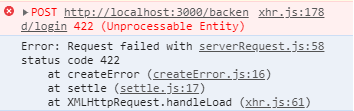
Fortunately, the solution is simple. When you access the error data, use error.response instead of error in your catch block, this way:
axios
  .post(endpoint, body, headers)
  .then(response => {
    // Do fancy stuff
  })
  .catch(error => {
    console.log(error.reponse); // logs an object to the console

    // Do something with error data
  });
Enter fullscreen mode
Exit fullscreen mode
Here, error.response is an object with several useful properties such as status, statusText, and data. The latter is what we’re looking for.
There you can find a message property with a general description, and errors object with detailed validation errors.
In the error.response.data.errors object, the keys are the input names, and the values are arrays(!) of strings that describe errors.
Now let’s make a step further, and use some fancy features provided by axios.
Axios gives us an ability to add interceptors to our requests and responses. It allows us to modify requests and responses consistently and stick to the DRY principle.
If you’re not familiar with the concept of interceptors, you can think of it as follows:
- For requests they modify your request data before sending it to the server,
- For responses they modify the response before all your
thenandcatchblocks.
If you want to learn more, check out the axios docs on this topic.
Using interceptors, we can add an extra layer:
instance.interceptors.response.use(
  response => response,
  error => Promise.reject(error.response)
);
Enter fullscreen mode
Exit fullscreen mode
Notice that we’re forwarding both the normal response and the error.
And basically, that’s it!
I am trying to insert data of a user in the database using ajax. I have done it without it and it worked fine. Now it is giving me error 422. The code is given below:
UserController.php
public function store(Request $request)
    {
        $request->validate([
            'name' => ['required', 'string', 'max:255'],
            'email' => ['required', 'string', 'email', 'max:255', 'unique:users'],
            'password' => ['required', 'string', 'min:8', 'confirmed'],
        ]);
        $inputArray = array(
            'name' => $request['name'],
            'email' => $request['email'],
            'password' => Hash::make($request['password']),
        );
        $value = User::create($inputArray);
        !is_null($value) ? $message = "User Added Successfully" : $message = "User not Added";
        return json_encode(array($message));
    }
Index.blade.php
<form method="post" {{-- action="{{ route('users.store') }}" --}} id="createform">
                        <input type="hidden" name="_token" id="csrf" value="{{Session::token()}}">
                        <div class="input-group mb-3">
                            <input type="text"
                                    name="name"
                                    class="form-control @error('name') is-invalid @enderror"
                                    value="{{ old('name') }}"
                                    placeholder="Full name"
                                    id="name">
                            <div class="input-group-append">
                                <div class="input-group-text">@icon('user')</div>
                            </div>
                            @error('name')
                            <span class="invalid-feedback" role="alert">
                                <strong>{{ $message }}</strong>
                            </span>
                            @enderror
                        </div>

                        <div class="input-group mb-3">
                            <input type="email"
                                    name="email"
                                    value="{{ old('email') }}"
                                    class="form-control @error('email') is-invalid @enderror"
                                    placeholder="Email"
                                    id="email">
                            <div class="input-group-append">
                                <div class="input-group-text">@icon('envelope')</div>
                            </div>
                            @error('email')
                            <span class="invalid-feedback" role="alert">
                                <strong>{{ $message }}</strong>
                            </span>
                            @enderror
                        </div>

                        <div class="input-group mb-3">
                            <input type="password"
                                    name="password"
                                    class="form-control @error('password') is-invalid @enderror"
                                    placeholder="Password"
                                    id="password">
                            <div class="input-group-append">
                                <div class="input-group-text">@icon('lock')</div>
                            </div>
                            @error('password')
                            <span class="invalid-feedback" role="alert">
                                <strong>{{ $message }}</strong>
                            </span>
                            @enderror
                        </div>

                        <div class="input-group mb-3">
                            <input type="password"
                                    name="password_confirmation"
                                    class="form-control"
                                    placeholder="Retype password"
                                    id="password_confirmation">
                            <div class="input-group-append">
                                <div class="input-group-text">@icon('lock')</div>
                            </div>
                        </div>

                        <div id="msg"></div>
                        <div class="modal-footer">
                            <button type="button" class="btn btn-secondary" data-dismiss="modal">Cancel</button>
                            <button type="submit" class="btn btn-primary" id="btnadd">Add User</button>
                        </div>
                    </form>
jqajax.js
jQuery(function ($) {

    jQuery("#btnadd").on('click', addInfo);
    function addInfo(e) {
        e.preventDefault();
        var name = jQuery('#name').val();
        var email = $("#email").val();
        var password = $("#password").val();
        var password_confirmation = $("#password_confirmation").val();

        $.ajax({
            url: "/users",
            method: "POST",
            data: {
                _token: $("#csrf").val(),
                name: name,
                email: email,
                password: password,
                password_confirmation: password_confirmation
            },
            success: function (dataResult) {
                var dataResult = JSON.parse(dataResult);
                msg = "<div class='alert alert-dark mt-3'>dataResult.message</div>";
                $("#msg").html(msg);
                $("#createform")[0].reset();
                showdata();
            },
        });

    }
});
The Error I am getting is app.js:14653 POST http://127.0.0.1:8000/users 422 (Unprocessable Entity)
I am trying to insert data of a user in the database using ajax. I have done it without it and it worked fine. Now it is giving me error 422. The code is given below:
UserController.php
public function store(Request $request)
    {
        $request->validate([
            'name' => ['required', 'string', 'max:255'],
            'email' => ['required', 'string', 'email', 'max:255', 'unique:users'],
            'password' => ['required', 'string', 'min:8', 'confirmed'],
        ]);
        $inputArray = array(
            'name' => $request['name'],
            'email' => $request['email'],
            'password' => Hash::make($request['password']),
        );
        $value = User::create($inputArray);
        !is_null($value) ? $message = "User Added Successfully" : $message = "User not Added";
        return json_encode(array($message));
    }
Index.blade.php
<form method="post" {{-- action="{{ route('users.store') }}" --}} id="createform">
                        <input type="hidden" name="_token" id="csrf" value="{{Session::token()}}">
                        <div class="input-group mb-3">
                            <input type="text"
                                    name="name"
                                    class="form-control @error('name') is-invalid @enderror"
                                    value="{{ old('name') }}"
                                    placeholder="Full name"
                                    id="name">
                            <div class="input-group-append">
                                <div class="input-group-text">@icon('user')</div>
                            </div>
                            @error('name')
                            <span class="invalid-feedback" role="alert">
                                <strong>{{ $message }}</strong>
                            </span>
                            @enderror
                        </div>

                        <div class="input-group mb-3">
                            <input type="email"
                                    name="email"
                                    value="{{ old('email') }}"
                                    class="form-control @error('email') is-invalid @enderror"
                                    placeholder="Email"
                                    id="email">
                            <div class="input-group-append">
                                <div class="input-group-text">@icon('envelope')</div>
                            </div>
                            @error('email')
                            <span class="invalid-feedback" role="alert">
                                <strong>{{ $message }}</strong>
                            </span>
                            @enderror
                        </div>

                        <div class="input-group mb-3">
                            <input type="password"
                                    name="password"
                                    class="form-control @error('password') is-invalid @enderror"
                                    placeholder="Password"
                                    id="password">
                            <div class="input-group-append">
                                <div class="input-group-text">@icon('lock')</div>
                            </div>
                            @error('password')
                            <span class="invalid-feedback" role="alert">
                                <strong>{{ $message }}</strong>
                            </span>
                            @enderror
                        </div>

                        <div class="input-group mb-3">
                            <input type="password"
                                    name="password_confirmation"
                                    class="form-control"
                                    placeholder="Retype password"
                                    id="password_confirmation">
                            <div class="input-group-append">
                                <div class="input-group-text">@icon('lock')</div>
                            </div>
                        </div>

                        <div id="msg"></div>
                        <div class="modal-footer">
                            <button type="button" class="btn btn-secondary" data-dismiss="modal">Cancel</button>
                            <button type="submit" class="btn btn-primary" id="btnadd">Add User</button>
                        </div>
                    </form>
jqajax.js
jQuery(function ($) {

    jQuery("#btnadd").on('click', addInfo);
    function addInfo(e) {
        e.preventDefault();
        var name = jQuery('#name').val();
        var email = $("#email").val();
        var password = $("#password").val();
        var password_confirmation = $("#password_confirmation").val();

        $.ajax({
            url: "/users",
            method: "POST",
            data: {
                _token: $("#csrf").val(),
                name: name,
                email: email,
                password: password,
                password_confirmation: password_confirmation
            },
            success: function (dataResult) {
                var dataResult = JSON.parse(dataResult);
                msg = "<div class='alert alert-dark mt-3'>dataResult.message</div>";
                $("#msg").html(msg);
                $("#createform")[0].reset();
                showdata();
            },
        });

    }
});
The Error I am getting is app.js:14653 POST http://127.0.0.1:8000/users 422 (Unprocessable Entity)
Tutorial last revisioned on August 10, 2022 with Laravel 9
API-based projects are more and more popular, and they are pretty easy to create in Laravel. But one topic is less talked about — it’s error handling for various exceptions. API consumers often complain that they get «Server error» but no valuable messages. So, how to handle API errors gracefully? How to return them in «readable» form?
Main Goal: Status Code + Readable Message
For APIs, correct errors are even more important than for web-only browser projects. As people, we can understand the error from browser message and then decide what to do, but for APIs — they are usually consumed by other software and not by people, so returned result should be «readable by machines». And that means HTTP status codes.
Every request to the API returns some status code, for successful requests it’s usually 200, or 2xx with XX as other number.
If you return an error response, it should not contain 2xx code, here are most popular ones for errors:
| Status Code | Meaning |
| 404 | Not Found (page or other resource doesn’t exist) |
| 401 | Not authorized (not logged in) |
| 403 | Logged in but access to requested area is forbidden |
| 400 | Bad request (something wrong with URL or parameters) |
| 422 | Unprocessable Entity (validation failed) |
| 500 | General server error |
Notice that if we don’t specify the status code for return, Laravel will do it automatically for us, and that may be incorrect. So it is advisable to specify codes whenever possible.
In addition to that, we need to take care of human-readable messages. So typical good response should contain HTTP error code and JSON result with something like this:
{
    "error": "Resource not found"
}
Ideally, it should contain even more details, to help API consumer to deal with the error. Here’s an example of how Facebook API returns error:
{
  "error": {
    "message": "Error validating access token: Session has expired on Wednesday, 14-Feb-18 18:00:00 PST. The current time is Thursday, 15-Feb-18 13:46:35 PST.",
    "type": "OAuthException",
    "code": 190,
    "error_subcode": 463,
    "fbtrace_id": "H2il2t5bn4e"
  }
}
Usually, «error» contents is what is shown back to the browser or mobile app. So that’s what will be read by humans, therefore we need to take care of that to be clear, and with as many details as needed.
Now, let’s get to real tips how to make API errors better.
Tip 1. Switch APP_DEBUG=false Even Locally
There’s one important setting in .env file of Laravel — it’s APP_DEBUG which can be false or true.
If you turn it on as true, then all your errors will be shown with all the details, including names of the classes, DB tables etc.

It is a huge security issue, so in production environment it’s strictly advised to set this to false.
But I would advise to turn it off for API projects even locally, here’s why.
By turning off actual errors, you will be forced to think like API consumer who would receive just «Server error» and no more information. In other words, you will be forced to think how to handle errors and provide useful messages from the API.
Tip 2. Unhandled Routes — Fallback Method
First situation — what if someone calls API route that doesn’t exist, it can be really possible if someone even made a typo in URL. By default, you get this response from API:
Request URL: http://q1.test/api/v1/offices
Request Method: GET
Status Code: 404 Not Found
{
    "message": ""
}
And it is OK-ish message, at least 404 code is passed correctly. But you can do a better job and explain the error with some message.
To do that, you can specify Route::fallback() method at the end of routes/api.php, handling all the routes that weren’t matched.
Route::fallback(function(){
    return response()->json([
        'message' => 'Page Not Found. If error persists, contact info@website.com'], 404);
});
The result will be the same 404 response, but now with error message that give some more information about what to do with this error.
Tip 3. Override 404 ModelNotFoundException
One of the most often exceptions is that some model object is not found, usually thrown by Model::findOrFail($id). If we leave it at that, here’s the typical message your API will show:
{
    "message": "No query results for model [AppOffice] 2",
    "exception": "SymfonyComponentHttpKernelExceptionNotFoundHttpException",
    ...
}
It is correct, but not a very pretty message to show to the end user, right? Therefore my advice is to override the handling for that particular exception.
We can do that in app/Exceptions/Handler.php (remember that file, we will come back to it multiple times later), in render() method:
// Don't forget this in the beginning of file
use IlluminateDatabaseEloquentModelNotFoundException;

// ...

public function render($request, Exception $exception)
{
    if ($exception instanceof ModelNotFoundException) {
        return response()->json([
            'error' => 'Entry for '.str_replace('App', '', $exception->getModel()).' not found'], 404);
    }

    return parent::render($request, $exception);
}
We can catch any number of exceptions in this method. In this case, we’re returning the same 404 code but with a more readable message like this:
{
    "error": "Entry for Office not found"
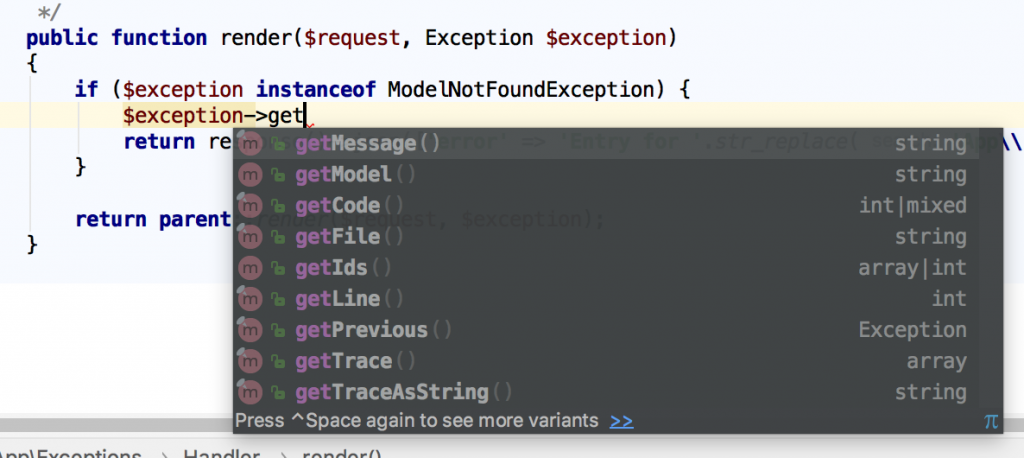
}Notice: have you noticed an interesting method $exception->getModel()? There’s a lot of very useful information we can get from the $exception object, here’s a screenshot from PhpStorm auto-complete:
Tip 4. Catch As Much As Possible in Validation
In typical projects, developers don’t overthink validation rules, stick mostly with simple ones like «required», «date», «email» etc. But for APIs it’s actually the most typical cause of errors — that consumer posts invalid data, and then stuff breaks.
If we don’t put extra effort in catching bad data, then API will pass the back-end validation and throw just simple «Server error» without any details (which actually would mean DB query error).
Let’s look at this example — we have a store() method in Controller:
public function store(StoreOfficesRequest $request)
{
    $office = Office::create($request->all());

    return (new OfficeResource($office))
        ->response()
        ->setStatusCode(201);
}
Our FormRequest file app/Http/Requests/StoreOfficesRequest.php contains two rules:
public function rules()
{
    return [
        'city_id' => 'required|integer|exists:cities,id',
        'address' => 'required'
    ];
}
If we miss both of those parameters and pass empty values there, API will return a pretty readable error with 422 status code (this code is produced by default by Laravel validation failure):
{
    "message": "The given data was invalid.",
    "errors": {
        "city_id": ["The city id must be an integer.", "The city id field is required."],
        "address": ["The address field is required."]
    }
}
As you can see, it lists all fields errors, also mentioning all errors for each field, not just the first that was caught.
Now, if we don’t specify those validation rules and allow validation to pass, here’s the API return:
{
    "message": "Server Error"
}
That’s it. Server error. No other useful information about what went wrong, what field is missing or incorrect. So API consumer will get lost and won’t know what to do.
So I will repeat my point here — please, try to catch as many possible situations as possible within validation rules. Check for field existence, its type, min-max values, duplication etc.
Tip 5. Generally Avoid Empty 500 Server Error with Try-Catch
Continuing on the example above, just empty errors are the worst thing when using API. But harsh reality is that anything can go wrong, especially in big projects, so we can’t fix or predict random bugs.
On the other hand, we can catch them! With try-catch PHP block, obviously.
Imagine this Controller code:
public function store(StoreOfficesRequest $request)
{
    $admin = User::find($request->email);
    $office = Office::create($request->all() + ['admin_id' => $admin->id]);
    (new UserService())->assignAdminToOffice($office);

    return (new OfficeResource($office))
        ->response()
        ->setStatusCode(201);
}
It’s a fictional example, but pretty realistic. Searching for a user with email, then creating a record, then doing something with that record. And on any step, something wrong may happen. Email may be empty, admin may be not found (or wrong admin found), service method may throw any other error or exception etc.
There are many way to handle it and to use try-catch, but one of the most popular is to just have one big try-catch, with catching various exceptions:
try {
    $admin = User::find($request->email);
    $office = Office::create($request->all() + ['admin_id' => $admin->id]);
    (new UserService())->assignAdminToOffice($office);
} catch (ModelNotFoundException $ex) { // User not found
    abort(422, 'Invalid email: administrator not found');
} catch (Exception $ex) { // Anything that went wrong
    abort(500, 'Could not create office or assign it to administrator');
}
As you can see, we can call abort() at any time, and add an error message we want. If we do that in every controller (or majority of them), then our API will return same 500 as «Server error», but with much more actionable error messages.
Tip 6. Handle 3rd Party API Errors by Catching Their Exceptions
These days, web-project use a lot of external APIs, and they may also fail. If their API is good, then they will provide a proper exception and error mechanism (ironically, that’s kinda the point of this whole article), so let’s use it in our applications.
As an example, let’s try to make a Guzzle curl request to some URL and catch the exception.
Code is simple:
$client = new GuzzleHttpClient();
$response = $client->request('GET', 'https://api.github.com/repos/guzzle/guzzle123456');
// ... Do something with that response
As you may have noticed, the Github URL is invalid and this repository doesn’t exist. And if we leave the code as it is, our API will throw.. guess what.. Yup, «500 Server error» with no other details. But we can catch the exception and provide more details to the consumer:
// at the top
use GuzzleHttpExceptionRequestException;

// ...

try {
    $client = new GuzzleHttpClient();
    $response = $client->request('GET', 'https://api.github.com/repos/guzzle/guzzle123456');
} catch (RequestException $ex) {
    abort(404, 'Github Repository not found');
}
Tip 6.1. Create Your Own Exceptions
We can even go one step further, and create our own exception, related specifically to some 3rd party API errors.
php artisan make:exception GithubAPIExceptionThen, our newly generated file app/Exceptions/GithubAPIException.php will look like this:
namespace AppExceptions;

use Exception;

class GithubAPIException extends Exception
{

    public function render()
    {
        // ...
    }

}
We can even leave it empty, but still throw it as exception. Even the exception name may help API user to avoid the errors in the future. So we do this:
try {
    $client = new GuzzleHttpClient();
    $response = $client->request('GET', 'https://api.github.com/repos/guzzle/guzzle123456');
} catch (RequestException $ex) {
    throw new GithubAPIException('Github API failed in Offices Controller');
}
Not only that — we can move that error handling into app/Exceptions/Handler.php file (remember above?), like this:
public function render($request, Exception $exception)
{
    if ($exception instanceof ModelNotFoundException) {
        return response()->json(['error' => 'Entry for '.str_replace('App', '', $exception->getModel()).' not found'], 404);
    } else if ($exception instanceof GithubAPIException) {
        return response()->json(['error' => $exception->getMessage()], 500);
    } else if ($exception instanceof RequestException) {
        return response()->json(['error' => 'External API call failed.'], 500);
    }

    return parent::render($request, $exception);
}
Final Notes
So, here were my tips to handle API errors, but they are not strict rules. People work with errors in quite different ways, so you may find other suggestions or opinions, feel free to comment below and let’s discuss.
Finally, I want to encourage you to do two things, in addition to error handling:
- Provide detailed API documentation for your users, use packages like API Generator for it;
- While returning API errors, handle them in the background with some 3rd party service like Bugsnag / Sentry / Rollbar. They are not free, but they save massive amount of time while debugging. Our team uses Bugsnag, here’s a video example.