
The 419 HTTP Status Code means that there has been a post error. In most cases, the 419 HTTP Status Code post problem is caused by the api.php file and the token authorization. The 419 HTTP Status Code is generated as a result of a CSRF token verification failure, a misconfigured cache, misconfigured permissions, incorrect session settings, and other factors. Laravel is designed to be an HTTP-driven application by default. Various methods of storing information are provided by the session. There are many alternatives available, including files, cookies, databases, Memcached or Redis, and arrays. There are two methods used in the 419 HTTP Status Code, which are the POTS and GET methods. The difference between it and the 400 HTTP Status Codes is that it shows that the server couldn’t interpret the request due to an invalid syntax structure. While the 419 HTTP Status Code indicates that an external script attempted to upload data without the CSRF token, which was required by the application.
What does 419 HTTP Status Code Mean?
The HTTP Status Code 419 indicates that a session has expired while processing a post request. Laravel is a web development framework that allows you to create dynamic websites. It provides the ability to customize the setup. Furthermore, the user/developer may build a .env file specifically for this purpose. A variety of factors might contribute to the session’s expired error. The most apparent causes for this include CSRF token failure, caching, permissions, and inappropriate session configuration. Only if you make many AJAX requests on the same page in succession will the 419 HTTP Status Code be returned to you.
How to Use 419 HTTP Status Codes for a Website?
To use the 419 HTTP Status Code in a site, the web developer should leverage backend tools for the web server for scaling, efficiency, and the capacity to respond to client requests and demands immediately. The 419 HTTP Status code with the “header” function may be used by a developer in JavaScript, Python, Ruby, PHP, Java, C#.Net, Perl, C++, Scala, and Kotlin. When utilizing these tools, web developers should remember to keep the token in the HTML meta tag that is used to identify the page. Then a library, such as a tool jQuery, may automatically include a token in the request headers of all requests. In cache issues, PHP artisan cache:clear may also be used by web developers in the event that a session has expired. If this does not work, web developers can request that the customer clear their browser’s cache. Another scenario is that the web developer should provide permissions such as chmod 755 storage, chmod 755 vendors, and, in the case of lavarel file and folder permissions, chmod -R 644 bootstrap/caches. The majority of the time, this will assist with the error. Last, but not least, is the level session configuration. Web developers should always double-check critical parameters such as domain and security, since this step-by-step procedure removes the error and restores Laravel’s functionality.
How to Check 419 HTTP Status Code?
To check the 419 HTTP Status Code use the web browser network tab and developer tools for every resource that the client uses.
Which HTTP Method is used with 419 HTTP Status Code?
There are two methods that can be used with the 419 HTTP Status Code. See the lists below.
- The GET method is used in the 419 HTTP Header Status Code. The GET is an entity correlating to the particular request for resources and is delivered in the response.
- The POST method is used in the 419 HTTP Status Code. The POST method sends data to the server in a package in a separate connection with the processing script.
There are related HTTP Response Headers with the 419 HTTP Status Code. Below are the related HTTP Response Headers with 419 HTTP Status Codes.
- 414 URI Too Long HTTP Status Code: The 414 HTTP Status Code is related to the 419 HTTP Status Code because they are both client error responses. The client’s URI is longer than the server is prepared to understand.
- 418 I’m a teapot HTTP Status Code: The 418 HTTP Status Code is related to the 419 HTTP Status Code because they are both client error responses. The server declines the request to make coffee in a teapot.
What is the Browser’s Compatibility with the 419 HTTP Status Code?
The 419 HTTP Status Code is compatible with all browsers including Chrome, Edge, Firefox, Internet Explorer, Opera, Safari, and Webview Android.
What are the other Similar Status Codes to the 419 HTTP Status Codes?
There are other similar HTTP Status Codes to the 419 HTTP Status codes. The following are listed below.
- 403 Forbidden HTTP Status Code: The 403 HTTP Status Code is similar to the 419 HTTP Status Code because they are both client error responses. The 403 HTTP Status Code indicates that the client lacks access permissions to the material; in other words, it is unauthorized, and so the server will not provide the requested resource.
- 404 Not Found HTTP Status Code: The 404 HTTP Status Code is similar to the 419 HTTP Status Code because they are both client error responses. The 404 HTTP Status Code indicates that the server has been unable to locate the requested resource. This indicates that the URL is not recognized by the browser. This can also signify that the endpoint is correct but the resource does not exist in the API. Additionally, servers may use this response rather than 403 Forbidden to conceal the existence of a resource from an unauthorized client. Due to its frequent presence on the web, this response code is likely the most well-known.
- 405 Method Not Allowed HTTP Status Code: The 405 HTTP Status Code is similar to the 419 HTTP Status code because they are both client error responses. The 405 HTTP Status Code indicates that the server is aware of the request method but the target resource does not support it. For instance, an API may not permit the use of DELETE to delete a resource.
- 407 Proxy-Authentication Required HTTP Status Code: The 407 HTTP Status Code is similar to the 419 HTTP Status Code because they are both client error responses. The 407 HTTP Status Code indicates that authentication must be performed through a proxy.
- Author
- Recent Posts
Holistic SEO & Digital has been built by Koray Tuğberk GÜBÜR. Holistic SEO is the process of developing integrated digital marketing projects with every aspect including Coding, Natural Language Processing, Data Science, Page Speed, Digital Analytics, Content Marketing, Technical SEO, and Branding. Structured, Semantic Search Engine improves its ability to detect the real-world entities, today. Having a simple website is not enough anymore. To show that your brand is authoritative, trustworthy, and expert on its own niche, you need entity-based Search Engine Optimization Projects. Holistic SEO & Digital’s main focus is on improving the brand’s organic visibility and growth potential.
I would really appreciate some help on this.
I tried tons of solutions as posted in this forum, but I cannot get it to work.
My ajax call is something like
$(document).ready(function() {
    $("#company").click(function() {
        $.ajax({
            type: "POST",
            dataType:'html',
            url : "/company",
            success : function (data) {
                $("#result").html(data);
            }
        });
    });
});
I am calling the view through my route
Route::post('/company', 'Ajaxcontroller@loadContent');
And controller
public function loadContent()
    {
        return view('listing.company')->render();
    }
My company.blade.php is
    @foreach ($companies as $company)
            <div class="posting-description">
            <h5 class="header"><a href="#"></a>{{$company->name}}
            </h5>
            <h5 class="header"> {{$company->streetaddress}} {{$company->postalcode}}</h5>
            <p class="header">
             <span class="red-text"> <?= $service; ?> </span> is available on <span class="green-text"><?php echo $date; ?></span>
           </p>
    @endforeach
I am getting this error
POST http://127.0.0.1:8234/company 419 (unknown status)

Paul Roub
36.2k27 gold badges82 silver badges90 bronze badges
asked Sep 28, 2017 at 15:20

8
Laravel 419 post error is usually related with api.php and token authorization
Laravel automatically generates a CSRF «token» for each active user session managed by the application. This token is used to verify that the authenticated user is the one actually making the requests to the application.
Add this to your ajax call
$.ajaxSetup({
    headers: {
        'X-CSRF-TOKEN': $('meta[name="csrf-token"]').attr('content')
    }
});
or you can exclude some URIs in VerifyCSRF token middleware
 protected $except = [
        '/route_you_want_to_ignore',
        '/route_group/*
    ];

answered Sep 29, 2017 at 16:42

DhirajDhiraj
2,6672 gold badges10 silver badges34 bronze badges
1
419 error happens when you don`t post csrf_token. in your post method you must add this token along other variables.
answered Nov 7, 2018 at 12:14

Had the same problem, regenerating application key helped — php artisan key:generate
answered Jan 31, 2019 at 10:25

EXayerEXayer
1351 silver badge9 bronze badges
You don’t have any data that you’re submitting! Try adding this line to your ajax:
data: $('form').serialize(),
Make sure you change the name to match!
Also your data should be submitted inside of a form submit function.
Your code should look something like this:
<script>
	$(function () {
		$('form').on('submit', function (e) {
			e.preventDefault();
			$.ajax({
				type: 'post',
				url: 'company.php',
				data: $('form').serialize(),
				success: function () {
					alert('form was submitted');
				}
			});
		});
	});
</script>
answered Sep 28, 2017 at 15:22

LulceltechLulceltech
1,65210 silver badges21 bronze badges
2
I had the same issue, and it ended up being a problem with the php max post size. Increasing it solved the problem.
answered Nov 6, 2018 at 14:02

I received this error when I had a config file with <?php on the second line instead of the first.
answered Dec 12, 2018 at 15:25

elieli
1872 silver badges15 bronze badges
You may also get that error when CSRF «token» for the active user session is out of date, even if the token was specified in ajax request.
answered Nov 21, 2019 at 9:25

eldorjoneldorjon
1452 silver badges13 bronze badges
Step 1: Put the csrf meta tag in head
<!DOCTYPE html>
<html lang="en">
<head>
    <meta charset="UTF-8">
    <meta name="viewport" content="width=device-width, initial-scale=1.0">
    <meta http-equiv="X-UA-Compatible" content="ie=edge">
    <meta name="csrf-token" content="{{ csrf_token() }}">
    <title>Document</title>
</head>
<body>
Step 2: Use this ajax format
<script src="https://ajax.googleapis.com/ajax/libs/jquery/3.5.1/jquery.min.js"></script>
<script>
    $(document).ready(function(){
      $("#frm").submit(function(e){
        e.preventDefault();
        $.ajaxSetup({
            headers: {
                'X-CSRF-TOKEN': $('meta[name="csrf-token"]').attr('content')
            }
            });
        $.ajax({
                url:"{{ url('form_submit') }}",
                data:$('frm').serialize(),
                type:'post',
                success: function(result){
                    console.log(result);
                }
        });
      });
    });
</script>

Gorka
1,9311 gold badge12 silver badges28 bronze badges
answered Jul 18, 2021 at 18:06

1
In laravel you can use view render.
ex.
$returnHTML = view(‘myview’)->render();
myview.blade.php contains your blade code
answered Sep 28, 2017 at 15:29

7
In your action you need first to load companies like so :
$companies = AppCompany::all();
return view('listing.company')->with('companies' => $companies)->render();
This will make the companies variable available in the view, and it should render the HTML correctly.
Try to use postman chrome extension to debug your view.
answered Sep 28, 2017 at 15:50

teeyoteeyo
3,5653 gold badges22 silver badges37 bronze badges
2
for me this happens now and then when running a unit test
php artisan config:clear
helped me
answered Jun 3, 2022 at 16:24

WitoldWitold
8775 silver badges5 bronze badges
Are you getting the Laravel error 419 session expired during a post request?
This occurs due to CSRF token verification failure, misconfigured cache, permissions, improper session settings, etc.
At Bobcares, we fix Laravel errors, as a part of our Server Management Services.
Today, let’s have a look into the session expired error. We’ll also see how our Support Engineers fix it.
Laravel Error: 419 session expired
Laravel is a web development framework. It allows customizing configuration. And the user/developer can create a .env file for this purpose.
By default, Laravel is an HTTP driven application. The session provides ways to store information. The available options are files, cookie, database, Memcached or Redis, and array.
This error shows up when a user submits a post request. The error in front-end appears as,

And, in the command line, the error appears as,
419 Sorry, your session has expired. Please refresh and try again.Many reasons can lead to session expired error. The most obvious reasons are CSRF token failure, cache, permissions, improper session settings.
How we fix the Laravel error 419 session expired?
Our Support Engineers with expertise over a decade in Server Administration fixes Laravel errors. Let’s see the common causes and how we fix it.
1. CSRF token verification failure
The most common reason for the 419 error is CSRF token failure. Cross-site request forgery token is a unique, encrypted value generated by the server.
Laravel generates a CSRF token for each user session. The token verifies the user by requesting the application.
So always include a CSRF token in the HTML form to validate the user request.
The VerifyCsrfToken middleware automatically crosses checks the token in the request to the token stored in the session.
In addition to CSRF token verification, the VerifyCsrfToken middleware also checks the X-CSRF-TOKEN request header.
So, we store the token in the HTML meta tag. Then a library like jQuery can automatically add a token to all request headers. Therefore to fix the CSRF token failure we check the token in the application.
2. Session expired error due to cache
Sometimes, the cache can also lead to session expired error in front-end. This can be both the server cache and browser cache. So, our Support Engineers clear the server cache using
php artisan cache:clearIf this does not fix the error, we ask the customer to clear the browser cache. Many times this fixes the error.
3. Laravel file and folder permissions
Similarly, improper file or folder permission can also lead to errors. Usually, web servers need write-permissions on the Laravel folders storage and vendor. Also, session storage needs write-permission. So, our Support Engineers give permissions as,
chmod -R 755 storage

chmod -R 755 vendor

chmod -R 644 bootstrap/caches
Mostly, this fixes the error.
4. Laravel session setting
Last but not least, session settings can also cause a 419 error. The app/config/session.php is the session config file. Our Experts check the session settings in this file. Hence we correct if there is an error. We always check for a few important parameters – domain and secure.
'domain' => env('SESSION_DOMAIN', null),
'secure' => env('SESSION_SECURE_COOKIE', false), // in case of cookie
These step by step approach fixes the error and make Laravel working again.
[Need assistance in fixing Laravel errors? – Our Experts are available 24/7.]
Conclusion
In short, the Laravel error 419 session expired occur due to many reasons like CSRF token failure, wrong cache, permissions, improper session settings, etc. Today, we saw how our Support Engineers fix this error.
PREVENT YOUR SERVER FROM CRASHING!
Never again lose customers to poor server speed! Let us help you.
Our server experts will monitor & maintain your server 24/7 so that it remains lightning fast and secure.
GET STARTED
var google_conversion_label = «owonCMyG5nEQ0aD71QM»;
Меню сайта
Компьютеры и железо
Инструменты
Информационные справочники
Облако тегов
1С Google PHP SEO TrustRank Индексация Интернет магазин Поисковая оптимизация Поисковый робот Продвижение блога Продвижение интернет магазина Продвижение сайта Разработка сайта Раскрутка блога Раскрутка интернет магазина Раскрутка сайта Создание блога Создание сайта
BNAME.RU » Код ошибки HTTP 419 Authentication Timeout (not in RFC 2616)
Что означает ошибка 419 Authentication Timeout (not in RFC 2616)?
Не входит в стандарт HTTP, 419 Authentication Timeout означает, что предыдущая аутентификация истекла. Он используется в качестве альтернативы 401 Unhorized для отличия от других аутентифицированных клиентов, которым запрещен доступ к определенным ресурсам сервера.
Если Вам помогла информация размещенная на странице «HTTP коды» — Вы можете поддержать наш проект.
«1xx» — Информационные коды HTTP
100 — Continue (Продолжай)
«Продолжить». Этот промежуточный ответ указывает, что запрос… Читать далее
Подробнее
101 — Switching Protocol (Переключение протоколов)
«Переключение протокола». Этот код присылается в ответ на за… Читать далее
Подробнее
102 — Processing (Идёт обработка)
«В обработке». Этот код указывает, что сервер получил запрос… Читать далее
Подробнее
103 — Early Hints (Ранняя метаинформация)
«Ранние подсказки». В ответе сообщаются ресурсы, которые мог… Читать далее
Подробнее
«2xx» — Успешные коды HTTP
200 — OK (Хорошо)
«Успешно». Запрос успешно обработан. Что значит «успешно», з… Читать далее
Подробнее
201 — Created (Создано)
«Создано». Запрос успешно выполнен и в результате был создан… Читать далее
Подробнее
202 — Accepted (Принято)
«Принято». Запрос принят, но ещё не обработан. Не поддержива… Читать далее
Подробнее
203 — Non-Authoritative Information (Информация не авторитетна)
«Информация не авторитетна». Этот код ответа означает, что и… Читать далее
Подробнее
204 — No Content (Нет содержимого)
«Нет содержимого». Нет содержимого для ответа на запрос, но … Читать далее
Подробнее
205 — Reset Content (Сбросить содержимое)
«Сбросить содержимое». Этот код присылается, когда запрос об… Читать далее
Подробнее
206 — Partial Content (Частичное содержимое)
«Частичное содержимое». Этот код ответа используется, когда … Читать далее
Подробнее
207 — Multi-Status (Многостатусный)
Код 207 (Multi-Status) позволяет передавать статусы для неск… Читать далее
Подробнее
208 — Already Reported (Уже сообщалось)
Относится к DAV и был ранее включен в 207 ответ. Там поныне … Читать далее
Подробнее
226 — IM Used (Использовано IM)
Расширение HTTP для поддержки «дельта кодирования» ( delta e… Читать далее
Подробнее
«3xx» — Коды перенаправлений (HTTP Редиректы)
300 — Multiple Choice (Множество выборов)
«Множественный выбор». Этот код ответа присылается, когда за… Читать далее
Подробнее
301 — Moved Permanently (Перемещено навсегда)
«Перемещён на постоянной основе». Этот код ответа значит, чт… Читать далее
Подробнее
302 — Found / Moved Temporarily (Найдено / Перемещено временно)
«Найдено». Этот код ответа значит, что запрошенный ресурс вр… Читать далее
Подробнее
303 — See Other (Смотреть другое)
«Просмотр других ресурсов». Этот код ответа присылается,&nbs… Читать далее
Подробнее
304 — Not Modified (Не изменялось)
«Не модифицировано». Используется для кэширования. Это код о… Читать далее
Подробнее
305 — Use Proxy (Использовать прокси)
«Использовать прокси». Это означает, что запрошенный ресурс … Читать далее
Подробнее
306 — Switch Proxy (Сменить прокси)
Больше не использовать. Изначально подразумевалось, что » по… Читать далее
Подробнее
307 — Temporary Redirect (Временное перенаправление)
«Временное перенаправление». Сервер отправил этот ответ… Читать далее
Подробнее
308 — Permanent Redirect (Постоянное перенаправление)
«Перенаправление на постоянной основе». Это означает, что ре… Читать далее
Подробнее
«4xx» — Коды ошибок на стороне клиента
400 — Bad Request (Некорректный запрос)
«Плохой запрос». Этот ответ означает, что сервер не понимает… Читать далее
Подробнее
401 — Unauthorized (Не авторизован)
«Неавторизовано». Для получения запрашиваемого ответа нужна … Читать далее
Подробнее
402 — Payment Required (Необходима оплата)
«Необходима оплата». Этот код ответа зарезервирован для буду… Читать далее
Подробнее
403 — Forbidden (Запрещено)
«Запрещено». У клиента нет прав доступа к содержимому, поэто… Читать далее
Подробнее
404 — Not Found (Не найдено)
«Не найден». Сервер не может найти запрашиваемый ресурс. Код… Читать далее
Подробнее
405 — Method Not Allowed (Метод не поддерживается)
«Метод не разрешен». Сервер знает о запрашиваемом методе, но… Читать далее
Подробнее
406 — Not Acceptable (Неприемлемо)
Этот ответ отсылается, когда веб сервер после выполнения ser… Читать далее
Подробнее
407 — Proxy Authentication Required (Необходима аутентификация прокси)
Этот код ответа аналогичен коду 401, только аутентификация т… Читать далее
Подробнее
408 — Request Timeout (Истекло время ожидания)
Ответ с таким кодом может прийти, даже без предшествующего з… Читать далее
Подробнее
409 — Conflict (Конфликт)
Этот ответ отсылается, когда запрос конфликтует с текущим со… Читать далее
Подробнее
410 — Gone (Удалён)
Этот ответ отсылается, когда запрашиваемый контент удален с … Читать далее
Подробнее
411 — Length Required (Необходима длина)
Запрос отклонен, потому что сервер требует указание заголовк… Читать далее
Подробнее
412 — Precondition Failed (Условие ложно)
Клиент указал в своих заголовках условия, которые сервер не … Читать далее
Подробнее
413 — Request Entity Too Large (Полезная нагрузка слишком велика)
Размер запроса превышает лимит, объявленный сервером. Сервер… Читать далее
Подробнее
414 — Request-URI Too Long (URI слишком длинный)
URI запрашиваемый клиентом слишком длинный для того, чтобы с… Читать далее
Подробнее
415 — Unsupported Media Type (Неподдерживаемый тип данных)
Медиа формат запрашиваемых данных не поддерживается сервером… Читать далее
Подробнее
416 — Requested Range Not Satisfiable (Диапазон не достижим)
Диапозон указанный заголовком запроса Range не может бы… Читать далее
Подробнее
417 — Expectation Failed (Ожидание не удалось)
Этот код ответа означает, что ожидание, полученное из заголо… Читать далее
Подробнее
418 — I’m a teapot (Я — чайник)
I’m a teapot — Этот код был введен в 1998 году как одна из т… Читать далее
Подробнее
419 — Authentication Timeout (not in RFC 2616) (Обычно ошибка проверки CSRF)
Authentication Timeout (not in RFC 2616) — Этого кода нет в … Читать далее
Подробнее
420 — Enhance Your Calm (Twitter) (Подождите немного (Твиттер))
Возвращается Twitter Search и Trends API, когда клиент отпра… Читать далее
Подробнее
421 — Misdirected Request (Неверный запрос)
Misdirected Request — запрос был перенаправлен на сервер, не… Читать далее
Подробнее
422 — Unprocessable Entity (Необрабатываемый экземпляр)
Запрос имел правильный формат, но его нельзя обработать из-з… Читать далее
Подробнее
423 — Locked (Заблокировано)
Целевой ресурс из запроса заблокирован от применения к нему … Читать далее
Подробнее
424 — Failed Dependency (Невыполненная зависимость)
Не удалось завершить запрос из-за ошибок к предыдущем запрос… Читать далее
Подробнее
425 — Too Early (Слишком рано)
Too Early — сервер не готов принять риски обработки «ранней … Читать далее
Подробнее
426 — Upgrade Required (Необходимо обновление)
Указание сервера, клиенту, обновить протокол. Заголовок отве… Читать далее
Подробнее
428 — Precondition Required (Необходимо предусловие)
Precondition Required — сервер указывает клиенту на необходи… Читать далее
Подробнее
429 — Too Many Requests (Слишком много запросов)
Too Many Requests — клиент попытался отправить слишком много… Читать далее
Подробнее
430 — Would Block (Будет заблокировано)
Код состояния 430 would Block — это код, который сервер мог … Читать далее
Подробнее
431 — Request Header Fields Too Large (Поля заголовка запроса слишком большие)
Request Header Fields Too Large — Превышена допустимая длина… Читать далее
Подробнее
434 — Requested host unavailable (Запрашиваемый адрес недоступен)
Сервер к которому вы обратились недоступен… Читать далее
Подробнее
444 — No Response (Nginx) (Нет ответа (Nginx))
Код ответа Nginx. Сервер не вернул информацию и закрыл соеди… Читать далее
Подробнее
449 — Retry With (Повторить с…)
Retry With — возвращается сервером, если для обработки запро… Читать далее
Подробнее
450 — Blocked by Windows Parental Controls (Microsoft) (Заблокировано родительским контролем Windows (Microsoft))
Расширение Microsoft. Эта ошибка возникает, когда родительск… Читать далее
Подробнее
451 — Unavailable For Legal Reasons (Недоступно по юридическим причинам)
Unavailable For Legal Reasons — доступ к ресурсу закрыт по ю… Читать далее
Подробнее
499 — Client Closed Request (Клиент закрыл соединение)
Нестандартный код состояния, представленный nginx для случая… Читать далее
Подробнее
«5xx» — Коды ошибок на стороне сервера
500 — Internal Server Error (Внутренняя ошибка сервера)
«Внутренняя ошибка сервера». Сервер столкнулся с ситуацией, … Читать далее
Подробнее
501 — Not Implemented (Не реализовано)
«Не выполнено». Метод запроса не поддерживается сервером и н… Читать далее
Подробнее
502 — Bad Gateway (Плохой шлюз)
«Плохой шлюз». Эта ошибка означает что сервер, во время рабо… Читать далее
Подробнее
503 — Service Unavailable (Сервис недоступен)
«Сервис недоступен». Сервер не готов обрабатывать запрос. За… Читать далее
Подробнее
504 — Gateway Timeout (Шлюз не отвечает)
Этот ответ об ошибке предоставляется, когда сервер действует… Читать далее
Подробнее
505 — HTTP Version Not Supported (Версия HTTP не поддерживается)
«HTTP-версия не поддерживается». HTTP-версия, используемая в… Читать далее
Подробнее
506 — Variant Also Negotiates (Вариант тоже проводит согласование)
Из-за не верной конфигурации, выбранный вариант указывает са… Читать далее
Подробнее
507 — Insufficient Storage (Переполнение хранилища)
Не хватает места для выполнения текущего запроса. Проблема м… Читать далее
Подробнее
508 — Loop Detected (Обнаружено бесконечное перенаправление)
Сервер обнаружил бесконечный цикл при обработке запроса…. Читать далее
Подробнее
509 — Bandwidth Limit Exceeded (Исчерпана пропускная ширина канала)
Данный код статуса, используется в случае превышения веб пло… Читать далее
Подробнее
510 — Not Extended (Не расширено)
У сервера отсутствует расширение, которое пытается использов… Читать далее
Подробнее
511 — Network Authentication Required (Требуется сетевая аутентификация)
Необходимо выполнить аутентификацию, при этом в ответе должн… Читать далее
Подробнее
520 — Unknown Error (Неизвестная ошибка)
Unknown Error, возникает когда сервер CDN не смог обработать… Читать далее
Подробнее
521 — Web Server Is Down (Веб-сервер не работает)
Web Server Is Down, возникает когда подключения CDN отклоняю… Читать далее
Подробнее
522 — Connection Timed Out (Соединение не отвечает)
Connection Timed Out, возникает когда CDN не удалось подключ… Читать далее
Подробнее
523 — Origin Is Unreachable (Источник недоступен)
Origin Is Unreachable, возникает когда веб-сервер недостижим… Читать далее
Подробнее
524 — A Timeout Occurred (Время ожидания истекло)
A Timeout Occurred, возникает при истечении тайм-аута подклю… Читать далее
Подробнее
525 — SSL Handshake Failed (Квитирование SSL не удалось)
SSL Handshake Failed, возникает при ошибке рукопожатия SSL м… Читать далее
Подробнее
526 — Invalid SSL Certificate (Недействительный сертификат SSL)
Invalid SSL Certificate, возникает когда не удаётся подтверд… Читать далее
Подробнее
527 — Error: Railgun Listener to origin error (Ошибка прослушивателя рейлгана для источника)
Нестандартный код CloudFlare — указывает на прерванное соеди… Читать далее
Подробнее
530 — Origin DNS Error (Ошибка исходного DNS)
Нестандартный код CloudFlare. Ошибка HTTP 530 возвращается с… Читать далее
Подробнее
598 — Network read timeout error (Ошибка тайм-аута сетевого чтения)
Используется прокси-серверами Microsoft HTTP для передачи си… Читать далее
Подробнее
599 — Network connect timeout error (Ошибка тайм-аута сетевого подключения)
Используется прокси-серверами Microsoft HTTP для передачи си… Читать далее
Подробнее
Copyright © BNAME.RU 2006 – | Все права защищены.
Последние комментарии

Dina — Вчера, 10:49
PHP преобразовать первый символ в верхний регистр — функция mb_ucfirst() в многобайтных кодировках и юникода
Fabulous, what a web site it is! This webpage provides useful facts to us, keep it up. Best Website To Buy Second
Esmeralda — Вчера, 03:49
PHP преобразовать первый символ в верхний регистр — функция mb_ucfirst() в многобайтных кодировках и юникода
It’s a pity you don’t have a donate button! I’d certainly donate to this superb blog! I suppose for now i’ll settle
Demi — Вчера, 01:13
PHP преобразовать первый символ в верхний регистр — функция mb_ucfirst() в многобайтных кодировках и юникода
I have read several good stuff here. Certainly worth bookmarking for revisiting. I surprise how so much attempt you set
Lida — Вчера, 00:40
PHP преобразовать первый символ в верхний регистр — функция mb_ucfirst() в многобайтных кодировках и юникода
Excellent way of explaining, and pleasant article to obtain facts concerning my presentation focus, which i am going to
Marisa — 10 февраля 2023 23:14
PHP преобразовать первый символ в верхний регистр — функция mb_ucfirst() в многобайтных кодировках и юникода
Недорогой ремонт инструментов в Минске http://mirhimii.ru/index.php?subaction=userinfo&user=ininug
Все комментарии
Онлайн статистика
4 посетителя на сайте. Из них:
Гости4
На локалке одинаковые токены, а на хостинге другие, из-за этого ошибка 419.
Хост

Локалка
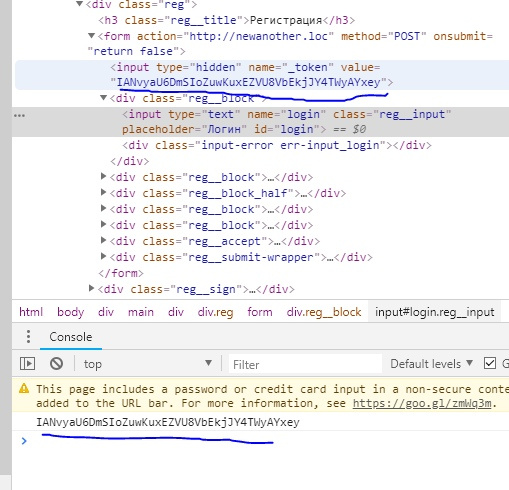
-
Вопрос заданболее трёх лет назад
-
15873 просмотра
csrf токет по идее должен быть всегда уникальный (по крайней мере в рамках одной сессии) , судя по тому что у формы на onsubmit стоит «return false;», то могу предположить что форма отправляется через ajax, проверьте отправляется ли csrf-токен.
Форма отправляется на тот же сайт?
Или вы пытаетесь отправлять с локалки на хостинг форму? если так, то конечно будет 419, для этого и придуман csrf.
Пригласить эксперта
Господа! Долго боролся с 419 ошибкой. Вообще нигде не написано, что причиной может быть кеш. Очистите всевозможный кеш. Мне помогло.
Реоптимизация класса loader:
php artisan optimize
Очистка кэша фасада:
php artisan cache:clear
Очистка кэша роутов:
php artisan route:cache
Очистка кэша view:
php artisan view:clear
Очистка кэша конфигов:
php artisan config:cache
Добавлю свою лепту!
Оставил проект на ночь, а утром отправил Ajax запрос и получил такую же ошибку.
После F5 отбросило на страницу логина.
То есть, все просто — стух токен, учтите это!
Ещё одна причина — время жизни сессии. При наличии авто входа авторизация не заметна, а вот токен создаётся заново. Следовательно остаётся либо продлевать сессию на время работы с формами, либо переходить на API с Ajax.
Решение данной ошибки находится в файле конфигурации session.php
Для использования на локальном сервере (http протокол) необходимо установить конфигурацию в false.
/*
    |--------------------------------------------------------------------------
    | HTTPS Only Cookies
    |--------------------------------------------------------------------------
    |
    | By setting this option to true, session cookies will only be sent back
    | to the server if the browser has a HTTPS connection. This will keep
    | the cookie from being sent to you if it can not be done securely.
    |
    */

'secure' => env('SESSION_SECURE_COOKIE',true),-
Показать ещё
Загружается…
12 февр. 2023, в 00:06
1000 руб./в час
11 февр. 2023, в 22:57
25000 руб./за проект
11 февр. 2023, в 21:59
1000 руб./за проект
Минуточку внимания

The 419 Page Expired error is very common and easy to fix in Laravel applications. It’s caused by the internal framework mechanism called CSRF protection. CSRF stands for Cross-Site Request Forgery and is one of the most popular attacks.
An error page layout may differ between the framework versions, but the error code (419) and the error message (Page Expired) are the same. The following screenshot comes from Laravel 8.

To avoid this issue, every POST, PUT, PATCH, and DELETE request have to have a csrf token as a parameter. Depending on the way you send your request, you have several options to append this parameter.
Solution #1 – Blade directive
When you create a form in a Blade template, the solution is extremely simple. Blade template engine has a built-in directive @csrf that generates a hidden HTML input containing the token. The directive should be added just after opening <form> tag.
<form method="POST" action="/register">
    @csrf

    <label for="email">Email</label>
    <input type="email" name="email">

    <label for="email">Password</label>
    <input type="password" name="password">

    <button type="submit">Save</button>
</form>
Alternatively, you can create a token input manually, using csrf_token() method. Outcome will be identical.
<!-- Equivalent for @csrf directive -->
<input type="hidden" name="_token" value="{{ csrf_token() }}">
Solution #2 – Header of the Ajax request
As for Ajax request, the solution is a little different, but also quite simple. All you have to do is to add the csrf token to the head section of your HTML document and send it as an X-CSRF-TOKEN header with your request.
<head>
    <meta name="csrf-token" content="{{ csrf_token() }}" />
</head>
var request;
var form = $("form");
var data = {
    'email': form.find('input[name="email"]').val(),
    'password': form.find('input[name="password"]').val()
};
var headers = {
    'X-CSRF-TOKEN': $('meta[name="csrf-token"]').attr('content')
}

request = $.ajax({
    url: "/register",
    type: "post",
    headers: headers,
    data: data
});

request.done(function (){
    console.log("It works!");
});
Solution #3 – Disabling CSRF validatation for some endpoints
For some specific endpoints, you can disable CSRF validation. Specific URLs can be excluded in the $except array of the VerifyCsrfToken class. This way you can exclude either the exact URL or group of URLs with a common prefix.
// /app/Http/Middleware/VerifyCsrfToken.php

class VerifyCsrfToken extends Middleware
{
    protected $except = [
        'payment/*',  // exclude all URLs wit payment/ prefix
        'user/add' // exclude exact URL
    ];
}
Excluding from CSRF protection should be used only for endpoints that are used by external applications (like payment providers). However, it’s also convenient to use api route file when you have many endpoints like that. They would be automatically excluded from the CSRF protection.
Conclusion
CSRF protection is by default enabled for all POST, PUT, PATCH, and DELETE requests within web routes file (those in api file are excluded). That approach has many advantages and allows developers to focus on more complex issues. However, that may be also confusing for less experienced programmers because requires more knowledge about a request lifecycle. Anyway, the three solutions I presented in this post are more than enough to handle all possible use cases and easily work with CSRF tokens in Laravel applications.
You need to setup CSRF https://laravel.com/docs/8.x/csrf
Introduction
Cross-site request forgeries are a type of malicious exploit whereby unauthorized commands are performed on behalf of an authenticated user. Thankfully, Laravel makes it easy to protect your application from cross-site request forgery (CSRF) attacks.
An Explanation Of The Vulnerability
In case you’re not familiar with cross-site request forgeries, let’s discuss an example of how this vulnerability can be exploited. Imagine your application has a /user/email route that accepts a POST request to change the authenticated user’s email address. Most likely, this route expects an email input field to contain the email address the user would like to begin using.
Without CSRF protection, a malicious website could create an HTML form that points to your application’s /user/email route and submits the malicious user’s own email address:
<form action="https://your-application.com/user/email" method="POST">
    <input type="email" value="malicious-email@example.com">
</form>

<script>
    document.forms[0].submit();
</script>
If the malicious website automatically submits the form when the page is loaded, the malicious user only needs to lure an unsuspecting user of your application to visit their website and their email address will be changed in your application.
To prevent this vulnerability, we need to inspect every incoming POST, PUT, PATCH, or DELETE request for a secret session value that the malicious application is unable to access.
Preventing CSRF Requests
Laravel automatically generates a CSRF «token» for each active user session managed by the application. This token is used to verify that the authenticated user is the person actually making the requests to the application. Since this token is stored in the user’s session and changes each time the session is regenerated, a malicious application is unable to access it.
The current session’s CSRF token can be accessed via the request’s session or via the csrf_token helper function:
use IlluminateHttpRequest;

Route::get('/token', function (Request $request) {
    $token = $request->session()->token();

    $token = csrf_token();

    // ...
});
Anytime you define a «POST», «PUT», «PATCH», or «DELETE» HTML form in your application, you should include a hidden CSRF _token field in the form so that the CSRF protection middleware can validate the request. For convenience, you may use the @csrf Blade directive to generate the hidden token input field:
<form method="POST" action="/profile">
    @csrf

    <!-- Equivalent to... -->
    <input type="hidden" name="_token" value="{{ csrf_token() }}" />
</form>
The AppHttpMiddlewareVerifyCsrfToken middleware, which is included in the web middleware group by default, will automatically verify that the token in the request input matches the token stored in the session. When these two tokens match, we know that the authenticated user is the one initiating the request.
CSRF Tokens & SPAs
If you are building an SPA that is utilizing Laravel as an API backend, you should consult the Laravel Sanctum documentation for information on authenticating with your API and protecting against CSRF vulnerabilities.
Excluding URIs From CSRF Protection
Sometimes you may wish to exclude a set of URIs from CSRF protection. For example, if you are using Stripe to process payments and are utilizing their webhook system, you will need to exclude your Stripe webhook handler route from CSRF protection since Stripe will not know what CSRF token to send to your routes.
Typically, you should place these kinds of routes outside of the web middleware group that the AppProvidersRouteServiceProvider applies to all routes in the routes/web.php file. However, you may also exclude the routes by adding their URIs to the $except property of the VerifyCsrfToken middleware:
<?php

namespace AppHttpMiddleware;

use IlluminateFoundationHttpMiddlewareVerifyCsrfToken as Middleware;

class VerifyCsrfToken extends Middleware
{
    /**
     * The URIs that should be excluded from CSRF verification.
     *
     * @var array
     */
    protected $except = [
        'stripe/*',
        'http://example.com/foo/bar',
        'http://example.com/foo/*',
    ];
}
You need to setup CSRF https://laravel.com/docs/8.x/csrf
Introduction
Cross-site request forgeries are a type of malicious exploit whereby unauthorized commands are performed on behalf of an authenticated user. Thankfully, Laravel makes it easy to protect your application from cross-site request forgery (CSRF) attacks.
An Explanation Of The Vulnerability
In case you’re not familiar with cross-site request forgeries, let’s discuss an example of how this vulnerability can be exploited. Imagine your application has a /user/email route that accepts a POST request to change the authenticated user’s email address. Most likely, this route expects an email input field to contain the email address the user would like to begin using.
Without CSRF protection, a malicious website could create an HTML form that points to your application’s /user/email route and submits the malicious user’s own email address:
<form action="https://your-application.com/user/email" method="POST">
    <input type="email" value="malicious-email@example.com">
</form>

<script>
    document.forms[0].submit();
</script>
If the malicious website automatically submits the form when the page is loaded, the malicious user only needs to lure an unsuspecting user of your application to visit their website and their email address will be changed in your application.
To prevent this vulnerability, we need to inspect every incoming POST, PUT, PATCH, or DELETE request for a secret session value that the malicious application is unable to access.
Preventing CSRF Requests
Laravel automatically generates a CSRF «token» for each active user session managed by the application. This token is used to verify that the authenticated user is the person actually making the requests to the application. Since this token is stored in the user’s session and changes each time the session is regenerated, a malicious application is unable to access it.
The current session’s CSRF token can be accessed via the request’s session or via the csrf_token helper function:
use IlluminateHttpRequest;

Route::get('/token', function (Request $request) {
    $token = $request->session()->token();

    $token = csrf_token();

    // ...
});
Anytime you define a «POST», «PUT», «PATCH», or «DELETE» HTML form in your application, you should include a hidden CSRF _token field in the form so that the CSRF protection middleware can validate the request. For convenience, you may use the @csrf Blade directive to generate the hidden token input field:
<form method="POST" action="/profile">
    @csrf

    <!-- Equivalent to... -->
    <input type="hidden" name="_token" value="{{ csrf_token() }}" />
</form>
The AppHttpMiddlewareVerifyCsrfToken middleware, which is included in the web middleware group by default, will automatically verify that the token in the request input matches the token stored in the session. When these two tokens match, we know that the authenticated user is the one initiating the request.
CSRF Tokens & SPAs
If you are building an SPA that is utilizing Laravel as an API backend, you should consult the Laravel Sanctum documentation for information on authenticating with your API and protecting against CSRF vulnerabilities.
Excluding URIs From CSRF Protection
Sometimes you may wish to exclude a set of URIs from CSRF protection. For example, if you are using Stripe to process payments and are utilizing their webhook system, you will need to exclude your Stripe webhook handler route from CSRF protection since Stripe will not know what CSRF token to send to your routes.
Typically, you should place these kinds of routes outside of the web middleware group that the AppProvidersRouteServiceProvider applies to all routes in the routes/web.php file. However, you may also exclude the routes by adding their URIs to the $except property of the VerifyCsrfToken middleware:
<?php

namespace AppHttpMiddleware;

use IlluminateFoundationHttpMiddlewareVerifyCsrfToken as Middleware;

class VerifyCsrfToken extends Middleware
{
    /**
     * The URIs that should be excluded from CSRF verification.
     *
     * @var array
     */
    protected $except = [
        'stripe/*',
        'http://example.com/foo/bar',
        'http://example.com/foo/*',
    ];
}
Likely Laravel Framework fix
IlluminateFoundationHttpMiddlewareVerifyCsrfToken and EncryptCookies should be changed to never PHP serialize the CSRF token.
Explanation
I believe it’s a framework problem caused by PHP serialization in the X-XSRF-TOKEN cookie used by Telescope’s Ajax request.
IlluminateFoundationHttpMiddlewareVerifyCsrfToken@getTokenFromRequest()
protected function getTokenFromRequest($request)
{
    $token = $request->input('_token') ?: $request->header('X-CSRF-TOKEN');

    if (! $token && $header = $request->header('X-XSRF-TOKEN')) {
        $token = $this->encrypter->decrypt($header, static::serialized());
    }

    return $token;
}
static::serialized() in that decrypt call is always false even if your application’s middleware asks for cookie PHP serialization.
i.e., status code 419 comes from these hashes being compared by the VerifyCsrfToken middleware:
'YHOOALqzvSbuzQQVurmTpQJM5NaVArIgoEStYrgd''s:40:"YHOOALqzvSbuzQQVurmTpQJM5NaVArIgoEStYrgd'
https://laravel.com/docs/5.6/upgrade «Configuring Cookie Serialization»
It’s suggested to make this change:
AppHttpMiddlewareEncryptCookies
protected static $serialize = true;
AppHttpMiddlewareVerifyCsrfToken::serialized() is pulling the base IlluminateCookieMiddlewareEncryptCookies::$serialize = false rather than the documented AppHttpMiddlewareEncryptCookies$serialize = true override.
App-level fix
Instead of protected static $serialize = true; as suggested by the 5.6 upgrade guide, override the serialized() method and don’t serialize the CSRF token:
class EncryptCookies extends BaseEncrypter
{
    public static function serialized($name)
    {
        return $name !== 'XSRF-TOKEN';
    }
}
Framework fix
Never PHP serialize the CSRF token since this hasn’t been working since August and nobody complained about it until now. It doesn’t really make any sense to serialize short-lived tokens (~3 hours?) that are just PHP strings? Anyone still serializing cookies are probably to cover complex data (array, object) or long time-to-live expiration that could be a pain to migrate to plain unserialized cookies.
Why hasn’t anyone noticed this problem in Laravel?
Because the stragglers still PHP serializing cookies probably use Blade @csrf / request('_token') to pass CSRF tokens across requests. In that case, VerifyCsrfToken@getTokenFromRequest() short-circuits the buggy conditional.