
 Одна из частых ошибок, возникающих в последнее время у пользователей Windows 7, 8.1 и 8 — сообщение о том, что запуск программы невозможен, так как api-ms-win-crt-runtime-l1-1-0.dll отсутствует на компьютере.
В этой инструкции — пошагово о том, что вызывает эту ошибку, как правильно скачать файл api-ms-win-crt-runtime-l1-1-0.dll с официального сайта Майкрософт, исправив тем самым проблему при запуске программ. Также в конце есть видео инструкция о том, как исправить ошибку, если такой вариант вам подходит больше.
Причина ошибки
Сообщение об ошибке появляется при запуске тех программ или игр, которые используют для работы функции «Универсальной среды выполнения C» (CRT) Windows 10, а запускаются в предыдущих версиях системы — Windows 7, 8, Vista. Наиболее часто это — Skype, программы Adobe и Autodesk, Microsoft Office и многие другие.
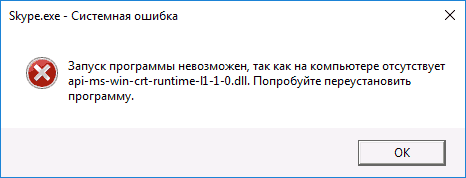
Для того, чтобы такие программы могли быть запущены и не вызывали сообщений о том, что api-ms-win-crt-runtime-l1-1-0.dll отсутствует на компьютере, для указанных версий Windows было выпущено обновление KB2999226, интегрирующее необходимые функции в системах, предшествующих Windows 10.
Ошибка, в свою очередь, возникает если это обновление не было установлено или же произошел сбой во время установки некоторых файлов Распространяемого пакет Visual C++ 2015, входящих в состав указанного обновления.
Как скачать api-ms-win-crt-runtime-l1-1-0.dll для исправления ошибки
Правильными способами скачать файл api-ms-win-crt-runtime-l1-1-0.dll и исправить ошибку будут следующие варианты (для того, чтобы все сработало, должна быть включена служба обновлений Windows):
- Установка обновления KB2999226 с официального сайта Майкрософт.
- Если оно уже установлено, то переустановка (или установка при отсутствии) компонентов Visual C++ 2015 (также могут потребоваться библиотеки DLL Visual C++ 2017), которые также доступны на официальном сайте.
Скачать обновление вы можете на странице https://support.microsoft.com/ru-ru/help/2999226/update-for-universal-c-runtime-in-windows (выберите нужную версию в списке во второй части страницы, при этом учитывайте, что под x86 — это для 32-битных систем, скачайте и установите). Если установка не происходит, например, сообщается о том, что обновление не применимо к вашему компьютеру, используйте способ установки, описанный в самом конце инструкции про ошибку 0x80240017 (перед последним абзацем).
В том случае, когда установка обновления не решила проблему, то проделайте следующее:
- Зайдите в Панель управления — Программы и компоненты. Если в списке присутствуют Распространяемые компоненты Visual C++ 2015 Redistributable (x86 и x64), удалите их (выбрать, нажать кнопку «Удалить»).

- Заново скачайте компоненты с официального сайта Майкрософт https://www.microsoft.com/ru-ru/download/details.aspx?id=53840 при этом загрузите и x86 и x64 версии установщика, если у вас 64-битная система. Важно: по какой-то причине указанная ссылка не всегда работает (иногда выдает, что страница не найдена). Если так случится, то попробуйте заменить число в конце ссылки на 52685, а если и это не сработает, используем инструкции Как скачать распространяемые пакеты Visual C++.

- Запустите сначала один, затем другой загруженный файл и установите компоненты.

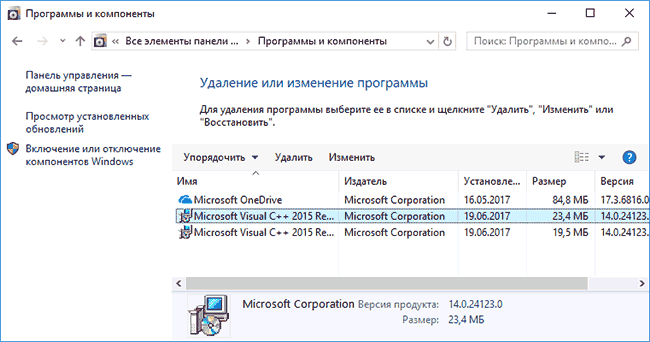


После установки необходимых компонентов, проверьте, была ли исправлена ошибка «api-ms-win-crt-runtime-l1-1-0.dll отсутствует на компьютере», снова попробовав запустить программу.
Если ошибка осталась, повторите то же самое для компонентов Visual C++ 2017. О загрузке этих библиотек— в отдельной инструкции Как скачать распространяемые компоненты Visual C++ с сайта Майкрософт.
Как скачать api-ms-win-crt-runtime-l1-1-0.dll — видео инструкция
По завершении выполнения этих простых шагов, проблемная программа или игра с большой вероятностью будет запускаться без каких-либо проблем.
Файлы с разрешением DLL в операционной системе Windows являются подключаемыми библиотеками, содержащими определенный программный код. Различные приложения используют их во время своей работы. Например, соответствующие файлы могут содержать инструкции по отрисовке диалоговых окон, воспроизведения аудио и видео и др. Благодаря их существованию разработчикам программ не приходится заново «изобретать велосипеды».

Однако в виду того, что соответствующие файлы используются сразу множеством приложений, они по каким-то причинам могут стать недоступны. Рассмотрим, каким образом исправить проблему, при которой отсутствует api-ms-win-crt-runtime-l1-1-0.dll.
Содержание
- Почему файл api-ms-win-crt-runtime-l1-1-0.dll недоступен
- Каким образом исправить ошибку, если файл отсутствует
- Видео решение api-ms-win-crt-runtime-I1-1-0.dll
Почему файл api-ms-win-crt-runtime-l1-1-0.dll недоступен

Можно назвать несколько причин, по которым файл api-ms-win-crt-runtime-l1-1-0.dll может оказаться недоступным.
- Одна из них – это поврежденные пути реестра. Когда такое происходит, система просто перестает понимать, где находится нужный файл.
- Другой вариант – файл поврежден какой-то программой или вредоносным вирусом.
- Даже микроскопических изменений в программном коде DLL достаточно для того, чтобы тот перестал нормально исполняться.
Читайте также: Техническая ошибка системы. Код ошибки CSC_7200034.
Каким образом исправить ошибку, если файл отсутствует
Метод устранения соответствующей проблемы зависит от того, что вызвало неисправность. Так как чаще всего она обусловлена устаревшими драйверами и повреждением файла или изменением/удалением путей в реестре, то рассмотрим способы решения именно для них.
Действенный способ исправить ошибку, когда нет файла api-ms-win-crt-runtime-l1-1-0.dll:
- Для того, чтобы исправить ошибку загрузите и установите обновление универсальной среды для выполнения C в Виндовс.
- Откройте https://support.microsoft.com/, внизу страницы выберите свою операционную систему и разрядность, нажмите «Скачать пакет».
- Далее запустите скачанный файл, после установки кликните «Закрыть» и перезагрузите свой ПК.
Вариант 2. Он заключается в проверке всех системных файлов в Windows. Для этого нам понадобится специальная утилита. Для её запуска нужно:
- Открыть «Командную строку» (жмем «CTRL+R», вводим cmd и жмем Enter);
- В открывшемся окне вводим команду «sfc /scannow» и нажимаем Enter;

- В процессе сканирования система может предлагать подтвердить или отклонить действия, на любой вопрос следует соглашаться.

В процессе проверки система выявит несоответствия в системных файлах и попробует их восстановить из КЭШа. Однако если она не найдет их, то потребуется вставить диск или флешку с Windows той версии, которая установлена на компьютере. Если проблема была именно в этом, то после выполнения указанных действий она должна исчезнуть.

Вариант 3. Второй способ устранения проблемы api-ms-win-crt-runtime-l1-1-0.dll предполагает чистку и коррекцию записей в реестре. Для этого понадобится одна из программ, которые позволяют исправить ошибки в системном реестре Windows. Таковой является, например, приложение CCleaner.
- Скачайте и установите приложение;
- Перейдите на вкладку «Реестр»;
- Установите все галочки в поле слева;
- Нажмите «Поиск проблем»;
- Когда программа закончит сканирование, кликните на «Исправить»;
- На предложение «сделать резервную копию» согласитесь, и сохраните бэкап в любое место на своем жестком диске;
- Дождитесь окончания процесса, закройте программу и перезагрузите компьютер.
После выполнения указанных действий, если проблема была в битых записях реестра, она должна исчезнуть. Приложения, которые при открытии выдавали ошибку отсутствия файла «api-ms-win-crt-runtime-I1-1-0.dll» должны перестать ее показывать и начать нормально запускаться.
Видео решение api-ms-win-crt-runtime-I1-1-0.dll
Опубликовано 01.11.2016 Обновлено 02.02.2021
Bug 108580
— Cannot run LibreOffice, api-ms-win-crt-runtime-l1-1-0.dll is missing (for local solution see comment 7)
Summary:
Cannot run LibreOffice, api-ms-win-crt-runtime-l1-1-0.dll is missing (for loc…
|
Description:
click the icon the error msge is"the program cannot start because api-ms-win-crt-runtime-l1-1-0.dll is missing from your computer.try to reinstalling the program to fix this problem

Actual Results:
application did not open error msge will be received

Expected Results:
application open


Reproducible: Always

User Profile Reset: No

Additional Info:
click the icon the error msge is"the program cannot start because api-ms-win-crt-runtime-l1-1-0.dll is missing from your computer.try to reinstalling the program to fix this probletry to install two and more systems same error msge will be received


User-Agent: Mozilla/5.0 (Windows NT 6.1; Win64; x64) AppleWebKit/537.36 (KHTML, like Gecko) Chrome/59.0.3071.86 Safari/537.36
Let's keep this open until we actually find out what's going on, or at least until the reports stop coming in.
*** Bug 111628 has been marked as a duplicate of this bug. ***
*** Bug 109994 has been marked as a duplicate of this bug. ***
As documentation states, [1] if a directory name *starts with* one of predefined SystemFolder properties, a CustomAction type 51 is generated for it. "It does not verify that the directory name exactly equals the directory property. Any directory beginning with one of these standard folder names gets a type 51 custom action, even if the rest of the name is not a GUID."

Our fix for bug 105311 follows this description literally. But my concern is if we are victims of another MS documentation flaw. I mean, the passage "The tables in the merge module must reference the location of a child directory of TARGETDIR, *or another directory in the merge module's tree*" in the mentioned documentation page (emphasis mine).

The C-Runtime merge module has two directories in it, named

SystemFolder.E281B893_10D7_34CE_BB0E_B69D88E154A5
and
SystemFolder_x86_VC.E281B893_10D7_34CE_BB0E_B69D88E154A5

The former has its parent set to TARGETDIR, and the latter has its parent set to former (SystemFolder.E281B893_10D7_34CE_BB0E_B69D88E154A5). I.e., they form a hierarchy (though the latter doesn't define any subdirectory).

But we generate two custom actions for both of them, because they both do begin with "SystemFolder". Thus, we may break the hierarchy (that's my guess). Intuitively, this shouldn't break things, as we still point both to a proper location, but who knows.

Could it be that MS documentation must be read as "if directory name *before dot* is equal to one of pre-defined SystemFolder properties, ..."?

Adding David Ostrovsky (the author of fix for bug 105311, and expert in this area) to CC list.

[1] https://msdn.microsoft.com/en-us/library/windows/desktop/aa367787
Created attachment 135448 [details]
Install log for an installation resulted in non-functional program

This is an installation log taken on a freshly-installed Windows Server 2008 Version 6.1 (Build 7601: Service Pack 1), no updates, with command line

msiexec /i C:UsersAdministratorDownloadsLibreOffice_5.4.0.3_Win_x86.msi /l*vx C:UsersAdministratorDownloadsLOinst.log

The installation completed successfully, and then launching the program resulted in the mentioned error message:

---------------------------
soffice.exe - System Error
---------------------------
The program can't start because api-ms-win-crt-runtime-l1-1-0.dll is missing from your computer. Try reinstalling the program to fix this problem.
---------------------------
OK
---------------------------
The problem is condition for component "ucrtbase.dll_system_x86.E281B893_10D7_34CE_BB0E_B69D88E154A5", which is

((VersionNT = 501) OR (VersionNT = 502)) AND (VC_REDIST=1)

This is only true for WinXP systems. So, I assume that the problem is only with Vista+ systems that have no Universal C Runtime preinstalled (up to Windows 10?). Changing the condition to simple

VC_REDIST=1

allows me to install and run LibreOffice on the above-mentioned test system.

Searching for "VersionNT" over repository doesn't give any similar results, I assume that this comes from merge module itself.

The Microsoft Visual C++ 2015 Redistributable Update 3 download page references KB 2999226 [1], which tells about different Universal C Runtime packages for different Windows versions. This makes me think that there might be different merge modules for different Windows versions, that we might need to include into installer, each one with its own VersionNT condition. I am not sure that simply forcing the WinXP version (that we bundle now) to install on any Vista+ is a proper solution.

[1] https://support.microsoft.com/en-us/kb/2999226
Sigh.

A discussion in a blog by Visual C++ team [1] describes this in detail.

> On Windows Vista and newer operating systems, the Universal CRT is
> installed via Windows Update—either when the machine downloads new
> updates from the web or when you install one of the redistributable
> packages from the Download Center (the November build, 10586, can be
> found here:
> http://www.microsoft.com/en-us/download/details.aspx?id=50410).
> Windows Update redistributables do not use MSI; they have a different
> installer technology. Because they do not use MSI, there are no MSMs
> for the Universal CRT. For Windows Vista and newer, installation of
> the Windows Update packages is the only supported way to get the
> Universal CRT onto the machine in the system directory. The Visual C++
> libraries MSMs install the Universal CRT on Windows XP only because
> the Universal CRT is not an operating system component on Windows XP
> (and Windows XP does not support the same Windows Update packaging
> mechanisms that are used on Windows Vista and above). Do not modify
> the MSMs.

So, it turns out that we cannot bundle the Universal CRT with the installer. In that case, we have a hard external dependency on those systems, that we must mention on release notes page. And possibly on the download page, with a link to MS site (mentioned in comment 7).

[1] https://blogs.msdn.microsoft.com/vcblog/2015/03/03/introducing-the-universal-crt/
Or can we?

On the same page mentioned in comment 11:

> 6. Updated September 11, 2015:  App-local deployment of the Universal CRT is
> supported.  To obtain the binaries for app-local deployment, install the
> Windows Software Development Kit (SDK) for Windows 10.  The binaries will be
> installed to C:Program Files (x86)Windows Kits10Redistucrt.  You will
> need to copy all of the DLLs with your app (note that the set of DLLs are
> necessary is different on different versions of Windows, so you must include
> all of the DLLs in order for your program to run on all supported versions
> of Windows).
People I am SO NOT AMUSED here at all.  While you are blathering around on this the installation instructions on the website say that Libreoffice has a dependency on VC 2008 C++ not VC 2015 C++ Update 3.   Do you what to know how much time I've already wasted installing various C++ redistributables before stumbling over this bug, trying to get the program to work on a brand new fresh installation of Vista?  I finally tried uninstalling LO before reading this and now it won't reinstall at all whether or not the correct runtime is installed.  And by the way MS has _2_ 2015 redistributables for download and of course I tried the wrong one first.

There is no problem at all with putting a check into the LO installer looking for the correct redistributable and telling the user to download it and install it first then aborting the installer.   Because now, I have no choice it seems but to do a complete nuke and repave of the machine since the uninstaller in LO obviously got broken during the uninstallation.

Quite trying to dumbify down the LO software installer and give us some credit for enough brains to find, download and install the correct VC++ redistributable before installing LO if you DOCUMENT THE FACT IT IS NEEDED in the installation instructions.   I read through the install instructions first and they just steered me wrong.   You have been waffling around on this bug for weeks now DOCUMENT THE PREREQUISITE FIRST THEN ARGUE ABOUT IT LATER.
Is this serious enough to escalate Importance to major? Most Windows users meeting this problem will likely not be able to solve it on their own.

While a solution is being discussed, I suggest placing a prominent note on the Windows download page on the requirement. Those who rather not deal with this issue on their own should go for the Still version for now.
This is the second time I have failed to install a 5.4 version of LO because of this failure.  I had hoped it would have been resolved by now.  I did not find the link mentioned in comment 7 was entirely transparent - it offers two different packages to download, with no explanation as to which is what.  I guessed correctly, but I think more guidance (or a proper resolution) might help others.

Anyone coming new to LO would likely just give up and look for something else: failed installations are IMHO a critical error - nothing works.
(In reply to Libomark from comment #16)
> Anyone coming new to LO would likely just give up and look for something
> else: failed installations are IMHO a critical error - nothing works.

I agree. Can we have this escalated to critical?
It seems that 2015+ vcredists aren't MSI-dependent (rather, they contain MSU packages in it, which require wusa.exe to run).

Maybe these packages won't conflict with MSI process, and thus, will allow us to run from installer? We could try to package the vc_redist.exe to out MSI, and run it in case a pre-requisite fits (OS + absence of the redist)?
(In reply to Mike Saunders from comment #19)
>
> Or is a fix in preparation for an upcoming release?

From speaking to Cloph, it looks like this will be fixed by bundling the DLL in 5.4.3 onwards.
.
What are the dll to copy to get installed 5.4.2.2 from 5.4.2.2 portable?
(In reply to Boris Silva R from comment #25)
> What are the dll to copy to get installed 5.4.2.2 from 5.4.2.2 portable?

For now i copy all api-ms-win-***.dll fron the LibreOfficePortableApplibreofficeprogram to the installed LO 5.4.2.2 and get it working in Win7 (no sp1)
Hi guys, I just downloaded 6.0.0.3 and installed it over 5.3.x and it seems the problem is still not solved. I get the same error message as the OP, so I tried to:

1) Repair the installation – no success
2) Remove LO and Visual C++ Redistributable for VS 2015 and perform a fresh install – no success although I saw the Visual C++ Redistributable for VS 2015 was a part of the installation
3) Manually install the Visual C++ Redistributable for VS 2015 Update 3 mentioned in #7 – finally I got it working

I think this can discourage many of the potential LO users… :-(
(In reply to martin from comment #30)
> I tried to:
>
> 2) Remove LO and Visual C++ Redistributable for VS 2015 and perform a fresh
> install – no success although I saw the Visual C++ Redistributable for VS
> 2015 was a part of the installation

... so you had the redistributable installed and listed in uninstall list? Absolutely unexpected.

What is your OS? (Please give details from winver launched using command line or Winkey+R).

What is the bitness of LibreOffice you used?
(In reply to Mike Kaganski from comment #31)
> ... so you had the redistributable installed and listed in uninstall list?
> Absolutely unexpected.

I mean - unexpected, that while the redistributable was on system, LibreOffice couldn't work.
(In reply to Mike Kaganski from comment #32)
> (In reply to Mike Kaganski from comment #31)
> > ... so you had the redistributable installed and listed in uninstall list?
> > Absolutely unexpected.
>
> I mean - unexpected, that while the redistributable was on system,
> LibreOffice couldn't work.

I found a possible cause. Seems to be related to Service Pack 1 for Windows 7. I had not ever installed this service pack, and when I started manually getting the dlls that were listed as not being found, I found they were related to an update that will only work when SP1 is already installed.

I did a full wipe of my PC, and started fresh with W7SP1 installed. The redist package installs correctly from a download from MS, and then LibreOffice starts no problem.

Just an idea. Check to make sure SP1 is installed. Might fix your issue. Also might specify in the system reqs (if not already done) that SP1 is required for 6 to work with Windows 7.
(In reply to mistersketchman from comment #33)
> I found a possible cause. Seems to be related to Service Pack 1 for Windows
> 7. I had not ever installed this service pack, and when I started manually
> getting the dlls that were listed as not being found, I found they were
> related to an update that will only work when SP1 is already installed.

Maybe not. Mine has SP1 right from the start.
*** Bug 115769 has been marked as a duplicate of this bug. ***
(In reply to Kumāra from comment #34)
> (In reply to mistersketchman from comment #33)
> > I found a possible cause. Seems to be related to Service Pack 1 for Windows
> > 7. I had not ever installed this service pack, and when I started manually
> > getting the dlls that were listed as not being found, I found they were
> > related to an update that will only work when SP1 is already installed.
>
> Maybe not. Mine has SP1 right from the start.

It wasn't SP1 that was required to run it. It was an update that needed SP1 to be installed. Right now I don't recall which update it was, but chasing down dlls pointed me to the update. I then tried to install the update, and Windows told me my version of Windows was not correct for the update. More searching showed that SP1 was required to install it.

So, it's not SP1 that was the issue. But if you had never installed it, you would also never get the update that had the dlls that were needed.
I have tried out the newest version of LibreOffice (LibreOffice_6.0.1_Win_x86.msi) and I also receive the same issue. I use Window 7 without SP1 and thus unable to install Visual C++ 2015 Redistributable Update 3 (as in Comment 7).

I have found a temporary solution for this issue
(solution courtesy of Boris Silva R - Comment 26):

1. Install the Portable Version of LibreOffice.
2. Navigate through LibreOfficePortableApplibreofficeprogram and copy these dll files into LibreOffice Program File (LibreOfficeprogram)

A) all api-ms-win-*.dll.
B) ucrtbase.dll

I wish that in the future installation pack it will include these dll files in the installation.
(In reply to Nickloh from comment #37)
> A) all api-ms-win-*.dll.
> B) ucrtbase.dll
>
> I wish that in the future installation pack it will include these dll files
> in the installation.

No, it will not. In 5.4, we had this temporary workaround (app-local redistributable), but as soon as we have found a way to avoid placing the libraries into the application directory, we have switched to that.

Having redistributable app-local means that this important third-party system component is not monitored and updated as required, e.g., when a security flaw in it is discovered. So - the release notes clearly indicate the minimum requirements to Windows OS that we support, which is Windows 7 SP1.
*** Bug 116077 has been marked as a duplicate of this bug. ***
I just encountered this issue for the first time after upgrading LibreOffice from 5.3.x to 6.0.2 on some old Win 7 computer.
I noticed that the installer tried to install some VC runtime, and even tough it apparently was successful I think (I didn't pay that much attention, sorry :/) I still had to install the Visual C++ 2015 Redistributable Update 3 mentioned in Comment #7 manually myself (then it worked)
I encounter the same error on windows 8.1 (ver 6.3.9600) X64

when i try to install "Visual C++ 2015 Redistributable Update 3"

I receive this error : 0x80240017

I've try with few other machine under Windows 8.1 same issue.

So I stick with LO 5.3.4 until a solution is released
(In reply to SpongeBob from comment #41)
> when i try to install "Visual C++ 2015 Redistributable Update 3"
> I receive this error : 0x80240017
> I've try with few other machine under Windows 8.1 same issue.
>
> So I stick with LO 5.3.4 until a solution is released

https://support.microsoft.com/en-us/help/2906956

> To resolve this issue, install update rollup 2887595.
>
> Microsoft has confirmed that this is a problem in the Microsoft products
> that are listed in the "Applies to" section.
(In reply to Mike Kaganski from comment #42)

I tried, but not working either...

The installation of the KB2887595 run smoothly (just to reboot once)

then when I install Libre office 6.0.2 I see that he install now the C++ 2015 Redistributable.

But when I lunch LO he still give me the same error (api-ms-win-crt-runtime-l1-1-0.dll is missing)

I deinstalled the C++ 2015 Redistributable and tried to install the C++ 2015 Update 3 From Comment #7 but that one don't want to install himself Error (0x80240017)
(In reply to SpongeBob from comment #41)
> I encounter the same error on windows 8.1 (ver 6.3.9600) X64
>
> when i try to install "Visual C++ 2015 Redistributable Update 3"
>
> I receive this error : 0x80240017
>
> I've try with few other machine under Windows 8.1 same issue.
>
> So I stick with LO 5.3.4 until a solution is released

I was having the problem with Win7 al LO, upgrade my pc to sata and Windows 8.1 and get the same problem: the 2015 c++ runtime fail to run the x86 msu included in the  runtime.
The solution was update Windows 8.1 to the requisites of the 2015 c++ runtime( agust 201 rollup update?) then can install the c++ runtime and get working LibreOffice.
One alternative was download LibreOffice portable and copy the missing files to the main LibreOfiice
(In reply to Commit Notification from comment #48)
> Mike Kaganski committed a patch related to this issue.
> It has been pushed to "libreoffice-6-0":
>
> Affected users are encouraged to test the fix and report feedback.

Hey I try the LibreOffice version :
master64~2018-05-03_08.36.01_LibreOfficeDev_6.1.0.0.alpha1_Win_x64.msi

and indeed when I launch the install I get a message (~ please install KB2919355 ) That I try to do, but When I launch the setup of the KB2919355 for x64 I got : "The update is not applicable to your computer" So screw it I stay with an old version of L.B
(In reply to SpongeBob from comment #49)
> Hey I try the LibreOffice version :
> master64~2018-05-03_08.36.01_LibreOfficeDev_6.1.0.0.alpha1_Win_x64.msi
>
> and indeed when I launch the install I get a message (~ please install
> KB2919355 )

Great! So I see that the detection works correctly.

> That I try to do, but When I launch the setup of the KB2919355
> for x64 I got : "The update is not applicable to your computer" So screw it
> I stay with an old version of L.B

In this specific case I'd suspect some kind of corrupted system. It reminds me of bug 115405, where a system component was installed incorrectly by some other application. https://ask.libreoffice.org/en/question/152440 gives another example of a third-party script breaking system, which happened to surface when using LibreOffice.

This kind of problem requires individual investigation and fixing on system level, but is outside of this bug 108580.
(In reply to SpongeBob from comment #49)
> Hey I try the LibreOffice version :
> master64~2018-05-03_08.36.01_LibreOfficeDev_6.1.0.0.alpha1_Win_x64.msi
>
> and indeed when I launch the install I get a message (~ please install
> KB2919355 ) That I try to do, but When I launch the setup of the KB2919355
> for x64 I got : "The update is not applicable to your computer" So screw it
> I stay with an old version of L.B

Does it say WHY "The update is not applicable to your computer"? Just acting on a possible cause: Is your OS 32-/64-bit?
(In reply to Kumāra from comment #51)
> (In reply to SpongeBob from comment #49)
> > Hey I try the LibreOffice version :
> > master64~2018-05-03_08.36.01_LibreOfficeDev_6.1.0.0.alpha1_Win_x64.msi
> >
> > and indeed when I launch the install I get a message (~ please install
> > KB2919355 ) That I try to do, but When I launch the setup of the KB2919355
> > for x64 I got : "The update is not applicable to your computer" So screw it
> > I stay with an old version of L.B
>
> Does it say WHY "The update is not applicable to your computer"? Just acting
> on a possible cause: Is your OS 32-/64-bit?

Of course... not :/ My Os is 64Bit and the update also..
(In reply to Mike Kaganski from comment #50)
> (In reply to SpongeBob from comment #49)
> > Hey I try the LibreOffice version :
> > master64~2018-05-03_08.36.01_LibreOfficeDev_6.1.0.0.alpha1_Win_x64.msi
> >
> > and indeed when I launch the install I get a message (~ please install
> > KB2919355 )
>
> Great! So I see that the detection works correctly.

OK, but is this all that can be done for this issue? I was hoping I could just install LO and be done with it.

Anyway, I'm hoping to save some time for me. Other than SpongeBob, has anyone else tried? What's your experience?
(In reply to Kumāra from comment #53)
> OK, but is this all that can be done for this issue? I was hoping I could
> just install LO and be done with it.

Which specific issue do you refer to as "this"?

Currently, the installer for Windows must:
1. Properly detect all OSes that LO *cannot* be installed to - on these OSes, you are *not* expected to "just install" this version of LO, and properly informing and exiting is all that *should be* done;
2. Properly install the redist on the OSes where it *is* applicable.

In the next version (6.1), the installer will also install the required components without additional interaction (no additional authentication/authorization), much like before 6.0 (though the inner machinery is different), to improve installation experience.

A broken OS is a special case for any software. An OS without a required component (as in SpongeBob's case) is unsupported (1) case. Inability to install any component on an OS is *not* a problem LibreOffice installer should deal with.
(In reply to Mike Kaganski from comment #54) > (In reply to Kumāra from comment #53) > > OK, but is this all that can be done for this issue? I was hoping I could > > just install LO and be done with it. > > Which specific issue do you refer to as "this"? This bug, this "Cannot run LibreOffice" because "api-ms-win-crt-runtime-l1-1-0.dll is missing". Anyway, I now get that you're saying it's completely not in the domain of LO, which can at best only get Windows to download the needed components. I just found this which affected ones might be interested to try:Fix api-ms-win-crt-runtime-l1-1-0.dll or api-ms-win-crt-heap-l1-1-0.dll is missing error> In the next version (6.1), the installer will also install the required > components without additional interaction (no additional > authentication/authorization), much like before 6.0 (though the inner > machinery is different), to improve installation experience. This sounds good. > A broken OS is a special case for any software. An OS without a required > component (as in SpongeBob's case) is unsupported (1) case. Inability to > install any component on an OS is *not* a problem LibreOffice installer > should deal with. I get that. Now still waiting for responds from others here who might have tried the latest.
Wonder if this is relevant here:

The file api-ms-win-crt-runtime-l1-1-0.dll exists in my computer, many times over, for Mozilla Firefox, Avast and Calibre, besides 2 instances under Windows.

As suggested by the webpage I showed above, I've tried to re-register the file with regsvr32. For both instances, I got this error message:

The module "api-ms-win-crt-runtime-l1-1-0.dll" was loaded but the entry-point DllRegisterServer was not found.

Make sure that "api-ms-win-crt-runtime-l1-1-0.dll" is a valid DLL or OCX file and then try again.

Come to think of it, it's just a 23kb file. If Mozilla Firefox, Avast and Calibre can include it as part of the package, perhaps LO can too. This is assuming the issue lies with this file only.
(In reply to Kumāra from comment #56)
> Come to think of it, it's just a 23kb file. If Mozilla Firefox, Avast and
> Calibre can include it as part of the package, perhaps LO can too. This is
> assuming the issue lies with this file only.

Erm... Probably not. I see under Avast, it's part of 2 folders of seemingly relevant stuff, about 5MB. (I think  one is for 32bit and the other for 64bit.)

I'd still prefer that LO could make use of what's already in Windows, instead of installing extra baggage. I'll try to solve it myself. However, less tech-savvy ones would probably just give up. So, again, perhaps LO might just consider just include it in the package. OR maybe what you mentioned for 6.1 is something niftier.
(In reply to Kumāra from comment #57)

LibreOffice installer for 6.0 (and 6.1, in a different form) *does* include the files. In 6.0, it's the whole VC redist installer from comment 7, ~14 MB, that is launched at the end of installation. The difference from all of (LO 5.4, FireFox, Avast) is that 6.0+ does not put the files in LO's own directory, but installs the component properly using its own installer. It is done not to save space, but to ensure that system components (and ucrt *is* a system component) are getting updates from the component's vendor. Otherwise, e.g. a security treat may arise from a user unknowingly using unpatched version of ucrt in LO, while the user might be sure that OS is fully updated (and not know that some sw bundles older vulnerable copies of OS components).
(In reply to Mike Kaganski from comment #58)

Thanks for taking the effort to explain. I'm much clearer of the picture.

Meaning, by right, it should work unless something is wrong with the user's system.

I was misled by your exchange with SpongeBob that the fix was merely to detect the lack of components the new LO depend on.

Anyway, I'll give LO6.0.4 a shot and report back.
A bit too long explanation of the problem's timeline to this already a bit too long thread; writing this here to be able to refer to when clarifications needed in the future.

After LibreOffice 5.3 was branched off, in the early 2017, the development branch toward 5.4 had switched to Visual Studio 2015 as baseline compiler for Windows [1]. This was needed to switch to the next CRT and C++ standard support (which in turn allows to write more efficient and less error-prone code, and thus, improve development for a huge codebase that LibreOffice is), and the switches to the new C Runtime library have happened before each time we upgraded compiler requirements; previously, these switches did not give much headaches, because we have always bundled the C Runtime redistributable in form of merge modules provided by Visual Studio itself [2].

This time, however, it turned out that we had overlooked that Microsoft had changed the redistributable and its installation since 2015 version. Now the redistributable consists of two independent parts (VCRT and UCRT), and the latter is the system component (included in the base installation of Windows 10, but required to be installed separately to Windows XP to 8.1). And what's important, MS own redist merge module used in LO installer *does* include the UCRT bits as well as VCRT, but it only installs the former to Windows XP, while for Windows Vista+, it does not do that (for purpose - see comment by James McNellis from 2016-03-11 at [3]).

So, having missed that at the 5.4 testing phase somehow (possibly because those who tested on Win 7-8.1 all had VCRedist 2015 installed separately), users started to complain about this bug when installing onto Windows 7 through 8.1 *without* VCRedist 2015. Those using Windows XP or Windows 10 were unaffected.

To solve the problem, we had implemented the App-local deployment of the Universal CRT (see #6 at the bottom of the article [3]) since version 5.4.3 [4] - see comment 21 and the two below for commit notifications. This meant that we put the required UCRT libraries into the LibreOffice installation directory, and thus not rely upon system UCRT. As mentioned, while this works, this is not a recommended option, and may create security concerns. So, at the time of those commits, Christian already mentioned that it's a workaround, not the proper solution.

So, we kept working to find a way to use the correct MS-advised UCRT install method in LibreOffice installer, and for 6.0, we included [5] the installer from Microsoft [6] (see comment 7) into the MSI so that it was launched at the end of installation process, asked to authorise second time, and then did whatever it was needed to install both VCRT and UCRT. So, we were pretty sure that now everything should work as it should, because the MS installer would of course do it properly.

And of course, it didn't. It turned out that it worked only partially on those systems that didn't match the minimal requirements for the UCRT [7] - those are April 2014 rollup for Windows 8.1, Service Pack 1 for Windows 7, and Service Pack 2 for Windows Vista (the latter being irrelevant for LO 6.0+). The MS installer only installed VCRT component, and reported success, while UCRT remained missing on the system. And at the 6.0, we started to receive the new wave of the same error reports from users attempted to install LibreOffice on those systems not matching the UCRT (and LO [8]) minimal requirements.

So the next part of the solution was to fix out installer to properly detect those OS versions, and prevent LO from installing there (because, naturally, the vital UCRT system component would be missing there, and LO wouldn't run anyway), issuing proper message. That was done in the commits notified by comment 38, comment 44, comment 46 and below. Since then, the only remaining issue (which cannot be solved on the LibreOffice installer side) is when user's system is broken in a way, so that it either cannot install UCRT (being eligible for it), or reports that it's already installed, but actually it's not. The broken OS (which might be caused by e.g. third-party software playing dirty tricks with ucrt - see bug 115405 for example) is outside of the scope of this bug.

And last (at the time of writing this) is the commits that have changed the UCRT installation procedure for 6.1 [9]: we now don't bundle the EXE from comment 7, but instead, UCRT packages from [10], which are installed (using proper MS tooling [11] for Windows Updates) in the course of main installation process, instead of launching separate second installation after LO installation has finished. This allows us to avoid the second authorization step, making installation experience more smooth; and also allows to install UCRT in unattended scenarios (which were unsupported in 6.0, and required separate UCRT installation by those who use unattended LO installations, like corporate deployments). As with 6.0, this still checks the pre-requisite OS level, and refuses to install when it doesn't fit the minimal requirements; and of course, this won't work in cases of broken OSes.

That's all the story thus far; the unfortunate decision of Microsoft to split the redistributable had brought a lot of trouble, of course; but hopefully, we now do it The Right Way (TM).

[1] https://cgit.freedesktop.org/libreoffice/core/commit/?id=84b36c704d73362d4d86dc9e9c0efa0625958347
[2] https://msdn.microsoft.com/en-us/library/ms235290
[3] https://blogs.msdn.microsoft.com/vcblog/2015/03/03/introducing-the-universal-crt/
[4] http://cgit.freedesktop.org/libreoffice/core/commit/?id=71d9a61302e65fe091cf70c13fa72b3df09b7e3a
[5] http://cgit.freedesktop.org/libreoffice/core/commit/?id=61b1d631331551b43bc7d619be33bfbfeff7cad6
[6] https://www.microsoft.com/en-us/download/details.aspx?id=53840
[7] https://support.microsoft.com/en-us/help/2999226
[8] https://www.libreoffice.org/get-help/system-requirements/#windows
[9] https://cgit.freedesktop.org/libreoffice/core/commit/?id=b84244378d411b83355b8763d3505031dd5ec324
[10] https://www.microsoft.com/en-us/download/details.aspx?id=48234
[11] https://support.microsoft.com/en-us/help/934307
I've just installed LO6.0.4. Hmmmmm... Same old "api-ms-win-crt-runtime-l1-1-0.dll is missing".

Then, I took one of the suggestions from the webpage I suggested earlier (http://www.thewindowsclub.com/api-ms-win-crt-runtime-l1-1-0-dll-is-missing):

Update for Universal C Runtime
Download the Update for Universal C Runtime from Microsoft (https://support.microsoft.com/en-us/help/2999226/update-for-universal-c-runtime-in-windows). Install the Runtime component and restart your computer and see. Just for your information, starting with Windows 10, the Universal CRT is part of the operating system.

Then, I started LO. No error message. OK... So far so good. And I waited, and waited, monitoring WTM. I saw soffice.bin there, but it seemed stuck. And I waited, and waited.

Suddenly the LO "splash banner" came out. Alright... And I waited, and waited, and... yes! LO is up and running!

But gee... that took a very long time. I guess some kind of run-once initiation was necessary, or it's just my computer. Anyway, to be sure, I unloaded and reloaded LO, and startup was fast, even without the quick-starter.

Great.

But now for some strange reason, the fonts provided with LO (DejaVu, Liberation, etc) all appear like Courier New. I can't even use them on other programs. I suppose restarting the computer would solve this.
Last mentioned issue with fonts is likely Bug 97982.
*** Bug 118869 has been marked as a duplicate of this bug. *** *** Bug 119910 has been marked as a duplicate of this bug. ***
*** Bug 123229 has been marked as a duplicate of this bug. ***
api-ms-win-crt-runtime-l1-1-0.dll is an essential piece of the Microsoft Visual C++ Redistributable for Visual Studio. It assumes a crucial job in the running and working of specific sorts of documents and windows program. Significantly clients who do have put in new crisp Windows OS on their PC faces this issue.

You can fix the issue using this guide: https://www.intenseclick.com/api-ms-win-crt-runtime-l1-1-0-dll-is-missing-error/
Kumāra: since you had to install crt things, I'd do the famous steps to be sure everything is clean with LO part:
- uninstall
- clean registry (with ccleaner or any tool you trust)
- remove any remnant Lo files you got
- remove LO profile (see https://wiki.documentfoundation.org/UserProfile#Windows)
- install LO again (6.2.4) from official website

(check if you choose LO 64 bits, you should have Java 64 bits,
...LO 32 bits -> Java 32 bits)
Changing priority to 'high' since the number of duplicates is 5 or higher
So I suppose that all the changes to installer I made to correctly install UCRT, and handle all the oddities resulting from MS making it so ridiculously hard, fixed this. No reports in current versions. Closing FIXED. Any newer problems, even looking similar, need own reports, possibly with this one in See Also.
Artemis Fowl Judi Dench Green Leather Commander Root Coat is a wonderful attire. Now available for sale at a very reliable price.
Good post. Thanks for sharing with us. I just loved your way of presentation. I enjoyed reading this. Thanks for sharing and keep writing. If u want to buy leather Jackets. Feel free to surf my web https://shoqz-fashionz.com/ hope you like it. |
Главная » WINDOWS » Отсутствует api-ms-win-crt-runtime-l1-1-0.dll как исправить в Windows
Опубликовано 13.04.2022
Содержание
- Вариант 1: Отсутствует api-ms-win-crt-runtime-l1-1-0.dll
- Вариант 2: Исправления ошибки «Запуск программы невозможен так как на компьютере отсутствует api-ms-win-crt-convert-l1-1-0.dll»
- Заключение
Если вы попытаетесь запустить программу и получаете сообщение об ошибке «api-ms-win-crt-runtime-l1-1-0.dll DLL отсутствует на вашем компьютере». Тогда эта статья для вас. В этом руководстве подробно описано что делать если отсутствует api-ms-win-crt-runtime-l1-1-0 dll и как исправить эту ошибку в Windows.
При создании программы они связываются с динамическими библиотеками ссылок (DLL). В этих DLL содержится код, необходимый программе для правильной работы. Если необходимая DLL отсутствует, Windows отобразит предупреждение с указанием имени отсутствующей DLL, чтобы вы могли попытаться решить проблему.
Если вы запустите программу и получите ошибку о api-ms-win-crt-runtime-l1-1-0.dll. Тогда вам требуется установить пакет Visual C++ 2015. Сделать это легко используя приведенные ниже шаги.
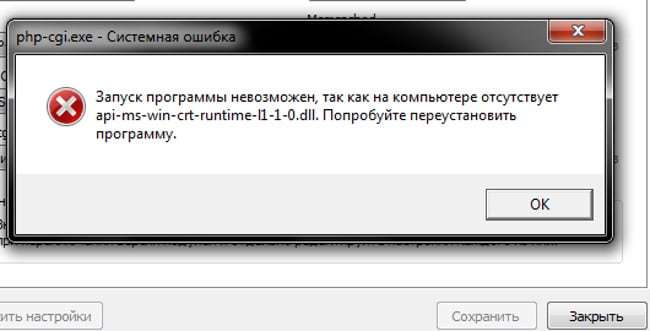
Вариант 1: Отсутствует api-ms-win-crt-runtime-l1-1-0.dll
«Запуск программы невозможен так как на компьютере отсутствует api-ms-win-crt-convert-l1-1-0.dll». Можно попробовать переустановить программу, чтобы решить эту проблему, но вряд ли это поможет.
Чтобы исправить Запуск программы невозможен так как на компьютере отсутствует api-ms-win-crt-convert-l1-1-0.dll, пожалуйста, выполните следующие действия:
- Перейдите на страницу Microsoft Visual C++ 2015 Redistributable, выберите язык и нажмите кнопку Downloads (Загрузить).
- Далее вас перенаправит на страницу, где вам надо выбрать, хотите ли вы загрузить 32-биную или 64-битную версию. Выберите нужную версию и нажмите кнопку «Далее». Если вы не знаете какая у вас версия Windows. Нажмите горячие клавиши Win + Pause.

Узнать разрядность Windows - Далее файл начнет загружаться на ваш компьютер. После загрузки дважды щелкните по загруженному vc_redist.x64.exe файлу.
- Появится экран Microsoft Visual C++-2015 Redistributable и попросит вас согласиться с условиями лицензии. Поставьте галочку в поле «I agree» (Я согласен), а затем нажмите на кнопку «Install» (Установить).

Установка Microsoft Visual C++-2015 - Если Windows предложит вам разрешить программе вносить изменения или продолжить, нажмите кнопку Да или Разрешить.
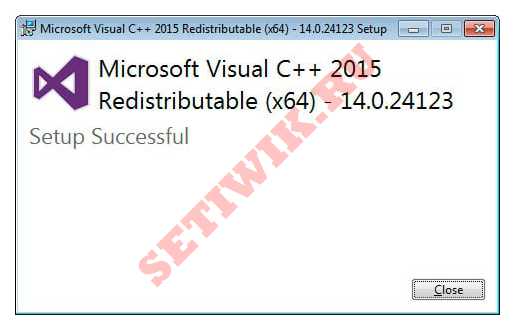
- Когда все установится, программа отобразит сообщение о том, что она была успешно установлена.
Установка Microsoft Visual C++-2015 завершена - Теперь вы можете закрыть программу установки.

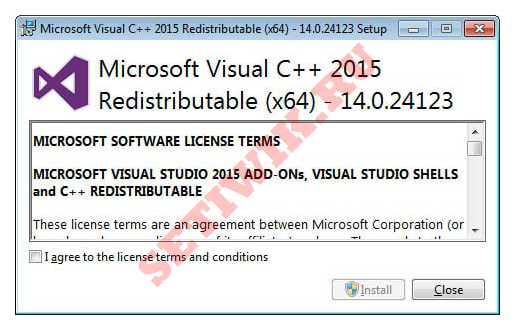
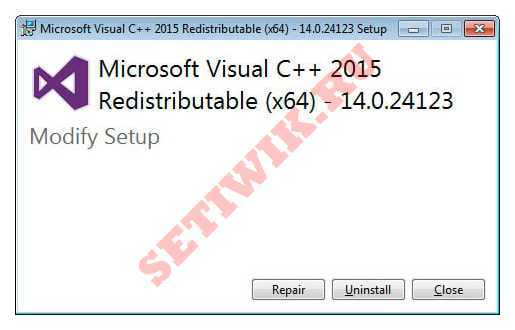
Если у вас уже был установлен Microsoft Visual C++-2015 Redistributable, и ошибка появляется. Тогда вам надо загрузить вышеупомянутый файл, но на этот раз выполнить ремонт нажав кнопку «Repair» (Ремонт).
Теперь вы можете попытаться запустить программу, которая ранее выдавала ошибку, и она должна работать. Если вдруг у вас так же появляется ошибка «Запуск программы невозможен так как на компьютере отсутствует api-ms-win-crt-convert-l1-1-0.dll». Тогда используйте следующий совет по устранению этой ошибки.
Вариант 2: Исправления ошибки «Запуск программы невозможен так как на компьютере отсутствует api-ms-win-crt-convert-l1-1-0.dll»
В этом варианте нам потребуется утилита scannow. Эта утилита сканирует все системные файлы в Windows и устраняет неисправности ОС.
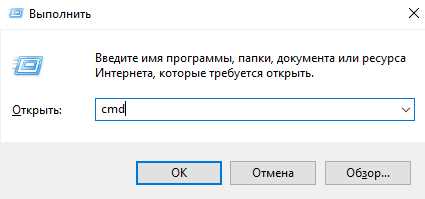
- Откройте «cmd» (Командную Строку), для этого нажмите горячие клавиши «CTRL+R«, введите команду cmd и нажмите Enter).

открытие cmd (командной строки) - Теперь введите команду «sfc /scannow» и нажмите Enter.

вызов команды scannow Внимание: может потребоваться запустить командную строку от имени администратора.
- Во время сканирования система может предложить вам подтвердить или отклонить действие. Рекомендуем вам соглашаться с тем, что спрашивает утилита scannow.
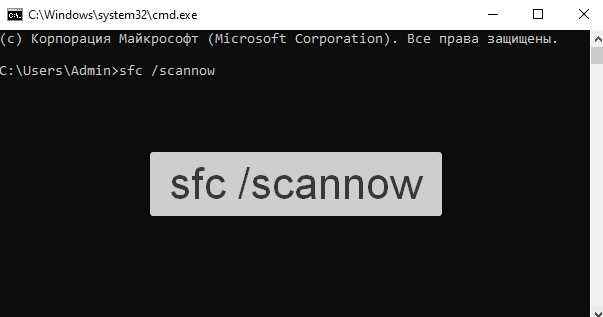
Так как во время сканирования система обнаруживает несоответствия в системных файлах и пытается извлечь их из кэша. Если эти файлы не найдены в кэше, вставьте дискету или USB-накопитель с Windows, которая установлена на вашем компьютере. Если проблема была в этом, то она должна исчезнуть после выполнения описанных выше действий.
Заключение
Надеюсь наше руководство помогло вам исправить ошибку api-ms-win-crt-convert-l1-1-0 dll. Если вы устраняли эту ошибку другими способами или у вас полезная информация по этой ошибке, напишите нам в комментариях. А так же если не получилось устранить ошибку свяжитесь с нами через комментарии. Мы постараемся помочь.
При попытке открыть какую-нибудь программу: видеоредактор, мессенджер, текстовый процессор и т. п., может появиться уведомление об отсутствии «api-ms-win-crt» (иногда пишется с окончанием «runtime-l1-1-0.dll»). Причём неважно, было ли это ПО компонентом Windows или вы установили его отдельно.
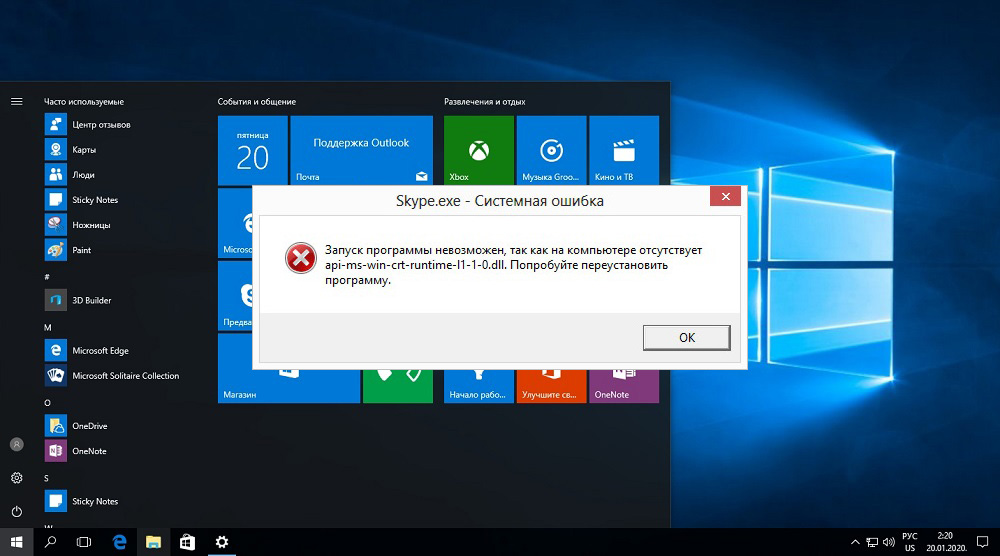
Причины появления ошибки
Если вы увидели подобное сообщение, это необязательно означает реальное отсутствие файла api-ms-win-crt-runtime – скорее, можно заподозрить, что программа просто не смогла с ним связаться. Если говорить простым языком, то искомый .dll является фрагментом динамической библиотеки, то есть такого набора служб, которым может воспользоваться любая программа, чтобы подключиться к графическому адаптеру, памяти, дискам и другим необходимым ресурсам ПК. Если бы подобной системы не было, в каждый пакет ПО пришлось бы добавлять различные компоненты управления для связи с ОС. Разумеется, если софт обратился к библиотеке, а она не ответила, запуск невозможен.
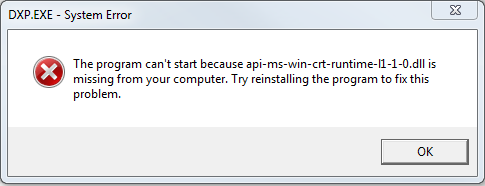
Причинами появления ошибки отсутствующего приложения могут быть:
- внезапное и некорректное отключение компьютера (выдернули из розетки, отключился свет и т. п.);
- вирус, заразивший систему;
- нарушение структуры записей или сбой в функционировании реестра Windows;
- ошибки винчестера или его механическое повреждение (при падении, ударе, перегреве);
- dll устарел;
- какая-нибудь программа модернизировала или уничтожила файл;
- запускаемая программа была установлена неправильно и не может взаимодействовать с библиотекой.
Методы исправления
Установить причину, по которой ошибка возникает, не всегда возможно. Поэтому пользователю рекомендуется поочередно выполнять следующие рекомендации:
- Вручную установить библиотеку Visual C++.
- Проверить наличие обновлений для Windows, произвести их установку.
- Выполнить переустановку программы, при запуске которой возникает ошибка.
- Вручную зарегистрировать DLL-библиотеку в реестре.
- Выполнить проверку (верификацию) системных библиотек Windows.
- Провести сканирование системы антивирусным ПО.
В 99% случаев указанные рекомендации позволяют избавиться от ошибки.
Установка библиотеки Visual C++dll
Microsoft Visual C++ является инструментом для разработки приложений под Windows. И чтобы программа, разработанная с использованием указанных API, нормально работала, нужно предварительно в Windows установить соответствующую библиотеку. Она распространяется бесплатно, скачать её можно на официальном сайте Microsoft по ссылке (для Windows 10, 8, 7, установочный файл нужно подбирать по разрядности используемой ОС). Стоит учесть, что необходимо устанавливать отдельно пакеты для Visual C++ версий за 2008, 2012, 2013, 2015 года (все библиотеки доступны для загрузки по вышеуказанной ссылке).
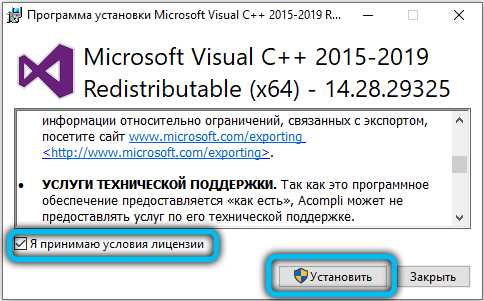
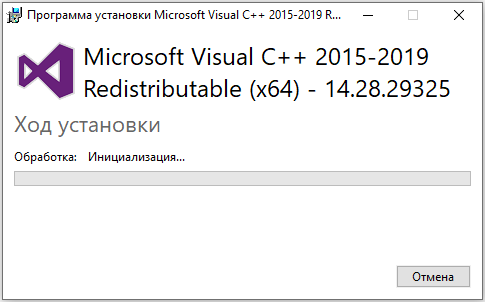
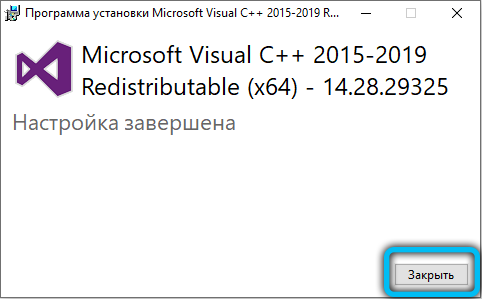
Если при запуске установочного файла появляется диалоговое окно с утверждением, что пакет уже установлен в систему, то следует выбрать «Переустановить» (Re-Install). А вот пользователям Windows 10 все эти библиотеки устанавливаются автоматически, если включено обновление системы.
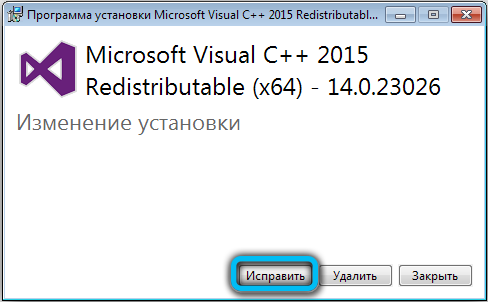
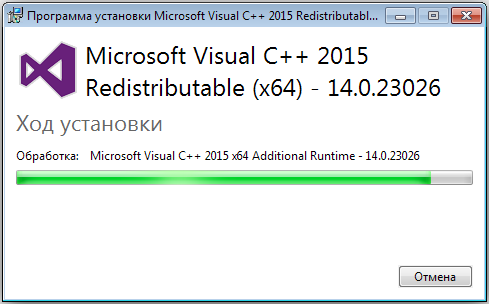
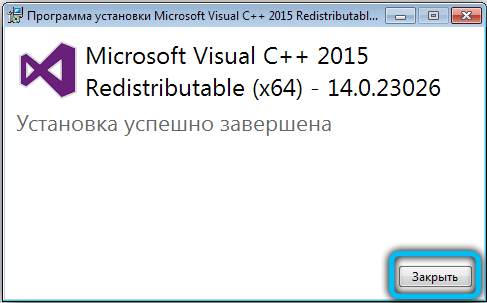
Проверка наличия обновлений для Windows
Данный способ часто помогает избавиться от ошибки на Windows 7 и 8. Пользователю следует убедиться, что у него установлено обновление с индексом KB2999226. Именно в нём содержится пакет правок, необходимых для запуска Visual C++ последних редакций. В Windows 10 это исправление интегрировано уже в установочный образ.
Для проверки наличия обновлений потребуется:
Переустановка программы, при запуске которой возникает ошибка
Если вышеуказанные рекомендации не помогают, то следует выполнить переустановку проблемного приложения. В процессе инсталляции программа повторно прописывает свои данные в реестре и, соответственно, «подхватывает» обновлённые библиотеки C++, необходимые для её нормальной работы.
Регистрация DLL-библиотеки в реестре
Вполне возможно, что пакет Visual C++ установлен в Windows, но сведения о библиотеке не прописаны в реестре. Чаще всего такое бывает после заражения компьютера вирусами, которые производят модификацию записей реестра (чтобы «замаскироваться» под системные файлы), а также после использования утилит для очистки системы от мусора (AuslogicsBootSpeed, AshampooStudio и так далее).
Итак, для регистрации библиотеки потребуется:
После обязательно перезагрузить ПК.
Верификация системных библиотек Windows
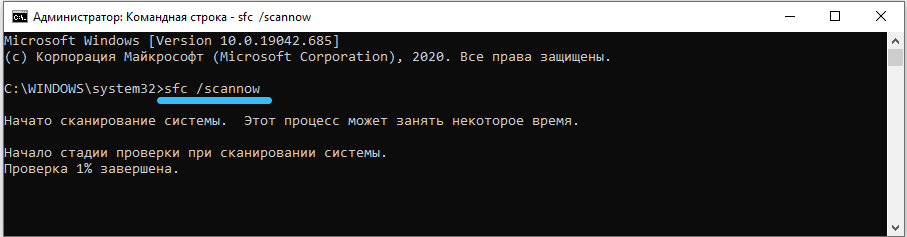
Повреждение системных файлов тоже может спровоцировать возникновение ошибки. И для таких случаев в Windows интегрирована утилита для автоматической верификации системных библиотек. Для её запуска потребуется открыть командную строку и ввести команду sfc /scannow (запускать обязательно от имени Администратора). В том случае, если при сканировании будут обнаружены модифицированные или поврежденные файлы, то в дальнейшем рекомендуется произвести переустановку ОС, а также проверку жёсткого диска (с помощью VictoriaHDD или MHDD — они позволяют обнаружить «битые» секторы на винчестере).
Сканирование антивирусом
Существует масса вирусов, которые в операционную систему интегрируются путём замены системных библиотек на модифицированные. И при попытке переустановить Visual C++ вирусное ПО инсталлированные пакеты сразу же тоже подменяет на заражённые.
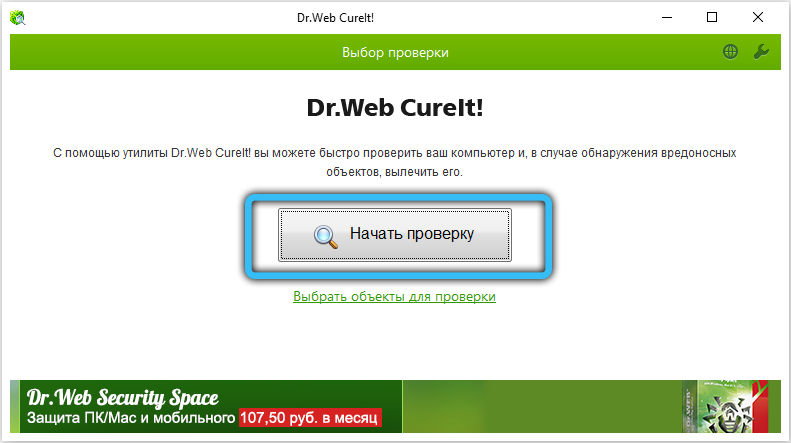
Бесплатно провести сканирование ОС, а также удалить все вирусы, заражённые файлы можно с помощью следующих программ:
- Dr.Web CureIt!;

- Kaspersky Virus Removal Tool;
- AVZ;
- ADW Cleaner;
- ESET Online Scanner.
Если ничего не помогает
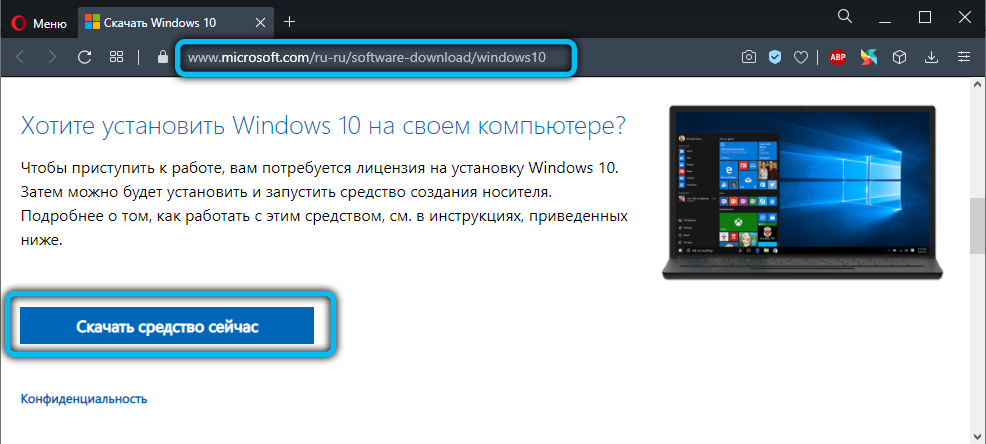
В таких случаях единственное верное решение — это полная переустановка системы. И сразу после этого следует установить все имеющиеся для её обновления (а также включить их автоматическую загрузку по расписанию). И устанавливать Windows рекомендуется именно с оригинального образа! В разного рода сторонних сборках нередко добавляют модифицированные системные библиотеки, из-за чего ошибка с api-ms-win-crt-runtime-l1-1-0.dll также может возникать! Скачать установочные образы бесплатно можно по ссылке (ключ активации нужно приобретать отдельно или использовать ранее купленный).
Действенность этих методов проверяется путём последовательного выполнения каждого пункта. Выявили и изолировали вирусы – перезагрузите ПК и попробуйте открыть программу, которая не отвечала. Если ситуация не изменилась, переходите к следующему совету.
Восстановление системы и регистрация файла не случайно описаны последними – это крайние меры, к которым целесообразно прибегнуть только когда ничто не помогло. Если все способы оказались бесполезными или сочетаются с другими ошибками, придётся ставить другую ОС (нелишней также будет проверка физического состояния винчестера).
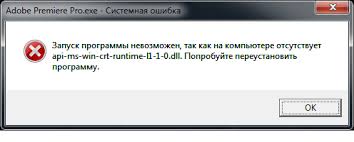
Многие пользователи операционной системы Windows при попытке запустить программу сталкиваются с сообщением «Запуск программы невозможен, так как на компьютере отсутствует api-ms-win-crt-runtime-l1-1-0.dll. Попробуйте переустановить программу». Текст сообщения может быть немного другим, но суть в том, что файла api-ms-win-crt-runtime-l1-1-0.dll нет, и поэтому запуск какой-то программы невозможен.
- Суть ошибки
- Как файл туда попадает
- Почему он отсутствует
- Как исправить
- Способ 1. Установите обновления Windows
- Способ 2. Установите распространяемый пакет Microsoft Visual C++ 2017
- Способ 3. Переустановите приложение, вызвавшее ошибку
- Способ 4. Запустите антивирус
- Способ 5. Скачайте файл в интернете
- Способ 6. Восстановите систему, откатив ее к точке в прошлом
Суть ошибки
Дело в том, что программы, написанные на языке программирования С, требуют для работы распространяемый пакет Microsoft Visual С++. Поскольку на языке С пишут только программы для операционной системы Windows, с этой ошибкой сталкиваются исключительно пользователи Windows любой версии: будь то XP, Vista, 7, 8 или 10. Что представляет собой этот распространяемый пакет: просто набор файлов со странными названиями и расширением dll, среди которых в том числе есть и наш файл api-ms-win-crt-runtime-l1-1-0.dll . Этот пакет можно рассматривать как вспомогательное средство, необходимое для работы программ на С. Файлы этого пакета файлы кладутся в системную папку Windows: C:WindowsSystem32 или C:WindowsSysWOW64 . У меня на 64-разрядной системе Windows 7 он находится в обеих папках, я выложила, можете скачать его. (только не уверена, что он подойдет именно под вашу версию Windows).
Как файл туда попадает
Обычно этот пакет устанавливает сама программа, требующая для своей работы пакета Microsoft Visual С++, то есть программа, написанная на С. При установке программа проверяет, есть этот пакет или нет в системе, и при необходимости ставит его – все файлы пакета, в том числе и файл api-ms-win-crt-runtime-l1-1-0.dll.
Наличие этого пакета Вы и сами можете проверить у себя в панели управления в окне «Программы и компоненты». У меня нашлось даже несколько версий пакета.
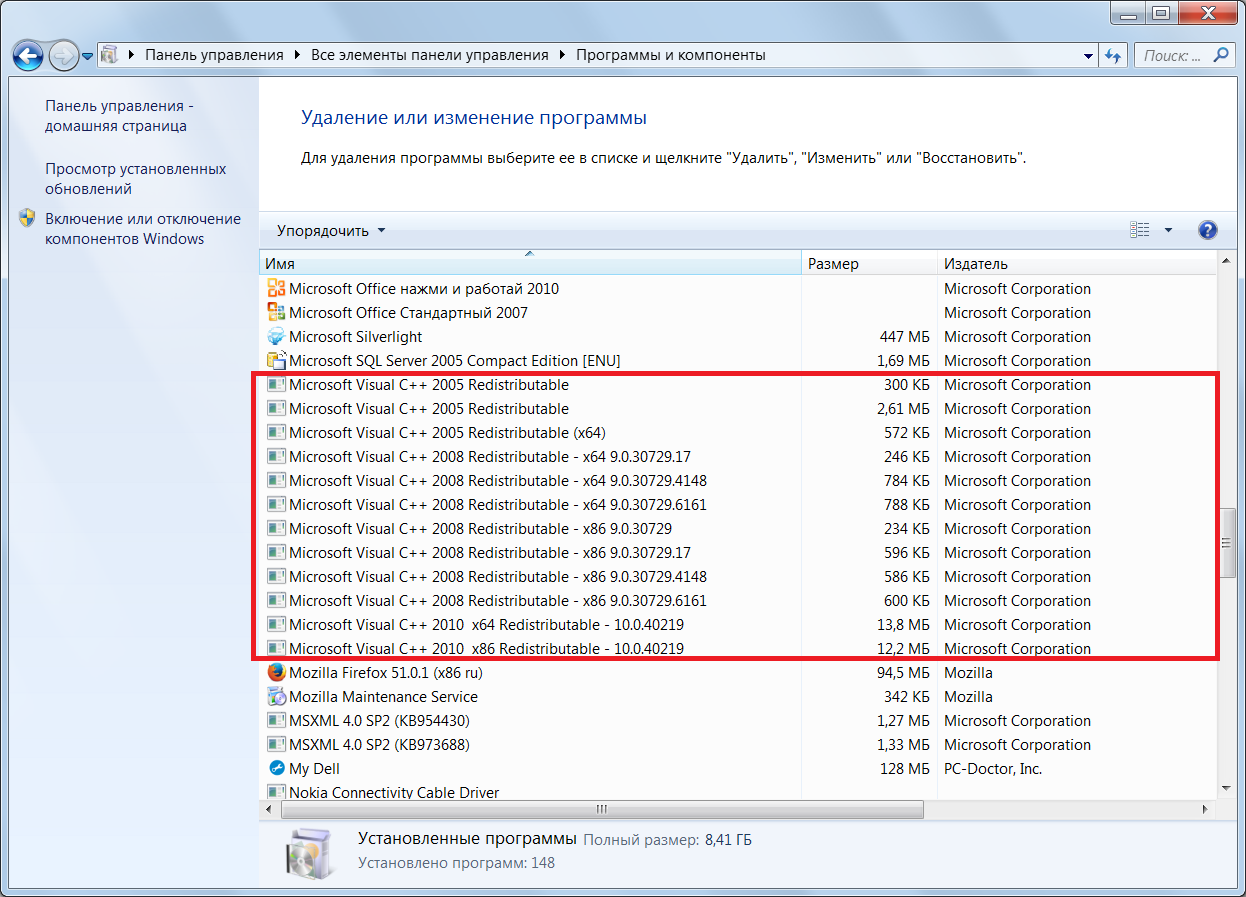
Кроме того, api-ms-win-crt-runtime-l1-1-0.dll поставляется с обновлением операционной системы Windows, поскольку и система Windows, и наш пакет – это продукт разработки одной компании Майкрософт. Так что Майкрософт может позаботиться, чтобы файл был на месте любым из двух способом.
Почему он отсутствует
Если столько вариантов попадания файла в систему, то почему же он все-таки отсутствует, и программа выдает ошибку? Наверняка сказать нельзя, причин пропажи файла может быть несколько.
- Внезапное отключение электропитания, вызвавшее повреждение файла.
- Вирусы.
- Системные утилиты, модифицировавшие либо удалившие файл случайно или намеренно.
- Любые проблемы с жестким диском, повреждения и т.п.
- Ошибки реестра системы.
- Версия файла устарела и почему-то не обновилась.
Как исправить
Итак, мы выяснили, что файл может попасть в систему с обновлениями системы Windows и при установке распространяемого пакет Microsoft Visual С++ (отдельно или вместе с требующей его программой). Логично, что для установки файла нужно либо поставить обновления Windows, либо распространяемый пакет Microsoft Visual С++. Можно, конечно, скачать этот файл из интернета и положить в системную папку, но не факт, что он подойдет под вашу версию системы, к тому же для неопытного пользователя это слишком опасно, так на деле файл с таким названием, скачанный неизвестно откуда, может оказаться вирусным. К тому же если поврежден этот файл, вполне может оказаться, что и с другими файлами пакета не все в порядке. Поэтому начнем с нормальных способов.
Способ 1. Установите обновления Windows
- Выберите в меню Пуск -> Панель управления –> Центр обновления Windows.
- Проверьте систему на наличие обновлений.
- Установите все доступные обновления.
- После установки обновлений перезапустите компьютер.
- После перезагрузки повторите шаги 1-4 до тех пор, пока все обновления не будут установлены.
Необходимое нам обновление идет под номером KB2999226 для Windows Server 2008/Vista/Server 2008 R2/8.1.
Чтобы установить это обновление, необходимо иметь установленный накопительный пакет обновления для Windows RT 8.1, Windows 8.1 и Windows Server 2012 R2 (2919355), выпущенный в апреле 2014, на компьютерах с операционной системой Windows 8.1 или Windows Server 2012 R2. Либо пакет обновления 1 на компьютерах с операционной системой Windows 7 или Windows Server 2008 R2. Либо пакет обновления 2 на компьютерах с операционной системой Windows Vista или Windows Server 2008. Чтобы не вам не вникать в эти тонкости, я посоветовал просто установить все обновления.
Способ 2. Установите распространяемый пакет Microsoft Visual C++ 2017
- Для 64-разрядной системы Windows он находится тут.
- Для 32-разрядной системы Windows — Visual C++ Redistributable for Visual Studio 2017 (32-bit)
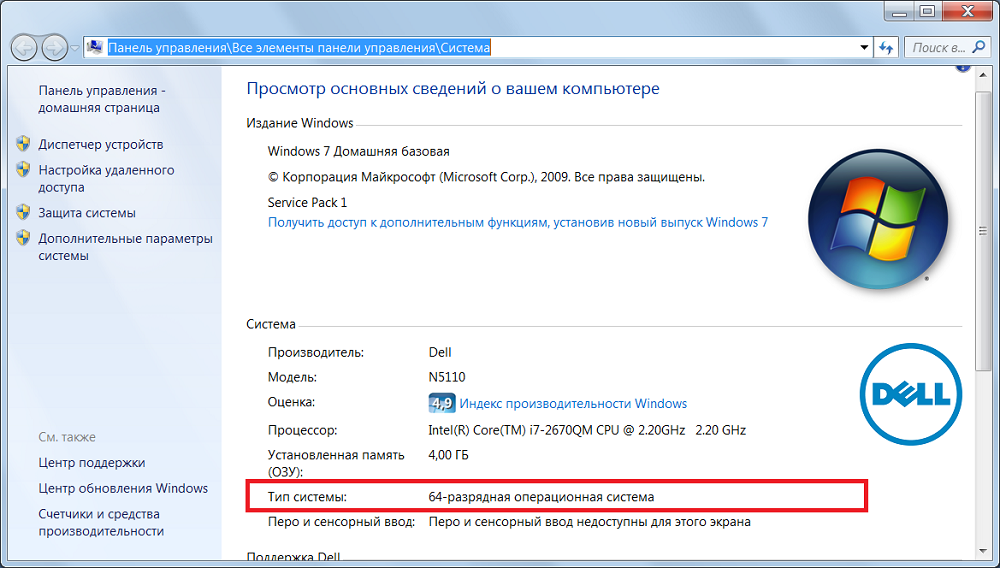
Узнать разрядность своей системы вы можете в проводнике. Для этого щелкните правой кнопкой мыши на «Компьютер», в меню выберите «Свойства» и посмотрите свойства системы. Разрядность выделена красным.
Способ 3. Переустановите приложение, вызвавшее ошибку
Может быть, ошибка возникла при установке самого приложения, которое выдает ошибку. Возможно нужный файл не был скопирован. Или файл есть, но работа с ним идет некорректно, и приложение врет, что файла нет. Попробуйте переустановить приложение. Возможно при установке этот файл будет скопирован на компьютер еще раз. После переустановки запустите приложение и узнайте, исчезла ли проблема.
Способ 4. Запустите антивирус
Возможно наш файл поврежден вирусом. Запустите антивирус, подтвердите удаление зараженных файлов. Но если среди них был удален и наш файл, придется его снова установить способом 1 или 2.
Способ 5. Скачайте файл в интернете.
Как уже было сказано, это опасно, так как можно занести вирусы, скачав системный файл из непроверенного источника. Но если вы все-таки решили это сделать, мало скачать файл и положить его в системную папку. Надо еще зарегистрировать файл в реестре. Итак
- Найдите и скачайте файл api-ms-win-crt-runtime-l1-1-0.dll из сети.
- Закиньте его в директорию C:/Windows/System32 или в C/Windows/SysWOW64(для 64-битной системы его нужно вложить в обе директории).
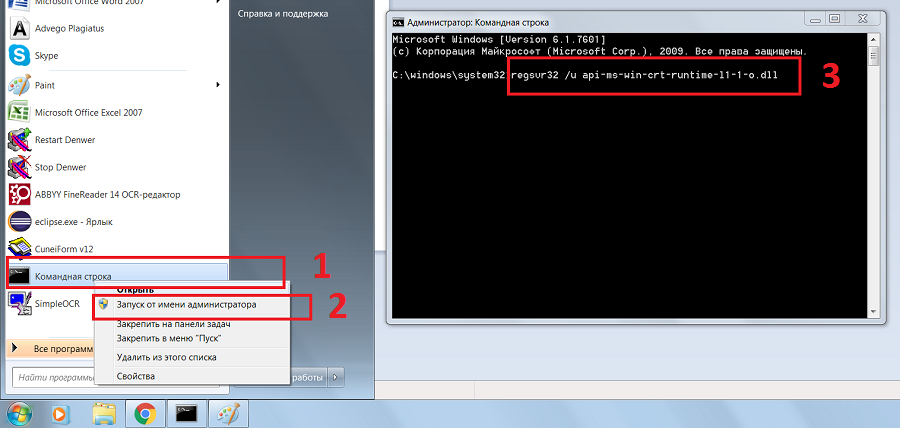
- Теперь зарегистрируем в реестре. Запустите консоль от имени администратора. Для этого выберите в меню «Пуск» программу «Командная строка», щелкнув ее правой кнопкой мыши. Появится контекстное меню. Выберите в нем «Запуск от имени администратора»

- В открывшейся «Командной строке» впишите команду regsvr32 /u api-ms-win-crt-runtime-l1-1-0.dll
- Потом впишите regsvr32 /i api-ms-win-crt-runtime-l1-1-0.dll
- Перезагрузите компьютер.
Способ 6. Восстановите систему, откатив ее к точке в прошлом.
Если раньше все работало, а теперь не работает, то систему можно откатить к состоянию «как раньше» — 2 час назад, день, два, неделю назад. При этом исчезнут все изменения системы, сделанные за последнее время.
- Выберите в меню Пуск -> Панель управления –> Восстановление
- Щелкните «Запуск восстановления».
- Выберите дату в прошлом, когда все работало. Система будет приведена к этой дате.
Итак, мы рассмотрели шесть способов устранения ошибки Api-ms-win-crt-runtime-l1-1-0.dll отсутствует — как исправить. Основными, конечно, являются первые два. Надеюсь, один из способов поможет вам устранить ошибку.
И напоследок конкретный пример устранения ошибки в игре Mafia 3.