
Ошибка с кодом 0xA00F4271, также может быть связана с <MediaCaptureFailedEvent>, 0x80070018 и др., относится к тем проблемам, которые очень сложно поддаются исправлению. Есть много пользователей, которые сталкиваются с ней при попытке запустить свою встроенную камеру несколько лет подряд. При этом технические специалисты отмалчиваются, не давая каких-то конкретных методов исправления. На основании пользовательских отчетов мы заметили, что проблема часто всплывает либо при использовании старой внешней веб-камеры, либо после замены встроенной камеры на ноутбуке. Вероятно, это и есть главная причина – устаревание оборудования или использование неофициальных комплектующих. Что интересно, ошибка появляется как на компьютерах с Windows 10, так и на смартфонах на аналогичной операционной системе. Вот все, что нам удалось узнать об ошибке.
Что делать при ошибке 0xa00f4271?
Сразу отметим, что схватка с ошибкой 0xa00f4271 в Windows 10 неравная и преимущество не в нашу пользу. Некоторые люди не могут исправить сбой никакими способами. Однако есть и те, кому повезло больше, и у них сработала одна из следующих процедур:
- Удалить веб-камеру из «Диспетчера устройств» и перезагрузить компьютер. После повторного подключения она может заработать исправно.
- Удалить проблемные обновления. Есть сведения, что сбой спровоцировали некоторые обновления безопасности. Пользователи указывают на KB4537572 и KB4552152. Стоит попробовать удалить их (через инструмент «Программы и компоненты», а затем проверить, есть ли эффект.
- Отредактировать реестр. Следует перейти по пути HKEY_LOCAL_MACHINE/SOFTWARE/WOW6432Node/Microsoft/Windows Media Foundation. Находясь в папке Windows Media Foundation, нажимаем правой кнопкой мыши по рабочей области справа и выбираем «Создать» – «Параметр DWORD 32-bit». Указываем в поле имя – EnableFrameServerMode и задаем значение 0.
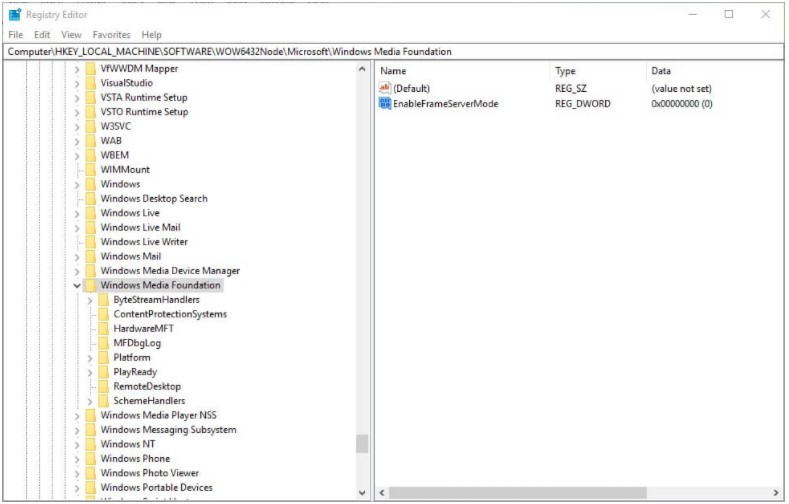
- Установить новый драйвер. Только загружайте его с официального источника, сперва попробовав самую новую версию. Возможно, если не сработает, можно попытать счастье и со сравнительно старыми драйверами.
Похоже, ошибка 0xA00F4271 в Windows связана с недоработкой Microsoft или ее намеренными действиями по запрету на использование неофициального оборудования. Стоит попробовать подключить внешнюю камеру, если речь идет о встроенной и проверить ее поведение.
Если вы обладаете хоть какими-нибудь полезными данными, опишите свою ситуацию в комментариях. Возможно, общими усилиями мы сможем все-таки найти решение или хотя бы обходной путь, который будет работать у всех.
Discus and support Error: 0xA00F4271 0x80070018 when trying to access built-in Camera in Windows 10 Software and Apps to solve the problem; I’m using an Acer predator laptop 2018. After updating to the latest windows my camera stopped working and is showing error code:…
Discussion in ‘Windows 10 Software and Apps’ started by RishiRoopen, Mar 30, 2020.
-
Error: 0xA00F4271 0x80070018 when trying to access built-in Camera
I’m using an Acer predator laptop 2018. After updating to the latest windows my camera stopped working and is showing error code: 0xA00F4271<MediaCaptureFailedEvent> 0x80070018
I’ve had this problem for around a year now
Model No. : PH315-51-510T
Built Version of Windows: Version 1909 OS Built 18363.720
No changes have been made to my laptop
I’ve also run the troubleshoot that was suggested by an article on Microsoft help page

-
built-in camera not working
I’m using an Acer predator laptop 2018. After updating to the latest windows my camera stopped working and is showing error code: 0xA00F4271<MediaCaptureFailedEvent> (0x80070018)
I’ve had this problem for around a year now
-
Microsoft Lifecam Studio — error code 0xA00F4271(0x80070018)
Like some other people, I get error code 0xA00F4271(0x80070018) when I try to use my Microsoft Lifecam Studio with the Windows Camera App. The camera also doesn’t work with Skype or Adobe products.
I am on Windows version 1607 (OS Build 14393.351)
I have tried all the suggested fixes and none of them have fixed the issue:
1. Checking for updates
2. Deleting the device from device manager & redetecting
3. Restarting my computer
4. Trying different USB ports
5. Changing USB root hub power management settings
6. Testing camera on another computer to verify it is not a hardware problem with the camera
-
Error: 0xA00F4271 0x80070018 when trying to access built-in Camera
when i open cam it dosnt work and gives an error code 0xA00F4271<mediacapturedfailedevent>(0x80070018)
when i open cam it dosnt work and gives an error code 0xA00F4271<mediacapturedfailedevent>(0x80070018)

Error: 0xA00F4271 0x80070018 when trying to access built-in Camera
-
Error: 0xA00F4271 0x80070018 when trying to access built-in Camera — Similar Threads — Error 0xA00F4271<MediaCaptureFailedEvent> 0x80070018
-
Error: 0xA00F4271<MediaCaptureFailedEvent> 0x80070018
in Windows 10 Software and Apps
Error: 0xA00F4271<MediaCaptureFailedEvent> 0x80070018: How to fix the camera?https://answers.microsoft.com/en-us/windows/forum/all/error-0xa00f4271mediacapturefailedevent-0x80070018/4a12053c-4d1d-4733-93ab-bbb0f12e73bb
-
Error: 0xA00F4271<MediaCaptureFailedEvent> 0x80070018 when trying to access built-in Camera
in Windows 10 Gaming
Error: 0xA00F4271<MediaCaptureFailedEvent> 0x80070018 when trying to access built-in Camera: I’m using an Asus tuf A152021 laptop . After updating to the latest windows my camera stopped working and is showing error code: 0xA00F4271<MediaCaptureFailedEvent> 0x80070018Laptop is just 1 week old …. -
Error: 0xA00F4271<MediaCaptureFailedEvent> 0x80070018 when trying to access built-in Camera
in Windows 10 Software and Apps
Error: 0xA00F4271<MediaCaptureFailedEvent> 0x80070018 when trying to access built-in Camera: I’m using an Asus tuf A152021 laptop . After updating to the latest windows my camera stopped working and is showing error code: 0xA00F4271<MediaCaptureFailedEvent> 0x80070018Laptop is just 1 week old …. -
Error: 0xA00F4271<MediaCaptureFailedEvent> 0x80070018 when trying to access built-in Camera
in Windows 10 Installation and Upgrade
Error: 0xA00F4271<MediaCaptureFailedEvent> 0x80070018 when trying to access built-in Camera: I’m using an Asus tuf A152021 laptop . After updating to the latest windows my camera stopped working and is showing error code: 0xA00F4271<MediaCaptureFailedEvent> 0x80070018Laptop is just 1 week old …. -
0xA00F4271<MediaCaptureFailedEvent>0x80070018
in Windows 10 Software and Apps
0xA00F4271<MediaCaptureFailedEvent>0x80070018: As you can see in the images i uploaded I removed the screen and bevel that was attached to my Hp laptop, the webcam is now a dangling wire that lays on the keyboard, It still worked i could access the camera app, but then the picture quality started to detriment further, not… -
Error: 0xA00F4271<MediaCaptureFailedEvent> 0x80070018 on built-in Camera
in Windows 10 Software and Apps
Error: 0xA00F4271<MediaCaptureFailedEvent> 0x80070018 on built-in Camera: When I open the built in camera, this error code ‘0xA00F4271<MediaCaptureFailedEvent> 0x80070018’ comes and the camera has never worked ever since I bought the laptop.It is an inbuilt camera by Microsoft and my laptop is:
Product name: HP Laptop 14-bp0xx
Serial…
-
Camera App Error 0xA00F4271<MediaCaptureFailedEvent> 0x80070018
in Windows 10 Software and Apps
Camera App Error 0xA00F4271<MediaCaptureFailedEvent> 0x80070018: I own an HP Omen Laptop running Windows 10 Version 1909. It has an inbuilt webcam.Whenever I open the Camera App, it shows the error 0xA00F4271<MediaCaptureFailedEvent> 0x80070018
I checked the Device Manager and it doesn’t have Imaging Devices listed. It does have a…
-
Error: 0xA00F4271<MediaCaptureFailedEvent> 0x80070018
in Windows 10 Software and Apps
Error: 0xA00F4271<MediaCaptureFailedEvent> 0x80070018: I use an Acer Predator Helios 300 core i5 7th gen laptop. The built-in camera app is showing <MediaCaptureFailedEvent> error. I followed all the steps in «Camera doesn’t work in Windows 10» but the issue still remains. During this quarantine period, most of the work is done… -
Error Code: 0xA00F4271<MediaCaptureFailedEvent> 0x80070018 — Web Camera not working
in Windows 10 Software and Apps
Error Code: 0xA00F4271<MediaCaptureFailedEvent> 0x80070018 — Web Camera not working: I’m getting the error code 0xA00F4271<MediaCaptureFailedEvent> 0x80070018, unable to use my webcam, but have tried all updates and installations, am using HP Envy 15t laptop, also used to try with external camera also and not working, removed some recent window updates also,…
Users found this page by searching for:
-
error cámara 0xa00f4271 0x80070018
,
-
mediacapturefailedevent 0x80070018
,
-
Error: 0xA00F4271<MediaCaptureFailedEvent> (0x80070018) when trying to access built-in Camera
,
- media capture failed event 0x80070018,
- teams video error media capture failed event,
- mediacapture failevent,
- 0xa00f4271 mediacapture failed event 0x80070018,
- 0x80070018,
- 0xA00F4271(0X80070018),
- 0xa00f4271<mediacapturefailedevent> (0x80070018),
- error code 0xa00f4271 mediacapturefailedevent 0x80070018,
- error 0xa00f4271(0x80070018),
- media capture failed event,
- media capture failed event 0xa00f4271 ,
- teams mediacapturefailedevent

I have dedicated Windows Server 2008 64bit R2 and I want to get Windows Backup from the server and it prompts me the errors as shown below.
Also the Indexing Service does not working right now.
I think installing Acronis causes those problems.
I installed Acronis Backup & Recovery 10 for server (trial version).
Then the problems appears on the server. So, I’ve uninstalled Acronis, but the problems still exist on the server.
Would you please help me to resolve the issue?
Please visit Link :
http://www.golpesar.com/error.jpg
Event Log Error Details
:
1-
Volume Shadow Copy Service error: Unexpected error calling routine XML document is too long. hr = 0x80070018, The program issued a command but the command length is incorrect.
.
Operation:
Writer Exposing its Metadata
Context:
Execution Context: Requestor
Writer Instance ID: {A3561209-02EC-41AA-8EC0-0DE36B7B3B7A}
Writer Class Id: {E8132975-6F93-4464-A53E-1050253AE220}
Writer Name: System Writer
— System
— Provider
[ Name] VSS
— EventID 8193
[ Qualifiers] 0
Level 2
Task 0
Keywords 0x80000000000000
— TimeCreated
[ SystemTime] 2010-11-15T08:38:27.000000000Z
EventRecordID 3618476
Channel Application
Computer
Security
— EventData
XML document is too long
0x80070018, The program issued a command but the command length is incorrect.
Operation: Writer Exposing its Metadata Context: Execution Context: Requestor Writer Instance ID: {A3561209-02EC-41AA-8EC0-0DE36B7B3B7A} Writer Class Id: {E8132975-6F93-4464-A53E-1050253AE220} Writer
Name: System Writer
2-
Volume Shadow Copy Service error: Unexpected error calling routine CreateVssExamineWriterMetadata. hr = 0x80042302, A Volume Shadow Copy Service component encountered an unexpected error.
Check the Application event log for more information.
.
Operation:
Writer Exposing its Metadata
Context:
Execution Context: Requestor
Writer Instance ID: {A3561209-02EC-41AA-8EC0-0DE36B7B3B7A}
Writer Class Id: {E8132975-6F93-4464-A53E-1050253AE220}
Writer Name: System Writer
— System
— Provider
[ Name] VSS
— EventID 8193
[ Qualifiers] 0
Level 2
Task 0
Keywords 0x80000000000000
— TimeCreated
[ SystemTime] 2010-11-15T08:38:27.000000000Z
EventRecordID 3618477
Channel Application
Computer
Security
— EventData
CreateVssExamineWriterMetadata
0x80042302, A Volume Shadow Copy Service component encountered an unexpected error. Check the Application event log for more information.
Operation: Writer Exposing its Metadata Context: Execution Context: Requestor Writer Instance ID: {A3561209-02EC-41AA-8EC0-0DE36B7B3B7A} Writer Class Id: {E8132975-6F93-4464-A53E-1050253AE220} Writer
Name: System Writer
-3
The backup operation that started at ‘ 2010 — 11 — 15T08:37:24.727715800Z’ has failed with following
error code ‘2155347997’ (The operation ended before completion.). Please review the event details for a solution, and then rerun the backup operation once the issue is resolved.
— System
— Provider
[ Name] Microsoft-Windows-Backup
[ Guid] {1DB28F2E-8F80-4027-8C5A-A11F7F10F62D}
EventID 517
Version 0
Level 2
Task 0
Opcode 0
Keywords 0x8000000000000000
— TimeCreated
[ SystemTime] 2010-11-15T08:38:28.123341800Z
EventRecordID 3618478
Correlation
— Execution
[ ProcessID] 14976
[ ThreadID] 9384
Channel Application
Computer
— Security
[ UserID] S-1-5-18
— EventData
BackupTime 2010-11-15T08:37:24.727715800Z
ErrorCode 2155347997
ErrorMessage %%2155347997
vssadmin list writers
vssadmin 1.1 — Volume Shadow Copy Service administrative command-line tool
(C) Copyright 2001-2005 Microsoft Corp.
Writer name: ‘Task Scheduler Writer’
Writer Id: {d61d61c8-d73a-4eee-8cdd-f6f9786b7124}
Writer Instance Id: {1bddd48e-5052-49db-9b07-b96f96727e6b}
State: [1] Stable
Last error: No error
Writer name: ‘VSS Metadata Store Writer’
Writer Id: {75dfb225-e2e4-4d39-9ac9-ffaff65ddf06}
Writer Instance Id: {088e7a7d-09a8-4cc6-a609-ad90e75ddc93}
State: [1] Stable
Last error: No error
Writer name: ‘Performance Counters Writer’
Writer Id: {0bada1de-01a9-4625-8278-69e735f39dd2}
Writer Instance Id: {f0086dda-9efc-47c5-8eb6-a944c3d09381}
State: [1] Stable
Last error: No error
Writer name: ‘ASR Writer’
Writer Id: {be000cbe-11fe-4426-9c58-531aa6355fc4}
Writer Instance Id: {fed0b1c6-ac4e-4420-afbb-80e2f1621068}
State: [1] Stable
Last error: No error
Writer name: ‘Shadow Copy Optimization Writer’
Writer Id: {4dc3bdd4-ab48-4d07-adb0-3bee2926fd7f}
Writer Instance Id: {036e82f3-769b-4973-b51e-ee1ffe2cced9}
State: [1] Stable
Last error: No error
Writer name: ‘Registry Writer’
Writer Id: {afbab4a2-367d-4d15-a586-71dbb18f8485}
Writer Instance Id: {0f52af20-2761-494d-b669-0b0399f4c4ff}
State: [1] Stable
Last error: No error
Writer name: ‘COM+ REGDB Writer’
Writer Id: {542da469-d3e1-473c-9f4f-7847f01fc64f}
Writer Instance Id: {32955e27-da48-44dd-9161-b17d6cf6c4a5}
State: [1] Stable
Last error: No error
Writer name: ‘NPS VSS Writer’
Writer Id: {35e81631-13e1-48db-97fc-d5bc721bb18a}
Writer Instance Id: {1a1e158d-c09e-4de9-aef0-4226092009b2}
State: [1] Stable
Last error: No error
Writer name: ‘BITS Writer’
Writer Id: {4969d978-be47-48b0-b100-f328f07ac1e0}
Writer Instance Id: {c38bba7e-8966-4875-803c-f68fbd24f7c9}
State: [1] Stable
Last error: No error
I have dedicated Windows Server 2008 64bit R2 and I want to get Windows Backup from the server and it prompts me the errors as shown below.
Also the Indexing Service does not working right now.
I think installing Acronis causes those problems.
I installed Acronis Backup & Recovery 10 for server (trial version).
Then the problems appears on the server. So, I’ve uninstalled Acronis, but the problems still exist on the server.
Would you please help me to resolve the issue?
Please visit Link :
http://www.golpesar.com/error.jpg
Event Log Error Details
:
1-
Volume Shadow Copy Service error: Unexpected error calling routine XML document is too long. hr = 0x80070018, The program issued a command but the command length is incorrect.
.
Operation:
Writer Exposing its Metadata
Context:
Execution Context: Requestor
Writer Instance ID: {A3561209-02EC-41AA-8EC0-0DE36B7B3B7A}
Writer Class Id: {E8132975-6F93-4464-A53E-1050253AE220}
Writer Name: System Writer
— System
— Provider
[ Name] VSS
— EventID 8193
[ Qualifiers] 0
Level 2
Task 0
Keywords 0x80000000000000
— TimeCreated
[ SystemTime] 2010-11-15T08:38:27.000000000Z
EventRecordID 3618476
Channel Application
Computer
Security
— EventData
XML document is too long
0x80070018, The program issued a command but the command length is incorrect.
Operation: Writer Exposing its Metadata Context: Execution Context: Requestor Writer Instance ID: {A3561209-02EC-41AA-8EC0-0DE36B7B3B7A} Writer Class Id: {E8132975-6F93-4464-A53E-1050253AE220} Writer
Name: System Writer
2-
Volume Shadow Copy Service error: Unexpected error calling routine CreateVssExamineWriterMetadata. hr = 0x80042302, A Volume Shadow Copy Service component encountered an unexpected error.
Check the Application event log for more information.
.
Operation:
Writer Exposing its Metadata
Context:
Execution Context: Requestor
Writer Instance ID: {A3561209-02EC-41AA-8EC0-0DE36B7B3B7A}
Writer Class Id: {E8132975-6F93-4464-A53E-1050253AE220}
Writer Name: System Writer
— System
— Provider
[ Name] VSS
— EventID 8193
[ Qualifiers] 0
Level 2
Task 0
Keywords 0x80000000000000
— TimeCreated
[ SystemTime] 2010-11-15T08:38:27.000000000Z
EventRecordID 3618477
Channel Application
Computer
Security
— EventData
CreateVssExamineWriterMetadata
0x80042302, A Volume Shadow Copy Service component encountered an unexpected error. Check the Application event log for more information.
Operation: Writer Exposing its Metadata Context: Execution Context: Requestor Writer Instance ID: {A3561209-02EC-41AA-8EC0-0DE36B7B3B7A} Writer Class Id: {E8132975-6F93-4464-A53E-1050253AE220} Writer
Name: System Writer
-3
The backup operation that started at ‘ 2010 — 11 — 15T08:37:24.727715800Z’ has failed with following
error code ‘2155347997’ (The operation ended before completion.). Please review the event details for a solution, and then rerun the backup operation once the issue is resolved.
— System
— Provider
[ Name] Microsoft-Windows-Backup
[ Guid] {1DB28F2E-8F80-4027-8C5A-A11F7F10F62D}
EventID 517
Version 0
Level 2
Task 0
Opcode 0
Keywords 0x8000000000000000
— TimeCreated
[ SystemTime] 2010-11-15T08:38:28.123341800Z
EventRecordID 3618478
Correlation
— Execution
[ ProcessID] 14976
[ ThreadID] 9384
Channel Application
Computer
— Security
[ UserID] S-1-5-18
— EventData
BackupTime 2010-11-15T08:37:24.727715800Z
ErrorCode 2155347997
ErrorMessage %%2155347997
vssadmin list writers
vssadmin 1.1 — Volume Shadow Copy Service administrative command-line tool
(C) Copyright 2001-2005 Microsoft Corp.
Writer name: ‘Task Scheduler Writer’
Writer Id: {d61d61c8-d73a-4eee-8cdd-f6f9786b7124}
Writer Instance Id: {1bddd48e-5052-49db-9b07-b96f96727e6b}
State: [1] Stable
Last error: No error
Writer name: ‘VSS Metadata Store Writer’
Writer Id: {75dfb225-e2e4-4d39-9ac9-ffaff65ddf06}
Writer Instance Id: {088e7a7d-09a8-4cc6-a609-ad90e75ddc93}
State: [1] Stable
Last error: No error
Writer name: ‘Performance Counters Writer’
Writer Id: {0bada1de-01a9-4625-8278-69e735f39dd2}
Writer Instance Id: {f0086dda-9efc-47c5-8eb6-a944c3d09381}
State: [1] Stable
Last error: No error
Writer name: ‘ASR Writer’
Writer Id: {be000cbe-11fe-4426-9c58-531aa6355fc4}
Writer Instance Id: {fed0b1c6-ac4e-4420-afbb-80e2f1621068}
State: [1] Stable
Last error: No error
Writer name: ‘Shadow Copy Optimization Writer’
Writer Id: {4dc3bdd4-ab48-4d07-adb0-3bee2926fd7f}
Writer Instance Id: {036e82f3-769b-4973-b51e-ee1ffe2cced9}
State: [1] Stable
Last error: No error
Writer name: ‘Registry Writer’
Writer Id: {afbab4a2-367d-4d15-a586-71dbb18f8485}
Writer Instance Id: {0f52af20-2761-494d-b669-0b0399f4c4ff}
State: [1] Stable
Last error: No error
Writer name: ‘COM+ REGDB Writer’
Writer Id: {542da469-d3e1-473c-9f4f-7847f01fc64f}
Writer Instance Id: {32955e27-da48-44dd-9161-b17d6cf6c4a5}
State: [1] Stable
Last error: No error
Writer name: ‘NPS VSS Writer’
Writer Id: {35e81631-13e1-48db-97fc-d5bc721bb18a}
Writer Instance Id: {1a1e158d-c09e-4de9-aef0-4226092009b2}
State: [1] Stable
Last error: No error
Writer name: ‘BITS Writer’
Writer Id: {4969d978-be47-48b0-b100-f328f07ac1e0}
Writer Instance Id: {c38bba7e-8966-4875-803c-f68fbd24f7c9}
State: [1] Stable
Last error: No error
I have dedicated Windows Server 2008 64bit R2 and I want to get Windows Backup from the server and it prompts me the errors as shown below.
Also the Indexing Service does not working right now.
I think installing Acronis causes those problems.
I installed Acronis Backup & Recovery 10 for server (trial version).
Then the problems appears on the server. So, I’ve uninstalled Acronis, but the problems still exist on the server.
Would you please help me to resolve the issue?
Please visit Link :
http://www.golpesar.com/error.jpg
Event Log Error Details
:
1-
Volume Shadow Copy Service error: Unexpected error calling routine XML document is too long. hr = 0x80070018, The program issued a command but the command length is incorrect.
.
Operation:
Writer Exposing its Metadata
Context:
Execution Context: Requestor
Writer Instance ID: {A3561209-02EC-41AA-8EC0-0DE36B7B3B7A}
Writer Class Id: {E8132975-6F93-4464-A53E-1050253AE220}
Writer Name: System Writer
— System
— Provider
[ Name] VSS
— EventID 8193
[ Qualifiers] 0
Level 2
Task 0
Keywords 0x80000000000000
— TimeCreated
[ SystemTime] 2010-11-15T08:38:27.000000000Z
EventRecordID 3618476
Channel Application
Computer
Security
— EventData
XML document is too long
0x80070018, The program issued a command but the command length is incorrect.
Operation: Writer Exposing its Metadata Context: Execution Context: Requestor Writer Instance ID: {A3561209-02EC-41AA-8EC0-0DE36B7B3B7A} Writer Class Id: {E8132975-6F93-4464-A53E-1050253AE220} Writer
Name: System Writer
2-
Volume Shadow Copy Service error: Unexpected error calling routine CreateVssExamineWriterMetadata. hr = 0x80042302, A Volume Shadow Copy Service component encountered an unexpected error.
Check the Application event log for more information.
.
Operation:
Writer Exposing its Metadata
Context:
Execution Context: Requestor
Writer Instance ID: {A3561209-02EC-41AA-8EC0-0DE36B7B3B7A}
Writer Class Id: {E8132975-6F93-4464-A53E-1050253AE220}
Writer Name: System Writer
— System
— Provider
[ Name] VSS
— EventID 8193
[ Qualifiers] 0
Level 2
Task 0
Keywords 0x80000000000000
— TimeCreated
[ SystemTime] 2010-11-15T08:38:27.000000000Z
EventRecordID 3618477
Channel Application
Computer
Security
— EventData
CreateVssExamineWriterMetadata
0x80042302, A Volume Shadow Copy Service component encountered an unexpected error. Check the Application event log for more information.
Operation: Writer Exposing its Metadata Context: Execution Context: Requestor Writer Instance ID: {A3561209-02EC-41AA-8EC0-0DE36B7B3B7A} Writer Class Id: {E8132975-6F93-4464-A53E-1050253AE220} Writer
Name: System Writer
-3
The backup operation that started at ‘ 2010 — 11 — 15T08:37:24.727715800Z’ has failed with following
error code ‘2155347997’ (The operation ended before completion.). Please review the event details for a solution, and then rerun the backup operation once the issue is resolved.
— System
— Provider
[ Name] Microsoft-Windows-Backup
[ Guid] {1DB28F2E-8F80-4027-8C5A-A11F7F10F62D}
EventID 517
Version 0
Level 2
Task 0
Opcode 0
Keywords 0x8000000000000000
— TimeCreated
[ SystemTime] 2010-11-15T08:38:28.123341800Z
EventRecordID 3618478
Correlation
— Execution
[ ProcessID] 14976
[ ThreadID] 9384
Channel Application
Computer
— Security
[ UserID] S-1-5-18
— EventData
BackupTime 2010-11-15T08:37:24.727715800Z
ErrorCode 2155347997
ErrorMessage %%2155347997
vssadmin list writers
vssadmin 1.1 — Volume Shadow Copy Service administrative command-line tool
(C) Copyright 2001-2005 Microsoft Corp.
Writer name: ‘Task Scheduler Writer’
Writer Id: {d61d61c8-d73a-4eee-8cdd-f6f9786b7124}
Writer Instance Id: {1bddd48e-5052-49db-9b07-b96f96727e6b}
State: [1] Stable
Last error: No error
Writer name: ‘VSS Metadata Store Writer’
Writer Id: {75dfb225-e2e4-4d39-9ac9-ffaff65ddf06}
Writer Instance Id: {088e7a7d-09a8-4cc6-a609-ad90e75ddc93}
State: [1] Stable
Last error: No error
Writer name: ‘Performance Counters Writer’
Writer Id: {0bada1de-01a9-4625-8278-69e735f39dd2}
Writer Instance Id: {f0086dda-9efc-47c5-8eb6-a944c3d09381}
State: [1] Stable
Last error: No error
Writer name: ‘ASR Writer’
Writer Id: {be000cbe-11fe-4426-9c58-531aa6355fc4}
Writer Instance Id: {fed0b1c6-ac4e-4420-afbb-80e2f1621068}
State: [1] Stable
Last error: No error
Writer name: ‘Shadow Copy Optimization Writer’
Writer Id: {4dc3bdd4-ab48-4d07-adb0-3bee2926fd7f}
Writer Instance Id: {036e82f3-769b-4973-b51e-ee1ffe2cced9}
State: [1] Stable
Last error: No error
Writer name: ‘Registry Writer’
Writer Id: {afbab4a2-367d-4d15-a586-71dbb18f8485}
Writer Instance Id: {0f52af20-2761-494d-b669-0b0399f4c4ff}
State: [1] Stable
Last error: No error
Writer name: ‘COM+ REGDB Writer’
Writer Id: {542da469-d3e1-473c-9f4f-7847f01fc64f}
Writer Instance Id: {32955e27-da48-44dd-9161-b17d6cf6c4a5}
State: [1] Stable
Last error: No error
Writer name: ‘NPS VSS Writer’
Writer Id: {35e81631-13e1-48db-97fc-d5bc721bb18a}
Writer Instance Id: {1a1e158d-c09e-4de9-aef0-4226092009b2}
State: [1] Stable
Last error: No error
Writer name: ‘BITS Writer’
Writer Id: {4969d978-be47-48b0-b100-f328f07ac1e0}
Writer Instance Id: {c38bba7e-8966-4875-803c-f68fbd24f7c9}
State: [1] Stable
Last error: No error