
Обработка ошибок увеличивает отказоустойчивость кода, защищая его от потенциальных сбоев, которые могут привести к преждевременному завершению работы.
Прежде чем переходить к обсуждению того, почему обработка исключений так важна, и рассматривать встроенные в Python исключения, важно понять, что есть тонкая грань между понятиями ошибки и исключения.
Ошибку нельзя обработать, а исключения Python обрабатываются при выполнении программы. Ошибка может быть синтаксической, но существует и много видов исключений, которые возникают при выполнении и не останавливают программу сразу же. Ошибка может указывать на критические проблемы, которые приложение и не должно перехватывать, а исключения — состояния, которые стоит попробовать перехватить. Ошибки — вид непроверяемых и невозвратимых ошибок, таких как OutOfMemoryError, которые не стоит пытаться обработать.
Обработка исключений делает код более отказоустойчивым и помогает предотвращать потенциальные проблемы, которые могут привести к преждевременной остановке выполнения. Представьте код, который готов к развертыванию, но все равно прекращает работу из-за исключения. Клиент такой не примет, поэтому стоит заранее обработать конкретные исключения, чтобы избежать неразберихи.
Ошибки могут быть разных видов:
- Синтаксические
- Недостаточно памяти
- Ошибки рекурсии
- Исключения
Разберем их по очереди.
Синтаксические ошибки (SyntaxError)
Синтаксические ошибки часто называют ошибками разбора. Они возникают, когда интерпретатор обнаруживает синтаксическую проблему в коде.
Рассмотрим на примере.
a = 8
b = 10
c = a b
File "", line 3
 c = a b
       ^
SyntaxError: invalid syntax
Стрелка вверху указывает на место, где интерпретатор получил ошибку при попытке исполнения. Знак перед стрелкой указывает на причину проблемы. Для устранения таких фундаментальных ошибок Python будет делать большую часть работы за программиста, выводя название файла и номер строки, где была обнаружена ошибка.
Недостаточно памяти (OutofMemoryError)
Ошибки памяти чаще всего связаны с оперативной памятью компьютера и относятся к структуре данных под названием “Куча” (heap). Если есть крупные объекты (или) ссылки на подобные, то с большой долей вероятности возникнет ошибка OutofMemory. Она может появиться по нескольким причинам:
- Использование 32-битной архитектуры Python (максимальный объем выделенной памяти невысокий, между 2 и 4 ГБ);
- Загрузка файла большого размера;
- Запуск модели машинного обучения/глубокого обучения и много другое;
Обработать ошибку памяти можно с помощью обработки исключений — резервного исключения. Оно используется, когда у интерпретатора заканчивается память и он должен немедленно остановить текущее исполнение. В редких случаях Python вызывает OutofMemoryError, позволяя скрипту каким-то образом перехватить самого себя, остановить ошибку памяти и восстановиться.
Но поскольку Python использует архитектуру управления памятью из языка C (функция malloc()), не факт, что все процессы восстановятся — в некоторых случаях MemoryError приведет к остановке. Следовательно, обрабатывать такие ошибки не рекомендуется, и это не считается хорошей практикой.
Ошибка рекурсии (RecursionError)
Эта ошибка связана со стеком и происходит при вызове функций. Как и предполагает название, ошибка рекурсии возникает, когда внутри друг друга исполняется много методов (один из которых — с бесконечной рекурсией), но это ограничено размером стека.
Все локальные переменные и методы размещаются в стеке. Для каждого вызова метода создается стековый кадр (фрейм), внутрь которого помещаются данные переменной или результат вызова метода. Когда исполнение метода завершается, его элемент удаляется.
Чтобы воспроизвести эту ошибку, определим функцию recursion, которая будет рекурсивной — вызывать сама себя в бесконечном цикле. В результате появится ошибка StackOverflow или ошибка рекурсии, потому что стековый кадр будет заполняться данными метода из каждого вызова, но они не будут освобождаться.
def recursion():
    return recursion()

recursion()
---------------------------------------------------------------------------

RecursionError                            Traceback (most recent call last)

 in
----> 1 recursion()


 in recursion()
      1 def recursion():
----> 2     return recursion()


... last 1 frames repeated, from the frame below ...


 in recursion()
      1 def recursion():
----> 2     return recursion()


RecursionError: maximum recursion depth exceeded
Ошибка отступа (IndentationError)
Эта ошибка похожа по духу на синтаксическую и является ее подвидом. Тем не менее она возникает только в случае проблем с отступами.
Пример:
for i in range(10):
    print('Привет Мир!')
  File "", line 2
    print('Привет Мир!')
        ^
IndentationError: expected an indented block
Исключения
Даже если синтаксис в инструкции или само выражение верны, они все равно могут вызывать ошибки при исполнении. Исключения Python — это ошибки, обнаруживаемые при исполнении, но не являющиеся критическими. Скоро вы узнаете, как справляться с ними в программах Python. Объект исключения создается при вызове исключения Python. Если скрипт не обрабатывает исключение явно, программа будет остановлена принудительно.
Программы обычно не обрабатывают исключения, что приводит к подобным сообщениям об ошибке:
Ошибка типа (TypeError)
a = 2
b = 'PythonRu'
a + b
---------------------------------------------------------------------------

TypeError                                 Traceback (most recent call last)

 in
      1 a = 2
      2 b = 'PythonRu'
----> 3 a + b


TypeError: unsupported operand type(s) for +: 'int' and 'str'
Ошибка деления на ноль (ZeroDivisionError)
10 / 0
---------------------------------------------------------------------------

ZeroDivisionError                         Traceback (most recent call last)

 in
----> 1 10 / 0


ZeroDivisionError: division by zero
Есть разные типы исключений в Python и их тип выводится в сообщении: вверху примеры TypeError и ZeroDivisionError. Обе строки в сообщениях об ошибке представляют собой имена встроенных исключений Python.
Оставшаяся часть строки с ошибкой предлагает подробности о причине ошибки на основе ее типа.
Теперь рассмотрим встроенные исключения Python.
Встроенные исключения
BaseException
 +-- SystemExit
 +-- KeyboardInterrupt
 +-- GeneratorExit
 +-- Exception
      +-- StopIteration
      +-- StopAsyncIteration
      +-- ArithmeticError
      |    +-- FloatingPointError
      |    +-- OverflowError
      |    +-- ZeroDivisionError
      +-- AssertionError
      +-- AttributeError
      +-- BufferError
      +-- EOFError
      +-- ImportError
      |    +-- ModuleNotFoundError
      +-- LookupError
      |    +-- IndexError
      |    +-- KeyError
      +-- MemoryError
      +-- NameError
      |    +-- UnboundLocalError
      +-- OSError
      |    +-- BlockingIOError
      |    +-- ChildProcessError
      |    +-- ConnectionError
      |    |    +-- BrokenPipeError
      |    |    +-- ConnectionAbortedError
      |    |    +-- ConnectionRefusedError
      |    |    +-- ConnectionResetError
      |    +-- FileExistsError
      |    +-- FileNotFoundError
      |    +-- InterruptedError
      |    +-- IsADirectoryError
      |    +-- NotADirectoryError
      |    +-- PermissionError
      |    +-- ProcessLookupError
      |    +-- TimeoutError
      +-- ReferenceError
      +-- RuntimeError
      |    +-- NotImplementedError
      |    +-- RecursionError
      +-- SyntaxError
      |    +-- IndentationError
      |         +-- TabError
      +-- SystemError
      +-- TypeError
      +-- ValueError
      |    +-- UnicodeError
      |         +-- UnicodeDecodeError
      |         +-- UnicodeEncodeError
      |         +-- UnicodeTranslateError
      +-- Warning
           +-- DeprecationWarning
           +-- PendingDeprecationWarning
           +-- RuntimeWarning
           +-- SyntaxWarning
           +-- UserWarning
           +-- FutureWarning
           +-- ImportWarning
           +-- UnicodeWarning
           +-- BytesWarning
           +-- ResourceWarning
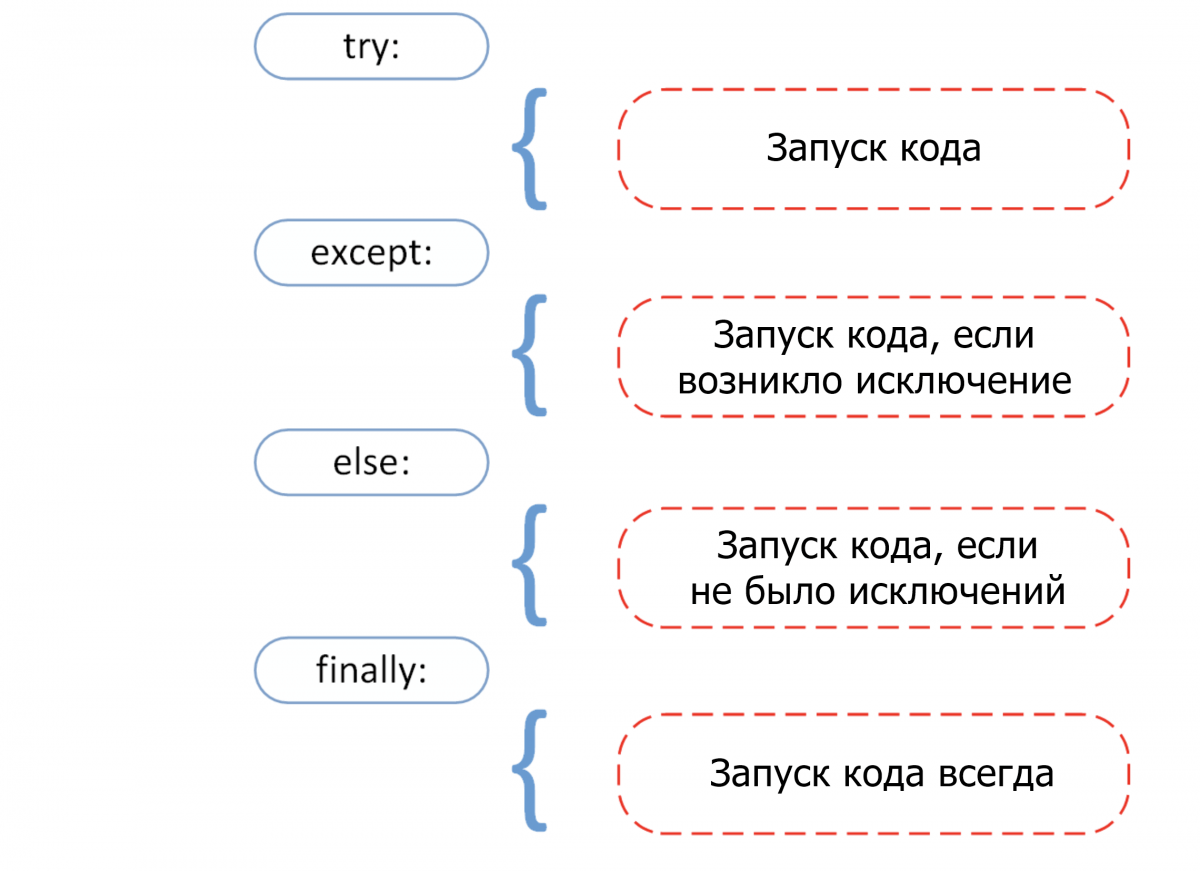
Прежде чем переходить к разбору встроенных исключений быстро вспомним 4 основных компонента обработки исключения, как показано на этой схеме.
Try: он запускает блок кода, в котором ожидается ошибка.Except: здесь определяется тип исключения, который ожидается в блокеtry(встроенный или созданный).Else: если исключений нет, тогда исполняется этот блок (его можно воспринимать как средство для запуска кода в том случае, если ожидается, что часть кода приведет к исключению).Finally: вне зависимости от того, будет ли исключение или нет, этот блок кода исполняется всегда.
В следующем разделе руководства больше узнаете об общих типах исключений и научитесь обрабатывать их с помощью инструмента обработки исключения.
Ошибка прерывания с клавиатуры (KeyboardInterrupt)
Исключение KeyboardInterrupt вызывается при попытке остановить программу с помощью сочетания Ctrl + C или Ctrl + Z в командной строке или ядре в Jupyter Notebook. Иногда это происходит неумышленно и подобная обработка поможет избежать подобных ситуаций.
В примере ниже если запустить ячейку и прервать ядро, программа вызовет исключение KeyboardInterrupt. Теперь обработаем исключение KeyboardInterrupt.
try:
    inp = input()
    print('Нажмите Ctrl+C и прервите Kernel:')
except KeyboardInterrupt:
    print('Исключение KeyboardInterrupt')
else:
    print('Исключений не произошло')
Исключение KeyboardInterrupt
Стандартные ошибки (StandardError)
Рассмотрим некоторые базовые ошибки в программировании.
Арифметические ошибки (ArithmeticError)
- Ошибка деления на ноль (Zero Division);
- Ошибка переполнения (OverFlow);
- Ошибка плавающей точки (Floating Point);
Все перечисленные выше исключения относятся к классу Arithmetic и вызываются при ошибках в арифметических операциях.
Деление на ноль (ZeroDivisionError)
Когда делитель (второй аргумент операции деления) или знаменатель равны нулю, тогда результатом будет ошибка деления на ноль.
try:
    a = 100 / 0
    print(a)
except ZeroDivisionError:
    print("Исключение ZeroDivisionError." )
else:
    print("Успех, нет ошибок!")
Исключение ZeroDivisionError.
Переполнение (OverflowError)
Ошибка переполнение вызывается, когда результат операции выходил за пределы диапазона. Она характерна для целых чисел вне диапазона.
try:
    import math
    print(math.exp(1000))
except OverflowError:
    print("Исключение OverFlow.")
else:
    print("Успех, нет ошибок!")
Исключение OverFlow.
Ошибка утверждения (AssertionError)
Когда инструкция утверждения не верна, вызывается ошибка утверждения.
Рассмотрим пример. Предположим, есть две переменные: a и b. Их нужно сравнить. Чтобы проверить, равны ли они, необходимо использовать ключевое слово assert, что приведет к вызову исключения Assertion в том случае, если выражение будет ложным.
try:
    a = 100
    b = "PythonRu"
    assert a == b
except AssertionError:
    print("Исключение AssertionError.")
else:
    print("Успех, нет ошибок!")
Исключение AssertionError.
Ошибка атрибута (AttributeError)
При попытке сослаться на несуществующий атрибут программа вернет ошибку атрибута. В следующем примере можно увидеть, что у объекта класса Attributes нет атрибута с именем attribute.
class Attributes(obj):
    a = 2
    print(a)

try:
    obj = Attributes()
    print(obj.attribute)
except AttributeError:
    print("Исключение AttributeError.")
2
Исключение AttributeError.
Ошибка импорта (ModuleNotFoundError)
Ошибка импорта вызывается при попытке импортировать несуществующий (или неспособный загрузиться) модуль в стандартном пути или даже при допущенной ошибке в имени.
import nibabel
---------------------------------------------------------------------------

ModuleNotFoundError                       Traceback (most recent call last)

 in
----> 1 import nibabel


ModuleNotFoundError: No module named 'nibabel'
Ошибка поиска (LookupError)
LockupError выступает базовым классом для исключений, которые происходят, когда key или index используются для связывания или последовательность списка/словаря неверна или не существует.
Здесь есть два вида исключений:
- Ошибка индекса (
IndexError); - Ошибка ключа (
KeyError);
Ошибка ключа
Если ключа, к которому нужно получить доступ, не оказывается в словаре, вызывается исключение KeyError.
try:
    a = {1:'a', 2:'b', 3:'c'}
    print(a[4])
except LookupError:
    print("Исключение KeyError.")
else:
    print("Успех, нет ошибок!")
Исключение KeyError.
Ошибка индекса
Если пытаться получить доступ к индексу (последовательности) списка, которого не существует в этом списке или находится вне его диапазона, будет вызвана ошибка индекса (IndexError: list index out of range python).
try:
    a = ['a', 'b', 'c']
    print(a[4])
except LookupError:
    print("Исключение IndexError, индекс списка вне диапазона.")
else:
    print("Успех, нет ошибок!")
Исключение IndexError, индекс списка вне диапазона.
Ошибка памяти (MemoryError)
Как уже упоминалось, ошибка памяти вызывается, когда операции не хватает памяти для выполнения.
Ошибка имени (NameError)
Ошибка имени возникает, когда локальное или глобальное имя не находится.
В следующем примере переменная ans не определена. Результатом будет ошибка NameError.
try:
    print(ans)
except NameError:
    print("NameError: переменная 'ans' не определена")
else:
    print("Успех, нет ошибок!")
NameError: переменная 'ans' не определена
Ошибка выполнения (Runtime Error)
Ошибка «NotImplementedError»
Ошибка выполнения служит базовым классом для ошибки NotImplemented. Абстрактные методы определенного пользователем класса вызывают это исключение, когда производные методы перезаписывают оригинальный.
class BaseClass(object):
    """Опередляем класс"""
    def __init__(self):
        super(BaseClass, self).__init__()
    def do_something(self):
	# функция ничего не делает
        raise NotImplementedError(self.__class__.__name__ + '.do_something')

class SubClass(BaseClass):
    """Реализует функцию"""
    def do_something(self):
        # действительно что-то делает
        print(self.__class__.__name__ + ' что-то делает!')

SubClass().do_something()
BaseClass().do_something()
SubClass что-то делает!


---------------------------------------------------------------------------

NotImplementedError                       Traceback (most recent call last)

 in
     14
     15 SubClass().do_something()
---> 16 BaseClass().do_something()


 in do_something(self)
      5     def do_something(self):
      6         # функция ничего не делает
----> 7         raise NotImplementedError(self.__class__.__name__ + '.do_something')
      8
      9 class SubClass(BaseClass):


NotImplementedError: BaseClass.do_something
Ошибка типа (TypeError)
Ошибка типа вызывается при попытке объединить два несовместимых операнда или объекта.
В примере ниже целое число пытаются добавить к строке, что приводит к ошибке типа.
try:
    a = 5
    b = "PythonRu"
    c = a + b
except TypeError:
    print('Исключение TypeError')
else:
    print('Успех, нет ошибок!')
Исключение TypeError
Ошибка значения (ValueError)
Ошибка значения вызывается, когда встроенная операция или функция получают аргумент с корректным типом, но недопустимым значением.
В этом примере встроенная операция float получат аргумент, представляющий собой последовательность символов (значение), что является недопустимым значением для типа: число с плавающей точкой.
try:
    print(float('PythonRu'))
except ValueError:
    print('ValueError: не удалось преобразовать строку в float: 'PythonRu'')
else:
    print('Успех, нет ошибок!')
ValueError: не удалось преобразовать строку в float: 'PythonRu'
Пользовательские исключения в Python
В Python есть много встроенных исключений для использования в программе. Но иногда нужно создавать собственные со своими сообщениями для конкретных целей.
Это можно сделать, создав новый класс, который будет наследовать из класса Exception в Python.
class UnAcceptedValueError(Exception):
    def __init__(self, data):
        self.data = data
    def __str__(self):
        return repr(self.data)

Total_Marks = int(input("Введите общее количество баллов: "))
try:
    Num_of_Sections = int(input("Введите количество разделов: "))
    if(Num_of_Sections < 1):
        raise UnAcceptedValueError("Количество секций не может быть меньше 1")
except UnAcceptedValueError as e:
    print("Полученная ошибка:", e.data)
Введите общее количество баллов: 10
Введите количество разделов: 0
Полученная ошибка: Количество секций не может быть меньше 1
В предыдущем примере если ввести что-либо меньше 1, будет вызвано исключение. Многие стандартные исключения имеют собственные исключения, которые вызываются при возникновении проблем в работе их функций.
Недостатки обработки исключений в Python
У использования исключений есть свои побочные эффекты, как, например, то, что программы с блоками try-except работают медленнее, а количество кода возрастает.
Дальше пример, где модуль Python timeit используется для проверки времени исполнения 2 разных инструкций. В stmt1 для обработки ZeroDivisionError используется try-except, а в stmt2 — if. Затем они выполняются 10000 раз с переменной a=0. Суть в том, чтобы показать разницу во времени исполнения инструкций. Так, stmt1 с обработкой исключений занимает больше времени чем stmt2, который просто проверяет значение и не делает ничего, если условие не выполнено.
Поэтому стоит ограничить использование обработки исключений в Python и применять его в редких случаях. Например, когда вы не уверены, что будет вводом: целое или число с плавающей точкой, или не уверены, существует ли файл, который нужно открыть.
import timeit
setup="a=0"
stmt1 = '''
try:
    b=10/a
except ZeroDivisionError:
    pass'''

stmt2 = '''
if a!=0:
    b=10/a'''

print("time=",timeit.timeit(stmt1,setup,number=10000))
print("time=",timeit.timeit(stmt2,setup,number=10000))
time= 0.003897680000136461
time= 0.0002797570000439009
Выводы!
Как вы могли увидеть, обработка исключений помогает прервать типичный поток программы с помощью специального механизма, который делает код более отказоустойчивым.
Обработка исключений — один из основных факторов, который делает код готовым к развертыванию. Это простая концепция, построенная всего на 4 блоках: try выискивает исключения, а except их обрабатывает.
Очень важно поупражняться в их использовании, чтобы сделать свой код более отказоустойчивым.
При выполнении заданий к главам вы скорее всего нередко сталкивались с возникновением различных ошибок. На этой главе мы изучим подход, который позволяет обрабатывать ошибки после их возникновения.
Напишем программу, которая будет считать обратные значения для целых чисел из заданного диапазона и выводить их в одну строку с разделителем «;». Один из вариантов кода для решения этой задачи выглядит так:
print(";".join(str(1 / x) for x in range(int(input()), int(input()) + 1)))
Программа получилась в одну строчку за счёт использования списочных выражений. Однако при вводе диапазона чисел, включающем в себя 0 (например, от -1 до 1), программа выдаст следующую ошибку:
ZeroDivisionError: division by zero
В программе произошла ошибка «деление на ноль». Такая ошибка, возникающая при выполнении программы и останавливающая её работу, называется исключением.
Попробуем в нашей программе избавиться от возникновения исключения деления на ноль. Пусть при попадании 0 в диапазон чисел, обработка не производится и выводится сообщение «Диапазон чисел содержит 0». Для этого нужно проверить до списочного выражения наличие нуля в диапазоне:
interval = range(int(input()), int(input()) + 1)
if 0 in interval:
    print("Диапазон чисел содержит 0.")
else:
    print(";".join(str(1 / x) for x in interval))
Теперь для диапазона, включающего в себя 0, например, от -2 до 2, исключения ZeroDivisionError не возникнет. Однако при вводе строки, которую невозможно преобразовать в целое число (например, «a»), будет вызвано другое исключение:
ValueError: invalid literal for int() with base 10: 'a'
Произошло исключение ValueError. Для борьбы с этой ошибкой нам придётся проверить, что строка состоит только из цифр. Сделать это нужно до преобразования в число. Тогда наша программа будет выглядеть так:
start = input()
end = input()
# Метод lstrip("-"), удаляющий символы "-" в начале строки, нужен для учёта
# отрицательных чисел, иначе isdigit() вернёт для них False
if not (start.lstrip("-").isdigit() and end.lstrip("-").isdigit()):
    print("Необходимо ввести два числа.")
else:
    interval = range(int(start), int(end) + 1)
    if 0 in interval:
        print("Диапазон чисел содержит 0.")
    else:
        print(";".join(str(1 / x) for x in interval))
Теперь наша программа работает без ошибок и при вводе строк, которые нельзя преобразовать в целое число.
Подход, который был нами применён для предотвращения ошибок, называется «Look Before You Leap» (LBYL), или «посмотри перед прыжком». В программе, реализующей такой подход, проверяются возможные условия возникновения ошибок до исполнения основного кода.
Подход LBYL имеет недостатки. Программу из примера стало сложнее читать из-за вложенного условного оператора. Проверка условия, что строка может быть преобразована в число, выглядит даже сложнее, чем списочное выражение. Вложенный условный оператор не решает поставленную задачу, а только лишь проверяет входные данные на корректность. Легко заметить, что решение основной задачи заняло меньше времени, чем составление условий проверки корректности входных данных.
Существует другой подход для работы с ошибками: «Easier to Ask Forgiveness than Permission» (EAFP) или «проще извиниться, чем спрашивать разрешение». В этом подходе сначала исполняется код, а в случае возникновения ошибок происходит их обработка. Подход EAFP реализован в Python в виде обработки исключений.
Исключения в Python являются классами ошибок. В Python есть много стандартных исключений. Они имеют определённую иерархию за счёт механизма наследования классов. В документации Python версии 3.10.8 приводится следующее дерево иерархии стандартных исключений:
BaseException
 +-- SystemExit
 +-- KeyboardInterrupt
 +-- GeneratorExit
 +-- Exception
      +-- StopIteration
      +-- StopAsyncIteration
      +-- ArithmeticError
      |    +-- FloatingPointError
      |    +-- OverflowError
      |    +-- ZeroDivisionError
      +-- AssertionError
      +-- AttributeError
      +-- BufferError
      +-- EOFError
      +-- ImportError
      |    +-- ModuleNotFoundError
      +-- LookupError
      |    +-- IndexError
      |    +-- KeyError
      +-- MemoryError
      +-- NameError
      |    +-- UnboundLocalError
      +-- OSError
      |    +-- BlockingIOError
      |    +-- ChildProcessError
      |    +-- ConnectionError
      |    |    +-- BrokenPipeError
      |    |    +-- ConnectionAbortedError
      |    |    +-- ConnectionRefusedError
      |    |    +-- ConnectionResetError
      |    +-- FileExistsError
      |    +-- FileNotFoundError
      |    +-- InterruptedError
      |    +-- IsADirectoryError
      |    +-- NotADirectoryError
      |    +-- PermissionError
      |    +-- ProcessLookupError
      |    +-- TimeoutError
      +-- ReferenceError
      +-- RuntimeError
      |    +-- NotImplementedError
      |    +-- RecursionError
      +-- SyntaxError
      |    +-- IndentationError
      |         +-- TabError
      +-- SystemError
      +-- TypeError
      +-- ValueError
      |    +-- UnicodeError
      |         +-- UnicodeDecodeError
      |         +-- UnicodeEncodeError
      |         +-- UnicodeTranslateError
      +-- Warning
           +-- DeprecationWarning
           +-- PendingDeprecationWarning
           +-- RuntimeWarning
           +-- SyntaxWarning
           +-- UserWarning
           +-- FutureWarning
           +-- ImportWarning
           +-- UnicodeWarning
           +-- BytesWarning
           +-- EncodingWarning
           +-- ResourceWarning
Для обработки исключения в Python используется следующий синтаксис:
try:
    <код , который может вызвать исключения при выполнении>
except <классисключения_1>:
    <код обработки исключения>
except <классисключения_2>:
    <код обработки исключения>
...
else:
    <код выполняется, если не вызвано исключение в блоке try>
finally:
    <код , который выполняется всегда>
Блок try содержит код, в котором нужно обработать исключения, если они возникнут. При возникновении исключения интерпретатор последовательно проверяет в каком из блоков except обрабатывается это исключение. Исключение обрабатывается в первом блоке except, обрабатывающем класс этого исключения или базовый класс возникшего исключения. Необходимо учитывать иерархию исключений для определения порядка их обработки в блоках except. Начинать обработку исключений следует с более узких классов исключений. Если начать с более широкого класса исключения, например, Exception, то всегда при возникновении исключения будет срабатывать первый блок except. Сравните два следующих примера. В первом порядок обработки исключений указан от производных классов к базовым, а во втором – наоборот.
try:
    print(1 / int(input()))
except ZeroDivisionError:
    print("Ошибка деления на ноль.")
except ValueError:
    print("Невозможно преобразовать строку в число.")
except Exception:
    print("Неизвестная ошибка.")
При вводе значений «0» и «a» получим ожидаемый соответствующий возникающим исключениям вывод:
Невозможно преобразовать строку в число.
и
Ошибка деления на ноль.
Второй пример:
try:
    print(1 / int(input()))
except Exception:
    print("Неизвестная ошибка.")
except ZeroDivisionError:
    print("Ошибка деления на ноль.")
except ValueError:
    print("Невозможно преобразовать строку в число.")
При вводе значений «0» и «a» получим в обоих случаях неинформативный вывод:
Неизвестная ошибка.
Необязательный блок else выполняет код в случае, если в блоке try не вызвано исключение. Добавим блок else в пример для вывода сообщения об успешном выполнении операции:
try:
    print(1 / int(input()))
except ZeroDivisionError:
    print("Ошибка деления на ноль.")
except ValueError:
    print("Невозможно преобразовать строку в число.")
except Exception:
    print("Неизвестная ошибка.")
else:
    print("Операция выполнена успешно.")
Теперь при вводе корректного значения, например, «5», вывод программы будет следующим:
2.0
Операция выполнена успешно.
Блок finally выполняется всегда, даже если возникло какое-то исключение, не учтённое в блоках except или код в этих блоках сам вызвал какое-либо исключение. Добавим в нашу программу вывод строки «Программа завершена» в конце программы даже при возникновении исключений:
try:
    print(1 / int(input()))
except ZeroDivisionError:
    print("Ошибка деления на ноль.")
except ValueError:
    print("Невозможно преобразовать строку в число.")
except Exception:
    print("Неизвестная ошибка.")
else:
    print("Операция выполнена успешно.")
finally:
    print("Программа завершена.")
Перепишем код, созданный с применением подхода LBYL, для первого примера из этой главы с использованием обработки исключений:
try:
    print(";".join(str(1 / x) for x in range(int(input()), int(input()) + 1)))
except ZeroDivisionError:
    print("Диапазон чисел содержит 0.")
except ValueError:
    print("Необходимо ввести два числа.")
Теперь наша программа читается намного легче. При этом создание кода для обработки исключений не заняло много времени и не потребовало проверки сложных условий.
Исключения можно принудительно вызывать с помощью оператора raise. Этот оператор имеет следующий синтаксис:
raise <класс исключения>(параметры)
В качестве параметра можно, например, передать строку с сообщением об ошибке.
В Python можно создавать свои собственные исключения. Синтаксис создания исключения такой же, как и у создания класса. При создании исключения его необходимо наследовать от какого-либо стандартного класса-исключения.
Напишем программу, которая выводит сумму списка целых чисел, и вызывает исключение, если в списке чисел есть хотя бы одно чётное или отрицательное число. Создадим свои классы исключений:
- NumbersError – базовый класс исключения;
- EvenError – исключение, которое вызывается при наличии хотя бы одного чётного числа;
- NegativeError – исключение, которое вызывается при наличии хотя бы одного отрицательного числа.
class NumbersError(Exception):
    pass


class EvenError(NumbersError):
    pass


class NegativeError(NumbersError):
    pass


def no_even(numbers):
    if all(x % 2 != 0 for x in numbers):
        return True
    raise EvenError("В списке не должно быть чётных чисел")


def no_negative(numbers):
    if all(x >= 0 for x in numbers):
        return True
    raise NegativeError("В списке не должно быть отрицательных чисел")


def main():
    print("Введите числа в одну строку через пробел:")
    try:
        numbers = [int(x) for x in input().split()]
        if no_negative(numbers) and no_even(numbers):
            print(f"Сумма чисел равна: {sum(numbers)}.")
    except NumbersError as e:  # обращение к исключению как к объекту
        print(f"Произошла ошибка: {e}.")
    except Exception as e:
        print(f"Произошла непредвиденная ошибка: {e}.")


if __name__ == "__main__":
    main()
Обратите внимание: в программе основной код выделен в функцию main. А код вне функций содержит только условный оператор и вызов функции main при выполнении условия __name__ == "__main__". Это условие проверяет, запущен ли файл как самостоятельная программа или импортирован как модуль.
Любая программа, написанная на языке программирования Python может быть импортирована как модуль в другую программу. В идеологии Python импортировать модуль – значит полностью его выполнить. Если основной код модуля содержит вызовы функций, ввод или вывод данных без использования указанного условия __name__ == "__main__", то произойдёт полноценный запуск программы. А это не всегда удобно, если из модуля нужна только отдельная функция или какой-либо класс.
При изучении модуля itertools, мы говорили о том, как импортировать модуль в программу. Покажем ещё раз два способа импорта на примере собственного модуля.
Для импорта модуля из файла, например example_module.py, нужно указать его имя, если он находится в той же папке, что и импортирующая его программа:
import example_module
Если требуется отдельный компонент модуля, например функция или класс, то импорт можно осуществить так:
from example_module import some_function, ExampleClass
Обратите внимание: при втором способе импортированные объекты попадают в пространство имён новой программы. Это означает, что они будут объектами новой программы, и в программе не должно быть других объектов с такими же именами.
Nov 1, 2017 10:10:27 PM |
The Python Exception Class Hierarchy
An overview of the Python exception class hierarchy, including a quick look at all the top-level exception classes in the standard library.
The Python exception class hierarchy consists of a few dozen different exceptions spread across a handful of important base class types. As with most programming languages, errors occur within a Python application when something unexpected goes wrong. Anything from improper arithmetic and running out of memory to invalid file references and unicode formatting errors may be raised by Python under certain circumstances.
Most of the errors we’ll explore in this series are considered exceptions, which indicate that these are non-fatal errors. While a fatal error will halt execution of the current application, all non-fatal exceptions allow execution to continue. This allows our code to explicitly catch or rescue the raised exception and programmatically react to it in an appropriate manner.
Let’s start by looking at the full Python exception class hierarchy, as seen below:
- BaseException
- Exception
- ArithmeticError
- FloatingPointError
- OverflowError
- ZeroDivisionError
- AssertionError
- AttributeError
- BufferError
- EOFError
- ImportError
- ModuleNotFoundError
- LookupError
- IndexError
- KeyError
- MemoryError
- NameError
- UnboundLocalError
- OSError
- BlockingIOError
- ChildProcessError
- ConnectionError
- BrokenPipeError
- ConnectionAbortedError
- ConnectionRefusedError
- ConnectionResetError
- FileExistsError
- FileNotFoundError
- InterruptedError
- IsADirectoryError
- NotADirectoryError
- PermissionError
- ProcessLookupError
- TimeoutError
- ReferenceError
- RuntimeError
- NotImplementedError
- RecursionError
- StopIteration
- StopAsyncIteration
- SyntaxError
- IndentationError
- TabError
- IndentationError
- SystemError
- TypeError
- ValueError
- UnicodeError
- UnicodeDecodeError
- UnicodeEncodeError
- UnicodeTranslateError
- UnicodeError
- Warning
- BytesWarning
- DeprecationWarning
- FutureWarning
- ImportWarning
- PendingDeprecationWarning
- ResourceWarning
- RuntimeWarning
- SyntaxWarning
- UnicodeWarning
- UserWarning
- ArithmeticError
- GeneratorExit
- KeyboardInterrupt
- SystemExit
- Exception
As we publish future exception-specific articles in this series we’ll update the full list above to relevant tutorial and article links for each exception, so this post can act as a go-to resource for Python exception handling tips.
Major Exception Types Overview
Next, let’s briefly discuss each important top-level exception type. These top-level exceptions will serve as a basis for digging into specific exceptions in future articles. Before we do that, however, it’s worth pointing out what might appear as a slight discrepancy when looking over the list of exception classes provided in Python. To illustrate, look closely at this small snippet of the Python exception class hierarchy and see if anything slightly strange pops out to you:
- BaseException
- Exception
- ArithmeticError
- FloatingPointError
- OverflowError
- ZeroDivisionError
- AssertionError
- ArithmeticError
- Exception
For developers that have worked with other programming languages in the past, what you might take note of is the distinction between using the word exception in the BaseException and Exception parent classes, and the use of error in most subclasses therein. Most other languages, such as .NET or Java, explicitly differentiate between exceptions and errors by separating them into distinct categories. In such languages, errors typically denote fatal errors (those that crash the application), whereas exceptions are catchable/rescuable errors.
Yet, as we see in the hierarchy above, Python merely inherits from Exception with a series of XYZError classes. The reason for this naming convention comes from the PEP8 Python style guide, which makes an explicit mention that «you should use the suffix ‘Error’ on your exception names (if the exception is actually an error).» I’ve added the extra emphasis to that quote, because the latter point is critical here — most Python exceptions with Error in the name are, in fact, errors.
BaseException
The BaseException class is, as the name suggests, the base class for all built-in exceptions in Python. Typically, this exception is never raised on its own, and should instead be inherited by other, lesser exception classes that can be raised.
The BaseException class (and, thus, all subclass exceptions as well) allows a tuple of arguments to be passed when creating a new instance of the class. In most cases, a single argument will be passed to an exception, which is a string value indicating the specific error message.
This class also includes a with_traceback(tb) method, which explicitly sets the new traceback information to the tb argument that was passed to it.
Exception
Exception is the most commonly-inherited exception type (outside of the true base class of BaseException). In addition, all exception classes that are considered errors are subclasses of the Exception class. In general, any custom exception class you create in your own code should inherit from Exception.
The Exception class contains many direct child subclasses that handle most Python errors, so we’ll briefly go over each below:
ArithmeticError— The base class for the variety of arithmetic errors, such as when attempting to divide by zero, or when an arithmetic result would be too large for Python to accurately represent.AssertionError— This error is raised when a call to the [assert] statement fails.AttributeError— Python’s syntax includes something calledattribute references, which is just the Python way of describing what you might know of asdot notation. In essence, anyprimary tokenin Python (like anidentifier,literal, and so forth) can be written and followed by a period (.), which is then followed by anidentifier. That syntax (i.e.primary.identifier) is called anattribute reference, and anytime the executing script encounters an error in such syntax anAttributeErroris raised.BufferError— Python allows applications to access low level memory streams in the form of abuffer. For example, thebytesclass can be used to directly work with bytes of information via a memory buffer. When something goes wrong within such a buffer operation aBufferErroris raised.EOFError— Similar to the Java EOFException article we did a few days ago, Python’sEOFErroris raised when using theinput()function and reaching the end of a file without any data.ImportError— Modules are usually loaded in memory for Python scripts to use via theimportstatement (e.g.import car from vehicles). However, if animportattempt fails anImportErrorwill often be raised.LookupError— LikeArithmeticError, theLookupErroris generally considered a base class from which other subclasses should inherit. AllLookupErrorsubclasses deal with improper calls to a collection are made by using invalidkeyorindexvalues.MemoryError— In the event that your Python application is about to run out of memory aMemoryErrorwill be raised. Since Python is smart enough to detect this potential issue slightly before all memory is used up, aMemoryErrorcan berescuedand allow you to recover from the situation by performing garbage collection of some kind.NameError— Raised when trying to use anidentifierwith an invalid or unknown name.OSError— This error is raised when a system-level problem occurs, such as failing to find a local file on disk or running out of disk space entirely.OSErroris a parent class to many subclasses explicitly used for certain issues related to operating system failure, so we’ll explore those in future publications.ReferenceError— Python includes the weakref module, which allows Python code to create a specific type of reference known as aweak reference. Aweak referenceis a reference that is not «strong» enough to keep the referenced object alive. This means that the next cycle of garbage collection will identify the weakly referenced object as no longer strongly referenced by another object, causing the weakly referenced object to be destroyed to free up resources. If aweak referenceproxy created via theweakref.proxy()function is used after the object that is referenced has already been destroyed via garbage collection, aReferenceErrorwill be raised.RuntimeError— ARuntimeErroris typically used as a catchall for when an error occurs that doesn’t really fit into any other specific error classification.StopIteration— If nodefaultvalue is passed to thenext()function when iterating over a collection, and that collection has no more iterated value to retrieve, aStopIterationexception is raised. Note that this is not classified as anError, since it doesn’t mean that an error has occurred.StopAsyncIteration— As of version 3.5, Python now includes coroutines for asynchronous transactions using theasyncandawaitsyntax. As part of this feature, collections can be asynchronously iterated using the__anext__()method. The__anext__()method requires that aStopAsyncIterationinstance be raised in order to halt async iteration.SyntaxError— Just like most programming languages, aSyntaxErrorin Python indicates that there is some improper syntax somewhere in your script file. ASyntaxErrorcan be raised directly from an executing script, or produced via functions likeeval()andexec().SystemError— A generic error that is raised when something goes wrong with the Python interpreter (not to be confused with theOSError, which handles operating system issues).TypeError— This error is raised when attempting to perform an operation on an incorrect object type.ValueError— Should be raised when a function or method receives an argument of the correct type, but with an actual value that is invalid for some reason.Warning— Another parent class to many subclasses, theWarningclass is used to alert the user in non-dire situations. There are a number of subclass warnings that we’ll explore in future articles.
GeneratorExit
A generator is a specific type of iterator in Python, which simplifies the process of creating iterators with constantly changing values. By using the yield statement within a generator code block, Python will return or «generate» a new value for each call to next(). When the explicit generator.close() method is called a GeneratorExit instance is raised.
KeyboardInterrupt
This simple exception is raised when the user presses a key combination that causes an interrupt to the executing script. For example, many terminals accept Ctrl+C as an interrupt keystroke.
SystemExit
Finally, the SystemExit exception is raised when calling the sys.exit() method, which explicitly closes down the executing script and exits Python. Since this is an exception, it can be rescued and programmatically responded to immediately before the script actually shuts down.
That’s just a small taste of the powerful, built-in Python exception class hierarchy as of version 3.6. Stay tuned for more in-depth articles examining each of these exceptions in greater detail, and be sure to check out Airbrake’s robust error monitoring software, which provides real-time error monitoring and automatic exception reporting for all your development projects. Airbrake’s state of the art web dashboard ensures you receive round-the-clock status updates on your application’s health and error rates. No matter what you’re working on, Airbrake easily integrates with all the most popular languages and frameworks. Plus, Airbrake makes it easy to customize exception parameters, while giving you complete control of the active error filter system, so you only gather the errors that matter most.
Check out Airbrake’s error monitoring software today with a 14-day trial and see for yourself why so many of the world’s best engineering teams use Airbrake to revolutionize their exception handling practices!
In Python, all exceptions must be instances of a class that derives from
BaseException. In a try statement with an except
clause that mentions a particular class, that clause also handles any exception
classes derived from that class (but not exception classes from which it is
derived). Two exception classes that are not related via subclassing are never
equivalent, even if they have the same name.
The built-in exceptions listed below can be generated by the interpreter or
built-in functions. Except where mentioned, they have an “associated value”
indicating the detailed cause of the error. This may be a string or a tuple of
several items of information (e.g., an error code and a string explaining the
code). The associated value is usually passed as arguments to the exception
class’s constructor.
User code can raise built-in exceptions. This can be used to test an exception
handler or to report an error condition “just like” the situation in which the
interpreter raises the same exception; but beware that there is nothing to
prevent user code from raising an inappropriate error.
The built-in exception classes can be subclassed to define new exceptions;
programmers are encouraged to derive new exceptions from the Exception
class or one of its subclasses, and not from BaseException. More
information on defining exceptions is available in the Python Tutorial under
User-defined Exceptions.
When raising (or re-raising) an exception in an except or
finally clause
__context__ is automatically set to the last exception caught; if the
new exception is not handled the traceback that is eventually displayed will
include the originating exception(s) and the final exception.
When raising a new exception (rather than using a bare raise to re-raise
the exception currently being handled), the implicit exception context can be
supplemented with an explicit cause by using from with
raise:
raise new_exc from original_exc
The expression following from must be an exception or None. It
will be set as __cause__ on the raised exception. Setting
__cause__ also implicitly sets the __suppress_context__
attribute to True, so that using raise new_exc from None
effectively replaces the old exception with the new one for display
purposes (e.g. converting KeyError to AttributeError, while
leaving the old exception available in __context__ for introspection
when debugging.
The default traceback display code shows these chained exceptions in
addition to the traceback for the exception itself. An explicitly chained
exception in __cause__ is always shown when present. An implicitly
chained exception in __context__ is shown only if __cause__
is None and __suppress_context__ is false.
In either case, the exception itself is always shown after any chained
exceptions so that the final line of the traceback always shows the last
exception that was raised.
5.1. Base classes
The following exceptions are used mostly as base classes for other exceptions.
-
exception
BaseException¶ -
The base class for all built-in exceptions. It is not meant to be directly
inherited by user-defined classes (for that, useException). If
str()is called on an instance of this class, the representation of
the argument(s) to the instance are returned, or the empty string when
there were no arguments.-
args¶ -
The tuple of arguments given to the exception constructor. Some built-in
exceptions (likeOSError) expect a certain number of arguments and
assign a special meaning to the elements of this tuple, while others are
usually called only with a single string giving an error message.
-
with_traceback(tb)¶ -
This method sets tb as the new traceback for the exception and returns
the exception object. It is usually used in exception handling code like
this:try: ... except SomeException: tb = sys.exc_info()[2] raise OtherException(...).with_traceback(tb)
-
-
exception
Exception¶ -
All built-in, non-system-exiting exceptions are derived from this class. All
user-defined exceptions should also be derived from this class.
-
exception
ArithmeticError¶ -
The base class for those built-in exceptions that are raised for various
arithmetic errors:OverflowError,ZeroDivisionError,
FloatingPointError.
-
exception
BufferError¶ -
Raised when a buffer related operation cannot be
performed.
-
exception
LookupError¶ -
The base class for the exceptions that are raised when a key or index used on
a mapping or sequence is invalid:IndexError,KeyError. This
can be raised directly bycodecs.lookup().
5.2. Concrete exceptions
The following exceptions are the exceptions that are usually raised.
-
exception
AssertionError¶ -
Raised when an
assertstatement fails.
-
exception
AttributeError¶ -
Raised when an attribute reference (see Attribute references) or
assignment fails. (When an object does not support attribute references or
attribute assignments at all,TypeErroris raised.)
-
exception
EOFError¶ -
Raised when the
input()function hits an end-of-file condition (EOF)
without reading any data. (N.B.: theio.IOBase.read()and
io.IOBase.readline()methods return an empty string when they hit EOF.)
-
exception
FloatingPointError¶ -
Raised when a floating point operation fails. This exception is always defined,
but can only be raised when Python is configured with the
--with-fpectloption, or theWANT_SIGFPE_HANDLERsymbol is
defined in thepyconfig.hfile.
-
exception
GeneratorExit¶ -
Raised when a generator or coroutine is closed;
seegenerator.close()andcoroutine.close(). It
directly inherits fromBaseExceptioninstead ofExceptionsince
it is technically not an error.
-
exception
ImportError¶ -
Raised when the
importstatement has troubles trying to
load a module. Also raised when the “from list” infrom ... import
has a name that cannot be found.The
nameandpathattributes can be set using keyword-only
arguments to the constructor. When set they represent the name of the module
that was attempted to be imported and the path to any file which triggered
the exception, respectively.Changed in version 3.3: Added the
nameandpathattributes.
-
exception
ModuleNotFoundError¶ -
A subclass of
ImportErrorwhich is raised byimport
when a module could not be located. It is also raised whenNone
is found insys.modules.New in version 3.6.
-
exception
IndexError¶ -
Raised when a sequence subscript is out of range. (Slice indices are
silently truncated to fall in the allowed range; if an index is not an
integer,TypeErroris raised.)
-
exception
KeyError¶ -
Raised when a mapping (dictionary) key is not found in the set of existing keys.
-
exception
KeyboardInterrupt¶ -
Raised when the user hits the interrupt key (normally
Control-Cor
Delete). During execution, a check for interrupts is made
regularly. The exception inherits fromBaseExceptionso as to not be
accidentally caught by code that catchesExceptionand thus prevent
the interpreter from exiting.
-
exception
MemoryError¶ -
Raised when an operation runs out of memory but the situation may still be
rescued (by deleting some objects). The associated value is a string indicating
what kind of (internal) operation ran out of memory. Note that because of the
underlying memory management architecture (C’smalloc()function), the
interpreter may not always be able to completely recover from this situation; it
nevertheless raises an exception so that a stack traceback can be printed, in
case a run-away program was the cause.
-
exception
NameError¶ -
Raised when a local or global name is not found. This applies only to
unqualified names. The associated value is an error message that includes the
name that could not be found.
-
exception
NotImplementedError¶ -
This exception is derived from
RuntimeError. In user defined base
classes, abstract methods should raise this exception when they require
derived classes to override the method, or while the class is being
developed to indicate that the real implementation still needs to be added.Note
It should not be used to indicate that an operator or method is not
meant to be supported at all – in that case either leave the operator /
method undefined or, if a subclass, set it toNone.Note
NotImplementedErrorandNotImplementedare not interchangeable,
even though they have similar names and purposes. See
NotImplementedfor details on when to use it.
-
exception
OSError([arg])¶ -
exception
OSError(errno, strerror[, filename[, winerror[, filename2]]]) -
This exception is raised when a system function returns a system-related
error, including I/O failures such as “file not found” or “disk full”
(not for illegal argument types or other incidental errors).The second form of the constructor sets the corresponding attributes,
described below. The attributes default toNoneif not
specified. For backwards compatibility, if three arguments are passed,
theargsattribute contains only a 2-tuple
of the first two constructor arguments.The constructor often actually returns a subclass of
OSError, as
described in OS exceptions below. The particular subclass depends on
the finalerrnovalue. This behaviour only occurs when
constructingOSErrordirectly or via an alias, and is not
inherited when subclassing.-
errno¶ -
A numeric error code from the C variable
errno.
-
winerror¶ -
Under Windows, this gives you the native
Windows error code. Theerrnoattribute is then an approximate
translation, in POSIX terms, of that native error code.Under Windows, if the winerror constructor argument is an integer,
theerrnoattribute is determined from the Windows error code,
and the errno argument is ignored. On other platforms, the
winerror argument is ignored, and thewinerrorattribute
does not exist.
-
strerror¶ -
The corresponding error message, as provided by
the operating system. It is formatted by the C
functionsperror()under POSIX, andFormatMessage()
under Windows.
-
filename¶ -
filename2¶ -
For exceptions that involve a file system path (such as
open()or
os.unlink()),filenameis the file name passed to the function.
For functions that involve two file system paths (such as
os.rename()),filename2corresponds to the second
file name passed to the function.
Changed in version 3.3:
EnvironmentError,IOError,WindowsError,
socket.error,select.errorand
mmap.errorhave been merged intoOSError, and the
constructor may return a subclass.Changed in version 3.4: The
filenameattribute is now the original file name passed to
the function, instead of the name encoded to or decoded from the
filesystem encoding. Also, the filename2 constructor argument and
attribute was added. -
-
exception
OverflowError¶ -
Raised when the result of an arithmetic operation is too large to be
represented. This cannot occur for integers (which would rather raise
MemoryErrorthan give up). However, for historical reasons,
OverflowError is sometimes raised for integers that are outside a required
range. Because of the lack of standardization of floating point exception
handling in C, most floating point operations are not checked.
-
exception
RecursionError¶ -
This exception is derived from
RuntimeError. It is raised when the
interpreter detects that the maximum recursion depth (see
sys.getrecursionlimit()) is exceeded.New in version 3.5: Previously, a plain
RuntimeErrorwas raised.
-
exception
ReferenceError¶ -
This exception is raised when a weak reference proxy, created by the
weakref.proxy()function, is used to access an attribute of the referent
after it has been garbage collected. For more information on weak references,
see theweakrefmodule.
-
exception
RuntimeError¶ -
Raised when an error is detected that doesn’t fall in any of the other
categories. The associated value is a string indicating what precisely went
wrong.
-
exception
StopIteration¶ -
Raised by built-in function
next()and an iterator‘s
__next__()method to signal that there are no further
items produced by the iterator.The exception object has a single attribute
value, which is
given as an argument when constructing the exception, and defaults
toNone.When a generator or coroutine function
returns, a newStopIterationinstance is
raised, and the value returned by the function is used as the
valueparameter to the constructor of the exception.If a generator function defined in the presence of a
from __future__directive raises
import generator_stopStopIteration, it will be
converted into aRuntimeError(retaining theStopIteration
as the new exception’s cause).Changed in version 3.3: Added
valueattribute and the ability for generator functions to
use it to return a value.Changed in version 3.5: Introduced the RuntimeError transformation.
-
exception
StopAsyncIteration¶ -
Must be raised by
__anext__()method of an
asynchronous iterator object to stop the iteration.New in version 3.5.
-
exception
SyntaxError¶ -
Raised when the parser encounters a syntax error. This may occur in an
importstatement, in a call to the built-in functionsexec()
oreval(), or when reading the initial script or standard input
(also interactively).Instances of this class have attributes
filename,lineno,
offsetandtextfor easier access to the details.str()
of the exception instance returns only the message.
-
exception
IndentationError¶ -
Base class for syntax errors related to incorrect indentation. This is a
subclass ofSyntaxError.
-
exception
TabError¶ -
Raised when indentation contains an inconsistent use of tabs and spaces.
This is a subclass ofIndentationError.
-
exception
SystemError¶ -
Raised when the interpreter finds an internal error, but the situation does not
look so serious to cause it to abandon all hope. The associated value is a
string indicating what went wrong (in low-level terms).You should report this to the author or maintainer of your Python interpreter.
Be sure to report the version of the Python interpreter (sys.version; it is
also printed at the start of an interactive Python session), the exact error
message (the exception’s associated value) and if possible the source of the
program that triggered the error.
-
exception
SystemExit¶ -
This exception is raised by the
sys.exit()function. It inherits from
BaseExceptioninstead ofExceptionso that it is not accidentally
caught by code that catchesException. This allows the exception to
properly propagate up and cause the interpreter to exit. When it is not
handled, the Python interpreter exits; no stack traceback is printed. The
constructor accepts the same optional argument passed tosys.exit().
If the value is an integer, it specifies the system exit status (passed to
C’sexit()function); if it isNone, the exit status is zero; if
it has another type (such as a string), the object’s value is printed and
the exit status is one.A call to
sys.exit()is translated into an exception so that clean-up
handlers (finallyclauses oftrystatements) can be
executed, and so that a debugger can execute a script without running the risk
of losing control. Theos._exit()function can be used if it is
absolutely positively necessary to exit immediately (for example, in the child
process after a call toos.fork()).-
code¶ -
The exit status or error message that is passed to the constructor.
(Defaults toNone.)
-
-
exception
TypeError¶ -
Raised when an operation or function is applied to an object of inappropriate
type. The associated value is a string giving details about the type mismatch.This exception may be raised by user code to indicate that an attempted
operation on an object is not supported, and is not meant to be. If an object
is meant to support a given operation but has not yet provided an
implementation,NotImplementedErroris the proper exception to raise.Passing arguments of the wrong type (e.g. passing a
listwhen an
intis expected) should result in aTypeError, but passing
arguments with the wrong value (e.g. a number outside expected boundaries)
should result in aValueError.
-
exception
UnboundLocalError¶ -
Raised when a reference is made to a local variable in a function or method, but
no value has been bound to that variable. This is a subclass of
NameError.
-
exception
UnicodeError¶ -
Raised when a Unicode-related encoding or decoding error occurs. It is a
subclass ofValueError.UnicodeErrorhas attributes that describe the encoding or decoding
error. For example,err.object[err.start:err.end]gives the particular
invalid input that the codec failed on.-
encoding¶ -
The name of the encoding that raised the error.
-
reason¶ -
A string describing the specific codec error.
-
object¶ -
The object the codec was attempting to encode or decode.
-
start¶ -
The first index of invalid data in
object.
-
end¶ -
The index after the last invalid data in
object.
-
-
exception
UnicodeEncodeError¶ -
Raised when a Unicode-related error occurs during encoding. It is a subclass of
UnicodeError.
-
exception
UnicodeDecodeError¶ -
Raised when a Unicode-related error occurs during decoding. It is a subclass of
UnicodeError.
-
exception
UnicodeTranslateError¶ -
Raised when a Unicode-related error occurs during translating. It is a subclass
ofUnicodeError.
-
exception
ValueError¶ -
Raised when a built-in operation or function receives an argument that has the
right type but an inappropriate value, and the situation is not described by a
more precise exception such asIndexError.
-
exception
ZeroDivisionError¶ -
Raised when the second argument of a division or modulo operation is zero. The
associated value is a string indicating the type of the operands and the
operation.
The following exceptions are kept for compatibility with previous versions;
starting from Python 3.3, they are aliases of OSError.
-
exception
EnvironmentError
-
exception
IOError
-
exception
WindowsError¶ -
Only available on Windows.
5.2.1. OS exceptions
The following exceptions are subclasses of OSError, they get raised
depending on the system error code.
-
exception
BlockingIOError¶ -
Raised when an operation would block on an object (e.g. socket) set
for non-blocking operation.
Corresponds toerrnoEAGAIN,EALREADY,
EWOULDBLOCKandEINPROGRESS.In addition to those of
OSError,BlockingIOErrorcan have
one more attribute:-
characters_written¶ -
An integer containing the number of characters written to the stream
before it blocked. This attribute is available when using the
buffered I/O classes from theiomodule.
-
-
exception
ChildProcessError¶ -
Raised when an operation on a child process failed.
Corresponds toerrnoECHILD.
-
exception
ConnectionError¶ -
A base class for connection-related issues.
Subclasses are
BrokenPipeError,ConnectionAbortedError,
ConnectionRefusedErrorandConnectionResetError.
-
exception
BrokenPipeError¶ -
A subclass of
ConnectionError, raised when trying to write on a
pipe while the other end has been closed, or trying to write on a socket
which has been shutdown for writing.
Corresponds toerrnoEPIPEandESHUTDOWN.
-
exception
ConnectionAbortedError¶ -
A subclass of
ConnectionError, raised when a connection attempt
is aborted by the peer.
Corresponds toerrnoECONNABORTED.
-
exception
ConnectionRefusedError¶ -
A subclass of
ConnectionError, raised when a connection attempt
is refused by the peer.
Corresponds toerrnoECONNREFUSED.
-
exception
ConnectionResetError¶ -
A subclass of
ConnectionError, raised when a connection is
reset by the peer.
Corresponds toerrnoECONNRESET.
-
exception
FileExistsError¶ -
Raised when trying to create a file or directory which already exists.
Corresponds toerrnoEEXIST.
-
exception
FileNotFoundError¶ -
Raised when a file or directory is requested but doesn’t exist.
Corresponds toerrnoENOENT.
-
exception
InterruptedError¶ -
Raised when a system call is interrupted by an incoming signal.
Corresponds toerrnoEINTR.Changed in version 3.5: Python now retries system calls when a syscall is interrupted by a
signal, except if the signal handler raises an exception (see PEP 475
for the rationale), instead of raisingInterruptedError.
-
exception
IsADirectoryError¶ -
Raised when a file operation (such as
os.remove()) is requested
on a directory.
Corresponds toerrnoEISDIR.
-
exception
NotADirectoryError¶ -
Raised when a directory operation (such as
os.listdir()) is requested
on something which is not a directory.
Corresponds toerrnoENOTDIR.
-
exception
PermissionError¶ -
Raised when trying to run an operation without the adequate access
rights — for example filesystem permissions.
Corresponds toerrnoEACCESandEPERM.
-
exception
ProcessLookupError¶ -
Raised when a given process doesn’t exist.
Corresponds toerrnoESRCH.
-
exception
TimeoutError¶ -
Raised when a system function timed out at the system level.
Corresponds toerrnoETIMEDOUT.
New in version 3.3: All the above OSError subclasses were added.
See also
PEP 3151 — Reworking the OS and IO exception hierarchy
5.3. Warnings
The following exceptions are used as warning categories; see the warnings
module for more information.
-
exception
Warning¶ -
Base class for warning categories.
-
exception
UserWarning¶ -
Base class for warnings generated by user code.
-
exception
DeprecationWarning¶ -
Base class for warnings about deprecated features.
-
exception
PendingDeprecationWarning¶ -
Base class for warnings about features which will be deprecated in the future.
-
exception
SyntaxWarning¶ -
Base class for warnings about dubious syntax.
-
exception
RuntimeWarning¶ -
Base class for warnings about dubious runtime behavior.
-
exception
FutureWarning¶ -
Base class for warnings about constructs that will change semantically in the
future.
-
exception
ImportWarning¶ -
Base class for warnings about probable mistakes in module imports.
-
exception
UnicodeWarning¶ -
Base class for warnings related to Unicode.
-
exception
BytesWarning¶ -
Base class for warnings related to
bytesandbytearray.
-
exception
ResourceWarning¶ -
Base class for warnings related to resource usage.
New in version 3.2.
5.4. Exception hierarchy
The class hierarchy for built-in exceptions is:
BaseException
 +-- SystemExit
 +-- KeyboardInterrupt
 +-- GeneratorExit
 +-- Exception
      +-- StopIteration
      +-- StopAsyncIteration
      +-- ArithmeticError
      |    +-- FloatingPointError
      |    +-- OverflowError
      |    +-- ZeroDivisionError
      +-- AssertionError
      +-- AttributeError
      +-- BufferError
      +-- EOFError
      +-- ImportError
      |    +-- ModuleNotFoundError
      +-- LookupError
      |    +-- IndexError
      |    +-- KeyError
      +-- MemoryError
      +-- NameError
      |    +-- UnboundLocalError
      +-- OSError
      |    +-- BlockingIOError
      |    +-- ChildProcessError
      |    +-- ConnectionError
      |    |    +-- BrokenPipeError
      |    |    +-- ConnectionAbortedError
      |    |    +-- ConnectionRefusedError
      |    |    +-- ConnectionResetError
      |    +-- FileExistsError
      |    +-- FileNotFoundError
      |    +-- InterruptedError
      |    +-- IsADirectoryError
      |    +-- NotADirectoryError
      |    +-- PermissionError
      |    +-- ProcessLookupError
      |    +-- TimeoutError
      +-- ReferenceError
      +-- RuntimeError
      |    +-- NotImplementedError
      |    +-- RecursionError
      +-- SyntaxError
      |    +-- IndentationError
      |         +-- TabError
      +-- SystemError
      +-- TypeError
      +-- ValueError
      |    +-- UnicodeError
      |         +-- UnicodeDecodeError
      |         +-- UnicodeEncodeError
      |         +-- UnicodeTranslateError
      +-- Warning
           +-- DeprecationWarning
           +-- PendingDeprecationWarning
           +-- RuntimeWarning
           +-- SyntaxWarning
           +-- UserWarning
           +-- FutureWarning
           +-- ImportWarning
           +-- UnicodeWarning
           +-- BytesWarning
           +-- ResourceWarning
В Python пользователи могут определять свои собственные исключения, создавая новый класс. Этот класс исключений должен прямо или косвенно быть производным от встроенного класса Exception. Большинство встроенных исключений также являются производными от этого класса. Все пользовательские исключения также должны быть производными от этого класса.
Пользовательские исключения полезны тем, что их можно вызвать с неправильными или неожиданными входными данными, тем самым лучше прояснив ситуацию с кодом, который падает или неправильно работает.
В примере создается определяемое пользователем исключение CustomError(), которое наследуется от класса Exception. Это новое исключение, как и другие исключения, может быть вызвано с помощью оператора raise с дополнительным сообщением об ошибке.
# Определяем собственное исключение
>>> class CustomError(Exception):
...     pass
...
>>> raise CustomError
# Traceback (most recent call last):
# ...
# __main__.CustomError

# Вызываем собственное исключение
# 'CustomError' с сообщением об ошибке
>>> raise CustomError("An error occurred")
# Traceback (most recent call last):
# ...
# __main__.CustomError: An error occurred
При разработке программы на Python, хорошей практикой считается помещать все определяемые пользователем исключения в отдельный файл. Многие стандартные модули определяют свои исключения отдельно как exceptions.py или errors.py (обычно, но не всегда).
Пользовательский класс исключений может реализовать все, что может делать обычный класс, но обычно их делают простыми и краткими. Большинство реализаций пользовательских исключений объявляют настраиваемый базовый класс и наследуют другие классы исключений из этого базового класса.
Большинство пользовательских исключений определяются именами, которые заканчиваются на «Error», аналогично именованию стандартных исключений.
В следующем примере иллюстрируется, как пользовательские исключения могут использоваться в программе для создания и перехвата ошибок.
Программа просит ввести число до тех пор, пока оно не будет равно загаданному. В качестве подсказки, пользователю каждый раз выводятся сообщения, о том, больше или меньше введенное число чем загаданное.
# определение пользовательских исключений
class Error(Exception):
    """Базовый класс для других исключений"""
    pass

class ValueTooSmallError(Error):
    """Вызывается, когда входное значение мало"""
    pass

class ValueTooLargeError(Error):
    """Вызывается, когда входное значение велико"""
    pass

# число, которое нужно угадать
number = 10

# игра продолжается до тех пор,
# пока пользователь его не угадает
while True:
    try:
        i_num = int(input("Ввести число: "))
        if i_num < number:
            raise ValueTooSmallError
        elif i_num > number:
            raise ValueTooLargeError
        break
    except ValueTooSmallError:
        print("Это число меньше загаданного, попробуйте еще раз!n")
    except ValueTooLargeError:
        print("Это число больше загаданного, попробуйте еще раз!n")

print("Поздравляю! Вы правильно угадали.")
В примере определен базовый класс под названием Error(). Два других исключения, которые фактически вызываются программой (ValueTooSmallError и ValueTooLargeError), являются производными от класса Error().
Это стандартный способ определения пользовательских исключений в программировании на Python, но ни кто не ограничен только этим способом.
Пример запуска скрипта с примером:
Ввести число: 12
Это число больше загаданного, попробуйте еще раз!

Ввести число: 0
Это число меньше загаданного, попробуйте еще раз!

Ввести число: 8
Это число меньше загаданного, попробуйте еще раз!

Ввести число: 10
Поздравляю! Вы правильно угадали.
Смотрим еще один простенький пример.
Пользовательские классы исключений, часто предлагая только ряд атрибутов, которые позволяют извлекать информацию об ошибке для исключения.
class Error(Exception):
    """Базовый класс для исключений в этом модуле."""
    pass

class InputError(Error):
    """Исключение для ошибок во входных данных.
    Attributes:
        expression -- выражение, в котором произошла ошибка
        message -- объяснение ошибки
    """
    def __init__(self, expression, message):
        self.expression = expression
        self.message = message


x = input("Ведите положительное целое число: ")
try:
    x = int(x)
    if x < 0:
        raise InputError(f'!!! x = input({x})',
                         '-> Допустимы только положительные числа.')
except ValueError:
    print("Error type of value!")
except InputError as e:
    print(e.args[0])
    print(e.args[1])
else:
    print(x)


# Ведите положительное целое число: 3
# 3

# Ведите положительное целое число: 7.9
# Error type of value!

# Ведите положительное целое число: -5
# !!! x = input(-5)
# -> Допустимы только положительные числа.
У объектов класса исключений Exception и его производных, определен метод __str__() так, чтобы выводить значения атрибутов. Поэтому можно не обращаться напрямую к полям объекта: e.expression и e.message. Кроме того у экземпляров класса исключений Exception есть атрибут args. Через него можно получать доступ к отдельным полям, как показано в примере выше.
Многие стандартные модули определяют свои собственные исключения для сообщений об ошибках, которые могут возникать в определяемых ими функциях. Более подробная информация о классах представлена в разделе «Классы в Python».
Настройка собственных классов исключений.
Для тонкой настройки своего класса исключения нужно иметь базовые знания объектно-ориентированного программирования.
Чтобы принимать дополнительные аргументы в соответствии с задачами конкретного исключения, необходимо дополнительно настроить пользовательский класс исключения.
class SalaryNotInRangeError(Exception):
    """Исключение возникает из-за ошибок в зарплате.

    Атрибуты:
        salary: входная зарплата, вызвавшая ошибку
        message: объяснение ошибки
    """

    def __init__(self, salary, message="Зарплата не входит в диапазон (5000, 15000)"):
        self.salary = salary
        self.message = message
        # переопределяется конструктор встроенного класса `Exception()`
        super().__init__(self.message)


salary = int(input("Введите сумму зарплаты: "))
if not 5000 < salary < 15000:
    raise SalaryNotInRangeError(salary)
В примере, для приема аргументов salary и message переопределяется конструктор встроенного класса Exception(). Затем конструктор родительского класса Exception() вызывается вручную с аргументом self.message при помощи функции super(). Пользовательский атрибут self.salary определен для использования позже.
Результаты запуска скрипта:
Введите сумму зарплаты: 2000
Traceback (most recent call last):
  File "test.py", line 17, in <module>
    raise SalaryNotInRangeError(salary)
__main__.SalaryNotInRangeError: Зарплата не входит в диапазон (5000, 15000)
Унаследованный метод __str__ класса Exception() используется для отображения соответствующего сообщения при возникновении SalaryNotInRangeError(). Также можно настроить сам метод __str__, переопределив его.
class SalaryNotInRangeError(Exception):
    """Исключение возникает из-за ошибок в зарплате.

    Атрибуты:
        salary: входная зарплата, вызвавшая ошибку
        message: объяснение ошибки
    """

    def __init__(self, salary, message="Зарплата не входит в диапазон (5000, 15000)"):
        self.salary = salary
        self.message = message
        super().__init__(self.message)

    # переопределяем метод '__str__'
    def __str__(self):
        return f'{self.salary} -> {self.message}'

salary = int(input("Введите сумму зарплаты: "))
if not 5000 < salary < 15000:
    raise SalaryNotInRangeError(salary)
Вывод работы скрипта:
Введите сумму зарплаты: 2000
Traceback (most recent call last):
  File "test.py", line 20, in <module>
    raise SalaryNotInRangeError(salary)
__main__.SalaryNotInRangeError: 2000 -> Зарплата не входит в диапазон (5000, 15000)
Как перехватывать пользовательское исключение.
Если необходимо, чтобы код использовал пользовательское исключение, то сначала нужно перехватить исключение, определяемое используемым модулем, а затем повторно вызвать, при помощи raise, своё собственное исключение.
import sqlite3

class MyError(Exception):
     """Could not connect to db"""
     pass

try:
    conn= sqlite3.connect('database.sqlite')
except sqlite3.Error as e:
    raise MyError(f'Could not connect to db: {e.value}')
В примере ловиться исключение, определяемое модулем sqlite3, а затем вызывается пользовательское исключение при помощи raise.