
Обновлено: 23 Февраль 2021 в 06:24
+ Содержание
- Способ № 1: платный
- Способ № 2: бесплатный
- Вывод
Если долго играть под одним ником, он может надоесть и его захочется поменять. В Paladins это можно сделать двумя способами. Один из них платный, а другой – бесплатный. Объясняем, как поменять ник в Paladins.
Способ № 1: платный
Поменять имя пользователя можно непосредственно в игре. Но за это придется заплатить 400 кристаллов, которые можно купить только за донат. В 2021 году такое количество игровой валюты обойдется примерно в 300 рублей.
Тут стоит оговориться – это единственный доступный способ смены ника для тех, кто играет через аккаунт Hi-Rez. На сайте студии менять имя нельзя – в профиле просто нет такой настройки.
Чтобы начать играть под новым ником, необходимо сделать следующее:
Последний шаг можно выполнить только в том случае, если на балансе игрока не менее 400 кристаллов. В противном случае он увидит вот такое сообщение:
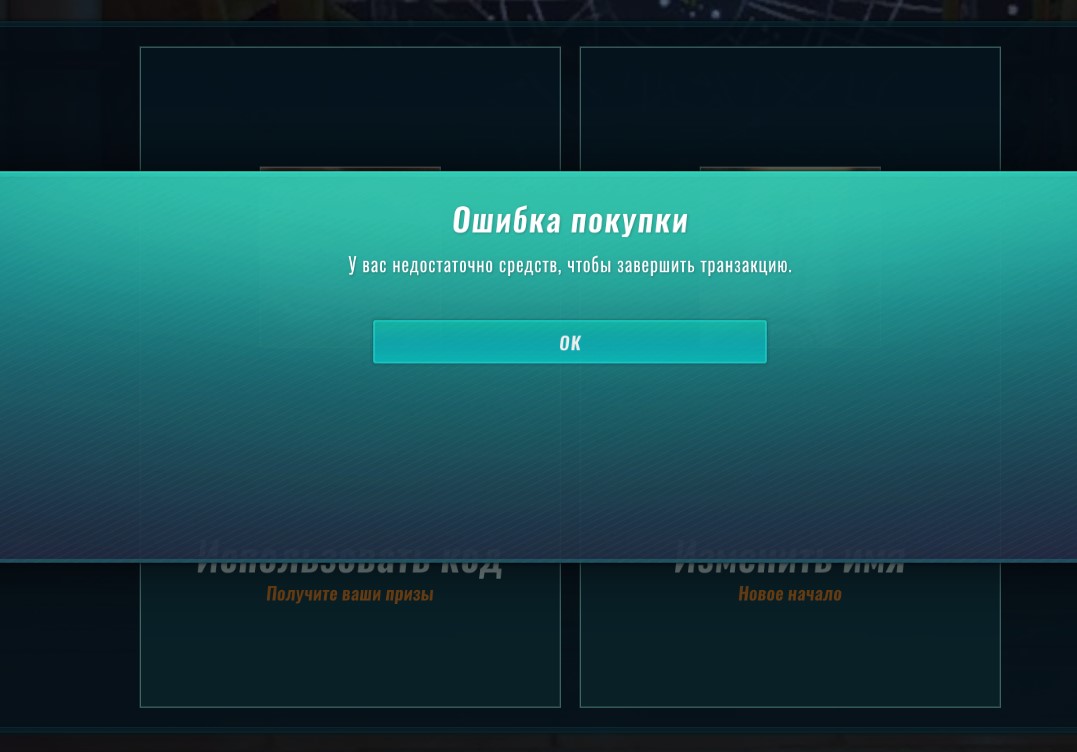
Так что если на внутриигровом счете пусто, нужно его пополнить. Сделать это можно тоже в разделе «Магазин». Нужно нажать кнопку «Купить кристаллы»:
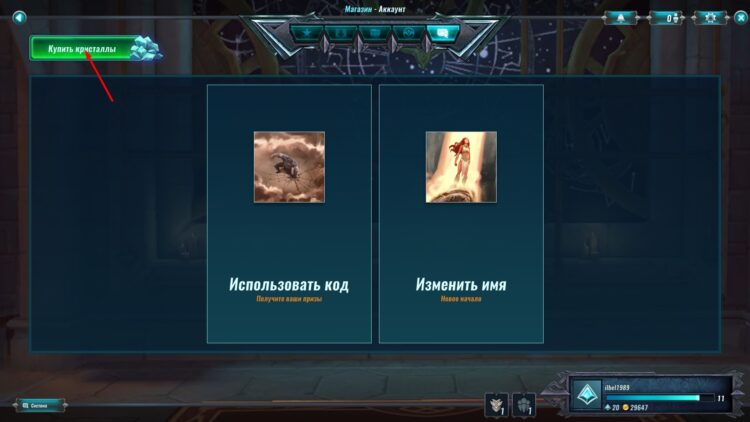
После этого игроку предложат указать сумму платежа, ввести реквизиты и подтвердить операцию. Покупка кристаллов происходит почти мгновенно – буквально за 2 – 3 секунды.
Способ № 2: бесплатный
Этот способ подойдет тем, кто скачал игру через Steam. Именно через его клиент мы и будем менять имя. Для этого необходимо сделать следующее:
Обратите внимание – ник изменится только в играх. Имя аккаунта Стим останется прежним – то есть таким, каким вы задали его при регистрации. Новый никнейм будет отображаться не только в Paladins, но и во всех остальных играх, привязанных к профилю Steam.
Смена имени непосредственно в игре пользователям Стим тоже доступна. Но всякий смысл в ней отпадает. Зачем платить 300 рублей, если можно задать новый никнейм совершенно бесплатно?
Вывод
Сменить ник в Paladins можно в самой игре или через аккаунт Steam. В первом случае за использование нового имени попросят заплатить внутриигровую валюту, которую нужно покупать за донат. Во втором смена никнейма будет совершенно бесплатной.
Автор гайда: arm89i
Рекламный контент
|
ID: 4569 |
Смена имени персонажа U (Масса: 0.01) Цена: 5 екр. Долговечность: 0/1 Уровень предмета: 4 Задержка использования: 1 нед. Требуется минимальное: Описание: Предмет не подлежит ремонту Предмет нельзя передавать, но можно выставить на аукцион Возможные способы получения предмета:** Можно купить в Березке (отдел «Заклинания: сервисные»). Описание и комментарии: Для того, чтобы сменить ник игрока, необходимо сначала использовать этот свиток, а затем авторизоваться в CTU и выбрать новый ник, который не нарушает правила и не занят другим игроком.
* В блоке «Предметы для получения» указаны все предметы, которые могут требоваться в различных местах. Подробности могут быть указаны в блоке «Описание и комментарии» или в описании к требующимся предметам на кнопках [ИНФО] перед указанием долговечности.
** В блоке «Возможные способы получения предмета» указываются известные способы получения предметов, однако со временем некоторые предметы убираются из магазинов или иных источников и могут быть недоступны в определенный момент. Дата обновления карточки предмета: 04.08.2022 в 21:19. |

Нашли ошибку в описании предмета? Информация на странице неполная и вы хотите что-то добавить?
Напишите в саппорт! (в обращении не забудьте указать ссылку на эту страницу)
Поиск только в этой категории
(напишите слово (или его часть)
и нажмите Enter)
Players can enter System Commands into the chat console to execute certain actions. The chat console can be brought up in-game by pressing Enter (or players can simply start typing with the slash character) or, while on the main lobby, on the Chat’s System tab.
- Open the chat window with the key you have configured for it. By default, it is Enter.
- Write the command you want to use.
- Press the Enter key to activate it.
Note: Players can no longer enter most of the System Commands as of August 8, 2019. The commands can still be executed by binding them to keys in the Program Files (x86)SteamsteamappscommonPaladinsChaosGameConfigDefaultInput.ini file. On the following example the command for a screenshot (shot) was assigned to the F1 key on the keyboard:
+Bindings=(Name="F1", Command="OnRelease shot")
Common Commands[]
The commands for normal play are:
| Command | Description |
|---|---|
| /help | Brief list of common system commands. |
| /w playername message | Send a whisper to a player. |
| /r message | Respond to a player’s whisper. Playername will default to the previous whisperer. |
| /block playername | Blocks a player from whispering you. |
| /unblock playername | Unblocks a player from whispering you. |
| /ignore playername | Ignores the messages and requests from a player. |
| /unignore playername | Unignores the messages and requests from a player. |
| /dnd | Toggle Do-Not-Disturb mode. While in DnD mode, you cannot receive whispers or party invites. |
| /lfg | Join the «Looking-for-Group» channel. |
| /claimpromotion promotioncode | Allows the user to claim promotional codes from anywhere in the game, even during a match. |
| /shot | Take a screenshot. The screenshots will be stored in your Windows «Documents» folder under «My GamespaladinsliveChaosGameScreenshotsWin32Console«. (Win64Console if you are using 64bit) |
| /stat fps | Toggle the Frames-Per-Second indicator. You can also press F9 to toggle this. |
| /stat unit | Toggle an advanced frame time indicator. |
| /spectate playername | Begin spectating in the Spectator Mode. If a game is not currently being played, you will be queued to spectate that player’s next game. (by pressing ESC you’ll go back to main screen) |
| /replay matchID | Begins replay of selected match in the Spectator Mode, if available. |
| /quit | Closes Paladins. |
| /exit | Similarly to /quit, closes Paladins. |
| /logout | Logout your accounts |
| /toggleclient3p | Toggles the 3rd person view. Works only in Shooting Range. |
Advanced Commands[]
The following commands are oriented for developer use and testing, but was still available in the public client.
| Command | Description | ||||||||||||||||||||||||||||||||||||||||||||||||||||||||||||||||||||||||||||||||||||||||||||||||||||||||||||||||||||||||
|---|---|---|---|---|---|---|---|---|---|---|---|---|---|---|---|---|---|---|---|---|---|---|---|---|---|---|---|---|---|---|---|---|---|---|---|---|---|---|---|---|---|---|---|---|---|---|---|---|---|---|---|---|---|---|---|---|---|---|---|---|---|---|---|---|---|---|---|---|---|---|---|---|---|---|---|---|---|---|---|---|---|---|---|---|---|---|---|---|---|---|---|---|---|---|---|---|---|---|---|---|---|---|---|---|---|---|---|---|---|---|---|---|---|---|---|---|---|---|---|---|---|
| /combatlog toggle piped | Begin recording an advanced/detailed combat log. The log will be stored in your Windows «Documents» folder under «My GamespaladinsliveChaosGameLogs«. | ||||||||||||||||||||||||||||||||||||||||||||||||||||||||||||||||||||||||||||||||||||||||||||||||||||||||||||||||||||||||
| /gamma value | Changes the gamma correction. Value is between 0 and 5. This can also be changed in the Video tab of the settings menu. | ||||||||||||||||||||||||||||||||||||||||||||||||||||||||||||||||||||||||||||||||||||||||||||||||||||||||||||||||||||||||
| /showlog | Opens a console window that records log messages from the game. Closing it will close the whole game. | ||||||||||||||||||||||||||||||||||||||||||||||||||||||||||||||||||||||||||||||||||||||||||||||||||||||||||||||||||||||||
| /showmiplevels | Toggle displaying the mip-map levels as different shaded colors. | ||||||||||||||||||||||||||||||||||||||||||||||||||||||||||||||||||||||||||||||||||||||||||||||||||||||||||||||||||||||||
| /suicide | Kills your character. This is only available in Training modes. | ||||||||||||||||||||||||||||||||||||||||||||||||||||||||||||||||||||||||||||||||||||||||||||||||||||||||||||||||||||||||
| /reconnect | Rejoin your game in progress. | ||||||||||||||||||||||||||||||||||||||||||||||||||||||||||||||||||||||||||||||||||||||||||||||||||||||||||||||||||||||||
| /show | displays various processes status on log. | ||||||||||||||||||||||||||||||||||||||||||||||||||||||||||||||||||||||||||||||||||||||||||||||||||||||||||||||||||||||||
| /setsensitivity value | modifies the sensitivity, in decimal number variables | ||||||||||||||||||||||||||||||||||||||||||||||||||||||||||||||||||||||||||||||||||||||||||||||||||||||||||||||||||||||||
| /hidehud | Hides all UI elements. | ||||||||||||||||||||||||||||||||||||||||||||||||||||||||||||||||||||||||||||||||||||||||||||||||||||||||||||||||||||||||
| /showhud | Shows all UI elements. | ||||||||||||||||||||||||||||||||||||||||||||||||||||||||||||||||||||||||||||||||||||||||||||||||||||||||||||||||||||||||
| /togglehud | Toggles display of all UI elements. | ||||||||||||||||||||||||||||||||||||||||||||||||||||||||||||||||||||||||||||||||||||||||||||||||||||||||||||||||||||||||
| /demoplay filename | This command is used to start spectator mode from a local demo file located in the correct directory. Further instructions on demo playback are found here. | ||||||||||||||||||||||||||||||||||||||||||||||||||||||||||||||||||||||||||||||||||||||||||||||||||||||||||||||||||||||||
| /setname | Change the name displayed on kill and death by the name set after the command. If Paladins is linked with Steam, display the Steam nickname. [Only work in Game] | ||||||||||||||||||||||||||||||||||||||||||||||||||||||||||||||||||||||||||||||||||||||||||||||||||||||||||||||||||||||||
| /switchlevel map name | The map name replaces the map’s file name (e.g. /switchlevel SG_AscensionPeak_P). Also a gamemode could be added with the expression: «?game=<gamemode>».
+Bindings=(Name="F2", Command="OnRelease switchlevel SG_AscensionPeak_P?game=TgGame.TgGame_Paladins_Siege") Those gamemodes could be found in the DefaultGame.ini file like:
|
|
v · d · e General |
|---|
|
About the Game • Game Credits • Account Level Rewards • Assembly of Champions • Champion Winrates • Commendations • Controls • Crystal Awards • Daily Queue Bonus • Developer Streams • DLC • Experience Points • Public Test Server • Redeem codes • Spectator Mode • Steam Community Items • System Commands • Voice Guided System Other Games Other |
Players can enter System Commands into the chat console to execute certain actions. The chat console can be brought up in-game by pressing Enter (or players can simply start typing with the slash character) or, while on the main lobby, on the Chat’s System tab.
- Open the chat window with the key you have configured for it. By default, it is Enter.
- Write the command you want to use.
- Press the Enter key to activate it.
Note: Players can no longer enter most of the System Commands as of August 8, 2019. The commands can still be executed by binding them to keys in the Program Files (x86)SteamsteamappscommonPaladinsChaosGameConfigDefaultInput.ini file. On the following example the command for a screenshot (shot) was assigned to the F1 key on the keyboard:
+Bindings=(Name="F1", Command="OnRelease shot")
Common Commands[]
The commands for normal play are:
| Command | Description |
|---|---|
| /help | Brief list of common system commands. |
| /w playername message | Send a whisper to a player. |
| /r message | Respond to a player’s whisper. Playername will default to the previous whisperer. |
| /block playername | Blocks a player from whispering you. |
| /unblock playername | Unblocks a player from whispering you. |
| /ignore playername | Ignores the messages and requests from a player. |
| /unignore playername | Unignores the messages and requests from a player. |
| /dnd | Toggle Do-Not-Disturb mode. While in DnD mode, you cannot receive whispers or party invites. |
| /lfg | Join the «Looking-for-Group» channel. |
| /claimpromotion promotioncode | Allows the user to claim promotional codes from anywhere in the game, even during a match. |
| /shot | Take a screenshot. The screenshots will be stored in your Windows «Documents» folder under «My GamespaladinsliveChaosGameScreenshotsWin32Console«. (Win64Console if you are using 64bit) |
| /stat fps | Toggle the Frames-Per-Second indicator. You can also press F9 to toggle this. |
| /stat unit | Toggle an advanced frame time indicator. |
| /spectate playername | Begin spectating in the Spectator Mode. If a game is not currently being played, you will be queued to spectate that player’s next game. (by pressing ESC you’ll go back to main screen) |
| /replay matchID | Begins replay of selected match in the Spectator Mode, if available. |
| /quit | Closes Paladins. |
| /exit | Similarly to /quit, closes Paladins. |
| /logout | Logout your accounts |
| /toggleclient3p | Toggles the 3rd person view. Works only in Shooting Range. |
Advanced Commands[]
The following commands are oriented for developer use and testing, but was still available in the public client.
| Command | Description | ||||||||||||||||||||||||||||||||||||||||||||||||||||||||||||||||||||||||||||||||||||||||||||||||||||||||||||||||||||||||
|---|---|---|---|---|---|---|---|---|---|---|---|---|---|---|---|---|---|---|---|---|---|---|---|---|---|---|---|---|---|---|---|---|---|---|---|---|---|---|---|---|---|---|---|---|---|---|---|---|---|---|---|---|---|---|---|---|---|---|---|---|---|---|---|---|---|---|---|---|---|---|---|---|---|---|---|---|---|---|---|---|---|---|---|---|---|---|---|---|---|---|---|---|---|---|---|---|---|---|---|---|---|---|---|---|---|---|---|---|---|---|---|---|---|---|---|---|---|---|---|---|---|
| /combatlog toggle piped | Begin recording an advanced/detailed combat log. The log will be stored in your Windows «Documents» folder under «My GamespaladinsliveChaosGameLogs«. | ||||||||||||||||||||||||||||||||||||||||||||||||||||||||||||||||||||||||||||||||||||||||||||||||||||||||||||||||||||||||
| /gamma value | Changes the gamma correction. Value is between 0 and 5. This can also be changed in the Video tab of the settings menu. | ||||||||||||||||||||||||||||||||||||||||||||||||||||||||||||||||||||||||||||||||||||||||||||||||||||||||||||||||||||||||
| /showlog | Opens a console window that records log messages from the game. Closing it will close the whole game. | ||||||||||||||||||||||||||||||||||||||||||||||||||||||||||||||||||||||||||||||||||||||||||||||||||||||||||||||||||||||||
| /showmiplevels | Toggle displaying the mip-map levels as different shaded colors. | ||||||||||||||||||||||||||||||||||||||||||||||||||||||||||||||||||||||||||||||||||||||||||||||||||||||||||||||||||||||||
| /suicide | Kills your character. This is only available in Training modes. | ||||||||||||||||||||||||||||||||||||||||||||||||||||||||||||||||||||||||||||||||||||||||||||||||||||||||||||||||||||||||
| /reconnect | Rejoin your game in progress. | ||||||||||||||||||||||||||||||||||||||||||||||||||||||||||||||||||||||||||||||||||||||||||||||||||||||||||||||||||||||||
| /show | displays various processes status on log. | ||||||||||||||||||||||||||||||||||||||||||||||||||||||||||||||||||||||||||||||||||||||||||||||||||||||||||||||||||||||||
| /setsensitivity value | modifies the sensitivity, in decimal number variables | ||||||||||||||||||||||||||||||||||||||||||||||||||||||||||||||||||||||||||||||||||||||||||||||||||||||||||||||||||||||||
| /hidehud | Hides all UI elements. | ||||||||||||||||||||||||||||||||||||||||||||||||||||||||||||||||||||||||||||||||||||||||||||||||||||||||||||||||||||||||
| /showhud | Shows all UI elements. | ||||||||||||||||||||||||||||||||||||||||||||||||||||||||||||||||||||||||||||||||||||||||||||||||||||||||||||||||||||||||
| /togglehud | Toggles display of all UI elements. | ||||||||||||||||||||||||||||||||||||||||||||||||||||||||||||||||||||||||||||||||||||||||||||||||||||||||||||||||||||||||
| /demoplay filename | This command is used to start spectator mode from a local demo file located in the correct directory. Further instructions on demo playback are found here. | ||||||||||||||||||||||||||||||||||||||||||||||||||||||||||||||||||||||||||||||||||||||||||||||||||||||||||||||||||||||||
| /setname | Change the name displayed on kill and death by the name set after the command. If Paladins is linked with Steam, display the Steam nickname. [Only work in Game] | ||||||||||||||||||||||||||||||||||||||||||||||||||||||||||||||||||||||||||||||||||||||||||||||||||||||||||||||||||||||||
| /switchlevel map name | The map name replaces the map’s file name (e.g. /switchlevel SG_AscensionPeak_P). Also a gamemode could be added with the expression: «?game=<gamemode>».
+Bindings=(Name="F2", Command="OnRelease switchlevel SG_AscensionPeak_P?game=TgGame.TgGame_Paladins_Siege") Those gamemodes could be found in the DefaultGame.ini file like:
|
|
v · d · e General |
|---|
|
About the Game • Game Credits • Account Level Rewards • Assembly of Champions • Champion Winrates • Commendations • Controls • Crystal Awards • Daily Queue Bonus • Developer Streams • DLC • Experience Points • Public Test Server • Redeem codes • Spectator Mode • Steam Community Items • System Commands • Voice Guided System Other Games Other |