
Материал из Кафедра ИУ5 МГТУ им. Н.Э.Баумана — студенческое сообщество

В статье пойдёт речь о том, как добиться корректного вывода кириллицы в «консоли» Windows (cmd.exe).
Содержание
- 1 Описание проблемы
- 2 Решение проблемы
- 2.1 Суть
- 2.2 Конкретные действия
- 2.2.1 Супер быстро и просто
- 2.2.2 Быстро и просто
- 2.2.3 Посложнее и подольше
Описание проблемы
В дистрибутив PostgreSQL, помимо всего прочего, для работы с СУБД входит:
- приложение с графическим интерфейсом
pgAdmin; - консольная утилита
psql.
При работе с psql в среде Windows пользователи всегда довольно часто сталкиваются с проблемой вывода кириллицы. Например, при отображении результатов запроса к таблице, в полях которых хранятся строковые данные на русском языке.
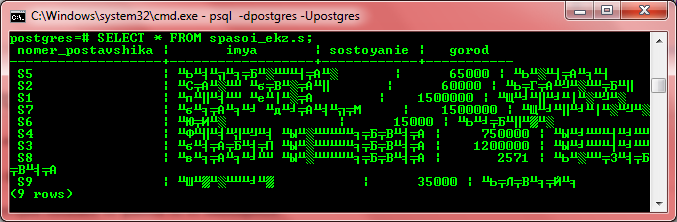
Ну и зачем тогда работать с psql, кому нужно долбить клавиатурой в консольке, когда можно всё сделать красиво и быстро в pgAdmin? Ну, не всегда pgAdmin доступен, особенно если речь идёт об удалённой машине. Кроме того, выполнение SQL-запросов в текстовом режиме консоли — это +10 к хакирству.
Решение проблемы
Версии ПО:
- MS Windows 7 SP1 x64;
- PostgreSQL 8.4.12 x32.
На сервере имеется БД, созданная в кодировке UTF8.
Суть
Суть проблемы в том, что cmd.exe работает (и так будет до скончания времён) в кодировке CP866, а сама Windows — в WIN1251, о чём psql предупреждает при начале работы:
WARNING: Console code page (866) differs from Windows code page (1251)
         8-bit characters might not work correctly. See psql reference
         page "Notes for Windows users" for details.
Значит, надо как-то добиться, чтобы кодировка была одна.
В разных источниках встречаются разные рецепты, включая правку реестра и подмену файлов в системных папках Windows. Ничего этого делать не нужно, достаточно всего трёх шагов:
- сменить шрифт у
cmd.exe; - сменить текущую кодовую страницу
cmd.exe; - сменить кодировку на стороне клиента в
psql.
Конкретные действия
Супер быстро и просто
Запускаете cmd.exe, оттуда psql:
psql -d ВАШАБАЗА -U ВАШЛОГИН
Далее:
psql ! chcp 1251
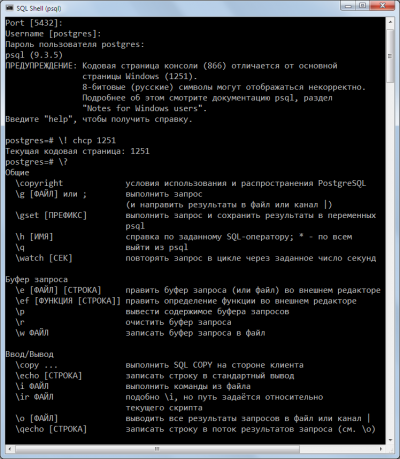
Быстро и просто
Запускаете cmd.exe, оттуда psql:
psql -d ВАШАБАЗА -U ВАШЛОГИН
Вводите пароль (если установлен) и выполняете команду:
set client_encoding='WIN866';
И всё. Теперь результаты запроса, содержащие кириллицу, будут отображаться нормально. Но есть небольшой косяк:
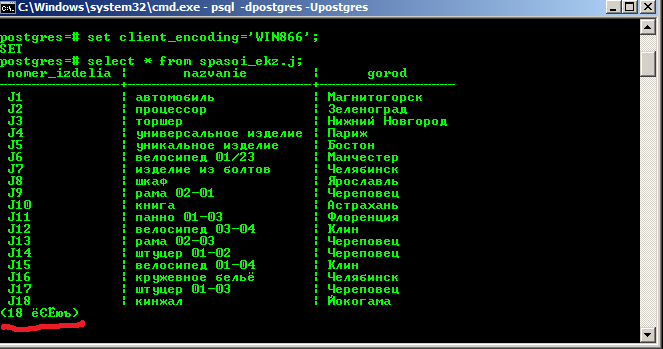
Потому предлагаем ещё способ, который этого недостатка лишён.
Посложнее и подольше
Запустить cmd.exe, нажать мышью в правом левом верхнем углу окна, там Свойства — Шрифт — выбрать Lucida Console. Нажать ОК.
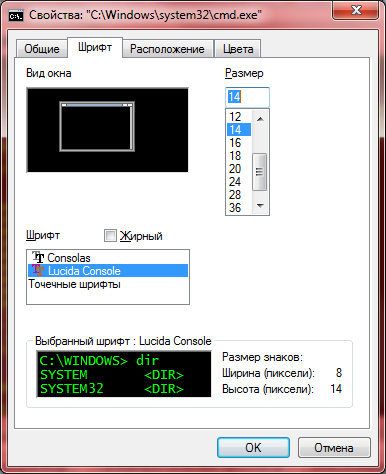
Выполнить команду:
chcp 1251
В ответ выведет:
Текущая кодовая страница: 1251
Запустить psql;
psql -d ВАШАБАЗА -U ВАШЛОГИН
Кстати, обратите внимание — теперь предупреждения о несовпадении кодировок нет.
Выполнить:
set client_encoding='win1251';
Он выведет:
SET
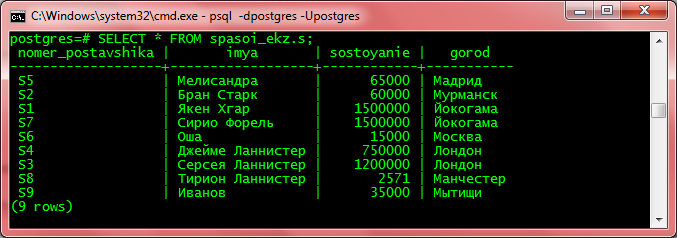
Всё, теперь кириллица будет нормально отображаться.
Проверяем:
The character set support in PostgreSQL allows you to store text in a variety of character sets (also called encodings), including single-byte character sets such as the ISO 8859 series and multiple-byte character sets such as EUC (Extended Unix Code), UTF-8, and Mule internal code. All supported character sets can be used transparently by clients, but a few are not supported for use within the server (that is, as a server-side encoding). The default character set is selected while initializing your PostgreSQL database cluster using initdb. It can be overridden when you create a database, so you can have multiple databases each with a different character set.
An important restriction, however, is that each database’s character set must be compatible with the database’s LC_CTYPE (character classification) and LC_COLLATE (string sort order) locale settings. For C or POSIX locale, any character set is allowed, but for other libc-provided locales there is only one character set that will work correctly. (On Windows, however, UTF-8 encoding can be used with any locale.) If you have ICU support configured, ICU-provided locales can be used with most but not all server-side encodings.
24.3.1. Supported Character Sets
Table 24.1 shows the character sets available for use in PostgreSQL.
Table 24.1. PostgreSQL Character Sets
| Name | Description | Language | Server? | ICU? | Bytes/Char | Aliases |
|---|---|---|---|---|---|---|
BIG5 |
Big Five | Traditional Chinese | No | No | 1–2 | WIN950, Windows950 |
EUC_CN |
Extended UNIX Code-CN | Simplified Chinese | Yes | Yes | 1–3 | |
EUC_JP |
Extended UNIX Code-JP | Japanese | Yes | Yes | 1–3 | |
EUC_JIS_2004 |
Extended UNIX Code-JP, JIS X 0213 | Japanese | Yes | No | 1–3 | |
EUC_KR |
Extended UNIX Code-KR | Korean | Yes | Yes | 1–3 | |
EUC_TW |
Extended UNIX Code-TW | Traditional Chinese, Taiwanese | Yes | Yes | 1–3 | |
GB18030 |
National Standard | Chinese | No | No | 1–4 | |
GBK |
Extended National Standard | Simplified Chinese | No | No | 1–2 | WIN936, Windows936 |
ISO_8859_5 |
ISO 8859-5, ECMA 113 | Latin/Cyrillic | Yes | Yes | 1 | |
ISO_8859_6 |
ISO 8859-6, ECMA 114 | Latin/Arabic | Yes | Yes | 1 | |
ISO_8859_7 |
ISO 8859-7, ECMA 118 | Latin/Greek | Yes | Yes | 1 | |
ISO_8859_8 |
ISO 8859-8, ECMA 121 | Latin/Hebrew | Yes | Yes | 1 | |
JOHAB |
JOHAB | Korean (Hangul) | No | No | 1–3 | |
KOI8R |
KOI8-R | Cyrillic (Russian) | Yes | Yes | 1 | KOI8 |
KOI8U |
KOI8-U | Cyrillic (Ukrainian) | Yes | Yes | 1 | |
LATIN1 |
ISO 8859-1, ECMA 94 | Western European | Yes | Yes | 1 | ISO88591 |
LATIN2 |
ISO 8859-2, ECMA 94 | Central European | Yes | Yes | 1 | ISO88592 |
LATIN3 |
ISO 8859-3, ECMA 94 | South European | Yes | Yes | 1 | ISO88593 |
LATIN4 |
ISO 8859-4, ECMA 94 | North European | Yes | Yes | 1 | ISO88594 |
LATIN5 |
ISO 8859-9, ECMA 128 | Turkish | Yes | Yes | 1 | ISO88599 |
LATIN6 |
ISO 8859-10, ECMA 144 | Nordic | Yes | Yes | 1 | ISO885910 |
LATIN7 |
ISO 8859-13 | Baltic | Yes | Yes | 1 | ISO885913 |
LATIN8 |
ISO 8859-14 | Celtic | Yes | Yes | 1 | ISO885914 |
LATIN9 |
ISO 8859-15 | LATIN1 with Euro and accents | Yes | Yes | 1 | ISO885915 |
LATIN10 |
ISO 8859-16, ASRO SR 14111 | Romanian | Yes | No | 1 | ISO885916 |
MULE_INTERNAL |
Mule internal code | Multilingual Emacs | Yes | No | 1–4 | |
SJIS |
Shift JIS | Japanese | No | No | 1–2 | Mskanji, ShiftJIS, WIN932, Windows932 |
SHIFT_JIS_2004 |
Shift JIS, JIS X 0213 | Japanese | No | No | 1–2 | |
SQL_ASCII |
unspecified (see text) | any | Yes | No | 1 | |
UHC |
Unified Hangul Code | Korean | No | No | 1–2 | WIN949, Windows949 |
UTF8 |
Unicode, 8-bit | all | Yes | Yes | 1–4 | Unicode |
WIN866 |
Windows CP866 | Cyrillic | Yes | Yes | 1 | ALT |
WIN874 |
Windows CP874 | Thai | Yes | No | 1 | |
WIN1250 |
Windows CP1250 | Central European | Yes | Yes | 1 | |
WIN1251 |
Windows CP1251 | Cyrillic | Yes | Yes | 1 | WIN |
WIN1252 |
Windows CP1252 | Western European | Yes | Yes | 1 | |
WIN1253 |
Windows CP1253 | Greek | Yes | Yes | 1 | |
WIN1254 |
Windows CP1254 | Turkish | Yes | Yes | 1 | |
WIN1255 |
Windows CP1255 | Hebrew | Yes | Yes | 1 | |
WIN1256 |
Windows CP1256 | Arabic | Yes | Yes | 1 | |
WIN1257 |
Windows CP1257 | Baltic | Yes | Yes | 1 | |
WIN1258 |
Windows CP1258 | Vietnamese | Yes | Yes | 1 | ABC, TCVN, TCVN5712, VSCII |
Not all client APIs support all the listed character sets. For example, the PostgreSQL JDBC driver does not support MULE_INTERNAL, LATIN6, LATIN8, and LATIN10.
The SQL_ASCII setting behaves considerably differently from the other settings. When the server character set is SQL_ASCII, the server interprets byte values 0–127 according to the ASCII standard, while byte values 128–255 are taken as uninterpreted characters. No encoding conversion will be done when the setting is SQL_ASCII. Thus, this setting is not so much a declaration that a specific encoding is in use, as a declaration of ignorance about the encoding. In most cases, if you are working with any non-ASCII data, it is unwise to use the SQL_ASCII setting because PostgreSQL will be unable to help you by converting or validating non-ASCII characters.
24.3.2. Setting the Character Set
initdb defines the default character set (encoding) for a PostgreSQL cluster. For example,
initdb -E EUC_JP
sets the default character set to EUC_JP (Extended Unix Code for Japanese). You can use --encoding instead of -E if you prefer longer option strings. If no -E or --encoding option is given, initdb attempts to determine the appropriate encoding to use based on the specified or default locale.
You can specify a non-default encoding at database creation time, provided that the encoding is compatible with the selected locale:
createdb -E EUC_KR -T template0 --lc-collate=ko_KR.euckr --lc-ctype=ko_KR.euckr korean
This will create a database named korean that uses the character set EUC_KR, and locale ko_KR. Another way to accomplish this is to use this SQL command:
CREATE DATABASE korean WITH ENCODING 'EUC_KR' LC_COLLATE='ko_KR.euckr' LC_CTYPE='ko_KR.euckr' TEMPLATE=template0;
Notice that the above commands specify copying the template0 database. When copying any other database, the encoding and locale settings cannot be changed from those of the source database, because that might result in corrupt data. For more information see Section 23.3.
The encoding for a database is stored in the system catalog pg_database. You can see it by using the psql -l option or the l command.
$ psql -l
                                         List of databases
   Name    |  Owner   | Encoding  |  Collation  |    Ctype    |          Access Privileges
-----------+----------+-----------+-------------+-------------+-------------------------------------
 clocaledb | hlinnaka | SQL_ASCII | C           | C           |
 englishdb | hlinnaka | UTF8      | en_GB.UTF8  | en_GB.UTF8  |
 japanese  | hlinnaka | UTF8      | ja_JP.UTF8  | ja_JP.UTF8  |
 korean    | hlinnaka | EUC_KR    | ko_KR.euckr | ko_KR.euckr |
 postgres  | hlinnaka | UTF8      | fi_FI.UTF8  | fi_FI.UTF8  |
 template0 | hlinnaka | UTF8      | fi_FI.UTF8  | fi_FI.UTF8  | {=c/hlinnaka,hlinnaka=CTc/hlinnaka}
 template1 | hlinnaka | UTF8      | fi_FI.UTF8  | fi_FI.UTF8  | {=c/hlinnaka,hlinnaka=CTc/hlinnaka}
(7 rows)
Important
On most modern operating systems, PostgreSQL can determine which character set is implied by the LC_CTYPE setting, and it will enforce that only the matching database encoding is used. On older systems it is your responsibility to ensure that you use the encoding expected by the locale you have selected. A mistake in this area is likely to lead to strange behavior of locale-dependent operations such as sorting.
PostgreSQL will allow superusers to create databases with SQL_ASCII encoding even when LC_CTYPE is not C or POSIX. As noted above, SQL_ASCII does not enforce that the data stored in the database has any particular encoding, and so this choice poses risks of locale-dependent misbehavior. Using this combination of settings is deprecated and may someday be forbidden altogether.
24.3.3. Automatic Character Set Conversion Between Server and Client
PostgreSQL supports automatic character set conversion between server and client for many combinations of character sets (Section 24.3.4 shows which ones).
To enable automatic character set conversion, you have to tell PostgreSQL the character set (encoding) you would like to use in the client. There are several ways to accomplish this:
-
Using the
encodingcommand in psql.encodingallows you to change client encoding on the fly. For example, to change the encoding toSJIS, type:encoding SJIS
-
libpq (Section 34.11) has functions to control the client encoding.
-
Using
SET client_encoding TO. Setting the client encoding can be done with this SQL command:SET CLIENT_ENCODING TO '
value';Also you can use the standard SQL syntax
SET NAMESfor this purpose:SET NAMES '
value';To query the current client encoding:
SHOW client_encoding;
To return to the default encoding:
RESET client_encoding;
-
Using
PGCLIENTENCODING. If the environment variablePGCLIENTENCODINGis defined in the client’s environment, that client encoding is automatically selected when a connection to the server is made. (This can subsequently be overridden using any of the other methods mentioned above.) -
Using the configuration variable client_encoding. If the
client_encodingvariable is set, that client encoding is automatically selected when a connection to the server is made. (This can subsequently be overridden using any of the other methods mentioned above.)
If the conversion of a particular character is not possible — suppose you chose EUC_JP for the server and LATIN1 for the client, and some Japanese characters are returned that do not have a representation in LATIN1 — an error is reported.
If the client character set is defined as SQL_ASCII, encoding conversion is disabled, regardless of the server’s character set. (However, if the server’s character set is not SQL_ASCII, the server will still check that incoming data is valid for that encoding; so the net effect is as though the client character set were the same as the server’s.) Just as for the server, use of SQL_ASCII is unwise unless you are working with all-ASCII data.
24.3.4. Available Character Set Conversions
PostgreSQL allows conversion between any two character sets for which a conversion function is listed in the pg_conversion system catalog. PostgreSQL comes with some predefined conversions, as summarized in Table 24.2 and shown in more detail in Table 24.3. You can create a new conversion using the SQL command CREATE CONVERSION. (To be used for automatic client/server conversions, a conversion must be marked as “default” for its character set pair.)
Table 24.2. Built-in Client/Server Character Set Conversions
| Server Character Set | Available Client Character Sets |
|---|---|
BIG5 |
not supported as a server encoding |
EUC_CN |
EUC_CN, MULE_INTERNAL, UTF8 |
EUC_JP |
EUC_JP, MULE_INTERNAL, SJIS, UTF8 |
EUC_JIS_2004 |
EUC_JIS_2004, SHIFT_JIS_2004, UTF8 |
EUC_KR |
EUC_KR, MULE_INTERNAL, UTF8 |
EUC_TW |
EUC_TW, BIG5, MULE_INTERNAL, UTF8 |
GB18030 |
not supported as a server encoding |
GBK |
not supported as a server encoding |
ISO_8859_5 |
ISO_8859_5, KOI8R, MULE_INTERNAL, UTF8, WIN866, WIN1251 |
ISO_8859_6 |
ISO_8859_6, UTF8 |
ISO_8859_7 |
ISO_8859_7, UTF8 |
ISO_8859_8 |
ISO_8859_8, UTF8 |
JOHAB |
not supported as a server encoding |
KOI8R |
KOI8R, ISO_8859_5, MULE_INTERNAL, UTF8, WIN866, WIN1251 |
KOI8U |
KOI8U, UTF8 |
LATIN1 |
LATIN1, MULE_INTERNAL, UTF8 |
LATIN2 |
LATIN2, MULE_INTERNAL, UTF8, WIN1250 |
LATIN3 |
LATIN3, MULE_INTERNAL, UTF8 |
LATIN4 |
LATIN4, MULE_INTERNAL, UTF8 |
LATIN5 |
LATIN5, UTF8 |
LATIN6 |
LATIN6, UTF8 |
LATIN7 |
LATIN7, UTF8 |
LATIN8 |
LATIN8, UTF8 |
LATIN9 |
LATIN9, UTF8 |
LATIN10 |
LATIN10, UTF8 |
MULE_INTERNAL |
MULE_INTERNAL, BIG5, EUC_CN, EUC_JP, EUC_KR, EUC_TW, ISO_8859_5, KOI8R, LATIN1 to LATIN4, SJIS, WIN866, WIN1250, WIN1251 |
SJIS |
not supported as a server encoding |
SHIFT_JIS_2004 |
not supported as a server encoding |
SQL_ASCII |
any (no conversion will be performed) |
UHC |
not supported as a server encoding |
UTF8 |
all supported encodings |
WIN866 |
WIN866, ISO_8859_5, KOI8R, MULE_INTERNAL, UTF8, WIN1251 |
WIN874 |
WIN874, UTF8 |
WIN1250 |
WIN1250, LATIN2, MULE_INTERNAL, UTF8 |
WIN1251 |
WIN1251, ISO_8859_5, KOI8R, MULE_INTERNAL, UTF8, WIN866 |
WIN1252 |
WIN1252, UTF8 |
WIN1253 |
WIN1253, UTF8 |
WIN1254 |
WIN1254, UTF8 |
WIN1255 |
WIN1255, UTF8 |
WIN1256 |
WIN1256, UTF8 |
WIN1257 |
WIN1257, UTF8 |
WIN1258 |
WIN1258, UTF8 |
Table 24.3. All Built-in Character Set Conversions
| Conversion Name [a] | Source Encoding | Destination Encoding |
|---|---|---|
big5_to_euc_tw |
BIG5 |
EUC_TW |
big5_to_mic |
BIG5 |
MULE_INTERNAL |
big5_to_utf8 |
BIG5 |
UTF8 |
euc_cn_to_mic |
EUC_CN |
MULE_INTERNAL |
euc_cn_to_utf8 |
EUC_CN |
UTF8 |
euc_jp_to_mic |
EUC_JP |
MULE_INTERNAL |
euc_jp_to_sjis |
EUC_JP |
SJIS |
euc_jp_to_utf8 |
EUC_JP |
UTF8 |
euc_kr_to_mic |
EUC_KR |
MULE_INTERNAL |
euc_kr_to_utf8 |
EUC_KR |
UTF8 |
euc_tw_to_big5 |
EUC_TW |
BIG5 |
euc_tw_to_mic |
EUC_TW |
MULE_INTERNAL |
euc_tw_to_utf8 |
EUC_TW |
UTF8 |
gb18030_to_utf8 |
GB18030 |
UTF8 |
gbk_to_utf8 |
GBK |
UTF8 |
iso_8859_10_to_utf8 |
LATIN6 |
UTF8 |
iso_8859_13_to_utf8 |
LATIN7 |
UTF8 |
iso_8859_14_to_utf8 |
LATIN8 |
UTF8 |
iso_8859_15_to_utf8 |
LATIN9 |
UTF8 |
iso_8859_16_to_utf8 |
LATIN10 |
UTF8 |
iso_8859_1_to_mic |
LATIN1 |
MULE_INTERNAL |
iso_8859_1_to_utf8 |
LATIN1 |
UTF8 |
iso_8859_2_to_mic |
LATIN2 |
MULE_INTERNAL |
iso_8859_2_to_utf8 |
LATIN2 |
UTF8 |
iso_8859_2_to_windows_1250 |
LATIN2 |
WIN1250 |
iso_8859_3_to_mic |
LATIN3 |
MULE_INTERNAL |
iso_8859_3_to_utf8 |
LATIN3 |
UTF8 |
iso_8859_4_to_mic |
LATIN4 |
MULE_INTERNAL |
iso_8859_4_to_utf8 |
LATIN4 |
UTF8 |
iso_8859_5_to_koi8_r |
ISO_8859_5 |
KOI8R |
iso_8859_5_to_mic |
ISO_8859_5 |
MULE_INTERNAL |
iso_8859_5_to_utf8 |
ISO_8859_5 |
UTF8 |
iso_8859_5_to_windows_1251 |
ISO_8859_5 |
WIN1251 |
iso_8859_5_to_windows_866 |
ISO_8859_5 |
WIN866 |
iso_8859_6_to_utf8 |
ISO_8859_6 |
UTF8 |
iso_8859_7_to_utf8 |
ISO_8859_7 |
UTF8 |
iso_8859_8_to_utf8 |
ISO_8859_8 |
UTF8 |
iso_8859_9_to_utf8 |
LATIN5 |
UTF8 |
johab_to_utf8 |
JOHAB |
UTF8 |
koi8_r_to_iso_8859_5 |
KOI8R |
ISO_8859_5 |
koi8_r_to_mic |
KOI8R |
MULE_INTERNAL |
koi8_r_to_utf8 |
KOI8R |
UTF8 |
koi8_r_to_windows_1251 |
KOI8R |
WIN1251 |
koi8_r_to_windows_866 |
KOI8R |
WIN866 |
koi8_u_to_utf8 |
KOI8U |
UTF8 |
mic_to_big5 |
MULE_INTERNAL |
BIG5 |
mic_to_euc_cn |
MULE_INTERNAL |
EUC_CN |
mic_to_euc_jp |
MULE_INTERNAL |
EUC_JP |
mic_to_euc_kr |
MULE_INTERNAL |
EUC_KR |
mic_to_euc_tw |
MULE_INTERNAL |
EUC_TW |
mic_to_iso_8859_1 |
MULE_INTERNAL |
LATIN1 |
mic_to_iso_8859_2 |
MULE_INTERNAL |
LATIN2 |
mic_to_iso_8859_3 |
MULE_INTERNAL |
LATIN3 |
mic_to_iso_8859_4 |
MULE_INTERNAL |
LATIN4 |
mic_to_iso_8859_5 |
MULE_INTERNAL |
ISO_8859_5 |
mic_to_koi8_r |
MULE_INTERNAL |
KOI8R |
mic_to_sjis |
MULE_INTERNAL |
SJIS |
mic_to_windows_1250 |
MULE_INTERNAL |
WIN1250 |
mic_to_windows_1251 |
MULE_INTERNAL |
WIN1251 |
mic_to_windows_866 |
MULE_INTERNAL |
WIN866 |
sjis_to_euc_jp |
SJIS |
EUC_JP |
sjis_to_mic |
SJIS |
MULE_INTERNAL |
sjis_to_utf8 |
SJIS |
UTF8 |
windows_1258_to_utf8 |
WIN1258 |
UTF8 |
uhc_to_utf8 |
UHC |
UTF8 |
utf8_to_big5 |
UTF8 |
BIG5 |
utf8_to_euc_cn |
UTF8 |
EUC_CN |
utf8_to_euc_jp |
UTF8 |
EUC_JP |
utf8_to_euc_kr |
UTF8 |
EUC_KR |
utf8_to_euc_tw |
UTF8 |
EUC_TW |
utf8_to_gb18030 |
UTF8 |
GB18030 |
utf8_to_gbk |
UTF8 |
GBK |
utf8_to_iso_8859_1 |
UTF8 |
LATIN1 |
utf8_to_iso_8859_10 |
UTF8 |
LATIN6 |
utf8_to_iso_8859_13 |
UTF8 |
LATIN7 |
utf8_to_iso_8859_14 |
UTF8 |
LATIN8 |
utf8_to_iso_8859_15 |
UTF8 |
LATIN9 |
utf8_to_iso_8859_16 |
UTF8 |
LATIN10 |
utf8_to_iso_8859_2 |
UTF8 |
LATIN2 |
utf8_to_iso_8859_3 |
UTF8 |
LATIN3 |
utf8_to_iso_8859_4 |
UTF8 |
LATIN4 |
utf8_to_iso_8859_5 |
UTF8 |
ISO_8859_5 |
utf8_to_iso_8859_6 |
UTF8 |
ISO_8859_6 |
utf8_to_iso_8859_7 |
UTF8 |
ISO_8859_7 |
utf8_to_iso_8859_8 |
UTF8 |
ISO_8859_8 |
utf8_to_iso_8859_9 |
UTF8 |
LATIN5 |
utf8_to_johab |
UTF8 |
JOHAB |
utf8_to_koi8_r |
UTF8 |
KOI8R |
utf8_to_koi8_u |
UTF8 |
KOI8U |
utf8_to_sjis |
UTF8 |
SJIS |
utf8_to_windows_1258 |
UTF8 |
WIN1258 |
utf8_to_uhc |
UTF8 |
UHC |
utf8_to_windows_1250 |
UTF8 |
WIN1250 |
utf8_to_windows_1251 |
UTF8 |
WIN1251 |
utf8_to_windows_1252 |
UTF8 |
WIN1252 |
utf8_to_windows_1253 |
UTF8 |
WIN1253 |
utf8_to_windows_1254 |
UTF8 |
WIN1254 |
utf8_to_windows_1255 |
UTF8 |
WIN1255 |
utf8_to_windows_1256 |
UTF8 |
WIN1256 |
utf8_to_windows_1257 |
UTF8 |
WIN1257 |
utf8_to_windows_866 |
UTF8 |
WIN866 |
utf8_to_windows_874 |
UTF8 |
WIN874 |
windows_1250_to_iso_8859_2 |
WIN1250 |
LATIN2 |
windows_1250_to_mic |
WIN1250 |
MULE_INTERNAL |
windows_1250_to_utf8 |
WIN1250 |
UTF8 |
windows_1251_to_iso_8859_5 |
WIN1251 |
ISO_8859_5 |
windows_1251_to_koi8_r |
WIN1251 |
KOI8R |
windows_1251_to_mic |
WIN1251 |
MULE_INTERNAL |
windows_1251_to_utf8 |
WIN1251 |
UTF8 |
windows_1251_to_windows_866 |
WIN1251 |
WIN866 |
windows_1252_to_utf8 |
WIN1252 |
UTF8 |
windows_1256_to_utf8 |
WIN1256 |
UTF8 |
windows_866_to_iso_8859_5 |
WIN866 |
ISO_8859_5 |
windows_866_to_koi8_r |
WIN866 |
KOI8R |
windows_866_to_mic |
WIN866 |
MULE_INTERNAL |
windows_866_to_utf8 |
WIN866 |
UTF8 |
windows_866_to_windows_1251 |
WIN866 |
WIN |
windows_874_to_utf8 |
WIN874 |
UTF8 |
euc_jis_2004_to_utf8 |
EUC_JIS_2004 |
UTF8 |
utf8_to_euc_jis_2004 |
UTF8 |
EUC_JIS_2004 |
shift_jis_2004_to_utf8 |
SHIFT_JIS_2004 |
UTF8 |
utf8_to_shift_jis_2004 |
UTF8 |
SHIFT_JIS_2004 |
euc_jis_2004_to_shift_jis_2004 |
EUC_JIS_2004 |
SHIFT_JIS_2004 |
shift_jis_2004_to_euc_jis_2004 |
SHIFT_JIS_2004 |
EUC_JIS_2004 |
|
[a] The conversion names follow a standard naming scheme: The official name of the source encoding with all non-alphanumeric characters replaced by underscores, followed by |
24.3.5. Further Reading
These are good sources to start learning about various kinds of encoding systems.
- CJKV Information Processing: Chinese, Japanese, Korean & Vietnamese Computing
-
Contains detailed explanations of
EUC_JP,EUC_CN,EUC_KR,EUC_TW. - https://www.unicode.org/
-
The web site of the Unicode Consortium.
- RFC 3629
-
UTF-8 (8-bit UCS/Unicode Transformation Format) is defined here.
Connecting to a Database
psql is a regular PostgreSQL client application. In order to connect to a database you need to know the name of your target database, the host name and port number of the server, and what user name you want to connect as. psql can be told about those parameters via command line options, namely -d, -h, -p, and -U respectively. If an argument is found that does not belong to any option it will be interpreted as the database name (or the user name, if the database name is already given). Not all of these options are required; there are useful defaults. If you omit the host name, psql will connect via a Unix-domain socket to a server on the local host, or via TCP/IP to localhost on machines that don’t have Unix-domain sockets. The default port number is determined at compile time. Since the database server uses the same default, you will not have to specify the port in most cases. The default user name is your operating-system user name, as is the default database name. Note that you cannot just connect to any database under any user name. Your database administrator should have informed you about your access rights.
When the defaults aren’t quite right, you can save yourself some typing by setting the environment variables PGDATABASE, PGHOST, PGPORT and/or PGUSER to appropriate values. (For additional environment variables, see Section 34.15.) It is also convenient to have a ~/.pgpass file to avoid regularly having to type in passwords. See Section 34.16 for more information.
An alternative way to specify connection parameters is in a conninfo string or a URI, which is used instead of a database name. This mechanism give you very wide control over the connection. For example:
$psql "service=myservice sslmode=require"$psql postgresql://dbmaster:5433/mydb?sslmode=require
This way you can also use LDAP for connection parameter lookup as described in Section 34.18. See Section 34.1.2 for more information on all the available connection options.
If the connection could not be made for any reason (e.g., insufficient privileges, server is not running on the targeted host, etc.), psql will return an error and terminate.
If both standard input and standard output are a terminal, then psql sets the client encoding to “auto”, which will detect the appropriate client encoding from the locale settings (LC_CTYPE environment variable on Unix systems). If this doesn’t work out as expected, the client encoding can be overridden using the environment variable PGCLIENTENCODING.
Entering SQL Commands
In normal operation, psql provides a prompt with the name of the database to which psql is currently connected, followed by the string =>. For example:
$ psql testdb
psql (15.2)
Type "help" for help.

testdb=>
At the prompt, the user can type in SQL commands. Ordinarily, input lines are sent to the server when a command-terminating semicolon is reached. An end of line does not terminate a command. Thus commands can be spread over several lines for clarity. If the command was sent and executed without error, the results of the command are displayed on the screen.
If untrusted users have access to a database that has not adopted a secure schema usage pattern, begin your session by removing publicly-writable schemas from search_path. One can add options=-csearch_path= to the connection string or issue SELECT pg_catalog.set_config('search_path', '', false) before other SQL commands. This consideration is not specific to psql; it applies to every interface for executing arbitrary SQL commands.
Whenever a command is executed, psql also polls for asynchronous notification events generated by LISTEN and NOTIFY.
While C-style block comments are passed to the server for processing and removal, SQL-standard comments are removed by psql.
Advanced Features
Variables
psql provides variable substitution features similar to common Unix command shells. Variables are simply name/value pairs, where the value can be any string of any length. The name must consist of letters (including non-Latin letters), digits, and underscores.
To set a variable, use the psql meta-command set. For example,
testdb=> set foo bar
sets the variable foo to the value bar. To retrieve the content of the variable, precede the name with a colon, for example:
testdb=> echo :foo
bar
This works in both regular SQL commands and meta-commands; there is more detail in SQL Interpolation, below.
If you call set without a second argument, the variable is set to an empty-string value. To unset (i.e., delete) a variable, use the command unset. To show the values of all variables, call set without any argument.
Note
The arguments of set are subject to the same substitution rules as with other commands. Thus you can construct interesting references such as set :foo 'something' and get “soft links” or “variable variables” of Perl or PHP fame, respectively. Unfortunately (or fortunately?), there is no way to do anything useful with these constructs. On the other hand, set bar :foo is a perfectly valid way to copy a variable.
A number of these variables are treated specially by psql. They represent certain option settings that can be changed at run time by altering the value of the variable, or in some cases represent changeable state of psql. By convention, all specially treated variables’ names consist of all upper-case ASCII letters (and possibly digits and underscores). To ensure maximum compatibility in the future, avoid using such variable names for your own purposes.
Variables that control psql‘s behavior generally cannot be unset or set to invalid values. An unset command is allowed but is interpreted as setting the variable to its default value. A set command without a second argument is interpreted as setting the variable to on, for control variables that accept that value, and is rejected for others. Also, control variables that accept the values on and off will also accept other common spellings of Boolean values, such as true and false.
The specially treated variables are:
AUTOCOMMIT-
When
on(the default), each SQL command is automatically committed upon successful completion. To postpone commit in this mode, you must enter aBEGINorSTART TRANSACTIONSQL command. Whenoffor unset, SQL commands are not committed until you explicitly issueCOMMITorEND. The autocommit-off mode works by issuing an implicitBEGINfor you, just before any command that is not already in a transaction block and is not itself aBEGINor other transaction-control command, nor a command that cannot be executed inside a transaction block (such asVACUUM).Note
In autocommit-off mode, you must explicitly abandon any failed transaction by entering
ABORTorROLLBACK. Also keep in mind that if you exit the session without committing, your work will be lost.Note
The autocommit-on mode is PostgreSQL‘s traditional behavior, but autocommit-off is closer to the SQL spec. If you prefer autocommit-off, you might wish to set it in the system-wide
psqlrcfile or your~/.psqlrcfile. COMP_KEYWORD_CASE-
Determines which letter case to use when completing an SQL key word. If set to
lowerorupper, the completed word will be in lower or upper case, respectively. If set topreserve-lowerorpreserve-upper(the default), the completed word will be in the case of the word already entered, but words being completed without anything entered will be in lower or upper case, respectively. DBNAME-
The name of the database you are currently connected to. This is set every time you connect to a database (including program start-up), but can be changed or unset.
ECHO-
If set to
all, all nonempty input lines are printed to standard output as they are read. (This does not apply to lines read interactively.) To select this behavior on program start-up, use the switch-a. If set toqueries, psql prints each query to standard output as it is sent to the server. The switch to select this behavior is-e. If set toerrors, then only failed queries are displayed on standard error output. The switch for this behavior is-b. If set tonone(the default), then no queries are displayed. ECHO_HIDDEN-
When this variable is set to
onand a backslash command queries the database, the query is first shown. This feature helps you to study PostgreSQL internals and provide similar functionality in your own programs. (To select this behavior on program start-up, use the switch-E.) If you set this variable to the valuenoexec, the queries are just shown but are not actually sent to the server and executed. The default value isoff. ENCODING-
The current client character set encoding. This is set every time you connect to a database (including program start-up), and when you change the encoding with
encoding, but it can be changed or unset. ERROR-
trueif the last SQL query failed,falseif it succeeded. See alsoSQLSTATE. FETCH_COUNT-
If this variable is set to an integer value greater than zero, the results of
SELECTqueries are fetched and displayed in groups of that many rows, rather than the default behavior of collecting the entire result set before display. Therefore only a limited amount of memory is used, regardless of the size of the result set. Settings of 100 to 1000 are commonly used when enabling this feature. Keep in mind that when using this feature, a query might fail after having already displayed some rows.Tip
Although you can use any output format with this feature, the default
alignedformat tends to look bad because each group ofFETCH_COUNTrows will be formatted separately, leading to varying column widths across the row groups. The other output formats work better. HIDE_TABLEAM-
If this variable is set to
true, a table’s access method details are not displayed. This is mainly useful for regression tests. HIDE_TOAST_COMPRESSION-
If this variable is set to
true, column compression method details are not displayed. This is mainly useful for regression tests. HISTCONTROL-
If this variable is set to
ignorespace, lines which begin with a space are not entered into the history list. If set to a value ofignoredups, lines matching the previous history line are not entered. A value ofignorebothcombines the two options. If set tonone(the default), all lines read in interactive mode are saved on the history list.Note
This feature was shamelessly plagiarized from Bash.
HISTFILE-
The file name that will be used to store the history list. If unset, the file name is taken from the
PSQL_HISTORYenvironment variable. If that is not set either, the default is~/.psql_history, or%APPDATA%postgresqlpsql_historyon Windows. For example, putting:set HISTFILE ~/.psql_history-:DBNAME
in
~/.psqlrcwill cause psql to maintain a separate history for each database.Note
This feature was shamelessly plagiarized from Bash.
HISTSIZE-
The maximum number of commands to store in the command history (default 500). If set to a negative value, no limit is applied.
Note
This feature was shamelessly plagiarized from Bash.
HOST-
The database server host you are currently connected to. This is set every time you connect to a database (including program start-up), but can be changed or unset.
IGNOREEOF-
If set to 1 or less, sending an EOF character (usually Control+D) to an interactive session of psql will terminate the application. If set to a larger numeric value, that many consecutive EOF characters must be typed to make an interactive session terminate. If the variable is set to a non-numeric value, it is interpreted as 10. The default is 0.
Note
This feature was shamelessly plagiarized from Bash.
LASTOID-
The value of the last affected OID, as returned from an
INSERTorlo_importcommand. This variable is only guaranteed to be valid until after the result of the next SQL command has been displayed. PostgreSQL servers since version 12 do not support OID system columns anymore, thus LASTOID will always be 0 followingINSERTwhen targeting such servers. LAST_ERROR_MESSAGELAST_ERROR_SQLSTATE-
The primary error message and associated SQLSTATE code for the most recent failed query in the current psql session, or an empty string and
00000if no error has occurred in the current session. ON_ERROR_ROLLBACK-
When set to
on, if a statement in a transaction block generates an error, the error is ignored and the transaction continues. When set tointeractive, such errors are only ignored in interactive sessions, and not when reading script files. When set tooff(the default), a statement in a transaction block that generates an error aborts the entire transaction. The error rollback mode works by issuing an implicitSAVEPOINTfor you, just before each command that is in a transaction block, and then rolling back to the savepoint if the command fails. ON_ERROR_STOP-
By default, command processing continues after an error. When this variable is set to
on, processing will instead stop immediately. In interactive mode, psql will return to the command prompt; otherwise, psql will exit, returning error code 3 to distinguish this case from fatal error conditions, which are reported using error code 1. In either case, any currently running scripts (the top-level script, if any, and any other scripts which it may have in invoked) will be terminated immediately. If the top-level command string contained multiple SQL commands, processing will stop with the current command. PORT-
The database server port to which you are currently connected. This is set every time you connect to a database (including program start-up), but can be changed or unset.
PROMPT1PROMPT2PROMPT3-
These specify what the prompts psql issues should look like. See Prompting below.
QUIET-
Setting this variable to
onis equivalent to the command line option-q. It is probably not too useful in interactive mode. ROW_COUNT-
The number of rows returned or affected by the last SQL query, or 0 if the query failed or did not report a row count.
SERVER_VERSION_NAMESERVER_VERSION_NUM-
The server’s version number as a string, for example
9.6.2,10.1or11beta1, and in numeric form, for example90602or100001. These are set every time you connect to a database (including program start-up), but can be changed or unset. SHOW_ALL_RESULTS-
When this variable is set to
off, only the last result of a combined query (;) is shown instead of all of them. The default ison. The off behavior is for compatibility with older versions of psql. SHOW_CONTEXT-
This variable can be set to the values
never,errors, oralwaysto control whetherCONTEXTfields are displayed in messages from the server. The default iserrors(meaning that context will be shown in error messages, but not in notice or warning messages). This setting has no effect whenVERBOSITYis set toterseorsqlstate. (See alsoerrverbose, for use when you want a verbose version of the error you just got.) SINGLELINE-
Setting this variable to
onis equivalent to the command line option-S. SINGLESTEP-
Setting this variable to
onis equivalent to the command line option-s. SQLSTATE-
The error code (see Appendix A) associated with the last SQL query’s failure, or
00000if it succeeded. USER-
The database user you are currently connected as. This is set every time you connect to a database (including program start-up), but can be changed or unset.
VERBOSITY-
This variable can be set to the values
default,verbose,terse, orsqlstateto control the verbosity of error reports. (See alsoerrverbose, for use when you want a verbose version of the error you just got.) VERSIONVERSION_NAMEVERSION_NUM-
These variables are set at program start-up to reflect psql‘s version, respectively as a verbose string, a short string (e.g.,
9.6.2,10.1, or11beta1), and a number (e.g.,90602or100001). They can be changed or unset.
SQL Interpolation
A key feature of psql variables is that you can substitute (“interpolate”) them into regular SQL statements, as well as the arguments of meta-commands. Furthermore, psql provides facilities for ensuring that variable values used as SQL literals and identifiers are properly quoted. The syntax for interpolating a value without any quoting is to prepend the variable name with a colon (:). For example,
testdb=>set foo 'my_table'testdb=>SELECT * FROM :foo;
would query the table my_table. Note that this may be unsafe: the value of the variable is copied literally, so it can contain unbalanced quotes, or even backslash commands. You must make sure that it makes sense where you put it.
When a value is to be used as an SQL literal or identifier, it is safest to arrange for it to be quoted. To quote the value of a variable as an SQL literal, write a colon followed by the variable name in single quotes. To quote the value as an SQL identifier, write a colon followed by the variable name in double quotes. These constructs deal correctly with quotes and other special characters embedded within the variable value. The previous example would be more safely written this way:
testdb=>set foo 'my_table'testdb=>SELECT * FROM :"foo";
Variable interpolation will not be performed within quoted SQL literals and identifiers. Therefore, a construction such as ':foo' doesn’t work to produce a quoted literal from a variable’s value (and it would be unsafe if it did work, since it wouldn’t correctly handle quotes embedded in the value).
One example use of this mechanism is to copy the contents of a file into a table column. First load the file into a variable and then interpolate the variable’s value as a quoted string:
testdb=>set content `cat my_file.txt`testdb=>INSERT INTO my_table VALUES (:'content');
(Note that this still won’t work if my_file.txt contains NUL bytes. psql does not support embedded NUL bytes in variable values.)
Since colons can legally appear in SQL commands, an apparent attempt at interpolation (that is, :name, :'name', or :"name") is not replaced unless the named variable is currently set. In any case, you can escape a colon with a backslash to protect it from substitution.
The :{? special syntax returns TRUE or FALSE depending on whether the variable exists or not, and is thus always substituted, unless the colon is backslash-escaped.name}
The colon syntax for variables is standard SQL for embedded query languages, such as ECPG. The colon syntaxes for array slices and type casts are PostgreSQL extensions, which can sometimes conflict with the standard usage. The colon-quote syntax for escaping a variable’s value as an SQL literal or identifier is a psql extension.
Prompting
The prompts psql issues can be customized to your preference. The three variables PROMPT1, PROMPT2, and PROMPT3 contain strings and special escape sequences that describe the appearance of the prompt. Prompt 1 is the normal prompt that is issued when psql requests a new command. Prompt 2 is issued when more input is expected during command entry, for example because the command was not terminated with a semicolon or a quote was not closed. Prompt 3 is issued when you are running an SQL COPY FROM STDIN command and you need to type in a row value on the terminal.
The value of the selected prompt variable is printed literally, except where a percent sign (%) is encountered. Depending on the next character, certain other text is substituted instead. Defined substitutions are:
%M-
The full host name (with domain name) of the database server, or
[local]if the connection is over a Unix domain socket, or[local:, if the Unix domain socket is not at the compiled in default location./dir/name] %m-
The host name of the database server, truncated at the first dot, or
[local]if the connection is over a Unix domain socket. %>-
The port number at which the database server is listening.
%n-
The database session user name. (The expansion of this value might change during a database session as the result of the command
SET SESSION AUTHORIZATION.) %/-
The name of the current database.
%~-
Like
%/, but the output is~(tilde) if the database is your default database. %#-
If the session user is a database superuser, then a
#, otherwise a>. (The expansion of this value might change during a database session as the result of the commandSET SESSION AUTHORIZATION.) %p-
The process ID of the backend currently connected to.
%R-
In prompt 1 normally
=, but@if the session is in an inactive branch of a conditional block, or^if in single-line mode, or!if the session is disconnected from the database (which can happen ifconnectfails). In prompt 2%Ris replaced by a character that depends on why psql expects more input:-if the command simply wasn’t terminated yet, but*if there is an unfinished/* ... */comment, a single quote if there is an unfinished quoted string, a double quote if there is an unfinished quoted identifier, a dollar sign if there is an unfinished dollar-quoted string, or(if there is an unmatched left parenthesis. In prompt 3%Rdoesn’t produce anything. %x-
Transaction status: an empty string when not in a transaction block, or
*when in a transaction block, or!when in a failed transaction block, or?when the transaction state is indeterminate (for example, because there is no connection). %l-
The line number inside the current statement, starting from
1. %digits-
The character with the indicated octal code is substituted.
%:name:-
The value of the psql variable
name. See Variables, above, for details. %`command`-
The output of
command, similar to ordinary “back-tick” substitution. %[…%]-
Prompts can contain terminal control characters which, for example, change the color, background, or style of the prompt text, or change the title of the terminal window. In order for the line editing features of Readline to work properly, these non-printing control characters must be designated as invisible by surrounding them with
%[and%]. Multiple pairs of these can occur within the prompt. For example:testdb=> set PROMPT1 '%[%033[1;33;40m%]%n@%/%R%[%033[0m%]%# '
results in a boldfaced (
1;) yellow-on-black (33;40) prompt on VT100-compatible, color-capable terminals. %w-
Whitespace of the same width as the most recent output of
PROMPT1. This can be used as aPROMPT2setting, so that multi-line statements are aligned with the first line, but there is no visible secondary prompt.
To insert a percent sign into your prompt, write %%. The default prompts are '%/%R%x%# ' for prompts 1 and 2, and '>> ' for prompt 3.
Note
This feature was shamelessly plagiarized from tcsh.
Command-Line Editing
psql uses the Readline or libedit library, if available, for convenient line editing and retrieval. The command history is automatically saved when psql exits and is reloaded when psql starts up. Type up-arrow or control-P to retrieve previous lines.
You can also use tab completion to fill in partially-typed keywords and SQL object names in many (by no means all) contexts. For example, at the start of a command, typing ins and pressing TAB will fill in insert into . Then, typing a few characters of a table or schema name and pressing TAB will fill in the unfinished name, or offer a menu of possible completions when there’s more than one. (Depending on the library in use, you may need to press TAB more than once to get a menu.)
Tab completion for SQL object names requires sending queries to the server to find possible matches. In some contexts this can interfere with other operations. For example, after BEGIN it will be too late to issue SET TRANSACTION ISOLATION LEVEL if a tab-completion query is issued in between. If you do not want tab completion at all, you can turn it off permanently by putting this in a file named .inputrc in your home directory:
$if psql
set disable-completion on
$endif
(This is not a psql but a Readline feature. Read its documentation for further details.)
The -n (--no-readline) command line option can also be useful to disable use of Readline for a single run of psql. This prevents tab completion, use or recording of command line history, and editing of multi-line commands. It is particularly useful when you need to copy-and-paste text that contains TAB characters.
Connecting to a Database
psql is a regular PostgreSQL client application. In order to connect to a database you need to know the name of your target database, the host name and port number of the server, and what user name you want to connect as. psql can be told about those parameters via command line options, namely -d, -h, -p, and -U respectively. If an argument is found that does not belong to any option it will be interpreted as the database name (or the user name, if the database name is already given). Not all of these options are required; there are useful defaults. If you omit the host name, psql will connect via a Unix-domain socket to a server on the local host, or via TCP/IP to localhost on machines that don’t have Unix-domain sockets. The default port number is determined at compile time. Since the database server uses the same default, you will not have to specify the port in most cases. The default user name is your operating-system user name, as is the default database name. Note that you cannot just connect to any database under any user name. Your database administrator should have informed you about your access rights.
When the defaults aren’t quite right, you can save yourself some typing by setting the environment variables PGDATABASE, PGHOST, PGPORT and/or PGUSER to appropriate values. (For additional environment variables, see Section 34.15.) It is also convenient to have a ~/.pgpass file to avoid regularly having to type in passwords. See Section 34.16 for more information.
An alternative way to specify connection parameters is in a conninfo string or a URI, which is used instead of a database name. This mechanism give you very wide control over the connection. For example:
$psql "service=myservice sslmode=require"$psql postgresql://dbmaster:5433/mydb?sslmode=require
This way you can also use LDAP for connection parameter lookup as described in Section 34.18. See Section 34.1.2 for more information on all the available connection options.
If the connection could not be made for any reason (e.g., insufficient privileges, server is not running on the targeted host, etc.), psql will return an error and terminate.
If both standard input and standard output are a terminal, then psql sets the client encoding to “auto”, which will detect the appropriate client encoding from the locale settings (LC_CTYPE environment variable on Unix systems). If this doesn’t work out as expected, the client encoding can be overridden using the environment variable PGCLIENTENCODING.
Entering SQL Commands
In normal operation, psql provides a prompt with the name of the database to which psql is currently connected, followed by the string =>. For example:
$ psql testdb
psql (15.2)
Type "help" for help.

testdb=>
At the prompt, the user can type in SQL commands. Ordinarily, input lines are sent to the server when a command-terminating semicolon is reached. An end of line does not terminate a command. Thus commands can be spread over several lines for clarity. If the command was sent and executed without error, the results of the command are displayed on the screen.
If untrusted users have access to a database that has not adopted a secure schema usage pattern, begin your session by removing publicly-writable schemas from search_path. One can add options=-csearch_path= to the connection string or issue SELECT pg_catalog.set_config('search_path', '', false) before other SQL commands. This consideration is not specific to psql; it applies to every interface for executing arbitrary SQL commands.
Whenever a command is executed, psql also polls for asynchronous notification events generated by LISTEN and NOTIFY.
While C-style block comments are passed to the server for processing and removal, SQL-standard comments are removed by psql.
Advanced Features
Variables
psql provides variable substitution features similar to common Unix command shells. Variables are simply name/value pairs, where the value can be any string of any length. The name must consist of letters (including non-Latin letters), digits, and underscores.
To set a variable, use the psql meta-command set. For example,
testdb=> set foo bar
sets the variable foo to the value bar. To retrieve the content of the variable, precede the name with a colon, for example:
testdb=> echo :foo
bar
This works in both regular SQL commands and meta-commands; there is more detail in SQL Interpolation, below.
If you call set without a second argument, the variable is set to an empty-string value. To unset (i.e., delete) a variable, use the command unset. To show the values of all variables, call set without any argument.
Note
The arguments of set are subject to the same substitution rules as with other commands. Thus you can construct interesting references such as set :foo 'something' and get “soft links” or “variable variables” of Perl or PHP fame, respectively. Unfortunately (or fortunately?), there is no way to do anything useful with these constructs. On the other hand, set bar :foo is a perfectly valid way to copy a variable.
A number of these variables are treated specially by psql. They represent certain option settings that can be changed at run time by altering the value of the variable, or in some cases represent changeable state of psql. By convention, all specially treated variables’ names consist of all upper-case ASCII letters (and possibly digits and underscores). To ensure maximum compatibility in the future, avoid using such variable names for your own purposes.
Variables that control psql‘s behavior generally cannot be unset or set to invalid values. An unset command is allowed but is interpreted as setting the variable to its default value. A set command without a second argument is interpreted as setting the variable to on, for control variables that accept that value, and is rejected for others. Also, control variables that accept the values on and off will also accept other common spellings of Boolean values, such as true and false.
The specially treated variables are:
AUTOCOMMIT-
When
on(the default), each SQL command is automatically committed upon successful completion. To postpone commit in this mode, you must enter aBEGINorSTART TRANSACTIONSQL command. Whenoffor unset, SQL commands are not committed until you explicitly issueCOMMITorEND. The autocommit-off mode works by issuing an implicitBEGINfor you, just before any command that is not already in a transaction block and is not itself aBEGINor other transaction-control command, nor a command that cannot be executed inside a transaction block (such asVACUUM).Note
In autocommit-off mode, you must explicitly abandon any failed transaction by entering
ABORTorROLLBACK. Also keep in mind that if you exit the session without committing, your work will be lost.Note
The autocommit-on mode is PostgreSQL‘s traditional behavior, but autocommit-off is closer to the SQL spec. If you prefer autocommit-off, you might wish to set it in the system-wide
psqlrcfile or your~/.psqlrcfile. COMP_KEYWORD_CASE-
Determines which letter case to use when completing an SQL key word. If set to
lowerorupper, the completed word will be in lower or upper case, respectively. If set topreserve-lowerorpreserve-upper(the default), the completed word will be in the case of the word already entered, but words being completed without anything entered will be in lower or upper case, respectively. DBNAME-
The name of the database you are currently connected to. This is set every time you connect to a database (including program start-up), but can be changed or unset.
ECHO-
If set to
all, all nonempty input lines are printed to standard output as they are read. (This does not apply to lines read interactively.) To select this behavior on program start-up, use the switch-a. If set toqueries, psql prints each query to standard output as it is sent to the server. The switch to select this behavior is-e. If set toerrors, then only failed queries are displayed on standard error output. The switch for this behavior is-b. If set tonone(the default), then no queries are displayed. ECHO_HIDDEN-
When this variable is set to
onand a backslash command queries the database, the query is first shown. This feature helps you to study PostgreSQL internals and provide similar functionality in your own programs. (To select this behavior on program start-up, use the switch-E.) If you set this variable to the valuenoexec, the queries are just shown but are not actually sent to the server and executed. The default value isoff. ENCODING-
The current client character set encoding. This is set every time you connect to a database (including program start-up), and when you change the encoding with
encoding, but it can be changed or unset. ERROR-
trueif the last SQL query failed,falseif it succeeded. See alsoSQLSTATE. FETCH_COUNT-
If this variable is set to an integer value greater than zero, the results of
SELECTqueries are fetched and displayed in groups of that many rows, rather than the default behavior of collecting the entire result set before display. Therefore only a limited amount of memory is used, regardless of the size of the result set. Settings of 100 to 1000 are commonly used when enabling this feature. Keep in mind that when using this feature, a query might fail after having already displayed some rows.Tip
Although you can use any output format with this feature, the default
alignedformat tends to look bad because each group ofFETCH_COUNTrows will be formatted separately, leading to varying column widths across the row groups. The other output formats work better. HIDE_TABLEAM-
If this variable is set to
true, a table’s access method details are not displayed. This is mainly useful for regression tests. HIDE_TOAST_COMPRESSION-
If this variable is set to
true, column compression method details are not displayed. This is mainly useful for regression tests. HISTCONTROL-
If this variable is set to
ignorespace, lines which begin with a space are not entered into the history list. If set to a value ofignoredups, lines matching the previous history line are not entered. A value ofignorebothcombines the two options. If set tonone(the default), all lines read in interactive mode are saved on the history list.Note
This feature was shamelessly plagiarized from Bash.
HISTFILE-
The file name that will be used to store the history list. If unset, the file name is taken from the
PSQL_HISTORYenvironment variable. If that is not set either, the default is~/.psql_history, or%APPDATA%postgresqlpsql_historyon Windows. For example, putting:set HISTFILE ~/.psql_history-:DBNAME
in
~/.psqlrcwill cause psql to maintain a separate history for each database.Note
This feature was shamelessly plagiarized from Bash.
HISTSIZE-
The maximum number of commands to store in the command history (default 500). If set to a negative value, no limit is applied.
Note
This feature was shamelessly plagiarized from Bash.
HOST-
The database server host you are currently connected to. This is set every time you connect to a database (including program start-up), but can be changed or unset.
IGNOREEOF-
If set to 1 or less, sending an EOF character (usually Control+D) to an interactive session of psql will terminate the application. If set to a larger numeric value, that many consecutive EOF characters must be typed to make an interactive session terminate. If the variable is set to a non-numeric value, it is interpreted as 10. The default is 0.
Note
This feature was shamelessly plagiarized from Bash.
LASTOID-
The value of the last affected OID, as returned from an
INSERTorlo_importcommand. This variable is only guaranteed to be valid until after the result of the next SQL command has been displayed. PostgreSQL servers since version 12 do not support OID system columns anymore, thus LASTOID will always be 0 followingINSERTwhen targeting such servers. LAST_ERROR_MESSAGELAST_ERROR_SQLSTATE-
The primary error message and associated SQLSTATE code for the most recent failed query in the current psql session, or an empty string and
00000if no error has occurred in the current session. ON_ERROR_ROLLBACK-
When set to
on, if a statement in a transaction block generates an error, the error is ignored and the transaction continues. When set tointeractive, such errors are only ignored in interactive sessions, and not when reading script files. When set tooff(the default), a statement in a transaction block that generates an error aborts the entire transaction. The error rollback mode works by issuing an implicitSAVEPOINTfor you, just before each command that is in a transaction block, and then rolling back to the savepoint if the command fails. ON_ERROR_STOP-
By default, command processing continues after an error. When this variable is set to
on, processing will instead stop immediately. In interactive mode, psql will return to the command prompt; otherwise, psql will exit, returning error code 3 to distinguish this case from fatal error conditions, which are reported using error code 1. In either case, any currently running scripts (the top-level script, if any, and any other scripts which it may have in invoked) will be terminated immediately. If the top-level command string contained multiple SQL commands, processing will stop with the current command. PORT-
The database server port to which you are currently connected. This is set every time you connect to a database (including program start-up), but can be changed or unset.
PROMPT1PROMPT2PROMPT3-
These specify what the prompts psql issues should look like. See Prompting below.
QUIET-
Setting this variable to
onis equivalent to the command line option-q. It is probably not too useful in interactive mode. ROW_COUNT-
The number of rows returned or affected by the last SQL query, or 0 if the query failed or did not report a row count.
SERVER_VERSION_NAMESERVER_VERSION_NUM-
The server’s version number as a string, for example
9.6.2,10.1or11beta1, and in numeric form, for example90602or100001. These are set every time you connect to a database (including program start-up), but can be changed or unset. SHOW_ALL_RESULTS-
When this variable is set to
off, only the last result of a combined query (;) is shown instead of all of them. The default ison. The off behavior is for compatibility with older versions of psql. SHOW_CONTEXT-
This variable can be set to the values
never,errors, oralwaysto control whetherCONTEXTfields are displayed in messages from the server. The default iserrors(meaning that context will be shown in error messages, but not in notice or warning messages). This setting has no effect whenVERBOSITYis set toterseorsqlstate. (See alsoerrverbose, for use when you want a verbose version of the error you just got.) SINGLELINE-
Setting this variable to
onis equivalent to the command line option-S. SINGLESTEP-
Setting this variable to
onis equivalent to the command line option-s. SQLSTATE-
The error code (see Appendix A) associated with the last SQL query’s failure, or
00000if it succeeded. USER-
The database user you are currently connected as. This is set every time you connect to a database (including program start-up), but can be changed or unset.
VERBOSITY-
This variable can be set to the values
default,verbose,terse, orsqlstateto control the verbosity of error reports. (See alsoerrverbose, for use when you want a verbose version of the error you just got.) VERSIONVERSION_NAMEVERSION_NUM-
These variables are set at program start-up to reflect psql‘s version, respectively as a verbose string, a short string (e.g.,
9.6.2,10.1, or11beta1), and a number (e.g.,90602or100001). They can be changed or unset.
SQL Interpolation
A key feature of psql variables is that you can substitute (“interpolate”) them into regular SQL statements, as well as the arguments of meta-commands. Furthermore, psql provides facilities for ensuring that variable values used as SQL literals and identifiers are properly quoted. The syntax for interpolating a value without any quoting is to prepend the variable name with a colon (:). For example,
testdb=>set foo 'my_table'testdb=>SELECT * FROM :foo;
would query the table my_table. Note that this may be unsafe: the value of the variable is copied literally, so it can contain unbalanced quotes, or even backslash commands. You must make sure that it makes sense where you put it.
When a value is to be used as an SQL literal or identifier, it is safest to arrange for it to be quoted. To quote the value of a variable as an SQL literal, write a colon followed by the variable name in single quotes. To quote the value as an SQL identifier, write a colon followed by the variable name in double quotes. These constructs deal correctly with quotes and other special characters embedded within the variable value. The previous example would be more safely written this way:
testdb=>set foo 'my_table'testdb=>SELECT * FROM :"foo";
Variable interpolation will not be performed within quoted SQL literals and identifiers. Therefore, a construction such as ':foo' doesn’t work to produce a quoted literal from a variable’s value (and it would be unsafe if it did work, since it wouldn’t correctly handle quotes embedded in the value).
One example use of this mechanism is to copy the contents of a file into a table column. First load the file into a variable and then interpolate the variable’s value as a quoted string:
testdb=>set content `cat my_file.txt`testdb=>INSERT INTO my_table VALUES (:'content');
(Note that this still won’t work if my_file.txt contains NUL bytes. psql does not support embedded NUL bytes in variable values.)
Since colons can legally appear in SQL commands, an apparent attempt at interpolation (that is, :name, :'name', or :"name") is not replaced unless the named variable is currently set. In any case, you can escape a colon with a backslash to protect it from substitution.
The :{? special syntax returns TRUE or FALSE depending on whether the variable exists or not, and is thus always substituted, unless the colon is backslash-escaped.name}
The colon syntax for variables is standard SQL for embedded query languages, such as ECPG. The colon syntaxes for array slices and type casts are PostgreSQL extensions, which can sometimes conflict with the standard usage. The colon-quote syntax for escaping a variable’s value as an SQL literal or identifier is a psql extension.
Prompting
The prompts psql issues can be customized to your preference. The three variables PROMPT1, PROMPT2, and PROMPT3 contain strings and special escape sequences that describe the appearance of the prompt. Prompt 1 is the normal prompt that is issued when psql requests a new command. Prompt 2 is issued when more input is expected during command entry, for example because the command was not terminated with a semicolon or a quote was not closed. Prompt 3 is issued when you are running an SQL COPY FROM STDIN command and you need to type in a row value on the terminal.
The value of the selected prompt variable is printed literally, except where a percent sign (%) is encountered. Depending on the next character, certain other text is substituted instead. Defined substitutions are:
%M-
The full host name (with domain name) of the database server, or
[local]if the connection is over a Unix domain socket, or[local:, if the Unix domain socket is not at the compiled in default location./dir/name] %m-
The host name of the database server, truncated at the first dot, or
[local]if the connection is over a Unix domain socket. %>-
The port number at which the database server is listening.
%n-
The database session user name. (The expansion of this value might change during a database session as the result of the command
SET SESSION AUTHORIZATION.) %/-
The name of the current database.
%~-
Like
%/, but the output is~(tilde) if the database is your default database. %#-
If the session user is a database superuser, then a
#, otherwise a>. (The expansion of this value might change during a database session as the result of the commandSET SESSION AUTHORIZATION.) %p-
The process ID of the backend currently connected to.
%R-
In prompt 1 normally
=, but@if the session is in an inactive branch of a conditional block, or^if in single-line mode, or!if the session is disconnected from the database (which can happen ifconnectfails). In prompt 2%Ris replaced by a character that depends on why psql expects more input:-if the command simply wasn’t terminated yet, but*if there is an unfinished/* ... */comment, a single quote if there is an unfinished quoted string, a double quote if there is an unfinished quoted identifier, a dollar sign if there is an unfinished dollar-quoted string, or(if there is an unmatched left parenthesis. In prompt 3%Rdoesn’t produce anything. %x-
Transaction status: an empty string when not in a transaction block, or
*when in a transaction block, or!when in a failed transaction block, or?when the transaction state is indeterminate (for example, because there is no connection). %l-
The line number inside the current statement, starting from
1. %digits-
The character with the indicated octal code is substituted.
%:name:-
The value of the psql variable
name. See Variables, above, for details. %`command`-
The output of
command, similar to ordinary “back-tick” substitution. %[…%]-
Prompts can contain terminal control characters which, for example, change the color, background, or style of the prompt text, or change the title of the terminal window. In order for the line editing features of Readline to work properly, these non-printing control characters must be designated as invisible by surrounding them with
%[and%]. Multiple pairs of these can occur within the prompt. For example:testdb=> set PROMPT1 '%[%033[1;33;40m%]%n@%/%R%[%033[0m%]%# '
results in a boldfaced (
1;) yellow-on-black (33;40) prompt on VT100-compatible, color-capable terminals. %w-
Whitespace of the same width as the most recent output of
PROMPT1. This can be used as aPROMPT2setting, so that multi-line statements are aligned with the first line, but there is no visible secondary prompt.
To insert a percent sign into your prompt, write %%. The default prompts are '%/%R%x%# ' for prompts 1 and 2, and '>> ' for prompt 3.
Note
This feature was shamelessly plagiarized from tcsh.
Command-Line Editing
psql uses the Readline or libedit library, if available, for convenient line editing and retrieval. The command history is automatically saved when psql exits and is reloaded when psql starts up. Type up-arrow or control-P to retrieve previous lines.
You can also use tab completion to fill in partially-typed keywords and SQL object names in many (by no means all) contexts. For example, at the start of a command, typing ins and pressing TAB will fill in insert into . Then, typing a few characters of a table or schema name and pressing TAB will fill in the unfinished name, or offer a menu of possible completions when there’s more than one. (Depending on the library in use, you may need to press TAB more than once to get a menu.)
Tab completion for SQL object names requires sending queries to the server to find possible matches. In some contexts this can interfere with other operations. For example, after BEGIN it will be too late to issue SET TRANSACTION ISOLATION LEVEL if a tab-completion query is issued in between. If you do not want tab completion at all, you can turn it off permanently by putting this in a file named .inputrc in your home directory:
$if psql
set disable-completion on
$endif
(This is not a psql but a Readline feature. Read its documentation for further details.)
The -n (--no-readline) command line option can also be useful to disable use of Readline for a single run of psql. This prevents tab completion, use or recording of command line history, and editing of multi-line commands. It is particularly useful when you need to copy-and-paste text that contains TAB characters.