
The character set support in PostgreSQL allows you to store text in a variety of character sets (also called encodings), including single-byte character sets such as the ISO 8859 series and multiple-byte character sets such as EUC (Extended Unix Code), UTF-8, and Mule internal code. All supported character sets can be used transparently by clients, but a few are not supported for use within the server (that is, as a server-side encoding). The default character set is selected while initializing your PostgreSQL database cluster using initdb. It can be overridden when you create a database, so you can have multiple databases each with a different character set.
An important restriction, however, is that each database’s character set must be compatible with the database’s LC_CTYPE (character classification) and LC_COLLATE (string sort order) locale settings. For C or POSIX locale, any character set is allowed, but for other libc-provided locales there is only one character set that will work correctly. (On Windows, however, UTF-8 encoding can be used with any locale.) If you have ICU support configured, ICU-provided locales can be used with most but not all server-side encodings.
24.3.1. Supported Character Sets
Table 24.1 shows the character sets available for use in PostgreSQL.
Table 24.1. PostgreSQL Character Sets
| Name | Description | Language | Server? | ICU? | Bytes/Char | Aliases |
|---|---|---|---|---|---|---|
BIG5 |
Big Five | Traditional Chinese | No | No | 1–2 | WIN950, Windows950 |
EUC_CN |
Extended UNIX Code-CN | Simplified Chinese | Yes | Yes | 1–3 | |
EUC_JP |
Extended UNIX Code-JP | Japanese | Yes | Yes | 1–3 | |
EUC_JIS_2004 |
Extended UNIX Code-JP, JIS X 0213 | Japanese | Yes | No | 1–3 | |
EUC_KR |
Extended UNIX Code-KR | Korean | Yes | Yes | 1–3 | |
EUC_TW |
Extended UNIX Code-TW | Traditional Chinese, Taiwanese | Yes | Yes | 1–3 | |
GB18030 |
National Standard | Chinese | No | No | 1–4 | |
GBK |
Extended National Standard | Simplified Chinese | No | No | 1–2 | WIN936, Windows936 |
ISO_8859_5 |
ISO 8859-5, ECMA 113 | Latin/Cyrillic | Yes | Yes | 1 | |
ISO_8859_6 |
ISO 8859-6, ECMA 114 | Latin/Arabic | Yes | Yes | 1 | |
ISO_8859_7 |
ISO 8859-7, ECMA 118 | Latin/Greek | Yes | Yes | 1 | |
ISO_8859_8 |
ISO 8859-8, ECMA 121 | Latin/Hebrew | Yes | Yes | 1 | |
JOHAB |
JOHAB | Korean (Hangul) | No | No | 1–3 | |
KOI8R |
KOI8-R | Cyrillic (Russian) | Yes | Yes | 1 | KOI8 |
KOI8U |
KOI8-U | Cyrillic (Ukrainian) | Yes | Yes | 1 | |
LATIN1 |
ISO 8859-1, ECMA 94 | Western European | Yes | Yes | 1 | ISO88591 |
LATIN2 |
ISO 8859-2, ECMA 94 | Central European | Yes | Yes | 1 | ISO88592 |
LATIN3 |
ISO 8859-3, ECMA 94 | South European | Yes | Yes | 1 | ISO88593 |
LATIN4 |
ISO 8859-4, ECMA 94 | North European | Yes | Yes | 1 | ISO88594 |
LATIN5 |
ISO 8859-9, ECMA 128 | Turkish | Yes | Yes | 1 | ISO88599 |
LATIN6 |
ISO 8859-10, ECMA 144 | Nordic | Yes | Yes | 1 | ISO885910 |
LATIN7 |
ISO 8859-13 | Baltic | Yes | Yes | 1 | ISO885913 |
LATIN8 |
ISO 8859-14 | Celtic | Yes | Yes | 1 | ISO885914 |
LATIN9 |
ISO 8859-15 | LATIN1 with Euro and accents | Yes | Yes | 1 | ISO885915 |
LATIN10 |
ISO 8859-16, ASRO SR 14111 | Romanian | Yes | No | 1 | ISO885916 |
MULE_INTERNAL |
Mule internal code | Multilingual Emacs | Yes | No | 1–4 | |
SJIS |
Shift JIS | Japanese | No | No | 1–2 | Mskanji, ShiftJIS, WIN932, Windows932 |
SHIFT_JIS_2004 |
Shift JIS, JIS X 0213 | Japanese | No | No | 1–2 | |
SQL_ASCII |
unspecified (see text) | any | Yes | No | 1 | |
UHC |
Unified Hangul Code | Korean | No | No | 1–2 | WIN949, Windows949 |
UTF8 |
Unicode, 8-bit | all | Yes | Yes | 1–4 | Unicode |
WIN866 |
Windows CP866 | Cyrillic | Yes | Yes | 1 | ALT |
WIN874 |
Windows CP874 | Thai | Yes | No | 1 | |
WIN1250 |
Windows CP1250 | Central European | Yes | Yes | 1 | |
WIN1251 |
Windows CP1251 | Cyrillic | Yes | Yes | 1 | WIN |
WIN1252 |
Windows CP1252 | Western European | Yes | Yes | 1 | |
WIN1253 |
Windows CP1253 | Greek | Yes | Yes | 1 | |
WIN1254 |
Windows CP1254 | Turkish | Yes | Yes | 1 | |
WIN1255 |
Windows CP1255 | Hebrew | Yes | Yes | 1 | |
WIN1256 |
Windows CP1256 | Arabic | Yes | Yes | 1 | |
WIN1257 |
Windows CP1257 | Baltic | Yes | Yes | 1 | |
WIN1258 |
Windows CP1258 | Vietnamese | Yes | Yes | 1 | ABC, TCVN, TCVN5712, VSCII |
Not all client APIs support all the listed character sets. For example, the PostgreSQL JDBC driver does not support MULE_INTERNAL, LATIN6, LATIN8, and LATIN10.
The SQL_ASCII setting behaves considerably differently from the other settings. When the server character set is SQL_ASCII, the server interprets byte values 0–127 according to the ASCII standard, while byte values 128–255 are taken as uninterpreted characters. No encoding conversion will be done when the setting is SQL_ASCII. Thus, this setting is not so much a declaration that a specific encoding is in use, as a declaration of ignorance about the encoding. In most cases, if you are working with any non-ASCII data, it is unwise to use the SQL_ASCII setting because PostgreSQL will be unable to help you by converting or validating non-ASCII characters.
24.3.2. Setting the Character Set
initdb defines the default character set (encoding) for a PostgreSQL cluster. For example,
initdb -E EUC_JP
sets the default character set to EUC_JP (Extended Unix Code for Japanese). You can use --encoding instead of -E if you prefer longer option strings. If no -E or --encoding option is given, initdb attempts to determine the appropriate encoding to use based on the specified or default locale.
You can specify a non-default encoding at database creation time, provided that the encoding is compatible with the selected locale:
createdb -E EUC_KR -T template0 --lc-collate=ko_KR.euckr --lc-ctype=ko_KR.euckr korean
This will create a database named korean that uses the character set EUC_KR, and locale ko_KR. Another way to accomplish this is to use this SQL command:
CREATE DATABASE korean WITH ENCODING 'EUC_KR' LC_COLLATE='ko_KR.euckr' LC_CTYPE='ko_KR.euckr' TEMPLATE=template0;
Notice that the above commands specify copying the template0 database. When copying any other database, the encoding and locale settings cannot be changed from those of the source database, because that might result in corrupt data. For more information see Section 23.3.
The encoding for a database is stored in the system catalog pg_database. You can see it by using the psql -l option or the l command.
$ psql -l
                                         List of databases
   Name    |  Owner   | Encoding  |  Collation  |    Ctype    |          Access Privileges
-----------+----------+-----------+-------------+-------------+-------------------------------------
 clocaledb | hlinnaka | SQL_ASCII | C           | C           |
 englishdb | hlinnaka | UTF8      | en_GB.UTF8  | en_GB.UTF8  |
 japanese  | hlinnaka | UTF8      | ja_JP.UTF8  | ja_JP.UTF8  |
 korean    | hlinnaka | EUC_KR    | ko_KR.euckr | ko_KR.euckr |
 postgres  | hlinnaka | UTF8      | fi_FI.UTF8  | fi_FI.UTF8  |
 template0 | hlinnaka | UTF8      | fi_FI.UTF8  | fi_FI.UTF8  | {=c/hlinnaka,hlinnaka=CTc/hlinnaka}
 template1 | hlinnaka | UTF8      | fi_FI.UTF8  | fi_FI.UTF8  | {=c/hlinnaka,hlinnaka=CTc/hlinnaka}
(7 rows)
Important
On most modern operating systems, PostgreSQL can determine which character set is implied by the LC_CTYPE setting, and it will enforce that only the matching database encoding is used. On older systems it is your responsibility to ensure that you use the encoding expected by the locale you have selected. A mistake in this area is likely to lead to strange behavior of locale-dependent operations such as sorting.
PostgreSQL will allow superusers to create databases with SQL_ASCII encoding even when LC_CTYPE is not C or POSIX. As noted above, SQL_ASCII does not enforce that the data stored in the database has any particular encoding, and so this choice poses risks of locale-dependent misbehavior. Using this combination of settings is deprecated and may someday be forbidden altogether.
24.3.3. Automatic Character Set Conversion Between Server and Client
PostgreSQL supports automatic character set conversion between server and client for many combinations of character sets (Section 24.3.4 shows which ones).
To enable automatic character set conversion, you have to tell PostgreSQL the character set (encoding) you would like to use in the client. There are several ways to accomplish this:
-
Using the
encodingcommand in psql.encodingallows you to change client encoding on the fly. For example, to change the encoding toSJIS, type:encoding SJIS
-
libpq (Section 34.11) has functions to control the client encoding.
-
Using
SET client_encoding TO. Setting the client encoding can be done with this SQL command:SET CLIENT_ENCODING TO '
value';Also you can use the standard SQL syntax
SET NAMESfor this purpose:SET NAMES '
value';To query the current client encoding:
SHOW client_encoding;
To return to the default encoding:
RESET client_encoding;
-
Using
PGCLIENTENCODING. If the environment variablePGCLIENTENCODINGis defined in the client’s environment, that client encoding is automatically selected when a connection to the server is made. (This can subsequently be overridden using any of the other methods mentioned above.) -
Using the configuration variable client_encoding. If the
client_encodingvariable is set, that client encoding is automatically selected when a connection to the server is made. (This can subsequently be overridden using any of the other methods mentioned above.)
If the conversion of a particular character is not possible — suppose you chose EUC_JP for the server and LATIN1 for the client, and some Japanese characters are returned that do not have a representation in LATIN1 — an error is reported.
If the client character set is defined as SQL_ASCII, encoding conversion is disabled, regardless of the server’s character set. (However, if the server’s character set is not SQL_ASCII, the server will still check that incoming data is valid for that encoding; so the net effect is as though the client character set were the same as the server’s.) Just as for the server, use of SQL_ASCII is unwise unless you are working with all-ASCII data.
24.3.4. Available Character Set Conversions
PostgreSQL allows conversion between any two character sets for which a conversion function is listed in the pg_conversion system catalog. PostgreSQL comes with some predefined conversions, as summarized in Table 24.2 and shown in more detail in Table 24.3. You can create a new conversion using the SQL command CREATE CONVERSION. (To be used for automatic client/server conversions, a conversion must be marked as “default” for its character set pair.)
Table 24.2. Built-in Client/Server Character Set Conversions
| Server Character Set | Available Client Character Sets |
|---|---|
BIG5 |
not supported as a server encoding |
EUC_CN |
EUC_CN, MULE_INTERNAL, UTF8 |
EUC_JP |
EUC_JP, MULE_INTERNAL, SJIS, UTF8 |
EUC_JIS_2004 |
EUC_JIS_2004, SHIFT_JIS_2004, UTF8 |
EUC_KR |
EUC_KR, MULE_INTERNAL, UTF8 |
EUC_TW |
EUC_TW, BIG5, MULE_INTERNAL, UTF8 |
GB18030 |
not supported as a server encoding |
GBK |
not supported as a server encoding |
ISO_8859_5 |
ISO_8859_5, KOI8R, MULE_INTERNAL, UTF8, WIN866, WIN1251 |
ISO_8859_6 |
ISO_8859_6, UTF8 |
ISO_8859_7 |
ISO_8859_7, UTF8 |
ISO_8859_8 |
ISO_8859_8, UTF8 |
JOHAB |
not supported as a server encoding |
KOI8R |
KOI8R, ISO_8859_5, MULE_INTERNAL, UTF8, WIN866, WIN1251 |
KOI8U |
KOI8U, UTF8 |
LATIN1 |
LATIN1, MULE_INTERNAL, UTF8 |
LATIN2 |
LATIN2, MULE_INTERNAL, UTF8, WIN1250 |
LATIN3 |
LATIN3, MULE_INTERNAL, UTF8 |
LATIN4 |
LATIN4, MULE_INTERNAL, UTF8 |
LATIN5 |
LATIN5, UTF8 |
LATIN6 |
LATIN6, UTF8 |
LATIN7 |
LATIN7, UTF8 |
LATIN8 |
LATIN8, UTF8 |
LATIN9 |
LATIN9, UTF8 |
LATIN10 |
LATIN10, UTF8 |
MULE_INTERNAL |
MULE_INTERNAL, BIG5, EUC_CN, EUC_JP, EUC_KR, EUC_TW, ISO_8859_5, KOI8R, LATIN1 to LATIN4, SJIS, WIN866, WIN1250, WIN1251 |
SJIS |
not supported as a server encoding |
SHIFT_JIS_2004 |
not supported as a server encoding |
SQL_ASCII |
any (no conversion will be performed) |
UHC |
not supported as a server encoding |
UTF8 |
all supported encodings |
WIN866 |
WIN866, ISO_8859_5, KOI8R, MULE_INTERNAL, UTF8, WIN1251 |
WIN874 |
WIN874, UTF8 |
WIN1250 |
WIN1250, LATIN2, MULE_INTERNAL, UTF8 |
WIN1251 |
WIN1251, ISO_8859_5, KOI8R, MULE_INTERNAL, UTF8, WIN866 |
WIN1252 |
WIN1252, UTF8 |
WIN1253 |
WIN1253, UTF8 |
WIN1254 |
WIN1254, UTF8 |
WIN1255 |
WIN1255, UTF8 |
WIN1256 |
WIN1256, UTF8 |
WIN1257 |
WIN1257, UTF8 |
WIN1258 |
WIN1258, UTF8 |
Table 24.3. All Built-in Character Set Conversions
| Conversion Name [a] | Source Encoding | Destination Encoding |
|---|---|---|
big5_to_euc_tw |
BIG5 |
EUC_TW |
big5_to_mic |
BIG5 |
MULE_INTERNAL |
big5_to_utf8 |
BIG5 |
UTF8 |
euc_cn_to_mic |
EUC_CN |
MULE_INTERNAL |
euc_cn_to_utf8 |
EUC_CN |
UTF8 |
euc_jp_to_mic |
EUC_JP |
MULE_INTERNAL |
euc_jp_to_sjis |
EUC_JP |
SJIS |
euc_jp_to_utf8 |
EUC_JP |
UTF8 |
euc_kr_to_mic |
EUC_KR |
MULE_INTERNAL |
euc_kr_to_utf8 |
EUC_KR |
UTF8 |
euc_tw_to_big5 |
EUC_TW |
BIG5 |
euc_tw_to_mic |
EUC_TW |
MULE_INTERNAL |
euc_tw_to_utf8 |
EUC_TW |
UTF8 |
gb18030_to_utf8 |
GB18030 |
UTF8 |
gbk_to_utf8 |
GBK |
UTF8 |
iso_8859_10_to_utf8 |
LATIN6 |
UTF8 |
iso_8859_13_to_utf8 |
LATIN7 |
UTF8 |
iso_8859_14_to_utf8 |
LATIN8 |
UTF8 |
iso_8859_15_to_utf8 |
LATIN9 |
UTF8 |
iso_8859_16_to_utf8 |
LATIN10 |
UTF8 |
iso_8859_1_to_mic |
LATIN1 |
MULE_INTERNAL |
iso_8859_1_to_utf8 |
LATIN1 |
UTF8 |
iso_8859_2_to_mic |
LATIN2 |
MULE_INTERNAL |
iso_8859_2_to_utf8 |
LATIN2 |
UTF8 |
iso_8859_2_to_windows_1250 |
LATIN2 |
WIN1250 |
iso_8859_3_to_mic |
LATIN3 |
MULE_INTERNAL |
iso_8859_3_to_utf8 |
LATIN3 |
UTF8 |
iso_8859_4_to_mic |
LATIN4 |
MULE_INTERNAL |
iso_8859_4_to_utf8 |
LATIN4 |
UTF8 |
iso_8859_5_to_koi8_r |
ISO_8859_5 |
KOI8R |
iso_8859_5_to_mic |
ISO_8859_5 |
MULE_INTERNAL |
iso_8859_5_to_utf8 |
ISO_8859_5 |
UTF8 |
iso_8859_5_to_windows_1251 |
ISO_8859_5 |
WIN1251 |
iso_8859_5_to_windows_866 |
ISO_8859_5 |
WIN866 |
iso_8859_6_to_utf8 |
ISO_8859_6 |
UTF8 |
iso_8859_7_to_utf8 |
ISO_8859_7 |
UTF8 |
iso_8859_8_to_utf8 |
ISO_8859_8 |
UTF8 |
iso_8859_9_to_utf8 |
LATIN5 |
UTF8 |
johab_to_utf8 |
JOHAB |
UTF8 |
koi8_r_to_iso_8859_5 |
KOI8R |
ISO_8859_5 |
koi8_r_to_mic |
KOI8R |
MULE_INTERNAL |
koi8_r_to_utf8 |
KOI8R |
UTF8 |
koi8_r_to_windows_1251 |
KOI8R |
WIN1251 |
koi8_r_to_windows_866 |
KOI8R |
WIN866 |
koi8_u_to_utf8 |
KOI8U |
UTF8 |
mic_to_big5 |
MULE_INTERNAL |
BIG5 |
mic_to_euc_cn |
MULE_INTERNAL |
EUC_CN |
mic_to_euc_jp |
MULE_INTERNAL |
EUC_JP |
mic_to_euc_kr |
MULE_INTERNAL |
EUC_KR |
mic_to_euc_tw |
MULE_INTERNAL |
EUC_TW |
mic_to_iso_8859_1 |
MULE_INTERNAL |
LATIN1 |
mic_to_iso_8859_2 |
MULE_INTERNAL |
LATIN2 |
mic_to_iso_8859_3 |
MULE_INTERNAL |
LATIN3 |
mic_to_iso_8859_4 |
MULE_INTERNAL |
LATIN4 |
mic_to_iso_8859_5 |
MULE_INTERNAL |
ISO_8859_5 |
mic_to_koi8_r |
MULE_INTERNAL |
KOI8R |
mic_to_sjis |
MULE_INTERNAL |
SJIS |
mic_to_windows_1250 |
MULE_INTERNAL |
WIN1250 |
mic_to_windows_1251 |
MULE_INTERNAL |
WIN1251 |
mic_to_windows_866 |
MULE_INTERNAL |
WIN866 |
sjis_to_euc_jp |
SJIS |
EUC_JP |
sjis_to_mic |
SJIS |
MULE_INTERNAL |
sjis_to_utf8 |
SJIS |
UTF8 |
windows_1258_to_utf8 |
WIN1258 |
UTF8 |
uhc_to_utf8 |
UHC |
UTF8 |
utf8_to_big5 |
UTF8 |
BIG5 |
utf8_to_euc_cn |
UTF8 |
EUC_CN |
utf8_to_euc_jp |
UTF8 |
EUC_JP |
utf8_to_euc_kr |
UTF8 |
EUC_KR |
utf8_to_euc_tw |
UTF8 |
EUC_TW |
utf8_to_gb18030 |
UTF8 |
GB18030 |
utf8_to_gbk |
UTF8 |
GBK |
utf8_to_iso_8859_1 |
UTF8 |
LATIN1 |
utf8_to_iso_8859_10 |
UTF8 |
LATIN6 |
utf8_to_iso_8859_13 |
UTF8 |
LATIN7 |
utf8_to_iso_8859_14 |
UTF8 |
LATIN8 |
utf8_to_iso_8859_15 |
UTF8 |
LATIN9 |
utf8_to_iso_8859_16 |
UTF8 |
LATIN10 |
utf8_to_iso_8859_2 |
UTF8 |
LATIN2 |
utf8_to_iso_8859_3 |
UTF8 |
LATIN3 |
utf8_to_iso_8859_4 |
UTF8 |
LATIN4 |
utf8_to_iso_8859_5 |
UTF8 |
ISO_8859_5 |
utf8_to_iso_8859_6 |
UTF8 |
ISO_8859_6 |
utf8_to_iso_8859_7 |
UTF8 |
ISO_8859_7 |
utf8_to_iso_8859_8 |
UTF8 |
ISO_8859_8 |
utf8_to_iso_8859_9 |
UTF8 |
LATIN5 |
utf8_to_johab |
UTF8 |
JOHAB |
utf8_to_koi8_r |
UTF8 |
KOI8R |
utf8_to_koi8_u |
UTF8 |
KOI8U |
utf8_to_sjis |
UTF8 |
SJIS |
utf8_to_windows_1258 |
UTF8 |
WIN1258 |
utf8_to_uhc |
UTF8 |
UHC |
utf8_to_windows_1250 |
UTF8 |
WIN1250 |
utf8_to_windows_1251 |
UTF8 |
WIN1251 |
utf8_to_windows_1252 |
UTF8 |
WIN1252 |
utf8_to_windows_1253 |
UTF8 |
WIN1253 |
utf8_to_windows_1254 |
UTF8 |
WIN1254 |
utf8_to_windows_1255 |
UTF8 |
WIN1255 |
utf8_to_windows_1256 |
UTF8 |
WIN1256 |
utf8_to_windows_1257 |
UTF8 |
WIN1257 |
utf8_to_windows_866 |
UTF8 |
WIN866 |
utf8_to_windows_874 |
UTF8 |
WIN874 |
windows_1250_to_iso_8859_2 |
WIN1250 |
LATIN2 |
windows_1250_to_mic |
WIN1250 |
MULE_INTERNAL |
windows_1250_to_utf8 |
WIN1250 |
UTF8 |
windows_1251_to_iso_8859_5 |
WIN1251 |
ISO_8859_5 |
windows_1251_to_koi8_r |
WIN1251 |
KOI8R |
windows_1251_to_mic |
WIN1251 |
MULE_INTERNAL |
windows_1251_to_utf8 |
WIN1251 |
UTF8 |
windows_1251_to_windows_866 |
WIN1251 |
WIN866 |
windows_1252_to_utf8 |
WIN1252 |
UTF8 |
windows_1256_to_utf8 |
WIN1256 |
UTF8 |
windows_866_to_iso_8859_5 |
WIN866 |
ISO_8859_5 |
windows_866_to_koi8_r |
WIN866 |
KOI8R |
windows_866_to_mic |
WIN866 |
MULE_INTERNAL |
windows_866_to_utf8 |
WIN866 |
UTF8 |
windows_866_to_windows_1251 |
WIN866 |
WIN |
windows_874_to_utf8 |
WIN874 |
UTF8 |
euc_jis_2004_to_utf8 |
EUC_JIS_2004 |
UTF8 |
utf8_to_euc_jis_2004 |
UTF8 |
EUC_JIS_2004 |
shift_jis_2004_to_utf8 |
SHIFT_JIS_2004 |
UTF8 |
utf8_to_shift_jis_2004 |
UTF8 |
SHIFT_JIS_2004 |
euc_jis_2004_to_shift_jis_2004 |
EUC_JIS_2004 |
SHIFT_JIS_2004 |
shift_jis_2004_to_euc_jis_2004 |
SHIFT_JIS_2004 |
EUC_JIS_2004 |
|
[a] The conversion names follow a standard naming scheme: The official name of the source encoding with all non-alphanumeric characters replaced by underscores, followed by |
24.3.5. Further Reading
These are good sources to start learning about various kinds of encoding systems.
- CJKV Information Processing: Chinese, Japanese, Korean & Vietnamese Computing
-
Contains detailed explanations of
EUC_JP,EUC_CN,EUC_KR,EUC_TW. - https://www.unicode.org/
-
The web site of the Unicode Consortium.
- RFC 3629
-
UTF-8 (8-bit UCS/Unicode Transformation Format) is defined here.
Материал из Кафедра ИУ5 МГТУ им. Н.Э.Баумана — студенческое сообщество

В статье пойдёт речь о том, как добиться корректного вывода кириллицы в «консоли» Windows (cmd.exe).
Содержание
- 1 Описание проблемы
- 2 Решение проблемы
- 2.1 Суть
- 2.2 Конкретные действия
- 2.2.1 Супер быстро и просто
- 2.2.2 Быстро и просто
- 2.2.3 Посложнее и подольше
Описание проблемы
В дистрибутив PostgreSQL, помимо всего прочего, для работы с СУБД входит:
- приложение с графическим интерфейсом
pgAdmin; - консольная утилита
psql.
При работе с psql в среде Windows пользователи всегда довольно часто сталкиваются с проблемой вывода кириллицы. Например, при отображении результатов запроса к таблице, в полях которых хранятся строковые данные на русском языке.
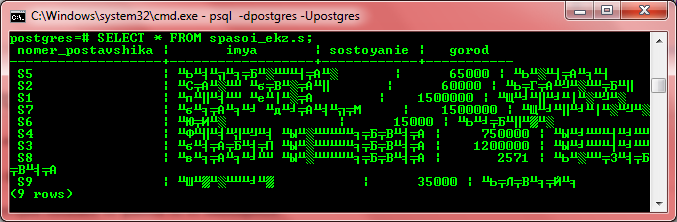
Ну и зачем тогда работать с psql, кому нужно долбить клавиатурой в консольке, когда можно всё сделать красиво и быстро в pgAdmin? Ну, не всегда pgAdmin доступен, особенно если речь идёт об удалённой машине. Кроме того, выполнение SQL-запросов в текстовом режиме консоли — это +10 к хакирству.
Решение проблемы
Версии ПО:
- MS Windows 7 SP1 x64;
- PostgreSQL 8.4.12 x32.
На сервере имеется БД, созданная в кодировке UTF8.
Суть
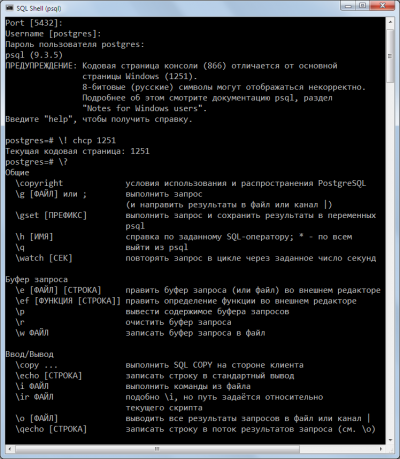
Суть проблемы в том, что cmd.exe работает (и так будет до скончания времён) в кодировке CP866, а сама Windows — в WIN1251, о чём psql предупреждает при начале работы:
WARNING: Console code page (866) differs from Windows code page (1251)
         8-bit characters might not work correctly. See psql reference
         page "Notes for Windows users" for details.
Значит, надо как-то добиться, чтобы кодировка была одна.
В разных источниках встречаются разные рецепты, включая правку реестра и подмену файлов в системных папках Windows. Ничего этого делать не нужно, достаточно всего трёх шагов:
- сменить шрифт у
cmd.exe; - сменить текущую кодовую страницу
cmd.exe; - сменить кодировку на стороне клиента в
psql.
Конкретные действия
Супер быстро и просто
Запускаете cmd.exe, оттуда psql:
psql -d ВАШАБАЗА -U ВАШЛОГИН
Далее:
psql ! chcp 1251
Быстро и просто
Запускаете cmd.exe, оттуда psql:
psql -d ВАШАБАЗА -U ВАШЛОГИН
Вводите пароль (если установлен) и выполняете команду:
set client_encoding='WIN866';
И всё. Теперь результаты запроса, содержащие кириллицу, будут отображаться нормально. Но есть небольшой косяк:
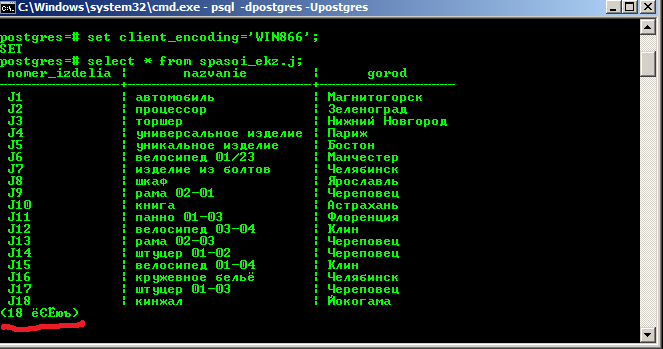
Потому предлагаем ещё способ, который этого недостатка лишён.
Посложнее и подольше
Запустить cmd.exe, нажать мышью в правом левом верхнем углу окна, там Свойства — Шрифт — выбрать Lucida Console. Нажать ОК.
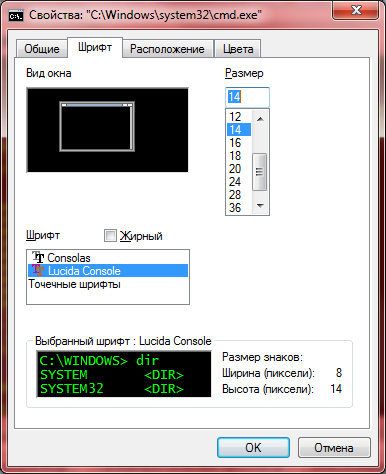
Выполнить команду:
chcp 1251
В ответ выведет:
Текущая кодовая страница: 1251
Запустить psql;
psql -d ВАШАБАЗА -U ВАШЛОГИН
Кстати, обратите внимание — теперь предупреждения о несовпадении кодировок нет.
Выполнить:
set client_encoding='win1251';
Он выведет:
SET
Всё, теперь кириллица будет нормально отображаться.
Проверяем:
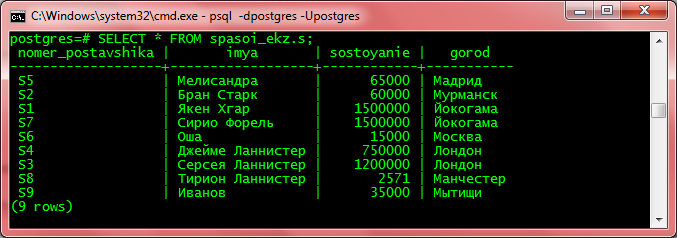
- 1. Проверка кодировки
- 2. Исправление кодировки для template1
В процессе настройки сервера для сайта, пришлось столкнуться с некоторыми проблемами. В частности с проблемой кодировки базы данных PostgreSQL. Дело в том, что при установке PostgreSQL, шаблоны баз данных создавались с кодировкой LATIN1, а сайт работает на Django, с использованием кодировки UTF8. В результате, при попытке вставки данных выпадала следующая ошибка:
ERROR: encoding UTF8 does not match locale en_US Detail: The chosen LC_CTYPE setting requires encoding LATIN1.Поискав информацию, удалось найти несколько решений, среди которых было решение, которое позволяет пересоздать шаблон базы данных с кодировкой UTF8. Но пройдёмся внимательно по симптомам задачи.
Проверка кодировки
Для проверки кодировки, применяемой на сервере и в базе данных, необходимо выполнить следующие команды.
Заходим в режим работы с PoctgreSQL:
sudo -u postgres psqlpsql — это утилита для работы с базами данных, а postgres — это супер пользователь PostgreSQL.
И выполняем следующие команды:
postgres=# SHOW SERVER_ENCODING; server_encoding ----------------- LATIN1 (1 row) postgres=# l List of databases Name | Owner | Encoding | Collate | Ctype | Access privileges -----------+----------+----------+---------+-------+----------------------- postgres | postgres | LATIN1 | en_US | en_US | template0 | postgres | LATIN1 | en_US | en_US | =c/postgres + | | | | | postgres=CTc/postgres template1 | postgres | LATIN1 | en_US | en_US | =c/postgres + | | | | | postgres=CTc/postgres (3 rows)В выводе будет показана кодировка LATIN1, как для сервера, так и для баз данных.
Исправление кодировки для template1
А теперь исправим кодировку template1, который используется для создания баз данных.
postgres=# UPDATE pg_database SET datistemplate = FALSE WHERE datname = 'template1'; postgres=# DROP DATABASE Template1; postgres=# CREATE DATABASE template1 WITH owner=postgres ENCODING = 'UTF-8' lc_collate = 'en_US.utf8' lc_ctype = 'en_US.utf8' template template0; postgres=# UPDATE pg_database SET datistemplate = TRUE WHERE datname = 'template1';В данном случае сначала мы указываем, что template1 не является шаблоном для баз данных. Удаляем данный шаблон. Потом создаём новый шаблон с кодировкой UTF8 и устанавливаем данную базу данных в качестве шаблона для новых баз данных. Дальше новые базы данных будут создаваться с кодировкой UTF8.
И проверим, в какой кодировке у нас находиться шаблон template1, сам сервер, кстати, будет по-прежнему в кодировке LATIN1
postgres=# l List of databases Name | Owner | Encoding | Collate | Ctype | Access privileges -----------+----------+----------+------------+------------+----------------------- postgres | postgres | LATIN1 | en_US | en_US | template0 | postgres | LATIN1 | en_US | en_US | =c/postgres + | | | | | postgres=CTc/postgres template1 | postgres | UTF8 | en_US.utf8 | en_US.utf8 | (3 rows)
How to change PostgreSQL database encoding to UTF8
9th October, 2019
The default encoding of the template databases in PostgreSQL is set to SQL_ASCII. If this encoding has not been changed, then the new databases will be created using this template and hence will have the same encoding SQL_ASCII. Overall this should not be a big problem unless Unicode data is required to be saved in the database. In that case you will receive an error such as :
Unicode escape values cannot be used for code point values above 007F when the server encoding is not UTF8.
In this blog, we will go through all steps in order to change the encoding of the database to UTF8. First of all one needs to know that encoding of already created database cannot be altered. Hence we need to drop and create a new one.
- Checking the current server encoding.
postgres@yourserver:~$ psql
psql (10.7 (Ubuntu 10.7-0ubuntu0.18.04.1))
Type "help" for help.

postgres=# SHOW SERVER_ENCODING;
 server_encoding
-----------------
 SQL_ASCII
(1 row)

postgres=#c your_database;
You are now connected to database "your_database" as user "postgres".
your_database=# SHOW SERVER_ENCODING;
 server_encoding
-----------------
 SQL_ASCII
(1 row)
In this case, as you can see, both the template database (the first result) and your_database is based on SQL_ASCII encoding.
There are two ways to proceed from here but before that its necessary to understand the process of CREATE DATABASE command. This command by default creates a copy of database from template1 which is the default template for creating any new database. This template has some preset settings already and ready for creating new databases. There is also another template which is free from all preset settings called template0 [ref.https://www.postgresql.org/docs/12/manage-ag-templatedbs.html].Coming back to ways of creating new database, one can either create new database using template0 and applying encoding UTF8 to it. Or updating the template1 encoding to UTF8, thereby any future databases will also be based on UTF8 as well. From here on, we will follow the second solution which is better in my opinion.
- Create backup of your_database.
postgres@yourserver:~$ pg_dump your_database > dump.sqlOPTIONAL: On pg_dump, sequences by default are set to AS integer. This might cause issues for some applications (such as Django). To fix this, use
sed 's/AS integer//' dump.sql > altered_dump.sql - Drop your database.
postgres@yourserver:~$ dropdb your_database - Update the template1 encoding to UTF8.
postgres@yourserver:~$ psql psql (10.7 (Ubuntu 10.7-0ubuntu0.18.04.1)) Type "help" for help. postgres=# UPDATE pg_database SET datistemplate = FALSE WHERE datname = 'template1'; postgres=# DROP DATABASE template1; postgres=# CREATE DATABASE template1 WITH TEMPLATE = template0 ENCODING = 'UTF8'; postgres=# UPDATE pg_database SET datistemplate = TRUE WHERE datname = 'template1'; postgres=# c template1; You are now connected to database "template1" as user "postgres". template1=# VACUUM FREEZE; - Create a new database having the same name as before. This time it will use the newly updated template1 for creating the database.
postgres@yourserver:~$ createdb -E utf8 your_database - Restore your data using your backup file (either the dump.sql or altered_dump.sql file)
postgres@yourserver:~$ psql your_database < dump.sqlThat’s it. Now you may check the encoding again for the new database by following the step 1 again .