
Существует несколько способов преобразования таблицы (типа, движка) MySQL из одной подсистемы хранения в другую (например, из MyISAM в InnoDB), и у каждого из них есть свои преимущества и недостатки.
В этом блоге мы рассмотрим три наиболее распространенных способа.
ALTER TABLE
Простейший способ преобразования таблицы из одной подсистемы в другую — использование команды ALTER TABLE. Следующая команда преобразует таблицу mytable к типу InnoDB:
mysql> ALTER TABLE mytable ENGINE = InnoDB;Такой синтаксис работает для всех подсистем хранения, но есть одна загвоздка — это может занять много времени. MySQL будет построчно копировать старую таблицу в новую. В это время, скорее всего, будет задействована вся пропускная способность диска сервера, а исходная таблица окажется заблокированной для чтения. Поэтому будьте осторожны, применяя этот подход для активно используемых таблиц. Вместо него можно задействовать один из рассмотренных далее методов, которые сначала создают копию таблицы.
При изменении подсистемы хранения утрачиваются все присущие старой подсистеме возможности. Например, после преобразования таблицы InnoDB в MyISAM, а потом обратно будут потеряны все внешние ключи, определенные в исходной таблице InnoDB.
Экспорт и импорт
Чтобы лучше контролировать процесс преобразования, можете сначала экспортировать таблицу в текстовый файл с помощью утилиты mysqldump. После этого можно будет просто изменить команду CREATE TABLE в этом текстовом файле. Не забудьте изменить название таблицы и ее тип, поскольку нельзя иметь две таблицы с одинаковыми именами в одной и той же базе данных, даже если у них разные типы, — a mysqldump по умолчанию пишет команду DROP TABLE перед командой CREATE TABLE, так что вы можете потерять свои данные, если не будете осторожны!
CREATE и SELECT
Третий способ преобразования обеспечивает компромисс между скоростью первого и безопасностью второго. Вместо того чтобы экспортировать всю таблицу или преобразовывать ее за один прием, создайте новую таблицу и используйте для ее заполнения команду MySQL INSERT ... SELECT следующим образом:
mysql> CREATE TABLE innodb_table LIKE myisam_table;

mysql> ALTER TABLE innodb.table ENGINE=InnoDB;

mysql> INSERT INTO innodb_table SELECT * FROM myisam_table;
При небольших объемах данных это хороший вариант. Но если объем данных велик, то зачастую гораздо эффективнее заполнять таблицу частями, подтверждая транзакцию после каждой части, чтобы журнал отмены не становился слишком большим. Предполагая, что id является первичным ключом, запустите этот запрос несколько раз (каждый раз задавая все большие значения х и у), пока не скопируете все данные в новую таблицу:
mysql> START TRANSACTION;

mysql> INSERT INTO innodb_table SELECT * FROM myisam_table -> WHERE id BETWEEN x AND y;

mysql> COMMIT;
После выполнения у вас будет исходная таблица, которую можно удалить, и целиком заполненная новая таблица. Не забудьте заблокировать исходную таблицу, если не хотите получить несогласованную копию данных!
Вас заинтересует / Intresting for you:
You can change table engine with the help of alter command. The syntax is as follows −
alter table yourTableName ENGINE = yourEngineName;
To understand the above syntax let us create a table with engine MyISAM. Later you can change any other engine. The following is the query to create a table.
mysql> create table ChangeEngineTableDemo
−> (
   −> MovieId int,
   −> MovieName varchar(100),
   −> IsPopular bool
−> )ENGINE = 'MyISAM';
Query OK, 0 rows affected (0.37 sec)
Look at the above query, the table engine is MyISAM, now you can change it to any other engine. Here, we will change engine type InnoDB. The query to change engine type is as follows −
mysql> alter table ChangeEngineTableDemo ENGINE = InnoDB;
Query OK, 0 rows affected (2.21 sec)
Records: 0 Duplicates: 0 Warnings: 0
To check the engine type has been changed or not with the help of show command, the following is the query −
mysql> show create table ChangeEngineTableDemo;
The following is the output −
+-----------------------+-------------------------------------------------------------------------------------------------------------------------------------------------------------------------------------------------------------------------------------+
| Table                 | Create Table                                                                                                                                                                                                                        |
+-----------------------+-------------------------------------------------------------------------------------------------------------------------------------------------------------------------------------------------------------------------------------+
| ChangeEngineTableDemo | CREATE TABLE `changeenginetabledemo` (
`MovieId` int(11) DEFAULT NULL,
`MovieName` varchar(100) DEFAULT NULL,
`IsPopular` tinyint(1) DEFAULT NULL
) ENGINE = InnoDB DEFAULT CHARSET = utf8mb4 COLLATE = utf8mb4_0900_ai_ci                                                                                                            |
+-----------------------+-------------------------------------------------------------------------------------------------------------------------------------------------------------------------------------------------------------------------------------+
1 row in set (0.03 sec)
You can change table engine with the help of alter command. The syntax is as follows −
alter table yourTableName ENGINE = yourEngineName;
To understand the above syntax let us create a table with engine MyISAM. Later you can change any other engine. The following is the query to create a table.
mysql> create table ChangeEngineTableDemo
−> (
   −> MovieId int,
   −> MovieName varchar(100),
   −> IsPopular bool
−> )ENGINE = 'MyISAM';
Query OK, 0 rows affected (0.37 sec)
Look at the above query, the table engine is MyISAM, now you can change it to any other engine. Here, we will change engine type InnoDB. The query to change engine type is as follows −
mysql> alter table ChangeEngineTableDemo ENGINE = InnoDB;
Query OK, 0 rows affected (2.21 sec)
Records: 0 Duplicates: 0 Warnings: 0
To check the engine type has been changed or not with the help of show command, the following is the query −
mysql> show create table ChangeEngineTableDemo;
The following is the output −
+-----------------------+-------------------------------------------------------------------------------------------------------------------------------------------------------------------------------------------------------------------------------------+
| Table                 | Create Table                                                                                                                                                                                                                        |
+-----------------------+-------------------------------------------------------------------------------------------------------------------------------------------------------------------------------------------------------------------------------------+
| ChangeEngineTableDemo | CREATE TABLE `changeenginetabledemo` (
`MovieId` int(11) DEFAULT NULL,
`MovieName` varchar(100) DEFAULT NULL,
`IsPopular` tinyint(1) DEFAULT NULL
) ENGINE = InnoDB DEFAULT CHARSET = utf8mb4 COLLATE = utf8mb4_0900_ai_ci                                                                                                            |
+-----------------------+-------------------------------------------------------------------------------------------------------------------------------------------------------------------------------------------------------------------------------------+
1 row in set (0.03 sec)
Introduction
Choosing the right storage engine is a crucial strategic decision that impacts future development. Depending on your use case, decide between two main storage engines for MySQL – MyISAM or InnoDB.
In this article, you will learn the main differences between MyISAM and InnoDB storage engines, how to check which storage engine you are using and how to convert it.
Prerequisites
- Access to the terminal /command line
- A functional MySQL database
- phpMyAdmin installed
What are MyISAM and InnoDB
MyISAM and InnoDB are MySQL storage engines. Storage engines are database management system components used to manipulate data from in database.
MyISAM
MyISAM stands for Indexed Sequential Access Method. It was the default storage engine for MySQL until December 2009. With the release of MySQL 5.5, MyISAM was replaced with InnoDB.
MyISAM is based on an ISAM algorithm that displays information from large data sets fast. It has a small data footprint and is best suitable for data warehousing and web applications.
InnoDB
InnoDB has been the default storage engine for MySQL since the release of MySQL 5.5. It is best suited for large databases that hold relational data.
InnoDB focuses on high reliability and performance, making it great for content management systems. One of the most known uses of InnoDB is MediaWiki software that powers Wikipedia.
MyISAM vs. InnoDB Main Differences
Let’s take a look at the main differences between MyISAM and InnoDB.
| Features | MyISAM | InnoDB |
| Type | Non-Transactional | Transactional |
| Locking | Table locking | Row-level locking |
| Foreign keys | No | Yes |
| Table, index, and data storage | Three separate files (.frm, .myd, and .myi) | Tablespace |
| Designed for | Speed | Performance |
| ACID | No | Yes |
Storage Engine Type
There are two types of storage engines, depending on the rollback method:
- Non-transactional – write options need to be rolled back manually.
- Transactional – write options roll back automatically if they don’t complete.
Summary: MyISAM is a non-transactional, while InnoDB is a transactional type of storage engine.
Locking
Locking in MySQL is an option that prevents two or more users from modifying data at the same time. The user can’t modify data when the locking option is activated. This feature preserves the validity of all data.
MyISAM uses table locking as the default method of locking. It allows a single session to modify tables at a time. Tables are always locked in the same order. The table locking method is best suitable for read-only databases that don’t require a lot of memory.
Example of table locking:
| Queries | Column 1 | Column 2 | Column 3 |
| Query 1 (update) | Writing | Data | Data |
| Query 2 (wait) | Data | Data | Data |
| Query 3 (wait) | Data | Data | Data |
InnoDB uses row-level locking as the default method of locking. It supports multiple sessions on selected rows by only locking the rows in the modification process. Row-locking is most suitable for databases that have multiple users. The disadvantage is that it requires a lot of memory and takes more time to query and modify data.
Example of row-level locking:
| Queries | Column 1 | Column 2 | Column 3 |
| Query 1 (update) | Writing | Data | Data |
| Query 2 (select) | Reading | Data | Reading |
| Query 3 (update) | Data | Writing | Data |
Summary: MyISAM uses table locking, while InnoDB uses row-level locking as the default method.
Foreign Keys
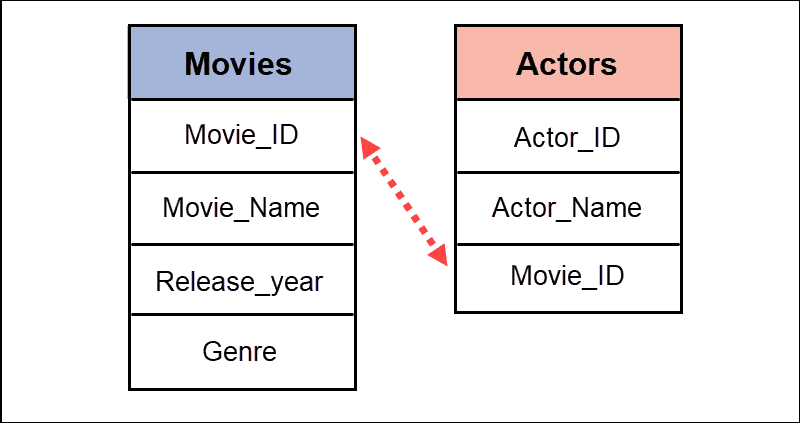
A foreign key is a column (or a collection of columns) in one table that links with a column (or a collection of columns) in another table. It prevents actions that destroy the link between tables and the possibility of inserting invalid data.
Summary: MyISAM does not support the foreign key option, while InnoDB does.
Table, Index and Data Storage
The two storage engines differ based on how they store files.
MyISAM stores tables, index, and data into three separate files:
- .frm – The table format containing the table structure or table definition.
- .myi – The index file with indexes for each table.
- .myd – The data file that contains data of each table.
InnoDB stores table structure in the .frm file and has a tablespace where it stores indexes and data.
Summary: MyISAM stores data in three separate files, while InnoDB stores data in a single file.
ACID Support
ACID refers to database transaction properties: atomicity, consistency, isolation, and durability. It guarantees that the transaction completes in cases of error or system failure.
Refer to our ACID vs. Base article to learn more about database transaction models.
Summary: MyISAM does not have ACID support, while InnoDB has full ACID compliance.
How to Check if You Are Using MyISAM or InnoDB
Using the correct storage engine is essential for data manipulation. The wrong storage engine can lead to errors in querying and reduced speed and performance. Therefore, it is crucial to check if MyISAM or InnoDB are set as the default storage engine.
Note: MySQL performance tuning requires evaluating numerous factors. We recommend using InnoDB instead of MyISAM for the best performance.
Check via Command Line
Find information about the default storage engine by following the steps listed below.
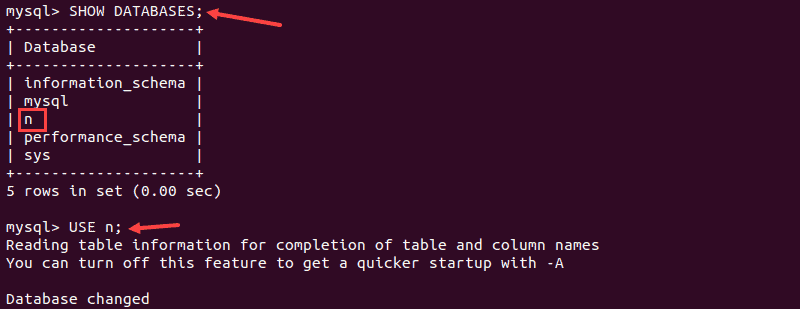
1. Open the terminal and log into the MySQL shell. Then, display a list of databases:
SHOW DATABASES;2. Locate the preferred database from the list and select it:
USE database_name;The terminal displays a confirmation message about the database change.
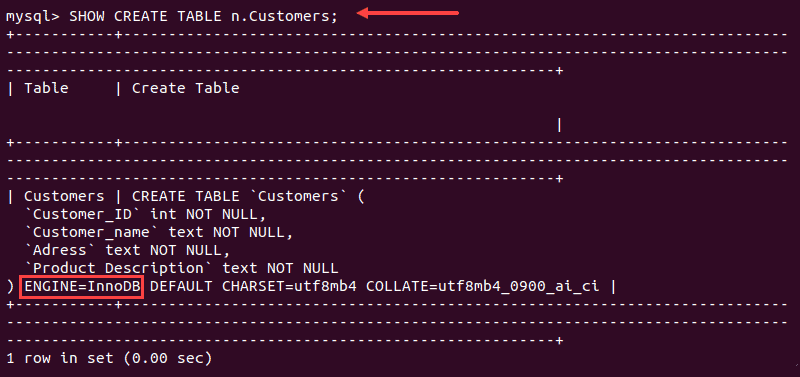
3. Next, use the SHOW CREATE TABLE command to display information about the table and storage engine:
SHOW CREATE TABLE database_name.table_name;In the example below, the output lists InnoDB as a default storage engine.
Note: Replace database_name and table_name with the name of your database and table.
Check Using phpMyAdmin
There are two ways to check the default storage engine in phpMyAdmin:
- From a table list.
- By running a query.
From a Table List
You can use a table list to find out which tables use MyISAM or InnoDB as the default storage engine.
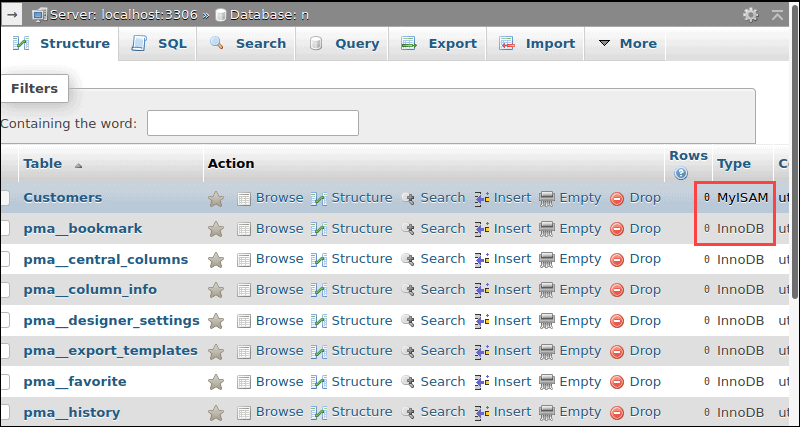
1. Open phpMyAdmin and select the preferred database from the list.
2. In the Table list, locate the Type column to see the types of storage engines. In our example, the Customers table uses MyISAM as a default storage engine.
Running a Query
Another way to display a default storage engine is to run a query.
1. Log in to phpMyAdmin and select the preferred database from a database list.
2. Select the SQL tab to access query options.
3. Enter the following command to display all tables using MyISAM as a storage engine:
SELECT TABLE_NAME, ENGINE FROM information_schema. TABLES WHERE TABLE_SCHEMA = 'database_name' and ENGINE = 'myISAM'4. Click Go to run a query.
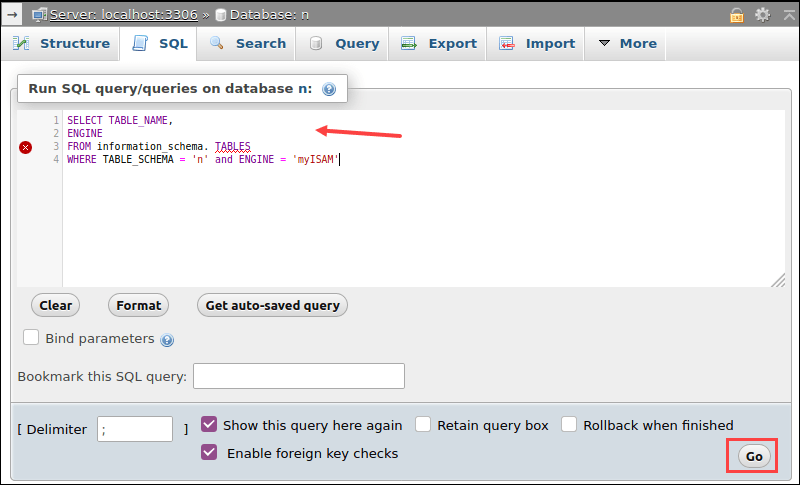
Note: Replace database_name with the name of your database.
The output displays a list of all tables containing the MyISAM storage engine.
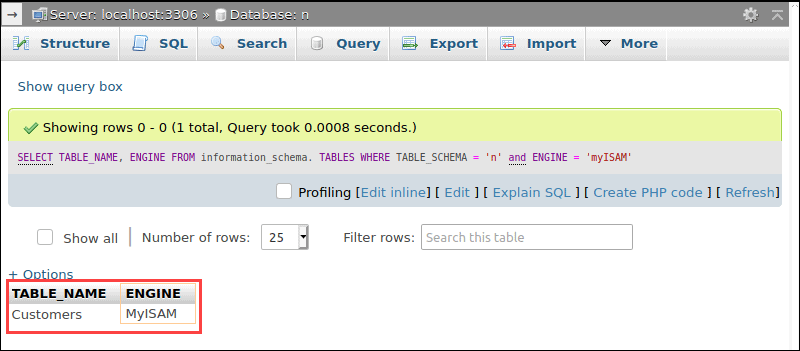
You can use the same command to find databases using the InnoDB storage engine. Modify the query by replacing ENGINE = 'myISAM' with ENGINE = 'InnoDB'.
Problems can occur if you use InnoDB in everyday processes, while an older table uses MyISAM. That is why it is essential to know how to convert tables.
Convert Storage Engine via Terminal
Run the ALTER TABLE command in the MySQL shell to convert the storage engine from MyISAM to InnoDB and vice versa.
- To convert InnoDB to MyISAM, run:
ALTER TABLE database_name.table_name ENGINE=MyISAM;- To convert MyISAM to InnoDB, run:
ALTER TABLE database_name.table_name ENGINE=InnoDB;The terminal prints out a confirmation message.

Convert Storage Engine Using phpMyAdmin
There are two ways to convert the storage engine in phpMyAdmin:
- Using the Table Operations menu.
- Running a query.
Using the Operations Menu
1. Select the preferred database from a database menu.
2. Choose a table for which you want to modify the storage engine and select the More drop-down menu.
3. Click Operations to access the menu.
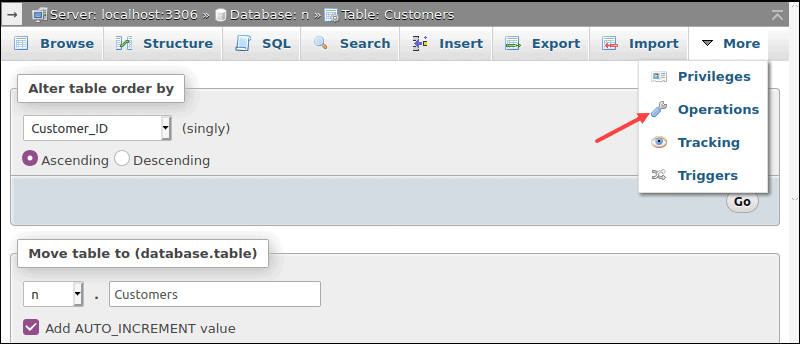
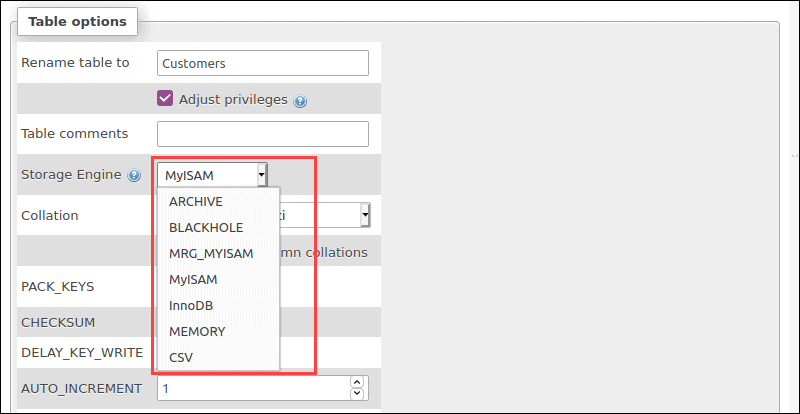
4. Locate the Storage Engine setting in the Table options and click the storage engine to load the drop-down menu containing various storage engines. Select InnoDB from the list and click GO to save the change.
Running a Query
1. Access the SQL command center for the preferred database.
2. Run the ALTER TABLE command in the MySQL shell to convert the storage engine.
To convert to MyISAM, run:
ALTER TABLE table_name ENGINE=MyISAM;To convert to InnoDB, run:
ALTER TABLE.table_name ENGINE=InnoDB;3. Click the GO button to run the query.
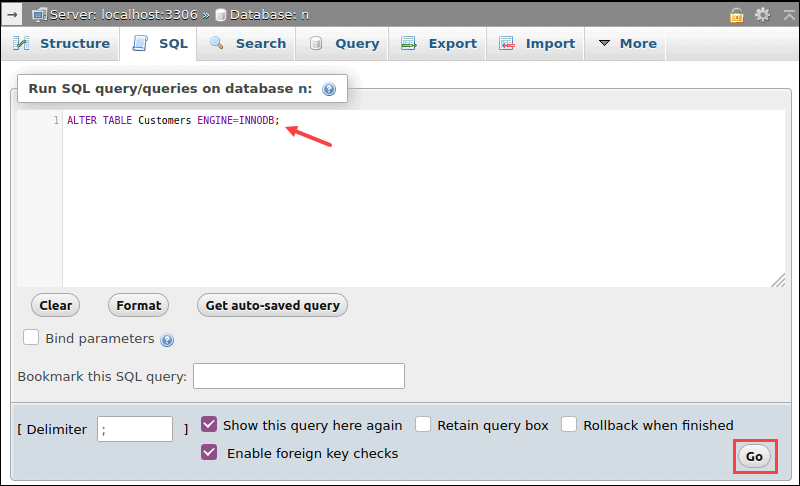
You have successfully converted the storage engine.
Conclusion
After reading this article, you should better understand the differences between MyISAM and InnoDB storage engines. Knowing the differences helps you choose the storage engine that fits your needs the most.
You have also learned how to check the storage engine and how to convert it if needed.
Summary: in this tutorial, you will learn how to which storage engine that a table is using and how to change the storage engine of the table to a different one.
MySQL supports many kinds of storage engines that provide different capabilities and characteristics. For example, the InnoDB tables support transaction, whereas MyISAM does not.
Querying the current storage engine of a table
There are several ways to get the current storage engine of a table.
The first way to check the current storage engine of a table is to query data from the tables table in the information_schema database.
For example, to get the current storage engine of the offices table in the classicmodels sample database, you use the following query:
Code language: SQL (Structured Query Language) (sql)
SELECT engine FROM information_schema.tables WHERE table_schema = 'classicmodels' AND table_name = 'offices';

The second way to query the storage engine of a table is to use the SHOW TABLE STATUS statement as follows:
Code language: SQL (Structured Query Language) (sql)
SHOW TABLE STATUS LIKE 'offices';

The third way to get the storage engine of a table is to use the SHOW CREATE TABLE statement.
Code language: SQL (Structured Query Language) (sql)
SHOW CREATE TABLE offices;
Code language: SQL (Structured Query Language) (sql)
mysql> SHOW CREATE TABLE officesG; *************************** 1. row *************************** Table: offices Create Table: CREATE TABLE `offices` ( `officeCode` varchar(10) NOT NULL, `city` varchar(50) NOT NULL, `phone` varchar(50) NOT NULL, `addressLine1` varchar(50) NOT NULL, `addressLine2` varchar(50) DEFAULT NULL, `state` varchar(50) DEFAULT NULL, `country` varchar(50) NOT NULL, `postalCode` varchar(15) NOT NULL, `territory` varchar(10) NOT NULL, PRIMARY KEY (`officeCode`) ) ENGINE=InnoDB DEFAULT CHARSET=latin1 1 row in set (0.00 sec) mysql>
MySQL showed the offices table uses the InnoDB storage engine.
MySQL changing storage engine
Once you have the information of the storage engine of a table, you can change it using the ALTER TABLE statement as follows:
Code language: SQL (Structured Query Language) (sql)
ALTER TABLE table_name ENGINE engine_name;
To check which storage engine that your MySQL server currently supports, you use the SHOW ENGINES statement as follows:
Code language: SQL (Structured Query Language) (sql)
SHOW ENGINES;
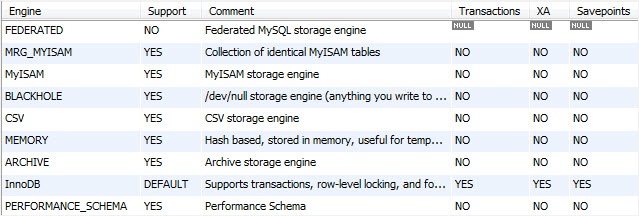
For example, to change the storage engine of the offices table from InnoDB to MyISAM, you use the following statement:
Code language: SQL (Structured Query Language) (sql)
ALTER TABLE offices ENGINE = 'MYISAM';
In this tutorial, we have shown you how to query the current storage engine of a table and how to change it to a different storage engine using the ALTER TABLE statement.
Was this tutorial helpful?