
I got the following error
Reading package lists... Done
W: GPG error: http://extras.ubuntu.com oneiric Release: Unknown error executing gpgv
executing gpgv
----
----
W: GPG error: http://archive.ubuntu.com oneiric-updates Release: Unknown error executing gpgv
Then after googling it I found and followed the following instruction but that caused one error:
**sudo -i
apt-get clean
cd /var/lib/apt
mv lists lists.old
mkdir -p lists/partial
apt-get clean
apt-get update**
While running I got the error:
kapil@ubuntu:/var/lib/apt$ sudo mv lists lists.old
mv: cannot move `lists' to `lists.old/lists': Directory not empty
So once again running the update command I got the same error again. Please help me what should I do?
I did the following on your advice and it showed the following
root@ubuntu:/home/kapil# df -h

Filesystem            Size  Used Avail Use% Mounted on

/dev/loop0             15G  4.7G  8.8G  35% /

udev                  1.5G  4.0K  1.5G   1% /dev

tmpfs                 591M  880K  590M   1% /run

none                  5.0M     0  5.0M   0% /run/lock

none                  1.5G  488K  1.5G   1% /run/shm

/dev/sda5             229G  221G  7.2G  97% /host

/dev/sda1             100M   25M   76M  25% /media/System Reserved

root@ubuntu:/home/kapil# ls -al /var/lib/apt/

total 68

drwxr-xr-x  7 root root  4096 2012-04-08 09:53 .

drwxr-xr-x 58 root root  4096 2012-03-28 09:59 ..

-rw-r--r--  1 root root   203 2012-03-24 13:18 cdroms.list

-rw-r--r--  1 root root  7261 2012-04-06 15:27 extended_states

drwxr-xr-x  2 root root  4096 2011-10-12 10:27 keyrings

drwxr-xr-x  3 root root 16384 2012-04-14 06:26 lists


drwxr-xr-x  4 root root 20480 2012-04-08 07:46 lists.old

drwxr-xr-x  3 root root  4096 2011-10-12 10:27 mirrors

drwxr-xr-x  2 root root  4096 2012-03-24 14:39 periodic*
When I followed the above instruction it showed following warnings first :
root@ubuntu:/home/kapil# sudo apt-get clean

root@ubuntu:/home/kapil# sudo rm /var/lib/apt/lists/*

rm: cannot remove `/var/lib/apt/lists/partial': Is a directory

root@ubuntu:/home/kapil# sudo rm /var/lib/apt/lists/partial/*

root@ubuntu:/home/kapil# sudo apt-get clean

root@ubuntu:/home/kapil# sudo apt-get update
After this it again showed the error :
Reading package lists... Done

W: GPG error: http//archive.canonical.com oneiric Release: Unknown error executing gpgv

W: GPG error: http//extras.ubuntu.com oneiric Release: Unknown error executing gpgv

W: GPG error: http//archive.ubuntu.com oneiric Release: Unknown error executing gpgv

W: GPG error: http//archive.ubuntu.com oneiric-backports Release: Unknown error executing gpgv

W: GPG error: http//archive.ubuntu.com oneiric-security Release: Unknown error executing gpgv

W: GPG error: http//archive.ubuntu.com oneiric-proposed Release: Unknown error executing gpgv

W: GPG error: http//archive.ubuntu.com oneiric-updates Release: Unknown error executing gpgv
What to do now?
Пытаюсь обновить список пакетов в репах, делаю aptitude update, на что мне выдается следующее:
W: GPG error: http://mirror.yandex.ru jessie-updates InRelease: Could not execute 'gpgv' to verify signature (is gpgv installed?)
W: GPG error: http://mirror.yandex.ru jessie Release: Could not execute 'gpgv' to verify signature (is gpgv installed?)
W: GPG error: http://security.debian.org jessie/updates InRelease: Could not execute 'gpgv' to verify signature (is gpgv installed?)
Содержимое source.lst:
Открыть содержимое (спойлер)
deb http://mirror.yandex.ru/debian/ jessie main
deb-src http://mirror.yandex.ru/debian/ jessie main
deb http://security.debian.org/ jessie/updates main contrib
deb-src http://security.debian.org/ jessie/updates main contrib
deb http://mirror.yandex.ru/debian/ jessie-updates main contrib
deb-src http://mirror.yandex.ru/debian/ jessie-updates main contrib
[свернуть]
#aptitude show gpgv:
Package: gpgv
State: installed
#dpkg -l | grep keyring
Открыть содержимое (спойлер)
ii  debian-archive-keyring         2014.3
ii  debian-keyring         2015.04.10
ii  gir1.2-gnomekeyring-1.0         3.12.0-1+b1         amd64
ii  gnome-keyring         3.14.0-1+b1         amd64
ii  libgnome-keyring-common         3.12.0-1         all
ii  libgnome-keyring0:amd64         3.12.0-1+b1         amd64
ii  libpam-gnome-keyring         3.14.0-1+b1    amd64
[свернуть]
ls -la /etc/apt/
Открыть содержимое (спойлер)
total 48
drwxr-xr-x   6 root root  4096 Nov 12 19:44 .
drwxr-xr-x 131 root root 12288 Nov 12 19:44 ..
drwxr-xr-x   2 root root  4096 Nov 12 18:15 apt.conf.d
-rw-r--r--   1 root root  2144 Oct 23  2014 apt-file.conf
-rw-r--r--   1 root root    99 Aug 18 17:54 listchanges.conf
drwxr-xr-x   2 root root  4096 Aug 18 19:01 preferences.d
-rw-r--r--   1 root root   520 Nov 12 19:16 sources.list
drwxr-xr-x   2 root root  4096 Nov 12 18:21 sources.list.d
-rw-r--r--   1 root root   447 Nov 10 12:07 sources.list.testing
[свернуть]
Cообщение объединено 12 ноября 2015, 21:18:21
Судя по всему был удален файл с gpg ключами.
Cообщение объединено 12 ноября 2015, 21:38:47
Устанавливаю ключи:
sudo apt-key update
sudo apt-key adv --keyserver keyring.debian.org --recv-keys `sudo apt-get update 2>&1 | grep -o '[0-9A-Z]{16}$' | xargs`
Выдает (no valid OpenPGP data found):
Executing: gpg --ignore-time-conflict --no-options --no-default-keyring --homedir /tmp/tmp.3MFrMz11JQ --no-auto-check-trustdb --trust-model always --keyring /etc/apt/trusted.gpg --primary-keyring /etc/apt/trusted.gpg --keyserver keyring.debian.org --recv-keys 8B48AD6246925553 7638D0442B90D010 CBF8D6FD518E17E1
gpg: requesting key 46925553 from hkp server keyring.debian.org
gpg: requesting key 2B90D010 from hkp server keyring.debian.org
gpg: requesting key 518E17E1 from hkp server keyring.debian.org
gpgkeys: key 8B48AD6246925553 can't be retrieved
gpgkeys: key 7638D0442B90D010 can't be retrieved
gpgkeys: key CBF8D6FD518E17E1 can't be retrieved
gpg: no valid OpenPGP data found.
gpg: Total number processed: 0
После делаю aptitude update:
Открыть содержимое (спойлер)
ЦитироватьW: GPG error: http://mirror.yandex.ru jessie-updates InRelease: The following signatures couldn’t be verified because the public key is not available: NO_PUBKEY 8B48AD6246925553 NO_PUBKEY 7638D0442B90D010
W: GPG error: http://mirror.yandex.ru jessie Release: The following signatures couldn’t be verified because the public key is not available: NO_PUBKEY 8B48AD6246925553 NO_PUBKEY 7638D0442B90D010 NO_PUBKEY CBF8D6FD518E17E1
W: GPG error: http://security.debian.org jessie/updates InRelease: The following signatures couldn’t be verified because the public key is not available: NO_PUBKEY 9D6D8F6BC857C906 NO_PUBKEY 8B48AD6246925553
[свернуть]
Cообщение объединено 12 ноября 2015, 23:10:23
Короче, проблема была во временной недоступности keyring.debian.org (не отвечал на ping запросы), позже все восстановилось. Вопрос снят.
Well, not quite…
Code: Select all
sudo gpgv -v --keyring /etc/apt/trusted.gpg Release.gpg Release
gpgv: armor header: Version: GnuPG v2
gpgv: Signature made Sat 22 Dec 2018 11:15:17 CET
gpgv:                using RSA key 9165938D90FDDD2E

gpgv: signal Segmentation fault caught ... exiting
Segmentation fault
I’ve noticed some encoding crap in python files in the /usr dir and I’ve removed quite a lot of components to dig deeper into the problem.
Code: Select all
sudo apt-get install gpgv --reinstallAlso does not help, so it’s probably not a fault in gpgv itself.
As the file system should be okay after the forced fsck, I went ahead and upgraded from jessie to stretch.
Upgrade went smooth, only errors were
Code: Select all
gtk-update-icon-cache: The generated cache was invalid.
WARNING: icon cache generation failed
and
Code: Select all
Warning: mailcap line not starting with a media type in vim-common
Problematic line: t%xt/plain3 riew %s; edit=vi %s� compos�=vi %s; needsterminal; priovity=3
(yes, that’s the encoding crap that I was talking about)
gtk-update-icon-cache failed before and when run with the manpage demo parameters, the output is exactly as useless as the error message before.
Code: Select all
sudo gtk-update-icon-cache /usr/share/icons/hicolor -f
gtk-update-icon-cache: The generated cache was invalid.
Effects on the main problem?
apt-update still craps itself
Code: Select all
W: GPG error: http://raspbian.raspberrypi.org/raspbian stretch InRelease: Unknown error executing apt-key
W: The repository 'http://raspbian.raspberrypi.org/raspbian stretch InRelease' is not signed.
N: Data from such a repository can't be authenticated and is therefore potentially dangerous to use.
N: See apt-secure(8) manpage for repository creation and user configuration details.
because
Code: Select all
sudo gpgv -v --keyring /etc/apt/trusted.gpg Release.gpg Release
gpgv: armor header: Version: GnuPG v2
gpgv: Signature made Sun 23 Dec 2018 17:22:45 CET
gpgv:                using RSA key 9165938D90FDDD2E

gpgv: signal Segmentation fault caught ... exiting
Segmentation fault
Also the desktop is now black and all icons are gone (red cross).
I’d like to find and fix the culprit, but this may be BER (just like the airport).
Recommend Projects
-

React
A declarative, efficient, and flexible JavaScript library for building user interfaces.
-
Vue.js
🖖 Vue.js is a progressive, incrementally-adoptable JavaScript framework for building UI on the web.
-
Typescript
TypeScript is a superset of JavaScript that compiles to clean JavaScript output.
-
TensorFlow
An Open Source Machine Learning Framework for Everyone
-
Django
The Web framework for perfectionists with deadlines.
-
Laravel
A PHP framework for web artisans
-
D3
Bring data to life with SVG, Canvas and HTML. 📊📈🎉



Recommend Topics
-
javascript
JavaScript (JS) is a lightweight interpreted programming language with first-class functions.
-
web
Some thing interesting about web. New door for the world.
-
server
A server is a program made to process requests and deliver data to clients.
-
Machine learning
Machine learning is a way of modeling and interpreting data that allows a piece of software to respond intelligently.
-
Visualization
Some thing interesting about visualization, use data art
-
Game
Some thing interesting about game, make everyone happy.
Recommend Org
-
Facebook
We are working to build community through open source technology. NB: members must have two-factor auth.
-
Microsoft
Open source projects and samples from Microsoft.
-
Google
Google ❤️ Open Source for everyone.
-
Alibaba
Alibaba Open Source for everyone
-
D3
Data-Driven Documents codes.
-
Tencent
China tencent open source team.


-
jreeseUE
- Posts: 3
- Joined: 2011-07-28 18:27
apt-get update is failing
#1
Post
by jreeseUE » 2011-07-30 03:23
Seems like something has changed and now whenever I try to update I receive a number of errors:
Code: Select all
user@hp-debian:~$ sudo apt-get update
Get:1 http://ftp.us.debian.org squeeze Release.gpg [1,672 B]
Ign http://ftp.us.debian.org/debian/ squeeze/main Translation-en
Ign http://ftp.us.debian.org/debian/ squeeze/main Translation-en_US
Ign http://ftp.us.debian.org/debian/ squeeze/non-free Translation-en
Ign http://ftp.us.debian.org/debian/ squeeze/non-free Translation-en_US
Get:2 http://ftp.us.debian.org squeeze-updates Release.gpg [836 B]
Ign http://ftp.us.debian.org/debian/ squeeze-updates/main Translation-en
Ign http://ftp.us.debian.org/debian/ squeeze-updates/main Translation-en_US
Hit http://ftp.us.debian.org squeeze Release
Ign http://ftp.us.debian.org squeeze Release
Get:3 http://ftp.us.debian.org squeeze-updates Release [113 kB]
Get:4 http://security.debian.org squeeze/updates Release.gpg [836 B]
Ign http://security.debian.org/ squeeze/updates/main Translation-en
Ign http://security.debian.org/ squeeze/updates/main Translation-en_US
Get:5 http://security.debian.org squeeze/updates Release [38.4 kB]
Err http://security.debian.org squeeze/updates Release

Err http://ftp.us.debian.org squeeze-updates Release

Ign http://ftp.us.debian.org squeeze/main Sources/DiffIndex
Ign http://ftp.us.debian.org squeeze/main i386 Packages/DiffIndex
Ign http://ftp.us.debian.org squeeze/non-free i386 Packages/DiffIndex
Hit http://ftp.us.debian.org squeeze/main Sources
Hit http://ftp.us.debian.org squeeze/main i386 Packages
Hit http://ftp.us.debian.org squeeze/non-free i386 Packages
Fetched 117 kB in 0s (201 kB/s)
Reading package lists... Done
W: GPG error: http://ftp.us.debian.org squeeze Release: Unknown error executing gpgv
W: A error occurred during the signature verification. The repository is not updated and the previous index files will be used. GPG error: http://security.debian.org squeeze/updates Release: Unknown error executing gpgv

W: A error occurred during the signature verification. The repository is not updated and the previous index files will be used. GPG error: http://ftp.us.debian.org squeeze-updates Release: Unknown error executing gpgv

W: Failed to fetch http://ftp.us.debian.org/debian/dists/squeeze-updates/Release

W: Failed to fetch http://security.debian.org/dists/squeeze/updates/Release

W: Some index files failed to download, they have been ignored, or old ones used instead.
I’m not sure what may have changed as I was able to perform updates just a couple days ago…
Thanks to anyone who has any ideas on this one.
Я сожалею заранее, если я не учитываю критическую информацию, или если я не следую правилам регистрации. Я довольно плохо знаком со всем этим.
Я недавно установил Ubuntu 14.0.4 как двойную загрузку с окнами 7. Я столкнулся с проблемой. Не уверенный, что я сделал, который вызвал его. Когда я работаю sudo apt-get update, Я получаю следующие ошибки:
...
Fetched 67.5 kB in 5s (12.2 kB/s)
Reading package lists... Done
W: GPG error: dl.google.com stable Release: Could not execute 'gpgv' to verify signature (is gpgv installed?)
W: GPG error: us.archive.ubuntu.com trusty Release: Could not execute 'gpgv' to verify signature (is gpgv installed?)
W: GPG error: us.archive.ubuntu.com trusty-updates Release: Could not execute 'gpgv' to verify signature (is gpgv installed?)
W: GPG error: us.archive.ubuntu.com trusty-backports Release: Could not execute 'gpgv' to verify signature (is gpgv installed?)
W: GPG error: extras.ubuntu.com trusty Release: Could not execute 'gpgv' to verify signature (is gpgv installed?)
W: An error occurred during the signature verification. The repository is not updated and the previous index files will be used. GPG error: security.ubuntu.com trusty-security Release: Could not execute 'gpgv' to verify signature (is gpgv installed?)

W: Failed to fetch security.ubuntu.com/ubuntu/dists/trusty-security/Release

W: Some index files failed to download. They have been ignored, or old ones used instead.
Сообщите мне, существует ли другая информация, которая необходима.Спасибо за помощь!
задан
13 July 2016 в 09:25
поделиться
3 ответа
Я решил ту же проблему на двух шагах:
- Установленный debian-брелок-для-ключей ( sudo Кв. — получают debian-брелок-для-ключей установки )
- работает склонный — получают обновление снова и для каждого недостающего выполненного ключа ( sudo способно-ключевая реклама — keyserver keyserver.ubuntu.com — recv-ключи XXXXXXXX)
Hope, которой это помогает
ответ дан pgaref
7 December 2019 в 16:21
поделиться
Откройте программное обеспечение и приложение обновлений от тире и выберите «other software tab».
Находят запись security.ubuntu.com/ubuntu/dists/trusty-security/Release
Снятие флажка или удаляют это, затем открывают терминал и работают
sudo apt-get update
, Это должно теперь работать, у Вас просто есть недопустимое программное обеспечение repo установленный.
ответ дан Jeff Atwood
7 December 2019 в 16:21
поделиться
У меня была такая же проблема. Ошибки GPG с ключами, добавил ключи как указано выше, проблема осталась.
Создал резервную копию /etc/apt, а затем заменил файл sources.list файлом, показанным здесь надежные источники github по умолчанию
Удалены файлы trust.gpg. Перезапустил…
Теперь ошибка GPG «gpgv установлен?» (Этот тип ошибки не показывает ключи.)
Нажал Настройки «Software Updater», вкладка «Аутентификация», Восстановить настройки по умолчанию. GPGV снова работает, обновления программного обеспечения тоже работают, пришлось вручную добавить 1 ключ, теперь sudo apt-get update в терминале без ошибок.
ответ дан Seek Truth
6 July 2020 в 16:20
поделиться
Другие вопросы по тегам:
Похожие вопросы:
If you want to mirror repositories from your current aptly server to a new server you must import the GPG key from your old server because you are going to encounter the following error:
gpgv: Signature made Fri 22 Apr 2019 17:35:04 AM UTC using DSA key ID FDC7A25E
gpgv: Can't check signature: public key not found

Looks like some keys are missing in your trusted keyring, you may consider importing them from keyserver:

gpg --no-default-keyring --keyring trustedkeys.gpg --keyserver pool.sks-keyservers.net --recv-keys 181482CCFDC7A25E

Sometimes keys are stored in repository root in file named Release.key, to import such key:

wget -O - https://some.repo/repository/Release.key | gpg --no-default-keyring --keyring trustedkeys.gpg --import

ERROR: unable to fetch mirror: verification of detached signature failed: exit status 2
And the mirror command fails. The problem is
you must import the GPG key from your old server in trustedkeys.gpg (even if you have already imported it in the new server with apt-key!!!)
Here is how to list, export and import it (we are going to import it in default and trustedkeys.gpg, because it is more convenient, but it is not mandatory to be in the default).
Before we begin here is the problem listing the default and trustedkeys keyring:
The old server:
root@srv-aptly-1:~# gpg --no-default-keyring --keyring trustedkeys.gpg --list-keys
/root/.gnupg/trustedkeys.gpg
----------------------------
pub   2048D/FDC7A25E 2017-09-16
uid                  My-aptly (aptly key no passphrase) <my-aptly@example.com>

root@srv-aptly-1:~# gpg --list-keys
/root/.gnupg/pubring.gpg
------------------------
pub   2048D/FDC7A25E 2017-09-16
uid                  My-aptly (aptly key no passphrase) <my-aptly@example.com>

root@srv-aptly-1:~# apt-key list|grep -A 1 FDC7A25E
pub   2048D/FDC7A25E 2017-09-16
uid                  My-aptly (aptly key no passphrase) <my-aptly@example.com>
The new server:
root@srv-aptly-2:~# gpg --no-default-keyring --keyring trustedkeys.gpg --list-keys
root@srv-aptly-2:~#
root@srv-aptly-2:~# gpg --list-keys
root@srv-aptly-2:~#
root@srv-aptly-2:~# apt-key list|grep -A 1 FDC7A25E
pub   2048D/FDC7A25E 2017-09-16
uid                  My-aptly (aptly key no passphrase) <my-aptly@example.com>
As you can see the key is missing in the new server’s GPG, but it is imported in apt system. You must import it in your system with the GPG tool! apt keys are used only with apt package system and not with the aptly, which uses more generic configuration with GPG. Yes, if you want to use your repository, this key must be imported with apt-key, but it is not enough for your mirrored aptly server.
Here is how to do it:
Export the public GPG key from your old server (the cat command is show you what is the content of the file and how should look a GPG exported public key):
root@srv-aptly-1:~# gpg --no-default-keyring --keyring trustedkeys.gpg --export --armor FDC7A25E > pub-FDC7A25E.key
root@srv-aptly-1:~# cat pub-FDC7A25E.key
-----BEGIN PGP PUBLIC KEY BLOCK-----

mQILdjitiexuangai1aiP0ahtohqu3hiej2chaiduT3Fee5euxaithee1xie6aic
eiReip6jobi3phaiph0hoo5bee9abahdeiyaitieriCh0oming4shai4Achaegus
ais0ze8pooHacharai3thi4CeiGi9ci3bephiaDeiboch0Pop9ohg8phooqu1ohW
MithaisaeS7eimoh0CahyeilooPheeweiloGhooGh4odie0fohXekail6Co0Aev5
ooc7Aekohfaed5Iephepohnga5Yaitohnunahshohd8meew7VaixouTie8Io8OoT
ang9AhlozahSaeji6iet0Iv9ahB3mohTo9ogh6eeneica4yiegauwufohraekeel
ahphieFooShei7Jah5je2aikoow9aosh3Odae7ochor7chaiShor8Hae2uikahpo
Auxaachi7aY9Ohlie5Eequ5oqueaboofiaphugauPo1eiheetofo7ahzoh0Eisie
vootie3eJo8um2aXeef9leki8iefo5moob9uyahv2hohz2doo4pheezo1se2ohvu
JeeCeiwie8queexahcai6looNeshe2OoTh9ahGhaiyer6ShohphieChahfaephu5
Teiy0hahCh8Foahu2phah7ta3aiShooNg6chair9ax5Thu2phi4za1eph1oothoo
ooTh4gah1aengaim4FaefiecheicoPh1geez2tae8oith9iemuiv7eiphaivoh5e
hao2quaij1saec7cie7ooha2to0LiNg6Jumeid7quuv2eeT7Kohb4eigeic6thoo
ahleic3rei1lairaojei0Loo5eXaoquahseingahkah7aimahPheefiseedoh6th
wix7uxie7ahfieChie3lohL2jai3Em0su9fooVaehahquochei9eeNingual6aij
ahhoowae3quoo5nee4ia4aela7ekierahng7fo8wahngo6oquer9ohRosohyelog
choomohdiethuHoo6raipohngie9Iayoudah0iy8eeje4rooku7Aire1vush9chi
pieshee8dohdaweeGo0Opohgun2aif5eegh8ooJaho5ui7aph0me5xu0eiZoongu
maizooDeib9viephooY6chaitai6aiv7xoopaph1ouRohwaiv5seo0theigh2eiM
eepoobilainge7aiyoh6na4Gu5shaeng6za6ooSheil8aem5ae4AhZai6iloduvu
wix7uxie7Ggg==
=PX7K
-----END PGP PUBLIC KEY BLOCK-----
Upload the file generated from the old server and import it in the new server:
root@srv-aptly-2:~# cat ./pub-FDC7A25E.key| gpg --no-default-keyring --keyring trustedkeys.gpg --import
gpg: key FDC7A25E: public key "My-aptly (aptly key no passphrase) <my-aptly@example.com>" imported
gpg: Total number processed: 1
gpg:               imported: 1
root@srv-aptly-2:~# gpg --import ./pub-FDC7A25E.key
gpg: key FDC7A25E: public key "My-aptly (aptly key no passphrase) <my-aptly@example.com>" imported
gpg: Total number processed: 1
gpg:               imported: 1
root@srv-aptly-2:~# apt-key list|grep -A 1 FDC7A25E
pub   2048D/FDC7A25E 2017-09-16
uid                  My-aptly (aptly key no passphrase) <my-aptly@example.com>
The key FDC7A25E is successfully imported and you may proceed in mirroring your server with aptly.
And now if you execute your mirror command the signature is recogized:
root@srv:~# aptly --config="/etc/aptly/.aptly.conf" mirror create -architectures=amd64 salt http://aptly-srv1.example.com/ubuntu xenial-myrepo main
Downloading http://aptly-srv1.example.com/ubuntu/dists/xenial-myrepo/InRelease...
gpgv: Signature made Fri 22 Apr 2019 17:35:04 AM UTC using DSA key ID FDC7A25E
gpgv: Good signature from "My-aptly (aptly key no passphrase) <my-aptly@example.com>"

Mirror [main]: http://aptly-srv1.example.com/ubuntu/ xenial-myrepo successfully added.
You can run 'aptly mirror update main' to download repository contents.
The whole output of the error
root@srv:~# aptly --config="/etc/aptly/.aptly.conf" mirror create -architectures=amd64,i386,source salt http://aptly-srv1.example.com/ubuntu xenial-myrepo main

Looks like your keyring with trusted keys is empty. You might consider importing some keys.
If you're running Debian or Ubuntu, it's a good idea to import current archive keys by running:

  gpg --no-default-keyring --keyring /usr/share/keyrings/debian-archive-keyring.gpg --export | gpg --no-default-keyring --keyring trustedkeys.gpg --import

(for Ubuntu, use /usr/share/keyrings/ubuntu-archive-keyring.gpg)

Downloading http://aptly-srv1.example.com/ubuntu/dists/xenial-myrepo/InRelease...
gpgv: Signature made Fri 22 Apr 2019 17:35:04 AM UTC using DSA key ID FDC7A25E
gpgv: Can't check signature: public key not found

Looks like some keys are missing in your trusted keyring, you may consider importing them from keyserver:

gpg --no-default-keyring --keyring trustedkeys.gpg --keyserver pool.sks-keyservers.net --recv-keys 181482CCFDC7A25E

Sometimes keys are stored in repository root in file named Release.key, to import such key:

wget -O - https://some.repo/repository/Release.key | gpg --no-default-keyring --keyring trustedkeys.gpg --import

Downloading http://aptly-srv1.example.com/ubuntu/dists/xenial-myrepo/Release...
Downloading http://aptly-srv1.example.com/ubuntu/dists/xenial-myrepo/Release.gpg...
gpgv: Signature made Fri 22 Apr 2019 17:35:04 AM UTC using DSA key ID FDC7A25E
gpgv: Can't check signature: public key not found

Looks like some keys are missing in your trusted keyring, you may consider importing them from keyserver:

gpg --no-default-keyring --keyring trustedkeys.gpg --keyserver pool.sks-keyservers.net --recv-keys 181482CCFDC7A25E

Sometimes keys are stored in repository root in file named Release.key, to import such key:

wget -O - https://some.repo/repository/Release.key | gpg --no-default-keyring --keyring trustedkeys.gpg --import

ERROR: unable to fetch mirror: verification of detached signature failed: exit status 2
NOTE
Just to note here we give you all the examples with the root user and the GPG keys are for the root user. You may use a different user for the aptly process and you must ensure the GPG keys to present for this user (the directories and files are the same, just home directory is different – the home directory of the aptly user i.e. “/[my-aptly-home-directory]/.gnupg/trustedkeys.gpg” and for all other GPG files “/[my-aptly-home-directory]/.gnupg/”).
1 minute read
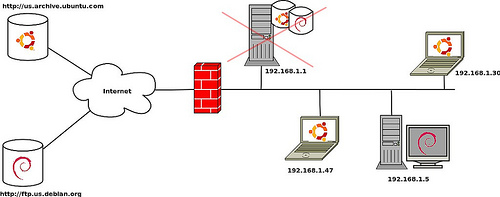
I have a mirror where Debian and Ubuntu packages are hosted, so people in the internal network can upgrade their software using this mirror. But the other day I realized it couldn’t sync against the Debian mirror, as described in the article How to build Debian and Ubuntu mirrors using debmirror. When I tried to run the sync script I got an error and it exited with errors.
Symptoms
When running debmirror script, it fails with a error similar to this one:
gpgv: Signature made Wed 17 Jul 2013 04:40:31 PM CST using RSA key ID 473041FA
[GNUPG:] ERRSIG AED4B06F473041FA 1 2 00 1374050431 9
[GNUPG:] NO_PUBKEY AED4B06F473041FA
gpgv: Can’t check signature: public key not found
gpgv: Signature made Wed 17 Jul 2013 04:40:31 PM CST using RSA key ID 46925553
[GNUPG:] ERRSIG 8B48AD6246925553 1 2 00 1374050431 9
[GNUPG:] NO_PUBKEY 8B48AD6246925553
gpgv: Can’t check signature: public key not found
Release signature does not verify
Cause
Packages are validated using a key, so we can trust what we are downloading from the source repo and what will installed on our computers. Some repositories have a keyring with known keys, and it’s likely that a new key signature was added to the Debian/Ubuntu keyring. This can occur if there is new distro version, and new keys were added, making our keyring out of date (the new keys are missing).
Solution
In order to fix this issue, follow the next steps depending on the distro you are mirroring:
Debian
Update the repository and import the new keys:
aptitude update
aptitude safe-upgrade
gpg --keyring /usr/share/keyrings/debian-archive-keyring.gpg  --export | gpg --no-default-keyring --keyring /var/data/keyrings/debian/trustedkeys.gpg --import
Side note: If no keys were added, download the latest debian-archive-keyring package from the repositories, extract it and use those keyrings. Example:
wget http://ftp.us.debian.org/debian/pool/main/d/debian-archive-keyring/debian-archive-keyring_2012.4_all.deb
dpkg -x debian-archive-keyring_2012.4_all.deb  ~
gpg --keyring ~/usr/share/keyrings/debian-archive-keyring.gpg  --export | gpg --no-default-keyring --keyring /var/data/keyrings/debian/trustedkeys.gpg --import
Ubuntu
Download the latest ubuntu-archive-keyring package and extract it, later use the those keyrings . Example:
wget http://mirror.pnl.gov/ubuntu//pool/main/u/ubuntu-keyring/ubuntu-keyring_2012.05.19_all.deb
dpkg -x ubuntu-keyring_2012.05.19_all.deb ~
gpg --keyring ~/usr/share/keyrings/ubuntu-archive-keyring.gpg --export|gpg --no-default-keyring --keyring /var/data/keyrings/ubuntu/trustedkeys.gpg --import
After this procedure, the sync script will run without problems and it will downloaded the latest updates.