
On 12/4/2020 at 1:09 PM, Alberto Paganini said:
Yes, this is the issue. I have just found out from the provider that «From 1st December only TLS 1.2 and above will be supported».
That is fine, Indy supports TLS 1.2. Just make sure you are using an up-to-date version of Indy so that TLS 1.2 is being supported properly — ie, by enabling the SNI extension, which most TLS 1.2 servers require, etc.
Quote
The version I have reported is the one found in the properties of the .DLL files.
However, the OpenSSLVersion function reports OpenSSL 1.0.0d 8 Feb 2011, and that explains why the .exe is not working any longer.
Does it mean my application uses other SSL .DLLs on my hard disk?
Yes, it does. You can use a tool like SysInternals’ Process Monitor or Process Explorer to see exactly which DLL files your app is actually using. Or, using Indy’s GetSSLLibHandle() and GetCryptLibHandle() functions in the IdSSLOpenSSLHeaders unit, you can pass those handles to the Win32 GetModuleFileName() function.
Quote
(yes, I have a few installed by other third-party software. Each of them resides in the relevant application folder)
Then they should not be colliding with each other, unless those paths are in the OS’s global search path.
Quote
How can I tell my application that the correct .DLL resides in the same folder of the application itself?
That is the first place the OS should be looking for them. But, if needed, you can use Indy’s IdOpenSSLSetLibPath() function in the IdSSLOpenSSLHeaders unit to force it.
On 12/5/2020 at 4:40 AM, Alberto Paganini said:
IdSSLOpenSSL.OpenSSLVersion; confirms now «OpenSSL 1.0.2q 20 Nov 2018» is loaded and this collides with the .DLLs version in the application folder.
You said earlier that you downloaded DLLs for 1.0.2u, you should be using those instead.
Quote
The amended source code is here above if anybody may be interested.
The IdOpenSSLSetLibPath() function should be called only 1 time, preferably at program startup.
On 12/5/2020 at 10:01 AM, Alberto Paganini said:
It turned out that Windows 7 does not enable TLS 1.2 by default. You have to do it manually by following this process https://support.site24x7.com/portal/en/kb/articles/how-to-check-if-tls-1-2-is-enabled
That has no effect whatsoever on OpenSSL. That only affects Microsoft’s own implementation of TLS, such as in the WinInet and WinHTTP APIs. Which OpenSSL does not use (and neither does Indy).
Quote
Next, I had to add one extra line in a third party code every time TIdSSLIOHandlerSocketOpenSSL is created.
The extra line is
sslIOHandler.SSLOptions.SSLVersions := [sslvTLSv1_2];
Your previous code was just fine. The above line enables ONLY TLS 1.2. Not all servers have migrated to TLS 1.2 solely. Most still support at least TLS 1.1, and maybe TLS 1.0. So you should leave all three enabled. Unless you know for a fact that the target server supports only TLS 1.2.
Edited December 6, 2020 by Remy Lebeau
How can I re-enable TLS 1.1 and 1.0 on server 5.3 with macOS 10.12.4 in the short term while I evaluate all the clients that aren’t ready for TLS 1.2?
If you jump to the bottom, attempts to change comfiguration files have failed so far to restore backwards compatibility
SSLProtocol -all +TLSv1 +TLSv1.1 +TLSv1.2
After having updated our server to macOS 12.4 and the Server app to version 5.3, using curl to connect to a macOS server https site from a Linux machine ceased to work, issuing the following messages on the client side:
$ curl -v --insecure -o "output.file" https://myserver.domain/path/page.php
* About to connect() to myserver.domain port 443 (#0)
*   Trying 192.168.xxx.xxx... connected
* Connected to myserver.domain (192.168.xxx.xxx) port 443 (#0)
* successfully set certificate verify locations:
*   CAfile: none
  CApath: /etc/ssl/certs/
* SSLv3, TLS handshake, Client hello (1):
} [data not shown]
* error:1407742E:SSL routines:SSL23_GET_SERVER_HELLO:tlsv1 alert protocol version
* Closing connection #0
The connection worked well before the update of the macOS server. So it seems that the update switched off a connection option which curl relies on. I googled a lot, but I am still uncertain about what exactly the cause is.
The same curlcommand works when issued from another Mac. The linux machine has
$ curl --version
curl 7.19.0 (x86_64-suse-linux-gnu) libcurl/7.19.0 OpenSSL/0.9.8h zlib/1.2.3 libidn/1.10
Protocols: tftp ftp telnet dict ldap http file https ftps
Features: GSS-Negotiate IDN IPv6 Largefile NTLM SSL libz
while on the Mac client
$ curl --version
curl 7.51.0 (x86_64-apple-darwin16.0) libcurl/7.51.0 SecureTransport zlib/1.2.8
Protocols: dict file ftp ftps gopher http https imap imaps ldap ldaps pop3 pop3s rtsp smb smbs smtp smtps telnet tftp
Features: AsynchDNS IPv6 Largefile GSS-API Kerberos SPNEGO NTLM NTLM_WB SSL libz UnixSockets
Unfortunately, it is not an option to try updating curlon the Linux machine.
Some resources claim incompatible cipher suites to be the cause, but after some testing, I haven’t been able to find a solution using the --ciphers option, and also I am not sure how to find a compatible cipher suite.
I have tried to find out what changed with macOS Server 5.3, but the Apple change log does not give me any hint about it. So the question is:
What has changed in macOS 12.4 and/or macOS Server 5.3 and how can I re-configure my macOS server so the curlconnection works again?
Update 1:
I have temporarily exposed port 443 to the public, so I could perform the SSL Labs tests. The results show that my macOS server supports only TLS 1.2 and nothing else any more. For several simulated clients, the test report Server sent fatal alert: protocol_version — including, for example, IE8-10/Win7 and Java7u25.
I have tried to reactivate TLS 1 and 1.1 in
/library/server/web/config/apache2/sites/0000_127.0.0.1_34543_myserver.domain.conf/library/server/web/config/apache2/httpd.conf/library/server/web/config/apache2/httpd_server_app.conf/library/server/web/config/proxy/apache_serviceproxy.conf(multiple instances here)
changing
SSLProtocol -all +TLSv1.2
into
SSLProtocol -all +TLSv1 +TLSv1.1 +TLSv1.2
or even
SSLProtocol All
but it did not make a difference when fetching the URL with curl.
Update 2:
The service proxy error log shows
[datetime] [ssl:info] [pid n] [client x.x.x.x:38805] AH02008: SSL library error 1 in handshake (server myserver.domain:443)
[datetime] [ssl:info] [pid n] SSL Library Error: error:1408A10B:SSL routines:SSL3_GET_CLIENT_HELLO:wrong version number
[datetime] [ssl:info] [pid n] [client x.x.x.x:38805] AH01998: Connection closed to child 11 with abortive shutdown (server myserver.domain:443)
To me, it looks as if my attempts to activate TLS v1 do not work.
So the question is: How can I reactivate TLS v1 in macOS Server Apache?

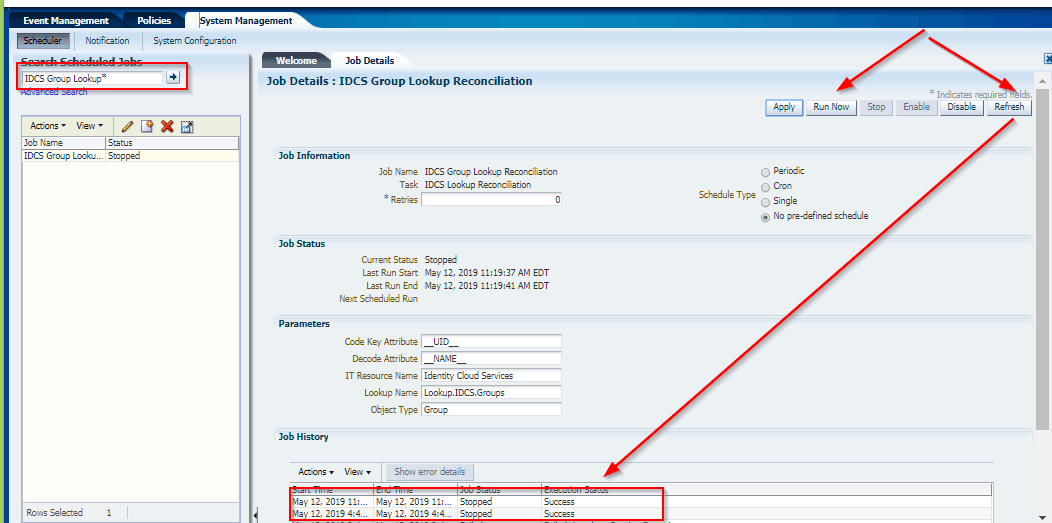
This Post Covers javax net ssl SSLException Received fatal alert protocol_version error while running schedule job IDCS Group Lookup Reconciliation as a part of Oracle Identity Manager (OIM)/Oracle Identity Governance (OIG), Integration with Oracle Identity Cloud Service (IDCS) from Oracle Identity Cloud Service (IDCS) Training. (for Free Master Class on Cloud Security Using Oracle IDCS: Career Path & What to Learn? )
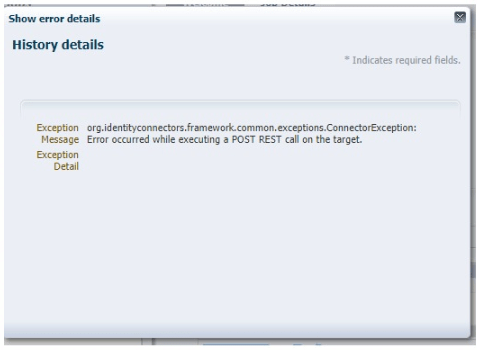
Error: occurred while executing a POST REST call on the target. org.identityconnectors.framework.common.exceptions.ConnectorException: Error occurred while executing a POST REST call on the target.
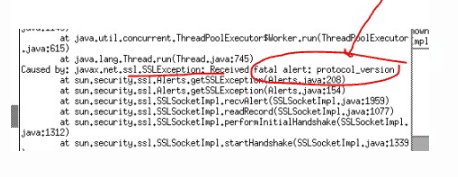
Caused by: javax.net.ssl.SSLException: Received fatal alert: protocol_version
If you are new to Secure Socket Layer (SSL), then I would suggest you check our previous post where we have covered in detail.
- SSL in WebLogic (CA, KeyStore, Identity & Trust Store): Things you must know – Part I Click Here
- SSL in WebLogic Server – Part II: Create KeyStore, generate CSR, Import CERT and configure KeyStore with WebLogic Click Here
If you want to know more about Oracle Identity Cloud Service (IDCS) check our previous post where we have covered in detail about Oracle Identity Cloud Serve ice (IDCS) Overview & Concepts
Issue:
Oracle Identity Manager (OIM) was integrated with Identity Cloud Service (IDCS) using the OIM IDCS connector Bundle 12.2.1.3 which was deployed into Connector Server 12.2.1.3.0.
While Running schedule job IDCS Group Lookup Reconciliation fails with javax net ssl SSLException: Received fatal alert protocol_version
Log Filename = $CONNECTOR_SERVER_HOME/logs/connectorserver0.log
————————————————–
May 14, 2019 5:49:44 AM org.identityconnectors.framework.server.impl.ConnectionListener processOperationRequest
SEVERE: Error occurred while executing a POST REST call on the target.
org.identityconnectors.framework.common.exceptions.ConnectorException: Error occurred while executing a POST REST call on the target.
at org.identityconnectors.restcommon.ClientHandler.executeRequest(ClientHandler.java:256)
at org.identityconnectors.restcommon.auth.impl.OAuthClientCredentials.getAuthHeaders(OAuthClientCredentials.java:123)
at org.identityconnectors.restcommon.ClientHandler.getAuthenticationHeaders(ClientHandler.java:97)
at org.identityconnectors.genericscim.GenericSCIMConnection.<init>(GenericSCIMConnection.java:79)
at org.identityconnectors.genericscim.GenericSCIMConnector.init(GenericSCIMConnector.java:209)
at org.identityconnectors.framework.impl.api.local.operations.ConnectorAPIOperationRunnerProxy.invoke(ConnectorAPIOperationRunnerProxy.java:89)
at com.sun.proxy.$Proxy5.search(Unknown Source)
at sun.reflect.NativeMethodAccessorImpl.invoke0(Native Method)
at sun.reflect.NativeMethodAccessorImpl.invoke(NativeMethodAccessorImpl.java:57)
at sun.reflect.DelegatingMethodAccessorImpl.invoke(DelegatingMethodAccessorImpl.java:43)
at java.lang.reflect.Method.invoke(Method.java:606)
at org.identityconnectors.framework.impl.api.local.operations.ThreadClassLoaderManagerProxy.invoke(ThreadClassLoaderManagerProxy.java:107)
at com.sun.proxy.$Proxy5.search(Unknown Source)
at org.identityconnectors.framework.server.impl.ConnectionProcessor.processOperationRequest(ConnectionProcessor.java:287)
at org.identityconnectors.framework.server.impl.ConnectionProcessor.processRequest(ConnectionProcessor.java:192)
at org.identityconnectors.framework.server.impl.ConnectionProcessor.run(ConnectionProcessor.java:121)
at java.util.concurrent.ThreadPoolExecutor.runWorker(ThreadPoolExecutor.java:1145)
at java.util.concurrent.ThreadPoolExecutor$Worker.run(ThreadPoolExecutor.java:615)
at java.lang.Thread.run(Thread.java:745)
Caused by: javax.net.ssl.SSLException: Received fatal alert protocol_version
at sun.security.ssl.Alerts.getSSLException(Alerts.java:208)
at sun.security.ssl.Alerts.getSSLException(Alerts.java:154)
at sun.security.ssl.SSLSocketImpl.recvAlert(SSLSocketImpl.java:1959)
at sun.security.ssl.SSLSocketImpl.readRecord(SSLSocketImpl.java:1077)
at sun.security.ssl.SSLSocketImpl.performInitialHandshake(SSLSocketImpl.java:1312)
at sun.security.ssl.SSLSocketImpl.startHandshake(SSLSocketImpl.java:1339)
at sun.security.ssl.SSLSocketImpl.startHandshake(SSLSocketImpl.java:1323)
at org.apache.http.conn.ssl.SSLConnectionSocketFactory.createLayeredSocket(SSLConnectionSocketFactory.java:394)
at org.apache.http.conn.ssl.SSLConnectionSocketFactory.connectSocket(SSLConnectionSocketFactory.java:353)
at org.apache.http.impl.conn.DefaultHttpClientConnectionOperator.connect(DefaultHttpClientConnectionOperator.java:141)
Root Cause:
The current version of java in use by the client is 1.7.0_60. TLS 1.2 was not automatically enabled until java 1.7.0_131
Reference: Click here
Prerequisites:
The Actual solution of this problem is Upgrade to Java 1.8 where TLS 1.2 is automatically enabled or Upgrading to 1.7.0_131 or greater should allow the TLS 1.2 to automatically work.
But before upgrading Java 1.8 or 1.7.0_131, you also need to make sure you have performed below points on your server:
- Check 1: Export the HTTPS public certificate (IDCS Public certificate)
- Check 2: Then, Check where to import OIM Trust Store
- Check 3: After checking location, Import IDCS Public Certificate into OIM Trust Store
- Check 4: Enable SSL as “True” in IDCS IT Resource Parameter
If you have not done the above steps then first follow our previous post about where we have covered all steps in detail like Export IDCS HTTPS public certificate and Import into OIM, Check where to import OIM Trust Store, Enable SSL as “True” in IDCS IT Resource Parameter click here
Troubleshooting:
You upgrade the Java to 1.8 or Upgrading to 1.7.0_131 or greater should allow the TLS 1.2 and then set the new JAVA Path and start connector server on new JAVA HOME.
High-level steps to Upgrade to Java 1.8
- Navigate to the JDK downloads page. Accept the license agreement and download the latest JDK 1.8 for Linux x64 (jdk-8uXXX-linux-x64.tar.gz)
- Move all the downloaded software to /stage/oracle/jdk (you can change this location)
- Launch a terminal, go to the location where you want to install JDK and enter the following command to install the JDK:
Example : cd /usr/java/ (in this location we will installed jdk)
tar -zxvpf /stage/oracle/jdk/jdk-8u211-linux-x64.tar.gz
- Then, Set the JAVA_HOME path and start the Connector Server on this new JDK path
export JAVA_HOME=/usr/java/jdk1.8.0_211/
export PATH=$JAVA_HOME/bin:$PATH
- Run Connector sever 12c , Go to $CONNECTOR_SERVER_HOME/bin
./connectorserver.sh /run (this will start connector server from console)
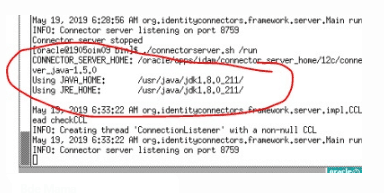
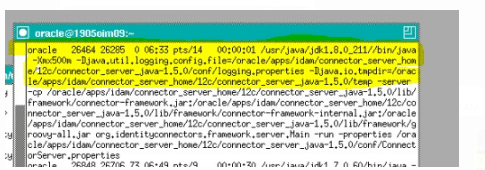
- Check JAVA version of the connector server if it’s showing in the same jdk1.8.0_211
ps -ef | grep java
Testing:
We could successfully run the Scheduled jobs in OIM/OIG.
This post is from our Oracle Identity Cloud Service (IDCS) training in which we have covered everything one should know about Oracle Identity Cloud Service like Architecture, Users & Groups Application, Branding, Auditing & Reports, Rest APIs, Adaptive security and much more.
Related Posts
- Cloud Security With Oracle Identity Cloud Service (IDCS) Click here
- Oracle Identity Cloud Service (IDCS): Step By Step Lab Activity Guide for Beginners Click here
- OIM/OIG – IDCS Connector Integration : [Troubleshooting] InvalidCredentialException: HTTP 401 Error : User not authorized to execute service Click here
- OIM/OIG – IDCS Integration : [Solved] javax.net.ssl.SSLHandshakeException : PKIX Path Building Failed Click here
- Oracle Identity Cloud Service (IDCS) Overview & Concepts Click here
- Cloud Security Using Identity Cloud Service Click here
- High-level Steps to Protecting an On-premises Application with IDCS by Using WebGate Click Here
References:
- “javax net ssl SSLException: Received fatal alert protocol_version” Error (Doc ID 2195947.1)
- ODTU error – protocol_version (Doc ID 2540821.1)
- When invoking icCnSrpSetupPublicService/Participant web service, getting Error getting response: javax net ssl SSLException: Received fatal alert protocol_version (Doc ID 2494077.1)
- E-REN: REN Server Window Stays in Queued Status and DSTGNT Log Shows Message – Java exception thrown: javax net ssl SSLException: Received fatal alert protocol_version (Doc ID 2276732.1)
- Orders Are Stopped Flowing Into Order Management System Integrated With Jagged Peak with “javax net ssl SSLException: Received fatal alert protocol_version” Error (Doc ID 2195947.1)
Next Task for You
Download our FREE Guide i.e., 7 Docs Must Read to Become Expert in Cloud Security With Oracle Identity Cloud Service (IDCS).
Click on the image below to Download the Guide:

Hi I tried answering on other thread however for whatever reason I couldn’t.
I tried your test on my own server(s) however I’m getting this:
curl -I -v --tlsv1.3 --tls-max 1.3 https://bw.domain.com
*   Trying 10.0.1.86:443...
* TCP_NODELAY set
* Connected to bw.domain.com (10.0.1.86) port 443 (#0)
* ALPN, offering http/1.1
* successfully set certificate verify locations:
*   CAfile: /opt/local/share/curl/curl-ca-bundle.crt
  CApath: none
* TLSv1.3 (OUT), TLS handshake, Client hello (1):
* TLSv1.3 (IN), TLS handshake, Server hello (2):
* TLSv1.3 (IN), TLS handshake, Encrypted Extensions (8):
* TLSv1.3 (IN), TLS handshake, Certificate (11):
* TLSv1.3 (IN), TLS handshake, CERT verify (15):
* TLSv1.3 (IN), TLS handshake, Finished (20):
* TLSv1.3 (OUT), TLS change cipher, Change cipher spec (1):
* TLSv1.3 (OUT), TLS handshake, Finished (20):
* SSL connection using TLSv1.3 / TLS_AES_256_GCM_SHA384
* ALPN, server accepted to use http/1.1
* Server certificate:
*  subject: CN=bw.domain.com
*  start date: Feb  3 16:54:01 2020 GMT
*  expire date: May  3 16:54:01 2020 GMT
*  subjectAltName: host "bw.domain.com" matched cert's "bw.domain.com"
*  issuer: C=US; O=Let's Encrypt; CN=Let's Encrypt Authority X3
*  SSL certificate verify ok.
> HEAD / HTTP/1.1
> Host: bw.domain.com
> User-Agent: curl/7.68.0
> Accept: */*
>
* TLSv1.3 (IN), TLS handshake, Newsession Ticket (4):
* TLSv1.3 (IN), TLS handshake, Newsession Ticket (4):
* old SSL session ID is stale, removing
* Mark bundle as not supporting multiuse
< HTTP/1.1 200 OK
HTTP/1.1 200 OK
< Server: nginx/1.16.1
Server: nginx/1.16.1
< Date: Wed, 19 Feb 2020 15:23:50 GMT
Date: Wed, 19 Feb 2020 15:23:50 GMT
< Content-Type: text/html; charset=utf-8
Content-Type: text/html; charset=utf-8
< Content-Length: 1373
Content-Length: 1373
< Connection: keep-alive
Connection: keep-alive
< Cache-Control: public, max-age=600
Cache-Control: public, max-age=600
< Feature-Policy: accelerometer 'none'; ambient-light-sensor 'none'; autoplay 'none'; camera 'none'; encrypted-media 'none'; fullscreen 'none'; geolocation 'none'; gyroscope 'none'; magnetometer 'none'; microphone 'none'; midi 'none'; payment 'none'; picture-in-picture 'none'; sync-xhr 'self' https://haveibeenpwned.com https://twofactorauth.org; usb 'none'; vr 'none'
Feature-Policy: accelerometer 'none'; ambient-light-sensor 'none'; autoplay 'none'; camera 'none'; encrypted-media 'none'; fullscreen 'none'; geolocation 'none'; gyroscope 'none'; magnetometer 'none'; microphone 'none'; midi 'none'; payment 'none'; picture-in-picture 'none'; sync-xhr 'self' https://haveibeenpwned.com https://twofactorauth.org; usb 'none'; vr 'none'
< Referrer-Policy: same-origin
Referrer-Policy: same-origin
< X-Frame-Options: SAMEORIGIN
X-Frame-Options: SAMEORIGIN
< X-Content-Type-Options: nosniff
X-Content-Type-Options: nosniff
< X-XSS-Protection: 1; mode=block
X-XSS-Protection: 1; mode=block
< Content-Security-Policy: frame-ancestors 'self' chrome-extension://nngceckbapebfimnlniiiahkandclblb moz-extension://* ;
Content-Security-Policy: frame-ancestors 'self' chrome-extension://nngceckbapebfimnlniiiahkandclblb moz-extension://* ;
< Access-Control-Allow-Origin:
Access-Control-Allow-Origin:

<
* Connection #0 to host bw.domain.com left intact
My reverse proxy is nginx but its configured with Mozilla intermediate. Despite the intermediate ssl-params, the TLS1.3 handshake looks to be established.
# openssl version
OpenSSL 1.1.1d  10 Sep 2019

# nginx -V
nginx version: nginx/1.16.1
built with OpenSSL 1.1.1d  10 Sep 2019
TLS SNI support enabled

# uname -a
Linux 5.4.15-arch1-1
I’m using the following nginx-ssl params
ssl_session_timeout 1d;
ssl_session_cache shared:MozSSL:10m;  # about 40000 sessions
ssl_session_tickets off;

# curl https://ssl-config.mozilla.org/ffdhe2048.txt > /path/to/dhparam.pem
ssl_dhparam /etc/ssl/dhparam.pem;

# intermediate configuration
ssl_protocols TLSv1.2 TLSv1.3;
ssl_ciphers ECDHE-ECDSA-AES128-GCM-SHA256:ECDHE-RSA-AES128-GCM-SHA256:ECDHE-ECD
SA-AES256-GCM-SHA384:ECDHE-RSA-AES256-GCM-SHA384:ECDHE-ECDSA-CHACHA20-POLY1305:
ECDHE-RSA-CHACHA20-POLY1305:DHE-RSA-AES128-GCM-SHA256:DHE-RSA-AES256-GCM-SHA384
;
ssl_prefer_server_ciphers off;

# HSTS (ngx_http_headers_module is required) (63072000 seconds)
#add_header Strict-Transport-Security "max-age=63072000" always;

# OCSP stapling
#ssl_stapling on;
#ssl_stapling_verify on;

resolver 10.0.1.1;