
mysql 5.7.18 (both master and slave)
error in slave status
Last_IO_Error: Master command COM_REGISTER_SLAVE failed: Access denied for user 'repl'@'xxx.xxx.xxx.xxx' (using password: YES) (Errno: 1045)
error on master (error.log)
2017-05-29T16:40:39.718290Z 213 [Note] Aborted connection 213 to db: 'unconnected' user: 'repl' host: 'xxx.xxx.xxx.xxx' (Got an error reading communication packets)
connecting from slave to master via mysql client
But if I login from the slave servers command line like this there is no error and the slave connects to the master perfectly. So there must be something in the master-slave configuration thats not right
mysql -h xxx.xxx.xxx.xxx -u repl -pxxxxxxxxxxxx
mysql> show grants;
+--------------------------------------------+
| Grants for repl@xxx.xxx.xxx.xxx            |
+--------------------------------------------+
| GRANT USAGE ON *.* TO 'repl'@'xxx.xxx.xxx.xxx' |
+--------------------------------------------+
1 row in set (0.00 sec)
create replication user on master
CREATE USER 'repl'@'xxx.xxx.xxx.xxx' IDENTIFIED BY 'xxxxx';
GRANT REPLICATION SLAVE ON *.* TO 'repl'@'xxx.xxx.xxx.xxx';
FLUSH PRIVILEGES;
master my.cnf
[mysqld]

# GENERAL #
user                           = mysql
port                           = 3306
default_storage_engine         = InnoDB
pid-file                       = /var/run/mysqld/mysqld.pid
socket                         = /var/run/mysqld/mysqld.sock

# SAFETY #
max_allowed_packet             = 16M
max_connect_errors             = 1000000
skip_name_resolve
sql_mode                       = STRICT_ALL_TABLES,NO_AUTO_CREATE_USER,NO_ENGINE_SUBSTITUTION,NO_ZERO_DATE,NO_ZERO_IN_DATE,ERROR_FOR_DIVISION_BY_ZERO
sysdate_is_now                 = 1
symbolic_links                 = 0

# DATA STORAGE #
datadir                        = /var/lib/mysql/

# BINARY LOGGING #
server_id                      = 1
log_bin                        = /var/lib/mysql/mysql-bin
log_slave_updates
expire_logs_days               = 14
sync_binlog                    = 1
log_bin_trust_function_creators= 1
binlog_format                  = ROW

# REPLICATION #
gtid_mode                      = ON
enforce_gtid_consistency

# CACHES AND LIMITS #
tmp_table_size                 = 64M
max_heap_table_size            = 64M
query_cache_type               = 0
query_cache_size               = 0
max_connections                = 500
thread_cache_size              = 50
open_files_limit               = 65535
table_definition_cache         = 4096
table_open_cache               = 4096
wait_timeout                   = 60

# INNODB #
innodb_flush_method                 = O_DIRECT
innodb_log_files_in_group           = 2
innodb_log_file_size                = 512M
innodb_log_buffer_size              = 64M
innodb_flush_log_at_trx_commit      = 1
innodb_file_per_table               = 1
innodb_buffer_pool_size             = 40G
innodb_buffer_pool_instances        = 12
innodb_autoinc_lock_mode            = 2
innodb_adaptive_hash_index          = 0
innodb_change_buffering             = none

# LOGGING #
log_error                      = /var/lib/mysql/mysql-error.log
log_queries_not_using_indexes  = 1
slow_query_log                 = 1
slow_query_log_file            = /var/lib/mysql/mysql-slow.log
long_query_time                = 1

basedir                        = /usr
tmpdir                         = /tmp
lc_messages_dir                = /usr/share/mysql
explicit_defaults_for_timestamp
slave my.cnf
[mysqld]

# GENERAL #
user                           = mysql
port                           = 3306
default_storage_engine         = InnoDB
pid-file                       = /var/run/mysqld/mysqld.pid
socket                         = /var/run/mysqld/mysqld.sock

# SAFETY #
max_allowed_packet             = 16M
max_connect_errors             = 1000000
skip_name_resolve
sql_mode                       = STRICT_ALL_TABLES,NO_AUTO_CREATE_USER,NO_ENGINE_SUBSTITUTION,NO_ZERO_DATE,NO_ZERO_IN_DATE,ERROR_FOR_DIVISION_BY_ZERO
sysdate_is_now                 = 1
symbolic_links                 = 0

# DATA STORAGE #
datadir                        = /var/lib/mysql/

# BINARY LOGGING #
server_id                      = 2
log_bin                        = /var/lib/mysql/mysql-bin
log_slave_updates
expire_logs_days               = 14
sync_binlog                    = 1
log_bin_trust_function_creators= 1
binlog_format                  = ROW

# REPLICATION #
gtid_mode                      = ON
enforce_gtid_consistency

# CACHES AND LIMITS #
tmp_table_size                 = 64M
max_heap_table_size            = 64M
query_cache_type               = 0
query_cache_size               = 0
max_connections                = 500
thread_cache_size              = 50
open_files_limit               = 65535
table_definition_cache         = 4096
table_open_cache               = 4096
wait_timeout                   = 60

# INNODB #
innodb_flush_method                 = O_DIRECT
innodb_log_files_in_group           = 2
innodb_log_file_size                = 512M
innodb_log_buffer_size              = 64M
innodb_flush_log_at_trx_commit      = 1
innodb_file_per_table               = 1
innodb_buffer_pool_size             = 12G
innodb_buffer_pool_instances        = 8
innodb_autoinc_lock_mode            = 2
innodb_adaptive_hash_index          = 0
innodb_change_buffering             = none

# LOGGING #
log_error                      = /var/lib/mysql/mysql-error.log
log_queries_not_using_indexes  = 1
slow_query_log                 = 1
slow_query_log_file            = /var/lib/mysql/mysql-slow.log
long_query_time                = 1

basedir                        = /usr
tmpdir                         = /tmp
lc_messages_dir                = /usr/share/mysql
explicit_defaults_for_timestamp
master status
show master statusG;
*************************** 1. row ***************************
             File: mysql-bin.000005
         Position: 194
     Binlog_Do_DB:
 Binlog_Ignore_DB:
Executed_Gtid_Set: e4e90c71-4264-11e7-b970-4061862b8d34:1-12803
1 row in set (0.00 sec)
slave status
show slave statusG;
*************************** 1. row ***************************
               Slave_IO_State: Waiting to reconnect after a failed registration on master
                  Master_Host: xxx.xxx.xxx.xxx
                  Master_User: repl
                  Master_Port: 3306
                Connect_Retry: 60
              Master_Log_File:
          Read_Master_Log_Pos: 4
               Relay_Log_File: Worker-Intel-i7-2600-16gb-relay-bin.000001
                Relay_Log_Pos: 4
        Relay_Master_Log_File:
             Slave_IO_Running: Connecting
            Slave_SQL_Running: Yes
          Replicate_Ignore_DB:
           Replicate_Do_Table:
       Replicate_Ignore_Table:
      Replicate_Wild_Do_Table:
  Replicate_Wild_Ignore_Table:
                   Last_Errno: 0
                   Last_Error:
                 Skip_Counter: 0
          Exec_Master_Log_Pos: 0
              Relay_Log_Space: 154
              Until_Condition: None
               Until_Log_File:
                Until_Log_Pos: 0
           Master_SSL_Allowed: No
           Master_SSL_CA_File:
           Master_SSL_CA_Path:
              Master_SSL_Cert:
            Master_SSL_Cipher:
               Master_SSL_Key:
        Seconds_Behind_Master: 0
Master_SSL_Verify_Server_Cert: No
                Last_IO_Errno: 1130
                Last_IO_Error: Master command COM_REGISTER_SLAVE failed: Access denied for user 'repl'@'176.9.137.3' (using password: YES) (Errno: 1045)
               Last_SQL_Errno: 0
               Last_SQL_Error:
  Replicate_Ignore_Server_Ids:
             Master_Server_Id: 0
                  Master_UUID:
             Master_Info_File: /var/lib/mysql/master.info
                    SQL_Delay: 0
          SQL_Remaining_Delay: NULL
      Slave_SQL_Running_State: Slave has read all relay log; waiting for more updates
           Master_Retry_Count: 86400
                  Master_Bind:
      Last_IO_Error_Timestamp: 170529 17:24:04
     Last_SQL_Error_Timestamp:
               Master_SSL_Crl:
           Master_SSL_Crlpath:
           Retrieved_Gtid_Set:
            Executed_Gtid_Set: 8976078a-40a0-11e7-8043-c8600054b161:1-1085
                Auto_Position: 1
         Replicate_Rewrite_DB:
                 Channel_Name:
           Master_TLS_Version:
1 row in set (0.00 sec)
start/setup slave
# mysql -u root -pxxxxxxxxxxx
# stop slave;
# CHANGE MASTER TO
# MASTER_HOST = 'xxx.xxx.xxx.xxx',
# MASTER_PORT = 3306,
# MASTER_USER = 'repl',
# MASTER_PASSWORD = 'xxxxxxxxxxxxx',
# MASTER_AUTO_POSITION = 1;
# start slave;
# show slave statusG;
I’m trying to set up replication in MySQL but I am being given an error that I do not know how to fix —
ERROR 1218 (08S01): Error connecting to master: Host ‘sh047.mydomain.com’ is not allowed to connect to this MySQL server
I’ve added the following code to the master my.ini —
server-id=238429
log-bin=mysql-bin
log-error=mysql-bin.err
binlog_do_db=my_databases_to_replicate {not literal, have listed the correct databases}
And I’ve added this to the slave my.ini —
server-id=2
master-host=192.168.1.15
master-user=replication
master-password=my_password
master-connect-retry=60
replicate-do-db=my_databases_to_replicate
The user ‘replication’ exists and the password that I use in the slave my.ini is correct. Any suggestions as to how to fix this would be welcome.
Thanks.
asked Nov 22, 2011 at 10:08

David GardDavid Gard
10.7k33 gold badges110 silver badges210 bronze badges
The error message says it all:
Host ‘sh047.mydomain.com’ is not allowed to connect to this MySQL
server
Make sure the user replication is configurated as replication@sh047.mydomain.com (or, but only for testing purposes: replication@%) on your master database.
If this doesn’t work out, check the MySQL Documentation for this, there might be one or two special cases (Linux compilation etc.), where that error might occur, too.
answered Nov 22, 2011 at 10:15

3
Содержание
- nerdherd.com
- Helping You Get Started in Cybersecurity
- Troubleshooting MySQL Replication Error 1045
- Ошибка: Access denied for user ‘root’@’localhost’ (Using password: YES и NO)
- Причины ошибки Access denied for user ‘root’@’localhost’
- Как исправить ошибку 1045 в MySQL
- MySQL error 1045
- Причина возникновения ошибки 1045
- Что делать?
- phpmyadmin
- Установка новой версии
- Fixing MySQL 1045 Error: Access Denied
- MySQL 1045 error Access Denied triggers in the following cases:
- 1) Connecting to wrong host:
- 2) User does not exist:
- 3) User exists but client host does not have permission to connect:
- 4) Password is wrong, or the user forgot his password:
- 5) Special characters in the password being converted by Bash:
- 6) SSL is required but the client is not using it:
- 7) PAM backend not working:
- Mysql 1045 access denied for user
- Localhost и 127.0.0.1
- Не указан хост в явном виде
- Использование кавычек
- Анонимный (пустой) пользователь
- Пароль утерян
- Самое главное
nerdherd.com
Helping You Get Started in Cybersecurity
Troubleshooting MySQL Replication Error 1045
MySQL Master / Slave replication is amazingly easy to set up. But what if you do everything by the book, log into the slave, and issue the climactic SLAVE START; command, followed by SHOW SLAVE STATUSG , and see this error?
Last_IO_Errno: 1045 Last_IO_Error: error connecting to master ‘slave_user@master.domain.int:3306’ — retry-time: 60 retries: 86400
and your log file shows:
110201 22:53:26 [Note] ‘CHANGE MASTER TO executed’. Previous state master_host=’master.domain.int’, master_port=’3306′, master_log_file=», master_log_pos=’4′. New state master_host=’10.0.0.10′, master_port=’3306′, master_log_file=’mysql-bin.000001′, master_log_pos=’106′. 110201 22:53:26 [Note] Slave SQL thread initialized, starting replication in log ‘mysql-bin.000001’ at position 106, relay log ‘/mnt/mysql/logs/relay-bin.000001’ position: 4 110201 22:53:26 [ERROR] Slave I/O: error connecting to master ‘slave-user@10.0.0.10:3306’ — retry-time: 60 retries: 86400, Error_code: 1045
The master isn’t rejecting your password, and there isn’t useful feedback indicating why the slave cannot connect. Note the error code 1045, which indicates a credentials problem. Double-check the length of your password; MySQL has a MASTER_PASSWORD maximum length limit of 32 characters. Shorten that puppy up and have another try. From the command line, you can issue a command such as mysql —user=slave-user —host=master -p to verify that your credentials are valid. However, be aware that you can connect this way with a password that is too long and that will not work for replication.
And as John_A points out in the comments: “turns out you cannot use a pound sign ‘#’ when your password is in my.cnf either. A work around is to copy the password into your master.info file.”
Also, double-check that neither firewalls nor SELinux are blocking the connection; you can telnet master 3306 to verify that MySQL is listening and accepting connections on that port.
Источник
Ошибка: Access denied for user ‘root’@’localhost’ (Using password: YES и NO)
При работе с системой MySQL могут возникнуть самые разные ошибки, и на этапе освоения программы разобраться с ними может быть сложно. Одна из наиболее распространенных проблем — ошибка 1045, которая сопровождается сообщением Access denied for user ‘root’@’localhost’ (Using password: YES и NO). Сегодня я расскажу, как ее исправить.
Понять суть проблемы можно, переведя сообщение об ошибке на русский язык. Означает оно, что пользователю с именем root на машине localhost запрещен доступ к БД при использовании пароля или без него.
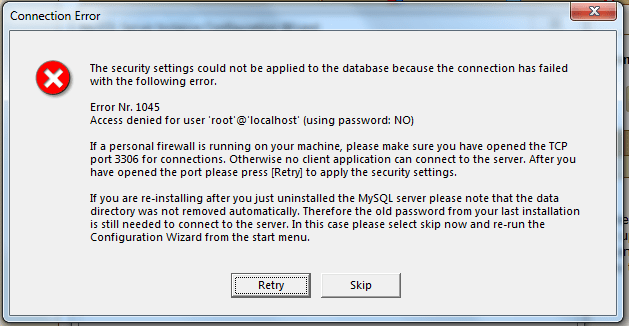
Причины ошибки Access denied for user ‘root’@’localhost’
Чтобы свободно получить доступ в MySQL, должно совпасть три параметра, описывающих пользователя базы данных — имя, название машины и пароль. Если есть какие-то несовпадения, доступ будет запрещен. Самая простая причина проблемы — неправильный ввод пароля. Кроме этого, вызывать ошибку может неправильный синтаксис.
В системе MySQL нет простой зависимости имя пользователя – пароль, название хоста играет важную роль в получении доступа к БД. Оно может иметь вид IP-адреса, доменного имени, ключевого слова (например, localhost) или символа, объединяющего несколько машин в группу (например, % — любой хост, кроме локального).
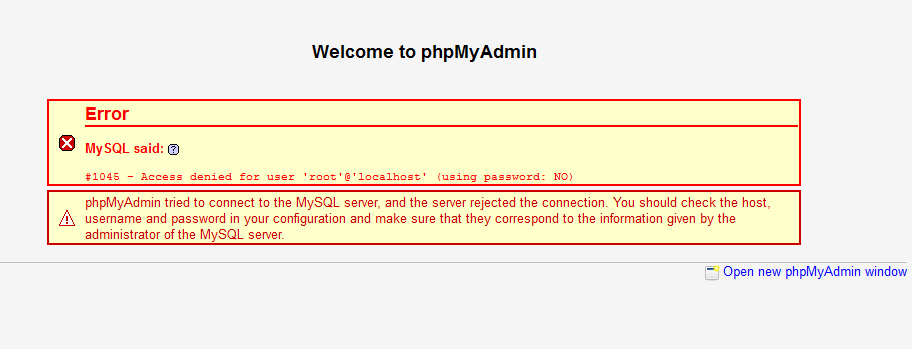
Наиболее распространенные ошибки при обращении к БД:
- При присвоении прав новому пользователю не был указан адрес машины, с которой он может подключаться. В таком случае ему автоматически будет разрешено пользоваться БД с любого хоста, кроме локального, и при попытке подключения с localhost возникнет ошибка доступа.
- Неправильно расставленные кавычки. Если при создании пользователя написать ‘username@localhost’, это будет значить, что username@localhost может подключаться с любой машины, кроме локальной, а не что username может подключаться с компьютера localhost. Логин пользователя и имя машины должны иметь свою пару кавычек.
- Использование пароля при его отсутствии в базе данных.
В зависимости от того, при каком способе подключения к БД возникает ошибка Access denied for user ‘root’@’localhost’ (Using password: YES или NO), используются разные методы решения проблемы.
Как исправить ошибку 1045 в MySQL
Если ошибка Access denied for user появляется с указанием Using password: YES, проблема заключается в неправильном вводе пароля. Проверить это можно, открыв таблицу mysql.user, в которой хранятся данные обо всех пользователях.

Порядок действий таков:
- Откройте таблицу пользователей.
- Проверьте, существует ли пользователь root с хостом localhost. Если он есть, смотрите на поле «password». Если там пусто, зайти в базу можно без ввода пароля. Если там что-то есть, значит, вы вводите неправильный пароль.
- Смените пароль командой SET PASSWORD.
- Если пользователя root нет, создайте его, установите пароль и предоставьте ему права.
После этого в базу данных можно зайти. Если изменить данные не получается, следует использовать параметр —skip-grant-tables, который отменяет все настройки разрешений.
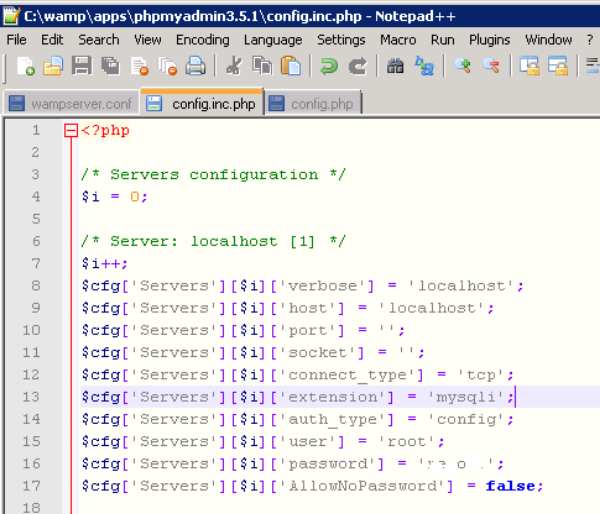
Строки, которые нужно изменить в файле конфигурации
Если ошибка появляется с ключом (Using password: NO), нужно сделать следующее изменить файл config.inc.php, указав в нем правильные данные. Если проблема возникает при установке MySQL, нужно удалить базы данных старой версии программы или сменить пароль для доступа к ним, используя режим —skip-grant-tables.
Таким образом, ошибка Access denied for user ‘root’@’localhost’ (Using password: YES или NO) возникает при несоответствии пароля и имени пользователя и легко исправляется заменой данных для входа.
Источник
MySQL error 1045
Автор: Василий Лукьянчиков , vl (at) sqlinfo (dot) ru
Статистика форума SQLinfo показывает, что одной из наиболее популярных проблем является ошибка mysql №1045 (ошибка доступа).
Текст ошибки содержит имя пользователя, которому отказано в доступе, компьютер, с которого производилось подключение, а также ключевое слово YES или NO, которые показывают использовался ли при этом пароль или была попытка выполнить подключение с пустым паролем.
Причина возникновения ошибки 1045
Как ни банально, но единственная причина это неправильная комбинация пользователя и пароля. Обратите внимание, речь идет о комбинации пользователь и пароль, а не имя пользователя и пароль. Это очень важный момент, так как в MySQL пользователь характеризуется двумя параметрами: именем и хостом, с которого он может обращаться. Синтаксически записывается как ‘имя пользователя’@’имя хоста’.
Таким образом, причина возникновения MySQL error 1045 — неправильная комбинация трех параметров: имени пользователя, хоста и пароля.
В качестве имени хоста могут выступать ip адреса, доменные имена, ключевые слова (например, localhost для обозначения локальной машины) и групповые символы (например, % для обозначения любого компьютера кроме локального). Подробный синтаксис смотрите в документации
Замечание: Важно понимать, что в базе не существует просто пользователя с заданным именем (например, root), а существует или пользователь с именем root, имеющий право подключаться с заданного хоста (например, root@localhost) или даже несколько разных пользователей с именем root (root@127.0.0.1, root@webew.ru, root@’мой домашний ip’ и т.д.) каждый со своим паролем и правами.
Примеры.
1) Если вы не указали в явном виде имя хоста
2) Другой первопричиной ошибки mysql 1045 может быть неправильное использование кавычек.
3) Неочевидный вариант. IP адрес 127.0.0.1 в имени хоста соответствует ключевому слову localhost. С одной стороны, root@localhost и ‘root’@’127.0.0.1’ это синонимы, с другой, можно создать двух пользователей с разными паролями. И при подключении будет выбран тот, который распологается в таблице привелегий (mysql.user) раньше.
4) Аккаунт с пустым именем пользователя трактуется сервером MySQL как анонимный, т.е. позволяет подключаться пользователю с произвольным именем или без указания имени. Например, вы создали пользователя »@localhost с пустым паролем, чтобы каждый мог подключиться к базе. Однако, если при подключении вы укажите пароль отличный от пустого, то получите ошибку 1045. Как говорилось ранее, нужно совпадение трех параметров: имени пользователя, хоста и пароля, а пароль в данном случае не совпадает с тем, что в базе.
Что делать?
Во-первых, нужно убедиться, что вы используете правильные имя пользователя и пароль. Для этого нужно подключиться к MySQL с правами администратора (если ошибка 1045 не дает такой возможности, то нужно перезапустить сервер MySQL в режиме —skip-grant-tables), посмотреть содержимое таблицы user служебной базы mysql, в которой хранится информация о пользователях, и при необходимости отредактировать её.
Если изначально была ошибка:
Экзотический пример. Устанавливаете новый пароль для root@localhost в режиме —skip-grant-tables, однако после перезагрузки сервера по прежнему возникает ошибка при подключении через консольный клиент:
ERROR 1045 ( 28000 ) : Access denied for user ‘root’ @ ‘localhost’ ( using password: YES ) Оказалось, что было установлено два сервера MySQL, настроенных на один порт.
phpmyadmin
При открытии в браузере phpmyadmin получаете сообщение:
Error
MySQL said:
#1045 — Access denied for user ‘root’@’localhost’ (using password: NO)
Connection for controluser as defined in your configuration failed.
phpMyAdmin tried to connect to the MySQL server, and the server rejected the connection. You should check the host, username and password in your configuration and make sure that they correspond to the information given by the administrator of the MySQL server.
Ни логина, ни пароля вы не вводили, да и пхпадмин их нигде требовал, сразу выдавая сообщение об ошибке. Причина в том, что данные для авторизации берутся из конфигурационного файла config.inc.php Необходимо заменить в нем строчки
Установка новой версии
Устанавливаете новую версию MySQL, но в конце при завершении конфигурации выпадает ошибка:
Это происходит потому, что ранее у вас стоял MySQL, который вы удалили без сноса самих баз. Если вы не помните старый пароль и вам нужны эти данные, то выполните установку новой версии без смены пароля, а потом смените пароль вручную через режим —skip-grant-tables.
Источник
Fixing MySQL 1045 Error: Access Denied
 During our work in support, we see this again and again: “I try to connect to MySQL and am getting a 1045 error”, and most times it comes accompanied with “…but I am sure my user and password are OK”. So we decided it was worth showing other reasons this error may occur.
MySQL 1045 error Access Denied triggers in the following cases:
1) Connecting to wrong host:
If not specifying the host to connect (with -h flag), MySQL client will try to connect to the localhost instance while you may be trying to connect to another host/port instance.
Fix: Double check if you are trying to connect to localhost, or be sure to specify host and port if it’s not localhost:
2) User does not exist:
Fix: Double check if the user exists:
If the user does not exist, create a new user:
3) User exists but client host does not have permission to connect:
Fix: You can check to see which host user/host MySQL allows connections with the following query:
If you need to check from which IP the client is connecting, you can use the following Linux commands for server IP:
or for public IP:
You can then create a user with correct Host (client IP), or with ‘%’ (wildcard) to match any possible IP:
4) Password is wrong, or the user forgot his password:
Fix: Check and/or reset password:
You cannot read user passwords in plain text from MySQL as the password hash is used for authentication, but you can compare hash strings with “PASSWORD” function:
We can see that PASSWORD(‘forgotten’) hash does not match the authentication_string column, which means password string=’forgotten’ is not the correct password to log in. Also, in case the user has multiple hosts (with different password), he may be trying to connect using the password for the wrong host.
In case you need to override the password you can execute the following query:
5) Special characters in the password being converted by Bash:
Fix: Prevent bash from interpreting special characters by wrapping password in single quotes:
6) SSL is required but the client is not using it:
Fix: Adding –ssl-mode flag (–ssl flag is deprecated but can be used too)
You can read more in-depth on how to configure SSL in MySQL in the blog post about “Setting up MySQL SSL and Secure Connections” and “SSL in 5.6 and 5.7“.
7) PAM backend not working:
Fix: Double check user/password is correct for the user to authenticate with the PAM currently being used.
In my example, I am using Linux shadow files for authentication. In order to check if the user exists:
To reset password:
Finally, if you are genuinely locked out and need to circumvent the authentication mechanisms in order to regain access to the database, here are a few simple steps to do so:
Источник
Mysql 1045 access denied for user

Технический редактор Highload


При подключении к MySQL, ERROR 1045 (28000): Access denied for user означает неверную комбинацию имени пользователя и/или хоста и/или пароля. Причин возникновения несколько.

Собираем на дрон для штурмовиков Николаевской области. Он поможет найти и уничтожить врага
Localhost и 127.0.0.1
Если вы уверены, что введенная комбинация пользователь/пароль верна, то следующим шагом будет проверка адреса. Localhost соответствует IP-адресу 127.0.0.1 , а пользователи ‘user’@’127.0.0.1’ и ‘user’@’localhost’ взаимозаменяемы. Вот только для каждого из них можно задать отдельный пароль, а при входе будет выбираться пользователь, который находится выше в таблице mysql.user .
Не указан хост в явном виде
Возможно при создании пользователя не был указан хост:
CREATE USER ‘user’ IDENTIFIED BY ‘pass’
Проблема также может появиться при выдаче прав GRANT ALL

В этом случае будет создан пользователь ‘user’@’%’ , а при попытке подключения локально появится ошибка, так как пользователя ‘user’@’localhost’ не существует.
Использование кавычек
Еще одна неявная причина ошибки — неправильное использование кавычек:
CREATE USER ‘[email protected]’ IDENTIFIED BY ‘somepass’
Анонимный (пустой) пользователь
Наличие “пустого” пользователя ”@’localhost’ или ”@’127.0.0.1′ – самая неочевидная причина проблемы. При подключении к БД, сервер в первую очередь проверяет пользователей с явно указанными IP-адресом или localhost-ом, проверяя по таблице mysql.user . То есть, система попробует подключить пользователя ‘user’@’localhost’ , проверяя пользователя ”@’localhost’ . В этом случае и появится ошибка 1045: Access denied for user. Лучшим решением проблемы будет удаление анонимного юзера:
Не забудьте указать свой хост
Пароль утерян
Если же ошибок нет и вы уверены, что имя пользователя верное, тогда единственное решение – смена пароля:
Подключение под суперпользователем, обновление таблицы mysql.user
Если же утерян пароль суперпользователя, то нужно выполнить следующее:
Установка нового root-пароля и обновление привилегий
Самое главное
Главная причина ошибки — несоответствие имени пользователя, хоста и пароля. Так что проверяйте учетные данные, отключайте анонимного пользователя и не используйте root для удаленного подключения.
Этот текст был написан несколько лет назад. С тех пор упомянутые здесь инструменты и софт могли получить обновления. Пожалуйста, проверяйте их актуальность.
Источник
0
1
На мастере(10.100.101.111) —
/etc/my.cnf
#Replication
log-bin=mysql-bin
server-id=1
mysql> show master statusG
*************************** 1. row ***************************
File: mysql-bin.000001
Position: 177
Binlog_Do_DB:
Binlog_Ignore_DB:
1 row in set (0.00 sec)
mysql> show master logsG
*************************** 1. row ***************************
Log_name: mysql-bin.000001
File_size: 177
1 row in set (0.00 sec)
mysql> CREATE USER ‘repl’ IDENTIFIED BY ‘1234’;
Query OK, 0 rows affected (0.00 sec)
mysql> GRANT REPLICATION SLAVE, RELOAD, SUPER ON *.* TO repl@«%»;
Query OK, 0 rows affected (0.00 sec)
На слэйве(10.100.101.112) —
/etc/my.cnf
#Replication
server-id=2
mysql> slave stop;
Query OK, 0 rows affected, 1 warning (0.01 sec)
mysql> reset slave;
Query OK, 0 rows affected (0.10 sec)
mysql> CHANGE MASTER TO MASTER_HOST=’10.100.101.111′, MASTER_USER=’repl’, MASTER_PASSWORD=’1234′, MASTER_LOG_FILE=’mysql-bin.000001′, MASTER_LOG_POS=106;
Query OK, 0 rows affected (0.16 sec)
mysql> slave start;
Query OK, 0 rows affected (0.01 sec)
mysql> show slave statusG
*************************** 1. row ***************************
Slave_IO_State: Connecting to master
Master_Host: 10.100.101.111
Master_User: repl
Master_Port: 3306
Connect_Retry: 60
Master_Log_File: mysql-bin.000001
Read_Master_Log_Pos: 106
Relay_Log_File: mysqld-relay-bin.000001
Relay_Log_Pos: 4
Relay_Master_Log_File: mysql-bin.000001
Slave_IO_Running: No
Slave_SQL_Running: Yes
Replicate_Do_DB:
Replicate_Ignore_DB:
Replicate_Do_Table:
Replicate_Ignore_Table:
Replicate_Wild_Do_Table:
Replicate_Wild_Ignore_Table:
Last_Errno: 0
Last_Error:
Skip_Counter: 0
Exec_Master_Log_Pos: 106
Relay_Log_Space: 106
Until_Condition: None
Until_Log_File:
Until_Log_Pos: 0
Master_SSL_Allowed: No
Master_SSL_CA_File:
Master_SSL_CA_Path:
Master_SSL_Cert:
Master_SSL_Cipher:
Master_SSL_Key:
Seconds_Behind_Master: NULL
Master_SSL_Verify_Server_Cert: No
Last_IO_Errno: 2013
Last_IO_Error: error connecting to master ‘repl@10.100.101.111:3306’ — retry-time: 60 retries: 86400
Last_SQL_Errno: 0
Last_SQL_Error:
1 row in set (0.01 sec)
mysql> system less /var/log/mysqld.log (Последние релевантные строки)
110209 20:04:57 [Note] ‘CHANGE MASTER TO executed’. Previous state master_host=’10.100.101.111′, master_port=’3306′, master_log_file=», master_log_pos=’4′. New state master_host=’10.100.101.111′, master_port=’3306′, master_log_file=’mysql-bin.000001′, master_log_pos=’106′.
110209 20:05:11 [ERROR] Slave I/O: error connecting to master ‘repl@10.100.101.111:3306’ — retry-time: 60 retries: 86400, Error_code: 2013
110209 20:05:11 [Note] Slave SQL thread initialized, starting replication in log ‘mysql-bin.000001’ at position 106, relay log ‘./mysqld-relay-bin.000001’ position: 4
(END)
Даже представить не могу где ещё смотреть… Помогите плз. Спасибо.
mysql._nastrojka_replikacii_master-slave
Содержание
Master-Slave репликация в MySQL часто используется для обеспечения отказоустойчивости приложений. Кроме этого, она позволяет распределить нагрузку на базу данных между несколькими серверами (репликами). Читайте подробнее о применении репликации.
Настройка репликации происходит в несколько шагов. Мы будем использовать два сервера с адресами:
-
Master сервер, 10.1.0.11
-
Slave сервер, 10.1.10.22
Шаг 1. Настройка Мастера
На сервере, который будет выступать мастером, необходимо внести правки в my.cnf :
-
server-id — идентификатор сервера, должен быть уникален. Лучше не использовать 1;
-
log_bin — путь к бинарному логу;
-
binlog_do_db — позволяет перечислить отдельные базы, для которых будет использоваться реплика.Если не инициализирована, то реплицируются все.
[mysqld]
# предлагаю указать последний октет IP-адреса
server-id = 11
log_bin = /var/lib/mysql/mysql-bin.log

# название Вашей базы данных, которая будет реплицироваться
binlog_do_db = newdatabase
Перезагружаем MySQL:
# В зависимости от системы и ПО:
/etc/init.d/mysql restart
# или
systemctl restart mysqld.service
# или
systemctl restart mariadb.service
Шаг 2. Права на репликацию
Далее необходимо создать профиль пользователя, из под которого будет происходить репликация. Для этого запускаем консоль:
mysql -u root -p
Далее создаем и назначаем права пользователю для реплики:
-
REPLICATION SLAVE — привилегия позволяющая подключиться к серверу т запросить обновлённые на мастере данные;
-
REPLICATION CLIENT — привилегия, позволяющая использовать статистику:
-
SHOW MASTER STATUS
-
SHOW SLAVE STATUS
-
SHOW BINARY LOGS
-
GRANT REPLICATION SLAVE, REPLICATION CLIENT ON *.* TO 'slave_user'@'10.1.%' IDENTIFIED BY 'password';
FLUSH PRIVILEGES;
Далее блокируем все таблицы в нашей базе данных:
USE newdatabase;
FLUSH TABLES WITH READ LOCK;
Проверяем статус Мастер-сервера:
SHOW MASTER STATUS;
Мы увидим что-то похожее на:
mysql> SHOW MASTER STATUS;
+------------------+----------+--------------+------------------+
| File             | Position | Binlog_Do_DB | Binlog_Ignore_DB |
+------------------+----------+--------------+------------------+
| mysql-bin.000001 |      107 | newdatabase  |                  |
+------------------+----------+--------------+------------------+
1 row in set (0.00 sec)
Шаг 3. Дамп базы
Теперь необходимо сделать дамп базы данных:
-
—master-data — включить в дамп информацию о бинарном логе мастер хоста;
-
-R — включить в дамп процедуры и функции.
mysqldump --master-data -R -u root -p newdatabase > newdatabase.sql
Разблокируем таблицы в консоли mysql:
USE newdatabase;
UNLOCK TABLES;
Шаг 4. Создание базы на слейве
В консоли mysql на Слейве создаем базу с таким же именем, как и на Мастере:
CREATE DATABASE newdatabase;
После этого загружаем дамп (из bash):
mysql -u root -p newdatabase < newdatabase.sql
Шаг 5. Настройка Слейва
В настройках my.cnf на Слейве указываем следующие параметры:
-
server-id — идентификатор сервера, должен быть уникален. Лучше не использовать 1. Это единственный обязательный параметр;
-
log_bin — путь к бинарному логу. Оптимально указывать по аналогии с мастером;
-
log_slave_updates — включает запись реляционных событий в собственный журнал на подчинённом сервере
-
binlog_do_db — позволяет перечислить отдельные базы, для которых будет использоваться реплика.Если не инициализирована, то реплицируются все.
server-id = 22
log_bin = /var/log/mysql/mysql-bin.log
relay_log = mysql-relay-bin

# База данных для репликации
binlog_do_db = newdatabase

# если необходимо сделать базу доступной только для чтения
# read_only = 1
Шаг 6. Запуск Слейва
Нам осталось включить репликацию, для этого необходимо указать параметры подключения к мастеру. В консоли mysql на Слейве необходимо выполнить запрос:
Для запуска slave-сервера необходимо:
-
указать параметры соединения (master-data).
-
запустить репликацию.
Если дамп базы делали с параметром —master-data, то первый пункт можно пропустить — информация будет указана при восстановлении дампа. В противном случае выполняем:
CHANGE MASTER TO MASTER_HOST='10.1.0.11', MASTER_USER='slave_user', MASTER_PASSWORD='password',
MASTER_LOG_FILE = 'mysql-bin.000001', MASTER_LOG_POS = 107;
Запуск репликации выполняется следующей командой:
START SLAVE;
Статус репликации
Проверить работу репликации на Слейве можно запросом:
mysql> SHOW SLAVE STATUSG

             Slave_IO_State: Waiting for master to send event
                Master_Host: localhost
                Master_User: root
                Master_Port: 3306
              Connect_Retry: 3
            Master_Log_File: gbichot-bin.005
        Read_Master_Log_Pos: 79
             Relay_Log_File: gbichot-relay-bin.005
              Relay_Log_Pos: 548
      Relay_Master_Log_File: gbichot-bin.005
           Slave_IO_Running: Yes
          Slave_SQL_Running: Yes
            Replicate_Do_DB:
        Replicate_Ignore_DB:
         Replicate_Do_Table:
     Replicate_Ignore_Table:
    Replicate_Wild_Do_Table:
Replicate_Wild_Ignore_Table:
                 Last_Errno: 0
                 Last_Error:
               Skip_Counter: 0
        Exec_Master_Log_Pos: 79
            Relay_Log_Space: 552
            Until_Condition: None
             Until_Log_File:
              Until_Log_Pos: 0
         Master_SSL_Allowed: No
         Master_SSL_CA_File:
         Master_SSL_CA_Path:
            Master_SSL_Cert:
          Master_SSL_Cipher:
             Master_SSL_Key:
      Seconds_Behind_Master: 8
Траблшутинг
show master status возвращает пустой вывод
Если
SHOW MASTER STATUS;
возвращает пустой результат, проверьте, включены ли бинарные логи:
SHOW BINARY LOGS;
Если на выходе получаем ошибку:
ERROR 1381 (HY000) at line 1: You are not using binary logging
то смотрим информацию ниже.
ERROR 1381 (HY000) at line 1: You are not using binary logging
Ошибка возвращается при запросе статистики по бинарным логам:
SHOW BINARY LOGS;
Не включили бинарные логи. Проверьте корректно ли задали параметр log_bin — важно, чтобы он был определён в секции [mysql].
Last_IO_Error: error connecting to master…
Если SHOW SLAVE STATUS выводим примерно следующую ошибку:
*************************** 1. row ***************************
               Slave_IO_State: Connecting to master
                  Master_Host: 10.1.0.11
                  Master_User: slave_user
                  Master_Port: 3306
                Connect_Retry: 60
              Master_Log_File: mysql-bin.000001
          Read_Master_Log_Pos: 419
               Relay_Log_File: mysql-relay-bin.000005
                Relay_Log_Pos: 529
        Relay_Master_Log_File: mysql-bin.000001
             Slave_IO_Running: Connecting
            Slave_SQL_Running: Yes
              Replicate_Do_DB:
          Replicate_Ignore_DB:
           Replicate_Do_Table:
       Replicate_Ignore_Table:
      Replicate_Wild_Do_Table:
  Replicate_Wild_Ignore_Table:
                   Last_Errno: 0
                   Last_Error:
                 Skip_Counter: 0
          Exec_Master_Log_Pos: 419
              Relay_Log_Space: 1281
              Until_Condition: None
               Until_Log_File:
                Until_Log_Pos: 0
           Master_SSL_Allowed: No
           Master_SSL_CA_File:
           Master_SSL_CA_Path:
              Master_SSL_Cert:
            Master_SSL_Cipher:
               Master_SSL_Key:
        Seconds_Behind_Master: NULL
Master_SSL_Verify_Server_Cert: No
                Last_IO_Errno: 2003
                Last_IO_Error: error connecting to master 'slave_user@10.1.0.11:3306' - retry-time: 60  retries: 86400  message: Can't connect to MySQL server on '10.1.0.11' (113)
               Last_SQL_Errno: 0
               Last_SQL_Error:
  Replicate_Ignore_Server_Ids:
             Master_Server_Id: 11
то у slave-сервера отсутствует возможность соединения с master-сервером. Причины:
-
некорректные авторизационные данные пользователя репликации;
-
закрыт порт MySQL для исходящих соединений на slave-сервере;
-
закрыт порт MySQL для входящих соединений на master-сервере.
Проверяем соединение:
$ telnet 10.1.0.11 3306
Trying 10.1.0.11...
telnet: connect to address 10.1.0.11: No route to host
Добавим правило на slave-сервере
iptables -I OUTPUT -p tcp -m tcp --dport 3306 -j ACCEPT
Добавим правило на master-сервере:
iptables -I INPUT -p tcp -m tcp --dport 3306 -j ACCEPT
Проверим возможность соединения:
$ telnet 10.1.0.11 3306
Trying 10.1.0.11...
Connected to 10.1.0.11.
Escape character is '^]'.
V
5.5.47-MariaDB-log
                  0P$_6/&�}K;%Gt7PoaQmysql_native_password
Источники
· Последнее изменение: 2017/01/04 00:00 (внешнее изменение)
I try to setup replication from slave to the master.
CHANGE MASTER TO
  MASTER_HOST = 'master',
  MASTER_PORT = 3306,
  MASTER_USER = 'repl',
  MASTER_PASSWORD = 'xxx';
And I did grant privileges to the user on master. I can connect with mysql command from slave machine to the master
mysql -h master -u repl -p
mysql> show grants;
GRANT RELOAD, SUPER, REPLICATION SLAVE, CREATE USER ON *.* TO 'repl'@'xxx' IDENTIFIED BY PASSWORD 'xxx'

mysql> select 1;
+---+
| 1 |
+---+
| 1 |
+---+
1 row in set (0.04 sec)
As you can see, privileges are correct, connection works fine, but however, the connection for replication to master always failed.
mysql> show slave statusG
*************************** 1. row ***************************
               Slave_IO_State: Connecting to master
                  Master_Host: master
                  Master_User: repl
                  Master_Port: 3306
                Connect_Retry: 60
              Master_Log_File:
          Read_Master_Log_Pos: 4
               Relay_Log_File: slave-replay-bin.000002
                Relay_Log_Pos: 4
        Relay_Master_Log_File:
             Slave_IO_Running: Connecting
            Slave_SQL_Running: Yes
              Replicate_Do_DB:
          Replicate_Ignore_DB:
           Replicate_Do_Table:
       Replicate_Ignore_Table:
      Replicate_Wild_Do_Table:
  Replicate_Wild_Ignore_Table:
                   Last_Errno: 0
                   Last_Error:
                 Skip_Counter: 0
          Exec_Master_Log_Pos: 0
              Relay_Log_Space: 107
              Until_Condition: None
               Until_Log_File:
                Until_Log_Pos: 0
           Master_SSL_Allowed: No
           Master_SSL_CA_File:
           Master_SSL_CA_Path:
              Master_SSL_Cert:
            Master_SSL_Cipher:
               Master_SSL_Key:
        Seconds_Behind_Master: NULL
Master_SSL_Verify_Server_Cert: No
                Last_IO_Errno: 1045
                Last_IO_Error: error connecting to master 'repl@master:3306' - retry-time: 60  retries: 86400
               Last_SQL_Errno: 0
               Last_SQL_Error:
  Replicate_Ignore_Server_Ids:
             Master_Server_Id: 0
1 row in set (0.00 sec)
Is this caused by different version of MySQL server? The version of master is 5.0.77, and the slave is 5.5.13. But all articles I could find tell me that it’s okay to replicate from a newer slave to old master. How to solve this problem?
— Update —
I even try to upgrade the old MySQL, but still, the problem is not solved.
mysql> show slave statusG
*************************** 1. row ***************************
               Slave_IO_State: Connecting to master
                  Master_Host: master
                  Master_User: repl
                  Master_Port: 3306
                Connect_Retry: 60
              Master_Log_File: master-bin.000007
          Read_Master_Log_Pos: 107
               Relay_Log_File: slave-replay-bin.000001
                Relay_Log_Pos: 4
        Relay_Master_Log_File: master-bin.000007
             Slave_IO_Running: Connecting
            Slave_SQL_Running: Yes
              Replicate_Do_DB:
          Replicate_Ignore_DB:
           Replicate_Do_Table:
       Replicate_Ignore_Table:
      Replicate_Wild_Do_Table:
  Replicate_Wild_Ignore_Table:
                   Last_Errno: 0
                   Last_Error:
                 Skip_Counter: 0
          Exec_Master_Log_Pos: 107
              Relay_Log_Space: 107
              Until_Condition: None
               Until_Log_File:
                Until_Log_Pos: 0
           Master_SSL_Allowed: No
           Master_SSL_CA_File:
           Master_SSL_CA_Path:
              Master_SSL_Cert:
            Master_SSL_Cipher:
               Master_SSL_Key:
        Seconds_Behind_Master: NULL
Master_SSL_Verify_Server_Cert: No
                Last_IO_Errno: 1045
                Last_IO_Error: error connecting to master 'repl@master' - retry-time: 60  retries: 86400
               Last_SQL_Errno: 0
               Last_SQL_Error:
  Replicate_Ignore_Server_Ids:
             Master_Server_Id: 0
1 row in set (0.00 sec)
MySQL Master / Slave replication is amazingly easy to set up. But what if you do everything by the book, log into the slave, and issue the climactic SLAVE START; command, followed by SHOW SLAVE STATUSG, and see this error?
Last_IO_Errno: 1045 Last_IO_Error: error connecting to master 'slave_user@master.domain.int:3306' - retry-time: 60 retries: 86400
and your log file shows:
110201 22:53:26 [Note] 'CHANGE MASTER TO executed'. Previous state master_host='master.domain.int', master_port='3306', master_log_file='', master_log_pos='4'. New state master_host='10.0.0.10', master_port='3306', master_log_file='mysql-bin.000001', master_log_pos='106'. 110201 22:53:26 [Note] Slave SQL thread initialized, starting replication in log 'mysql-bin.000001' at position 106, relay log '/mnt/mysql/logs/relay-bin.000001' position: 4 110201 22:53:26 [ERROR] Slave I/O: error connecting to master 'slave-user@10.0.0.10:3306' - retry-time: 60 retries: 86400, Error_code: 1045
The master isn’t rejecting your password, and there isn’t useful feedback indicating why the slave cannot connect. Note the error code 1045, which indicates a credentials problem. Double-check the length of your password; MySQL has a MASTER_PASSWORD maximum length limit of 32 characters. Shorten that puppy up and have another try. From the command line, you can issue a command such as mysql --user=slave-user --host=master -p to verify that your credentials are valid. However, be aware that you can connect this way with a password that is too long and that will not work for replication.
And as John_A points out in the comments: “turns out you cannot use a pound sign ‘#’ when your password is in my.cnf either. A work around is to copy the password into your master.info file.”
Also, double-check that neither firewalls nor SELinux are blocking the connection; you can telnet master 3306 to verify that MySQL is listening and accepting connections on that port.
More MySQL variable restrictions at: MySQL :: MySQL 5.1 Reference Manual :: 12.5.2.1 CHANGE MASTER TO Syntax.
Using a MySQL Database Service instance in OCI as an asynchronous replica is very useful. It allows testing the service with always updated data from on-premise production. It can be used in the process of migrating with minimal downtime to OCI and finally, it can also be used between MDS instances on different regions for DR, analytics, etc…
Here are some links to the documentation and other resources about inbound replication channel and how to use it:
- https://docs.oracle.com/en-us/iaas/mysql-database/doc/replication.html
- http://dasini.net/blog/2021/01/26/replicate-from-mysql-5-7-to-mysql-database-service/
- https://lefred.be/content/migrate-from-on-premise-mysql-to-mysql-database-service/
- https://lefred.be/content/setup-disaster-recovery-for-oci-mysql-database-service/
- https://www.slideshare.net/lefred.descamps/mysql-database-service-webinar-upgrading-from-onpremise-mysql-to-mds
In this article, we consider that you already have everything ready to replicate from the source to a MDS instance. This means that the network part (VCNs, eventual VPN, routing, security list) and the replication user and credentials have been configured.
We will consider errors like described in this schema:

But before checking what kind of error we can encounter, let’s see how we can verify the status of the inbound replication channel.
The first source to see if the replication channel is running, is the OCI MDS console:

We can also use the oci sdk to get that info. For example, from the cloud shell, you can get the status using the channel’s ocid:
$ oci mysql channel get --channel-id <channel_ocid> | grep lifecycle-state
  "lifecycle-state": "NEEDS_ATTENTION"
Let’s see an example:

However, we have no idea of what is wrong, but we know we need to check.
Please note that the status on the console is not updated in real-time and can take up to 10mins before noticing a problem. I encourage you to check the MySQL Replication Channel status directly from the replica instance itself (more on that later).
How to know what is the problem ?
The only way to see what is the problem, is to connect on the MDS replica instance and verify using our client. I use MySQL Shell.
Usually replication problems are reported in 4 different locations:
- output of
SHOW REPLICA STATUSG(which is the most commonly used but not recommended) performance_schema.replication_connection_statusperformance_schema.replication_applier_status_by_coordinatorandperformance_schema.replication_applier_status_by_worker- MySQL’s error log (available using
performance_schema.error_login MDS)
This is an example:
 SQL > select * from performance_schema.error_log
       where SUBSYSTEM = 'Repl' and PRIO = 'Error'
       order by 1 desc limit 1G
*************************** 1. row ***************************
    LOGGED: 2021-09-23 08:37:22.602686
 THREAD_ID: 51
      PRIO: Error
ERROR_CODE: MY-010584
 SUBSYSTEM: Repl
      DATA: Slave SQL for channel 'replication_channel': Worker 1 failed executing transaction 'b545b0e8-139e-11ec-b9ee-c8e0eb374015:35' at master log binlog.000008, end_log_pos 32561; Could not execute Write_rows event on table rss.ttrss_feeds; Duplicate entry '2' for key 'ttrss_feeds.PRIMARY', Error_code: 1062; handler error HA_ERR_FOUND_DUPP_KEY; the event's master log binlog.000008, end_log_pos 32561, Error_code: MY-001062
We will cover the following issues:
- Network Issues
- Credentials Issues
- No dataset definition
- Missing Binlogs
- Other Replication Problems related to statements
Now let’s focus on the first category of Inbound replication issues.
Replication Channel does not start
When you have created the replication channel and it immediately complain, it’s usually caused by one of these two issues:
- the replica cannot connect to the source due to a network issue
- the replica cannot connect to the source due to wrong credentials
Network Issue
If you have a network issue, meaning that MDS is not able to connect on the host and port you defined when creating the inbound replication channel. The only way to fix this is to control the security list and eventual routing.
If we check the 4 sources of information we will see the following information:
From SHOW REPLICA STATUSG (last time I use it!):
 SQL > show replica statusG
*************************** 1. row ***************************
             Replica_IO_State: Connecting to source
                  Source_Host: 172.27.240.3
                  Source_User: repl_mds
                  Source_Port: 3306
                Connect_Retry: 60
                           ...
           Replica_IO_Running: Connecting
          Replica_SQL_Running: Yes
                           ...
                Last_IO_Errno: 2003
                Last_IO_Error: error connecting to master 'repl_mds@172.27.240.3:3306' - retry-time: 60 retries: 2 message: Can't connect to MySQL server on '172.27.240.3:3306' (113)
And from Performance_Schema table:
 SQL > select * from performance_schema.replication_connection_statusG
*************************** 1. row ***************************
                                      CHANNEL_NAME: replication_channel
                                        GROUP_NAME:
                                       SOURCE_UUID:
                                         THREAD_ID: NULL
                                     SERVICE_STATE: CONNECTING
                         COUNT_RECEIVED_HEARTBEATS: 0
                          LAST_HEARTBEAT_TIMESTAMP: 0000-00-00 00:00:00
                          RECEIVED_TRANSACTION_SET:
                                 LAST_ERROR_NUMBER: 2003
                                LAST_ERROR_MESSAGE: error connecting to master 'repl_mds@172.27.240.3:3306' - retry-time: 60 retries: 6 message: Can't connect to MySQL server on '172.27.240.3:3306' (113)
                              LAST_ERROR_TIMESTAMP: 2021-09-23 12:13:11.041796
                           LAST_QUEUED_TRANSACTION:
 LAST_QUEUED_TRANSACTION_ORIGINAL_COMMIT_TIMESTAMP: 0000-00-00 00:00:00
LAST_QUEUED_TRANSACTION_IMMEDIATE_COMMIT_TIMESTAMP: 0000-00-00 00:00:00
     LAST_QUEUED_TRANSACTION_START_QUEUE_TIMESTAMP: 0000-00-00 00:00:00
       LAST_QUEUED_TRANSACTION_END_QUEUE_TIMESTAMP: 0000-00-00 00:00:00
                              QUEUEING_TRANSACTION:
    QUEUEING_TRANSACTION_ORIGINAL_COMMIT_TIMESTAMP: 0000-00-00 00:00:00
   QUEUEING_TRANSACTION_IMMEDIATE_COMMIT_TIMESTAMP: 0000-00-00 00:00:00
        QUEUEING_TRANSACTION_START_QUEUE_TIMESTAMP: 0000-00-00 00:00:00
This table refers to the IO_Thread. There is no need to check the content of performance_schema.replication_applier_status_% that are in fact related to the SQL_Thread.
Credentials Issues
When the network issue is resolved, we might also encounter authentication issues like wrong user, wrong password… or SSL issues.
In that case you will see the following error:
 SQL > select * from performance_schema.replication_connection_statusG
*************************** 1. row ***************************
                                      CHANNEL_NAME: replication_channel
                                        GROUP_NAME:
                                       SOURCE_UUID:
                                         THREAD_ID: NULL
                                     SERVICE_STATE: CONNECTING
                         COUNT_RECEIVED_HEARTBEATS: 0
                          LAST_HEARTBEAT_TIMESTAMP: 0000-00-00 00:00:00
                          RECEIVED_TRANSACTION_SET:
                                 LAST_ERROR_NUMBER: 1045
                                LAST_ERROR_MESSAGE: error connecting to master 'repl_mds@172.27.240.2:3306' - retry-time: 60 retries: 1 message: Access denied for user 'repl_mds'@'10.0.1.115' (using password: YES)
                              LAST_ERROR_TIMESTAMP: 2021-09-23 12:20:18.405572
                           LAST_QUEUED_TRANSACTION:
 LAST_QUEUED_TRANSACTION_ORIGINAL_COMMIT_TIMESTAMP: 0000-00-00 00:00:00
LAST_QUEUED_TRANSACTION_IMMEDIATE_COMMIT_TIMESTAMP: 0000-00-00 00:00:00
     LAST_QUEUED_TRANSACTION_START_QUEUE_TIMESTAMP: 0000-00-00 00:00:00
       LAST_QUEUED_TRANSACTION_END_QUEUE_TIMESTAMP: 0000-00-00 00:00:00
                              QUEUEING_TRANSACTION:
    QUEUEING_TRANSACTION_ORIGINAL_COMMIT_TIMESTAMP: 0000-00-00 00:00:00
   QUEUEING_TRANSACTION_IMMEDIATE_COMMIT_TIMESTAMP: 0000-00-00 00:00:00
        QUEUEING_TRANSACTION_START_QUEUE_TIMESTAMP: 0000-00-00 00:00:00
You need to verify the user and password and eventually recreate them. Also, check that you are using the right SSL mode in the Inboud Replication Channel’s console:

In the previous error, I had just used Disabled but the replication use was created with REQUIRE SSL.
Before checking the next category of errors, I would like to introduce some functions and procedures I created to make my life easier. Those functions and procedures I created them in a dedicated schema that I called mds. Every time you see mds. prefixing a function or a store procedure, this is just something I’ve added. You can add those additions too if you find them useful: mds_functions.sql
If you prefer to not add any functions and procedures to MDS, you can also use MySQL Shell replication plugin.
This is an example:
 SQL > call replication_status;
+---------------------+-----------+------------+------------+
| channel_name        | IO_thread | SQL_thread | lag_in_sec |
+---------------------+-----------+------------+------------+
| replication_channel | ON        | OFF        | 11796      |
+---------------------+-----------+------------+------------+
1 row in set (0.0984 sec

Replication Stops
Now we will see why the replication channel stops and how to fix it.
Once again, we can divide this category in two sub-categories:
- stops immediately after first start
- stops unexpectedly while is was running
Inbound Replication stops after first start
When Inbound Replication stops after having started for the first time, the 2 common reasons are:
- user didn’t tell to MDS instance the status of the initial load
- the source doesn’t have the required data anymore in its binary logs
No dataset definition
Usually, when you create a replica in MDS, you need first to perform a dump using MySQL Shell and loading it in MDS.
If you use Object Storage to dump the data, when you create the MDS instance, you can specify the initial data to load. This is the recommended way.

If that method is used, there won’t be any problem regarding the state of the dataset imported (GTID purged). However, if you do that initial import manually using MySQL Shell or any other logical method, you will have to tell MDS what are the GTIDs defining that dataset.
If you don’t, once Inbound Replication will start, it will start to replicate from the first binlog still available on the source and most probably try to apply transactions already present in the dataset and fail with a duplicate entry error or a missing key.
To illustrate this, I imported manually a dump from the MySQL source server and then I added an inbound replication channel.
Replication started and then failed with the following error message:
Slave SQL for channel 'replication_channel': Worker 1 failed executing transaction 'b545b0e8-139e-11ec-b9ee-c8e0eb374015:35' at master log binlog.000008, end_log_pos 32561; Could not execute Write_rows event on table rss.ttrss_feeds; Duplicate entry '2' for key 'ttrss_feeds.PRIMARY', Error_code: 1062; handler error HA_ERR_FOUND_DUPP_KEY; the event's master log binlog.000008, end_log_pos 32561, Error_code: MY-001062
We can see that this is indeed a duplicate entry error: HA_ERR_FOUND_DUPP_KEY.
If we use the mds.replication_status_extended procedure, we will see the following:
 SQL > call mds.replication_status_extended G
*************************** 1. row ***************************
            channel_name: replication_channel
               IO_thread: ON
              SQL_thread: OFF
 last_queued_transaction: b545b0e8-139e-11ec-b9ee-c8e0eb374015:105
last_applied_transaction: b545b0e8-139e-11ec-b9ee-c8e0eb374015:34
         rep delay (sec): 1999483.584932
          transport time: 209.787793
                 time RL: 0.000008
              apply time: 0.002185
              lag_in_sec: 172787
And we can also verify the value of gtid_executed and gtid_purged:
 SQL > select @@gtid_executed, @@gtid_purgedG
*************************** 1. row ***************************
@@gtid_executed: 34337faa-1c79-11ec-a36f-0200170403db:1-88,
b545b0e8-139e-11ec-b9ee-c8e0eb374015:1-34
  @@gtid_purged:
Oups… we realize that we forgot to purge the GTIDs present in the dump. We can now retrieve that info from the dump itself:


So we need to fix that. In MDS, you are allowed to change the value of GTID_PURGED using sys.set_gtid_purged():
SQL > call sys.set_gtid_purged("b545b0e8-139e-11ec-b9ee-c8e0eb374015:35-101");
Note that I started from :35
You can now resume the replication channel from the OCI console.
As for sys.set_gtid_purgeg(), it will be very nice to have such procedure to restart the Replica_SQL_Running thread.
It’s common to see similar contradiction as the status on the console can take several minutes to be updated… this can lead to huge replication lag in case of a small issue (imagine is there are 2 small consecutive issues… extra 20minutes to restart replication!)

Missing Binlogs
Another common error, is to use a too old dump or not keeping the binary logs long enough on the source. If the next transaction if not present anymore in the source’s binlogs, the replication won’t be possible and the following error will be returned:
 last_error_message: Got fatal error 1236 from master when reading data from binary log: 'Cannot replicate because the master purged required binary logs. Replicate the missing transactions from elsewhere, or provision a new slave from backup. Consider increasing the master's binary log expiration period. The GTID set sent by the slave is '4b663fdc-1c7e-11ec-8634-020017076ca2:1-100,
b545b0e8-139e-11ec-b9ee-c8e0eb374015:35-101', and the missing transactions are 'b545b0e8-139e-11ec-b9ee-c8e0eb374015:1-34:102-108''
Nothing can be done if you want to keep data integrity. The only solution is to create the dump again and insure to not purge the binary logs that will be required.
Other Replication Problems
Inbound replication channel can also break later when everything is working fine. Let’s see how we can deal with that.
On the on-premise source I run this query:
SOURCE SQL > create table oups (id int) engine=MyISAM;
And now on my replica in MDS:
 MDS REPLICA SQL > call replication_status;
+---------------------+-----------+------------+------------+
| channel_name        | IO_thread | SQL_thread | lag_in_sec |
+---------------------+-----------+------------+------------+
| replication_channel | ON        | OFF        | 142        |
+---------------------+-----------+------------+------------+
1 row in set (0.1291 sec)
Let’s verify what is the problem:
MDS REPLICA SQL > call replication_errors()G
Empty set (0.1003 sec)

*************************** 1. row ***************************
        channel_name: replication_channel
last_error_timestamp: 2021-09-23 16:09:59.079998
  last_error_message: Coordinator stopped because there were error(s) in the worker(s). The most recent failure being: Worker 1 failed executing transaction 'b545b0e8-139e-11ec-b9ee-c8e0eb374015:121' at master log binlog.000014, end_log_pos 6375. See error log and/or performance_schema.replication_applier_status_by_worker table for more details about this failure or others, if any.
1 row in set (0.1003 sec)

*************************** 1. row ***************************
        channel_name: replication_channel
last_error_timestamp: 2021-09-23 16:09:59.080003
  last_error_message: Worker 1 failed executing transaction 'b545b0e8-139e-11ec-b9ee-c8e0eb374015:121' at master log binlog.000014, end_log_pos 6375; Error 'Storage engine MyISAM is disabled (Table creation is disallowed).' on query. Default database: 'test'. Query: 'create table oups (id int) engine=MyISAM'
1 row in set (0.1003 sec)

Query OK, 0 rows affected (0.1003 sec)
We can get some more information about the GTIDs too:

We need to skip that transaction on our replica and then maybe create the table manually or recreate it as InnoDB on the source.
To skip it, we need to deal with GTID_NEXT and genera an empty transaction. I’ve created a procedure to perform all the steps for me:
MDS REPLICA SQL > call skip_replication_error();
+------------------------------------------+
| skipped GTID                             |
+------------------------------------------+
| b545b0e8-139e-11ec-b9ee-c8e0eb374015:121 |
+------------------------------------------+
1 row in set (0.1080 sec)
This is an example using MySQL Shell Plugin:

And now, you can go on the console and as soon as you can resume the replication channel:

Let’s see what can break MDS Inbound Replication that usually doesn’t break MySQL Asynchronous replication:
FLUSH PRIVILEGESFLUSH STATUS- Create something (table, view, function, procedure) in
mysqlorsys - Unsupported STORAGE ENGINE
- Unsupported or removed syntax (like creating a user from GRANT statement),
- … see the full limitations in the manual.
This is an old bad practice to use the FLUSH statement without specifying to be LOCAL as many FLUSH statements are replicated. See the manual.
It’s time to change your habit and specify the LOCAL keyword to all your FLUSH statements to be sure they don’t get replicated (this is also recommended in any replication topology, not only with MDS).
So FLUSH PRIVILEGES becomes FLUSH LOCAL PRIVILEGES !
Conclusion
MySQL Database Service Inbound Replication is already great between MDS servers (for DR, etc..) but the DBA must be very attentive when having to deal with external load (on-premise, other clouds, …), as some bad practices won’t be allowed (old engines, FLUSH without LOCAL, adding stuff in system schema like mysql or sys).
What I’m really looking forward for Inbound Replication Channel is:
- being able to restart it more quickly from SQL
- being able to use filters (would be very useful for migration from RDS and Aurora to MDS)
- the possibility to set the replica READ_ONLY
- being supported in MDS HA
Thank you for using MySQL and MySQL Database Service.