
Table of Contents
- What is JETCOMP.exe?
- How the JETCOMP.exe utility works?
- Limitations of JETCOMP.exe
- Alternative to Microsoft Access JetComp.exe
- Conclusion
Microsoft Access database files can quickly grow in size, which may result in performance degradation. Also, the database files can become corrupt due to factors ranging from error in binary file format, multi-user access, CRC errors to unrecognized database
format and other reasons. You can try using the Microsoft Jet Compact Utility, also referred to as JETCOMP.exe, to fix the database issues.
What is JETCOMP.exe?
It is a freeware, standalone utility that allows to compact Access databases created with Microsoft Jet database engine 3.x and 4.x. Also, JETCOMP.exe may help you recover corrupt databases when run in conjunction with the Jet database engines 3.x and 4.x.
Although you can also run the Microsoft Access ‘Compact and Repair Database’ utility with Jet database engine 3.x and 4.x, but JETCOMP.exe may help in recovering some databases that the Microsoft Access Compact utility cannot.
Essentially, the Access Compact utility open and close a database prior for compacting the database. So, in certain cases where the utility cannot reopen the database file, it won’t be able to proceed with the recovery of that file. But, the Jet Compact
utility attempts to compact the database without opening it. And thus, JETCOMP.exe may recover the databases that the MS Access compact utility failed to recover.
How the JETCOMP.exe utility works?
- Download the
JETCOMP.exe package, and double-click JetComp.exe. - In the ‘Database to Compact From (Source)’ textbox, type the path and name of your Access database that you wish to compact.
- In the ‘Database to Compact Into (Destination)’ textbox, type the path and name of the new compacted database that you wish to create.
- Next, under ‘Additional Compact Options’ tab, select the appropriate options.
- Click Compact.
Limitations of JETCOMP.exe
While the Jet Compact Utility can be used to compact the database, there are a few limitations of this utility you need to know about:
- It only works on .mdb files
- It only supports recovery of minor corruptions in Access database
- It is compatible with Access 2010 and earlier versions
- Incorrect implementation of instructions to run JETCOMP.exe may cause damage to the database
- Running jetcomp 4.0 utility occasionally throws an error, “Error Compacting database.”
Alternative to Microsoft Access JetComp.exe
If JETCOMP.exe is not able to compact the database and you can’t afford to lose more time – finding and implementing solutions – to fix Access database file size/corruption issues, restore the database from backup of try Access database repair tools that
can come in handy.
Conclusion
In this post, we discussed about the factors that can make an Access database corrupt or damaged, and how the Microsoft Jet Compact Utility (JETCOMP.exe) can help fix the issue. Besides this, the post also underlined the limitations of JETCOMP.exe and alternatives
to fix databas corruption.
Microsoft Access database .mdb (or .accdb) file can become corrupt due to an increase in the database file size, simultaneous use of the Access database by multiple users, error in binary file format, or hardware and software errors.
Also Read: Top 10 Access Database Corruption Causes
Corruption in an Access database can turn database files inaccessible, forcing you to stop your work. Not repairing the db on time may lead to extended database downtime and data loss.
Quick Solution: Use Stellar Repair for Access software to repair severely corrupted Access database (.ACCDB and .MDB) files in just a few clicks, without any technical assistance. The software can also help recover all the database objects, including deleted records, password-protected forms, and modules, etc. Download the free trial version of the software to scan and preview recoverable Access database objects now.

Usually, when a database gets corrupted, it is recommended to restore it from the last known good backup copy. But, if the backup copy isn’t available or is not updated, Microsoft offers some tools to repair the database. MS Access built-in Compact and Repair utility is one such tool that helps fix corrupt db. Besides this built-in tool, Microsoft released a standalone utility, called the Jet Compact Utility (or JETCOMP.exe), to resolve issues with Access database .mdb files.
Before we discuss about the Jet Compact Utility, check out some tell-tale signs of Access database corruption:
- You receive any of these error messages:
- “Unrecognized Database Format”
- “You do not have the necessary permissions to open this object. Please contact your system administrator.”
- “MDB isn’t an Index in this table.”
- «Microsoft Jet database engine stopped the process because you and another user are attempting to open the same file…”
- You get prompted to enter a database password even when you haven’t set one.
- Microsoft Jet Engine cannot open the db file.
- Access crashes on opening MDB or ACCDB files.
What is Jet Compact Utility?
Microsoft Jet Compact Utility, also called JETCOMP.exe, is a freeware utility to compact Access databases created by using Microsoft Jet database engine 3.x and 4.x. Also, running JETCOMP.exe together with the Jet database engines 3.x and 4.x may help in recovering corrupted databases. It may even restore some databases that Microsoft’s native Access ‘Compact and Repair’ utility and ‘CompactDatabase’ method cannot recover.
The MS Access built-in ‘Compact and Repair’ and the ‘CompactDatabase’ method try to open and close a database before compacting it. In case these methods cannot reopen the database, a compact process will not run, preventing the recovery of that database. In contrast, the Jet Compact Utility does not attempt to open and close the database before compacting. And so, JETCOMP.exe may be able to recover databases when methods such as Compact and Repair does not work.
Compacting and Repairing Access Database with Jet Compact Utility
Now let’s discuss how to use the JETCOMP.exe Utility to compact and repair an Access db.
Prerequisites
Make sure you have the following products installed on your system for running the JETCOMP.exe tool:
- Microsoft Office 97/2000/XP
- MS Access 97/2000/2002
- Microsoft Visual Basic 5.0 version including MS Jet database engine 3.5 or 4.0
- Microsoft Visual Basic 6.0 version including MS Jet database engine 3.5
Steps to Use Jet Compact Utility to Compact and Repair Access Database
Notes — Before you run the Jet Compact tool, make sure:
- The database file you are trying to repair is closed.
- There are no active users before you run the utility.
- You have backed up your MDB file (even if it’s corrupt) to prevent data loss.
Step 1: Download the JETCOMP.exe package from the Microsoft Download Center.
Step 2: The Jet Compact Utility 4.0 dialog box is displayed. Type or browse the location where you want to save the JETCOMP.exe file.
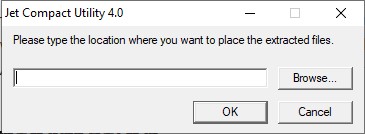
Figure 1 — Jet Compact Utility 4.0
Step 3: Navigate to the location where you saved the file.
Step 4: Double-click JETCOMP
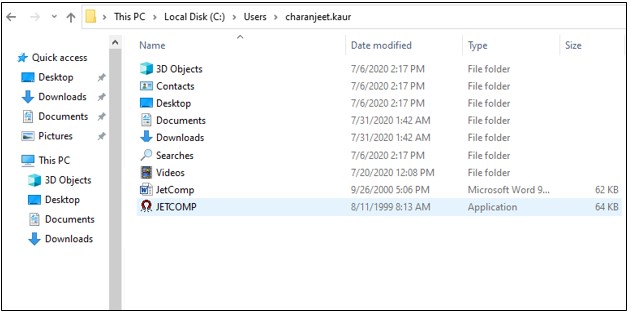
Figure 2 — Find and Open JETCOMP
Step 5: In the dialog box that appears, do the following:
- Click the three dots corresponding to the ‘Database to Compact From (Source)’textbox to browse and select the Access database file you want to fix.
- Next, click the three dots next to the ‘Database to Compact Into (Destination)’ textbox to select the location and database name wherein you want to save the recovered file.
TIP: Avoid compacting into an existing database even if it is empty, or else it may return an error.
- Select the appropriate option under the ‘Additional Compact Options’ tab.
- Click Compact.
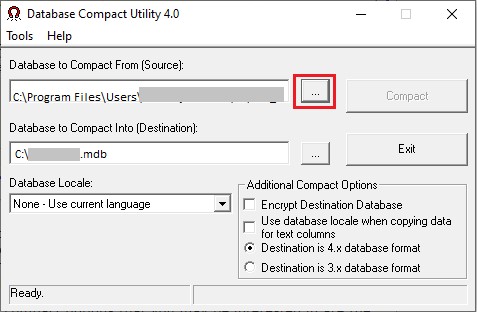
Figure 3 — Select Database to Compact
The corrupted Access database file will get repaired.
Downsides to Using JETCOMP.exe
The following are some limitations of the Jet Compact Utility:
- It only works with MS Access database (.mdb) file.
- May fail to fix severely corrupt Access databases.
- Cannot fix all types of Access database errors.
- Cannot recover deleted tables and records.
- Recover corrupt databases of Access 2002 and older versions.
- Running JETCOMP 4.0 utility occasionally throw the “Error Compacting database” message.
To overcome these limitations, you need a more reliable Access repair tool than JETCOMP to repair the Access db.
Best Alternative to Microsoft Access Jet Compact Utility
Access repair software from Stellar® serves as the best alternative to Jet Compact Utility, and here’s how:
- Repairs both MDB and ACCDB files of the Access database.
- Can repair severely corrupt Access database files.
- Handle common Access database errors such as inconsistencies in the database design, unrecognized database format, etc.
- Recovers deleted tables, records, attachments, etc.
- Supports Microsoft Access 2019, 2016, 2013, 2010, 2007, and older versions.
Stellar Repair for Access software helps recover all the database objects, including tables, indexes, queries, forms, macros, reports, etc. and saves them in a new database. It even performs recovery of relationships and data linked through different sources from corrupt tables.
Steps to Repair Access Database by using Stellar Repair for Access Software
To repair corrupt Access (MDB/ACCDB) files, download and install Stellar Repair for Access software. Run the software and follow these steps:
Step 1: Browse the corrupt database file that you want to repair from the software’s main interface.
Notes:
- If you cannot find the location of the database file, click ‘Search’ to find and select the file.
- To perform recovery of deleted records, make sure that the “Scan for deleted records” checkbox is checked.
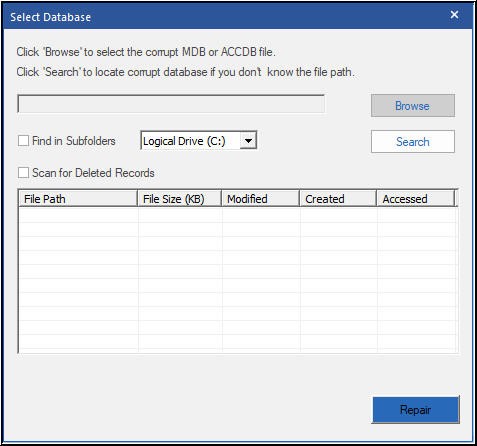
Figure 4 – Browse or Search Corrupt Access Database File
Step 2: Once the targeted Access database file is selected, choose Repair to begin the repairing process.
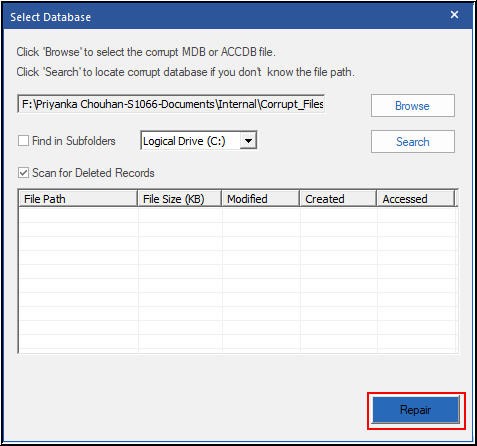
Figure 5 – Initiate Access Repairing Process
Step 3: When the ‘Repairing of selected database completed’ message appears, click OK.
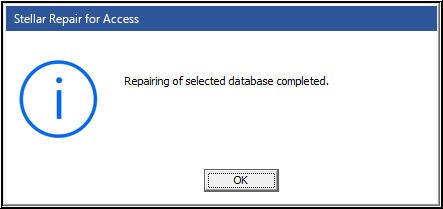
Figure 6 – Database Repair Complete Message
Step 4: The software previews recoverable Access database objects in a tree-like structure. All the recovered database objects get listed in the left panel of the Preview window. Click on any db object to see its preview in the right panel.
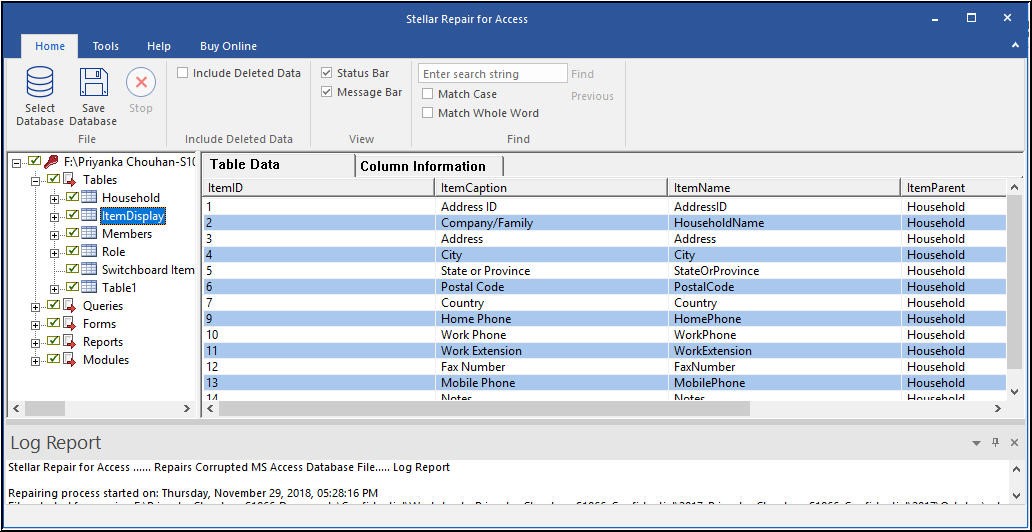
Figure 7 – Access Database Preview
Step 5: For saving the repaired database file, select the Save Database option on the File menu.
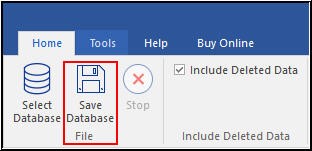
Figure 8 – Save Database Option
Step 6: Select a ‘default’ or a ‘new’ destination to save the repaired database file, and then click OK.
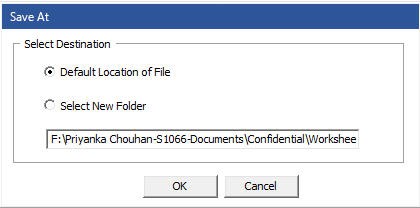
Figure 9 – Save Repaired File at a Desired Location
Step 7: Once the file gets saved, a message window will pop-up. Click OK to complete the repair process.
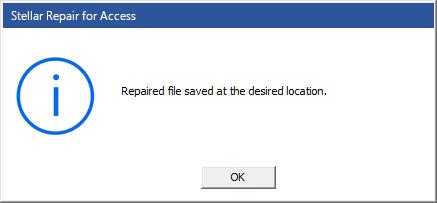
Figure 10 – Repaired File saved at the desired location message
Conclusion
In this article, we outlined common reasons that make an Access database damaged (or corrupt). Also, we discussed how to use Jet Compact Utility to compact and repair the Access database. Additionally, we talked about the limitations of using the JETCOMP.exe utility and the best alternative to repair and recover objects and data from a severely corrupt Access database. In case the Jet Compact Utility fails restoring the db, you can always take the help of a professional Access database repair software. One such software you can trust to repair corrupted database files is Stellar Repair for Access. It comes with several advanced features, such as the ability to check a real-time preview of recoverable database objects for precise recovery. It can also help restore password-protected forms and modules.
When I am trying to compact my Access 2010 database (no password), I am getting the error message Class Not Registered I am using Visual Studio 2010, and I have not idea what this problem is. Here Is the code i’m using:
Private Sub Compactdb()

    Dim JRO As JRO.JetEngine
    JRO = New JRO.JetEngine


    'The first source is the original, the second is the compacted database under an other name.
    JRO.CompactDatabase("Provider=Microsoft.Jet.OLEDB.5.0;Data Source=C:ForteEx.mdb; Jet OLEDB:Engine Type=5", "Provider=Microsoft.Jet.OLEDB.5.0;Data Source=C:ForteTemp.mdb; JetOLEDB:Engine Type=5")


    'Original (not compacted database is deleted)
    System.IO.File.Delete("C:ForteEx.mdb")


    'Compacted database is renamed to the original databas's neme.
    Rename("C:ForteTemp.mdb", "C:ForteEx.mdb")


    'User notification
    MsgBox("The database was compacted successfully")

End Sub
If I change the Jet.OLEDB.5.0 to 4.0 I get a different error message of Unrecognized databse format
asked Jun 27, 2013 at 15:52

    Try
        Dim ParentCNN As String
        Dim CloneCNN As String
        Dim JrO As New JRO.JetEngine

        ParentCNN = "PROVIDER = MICROSOFT.ACE.OLEDB.12.0;DATA SOURCE = C:ForteFortedb.accdb;JET OLEDB:DATABASE PASSWORD = 21061975;"
        CloneCNN = "PROVIDER = MICROSOFT.ACE.OLEDB.12.0;DATA SOURCE = C:ForteTemp.accdb;JET OLEDB:DATABASE PASSWORD = 21061975;Jet OLEDB:Engine Type=5"
        'If cnnMDE.State = ConnectionState.Open Then
        '    cnnMDE.Close()
        'End If
        JrO.CompactDatabase(ParentCNN, CloneCNN)
        If System.IO.File.Exists("C:ForteTemp.accdb") Then
            System.IO.File.Delete("C:ForteFortedb.accdb")
            Rename("C:ForteTemp.accdb", "C:ForteFortedb.accdb")
        End If
    Catch ex As Exception
        MainTextBox.AppendText(Environment.NewLine & "Database Compression Failure :" & vbCr & ex.Message)
    End Try
answered Jun 27, 2013 at 17:40
Chase ErnstChase Ernst
1,1471 gold badge23 silver badges51 bronze badges
Ivan V. Vovk
-
#1
Вчера создал на сервере документ программы, выполняющейся ночью для сжатия определенной БД.
Утром сегодня пришел стал проверять — размер БД остался тот же самый. Посмотрел в логах там ошибочка. Error compacting testtest.nsf: Database is currently in use by you or another user. В хелпе прочитал, что при сжатии ин-плайс (я такое и использую) разрешено юзерам и серверам продолжать работать с БД (в том числе и редактировать) во время сжатия. Запустил с консоли, выскочила эта же ошибка Может кто сталкивался?
Версия сервера Домино 6.5.5
PahanV
-
#2
вот так попробуй: compact testtest.nsf -c -i
Ivan V. Vovk
-
#3
Выдает ту же ошибку :huh:
А так разве произойдет уменьшение размера файла БД?То что произойдет уплотнение пространства понятно и с игнорированием ошибок документа, а нужно, что бы еще и при этом уменьшился размер самой БД…
LIGHT
-
#4
Такая же беда, сервер 6.5.4 при чем даже если юзеров 0 один фиг ошибка лезет, НО не всегда, то есть 1 день есть 2 нету, логики ни какой, по видимуму сервер сам юзает базу, и не дает ее же жать.
-
#5
Я сталкивался, что, если база интенсивно используется, например при пересылке почты, то единственный способ — это ncompact в офлайне.
LIGHT
-
#6
Не ни как не связано. Вот есть железяка на которой почта совершенно не крутится, однако беда таже.
То есть вообще ставил эксперемент типа поднимал сервер на который вообще юзеры не заходят и что вы думаете? да, да, ошибка та же!
А вот как ее победить совершенно не приложу ума.
-
#7
То есть сервер совершенно отдельный, без репликаций, сетевой активности и дополнительного софта типа антивирусов/бэкапов?
berezka
-
#8
а база случаем не log.nsf ?
Ivan V. Vovk
-
#9
Пробовал запустить compact -L, тогда процесс идет, но как только юзеры начинают редактировать документы, то все компакт сразу рушится. Так что об уменьшении размера БД можно забыть
2 LIGHT:
А ты пробовал запускать compact со всеми ключами?Попробуй, один то должен подойти :blink:
LIGHT
-
#10
Запускаю
compact -b -s 10%
compact -B -s 10%
И работает через раз, один день есть другой день Error compacting names.nsf: Database is currently in use by you or another user
И проблемма только с АК
При этом 100% на сервере ни кого нет. Бекап на файловом уровне, то есть сервер тушится работает xcopy сервер поднимается (это к стате гарантирует что все юзеры вылетают) и запускается compact
Вот такая загогулина!
Ivan V. Vovk
-
#11
2LIGHT
А зачем с ключом «В» используешь ключ «S»?Запусти с ключом L, а потом с В!
У меня тоже по-прежнему не сжимается моя база, тока теперь вылетает другая ошибка The database is in use and cannot be taken off-line.
-
#12
<!—QuoteBegin-LIGHT+30:03:2007, 00:59 —>
<span class=»vbquote»>(LIGHT @ 30:03:2007, 00:59 )</span><!—QuoteEBegin—>При этом 100% на сервере ни кого нет. Бекап на файловом уровне, то есть сервер тушится работает xcopy сервер поднимается (это к стате гарантирует что все юзеры вылетают) и запускается compact
[snapback]60686″ rel=»nofollow» target=»_blank[/snapback]
[/quote]
Юзеры может и вылетают, но гарантии, что база не занята — нет. Если уж ты все равно гасишь сервер и очень хочешь ее ужать, то запускай сжатие из командной строки.
LIGHT
-
#13
Этот вариант не подходит по простой причине
Notes Stop
…..
…..
Notes Start
занимает примерно 12 минут, т.е. за 12 минут 30G данных успешно копируются дальше уже работает rar и так далее, а сервер уже поднят.
А если сделать
Notes Stop
…..
compact
…..
Notes Start
То compact будет пережевывать около полу часа, что недопустимо. Т.е. получится сервер будет лежать ~ час а то и более, вот в чем закавыка. Тоже касается и fixup
Уж долго они работают
-
#14
Ты хочешь сказать, что офлайн сжатие только АК занимает полчаса?
Вот еще:
To prevent the errors from occurring, the system databases should be compacted off-line using the ncompact command. In order to do this, the server should be shut down and the ncompact,exe run from the command prompt of the OS as in the following example:
C:LotusDominoncompact -B -D names.nsf
Supporting Information:
The errors occur because these system databases are constantly being written to as the server performs its various tasks. When Compact is run, these databases are locked or otherwise made inaccessible to the server, meaning the information cannot be written into these databases, which can lead to performance issues on the server.
LIGHT
-
#15
Да пища для размышления есть но….
names.nfs весит всего ~ 18М и по этому особой нужды жать ее нет, просто до кучи стоит маска * жать все базы, и вот на нейме вылазит. А есть базы по 20G которые жать, как вы понимаете очень даже надо и жмутся при < 10%
inik
-
#16
там есть ключик — исключить бд из списка сжатия
- Remove From My Forums
-
Question
-
Windows 7 Professional x86
I am trying to compact a legacy Access database (Jet Engine 4.0) that is placed in
[ProgramData]<Software> folder using the function SQLConfigDataSource that always fails. Using
SQLInstallerError function I get ODBC_ERROR_REQUEST_FAILED error.If the database file is placed in a normal folder created by a normal user like
c:temporal, the compacting of the database file is performed right.In both cases the function is executed by the same user that has Administrator permissions and full control over the folder and the database file.
I only can fix this error giving to the «Users» account full control permission over the folder and the database file.
Why is this error happenning? The call to SQLConfigDataSource is executed impersonating other user?
Answers
-
you got a filtered token (stripped off all admin permissions that is) when you run the program under an administrator user session but not launched as administrator.
If you do not want the UAC prompt on every startup, spin off your compacting code into a separate process, then indicate that process requires administrator in its manifest file. This would only show the the UAC prompt
when you compact the database.
Visual C++ MVP
-
Marked as answer by
Monday, September 7, 2015 8:21 AM
-
Marked as answer by
I currently have Version 2201 (Build 14827.20198), which is dated Feb 16 according to Microsoft. I first noticed the problem on February 18, and didn’t attempt to compact anything on the 17th, so maybe the problem is actually caused this latest build.
My current version has a help message that mentions a bug in Version 2201 (Build 14827.20158) with the relevant symptoms, which was supposedly fixed in Version 2201 (Build 14827.20192) dated February 8.
Side note: I can’t compact any database; it’s not specific to a particular file. I use Access as a GUI for creating data that I load into SQL server, so I have dozens of files, none larger than 8MB, and none much connected to anything. The files don’t have long histories. The only other odd thing about my system: in order to load Access data into SQL server locally for testing, I needed to download and install AccessDatabaseEngine_X64.exe from Microsoft. This provides the Access ODBC driver. I have been doing this for 20 years and it’s always been fine. But on my current Windows 10 computer, most Windows updates seem to eliminate the ODBC driver, and I need to do a repair-reinstall of the Access database engine to get going again. This is a minor nuisance I have been living with for more than 2 years, and never affected the basic function of the MS Office Access application.

Joe4
MrExcel MVP, Junior Admin
-
#2
Create a new blank database, then import all the objects from your old database into your new one.
Joe4
MrExcel MVP, Junior Admin
-
#4
Yep. Already tried that. I get that same Jet database engine message when I select the corrupt database.
Hmmm…
That has always worked for me. I wonder if the corruption level is to the extent that it cannot be salvaged. Do you make regular backups of the database that you could restore a backup?
Maybe one of the Access guru’s will have some other tricks up their sleeve. You may also want to try Googling «recovering corrupt Access database» and see what comes up.
|
0 / 0 / 0 Регистрация: 28.06.2009 Сообщений: 1,567 |
|
|
1 |
|
|
18.03.2010, 09:55. Показов 31143. Ответов 17
Традиционное Пробую отдельный program-док делать с копистайлом для служебных баз и получаю нечто вроде Итак, кто как компактит служебные базы на работающем сервере?
__________________
0 |

|
0 / 0 / 0 Регистрация: 16.10.2008 Сообщений: 128 |
|
|
18.03.2010, 10:05 |
2 |
|
А зачем Вам компактить служебные базы? При включенном сервере compact -c для names.nsf и многих других служебных баз не пройдет даже через документ program. Только при выключенном сервере Вы также не сможете откомпактить с опцией -c любую другую открытую базу. Для этого нужно будет делать drop пользователям, юзающим эту базу
0 |
|
0 / 0 / 0 Регистрация: 28.06.2009 Сообщений: 1,567 |
|
|
18.03.2010, 10:24 |
3 |
|
зачем Вам компактить служебные базы? для порядка и чтоб не лезли в мониторинг ерроры…и не чтоб не вылезло какое глюкалово лишний раз…
Только при выключенном сервере с консоли при определенных условиях компактится всё, кроме log.nsf, с програм-дока — не хочет…
делать drop пользователям ночью нет пользователей. базы разве что сервером открыты… HotDog
0 |

|
0 / 0 / 0 Регистрация: 16.10.2008 Сообщений: 128 |
|
|
18.03.2010, 10:47 |
4 |
|
для порядка и чтоб не лезли в мониторинг ерроры…и не чтоб не вылезло какое глюкалово лишний раз… с консоли при определенных условиях компактится всё, кроме log.nsf, с програм-дока — не хочет… ночью нет пользователей. базы разве что сервером открыты… HotDog Для порядка можно выполнять compact -b или -B P.S. Я выполнял compact -c для системных баз при выключенном сервере только когда переходил с 7-ки на 8-ку для апгрейда ODS P.P.S. У IBM есть дока по регламентному обслуживанию лотусовых баз.
0 |
|
0 / 0 / 0 Регистрация: 28.06.2009 Сообщений: 1,567 |
|
|
18.03.2010, 11:04 |
5 |
|
У IBM есть дока по регламентному обслуживанию лотусовых баз. конечно есть но есть и явная технота именно по работе COMPACT в program-доке, которая якобы решила все вопросы.. А на вид это — не так
0 |
|
0 / 0 / 0 Регистрация: 16.10.2008 Сообщений: 128 |
|
|
18.03.2010, 11:32 |
6 |
|
конечно есть но есть и явная технота именно по работе COMPACT в program-доке, которая якобы решила все вопросы.. А на вид это — не так
Замечено, что после старта сервера без проблем можно выполнить compact -c например базы statrep или admin4.
0 |
|
0 / 0 / 0 Регистрация: 28.06.2009 Сообщений: 1,567 |
|
|
18.03.2010, 11:39 |
7 |
|
в Вашей техноте технота IBM! Там просто вопрос про програм-док, а решение — про запуск из ОС. Если понимать, что это решение IBM — тогда програм-док должен запускать системный компакт (для чего програм-док в общем и существует). Если IBM предлагает руками запускать на потухшем сервере — то это воркэраунд к проблеме
0 |
|
0 / 0 / 0 Регистрация: 04.11.2007 Сообщений: 3,019 |
|
|
21.03.2010, 15:47 |
8 |
|
странные вы люди, а что вам мешает выполнить команду dbcache flush и сразу компануть?
0 |
|
0 / 0 / 0 Регистрация: 23.08.2008 Сообщений: 6,252 |
|
|
21.03.2010, 15:58 |
9 |
|
0 |
|
0 / 0 / 0 Регистрация: 07.02.2009 Сообщений: 183 |
|
|
22.11.2011, 11:47 |
10 |
|
помогите, пожалуйста, создаю program, создаю файл, в необходимое время запускается compact, что видно по логам > < task.txt > drop all > dbcache flush > load compact -B уже и «compact -B» и просто «compact» пробую, все равно на служебных бд одно и тоже:
0 |
|
0 / 0 / 0 Регистрация: 04.11.2007 Сообщений: 3,019 |
|
|
22.11.2011, 14:04 |
11 |
|
если речь идёт о «служебных» базах — то это говорит о том, что домино их НИКОГДА не отпускает
0 |
|
0 / 0 / 0 Регистрация: 07.02.2009 Сообщений: 183 |
|
|
22.11.2011, 15:27 |
12 |
|
при потушеном сервере понятно как compact делать. Есть ли способ делать compact при запущенном сервере?
0 |
|
0 / 0 / 0 Регистрация: 04.11.2007 Сообщений: 3,019 |
|
|
22.11.2011, 17:36 |
13 |
|
при потушеном сервере понятно как compact делать. Есть ли способ делать compact при запущенном сервере? для служебных баз нет
0 |
|
0 / 0 / 0 Регистрация: 07.02.2009 Сообщений: 183 |
|
|
22.11.2011, 17:45 |
14 |
|
ToxaRat
0 |
|
0 / 0 / 0 Регистрация: 04.11.2007 Сообщений: 3,019 |
|
|
22.11.2011, 18:22 |
15 |
|
с log можно и согласиться, но есть же и другие базы, вот например names.nsf, также реплики АК с других серверов в процесе компакта names.nsf пришло письмо или было отправлено на группы, или человек открыл ЛЮБУЮ базу и нужно просчитать его роли, группы, доступ и что серверу делать в такой ситуации? — правильный ответ выбить пользователю, письму, событию — НЕДОСТУПЕН
0 |
|
0 / 0 / 0 Регистрация: 07.02.2009 Сообщений: 183 |
|
|
22.11.2011, 18:29 |
16 |
|
так зачем платить больше причем здесь платить?! в час ночи не так уж и много писем отправляют на корпоративную почту, поэтому в том что кому-то бы пришел ответ , что письмо не доставлено нет ничего страшного…
интересно получилось у кого-то настроить компакт так чтобы он срабатывал на служебные базы?
0 |
|
0 / 0 / 0 Регистрация: 04.11.2007 Сообщений: 3,019 |
|
|
23.11.2011, 11:22 |
17 |
|
что письмо не доставлено нет ничего страшного если письмо не придет генеральному вам потом будет очень страшно
0 |
|
0 / 0 / 0 Регистрация: 07.02.2010 Сообщений: 1,063 |
|
|
23.11.2011, 13:25 |
18 |
|
меня интересовало вот это: Нуууу… теоретически можно еще загасить все задачи, кроме server… Не уверен, что поможет в случае c names.nsf…
0 |

Rockn

This person is a verified professional.
Verify your account
to enable IT peers to see that you are a professional.
mace
objAccess is not defined and or commented out ,but the available versions for Access 2003. Try this one and make sure the path to the db is correct.
‘ ***************** BEGIN CODE HERE ‘ *****************
‘
Dim objScript
Dim objAccess
Dim strPathToMDB
Dim strMsg
‘ ///////////// NOTE: User must edit variables in this section /////
‘
‘ The following line of code is the only variable that need be edited
‘ You must provide a path to the Access MDB which will be compacted
‘
strPathToMDB = «C:xyzxyz.mdb»
‘
‘ ////////////////////////////////////////////////////////////////
‘ Set a name and path for a temporary mdb file
strTempDB = «C:xyzComp0001.mdb»
Set objAccess = CreateObject(«Access.Application.11»)
‘ Perform the DB Compact into the temp mdb file
‘ (If there is a problem, then the original mdb is preserved)
objAccess.DbEngine.CompactDatabase strPathToMDB ,strTempDB
If Err.Number > 0 Then
‘ There was an error. Inform the user and halt execution
strMsg = «The following error was encountered while compacting database:»
strMsg = strMsg & vbCrLf & vbCrLf & Err.Description
Else
‘ Create File System Object to handle file manipulations
Set objScript= CreateObject(«Scripting.FileSystemObject»)
‘ Back up the original file as Filename.mdbz. In case of undetermined
‘ error, it can be recovered by simply removing the terminating «z».
objScript.CopyFile strPathToMDB , strPathToMDB & «z», True
‘ Copy the compacted mdb by into the original file name
objScript.CopyFile strTempDB, strPathToMDB, True
‘ We are finished with TempDB. Kill it.
objScript.DeleteFile strTempDB
End If
‘ Always remember to clean up after yourself
Set objAccess = Nothing
Set objScript = Nothing
‘
‘ ****************** END CODE HERE ‘ ******************
Was this post helpful?
thumb_up
thumb_down