
При использовании команды:
pip install dlib
Выдает ошибку:
"c:userseezbeappdatalocalprogramsthonnylibdistutilsdist.py", line 966, in run_commands
self.run_command(cmd)
File "c:userseezbeappdatalocalprogramsthonnylibdistutilsdist.py", line 985, in run_command
cmd_obj.run()
File "c:userseezbeappdatalocalprogramsthonnylibsite-packagessetuptoolscommandinstall.py", line 61, in run
return orig.install.run(self)
File "c:userseezbeappdatalocalprogramsthonnylibdistutilscommandinstall.py", line 545, in run
self.run_command('build')
File "c:userseezbeappdatalocalprogramsthonnylibdistutilscmd.py", line 313, in run_command
self.distribution.run_command(command)
File "c:userseezbeappdatalocalprogramsthonnylibdistutilsdist.py", line 985, in run_command
cmd_obj.run()
File "c:userseezbeappdatalocalprogramsthonnylibdistutilscommandbuild.py", line 135, in run
self.run_command(cmd_name)
File "c:userseezbeappdatalocalprogramsthonnylibdistutilscmd.py", line 313, in run_command
self.distribution.run_command(command)
File "c:userseezbeappdatalocalprogramsthonnylibdistutilsdist.py", line 985, in run_command
cmd_obj.run()
File "C:UserseezbeAppDataLocalTemppip-install-kcgx0v3tdlibsetup.py", line 135, in run
self.build_extension(ext)
File "C:UserseezbeAppDataLocalTemppip-install-kcgx0v3tdlibsetup.py", line 172, in build_extension
subprocess.check_call(cmake_setup, cwd=build_folder)
File "c:userseezbeappdatalocalprogramsthonnylibsubprocess.py", line 363, in check_call
raise CalledProcessError(retcode, cmd)
subprocess.CalledProcessError: Command '['cmake', 'C:\Users\eezbe\AppData\Local\Temp\pip-install-kcgx0v3t\dlib\tools\python', '-DCMAKE_LIBRARY_OUTPUT_DIRECTORY=C:\Users\eezbe\AppData\Local\Temp\pip-install-kcgx0v3t\dlib\build\lib.win32-3.7', '-DPYTHON_EXECUTABLE=c:\users\eezbe\appdata\local\programs\thonny\python.exe', '-DCMAKE_LIBRARY_OUTPUT_DIRECTORY_RELEASE=C:\Users\eezbe\AppData\Local\Temp\pip-install-kcgx0v3t\dlib\build\lib.win32-3.7']' returned non-zero exit status 1.
—--------------------------------------
ERROR: Command errored out with exit status 1: 'c:userseezbeappdatalocalprogramsthonnypython.exe' -u -c 'import sys, setuptools, tokenize; sys.argv[0] = '"'"'C:\Users\eezbe\AppData\Local\Temp\pip-install-kcgx0v3t\dlib\setup.py'"'"'; __file__='"'"'C:\Users\eezbe\AppData\Local\Temp\pip-install-kcgx0v3t\dlib\setup.py'"'"';f=getattr(tokenize, '"'"'open'"'"', open)(__file__);code=f.read().replace('"'"'rn'"'"', '"'"'n'"'"');f.close();exec(compile(code, __file__, '"'"'exec'"'"'))' install —record 'C:UserseezbeAppDataLocalTemppip-record-6joaylx3install-record.txt' —single-version-externally-managed —compile —install-headers 'c:userseezbeappdatalocalprogramsthonnyIncludedlib' Check the logs for full command output.
Как я могу это исправить?
UPD
Collecting dlib
  Using cached dlib-19.20.0.tar.gz (3.2 MB)
Using legacy setup.py install for dlib, since package 'wheel' is not installed.
Installing collected packages: dlib
    Running setup.py install for dlib ... error
    ERROR: Command errored out with exit status 1:
     command: 'c:userseezbeappdatalocalprogramsthonnypython.exe' -u -c 'import sys, setuptools, tokenize; sys.argv[0] = '"'"'C:\Users\eezbe\AppData\Local\Temp\pip-install-izoqttv6\dlib\setup.py'"'"'; __file__='"'"'C:\Users\eezbe\AppData\Local\Temp\pip-install-izoqttv6\dlib\setup.py'"'"';f=getattr(tokenize, '"'"'open'"'"', open)(__file__);code=f.read().replace('"'"'rn'"'"', '"'"'n'"'"');f.close();exec(compile(code, __file__, '"'"'exec'"'"'))' install --record 'C:UserseezbeAppDataLocalTemppip-record-4ohgzi59install-record.txt' --single-version-externally-managed --compile --install-headers 'c:userseezbeappdatalocalprogramsthonnyIncludedlib'
         cwd: C:UserseezbeAppDataLocalTemppip-install-izoqttv6dlib
    Complete output (65 lines):
    running install
    running build
    running build_py
    package init file 'dlib__init__.py' not found (or not a regular file)
    running build_ext
    Building extension for Python 3.7.7 (tags/v3.7.7:d7c567b08f, Mar 10 2020, 09:44:33) [MSC v.1900 32 bit (Intel)]
    Invoking CMake setup: 'cmake C:UserseezbeAppDataLocalTemppip-install-izoqttv6dlibtoolspython -DCMAKE_LIBRARY_OUTPUT_DIRECTORY=C:UserseezbeAppDataLocalTemppip-install-izoqttv6dlibbuildlib.win32-3.7 -DPYTHON_EXECUTABLE=c:userseezbeappdatalocalprogramsthonnypython.exe -DCMAKE_LIBRARY_OUTPUT_DIRECTORY_RELEASE=C:UserseezbeAppDataLocalTemppip-install-izoqttv6dlibbuildlib.win32-3.7'
    -- Building for: Visual Studio 16 2019
    -- The C compiler identification is MSVC 19.26.28806.0
    -- The CXX compiler identification is MSVC 19.26.28806.0
    -- Check for working C compiler: C:/Program Files (x86)/Microsoft Visual Studio/2019/Professional/VC/Tools/MSVC/14.26.28801/bin/Hostx64/x64/cl.exe
    -- Check for working C compiler: C:/Program Files (x86)/Microsoft Visual Studio/2019/Professional/VC/Tools/MSVC/14.26.28801/bin/Hostx64/x64/cl.exe - works
    -- Detecting C compiler ABI info
    -- Detecting C compiler ABI info - done
    -- Detecting C compile features
    -- Detecting C compile features - done
    -- Check for working CXX compiler: C:/Program Files (x86)/Microsoft Visual Studio/2019/Professional/VC/Tools/MSVC/14.26.28801/bin/Hostx64/x64/cl.exe
    -- Check for working CXX compiler: C:/Program Files (x86)/Microsoft Visual Studio/2019/Professional/VC/Tools/MSVC/14.26.28801/bin/Hostx64/x64/cl.exe - works
    -- Detecting CXX compiler ABI info
    -- Detecting CXX compiler ABI info - done
    -- Detecting CXX compile features
    -- Detecting CXX compile features - done
    -- Found PythonInterp: C:/Users/eezbe/AppData/Local/Programs/Thonny/python.exe (found version "3.7.7")
    CMake Error at C:/Users/eezbe/AppData/Local/Temp/pip-install-izoqttv6/dlib/dlib/external/pybind11/tools/FindPythonLibsNew.cmake:124 (message):
      Python config failure: Python is 32-bit, chosen compiler is 64-bit
    Call Stack (most recent call first):
      C:/Users/eezbe/AppData/Local/Temp/pip-install-izoqttv6/dlib/dlib/external/pybind11/tools/pybind11Tools.cmake:16 (find_package)
      C:/Users/eezbe/AppData/Local/Temp/pip-install-izoqttv6/dlib/dlib/external/pybind11/CMakeLists.txt:33 (include)


    -- Configuring incomplete, errors occurred!
    See also "C:/Users/eezbe/AppData/Local/Temp/pip-install-izoqttv6/dlib/build/temp.win32-3.7/Release/CMakeFiles/CMakeOutput.log".
    Traceback (most recent call last):
      File "<string>", line 1, in <module>
      File "C:UserseezbeAppDataLocalTemppip-install-izoqttv6dlibsetup.py", line 261, in <module>
        'Topic :: Software Development',
      File "c:userseezbeappdatalocalprogramsthonnylibsite-packagessetuptools__init__.py", line 145, in setup
        return distutils.core.setup(**attrs)
      File "c:userseezbeappdatalocalprogramsthonnylibdistutilscore.py", line 148, in setup
        dist.run_commands()
      File "c:userseezbeappdatalocalprogramsthonnylibdistutilsdist.py", line 966, in run_commands
        self.run_command(cmd)
      File "c:userseezbeappdatalocalprogramsthonnylibdistutilsdist.py", line 985, in run_command
        cmd_obj.run()
      File "c:userseezbeappdatalocalprogramsthonnylibsite-packagessetuptoolscommandinstall.py", line 61, in run
        return orig.install.run(self)
      File "c:userseezbeappdatalocalprogramsthonnylibdistutilscommandinstall.py", line 545, in run
        self.run_command('build')
      File "c:userseezbeappdatalocalprogramsthonnylibdistutilscmd.py", line 313, in run_command
        self.distribution.run_command(command)
      File "c:userseezbeappdatalocalprogramsthonnylibdistutilsdist.py", line 985, in run_command
        cmd_obj.run()
      File "c:userseezbeappdatalocalprogramsthonnylibdistutilscommandbuild.py", line 135, in run
        self.run_command(cmd_name)
      File "c:userseezbeappdatalocalprogramsthonnylibdistutilscmd.py", line 313, in run_command
        self.distribution.run_command(command)
      File "c:userseezbeappdatalocalprogramsthonnylibdistutilsdist.py", line 985, in run_command
        cmd_obj.run()
      File "C:UserseezbeAppDataLocalTemppip-install-izoqttv6dlibsetup.py", line 135, in run
        self.build_extension(ext)
      File "C:UserseezbeAppDataLocalTemppip-install-izoqttv6dlibsetup.py", line 172, in build_extension
        subprocess.check_call(cmake_setup, cwd=build_folder)
      File "c:userseezbeappdatalocalprogramsthonnylibsubprocess.py", line 363, in check_call
        raise CalledProcessError(retcode, cmd)
    subprocess.CalledProcessError: Command '['cmake', 'C:\Users\eezbe\AppData\Local\Temp\pip-install-izoqttv6\dlib\tools\python', '-DCMAKE_LIBRARY_OUTPUT_DIRECTORY=C:\Users\eezbe\AppData\Local\Temp\pip-install-izoqttv6\dlib\build\lib.win32-3.7', '-DPYTHON_EXECUTABLE=c:\users\eezbe\appdata\local\programs\thonny\python.exe', '-DCMAKE_LIBRARY_OUTPUT_DIRECTORY_RELEASE=C:\Users\eezbe\AppData\Local\Temp\pip-install-izoqttv6\dlib\build\lib.win32-3.7']' returned non-zero exit status 1.
    ----------------------------------------
ERROR: Command errored out with exit status 1: 'c:userseezbeappdatalocalprogramsthonnypython.exe' -u -c 'import sys, setuptools, tokenize; sys.argv[0] = '"'"'C:\Users\eezbe\AppData\Local\Temp\pip-install-izoqttv6\dlib\setup.py'"'"'; __file__='"'"'C:\Users\eezbe\AppData\Local\Temp\pip-install-izoqttv6\dlib\setup.py'"'"';f=getattr(tokenize, '"'"'open'"'"', open)(__file__);code=f.read().replace('"'"'rn'"'"', '"'"'n'"'"');f.close();exec(compile(code, __file__, '"'"'exec'"'"'))' install --record 'C:UserseezbeAppDataLocalTemppip-record-4ohgzi59install-record.txt' --single-version-externally-managed --compile --install-headers 'c:userseezbeappdatalocalprogramsthonnyIncludedlib' Check the logs for full command output.
Expected Behavior
Expected dlib to be instalable on Windows 10 running Python 3.6 (as a conda virtual env) with command: pip install dlib. Have installed cmake and numpy as prerequisites. This failed with:
(py36) PS C:UsersJean Claude> pip install dlib
Collecting dlib
Using cached dlib-19.22.0.tar.gz (7.4 MB)
Building wheels for collected packages: dlib
Building wheel for dlib (setup.py) … error
ERROR: Command errored out with exit status 1:
command: ‘C:UsersJean Claudeanaconda3envspy36python.exe’ -u -c ‘import sys, setuptools, tokenize; sys.argv[0] = ‘»‘»‘C:UsersJEANCL1AppDataLocalTemppip-install-bdv23esedlib_6034d75b85f2455eaa1e85e06b14242bsetup.py'»‘»‘; file='»‘»‘C:UsersJEANCL1AppDataLocalTemppip-install-bdv23esedlib_6034d75b85f2455eaa1e85e06b14242bsetup.py'»‘»‘;f=getattr(tokenize, ‘»‘»‘open'»‘»‘, open)(file);code=f.read().replace(‘»‘»‘rn'»‘»‘, ‘»‘»‘n'»‘»‘);f.close();exec(compile(code, file, ‘»‘»‘exec'»‘»‘))’ bdist_wheel -d ‘C:UsersJEANCL1AppDataLocalTemppip-wheel-03d14jpb’
cwd: C:UsersJEANCL1AppDataLocalTemppip-install-bdv23esedlib_6034d75b85f2455eaa1e85e06b14242b
Complete output (58 lines):
running bdist_wheel
running build
running build_py
package init file ‘toolspythondlib_init_.py’ not found (or not a regular file)
running build_ext
Building extension for Python 3.6.13 |Anaconda, Inc.| (default, Mar 16 2021, 11:37:27) [MSC v.1916 64 bit (AMD64)]
Invoking CMake setup: ‘cmake C:UsersJEANCL1AppDataLocalTemppip-install-bdv23esedlib_6034d75b85f2455eaa1e85e06b14242btoolspython -DCMAKE_LIBRARY_OUTPUT_DIRECTORY=C:UsersJEANCL1AppDataLocalTemppip-install-bdv23esedlib_6034d75b85f2455eaa1e85e06b14242bbuildlib.win-amd64-3.6 -DPYTHON_EXECUTABLE=C:UsersJean Claudeanaconda3envspy36python.exe -DCMAKE_LIBRARY_OUTPUT_DIRECTORY_RELEASE=C:UsersJEANCL~1AppDataLocalTemppip-install-bdv23esedlib_6034d75b85f2455eaa1e85e06b14242bbuildlib.win-amd64-3.6 -A x64’
— Building for: NMake Makefiles
CMake Error at CMakeLists.txt:5 (message):
!!!!!!!!!!!!!!!!!!!!!!!!!!!!!!!!!!!!!!!!!!!!!!!!!!!!!!!!!!!!!!!!!!!!!!!!!!!!!!!


You must use Visual Studio to build a python extension on windows.  If you
are getting this error it means you have not installed Visual C++.  Note
that there are many flavors of Visual Studio, like Visual Studio for C#
development.  You need to install Visual Studio for C++.


!!!!!!!!!!!!!!!!!!!!!!!!!!!!!!!!!!!!!!!!!!!!!!!!!!!!!!!!!!!!!!!!!!!!!!!!!!!!!!!
— Configuring incomplete, errors occurred!
Traceback (most recent call last):
File «», line 1, in
File «C:UsersJEANCL1AppDataLocalTemppip-install-bdv23esedlib_6034d75b85f2455eaa1e85e06b14242bsetup.py», line 261, in
‘Topic :: Software Development’,
File «C:UsersJean Claudeanaconda3envspy36libsite-packagessetuptools_init_.py», line 153, in setup
return distutils.core.setup(**attrs)
File «C:UsersJean Claudeanaconda3envspy36libdistutilscore.py», line 148, in setup
dist.run_commands()
File «C:UsersJean Claudeanaconda3envspy36libdistutilsdist.py», line 955, in run_commands
self.run_command(cmd)
File «C:UsersJean Claudeanaconda3envspy36libdistutilsdist.py», line 974, in run_command
cmd_obj.run()
File «C:UsersJean Claudeanaconda3envspy36libsite-packageswheelbdist_wheel.py», line 299, in run
self.run_command(‘build’)
File «C:UsersJean Claudeanaconda3envspy36libdistutilscmd.py», line 313, in run_command
self.distribution.run_command(command)
File «C:UsersJean Claudeanaconda3envspy36libdistutilsdist.py», line 974, in run_command
cmd_obj.run()
File «C:UsersJean Claudeanaconda3envspy36libdistutilscommandbuild.py», line 135, in run
self.run_command(cmd_name)
File «C:UsersJean Claudeanaconda3envspy36libdistutilscmd.py», line 313, in run_command
self.distribution.run_command(command)
File «C:UsersJean Claudeanaconda3envspy36libdistutilsdist.py», line 974, in run_command
cmd_obj.run()
File «C:UsersJEANCL1AppDataLocalTemppip-install-bdv23esedlib_6034d75b85f2455eaa1e85e06b14242bsetup.py», line 134, in run
self.build_extension(ext)
File «C:UsersJEANCL1AppDataLocalTemppip-install-bdv23esedlib_6034d75b85f2455eaa1e85e06b14242bsetup.py», line 171, in build_extension
subprocess.check_call(cmake_setup, cwd=build_folder)
File «C:UsersJean Claudeanaconda3envspy36libsubprocess.py», line 311, in check_call
raise CalledProcessError(retcode, cmd)
subprocess.CalledProcessError: Command ‘[‘cmake’, ‘C:UsersJEANCL1AppDataLocalTemppip-install-bdv23esedlib_6034d75b85f2455eaa1e85e06b14242btoolspython’, ‘-DCMAKE_LIBRARY_OUTPUT_DIRECTORY=C:UsersJEANCL1AppDataLocalTemppip-install-bdv23esedlib_6034d75b85f2455eaa1e85e06b14242bbuildlib.win-amd64-3.6’, ‘-DPYTHON_EXECUTABLE=C:UsersJean Claudeanaconda3envspy36python.exe’, ‘-DCMAKE_LIBRARY_OUTPUT_DIRECTORY_RELEASE=C:UsersJEANCL1AppDataLocalTemppip-install-bdv23esedlib_6034d75b85f2455eaa1e85e06b14242bbuildlib.win-amd64-3.6’, ‘-A’, ‘x64′]’ returned non-zero exit status 1.
ERROR: Failed building wheel for dlib
Running setup.py clean for dlib
Failed to build dlib
Installing collected packages: dlib
Running setup.py install for dlib … error
ERROR: Command errored out with exit status 1:
command: ‘C:UsersJean Claudeanaconda3envspy36python.exe’ -u -c ‘import sys, setuptools, tokenize; sys.argv[0] = ‘»‘»‘C:UsersJEANCL1AppDataLocalTemppip-install-bdv23esedlib_6034d75b85f2455eaa1e85e06b14242bsetup.py'»‘»‘; file='»‘»‘C:UsersJEANCL1AppDataLocalTemppip-install-bdv23esedlib_6034d75b85f2455eaa1e85e06b14242bsetup.py'»‘»‘;f=getattr(tokenize, ‘»‘»‘open'»‘»‘, open)(file);code=f.read().replace(‘»‘»‘rn'»‘»‘, ‘»‘»‘n'»‘»‘);f.close();exec(compile(code, file, ‘»‘»‘exec'»‘»‘))’ install —record ‘C:UsersJEANCL1AppDataLocalTemppip-record-odoruwutinstall-record.txt’ —single-version-externally-managed —compile —install-headers ‘C:UsersJean Claudeanaconda3envspy36Includedlib’
cwd: C:UsersJEANCL1AppDataLocalTemppip-install-bdv23esedlib_6034d75b85f2455eaa1e85e06b14242b
Complete output (60 lines):
running install
running build
running build_py
package init file ‘toolspythondlib_init_.py’ not found (or not a regular file)
running build_ext
Building extension for Python 3.6.13 |Anaconda, Inc.| (default, Mar 16 2021, 11:37:27) [MSC v.1916 64 bit (AMD64)]
Invoking CMake setup: ‘cmake C:UsersJEANCL1AppDataLocalTemppip-install-bdv23esedlib_6034d75b85f2455eaa1e85e06b14242btoolspython -DCMAKE_LIBRARY_OUTPUT_DIRECTORY=C:UsersJEANCL1AppDataLocalTemppip-install-bdv23esedlib_6034d75b85f2455eaa1e85e06b14242bbuildlib.win-amd64-3.6 -DPYTHON_EXECUTABLE=C:UsersJean Claudeanaconda3envspy36python.exe -DCMAKE_LIBRARY_OUTPUT_DIRECTORY_RELEASE=C:UsersJEANCL~1AppDataLocalTemppip-install-bdv23esedlib_6034d75b85f2455eaa1e85e06b14242bbuildlib.win-amd64-3.6 -A x64’
— Building for: NMake Makefiles
CMake Error at CMakeLists.txt:5 (message):
  !!!!!!!!!!!!!!!!!!!!!!!!!!!!!!!!!!!!!!!!!!!!!!!!!!!!!!!!!!!!!!!!!!!!!!!!!!!!!!!


  You must use Visual Studio to build a python extension on windows.  If you
  are getting this error it means you have not installed Visual C++.  Note
  that there are many flavors of Visual Studio, like Visual Studio for C#
  development.  You need to install Visual Studio for C++.


  !!!!!!!!!!!!!!!!!!!!!!!!!!!!!!!!!!!!!!!!!!!!!!!!!!!!!!!!!!!!!!!!!!!!!!!!!!!!!!!


-- Configuring incomplete, errors occurred!
Traceback (most recent call last):
  File "<string>", line 1, in <module>
  File "C:UsersJEANCL~1AppDataLocalTemppip-install-bdv23esedlib_6034d75b85f2455eaa1e85e06b14242bsetup.py", line 261, in <module>
    'Topic :: Software Development',
  File "C:UsersJean Claudeanaconda3envspy36libsite-packagessetuptools__init__.py", line 153, in setup
    return distutils.core.setup(**attrs)
  File "C:UsersJean Claudeanaconda3envspy36libdistutilscore.py", line 148, in setup
    dist.run_commands()
  File "C:UsersJean Claudeanaconda3envspy36libdistutilsdist.py", line 955, in run_commands
    self.run_command(cmd)
  File "C:UsersJean Claudeanaconda3envspy36libdistutilsdist.py", line 974, in run_command
    cmd_obj.run()
  File "C:UsersJean Claudeanaconda3envspy36libsite-packagessetuptoolscommandinstall.py", line 61, in run
    return orig.install.run(self)
  File "C:UsersJean Claudeanaconda3envspy36libdistutilscommandinstall.py", line 545, in run
    self.run_command('build')
  File "C:UsersJean Claudeanaconda3envspy36libdistutilscmd.py", line 313, in run_command
    self.distribution.run_command(command)
  File "C:UsersJean Claudeanaconda3envspy36libdistutilsdist.py", line 974, in run_command
    cmd_obj.run()
  File "C:UsersJean Claudeanaconda3envspy36libdistutilscommandbuild.py", line 135, in run
    self.run_command(cmd_name)
  File "C:UsersJean Claudeanaconda3envspy36libdistutilscmd.py", line 313, in run_command
    self.distribution.run_command(command)
  File "C:UsersJean Claudeanaconda3envspy36libdistutilsdist.py", line 974, in run_command
    cmd_obj.run()
  File "C:UsersJEANCL~1AppDataLocalTemppip-install-bdv23esedlib_6034d75b85f2455eaa1e85e06b14242bsetup.py", line 134, in run
    self.build_extension(ext)
  File "C:UsersJEANCL~1AppDataLocalTemppip-install-bdv23esedlib_6034d75b85f2455eaa1e85e06b14242bsetup.py", line 171, in build_extension
    subprocess.check_call(cmake_setup, cwd=build_folder)
  File "C:UsersJean Claudeanaconda3envspy36libsubprocess.py", line 311, in check_call
    raise CalledProcessError(retcode, cmd)
subprocess.CalledProcessError: Command '['cmake', 'C:\Users\JEANCL~1\AppData\Local\Temp\pip-install-bdv23ese\dlib_6034d75b85f2455eaa1e85e06b14242b\tools\python', '-DCMAKE_LIBRARY_OUTPUT_DIRECTORY=C:\Users\JEANCL~1\AppData\Local\Temp\pip-install-bdv23ese\dlib_6034d75b85f2455eaa1e85e06b14242b\build\lib.win-amd64-3.6', '-DPYTHON_EXECUTABLE=C:\Users\Jean Claude\anaconda3\envs\py36\python.exe', '-DCMAKE_LIBRARY_OUTPUT_DIRECTORY_RELEASE=C:\Users\JEANCL~1\AppData\Local\Temp\pip-install-bdv23ese\dlib_6034d75b85f2455eaa1e85e06b14242b\build\lib.win-amd64-3.6', '-A', 'x64']' returned non-zero exit status 1.
----------------------------------------
ERROR: Command errored out with exit status 1: ‘C:UsersJean Claudeanaconda3envspy36python.exe’ -u -c ‘import sys, setuptools, tokenize; sys.argv[0] = ‘»‘»‘C:UsersJEANCL1AppDataLocalTemppip-install-bdv23esedlib_6034d75b85f2455eaa1e85e06b14242bsetup.py'»‘»‘; file='»‘»‘C:UsersJEANCL1AppDataLocalTemppip-install-bdv23esedlib_6034d75b85f2455eaa1e85e06b14242bsetup.py'»‘»‘;f=getattr(tokenize, ‘»‘»‘open'»‘»‘, open)(file);code=f.read().replace(‘»‘»‘rn'»‘»‘, ‘»‘»‘n'»‘»‘);f.close();exec(compile(code, file, ‘»‘»‘exec'»‘»‘))’ install —record ‘C:UsersJEANCL~1AppDataLocalTemppip-record-odoruwutinstall-record.txt’ —single-version-externally-managed —compile —install-headers ‘C:UsersJean Claudeanaconda3envspy36Includedlib’ Check the logs for full command output.
Содержание
- dlib fails to install on Windows 10 #2371
- Comments
- Expected Behavior
- — Configuring incomplete, errors occurred! Traceback (most recent call last): File «», line 1, in File «C:UsersJEANCL 1AppDataLocalTemppip-install-bdv23esedlib_6034d75b85f2455eaa1e85e06b14242bsetup.py», line 261, in ‘Topic :: Software Development’, File «C:UsersJean Claudeanaconda3envspy36libsite-packagessetuptools_init_.py», line 153, in setup return distutils.core.setup(**attrs) File «C:UsersJean Claudeanaconda3envspy36libdistutilscore.py», line 148, in setup dist.run_commands() File «C:UsersJean Claudeanaconda3envspy36libdistutilsdist.py», line 955, in run_commands self.run_command(cmd) File «C:UsersJean Claudeanaconda3envspy36libdistutilsdist.py», line 974, in run_command cmd_obj.run() File «C:UsersJean Claudeanaconda3envspy36libsite-packageswheelbdist_wheel.py», line 299, in run self.run_command(‘build’) File «C:UsersJean Claudeanaconda3envspy36libdistutilscmd.py», line 313, in run_command self.distribution.run_command(command) File «C:UsersJean Claudeanaconda3envspy36libdistutilsdist.py», line 974, in run_command cmd_obj.run() File «C:UsersJean Claudeanaconda3envspy36libdistutilscommandbuild.py», line 135, in run self.run_command(cmd_name) File «C:UsersJean Claudeanaconda3envspy36libdistutilscmd.py», line 313, in run_command self.distribution.run_command(command) File «C:UsersJean Claudeanaconda3envspy36libdistutilsdist.py», line 974, in run_command cmd_obj.run() File «C:UsersJEANCL 1AppDataLocalTemppip-install-bdv23esedlib_6034d75b85f2455eaa1e85e06b14242bsetup.py», line 134, in run self.build_extension(ext) File «C:UsersJEANCL 1AppDataLocalTemppip-install-bdv23esedlib_6034d75b85f2455eaa1e85e06b14242bsetup.py», line 171, in build_extension subprocess.check_call(cmake_setup, cwd=build_folder) File «C:UsersJean Claudeanaconda3envspy36libsubprocess.py», line 311, in check_call raise CalledProcessError(retcode, cmd) subprocess.CalledProcessError: Command ‘[‘cmake’, ‘C:UsersJEANCL 1AppDataLocalTemppip-install-bdv23esedlib_6034d75b85f2455eaa1e85e06b14242btoolspython’, ‘-DCMAKE_LIBRARY_OUTPUT_DIRECTORY=C:UsersJEANCL 1AppDataLocalTemppip-install-bdv23esedlib_6034d75b85f2455eaa1e85e06b14242bbuildlib.win-amd64-3.6’, ‘-DPYTHON_EXECUTABLE=C:UsersJean Claudeanaconda3envspy36python.exe’, ‘-DCMAKE_LIBRARY_OUTPUT_DIRECTORY_RELEASE=C:UsersJEANCL 1AppDataLocalTemppip-install-bdv23esedlib_6034d75b85f2455eaa1e85e06b14242bbuildlib.win-amd64-3.6’, ‘-A’, ‘x64′]’ returned non-zero exit status 1.
- ERROR: Command errored out with exit status 1 #8618
- Comments
- ERROR: Command errored out with exit status 1: command: ‘C:Usersefasoanaconda3envsEmiwest007python.exe’ -c ‘import sys, setuptools, tokenize; sys.argv[0] = ‘»‘»‘C:UsersefasoAppDataLocalTemppip-install-pxfs0zcufiona_fac8a86d26174f6e924bd60e763dd9d9setup.py’»‘»‘; file=’»‘»‘C:UsersefasoAppDataLocalTemppip-install-pxfs0zcufiona_fac8a86d26174f6e924bd60e763dd9d9setup.py’»‘»‘;f=getattr(tokenize, ‘»‘»‘open’»‘»‘, open)(file);code=f.read().replace(‘»‘»‘rn’»‘»‘, ‘»‘»‘n’»‘»‘);f.close();exec(compile(code, file, ‘»‘»‘exec’»‘»‘))’ egg_info —egg-base ‘C:UsersefasoAppDataLocalTemppip-pip-egg-info-44d7sevx’ cwd: C:UsersefasoAppDataLocalTemppip-install-pxfs0zcufiona_fac8a86d26174f6e924bd60e763dd9d9 Complete output (1 lines): A GDAL API version must be specified. Provide a path to gdal-config using a GDAL_CONFIG environment variable or use a GDAL_VERSION environment variable.
dlib fails to install on Windows 10 #2371
Expected Behavior
Expected dlib to be instalable on Windows 10 running Python 3.6 (as a conda virtual env) with command: pip install dlib . Have installed cmake and numpy as prerequisites. This failed with:
(py36) PS C:UsersJean Claude> pip install dlib
Collecting dlib
Using cached dlib-19.22.0.tar.gz (7.4 MB)
Building wheels for collected packages: dlib
Building wheel for dlib (setup.py) . error
ERROR: Command errored out with exit status 1:
command: ‘C:UsersJean Claudeanaconda3envspy36python.exe’ -u -c ‘import sys, setuptools, tokenize; sys.argv[0] = ‘»‘»‘C:UsersJEANCL 1AppDataLocalTemppip-install-bdv23esedlib_6034d75b85f2455eaa1e85e06b14242bsetup.py’»‘»‘; file=’»‘»‘C:UsersJEANCL 1AppDataLocalTemppip-install-bdv23esedlib_6034d75b85f2455eaa1e85e06b14242bsetup.py’»‘»‘;f=getattr(tokenize, ‘»‘»‘open’»‘»‘, open)(file);code=f.read().replace(‘»‘»‘rn’»‘»‘, ‘»‘»‘n’»‘»‘);f.close();exec(compile(code, file, ‘»‘»‘exec’»‘»‘))’ bdist_wheel -d ‘C:UsersJEANCL 1AppDataLocalTemppip-wheel-03d14jpb’
cwd: C:UsersJEANCL 1AppDataLocalTemppip-install-bdv23esedlib_6034d75b85f2455eaa1e85e06b14242b
Complete output (58 lines):
running bdist_wheel
running build
running build_py
package init file ‘toolspythondlib_init_.py’ not found (or not a regular file)
running build_ext
Building extension for Python 3.6.13 |Anaconda, Inc.| (default, Mar 16 2021, 11:37:27) [MSC v.1916 64 bit (AMD64)]
Invoking CMake setup: ‘cmake C:UsersJEANCL 1AppDataLocalTemppip-install-bdv23esedlib_6034d75b85f2455eaa1e85e06b14242btoolspython -DCMAKE_LIBRARY_OUTPUT_DIRECTORY=C:UsersJEANCL 1AppDataLocalTemppip-install-bdv23esedlib_6034d75b85f2455eaa1e85e06b14242bbuildlib.win-amd64-3.6 -DPYTHON_EXECUTABLE=C:UsersJean Claudeanaconda3envspy36python.exe -DCMAKE_LIBRARY_OUTPUT_DIRECTORY_RELEASE=C:UsersJEANCL
1AppDataLocalTemppip-install-bdv23esedlib_6034d75b85f2455eaa1e85e06b14242bbuildlib.win-amd64-3.6 -A x64′
— Building for: NMake Makefiles
CMake Error at CMakeLists.txt:5 (message):
— Configuring incomplete, errors occurred!
Traceback (most recent call last):
File «», line 1, in
File «C:UsersJEANCL 1AppDataLocalTemppip-install-bdv23esedlib_6034d75b85f2455eaa1e85e06b14242bsetup.py», line 261, in
‘Topic :: Software Development’,
File «C:UsersJean Claudeanaconda3envspy36libsite-packagessetuptools_init_.py», line 153, in setup
return distutils.core.setup(**attrs)
File «C:UsersJean Claudeanaconda3envspy36libdistutilscore.py», line 148, in setup
dist.run_commands()
File «C:UsersJean Claudeanaconda3envspy36libdistutilsdist.py», line 955, in run_commands
self.run_command(cmd)
File «C:UsersJean Claudeanaconda3envspy36libdistutilsdist.py», line 974, in run_command
cmd_obj.run()
File «C:UsersJean Claudeanaconda3envspy36libsite-packageswheelbdist_wheel.py», line 299, in run
self.run_command(‘build’)
File «C:UsersJean Claudeanaconda3envspy36libdistutilscmd.py», line 313, in run_command
self.distribution.run_command(command)
File «C:UsersJean Claudeanaconda3envspy36libdistutilsdist.py», line 974, in run_command
cmd_obj.run()
File «C:UsersJean Claudeanaconda3envspy36libdistutilscommandbuild.py», line 135, in run
self.run_command(cmd_name)
File «C:UsersJean Claudeanaconda3envspy36libdistutilscmd.py», line 313, in run_command
self.distribution.run_command(command)
File «C:UsersJean Claudeanaconda3envspy36libdistutilsdist.py», line 974, in run_command
cmd_obj.run()
File «C:UsersJEANCL 1AppDataLocalTemppip-install-bdv23esedlib_6034d75b85f2455eaa1e85e06b14242bsetup.py», line 134, in run
self.build_extension(ext)
File «C:UsersJEANCL 1AppDataLocalTemppip-install-bdv23esedlib_6034d75b85f2455eaa1e85e06b14242bsetup.py», line 171, in build_extension
subprocess.check_call(cmake_setup, cwd=build_folder)
File «C:UsersJean Claudeanaconda3envspy36libsubprocess.py», line 311, in check_call
raise CalledProcessError(retcode, cmd)
subprocess.CalledProcessError: Command ‘[‘cmake’, ‘C:UsersJEANCL 1AppDataLocalTemppip-install-bdv23esedlib_6034d75b85f2455eaa1e85e06b14242btoolspython’, ‘-DCMAKE_LIBRARY_OUTPUT_DIRECTORY=C:UsersJEANCL 1AppDataLocalTemppip-install-bdv23esedlib_6034d75b85f2455eaa1e85e06b14242bbuildlib.win-amd64-3.6’, ‘-DPYTHON_EXECUTABLE=C:UsersJean Claudeanaconda3envspy36python.exe’, ‘-DCMAKE_LIBRARY_OUTPUT_DIRECTORY_RELEASE=C:UsersJEANCL 1AppDataLocalTemppip-install-bdv23esedlib_6034d75b85f2455eaa1e85e06b14242bbuildlib.win-amd64-3.6’, ‘-A’, ‘x64′]’ returned non-zero exit status 1.
ERROR: Failed building wheel for dlib
Running setup.py clean for dlib
Failed to build dlib
Installing collected packages: dlib
Running setup.py install for dlib . error
ERROR: Command errored out with exit status 1:
command: ‘C:UsersJean Claudeanaconda3envspy36python.exe’ -u -c ‘import sys, setuptools, tokenize; sys.argv[0] = ‘»‘»‘C:UsersJEANCL 1AppDataLocalTemppip-install-bdv23esedlib_6034d75b85f2455eaa1e85e06b14242bsetup.py’»‘»‘; file=’»‘»‘C:UsersJEANCL 1AppDataLocalTemppip-install-bdv23esedlib_6034d75b85f2455eaa1e85e06b14242bsetup.py’»‘»‘;f=getattr(tokenize, ‘»‘»‘open’»‘»‘, open)(file);code=f.read().replace(‘»‘»‘rn’»‘»‘, ‘»‘»‘n’»‘»‘);f.close();exec(compile(code, file, ‘»‘»‘exec’»‘»‘))’ install —record ‘C:UsersJEANCL 1AppDataLocalTemppip-record-odoruwutinstall-record.txt’ —single-version-externally-managed —compile —install-headers ‘C:UsersJean Claudeanaconda3envspy36Includedlib’
cwd: C:UsersJEANCL 1AppDataLocalTemppip-install-bdv23esedlib_6034d75b85f2455eaa1e85e06b14242b
Complete output (60 lines):
running install
running build
running build_py
package init file ‘toolspythondlib_init_.py’ not found (or not a regular file)
running build_ext
Building extension for Python 3.6.13 |Anaconda, Inc.| (default, Mar 16 2021, 11:37:27) [MSC v.1916 64 bit (AMD64)]
Invoking CMake setup: ‘cmake C:UsersJEANCL 1AppDataLocalTemppip-install-bdv23esedlib_6034d75b85f2455eaa1e85e06b14242btoolspython -DCMAKE_LIBRARY_OUTPUT_DIRECTORY=C:UsersJEANCL 1AppDataLocalTemppip-install-bdv23esedlib_6034d75b85f2455eaa1e85e06b14242bbuildlib.win-amd64-3.6 -DPYTHON_EXECUTABLE=C:UsersJean Claudeanaconda3envspy36python.exe -DCMAKE_LIBRARY_OUTPUT_DIRECTORY_RELEASE=C:UsersJEANCL
1AppDataLocalTemppip-install-bdv23esedlib_6034d75b85f2455eaa1e85e06b14242bbuildlib.win-amd64-3.6 -A x64′
— Building for: NMake Makefiles
CMake Error at CMakeLists.txt:5 (message):
1AppDataLocalTemppip-install-bdv23esedlib_6034d75b85f2455eaa1e85e06b14242bsetup.py», line 261, in ‘Topic :: Software Development’, File «C:UsersJean Claudeanaconda3envspy36libsite-packagessetuptools__init__.py», line 153, in setup return distutils.core.setup(**attrs) File «C:UsersJean Claudeanaconda3envspy36libdistutilscore.py», line 148, in setup dist.run_commands() File «C:UsersJean Claudeanaconda3envspy36libdistutilsdist.py», line 955, in run_commands self.run_command(cmd) File «C:UsersJean Claudeanaconda3envspy36libdistutilsdist.py», line 974, in run_command cmd_obj.run() File «C:UsersJean Claudeanaconda3envspy36libsite-packagessetuptoolscommandinstall.py», line 61, in run return orig.install.run(self) File «C:UsersJean Claudeanaconda3envspy36libdistutilscommandinstall.py», line 545, in run self.run_command(‘build’) File «C:UsersJean Claudeanaconda3envspy36libdistutilscmd.py», line 313, in run_command self.distribution.run_command(command) File «C:UsersJean Claudeanaconda3envspy36libdistutilsdist.py», line 974, in run_command cmd_obj.run() File «C:UsersJean Claudeanaconda3envspy36libdistutilscommandbuild.py», line 135, in run self.run_command(cmd_name) File «C:UsersJean Claudeanaconda3envspy36libdistutilscmd.py», line 313, in run_command self.distribution.run_command(command) File «C:UsersJean Claudeanaconda3envspy36libdistutilsdist.py», line 974, in run_command cmd_obj.run() File «C:UsersJEANCL
1AppDataLocalTemppip-install-bdv23esedlib_6034d75b85f2455eaa1e85e06b14242bsetup.py», line 134, in run self.build_extension(ext) File «C:UsersJEANCL
1AppDataLocalTemppip-install-bdv23esedlib_6034d75b85f2455eaa1e85e06b14242bsetup.py», line 171, in build_extension subprocess.check_call(cmake_setup, cwd=build_folder) File «C:UsersJean Claudeanaconda3envspy36libsubprocess.py», line 311, in check_call raise CalledProcessError(retcode, cmd) subprocess.CalledProcessError: Command ‘[‘cmake’, ‘C:\Users\JEANCL
1\AppData\Local\Temp\pip-install-bdv23ese\dlib_6034d75b85f2455eaa1e85e06b14242b\build\lib.win-amd64-3.6′, ‘-DPYTHON_EXECUTABLE=C:\Users\Jean Claude\anaconda3\envs\py36\python.exe’, ‘-DCMAKE_LIBRARY_OUTPUT_DIRECTORY_RELEASE=C:\Users\JEANCL
1\AppData\Local\Temp\pip-install-bdv23ese\dlib_6034d75b85f2455eaa1e85e06b14242b\build\lib.win-amd64-3.6′, ‘-A’, ‘x64′]’ returned non-zero exit status 1. —————————————-«>
ERROR: Command errored out with exit status 1: ‘C:UsersJean Claudeanaconda3envspy36python.exe’ -u -c ‘import sys, setuptools, tokenize; sys.argv[0] = ‘»‘»‘C:UsersJEANCL 1AppDataLocalTemppip-install-bdv23esedlib_6034d75b85f2455eaa1e85e06b14242bsetup.py’»‘»‘; file=’»‘»‘C:UsersJEANCL 1AppDataLocalTemppip-install-bdv23esedlib_6034d75b85f2455eaa1e85e06b14242bsetup.py’»‘»‘;f=getattr(tokenize, ‘»‘»‘open’»‘»‘, open)(file);code=f.read().replace(‘»‘»‘rn’»‘»‘, ‘»‘»‘n’»‘»‘);f.close();exec(compile(code, file, ‘»‘»‘exec’»‘»‘))’ install —record ‘C:UsersJEANCL
1AppDataLocalTemppip-record-odoruwutinstall-record.txt’ —single-version-externally-managed —compile —install-headers ‘C:UsersJean Claudeanaconda3envspy36Includedlib’ Check the logs for full command output.
The text was updated successfully, but these errors were encountered:
Источник
ERROR: Command errored out with exit status 1 #8618
- Windows 10.
- pip 20.1.1
- Python 3.8.2
Hello. I have been trying to install some packages like pyautogui, pyinstaller, pygame but I have the same error. I have uploaded many packages before and now I couldn’t find the solution. Could you please help me figure out ?
pip install pyautogui
The text was updated successfully, but these errors were encountered:
Hi, this seems to be duplicate of GH-8272.
Is there any solution. I am having the same problem in mac
I had the same problem with installing Pygame on Windows with Python 3.9.
The solution was to install an older version of python (with an older version of pip), where I know it would work.
py -3.8 -m pip install pygame
With py -3.8 you choose the version you want to use.
I had same problem when installing scikit-learn on PyCharm (2020.2.3) virtualenv with Python 3.9. I think v3.9 has some package installing problems. I solved this problem with removing v3.9 and installing v3.8.6.
I had same problem with installing matplotlib 😶 (windows 10, python 3.9.0)
I had same problem with installing matplotlib 😶 (windows 10, python 3.9.0)
For this try pip install -U setuptools pip install -U wheel, works for me. but know i have the same problem whit Sklearn. jajaj
I had same problem with installing matplotlib 😶 (windows 10, python 3.9.0)
How can you solve it? I have same your problem 🙁
Same problem man, what do I do? Do I install an older version of Python instead of the current 3.9 version? If so, are we sure that it’s gonna work, and it’ll not affect mysql database connections right?
I already solvet, let me search the solution again, I remember it was an issue whit the wheels tools El vie., 13 nov. 2020 14:50, Sukanyaaaaa notifications@github.com escribió:
…
Same problem man, what do I do? Do I install an older version of Python instead of the current 3.9 version? If so, are we sure that it’s gonna work, and it’ll not affect mysql database connections right? — You are receiving this because you commented. Reply to this email directly, view it on GitHub , or unsubscribe https://github.com/notifications/unsubscribe-auth/AMZYPM72SPPHEM4QPVOXCYTSPVWXZANCNFSM4PGBPG6Q .
Did you find it? If so, pls do lemme know soon!
Command errored out with exit status 1:
I’m facing this type of problem in installing «sklearn» in python 3.9v.
Does anyone has a solution.
If the project doesn’t (yet) distribute binaries, and you can’t build from source yourself, then you’ll need to either wait for the project to get round to adding Python 3.9 binaries, or go back to Python 3.8 until the projects you rely on have updated.
Rollback pip to an older version:
python -m pip install pip==18.1
Install desired module:
pip install pyautogui
Update pip:
python -m pip install —upgrade pip
pip3 install —upgrade setuptools
pip3 install —upgrade pip
I had the same issue while installing biopython with py 3.9.1 and latest pip 20.2.3, installed py 3.8.7,everthing is running A ok now
ERROR: Command errored out with exit status 1: ‘c:usersprakashappdatalocalprogramspythonpython39python.exe’ -u -c ‘import sys, setuptools, tokenize; sys.argv[0] = ‘»‘»‘C:UsersprakashAppDataLocalTemppip-install-74mk3fxttwisted_94e4bf42af5a43469b394965a3fdddd4setup.py’»‘»‘; file=’»‘»‘C:UsersprakashAppDataLocalTemppip-install-74mk3fxttwisted_94e4bf42af5a43469b394965a3fdddd4setup.py’»‘»‘;f=getattr(tokenize, ‘»‘»‘open’»‘»‘, open)(file);code=f.read().replace(‘»‘»‘rn’»‘»‘, ‘»‘»‘n’»‘»‘);f.close();exec(compile(code, file, ‘»‘»‘exec’»‘»‘))’ install —record ‘C:UsersprakashAppDataLocalTemppip-record-_hpx2xitinstall-record.txt’ —single-version-externally-managed —compile —install-headers ‘c:usersprakashappdatalocalprogramspythonpython39IncludeTwisted’ Check the logs for full command output. How to solve this .
pip install geopandas
ERROR: Command errored out with exit status 1:
command: ‘C:Usersefasoanaconda3envsEmiwest007python.exe’ -c ‘import sys, setuptools, tokenize; sys.argv[0] = ‘»‘»‘C:UsersefasoAppDataLocalTemppip-install-pxfs0zcufiona_fac8a86d26174f6e924bd60e763dd9d9setup.py’»‘»‘; file=’»‘»‘C:UsersefasoAppDataLocalTemppip-install-pxfs0zcufiona_fac8a86d26174f6e924bd60e763dd9d9setup.py’»‘»‘;f=getattr(tokenize, ‘»‘»‘open’»‘»‘, open)(file);code=f.read().replace(‘»‘»‘rn’»‘»‘, ‘»‘»‘n’»‘»‘);f.close();exec(compile(code, file, ‘»‘»‘exec’»‘»‘))’ egg_info —egg-base ‘C:UsersefasoAppDataLocalTemppip-pip-egg-info-44d7sevx’
cwd: C:UsersefasoAppDataLocalTemppip-install-pxfs0zcufiona_fac8a86d26174f6e924bd60e763dd9d9
Complete output (1 lines):
A GDAL API version must be specified. Provide a path to gdal-config using a GDAL_CONFIG environment variable or use a GDAL_VERSION environment variable.
—————————————-
ERROR: Command errored out with exit status 1: python setup.py egg_info Check the logs for full command output.
ERROR: Command errored out with exit status 1:
command: ‘C:Usersefasoanaconda3envsEmiwest007python.exe’ -c ‘import sys, setuptools, tokenize; sys.argv[0] = ‘»‘»‘C:UsersefasoAppDataLocalTemppip-install-pxfs0zcufiona_fac8a86d26174f6e924bd60e763dd9d9setup.py’»‘»‘; file=’»‘»‘C:UsersefasoAppDataLocalTemppip-install-pxfs0zcufiona_fac8a86d26174f6e924bd60e763dd9d9setup.py’»‘»‘;f=getattr(tokenize, ‘»‘»‘open’»‘»‘, open)(file);code=f.read().replace(‘»‘»‘rn’»‘»‘, ‘»‘»‘n’»‘»‘);f.close();exec(compile(code, file, ‘»‘»‘exec’»‘»‘))’ egg_info —egg-base ‘C:UsersefasoAppDataLocalTemppip-pip-egg-info-44d7sevx’
cwd: C:UsersefasoAppDataLocalTemppip-install-pxfs0zcufiona_fac8a86d26174f6e924bd60e763dd9d9
Complete output (1 lines):
A GDAL API version must be specified. Provide a path to gdal-config using a GDAL_CONFIG environment variable or use a GDAL_VERSION environment variable.
ERROR: Command errored out with exit status 1: python setup.py egg_info Check the logs for full command output.
I faced the same issue. I fixed it by install a older version of python (such as 3.7.0)
i had same problem while using
pip install jsonlib
Trying to install » sudo pip install git+https://www.github.com/keras-team/keras-contrib.git» on python version 3.8.5
it works for google colab but for the system it return the error:
» ERROR: Command errored out with exit status 1: git clone -q https://www.github.com/keras-team/keras-contrib.git /private/var/folders/ph/9nhz32091gx61hp41z_51y440000gn/T/pip-req-build-hai1na5_ Check the logs for full command output.»
Same problem for me while installing cffi
Both on Windows and Ubuntu
Same issue while installing robotframework-excellibrary
Python 3.7.7
Window 10
pip 20.0.2
I had same problem when installing scikit-learn on PyCharm (2020.2.3) virtualenv with Python 3.9. I think v3.9 has some package installing problems. I solved this problem with removing v3.9 and installing v3.8.6.
I did what you said, but I keep getting the same error, I tried it in 2 different versions, but it didn’t work, do you have any advice?
I had same problem when installing scikit-learn on PyCharm (2020.2.3) virtualenv with Python 3.9. I think v3.9 has some package installing problems. I solved this problem with removing v3.9 and installing v3.8.6.
I did what you said, but I keep getting the same error, I tried it in 2 different versions, but it didn’t work, do you have any advice?
Did you use this command:
pip install —pre -U scikit-learn
i had same problem while using
pip install jsonlib
Hey have you found solution ?? I am having same error while installing jsonlib
I had the same problem with
pip install web3
ERROR: Command errored out with exit status 1:
command: ‘c:program filespython39python.exe’ -u -c ‘import io, os, sys, setuptools, tokenize; sys.argv[0] = ‘»‘»‘C:UsersKaran LukeAppDataLocalTemppip-install-j4x3wsl1cytoolz_34b18322c1c14506b2d054cb87909d16setup.py’»‘»‘; file=’»‘»‘C:UsersKaran LukeAppDataLocalTemppip-install-j4x3wsl1cytoolz_34b18322c1c14506b2d054cb87909d16setup.py’»‘»‘;f = getattr(tokenize, ‘»‘»‘open’»‘»‘, open)(file) if os.path.exists(file) else io.StringIO(‘»‘»‘from setuptools import setup; setup()’»‘»‘);code = f.read().replace(‘»‘»‘rn’»‘»‘, ‘»‘»‘n’»‘»‘);f.close();exec(compile(code, file, ‘»‘»‘exec’»‘»‘))’ install —record ‘C:UsersKaran LukeAppDataLocalTemppip-record-61l4rvt3install-record.txt’ —single-version-externally-managed —user —prefix= —compile —install-headers ‘C:UsersKaran LukeAppDataRoamingPythonPython39Includecytoolz’
cwd: C:UsersKaran LukeAppDataLocalTemppip-install-j4x3wsl1cytoolz_34b18322c1c14506b2d054cb87909d16
Complete output (54 lines):
[1/5] Cythonizing cytoolz/utils.pyx
[2/5] Cythonizing cytoolz/dicttoolz.pyx
[3/5] Cythonizing cytoolz/functoolz.pyx
[4/5] Cythonizing cytoolz/itertoolz.pyx
[5/5] Cythonizing cytoolz/recipes.pyx
running install
running build
running build_py
creating build
creating buildlib.win-amd64-3.9
creating buildlib.win-amd64-3.9cytoolz
copying cytoolzcompatibility.py -> buildlib.win-amd64-3.9cytoolz
copying cytoolzutils_test.py -> buildlib.win-amd64-3.9cytoolz
copying cytoolz_signatures.py -> buildlib.win-amd64-3.9cytoolz
copying cytoolz_version.py -> buildlib.win-amd64-3.9cytoolz
copying cytoolz_init_.py -> buildlib.win-amd64-3.9cytoolz
creating buildlib.win-amd64-3.9cytoolzcurried
copying cytoolzcurriedexceptions.py -> buildlib.win-amd64-3.9cytoolzcurried
copying cytoolzcurriedoperator.py -> buildlib.win-amd64-3.9cytoolzcurried
copying cytoolzcurried_init_.py -> buildlib.win-amd64-3.9cytoolzcurried
copying cytoolzdicttoolz.pyx -> buildlib.win-amd64-3.9cytoolz
copying cytoolzfunctoolz.pyx -> buildlib.win-amd64-3.9cytoolz
copying cytoolzitertoolz.pyx -> buildlib.win-amd64-3.9cytoolz
copying cytoolzrecipes.pyx -> buildlib.win-amd64-3.9cytoolz
copying cytoolzutils.pyx -> buildlib.win-amd64-3.9cytoolz
copying cytoolzcpython.pxd -> buildlib.win-amd64-3.9cytoolz
copying cytoolzdicttoolz.pxd -> buildlib.win-amd64-3.9cytoolz
copying cytoolzfunctoolz.pxd -> buildlib.win-amd64-3.9cytoolz
copying cytoolzitertoolz.pxd -> buildlib.win-amd64-3.9cytoolz
copying cytoolzrecipes.pxd -> buildlib.win-amd64-3.9cytoolz
copying cytoolzutils.pxd -> buildlib.win-amd64-3.9cytoolz
copying cytoolz_init_.pxd -> buildlib.win-amd64-3.9cytoolz
creating buildlib.win-amd64-3.9cytoolztests
I am having this error during installing dlib and face-recognition. (cmake is done)
Collecting dlib==19.18.0
Using cached dlib-19.18.0.tar.gz (3.1 MB)
Building wheels for collected packages: dlib
Building wheel for dlib (setup.py): started
Building wheel for dlib (setup.py): finished with status ‘error’
Running setup.py clean for dlib
Failed to build dlib
Installing collected packages: dlib
Running setup.py install for dlib: started
Running setup.py install for dlib: finished with status ‘error’
ERROR: Command errored out with exit status 1:
command: ‘C:UsersHaiderAppDataLocalMicrosoftWindowsAppsPythonSoftwareFoundation.Python.3.9_qbz5n2kfra8p0python.exe’ -u -c ‘import io, os, sys, setuptools, tokenize; sys.argv[0] = ‘»‘»‘C:UsersHaiderAppDataLocalTemppip-install-57j0zzf2dlib_c4a81041578145ff85c50fb1f74112f9setup.py’»‘»‘; file=’»‘»‘C:UsersHaiderAppDataLocalTemppip-install-57j0zzf2dlib_c4a81041578145ff85c50fb1f74112f9setup.py’»‘»‘;f = getattr(tokenize, ‘»‘»‘open’»‘»‘, open)(file) if os.path.exists(file) else io.StringIO(‘»‘»‘from setuptools import setup; setup()’»‘»‘);code = f.read().replace(‘»‘»‘rn’»‘»‘, ‘»‘»‘n’»‘»‘);f.close();exec(compile(code, file, ‘»‘»‘exec’»‘»‘))’ bdist_wheel -d ‘C:UsersHaiderAppDataLocalTemppip-wheel-usp4krfi’
cwd: C:UsersHaiderAppDataLocalTemppip-install-57j0zzf2dlib_c4a81041578145ff85c50fb1f74112f9
Complete output (55 lines):
running bdist_wheel
running build
running build_py
package init file ‘dlib_init_.py’ not found (or not a regular file)
warning: build_py: byte-compiling is disabled, skipping.
running build_ext
Traceback (most recent call last):
File «C:UsersHaiderAppDataLocalTemppip-install-57j0zzf2dlib_c4a81041578145ff85c50fb1f74112f9setup.py», line 120, in get_cmake_version
out = subprocess.check_output([‘cmake’, ‘—version’])
File «C:Program FilesWindowsAppsPythonSoftwareFoundation.Python.3.9_3.9.1520.0_x64__qbz5n2kfra8p0libsubprocess.py», line 424, in check_output
return run(*popenargs, stdout=PIPE, timeout=timeout, check=True,
File «C:Program FilesWindowsAppsPythonSoftwareFoundation.Python.3.9_3.9.1520.0_x64__qbz5n2kfra8p0libsubprocess.py», line 505, in run
with Popen(*popenargs, **kwargs) as process:
File «C:Program FilesWindowsAppsPythonSoftwareFoundation.Python.3.9_3.9.1520.0_x64__qbz5n2kfra8p0libsubprocess.py», line 951, in init
self._execute_child(args, executable, preexec_fn, close_fds,
File «C:Program FilesWindowsAppsPythonSoftwareFoundation.Python.3.9_3.9.1520.0_x64__qbz5n2kfra8p0libsubprocess.py», line 1420, in _execute_child
hp, ht, pid, tid = _winapi.CreateProcess(executable, args,
FileNotFoundError: [WinError 2] The system cannot find the file specified
During handling of the above exception, another exception occurred:
Traceback (most recent call last):
File «», line 1, in
File «C:UsersHaiderAppDataLocalTemppip-install-57j0zzf2dlib_c4a81041578145ff85c50fb1f74112f9setup.py», line 223, in
setup(
File «C:UsersHaiderAppDataLocalPackagesPythonSoftwareFoundation.Python.3.9_qbz5n2kfra8p0LocalCachelocal-packagesPython39site-packagessetuptools_init_.py», line 153, in setup
return distutils.core.setup(attrs)
File «C:Program FilesWindowsAppsPythonSoftwareFoundation.Python.3.9_3.9.1520.0_x64__qbz5n2kfra8p0libdistutilscore.py», line 148, in setup
dist.run_commands()
File «C:Program FilesWindowsAppsPythonSoftwareFoundation.Python.3.9_3.9.1520.0_x64__qbz5n2kfra8p0libdistutilsdist.py», line 966, in run_commands
self.run_command(cmd)
File «C:Program FilesWindowsAppsPythonSoftwareFoundation.Python.3.9_3.9.1520.0_x64__qbz5n2kfra8p0libdistutilsdist.py», line 985, in run_command
cmd_obj.run()
File «C:UsersHaiderAppDataLocalPackagesPythonSoftwareFoundation.Python.3.9_qbz5n2kfra8p0LocalCachelocal-packagesPython39site-packageswheelbdist_wheel.py», line 299, in run
self.run_command(‘build’)
File «C:Program FilesWindowsAppsPythonSoftwareFoundation.Python.3.9_3.9.1520.0_x64__qbz5n2kfra8p0libdistutilscmd.py», line 313, in run_command
self.distribution.run_command(command)
File «C:Program FilesWindowsAppsPythonSoftwareFoundation.Python.3.9_3.9.1520.0_x64__qbz5n2kfra8p0libdistutilsdist.py», line 985, in run_command
cmd_obj.run()
File «C:Program FilesWindowsAppsPythonSoftwareFoundation.Python.3.9_3.9.1520.0_x64__qbz5n2kfra8p0libdistutilscommandbuild.py», line 135, in run
self.run_command(cmd_name)
File «C:Program FilesWindowsAppsPythonSoftwareFoundation.Python.3.9_3.9.1520.0_x64__qbz5n2kfra8p0libdistutilscmd.py», line 313, in run_command
self.distribution.run_command(command)
File «C:Program FilesWindowsAppsPythonSoftwareFoundation.Python.3.9_3.9.1520.0_x64__qbz5n2kfra8p0libdistutilsdist.py», line 985, in run_command
cmd_obj.run()
File «C:UsersHaiderAppDataLocalTemppip-install-57j0zzf2dlib_c4a81041578145ff85c50fb1f74112f9setup.py», line 129, in run
cmake_version = self.get_cmake_version()
File «C:UsersHaiderAppDataLocalTemppip-install-57j0zzf2dlib_c4a81041578145ff85c50fb1f74112f9setup.py», line 122, in get_cmake_version
raise RuntimeError(«n*****************************************************************n» +
RuntimeError:
CMake must be installed to build the following extensions: dlib
Источник
Добрый день, я ломаю голову уже несколько дней над проблемой добавления пакета dlib в PyCharm. При попытке сделать это, как указано в руководстве джетбрейнсов выдает ошибку следующего вида(не пугайтесь пожалуйста)
тык
Collecting dlib
Using cached dlib-19.21.1.tar.gz (3.6 MB)
Using legacy ‘setup.py install’ for dlib, since package ‘wheel’ is not installed.
Installing collected packages: dlib
Running setup.py install for dlib: started
Running setup.py install for dlib: finished with status ‘error’
ERROR: Command errored out with exit status 1:
command: ‘C:Program FilesPython38python.exe’ -u -c ‘import sys, setuptools, tokenize; sys.argv[0] = ‘»‘»‘C:\Users\Vladimir\AppData\Local\Temp\pip-install-wo1po3h2\dlib\setup.py'»‘»‘; __file__='»‘»‘C:\Users\Vladimir\AppData\Local\Temp\pip-install-wo1po3h2\dlib\setup.py'»‘»‘;f=getattr(tokenize, ‘»‘»‘open'»‘»‘, open)(__file__);code=f.read().replace(‘»‘»‘rn'»‘»‘, ‘»‘»‘n'»‘»‘);f.close();exec(compile(code, __file__, ‘»‘»‘exec'»‘»‘))’ install —record ‘C:UsersVladimirAppDataLocalTemppip-record-pigi9lcbinstall-record.txt’ —single-version-externally-managed —user —prefix= —compile —install-headers ‘C:UsersVladimirAppDataRoamingPythonPython38Includedlib’
cwd: C:UsersVladimirAppDataLocalTemppip-install-wo1po3h2dlib
Complete output (62 lines):
running install
running build
running build_py
package init file ‘toolspythondlib__init__.py’ not found (or not a regular file)
warning: build_py: byte-compiling is disabled, skipping.
running build_ext
Building extension for Python 3.8.6 (tags/v3.8.6:db45529, Sep 23 2020, 15:52:53) [MSC v.1927 64 bit (AMD64)]
Invoking CMake setup: ‘cmake C:UsersVladimirAppDataLocalTemppip-install-wo1po3h2dlibtoolspython -DCMAKE_LIBRARY_OUTPUT_DIRECTORY=C:UsersVladimirAppDataLocalTemppip-install-wo1po3h2dlibbuildlib.win-amd64-3.8 -DPYTHON_EXECUTABLE=C:Program FilesPython38python.exe -DCMAKE_LIBRARY_OUTPUT_DIRECTORY_RELEASE=C:UsersVladimirAppDataLocalTemppip-install-wo1po3h2dlibbuildlib.win-amd64-3.8 -A x64’
— Building for: NMake Makefiles
CMake Error at CMakeLists.txt:5 (message):
!!!!!!!!!!!!!!!!!!!!!!!!!!!!!!!!!!!!!!!!!!!!!!!!!!!!!!!!!!!!!!!!!!!!!!!!!!!!!!!
You must use Visual Studio to build a python extension on windows. If you
are getting this error it means you have not installed Visual C++. Note
that there are many flavors of Visual Studio, like Visual Studio for C#
development. You need to install Visual Studio for C++.
!!!!!!!!!!!!!!!!!!!!!!!!!!!!!!!!!!!!!!!!!!!!!!!!!!!!!!!!!!!!!!!!!!!!!!!!!!!!!!!
— Configuring incomplete, errors occurred!
Traceback (most recent call last):
File «», line 1, in
File «C:UsersVladimirAppDataLocalTemppip-install-wo1po3h2dlibsetup.py», line 223, in
setup(
File «C:Program FilesPython38libsite-packagessetuptools__init__.py», line 165, in setup
return distutils.core.setup(**attrs)
File «C:Program FilesPython38libdistutilscore.py», line 148, in setup
dist.run_commands()
File «C:Program FilesPython38libdistutilsdist.py», line 966, in run_commands
self.run_command(cmd)
File «C:Program FilesPython38libdistutilsdist.py», line 985, in run_command
cmd_obj.run()
File «C:Program FilesPython38libsite-packagessetuptoolscommandinstall.py», line 61, in run
return orig.install.run(self)
File «C:Program FilesPython38libdistutilscommandinstall.py», line 545, in run
self.run_command(‘build’)
File «C:Program FilesPython38libdistutilscmd.py», line 313, in run_command
self.distribution.run_command(command)
File «C:Program FilesPython38libdistutilsdist.py», line 985, in run_command
cmd_obj.run()
File «C:Program FilesPython38libdistutilscommandbuild.py», line 135, in run
self.run_command(cmd_name)
File «C:Program FilesPython38libdistutilscmd.py», line 313, in run_command
self.distribution.run_command(command)
File «C:Program FilesPython38libdistutilsdist.py», line 985, in run_command
cmd_obj.run()
File «C:UsersVladimirAppDataLocalTemppip-install-wo1po3h2dlibsetup.py», line 135, in run
self.build_extension(ext)
File «C:UsersVladimirAppDataLocalTemppip-install-wo1po3h2dlibsetup.py», line 172, in build_extension
subprocess.check_call(cmake_setup, cwd=build_folder)
File «C:Program FilesPython38libsubprocess.py», line 364, in check_call
raise CalledProcessError(retcode, cmd)
subprocess.CalledProcessError: Command ‘[‘cmake’, ‘C:\Users\Vladimir\AppData\Local\Temp\pip-install-wo1po3h2\dlib\tools\python’, ‘-DCMAKE_LIBRARY_OUTPUT_DIRECTORY=C:\Users\Vladimir\AppData\Local\Temp\pip-install-wo1po3h2\dlib\build\lib.win-amd64-3.8’, ‘-DPYTHON_EXECUTABLE=C:\Program Files\Python38\python.exe’, ‘-DCMAKE_LIBRARY_OUTPUT_DIRECTORY_RELEASE=C:\Users\Vladimir\AppData\Local\Temp\pip-install-wo1po3h2\dlib\build\lib.win-amd64-3.8’, ‘-A’, ‘x64′]’ returned non-zero exit status 1.
—————————————-
ERROR: Command errored out with exit status 1: ‘C:Program FilesPython38python.exe’ -u -c ‘import sys, setuptools, tokenize; sys.argv[0] = ‘»‘»‘C:\Users\Vladimir\AppData\Local\Temp\pip-install-wo1po3h2\dlib\setup.py'»‘»‘; __file__='»‘»‘C:\Users\Vladimir\AppData\Local\Temp\pip-install-wo1po3h2\dlib\setup.py'»‘»‘;f=getattr(tokenize, ‘»‘»‘open'»‘»‘, open)(__file__);code=f.read().replace(‘»‘»‘rn'»‘»‘, ‘»‘»‘n'»‘»‘);f.close();exec(compile(code, __file__, ‘»‘»‘exec'»‘»‘))’ install —record ‘C:UsersVladimirAppDataLocalTemppip-record-pigi9lcbinstall-record.txt’ —single-version-externally-managed —user —prefix= —compile —install-headers ‘C:UsersVladimirAppDataRoamingPythonPython38Includedlib’ Check the logs for full command output.
WARNING: You are using pip version 20.2.1; however, version 20.3.3 is available.
You should consider upgrading via the ‘C:Program FilesPython38python.exe -m pip install —upgrade pip’ command.
К слову, MS VC я поставил почти все версии, но ему просто плевать.
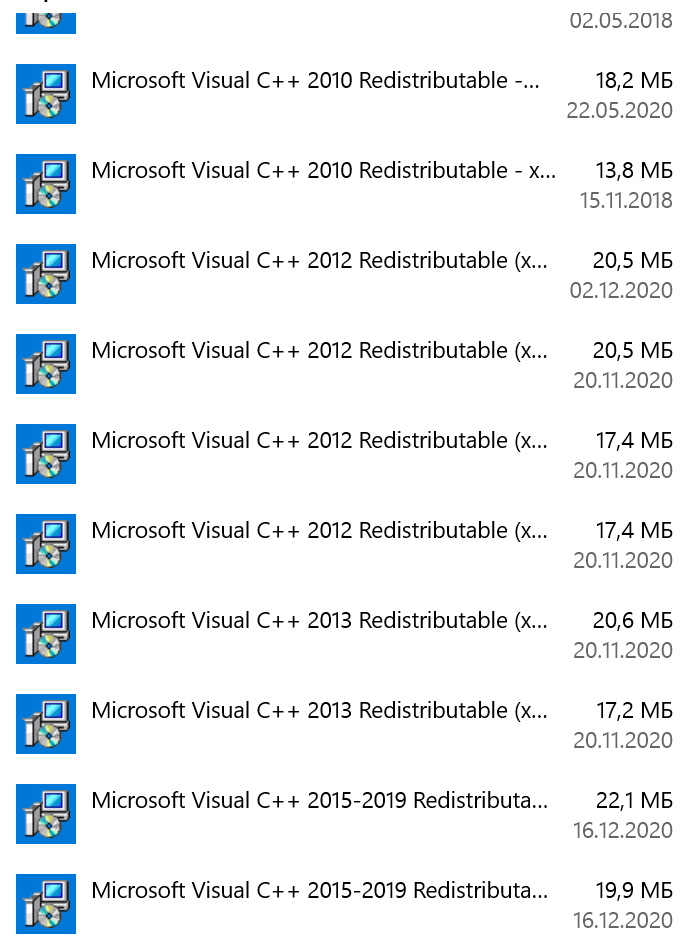
Спасите меня пожалуйста, уже голова плывет…
I was trying to install dlib library for face recognition in pycharm,
pip install dlib
I’m using virtual environment and base interpreter is C:UsersAyushmanAppDataLocalProgramsPythonPython38-32python.exe
Already installed cmake and pip.
python—version 3.8.3
pip—version 20.1.1
When I tried to install from setting, I got this error message:
Try to run this command from the system terminal. Make sure that you use the correct version of 'pip' installed for your Python interpreter located at 'C:UsersAyushmanPycharmProjectsdemoProjectvenvScriptspython.exe'.
When I used terminal, I got this error message:
Collecting dlib
  Using cached dlib-19.19.0.tar.gz (3.2 MB)
Using legacy setup.py install for dlib, since package 'wheel' is not installed.
Installing collected packages: dlib
    Running setup.py install for dlib ... error
    ERROR: Command errored out with exit status 1:
     command: 'c:usersayushmanpycharmprojectsdemoprojectvenvscriptspython.exe' -u -c 'import sys, setuptools, tokenize; sys.argv[0] = '"'"'C:\Users\Ayushman
\AppData\Local\Temp\pip-install-7crglpz8\dlib\setup.py'"'"'; __file__='"'"'C:\Users\Ayushman\AppData\Local\Temp\pip-install-7crglpz8\dlib\setup.py'"'"'
;f=getattr(tokenize, '"'"'open'"'"', open)(__file__);code=f.read().replace('"'"'rn'"'"', '"'"'n'"'"');f.close();exec(compile(code, __file__, '"'"'exec'"'"'))' ins
tall --record 'C:UsersAyushmanAppDataLocalTemppip-record-id9u7hlkinstall-record.txt' --single-version-externally-managed --compile --install-headers 'c:users
ayushmanpycharmprojectsdemoprojectvenvincludesitepython3.8dlib'
         cwd: C:UsersAyushmanAppDataLocalTemppip-install-7crglpz8dlib
    Complete output (80 lines):
    running install
    running build
    running build_py
    package init file 'dlib__init__.py' not found (or not a regular file)
    running build_ext
    Building extension for Python 3.8.3 (tags/v3.8.3:6f8c832, May 13 2020, 22:20:19) [MSC v.1925 32 bit (Intel)]
    Invoking CMake setup: 'cmake C:UsersAyushmanAppDataLocalTemppip-install-7crglpz8dlibtoolspython -DCMAKE_LIBRARY_OUTPUT_DIRECTORY=C:UsersAyushmanAppDa
taLocalTemppip-install-7crglpz8dlibbuildlib.win32-3.8 -DPYTHON_EXECUTABLE=c:usersayushmanpycharmprojectsdemoprojectvenvscriptspython.exe -DCMAKE_LIBRARY
_OUTPUT_DIRECTORY_RELEASE=C:UsersAyushmanAppDataLocalTemppip-install-7crglpz8dlibbuildlib.win32-3.8'
    -- Building for: NMake Makefiles
    -- The C compiler identification is unknown
    -- The CXX compiler identification is unknown
    CMake Error at CMakeLists.txt:3 (project):
      The CMAKE_C_COMPILER:

        cl

      is not a full path and was not found in the PATH.

      To use the NMake generator with Visual C++, cmake must be run from a shell
      that can use the compiler cl from the command line.  This environment is
      unable to invoke the cl compiler.  To fix this problem, run cmake from the
      Visual Studio Command Prompt (vcvarsall.bat).

      Tell CMake where to find the compiler by setting either the environment
      variable "CC" or the CMake cache entry CMAKE_C_COMPILER to the full path to
      the compiler, or to the compiler name if it is in the PATH.


    CMake Error at CMakeLists.txt:3 (project):
      The CMAKE_CXX_COMPILER:

        cl

      is not a full path and was not found in the PATH.

      To use the NMake generator with Visual C++, cmake must be run from a shell
      that can use the compiler cl from the command line.  This environment is
      unable to invoke the cl compiler.  To fix this problem, run cmake from the
      Visual Studio Command Prompt (vcvarsall.bat).

      Tell CMake where to find the compiler by setting either the environment
      variable "CXX" or the CMake cache entry CMAKE_CXX_COMPILER to the full path
      to the compiler, or to the compiler name if it is in the PATH.


    -- Configuring incomplete, errors occurred!
    See also "C:/Users/Ayushman/AppData/Local/Temp/pip-install-7crglpz8/dlib/build/temp.win32-3.8/Release/CMakeFiles/CMakeOutput.log".
    See also "C:/Users/Ayushman/AppData/Local/Temp/pip-install-7crglpz8/dlib/build/temp.win32-3.8/Release/CMakeFiles/CMakeError.log".
    Traceback (most recent call last):
      File "<string>", line 1, in <module>
      File "C:UsersAyushmanAppDataLocalTemppip-install-7crglpz8dlibsetup.py", line 223, in <module>
        setup(
      File "c:usersayushmanpycharmprojectsdemoprojectvenvlibsite-packagessetuptools__init__.py", line 144, in setup
        return distutils.core.setup(**attrs)
      File "C:UsersAyushmanAppDataLocalProgramsPythonPython38-32libdistutilscore.py", line 148, in setup
        dist.run_commands()
      File "C:UsersAyushmanAppDataLocalProgramsPythonPython38-32libdistutilsdist.py", line 966, in run_commands
        self.run_command(cmd)
      File "C:UsersAyushmanAppDataLocalProgramsPythonPython38-32libdistutilsdist.py", line 985, in run_command
        cmd_obj.run()
      File "c:usersayushmanpycharmprojectsdemoprojectvenvlibsite-packagessetuptoolscommandinstall.py", line 61, in run
        return orig.install.run(self)
      File "C:UsersAyushmanAppDataLocalProgramsPythonPython38-32libdistutilscommandinstall.py", line 545, in run
        self.run_command('build')
      File "C:UsersAyushmanAppDataLocalProgramsPythonPython38-32libdistutilscmd.py", line 313, in run_command
        self.distribution.run_command(command)
      File "C:UsersAyushmanAppDataLocalProgramsPythonPython38-32libdistutilsdist.py", line 985, in run_command
        cmd_obj.run()
      File "C:UsersAyushmanAppDataLocalProgramsPythonPython38-32libdistutilscommandbuild.py", line 135, in run
        self.run_command(cmd_name)
      File "C:UsersAyushmanAppDataLocalProgramsPythonPython38-32libdistutilscmd.py", line 313, in run_command
        self.distribution.run_command(command)
      File "C:UsersAyushmanAppDataLocalProgramsPythonPython38-32libdistutilsdist.py", line 985, in run_command
        cmd_obj.run()
      File "C:UsersAyushmanAppDataLocalTemppip-install-7crglpz8dlibsetup.py", line 135, in run
        self.build_extension(ext)
      File "C:UsersAyushmanAppDataLocalTemppip-install-7crglpz8dlibsetup.py", line 172, in build_extension
        subprocess.check_call(cmake_setup, cwd=build_folder)
      File "C:UsersAyushmanAppDataLocalProgramsPythonPython38-32libsubprocess.py", line 364, in check_call
        raise CalledProcessError(retcode, cmd)
    subprocess.CalledProcessError: Command '['cmake', 'C:\Users\Ayushman\AppData\Local\Temp\pip-install-7crglpz8\dlib\tools\python', '-DCMAKE_LIBRARY_OUTPUT
_DIRECTORY=C:\Users\Ayushman\AppData\Local\Temp\pip-install-7crglpz8\dlib\build\lib.win32-3.8', '-DPYTHON_EXECUTABLE=c:\users\ayushman\pycharmprojects\d
emoproject\venv\scripts\python.exe', '-DCMAKE_LIBRARY_OUTPUT_DIRECTORY_RELEASE=C:\Users\Ayushman\AppData\Local\Temp\pip-install-7crglpz8\dlib\build\lib.w
in32-3.8']' returned non-zero exit status 1.
    ----------------------------------------
ERROR: Command errored out with exit status 1: 'c:usersayushmanpycharmprojectsdemoprojectvenvscriptspython.exe' -u -c 'import sys, setuptools, tokenize; sys.a
rgv[0] = '"'"'C:\Users\Ayushman\AppData\Local\Temp\pip-install-7crglpz8\dlib\setup.py'"'"'; __file__='"'"'C:\Users\Ayushman\AppData\Local\Temp\pip-inst
all-7crglpz8\dlib\setup.py'"'"';f=getattr(tokenize, '"'"'open'"'"', open)(__file__);code=f.read().replace('"'"'rn'"'"', '"'"'n'"'"');f.close();exec(compile(code
, __file__, '"'"'exec'"'"'))' install --record 'C:UsersAyushmanAppDataLocalTemppip-record-id9u7hlkinstall-record.txt' --single-version-externally-managed --co
mpile --install-headers 'c:usersayushmanpycharmprojectsdemoprojectvenvincludesitepython3.8dlib' Check the logs for full command output.
I want to install dlib on spyder of Anaconda3, but the following error message is output.
ERROR: Command errored out with exit status 1:’C: ProgramData Anaconda3 python.exe’ -u -c’ import sys, setuptools, tokenize;sys.argv [0] ='»‘»‘ C: \ Users \ aaaaaaa \ AppData \ Local \ Temp \ pip-install-159kj4gq \ dlib_ad3dd9ccd5034a838a9eade927ce5360 \ setup.py'»‘»‘;file='»‘»‘ C: \ Users \ aaaaaaa \ AppData \ Local \ Temp \ pip-install-159kj4gq \ dlib_ad3dd9ccd5034a838a9eade927ce5360 \ setup.py'»‘»‘;f = getattr (tokenize, ‘»‘»‘ open'»‘»‘, open) (file);code = f.read (). replace (‘»‘»‘ r n'»‘»‘,'»‘»‘ n'»‘»‘);f.close ();(code,file,'»‘»‘exec'»‘»‘))’ install —record’ C: Users aaaaaaa AppData Local Temp pip-record-symr1dxr install-record.txt’ —single-version -externally-managed —compile —install-headers’C: ProgramData Anaconda3 Include dlib’ Check the logs for full command output.
Corresponding source code
Python
>python -m pip install -U pip dlib == 19.19
What I tried
python -m pip install -U pip dlib == 19.19
As a result, the above error occurred.
Also,
conda install -c menpo dlib
Then
UnsatisfiableError: The following specifications were found
to be incompatible with the existing python installation in your environment:
Specifications: Specifications:
- dlib->python [version = ‘2.7. * | 3.4. * | 3.5. *’]
Your python: python = 3.8
If python is on the left-most side of the chain, that’s the version you’ve asked for.
When python appears to the right, that indicates that the thing on the left is somehow
not available for the python version i am constrained to. Note that conda will not
change your python version to a different minor version unless you explicitly specify
that.
Was output, so I downgraded Python, but I gave up because version 3.5.9 was not available.
Supplementary information (FW/tool version, etc.)
windows10
Python 3.8.5
pip 20.3.1