
I’m getting a «column of relation already exists» error when I try to run the Django migrate command:
Operations to perform:
  Synchronize unmigrated apps: signin, django_rq, gis, staticfiles, admindocs, messages, pipeline, test_without_migrations, django_extensions
  Apply all migrations: profile, activities, contenttypes, # plus other modules...
Synchronizing apps without migrations:
  Creating tables...
    Running deferred SQL...
  Installing custom SQL...
Running migrations:
  Rendering model states... DONE
  Applying activities.0002_auto_20170731_1939...Traceback (most recent call last):
  File "manage.py", line 10, in <module>
    execute_from_command_line(sys.argv)
  File "/srv/http/example.com/venvs/4dc40e5fc12700640a30ae0f040aa07ffc8aa1c5/local/lib/python2.7/site-packages/django/core/management/__init__.py", line 338, in execute_from_command_line
    utility.execute()
  File "/srv/http/example.com/venvs/4dc40e5fc12700640a30ae0f040aa07ffc8aa1c5/local/lib/python2.7/site-packages/django/core/management/__init__.py", line 330, in execute
    self.fetch_command(subcommand).run_from_argv(self.argv)
  File "/srv/http/example.com/venvs/4dc40e5fc12700640a30ae0f040aa07ffc8aa1c5/local/lib/python2.7/site-packages/django/core/management/base.py", line 393, in run_from_argv
    self.execute(*args, **cmd_options)
  File "/srv/http/example.com/venvs/4dc40e5fc12700640a30ae0f040aa07ffc8aa1c5/local/lib/python2.7/site-packages/django/core/management/base.py", line 444, in execute
    output = self.handle(*args, **options)
  File "/srv/http/example.com/venvs/4dc40e5fc12700640a30ae0f040aa07ffc8aa1c5/local/lib/python2.7/site-packages/django/core/management/commands/migrate.py", line 222, in handle
    executor.migrate(targets, plan, fake=fake, fake_initial=fake_initial)
  File "/srv/http/example.com/venvs/4dc40e5fc12700640a30ae0f040aa07ffc8aa1c5/local/lib/python2.7/site-packages/django/db/migrations/executor.py", line 110, in migrate
    self.apply_migration(states[migration], migration, fake=fake, fake_initial=fake_initial)
  File "/srv/http/example.com/venvs/4dc40e5fc12700640a30ae0f040aa07ffc8aa1c5/local/lib/python2.7/site-packages/django/db/migrations/executor.py", line 148, in apply_migration
    state = migration.apply(state, schema_editor)
  File "/srv/http/example.com/venvs/4dc40e5fc12700640a30ae0f040aa07ffc8aa1c5/local/lib/python2.7/site-packages/django/db/migrations/migration.py", line 115, in apply
    operation.database_forwards(self.app_label, schema_editor, old_state, project_state)
  File "/srv/http/example.com/venvs/4dc40e5fc12700640a30ae0f040aa07ffc8aa1c5/local/lib/python2.7/site-packages/django/db/migrations/operations/fields.py", line 62, in database_forwards
    field,
  File "/srv/http/example.com/venvs/4dc40e5fc12700640a30ae0f040aa07ffc8aa1c5/local/lib/python2.7/site-packages/django/contrib/gis/db/backends/postgis/schema.py", line 94, in add_field
    super(PostGISSchemaEditor, self).add_field(model, field)
  File "/srv/http/example.com/venvs/4dc40e5fc12700640a30ae0f040aa07ffc8aa1c5/local/lib/python2.7/site-packages/django/db/backends/base/schema.py", line 398, in add_field
    self.execute(sql, params)
  File "/srv/http/example.com/venvs/4dc40e5fc12700640a30ae0f040aa07ffc8aa1c5/local/lib/python2.7/site-packages/django/db/backends/base/schema.py", line 111, in execute
    cursor.execute(sql, params)
  File "/srv/http/example.com/venvs/4dc40e5fc12700640a30ae0f040aa07ffc8aa1c5/local/lib/python2.7/site-packages/django/db/backends/utils.py", line 79, in execute
    return super(CursorDebugWrapper, self).execute(sql, params)
  File "/srv/http/example.com/venvs/4dc40e5fc12700640a30ae0f040aa07ffc8aa1c5/local/lib/python2.7/site-packages/django/db/backends/utils.py", line 64, in execute
    return self.cursor.execute(sql, params)
  File "/srv/http/example.com/venvs/4dc40e5fc12700640a30ae0f040aa07ffc8aa1c5/local/lib/python2.7/site-packages/django/db/utils.py", line 97, in __exit__
    six.reraise(dj_exc_type, dj_exc_value, traceback)
  File "/srv/http/example.com/venvs/4dc40e5fc12700640a30ae0f040aa07ffc8aa1c5/local/lib/python2.7/site-packages/django/db/backends/utils.py", line 64, in execute
    return self.cursor.execute(sql, params)
django.db.utils.ProgrammingError: column "country_id" of relation "travel" already exists
The Travel class inherits from the Activities class:
# activities/models.py
from profile.models import Country

class Activity(models.Model):
    host = models.ForeignKey(User)
    # other fields...

    class Meta:
        abstract = True

class Travel(Activity):
    start_date = models.DateField()
    country = models.ForeignKey(Country)
    # other fields...
The country class being referenced by the foreign key is in another module. It’s essentially a lookup table that will contain a code (abbreviation) and
name for each country:
# profile/models.py
class Country(models.Model):
    country_cd = models.CharField(max_length=2)
    descrip = models.CharField(max_length=50)
I don’t see anything out of the ordinary in the migrations file other than the fact that there are two migration files for activities (which I don’t quite understand):
# activities/migrations/0001_initial.py
class Migration(migrations.Migration):

    dependencies = [
    ]

    operations = [
        migrations.CreateModel(
            name='Travel',
            fields=[
                ('id', models.AutoField(verbose_name='ID', serialize=False, auto_created=True, primary_key=True)),
                ('name', models.CharField(max_length=256)),
                # other fields but none that reference Country
            ],
            options={
                'db_table': 'travel',
            },
        ),
    ]

# activities/migrations/0002_auto_20170731_1939.py
class Migration(migrations.Migration):

    dependencies = [
        migrations.swappable_dependency(settings.AUTH_USER_MODEL),
        ('profile', '0001_initial'),
        ('activities', '0001_initial'),
    ]

    operations = [
        migrations.AddField(
            model_name='travel',
            name='country',
            field=models.ForeignKey(to='profile.Country'),
        ),
        migrations.AddField(
            model_name='travel',
            name='host',
            field=models.ForeignKey(to=settings.AUTH_USER_MODEL),
        ),
        # other fields...
    ]
I don’t understand why I’m getting this error. I’ve noticed that I don’t have this problem in other models that declare foreign key relations. However,in all of those models either the foreign key relation is to auth.models.User or to another class within the same model file. I read an article Tips for Building High-Quality Django Apps at Scale recently in which the author said you can have problems running migrations if you have cross-app foreign keys, so maybe the problem is related to that. I could recreate the ‘Country’ class inside the activities module but that wouldn’t be DRY. I’m not sure how to resolve this problem.
This error happens when you try to run a migration adding a column that already exists.
For instance, let’s say you write a migration in your local environment to add the column source to a lead. You run it then realize your migration is useless.
So you delete the migration file but forget to rails db:rollback 😱. Rookie mistake! Your source column is still in schema.rb and in your local database.
If you later pull a colleague’s branch that add a source column to leads, you’ll get:
PGError: ERROR: column “source” of relation “leads” already existsYour database’s schema is corrupted. At this point, you can’t do much to correct your mistake. You could:
- write a migration file to delete your
sourcecolumn - meddle with the fingerprinting to have this migration run before your colleague’s
- delete the file once you ran
rails db:migrate
But that’s a lot of messing around with a lot of possibilities to make things worse.
Another — and safer way — is to save your database and restore it anew. Let’s see how to do this:
1) Find the database’s name in database.yml and run the following command.
pg_dump -F c -v -h localhost <database_name> -f tmp/<pick_a_file_name>.psqlThis will export your database to a .psql file.
2) Drop the database and recreate it
rails db:drop db:create3) Restore your data to your database
pg_restore --exit-on-error --verbose --dbname=<database_name> tmp/<pick_a_file_name>.psqlThe schema and database will sync up on your migration files. No more source in leads. 🙌
Don’t forget to delete your <pick_a_file_name>.psql file from /tmp.
And voilà!
If you run into the following error:
  PG::ObjectInUse: ERROR:  database <your_database_name> is being accessed by other users
  DETAIL:  There are 2 other sessions using the database.
run this into your terminal:
kill -9 $(lsof -i tcp:3000 -t)It’ll identify the server already running and kill it.
Hope this will help! If you need more tips and tricks, check out the rest of the technical blog.
Cheers,
Remi — @mercier_remi
Hi,
Hi tried to upgrade from ansible-awx-9.0.1.94-1.el7.x86_64.rpm to ansible-awx-9.0.1.256-1.el7.x86_64.rpm
But I get this error:
Operations to perform:
  Apply all migrations: auth, conf, contenttypes, main, oauth2_provider, sessions, sites, social_django, sso, taggit
Running migrations:
  Applying main.0100_v370_projectupdate_job_tags...Traceback (most recent call last):
  File "/opt/rh/rh-python36/root/usr/lib/python3.6/site-packages/django/db/backends/utils.py", line 84, in _execute
    return self.cursor.execute(sql, params)
psycopg2.errors.DuplicateColumn: column "job_tags" of relation "main_projectupdate" already exists


The above exception was the direct cause of the following exception:

Traceback (most recent call last):
  File "/opt/rh/rh-python36/root/usr/bin/awx-manage", line 11, in <module>
    load_entry_point('awx==9.0.1', 'console_scripts', 'awx-manage')()
  File "/opt/rh/rh-python36/root/usr/lib/python3.6/site-packages/awx/__init__.py", line 158, in manage
    execute_from_command_line(sys.argv)
  File "/opt/rh/rh-python36/root/usr/lib/python3.6/site-packages/django/core/management/__init__.py", line 381, in execute_from_command_line
    utility.execute()
  File "/opt/rh/rh-python36/root/usr/lib/python3.6/site-packages/django/core/management/__init__.py", line 375, in execute
    self.fetch_command(subcommand).run_from_argv(self.argv)
  File "/opt/rh/rh-python36/root/usr/lib/python3.6/site-packages/django/core/management/base.py", line 323, in run_from_argv
    self.execute(*args, **cmd_options)
  File "/opt/rh/rh-python36/root/usr/lib/python3.6/site-packages/django/core/management/base.py", line 364, in execute
    output = self.handle(*args, **options)
  File "/opt/rh/rh-python36/root/usr/lib/python3.6/site-packages/django/core/management/base.py", line 83, in wrapped
    res = handle_func(*args, **kwargs)
  File "/opt/rh/rh-python36/root/usr/lib/python3.6/site-packages/django/core/management/commands/migrate.py", line 234, in handle
    fake_initial=fake_initial,
  File "/opt/rh/rh-python36/root/usr/lib/python3.6/site-packages/django/db/migrations/executor.py", line 117, in migrate
    state = self._migrate_all_forwards(state, plan, full_plan, fake=fake, fake_initial=fake_initial)
  File "/opt/rh/rh-python36/root/usr/lib/python3.6/site-packages/django/db/migrations/executor.py", line 147, in _migrate_all_forwards
    state = self.apply_migration(state, migration, fake=fake, fake_initial=fake_initial)
  File "/opt/rh/rh-python36/root/usr/lib/python3.6/site-packages/django/db/migrations/executor.py", line 245, in apply_migration
    state = migration.apply(state, schema_editor)
  File "/opt/rh/rh-python36/root/usr/lib/python3.6/site-packages/django/db/migrations/migration.py", line 124, in apply
    operation.database_forwards(self.app_label, schema_editor, old_state, project_state)
  File "/opt/rh/rh-python36/root/usr/lib/python3.6/site-packages/django/db/migrations/operations/fields.py", line 112, in database_forwards
    field,
  File "/opt/rh/rh-python36/root/usr/lib/python3.6/site-packages/django/db/backends/base/schema.py", line 447, in add_field
    self.execute(sql, params)
  File "/opt/rh/rh-python36/root/usr/lib/python3.6/site-packages/django/db/backends/base/schema.py", line 137, in execute
    cursor.execute(sql, params)
  File "/opt/rh/rh-python36/root/usr/lib/python3.6/site-packages/django/db/backends/utils.py", line 67, in execute
    return self._execute_with_wrappers(sql, params, many=False, executor=self._execute)
  File "/opt/rh/rh-python36/root/usr/lib/python3.6/site-packages/django/db/backends/utils.py", line 76, in _execute_with_wrappers
    return executor(sql, params, many, context)
  File "/opt/rh/rh-python36/root/usr/lib/python3.6/site-packages/django/db/backends/utils.py", line 84, in _execute
    return self.cursor.execute(sql, params)
  File "/opt/rh/rh-python36/root/usr/lib/python3.6/site-packages/django/db/utils.py", line 89, in __exit__
    raise dj_exc_value.with_traceback(traceback) from exc_value
  File "/opt/rh/rh-python36/root/usr/lib/python3.6/site-packages/django/db/backends/utils.py", line 84, in _execute
    return self.cursor.execute(sql, params)
django.db.utils.ProgrammingError: column "job_tags" of relation "main_projectupdate" already exists
Regards,

Sometime we messed up with django migration and migrate process. Deleting migration file and run python manage.py makemigrations and python manage.py migrate solve the issue by undo previous migration or we can say that it takes us to previous migration state. But I faced one kind of situation where already a column created by a migrations and I saved some data in this column which was already created. And if i want to delete a migration file and want to go back previous situation django make sure that it doesn’t happened because column is already created and I want to add this column again. And in this situation django will throw a error something like that 👇
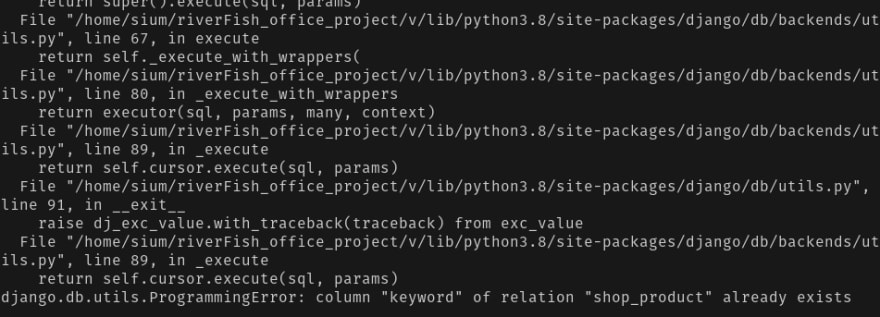
And I can’t delete all my data and make migrations from zero. Because I’m in now production mode and have some data in my database. So I run this command and it’s help me to overcome from this situation. And the magical command is 🧞-
python manage.py migrate --fake <put your app name>
Enter fullscreen mode
Exit fullscreen mode
Error:
PG::DuplicateColumn: ERROR: column of relation table_name already exists
I am using Ruby On Rails with Postgresql and I faced this issue while I am doing migration.
sachin@sachin:~/demo_app$ rake db:migrate
== 20150710135824 AddStatusToUser: migrating =========================
— add_column(:users, :status, :integer)
rake aborted!
StandardError: An error has occurred, this and all later migrations canceled:
PG::DuplicateColumn: ERROR: column «status» of relation «users» already exists
: ALTER TABLE «users» ADD COLUMN «status» integer/home/sachin/.rvm/gems/ruby-2.0.0-p598@demo_app/gems/activerecord-4.1.0/lib/active_record/connection_adapters/postgresql/database_statements.rb:128:in `async_exec’
Solution:
Error indicates that in users table status column is already available. Then I found that earlier I have added same migration and then I have done rake db:migrate that time. So That time this column is created. And now I have added again. That’s why I am facing this issue.
So here solution is: We need to remove existing column and then need to do migration.
For that I have found this ways to resolve this issue:
1.) With ruby on rails,
Open terminal and run «rails db» command it will connect with database. Then you can drop that added columns from here.
You need to run this command for alter table:
ALTER TABLE users DROP COLUMN status;
2.) Open postgresql console for drop column.
Open terminal and run «psql -U postgres» command then it will open psql console.Then you can drop that added columns from here.
You need to run this command for alter table:
ALTER TABLE users DROP COLUMN status;
3.) Add condition in migration
if column_exists? :table_name, :column_name
remove_column :table_name, :column_name
end
You ran makemigrations, then migrate and yet Django dares to throw an error? Incomparable betrayal! Let’s look through several cases.
Sidenote
For ages encountering migrations errors, I have been wipin the entire database and migrations files. Until one day an error occurred at a production server. There was no other option but to calm down and learn how to fix it.
🧸 Relation does not exist 1: not applied by you or Django
Run the command showmigrations and look at the output. If you see something like this:
firstapp
 [X] 0001_initial
 [X] 0002_auto_20190819_2019
 [X] 0003_auto_20190827_2311
 [ ] 0004_testunit
That means that the 0004 migrations was not applied, so just run migrate. If it stays misapplied or to avoid wasting time you can run this:
migrate firstapp 0004_testunitIf not, look further.
💔 Relation does not exist 2: You removed a migration’s file
Sidenote
The point of each migrations is to find the difference between the last version of the database structure and the current one. But Django does not look at the database itself, it compares your current models.py files with a virtual database made from migrations.py files. Then Django writes the changes down in new migrations files. And only with migrate you apply these changed to the database.
So if you remove something from migrations/ folder, the database will stay the same, but the Django’s idea of it won’t.
Case
So, you added a field type to a class Tag:
class Tag(models.Model)
   name = models.CharField(max_length=100)
   type = models.CharField(max_length=100)
You made a migrations, say, number 0002, it contains adding type field. Then you removed the migrations. After that, you made some changes, lived your best live, and decided to make migrations again.
Django will include creation of the type field to the migrations again. Therefore applying this migrations will give you an error:
ProgrammingError: column "tag_type" of relation "tag" already existsHow to Solve it 🧰
1. From migration file 0002_something.py remove the line about creating the type field.
from django.db import migrations, models


class Migration(migrations.Migration):

    dependencies = [
        ('firstapp', '0002_something'),
    ]

    operations = [
        ...
        # This .AddField below:
        migrations.AddField(
            model_name='tag',
            name='type',
            field=models.Charfield(max_length),
        ),
        ...
    ]
2. Migrate the 0002_something.py file:
migrate firstapp 0002_something3. Make a new migration (it must only contain creating the type field):
makemigrations4. Fake apply it like this:
migrate firstapp 0003_something_two --fake🔨 Relation does not exist 2: Renaming a field was not applied
This mysterious thing happened. I renamed type to type_name and I have a migrations that states it:
...
    operations = [
        migrations.RenameField(
            model_name='tag',
            old_name='type',
            new_name='type_name',
        ),
    ]
...
And yet I get this error:
ProgrammingError at /test relation "firstapp_tag_type_name" does not exist
Possible culprit (myself and mass replace) a.k.a Sloppy Development installment
While changing names in the whole project automatically, I also unwillingly changed them in the migrations files. It is a great temptation to remove it all at once, but be careful. That may be the problem.
How to Solve it 🧰
Attempt #1: Order is wrong
The type field may have been altered before it was created because of the mass replace.
Try finding the whole life cycle of type field in your migrations – where it was added, where it was altered etc.
Attempt #2: Remove Migration file concerning the field
Remove every mention of the type field in migrations’ files (in operation). Then do whatever you want (rename it etc.) and make a migration again.
If the change is the only one in a migrations file, remove it all together.
You can remove the whole migration file, if it only contains type field manipulations. But be careful and alter dependencies for the following migration file (replace the deleted file’s name with the one before it).
Say, migrations’s files are 0002_something_before.py, 0003_something.py (removed) and 0004_brave_new.py.
So, after deleting 0003_something.py, in 0004_brave_new.py file:
dependencies = [
    ('firstapp', '0003_something'),
]
Replace 0003_something.py with0002_something_before:
dependencies = [
    ('firstapp', '0002_something_before'),
]
Otherwise you will get an error like this:
django.db.migrations.exceptions.NodeNotFoundError: Migration firstapp.0003_something_something dependencies reference nonexistent parent node Then, makemigrations and migrate.
Attempt #3: Remove every mention of the problematic field
If simply removing a migration and making another one doesn’t help…
Embrace yourself and remove every mention of type field. For my personal project, that inspired this post, it was quite time consuming.
However, as I see it now, you can’t just remove the field and make migrations of that, because type does not exist in the database. However, I can’t answer why.
You need to remove it from everywhere.
Then, makemigrations must show nothing, and the error won’t make am appearance.
🚫 Why you shouldn’t remove migrations
Summing up, Django does not care about database itself, except for when it returns errors. So Django’s idea of the database is made of migrations it have. That’s why when you run makemigrations, you get errors about migration files.
After applying new migrations, you will start getting all sorts of surprises: InvalidCursorName cursor does not exist or good old ProgrammingError: column does not exist and ProgrammingError: column of relation already exists.
Take my advice – don’t remove migrations because of migration errors, better learn how to work with them. Because in production you won’t be able to flush the database without a trouble (you kind of can, but you will need to insert missing data afterwards).
But if you did remove migrations…
Oh, been there.
I can say one thing – you will need to keep reversing changes to the database until you don’t get any more errors. And then make this changes again the same way I showed you here. And while in most cases Attempt #3 works, some day it may fail you.
One day I will emulate this and come back and update this post with a quick solution, but now I am triggered enough by just the mention of it.
Transforming one field to another
You can transform pretty much everything with an exception.
Adding a through table to M2M relation (or backwards)
Usually you want to add a through table to store additional data about the relation, not remove it. Either way, Django won’t allow this transition.
Say, Django can remove all the additional data, but constraints like unique_together can ruin your architecture. So you need to do it manually.
When you are moving quickly, sometimes the migrations in your locally running app get tripped up. This may be due to something on your side or coordinating with your team. There are a number of possible not-fun reasons. Whatever the cause, you just want to get past it and continue writing code.
Here are some things I have learned to resolve Ruby migration errors involving duplicate columns.
Problem: Duplicate column error
You might get a message like this when you run your migration. The PG refers to the PostgreSQL database I’m using, but this can happen regardless of your database choic
rake aborted!
StandardError: An error has occurred, this and all later migrations canceled:

PG::DuplicateColumn: ERROR:  column "stocksplitratio" of relation "tags" already exists
The problem here is that your migration will not run because those changes already exist in your schema, so you are stuck in a loop. You have to run the migration to be able to render your code locally, but you can’t run the migration because your app sees that those elements already exist.
Solution #1:
Comment out the offending part of the migrations and rerun, then uncomment them.
If you are sure your schema is correct (or if you have just manually copied it over from the source file in your GitHub repo), you can comment out the part of the migration files that are getting stuck, run your migration, then uncomment that code.
You need to include the top and bottom part of the migration file. Just comment out the middle, like this:
class AddMoreExpandedEntityFieldsToTags < ActiveRecord::Migration
def change
  change_table :tags do |t|
    # t.string :filingtype
    # t.string :quarter
    ... all your info here
    # t.string :accountingchangetype
  end
end
end
Then, rerun the migration.
rake db:migrate
Then, you will see something like this:
Changes to be committed:
 (use "git reset HEAD ..." to unstage)

       new file:   db/migrate/20160526221804_add_more_expanded_entity_fields_to_tags.rb
       new file:   db/migrate/20160530151904_add_stock_split_ratio_tag_info.rb

Changes not staged for commit:
 (use "git add ..." to update what will be committed)
 (use "git checkout -- ..." to discard changes in working directory)

       modified:   db/migrate/20160526221804_add_more_expanded_entity_fields_to_tags.rb
       modified:   db/migrate/20160530151904_add_stock_split_ratio_tag_info.rb
The migrations actually run, but without the offending pieces. Your app should now render locally.
Remember that you now need to uncomment the parts of those migrations, and then add and commit them back.
Solution #2 (not preferred):
Delete the offending migration files completely, confirm your schema is correct (or add in your correct schema manually from the GitHub source), run the migrations, then add your migrations back manually, exactly as they appeared before, in the same order.
If the first solution does not work for you, try this surgical approach. It is not recommended, because there are many ways to screw it up. But if you are desperate, here are the steps …
First, manually delete the offending migrations from your local app version.
Then, rerun the migration.
Your app should now render locally.
But remember you need those migrations back in there!
So next, put the migrations back exactly as they were before.
Do this manually. Get the original migration files from your source repo in GitHub. You need to make sure they stay in the exact original order, since the order in the app is the order in which they are processed when you run a migration.
Note: When I do this, GitHub displays the migrations in the reverse chronological order from the order in my local app. This requires manually transposing the order to figure out where yours should be put back into your local version. (I use RubyMine; your IDE may display them differently.)
Now you wil be able to work on code and push your commits up safely so it will not impact your team. Good luck!
Содержание
- Yii Framework
- Почему возникает ошибка constraint for relation already exists при импорте базы postgres?
- Почему возникает ошибка constraint for relation already exists при импорте базы postgres?
- Re: Почему возникает ошибка constraint for relation already exists при импорте базы postgres?
- Common DB schema change mistakes
- Table of Contents
- Terminology
- Three categories of DB migration mistakes
- Case 1. Schema mismatch
- Case 2. Misuse of IF [NOT] EXISTS
- Case 3. Hitting statement_timeout
- Case 4. Unlimited massive change
- Case 5. Acquire an exclusive lock + wait in transaction
- Case 6. A transaction with DDL + massive DML
- Case 7. Waiting to acquire an exclusive lock for long ⇒ blocking others
- Case 8. Careless creation of an FK
- Case 9. Careless removal of an FK
- Case 10. Careless addition of a CHECK constraint
- Case 11. Careless addition of NOT NULL
- Case 12. Careless change of column’s data type
- Case 13. Careless CREATE INDEX
- Case 14. Careless DROP INDEX
- Case 15. Renaming objects
- Case 16. Add a column with DEFAULT
- Case 17. Leftovers of CREATE INDEX CONCURRENTLY
- Case 18. 4-byte integer primary keys for large tables
- Recommendations
- Share this blog post:
Yii Framework
Почему возникает ошибка constraint for relation already exists при импорте базы postgres?
Почему возникает ошибка constraint for relation already exists при импорте базы postgres?
Сообщение EVOSandru6 » 2016.04.25, 13:37
Есть рабочий сайт с именем domen1. Делаю экспорт в pgAdmin ||| . Выбрал:
Кодировка UTF-8, Владелец — postgres, Выставил галочки на DROP, INSERT.
Собрался бэкап. Если я импортирую его на другой машине в базу с таким же именем ( dbname1 ) , импорт проходит успешно. Если же сливаю импорт в базу с другим именем dbname2, происходит подобная ерунда:
psql:dump_1.sql:8266: ERROR: constraint «mc_valutes_tenant_id_fkey» for relation «mc_courses» already exists
multiple primary keys for table «f_pays» are not allowed
DETAIL: Key (id)=(631010000) already exists.
psql:dump_1.sql:7527: ERROR: duplicate key value violates unique constraint «t_places_pkey»
Импорт делаю в debian:
В sql файле проверял, имена внешних ключей не повторяются.
В чем может быть проблема?
Re: Почему возникает ошибка constraint for relation already exists при импорте базы postgres?
Сообщение zelenin » 2016.04.25, 14:14
EVOSandru6 писал(а): Выбрал:
Кодировка UTF-8, Владелец — postgres, Выставил галочки на DROP, INSERT.
Собрался бэкап. Если я импортирую его на другой машине в базу с таким же именем ( dbname1 ) , импорт проходит успешно. Если же сливаю импорт в базу с другим именем dbname2, происходит подобная ерунда:
psql:dump_1.sql:8266: ERROR: constraint «mc_valutes_tenant_id_fkey» for relation «mc_courses» already exists
multiple primary keys for table «f_pays» are not allowed
DETAIL: Key (id)=(631010000) already exists.
psql:dump_1.sql:7527: ERROR: duplicate key value violates unique constraint «t_places_pkey»
Импорт делаю в debian:
В sql файле проверял, имена внешних ключей не повторяются.
Источник
Common DB schema change mistakes

In his article «Lesser Known PostgreSQL Features», @be_haki describes 18 Postgres features many people don’t know. I enjoyed that article, and it inspired me to write about «anti-features» – things that everyone should avoid when working in probably the riskiest field of application development – so-called «schema migrations».
This is one of my favorite topics in the field of relational databases. We all remember how MongoDB entered the stage with two clear messages: «web-scale» (let’s have sharding out-of-the-box) and «schemaless» (let’s avoid designing schemas and allow full flexibility). In my opinion, both buzzwords are an oversimplification, but if you have experience in reviewing and deploying schema changes in relational databases, you probably understand the level of difficulty, risks, and pain of scaling the process of making schema changes. My personal score: 1000+ migrations designed/reviewed/deployed during 17+ years of using Postgres in my own companies and when consulting others such as GitLab, Chewy, Miro. Here I’m going to share what I’ve learned, describing some mistakes I’ve made or observed – so probably next time you’ll avoid them.
Moreover, a strong desire to help people avoid such mistakes led me to invent the Database Lab Engine – a technology for thin cloning of databases, essential for development and testing. With it, you can clone a 10 TiB database in 10 seconds, test schema changes, and understand the risks before deployment. Most cases discussed in this article can be easily detected by such testing, and it can be done automatically in CI/CD pipelines.
As usual, I’ll be focusing on OLTP use cases (mobile and web apps), for which query execution that exceeds 1 second is normally considered too slow. Some cases discussed here are hard to notice in small databases with low activity. But I’m pretty confident that you’ll encounter most of them when your database grows to
10 TiB in size and its load reaches
10 5 –10 6 transactions per second (of course, some cases will be seen – unless deliberately prevented. – much, much earlier).
I advise you to read GitLab’s great documentation – their Migration Style Guide is full of wisdom written by those who have experience in deploying numerous Postgres schema changes in a fully automated fashion to a huge number of instances, including GitLab.com itself.
I also encourage everyone to watch PGCon-2022 – one of the key Postgres conferences; this time, it’s happening online again. On Thursday, May 26, I’ll give two talks, and one of them is called «Common DB schema change mistakes», you find the slide deck here. If you missed it, no worries – @DLangille, who has organized the conference since 2006 (thank you, Dan!), promises to publish talk videos in a few weeks.
Table of Contents
Terminology
The term «DB migration» may be confusing; it’s often used to describe the task of switching from one database system to another, moving the database, and minimizing possible negative effects (such as long downtime).
In this article, I’m going to talk about the second meaning of the term – DB schema changes having the following properties:
- «incremental»: changes are performed in steps;
- «reversible»: it is possible to «undo» any change, returning to the original state of the schema (and data; which, in some cases, may be difficult or impossible);
- «versionable»: some version control system is used (such as Git).
I prefer using the adjusted term, «DB schema migration». However, we need to remember that many schema changes imply data changes – for example, changing a column data type from integer to text requires a full table rewrite, which is a non-trivial task in heavily-loaded large databases.
Application DBA – a database engineer responsible for tasks such as DB schema design, development and deployment of changes, query performance optimization, and so on, while «Infrastructure DBA» is responsible for database provisioning, replication, backups, global configuration. The term «Application DBA» was explained by @be_haki in «Some SQL Tricks of an Application DBA».
Finally, the usual suspects in our small terminology list:
- DML – database manipulation language ( SELECT / INSERT / UPDATE / DELETE , etc.)
- DDL – data definition language ( CREATE … , ALTER … , DROP … )
Three categories of DB migration mistakes
I distinguish three big categories of DB schema migration mistakes:
- Concurrency-related mistakes. This is the largest category, usually determining a significant part of an application DBA’s experience. Some examples (skipping details; we’ll talk about them soon):
- Failure to acquire a lock
- Updating too many rows at once
- Acquired an exclusive lock and left transaction open for long
- Mistakes related to the correctness of steps – logical issues. Examples:
- Unexpected schema deviations
- Schema/app code mismatch
- Unexpected data
- Miscellaneous – mistakes related to the implementation of some specific database feature or the configuration of a particular database, e.g.:
- Reaching statement_timeout
- Use of 4-byte integer primary keys in tables that can grow
- Ignoring VACUUM behavior and bloat risks
Case 1. Schema mismatch
Let’s start with an elementary example. Assume we need to deploy the following DDL:
It worked well when we developed and tested it. But later, it failed during testing in some test/QA or staging environment, or – in the worst case – during deployment attempt on production:
Reasons for this problem may vary. For example, the table could be created by breaking the workflow (for example, manually). To fix it, we should investigate how the table was created and why the process wasn’t followed, and then we need to find a way to establish a good workflow to avoid such cases.
Unfortunately, people often choose another way to «fix» it – leading us to the second case.
Case 2. Misuse of IF [NOT] EXISTS
Observing schema mismatch errors such as those above may lead to the «give up» kind of fix: instead of finding the error’s root cause, engineers often choose to patch their code blindly. For the example above it can be the following:
If this code is used not for benchmarking or testing scripts but to define some application schema, this approach is usually a bad idea. It masks the problem with logic, adding some risks of anomalies. An obvious example of such an anomaly: an existing table that has a different structure than table we were going to create. In my example, I used an «empty» set of columns (in reality, there are always some columns – Postgres creates hidden, system columns such as xmin , xmax and ctid , you can read about them in Postgres docs, «5.5. System Columns», so each row always have a few columns; try: insert into t1 select; select ctid, xmin, xmax from t1; ).
I observe this approach quite often, probably in every other engineering team I work with. A detailed analysis of this problem is given in «Three Cases Against IF NOT EXISTS / IF EXISTS in Postgres DDL».
If you’re using a DB schema migration tool such as Sqitch, Liquibase, Flyway, or one embedded in your framework (Ruby on Rails, Django, Yii, and others have it), you probably test the migration stems in CI/CD pipelines. If you start testing the chain DO-UNDO-DO (apply the change, revert it, and re-apply again), it can help with detecting some undesired use of IF [NOT] EXISTS . Of course, keeping schemas in all environments up-to-date and respecting all observed errors, not ignoring them, and not choosing «workaround» paths such as IF [NOT] EXISTS , can be considered good engineering practices.
Case 3. Hitting statement_timeout
This one is pretty common if testing environments don’t have large tables and testing procedures are not mature:
Even if both production and non-production environments use identical statement_timeout settings, the smaller tables are, the faster queries are executed. This can easily lead to a situation when a timeout is reached only on production.
I strongly recommend testing all changes on large volumes of data so such problems will be observed much earlier in dev-test-deploy pipelines. The most powerful approach here is using thin clones of full-size databases as early in the pipelines as possible – preferably right during development. Check out our Database Lab Engine and let us know if you have questions (for example, on Twitter: @Database_Lab).
Case 4. Unlimited massive change
An UPDATE or DELETE targeting too many rows is a bad idea, as everyone knows. But why?
Potential problems that may disturb production:
- Modifying too many rows in a transaction (here, we have a single-query transaction) means that those rows will be locked for modifications until our transaction finishes. This can affect other transactions, potentially worsening the user experience. For example, if some user tries to modify one of the locked rows, their modification attempt may take very long.
- If the checkpointer is not well-tuned (for example, the max_wal_size value is left default, 1GB ), checkpoints may occur very often during such a massive operation. With full_page_writes being on (default), this leads to excessive generation of WAL data.
- Moreover, if the disk system is not powerful enough, the IO generated by the checkpointer may saturate the write capabilities of the disks, leading to general performance degradation.
- If our massive operation is based on some index and data modifications happen in pages in random order, re-visiting a single page multiple times, with untuned checkpointer and frequent checkpoints, one buffer may pass multiple dirty-clean cycles, meaning that we have redundant write operations.
- Finally, we may have two types of VACUUM/bloat issues here. First, if we’re changing a lot of tuples in a single transaction with UPDATE or DELETE, a lot of dead tuples are produced. Even if autovacuum cleans them up soon, there are high chances that such a mass of dead tuples will be directly converted to bloat, leading to extra disk consumption and potential performance degradation. Second, during the long transaction, the autovacuum cannot clean up dead tuples in any table that became dead during our transaction – until this transaction stops.
- Consider splitting the work into batches, each one being a separate transaction. If you’re working in the OLTP context (mobile or web apps), the batch size should be determined so the expected processing of any batch won’t exceed 1 second. To understand why I recommend 1 second as a soft threshold for batch processing, read the article «What is a slow SQL query?»
- Take care of VACUUMing – tune autovacuum and/or consider using explicit VACUUM calls after some number of batches processed.
- Finally, as an extra protection measure, tune the checkpointer so that even if a massive change happens, our database’s negative effect is not so acute. I recommend reading «Basics of Tuning Checkpoints» by Tomáš Vondra.
Case 5. Acquire an exclusive lock + wait in transaction
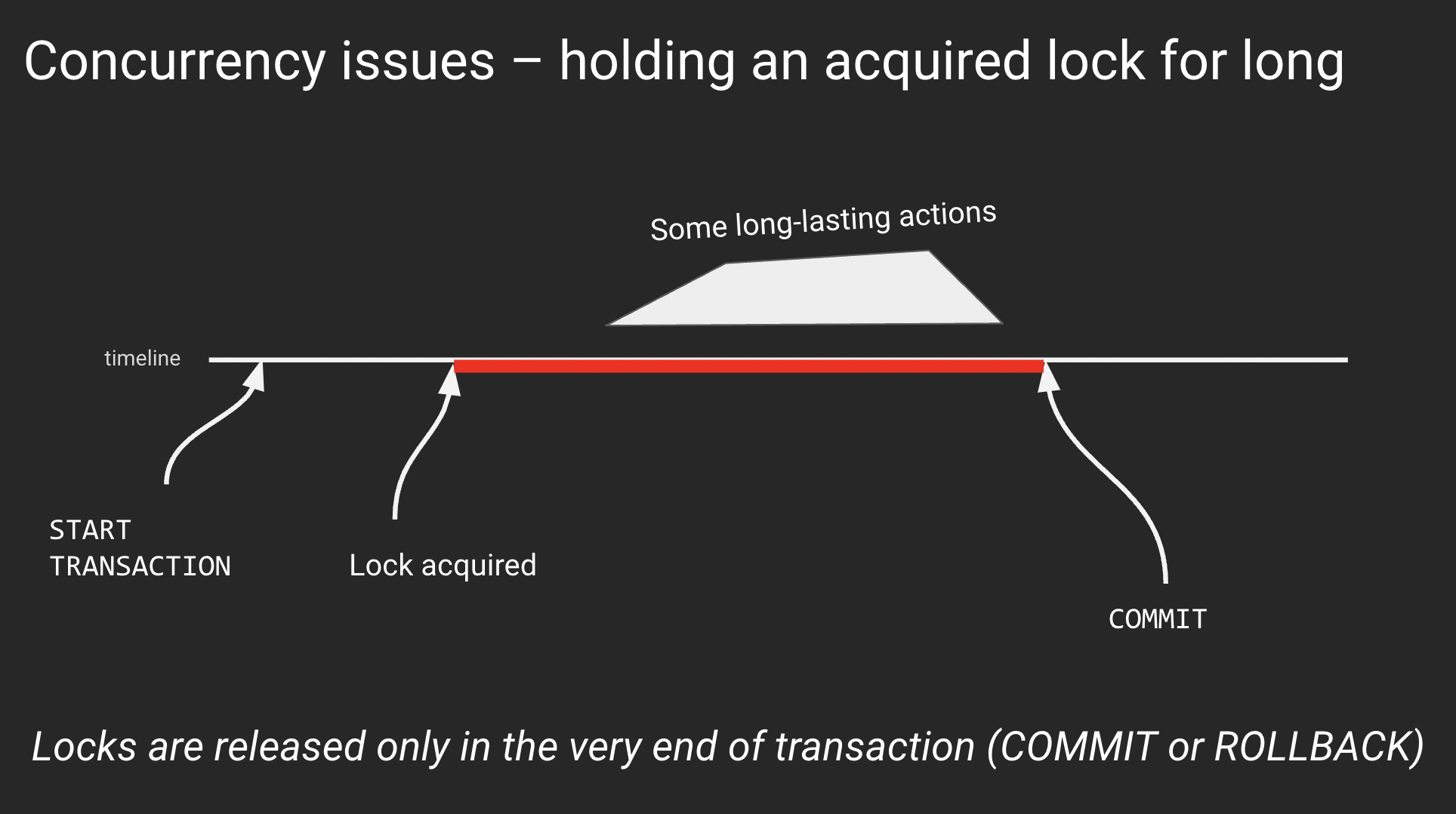
In the previous case, we touched on the problem of holding exclusive locks for long. These can be locked rows (implicitly via UPDATE or DELETE or explicitly via SELECT .. FOR UPDATE ) or database objects (example: successful ALTER TABLE inside a transaction block locks the table and holds the lock until the end of the transaction). If you need to learn more about locks in Postgres, read the article «PostgreSQL rocks, except when it blocks: Understanding locks» by Marco Slot.
An abstract example of the general issue with locking:
The reason for sitting inside a transaction after lock acquisition may vary. However, sometimes it is nothing – a simple waiting with an open transaction and acquired lock. This is the most annoying reason that can quickly lead to various performance or even partial downtime: an exclusive lock to a table blocks even SELECTs to this table.
Remember: any lock acquired in a transaction is held until the very end of this transaction. It is released only when the transaction finishes, with either COMMIT or ROLLBACK.
Every time we acquire an exclusive lock, we should think about finishing the transaction as soon as possible.
Case 6. A transaction with DDL + massive DML
This one is a subcase of the previous case. I describe it separately because it can be considered a common anti-pattern that is quite easy to encounter when developing DB migrations. Here is it in pseudocode:
If the DML step takes significant time, as we already discussed, the locks acquired on the previous step (DDL) will be held long too. This can lead to performance degradation or partial downtime.
Basic rules to follow:
- DML never should go after DDL unless they both deal with some freshly created table
- It is usually wise to split DDL and DML activities into separate transactions / migration steps
- Finally, remember that massive changes should go in batches? Each batch is a separate transaction – so if you follow this rule and have used large data volumes when testing changes in CI/CD pipelines, you should never encounter this case
Case 7. Waiting to acquire an exclusive lock for long ⇒ blocking others
This problem might happen with most ALTER commands deployed in a careless fashion – but for small, not heavily loaded databases, the chances are quite small, so the problem may remain unnoticed for a long time, until someday it hits in an ugly way, triggering the questions like «How dare could we live with this?» (I passed thru this process with a few teams, it was always quite embarrassing.)
We’ve discussed what happens when an exclusive lock is acquired and then it’s being held for too long. But what if we cannot acquire it?
This event may happen, and in heavily-loaded large databases, it’s pretty common. For example, this may happen because the autovacuum is processing the table we’re trying to modify, and it doesn’t yield – normally, it does, but not when running in the transaction ID wraparound prevention mode. This mode is considered by Postgres as a severe state that must be handled ASAP, so regular logic of autovacuum interrupting its work to allow DDL to succeed won’t work here. In this case, usually, it’s better to just wait.
But that’s not the worst part of this case. What’s really bad is the fact that while we’re waiting to acquire a lock, if our timeout settings ( statement_timeout and lock_timeout ) are set to 0 (default) or quite large (>> 1s), we’re going to block all queries to this table, even SELECTs. I talk about this particular problem in the article «Zero-downtime Postgres schema migrations need this: lock_timeout and retries».
What to do here? For all (!) DB migrations, except those that create brand new DB objects or use CREATE/DROP INDEX CONCURRENTLY (discussed below), you should have retry logic with low lock_timeout , as I describe in my article. This is a fundamental mechanism that everyone needs to have – I think at some point, either Postgres or popular DB schema migration tools will implement it so the world of application DBA will become better.
Case 8. Careless creation of an FK
In Case 5, we’ve discussed a transaction consisting of a successful DDL acquiring an exclusive lock and some actions (or lack of them) in the same transaction. But sometimes, a single-statement transaction – a DDL – can combine a lock acquisition and some work that increases the duration of the operation, leading to similar effects. That work can be either reading or data modification; the longer it lasts, the longer the operation will be, and the more risks of blocking other sessions we have.
We’ll discuss several cases with such a nature – a DDL operation whose duration is prolonged because of the need to read or modify some data. These cases are quite similar, but I want to recognize them individually because there are nuances for each one of them.
The first case in this series is the creation of a foreign key on two existing tables which are large and busy:
Here we can have two issues we’ve already discussed:
- The metadata for two tables needs to be adjusted, so we need two locks – and if one is acquired but the second one is not, and we’re waiting for it, we’re going to experience blocking issues (for both tables!)
- When an FK is introduced, Postgres needs to check the presence of this value in the referenced table for each value used in the referencing table. It may take a while – and during this time, locks are going to be held.
To avoid these issues:
- Use a two-step approach: first, define the FK with the not valid option, then, in a separate transaction, run alter table … validate constraint …;
- When the first ALTER, don’t forget about the retry logic that we discussed above. Note that two table-level exclusive locks are needed.
Case 9. Careless removal of an FK
When an FK needs to be dropped, similar considerations have to be applied as in the previous case, except that no data checks are needed. So, when dropping an FK, we need to acquire two table-level exclusive locks, and the retry logic with low lock_timeout can save us from the risks of blocking issues.
Case 10. Careless addition of a CHECK constraint
CHECK constraints are a powerful and really useful mechanism. I like them a lot because they can help us define a strict data model where major checks are done on the database side, so we have a reliable guarantee of high data quality.
The problem with adding CHECK constraints is very similar to adding foreign key constraints – but it’s simpler because we need to deal with only one table (you cannot reference another table in a CHECK constraint, unfortunately). When we add such a constraint on a large table, a full table scan needs to be performed to ensure that there is no violation of the constraint. This takes time, during which we have a partial downtime – no queries to the table are possible. (Remember the DDL + massive data change case? Here we have a subcase of that.)
Fortunately, CHECKs support the same approach as we saw for FKs: first, we define this constraint by adding the not valid option. Next, in a separate transaction, we perform validation: alter table … validate constraint …; .
Dropping such constraints doesn’t imply any risks (although, we still shouldn’t forget about retry logic with low lock_timeout when running the ALTER command).
Case 11. Careless addition of NOT NULL
This is one of my favorite cases. It is very interesting and often overlooked because, on small and mid-size tables, its negative effect can be left unnoticed. But on a table with, say, one billion rows, this case can lead to partial downtime.
When we need to forbid NULLs in a column col1 , there are two popular ways:
- Use a CHECK constraint with the expression: alter table . add constraint . (col1 is not null)
- Use a «regular» NOT NULL constraint: alter table . alter column c1 set not null
The problem with the latter is that, unlike for CHECK constraints, the definition of regular NOT NULL cannot be performed in an «online fashion», in two steps, as we saw for FKs and CHECKs.
Let’s always use CHECKs then, one could say. Agreed – the approaches are semantically identical. However, there is one important case, when only regular NOT NULL can be applicable – it’s when we define (or redefine) a primary key on an existing table with lots of data. There we must have a NOT NULL on all columns that are used in the primary key definition – or we’ll get a sudden full-table scan to install the NOT NULL constraint implicitly.
What to do about this? It depends on the Postgres version:
- Before Postgres 11, there were no «official» ways to avoid partial downtime. The only way was to ensure that no values violate the constraint and edit system catalogs explicitly, which, of course, is not recommended.
- Since Postgres 11, if NOT NULL has to be installed on a new column (quite often a case when we talk about a PK definition), we can use a nice trick:
- first, add a column with not null default -1 (considering that column is of int8 type; here we benefit from a great optimization introduced in Postgres 11 – fast creation of column with a default value; our NOT NULL is automagically introduced and enforced because all existing rows get -1 in the new column, so there are no NULL values present)
- then backfill all existing rows with values
- and in the end, drop the DEFAULT – the NOT NULL constraint will remain in its place
- Finally, in Postgres 12, another great optimization made it possible to introduce a regular, traditional NOT NULL on any column in a fully «online» fashion. What has to be done: first, create a CHECK constraint with (. is not null) expression. Next, define a regular NOT NULL constraint – due to new optimization, the mandatory scan will be skipped because now Postgres understand that there are no NULLs present, thanks to the CHECK constraint. In the end, the CHECK constraint can be dropped because it becomes redundant to our regular NOT NULL one.
Case 12. Careless change of column’s data type
One cannot simply change the data type of a column not thinking about blocking issues. In most cases, you risk getting a full table rewrite when you issue a simple alter table t1 alter column c2 type int8; .
What to do with it? Create a new column, define a trigger to mirror values from the old one, backfill (in batches, controlling dead tuples and bloat), and then switch your app to use the new column, dropping the old one when fully switched.
Case 13. Careless CREATE INDEX
This is a widely known fact – you shouldn’t use CREATE INDEX in OLTP context unless it’s an index on a brand new table that nobody is using yet.
Everyone should use CREATE INDEX CONCURRENTLY . Although, there are caveats to remember:
- it’s roughly two times slower than regular CREATE INDEX
- it cannot be used in transaction blocks
- if it fails (chances are not 0 if you’re building a unique index), an invalid index is left defined for the table, so:
- deployment system has to be prepared to retry index creation
- after failures, cleanup is needed
Case 14. Careless DROP INDEX
Unlike CREATE INDEX , the only issue with DROP INDEX is that it can lead to lock acquisition issues (see Case 7). While for ALTER, there is nothing that can be used to the issues associated with a long-waiting or failing lock acquisition, for DROP INDEX Postgres has DROP INDEX CONCURRENTLY . This looks imbalanced but probably can be explained by the fact that index recreation is what may be needed much more often than ALTER (plus, REINDEX CONCURRENTLY was added in Postgres 12).
Case 15. Renaming objects
Renaming a table or a column may become a non-trivial task in a large database receiving lots of SQL traffic.
The renaming doesn’t look like a hard task – until we look at how the application code works with the database and how changes are deployed on both ends. PostgreSQL DDL supports transactions. (Well, except CREATE INDEX CONCURRENTLY . And the fact that we need batches. And avoid long-lasting exclusive locks. And all the other bells and whistles we already discussed. ) Ideally, the deployment of application code – on all nodes that we have, and it might be hundreds or thousands – should happen inside the same transaction, so when renaming is committed, all application nodes have a new version of code already.
Of course, it’s impossible. So when renaming something, we need to find a way to avoid inconsistencies between application code and DB schema – otherwise, users will be getting errors for a significant period of time.
One approach can be: to deploy application changes first, adjusting the code to understand both old and new (not yet deployed) schema versions. Then deploy DB changes. Finally, deploy another application code change (cleanup).
Another approach is more data change intensive, but it may be easier to use for developers once properly automated. It is similar to what was already described in Case 12 (changing column’s data type):
- Create a new column (with a new name)
- Define a trigger to mirror values from the old one
- Backfill (in batches, controlling dead tuples and bloat)
- Switch your app to use the new column
- Drop the old one when fully switched
Case 16. Add a column with DEFAULT
As was already mentioned, before Postgres 11, adding a column with default was a non-trivial and data change intensive task (by default implying a full table rewrite). If you missed that feature somehow, read about it, for example, in «A Missing Link in Postgres 11: Fast Column Creation with Defaults» by @brandur.
This is a perfect example of how a long-time painful type of change can be fully automated, so the development and deployment of a DB schema change become simple and risk-free.
Case 17. Leftovers of CREATE INDEX CONCURRENTLY
As we already discussed in Case 13, a failed CREATE INDEX CONCURRENTLY leaves an invalid index behind. If migration scripts don’t expect that, fully automated retries are going to be blocked, so manual intervention would be required. To make retries fully automated, before running CREATE INDEX CONCURRENTLY , we should check if pg_indexes :
A complication here could be if the framework you’re using encourages the creation of indexes with unpredictable names – it is usually better to take control over names, making cleanup implementation straightforward.
Case 18. 4-byte integer primary keys for large tables
This is a big topic that is worth a separate article. In most cases, it doesn’t make sense to use int4 PKs when defining a new table – and the good news here is that most popular frameworks such as Rails, Django have already switched to using int8 . I personally recommend using int8 always, even if you don’t expect your table to grow right now – things may change if the project is successful.
To those who still tend to use int4 in surrogate PKs, I have a question. Consider a table with 1 billion rows, with two columns – an integer and a timestamp. Will you see the difference in size between the two versions of the table, (id int4, ts timestamptz) and (id int8, ts timestamptz) . The answer may be surprising to you (in this case, read about «Column Tetris»).
Recommendations
In addition to the recommendations provided for each specific case, here are general ones, without specific order:
- Test, test, test. Use realistic data volumes during testing. As already mentioned, Database Lab Engine (DLE) can be very useful for it.
- When testing, pay attention to how long exclusive locks are held. Check out DLE’s component called «DB Migration Checker», it can help you automate this kind of testing in CI/CD pipelines.
- For extended lock analysis, use the snipped from my blog post about lock tree analysis.
- Build better automation for deployment. There are many good examples of great automation, libraries of helpers that allow avoiding downtime and performance issues during (and after) DB migration deployment. GitLab’s migration_helpers.rb is a great example of such a set of helpers.
- Learn from others and share your knowledge! If you have another idea of what can be mentioned in the list above, send me an email ( [email protected] ) or reach me on Twitter: @samokhvalov; I’ll be happy to discuss it.

Nikolay Samokhvalov
Working on tools to balance Dev with Ops in DevOps
Database Lab by Postgres.ai
An open-source experimentation platform for PostgreSQL databases. Instantly create full-size clones of your production database and use them to test your database migrations, optimize SQL, or deploy full-size staging apps.
Источник