
In this article we explain about ERROR 208, why it occurs and how to deal with it.
We often come across situations which seem to be very complicated and challenging but are actually very easy to get out of; provided we think logically. One such situation a lot of SQL Server DBA’s come across is the SSMS error 208, i.e. the ‘Invalid Object Name’ error. This is a very commonly occurring error which ends up confusing a lot of DBAs. So today, we will not only provide you with a solution to this problem, but also suggest you ways to avoid it from occurring in future.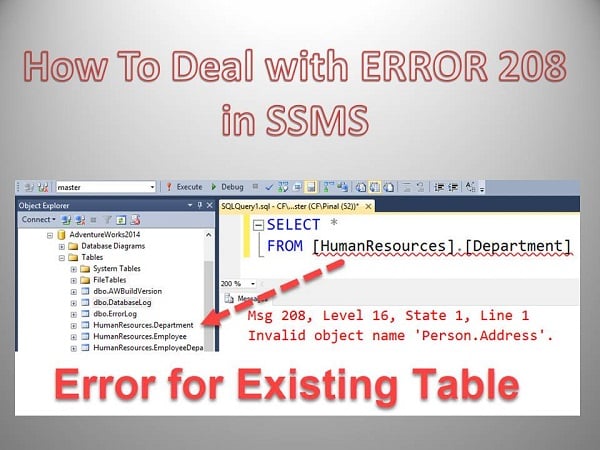
What is Error 208 in SSMS
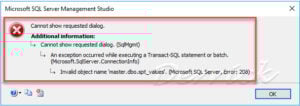 A lot of us or those DBAs who are not very experienced with using SQL Server, usually opt for exploring the software with the help of SQL Server Management Studio (SSMS). And while you are at it, you might click at a given object to know more about it, and suddenly come across a pop up stating ERROR 208! This is a point where a lot of you might get stuck. But after reading this article we hope things would get better as you would get a greater understanding of the subject.
What is most perplexing about this error to majority of DBAs is the fact that the object is visible to them in SSMS Object Explorer window but when they attempt to select it using T- SQL, they witness the error. This is the point where a lot of DBAs switch to extreme and desperate measures like restarting SSMS multiple times to furiously refreshing queries, restarting databases, etc. But to their sorrow, none of this will provide them with the solution they are looking for.
These practices fail to work because none of these is addressing the root cause of the error which is nothing but simple mismatch in database context.
How to Solve Error 208 in SSMS
Now that you know what is causing the error, finding the solution should not take long. The most common reason for this context mismatching error to occur is the fact that the default database context has been set to master. Well in 99 out of 100 cases, this ends up being the cause. And if this really is what is causing the error to appear in your system, then a very basic thing for you to do is changing the context of the database. And while you are at it, change it in a way that the context becomes similar to the current database object that is in use.
Once you perform this step, you will be glad to see that the error will appear no longer, and all other functions will also happen smoothly. This is one of those errors that almost every single DBA would have experienced, but few would actually know a way out of this situation without considering a repair sql action. This article would hopefully be of help to all of them. Apart from the solution given above, there is one more option that DBAs can try out; this involves prefixing multipart database name to the database that is in use. Or you might also want to change the database that opens by default once you login SSMS.
Author Introduction:
Victor Simon is a data recovery expert in DataNumen, Inc., which is the world leader in data recovery technologies, including corrupted mdb and sql recovery software products. For more information visit https://www.datanumen.com/
- Remove From My Forums
-
Question
-
Im Executing bcp <databasename.schema.tablename> out <destination file> -T -c but the result is always to export data from a table to a flat txt file
SQLState = S0002, NativeError = 208 Error =[Microsoft][Sql server native client 10.0][sql sevrer]Invalid object name ‘database.schema.table’
Inspite of the fact that I provide an exact full table name that exists effectively within my server instance
Im running sql server 2008 32 bit in a windows server 2008 32 bit machine
Thanks
The complexity resides in the simplicity
Answers
-
Ok friends,
I fortunately discovred whats wrong, and I want to share this experience may it help other people in the forum
In fact, if you have more than an sql server instance within your server or box or machine and you dont specify the server name then the bcp connect to the default instance by default, then if your data table stored procedure or what
ever it is, is stored within one of the named instances and Of Corse if you dont specify that server named instance full name, then the Native error = 208 will be raised and this is obviously logic because the data source that
you are handling exists within the named instance and not on the default one, hence the command must bebcp <databasename.schema.tablename> in|out <complete target path where data will be imported|exported> -S<Full server named instance name> -T |or specify credentials through -P/-U -c|-n
Try to execute that and it will work
The complexity resides in the simplicity
-
Proposed as answer by
Sunday, August 8, 2010 2:14 PM
-
Marked as answer by
Kalman TothEditor
Friday, August 13, 2010 5:45 PM
-
Proposed as answer by

WRITE FOR US
- Remove From My Forums
-
Question
-
I am unable to right click and view the properties on any database on this server I get this error
Invalid object name ‘master.dbo.spt_values’. (.Microsoft SQL Server , Error 208)
Ihave tried to run the u script and recieved an error missing table or permissions denied, I have verified that I have SA rights.
I compared the master DB with the working DB;s and dont see any differences. Where is this located ‘master.dbo.spt_values’ and how to resolve
SQL server 2012
Thanks in advance
David Yard
Answers
-
I would highly recommend restoring master. You have no idea what else might have been deleted in master.
-
Marked as answer by
Tuesday, October 23, 2012 6:58 AM
-
Marked as answer by
Problem
This technote addresses some of the issues that have been known to cause Invalid object name and SQLExecDirect errors in IBM® Rational® ClearQuest®, when you are using a Microsoft® SQL Server database back-end.
Symptom
The following error might be return if the SQL Server databases used by CQ are improperly configured:
An error was encountered with the database. You may have specified a database of unknown origin or a ClearQuest database instead of a ClearQuest Schema Repository. Please specify a valid ClearQuest Schema Repository.
SQLExecDirect: RETCODE=-1, State=S0002, Native Error=208
SQL statement="select metaschema_version from xxxxxxxx"
[Microsoft][ODBC SQL Server Driver][SQL Server]Invalid object name xxxxxxxx
Cause
User selected an empty database when connecting:
This has been know to occur when attempting to connect to an empty database.
NOTE: With certain database vendors, it is necessary to create an empty database prior to performing the actual schema repository creation. If a user is unaware that the schema repository has not yet been created within the database and then tries to connect to an existing schema repository using this database's information, the above error will be displayed.
User selected a ClearQuest User database and not the MASTER:
This error may indicate that the user has chosen a ClearQuest User/Production database and not the Master Schema Repository.
Possibly corrupt DBset:
This has been know to occur when attempting to connect to a corrupted DBSet name, which is the logical name of the Schema Repository.
Excess permissions on the SQL Server User:
This has been know to occur when the SQL User account has been assigned Server Roles
Resolving The Problem
User selected a empty database when connecting:
Create the schema repository via the ClearQuest Maintenance tool and provide the connection information to the empty database. Once created, users should be able to successfully connect to the schema repository.
User selected a ClearQuest User database and not the MASTER:
Have the User verify the information for the Master Schema Repository and retry connecting to the Schema Repository.
Possibly corrupt DBset:
Create a new DBSet name in the ClearQuest Maintenance tool and associate it to the Schema Repository.
Steps on how to create a new DBSet name
- Select Start > Programs > Rational ClearQuest > ClearQuest Maintenance tool
- On the menu bar select Connection > New
- Type in the Connection name
- Fill in the properties that are required by the database vendor for the ClearQuest Schema Repository
- Click Finish
Excess permissions on the SQL Server User:
- Open the SQL Server Enterprise Manager
- Navigate to the Security folder
- Expand the Security and select Logins
- In the right hand pane, select your SQL User account
- Right click and select the Properties
- Select the Server Roles tab
- Verify no options are selected (clear any selected)
Back to top
Related Information
Select metaschema_version from master_global - Problem
Unable to connect to the master schema repository using
[{"Product":{"code":"SSSH5A","label":"Rational ClearQuest"},"Business Unit":{"code":"BU053","label":"Cloud & Data Platform"},"Component":"Database Configuration/Connectivity - SQL Server","Platform":[{"code":"PF033","label":"Windows"}],"Version":"2003.06.00;2003.06.10;2003.06.12;2003.06.13;2003.06.14;2003.06.15;2003.06.16;7.0;7.0.0.1;7.0.0.2;7.0.1;7.0.1.1","Edition":"","Line of Business":{"code":"LOB45","label":"Automation"}}]
If you encounter error Msg 208, Level 16 “Invalid object name ‘OPENJSON’.”, you are probably trying to use the OPENJSON() function on a database with a compatibility level of less than 130.
OPENJSON() is only available under compatibility level 130 or higher.
To fix this, either increase the compatibility level of your database to 130 or higher, or change to a database that already has the appropriate compatibility level.
Example of Error
Here’s an example of some basic code that will cause this error.
USE Pets;
SELECT * FROM OPENJSON('["Cat","Dog","Bird"]');
Result:
Msg 208, Level 16, State 1, Line 1
Invalid object name 'OPENJSON'.
When your database compatibility level is lower than 130, SQL Server can’t find and run the OPENJSON() function.
In my case, the database I was trying to run this on had a compatibility level of 120.
Check the Compatibility Level of the Database
You can query sys.databases to check the compatibility level of the database (or all databases if you prefer).
SELECT compatibility_level
FROM sys.databases
WHERE name = 'Pets';
Result:
+-----------------------+
| compatibility_level   |
|-----------------------|
| 120                   |
+-----------------------+
As suspected, this database has a compatibility level of less than 130.
Solution 1
The most obvious solution is to increase the compatibility level of the database for which you’re trying to run OPENJSON() against.
ALTER DATABASE Pets
SET COMPATIBILITY_LEVEL = 150;
Running that code will increase the database’s compatibility level to 150, which is more than high enough to support the OPENJSON() function.
If we check the compatibility level again, we can see that it’s increased to 150.
SELECT compatibility_level
FROM sys.databases
WHERE name = 'Pets';
Result:
+-----------------------+
| compatibility_level   |
|-----------------------|
| 150                   |
+-----------------------+
Now we can run the original code without error.
USE Pets;
SELECT * FROM OPENJSON('["Cat","Dog","Bird"]');
Result:
+-------+---------+--------+
| key   | value   | type   |
|-------+---------+--------|
| 0     | Cat     | 1      |
| 1     | Dog     | 1      |
| 2     | Bird    | 1      |
+-------+---------+--------+
Solution 2
If for some reason you can’t, or don’t want to, change the compatibility level of the database, you could switch to a database that already has the appropriate compatibility level.
Obviously, this may or may not be suitable, depending on whether you need to insert your parsed JSON into the database or not.
Anyway, to do this, you could query sys.databases for a suitable database.
SELECT
    name,
    compatibility_level
FROM sys.databases;
Result:
+--------------------+-----------------------+
| name               | compatibility_level   |
|--------------------+-----------------------|
| master             | 150                   |
| tempdb             | 150                   |
| model              | 150                   |
| msdb               | 150                   |
| Music              | 150                   |
| Test               | 150                   |
| WideWorldImporters | 130                   |
| World              | 140                   |
| Pets               | 120                   |
+--------------------+-----------------------+
Fortunately in this case, all other databases are 130 or higher. So we could switch to any one of them.
USE World;
SELECT * FROM OPENJSON('["Cat","Dog","Bird"]');
Result:
+-------+---------+--------+
| key   | value   | type   |
|-------+---------+--------|
| 0     | Cat     | 1      |
| 1     | Dog     | 1      |
| 2     | Bird    | 1      |
+-------+---------+--------+
Error 208
Severity Level 16
Message Text
Invalid object name '%.*ls'.
Explanation
This error occurs when an object that does not exist is referenced. If the object exists, you might need to include the owner’s name in the object name.
If the object is not owned by the user attempting to access it, and it is not owned by the database owner, all references to the object must include the owner’s name. For example, if user1 creates a table called test, other users must use the name user1.test when they refer to the table.
The Microsoft® SQL Server™ naming convention for database objects is:
[[[server_name.][database_name].][owner_name].]object_name
The default value for server_name is the current server and the default value for database_name is the current database. The default value for owner_name is the current user. Because owner_name is part of the object name, it is possible for two different users to have tables with the same name in the same database (for example, user1.test and user2.test). For more information about naming conventions, see Transact-SQL Syntax Conventions.
This message can also occur when you reference a temporary table that was created with an EXECUTE statement.
Action
The procedure for handling this error depends on what you know about the object indicated in the error message text.
The appropriate permissions must also be set to allow access to an object. If these permissions are not set, error 229 or 230 occurs.
If you do not know who owns the object
- Execute sp_help with no parameters to display the object owner.
Or
- Query the Information Schema Views if the object is a table or view to determine the object owner and type. If the object is not a table or a view, query the sysobjects system table to determine the object owner and type.
For example, to determine the owner and type for the object named table_1, execute the following:
USE master
GO
SELECT TABLE_SCHEMA
FROM INFORMATION_SCHEMA.TABLES
WHERE TABLE_NAME = 'table_1'
GO
If no rows are returned from this query, the object either resides in a different database or does not exist.
If you do not own the object in question
- Include the object owner in the object name. For example:
SELECT *
FROM user1.table_1
Although using fully qualified object names eliminates this problem, remember that including the fully qualified object name in an application might complicate the maintenance of the application. For example, if all references to a table include the database name, changing the database name could become difficult.
Or
- Have the database owner create the object. If the owner creates the object, any user can find the object without specifying the owner. However, temporary tables reside in tempdb and are dropped automatically when the user process or server connection that created them is terminated. Users cannot share temporary tables, even if they are created by the database owner.
If the object does not reside in the database
- Switch context to the correct database using the USE statement. For example:
USE database_1Or
- Qualify the object name with the database name. For example:
SELECT *
FROM database_1.user1.table_1
If you own the object or if the object is owned by the database owner, the owner name is not needed. For example:
SELECT *
FROM database_1..table_1
If a temporary table created with an EXECUTE statement is referenced
- If you must use the EXECUTE statement to create a temporary table, create it as a global temporary table using the syntax ##tablename.
See Also
CREATE TABLE
Creating and Modifying a Table
Errors 1 — 999
EXECUTE
Information Schema Views
Querying SQL Server System Catalogs
SELECT
sp_help
sysobjects
Transact-SQL Syntax Conventions
USE