
Содержание
- Hikvision SADP error 2015 (solved)
- What causes the Error 2015 on the SADP tool
- How to fix the SADP Error 2015
- Related articles
- Hikvision SADP Activation error 2015 others
- Carlton
- alastairstevenson
- Carlton
- Carlton
- John17
- Carlton
- HPGNS
- ThiagoSS
- Коды ошибок SADP
- Коды ошибок SADP
Hikvision SADP error 2015 (solved)
This article will help you to solve the problem with the Hikvision SADP error 2015.
If you have a Hikvision camera or recorder (DVR or NVR), you may face this type of error while trying to configure the IP address. So let’s talk about a solution for that.
The message «Error 2015: Others» is displayed when the error occurs.
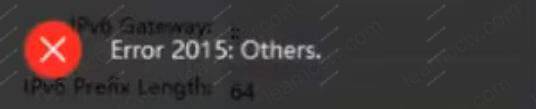
Hikvision SADP error 2015 message
Let’s understand why the problem occurs and how to solve it.
The error 2015 shows up when the devices are in different subnet range.
You usually see this error message when the computer running the SADP tool and the devices (DVR, NVR, or IP cameras) are not using similar IP addresses and subnet masks that allow them to be part of the same logical network.
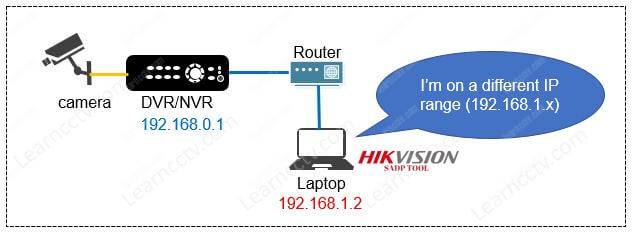
SADP Tool and DVR on different subnets
As you can see in the diagram, the DVR has the IP 192.168.0.1 , and the laptop has g the 192.168.1.2 , which is on a different subnet range. (supposing both are using the same subnet mask 255.255.255.0). Let’s talk about how to fix that problem.
How to fix the SADP Error 2015
You can add an extra IP address to your computer/laptop to match the Hikvision IP device’s range to make the SADP tool work properly and then change the camera or recorder IP address to the correct subnet range.
Let’s start by adding an extra IP address to your computer/laptop.
On the bottom of the screen, right-click the network icon (close to the windows clock) and select » Open Network & Internet Settings » as shown in the picture.
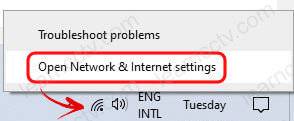
(If you don’t see this icon, just open the Control Panel and the Network & Internet).
Next, click on «Change adapter options».
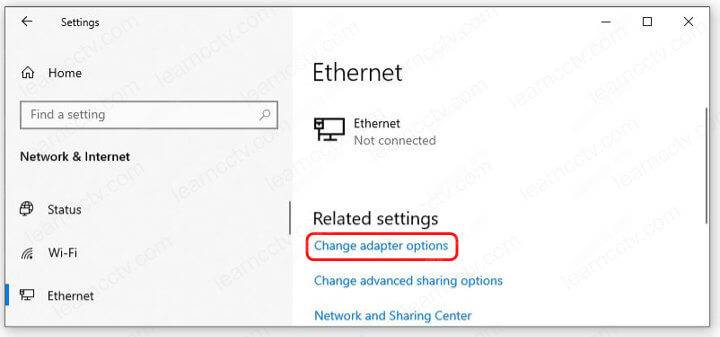
You may see a screen with the network adapters, as shown below.
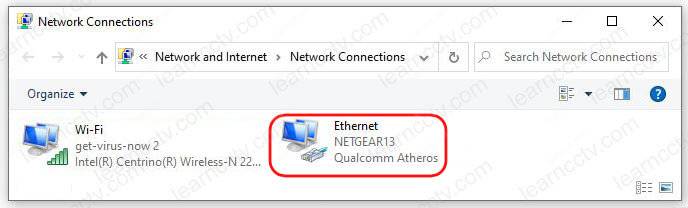
Right-click the interface that represents your connection and select «Properties«.
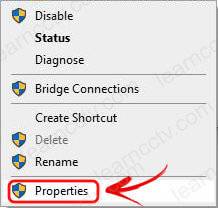
Double-click the «Internet Procotol Version 4» or click the «Properties» button.
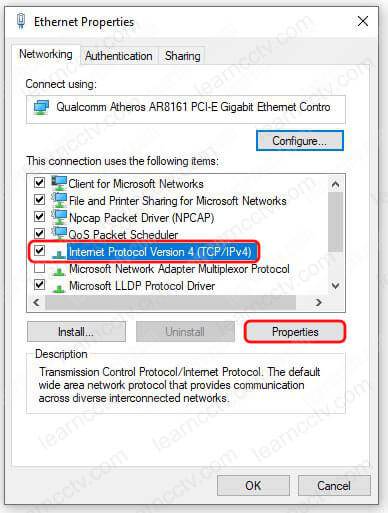
Click the «Avanced» button to open the next window.
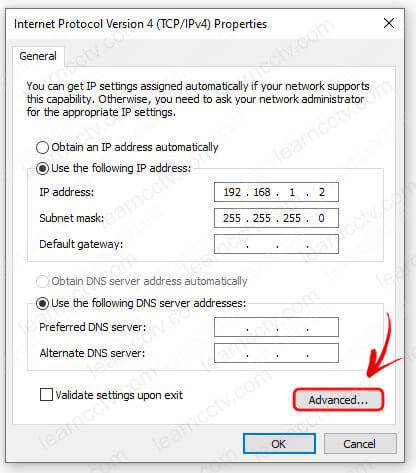
Click the «Add. » button to add an extra IP address.
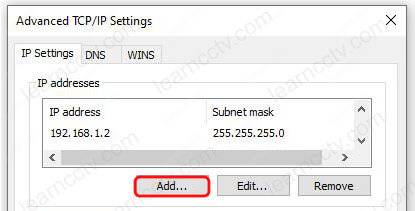
Add the extra IP address to the Ethernet interface.

After adding an extra IP address to the computer/laptop, the SADP tool can find the devices in the devices without a problem, and the error just goes away.
Now you can open the SADP tool and do whatever you want to do.
As you can see in the diagram below, the devices are in the same subnet range.
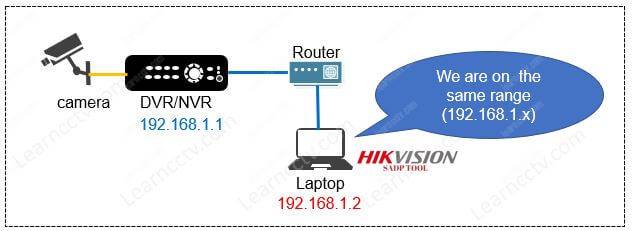
You shouldn’t see the SADP error 2015 anymore.
I recommend you change the Hikvision device IP address to the same subnet range used by your computer, and then you can remove the extra IP if you want to.
Related articles
Here are some related articles that can help you.
Источник
Hikvision SADP Activation error 2015 others

Carlton
I have downloaded the software, it identifies the inactive camera. I enter in a strong password and I get the error «error 2015 others.»
Can anyone please help me with this?
Thank You,
Carlton

alastairstevenson
Carlton
I have used many, 20 plus, combinations of passwords. Strong alpa numeric.
Thanks trying, I appreciate it.
Carlton
I tried it on another computer and I was able to get it to work. I am not sure why, but thank you to all who helped/ read this.
John17
I have downloaded the software, it identifies the inactive camera. I enter in a strong password and I get the error «error 2015 others.»
Can anyone please help me with this?
Thank You,
Carlton
I got this error on my Hikvision when I viewed the camera for the first time with SADP. I DID find a good work around:
The lan address listed on the box was 192.0.0.1 which I knew would not work in the USA.
I could not «activate» the camera using SADP due to the error, but it did appear in SADP.
But, the lan address was listed as 192.168.1.64. SO, I punched that address as is right into IE Explorer and the camera opened right up to the change PW screen and everything was fine for adjustments afterward.
I never did find anymore information about this error on the internet than was here. I think it was caused by my security settings on the computer which I am always tweaking, and messing up.
BTW: I believe the default lan address for all Hiks in the USA is 192.168.1.64.
Carlton

HPGNS
I got this error on my Hikvision when I viewed the camera for the first time with SADP. I DID find a good work around:
The lan address listed on the box was 192.0.0.1 which I knew would not work in the USA.
I could not «activate» the camera using SADP due to the error, but it did appear in SADP.
But, the lan address was listed as 192.168.1.64. SO, I punched that address as is right into IE Explorer and the camera opened right up to the change PW screen and everything was fine for adjustments afterward.
I never did find anymore information about this error on the internet than was here. I think it was caused by my security settings on the computer which I am always tweaking, and messing up.
BTW: I believe the default lan address for all Hiks in the USA is 192.168.1.64.

ThiagoSS
I got this error on my Hikvision when I viewed the camera for the first time with SADP. I DID find a good work around:
The lan address listed on the box was 192.0.0.1 which I knew would not work in the USA.
I could not «activate» the camera using SADP due to the error, but it did appear in SADP.
But, the lan address was listed as 192.168.1.64. SO, I punched that address as is right into IE Explorer and the camera opened right up to the change PW screen and everything was fine for adjustments afterward.
I never did find anymore information about this error on the internet than was here. I think it was caused by my security settings on the computer which I am always tweaking, and messing up.
BTW: I believe the default lan address for all Hiks in the USA is 192.168.1.64.
Yes it worked ,, configure the PC network interface with same CAM prefix, and Mask / 24, close SADP and try again,
Источник
Коды ошибок SADP
Коды ошибок SADP
Инструмент SADP — это программное обеспечение, которое можно использовать для обнаружения и изменения IP-адреса IP-камер, цифровых видеорегистраторов, сетевых видеорегистраторов, дверных звонков и т.д.
Довольно часто при попытке установить инструмент SADP или при нажатии кнопки поиска для сканирования сети на наличие IP-камер могут отображаться различные коды ошибок. В этом руководстве перечислены все коды ошибок SADP и их значения, которые помогут вам исправить проблемы.
В таблице ниже перечислены наиболее важные коды ошибок SADP, их кодовые номера, а в последнем столбце показано значение каждой ошибки.
| Ошибка SADP | Код ошибки | Имея в виду |
| SADP_NOERROR | Нет ошибки | |
| SADP_ALLOC_RESOURCE_ERROR | 2001 г. | Ошибка распределения ресурсов |
| SADP_NOT_START_ERROR | 2002 г. | SADP не запущен |
| SADP_NO_ADAPTER_ERROR | 2003 г. | Нет сетевой карты |
| SADP_GET_ADAPTER_FAIL_ERROR | 2004 г. | Не удалось получить информацию о сетевой карте |
| SADP_PARAMETER_ERROR | 2005 г. | Ошибка параметра |
| SADP_OPEN_ADAPTER_FAIL_ERROR | 2006 г. | Open NIC Failed |
| SADP_SEND_PACKET_FAIL_ERROR | 2007 г. | Отправка пакета не удалась |
| SADP_SYSTEM_CALL_ERROR | 2008 г. | Не удалось получить системный интерфейс |
| SADP_DENY_ERROR | 2009 г. | Устройство отказывается обрабатывать |
| SADP_NPF_INSTALL_FAILED | 2010 г. | Установить НПФ не удалось |
| SADP_TIME_OUT | 2011 г. | Тайм-аут устройства |
| SADP_CREATE_SOCKET_ERROR | 2012 г. | Ошибка создания сокета |
| SADP_BIND_SOCKET_ERROR | 2013 | Не удалось привязать сокет |
| SADP_JOIN_MULTI_CAST_ERROR | 2014 г. | Не удалось присоединиться к многоадресной рассылке |
| SADP_NETWORK_SEND_ERROR | 2015 г. | Ошибка отправки |
| SADP_NETWORK_RECV_ERROR | 2016 г. | Ошибка получения |
| SADP_XML_PARSE_ERROR | 2017 г. | Ошибка многоадресного анализа XML |
| SADP_LOCKED | 2018 г. | Устройство заблокировано |
| SADP_NOT_ACTIVATED | 2019 г. | Устройство не активировано |
| SADP_RISK_PASSWORD | 2020 г. | Пароль высокого риска |
| SADP_HAS_ACTIVATED | 2021 г. | Устройство было активировано |
| SADP_EMPTY_ENCRYPT_STRING | 2022 год | Зашифрованная строка пуста |
| SADP_EXPORT_FILE_OVERDUE | 2023 г. | Просрочен экспорт файла |
| SADP_PASSWORD_ERROR | 2024 г. | неверный пароль |
| SADP_LONG_SECURITY_ANSWER | 2025 г. | Длинный ответ безопасности |
| SADP_INVALID_GUID | 2026 г. | Неверный GUID |
| SADP_ANSWER_ERROR | 2027 г. | Неправильный ответ |
| SADP_QUESTION_NUM_ERR | 2028 г. | Ошибка номера секретного вопроса |
| SADP_LOAD_WPCAP_FALL | 2030 г. | Ошибка загрузки Wpcap |
| SADP_ILLEGAL-VERIFICATION_CODE | 2033 г. | Неверный проверочный код |
Анализ кода распространенной ошибки SADP
Ошибка параметра SADP 2005
Объяснение: Параметры, такие как пароль, серийный номер, не заполнены. При сбросе пароля импортированный файл пуст или его содержимое превышает 512 байт.
Устройство SADP 2009 отказывается обрабатывать
Объяснение: Ошибка пароля, номер порта HTTP недействителен, адрес IPv6 пуст, шлюз IPv6 пуст.
Истекло время ожидания устройства SADP 2011
Объяснение: Когда SADP отправляет запрос и не получает ответа от устройства через 10 секунд, он выдаст эту ошибку. В этой ситуации нам нужно использовать Wireshark для захвата пакетов для анализа времени ответа от устройства.
Ошибка отправки SADP 2015
Объяснение: Когда IP-адрес ПК изменяется и SADP не перезапускается, возникает ошибка.
SADP выскакивает с ошибкой «программа работает, сначала выйдите» после установки.
Объяснение: Если каталог установки совпадает с каталогом установки, убедитесь, что каталог установки программного обеспечения и пакет установки не находятся в одном каталоге.
SADP 2022 Зашифрованная строка пуста
Объяснение: Если при импорте файла XML не удается найти соответствующую зашифрованную строку, возникает ошибка. Вам необходимо перезагрузить устройство и снова сбросить пароль.
Надеемся, эта статья поможет вам разобраться с ошибками SADP.
Источник
This error occurs when you’re trying to set an IP address to either a Hikvision IP camera, DVR, NVR, or intercom system. Let’s say you want to adjust the IP address to match the network range of your local network but when you do so the SADP Tool shows Error 2015: Others.
This issue is caused by the computer and the camera (or any other Hikvision device) being on different subnets, so what happens is it will actually not allow you to either enable the HTTP or manually set the IP address.
To fix this you need to make some changes to your network adapter which then allows us to set the IP address. After that, you need to change the network adapter back to the previous settings and you’ll be good to go.
First of all, let’s see how the Hikvision error code 2015 shows up on the SADP. In this example, we have a Hikvision device on the network and we can see the IP address of the device (192.0.0.65) on the SADP tool.
If we click on Enable DHCP and enter the password we get the message Error 2015: Others. Same error shows up if you try to manually modify the IP address of your device.
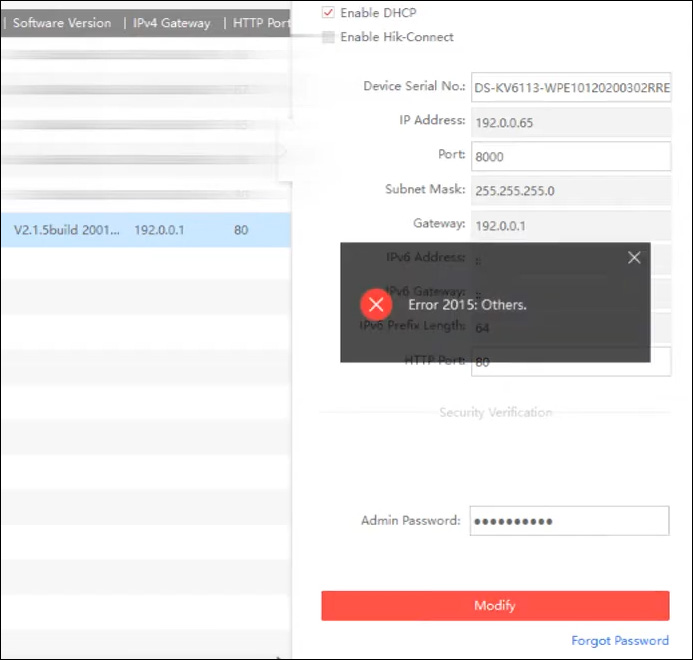
To fix this issue, go to the Network Adapter settings on our computer. In the bottom right corner, right click on the Network Adapter and then click Open Network & Internet settings.
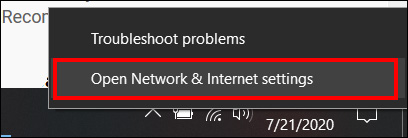 Click Change adapter options and you’ll see your Local Area Connection.
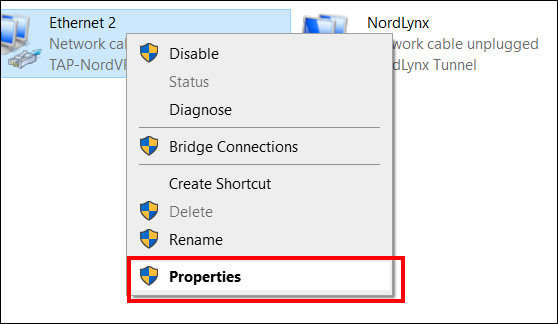
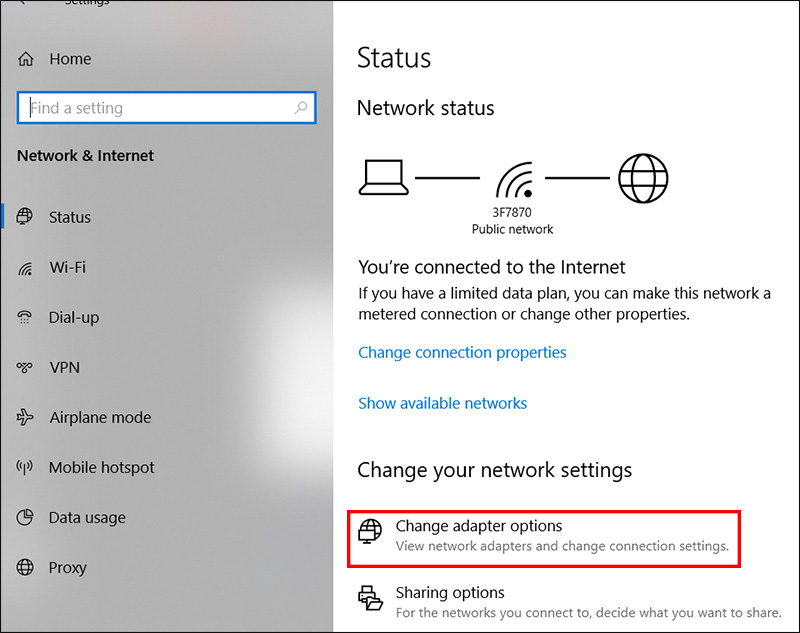 Right click again and go to Properties.
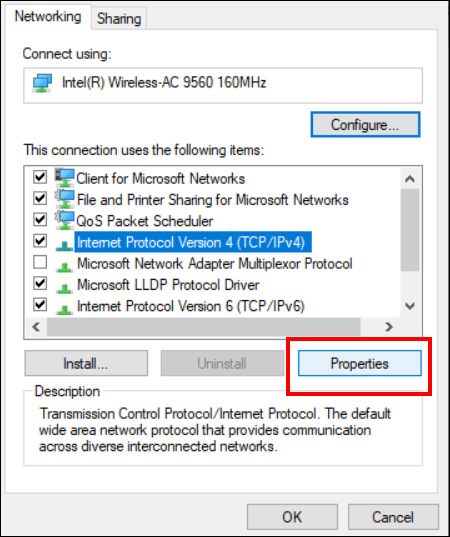
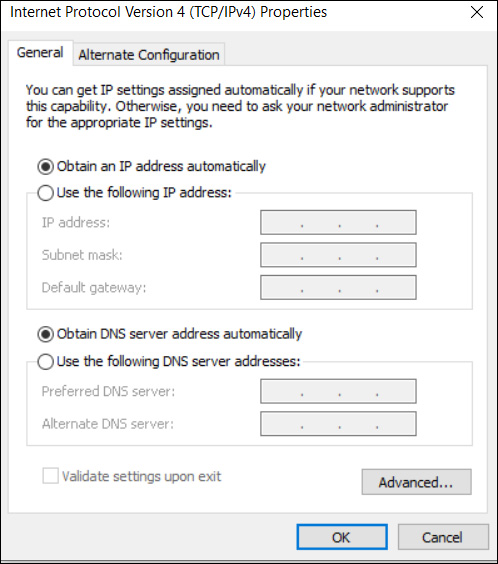
 Select Internet Protocol Version 4, then click Properties.
 Here you have to put the Network Adapter on the same range as that of the camera. In our case we have to put:
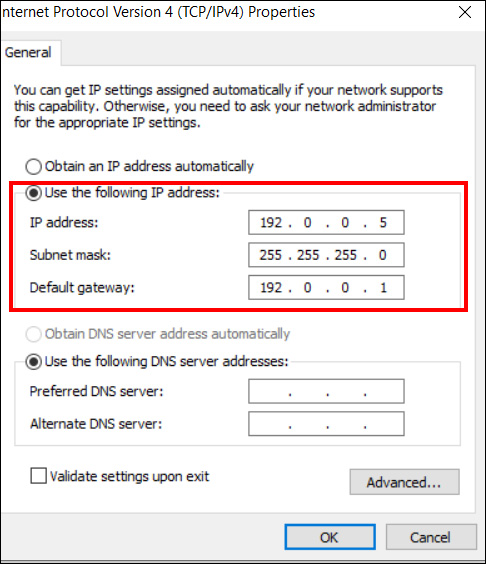
- IP address: 192.0.0.5
- Subnet Mask: 255.255.255.0
- Default Gateway: 192.0.0.1
Technically you can use any IP address as long as it’s the same format. Click Close and go back over to the SADP tool. Don’t do anything else but close down the SADP tool.
Most people don’t close the SADP tool and still get the same error message. You need to completely close it and after that, the settings we just did will take effect.
Reopen the SADP tool and change the IP address of your device, either by using the DHCP mode or setting it manually. This time the settings will go through successfully and no Error 2015 will show up.
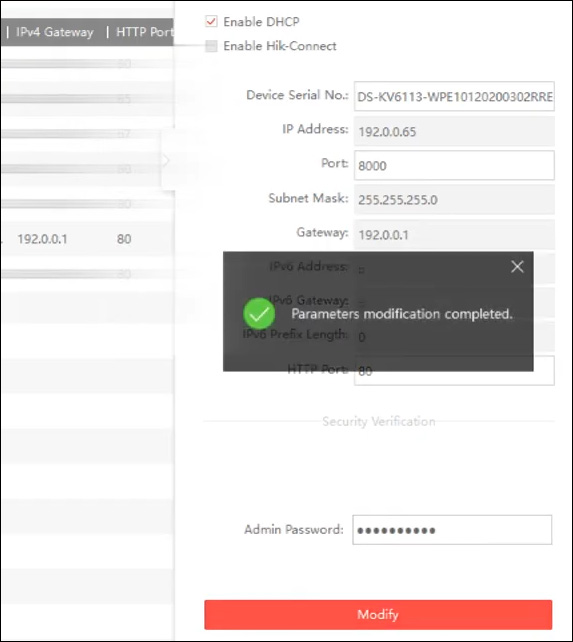 Once done, you need to change the network adapter settings back to the original. Go back to where you were before. Select “Obtain the IP address automatically”, close and all is done.
 Hope this tutorial was helpful to you.
This article will help you to solve the problem with the Hikvision SADP error 2015.
If you have a Hikvision camera or recorder (DVR or NVR), you may face this type of error while trying to configure the IP address. So let’s talk about a solution for that.
The message «Error 2015: Others» is displayed when the error occurs.
Hikvision SADP error 2015 message
Let’s understand why the problem occurs and how to solve it.
What causes the Error 2015 on the SADP tool
The error 2015 shows up when the devices are in different subnet range.
You usually see this error message when the computer running the SADP tool and the devices (DVR, NVR, or IP cameras) are not using similar IP addresses and subnet masks that allow them to be part of the same logical network.
SADP Tool and DVR on different subnets
As you can see in the diagram, the DVR has the IP 192.168.0.1, and the laptop has g the 192.168.1.2, which is on a different subnet range. (supposing both are using the same subnet mask 255.255.255.0). Let’s talk about how to fix that problem.
How to fix the SADP Error 2015
You can add an extra IP address to your computer/laptop to match the Hikvision IP device’s range to make the SADP tool work properly and then change the camera or recorder IP address to the correct subnet range.
Let’s start by adding an extra IP address to your computer/laptop.
On the bottom of the screen, right-click the network icon (close to the windows clock) and select «Open Network & Internet Settings » as shown in the picture.
(If you don’t see this icon, just open the Control Panel and the Network & Internet).
Next, click on «Change adapter options».
You may see a screen with the network adapters, as shown below.
Right-click the interface that represents your connection and select «Properties«.
Double-click the «Internet Procotol Version 4» or click the «Properties» button.
Click the «Avanced» button to open the next window.
Click the «Add…» button to add an extra IP address.
Add the extra IP address to the Ethernet interface.
After adding an extra IP address to the computer/laptop, the SADP tool can find the devices in the devices without a problem, and the error just goes away.
That’s cool, huh?
Now you can open the SADP tool and do whatever you want to do.
As you can see in the diagram below, the devices are in the same subnet range.
You shouldn’t see the SADP error 2015 anymore.
I recommend you change the Hikvision device IP address to the same subnet range used by your computer, and then you can remove the extra IP if you want to.
Related articles
Here are some related articles that can help you.
Conclusion
The Hikvision SADP error 2015 can be easily fixed. You just need to set up every device on the local network to same subnet range and the error disappers.
If you need extra information, please visit the Hikvsion website.
I hope this article can help you; please share it with your friends.
-
#1
Hello,
I have downloaded the software, it identifies the inactive camera. I enter in a strong password and I get the error «error 2015 others.»
Can anyone please help me with this?
Thank You,
Carlton

-
#2
I enter in a strong password and I get the error «error 2015 others.»
Did you use any non-alpha-numeric characters that may not be supported?
Try a strong password with alpha-numeric only and see if that works.
-
#3
I have used many, 20 plus, combinations of passwords. Strong alpa numeric.
Thanks trying, I appreciate it.
-
#4
I tried it on another computer and I was able to get it to work. I am not sure why, but thank you to all who helped/ read this.
Carlton
-
#5
Hello,
I have downloaded the software, it identifies the inactive camera. I enter in a strong password and I get the error «error 2015 others.»
Can anyone please help me with this?
Thank You,
Carlton
I got this error on my Hikvision when I viewed the camera for the first time with SADP. I DID find a good work around:
The lan address listed on the box was 192.0.0.1 which I knew would not work in the USA.
I could not «activate» the camera using SADP due to the error, but it did appear in SADP.
But, the lan address was listed as 192.168.1.64. SO, I punched that address as is right into IE Explorer and the camera opened right up to the change PW screen and everything was fine for adjustments afterward.
I never did find anymore information about this error on the internet than was here. I think it was caused by my security settings on the computer which I am always tweaking, and messing up.
BTW: I believe the default lan address for all Hiks in the USA is 192.168.1.64.
-
#7
I got this error on my Hikvision when I viewed the camera for the first time with SADP. I DID find a good work around:
The lan address listed on the box was 192.0.0.1 which I knew would not work in the USA.
I could not «activate» the camera using SADP due to the error, but it did appear in SADP.
But, the lan address was listed as 192.168.1.64. SO, I punched that address as is right into IE Explorer and the camera opened right up to the change PW screen and everything was fine for adjustments afterward.
I never did find anymore information about this error on the internet than was here. I think it was caused by my security settings on the computer which I am always tweaking, and messing up.
BTW: I believe the default lan address for all Hiks in the USA is 192.168.1.64.
Still helpful in 2019. Thank you.
-
#8
I got this error on my Hikvision when I viewed the camera for the first time with SADP. I DID find a good work around:
The lan address listed on the box was 192.0.0.1 which I knew would not work in the USA.
I could not «activate» the camera using SADP due to the error, but it did appear in SADP.
But, the lan address was listed as 192.168.1.64. SO, I punched that address as is right into IE Explorer and the camera opened right up to the change PW screen and everything was fine for adjustments afterward.
I never did find anymore information about this error on the internet than was here. I think it was caused by my security settings on the computer which I am always tweaking, and messing up.
BTW: I believe the default lan address for all Hiks in the USA is 192.168.1.64.
Yes it worked ,, configure the PC network interface with same CAM prefix, and Mask / 24, close SADP and try again,
worked here.
-
#9
It works after I restart the SADP tool its amazing.

|
Error |
Code |
information |
|
SADP_NOERROR |
0 |
No Error |
|
SADP_ALLOC_RESOURCE_ERROR |
2001 |
Allocation of resource error |
|
SADP_NOT_START_ERROR |
2002 |
SADP not started |
|
SADP_NO_ADAPTER_ERROR |
2003 |
No NIC |
|
SADP_GET_ADAPTER_FAIL_ERROR |
2004 |
Get NIC info failed |
|
SADP_PARAMETER_ERROR |
2005 |
Parameter Error |
|
SADP_OPEN_ADAPTER_FAIL_ERROR |
2006 |
Open NIC Failed |
|
SADP_SEND_PACKET_FAIL_ERROR |
2007 |
Sending Packet Failed |
|
SADP_SYSTEM_CALL_ERROR |
2008 |
Get system interface failed |
|
SADP_DENY_ERROR |
2009 |
Device refuse to process |
|
SADP_NPF_INSTALL_FAILED |
2010 |
Install NPF failed |
|
SADP_TIME_OUT |
2011 |
Device time out |
|
SADP_CREATE_SOCKET_ERROR |
2012 |
Create socket failed |
|
SADP_BIND_SOCKET_ERROR |
2013 |
Bind socket failed |
|
SADP_JOIN_MULTI_CAST_ERROR |
2014 |
Join multi-cast failed |
|
SADP_NETWORK_SEND_ERROR |
2015 |
Sending error |
|
SADP_NETWORK_RECV_ERROR |
2016 |
Receiving error |
|
SADP_XML_PARSE_ERROR |
2017 |
Multi-cast XML parse error |
|
SADP_LOCKED |
2018 |
Device is locked |
|
SADP_NOT_ACTIVATED |
2019 |
Device is not activated |
|
SADP_RISK_PASSWORD |
2020 |
High risk password |
|
SADP_HAS_ACTIVATED |
2021 |
Device has been activated |
|
SADP_EMPTY_ENCRYPT_STRING |
2022 |
The encrypted string is empty |
|
SADP_EXPORT_FILE_OVERDUE |
2023 |
Export file overdue |
|
SADP_PASSWORD_ERROR |
2024 |
Incorrect password |
|
SADP_LONG_SECURITY_ANSWER |
2025 |
Long security answer |
|
SADP_INVALID_GUID |
2026 |
Invalid GUID |
|
SADP_ANSWER_ERROR |
2027 |
Incorrect answer |
|
SADP_QUESTION_NUM_ERR |
2028 |
Security question number error |
|
SADP_LOAD_WPCAP_FALL |
2030 |
Load Wpcap failed |
|
SADP_ILLEGAL-VERIFICATION_CODE |
2033 |
Illegal verification code |
Hikvision SADP Tool Common Errors and Solutions :-
- 2005 parameter error
Possible situations:
Parameter such as password, serial number, is empty.
When reset the password, imported file is empty or the file’s content has more than 512 bytes.
-
2009 device refuse to process
Possible situations:
Password error, HTTP port number is invalid, IPv6 address is empty, IPv6 gateway is empty.
-
2011 device timed out
When SADP sends an request, and no response from the device after 10 seconds, it will give this error, in this situation we need to use Wireshark to capture the packets to analyze the response time from the device.
-
2015 sending error
When the IP address of the PC is changed, and SADP is not restarted, the error will occur.
-
SADP pop up with error ”the software is running, please exit first” after installation
When the installation directory is same as the installation package, ensure the software installation directory and installation package are not in the same directory.
-
2022 The encrypted string is empty
When import the XML file, and cannot find the corresponding encrypted string, the error will occur, we need restart the device and reset the password again.
Subscribe Us on YouTube: CCTV Networking Technical Support