
If you spend time running lots of MySQL queries, you might come across the Error Code: 2013. Lost connection to MySQL server during query. This article offers some suggestions on how to avoid or fix the problem.
Why this happens
This error appears when the connection between your MySQL client and database server times out. Essentially, it took too long for the query to return data so the connection gets dropped.
Most of my work involves content migrations. These projects usually involve running complex MySQL queries that take a long time to complete. I’ve found the WordPress wp_postmeta table especially troublesome because a site with tens of thousands of posts can easily have several hundred thousand postmeta entries. Joins of large datasets from these types of tables can be especially intensive.
Avoid the problem by refining your queries
In many cases, you can avoid the problem entirely by refining your SQL queries. For example, instead of joining all the contents of two very large tables, try filtering out the records you don’t need. Where possible, try reducing the number of joins in a single query. This should have the added benefit of making your query easier to read. For my purposes, I’ve found that denormalizing content into working tables can improve the read performance. This avoids time-outs.
Re-writing the queries isn’t always option so you can try the following server-side and client-side workarounds.
Server-side solution
If you’re an administrator for your MySQL server, try changing some values. The MySQL documentation suggests increasing the net_read_timeout or connect_timeout values on the server.
Client-side solution
You can increase your MySQL client’s timeout values if you don’t have administrator access to the MySQL server.
MySQL Workbench
You can edit the SQL Editor preferences in MySQL Workbench:
- In the application menu, select Edit > Preferences > SQL Editor.
- Look for the MySQL Session section and increase the DBMS connection read time out value.
- Save the settings, quite MySQL Workbench and reopen the connection.

Navicat
How to edit Navicat preferences:
- Control-click on a connection item and select Connection Properties > Edit Connection.
- Select the Advanced tab and increase the Socket Timeout value.
Command line
On the command line, use the connect_timeout variable.
Python script
If you’re running a query from a Python script, use the connection argument:
con.query('SET GLOBAL connect_timeout=6000')
Is your database restore stuck with MySQL Error 2013 (hy000)?
Often queries or modifications in large databases result in MySQL errors due to server timeout limits.
At Bobcares, we often get requests to fix MySQL errors, as a part of our Server Management Services.
Today, let’s see how our Support Engineers fix MySQL Error 2013 (hy000) for our customers.
Why this MySQL Error 2013 (hy000) happens?
While dealing with MySQL, we may encounter some errors. Today, we are going to discuss one such error.
This MySQL 2013 error occurs during a restore of databases via mysqldump, in MySQL replication, etc.
This error appears when the connection between MySQL client and database server times out.
In general, this happens in databases with large tables. As a result, it takes too much time for the query to return data and the connection drops with an error.
Other reasons for the error include a large number of aborted connections, insufficient server memory, server restrictions, etc.
How do we fix MySQL Error 2013 (hy000)?
The fix for MySQL Error 2013 (hy000) depends a lot on the triggering reason. Let’s now see how our MySQL Engineers help customers solve it.
1. Changing MySQL limits
Recently, one of our customers approached us saying that he is getting an error like the one shown below while he is trying to connect with MySQL server.

So, our Engineers checked in detail and found that the connect_timeout value was set to only a few seconds. So, we increased it to 10 in the MySQL configuration file. For that, we followed the steps below:
Firstly, we opened the MySQL configuration file at /etc/mysql/my.cnf
Then, we searched for connect_timeout and set it as:
connect_timeout=10Then we tried connecting with MySQL server and we were successful.
Additionally, it requires the proper setting of the variable max_allowed_packet in the MySQL configuration file too. While trying to restore the dump file in GB sizes, we increase the value to a higher one.
2. Disable Access restrictions
Similarly, this error also appears when the host has access restrictions. In such cases, we fix this by adding the client’s IP in /etc/hosts.allow or allow it in the server firewall.
Also, the error can happen due to the unavailability of the server. Recently, in a similar instance, the problem was not related to MySQL server or MySQL settings. We did a deep dig and found that high network traffic is causing the problem.
When we checked we found that a weird process running by the Apache user. So, we killed that and this fixed the error.
3. Increasing Server Memory
Last and not least, MySQL memory allocation also becomes a key factor for the error. Here, the server logs will have related entries showing the insufficient memory limit.
Therefore, our Dedicated Engineers reduce the innodb_buffer_pool size. This reduces the memory allocation on the server and fixes the error.
[Need assistance with MySQL errors – We can help you fix it]
Conclusion
In short, we discussed in detail on the causes for MySQL Error 2013 (hy000) and saw how our Support Engineers fix this error for our customers.
PREVENT YOUR SERVER FROM CRASHING!
Never again lose customers to poor server speed! Let us help you.
Our server experts will monitor & maintain your server 24/7 so that it remains lightning fast and secure.
GET STARTED
var google_conversion_label = «owonCMyG5nEQ0aD71QM»;
The misstep depicted in the title of this article is entirely outstanding. A couple of attempts on handling the issue exist in various articles on the web. However, in error 2013 you lost connection to MySQL server during a query, concerning this article, there is a specific condition that is exceptionally novel so in the end, it causes the error to occur. The error occurs with the specific error message. That error message is in the going with yield message:
- root@hostname ~# mysql – uroot – p – h 127.0.0.1 – P 4406
- Enter secret key:
- Error 2013 (HY000): Lost relationship with MySQL server at ‘examining initial correspondence bundle’, system error: 0
- root@hostname ~#
The above error message is a result of partner with a MySQL Database Server. It is a standard MySQL Database Server running on a machine. However, the real connection is a substitute one. The connection exists using Worker holder running collaboration. Coming up next is the reliable running course of that Worker holder:
- root@hostname ~# netstat – tulpn | grep 4406
- tcp6 0:4406: * LISTEN 31814/worker-go-between
- root@hostname ~#
There are at this point lots of articles analyze about this mix-up. For a model in this association in the stack overflow or this association and one more in this association, besides in this association. The general issue is truly something almost identical. There is something misguided in the running arrangement of the regular MySQL Database Server.
Why this happens
This misstep appears when the relationship between your MySQL client and database server times out. Essentially, it took unreasonably long for the request to return data so the connection gets dropped.
By far most of my work incorporates content migrations. These activities for the most part incorporate running complex MySQL requests that burn through a huge lump of the day to wrap up. I’ve found the WordPress wp_postmeta table especially hazardous considering the way that a site with countless posts can without a very remarkable stretch have two or three hundred thousand post meta sections. Joins of enormous datasets from such tables can be especially genuine.
Avoid the issue by sanitizing your requests
Generally speaking, you can avoid the issue absolutely by refining your SQL questions. For example, instead of joining all of the substance of two especially immense tables, have a go at filtering through the records you needn’t waste time with. Where possible, have a go at reducing the amount of partakes in a singular inquiry. This should have the extra benefit of simplifying your inquiry to examine. For my inspirations, I’ve found that denormalizing content into working tables can deal with the read execution. This avoids breaks.
Re-making the inquiries isn’t, by and large, another option so you can effort the going with server-side and client-side workarounds.

A server-side course of action
If you’re ahead for your MySQL server, make a pass at changing a couple of characteristics. The MySQL documentation proposes extending the net_read_timeout or connect timeout values on the server.
The client-side course of action
You can extend your MySQL client’s sever regards on the possibility that you don’t have exclusive induction to the MySQL server.
MySQL Worktable
You can adjust the SQL Editor tendencies in MySQL Work Table:
- In the application menu, select Edit > Preferences > SQL Editor.
- Quest for the MySQL Session portion and augmentation the DBMS connection read break regard.
- Save the settings, very MySQL Work Table, and return the connection.
Step for handling the issue
There are a couple of stages for handling the issue above. There are two segments for handling the issue. The underlying portion is for perceiving the principal driver of the issue. Later on, the ensuing part is the genuine plan taken for tending to the fundamental driver of that issue. Thusly, going with the region which is the underlying portion will focus on power to search for the justification behind the issue.
Glancing through the justification behind the issue
Because of this article, coming up next is the means for settling the mix-up
- Check whether the MySQL Database Server measure is truly running. Effect it as follows using any request plan open in the working for truly taking a gander at a running connection. Concerning this article, it is ‘systemctl status MySQL. Thusly, coming up next is a model for the execution of the request plan:
- root@hostname ~# systemctl status MySQL
- service – MySQL Community Server
- Stacked: stacked (/lib/systemd/structure/mysql.service; horrible; vendor preset: engaged)
- Dynamic: dynamic (running) since Mon 2019-09-16 13:16:12; 40s back
- Cycle: 14867 ExecStart=/usr/sbin/mysqld – demonize – pid-file=/run/mysqld/mysqld. Pid (code=exited, status=0/SUCCESS)
- Connection: 14804 ExecStartPre=/usr/share/mysql/mysql-systemd-start pre (code=exited, status=0/SUCCESS)
- Guideline PID: 14869 (mysqld)
- Tasks: 31 (limit: 4915)
- Group:/system. Slice/mysql.service
- └─14869/usr/sbin/mysqld – daemonize – pid-file=/run/mysqld/mysqld. Pid
- root@hostname ~#
- Preceding partner with MySQL Database Server using a substitute port focusing on any moving toward requesting where it is a worker compartment measure dealing with, basically test the regular connection. By the day’s end, the partner using the normal port tuning in the machine for any moving toward a relationship with MySQL Database Server. Normally, it exists in port ‘3306’. Do it as follow:
- root@hostname ~# mysql – uroot
- Goof 2002 (HY000): Can’t interface with neighborhood MySQL server through connection ‘/var/run/mysqld/mysqld. Sock’ (2)
- root@hostname ~#
The above screw-up message is where the genuine root issue is. Check for the genuine report which is tending to the connection record for MySQL daemon measure as follows:
- root@hostname ~# disc/var/run/mysqld/
- root@hostname ~# ls
- Pid MySQL. sock MySQL. sock. Lock
- root@hostname ~#
As shown by the above yield, the report doesn’t exist. That is the explanation the relationship with MySQL Database Server is continually failed. Even though the connection cooperation is done through the default port of ‘3306’.
- The effort to restart the cooperation and trust that it will handle the issue.
- root@hostname ~# systemctl stop MySQL
- root@hostname ~# systemctl start MySQL
- root@hostname ~# mysql – uroot
- Slip-up 2002 (HY000): Can’t interface with neighborhood MySQL server through connection ‘/var/run/mysqld/mysqld. Sock’ (2)
- root@hostname ~#
- Unfortunately, the above cycle moreover wraps up in disappointment. Progress forward the movement for handling the issue, just check the MySQL Database arrangement record. In the wake of really investigating the report course of action, it doesn’t fit in any way shape, or form. Eventually, going through hours for changing the arrangement records, nothing happens.
For the reason happens above, check the right game plan before to see which MySQL Database Server arrangement is used by the running MySQL Database Server.
How might we fix MySQL Error 2013 (hy000)?
The fix for MySQL Error 2013 (hy000) depends a ton upon the setting off reason. We should now see how our MySQL Engineers help customers with settling it.
1. Changing MySQL limits
Lately, one of our customers pushed toward us saying that he is getting a mix-up as the one showed underneath while he is efforting to interface with the MySQL server.
Along these lines, our Engineers checked thoroughly and found that the connect timeout regard was set to two or three minutes. Thusly, we extended it to 10 in the MySQL arrangement record. For that, we followed the means underneath:
First thing, we opened the MySQL plan archive at, etc/MySQL/my.cnf
Then, we searched for connect timeout and set it as:
connect timeout=10
Then, we had a go at partner with MySQL server and we were viable.
Additionally, it requires the genuine setting of the variable max_allowed_packet in the MySQL arrangement record also. While efforting to restore the landfill record in GB sizes, we increase the value to a higher one.
2. Disabled person Access limits
This slip-up in like manner appears when the host approaches impediments. In such cases, we fix this by adding the client’s IP in, etc/hosts. Allow or license it in the server firewall.
Similarly, the error can happen as a result of the detachment of the server. Lately, in a similar case, the issue was not related to MySQL server or MySQL settings. We did a significant tunnel and found that high association traffic is causing the issue.
Exactly when we checked we found that an unconventional communication running by the Apache customer. Thusly, we killed that, and this good misstep.
3. Growing Server Memory
Last and not least, MySQL memory apportioning furthermore transforms into a basic factor for the slip-up. Here, the server logs will have related segments showing the lacking memory limit.
Subsequently, our Dedicated Engineers decline the innodb_buffer_pool size. This reduces the memory segment on the server and fixes the slip-up.
Checking the MySQL Database Server configuration used by the running MySQL Database Server
In the past fragment or part, there is a need to search for the real plan report used by the running MySQL Database Server. It is essential to guarantee that the plan record used is the right one. Thusly, every change can invite the right impact on dealing with the mix-up issue. Coming up next is the movement for searching for it:
- Truly check out the once-over of the assistance first by suggesting the running framework. In the past part, the running framework is the ‘MySQL one. Execute the going with request guide to list the open running cycle:
systemctl list-unit-reports | grep MySQL
The yield of the above request plan for a model is in the going with one:
- user hostname: ~$ systemctl list-unit-archives | grep MySQL
- service horrendous
- Service horrendous
- user hostname: ~$
- Then, at that point, truly investigate the substance of the help by executing the going with the request. Pick the right help, in this particular circumstance, it is ‘MySQL. service’:
- user hostname: ~$ systemctl cat myself. service
- #/lib/system/structure/Mysql.service
- # MySQL systemd organization record
- [Unit]
- Description=MySQL Community Server
- After=network. Target
- [Install]
- Wanted by=multi-user. Target
- [Service]
- Type=forking
- User=mysql
- Group=mysql
- PIDFile=/run/mysqld/mysqld. Pid
- PermissionsStartOnly=true
- ExecStartPre=/usr/share/mysql/mysql-systemd-start pre
- ExecStart=/usr/sbin/mysqld – daemonize – pid-file=/run/mysqld/mysqld. Pid
- Timeouts=600
- Restart=on-dissatisfaction
- Runtime Directory=mysqld
- RuntimeDirectoryMode=755
- LimitNOFILE=5000
- user hostname: ~$
- The record obligated for starting the help is in the archive ‘/usr/share/MySQL/MySQL-systems-start’ according to the yield message above. Coming up next is the substance of that record which is only fundamental for it:
- if [! – r, etc/MySQL/my.cnf]; then,
- resonation “MySQL arrangement not found at, etc/MySQL/my.in. Assuming no one minds, make one.”
- leave 1
- fi
- …..
- Resulting in truly taking a gander at the substance of the report ‘/, etc/MySQL/my.on, obviously, it isn’t the right record. Accordingly, to be more exact, there are other ways to deal with find the planned archive used by the running MySQL Database Server. The reference or the information exists in this association. Hence, according to the information in that association, basically perform the going with request guide to get the right one. It is forgetting the cycle ID and the right MySQL Database Server running collaboration:
- root@hostname ~# netstat – tulpn | grep 3306
- tcp6 0:3306: * LISTEN 21192/mysqld
- root@hostname ~# ps aux | grep 21192
- root@hostname ~# ps aux | grep 21192
- mysql 21192 0.2 0.1 3031128 22664? Sl Sep16 1:39/usr/sbin/mysqld – daemonize – pid-file=/run/mysqld/mysqld. Pid
- root 25442 0.0 23960 1068 pts/20 S+ 01:41 0:00 grep 21192
- root@hostname ~#
- Ensuing to getting the right running cycle, do the going with the request of ‘trace file_name_process’:
- root@hostname ~# album/usr/bin/
- root@hostname ~# strace. /mysqld
- Coming up next is fundamental for the yield of the request:
- detail, etc/my.cnf”, 0x7fff2e917880) = – 1 ENOENT (No such archive or vault)
- detail, etc/mysql/my.cnf”, {st_mode=S_IFREG|0644, st_size=839, …}) = 0
- openat (AT_FDCWD, “/, etc/mysql/my.cnf”, O_RDONLY) = 3
- fstat (3, {st_mode=S_IFREG|0644, st_size=839, …}) = 0
- brk(0x35f6000) = 0x35f6000
- read (3, “#n# The MySQL data base server co”…, 4096) = 839
- openat (AT_FDCWD, “/, etc/mysql/conf. d/”, O_RDONLY|O_NONBLOCK|O_CLOEXEC|O_DIRECTORY) = 4
- fstat (4, {st_mode=S_IFDIR|0755, st_size=4096, …}) = 0
- get dents (4, /* 4 entries */, 32768) = 120
- get dents (4, /* 0 entries */, 32768) = 0
- close (4) = 0
- detail, etc/mysql/conf.d/mysql.cnf”, {st_mode=S_IFREG|0644, st_size=629, …}) = 0
- openat (AT_FDCWD, “/, etc/mysql/conf.d/mysql.cnf”, O_RDONLY) = 4
- fstat (4, {st_mode=S_IFREG|0644, st_size=629, …}) = 0
- read (4, “[mysqld]nn# Connection and Three”…, 4096) = 629
- read (4, “”, 4096) = 0
- close (4) = 0
- detail, etc/mysql/conf.d/mysqldump.cnf”, {st_mode=S_IFREG|0644, st_size=55, …}) = 0
- openat (AT_FDCWD, “/, etc/mysql/conf.d/mysqldump.cnf”, O_RDONLY) = 4
- fstat (4, {st_mode=S_IFREG|0644, st_size=55, …}) = 0
- read (4, “[MySQL dump] nquicknquote-namesnma”…, 4096) = 55
- read (4, “”, 4096) = 0
- close (4) = 0
- read (3, “”, 4096) = 0
- close (3) = 0
- detail (“/root/.my. cnf”, 0x7fff2e917880) = – 1 ENOENT (No such record or list)
The right one is finally in ‘/, etc/MySQL/conf.d/mysql.cf. Resulting in truly investigating the substance of the record, it is an empty archive. This is its essential driver. There has been some update and inverse present type of the MySQL Database Server, it making some disaster area the MySQL Database Server. The plan is essentially to fill that empty plan record with the right arrangement. The reference for the right arrangement of MySQL Database Server exists in this association. Restart the MySQL Server again, the above error issue will be tended to.
Solving Error 2013: Lost connection to MySQL server during query when dumping table
Find out how you can solve Error 2013

Written by Brent Sanders
Updated over a week ago
Are you getting failed backups with an error similar to: mysqldump: Error 2013: Lost connection to MySQL server during query when dumping table ….
If so there are several options you can try to resolve:
-
it is possible that the backup is hitting the MySQL timeout limits.
The particular variables in question here are net_read_timeout and net_write_timeout which are set to 30 and 60 seconds respectivley.
You can change these in the my.cnf config file by setting them as you desire. Here is an example. After making these changes to my.cnf you must restart MySQL
net_read_timeout = 120
net_write_timeout = 900
If you prefer to change these settings without needing to reboot MySQL you can do that with the following SQL statements:
set global net_read_timeout = 120;
set global net_write_timeout = 900;
Again, use the value for these settings that you feel is appropriate for your setup.
2) Increase max_allowed_packet setting
You might try increasing the max_allowed_packet configuration setting. You could try setting it to 256M or even up to 1G
3) You could have a corrupt table
Sometimes «Lost connection» errors are caused by a corrupt table. You could try setting innodb_force_recovery = 1 and restart mysql to see if that helps. If it does, doing the dump might fix the page cache in which you can often turn this back to 0 or remove.
🎉🎉🎉
We hope you find this helpful! If you need any further assistance, please contact us and we’ll be more than glad to help you out.
November 4, 2017 | Posted in SQL
This is kind of a silly and duplicative post, but I spent too much time searching for the right answer, so maybe this will help the right course of action bubble to the top faster in the future.
The Issue
I was trying to run a query on my local SQL install (whatever MAMP manages and provisions) using MySQL Workbench 6.3 for Mac but kept getting a timeout error.

The query itself wasn’t overly complex, but I was using aggregate functions, group by, and a join to consolidate a dataset. I’m working with distance education reporting data for all U.S. colleges and universities from 2012-2015, so this join involved a 7K row table and another with 25K rows, so not inconsequential but also not BIG data level.
SELECT
STABBR as State,
EFDELEV as Level ,
SUM(EFDETOT) as Total_Distance,
SUM(EFDEEXC) as Exclusive_Distance,
SUM(EFDESOM) as Some_Distance,
SUM(EFDENON) as None_Distance

FROM hd2012 LEFT JOIN ef2012a_dist_rv
ON hd2012.UNITID = ef2012a_dist_rv.UNITID
GROUP BY State,  Level;
I did some initial googling on the error code, but it is a pretty general error code, so it was difficult to be sure whether this was a limitation of SQL or the Workbench DBMS. I read a few posts that suggested manipulating some of the .conf files for the underlying MySQL install, and I went too long down this road before trying something in Workbench itself.
It turns out there are timeout settings for the DBMS that you extend to make sure that it waits a sufficient amount of time for your query to return data. Thanks to this specific answer on StackOverflow, but the description of “how-to” it links to is no longer valid, hence this blog post.
The Fix
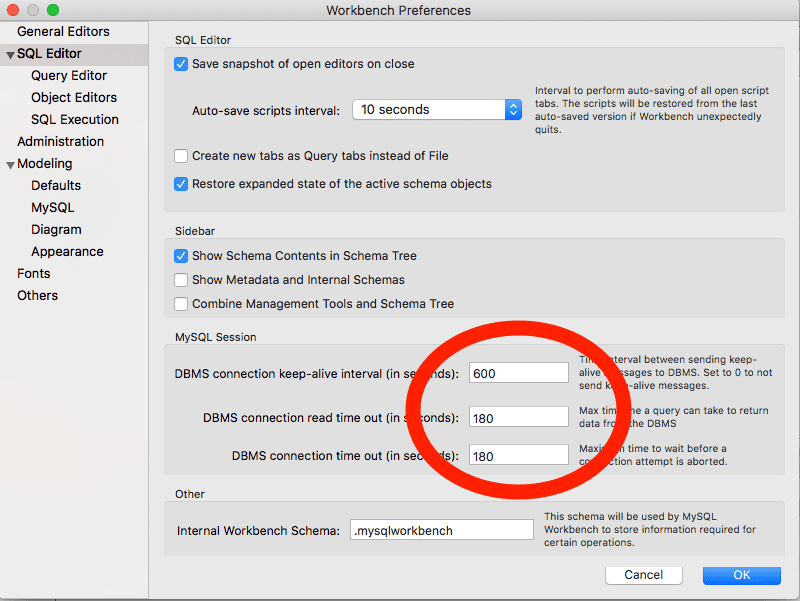
There is a quick setting in Preferences that helped me. As you might expect, the DBMS has settings to manage its connection to the SQL server. In my case, those were just too short for my long running queries.
I changed the 30 second defaults to 180, and returned the data I needed. However, I’d imagine that some things would call for a much higher timeout, especially if you wanted to do a lot of transactions.
Another Fix
As of 08/27/2018, I did some additional noodling around with the queries that produced this slow result and realized some simple indexing reduced the query time from ~50 seconds to .227 seconds. You can find a more detailed post about that here.
If you are looking for a way to stop the timeout error, now you have two options. However, now I realize that most of my issue had nothing to do with MySQL Workbench and everything to do with the way I constructed the underlying database : ) However, options are always good, so good luck!
 |
����� 10. Lost connection to MySQL server during query
�� ������ ������� ������ Lost connection to MySQL server �� ������ �� ������� ������� ���������� connect_timeout, �� � �� ���� ������ ������. � ��������� ����� �� ���������� ��� �������.
$php phpconf2009_4.php

string(44) "Lost connection to MySQL server during query"
���� ����� error log ������� ��� ���������:
Version: '5.1.39'  socket: '/tmp/mysql_sandbox5139.sock'  port: 5139  MySQL Community Server (GPL)

091002 14:56:54 - mysqld got signal 11 ;

This could be because you hit a bug. It is also possible that this binary

or one of the libraries it was linked against is corrupt, improperly built,

or misconfigured. This error can also be caused by malfunctioning hardware.

We will try our best to scrape up some info that will hopefully help diagnose

the problem, but since we have already crashed, something is definitely wrong

and this may fail.

key_buffer_size=8384512

read_buffer_size=131072

max_used_connections=1

max_threads=151

threads_connected=1
It is possible that mysqld could use up to
key_buffer_size + (read_buffer_size + sort_buffer_size)*max_threads = 338301 K
bytes of memory
Hope that's ok; if not, decrease some variables in the equation.
thd: 0x69e1b00
Attempting backtrace. You can use the following information to find out
where mysqld died. If you see no messages after this, something went
terribly wrong...
stack_bottom = 0x450890f0 thread_stack 0x40000
/users/ssmirnova/blade12/5.1.39/bin/mysqld(my_print_stacktrace+0x2e)[0x8ac81e]
/users/ssmirnova/blade12/5.1.39/bin/mysqld(handle_segfault+0x322)[0x5df502]
/lib64/libpthread.so.0[0x3429e0dd40]
/users/ssmirnova/blade12/5.1.39/bin/mysqld(_ZN6String4copyERKS_+0x16)[0x5d9876]
/users/ssmirnova/blade12/5.1.39/bin/mysqld(_ZN14Item_cache_str5storeEP4Item+0xc9)[0x52ddd9]
/users/ssmirnova/blade12/5.1.39/bin/mysqld(_ZN26select_singlerow_subselect9send_dataER4ListI4ItemE+0x45)[0x5ca145]
/users/ssmirnova/blade12/5.1.39/bin/mysqld[0x6386d1]
/users/ssmirnova/blade12/5.1.39/bin/mysqld[0x64236a]
/users/ssmirnova/blade12/5.1.39/bin/mysqld(_ZN4JOIN4execEv+0x949)[0x658869]
/users/ssmirnova/blade12/5.1.39/bin/mysqld(_ZN30subselect_single_select_engine4execEv+0x36c)[0x596f3c]
/users/ssmirnova/blade12/5.1.39/bin/mysqld(_ZN14Item_subselect4execEv+0x26)[0x595d96]
/users/ssmirnova/blade12/5.1.39/bin/mysqld(_ZN24Item_singlerow_subselect8val_realEv+0xd)[0x595fbd]
/users/ssmirnova/blade12/5.1.39/bin/mysqld(_ZN14Arg_comparator18compare_real_fixedEv+0x39)[0x561b89]
/users/ssmirnova/blade12/5.1.39/bin/mysqld(_ZN12Item_func_ne7val_intEv+0x23)[0x568fb3]
/users/ssmirnova/blade12/5.1.39/bin/mysqld(_ZN4JOIN8optimizeEv+0x12ef)[0x65208f]
/users/ssmirnova/blade12/5.1.39/bin/mysqld(_Z12mysql_selectP3THDPPP4ItemP10TABLE_LISTjR4ListIS1_ES2_jP8st_orderSB_S2_SB_yP13select_resultP18st_select_lex_unitP13st_select_lex+0xa0)[0x654850]
/users/ssmirnova/blade12/5.1.39/bin/mysqld(_Z13handle_selectP3THDP6st_lexP13select_resultm+0x16c)[0x65a1cc]
/users/ssmirnova/blade12/5.1.39/bin/mysqld[0x5ecbda]
/users/ssmirnova/blade12/5.1.39/bin/mysqld(_Z21mysql_execute_commandP3THD+0x602)[0x5efdd2]
/users/ssmirnova/blade12/5.1.39/bin/mysqld(_Z11mysql_parseP3THDPKcjPS2_+0x357)[0x5f52f7]
/users/ssmirnova/blade12/5.1.39/bin/mysqld(_Z16dispatch_command19enum_server_commandP3THDPcj+0xe93)[0x5f6193]
/users/ssmirnova/blade12/5.1.39/bin/mysqld(_Z10do_commandP3THD+0xe6)[0x5f6a56]
/users/ssmirnova/blade12/5.1.39/bin/mysqld(handle_one_connection+0x246)[0x5e93f6]
/lib64/libpthread.so.0[0x3429e061b5]
/lib64/libc.so.6(clone+0x6d)[0x34292cd39d]`)
Trying to get some variables.
Some pointers may be invalid and cause the dump to abort...
thd->query at 0x6a39e60 = select 1 from `t1` where `c0` <> (select geometrycollectionfromwkb(`c3`) from `t1`)
thd->thread_id=2
thd->killed=NOT_KILLED
The manual page at http://dev.mysql.com/doc/mysql/en/crashing.html contains
information that should help you find out what
�� �����, ��� MySQL ������ ���� �� ������� ��������� ������ 11 ( mysqld got signal 11). �� ���� MySQL ������ �������� � ������������ ������� ������ (��������, ������ � ����� ��� ����������� ������), �� ������� ����� � ����� 11. ��� ������ ���� ����� ���������� Segmentation fault — ����� � ������� � ����������� ������.
������ ������ ������������ ������� �� ������������ � ����� ����������. ���� �� ������ ���� �������, ��� ������ ��� ����� � ����� ������������ ������� ������̣���� �������� ��� ��� ����������� ����� ����������Σ���� ������ ����������� ������� perror, ������� ��������� � ���������� bin ���������� ���� �� ���������� MySQL. ���, ��������, ��� ���������� perror ��� ���� ����������� MacOSX:
$perror 11

OS error code  11:  Resource deadlock avoided
����� �� ����� backtrace (������� � Attempting backtrace.) �� ������ � backtace �����.
�ݣ ���� �� ����� ������, ������� ������ ��� ��������:
Trying to get some variables.

Some pointers may be invalid and cause the dump to abort...

thd->query at 0x6a39e60 = select 1 from `t1` where `c0` <>  (select geometrycollectionfromwkb(`c3`) from `t1`)
�������� � �������
select 1 from `t1` where `c0` <> (select geometrycollectionfromwkb(`c3`) from `t1`)
���������� ������������� � mysql cli
$./my sql

mysql [localhost] {msandbox} ((none)) > use test

Database changed

mysql [localhost] {msandbox} (test) > select 1 from `t1` where `c0` <>  (select geometrycollectionfromwkb(`c3`) from `t1`);

ERROR 2013 (HY000): Lost connection to MySQL server during query

mysql [localhost] {msandbox} (test) > q

Bye
�� ���� ��� ��������� ������������� ���. ����� �������� ���������� ����� �������, ����� ��� �� ������������ � ���� ����� ���� �� �� ����� ���������.
��� ����� ��������� backtrace
/users/ssmirnova/blade12/5.1.39/bin/mysqld(_ZN14Item_subselect4execEv+0x26)[0x595d96]

/users/ssmirnova/blade12/5.1.39/bin/mysqld(_ZN24Item_singlerow_subselect8val_realEv+0xd)[0x595fbd]

/users/ssmirnova/blade12/5.1.39/bin/mysqld(_ZN14Arg_comparator18compare_real_fixedEv+0x39)[0x561b89]

/users/ssmirnova/blade12/5.1.39/bin/mysqld(_ZN12Item_func_ne7val_intEv+0x23)[0x568fb3]

/users/ssmirnova/blade12/5.1.39/bin/mysqld(_ZN4JOIN8optimizeEv+0x12ef)[0x65208f]
�� �������� ��������� ������: Item_subselect � Item_singlerow_subselect. ������ ���� �� ���������� � ��� MySQL �� ����� ������� �����, ��� ������� ���������.
��������� ���������� ������
$./my sql

mysql [localhost] {msandbox} (test) > select 1 from `t1` where `c0` <> geometrycollectionfromwkb(`c3`);

Empty set (0.00 sec)
MySQL ������ �������� ���������! �� ����� ������������ ������������ �������� �� ��� ���, ���� ��� �� ����� ���������.
��ɣ� 18: ������ ����������� error log
�� ������ � error log ��� ������ ����������
��� �� ������, �� �� Mac-�
091002 16:49:48 - mysqld got signal 10 ;

This could be because you hit a bug. It is also possible that this binary

or one of the libraries it was linked against is corrupt, improperly built,

or misconfigured. This error can also be caused by malfunctioning hardware.

We will try our best to scrape up some info that will hopefully help diagnose

the problem, but since we have already crashed, something is definitely wrong

and this may fail.
key_buffer_size=8384512
read_buffer_size=131072
max_used_connections=1
max_connections=100
threads_connected=1
It is possible that mysqld could use up to
key_buffer_size + (read_buffer_size + sort_buffer_size)*max_connections = 225784 K
��� �����, �� backtrace, �� ������� � error log ���. ��� �� ������?
� ���� ������, ��� � ������, ��� ������� general query log. MySQL ������� ����� ������ � general query log � ������ ����� ��������� ���. ������� ������ ������� ������������ ���� ����� ��� ������������� ���������� ��������.
mysql> set global general_log=1;

Query OK, 0 rows affected (0.00 sec)

mysql> set global log_output='table';

Query OK, 0 rows affected (0.00 sec)
��������� ����. ����� ����������� ������� ��������� general query log:
mysql> select argument from mysql.general_log order by event_time desc limit 10;

+--------------------------------------------+

| argument                                   |

+--------------------------------------------+

| Access denied for user 'MySQL_Instance_Manager'@'localhost' (using password: YES)                             |

| select 1 from `t1` where `c0` <>  (select geometrycollectionfromwkb(`c3`) from `t1`) |
������, ��������� ��������, ���������!
��ɣ� 19: ����������� general query log ���� error log �� �������� ���������� � �������� �������� �������.
��� ������������� ����� ��ɣ�� ���������� �����������, ��� ������� mysql.general_log ����� ���������� �� ����� �������� MySQL �������. � ���� ������ ���������� ������ � ����.
����� ���������� �����������, ��� MySQL ������ ���������� �������� �� ����� ������ ������� � general query log. � ����� ������ ����������� ���� ������ ������ ����������, ���� ������.
������, ������� �� ������ ��� �����������, ������ۣ� �� ���� MySQL �������. �� MySQL ������ ����� ���� �������� ���������� � �� ������� �������� �������� � �������.
������, �� ��� ����� �������� �������� ��� RAM
������ �� ��������� ����:
key_buffer_size=235929600

read_buffer_size=4190208

max_used_connections=17

max_connections=2048

threads_connected=13

It is possible that mysqld could use up to

key_buffer_size + (read_buffer_size + sort_buffer_size)*max_connections = 21193712 K

-----

21193712K ~= 20G
�� ���� MySQL ����� ������������ �� 20G RAM! ������ ������ ������, �� ����� ��������� ������������� �� � ��� 20G RAM.
��ɣ� 20: ������ ���������� ���������� �� � ��� RAM ��� ���������� �������.
����� �������� �������� �� �������� ���������� max_connections.
� ���������� ������� max_connections=2048. ��� ���������� �����. ���������, ������ �� � ��� �������� �� ����� ���������� ������������� ����������.
� ��������� � �������� ������, ����� ������������ ������������� �������� max_connections ����������� ������, ��� �� ������� ����� ���������. ��� ��������� � ��������������� ��������� MySQL ������� ��� ����� ��������� ��������� �� ������������� ���-�������.
��ɣ� 21: �������������� �������� max_connections ����� ����� �� ������� ���������.
����� MySQL ������ ����� ���������� �������� ������ ��������. ������ ���������� �� ������ ���������� � error log. ������������ ��� ���������� � ��������� ��������.
������ �� ������ ��� MySQL ������ ������� � �������� ��������. ����� ��� ���������, ��� �� ������ ������ ����������. � ����� ������ ����������� ��������� �������� ��� �����������, ����� ������� ���������.
��ɣ� 22: ����������� �������� ����������� ����� ������������ �������� ����� ���������� ��� ���������� ���������� ���������� ��������, ������� �������� � �������� MySQL �������.
��� �� ����� ����������� ��������� Lost connection to MySQL server ����� ����� ���������� timeout. ���� error log �� �������� ������ ������ ��� �� ������������ ������ ���� ������, �������� ����� log_warnings=2 � ���������������� ���� � ��������� error log ����� ��������� ���������.
��ɣ� 23: ����������� ����� log_warnings=2 ����� ��������� ������� �� � ��� �����Σ���� ����������.
������ ������ ����������� ������ ��� ������������ ��������. ����������� �������������� ���������� ����������� � general log, ����� ������ ����� ������. � �� ���� ����� ��������������� �� ������ ���� ���������, ��������� ��� ���������� ������ � ������� ��������������� �������.
When I am trying to execute a query from some large table it turns out that connection to DB is lost:
ERROR 2013 (HY000): Lost connection to MySQL server during query
I am running a query directly on the DB server:
I have allready issued some configuration in my.cnf but the problem persist:
net_read_timeout=600
net_write_timeout=180
wait_timeout=86400
interactive_timeout=86400
- max_allowed_packet=128M
key_buffer_size = 2560M
max_allowed_packet = 7500M
thread_stack = 1M
thread_cache_size = 16
innodb_buffer_pool_size = 20G
read_buffer_size = 128M
read_rnd_buffer_size = 256M
sort_buffer_size = 3G
query_cache_size = 1024M
innodb_force_recovery = 4
- ↑ The Community ↑
Comments
Content reproduced on this site is the property of its respective owners,
and this content is not reviewed in advance by MariaDB. The views, information and opinions
expressed by this content do not necessarily represent those of MariaDB or any other party.