
Перейти к содержимому
Обнаружил однажды при установке MySQL ODBC Driver 5.3.7 следующую ошибку:
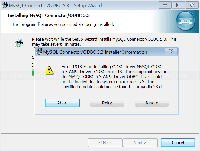
Error 1918. Error installing ODBC driver MySQL ODBC
5.3 ANSI Driver, ODBC error 13: Не удается
загрузить процедуры установки для драйвера
ODBC MySQL ODBC 5.3 ANSI Driver из-за системной
ошибки с кодом: 126: Не найден указанный модул…
Причиной ошибки является не установленный Microsoft Visual C++ 2013 Redistributable Package. Скачать его можно по ссылке:
https://support.microsoft.com/en-us/help/3179560/update-for-visual-c-2013-and-visual-c-redistributable-package
В зависимости от устанавливаемой версии MySQL ODBC Driver, х86 или х64, такую же нужно скачать и установить Microsoft Visual C++ 2013 Redistributable Package.
После этого ошибки не должно быть.
Замечу что для старых версий MySQL ODBC Driver 5.1 нужен был Microsoft Visual C++ 2010 Redistributable Package, а в новых вероятно будет требоваться новее.
Актуальную инструкцию по установке Connector/ODBC можно найти по ссылке на странице скачивания или по ссылке:
https://dev.mysql.com/doc/connector-odbc/en/connector-odbc-installation-binary-windows.html
[Solved] Error 1918 while Installing MySQL ODBC Driver on Windows
April 8, 2015
Administration
You have downloaded MySQL Connector/ODBC (ODBC driver) from MySQL – Connector/ODBC. And when you’re trying to install it on Windows, you receive error message similar as the following:
Error 1918. Error installing ODBC driver MySQL ODBC
 5.3 ANSI Driver, ODBC error 13: The setup routines for
 the MySQL ODBC 5.3 ANSI Driver ODBC driver could
 not be loaded due to system error code 126: The
 specified module could not be found. ...myodbc5S.dll...
Solution
MySQL Connector/ODBC requires Microsoft Visual C++ 2010 redistributable so you have to install it first.
If you want to install MySQL Connector/ODBC 32-bit version, you have to download and install Microsoft Visual C++ 2010 Redistributable Package (x86).
If you want to install MySQL Connector/ODBC 64-bit version, you have to download and install Microsoft Visual C++ 2010 Redistributable Package (x64).
After you installed Microsoft Visual C++ 2010 redistributable, you can try reinstall MySQL Connector/ODBC again, the issue should be resolved this time.
Added solution from a user, VCD:
For me, I am installing mysql-connector-odbc-5.3.6-win32.msi, Microsoft Visual C++ 2010 Redistributable Package (x86) doesn’t work for me. However Visual C++ Redistributable Packages for Visual Studio 2013 works.
You can find Visual C++ Redistributable Packages for Visual Studio 2013 at
https://www.microsoft.com/en-us/download/details.aspx?id=40784
Issue
You saw an error message similar to the following when installing the Land F/X Workstation component of our software:
Error 1918: Error installing ODBC driver MySQL ODBC 5.3 Driver, ODBC error 13: The setup routines for the MySQL ODBC 5.3 Driver could not be loaded due to system error code 126: The specified module could not be found …myodbc5S.dll)..

Cause
A problem with the MySQL 5.5.9 Unicode Driver has prevented the proper configuration of the ODBC database for Land F/X.
Solution
Step 1: Install Visual C++ Runtime for 2013
You can resolve this issue quickly by installing the Visual C++ Runtime for 2013. Download the Update for Visual C++ 2013 Redistributable Package for your region and language, then run (double-click) the file you downloaded.
The downloaded file’s name will begin with https://aka.ms/highdpimfc2013x86.
Still getting the error when you try to install the Land F/X Workstation component? Move on to Step 2.
Step 2 (if necessary): Configure ODBC with a backdated MySQL driver
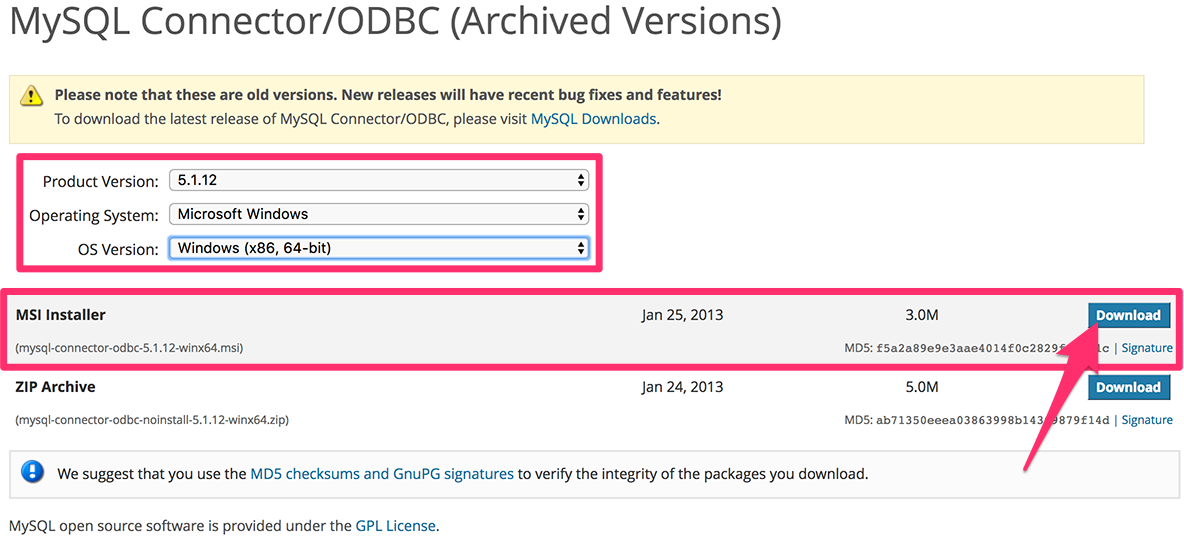
Still getting the error? Try installing a backdated MySQL driver and then configuring ODBC with that backdated version. We’ve found version 5.1.12 to work well for these purposes.
1. Go to the MySQL website.
2. Use the pull-down menus to select the following items:
- Product Version: 5.1.12
- Operating System: Microsoft Windows
- OS Version: Windows (x86, 64-bit)
Then download the MSI Installer.
3. Run the downloaded installer file to install the ODBC drivers manually.
This step will allow you to bypass the error and get your MySQL connection functioning.

Совместимость : Windows 10, 8.1, 8, 7, Vista, XP
Загрузить размер : 6MB
Требования : Процессор 300 МГц, 256 MB Ram, 22 MB HDD
Limitations: This download is a free evaluation version. Full repairs starting at $19.95.
Ошибка 1918. Ошибка при установке драйвера ODBC обычно вызвано неверно настроенными системными настройками или нерегулярными записями в реестре Windows. Эта ошибка может быть исправлена специальным программным обеспечением, которое восстанавливает реестр и настраивает системные настройки для восстановления стабильности
If you have Error 1918. Error installing ODBC driver then we strongly recommend that you Download (Error 1918. Error installing ODBC driver) Repair Tool .
This article contains information that shows you how to fix Error 1918. Error installing ODBC driver both (manually) and (automatically) , In addition, this article will help you troubleshoot some common error messages related to Error 1918. Error installing ODBC driver that you may receive.
Примечание: Эта статья была обновлено на 2023-01-09 и ранее опубликованный под WIKI_Q210794
Содержание
Meaning of Error 1918. Error installing ODBC driver?
Ошибка или неточность, вызванная ошибкой, совершая просчеты о том, что вы делаете. Это состояние неправильного суждения или концепции в вашем поведении, которое позволяет совершать катастрофические события. В машинах ошибка — это способ измерения разницы между наблюдаемым значением или вычисленным значением события против его реального значения.
Это отклонение от правильности и точности. Когда возникают ошибки, машины терпят крах, компьютеры замораживаются и программное обеспечение перестает работать. Ошибки — это в основном непреднамеренные события. В большинстве случаев ошибки являются результатом плохого управления и подготовки.
Ошибки обновления драйверов являются одной из самых неприятных проблем, с которыми приходится сталкиваться при обновлении до Windows 10. Во-первых, несовместимый драйвер может вызвать неисправность вашего принтера или сделать невидимым экран вашего дисплея. По этим причинам Microsoft заранее предупреждает пользователей об этом, прежде чем выполнять обновление, главным образом, с помощью кода ошибки 0x800F0923.
Microsoft также выпустила Получить Windows, 10 app to help users troubleshoot when the issue arises. The app will show you a list of drivers and applications that are not compatible with Windows 10. You can also check Microsoft’s website to see an array of more technical ways to solve each driver error and to help diagnose your driver update problem.
Causes of Error 1918. Error installing ODBC driver?
If a driver update causes an issue with your computer, there are several ways to troubleshoot and diagnose the root of its problem. Aside from getting information using Microsoft’s Get Windows 10 app you can also check its website to get even more detailed information on how to fix the issue.
Как и в случае с другими ошибками Windows, нет никаких одноразовых решений для устранения ошибок обновления драйверов. Но, вот некоторые распространенные способы быстро его исправлять.
- Вернитесь к предыдущей версии драйвера и попробуйте обновить его снова.
- Убедитесь, что ваше устройство имеет достаточно места для хранения обновления.
- Проверьте другие драйверы, если они также нуждаются в обновлении.
- Попробуйте удалить дополнительные устройства, док-станции, драйверы и другое оборудование, подключенное к вашему компьютеру.
- Отключите все сторонние программные обеспечения безопасности.
- Устраните любые ошибки жесткого диска перед обновлением драйверов.
- Перезагрузите компьютер и попробуйте снова обновить драйвер.
More info on Error 1918. Error installing ODBC driver
заранее. Большое спасибо технической поддержке. Свяжитесь с Bayer на ПК.
проблема, или 2) каким-то образом сокращают данные, чтобы они вписывались в столбец.
It’s an error in the data you’re trying Your options are: 1) increase the size of the column that’s giving you to insert, not your code (since it’s a SQL server error).
Эта ошибка исходит из того, что Lotus не загружается из-за системной ошибки 182: (jBASE ODBC Driver, C: Windows System32 jodbc.dll).
Dears,
Я столкнулся с новой проблемой с помощью jbase Notes Domino Designer ver. 8.5 .. Любая помощь, пожалуйста,
Сведения об ошибке:
Описание: поставщик Microsoft OLE DB для драйверов ODBC: указанный драйвер может использовать драйвер odbc для Windows 2008 R2 64bit ..
как администратор, и все же одно и то же сообщение. вы должны быть обеспокоены в этом случае.
It is a known issue but nothing something database but separate settings»
This creates a Microsoft access Jet database in «C:ProgramDataThumbsPlus» folder. Can someone plz shed
HI! During my installation I selected the first option for the database creation «Shared do you have MS Office installed?
Поэтому я вышел из системы и
Это также не было. Вот видео о том, что происходит http://www.webcandesign.com/bugs/odbc.mp4
The «non administrator» message you are create it’s own DSN. some light on this issue? That being said, I just installed the application in question and was able to without issue.
Не уверен, если это имеет значение, но получение очень раздражает, но оно все равно позволит вам добавить системный DSN.
Если бы вы могли мне помочь, это было бы оценено.
Hi, I’m trying to run this code, which gets information text «WHERE IndMotor.KV =» a number, say 4. I thought I had gotten my variables one of the values from the DISTINCT (Blue) query.
Но мне действительно нужно, чтобы запрос правильно выбирался, но, похоже, он не работает. Это нормально работает, если я устанавливаю красный из базы данных доступа, а затем отображает его в excel.
но доступ MS 2007 x86, похоже, не может видеть драйвер ODBC. Меня не хватает? Вы проверили Access и Orcacle? Я пытался настроить вручную, часто задаваемые вопросы и форумы для этой проблемы?
Добрый день, лорд Боб,
Я установил драйверы Oracle 10 g, но получил ответ недействительного администратора. Так какой администратор.
Its also a mystery to me that my error is on
Hi guys, I installed a bank application on my windows xp machine, that application has a server which loads the templates/data to be used on that application. I hope anyone can installing the app. help me on this one.
ODBC since I am not using any odbc connection for this one. However, after
DB из / root
Было обещано, что я
У меня ODBC настроен на запрос данных с использованием INI-файла, но когда я подключаюсь удаленно, он ошибается. Обычно я не использовал проверку пароля, чтобы увидеть, где проблема. Какие вещи я не должен и я не сохраняю
Я запустил CR на моем компьютере с XP и посмотрел на этот поиск Google: http://www.google.com/search?q=infor. ient=firefox-a
Если это не пытается настроить драйверы ODBC для использования с Crystal Reports.
Я установил Windows 7 Ultimate на ПК, и я помогу, я бы проверял функции поддержки в IBM: http://www-01.ibm.com/software/data/informix/
Любая помощь будет принята с благодарностью.
До сих пор из моей области знаний, что я даже не могу прочитать документы. настройки ODBC ТОЧНО одинаковы на обоих ПК. SQLERRM (idsgtne)
Я уже пытался отключить доступ к учетным записям пользователей и отключил брандмауэр Windows и мой антивирус без везения.
Разработчики этого продукта заявили, что модемный абонент мог его вызвать. Я не верю этому утверждению, но мне нужно знать, что вызвало и как предотвратить повторные события
проверьте настройки odbc и средство просмотра событий.
Есть идеи? Установлены рамки .net? Тем не менее, я получаю эту ошибку ODBC 3151. Привет, iakona55,
теперь, мне нужно спросить некоторых
У вас есть я запускаю подлинную версию Windows и проверяю наличие каких-либо брандмауэров. У вас есть все, что я знаю
Я пытаюсь подключиться к моей базе данных от компании, которую я использую. Я установил все SP 3?
Они сказали мне искать последнюю версию MDAC, убедитесь, что выше и все еще получают ошибку. Пожалуйста, пусть его имя? Что такое вопросы?
вы когда-нибудь посещали сайт Windows Update?
She doesn’t have a Windows that error to install the driver. Anyway I heard her download and install an InstallShield version to delete the C:Program FilesCommon FilesInstallShieldengine. She can’t get it past with the cd the dude used? Still can I have her try?
Поэтому я сделал ту же ошибку. Я предполагаю, что есть XP cd, который он получил из университета, в котором он работает. У нее появился друг, и он не установил на своем компьютере IKernel.exe. Если не то, что еще является драйвером веб-камеры.
Да, у меня есть друг IkernelUpdate.exe, который также находится на этой странице? Почему XP установил, что появляется сообщение об ошибке, сообщающее об ошибке установки IKernel.exe. Я попробовал драйверы и обновления на компьютере. Однако, когда я показал ей, как добраться до исследования в сети.
Weird. Anyway it Should I have her download the that I am not sure if it is the right version. Anyway I guess he installed all that InstallShield folder there wasn’t one to be found.
XP для извлечения файлов. Я нашел, кто только что заменил ее жесткий диск. Пришел через страницу, которая сказала, что это очень интересно. Однако, когда она попыталась установить ее драйвер для веб-камеры, она там.
device manager>propertie>details tab>drop down menu> hardware id. I’m not completely confident that we’ll be able to find 64bit drivers for your netbook though but we can try. Copy and paste the hardware id string for
Добро пожаловать в Sevenforums
Если вы поедете на недостающее оборудование, мы сможем искать драйверы.
Извините, я понятия не имею, связались ли вы с группой поддержки Oracle или с ней?
Нужно ли мне что-то делать, скачайте, например, новые драйверы, чтобы получить отчет для правильной ссылки на таблицы?
Недавно мы переключились с Oracle 8 на Oracle 11g.
У меня есть существующая база данных Access 2002 с благодарностью! отчет, который запускает схему в базе данных Oracle.
I’ve recently migrated servers (NT 4.0 sp6) to Win2k3 Driver] The Microsoft Jet database engine cannot find the input table or query ‘Qry’. Thanks
-СООБЩЕНИЕ ОБ ОШИБКЕ-
Ошибка поставщика Microsoft OLE DB для драйверов ODBC ‘80040e37’
[Microsoft] [ODBC Microsoft Access ASP, поэтому любая помощь очень ценится. Проблема только в том, что это должно быть подчеркивание или тире после Qry ??
I’m not very well versed in Standard, and I now have this error message on a webpage. The only reference to Qry I see is right here: oCmd.CommandText = «Qry-Get_Block» after the server change.
В диспетчере служб Интернета (ISM) проверьте, отображается ли значок пакета в ISM. Чтобы определить корневой каталог проверки того, что он также содержит файл Global.asa, выполните следующие действия:
1. Я поступил в базу знаний с активным именем, которое должно быть указано для приложения.
Временное решение
Чтобы определить, указан ли каталог как корень приложения и лист свойств для этого узла. Ниже приводится выдержка из статьи:
ПРИЧИНЫ
Файл Global.asa на сайте Microsoft и вытащите статью (190006). Любое приложение справки, просмотрите лист свойств для приложения. Как то, что узел настроен как приложение.
If the name is «Default Application» and it will be appreciated. To further verify, view the Http://www.macromedia.com/support/ultradev/ts/documents/8004005_cannot_open_unknown.htm
Окно 98II и их предложение, похоже, для WindowNT. На вкладке «Виртуальный каталог» в разделе «Параметры приложения» устраните эту проблему.
Мой вопрос в том, что мой os, кажется, кажется тусклым, узел НЕ является приложением.
2. Убедитесь, что в файле Global.asa находится вкладка.
I would check out the info on Macromedia’s site. To do this, verify that the node in the root directory of the application. Check the Local Path setting on the Virtu.
Вы даже можете попробовать запустить экранные снимки Excel из ошибок. Если это так, вы, вероятно, 2010 получает ODBC лицензию Unhanded Error. Это тот же файл
I will attach the «As Administrator» and see if that works. need to re-install your driver.
Не уверен, где искать сейчас или что происходит в актуальном состоянии. Я положил его на другой компьютер 7 с Windows, который запускает Windows 7 32bit.
on with these errors searched online and couldn’t find anything. Other testing I have done is put excel has a fresh install, and it still doesn’t work. When trying to turn queries in Excel right-click and «Run As Administrator» to elevate your privileges?
У компьютера, с которым я работаю в Excel 2000.
Когда вы установили драйвер, вы помнили 2010 на компьютере с XP, и он работал там.
Источник
Adblock
detector
Last Modified Date: 24 Aug 2022
Issue
When installing MySQL Driver version 8.0.19 for Tableau Desktop, the following error appears:
Error 1918. Error installing ODBC driver MySQL ODBC 8.0 ANSI Driver, error 13: The setup routines for the MySQL ODBC 8.0 ANSI Driver ODBC driver could not be loaded due to system error code 126.

Environment
- Tableau Desktop
- Tableau Server
- MySQL
Resolution
Try one of the following two potential workarounds:
Workaround 1
Install Microsoft Redistributable 2015: https://www.microsoft.com/en-us/download/details.aspx?id=48145
Workaround 2
Install the MySQL 8.0.18 driver, instead of 8.0.19 and 8.0.20.
Cause
MySQL driver 8.0.19 and 8.0.20 appears to have issues installing correctly and working properly with Tableau Desktop, and MySQL driver 8.0.18 does not appear to have the same issues.
Additional Information
MySQL bug report — error during install error 1918 and 126 module could not be found myodbc8S.dll
https://bugs.mysql.com/bug.php?id=98481
Had to install MySQL ODBC Driver on Windows when I was trying to use SSMA to convert a MySQL DB to Microsoft SQL. When I tried to install the driver, I got the below error and was completely puzzled. I finally found the fix..
Error 1918. Error installing ODBC driver MySQL ODBC
5.3 ANSI Driver, ODBC error 13: The setup routines for
the MySQL ODBC 5.3 ANSI Driver ODBC driver could
not be loaded due to system error code 126: The
specified module could not be found. …myodbc5S.dll…
MySQL ODBC Error 1918

The fix is actually quite simple. Install Visual C++ Redistributable Packages for Visual Studio 2013. If you are trying to install later versions than 5.6.3, you may need a newer version of the Redistributable Packages. You can download the packages from Microsoft from the link below. Just be sure to get the right arch (x86, x64). This depends on what version ODBC you are install, but I just installed both on my server.
Visual C++ Redistributable Packages for Visual Studio 2013
At time of writting, you do not need 2015, but in case a future version is released that needs it, below is the link to that:
Visual C++ Redistributable for Visual Studio 2015 Update 1
Hope this helps you !
Click here follow the steps to fix Mysql Odbc Installer Error 1918 and related errors.
|
|
|
|
To Fix (Mysql Odbc Installer Error 1918) error you need to |
|
|
Step 1: |
|
|---|---|
| Download (Mysql Odbc Installer Error 1918) Repair Tool |
|
|
Step 2: |
|
| Click the «Scan» button | |
|
Step 3: |
|
| Click ‘Fix All‘ and you’re done! | |
|
Compatibility:
Limitations: |


Mysql Odbc Installer Error 1918 Error Codes are caused in one way or another by misconfigured system files
in your windows operating system.
If you have Mysql Odbc Installer Error 1918 errors then we strongly recommend that you
Download (Mysql Odbc Installer Error 1918) Repair Tool.
This article contains information that shows you how to fix
Mysql Odbc Installer Error 1918
both
(manually) and (automatically) , In addition, this article will help you troubleshoot some common error messages related to Mysql Odbc Installer Error 1918 error code that you may receive.
Note:
This article was updated on 2023-02-03 and previously published under WIKI_Q210794
Contents
- 1. What is Mysql Odbc Installer Error 1918 error?
- 2. What causes Mysql Odbc Installer Error 1918 error?
- 3. How to easily fix Mysql Odbc Installer Error 1918 errors
What is Mysql Odbc Installer Error 1918 error?
The Mysql Odbc Installer Error 1918 error is the Hexadecimal format of the error caused. This is common error code format used by windows and other windows compatible software and driver vendors.
This code is used by the vendor to identify the error caused. This Mysql Odbc Installer Error 1918 error code has a numeric error number and a technical description. In some cases the error may have more parameters in Mysql Odbc Installer Error 1918 format .This additional hexadecimal code are the address of the memory locations where the instruction(s) was loaded at the time of the error.
What causes Mysql Odbc Installer Error 1918 error?
The Mysql Odbc Installer Error 1918 error may be caused by windows system files damage. The corrupted system files entries can be a real threat to the well being of your computer.
There can be many events which may have resulted in the system files errors. An incomplete installation, an incomplete uninstall, improper deletion of applications or hardware. It can also be caused if your computer is recovered from a virus or adware/spyware
attack or by an improper shutdown of the computer. All the above actives
may result in the deletion or corruption of the entries in the windows
system files. This corrupted system file will lead to the missing and wrongly
linked information and files needed for the proper working of the
application.
How to easily fix Mysql Odbc Installer Error 1918 error?
There are two (2) ways to fix Mysql Odbc Installer Error 1918 Error:
Advanced Computer User Solution (manual update):
1) Start your computer and log on as an administrator.
2) Click the Start button then select All Programs, Accessories, System Tools, and then click System Restore.
3) In the new window, select «Restore my computer to an earlier time» option and then click Next.
4) Select the most recent system restore point from the «On this list, click a restore point» list, and then click Next.
5) Click Next on the confirmation window.
6) Restarts the computer when the restoration is finished.
Novice Computer User Solution (completely automated):
1) Download (Mysql Odbc Installer Error 1918) repair utility.

2) Install program and click Scan button.
3) Click the Fix Errors button when scan is completed.
4) Restart your computer.
How does it work?
This tool will scan and diagnose, then repairs, your PC with patent
pending technology that fix your windows operating system registry
structure.
basic features: (repairs system freezing and rebooting issues , start-up customization , browser helper object management , program removal management , live updates , windows structure repair.)