
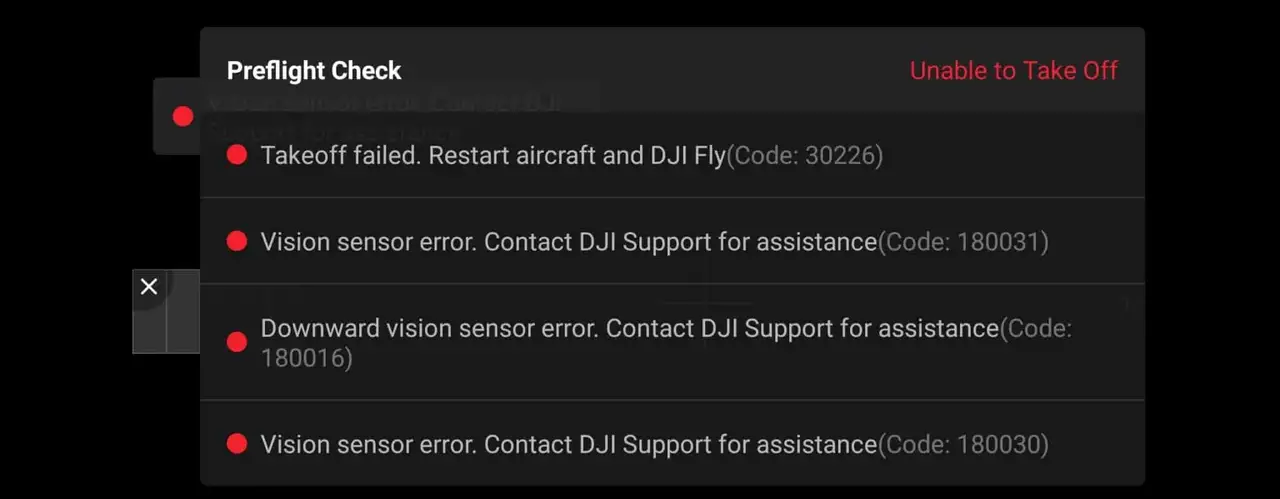
Downward vision sensors are the small camera lens-looking holes located beneath the drone.
They are used to stabilize the altitude of the drone and allow for a safe landing, which means that if they are not working properly, your drone will have difficulty maneuvering itself.
However, if you have this error in the first place, the software will frequently refuse to allow you to lift off, which is very frustrating.
It’s a common problem with DJI drones, but it’s relatively simple to fix.
You can fix DJI drone’s downward vision sensor error by recalibrating the drone with DJI assistant software. Download DJI Assistant 2 from DJI’s website, make sure it is the version that is suitable for your drone. The software will guide you through the process of recalibrating, it can take up to 20 minutes.
That may solve your problem, but if it does not, I will discuss four other options. The first three are fairly straightforward and generic, and they will help 80% of people. The last one is a pretty ninja technique, and hopefully it will solve the remaining 20%. but first start off by recalibrating your drone.
Method 1. Recalibrate your drone in DJI Assistant 2
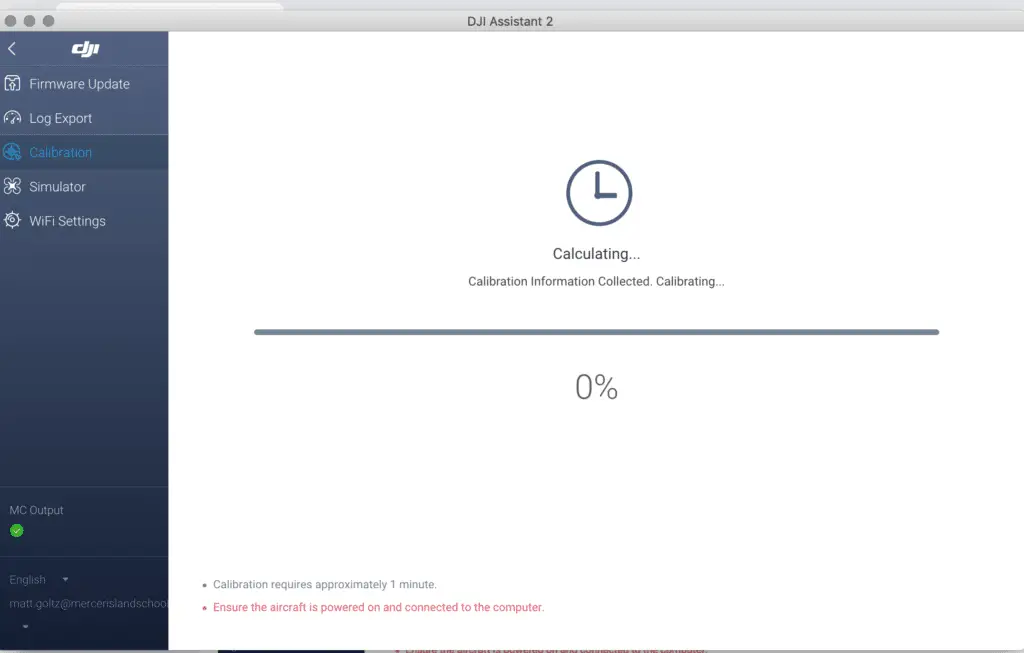
If you already have flown your drone, you already have calibrated your drone on the DJI assistant software, so you already know how to calibrate your drone.
Now this “downward vision sensor calibration error” which you see on your phone or the screen of your controller can be because the drone has lost the previous calibration.
So you have to recalibrate-
- Download DJI Assistant 2 from dji.com.
- Use the proper software, every DJI lineup have a different software
- This is for the phantom lineup
- This is for the FPV lineup
- This is for the Mavic lineup
- Finally, the software will guide you through the process
Now I have seen a lot of people’s calibration process getting stuck mid-calibration and some people will finish the process then it will stop after it reaches %71 of the calibration process.
so if this is happening to you this might be the problem-
- Don’t use a curved screen.
- Use a bigger screen
- Uninstall the current software you have from your computer and download it again.
- try it on different screens
If this doesn’t fix the problem it can be because you have an outdated firmware or your drone is damaged-
Method 2. update firmware
Outdated firmware can also be the issue, I have seen people use a 2019 version in 2021 which is kind of scary to be honest, anyways to update your software follow these
- Connect both the drone and controller to your mobile device using the supplied cable.
- Make sure both drone controllers are powered on and have a full battery
- Open DJI GO 4 or DJI Pilot.
- Within the app, a notification will appear letting you know if there is an update available(in the home screen, not the camera view screen)
- Tap Firmware Download.
After updating the firm wear to get rid of the sensor calibration error you might have to recalibrate your drone.
*Note: before firmware update make sure all your drone, controller, and phones battery are fully charged because it can take up to 30 minutes*
Method 3. Clean the vision sensor
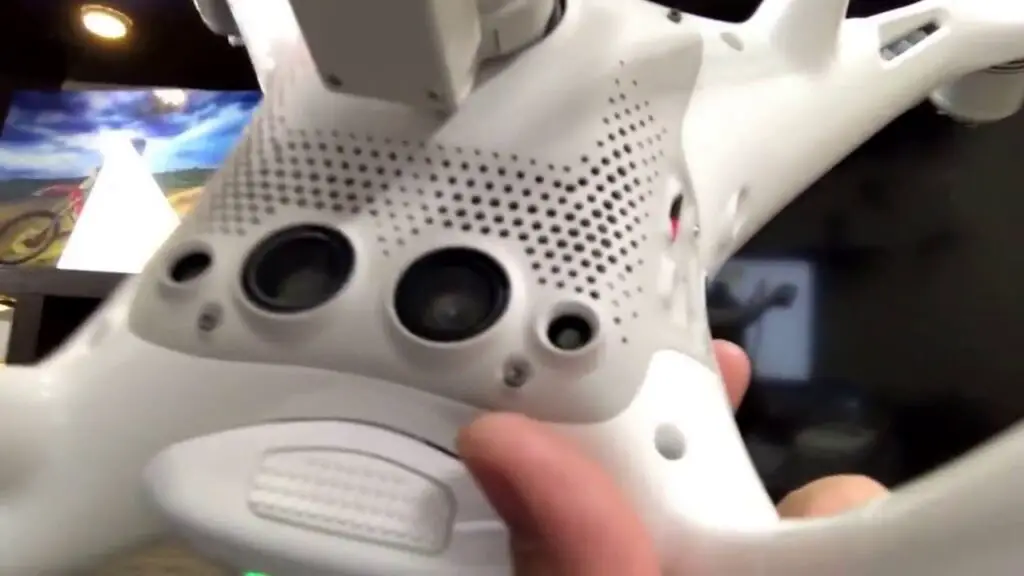
- If you had a crash and there is dirt on the lens
- If you have flown in rain or fog or even in high humidity and there is precipitation inside
- If there some kind of lotion grease or food particles that got transferred from your hand to the lenses
If the sensor is not squeaky clean there is a high chance it is causing the problem.
To clean the sensor you only need a soft cloth, unless there is precipitation inside, in that case the lenses must be removed and cleaned.
Also if your drone has been with DJI for a repair you should also check if there is no plastic covering on the sensor because when you send a drone to DJI to get it fixed they oftentimes send you a refurbished drone which often has plastic coverings on the sensors
Method 4. turn on the drone mid-air
So the last technique which is pretty awesome and easy to turn your drone on mid-air, so it is a very straightforward and simple process-
- Pick up your drone of the ground at an about 1 foot about 12 inches distance from the ground
- Then tun it on as you normally would
- Make sure you are not covering the sensors with your hand
What this does is it resets the downward vision sensors and that will hopefully fix the error.
The problem with the method is that the error might come again after some time.
Last solution
If none of these solutions work, I’m afraid you’ll have to turn it over to a professional. If your drone is still within one year of purchase or activation, there is a good chance DJI will repair it for free (except for shipping costs). If you have DJI care, the shipping will be covered as well.
If you don’t want to ship your drone you can also get it fixed in local drone stores.
What happens if you fly without calibrating your drone?
if you manage to take off the ground you probably couldn’t cause the software let you but if you did there high a high chance you will have an unsafe landing or even a crash.

Let us calibrate. Let us eradicate. Let Us Drone. In a perfect world, we would be able to fly our drones whenever and wherever we felt like it; never getting any errors or malfunctions. But this world isn’s perfect, and we have annoying things like jobs that dictate when we can fly, and the FAA to say where we can fly. When Saturday finally does come around and our location is in the green, we get VPS errors *sigh*. All is not bad though, it’s still Saturday, and I’m going to tell you how to get rid of those vision system errors on your Mavic Pro.
Here are the quick steps on how to calibrate the Mavic Pro Vision System to eradicate errors. First, download/launch DJI Assistant and set your computer screen to 1600×900. Connect your Mavic to the computer and click on “calibration”. Follow the onscreen instructions and restart your drone when the calibration is complete. See below for more detailed instructions.

What is the Vision System
DJI has worked very hard to make their drones user-friendly. The remote control helicopters I would fly as a teenager were incredibly difficult to maneuver compared to any of DJI’s drone lineup. Why is this? The incorporation of GPS and a Vision Positioning System (VPS) to keep the aircraft extremely steady are certainly two of the reasons.
The Vision System on the Mavic Pro is comprised of two ultrasonic sensors (located on the bottom) and four monocular sensors (two on the front and two on the bottom).
Ultrasonic sensors emit high-frequency sound waves that bounce off surfaces back to the drone to provide distances of objects.
Monocular sensors are cameras that feed images to the drones processor, which is then able to identify the depth of objects.
This is a basic description of the VPS. The Mavic Pro and Mavic Pro Platinum have identical Vision Systems, but I should note that sensors have been added to the sides, rear, and top of the Mavic 2 Pro and Mavic 2 Zoom. Be on the lookout for an article that dives deeper into the Vision Systems of the newer Mavics.
Common reasons for Vision System errors
Ever receive one of the following messages while flying your Mavic Pro?
- “Downward Vision Sensor Calibration Error. Precision Landing May Fail”. Well, that’s not good.
- “Vision Sensor Communication Error (10000 or 40000)”
- “Vision System Error”
- “Forward Vision Sensor Calibration Error. Precision Landing and Obstacle Avoidance May Fail”
- “Restart Aircraft. Contact DJI Support if the Problem Persists.”
- “Vision System Error (a00008)”
- “Recalibrate Vision System using DJI Assistant 2”
- “Recalibrate the Vision System. Use DJI Assistant on Mac or PC.”
It may be difficult to ascertain why you are getting errors with the VPS, but I have compiled a list of some common instances where people have gotten errors.
Problem: You may get an error or the drones VPS might just not operate correctly when flying over water. This is clearly stated in the manual: “The performance of the Forward and Downward Vision Systems are affected by the surface being flown over”, and under the types of surfaces listed we see “Flying over water or transparent surfaces”.
Solution: A lot of people have recommended turning off the VPS when flying over water. I usually don’t (unless I am flying low), but it is worth a shot if you are getting errors or notice erratic behavior while flying over water. To disable vision positioning, go to settings>visual navigation settings>advanced settings>enable vision positioning.

Problem: You receive a vision system error after a firmware update.
Solution: Try calibrating the VPS. If that doesn’t work, try refreshing the firmware. You can refresh the firmware with DJI Assistant 2 or within the DJI GO 4 App.
Problem: You receive a vision system error with your brand new drone.
Solution: Calibrate the VPS. We all know how much of bumpy ride packages go through in the mail, and your Mavic Pro doesn’t love all that jarring action.
Problem: VPS error after a crash.
Solution: Well, we can’t be too surprised if we get a VPS error, along with a few other errors if you crash the drone. Not only should you calibrate the VPS after a crash, but it would also be wise to calibrate the IMU and compass. Do a thorough inspection of the drone to make sure everything is structurally sound as well!

Problem: VPS error after a DJI GO 4 App update.
Solution: Forceclose the app and see if the error is still present upon reopening it. If it’s still there, delete the app and download it again. If none of this works, consider rolling back the app to the previous version. I can’t speak much to this as I have never tried it, but here are YouTube tutorials on how to undertake such a task: click here for Apple, and here for Android.
Problem: VPS error after the drone came into contact with moisture. A guy reported that after landing in the snow he got a VPS error, but the drone wouldn’t calibrate with DJI Assistant 2. Turns out moisture had fogged up one of the downward stereo vision sensors (on a P4 Pro).
Solution: After letting it dry out for a couple of days he was able to calibrate the VPS with no problem.
Problem: You may have a bad VPS module.
Solution: If you’ve tried everything and are still getting vision system errors, there is a chance that the VPS module is bad. DJI offers a 6-month limited warranty for the VPS on the Mavic Pro. In my article Is My DJI Drone or Gimbal Under Warranty? Check Here I explain how to go about initiating a return.

How to calibrate the Vision System on the Mavic Pro
Calibrating the vision system is a relatively simple process, and it takes about five minutes. You will need DJI Assistant 2 for the calibration.
- Make sure that you are on the latest firmware update.
- If you haven’t already, download DJI Assistant 2 from DJI’s website here.
- Set the resolution of your computer screen to 1600×900.
- Ensure that you have at least a 50% charge in your battery.
- Connect your Mavic Pro to a computer with a USB cable.
- Power on the drone.
- Launch DJI Assistant 2.
- Click on Mavic Pro.
- Click on “Calibration” which you should see on the lefthand menu.
- Follow the tutorial that will walk you through the steps of calibrating.
- After you have tilted your drone in every which way, DJI assistant 2 will begin the calibration, which takes about a minute.
- Upon completion of the calibration process, DJI Assistant 2 will ask you to restart the drone.
- Ta-da! You did it, and hopefully, all VPS errors will be gone when you open DJI GO 4.
If you’d prefer, here is a YouTube tutorial video that walks you through each step.
It’s very important to set the screen resolution
In order for the calibration to work, your computers screen resolution should be set to 1600 x 900. I have an older 27″ iMac which has a default screen resolution of 2560 x 1440, and I could not calibrate the VPS. I kept getting a “Frame Alignment Error”, and when I clicked on “calibrate” I was met with a white screen. I kept thinking “where are those darn dots that I see in the tutorial video”. Well, after conducting some research I learned that the resolution needs to be set to 1600 x 900. When I changed the screen resolution under the display settings, the calibration worked flawlessly.

If you have an Apple computer, go to settings>displays>scaled>click 1600 x 900. If you have a PC, the steps may be a bit different, but there should still be a “displays” section under settings where you can adjust the resolution.
Trevor’s Take
I’ll admit it, I can be lazy. I flew for months with a message on the DJI GO 4 App that read “Recalibrate the Vision System. Use DJI Assistant on Mac or PC.” When I went to calibrate the VPS on my iMac, I ran into the issue I mentioned above where the screen resolution was too large. I didn’t know that the screen resolution size was the culprit at the time, and I was too lazy to figure out why because, after all, my drone seemed to be flying just fine. When I realized how simple the remedy was, I frowned at myself for dragging my feet.
If you’re reading this and currently have a VPS error message displaying on your app, I hope that this post provided some value for ya. What’s your experience with the vision positioning system? Have you experienced other errors or problems that weren’t mentioned above? Comment below!

#2901

OFFLINE
OlegXXL
-

- Пользователи
-
- 2 сообщений
Начинающий летчик
- Город:Charkiv
- Коптер:Mavic Air
Отправлено 25 Июль 2019 — 12:29
появились проблемы — на высоте 2-5 метров, при изменении угла наклона камеры коптер весьма бодро (примерно как стик влево-вправо до упора) стрейфит влево или вправо (((
при вертикальном подъеме начинаетсамовольно крутиться по часовой стрелке, иногда при зависании тоже самовольно медленно крутится по часовой стрелке, если крутнуть в обратную сторону то самовольное кружение прекращается
пробовал калибровать стики и IMU- не помогло
-
0
#2902
OFFLINE
Micha
Micha
- Город:Саратов
- Коптер:MAVICи
Отправлено 25 Июль 2019 — 02:41
Подобное поведение, периодически, описывают пользователи Air… Вот, крайний раз: http://dji-club.ru/t…с-air/?p=184498
Однако, однозначного «рецепта» как избавится, что то не припомню…
Сообщение отредактировал Micha: 25 Июль 2019 — 02:44
-
0
#2903
OFFLINE
ydanhill
ydanhill
- Город:Винница
- Коптер:DJI Mavic Air
Отправлено 25 Июль 2019 — 02:47
OlegXXL, проблема в пульте управления, распространенная проблема пультов mavic air(
Мне помогает пару раз (3-4 раза) откалибровать стики, бывает что при включении пульта он начинает постоянно пищать, я выключаю его и дергаю стики во все стороны, потом включаю он перестает пищать и калибрую пару раз, на некоторое время помогает, но луче пару раз откалибровать и спокойно летать чем испортить кадр и ничего не иметь. Говорят что такое происходит из за того что в стиках есть какие то магниты которые намагничиваются и начинают барахлить..
-
0
#2904
OFFLINE
Drondulet
Drondulet
-
- Пользователи
-
- 7 сообщений
Начинающий летчик
- Город:Стерлитамак (Башкортостан)
- Коптер:Mavic Air
Отправлено 28 Июль 2019 — 01:40
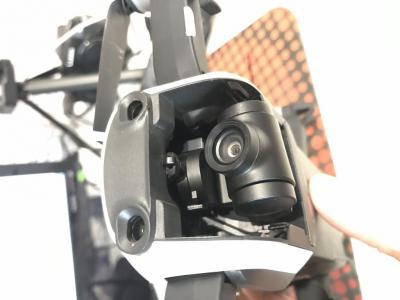
Всем привет. Летел на небольшой высоте (<10 м), не заметил провод, после чего дрон рухнул на спину. На корпусе ссадины, в т.ч. возле сенсоров, повреждены пропеллеры. Попробовал надеть защитную крышку на камеру — не получилось. Она как будто немного торчит наружу вместе с подвесом. На следующий день попробовал запустить дрон, изображение есть, но появились такие сообщения:
— Gimbal motor overloaded
— Downward Vision Sensor Calibration Error. Precision hovering and landing protection may fail
Я так понимаю — подвесу хана? Куда можно обратиться с ремонтом и во сколько он может встать? У нас город небольшой, местным специалистам (даже если они есть) доверия мало.
Прикрепленные изображения
-
0
#2905
OFFLINE
mpetr
mpetr
- Город:Обнинск
- Коптер:Mavic Pro, Mavic 2 Pro, Phantom 4 Pro, DJI Mini 2
Отправлено 28 Июль 2019 — 06:17
Куда можно обратиться с ремонтом и во сколько он может встать?
Вверху страницы…
-
0
#2906
OFFLINE
Cheslav1968
Cheslav1968
- Город:Kharkiv
- Коптер:Dji Mavic Air, Mavic Pro
Отправлено 28 Июль 2019 — 06:24
Какое все таки удовольствие летать на 8″ планшете.. Охренительно, восхитительно, обалденно.
Всего то два дюйма разницы.
-
0
#2907
OFFLINE
mpetr
mpetr
- Город:Обнинск
- Коптер:Mavic Pro, Mavic 2 Pro, Phantom 4 Pro, DJI Mini 2
Отправлено 28 Июль 2019 — 07:39
Какое все таки удовольствие летать на 8″ планшете.
Когда я попробовал 12,9 то…, ну дальше сами…
Справедливости ради для Ф4Про.
Надо мной тут хихикали.
Для М2Про тоже использую 8″.
Сообщение отредактировал mpetr: 28 Июль 2019 — 07:41
-
0
#2908
OFFLINE
Cheslav1968
Cheslav1968
- Город:Kharkiv
- Коптер:Dji Mavic Air, Mavic Pro
Отправлено 28 Июль 2019 — 09:00
Хихикали те, кто не пробовал вероятно. 8″ чем интересна, что прекрасно фиксируется стандартными захватами пульта, руки лежат привычно. Время на подготовку не больше, чем с телефоном. Я не вижу минусов.
Жена за плечом в полном восторге.
-
0
#2909
OFFLINE
mishail
mishail
- Город:Санкт-Петербург
- Коптер:Maviс Air
Отправлено 30 Июль 2019 — 06:00
Народ, чего за версия новая обновления такая 01.00.0620, стоит обновлять?
Сообщение отредактировал mishail: 30 Июль 2019 — 06:02
-
0
#2910
OFFLINE
Micha
Micha
- Город:Саратов
- Коптер:MAVICи
Отправлено 30 Июль 2019 — 07:19
Сами решайте… «Fixed aircraft and remote controller connecting issue when operating in Panama.»
Вот ссылка на источник…
https://dronedj.com/…date-mavic-air/
Сообщение отредактировал Micha: 30 Июль 2019 — 07:21
-
0
#2911
OFFLINE
weexplosive
weexplosive
- Город:Клёново
- Коптер:Mavic Air
Отправлено 30 Июль 2019 — 09:19
mishail, о бновился до этой версии с момента выхода. работает стабильно. по этому думаю стоит.
-
0
#2912
OFFLINE
Cheslav1968
Cheslav1968
- Город:Kharkiv
- Коптер:Dji Mavic Air, Mavic Pro
Отправлено 31 Июль 2019 — 12:13
Обновляйтесь, но помните, что не сможете откатиться на предыдущие прошивки. В меню отсутствует эта возможность.
-
0
#2913
OFFLINE
ACDS
ACDS
-
- Модераторы
-
- 3 457 сообщений
Опытный летчик АС

- Город:Южно-Сахалинск
- Коптер:M2P, AE2P
Отправлено 02 Август 2019 — 01:34
Модератор
_________
Последние посты перенесены в Аксессуары
Не засоряйте тему.
-
0
#2914
OFFLINE
Cheslav1968
Cheslav1968
- Город:Kharkiv
- Коптер:Dji Mavic Air, Mavic Pro
Отправлено 02 Август 2019 — 07:21
Я не писал про аксессуары. Планшет не является доп.оборудованием, без него не полетишь.
-
0
#2915
OFFLINE
ACDS
ACDS
-
- Модераторы
-
- 3 457 сообщений
Опытный летчик АС
- Город:Южно-Сахалинск
- Коптер:M2P, AE2P
Отправлено 02 Август 2019 — 10:19
Планшет не является доп.оборудованием
для такого доп.оборудования есть свои темы..смотрите разделы в других дронах — система у всех одинакова, что подходит дронам DJI — подойдет и вам.
А вот взаимодействие-баги вашего дрона с планшетом-телефоном — будет в тему..
-
0
#2916
OFFLINE
AndrTs
AndrTs
-
- Пользователи
-
- 4 сообщений
Начинающий летчик
- Город:Moscow
- Коптер:DJI Mavic Air
Отправлено 02 Август 2019 — 03:17
Всем привет! После некоторых перенастроек в камере и управлении, перестало записываться видео (2 гига) на телефон. Настройки записи не трогал, объем стоит тот что и был 2 Гб, но видео пишется только в память дрона или на эсдишку. Может конечно криворукость и где-то галочку пропустил, но перепроверял, а результата нет.
-
0
#2917
OFFLINE
aleks8989
aleks8989
-
- Пользователи
-
- 13 сообщений
Начинающий летчик
- Город:Санкт-Петербург
- Коптер:dji
Отправлено 02 Август 2019 — 04:27
Кто нибудь слыша про ошибку 200 на Mavic AIR ?????? Как решить эту проблему?
-
0
#2918
OFFLINE
Micha
Micha
- Город:Саратов
- Коптер:MAVICи
Отправлено 02 Август 2019 — 04:41
Вот про Вашу ошибку: https://forum.dji.co…read&tid=147185
https://mavicpilots….code-200.56587/
https://mavicpilots….onnected.42274/
Похоже на плохой контакт… Встречается на М1 и М2, в том числе…
Сообщение отредактировал Micha: 02 Август 2019 — 04:54
-
0
#2919
OFFLINE
max1e
max1e
-
- Пользователи
-
- 5 сообщений
Начинающий летчик
- Город:Житомир
- Коптер:mavic air
Отправлено 04 Август 2019 — 10:20
Поделюсь похожей проблемой, как тут люди иногда пишут:
мавик глючно реагирует на левый стик.
т.е. жмешь четко вертикально вверх/вниз, а он определяет это как отклонение вбок/вверх до упора. В меню калибровки джойстика эту проблему четко видно. При нажиме вверх определяет как 99% вверх и вправо. При нажиме вниз определяет как вниз и влево на 99%.
Что делать — не представляю. Искать новый б/у джойстик?
ниже нашел проблему у человека, у него стик завис. Я вот думаю, может такую же операцию проделать?
https://www.youtube….h?v=BwM2L-uqdvU
Сообщение отредактировал max1e: 04 Август 2019 — 10:34
-
0
#2920
OFFLINE
weexplosive
weexplosive
- Город:Клёново
- Коптер:Mavic Air
Отправлено 04 Август 2019 — 12:15
Посторонний предмет, пыль не исключаете? Часто бывает хранение со многими металлическими предметами. Не к намогничеванию, а к тому, что от трения металла много мелкой пыли. Сам того не ожидая после приобретения магнитного контакта в usb порт обратил внимание на намогниченую пыль…
Продуть как нибудь сперва.
Я читал о многих проблемах пульта но так же замечал, что народ носит их и хронит где попало. Мой в сумке из под Спарка. Сколько с момента выхода(полтора года) полет тфу, тфу.
-
1
Feeds
HomePopular
Topics
ValheimGenshin ImpactMinecraftPokimaneHalo InfiniteCall of Duty: WarzonePath of ExileHollow Knight: SilksongEscape from TarkovWatch Dogs: Legion
NFLNBAMegan AndersonAtlanta HawksLos Angeles LakersBoston CelticsArsenal F.C.Philadelphia 76ersPremier LeagueUFC
GameStopModernaPfizerJohnson & JohnsonAstraZenecaWalgreensBest BuyNovavaxSpaceXTesla
CardanoDogecoinAlgorandBitcoinLitecoinBasic Attention TokenBitcoin Cash
The Real Housewives of AtlantaThe BachelorSister Wives90 Day FianceWife SwapThe Amazing Race AustraliaMarried at First SightThe Real Housewives of DallasMy 600-lb LifeLast Week Tonight with John Oliver
Kim KardashianDoja CatIggy AzaleaAnya Taylor-JoyJamie Lee CurtisNatalie PortmanHenry CavillMillie Bobby BrownTom HiddlestonKeanu Reeves
Animals and PetsAnimeArtCars and Motor VehiclesCrafts and DIYCulture, Race, and EthnicityEthics and PhilosophyFashionFood and DrinkHistoryHobbiesLawLearning and EducationMilitaryMoviesMusicPlacePodcasts and StreamersPoliticsProgrammingReading, Writing, and LiteratureReligion and SpiritualityScienceTabletop GamesTechnologyTravel
Create an account to follow your favorite communities and start taking part in conversations.
Posts
r/dji
2
Posted by2 years ago

Has anyone has this error? How do I fix it? It also says “precision hovering and landing protection”
1 comment
100% Upvoted
level 1
· 2 yr. ago
I just received mine and seem to be having the same issue. Have you found a solution?
1
About Community

r/dji
A place for DJI fans to converse and communicate.
Created Apr 5, 2013
85.8k
Members
82
Online
Top posts september 12th 2020Top posts of september, 2020Top posts 2020
User AgreementPrivacy policy
Content policyModerator Code of Conduct
Reddit Inc © 2023. All rights reserved
Knowing how to calibrate the Mavic 2 Pro and Zoom vision sensors is very important.
If your are receiving the Mavic 2 Vision system error, or if your quadcopter is flying erratically, not hovering correctly, then you need to calibrate the Mavic 2 Vision Positioning System.
Also, if the Mavic 2 vision system is not working correctly, then it may not detect and avoid obstacles.
Below are the instructions on how to calibrate the Mavic 2 Pro and Zoom vision system including videos. You will also find tips to fix the Mavic 2 vision sensor and system errors.
If you are flying your Mavic 2 and the Vision Sensor Calibration error or Vision System Error occurs, you need to fly the quadcopter in straight away and re-calibrate the Mavic 2 VPS using the below instructions.
If the Mavic 2 calibration doesn’t fix the flying difficulties, then check to see if there is a Mavic 2 update available and use the excellent tips below to fix the Mavic 2 vision system error.
The full Mavic 2 calibration is done with the DJI Assistant 2 software. However, if you have no computer with you, then you can perform a quick vision sensor calibration using the DJI Go 4 app.
If you have the original Mavic Pro, then you visit our Mavic Pro vision calibration article as there are differences in the Mavic Pro and Mavic 2 vision system calibration.
Below are the instructions to calibrate the Mavic 2 Pro and Zoom vision system to fix errors while flying, hovering or obstacle sense and avoid issues.
- Download the DJI Assistant app (Apply and Windows versions available).
- Remove the Mavic 2 propellers.
- Power on the Mavic 2 quadcopter.
- Connect the quadcopter to a computer using a USB cable.
- Launch the DJI Assistant 2 application on your computer.
- Select Mavic 2.
- Click Calibration on the left side in the DJI Assistant 2 software.
- Watch the tutorial a couple of times, which show you how to calibrate the Mavic 2.
- Click Next and Calibration Now.
- Face the Mavic 2 front sensors at the computer screen.
- Adjust the Mavic 2 position so that the green rectangle is covered by the red rectangle.
- Keep the Mavic 2 in its current position and slowly move the drone along with the blue background.
- When the Mavic 2 forward vision sensors are calibrated a prompt will pop up, stating Forward Camera Calibration Complete with a green check mark.
- Click Start Downward Camera Calibration to continue.
- Keep the Mavic 2 with its downward vision sensor in its current position facing the computer and slowly move the drone along with the blue background.
- When the Mavic 2 downward vision sensors are calibrated a prompt will pop up stating Downward Camera Calibration Complete.
- Click Start Rear Camera Calibration to continue.
- Keep the Mavic 2 with its backward vision sensor in its current position facing the computer and slowly move the drone along with the blue background.
- When the Mavic 2 backward vision sensors are calibrated a prompt will pop up stating Rear Camera Calibration Complete.
- Next, fold the back legs under the Mavic 2 before starting to calibrate the side vision sensors.
- You won’t be able to fold the back leg fully on the side which has the USB cable on. That is OK.
- First, hold the Mavic 2 with the right side, which contains the USB cable to face the computer and move the quadcopter along with the blue background.
- When this side sensor is calibrated a pop up box will state Right Camera Calibration Complete.
- Then turn the Mavic 2 to the left side and calibrate by following the blue boxes on screen.
- After both sides of the Mavic 2 are calibrated, the DJI Assistant performs calculations. If calibration is successful, you will see a green check mark with Calibration Complete message.
- Then restart your Mavic 2 drone to complete the calibration.
Below is an excellent Mavic 2 calibration tutorial video.
Calibrate Mavic 2 Vision Sensor Using DJI Go 4
It is possible to do a quick calibration of the Mavic 2 vision sensors using the DJI Go 4 app. This could be a quick fix if you receive the DJI Mavic Vision Sensor Calibration error or Vision System Error.
Other reasons to calibrate the Mavic 2 VPS is if you feel the Mavic 2 isn’t hovering as stable as it normally does or if you feel the Mavic 2 is slow detecting obstacles or just not flying as it should.
If you don’t have a laptop with the DJI Assistant 2 app to do a full Mavic vision sensor calibration, then you can do a quick Mavic vision sensor calibration using the DJI Go 4 app.
To do the quick Mavic vision calibration, tap on the Aircraft Status in the DJI Go 4 app. Then click on Vision Sensors and start the quick calibration.
What To Do If Mavic 2 Vision Sensor Calibration Fails
- Insure that you have the latest Mavic 2 firmware before calibrating the vision sensors.
- Only calibrate the Vision Sensors when the light is good and never calibrate near or over reflective surfaces.
- Remove the propellers before starting the calibration.
- It is best to have batteries full or as close to full on your laptop and Mavic 2 just in case the vision sensor calibration takes longer.
- Give yourself plenty of space and have no interruptions while you calibrate the Mavic 2 vision sensors.
- Calibration of the Mavic 2 vision sensors require more or less only wrist movement to pivot, tilt and rotate the drone to follow the blue squares on the screen.
- Insure you fingers aren’t covering or close to the vision sensors while calibrating the Mavic 2.
- Leave the Mavic 2 on during the full process until you see the “Calibration Complete” message.
- Don’t forget to restart the Mavic 2 after calibration.
- If you are using a laptop and the DJI Assistant 2 is not properly recognizing the Mavic 2 sensors, then try it on a normal desktop computer with external display.
Fix Mavic 2 Vision System Error
The Mavic 2 vision system error does not have to be coming from the vision sensors. It could be caused by the infrared sensors, which are part of the whole Mavic 2 Vision Positioning System. So the process of calibrating the vision sensors would not correct the system error if the problem is with the infrared sensors.
If you’re quadcopter is only new and you are receiving the Mavic 2 vision system error, it is important to troubleshoot the problem as quickly as possible.
With all new DJI products, there is always the option to return the quadcopter but this return period is not very long. However, don’t send it straight back without checking the Mavic 2 and following the below steps as it could be something very simple causing the Mavic 2 vision system error.
Here are some instructions on what to try when you receive the DJI Mavic Vision system errors.
- If the Mavic is only new, check that there is no tape or packaging covering the vision sensors on the forward, rear, downward and both sides.
- Switch off the Mavic 2, take the battery out and leave it off for about 3 minutes.
- If the light is insufficient, then the Mavic 2 vision sensors won’t work properly. See below.
- The Mavic 2 vision system won’t work correctly or not at all over polished or reflective surfaces giving cause to the vision sensor See below.
- Ensure the vision sensors are clean. Use a soft cloth to remove any dust or debris from the sensors.
- Check other parts of your Mavic 2. If the quadcopter isn’t flying correctly because of bent or broken propellers or other parts, then incorrect information will be sent back to the flight controller, which could lead to the to the system error.
- Check to see if there is new Mavic 2 firmware available.
- Calibrate the Mavic 2 vision sensors using DJI Assistant 2 software as described above.
- Try the DJI Go 4 Mavic quick calibration described above.
- Check that you are getting a strong GPS signal in P-Mode.
- Calibrate the Mavic 2. If the IMU / compass is not calibrated, the flight control system will not receiving correct information and this may effect the vision system error.
As well as vision sensor issues, you may be having issues where the Mavic disconnects from the Remote Control or DJI Go 4 app.
If you are experiencing these Mavic 2 disconnect issues, then read our article on fixing Mavic Pro and Mavic 2 disconnects. The article covers all the many reasons which can cause the drone disconnecting from the remote or DJI Go 4 app. Looks at cables, ports, SD cards, smartphone cache, app settings and more.
Performance Of The Mavic 2 Vision System
The Mavic Vision System is affected by its surroundings with the infrared sensor under the Mavic been affected greatly by the surfaces it is being flown over.
Here are some notes on instances and surroundings which can adversely affect your Mavic Vision system;
- Flying over monochrome surfaces such as pure black, white, pure red, pure green.
- Flying over reflective surfaces.
- Flying over transparent surfaces.
- Flying over moving objects or surfaces.
- Flying over surfaces that strongly reflect infrared waves away such as mirrors.
- Flying at high speeds of over 31 mph forward and 27 mph backward to allow the Mavic 2 sufficient time to brake.
- Flying over small and fine objects such as power lines or tree branches.
- Flying when the lighting changes frequently and drastically.
- Flying over extremely dark surfaces. (< 10 lux) or very bright (> lux 40,000).
- Flying over surfaces without a clear pattern or texture.
- Flying over surfaces with identical repeating patterns.
Note: If you require components for your quadcopter, then view this large selection of Mavic 2 parts, upgrades and accessories.
DJI Mavic Care Refresh
The Mavic Care Refresh provides two replacement units for a small additional charge in one year and covers a wide variety of accidents, giving you greater peace of mind. Click on the below link to read the FAQ and pricing.
DJI Mavic 2 Care Refresh
Mavic 2 Obstacle Sensing Vision System Information
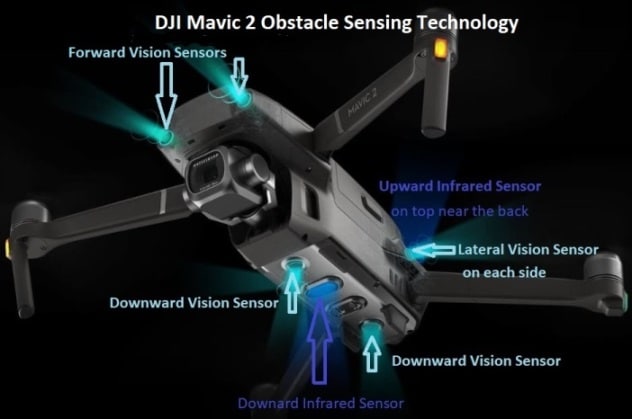
The new Mavic 2 Pro and Zoom can sense objects in 6 directions. Known as Omnidirectional Obstacle Sensing, this includes left, right, up, down, forward and backward obstacle sensing.
Obstacle sensing for left and right directions is only available in ActiveTrack or Tripod Mode.
Now, while all 6 sides of the Mavic 2 are covered for obstacle sensing, Omnidirectional Obstacle Sensing does not fully cover the full 360 degree circumference arc of the quadcopter.
Please see the DJI Mavic 2 user manual for diagrams showing the obstacle sensing coverage around the quadcopter.
How the Mavic 2 Obstacle Sensing Works
The Mavic 2 Pro and Mavic 2 Zoom are equipped with Forward, Backward, Downward and Lateral Vision Systems including Upward and Downward Infrared Sensing Systems. These all provide omnidirectional obstacle detection, providing lighting conditions are adequate.
The main components of the Forward, Backward and Downward Vision Systems are 6 camera sensors located on the nose, rear end and underside of the Mavic 2 quadcopter.
The lateral Vision System are 2 cameras with one camera on each side of the Mavic 2 quadcopter.

The main components of the Upward and Downward Infrared Sensing Systems are 2 x 3D infrared modules located on the top and underside of the Mavic 2 quadcopter.
The Downward Vision System and Infrared Sensing System helps the Mavic 2 maintain its current position and hover in place very precisely. The Vision and Infrared Sensing system allow the Mavic 2 to fly indoors or in other areas where a GPS signal is unavailable.
Mavic 2 Bottom Auxiliary Light
The Auxiliary light located on the underside of the Mavic 2 improves visibility for the Downward Vision System in bad light conditions.
Obstacle Sensing is fascinating technology and you can read further in this article entitled “Top Collision Avoidance Drones And Obstacle Detection Explained“.
Here is a shorter version from DJI on how to calibrate the Mavic 2 VPS.
4 Ways to Fix DJI forward vision sensor calibration error
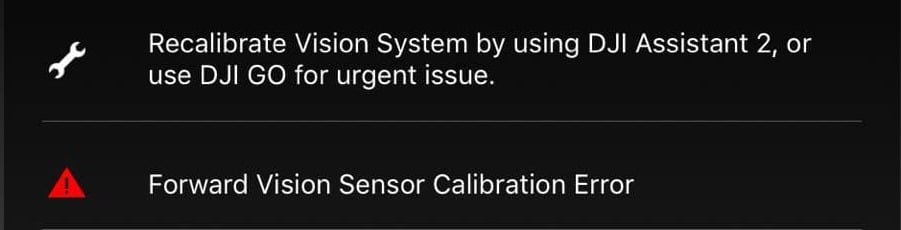
Forward vision sensors are the small camera lens-looking holes located under the drone.
these sensors are used to stabilize the altitude of a drone, they also allow safe landing, which means if they are not functioning properly your drone might crash.
However often times the software won’t even allow you to the lift-off if you have this error in the first place.
The thing is, it is fairly easy to fix in most cases but I see people putting their drones on for years because they are not able to find a solution to this.
How do you fix forward vision sensor error?
You can fix forward vision sensor error by recalibrating the drone and refreshing the firmware with DJI assistant software. Download DJI Assistant 2 from DJI’s website, make sure it is the version that is suitable for your drone. The software will guide you through, and it can take up to 20 minutes.
if recalibrating and refreshing the firmware doesn’t seem to work i will be mentioning 4 other methods you can try.
The first three are pretty sight forward and generic, the last one is a pretty ninja technique, and hopefully it will fix the rest 20%.
1. Clean the vision sensor
- If you had a crash and there is dirt on the lens
- If you have flown in rain or fog or even in high humidity and there is precipitation inside
- If there some kind of lotion grease or food particles that got transferred from your hand to the lenses
If the sensor is not squeaky clean there is a high chance it is causing the problem.
To clean the sensor you only need a soft cloth, unless there is precipitation inside, in that case the lenses must be removed and cleaned.
Also if your drone has been with DJI for a repair you should also check if there is no plastic covering on the sensor because when you send a drone to DJI to get it fixed they oftentimes send you a refurbished drone which often has plastic coverings on the sensors
2. Recalibrate your drone in DJI assistant 2
If you already have flown your drone, I guess you already have calibrated your drone before so it won’t be that complicated.
So to calibrate your DJI drone-
- Download DJI assistant 2 from the dji.com.
- Use the proper software, every DJI lineup have a different software
- This is for the phantom lineup
- This is for the fpv lineup
- This is for the Mavic lineup
- connect your drone with the provided cable
- Finally, the software will guide you through the process
Now I have seen a lot of people’s calibration process getting stuck mid-calibration and some people will finish the process then it will stop after it reaches %71 of the calibration process.
so if this is happening to you this might be the problem-
- use a flat screen
- Use a bigger screen
- Uninstall the current software you have from your computer and download it again.
- Try it on different screens
If this doesn’t fix the problem it can be because you have outdated firmware or your drone is damaged-
3. Refresh firmware in DJI assistant 2
Outdated firmware can also be the issue, I have seen people use a 2019 version in 2021 which is kind of scary to be honest.
To refresh your drone’s firmware-
- Power on the drone
- Connect it to your computer using the USB cable DJI provides
- Open the DJI Assistant 2 software on your laptop
- Log in to the DJI Assistant 2 app and select your drone
- Next, you will see the firmware version
- Tap update and choose the latest version
- If it is already the latest version click refresh
- Repeat process with other batteries(if you own one)
After updating the firm wear to get rid of the sensor calibration error you might have to recalibrate your drone.
*Note: before firmware update make sure all your drone, controller, and phones battery are fully charged because it can take up to 30 minutes*
4. Turn on the drone mid-air
So the last technique which is pretty awesome and easy to turn your drone on mid-air placing your drone about 12 inches from a straight wall.
- Pick up your drone of the ground at an about 1 foot about 12 inches distance from the ground
- hold the drone stable also about 12 inches from a stight wall
- Then tun it on as you normally would
- Make sure you are not covoring the sensors with your hand
- then restart the drone
What this does is it resets the downward vision sensor error. The problem with the method is that the error might come again after some time.
Final choice
If none of the methods fix it you need to send it to a professional.
If your drone is within a year period from activation or if you have DJI care there is a good chance you can get it fixed without any cost.
If not you might have to pay from fifty dollars up to hundreds of dollars depending on the situation
After you hand it to DJI it can take up to 15 days till they fix it and send it back to you, and it can take longer if you don’t live in the united states
If you are located in Armenia, you may contact the local dealer or DJI’s support via email to start a case and send the unit back.
Источник
Не работают сенсоры
#1 OFFLINE Commander


- Город: Москва
- Коптер: mavic
После 3-4 полетов перестали работать сенсоры. Коптер не падал, не врезался, сенсоры чистые, обновлений и даже калибровок не делал (за эти 3-4 полета осваивал азы). Освещенности более чем достаточно, в первый раз обнаружил их неработоспособность в солнечный день. При этом dji go не выдает никаких ошибок, что сенсоры не исправны. Предложений откалибровать их также нет.
Что сделал: через assistant скачал новую прошивку. Далее захожу в калибровку, пролистываю три слайда tutorial, и кнопка «Начать калибровку» оказывается недоступной (серая). Рядом вращается значок «солнышка», типа система думает, но я оставлял в таком состоянии ее больше чем на час, ничего не происходит.
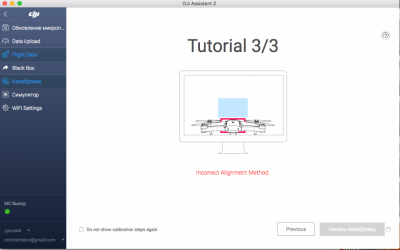
В общем такое ощущение, что как будто сенсоры с дрона исчезли как класс, и при этом dji go это полностью устраивает.
P.S. Одновременно с этой проблемой перестал работать active track и прочие интеллектуальные режимы.
#2 OFFLINE olegnsk
Опытный летчик АС

- Город: Москва, исторически Новосибирск и Камчатка
- Коптер: младшенький Mavic и ещё небольшая эскадрилья
Commander , Настройки GO бывают при переустановках слетают, проверяли а у вас сенсоры в приложении включены — в полётном меню иконка круг с дужками первая команда передние камеры, далее advance setting и команда нижние камеры.
#3 OFFLINE Commander
- Город: Москва
- Коптер: mavic
Да, эти настройки все включены. Да и повторюсь, я не менял ничего за время сделанных 3-4х полетов, обновлений не ставил. Прошивку сделал уже после того, как сенсоры перестали работать.
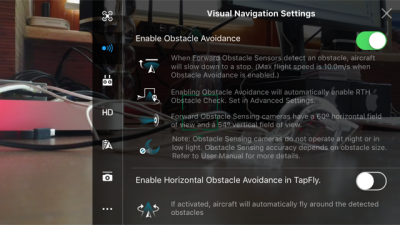
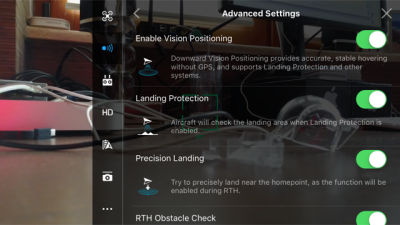
#4 OFFLINE olegnsk
Опытный летчик АС
- Город: Москва, исторически Новосибирск и Камчатка
- Коптер: младшенький Mavic и ещё небольшая эскадрилья
Commander , через GO провести калибровку не пробовали?
#5 OFFLINE Commander
- Город: Москва
- Коптер: mavic
olegnsk , хотел, но не знаю как это сделать. Нет ни в одном из меню igo такого варианта. В одной из тем про калибровку (http://dji-club.ru/i. -vision-sensor/) видел скрин, на котором в меню «Aircraft status» есть пункт «Calibration vision sensors». Но у меня такого нет
По статусу с сенсорами все ОК:
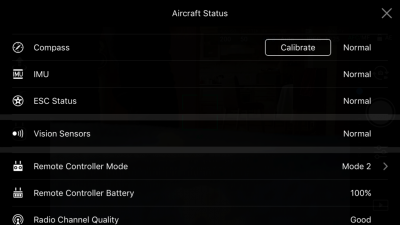
#6 OFFLINE olegnsk
Опытный летчик АС
- Город: Москва, исторически Новосибирск и Камчатка
- Коптер: младшенький Mavic и ещё небольшая эскадрилья
Commander , Простите, а с чего вы считаете, что сенсоры VPS не работают? Высота по VPS не отображается?, радар сенсоров в пилотном меню не активен либо не показывает приближение к препятствиям? Симптомы какие? То что, в Ассистенте не калибруются, но с этой прогой откровенно многие не дружат, у многих вкл меня не получилось через неё и прошится, только через GO.
Сообщение отредактировал olegnsk: 15 Май 2017 — 03:54
#7 OFFLINE Olegich
- Город: Калининград
- Коптер: DJI MAVIK PRO
У меня после прошивки версии 700, тоже не калибруется. И с видео что-то, пока не понял. Прошился, два дня назад. А у других, как встала прошивка.
#8 OFFLINE Commander
- Город: Москва
- Коптер: mavic
olegnsk , по нескольким причинам:
1. В первую очередь визуально. Очередной раз запустив коптер, он на что-то ругнулся при включении active track, стал его сажать, а он взял и сел) А не завис над землей, сопротивляясь управлению.
2. Раньше он зависал на расстоянии неск метров над землей как вкопанный, а теперь его подколбашивает
3. Нет полос обнаружения препятствий на экране телефона. Нет показателя VPS (только D, H, HS, VS)
4. Ну и дальше уже всякие эксперименты: подношу руку снизу, спереди, приближаю специально к препятствию — ничего не происходит.
Я не уверен, что дело в калибровке. Тогда бы GO сообщила, что надо откалибровать. А она пишет normal. Но при этому ощущение, что сенсоры вообще отсутствуют и даже и не предполагались, иначе бы ошибка какая-нибудь была.
Но допустим надо откалибровать: как это сделать? В GO нет такого пункта.
Хотя в инструкции написано, что можно:
Используйте быструю калибровку, когда приложение DJI GO уведомляет, что требуется калибровка для датчиков технического зрения. Нажмите через «Aircraft Status» -> «Vision Sensors» для проведения быстрой калибровки.
Olegich , у меня эта проблема образовалась без обновления прошивки. Вообще ничего не трогал. Дальнейшая прошивка последней версии не помогла.
А у вас не калибруются, или вообще не работают?
Сообщение отредактировал Commander: 15 Май 2017 — 05:22
#9 OFFLINE Olegich
- Город: Калининград
- Коптер: DJI MAVIK PRO
Раньше не обращал внимания, летал над полями. Обучался и привыкал. Прошился 700, не смог от калиброваться. Взлетел, попробовал сенсоры снизу, спереди. Висит без движения. На (видио) подходишь должен отлетать, снизу, приподниматься. Буду пробывать еще калибровать, на другом компьютере.
#10 OFFLINE Commander
- Город: Москва
- Коптер: mavic
Olegich , в одном из видео-уроков говорилось, что после обновления желательно калибровать сенсоры, иначе они хуже начинают работать, с меньшего расстояния начинают видеть препятствия. Но нигде не упоминалось, что они вообще после обновления могут отрубиться. Вполне возможно, что они у вас и раньше не работали. Хотя вы точно должны были обратить внимание вот на что: если они работали, то при посадке он должен был тормозить над землей.
По поводу попробовать откалиброваться на другом компьютере — спасибо за идею. Тоже попробую. Правда у меня все компы маки. Если на другом не получится, то буду винду искать.
Скажите, а GO не предлагает вам откалибровать сенсоры? Какой статус по ним, как и у меня normal?
#11 OFFLINE Olegich
- Город: Калининград
- Коптер: DJI MAVIK PRO
Сенсоры откалибровал на другом компьютере сис. винд. Взлетел, останавливается за метр до стены (видео, после калибровки за три метра) пусть хоть так. Набери в поиске на сайте «версия 700», жаркая дискуссия и много нового. Там и наши проблемы проскакивают. Есть пилоты, которые на старые прошивки откатываются.
#12 OFFLINE Euronymousua
- Город: Харьков
Commander , Cенсоры не калибрует так как у вас стоит Windows 10. Для работы калибровки в Windows 10 надо отключить цифровую проверку подписи драйверов и перезагрузиться
#13 OFFLINE Commander
- Город: Москва
- Коптер: mavic
Euronymousua , у меня нет windows, только mac. На двух компьютерах mac одинаковая ошибка. Как раз хочу найти винду и попробовать на ней.
#14 OFFLINE DmitriyOz
- Город: Екатеринбург
- Коптер: Mavic Pro
Такая же проблема, не удалось сделать калибровку. Проблема возникла до обновления в меню DJI Go статут Vision Sensor — Normal. При взлёте мавик не зависает на положенном расстоянии, начинает мотать вверх-вниз, немногов тороны Пробовал на Mac , Windows 7,10. При калибровке ошибка калибровки DJI Assistant 2 последней версии, пленок нет.
#15 OFFLINE Commander
- Город: Москва
- Коптер: mavic
DmitriyOz , я отдал коптер по гарантии официалам. Признали проблему, сделать ничего не смогли. Будут отправлять в Китай.
#16 OFFLINE DmitriyOz
- Город: Екатеринбург
- Коптер: Mavic Pro
Commander , печально. Тоже не могу решить эту проблему, заказывал из Китая сейчас пытаюсь связаться напрямую с DJI хотя бы что то узнать в чем может быть проблема
#17 OFFLINE Commander
- Город: Москва
- Коптер: mavic
DmitriyOz , я в начале подзабыл, что покупал в России у официалов, и поэтому обращался к китайцам. Они мне ответили, что надо отправлять коптер к ним. В чем именно проблема они не написали. Ниже оригинальный текст, если интересно.
Subject: The sensors do not work
Message: Hello! After the 3-4 flights of my dron the both sensors — bottom and forward — stopped working. The dron did not crash into anything. The sensors are clear, and there is Illumination is quite enough. And I didn’t upgrade the firmware, didn’t calibrate the sensors. I did not do anything. It has happend suddenly. I watched the drone status in DJI GO4, but there was not any errors. And the system doesn’t recommend me to calibrate the sensors (watch the attached picture). What I’ve done: 1. Downloaded Assistant 2 and upgraded the firmware to latest version (macbook mini) 2. Go to Calibration, but the button «Start calibration» is disabled and grey. And there is mistake: Incorrect allignment method. (watch the attached picture) 3. Then I repeated these steps on another computer — macbook pro, and then I’ve make it one more time on PC (windows OS). With the same results. Will you recommend me what should I do?
Support5.DE (DJI)
Hello, Unfortunately we recommend you send the drone in for a repair. In order to this you will need to contact your dealer or a local dealer in order to have it sent in. We apologize for the inconvenience.
Best Regards, Technical Support
DJI GmbH
Сообщение отредактировал Commander: 15 Июнь 2017 — 09:17
Источник
- Публикация
- Товары6
Инструкции: Калибровка Vision сенсоров DJI Mavic 2
- Оптические сенсоры установлены спереди, сзади, внизу и по бокам Mavic 2
- Включите дрон
- Подключите к компьютеру при помощи USB кабеля
- Запустите DJI Assistant 2 и выберите “Mavic 2”
- Нажмите на пункт “калибровка” в левой части окна и следуйте инструкции
- Нажмите “далее”, затем кнопку “калибровать”
- Направьте коптер на экран так, чтобы зеленый и красный треугольники совпали
- Держите дрон в таком положении
- Медленно двигайте дрон по форме прямоугольника
- Двигайтесь вдоль голубого фона
- После калибровки передних сенсоров появится оповещение
- Нажмите “начать калибровку нижней камеры”, чтобы продолжить
- Затем откалибруйте задние сенсоры
- После того как задние сенсоры откалиброваны, пожалуйста сложите задние лучи и затем откалибруйте боковые датчики следуя инструкциям на экране
- После этой операции DJI Assistant 2 автоматически начнет просчет данных калибровки
- После окончания калибровки оптической системы, пожалуйста перезапустите дрон
- Спасибо за просмотр!
Товары
Все6
DJI Mavic 24
DJI Mavic 2 Enterprise1
Аксессуары DJI Mavic 21
Артикул: 3003
Добавить к сравнению
Артикул: 3005
Добавить к сравнению
Артикул: 3048
Добавить к сравнению
Артикул: 3001
Добавить к сравнению
Артикул: 3159
Добавить к сравнению
Артикул: 3047
Добавить к сравнению