
Меню сайта
Компьютеры и железо
Инструменты
Информационные справочники
Облако тегов
1С Google PHP SEO TrustRank Индексация Интернет магазин Поисковая оптимизация Поисковый робот Продвижение блога Продвижение интернет магазина Продвижение сайта Разработка сайта Раскрутка блога Раскрутка интернет магазина Раскрутка сайта Создание блога Создание сайта
BNAME.RU » Код ошибки HTTP 423 Locked
Что означает ошибка 423 Locked ?
Состояние 423 указывает, что целевой ресурс недоступен для указанного метода. Этот ответ ДОЛЖЕН содержать соответствующее предварительное условие или постусловие, такое как «lock-token-submissed» или «no-conflicting-lock»
Если Вам помогла информация размещенная на странице «HTTP коды» — Вы можете поддержать наш проект.
«1xx» — Информационные коды HTTP
100 — Continue (Продолжай)
«Продолжить». Этот промежуточный ответ указывает, что запрос… Читать далее
Подробнее
101 — Switching Protocol (Переключение протоколов)
«Переключение протокола». Этот код присылается в ответ на за… Читать далее
Подробнее
102 — Processing (Идёт обработка)
«В обработке». Этот код указывает, что сервер получил запрос… Читать далее
Подробнее
103 — Early Hints (Ранняя метаинформация)
«Ранние подсказки». В ответе сообщаются ресурсы, которые мог… Читать далее
Подробнее
«2xx» — Успешные коды HTTP
200 — OK (Хорошо)
«Успешно». Запрос успешно обработан. Что значит «успешно», з… Читать далее
Подробнее
201 — Created (Создано)
«Создано». Запрос успешно выполнен и в результате был создан… Читать далее
Подробнее
202 — Accepted (Принято)
«Принято». Запрос принят, но ещё не обработан. Не поддержива… Читать далее
Подробнее
203 — Non-Authoritative Information (Информация не авторитетна)
«Информация не авторитетна». Этот код ответа означает, что и… Читать далее
Подробнее
204 — No Content (Нет содержимого)
«Нет содержимого». Нет содержимого для ответа на запрос, но … Читать далее
Подробнее
205 — Reset Content (Сбросить содержимое)
«Сбросить содержимое». Этот код присылается, когда запрос об… Читать далее
Подробнее
206 — Partial Content (Частичное содержимое)
«Частичное содержимое». Этот код ответа используется, когда … Читать далее
Подробнее
207 — Multi-Status (Многостатусный)
Код 207 (Multi-Status) позволяет передавать статусы для неск… Читать далее
Подробнее
208 — Already Reported (Уже сообщалось)
Относится к DAV и был ранее включен в 207 ответ. Там поныне … Читать далее
Подробнее
226 — IM Used (Использовано IM)
Расширение HTTP для поддержки «дельта кодирования» ( delta e… Читать далее
Подробнее
«3xx» — Коды перенаправлений (HTTP Редиректы)
300 — Multiple Choice (Множество выборов)
«Множественный выбор». Этот код ответа присылается, когда за… Читать далее
Подробнее
301 — Moved Permanently (Перемещено навсегда)
«Перемещён на постоянной основе». Этот код ответа значит, чт… Читать далее
Подробнее
302 — Found / Moved Temporarily (Найдено / Перемещено временно)
«Найдено». Этот код ответа значит, что запрошенный ресурс вр… Читать далее
Подробнее
303 — See Other (Смотреть другое)
«Просмотр других ресурсов». Этот код ответа присылается,&nbs… Читать далее
Подробнее
304 — Not Modified (Не изменялось)
«Не модифицировано». Используется для кэширования. Это код о… Читать далее
Подробнее
305 — Use Proxy (Использовать прокси)
«Использовать прокси». Это означает, что запрошенный ресурс … Читать далее
Подробнее
306 — Switch Proxy (Сменить прокси)
Больше не использовать. Изначально подразумевалось, что » по… Читать далее
Подробнее
307 — Temporary Redirect (Временное перенаправление)
«Временное перенаправление». Сервер отправил этот ответ… Читать далее
Подробнее
308 — Permanent Redirect (Постоянное перенаправление)
«Перенаправление на постоянной основе». Это означает, что ре… Читать далее
Подробнее
«4xx» — Коды ошибок на стороне клиента
400 — Bad Request (Некорректный запрос)
«Плохой запрос». Этот ответ означает, что сервер не понимает… Читать далее
Подробнее
401 — Unauthorized (Не авторизован)
«Неавторизовано». Для получения запрашиваемого ответа нужна … Читать далее
Подробнее
402 — Payment Required (Необходима оплата)
«Необходима оплата». Этот код ответа зарезервирован для буду… Читать далее
Подробнее
403 — Forbidden (Запрещено)
«Запрещено». У клиента нет прав доступа к содержимому, поэто… Читать далее
Подробнее
404 — Not Found (Не найдено)
«Не найден». Сервер не может найти запрашиваемый ресурс. Код… Читать далее
Подробнее
405 — Method Not Allowed (Метод не поддерживается)
«Метод не разрешен». Сервер знает о запрашиваемом методе, но… Читать далее
Подробнее
406 — Not Acceptable (Неприемлемо)
Этот ответ отсылается, когда веб сервер после выполнения ser… Читать далее
Подробнее
407 — Proxy Authentication Required (Необходима аутентификация прокси)
Этот код ответа аналогичен коду 401, только аутентификация т… Читать далее
Подробнее
408 — Request Timeout (Истекло время ожидания)
Ответ с таким кодом может прийти, даже без предшествующего з… Читать далее
Подробнее
409 — Conflict (Конфликт)
Этот ответ отсылается, когда запрос конфликтует с текущим со… Читать далее
Подробнее
410 — Gone (Удалён)
Этот ответ отсылается, когда запрашиваемый контент удален с … Читать далее
Подробнее
411 — Length Required (Необходима длина)
Запрос отклонен, потому что сервер требует указание заголовк… Читать далее
Подробнее
412 — Precondition Failed (Условие ложно)
Клиент указал в своих заголовках условия, которые сервер не … Читать далее
Подробнее
413 — Request Entity Too Large (Полезная нагрузка слишком велика)
Размер запроса превышает лимит, объявленный сервером. Сервер… Читать далее
Подробнее
414 — Request-URI Too Long (URI слишком длинный)
URI запрашиваемый клиентом слишком длинный для того, чтобы с… Читать далее
Подробнее
415 — Unsupported Media Type (Неподдерживаемый тип данных)
Медиа формат запрашиваемых данных не поддерживается сервером… Читать далее
Подробнее
416 — Requested Range Not Satisfiable (Диапазон не достижим)
Диапозон указанный заголовком запроса Range не может бы… Читать далее
Подробнее
417 — Expectation Failed (Ожидание не удалось)
Этот код ответа означает, что ожидание, полученное из заголо… Читать далее
Подробнее
418 — I’m a teapot (Я — чайник)
I’m a teapot — Этот код был введен в 1998 году как одна из т… Читать далее
Подробнее
419 — Authentication Timeout (not in RFC 2616) (Обычно ошибка проверки CSRF)
Authentication Timeout (not in RFC 2616) — Этого кода нет в … Читать далее
Подробнее
420 — Enhance Your Calm (Twitter) (Подождите немного (Твиттер))
Возвращается Twitter Search и Trends API, когда клиент отпра… Читать далее
Подробнее
421 — Misdirected Request (Неверный запрос)
Misdirected Request — запрос был перенаправлен на сервер, не… Читать далее
Подробнее
422 — Unprocessable Entity (Необрабатываемый экземпляр)
Запрос имел правильный формат, но его нельзя обработать из-з… Читать далее
Подробнее
423 — Locked (Заблокировано)
Целевой ресурс из запроса заблокирован от применения к нему … Читать далее
Подробнее
424 — Failed Dependency (Невыполненная зависимость)
Не удалось завершить запрос из-за ошибок к предыдущем запрос… Читать далее
Подробнее
425 — Too Early (Слишком рано)
Too Early — сервер не готов принять риски обработки «ранней … Читать далее
Подробнее
426 — Upgrade Required (Необходимо обновление)
Указание сервера, клиенту, обновить протокол. Заголовок отве… Читать далее
Подробнее
428 — Precondition Required (Необходимо предусловие)
Precondition Required — сервер указывает клиенту на необходи… Читать далее
Подробнее
429 — Too Many Requests (Слишком много запросов)
Too Many Requests — клиент попытался отправить слишком много… Читать далее
Подробнее
430 — Would Block (Будет заблокировано)
Код состояния 430 would Block — это код, который сервер мог … Читать далее
Подробнее
431 — Request Header Fields Too Large (Поля заголовка запроса слишком большие)
Request Header Fields Too Large — Превышена допустимая длина… Читать далее
Подробнее
434 — Requested host unavailable (Запрашиваемый адрес недоступен)
Сервер к которому вы обратились недоступен… Читать далее
Подробнее
444 — No Response (Nginx) (Нет ответа (Nginx))
Код ответа Nginx. Сервер не вернул информацию и закрыл соеди… Читать далее
Подробнее
449 — Retry With (Повторить с…)
Retry With — возвращается сервером, если для обработки запро… Читать далее
Подробнее
450 — Blocked by Windows Parental Controls (Microsoft) (Заблокировано родительским контролем Windows (Microsoft))
Расширение Microsoft. Эта ошибка возникает, когда родительск… Читать далее
Подробнее
451 — Unavailable For Legal Reasons (Недоступно по юридическим причинам)
Unavailable For Legal Reasons — доступ к ресурсу закрыт по ю… Читать далее
Подробнее
499 — Client Closed Request (Клиент закрыл соединение)
Нестандартный код состояния, представленный nginx для случая… Читать далее
Подробнее
«5xx» — Коды ошибок на стороне сервера
500 — Internal Server Error (Внутренняя ошибка сервера)
«Внутренняя ошибка сервера». Сервер столкнулся с ситуацией, … Читать далее
Подробнее
501 — Not Implemented (Не реализовано)
«Не выполнено». Метод запроса не поддерживается сервером и н… Читать далее
Подробнее
502 — Bad Gateway (Плохой шлюз)
«Плохой шлюз». Эта ошибка означает что сервер, во время рабо… Читать далее
Подробнее
503 — Service Unavailable (Сервис недоступен)
«Сервис недоступен». Сервер не готов обрабатывать запрос. За… Читать далее
Подробнее
504 — Gateway Timeout (Шлюз не отвечает)
Этот ответ об ошибке предоставляется, когда сервер действует… Читать далее
Подробнее
505 — HTTP Version Not Supported (Версия HTTP не поддерживается)
«HTTP-версия не поддерживается». HTTP-версия, используемая в… Читать далее
Подробнее
506 — Variant Also Negotiates (Вариант тоже проводит согласование)
Из-за не верной конфигурации, выбранный вариант указывает са… Читать далее
Подробнее
507 — Insufficient Storage (Переполнение хранилища)
Не хватает места для выполнения текущего запроса. Проблема м… Читать далее
Подробнее
508 — Loop Detected (Обнаружено бесконечное перенаправление)
Сервер обнаружил бесконечный цикл при обработке запроса…. Читать далее
Подробнее
509 — Bandwidth Limit Exceeded (Исчерпана пропускная ширина канала)
Данный код статуса, используется в случае превышения веб пло… Читать далее
Подробнее
510 — Not Extended (Не расширено)
У сервера отсутствует расширение, которое пытается использов… Читать далее
Подробнее
511 — Network Authentication Required (Требуется сетевая аутентификация)
Необходимо выполнить аутентификацию, при этом в ответе должн… Читать далее
Подробнее
520 — Unknown Error (Неизвестная ошибка)
Unknown Error, возникает когда сервер CDN не смог обработать… Читать далее
Подробнее
521 — Web Server Is Down (Веб-сервер не работает)
Web Server Is Down, возникает когда подключения CDN отклоняю… Читать далее
Подробнее
522 — Connection Timed Out (Соединение не отвечает)
Connection Timed Out, возникает когда CDN не удалось подключ… Читать далее
Подробнее
523 — Origin Is Unreachable (Источник недоступен)
Origin Is Unreachable, возникает когда веб-сервер недостижим… Читать далее
Подробнее
524 — A Timeout Occurred (Время ожидания истекло)
A Timeout Occurred, возникает при истечении тайм-аута подклю… Читать далее
Подробнее
525 — SSL Handshake Failed (Квитирование SSL не удалось)
SSL Handshake Failed, возникает при ошибке рукопожатия SSL м… Читать далее
Подробнее
526 — Invalid SSL Certificate (Недействительный сертификат SSL)
Invalid SSL Certificate, возникает когда не удаётся подтверд… Читать далее
Подробнее
527 — Error: Railgun Listener to origin error (Ошибка прослушивателя рейлгана для источника)
Нестандартный код CloudFlare — указывает на прерванное соеди… Читать далее
Подробнее
530 — Origin DNS Error (Ошибка исходного DNS)
Нестандартный код CloudFlare. Ошибка HTTP 530 возвращается с… Читать далее
Подробнее
598 — Network read timeout error (Ошибка тайм-аута сетевого чтения)
Используется прокси-серверами Microsoft HTTP для передачи си… Читать далее
Подробнее
599 — Network connect timeout error (Ошибка тайм-аута сетевого подключения)
Используется прокси-серверами Microsoft HTTP для передачи си… Читать далее
Подробнее
Copyright © BNAME.RU 2006 – | Все права защищены.
Последние комментарии

Ewan — 5 февраля 2023 14:43
PHP преобразовать первый символ в верхний регистр — функция mb_ucfirst() в многобайтных кодировках и юникода
CBD Oil Malta, trustedrevie.ws, Write more, thats all I have to say. Literally, it seems as though you relied on the
Christopher — 15 января 2023 20:08
PHP преобразовать первый символ в верхний регистр — функция mb_ucfirst() в многобайтных кодировках и юникода
Are you looking to jumpstart your career in the exciting world of Web3 and blockchain technology? Look no further
Darci — 15 января 2023 10:52
PHP преобразовать первый символ в верхний регистр — функция mb_ucfirst() в многобайтных кодировках и юникода
toto slot (archive.ams.cmu.ac.th)
Allan — 15 января 2023 04:40
PHP преобразовать первый символ в верхний регистр — функция mb_ucfirst() в многобайтных кодировках и юникода
Are you looking to jumpstart your career in the exciting world of Web3 and blockchain technology? Look no further than
Rosaline — 4 января 2023 03:34
PHP преобразовать первый символ в верхний регистр — функция mb_ucfirst() в многобайтных кодировках и юникода
bestspherepictures.blogspot.com It’s a shame you don’t have a donate button! I’d without a doubt donate to this
Все комментарии
Онлайн статистика
4 посетителя на сайте. Из них:
Гости4
Обычные посетители сайта обращают внимание в первую очередь на качественный контент, а поисковые краулеры – на ответы сервера.
Сегодня научимся проверять код как одной страницы, так и всех сразу, а также разберем все коды ответа и узнаем, что именно они означают.
Немного теории
Определить доступность веб-страницы поможет анализ кода состояния HTTP. Технически он представляет из себя стандартный запрос. Он отправляется, когда мы переходим по определенной ссылке на сайте или просто вводим ее в поисковой строке браузера. При обработке запроса сервер самостоятельно формирует и отдает трехзначный цифровой код.
Благодаря коду ответа понять реакцию сайта на запрос может не только поисковый краулер, но и обычный пользователь. Здесь нет ничего сложного даже для начинающих вебмастеров.
Сперва определимся с терминами.
- Клиент – компьютер, смартфон или другое мобильное устройство, которое имеет подключение к интернету.
- Сервер – определенный компьютер, который хранит все данные сайта (включая страницы и системные файлы). Именно на сервере «живет» сайт.
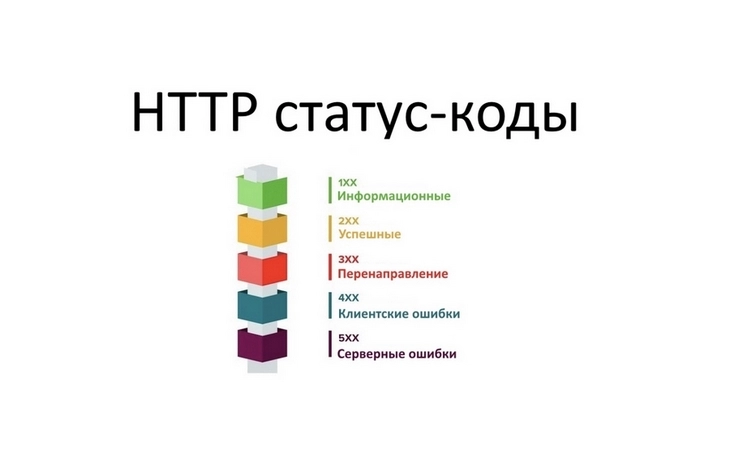
Выделяют пять классов ответов. Идентифицировать класс можно по первой цифре.
- 5** – техническая ошибка на стороне сервера. Точная причина указывается сразу после кода. Иногда пятисотая говорит о внутренних сбоях, реже – о превышении статической нагрузки на сервер.
- 4** – сбой на стороне юзера.
- 3** – обнаружен редирект на другой адрес (не ошибка).
- 2** – запрос обработан успешно (не ошибка).
- 1** – служебный класс кодов, который чаще всего относится к информационным сообщениям (не ошибка).
Логика кодов, таким образом, весьма проста:
Продвинем ваш бизнес
В Google и «Яндексе», соцсетях, рассылках, на видеоплатформах, у блогеров
Подробнее

Что значат коды состояния HTTP
Причины / решения / пояснения ошибок, я буду давать только для самых часто встречающихся кодов. Для всех остальных – только краткое описание.
Двухсотые – успешные запросы
200 – успешный запрос данных. Код не является ошибкой.
201 – завершена успешная транзакция. Код говорит о том, что сформирован новый ресурс (или документ).
202 – запрос принят, но еще не завершен. Необходимо дождаться окончания обработки.
203 – данные получены не из первоисточника (возвращаемые данные идут не от исходного сервера, а от какого-то другого) и могут быть устаревшими.
204 – запрос был обработан правильно, но отсутствует содержимое. Есть заголовок ответа, но содержимое для него отсутствует. Обновлять и актуализировать содержимое не нужно.
205 – клиенту необходимо осуществить сброс содержимого. Саму страницу обновлять не требуется.
206 – ошибка частичного содержимого. Если клиент хочет выполнить загрузку данных в несколько потоков, а сервер выполняет только часть GET-запроса, будет возникать 206-ая ошибка.
GET-запрос предназначен для получения данных, в то время как POST-запрос нужен для отправки данных.
Код также может быть отправлен с сервера, когда клиент запросил диапазон (например, условно: «Дайте мне первые 2 МБ видеоданных»). Происходит возврат только частичного контента, соответствующего Range-заголовку (данный заголовок дает понять серверу, какую именно часть страницы от него требуют, и какую ему нужно вернуть).
Если страница отдает этот код, следует обратить внимание на выполнение кэширования и на исходящий запрос.
207 – выполнено несколько операций. Найти их можно в XML, в строке MultiStatus.
226 – обработан IM-заголовок. Содержимое будет возвращено для получения информации об ответе вместе с ранее обозначенными параметрами.
Трехсотые – запросы на редирект
300 – не удалось идентифицировать точный URL. Такой ответ возникает, когда существует множественный выбор, и краулер не знает, к какой именно странице относится ресурс.
301 – документ был навсегда перемещен на новый URL. Так должны отвечать все веб-страницы, которые удалены или являются зеркалами, дублями. Со временем все указанные страницы будут склеены с целевой веб-страницей (присоединены к ней) автоматически. Если возникает такая ошибка, нужно настроить 301-ое перенаправление с устаревшего URL на актуальный (если речь идет о веб-странице, которая уже ранжировалась, но ее URL изменился). В таком случае все позитивные метрики, включая вес URL, будут сохранены.
302 – документ был временно перемещен на новый URL. Это абсолютно корректный ответ сервера, который актуален для веб-страниц с распродажами или сезонными акциями, распространяющимися на какой-либо товар. Код указывает, что данный URI будет учитываться клиентом в последующих запросах. Другими словами, страница была найдена, но перенесена. Такие документы из индекса не удаляются. Если адрес был изменен навсегда, вместо 302-го, лучше использовать 303-ий или 307-ой ответ.
303 – нужно направить пользователя на иной URL. 303-ый код можно получить исключительно GET-запросом. В идеале, этот код нужно отдавать, когда требуется редиректнуть посетителя на близкорелевантую, но не идентичную странице.
304 – документ не модифицировался. Этот код не является стандартным редиректом. Он помогает краулерам определять страницы, которые не изменились с последнего визита.
Если на вашем сайте немного страниц (до 1 000), использовать код 304 нет смысла. Если вас напрягает этот редирект, то в заголовке нужно поправить параметр Last-Modified (последняя дата изменения) – он не должен быть старше, чем заголовок If-Modified-Since (если изменялся спустя заданное количество времени).
305 – доступ к этому документу возможен исключительно через прокси.
307 – документ был временно перемещен на иной URL. Идеальный вариант, если требуется временно редиректнуть посетителя, но оставить техническую возможность отправки POST-запросов.
Четырехсотые – сбои на стороне клиента
400 – ошибка синтаксиса. Сервер не может идентифицировать запрос, так как была допущена опечатка в синтаксисе. Проверьте корректность отправляемого запроса.
401 – отсутствует аутентификация. Код отдается, когда для доступа требуется пароль или регистрация.
403 – отсутствует доступ к документу. Возникает, когда пользователь хочет открыть системные файлы (robots, htaccess). Либо вы сделали опечатку при вводе URL и пытаетесь воспользоваться веб-страницей, которая не предназначена для обычного пользователя, либо вам нужно: пройти авторизацию для доступа к системным файлам.
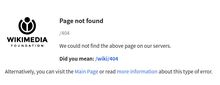
404 – отсутствует соответствующий ресурс по введенному URL. Разберитесь, по каким причинам была удалена / перемещена страница. Возможно, вы допустили ошибку и удалили ее случайно. Если так – просто восстановите ее.
Задумайтесь над созданием красивой, кастомизированной 404-ой. Например, такой:

405 – некорректный метод (указывается в запросной строке клиента) для выбранного документа. Метод запроса определяет точное действие, которое должно быть выполнено для указанного ресурса.
406 – некорректный / неподдерживаемый краулером формат запроса. Код отдается, когда сервер не способен возвратить ответ, релевантный листу допустимых значений. Самый распространенный случай – поисковый робот не поддерживает кодировку документа или его язык. Убедитесь, что в теле сообщения содержится лист доступных ресурсов. Подробное описание ошибка на сайте веб-разработчиков Mozilla.
407 – отсутствует регистрация прокси или авторизация файервола.
408 – таймаут запроса. Соединение разорвано, так как полный запрос не был передан. Другими словами, запрос занял слишком много времени, а сервер не готов был ждать. На каждом сайте существует свое время таймаута. Проверьте наличие интернета и просто обновите страницу. Подробное объяснение этой ошибки на сайте веб-разработчиков Mozilla.
409 – несовместимость двух запросов. Запрос невозможно выполнить при текущем состоянии сервера. Самый распространенный случай – операции c PUT-запросом. Например, когда нужно скачать файл, возраст которого превышает возраст уже существующего, расположенного на сервере.
410 – ресурс более не существует по указанному URL. Если страница удаляется целенаправленно, лучше делать так, чтобы она отдавала именно 410-ый. Краулер обойдет такую страницу, получит этот код и больше никогда на нее не вернется, так как поймет, что она удалена навсегда. Если речь о веб-странице, которая была удалена временно, гораздо эффективнее использовать 404-ый ответ. Если страница удалена намерено и навсегда, но в SERP имела хорошие места и приносила трафик, лучше сделать редирект на максимально релевантную существующую страницу.
411 – сервер сам отклоняет отправляемый запрос, так как не находит значение Content-Length. Этот ответ характерен как для обычных POST-запросов, так и для PUT-запросов (подразумевают замену существующих представлений документа на данные, которые содержатся в самом запросе).
412 –не были до конца выполнены условные поля HTTP-заголовка, например, If-Match. 412-ый код появляется в случаях, когда доступ к целевому документу отклоняется. Нужно проверить соблюдение и корректность HTTP-заголовков выполняемого запроса.
413 – у каждого сервера есть свой собственный максимальный размер запроса, определяемый не самим HTTP-протоколом (у него ограничения по длине запроса просто напросто отсутствуют), а ограничениями со стороны браузеров. Браузеры поддерживают запросы от 2 до 8 килобайт. Вышеуказанный код отдается, когда сервер не понимает запрос из-за слишком большого размера.
414 – возникает, когда отправляется чрезвычайно длинный URL. Запросы, содержащие излишне длинные URL, не могут правильно интерпретироваться сервером. Самые частые случаи появления этого ответа – попытка передать удлиненные параметры (излишне большое количество данных через GET- запрос).
415 – некорректный медиаформат. Текущий тип данных не может быть интерпретирован сервером.
416 – некорректное значение Range (диапазон). Ответ возникает в случаях, когда в самом HTTP-заголовке прописывается некорректный байтовый диапазон. 416-ый отдается в случаях, когда сервер не может взаимодействовать с запрашиваемыми диапазонами. Причина – отсутствие диапазона в необходимом документе или опечатка в синтаксисе.Сервер просто не имеет возможности работать с запрашиваемыми диапазонами. Проверьте синтаксис значения Range – он должен обязательно соблюдаться. Скорее всего, документ просто не имеет запрашиваемых диапазонов. Обновите страницу.
417 – указанное значение Expect не может быть удовлетворено (речь о заголовке запроса). Прокси некорректно идентифицировал содержимое поля «Expect: 100-Continue». Устранить эту ошибку самостоятельно не удастся. Если вы используете прокси Squid, обратитесь в поддержку. Вам нужно активировать ignore_expect_100. Другой вариант разрешите BS_PingHost обращаться к интернет-сети без участия прокси.
422 – существует определенная логическая ошибка. Какая именно, данный код не указывает. Копайте в сторону ошибок в семантике документа.
423 – используемый ресурс был заблокирован для выбранного HTTP—метода. Перезагрузите роутер и компьютер. Используйте только статистический IP.
424 – зависимый ресурс был блокирован по соображением безопасности. Данный код отдается, если в запросе присутствуют признаки несанкционированного доступа к файлам CMS.
426 – некорректные значения полей Upgrade и Conection. Этот ответ возникает, когда серверу требуется обновление до SSL-протокола, но клиент не имеет его поддержки.
429 – слишком много запросов. Ошибка отдается, когда один пользователь проявляет чрезмерно большую активность за короткий временной интервал. Проверьте плагины используемой CMS. В идеале, отключите их все и включайте по очереди, пока не доберетесь до источника проблемы.
451 – доступ к серверу заблокирован по решению судебных органов. Можно плодить бесконечные дубли или вообще создать новый домен, но рано или поздно страницу с идентичным содержимым все равно заблокируют. Временное решение – разместить проблемное содержимое на другом домене. Провайдеры могут подстраховаться и блокировать не только отдельные страницы, но и сайты целиком. Не нарушать закон – единственное, что можно посоветовать в этом случае.
Пятисотые – серверные сбои
500 – серверу не удается полностью обработать запрос. Такой код отдается, когда существует непредвиденное условие, мешающее выполнению запроса. Чаще всего внутренняя ошибка сервера может появляться при серверных сбоях. Проверяйте, корректно ли указаны директивы в системных файлах (особенно htaccess), нет ли ошибки прав доступа к файлам. Обратите внимание на ошибки внутри скриптов и их медленную работу.
Проверяйте конфликты плагинов и дополнений. Нередко 500-ая возникает, когда в настройках административной панели хостинга указана одна версия PHP, а на самом сайте используется другая. Последнее также создает высокую статическую нагрузку на хостинг. Если вам было бы узнать о пятисотой подробнее, пишите в комментариях, и я напишу развернутый материал на эту тему.
501 – не выполнено. Этот код отдается, когда сам сервер не может идентифицировать метод запроса. Сами вы эту ошибку не исправите. Устранить ее может только сервер.
502 – шлюзовый сбой. Возникает при получении некорректного ответа от сервера, находящегося по иерархии выше. Актуально исключительно для прокси и шлюзовых конфигураций.
503 – данный ответ возникает в случаях, когда существуют технические неполадки, не позволяющие интерпретировать введенный запрос. Скорее всего, ваш сервер просто на обслуживании или сильно перегружен. Уменьшите число перманентных запросов к базам данных. Убедитесь, что на сервере нет профилактических или других работ, ограничивающих его пропускную способность. Не используйте VPN.
504 – отсутствует ответ. Этот код отдается в одной ситуации – если сервер не может получит ответ за необходимый период времени. Отклика нет и возникает таймаут. Как и 501-ый ответ, 504-ый исправить самостоятельно не получится. Здесь дело в прокси, часто – в веб-сервере. Первым делом просто обновите веб-страницу. Если не помогло, нужно почистить DNS-кэш. Для этого используем сочетание горячих клавиш Windows+R и вводим команду cmd (Control+пробел). В открывшемся окне указываем команду ipconfig / flushdns и подтверждаем ее нажатием Enter.
Также полезно посмотреть, как страница ведет себя различных мобильных устройствах и в разных браузерах. Проверьте дебаг. Если сайт на WP, то проверить дебан проще всего. Достаточно добавить этот код в wp-config.php:
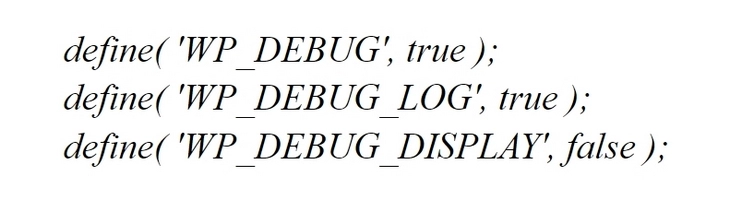
Теперь все сбои будут фиксировать в файле debug.log (находится в папке wp-сontents). Если вы используете другую CMS, найдите к ней мануал и посмотрите, как активировать в ней журнал ошибок.
Также 504-ая отдает, когда на сайте существуют проблемы, связанные с задействованием CDN или кастомизированных серверов DNS. Отключите CDN на своем сайте.
Иногда 504-ый код пропадает, если просто подождать несколько часов. Часто 504-ая появляется на сайтах, которые используют CloudFlare.
505 – отсутствует поддержка текущей версии HTTP-протокола.
507 – не хватает места на жестком диске для выполнения запроса.
510 – не найдено расширение, желающее задействовать клиент.
Массово проверяем ответ веб-страницы
Самый простой способ проверить ответ веб-страницы – воспользоваться готовыми сервисами. Наиболее популярны:
- mainspy;
- 2ip;
- cy-pr;
- wwhois;
- 4seo.
Возьмем для примера mainspy. Тут проверить код ответа проще всего:

Таким образом, для проверки кода просто открываем страницу и вводим необходимые URL. Кликаем «Проверить». Будет выведен отчет. Напротив каждого проверяемого URL будет отображаться код ответа сервера:

Кроме перечисленных сервисов есть также замечательный плагин для Google Chrome – HTTP Header Spy. Он позволяет проверять код ответа сервера как одной, так и нескольких страниц сразу:

Послесловие
Коды ответа HTTP – это универсальный язык, который понимают не только краулеры Google / «Яндекса», но и люди. 5 классов кодов позволят с первого взгляда определить, где именно существует ошибка при выполнении HTTP запроса и куда копать для ее устранения.
Если ваш код ответа не указан в этом мануале, значит речь идет о кастомизированном сервере. Чтобы правильно истолковать ответ такого сервера и перевести его на человеческий язык, придется обратится к его разработчику.
The 423 Locked status-code does not appear in the base
HTTP specification, but is part of WebDAV specification, which is an
extension to HTTP.
A major goal of WebDAV was to provide a ‘filesystem over the web’. One of its
core features is for users to ‘lock’ specific files and directories to prevent
others from editing them.
A user can lock a resource by issuing a http LOCK method and later on
unlock the resource by using the UNLOCK HTTP method.
Both ‘shared locks’ and ‘exclusive locks’ are supported.
Example
Locking a resource
LOCK /article/5 HTTP/1.1
Content-Type: application/xml

<?xml version="1.0"?>
<d:lockinfo xmlns:d='DAV:'>
 <d:lockscope><d:exclusive/></d:lockscope>
 <d:locktype><d:write/></d:locktype>
 <d:owner>Evert</d:owner>
</d:lockinfo>
A successful response to this includes a Lock-Token header.
HTTP/1.1 200 OK
Content-Type: application/xml
Lock-Token: <urn:uuid:e71d4fae-5dec-22d6-fea5-00a0c91e6be4>

<?xml version="1.0"?>
...
If a user tries to make a change to a locked resource, they will get an error:
PUT /article/5 HTTP/1.1
Content-Type: text/plain

New content
HTTP/1.1 423 Locked
Content-Type: application/xml

<?xml version="1.0" encoding="utf-8" ?>
<d:error xmlns:d="DAV:">
  <d:lock-token-submitted>
  <d:href>/article/5</d:href>
  </d:lock-token-submitted>
</d:error>
Unless, they also include the lock-token in the If header:
PUT /article/5 HTTP/1.1
Content-Type: text/plain
If: <urn:uuid:e71d4fae-5dec-22d6-fea5-00a0c91e6be4>

New content
Usage on the web
I haven’t seen a lot of usage of LOCK, UNLOCK and the 423 code outside
of WebDAV. However, I don’t see strong reasons against their usage.
A big part that the lock functionality
of WebDAV hopes to solve, is avoiding problems with multiple users making
updates on (groups of-) resources at the same time.
If you also have this issue, bear in mind that there is a more popular feature
in HTTP to deal with this: Etags and the If-Match / If-None-Match headers.
These headers tend to work a bit better, especially if they are required
because they give a strong indicator to an end-user: you are about to overwrite
someone’s changes. If ETags solve your concurrency or ‘lost update’
use-case, it’s likely better.
However, one thing LOCK does is that it allows a user to reserve a resource
in advance for editing. It basically can give an indication to other users:
“someone is currently working on this document”.
Is that problem solvable without resorting to WebDAV http methods? Probably!
Your REST resources could for example simply expose a lockedBy JSON property.
When set, it could prevent only that user to make changes.
References
- RFC4918, Section 11.3 — 423 Locked
- RFC4918, Section 9.10 — LOCK method
- RFC4918, Section 9.11 — UNLOCK method
See also:
- 412 Precondition Failed.
- WebDAV features that might be useful for HTTP services.

From Wikipedia, the free encyclopedia
This is a list of Hypertext Transfer Protocol (HTTP) response status codes. Status codes are issued by a server in response to a client’s request made to the server. It includes codes from IETF Request for Comments (RFCs), other specifications, and some additional codes used in some common applications of the HTTP. The first digit of the status code specifies one of five standard classes of responses. The optional message phrases shown are typical, but any human-readable alternative may be provided, or none at all.
Unless otherwise stated, the status code is part of the HTTP standard (RFC 9110).
The Internet Assigned Numbers Authority (IANA) maintains the official registry of HTTP status codes.[1]
All HTTP response status codes are separated into five classes or categories. The first digit of the status code defines the class of response, while the last two digits do not have any classifying or categorization role. There are five classes defined by the standard:
- 1xx informational response – the request was received, continuing process
- 2xx successful – the request was successfully received, understood, and accepted
- 3xx redirection – further action needs to be taken in order to complete the request
- 4xx client error – the request contains bad syntax or cannot be fulfilled
- 5xx server error – the server failed to fulfil an apparently valid request
1xx informational response
An informational response indicates that the request was received and understood. It is issued on a provisional basis while request processing continues. It alerts the client to wait for a final response. The message consists only of the status line and optional header fields, and is terminated by an empty line. As the HTTP/1.0 standard did not define any 1xx status codes, servers must not[note 1] send a 1xx response to an HTTP/1.0 compliant client except under experimental conditions.
- 100 Continue
- The server has received the request headers and the client should proceed to send the request body (in the case of a request for which a body needs to be sent; for example, a POST request). Sending a large request body to a server after a request has been rejected for inappropriate headers would be inefficient. To have a server check the request’s headers, a client must send
Expect: 100-continueas a header in its initial request and receive a100 Continuestatus code in response before sending the body. If the client receives an error code such as 403 (Forbidden) or 405 (Method Not Allowed) then it should not send the request’s body. The response417 Expectation Failedindicates that the request should be repeated without theExpectheader as it indicates that the server does not support expectations (this is the case, for example, of HTTP/1.0 servers).[2] - 101 Switching Protocols
- The requester has asked the server to switch protocols and the server has agreed to do so.
- 102 Processing (WebDAV; RFC 2518)
- A WebDAV request may contain many sub-requests involving file operations, requiring a long time to complete the request. This code indicates that the server has received and is processing the request, but no response is available yet.[3] This prevents the client from timing out and assuming the request was lost.
- 103 Early Hints (RFC 8297)
- Used to return some response headers before final HTTP message.[4]
2xx success
This class of status codes indicates the action requested by the client was received, understood, and accepted.[1]
- 200 OK
- Standard response for successful HTTP requests. The actual response will depend on the request method used. In a GET request, the response will contain an entity corresponding to the requested resource. In a POST request, the response will contain an entity describing or containing the result of the action.
- 201 Created
- The request has been fulfilled, resulting in the creation of a new resource.[5]
- 202 Accepted
- The request has been accepted for processing, but the processing has not been completed. The request might or might not be eventually acted upon, and may be disallowed when processing occurs.
- 203 Non-Authoritative Information (since HTTP/1.1)
- The server is a transforming proxy (e.g. a Web accelerator) that received a 200 OK from its origin, but is returning a modified version of the origin’s response.[6][7]
- 204 No Content
- The server successfully processed the request, and is not returning any content.
- 205 Reset Content
- The server successfully processed the request, asks that the requester reset its document view, and is not returning any content.
- 206 Partial Content
- The server is delivering only part of the resource (byte serving) due to a range header sent by the client. The range header is used by HTTP clients to enable resuming of interrupted downloads, or split a download into multiple simultaneous streams.
- 207 Multi-Status (WebDAV; RFC 4918)
- The message body that follows is by default an XML message and can contain a number of separate response codes, depending on how many sub-requests were made.[8]
- 208 Already Reported (WebDAV; RFC 5842)
- The members of a DAV binding have already been enumerated in a preceding part of the (multistatus) response, and are not being included again.
- 226 IM Used (RFC 3229)
- The server has fulfilled a request for the resource, and the response is a representation of the result of one or more instance-manipulations applied to the current instance.[9]
3xx redirection
This class of status code indicates the client must take additional action to complete the request. Many of these status codes are used in URL redirection.[1]
A user agent may carry out the additional action with no user interaction only if the method used in the second request is GET or HEAD. A user agent may automatically redirect a request. A user agent should detect and intervene to prevent cyclical redirects.[10]
- 300 Multiple Choices
- Indicates multiple options for the resource from which the client may choose (via agent-driven content negotiation). For example, this code could be used to present multiple video format options, to list files with different filename extensions, or to suggest word-sense disambiguation.
- 301 Moved Permanently
- This and all future requests should be directed to the given URI.
- 302 Found (Previously «Moved temporarily»)
- Tells the client to look at (browse to) another URL. The HTTP/1.0 specification (RFC 1945) required the client to perform a temporary redirect with the same method (the original describing phrase was «Moved Temporarily»),[11] but popular browsers implemented 302 redirects by changing the method to GET. Therefore, HTTP/1.1 added status codes 303 and 307 to distinguish between the two behaviours.[10]
- 303 See Other (since HTTP/1.1)
- The response to the request can be found under another URI using the GET method. When received in response to a POST (or PUT/DELETE), the client should presume that the server has received the data and should issue a new GET request to the given URI.
- 304 Not Modified
- Indicates that the resource has not been modified since the version specified by the request headers If-Modified-Since or If-None-Match. In such case, there is no need to retransmit the resource since the client still has a previously-downloaded copy.
- 305 Use Proxy (since HTTP/1.1)
- The requested resource is available only through a proxy, the address for which is provided in the response. For security reasons, many HTTP clients (such as Mozilla Firefox and Internet Explorer) do not obey this status code.
- 306 Switch Proxy
- No longer used. Originally meant «Subsequent requests should use the specified proxy.»
- 307 Temporary Redirect (since HTTP/1.1)
- In this case, the request should be repeated with another URI; however, future requests should still use the original URI. In contrast to how 302 was historically implemented, the request method is not allowed to be changed when reissuing the original request. For example, a POST request should be repeated using another POST request.
- 308 Permanent Redirect
- This and all future requests should be directed to the given URI. 308 parallel the behaviour of 301, but does not allow the HTTP method to change. So, for example, submitting a form to a permanently redirected resource may continue smoothly.
4xx client errors
This class of status code is intended for situations in which the error seems to have been caused by the client. Except when responding to a HEAD request, the server should include an entity containing an explanation of the error situation, and whether it is a temporary or permanent condition. These status codes are applicable to any request method. User agents should display any included entity to the user.
- 400 Bad Request
- The server cannot or will not process the request due to an apparent client error (e.g., malformed request syntax, size too large, invalid request message framing, or deceptive request routing).
- 401 Unauthorized
- Similar to 403 Forbidden, but specifically for use when authentication is required and has failed or has not yet been provided. The response must include a WWW-Authenticate header field containing a challenge applicable to the requested resource. See Basic access authentication and Digest access authentication. 401 semantically means «unauthorised», the user does not have valid authentication credentials for the target resource.
- Some sites incorrectly issue HTTP 401 when an IP address is banned from the website (usually the website domain) and that specific address is refused permission to access a website.[citation needed]
- 402 Payment Required
- Reserved for future use. The original intention was that this code might be used as part of some form of digital cash or micropayment scheme, as proposed, for example, by GNU Taler,[13] but that has not yet happened, and this code is not widely used. Google Developers API uses this status if a particular developer has exceeded the daily limit on requests.[14] Sipgate uses this code if an account does not have sufficient funds to start a call.[15] Shopify uses this code when the store has not paid their fees and is temporarily disabled.[16] Stripe uses this code for failed payments where parameters were correct, for example blocked fraudulent payments.[17]
- 403 Forbidden
- The request contained valid data and was understood by the server, but the server is refusing action. This may be due to the user not having the necessary permissions for a resource or needing an account of some sort, or attempting a prohibited action (e.g. creating a duplicate record where only one is allowed). This code is also typically used if the request provided authentication by answering the WWW-Authenticate header field challenge, but the server did not accept that authentication. The request should not be repeated.
- 404 Not Found
- The requested resource could not be found but may be available in the future. Subsequent requests by the client are permissible.
- 405 Method Not Allowed
- A request method is not supported for the requested resource; for example, a GET request on a form that requires data to be presented via POST, or a PUT request on a read-only resource.
- 406 Not Acceptable
- The requested resource is capable of generating only content not acceptable according to the Accept headers sent in the request. See Content negotiation.
- 407 Proxy Authentication Required
- The client must first authenticate itself with the proxy.
- 408 Request Timeout
- The server timed out waiting for the request. According to HTTP specifications: «The client did not produce a request within the time that the server was prepared to wait. The client MAY repeat the request without modifications at any later time.»
- 409 Conflict
- Indicates that the request could not be processed because of conflict in the current state of the resource, such as an edit conflict between multiple simultaneous updates.
- 410 Gone
- Indicates that the resource requested was previously in use but is no longer available and will not be available again. This should be used when a resource has been intentionally removed and the resource should be purged. Upon receiving a 410 status code, the client should not request the resource in the future. Clients such as search engines should remove the resource from their indices. Most use cases do not require clients and search engines to purge the resource, and a «404 Not Found» may be used instead.
- 411 Length Required
- The request did not specify the length of its content, which is required by the requested resource.
- 412 Precondition Failed
- The server does not meet one of the preconditions that the requester put on the request header fields.
- 413 Payload Too Large
- The request is larger than the server is willing or able to process. Previously called «Request Entity Too Large» in RFC 2616.[18]
- 414 URI Too Long
- The URI provided was too long for the server to process. Often the result of too much data being encoded as a query-string of a GET request, in which case it should be converted to a POST request. Called «Request-URI Too Long» previously in RFC 2616.[19]
- 415 Unsupported Media Type
- The request entity has a media type which the server or resource does not support. For example, the client uploads an image as image/svg+xml, but the server requires that images use a different format.
- 416 Range Not Satisfiable
- The client has asked for a portion of the file (byte serving), but the server cannot supply that portion. For example, if the client asked for a part of the file that lies beyond the end of the file. Called «Requested Range Not Satisfiable» previously RFC 2616.[20]
- 417 Expectation Failed
- The server cannot meet the requirements of the Expect request-header field.[21]
- 418 I’m a teapot (RFC 2324, RFC 7168)
- This code was defined in 1998 as one of the traditional IETF April Fools’ jokes, in RFC 2324, Hyper Text Coffee Pot Control Protocol, and is not expected to be implemented by actual HTTP servers. The RFC specifies this code should be returned by teapots requested to brew coffee.[22] This HTTP status is used as an Easter egg in some websites, such as Google.com’s «I’m a teapot» easter egg.[23][24][25] Sometimes, this status code is also used as a response to a blocked request, instead of the more appropriate 403 Forbidden.[26][27]
- 421 Misdirected Request
- The request was directed at a server that is not able to produce a response (for example because of connection reuse).
- 422 Unprocessable Entity
- The request was well-formed but was unable to be followed due to semantic errors.[8]
- 423 Locked (WebDAV; RFC 4918)
- The resource that is being accessed is locked.[8]
- 424 Failed Dependency (WebDAV; RFC 4918)
- The request failed because it depended on another request and that request failed (e.g., a PROPPATCH).[8]
- 425 Too Early (RFC 8470)
- Indicates that the server is unwilling to risk processing a request that might be replayed.
- 426 Upgrade Required
- The client should switch to a different protocol such as TLS/1.3, given in the Upgrade header field.
- 428 Precondition Required (RFC 6585)
- The origin server requires the request to be conditional. Intended to prevent the ‘lost update’ problem, where a client GETs a resource’s state, modifies it, and PUTs it back to the server, when meanwhile a third party has modified the state on the server, leading to a conflict.[28]
- 429 Too Many Requests (RFC 6585)
- The user has sent too many requests in a given amount of time. Intended for use with rate-limiting schemes.[28]
- 431 Request Header Fields Too Large (RFC 6585)
- The server is unwilling to process the request because either an individual header field, or all the header fields collectively, are too large.[28]
- 451 Unavailable For Legal Reasons (RFC 7725)
- A server operator has received a legal demand to deny access to a resource or to a set of resources that includes the requested resource.[29] The code 451 was chosen as a reference to the novel Fahrenheit 451 (see the Acknowledgements in the RFC).
5xx server errors
The server failed to fulfil a request.
Response status codes beginning with the digit «5» indicate cases in which the server is aware that it has encountered an error or is otherwise incapable of performing the request. Except when responding to a HEAD request, the server should include an entity containing an explanation of the error situation, and indicate whether it is a temporary or permanent condition. Likewise, user agents should display any included entity to the user. These response codes are applicable to any request method.
- 500 Internal Server Error
- A generic error message, given when an unexpected condition was encountered and no more specific message is suitable.
- 501 Not Implemented
- The server either does not recognize the request method, or it lacks the ability to fulfil the request. Usually this implies future availability (e.g., a new feature of a web-service API).
- 502 Bad Gateway
- The server was acting as a gateway or proxy and received an invalid response from the upstream server.
- 503 Service Unavailable
- The server cannot handle the request (because it is overloaded or down for maintenance). Generally, this is a temporary state.[30]
- 504 Gateway Timeout
- The server was acting as a gateway or proxy and did not receive a timely response from the upstream server.
- 505 HTTP Version Not Supported
- The server does not support the HTTP version used in the request.
- 506 Variant Also Negotiates (RFC 2295)
- Transparent content negotiation for the request results in a circular reference.[31]
- 507 Insufficient Storage (WebDAV; RFC 4918)
- The server is unable to store the representation needed to complete the request.[8]
- 508 Loop Detected (WebDAV; RFC 5842)
- The server detected an infinite loop while processing the request (sent instead of 208 Already Reported).
- 510 Not Extended (RFC 2774)
- Further extensions to the request are required for the server to fulfill it.[32]
- 511 Network Authentication Required (RFC 6585)
- The client needs to authenticate to gain network access. Intended for use by intercepting proxies used to control access to the network (e.g., «captive portals» used to require agreement to Terms of Service before granting full Internet access via a Wi-Fi hotspot).[28]
Unofficial codes
The following codes are not specified by any standard.
- 419 Page Expired (Laravel Framework)
- Used by the Laravel Framework when a CSRF Token is missing or expired.
- 420 Method Failure (Spring Framework)
- A deprecated response used by the Spring Framework when a method has failed.[33]
- 420 Enhance Your Calm (Twitter)
- Returned by version 1 of the Twitter Search and Trends API when the client is being rate limited; versions 1.1 and later use the 429 Too Many Requests response code instead.[34] The phrase «Enhance your calm» comes from the 1993 movie Demolition Man, and its association with this number is likely a reference to cannabis.[citation needed]
- 430 Request Header Fields Too Large (Shopify)
- Used by Shopify, instead of the 429 Too Many Requests response code, when too many URLs are requested within a certain time frame.[35]
- 450 Blocked by Windows Parental Controls (Microsoft)
- The Microsoft extension code indicated when Windows Parental Controls are turned on and are blocking access to the requested webpage.[36]
- 498 Invalid Token (Esri)
- Returned by ArcGIS for Server. Code 498 indicates an expired or otherwise invalid token.[37]
- 499 Token Required (Esri)
- Returned by ArcGIS for Server. Code 499 indicates that a token is required but was not submitted.[37]
- 509 Bandwidth Limit Exceeded (Apache Web Server/cPanel)
- The server has exceeded the bandwidth specified by the server administrator; this is often used by shared hosting providers to limit the bandwidth of customers.[38]
- 529 Site is overloaded
- Used by Qualys in the SSLLabs server testing API to signal that the site can’t process the request.[39]
- 530 Site is frozen
- Used by the Pantheon Systems web platform to indicate a site that has been frozen due to inactivity.[40]
- 598 (Informal convention) Network read timeout error
- Used by some HTTP proxies to signal a network read timeout behind the proxy to a client in front of the proxy.[41]
- 599 Network Connect Timeout Error
- An error used by some HTTP proxies to signal a network connect timeout behind the proxy to a client in front of the proxy.
Internet Information Services
Microsoft’s Internet Information Services (IIS) web server expands the 4xx error space to signal errors with the client’s request.
- 440 Login Time-out
- The client’s session has expired and must log in again.[42]
- 449 Retry With
- The server cannot honour the request because the user has not provided the required information.[43]
- 451 Redirect
- Used in Exchange ActiveSync when either a more efficient server is available or the server cannot access the users’ mailbox.[44] The client is expected to re-run the HTTP AutoDiscover operation to find a more appropriate server.[45]
IIS sometimes uses additional decimal sub-codes for more specific information,[46] however these sub-codes only appear in the response payload and in documentation, not in the place of an actual HTTP status code.
nginx
The nginx web server software expands the 4xx error space to signal issues with the client’s request.[47][48]
- 444 No Response
- Used internally[49] to instruct the server to return no information to the client and close the connection immediately.
- 494 Request header too large
- Client sent too large request or too long header line.
- 495 SSL Certificate Error
- An expansion of the 400 Bad Request response code, used when the client has provided an invalid client certificate.
- 496 SSL Certificate Required
- An expansion of the 400 Bad Request response code, used when a client certificate is required but not provided.
- 497 HTTP Request Sent to HTTPS Port
- An expansion of the 400 Bad Request response code, used when the client has made a HTTP request to a port listening for HTTPS requests.
- 499 Client Closed Request
- Used when the client has closed the request before the server could send a response.
Cloudflare
Cloudflare’s reverse proxy service expands the 5xx series of errors space to signal issues with the origin server.[50]
- 520 Web Server Returned an Unknown Error
- The origin server returned an empty, unknown, or unexpected response to Cloudflare.[51]
- 521 Web Server Is Down
- The origin server refused connections from Cloudflare. Security solutions at the origin may be blocking legitimate connections from certain Cloudflare IP addresses.
- 522 Connection Timed Out
- Cloudflare timed out contacting the origin server.
- 523 Origin Is Unreachable
- Cloudflare could not reach the origin server; for example, if the DNS records for the origin server are incorrect or missing.
- 524 A Timeout Occurred
- Cloudflare was able to complete a TCP connection to the origin server, but did not receive a timely HTTP response.
- 525 SSL Handshake Failed
- Cloudflare could not negotiate a SSL/TLS handshake with the origin server.
- 526 Invalid SSL Certificate
- Cloudflare could not validate the SSL certificate on the origin web server. Also used by Cloud Foundry’s gorouter.
- 527 Railgun Error
- Error 527 indicates an interrupted connection between Cloudflare and the origin server’s Railgun server.[52]
- 530
- Error 530 is returned along with a 1xxx error.[53]
AWS Elastic Load Balancer
Amazon’s Elastic Load Balancing adds a few custom return codes
- 460
- Client closed the connection with the load balancer before the idle timeout period elapsed. Typically when client timeout is sooner than the Elastic Load Balancer’s timeout.[54]
- 463
- The load balancer received an X-Forwarded-For request header with more than 30 IP addresses.[54]
- 561 Unauthorized
- An error around authentication returned by a server registered with a load balancer. You configured a listener rule to authenticate users, but the identity provider (IdP) returned an error code when authenticating the user.[55]
Caching warning codes (obsoleted)
The following caching related warning codes were specified under RFC 7234. Unlike the other status codes above, these were not sent as the response status in the HTTP protocol, but as part of the «Warning» HTTP header.[56][57]
Since this «Warning» header is often neither sent by servers nor acknowledged by clients, this header and its codes were obsoleted by the HTTP Working Group in 2022 with RFC 9111.[58]
- 110 Response is Stale
- The response provided by a cache is stale (the content’s age exceeds a maximum age set by a Cache-Control header or heuristically chosen lifetime).
- 111 Revalidation Failed
- The cache was unable to validate the response, due to an inability to reach the origin server.
- 112 Disconnected Operation
- The cache is intentionally disconnected from the rest of the network.
- 113 Heuristic Expiration
- The cache heuristically chose a freshness lifetime greater than 24 hours and the response’s age is greater than 24 hours.
- 199 Miscellaneous Warning
- Arbitrary, non-specific warning. The warning text may be logged or presented to the user.
- 214 Transformation Applied
- Added by a proxy if it applies any transformation to the representation, such as changing the content encoding, media type or the like.
- 299 Miscellaneous Persistent Warning
- Same as 199, but indicating a persistent warning.
See also
- Custom error pages
- List of FTP server return codes
- List of HTTP header fields
- List of SMTP server return codes
- Common Log Format
Explanatory notes
- ^ Emphasised words and phrases such as must and should represent interpretation guidelines as given by RFC 2119
References
- ^ a b c «Hypertext Transfer Protocol (HTTP) Status Code Registry». Iana.org. Archived from the original on December 11, 2011. Retrieved January 8, 2015.
- ^ «RFC 9110: HTTP Semantics and Content, Section 10.1.1 «Expect»«.
- ^ Goland, Yaronn; Whitehead, Jim; Faizi, Asad; Carter, Steve R.; Jensen, Del (February 1999). HTTP Extensions for Distributed Authoring – WEBDAV. IETF. doi:10.17487/RFC2518. RFC 2518. Retrieved October 24, 2009.
- ^ Oku, Kazuho (December 2017). An HTTP Status Code for Indicating Hints. IETF. doi:10.17487/RFC8297. RFC 8297. Retrieved December 20, 2017.
- ^ Stewart, Mark; djna. «Create request with POST, which response codes 200 or 201 and content». Stack Overflow. Archived from the original on October 11, 2016. Retrieved October 16, 2015.
- ^ «RFC 9110: HTTP Semantics and Content, Section 15.3.4».
- ^ «RFC 9110: HTTP Semantics and Content, Section 7.7».
- ^ a b c d e Dusseault, Lisa, ed. (June 2007). HTTP Extensions for Web Distributed Authoring and Versioning (WebDAV). IETF. doi:10.17487/RFC4918. RFC 4918. Retrieved October 24, 2009.
- ^ Delta encoding in HTTP. IETF. January 2002. doi:10.17487/RFC3229. RFC 3229. Retrieved February 25, 2011.
- ^ a b «RFC 9110: HTTP Semantics and Content, Section 15.4 «Redirection 3xx»«.
- ^ Berners-Lee, Tim; Fielding, Roy T.; Nielsen, Henrik Frystyk (May 1996). Hypertext Transfer Protocol – HTTP/1.0. IETF. doi:10.17487/RFC1945. RFC 1945. Retrieved October 24, 2009.
- ^ «The GNU Taler tutorial for PHP Web shop developers 0.4.0». docs.taler.net. Archived from the original on November 8, 2017. Retrieved October 29, 2017.
- ^ «Google API Standard Error Responses». 2016. Archived from the original on May 25, 2017. Retrieved June 21, 2017.
- ^ «Sipgate API Documentation». Archived from the original on July 10, 2018. Retrieved July 10, 2018.
- ^ «Shopify Documentation». Archived from the original on July 25, 2018. Retrieved July 25, 2018.
- ^ «Stripe API Reference – Errors». stripe.com. Retrieved October 28, 2019.
- ^ «RFC2616 on status 413». Tools.ietf.org. Archived from the original on March 7, 2011. Retrieved November 11, 2015.
- ^ «RFC2616 on status 414». Tools.ietf.org. Archived from the original on March 7, 2011. Retrieved November 11, 2015.
- ^ «RFC2616 on status 416». Tools.ietf.org. Archived from the original on March 7, 2011. Retrieved November 11, 2015.
- ^ TheDeadLike. «HTTP/1.1 Status Codes 400 and 417, cannot choose which». serverFault. Archived from the original on October 10, 2015. Retrieved October 16, 2015.
- ^ Larry Masinter (April 1, 1998). Hyper Text Coffee Pot Control Protocol (HTCPCP/1.0). doi:10.17487/RFC2324. RFC 2324.
Any attempt to brew coffee with a teapot should result in the error code «418 I’m a teapot». The resulting entity body MAY be short and stout.
- ^ I’m a teapot
- ^ Barry Schwartz (August 26, 2014). «New Google Easter Egg For SEO Geeks: Server Status 418, I’m A Teapot». Search Engine Land. Archived from the original on November 15, 2015. Retrieved November 4, 2015.
- ^ «Google’s Teapot». Retrieved October 23, 2017.[dead link]
- ^ «Enable extra web security on a website». DreamHost. Retrieved December 18, 2022.
- ^ «I Went to a Russian Website and All I Got Was This Lousy Teapot». PCMag. Retrieved December 18, 2022.
- ^ a b c d Nottingham, M.; Fielding, R. (April 2012). «RFC 6585 – Additional HTTP Status Codes». Request for Comments. Internet Engineering Task Force. Archived from the original on May 4, 2012. Retrieved May 1, 2012.
- ^ Bray, T. (February 2016). «An HTTP Status Code to Report Legal Obstacles». ietf.org. Archived from the original on March 4, 2016. Retrieved March 7, 2015.
- ^ alex. «What is the correct HTTP status code to send when a site is down for maintenance?». Stack Overflow. Archived from the original on October 11, 2016. Retrieved October 16, 2015.
- ^ Holtman, Koen; Mutz, Andrew H. (March 1998). Transparent Content Negotiation in HTTP. IETF. doi:10.17487/RFC2295. RFC 2295. Retrieved October 24, 2009.
- ^ Nielsen, Henrik Frystyk; Leach, Paul; Lawrence, Scott (February 2000). An HTTP Extension Framework. IETF. doi:10.17487/RFC2774. RFC 2774. Retrieved October 24, 2009.
- ^ «Enum HttpStatus». Spring Framework. org.springframework.http. Archived from the original on October 25, 2015. Retrieved October 16, 2015.
- ^ «Twitter Error Codes & Responses». Twitter. 2014. Archived from the original on September 27, 2017. Retrieved January 20, 2014.
- ^ «HTTP Status Codes and SEO: what you need to know». ContentKing. Retrieved August 9, 2019.
- ^ «Screenshot of error page». Archived from the original (bmp) on May 11, 2013. Retrieved October 11, 2009.
- ^ a b «Using token-based authentication». ArcGIS Server SOAP SDK. Archived from the original on September 26, 2014. Retrieved September 8, 2014.
- ^ «HTTP Error Codes and Quick Fixes». Docs.cpanel.net. Archived from the original on November 23, 2015. Retrieved October 15, 2015.
- ^ «SSL Labs API v3 Documentation». github.com.
- ^ «Platform Considerations | Pantheon Docs». pantheon.io. Archived from the original on January 6, 2017. Retrieved January 5, 2017.
- ^ «HTTP status codes — ascii-code.com». www.ascii-code.com. Archived from the original on January 7, 2017. Retrieved December 23, 2016.
- ^
«Error message when you try to log on to Exchange 2007 by using Outlook Web Access: «440 Login Time-out»«. Microsoft. 2010. Retrieved November 13, 2013. - ^ «2.2.6 449 Retry With Status Code». Microsoft. 2009. Archived from the original on October 5, 2009. Retrieved October 26, 2009.
- ^ «MS-ASCMD, Section 3.1.5.2.2». Msdn.microsoft.com. Archived from the original on March 26, 2015. Retrieved January 8, 2015.
- ^ «Ms-oxdisco». Msdn.microsoft.com. Archived from the original on July 31, 2014. Retrieved January 8, 2015.
- ^ «The HTTP status codes in IIS 7.0». Microsoft. July 14, 2009. Archived from the original on April 9, 2009. Retrieved April 1, 2009.
- ^ «ngx_http_request.h». nginx 1.9.5 source code. nginx inc. Archived from the original on September 19, 2017. Retrieved January 9, 2016.
- ^ «ngx_http_special_response.c». nginx 1.9.5 source code. nginx inc. Archived from the original on May 8, 2018. Retrieved January 9, 2016.
- ^ «return» directive Archived March 1, 2018, at the Wayback Machine (http_rewrite module) documentation.
- ^ «Troubleshooting: Error Pages». Cloudflare. Archived from the original on March 4, 2016. Retrieved January 9, 2016.
- ^ «Error 520: web server returns an unknown error». Cloudflare. Retrieved November 1, 2019.
- ^ «527 Error: Railgun Listener to origin error». Cloudflare. Archived from the original on October 13, 2016. Retrieved October 12, 2016.
- ^ «Error 530». Cloudflare. Retrieved November 1, 2019.
- ^ a b «Troubleshoot Your Application Load Balancers – Elastic Load Balancing». docs.aws.amazon.com. Retrieved August 27, 2019.
- ^ «Troubleshoot your Application Load Balancers — Elastic Load Balancing». docs.aws.amazon.com. Retrieved January 24, 2021.
- ^ «Hypertext Transfer Protocol (HTTP/1.1): Caching». datatracker.ietf.org. Retrieved September 25, 2021.
- ^ «Warning — HTTP | MDN». developer.mozilla.org. Retrieved August 15, 2021.
 Some text was copied from this source, which is available under a Creative Commons Attribution-ShareAlike 2.5 Generic (CC BY-SA 2.5) license.
- ^ «RFC 9111: HTTP Caching, Section 5.5 «Warning»«. June 2022.
 Some text was copied from this source, which is available under a Creative Commons Attribution-ShareAlike 2.5 Generic (CC BY-SA 2.5) license.
External links
- «RFC 9110: HTTP Semantics and Content, Section 15 «Status Codes»«.
- Hypertext Transfer Protocol (HTTP) Status Code Registry
From Wikipedia, the free encyclopedia
This is a list of Hypertext Transfer Protocol (HTTP) response status codes. Status codes are issued by a server in response to a client’s request made to the server. It includes codes from IETF Request for Comments (RFCs), other specifications, and some additional codes used in some common applications of the HTTP. The first digit of the status code specifies one of five standard classes of responses. The optional message phrases shown are typical, but any human-readable alternative may be provided, or none at all.
Unless otherwise stated, the status code is part of the HTTP standard (RFC 9110).
The Internet Assigned Numbers Authority (IANA) maintains the official registry of HTTP status codes.[1]
All HTTP response status codes are separated into five classes or categories. The first digit of the status code defines the class of response, while the last two digits do not have any classifying or categorization role. There are five classes defined by the standard:
- 1xx informational response – the request was received, continuing process
- 2xx successful – the request was successfully received, understood, and accepted
- 3xx redirection – further action needs to be taken in order to complete the request
- 4xx client error – the request contains bad syntax or cannot be fulfilled
- 5xx server error – the server failed to fulfil an apparently valid request
1xx informational response
An informational response indicates that the request was received and understood. It is issued on a provisional basis while request processing continues. It alerts the client to wait for a final response. The message consists only of the status line and optional header fields, and is terminated by an empty line. As the HTTP/1.0 standard did not define any 1xx status codes, servers must not[note 1] send a 1xx response to an HTTP/1.0 compliant client except under experimental conditions.
- 100 Continue
- The server has received the request headers and the client should proceed to send the request body (in the case of a request for which a body needs to be sent; for example, a POST request). Sending a large request body to a server after a request has been rejected for inappropriate headers would be inefficient. To have a server check the request’s headers, a client must send
Expect: 100-continueas a header in its initial request and receive a100 Continuestatus code in response before sending the body. If the client receives an error code such as 403 (Forbidden) or 405 (Method Not Allowed) then it should not send the request’s body. The response417 Expectation Failedindicates that the request should be repeated without theExpectheader as it indicates that the server does not support expectations (this is the case, for example, of HTTP/1.0 servers).[2] - 101 Switching Protocols
- The requester has asked the server to switch protocols and the server has agreed to do so.
- 102 Processing (WebDAV; RFC 2518)
- A WebDAV request may contain many sub-requests involving file operations, requiring a long time to complete the request. This code indicates that the server has received and is processing the request, but no response is available yet.[3] This prevents the client from timing out and assuming the request was lost.
- 103 Early Hints (RFC 8297)
- Used to return some response headers before final HTTP message.[4]
2xx success
This class of status codes indicates the action requested by the client was received, understood, and accepted.[1]
- 200 OK
- Standard response for successful HTTP requests. The actual response will depend on the request method used. In a GET request, the response will contain an entity corresponding to the requested resource. In a POST request, the response will contain an entity describing or containing the result of the action.
- 201 Created
- The request has been fulfilled, resulting in the creation of a new resource.[5]
- 202 Accepted
- The request has been accepted for processing, but the processing has not been completed. The request might or might not be eventually acted upon, and may be disallowed when processing occurs.
- 203 Non-Authoritative Information (since HTTP/1.1)
- The server is a transforming proxy (e.g. a Web accelerator) that received a 200 OK from its origin, but is returning a modified version of the origin’s response.[6][7]
- 204 No Content
- The server successfully processed the request, and is not returning any content.
- 205 Reset Content
- The server successfully processed the request, asks that the requester reset its document view, and is not returning any content.
- 206 Partial Content
- The server is delivering only part of the resource (byte serving) due to a range header sent by the client. The range header is used by HTTP clients to enable resuming of interrupted downloads, or split a download into multiple simultaneous streams.
- 207 Multi-Status (WebDAV; RFC 4918)
- The message body that follows is by default an XML message and can contain a number of separate response codes, depending on how many sub-requests were made.[8]
- 208 Already Reported (WebDAV; RFC 5842)
- The members of a DAV binding have already been enumerated in a preceding part of the (multistatus) response, and are not being included again.
- 226 IM Used (RFC 3229)
- The server has fulfilled a request for the resource, and the response is a representation of the result of one or more instance-manipulations applied to the current instance.[9]
3xx redirection
This class of status code indicates the client must take additional action to complete the request. Many of these status codes are used in URL redirection.[1]
A user agent may carry out the additional action with no user interaction only if the method used in the second request is GET or HEAD. A user agent may automatically redirect a request. A user agent should detect and intervene to prevent cyclical redirects.[10]
- 300 Multiple Choices
- Indicates multiple options for the resource from which the client may choose (via agent-driven content negotiation). For example, this code could be used to present multiple video format options, to list files with different filename extensions, or to suggest word-sense disambiguation.
- 301 Moved Permanently
- This and all future requests should be directed to the given URI.
- 302 Found (Previously «Moved temporarily»)
- Tells the client to look at (browse to) another URL. The HTTP/1.0 specification (RFC 1945) required the client to perform a temporary redirect with the same method (the original describing phrase was «Moved Temporarily»),[11] but popular browsers implemented 302 redirects by changing the method to GET. Therefore, HTTP/1.1 added status codes 303 and 307 to distinguish between the two behaviours.[10]
- 303 See Other (since HTTP/1.1)
- The response to the request can be found under another URI using the GET method. When received in response to a POST (or PUT/DELETE), the client should presume that the server has received the data and should issue a new GET request to the given URI.
- 304 Not Modified
- Indicates that the resource has not been modified since the version specified by the request headers If-Modified-Since or If-None-Match. In such case, there is no need to retransmit the resource since the client still has a previously-downloaded copy.
- 305 Use Proxy (since HTTP/1.1)
- The requested resource is available only through a proxy, the address for which is provided in the response. For security reasons, many HTTP clients (such as Mozilla Firefox and Internet Explorer) do not obey this status code.
- 306 Switch Proxy
- No longer used. Originally meant «Subsequent requests should use the specified proxy.»
- 307 Temporary Redirect (since HTTP/1.1)
- In this case, the request should be repeated with another URI; however, future requests should still use the original URI. In contrast to how 302 was historically implemented, the request method is not allowed to be changed when reissuing the original request. For example, a POST request should be repeated using another POST request.
- 308 Permanent Redirect
- This and all future requests should be directed to the given URI. 308 parallel the behaviour of 301, but does not allow the HTTP method to change. So, for example, submitting a form to a permanently redirected resource may continue smoothly.
4xx client errors
This class of status code is intended for situations in which the error seems to have been caused by the client. Except when responding to a HEAD request, the server should include an entity containing an explanation of the error situation, and whether it is a temporary or permanent condition. These status codes are applicable to any request method. User agents should display any included entity to the user.
- 400 Bad Request
- The server cannot or will not process the request due to an apparent client error (e.g., malformed request syntax, size too large, invalid request message framing, or deceptive request routing).
- 401 Unauthorized
- Similar to 403 Forbidden, but specifically for use when authentication is required and has failed or has not yet been provided. The response must include a WWW-Authenticate header field containing a challenge applicable to the requested resource. See Basic access authentication and Digest access authentication. 401 semantically means «unauthorised», the user does not have valid authentication credentials for the target resource.
- Some sites incorrectly issue HTTP 401 when an IP address is banned from the website (usually the website domain) and that specific address is refused permission to access a website.[citation needed]
- 402 Payment Required
- Reserved for future use. The original intention was that this code might be used as part of some form of digital cash or micropayment scheme, as proposed, for example, by GNU Taler,[13] but that has not yet happened, and this code is not widely used. Google Developers API uses this status if a particular developer has exceeded the daily limit on requests.[14] Sipgate uses this code if an account does not have sufficient funds to start a call.[15] Shopify uses this code when the store has not paid their fees and is temporarily disabled.[16] Stripe uses this code for failed payments where parameters were correct, for example blocked fraudulent payments.[17]
- 403 Forbidden
- The request contained valid data and was understood by the server, but the server is refusing action. This may be due to the user not having the necessary permissions for a resource or needing an account of some sort, or attempting a prohibited action (e.g. creating a duplicate record where only one is allowed). This code is also typically used if the request provided authentication by answering the WWW-Authenticate header field challenge, but the server did not accept that authentication. The request should not be repeated.
- 404 Not Found
- The requested resource could not be found but may be available in the future. Subsequent requests by the client are permissible.
- 405 Method Not Allowed
- A request method is not supported for the requested resource; for example, a GET request on a form that requires data to be presented via POST, or a PUT request on a read-only resource.
- 406 Not Acceptable
- The requested resource is capable of generating only content not acceptable according to the Accept headers sent in the request. See Content negotiation.
- 407 Proxy Authentication Required
- The client must first authenticate itself with the proxy.
- 408 Request Timeout
- The server timed out waiting for the request. According to HTTP specifications: «The client did not produce a request within the time that the server was prepared to wait. The client MAY repeat the request without modifications at any later time.»
- 409 Conflict
- Indicates that the request could not be processed because of conflict in the current state of the resource, such as an edit conflict between multiple simultaneous updates.
- 410 Gone
- Indicates that the resource requested was previously in use but is no longer available and will not be available again. This should be used when a resource has been intentionally removed and the resource should be purged. Upon receiving a 410 status code, the client should not request the resource in the future. Clients such as search engines should remove the resource from their indices. Most use cases do not require clients and search engines to purge the resource, and a «404 Not Found» may be used instead.
- 411 Length Required
- The request did not specify the length of its content, which is required by the requested resource.
- 412 Precondition Failed
- The server does not meet one of the preconditions that the requester put on the request header fields.
- 413 Payload Too Large
- The request is larger than the server is willing or able to process. Previously called «Request Entity Too Large» in RFC 2616.[18]
- 414 URI Too Long
- The URI provided was too long for the server to process. Often the result of too much data being encoded as a query-string of a GET request, in which case it should be converted to a POST request. Called «Request-URI Too Long» previously in RFC 2616.[19]
- 415 Unsupported Media Type
- The request entity has a media type which the server or resource does not support. For example, the client uploads an image as image/svg+xml, but the server requires that images use a different format.
- 416 Range Not Satisfiable
- The client has asked for a portion of the file (byte serving), but the server cannot supply that portion. For example, if the client asked for a part of the file that lies beyond the end of the file. Called «Requested Range Not Satisfiable» previously RFC 2616.[20]
- 417 Expectation Failed
- The server cannot meet the requirements of the Expect request-header field.[21]
- 418 I’m a teapot (RFC 2324, RFC 7168)
- This code was defined in 1998 as one of the traditional IETF April Fools’ jokes, in RFC 2324, Hyper Text Coffee Pot Control Protocol, and is not expected to be implemented by actual HTTP servers. The RFC specifies this code should be returned by teapots requested to brew coffee.[22] This HTTP status is used as an Easter egg in some websites, such as Google.com’s «I’m a teapot» easter egg.[23][24][25] Sometimes, this status code is also used as a response to a blocked request, instead of the more appropriate 403 Forbidden.[26][27]
- 421 Misdirected Request
- The request was directed at a server that is not able to produce a response (for example because of connection reuse).
- 422 Unprocessable Entity
- The request was well-formed but was unable to be followed due to semantic errors.[8]
- 423 Locked (WebDAV; RFC 4918)
- The resource that is being accessed is locked.[8]
- 424 Failed Dependency (WebDAV; RFC 4918)
- The request failed because it depended on another request and that request failed (e.g., a PROPPATCH).[8]
- 425 Too Early (RFC 8470)
- Indicates that the server is unwilling to risk processing a request that might be replayed.
- 426 Upgrade Required
- The client should switch to a different protocol such as TLS/1.3, given in the Upgrade header field.
- 428 Precondition Required (RFC 6585)
- The origin server requires the request to be conditional. Intended to prevent the ‘lost update’ problem, where a client GETs a resource’s state, modifies it, and PUTs it back to the server, when meanwhile a third party has modified the state on the server, leading to a conflict.[28]
- 429 Too Many Requests (RFC 6585)
- The user has sent too many requests in a given amount of time. Intended for use with rate-limiting schemes.[28]
- 431 Request Header Fields Too Large (RFC 6585)
- The server is unwilling to process the request because either an individual header field, or all the header fields collectively, are too large.[28]
- 451 Unavailable For Legal Reasons (RFC 7725)
- A server operator has received a legal demand to deny access to a resource or to a set of resources that includes the requested resource.[29] The code 451 was chosen as a reference to the novel Fahrenheit 451 (see the Acknowledgements in the RFC).
5xx server errors
The server failed to fulfil a request.
Response status codes beginning with the digit «5» indicate cases in which the server is aware that it has encountered an error or is otherwise incapable of performing the request. Except when responding to a HEAD request, the server should include an entity containing an explanation of the error situation, and indicate whether it is a temporary or permanent condition. Likewise, user agents should display any included entity to the user. These response codes are applicable to any request method.
- 500 Internal Server Error
- A generic error message, given when an unexpected condition was encountered and no more specific message is suitable.
- 501 Not Implemented
- The server either does not recognize the request method, or it lacks the ability to fulfil the request. Usually this implies future availability (e.g., a new feature of a web-service API).
- 502 Bad Gateway
- The server was acting as a gateway or proxy and received an invalid response from the upstream server.
- 503 Service Unavailable
- The server cannot handle the request (because it is overloaded or down for maintenance). Generally, this is a temporary state.[30]
- 504 Gateway Timeout
- The server was acting as a gateway or proxy and did not receive a timely response from the upstream server.
- 505 HTTP Version Not Supported
- The server does not support the HTTP version used in the request.
- 506 Variant Also Negotiates (RFC 2295)
- Transparent content negotiation for the request results in a circular reference.[31]
- 507 Insufficient Storage (WebDAV; RFC 4918)
- The server is unable to store the representation needed to complete the request.[8]
- 508 Loop Detected (WebDAV; RFC 5842)
- The server detected an infinite loop while processing the request (sent instead of 208 Already Reported).
- 510 Not Extended (RFC 2774)
- Further extensions to the request are required for the server to fulfill it.[32]
- 511 Network Authentication Required (RFC 6585)
- The client needs to authenticate to gain network access. Intended for use by intercepting proxies used to control access to the network (e.g., «captive portals» used to require agreement to Terms of Service before granting full Internet access via a Wi-Fi hotspot).[28]
Unofficial codes
The following codes are not specified by any standard.
- 419 Page Expired (Laravel Framework)
- Used by the Laravel Framework when a CSRF Token is missing or expired.
- 420 Method Failure (Spring Framework)
- A deprecated response used by the Spring Framework when a method has failed.[33]
- 420 Enhance Your Calm (Twitter)
- Returned by version 1 of the Twitter Search and Trends API when the client is being rate limited; versions 1.1 and later use the 429 Too Many Requests response code instead.[34] The phrase «Enhance your calm» comes from the 1993 movie Demolition Man, and its association with this number is likely a reference to cannabis.[citation needed]
- 430 Request Header Fields Too Large (Shopify)
- Used by Shopify, instead of the 429 Too Many Requests response code, when too many URLs are requested within a certain time frame.[35]
- 450 Blocked by Windows Parental Controls (Microsoft)
- The Microsoft extension code indicated when Windows Parental Controls are turned on and are blocking access to the requested webpage.[36]
- 498 Invalid Token (Esri)
- Returned by ArcGIS for Server. Code 498 indicates an expired or otherwise invalid token.[37]
- 499 Token Required (Esri)
- Returned by ArcGIS for Server. Code 499 indicates that a token is required but was not submitted.[37]
- 509 Bandwidth Limit Exceeded (Apache Web Server/cPanel)
- The server has exceeded the bandwidth specified by the server administrator; this is often used by shared hosting providers to limit the bandwidth of customers.[38]
- 529 Site is overloaded
- Used by Qualys in the SSLLabs server testing API to signal that the site can’t process the request.[39]
- 530 Site is frozen
- Used by the Pantheon Systems web platform to indicate a site that has been frozen due to inactivity.[40]
- 598 (Informal convention) Network read timeout error
- Used by some HTTP proxies to signal a network read timeout behind the proxy to a client in front of the proxy.[41]
- 599 Network Connect Timeout Error
- An error used by some HTTP proxies to signal a network connect timeout behind the proxy to a client in front of the proxy.
Internet Information Services
Microsoft’s Internet Information Services (IIS) web server expands the 4xx error space to signal errors with the client’s request.
- 440 Login Time-out
- The client’s session has expired and must log in again.[42]
- 449 Retry With
- The server cannot honour the request because the user has not provided the required information.[43]
- 451 Redirect
- Used in Exchange ActiveSync when either a more efficient server is available or the server cannot access the users’ mailbox.[44] The client is expected to re-run the HTTP AutoDiscover operation to find a more appropriate server.[45]
IIS sometimes uses additional decimal sub-codes for more specific information,[46] however these sub-codes only appear in the response payload and in documentation, not in the place of an actual HTTP status code.
nginx
The nginx web server software expands the 4xx error space to signal issues with the client’s request.[47][48]
- 444 No Response
- Used internally[49] to instruct the server to return no information to the client and close the connection immediately.
- 494 Request header too large
- Client sent too large request or too long header line.
- 495 SSL Certificate Error
- An expansion of the 400 Bad Request response code, used when the client has provided an invalid client certificate.
- 496 SSL Certificate Required
- An expansion of the 400 Bad Request response code, used when a client certificate is required but not provided.
- 497 HTTP Request Sent to HTTPS Port
- An expansion of the 400 Bad Request response code, used when the client has made a HTTP request to a port listening for HTTPS requests.
- 499 Client Closed Request
- Used when the client has closed the request before the server could send a response.
Cloudflare
Cloudflare’s reverse proxy service expands the 5xx series of errors space to signal issues with the origin server.[50]
- 520 Web Server Returned an Unknown Error
- The origin server returned an empty, unknown, or unexpected response to Cloudflare.[51]
- 521 Web Server Is Down
- The origin server refused connections from Cloudflare. Security solutions at the origin may be blocking legitimate connections from certain Cloudflare IP addresses.
- 522 Connection Timed Out
- Cloudflare timed out contacting the origin server.
- 523 Origin Is Unreachable
- Cloudflare could not reach the origin server; for example, if the DNS records for the origin server are incorrect or missing.
- 524 A Timeout Occurred
- Cloudflare was able to complete a TCP connection to the origin server, but did not receive a timely HTTP response.
- 525 SSL Handshake Failed
- Cloudflare could not negotiate a SSL/TLS handshake with the origin server.
- 526 Invalid SSL Certificate
- Cloudflare could not validate the SSL certificate on the origin web server. Also used by Cloud Foundry’s gorouter.
- 527 Railgun Error
- Error 527 indicates an interrupted connection between Cloudflare and the origin server’s Railgun server.[52]
- 530
- Error 530 is returned along with a 1xxx error.[53]
AWS Elastic Load Balancer
Amazon’s Elastic Load Balancing adds a few custom return codes
- 460
- Client closed the connection with the load balancer before the idle timeout period elapsed. Typically when client timeout is sooner than the Elastic Load Balancer’s timeout.[54]
- 463
- The load balancer received an X-Forwarded-For request header with more than 30 IP addresses.[54]
- 561 Unauthorized
- An error around authentication returned by a server registered with a load balancer. You configured a listener rule to authenticate users, but the identity provider (IdP) returned an error code when authenticating the user.[55]
Caching warning codes (obsoleted)
The following caching related warning codes were specified under RFC 7234. Unlike the other status codes above, these were not sent as the response status in the HTTP protocol, but as part of the «Warning» HTTP header.[56][57]
Since this «Warning» header is often neither sent by servers nor acknowledged by clients, this header and its codes were obsoleted by the HTTP Working Group in 2022 with RFC 9111.[58]
- 110 Response is Stale
- The response provided by a cache is stale (the content’s age exceeds a maximum age set by a Cache-Control header or heuristically chosen lifetime).
- 111 Revalidation Failed
- The cache was unable to validate the response, due to an inability to reach the origin server.
- 112 Disconnected Operation
- The cache is intentionally disconnected from the rest of the network.
- 113 Heuristic Expiration
- The cache heuristically chose a freshness lifetime greater than 24 hours and the response’s age is greater than 24 hours.
- 199 Miscellaneous Warning
- Arbitrary, non-specific warning. The warning text may be logged or presented to the user.
- 214 Transformation Applied
- Added by a proxy if it applies any transformation to the representation, such as changing the content encoding, media type or the like.
- 299 Miscellaneous Persistent Warning
- Same as 199, but indicating a persistent warning.
See also
- Custom error pages
- List of FTP server return codes
- List of HTTP header fields
- List of SMTP server return codes
- Common Log Format
Explanatory notes
- ^ Emphasised words and phrases such as must and should represent interpretation guidelines as given by RFC 2119
References
- ^ a b c «Hypertext Transfer Protocol (HTTP) Status Code Registry». Iana.org. Archived from the original on December 11, 2011. Retrieved January 8, 2015.
- ^ «RFC 9110: HTTP Semantics and Content, Section 10.1.1 «Expect»«.
- ^ Goland, Yaronn; Whitehead, Jim; Faizi, Asad; Carter, Steve R.; Jensen, Del (February 1999). HTTP Extensions for Distributed Authoring – WEBDAV. IETF. doi:10.17487/RFC2518. RFC 2518. Retrieved October 24, 2009.
- ^ Oku, Kazuho (December 2017). An HTTP Status Code for Indicating Hints. IETF. doi:10.17487/RFC8297. RFC 8297. Retrieved December 20, 2017.
- ^ Stewart, Mark; djna. «Create request with POST, which response codes 200 or 201 and content». Stack Overflow. Archived from the original on October 11, 2016. Retrieved October 16, 2015.
- ^ «RFC 9110: HTTP Semantics and Content, Section 15.3.4».
- ^ «RFC 9110: HTTP Semantics and Content, Section 7.7».
- ^ a b c d e Dusseault, Lisa, ed. (June 2007). HTTP Extensions for Web Distributed Authoring and Versioning (WebDAV). IETF. doi:10.17487/RFC4918. RFC 4918. Retrieved October 24, 2009.
- ^ Delta encoding in HTTP. IETF. January 2002. doi:10.17487/RFC3229. RFC 3229. Retrieved February 25, 2011.
- ^ a b «RFC 9110: HTTP Semantics and Content, Section 15.4 «Redirection 3xx»«.
- ^ Berners-Lee, Tim; Fielding, Roy T.; Nielsen, Henrik Frystyk (May 1996). Hypertext Transfer Protocol – HTTP/1.0. IETF. doi:10.17487/RFC1945. RFC 1945. Retrieved October 24, 2009.
- ^ «The GNU Taler tutorial for PHP Web shop developers 0.4.0». docs.taler.net. Archived from the original on November 8, 2017. Retrieved October 29, 2017.
- ^ «Google API Standard Error Responses». 2016. Archived from the original on May 25, 2017. Retrieved June 21, 2017.
- ^ «Sipgate API Documentation». Archived from the original on July 10, 2018. Retrieved July 10, 2018.
- ^ «Shopify Documentation». Archived from the original on July 25, 2018. Retrieved July 25, 2018.
- ^ «Stripe API Reference – Errors». stripe.com. Retrieved October 28, 2019.
- ^ «RFC2616 on status 413». Tools.ietf.org. Archived from the original on March 7, 2011. Retrieved November 11, 2015.
- ^ «RFC2616 on status 414». Tools.ietf.org. Archived from the original on March 7, 2011. Retrieved November 11, 2015.
- ^ «RFC2616 on status 416». Tools.ietf.org. Archived from the original on March 7, 2011. Retrieved November 11, 2015.
- ^ TheDeadLike. «HTTP/1.1 Status Codes 400 and 417, cannot choose which». serverFault. Archived from the original on October 10, 2015. Retrieved October 16, 2015.
- ^ Larry Masinter (April 1, 1998). Hyper Text Coffee Pot Control Protocol (HTCPCP/1.0). doi:10.17487/RFC2324. RFC 2324.
Any attempt to brew coffee with a teapot should result in the error code «418 I’m a teapot». The resulting entity body MAY be short and stout.
- ^ I’m a teapot
- ^ Barry Schwartz (August 26, 2014). «New Google Easter Egg For SEO Geeks: Server Status 418, I’m A Teapot». Search Engine Land. Archived from the original on November 15, 2015. Retrieved November 4, 2015.
- ^ «Google’s Teapot». Retrieved October 23, 2017.[dead link]
- ^ «Enable extra web security on a website». DreamHost. Retrieved December 18, 2022.
- ^ «I Went to a Russian Website and All I Got Was This Lousy Teapot». PCMag. Retrieved December 18, 2022.
- ^ a b c d Nottingham, M.; Fielding, R. (April 2012). «RFC 6585 – Additional HTTP Status Codes». Request for Comments. Internet Engineering Task Force. Archived from the original on May 4, 2012. Retrieved May 1, 2012.
- ^ Bray, T. (February 2016). «An HTTP Status Code to Report Legal Obstacles». ietf.org. Archived from the original on March 4, 2016. Retrieved March 7, 2015.
- ^ alex. «What is the correct HTTP status code to send when a site is down for maintenance?». Stack Overflow. Archived from the original on October 11, 2016. Retrieved October 16, 2015.
- ^ Holtman, Koen; Mutz, Andrew H. (March 1998). Transparent Content Negotiation in HTTP. IETF. doi:10.17487/RFC2295. RFC 2295. Retrieved October 24, 2009.
- ^ Nielsen, Henrik Frystyk; Leach, Paul; Lawrence, Scott (February 2000). An HTTP Extension Framework. IETF. doi:10.17487/RFC2774. RFC 2774. Retrieved October 24, 2009.
- ^ «Enum HttpStatus». Spring Framework. org.springframework.http. Archived from the original on October 25, 2015. Retrieved October 16, 2015.
- ^ «Twitter Error Codes & Responses». Twitter. 2014. Archived from the original on September 27, 2017. Retrieved January 20, 2014.
- ^ «HTTP Status Codes and SEO: what you need to know». ContentKing. Retrieved August 9, 2019.
- ^ «Screenshot of error page». Archived from the original (bmp) on May 11, 2013. Retrieved October 11, 2009.
- ^ a b «Using token-based authentication». ArcGIS Server SOAP SDK. Archived from the original on September 26, 2014. Retrieved September 8, 2014.
- ^ «HTTP Error Codes and Quick Fixes». Docs.cpanel.net. Archived from the original on November 23, 2015. Retrieved October 15, 2015.
- ^ «SSL Labs API v3 Documentation». github.com.
- ^ «Platform Considerations | Pantheon Docs». pantheon.io. Archived from the original on January 6, 2017. Retrieved January 5, 2017.
- ^ «HTTP status codes — ascii-code.com». www.ascii-code.com. Archived from the original on January 7, 2017. Retrieved December 23, 2016.
- ^
«Error message when you try to log on to Exchange 2007 by using Outlook Web Access: «440 Login Time-out»«. Microsoft. 2010. Retrieved November 13, 2013. - ^ «2.2.6 449 Retry With Status Code». Microsoft. 2009. Archived from the original on October 5, 2009. Retrieved October 26, 2009.
- ^ «MS-ASCMD, Section 3.1.5.2.2». Msdn.microsoft.com. Archived from the original on March 26, 2015. Retrieved January 8, 2015.
- ^ «Ms-oxdisco». Msdn.microsoft.com. Archived from the original on July 31, 2014. Retrieved January 8, 2015.
- ^ «The HTTP status codes in IIS 7.0». Microsoft. July 14, 2009. Archived from the original on April 9, 2009. Retrieved April 1, 2009.
- ^ «ngx_http_request.h». nginx 1.9.5 source code. nginx inc. Archived from the original on September 19, 2017. Retrieved January 9, 2016.
- ^ «ngx_http_special_response.c». nginx 1.9.5 source code. nginx inc. Archived from the original on May 8, 2018. Retrieved January 9, 2016.
- ^ «return» directive Archived March 1, 2018, at the Wayback Machine (http_rewrite module) documentation.
- ^ «Troubleshooting: Error Pages». Cloudflare. Archived from the original on March 4, 2016. Retrieved January 9, 2016.
- ^ «Error 520: web server returns an unknown error». Cloudflare. Retrieved November 1, 2019.
- ^ «527 Error: Railgun Listener to origin error». Cloudflare. Archived from the original on October 13, 2016. Retrieved October 12, 2016.
- ^ «Error 530». Cloudflare. Retrieved November 1, 2019.
- ^ a b «Troubleshoot Your Application Load Balancers – Elastic Load Balancing». docs.aws.amazon.com. Retrieved August 27, 2019.
- ^ «Troubleshoot your Application Load Balancers — Elastic Load Balancing». docs.aws.amazon.com. Retrieved January 24, 2021.
- ^ «Hypertext Transfer Protocol (HTTP/1.1): Caching». datatracker.ietf.org. Retrieved September 25, 2021.
- ^ «Warning — HTTP | MDN». developer.mozilla.org. Retrieved August 15, 2021. Some text was copied from this source, which is available under a Creative Commons Attribution-ShareAlike 2.5 Generic (CC BY-SA 2.5) license.
- ^ «RFC 9111: HTTP Caching, Section 5.5 «Warning»«. June 2022.
External links
- «RFC 9110: HTTP Semantics and Content, Section 15 «Status Codes»«.
- Hypertext Transfer Protocol (HTTP) Status Code Registry
From Wikipedia, the free encyclopedia
This is a list of Hypertext Transfer Protocol (HTTP) response status codes. Status codes are issued by a server in response to a client’s request made to the server. It includes codes from IETF Request for Comments (RFCs), other specifications, and some additional codes used in some common applications of the HTTP. The first digit of the status code specifies one of five standard classes of responses. The optional message phrases shown are typical, but any human-readable alternative may be provided, or none at all.
Unless otherwise stated, the status code is part of the HTTP standard (RFC 9110).
The Internet Assigned Numbers Authority (IANA) maintains the official registry of HTTP status codes.[1]
All HTTP response status codes are separated into five classes or categories. The first digit of the status code defines the class of response, while the last two digits do not have any classifying or categorization role. There are five classes defined by the standard:
- 1xx informational response – the request was received, continuing process
- 2xx successful – the request was successfully received, understood, and accepted
- 3xx redirection – further action needs to be taken in order to complete the request
- 4xx client error – the request contains bad syntax or cannot be fulfilled
- 5xx server error – the server failed to fulfil an apparently valid request
1xx informational response
An informational response indicates that the request was received and understood. It is issued on a provisional basis while request processing continues. It alerts the client to wait for a final response. The message consists only of the status line and optional header fields, and is terminated by an empty line. As the HTTP/1.0 standard did not define any 1xx status codes, servers must not[note 1] send a 1xx response to an HTTP/1.0 compliant client except under experimental conditions.
- 100 Continue
- The server has received the request headers and the client should proceed to send the request body (in the case of a request for which a body needs to be sent; for example, a POST request). Sending a large request body to a server after a request has been rejected for inappropriate headers would be inefficient. To have a server check the request’s headers, a client must send
Expect: 100-continueas a header in its initial request and receive a100 Continuestatus code in response before sending the body. If the client receives an error code such as 403 (Forbidden) or 405 (Method Not Allowed) then it should not send the request’s body. The response417 Expectation Failedindicates that the request should be repeated without theExpectheader as it indicates that the server does not support expectations (this is the case, for example, of HTTP/1.0 servers).[2] - 101 Switching Protocols
- The requester has asked the server to switch protocols and the server has agreed to do so.
- 102 Processing (WebDAV; RFC 2518)
- A WebDAV request may contain many sub-requests involving file operations, requiring a long time to complete the request. This code indicates that the server has received and is processing the request, but no response is available yet.[3] This prevents the client from timing out and assuming the request was lost.
- 103 Early Hints (RFC 8297)
- Used to return some response headers before final HTTP message.[4]
2xx success
This class of status codes indicates the action requested by the client was received, understood, and accepted.[1]
- 200 OK
- Standard response for successful HTTP requests. The actual response will depend on the request method used. In a GET request, the response will contain an entity corresponding to the requested resource. In a POST request, the response will contain an entity describing or containing the result of the action.
- 201 Created
- The request has been fulfilled, resulting in the creation of a new resource.[5]
- 202 Accepted
- The request has been accepted for processing, but the processing has not been completed. The request might or might not be eventually acted upon, and may be disallowed when processing occurs.
- 203 Non-Authoritative Information (since HTTP/1.1)
- The server is a transforming proxy (e.g. a Web accelerator) that received a 200 OK from its origin, but is returning a modified version of the origin’s response.[6][7]
- 204 No Content
- The server successfully processed the request, and is not returning any content.
- 205 Reset Content
- The server successfully processed the request, asks that the requester reset its document view, and is not returning any content.
- 206 Partial Content
- The server is delivering only part of the resource (byte serving) due to a range header sent by the client. The range header is used by HTTP clients to enable resuming of interrupted downloads, or split a download into multiple simultaneous streams.
- 207 Multi-Status (WebDAV; RFC 4918)
- The message body that follows is by default an XML message and can contain a number of separate response codes, depending on how many sub-requests were made.[8]
- 208 Already Reported (WebDAV; RFC 5842)
- The members of a DAV binding have already been enumerated in a preceding part of the (multistatus) response, and are not being included again.
- 226 IM Used (RFC 3229)
- The server has fulfilled a request for the resource, and the response is a representation of the result of one or more instance-manipulations applied to the current instance.[9]
3xx redirection
This class of status code indicates the client must take additional action to complete the request. Many of these status codes are used in URL redirection.[1]
A user agent may carry out the additional action with no user interaction only if the method used in the second request is GET or HEAD. A user agent may automatically redirect a request. A user agent should detect and intervene to prevent cyclical redirects.[10]
- 300 Multiple Choices
- Indicates multiple options for the resource from which the client may choose (via agent-driven content negotiation). For example, this code could be used to present multiple video format options, to list files with different filename extensions, or to suggest word-sense disambiguation.
- 301 Moved Permanently
- This and all future requests should be directed to the given URI.
- 302 Found (Previously «Moved temporarily»)
- Tells the client to look at (browse to) another URL. The HTTP/1.0 specification (RFC 1945) required the client to perform a temporary redirect with the same method (the original describing phrase was «Moved Temporarily»),[11] but popular browsers implemented 302 redirects by changing the method to GET. Therefore, HTTP/1.1 added status codes 303 and 307 to distinguish between the two behaviours.[10]
- 303 See Other (since HTTP/1.1)
- The response to the request can be found under another URI using the GET method. When received in response to a POST (or PUT/DELETE), the client should presume that the server has received the data and should issue a new GET request to the given URI.
- 304 Not Modified
- Indicates that the resource has not been modified since the version specified by the request headers If-Modified-Since or If-None-Match. In such case, there is no need to retransmit the resource since the client still has a previously-downloaded copy.
- 305 Use Proxy (since HTTP/1.1)
- The requested resource is available only through a proxy, the address for which is provided in the response. For security reasons, many HTTP clients (such as Mozilla Firefox and Internet Explorer) do not obey this status code.
- 306 Switch Proxy
- No longer used. Originally meant «Subsequent requests should use the specified proxy.»
- 307 Temporary Redirect (since HTTP/1.1)
- In this case, the request should be repeated with another URI; however, future requests should still use the original URI. In contrast to how 302 was historically implemented, the request method is not allowed to be changed when reissuing the original request. For example, a POST request should be repeated using another POST request.
- 308 Permanent Redirect
- This and all future requests should be directed to the given URI. 308 parallel the behaviour of 301, but does not allow the HTTP method to change. So, for example, submitting a form to a permanently redirected resource may continue smoothly.
4xx client errors
This class of status code is intended for situations in which the error seems to have been caused by the client. Except when responding to a HEAD request, the server should include an entity containing an explanation of the error situation, and whether it is a temporary or permanent condition. These status codes are applicable to any request method. User agents should display any included entity to the user.
- 400 Bad Request
- The server cannot or will not process the request due to an apparent client error (e.g., malformed request syntax, size too large, invalid request message framing, or deceptive request routing).
- 401 Unauthorized
- Similar to 403 Forbidden, but specifically for use when authentication is required and has failed or has not yet been provided. The response must include a WWW-Authenticate header field containing a challenge applicable to the requested resource. See Basic access authentication and Digest access authentication. 401 semantically means «unauthorised», the user does not have valid authentication credentials for the target resource.
- Some sites incorrectly issue HTTP 401 when an IP address is banned from the website (usually the website domain) and that specific address is refused permission to access a website.[citation needed]
- 402 Payment Required
- Reserved for future use. The original intention was that this code might be used as part of some form of digital cash or micropayment scheme, as proposed, for example, by GNU Taler,[13] but that has not yet happened, and this code is not widely used. Google Developers API uses this status if a particular developer has exceeded the daily limit on requests.[14] Sipgate uses this code if an account does not have sufficient funds to start a call.[15] Shopify uses this code when the store has not paid their fees and is temporarily disabled.[16] Stripe uses this code for failed payments where parameters were correct, for example blocked fraudulent payments.[17]
- 403 Forbidden
- The request contained valid data and was understood by the server, but the server is refusing action. This may be due to the user not having the necessary permissions for a resource or needing an account of some sort, or attempting a prohibited action (e.g. creating a duplicate record where only one is allowed). This code is also typically used if the request provided authentication by answering the WWW-Authenticate header field challenge, but the server did not accept that authentication. The request should not be repeated.
- 404 Not Found
- The requested resource could not be found but may be available in the future. Subsequent requests by the client are permissible.
- 405 Method Not Allowed
- A request method is not supported for the requested resource; for example, a GET request on a form that requires data to be presented via POST, or a PUT request on a read-only resource.
- 406 Not Acceptable
- The requested resource is capable of generating only content not acceptable according to the Accept headers sent in the request. See Content negotiation.
- 407 Proxy Authentication Required
- The client must first authenticate itself with the proxy.
- 408 Request Timeout
- The server timed out waiting for the request. According to HTTP specifications: «The client did not produce a request within the time that the server was prepared to wait. The client MAY repeat the request without modifications at any later time.»
- 409 Conflict
- Indicates that the request could not be processed because of conflict in the current state of the resource, such as an edit conflict between multiple simultaneous updates.
- 410 Gone
- Indicates that the resource requested was previously in use but is no longer available and will not be available again. This should be used when a resource has been intentionally removed and the resource should be purged. Upon receiving a 410 status code, the client should not request the resource in the future. Clients such as search engines should remove the resource from their indices. Most use cases do not require clients and search engines to purge the resource, and a «404 Not Found» may be used instead.
- 411 Length Required
- The request did not specify the length of its content, which is required by the requested resource.
- 412 Precondition Failed
- The server does not meet one of the preconditions that the requester put on the request header fields.
- 413 Payload Too Large
- The request is larger than the server is willing or able to process. Previously called «Request Entity Too Large» in RFC 2616.[18]
- 414 URI Too Long
- The URI provided was too long for the server to process. Often the result of too much data being encoded as a query-string of a GET request, in which case it should be converted to a POST request. Called «Request-URI Too Long» previously in RFC 2616.[19]
- 415 Unsupported Media Type
- The request entity has a media type which the server or resource does not support. For example, the client uploads an image as image/svg+xml, but the server requires that images use a different format.
- 416 Range Not Satisfiable
- The client has asked for a portion of the file (byte serving), but the server cannot supply that portion. For example, if the client asked for a part of the file that lies beyond the end of the file. Called «Requested Range Not Satisfiable» previously RFC 2616.[20]
- 417 Expectation Failed
- The server cannot meet the requirements of the Expect request-header field.[21]
- 418 I’m a teapot (RFC 2324, RFC 7168)
- This code was defined in 1998 as one of the traditional IETF April Fools’ jokes, in RFC 2324, Hyper Text Coffee Pot Control Protocol, and is not expected to be implemented by actual HTTP servers. The RFC specifies this code should be returned by teapots requested to brew coffee.[22] This HTTP status is used as an Easter egg in some websites, such as Google.com’s «I’m a teapot» easter egg.[23][24][25] Sometimes, this status code is also used as a response to a blocked request, instead of the more appropriate 403 Forbidden.[26][27]
- 421 Misdirected Request
- The request was directed at a server that is not able to produce a response (for example because of connection reuse).
- 422 Unprocessable Entity
- The request was well-formed but was unable to be followed due to semantic errors.[8]
- 423 Locked (WebDAV; RFC 4918)
- The resource that is being accessed is locked.[8]
- 424 Failed Dependency (WebDAV; RFC 4918)
- The request failed because it depended on another request and that request failed (e.g., a PROPPATCH).[8]
- 425 Too Early (RFC 8470)
- Indicates that the server is unwilling to risk processing a request that might be replayed.
- 426 Upgrade Required
- The client should switch to a different protocol such as TLS/1.3, given in the Upgrade header field.
- 428 Precondition Required (RFC 6585)
- The origin server requires the request to be conditional. Intended to prevent the ‘lost update’ problem, where a client GETs a resource’s state, modifies it, and PUTs it back to the server, when meanwhile a third party has modified the state on the server, leading to a conflict.[28]
- 429 Too Many Requests (RFC 6585)
- The user has sent too many requests in a given amount of time. Intended for use with rate-limiting schemes.[28]
- 431 Request Header Fields Too Large (RFC 6585)
- The server is unwilling to process the request because either an individual header field, or all the header fields collectively, are too large.[28]
- 451 Unavailable For Legal Reasons (RFC 7725)
- A server operator has received a legal demand to deny access to a resource or to a set of resources that includes the requested resource.[29] The code 451 was chosen as a reference to the novel Fahrenheit 451 (see the Acknowledgements in the RFC).
5xx server errors
The server failed to fulfil a request.
Response status codes beginning with the digit «5» indicate cases in which the server is aware that it has encountered an error or is otherwise incapable of performing the request. Except when responding to a HEAD request, the server should include an entity containing an explanation of the error situation, and indicate whether it is a temporary or permanent condition. Likewise, user agents should display any included entity to the user. These response codes are applicable to any request method.
- 500 Internal Server Error
- A generic error message, given when an unexpected condition was encountered and no more specific message is suitable.
- 501 Not Implemented
- The server either does not recognize the request method, or it lacks the ability to fulfil the request. Usually this implies future availability (e.g., a new feature of a web-service API).
- 502 Bad Gateway
- The server was acting as a gateway or proxy and received an invalid response from the upstream server.
- 503 Service Unavailable
- The server cannot handle the request (because it is overloaded or down for maintenance). Generally, this is a temporary state.[30]
- 504 Gateway Timeout
- The server was acting as a gateway or proxy and did not receive a timely response from the upstream server.
- 505 HTTP Version Not Supported
- The server does not support the HTTP version used in the request.
- 506 Variant Also Negotiates (RFC 2295)
- Transparent content negotiation for the request results in a circular reference.[31]
- 507 Insufficient Storage (WebDAV; RFC 4918)
- The server is unable to store the representation needed to complete the request.[8]
- 508 Loop Detected (WebDAV; RFC 5842)
- The server detected an infinite loop while processing the request (sent instead of 208 Already Reported).
- 510 Not Extended (RFC 2774)
- Further extensions to the request are required for the server to fulfill it.[32]
- 511 Network Authentication Required (RFC 6585)
- The client needs to authenticate to gain network access. Intended for use by intercepting proxies used to control access to the network (e.g., «captive portals» used to require agreement to Terms of Service before granting full Internet access via a Wi-Fi hotspot).[28]
Unofficial codes
The following codes are not specified by any standard.
- 419 Page Expired (Laravel Framework)
- Used by the Laravel Framework when a CSRF Token is missing or expired.
- 420 Method Failure (Spring Framework)
- A deprecated response used by the Spring Framework when a method has failed.[33]
- 420 Enhance Your Calm (Twitter)
- Returned by version 1 of the Twitter Search and Trends API when the client is being rate limited; versions 1.1 and later use the 429 Too Many Requests response code instead.[34] The phrase «Enhance your calm» comes from the 1993 movie Demolition Man, and its association with this number is likely a reference to cannabis.[citation needed]
- 430 Request Header Fields Too Large (Shopify)
- Used by Shopify, instead of the 429 Too Many Requests response code, when too many URLs are requested within a certain time frame.[35]
- 450 Blocked by Windows Parental Controls (Microsoft)
- The Microsoft extension code indicated when Windows Parental Controls are turned on and are blocking access to the requested webpage.[36]
- 498 Invalid Token (Esri)
- Returned by ArcGIS for Server. Code 498 indicates an expired or otherwise invalid token.[37]
- 499 Token Required (Esri)
- Returned by ArcGIS for Server. Code 499 indicates that a token is required but was not submitted.[37]
- 509 Bandwidth Limit Exceeded (Apache Web Server/cPanel)
- The server has exceeded the bandwidth specified by the server administrator; this is often used by shared hosting providers to limit the bandwidth of customers.[38]
- 529 Site is overloaded
- Used by Qualys in the SSLLabs server testing API to signal that the site can’t process the request.[39]
- 530 Site is frozen
- Used by the Pantheon Systems web platform to indicate a site that has been frozen due to inactivity.[40]
- 598 (Informal convention) Network read timeout error
- Used by some HTTP proxies to signal a network read timeout behind the proxy to a client in front of the proxy.[41]
- 599 Network Connect Timeout Error
- An error used by some HTTP proxies to signal a network connect timeout behind the proxy to a client in front of the proxy.
Internet Information Services
Microsoft’s Internet Information Services (IIS) web server expands the 4xx error space to signal errors with the client’s request.
- 440 Login Time-out
- The client’s session has expired and must log in again.[42]
- 449 Retry With
- The server cannot honour the request because the user has not provided the required information.[43]
- 451 Redirect
- Used in Exchange ActiveSync when either a more efficient server is available or the server cannot access the users’ mailbox.[44] The client is expected to re-run the HTTP AutoDiscover operation to find a more appropriate server.[45]
IIS sometimes uses additional decimal sub-codes for more specific information,[46] however these sub-codes only appear in the response payload and in documentation, not in the place of an actual HTTP status code.
nginx
The nginx web server software expands the 4xx error space to signal issues with the client’s request.[47][48]
- 444 No Response
- Used internally[49] to instruct the server to return no information to the client and close the connection immediately.
- 494 Request header too large
- Client sent too large request or too long header line.
- 495 SSL Certificate Error
- An expansion of the 400 Bad Request response code, used when the client has provided an invalid client certificate.
- 496 SSL Certificate Required
- An expansion of the 400 Bad Request response code, used when a client certificate is required but not provided.
- 497 HTTP Request Sent to HTTPS Port
- An expansion of the 400 Bad Request response code, used when the client has made a HTTP request to a port listening for HTTPS requests.
- 499 Client Closed Request
- Used when the client has closed the request before the server could send a response.
Cloudflare
Cloudflare’s reverse proxy service expands the 5xx series of errors space to signal issues with the origin server.[50]
- 520 Web Server Returned an Unknown Error
- The origin server returned an empty, unknown, or unexpected response to Cloudflare.[51]
- 521 Web Server Is Down
- The origin server refused connections from Cloudflare. Security solutions at the origin may be blocking legitimate connections from certain Cloudflare IP addresses.
- 522 Connection Timed Out
- Cloudflare timed out contacting the origin server.
- 523 Origin Is Unreachable
- Cloudflare could not reach the origin server; for example, if the DNS records for the origin server are incorrect or missing.
- 524 A Timeout Occurred
- Cloudflare was able to complete a TCP connection to the origin server, but did not receive a timely HTTP response.
- 525 SSL Handshake Failed
- Cloudflare could not negotiate a SSL/TLS handshake with the origin server.
- 526 Invalid SSL Certificate
- Cloudflare could not validate the SSL certificate on the origin web server. Also used by Cloud Foundry’s gorouter.
- 527 Railgun Error
- Error 527 indicates an interrupted connection between Cloudflare and the origin server’s Railgun server.[52]
- 530
- Error 530 is returned along with a 1xxx error.[53]
AWS Elastic Load Balancer
Amazon’s Elastic Load Balancing adds a few custom return codes
- 460
- Client closed the connection with the load balancer before the idle timeout period elapsed. Typically when client timeout is sooner than the Elastic Load Balancer’s timeout.[54]
- 463
- The load balancer received an X-Forwarded-For request header with more than 30 IP addresses.[54]
- 561 Unauthorized
- An error around authentication returned by a server registered with a load balancer. You configured a listener rule to authenticate users, but the identity provider (IdP) returned an error code when authenticating the user.[55]
Caching warning codes (obsoleted)
The following caching related warning codes were specified under RFC 7234. Unlike the other status codes above, these were not sent as the response status in the HTTP protocol, but as part of the «Warning» HTTP header.[56][57]
Since this «Warning» header is often neither sent by servers nor acknowledged by clients, this header and its codes were obsoleted by the HTTP Working Group in 2022 with RFC 9111.[58]
- 110 Response is Stale
- The response provided by a cache is stale (the content’s age exceeds a maximum age set by a Cache-Control header or heuristically chosen lifetime).
- 111 Revalidation Failed
- The cache was unable to validate the response, due to an inability to reach the origin server.
- 112 Disconnected Operation
- The cache is intentionally disconnected from the rest of the network.
- 113 Heuristic Expiration
- The cache heuristically chose a freshness lifetime greater than 24 hours and the response’s age is greater than 24 hours.
- 199 Miscellaneous Warning
- Arbitrary, non-specific warning. The warning text may be logged or presented to the user.
- 214 Transformation Applied
- Added by a proxy if it applies any transformation to the representation, such as changing the content encoding, media type or the like.
- 299 Miscellaneous Persistent Warning
- Same as 199, but indicating a persistent warning.
See also
- Custom error pages
- List of FTP server return codes
- List of HTTP header fields
- List of SMTP server return codes
- Common Log Format
Explanatory notes
- ^ Emphasised words and phrases such as must and should represent interpretation guidelines as given by RFC 2119
References
- ^ a b c «Hypertext Transfer Protocol (HTTP) Status Code Registry». Iana.org. Archived from the original on December 11, 2011. Retrieved January 8, 2015.
- ^ «RFC 9110: HTTP Semantics and Content, Section 10.1.1 «Expect»«.
- ^ Goland, Yaronn; Whitehead, Jim; Faizi, Asad; Carter, Steve R.; Jensen, Del (February 1999). HTTP Extensions for Distributed Authoring – WEBDAV. IETF. doi:10.17487/RFC2518. RFC 2518. Retrieved October 24, 2009.
- ^ Oku, Kazuho (December 2017). An HTTP Status Code for Indicating Hints. IETF. doi:10.17487/RFC8297. RFC 8297. Retrieved December 20, 2017.
- ^ Stewart, Mark; djna. «Create request with POST, which response codes 200 or 201 and content». Stack Overflow. Archived from the original on October 11, 2016. Retrieved October 16, 2015.
- ^ «RFC 9110: HTTP Semantics and Content, Section 15.3.4».
- ^ «RFC 9110: HTTP Semantics and Content, Section 7.7».
- ^ a b c d e Dusseault, Lisa, ed. (June 2007). HTTP Extensions for Web Distributed Authoring and Versioning (WebDAV). IETF. doi:10.17487/RFC4918. RFC 4918. Retrieved October 24, 2009.
- ^ Delta encoding in HTTP. IETF. January 2002. doi:10.17487/RFC3229. RFC 3229. Retrieved February 25, 2011.
- ^ a b «RFC 9110: HTTP Semantics and Content, Section 15.4 «Redirection 3xx»«.
- ^ Berners-Lee, Tim; Fielding, Roy T.; Nielsen, Henrik Frystyk (May 1996). Hypertext Transfer Protocol – HTTP/1.0. IETF. doi:10.17487/RFC1945. RFC 1945. Retrieved October 24, 2009.
- ^ «The GNU Taler tutorial for PHP Web shop developers 0.4.0». docs.taler.net. Archived from the original on November 8, 2017. Retrieved October 29, 2017.
- ^ «Google API Standard Error Responses». 2016. Archived from the original on May 25, 2017. Retrieved June 21, 2017.
- ^ «Sipgate API Documentation». Archived from the original on July 10, 2018. Retrieved July 10, 2018.
- ^ «Shopify Documentation». Archived from the original on July 25, 2018. Retrieved July 25, 2018.
- ^ «Stripe API Reference – Errors». stripe.com. Retrieved October 28, 2019.
- ^ «RFC2616 on status 413». Tools.ietf.org. Archived from the original on March 7, 2011. Retrieved November 11, 2015.
- ^ «RFC2616 on status 414». Tools.ietf.org. Archived from the original on March 7, 2011. Retrieved November 11, 2015.
- ^ «RFC2616 on status 416». Tools.ietf.org. Archived from the original on March 7, 2011. Retrieved November 11, 2015.
- ^ TheDeadLike. «HTTP/1.1 Status Codes 400 and 417, cannot choose which». serverFault. Archived from the original on October 10, 2015. Retrieved October 16, 2015.
- ^ Larry Masinter (April 1, 1998). Hyper Text Coffee Pot Control Protocol (HTCPCP/1.0). doi:10.17487/RFC2324. RFC 2324.
Any attempt to brew coffee with a teapot should result in the error code «418 I’m a teapot». The resulting entity body MAY be short and stout.
- ^ I’m a teapot
- ^ Barry Schwartz (August 26, 2014). «New Google Easter Egg For SEO Geeks: Server Status 418, I’m A Teapot». Search Engine Land. Archived from the original on November 15, 2015. Retrieved November 4, 2015.
- ^ «Google’s Teapot». Retrieved October 23, 2017.[dead link]
- ^ «Enable extra web security on a website». DreamHost. Retrieved December 18, 2022.
- ^ «I Went to a Russian Website and All I Got Was This Lousy Teapot». PCMag. Retrieved December 18, 2022.
- ^ a b c d Nottingham, M.; Fielding, R. (April 2012). «RFC 6585 – Additional HTTP Status Codes». Request for Comments. Internet Engineering Task Force. Archived from the original on May 4, 2012. Retrieved May 1, 2012.
- ^ Bray, T. (February 2016). «An HTTP Status Code to Report Legal Obstacles». ietf.org. Archived from the original on March 4, 2016. Retrieved March 7, 2015.
- ^ alex. «What is the correct HTTP status code to send when a site is down for maintenance?». Stack Overflow. Archived from the original on October 11, 2016. Retrieved October 16, 2015.
- ^ Holtman, Koen; Mutz, Andrew H. (March 1998). Transparent Content Negotiation in HTTP. IETF. doi:10.17487/RFC2295. RFC 2295. Retrieved October 24, 2009.
- ^ Nielsen, Henrik Frystyk; Leach, Paul; Lawrence, Scott (February 2000). An HTTP Extension Framework. IETF. doi:10.17487/RFC2774. RFC 2774. Retrieved October 24, 2009.
- ^ «Enum HttpStatus». Spring Framework. org.springframework.http. Archived from the original on October 25, 2015. Retrieved October 16, 2015.
- ^ «Twitter Error Codes & Responses». Twitter. 2014. Archived from the original on September 27, 2017. Retrieved January 20, 2014.
- ^ «HTTP Status Codes and SEO: what you need to know». ContentKing. Retrieved August 9, 2019.
- ^ «Screenshot of error page». Archived from the original (bmp) on May 11, 2013. Retrieved October 11, 2009.
- ^ a b «Using token-based authentication». ArcGIS Server SOAP SDK. Archived from the original on September 26, 2014. Retrieved September 8, 2014.
- ^ «HTTP Error Codes and Quick Fixes». Docs.cpanel.net. Archived from the original on November 23, 2015. Retrieved October 15, 2015.
- ^ «SSL Labs API v3 Documentation». github.com.
- ^ «Platform Considerations | Pantheon Docs». pantheon.io. Archived from the original on January 6, 2017. Retrieved January 5, 2017.
- ^ «HTTP status codes — ascii-code.com». www.ascii-code.com. Archived from the original on January 7, 2017. Retrieved December 23, 2016.
- ^
«Error message when you try to log on to Exchange 2007 by using Outlook Web Access: «440 Login Time-out»«. Microsoft. 2010. Retrieved November 13, 2013. - ^ «2.2.6 449 Retry With Status Code». Microsoft. 2009. Archived from the original on October 5, 2009. Retrieved October 26, 2009.
- ^ «MS-ASCMD, Section 3.1.5.2.2». Msdn.microsoft.com. Archived from the original on March 26, 2015. Retrieved January 8, 2015.
- ^ «Ms-oxdisco». Msdn.microsoft.com. Archived from the original on July 31, 2014. Retrieved January 8, 2015.
- ^ «The HTTP status codes in IIS 7.0». Microsoft. July 14, 2009. Archived from the original on April 9, 2009. Retrieved April 1, 2009.
- ^ «ngx_http_request.h». nginx 1.9.5 source code. nginx inc. Archived from the original on September 19, 2017. Retrieved January 9, 2016.
- ^ «ngx_http_special_response.c». nginx 1.9.5 source code. nginx inc. Archived from the original on May 8, 2018. Retrieved January 9, 2016.
- ^ «return» directive Archived March 1, 2018, at the Wayback Machine (http_rewrite module) documentation.
- ^ «Troubleshooting: Error Pages». Cloudflare. Archived from the original on March 4, 2016. Retrieved January 9, 2016.
- ^ «Error 520: web server returns an unknown error». Cloudflare. Retrieved November 1, 2019.
- ^ «527 Error: Railgun Listener to origin error». Cloudflare. Archived from the original on October 13, 2016. Retrieved October 12, 2016.
- ^ «Error 530». Cloudflare. Retrieved November 1, 2019.
- ^ a b «Troubleshoot Your Application Load Balancers – Elastic Load Balancing». docs.aws.amazon.com. Retrieved August 27, 2019.
- ^ «Troubleshoot your Application Load Balancers — Elastic Load Balancing». docs.aws.amazon.com. Retrieved January 24, 2021.
- ^ «Hypertext Transfer Protocol (HTTP/1.1): Caching». datatracker.ietf.org. Retrieved September 25, 2021.
- ^ «Warning — HTTP | MDN». developer.mozilla.org. Retrieved August 15, 2021. Some text was copied from this source, which is available under a Creative Commons Attribution-ShareAlike 2.5 Generic (CC BY-SA 2.5) license.
- ^ «RFC 9111: HTTP Caching, Section 5.5 «Warning»«. June 2022.
External links
- «RFC 9110: HTTP Semantics and Content, Section 15 «Status Codes»«.
- Hypertext Transfer Protocol (HTTP) Status Code Registry

Многие пользователи при входе на какой нибудь сайт, под своим логином, или для регистрации, иногда сталкиваются с проблемой не возможностью этого сделать, из-за ошибки 423 (Method locked due to malicious activity from your IP address). Эта ошибка означает, что этот ip заблокирован хостером за аномальную активность, а именно интернет мошенничество. Так же вероятно, что это результат вируса на компьютере пользователя. Существуют и другие причины этой ошибки о которых пойдет речь в этой статье, а также как с этим можно бороться.
Как написано выше, эта ошика может возникнуть из-за вируса на компьютере, поэтому, первым делом проверьте вашу систему антивирусными утилитами на наличие таковых. Хороший вариант воспользоваться такими сканерами как Dr.Web CureIt или AdwCleaner.
Зачастую, Error 423 (Method locked due to malicious activity from your IP address) происходит из-за Вашего динамического IP адреса, через который в сеть выходят тысячи пользователей.
Для решения этой ситуации необходимо приобрести статистический IP, или так называемый «белый адрес», который получить сейчас довольно таки сложно, так как провайдеры сидят на IPv4 и свободных адресов может и не быть, а если и есть, то стоят они гараздо дороже. В случае если у Вас нет возможности перейти на статистический IP адрес, есть вариант применить «исскуственный» способ смены IP адреса установив специальные программы дополнения в Ваш браузер. Очень хорошая программка для таких целей ZenMate. Эта дополнение сделана для браузеров Mozilla Firefox и Google Chrome. Включайте ZenMate по мере надобности, там где блокируется вход на нужный Вам сайт.
Со временем Error 423 может исчезнуть сама по себе, если причиной этой ошибки был Ваш интернет-провайдер.
Коды ответов и ошибок сервера 100 … 403, 404 … 511

Удобный справочник кодов состояния соединения…
Код состояния HTTP — это часть первой строки ответа сервера при запросах по протоколу…

Содержание…
100…
200…
300…
400…
500…
Информационные
100
100 Continue — сервер удовлетворён начальными сведениями о запросе, клиент может продолжать пересылать заголовки.
Наверх к содержанию…
101
101 Switching Protocols — сервер предлагает перейти на более подходящий для указанного ресурса протокол. Список предлагаемых протоколов сервер обязательно указывает в поле заголовка Update. Если клиента это заинтересует, то он посылает новый запрос с указанием другого протокола.
Наверх к содержанию…
102
102 Processing — запрос принят, но на его обработку понадобится длительное время. Используется сервером, чтобы клиент не разорвал соединение из-за превышения времени ожидания. Клиент при получении такого ответа должен сбросить таймер и дожидаться следующей команды в обычном режиме.
Наверх к содержанию…
105
105 Name Not Resolved — возникла ошибка в связи с неверным или отсутствующем IP-адресом DNS-сервера.
Наверх к содержанию…
Успешные
200
200 OK — успешный запрос. Клиенту отправлены запрошенные данные.
Наверх к содержанию…
201
201 Created — в результате успешного выполнения запроса был создан новый ресурс. Если ресурс не может быть создан в данный момент, то сервер вместо этого должен отобразить код 202.
Наверх к содержанию…
202
202 Accepted — запрос был принят на обработку, но она не завершена. Клиенту не обязательно дожидаться окончательной передачи сообщения, так как процесс может занять много времени.
Наверх к содержанию…
203
203 Non-Authoritative Information — аналогично ответу 200, но в этом случае передаваемая информация была взята не из первичного источника, а из резервной копии, с другого сервера и т.д… Поэтому инфа может быть неактуальной.
Наверх к содержанию…
204
204 No Content — сервер успешно обработал запрос, но в ответе были переданы только заголовки без тела сообщения. Клиент не должен обновлять содержимое документа, но может применить к нему полученные метаданные.
Используется для того, чтобы позволить осуществить ввод или какие-либо действия без необходимости обновлять документ (страницу).
Наверх к содержанию…
205
205 Reset Content — сервер обязывает клиента сбросить введённые пользователем данные, при этом тело сообщения не передаётся, поэтому страницу обновлять не обязательно.
Используется когда пользователь заполняет форму, а сервер посылает браузеру запрос на очистку формы.
Наверх к содержанию…
206
206 Partial Content — сервер удачно выполнил частичный GET-запрос, возвратив только часть сообщения. В заголовке Content-Range сервер указывает байтовые диапазоны содержимого.
Наверх к содержанию…
207
207 Multi-Status — сервер передаёт результаты выполнения сразу нескольких независимых операций. Они помещаются в само тело сообщения в виде XML-документа с объектом multistatus.
Наверх к содержанию…
226
226 IM Used — заголовок A-IM от клиента был успешно принят и сервер возвращает содержимое с учётом указанных параметров. Введено в RFC 3229 для дополнения протокола HTTP поддержкой дельта-кодирования.
Наверх к содержанию…
Перенаправление
300
300 Multiple Choices — по указанному URI существует несколько вариантов предоставления ресурса по типу MIME, по языку или по другим характеристикам. Сервер передаёт с сообщением список вариантов, давая клиенту сделать выбор.
Такое происходит, когда пользователь использует URL на директорию не самого последнего уровня, и сервер предлагает ему выбор имеющихся файлов или директорий последующего уровня.
Наверх к содержанию…
301
301 Moved Permanently — запрошенный документ был перенесен на новый URI адрес которого указанный в поле Location.
Некоторые клиенты некорректно ведут себя при обработке данного кода.
Наверх к содержанию…
302
302 Found, 302 Moved Temporarily — запрошенный документ временно доступен по другому URI, указанному в заголовке в поле Location.
Изначально представлял собой основной способ создания временного перенаправления. Тем не менее, сегодня существуют и другие – этичные, и неэтичные – способы его применения.
Наверх к содержанию…
303
303 See Other — код указывает пользователю на то, что запрашиваемый ресурс можно найти по URL, который отличается от указанного в запросе. Это не обязательно означает, что что-то было перемещено, этот код лишь предоставляет адрес, по которому следует запрашивать подобный ответ.
Этот метод главным образом существует для того, чтобы позволить выводу данных POST-активированного скрипта перенаправить агента пользователя к выбранному ресурсу.
Наверх к содержанию…
304
304 Not Modified — сервер возвращает такой код, если документ не изменился с момента последнего посещения сервера клиентом.
В этом коде сообщается о том, что параметры документа If-Modified-Since или If-Match не менялись с момента создания последнего кэша, и нет необходимости в повторной отправке ресурса.
Наверх к содержанию…
305
305 Use Proxy — запрос к запрашиваемому ресурсу должен осуществляться через прокси-сервер, URI которого указан в поле Location заголовка. Данный код ответа могут использовать только исходные HTTP-сервера (не прокси).
Наверх к содержанию…
306
306 — использовался раньше, в настоящий момент зарезервирован.
Наверх к содержанию…
307
307 Temporary Redirect — запрашиваемый ресурс, на короткое время, доступен по другому URI указанному в поле Location. Этот код был введён вместе с 303 вместо 302-го для избежания неоднозначности.
Наверх к содержанию…
Ошибки клиента
400
400 Bad Request — сервер обнаружил в запросе клиента синтаксическую ошибку.
Наверх к содержанию…
401
401 Unauthorized — для доступа к запрашиваемому ресурсу требуется аутентификация.
Ответ сервера должен содержать поле WWW-Authenticate с перечнем условий аутентификации. Клиент может повторить запрос, включив в сообщение требуемые для аутентификации данные.
Наверх к содержанию…
402
402 Payment Required — предполагается использовать в будущем, сейчас не используется.
Код предусмотрен для платных пользовательских сервисов, а не для хостинговых компаний. Имеется в виду, что эта ошибка не будет выдана хостинговым провайдером в случае просроченной оплаты его услуг.
Наверх к содержанию…
403
403 Forbidden — сервер понял запрос, но отказался его выполнять из-за ограничений в доступе к указанному ресурсу. Если для доступа к ресурсу требуется аутентификация средствами HTTP, то сервер вернёт ответ 401 или 407 при использовании прокси. В противном случае ограничения были заданы администратором сервера или разработчиком веб-приложения и могут быть любыми в зависимости от возможностей используемого программного обеспечения.
Наиболее вероятными причинами ограничения, может послужить попытка доступа к системным ресурсам веб-сервера (например, файлам .htaccess или .htpasswd) или сервер не удовлетворён IP-адресом клиента, например, при блокировках.
Наверх к содержанию…
404
404 Not Found — самая распространенная ошибка в интернете, основная причина — ошибка в написании адреса Web-страницы.
Сервер понял запрос, но не нашёл соответствующего ресурса по указанному URI.
Наверх к содержанию…
405
405 Method Not Allowed — указанный клиентом метод нельзя применить к текущему ресурсу.
В ответе сервер должен указать доступные методы в заголовке Allow, разделив их запятой. Эту ошибку сервер должен возвращать, если метод ему известен, но он не применим именно к указанному в запросе ресурсу, если же указанный метод не применим на всём сервере, то клиенту нужно вернуть код 501 (Not Implemented).
Наверх к содержанию…
406
406 Not Acceptable — запрошенный URI не может удовлетворить переданным в заголовке характеристикам. Если метод был не HEAD, то сервер должен вернуть список допустимых характеристик для данного ресурса.
Наверх к содержанию…
407
407 Proxy Authentication Required — ответ аналогичен коду 401 за исключением того, что аутентификация производится для прокси-сервера. Механизм аналогичен идентификации на исходном сервере.
Наверх к содержанию…
408
408 Request Timeout — время ожидания сервером передачи от клиента истекло. Клиент может повторить запрос в любое время. Например, такая ситуация может возникнуть при загрузке на сервер объёмного файла методом POST или PUT.
Наверх к содержанию…
409
409 Conflict — запрос не может быть выполнен из-за конфликтного обращения к ресурсу. Такое возможно, например, когда два клиента пытаются изменить ресурс с помощью метода PUT.
Наверх к содержанию…
410
410 Gone — сервер посылает такой код если ресурс раньше был по указанному URL, но был удалён и теперь недоступен.
Серверу в этом случае неизвестно и местоположение альтернативного документа, например, копии. Если у сервера есть подозрение, что документ в ближайшее время может быть восстановлен, то лучше клиенту передать код 404.
Наверх к содержанию…
411
411 Length Required — сервер сообщает, что клиент должен указать Content-Length в заголовке запроса. Без указания этого поля не стоит делать повторную попытку запроса к серверу по данному URI. Такой ответ естественен для запросов типа POST и PUT. Например, если по указанному URI производится загрузка файлов, а на сервере стоит ограничение на их объём.
Наверх к содержанию…
412
412 Precondition Failed — возвращается, если ни одно из полей запроса не было выполнено.
Иными словами, один или более заголовок запроса был возвращен с атрибутом false.
Наверх к содержанию…
413
413 Request Entity Too Large — возвращается в случае, если сервер отказывается обработать запрос по причине слишком большого размера тела запроса.
Сервер может закрыть соединение, чтобы прекратить дальнейшую передачу запроса. Если проблема временная, то рекомендуется в ответ сервера включить заголовок Retry-After с указанием времени, по истечении которого можно повторить аналогичный запрос.
Наверх к содержанию…
414
414 Request-URL Too Long — сервер не может обработать запрос из-за слишком длинного указанного URL. Такую ошибку можно спровоцировать, например, когда клиент пытается передать длинные параметры через метод GET, а не POST.
Наверх к содержанию…
415
415 Unsupported Media Type — сервер заметил, что часть запроса была сделана в неподдерживаемом формате.
В запросе не указываются какие-либо типы медиа, которые поддерживаются ресурсом или сервером. Например, пользователь запрашивает изображение с расширением файла, которое не поддерживается сервером.
Наверх к содержанию…
416
416 Requested Range Not Satisfiable — в поле Range заголовка запроса был указан диапазон за пределами ресурса и отсутствует поле If-Range. Если клиент передал байтовый диапазон, то сервер может вернуть реальный размер в поле Content-Range заголовка.
Наверх к содержанию…
417
417 Expectation Failed — по каким-то причинам сервер не может удовлетворить значению поля Expect заголовка запроса
Наверх к содержанию…
418
418 I’m a teapot — код был введен в 1998 году как одна из традиционных первоапрельских шуток IETF в RFC 2324, Hyper Text Coffee Pot Control Protocol.
Не ожидается, что данный код будет поддерживаться реальными серверами.
Наверх к содержанию…
422
422 Unprocessable Entity — сервер успешно принял запрос, может работать с указанным видом данных, в теле запроса XML-документ имеет верный синтаксис, но имеется какая-то логическая ошибка, из-за которой невозможно произвести операцию над ресурсом.
Наверх к содержанию…
423
423 Locked — целевой ресурс заблокирован от применения к нему указанного метода.
Наверх к содержанию…
424
424 Failed Dependency — указывает на то, что реализация текущего запроса может зависеть от успешности выполнения другой операции, и если она не будет успешно проведена, то вся обработка запроса будет прервана.
Наверх к содержанию…
425
425 Unordered Collection — используется в расширении WebDAV Advanced Collections Protocol. Посылается, если клиент указал номер элемента в неупорядоченном списке, или запросил несколько элементов в порядке, отличающемся от серверного.
Наверх к содержанию…
426
426 Upgrade Required — сервер указывает клиенту на необходимость обновить протокол. Заголовок ответа должен содержать правильно сформированные поля Upgrade и Connection. Введено в RFC 2817 для возможности перехода к TLS посредством HTTP.
Наверх к содержанию…
428
428 Precondition Required — сервер указывает клиенту на необходимость использования в запросе заголовков условий, наподобие If-Match. Введено в черновике стандарта RFC 6585.
Наверх к содержанию…
429
429 Too Many Requests — клиент попытался отправить слишком много запросов за короткое время, что может указывать, например, на попытку DoS-атаки. Может сопровождаться заголовком Retry-After, указывающим, через какое время можно повторить запрос. Введено в черновике стандарта RFC 6585.
Наверх к содержанию…
431
431 Request Header Fields Too Large — превышена допустимая длина заголовков. Сервер не обязан отвечать этим кодом, вместо этого он может просто сбросить соединение. Введено в черновике стандарта RFC 6585.
Наверх к содержанию…
434
434 Requested host unavailable — запрашиваемый адрес недоступен.
Наверх к содержанию…
444
444 — возвращается только сервером nginx. Бывают случаи, когда вы можете распознать по неким признакам бота, сканер или хакера. В таких случаях хорошо бы просто закрывать соединение. Вот для таких случаев и создан ответ 444. Собственно NGINX просто посылает в ответ пустой пакет (без заголовков) TCP RST и закрывает соединение.
Наверх к содержанию…
449
449 Retry With — возвращается сервером, если для обработки запроса от клиента поступило недостаточно информации. При этом в заголовок ответа помещается поле Ms-Echo-Request. Введено корпорацией Microsoft для WebDAV. В настоящий момент как минимум используется программой Microsoft Money.
Наверх к содержанию…
451
451 Unavailable For Legal Reasons — доступ к ресурсу закрыт по юридическим причинам, например, по требованию органов государственной власти или по требованию правообладателя в случае нарушения авторских прав. Введено в черновике IETF за авторством Google, код ошибки является отсылкой к роману Рэя Брэдбери «451 градус по Фаренгейту».
Наверх к содержанию…
456
456 Unrecoverable Error — возвращается сервером, если обработка запроса вызывает некорректируемые сбои в таблицах баз данных. Введено корпорацией Microsoft для WebDAV.
Наверх к содержанию…
499
499 — используется Nginx, когда клиент закрывает соединение до получения ответа.
Наверх к содержанию…
Ошибка сервера
500
500 Internal Server Error — любая внутренняя ошибка сервера, которая не входит в рамки остальных ошибок класса.
Наверх к содержанию…
501
501 Not Implemented — сервер не поддерживает возможностей, необходимых для обработки запроса. Типичный ответ для случаев, когда сервер не понимает указанный в запросе метод. Если же метод серверу известен, но он не применим к данному ресурсу, то нужно вернуть ответ 405.
Наверх к содержанию…
502
502 Bad Gateway — сервер, выступая в роли шлюза или прокси-сервера, получил недействительное ответное сообщение от вышестоящего сервера.
Наверх к содержанию…
503
503 Service Unavailable — сервер временно не имеет возможности обрабатывать запросы по техническим причинам (обслуживание, перегрузка и прочее). В поле Retry-After заголовка сервер может указать время, через которое клиенту рекомендуется повторить запрос. Хотя во время перегрузки очевидным кажется сразу разрывать соединение, эффективней может оказаться установка большого значения поля Retry-After для уменьшения частоты избыточных запросов.
Наверх к содержанию…
504
504 Gateway Timeout — сервер в роли шлюза или прокси-сервера не дождался ответа от вышестоящего сервера для завершения текущего запроса.
Наверх к содержанию…
505
505 HTTP Version Not Supported — сервер не поддерживает или отказывается поддерживать указанную в запросе версию протокола HTTP.
Наверх к содержанию…
506
506 Variant Also Negotiates — в результате ошибочной конфигурации выбранный вариант указывает сам на себя, из-за чего процесс связывания прерывается.
Наверх к содержанию…
507
507 Insufficient Storage — не хватает места для выполнения текущего запроса. Проблема может быть временной. Введено в WebDAV.
Наверх к содержанию…
509
509 Bandwidth Limit Exceeded — используется при превышении веб-площадкой отведённого ей ограничения на потребление трафика. В данном случае владельцу площадки следует обратиться к своему хостинг-провайдеру. В настоящий момент данный код не описан ни в одном RFC и используется только модулем «bw/limited», входящим в панель управления хостингом cPanel, где и был введён.
Наверх к содержанию…
510
510 Not Extended — на сервере отсутствует расширение, которое запрашивает клиент. Сервер может дополнительно передать информацию о доступных ему расширениях. Введено в RFC 2774 для дополнения протокола HTTP поддержкой расширений.
Наверх к содержанию…
511
511 Network Authentication Required — этот ответ посылается не сервером, которому был предназначен запрос, а сервером-посредником, например сервером провайдера — если клиент должен сначала авторизоваться в сети. Предполагается, что в теле ответа будет возвращена Web-форма авторизации или перенаправление на неё. Введено в черновике стандарта RFC 6585.
Наверх к содержанию…

-
+608
-
6 апреля 2015, 10:53
 20079
20079
 20079
20079Только зарегистрированные и авторизованные пользователи могут оставлять комментарии.