
Коды ошибок, актуальные для Canon imagePROGRAF iPF670, iPF605, iPF770, iPF750, iPF710, iPF650, iPF700, iPF785, iPF610, iPF765, iPF680, iPF760, iPF510, iPF780, iPF600, iPF500, iPF685, iPF720, iPF670e, iPF671, iPF671e (для картриджей PFI-102, PFI-104, PFI-107).
Группы ошибок
| Code | Diagnosis | Что значит |
| 0181xxxx-xxxx | Ink warning | Некритичная ошибка чернил |
| 0180xxxx-xxxx | Printhead warning | Некритичная ошибка печатающей головки |
| 0184xxxx-xxxx | Maintenance cartridge warning | Некритичная ошибка картриджа |
| 0134xxxx-xxxx | GARO warning | Некритичная ошибка растрового драйвера |
| 0303xxxx-xxxx | Cover error | Ошибка крышки принтера |
| 0301xxxx-xxxx 0306xxxx-xxxx 0386xxxx-xxxx |
Media error | Ошибки загрузки носителя (например, бумаги) |
| 0313xxxx-xxxx | Sensors, fans, motors error | Ошибки датчиков, моторов и вентиляторов |
| 0380xxxx-xxxx | Printhead error | Ошибки печатающей головки |
| 0381xxxx-xxxx 0383xxxx-xxxx |
Ink error | Ошибки чернил |
| 0384xxxx-xxxx | Maintenance cartridge error | Ошибки картриджа отработки |
| 0387xxxx-xxxx | Cutter unit error | Ошибки резака |
| 0389xxxx-xxxx | Media take-up unit error | Ошибки устройства приёма носителя |
| 0390xxxx-xxxx | Firmware error | Ошибки прошивки |
| Exxx-xxxx | Service call error | Ошибки сервисного режима |
Ошибки с кодами и расшифровкой
| Сообщение на экране | Код ошибки | Проблема | Способ устранения проблемы |
| Ink Level: Check | 0180104-1000 | BK ink tank near-empty | Замените картриджи. |
| Ink Level: Check | 0180101-1001 | Y ink tank near-empty | |
| Ink Level: Check | 0180102-1002 | M ink tank near-empty | |
| Ink Level: Check | 0180103-1003 | C ink tank near-empty | |
| Ink Level: Check | 0180106-1006 | MBK ink tank near-empty | |
| Ink Level: Check | 0180106-1007 | MBK2 ink tank near-empty | |
| Problem with Printhead. Check printing results |
01800500-1010 | Number of non-discharging nozzles in printhead: Warning level | Очистите печатающие головки. Замените печатающие головки. Проверьте датчики печатающих головок. |
| Prepare for maint cart replacement. | 01841001-281A | Maintenance cartridge near-full | Замените картридж обслуживания. |
| Prepare for parts replacement. Call for service. |
Parts counter W1 level | Проверьте датчик деталей в меню обслуживания. | |
| Parts replacement time has passed. Call for service. |
Parts counter W2 level | After checking the parts counter in service mode, replace any part whose counter is nearing the error value. После проверки датчика деталей в сервисном меню, замените деталь, указанную в ошибке. |
|
| GARO W1221 | 01341221-1030 | GARO (image mode): Unknown command | Verify the transmitted data before reprinting. Проверьте загруженные данные перед повтором печати. |
| GARO W1222 | 01341222-1031 | GARO (image mode): Invalid parameter count (no parameters) | |
| GARO W1223 | 01341223-1032 | GARO (image mode): Required parameter missing | |
| GARO W1225 | 01341225-1034 | GARO (image mode): Other warning | |
| GARO W1226 | 01341226-103A | GARO (image mode): Image processing table error | |
| GARO W1231 | 01341231-1035 | GARO (setup): Unknown command | |
| GARO W1232 | 01341232-1036 | GARO (setup): Invalid parameter count | |
| GARO W1233 | 01341233-1037 | GARO (setup): Required parameter missing | |
| GARO W1234 | 01341234-1038 | GARO (setup): Data out of bounds | |
| GARO W1235 | 01341235-1039 | GARO (setup): Other warning | |
| End of paper feed. Cannot feed paper more. | Forced feed limit | Check the remaining quantity of roll media. Проверьте количество бумаги. |
|
| This type of paper is not compatible with HP-GL/2. | 01860006-1015 | Non-support paper of HP-GL/2 | Замените бумагу на совместимую. Exchange for the compatible paper to HP-GL/2. |
| GL2:W0501 The memory is full. |
01340501-1040 | Memory full (HP-GL/2) | Проверьте, нет ли области печати без изображения. Проверьте загруженные данные перед повтором запуска печати. Check if there is the non-image area of the print. Verify the transmitted data before reprinting. |
| GL2:W0904 The memory is full. |
01340904-1048 | Overflow of Polygon buffer (HP-GL/2) | |
| GL2:W0903 The memory is full. |
01340903-1047 | Overflow of replot buffer (HP-GL/2) | |
| GL2:W0502 The parameter is out of range. |
01340502-1041 | Invalid parameter (HP-GL/2) | Проверьте загруженные данные перед повтором печати. Verify the transmitted data before reprinting. |
| GL2:W0504 This command is not supported. |
01340504-1043 | Invalid command (HP-GL/2) | |
| Mail box nearly full. Delete unwanted data |
011A1001-2901 | The free hard disk space left for Personal Boxes in the printer’s hard disk does not have more than 1 GB, combined. | Удалите ненужные задания в личных блоках заданий. Delete unneeded jobs stored in Personal Boxes. |
| Mail box full. Now printing without saving data. |
01861003-2902 | 100 jobs are stored in the Personal Box. | Удалите ненужные задания в личных блоках заданий. Delete unneeded jobs stored in Personal Boxs. |
| Not much ink is left. Prepare to replace the ink. |
01810103-1003 | C ink tank near-empty | Замените синий картридж. Renew the C ink tank |
| Not much ink is left. Prepare to replace the ink. |
01810102-1002 | M ink tank near-empty | Замените пурпурный картридж Renew the M ink tank. |
| Not much ink is left. Prepare to replace the ink. |
01810101-1001 | Y ink tank near-empty | Замените желтый картридж. Renew the Y ink tank. |
| Not much ink is left. Prepare to replace the ink. |
01810106-1006 | MBK ink tank near-empty | Замените матовый черный картридж. Renew the MBK ink tank. |
| Not much ink is left. Prepare to replace the ink. |
01810104-1000 | BK ink tank near-empty | Замените фото-черный картридж. Renew the BK ink tank. |
| Ink tank is empty. Replace the ink tank. |
01810303-1403 | C ink tank empty | Замените синий картридж. Renew the C ink tank. |
| Ink tank is empty. Replace the ink tank. |
01810302-1402 | M ink tank empty | Замените пурпурный картридж. Renew the M ink tank. |
| Ink tank is empty. Replace the ink tank. |
01810301-1401 | Y ink tank empty | Замените желтый картридж. Renew the Y ink tank. |
| Ink tank is empty. Replace the ink tank. |
01810306-1406 | MBK ink tank empty | Замените матовый черный картридж. Renew the MBK ink tank. |
| Ink tank is empty. Replace the ink tank. |
01810304-1400 | BK ink tank empty | Замените фото-черный картридж. Renew the BK ink tank. |
| No ink tank loaded. Check ink tank. |
01810103-1413 | C ink tank removal | Вставьте синий картридж. Attach the C ink tank. |
| No ink tank loaded. Check ink tank. |
01810102-1412 | M ink tank removal | Вставьте пурпурный картридж. Attach the M ink tank. |
| No ink tank loaded. Check ink tank. |
01810101-1411 | Y ink tank removal | Вставьте желтый картридж. Attach the Y ink tank. |
| No ink tank loaded. Check ink tank. |
01810106-1416 | MBK ink tank removal | Вставьте матовый черный картридж. Attach the MBK ink tank. |
| No ink tank loaded. Check ink tank. |
01810104-1410 | BK ink tank removal | Вставьте фото-черный картридж. Attach the BK ink tank. |
| The paper is too small. | 013200D2-1051 | Size clip error | Проверьте формат загруженной бумаги. Замените бумагу. Check the media size check. Change the media size. |
| Maximum jobs stored. Delete unwanted data. |
011A1006-2907 | Saved jobs exceed the Personal Box capacity. | Нажмите кнопку “стоп” чтобы отменить задание. Удалите задания из очереди. Удалите ненужные задания, хранящиеся на жестком диске. Press the stop button to cancel the print job. Delete print jobs from the queue. Delete unneeded jobs stored on the hard disk. |
| PHead needs cleaning. Press Online to clear error. |
03800500-280C | Printhead found to have many non-discharging nozzles during a non-discharging inspection (printing paused) | Очистите печатающую головку. Проверьте состояние дюз через сервисное меню. Замение печатающую головку. Clean the printhead. Identify the nozzles in a nozzle check pattern. Replace the printhead. |
| Paper size not detected. Lift the release lever and reload the paper. |
03010000-200C | Unable to detect the leading end of paper | Проверьте край бумаги. Перезагрузите бумагу. Check the leading end of paper. Reload the paper. |
| Leading edge detection error. Lift the release lever and align leading edge with orange line. |
03010000-200D | Unable to detect the trailing end of cut sheet | Проверьте длину листа. Проверьте, нет ли замятия. Check the sheet length. Check to see if paper has not jammed. |
| Paper size not detected. Lift the release lever and reload the paper. |
03010000-2017 | Paper (right) edge detection error | Проверьте правый край бумаги. Выберите верный тип бумаги. Check the right edge of paper. Check the paper type. |
| Paper size not detected. Lift the release lever and reload the paper. |
03010000-2018 | Paper (left) edge detection error | Проверьте левый край бумаги. Выберите правильный тип бумаги. Check the left edge of paper. Check the paper type. |
| Cannot adjust printhead. Press Online to clear the error and readjust printhead. |
03863000-2820 | Printhead registration unadjustable | Проверьте бумагу на отсутствие пятен. Проверьте, нет попадает ли солнечный свет на отпечаток. Прочистите печатающую головку. Check the paper on which a pattern is printed for smears. Check the environment for interferences from outside light. Clean the printhead. |
| Cannot adjust printhead. Press Online to clear the error and readjust printhead. |
03863000-2821 | LF unadjustable | Проверьте бумагу на отсутствие пятен. Проверьте, нет попадает ли солнечный свет на отпечаток. Прочистите печатающую головку. Check the paper on which a pattern is printed for smears. Check the environment for interferences from outside light. Clean the printhead. |
| Cannot print as specified. Lift the release lever and replace paper with A4/ LTR (vertical) or larger. |
03010000-2E1F | Undersized paper loaded for internal printing (A4 or larger) | Замените бумагу на формат A4/Letter или любую большего формата. Replace with A4/Letter or any larger-sized paper. |
| Cannot print as specified. Lift the release lever and replace paper with A3/ Ledger (vertical) or larger. |
03010000-2E1F | Undersized paper loaded for internal printing (A3 or larger) | Замените бумагу на формат A3/11″x17″ или любую большего формата. Replace with A3/11″x17″ or any larger-sized paper. |
| Cannot print as specified. Lift the release lever and replace roll with 10 in. wide or larger roll. |
03010000-2E1F | Undersized paper loaded for internal printing (roll media) | Замените бумагу на рулон шириной не меньше 10 дюймов. Replace with roll media at least 10 inches in width. |
| Cannot detect paper Remove paper and press Load/Eject. |
03010000-2E25 | Paper jam while feeding/ejecting/printing | Устраните замятие и перезагрузите бумагу. Remove the paper jam and reload the paper. |
| Cannot feed paper Lift the release lever and reload paper. |
03010000-2E27 | Paper jam during feeding/printing/ejection | Перезагрузите бумагу. Reload the paper. |
| This paper cannot be used. Check supported paper sizes. |
03010000-200E | Undersized paper (cut sheets/roll media) | Замените бумагу на больший формат. Replace with larger-sized paper. |
| This paper cannot be used. Check supported paper sizes. |
03010000-200F | Oversized paper (cut sheets/roll media) | Замените бумагу на меньший формат. Replace with smaller-sized paper. |
| Use another paper. Press Online to clear the error. |
03010000-2F33 | Unadjustable because of transparent media | Замените бумагу на совместимую. Replace with adjustable media. |
| Paper loaded askew. Lift the release lever. |
03016000-2010 | Skew | Исправьте наклон бумаги и перезагрузите ее. Correct the skew in the paper and reload it. |
| Paper size not detected. Reload paper. |
03010000-200A | Unable to detect the paper width (Paper loaded at an improper position) | Перезагрузите бумагу. Reload the paper |
| Paper jam. Press Load/Eject and reload the paper. |
03010000-2E27 | Paper jam during feeding/printing/ejection | Перезагрузите бумагу. Reload the paper |
| Paper size not detected. Lift the release lever and reload the paper. |
03010000-200C | Roll media loading size detection failure | Перезагрузите рулонный носитель. Reload the roll media. |
| Cannot adjust eccentric. Press Online to clear the error. |
03863000-2822 | Eccentricity correction disabled | Проверьте, нет ли замятия бумаги. Check to see if paper has not jammed. |
| Sheet printing is selected. Press Load/Eject and load sheets. |
03860002-2E02 | Data with a cut sheet specification has been received but no cut sheets are loaded. | Загрузите листы бумаги в лоток. Load cut sheets at the paper tray port. |
| Roll printing is selected, but sheets are loaded. Press OK, remove the sheets, and load a roll. |
03860002-2E0A | Data with a roll media specification has been received when a cut sheet tray is loaded. | Замените рулонный носитель. Replace with roll media. |
| Roll printing is selected. Press Load/Eject and load a roll. |
03060A00-2E00 | Data with a roll media specification has been received but no roll media are loaded. | Загрузите рулонный носитель. Load roll media. |
| No Roll Feed Unit. Turn printer off and install roll feed unit. |
03060A00-2E0E | Roll media unit not installed | Загрузите рулонный носитель. Install the roll media unit. |
| The roll is empty. Lift the release lever and replace the roll. |
03060A00-2E1B | Roll media end | Загрузите новый рулон. Renew the supply of roll media. |
| Wrong paper feed slot for this paper type. Press Load/Eject and reload the paper. |
03061000-2E15 | Paper type mismatch | Проверьте тип бумаги и перезагрузите ее. Check the type of paper that can be fed and reload the paper. |
| Manual printing is selected, but a roll is loaded. Press Load/Eject and remove the roll. |
03860001-2E0C | Data with a cut sheet specification has been received when roll media are loaded. | Загрузите листы бумаги в лоток. Load cut sheets at the paper tray port. |
| Hardware error. 03130031-2E23 Turn off printer, wait, then turn on again. |
03130031-2E23 | Cutter unit failure | Проверьте резак. Check the cutter unit. |
| Hardware error. 03130031-2E14 Turn off printer, wait, then turn on again. |
03130031-2F14 | Writing to the ASIC register disabled | Замените главную плату контроллера. Replace the main controller PCB |
| Hardware error. 03130031-2E16 Turn off printer, wait, then turn on again. |
03130031-2F16 | Mist fan error | Проверьте вентилятор. Check the mist fan. |
| Hardware error. 03130031-2E17 Turn off printer, wait, then turn on again. |
03130031-2F17 | Suction fan lock detection error | Проверьте всасывающий вентилятор. Check the suction fan. |
| Hardware error. 03130031-2E20 Turn off printer, wait, then turn on again. |
03130031-2F20 | Purge motor cam position error | Проверьте блок очистки. Check the purge unit. |
| Hardware error. 03130031-2E22 Turn off printer, wait, then turn on again. |
03130031-2F22 | Pump travel timeout | Проверьте блок очистки. Check the purge unit. |
| Hardware error. 03130031-2E23 Turn off printer, wait, then turn on again. |
03130031-2F23 | Purge motor error Pump inoperable | Проверьте блок очистки. Check the purge unit. |
| Hardware error. 03130031-2E25 Turn off printer, wait, then turn on again. |
03130031-2F25 | Unable to detect the carriage motor home position | Проверьте каретку. Проверьте датчики на наличие пятен. Check the carriage unit. Check the linear encoder for smears. |
| Hardware error. 03130031-2E26 Turn off printer, wait, then turn on again. |
03130031-2F26 | Carriage inoperable | Проверьте каретку и окружающие ее части. Check the carriage unit and surrounding parts. |
| Hardware error. 03130031-2E27 Turn off printer, wait, then turn on again. |
03130031-2F27 | Carriage travel timeout | Проверьте каретку и окружающие ее части. Check the carriage unit and surrounding parts. |
| Hardware error. 03130031-2E1F Turn off printer, wait, then turn on again. |
03130031-2F1F | Pump cam sensor error | Проверьте блок очистки. Check the purge unit. |
| Hardware error. 03130031-2E2A Turn off printer, wait, then turn on again. |
03130031-2F2A | Unable to detect the feed roller home position | Проверьте датчики ролика подачи бумаги и окружающие его части. Проверьте, не замята ли бумага. Check the feed roller encoder and surrounding part. Check to see if paper has not jammed. |
| Hardware error. 03130031-2E29 Turn off printer, wait, then turn on again. |
03010000-2F29 | Feed motor timeout (Roll media) | Проверьте ролик подачи бумаги. Проверьте рулон бумаги. Проверьте, нет ли замятия бумаги. Check the roll feed unit. Check roll media. Check to see if paper has not jammed in the printer. |
| Hardware error. 03130031-2E2E Turn off printer, wait, then turn on again. |
03130031-2F2E | Roll travel timeout | Проверьте ролик подачи бумаги. Check the roll feed unit. |
| Hardware error. 03130031-4027 Turn off printer, wait, then turn on again. |
03130031-4027 | Lift travel timeout error | Проверьте каретку и окружающие ее части. Check the carriage unit and surrounding parts. |
| Hardware error. 03130031-2E13 Turn off printer, wait, then turn on again. |
03130031-2F13 | A/D converter external trigger output stop detection hardware error 1 | Попробуйте очистить ленту энкодера, а также очистите направляющую каретки. Эта ошибка распространена на широкоформатных принтерах Canon и обычно устраняется путем очистки направляющей и ленты. Направляющая каретки (рельс) должен быть сухим.Если это не поможет – нужно менять печатающую голову. |
| Hardware error. 03130031-2F32 Turn off printer, wait, then turn on again. |
03130031-2F32 | Multi sensor error | Проверьте, не попадает ли свет на устройство. Замените мультисенсорный блок. Check the environment for interferences from outside light. Replace the multi sensor unit. |
| Hardware error. 03130031-2F3A Turn off printer, wait, then turn on again. |
03130031-2F3A | Valve motor error | Проверьте блок подачи чернил. Check the ink supply unit. |
| Hardware error. 03130031-2F3B Turn off printer, wait, then turn on again. |
03130031-2F3B | CS communication error | Вытащите чернильные картриджи, затем снова вставьте их. Проверьте главную плату контроллера. Remove the ink tanks and then reload them. Check the main controller PCB. |
| Hardware error. 03130031-2F70 Turn off printer, wait, then turn on again. |
03130031-2F70 | Ошибка заполнения промежуточных чернильных ёмкостей. | Как устранить |
| Hardware error. 03130031-2F71 Turn off printer, wait, then turn on again. |
03130031-2F71 | Ошибка заполнения промежуточной чернильной ёмкости (левой). | Как устранить |
| Hardware error. 03130031-2F72 Turn off printer, wait, then turn on again. |
03130031-2F72 | Ошибка заполнения промежуточной чернильной ёмкости (правой). | Как устранить |
| Hardware error. 03130031-260E Turn off printer, wait, then turn on again. |
03130031-260E | Gap detection error | Проверьте каретку и окружающие ее части. Замените главную плату контроллера. Check the carriage unit and surrounding parts. Replace the main controller PCB. |
| Hardware error. 03130031-2618 Turn off printer, wait, then turn on again. |
03130031-2618 | VH voltage error | Проверьте блок питания. Check the power supply unit. |
| Hardware error. 03130031-260F Turn off printer, wait, then turn on again. |
03130031-260F | Gap reference surface error | Replace the reference surface sheet. |
| Roll feed unit error Turn off printer and check roll feed unit |
03060B00-2E24 | Roll feed unit failure | Замените блок подачи рулона. Replace the roll feed unit. |
| Unknown file. Check file format. Turn off printer, wait a while, then turn it on again. |
03900001-4049 | ROM data for another model has been transferred. | Загрузите верные данные. Transmit valid ROM data. |
| Unknown file. Check file format. Turn off printer, wait a while, then turn it on again. |
03900001-4042 | MIT data transfer failure | Проверьте данные перед загрузкой. Verify the validity of MID data before transferring it. |
| Hardware error. 03130031-2F2B Turn off printer, wait, then turn on again. |
03130031-2F2B | LF operation failure | Проверьте, не застряла ли бумага. Проверьте двигатель подачи и ролик подачи.Check to see if paper has not jammed. Check the feed motor and feed roller. |
| Printhead error Open top cover and replace the printhead. |
03800200-2802 | Invalid printhead installed | Замените печатающую головку. Replace printhead |
| Printhead error Open top cover and replace the right printhead. |
03800300-2801 | Printhead DI compensation failure | Замените печатающую головку. Replace printhead |
| Printhead error Open top cover and replace the right printhead. |
03800400-2803 | Printhead EEPROM error | Замените печатающую головку. Replace printhead |
| Hardware error. 03800500-2F40 Turn off printer, wait, then turn on again. |
03800500-2F40 | The non-discharge of all colors and chips(A/B, EVEN/ODD) and nozzles is detected (проблема с поступлением чернил в/из печатающей головки.) | Проверьте трубки для чернил и окружающие детали. Проверьте блок очистки печатающей головки и окружающие детали. Проверьте датчик управления головкой и окружающие детали. Убедитесь, что печатающая головка установлена правильно. Если визуально все чисто и корректно подключено, нужно пробовать: Заменить датчик управления головкой. Заменить главную плату контроллера. Замените печатающую головку. Замените каретку. |
| Hardware error. 03800500-2F2F Turn off printer, wait, then turn on again. |
03800500-2F2F | Non-discharging error | Проверьте датчик управления печатающей головкой. Замените датчик управления печатающей головкой. Замените печатающую головку. Identify the head management sensor unit Replace the head management sensor unit Replace the printhead |
| Hardware error. 03800500-2F30 Turn off printer, wait, then turn on again. |
03800500-2F30 | Non-discharging position adjustment error | Проверьте датчик управления печатающей головкой. Замените датчик управления печатающей головкой. Замените печатающую головку. Identify the head management sensor unit Replace the head management sensor unit Replace the printhead |
| Ink tank is empty. Press OK and replace ink tank. |
03810104-2500 | Bk ink tank empty | Замените картридж BK Renew the Bk ink tank |
| Ink tank is empty. Press OK and replace ink tank. |
03810101-2501 | Y ink tank empty | Замените картридж Y. Renew the Y ink tank |
| Ink tank is empty. Press OK and replace ink tank. |
03810102-2502 | M ink tank empty | Замените картридж M. Renew the M ink tank |
| Ink tank is empty. Press OK and replace ink tank. |
03810103-2503 | C ink tank empty | Замените картридж C. Renew the C ink tank |
| Ink tank is empty. Press OK and replace ink tank. |
03810106-2506 | MBk ink tank empty | Замените картридж MBK. Renew the MBk ink tank |
| Ink tank is empty. Press OK and replace ink tank. |
03810106-2507 | MBk2 ink tank empty | Замените картридж MBK. Renew the MBk ink tank |
| Ink insufficient. Press OK and replace ink tank. |
03810204-2580 | Low on the Bk ink tank (as during cleaning) | Замените на заполненный картридж BK Replace with a fully replenished Bk ink tank |
| Ink insufficient. Press OK and replace ink tank. |
03810201-2581 | Low on the Y ink tank (as during cleaning) | Замените на заполненный картридж Y Replace with a fully replenished Y ink tank |
| Ink insufficient. Press OK and replace ink tank. |
03810202-2582 | Low on the M ink tank (as during cleaning) | Замените на заполненный картридж M Replace with a fully replenished M ink tank |
| Ink insufficient. Press OK and replace ink tank. |
03810203-2583 | Low on the C ink tank (as during cleaning) | Замените на заполненный картридж C Replace with a fully replenished C ink tank |
| Ink insufficient. Press OK and replace ink tank. |
03810206-2586 | Low on the MBk ink tank (as during cleaning) | Замените на заполненный картридж MBK Replace with a fully replenished MBk ink tank |
| Ink insufficient. Press OK and replace ink tank. |
03810204-2590 | Low on the Bk ink tank (during pre-printing checks) | Замените на заполненный картридж BK Replace with a fully replenished Bk ink tank |
| Ink insufficient. Press OK and replace ink tank. |
03810201-2591 | Low on the Y ink tank (during pre-printing checks) | Замените на заполненный картридж Y Replace with a fully replenished Y ink tank |
| Ink insufficient. Press OK and replace ink tank. |
03810202-2592 | Low on the M ink tank (during pre-printing checks) | Замените на заполненный картридж M Replace with a fully replenished M ink tank |
| Ink insufficient. Press OK and replace ink tank. |
03810203-2593 | Low on the C ink tank (during pre-printing checks) | Замените на заполненный картридж C Replace with a fully replenished C ink tank |
| Ink insufficient. Press OK and replace ink tank. |
03810206-2596 | Low on the MBk ink tank (during pre-printing checks) | Замените на заполненный картридж MBK Replace with a fully replenished MBk ink tank |
| Ink tank error. Press OK and replace ink tank. |
03830204-2540 | Bk ink tank ID error | Замените картридж BK на подходящий. Replace with a valid Bk ink tank |
| Ink tank error. Press OK and replace ink tank. |
03830201-2541 | Y ink tank ID error | Замените картридж Y на подходящий. Replace with a valid Y ink tank |
| Ink tank error. Press OK and replace ink tank. |
03830202-2542 | M ink tank ID error | Замените картридж M на подходящий Replace with a valid M ink tank |
| Ink tank error. Press OK and replace ink tank. |
03830203-2543 | C ink tank ID error | Замените картридж C на подходящий. Replace with a valid C ink tank |
| Ink tank error. Press OK and replace ink tank. |
03830206-2546 | MBk ink tank ID error | Замените картридж MBK на подходящий. Replace with a valid MBk ink tank |
| Ink tank error. Press OK and replace ink tank. |
03830206-2547 | MBk2 ink tank ID error | Замените картридж MBK на подходящий. Replace with a valid MBk ink tank |
| No ink tank loaded. Press OK and check ink tank. |
03830104-2520 | BK ink tank not installed | Установите картридж BK. Install a Bk ink tank |
| No ink tank loaded. Press OK and check ink tank. |
03830101-2521 | Y ink tank not installed | Установите картридж Y. Install a Y ink tank |
| No ink tank loaded. Press OK and check ink tank. |
03830102-2522 | M ink tank not installed | Установите картридж M. Install a M ink tank |
| No ink tank loaded. Press OK and check ink tank. |
03830103-2523 | C ink tank not installed | Установить картридж C. Install a C ink tank |
| No ink tank loaded. Press OK and check ink tank. |
03830106-2526 | MBK ink tank not installed | Установите картридж MBK. Install a MBk ink tank |
| No ink tank loaded. Press OK and check ink tank. |
03830106-2527 | MBK2 ink tank not installed | Установите картридж MBK. Install a MBk ink tank |
| Top cover is open. Turn off printer, wait a while, and turn it on again. |
03031000-2F38 | Top cover abnormally open | Закройте верхнюю крышку и включите принтер заново. Close the top cover and turn on the printer again. |
| Ink tank cover is open. Turn off printer, wait a while, and turn it on again. |
03031000-2E10 | Ink tank cover abnormally open | Закройте крышку картриджного отсека и заново включите принтер. Close the ink tank cover and turn on the printer again. |
| Maintenance cartridge full. Replace the maintenance cartridge. |
03841001-2819 | Maintenance cartridge full | Замените картридж обслуживания. Renew the maintenance cartridge. |
| No Maintenance Cartridge capacity. Replace the maintenance cartridge. |
03841001-281B | Not enough space in the maintenance cartridge prior to cleaning | Замените картридж обслуживания. Replace the maintenance cartridge. |
| Maintenance cartridge problem. Replace the maintenance cartridge. |
03841201-2816 | Maintenance cartridge EEPROM error | Замените картридж обслуживания. Renew the maintenance cartridge. |
| Maintenance cartridge problem. Replace the maintenance cartridge. |
03841201-2817 | Maintenance cartridge ID error | Замените картридж обслуживания. Renew the maintenance cartridge. |
| Borderless printng not possible. Check roll position. Online: Print Load/Eject: Change Paper |
03861001-2405 | Paper loaded at a position inaccessible for borderless printing | Проверьте, установлен ли ограничитель для печати без полей. Перезагрузите бумагу. Check to see if a borderless printing spacer is installed. Reload the paper. |
| Borderless printng not possible. Check paper size setting. Online: Print Load/Eject: Change Paper |
03861001-2406 | Data unfit for borderless printing | Проверьте размер бумаги. Замените бумагу. Check the paper size. Change the paper size. |
| Insufficient paper for job Online: Print Stop: Stop Printing Load/Eject: Change Paper |
03862000-2E09 | Not enough roll media on remaining roll media quantity detection | Возобновите подачу бумаги. Renew the supply of roll media. |
| Cannot cut paper. Lift the release lever and reload the paper. |
03870001-2015 | Cutting failure | Отрежьте бумагу вручную. Проверьте нож. Cut paper manually. Check the cutter. |
| Cannot adjust optic axis. Press Online to clear the error. |
03863000-2824 | Optical axis error | Проверьте мультидатчик. Проверьте датчик управления печатающей головкой. Check the multi sensor. Check the head management sensor. |
| This type of paper is not compatible with HP-GL/ 2. Online: Print Stop: Stop Printing Load/Eject: Change Paper |
03061000-2E15 | Non-support media of HP-GL/2 | Замените бумагу на совместимую с HP-GL/2. Exchange for the compatible paper to HP-GL/2 before reprinting. |
| Mail box full. Delete unwanted data on your computer to resume printing. Press Stop to cancel printing. |
031A1001-2905 | The job store executed when the free hard disk space left for Personal Boxes in the printer’s hard disk is full. | Удалите ненужные задачи из личного блока заданий. Delete unneeded jobs stored in Personal Boxes. |
| Mail box full. Cannot save. Delete unwanted data on your computer to resume printing. Press Stop to cancel printing. |
031A1006-2906 | The store executed when 32 jobs are stored in the Personal Box. | Удалите ненужные задачи из личного блока заданий. Delete unneeded jobs stored in Personal Boxes. |
| Hard disk error. Press OK to reformat |
031A1002-2908 | Hard disk format error | Нажмите кнопку ОК для форматирования жесткого диска. Когда форматирование будет завершено, принтер автоматически перезагрузится. Press the [OK] button to start reformatting the hard disk. When formatting is finished, the printer automatically restarts. |
| File read error. Turn off printer, wait a while, and turn it on again. Invalid files will be deleted. |
031A1002-2909 | Hard disk file error | Перезагрузите принтер. Только поврежденные файлы будут удалены, и принтер перезагрузится. Restart the printer. Only the corrupted files will be deleted, and the printer will restart. |
| Hardware error. 03800500-2F31 Turn off printer, wait, then turn on again. |
03800500-2F31 | Non-discharge detection optical axis error | Проверьте датчик управления печатающей головкой. Замените датчик управления печатающей головкой. Замените печатающую головку. Check the head management sensor. Replace the head management sensor. Replace the printhead. |
| Hardware error. 03130031-2F3C Turn off printer, wait, then turn on again. |
03130031-2F3C | LF pressure error | Проверьте прижимной ролик и окружающие его части. Замените узел привода прижимного ролика. Check the pinch roller and surrounding part. Replace the pinch roller pressure drive unit. |
| No printhead Install printhead. |
03800100-2800 | Printhead not installed | Установите печатающую головку. Install the printhead. |
| Wrong printhead. Open top cover and replace the printhead. | 03800200-2811 | Printhead version error | Замените печатающую головку. Replace the printhead. |
| No maintenance cartridge. Check the maintenance cartridge. |
03841101-2818 | Mauntenance cartridge not installed | Установите картридж обслуживания. Install the maintenance cartridge. |
| This type of media is not compatible with HP-GL/ 2. | 03860006-2825 | Paper type mismatch at HP-GL/2 printing | Замените бумагу на совместимую с HP-GL2 перед возобновлением печати. Exchange for the compatible paper to HP-GL/2 before reprinting. |
| Cannot cut paper. Lift the release lever and reload the paper. |
03870001-2019 | Cut failure (during jam occure) | Проверьте резак и окружающие его части. Замените резак. Check the cutter unit and surrounding part. Replace the cutter. |
| Insufficient paper for job | 03862001-2E31 | Not enough roll media | Возобновите подачу бумаги. Renew the supply of roll media. |
| Paper jam. Manually rewind roll all the way and press OK. |
03010000-2E3A | Madia load failure | Проверьте блок захвата и подачи бумаги. Проверьте, нет ли замятия бумаги. Check the pick-up unit and roll media. Check to see if paper has not jammed. |
| Sheet printing is selected. Press Load/Eject and load sheets. | 03060100-2E02 | Cut sheet in not set | Загрузите листы бумаги в лоток. Load cut sheets at the paper tray port. |
| Borderless printng not possible. Check supported paper. | 03861001-2408 | Borderless printing disabled (unsupported size) | Проверьте размер носителя. Check the media size. Change the media size. |
| Borderless printng not possible. Paper stretched or shrank. Confirm usage cond. of the paper. |
03861001-2407 | Borderless printing disabled (engine detection) | Перезагрузите бумагу. Reload the paper. |
| Roll printing is selected. Press Load/Eject and load a roll. | 03060A00-2E35 | Roll media is not loaded for internal printing. | Перезагрузите рулог бумаги. Reload the roll media. |
Ошибки в сервисном режиме
| Code | Description | Action |
| E141-4046 | Number of recovery rotations reaching 50,000 or more | Замените комплект очистки, затем обновите счетчик деталей в сервисном режиме. Replace the purge kit, and then clear the parts counter in the service mode. |
| E146-4001 | Borderless/flow idle ejection/mist recovery count error | Замените блок для отработанных чернил или вентилятор тумана или поглотитель отработанных чернил или мультисенсор, а затем обновите счетчик запчастей в сервисном режиме. Replace the waste ink tank unit or mist fan or waste ink absorber or multi sensor reference, and then clear the parts counter in the service mode. |
| E161-403E | Abnormal temperature rise in printhead | Замените печатающую головку. Replace the printhead. |
| E194-404A | Non-discharging nozzle count error | Замените блок датчика управления головкой, а затем очистите счетчик деталей в сервисном режиме.Replace the head management sensor unit, and then clear the parts counter in the service mode. |
| E196-4040 | Checksum error | Замените главную плату контроллера. Replace the main controller PCB. |
| E196-4041 | Flash memory erase error | Замените главную плату контроллера. Replace the main controller PCB. |
| E196-4042 | Flash memory write error | Замените главную плату контроллера Replace the main controller PCB. |
| E196-4045 | EEPROM write error | Замените главную плату контроллера. Replace the main controller PCB. |
| E196-404C | Serial number mismatch between boards | Execute PCB replacement mode or replace the main controller PCB. |
| E196-404D | Machine ID mismatch between boards | Замените главную плату контроллера Replace the main controller PCB. |
| E196-404E | EEPROM read error | Замените главную плату контроллера. Replace the main controller PCB. |
| E198-401C | RTC error | Замените литиевую батарею или замените главную плату контроллера.Replace the lithium battery or replace the main controller PCB. |
| E198-401D | RTC low battery error | Замените литиевую батарею или замените главную плату контроллера.Replace the lithium battery or replace the main controller PCB. |
| E198-401E | RTC clock stop | Замените литиевую батарею или замените главную плату контроллера.Replace the lithium battery or replace the main controller PCB. |
| E199-404B | Temperature/humidity sensor board connector out of position | Проверьте разъем платы датчика температуры / влажности или замените плату.Check the temperature/humidity sensor board connector or replace the board. |
| E602-401A | HDD failure | Замените жесткий диск. Replace the HDD unit. |
| E602-401B | HDD connection error | Проверьте разъем жесткого диска. Замените жесткий диск. Check the HDD connector/Replace the HDD unit. |
| E144-4047 | Number of carrriage scan operation is full | Замените рулонный блок, затем обновите счетчик деталей в сервисном меню. Replace the tube unit, and then clear the parts counter in the service mode. |
| E144-4048 | Printhead ink filling failure | Замените печатающую головку. Replace the printhead. |
| E196-4043 | Memory error | Выполните обновление прошивки или замените главную плату контроллера.Execute firmware update or replace the main controller PCB. |
| E196-4044 | Firmware size error | Выполните обновление прошивки или замените главную плату контроллера.Execute firmware update or replace the main controller PCB. |
Коды ошибок, актуальные для Canon imagePROGRAF iPF670, iPF605, iPF770, iPF750, iPF710, iPF650, iPF700, iPF785, iPF610, iPF765, iPF680, iPF760, iPF510, iPF780, iPF600, iPF500, iPF685, iPF720, iPF670e, iPF671, iPF671e (для картриджей PFI-102, PFI-104, PFI-107).
Check printing results
Call for service.
Call for service.
После проверки датчика деталей в сервисном меню, замените деталь, указанную в ошибке.
Проверьте загруженные данные перед повтором печати.
Проверьте количество бумаги.
Exchange for the compatible paper to HP-GL/2.
The memory is full.
Check if there is the non-image area of the print. Verify the transmitted data before reprinting.
The memory is full.
The memory is full.
The parameter is out of range.
Verify the transmitted data before reprinting.
This command is not supported.
Delete unwanted data
Delete unneeded jobs stored in Personal Boxes.
Now printing without saving data.
Delete unneeded jobs stored in Personal Boxs.
Prepare to replace the ink.
Renew the C ink tank
Prepare to replace the ink.
Renew the M ink tank.
Prepare to replace the ink.
Renew the Y ink tank.
Prepare to replace the ink.
Renew the MBK ink tank.
Prepare to replace the ink.
Renew the BK ink tank.
Replace the ink tank.
Renew the C ink tank.
Replace the ink tank.
Renew the M ink tank.
Replace the ink tank.
Renew the Y ink tank.
Replace the ink tank.
Renew the MBK ink tank.
Replace the ink tank.
Renew the BK ink tank.
Check ink tank.
Attach the C ink tank.
Check ink tank.
Attach the M ink tank.
Check ink tank.
Attach the Y ink tank.
Check ink tank.
Attach the MBK ink tank.
Check ink tank.
Attach the BK ink tank.
Check the media size check. Change the media size.
Delete unwanted data.
Press the stop button to cancel the print job. Delete print jobs from the queue.
Delete unneeded jobs stored on the hard disk.
Press Online to clear error.
Clean the printhead. Identify the nozzles in a nozzle check pattern. Replace the printhead.
Lift the release lever and reload the paper.
Check the leading end of paper. Reload the paper.
Lift the release lever and align leading edge with orange line.
Check the sheet length. Check to see if paper has not jammed.
Lift the release lever and reload the paper.
Check the right edge of paper. Check the paper type.
Lift the release lever and reload the paper.
Check the left edge of paper.
Check the paper type.
Press Online to clear the error and readjust printhead.
Check the paper on which a pattern is printed for smears. Check the environment for interferences from outside light.
Clean the printhead.
Press Online to clear the error and readjust printhead.
Check the paper on which a pattern is printed for smears. Check the environment for interferences from outside light.
Clean the printhead.
Lift the release lever and replace paper with A4/ LTR (vertical) or larger.
Replace with A4/Letter or any larger-sized paper.
Lift the release lever and replace paper with A3/ Ledger (vertical) or larger.
Replace with A3/11″x17″ or any larger-sized paper.
Lift the release lever and replace roll with 10 in. wide or larger roll.
Replace with roll media at least 10 inches in width.
Remove paper and press Load/Eject.
Remove the paper jam and reload the paper.
Lift the release lever and reload paper.
Reload the paper.
Check supported paper sizes.
Replace with larger-sized paper.
Check supported paper sizes.
Replace with smaller-sized paper.
Press Online to clear the error.
Replace with adjustable media.
Lift the release lever.
Correct the skew in the paper and reload it.
Reload paper.
Reload the paper
Press Load/Eject and reload the paper.
Reload the paper
Lift the release lever and reload the paper.
Reload the roll media.
Press Online to clear the error.
Check to see if paper has not jammed.
Press Load/Eject and load sheets.
Load cut sheets at the paper tray port.
Press OK, remove the sheets, and load a roll.
Replace with roll media.
Press Load/Eject and load a roll.
Load roll media.
Turn printer off and install roll feed unit.
Install the roll media unit.
Lift the release lever and replace the roll.
Renew the supply of roll media.
Press Load/Eject and reload the paper.
Check the type of paper that can be fed and reload the paper.
Press Load/Eject and remove the roll.
Load cut sheets at the paper tray port.
03130031-2E23
Turn off printer, wait, then turn on again.
Check the cutter unit.
03130031-2E14
Turn off printer, wait, then turn on again.
Replace the main controller PCB
03130031-2E16
Turn off printer, wait, then turn on again.
Check the mist fan.
03130031-2E17
Turn off printer, wait, then turn on again.
Check the suction fan.
03130031-2E20
Turn off printer, wait, then turn on again.
Check the purge unit.
03130031-2E22
Turn off printer, wait, then turn on again.
Check the purge unit.
03130031-2E23
Turn off printer, wait, then turn on again.
Check the purge unit.
03130031-2E25
Turn off printer, wait, then turn on again.
Check the carriage unit. Check the linear encoder for smears.
03130031-2E26
Turn off printer, wait, then turn on again.
Check the carriage unit and surrounding parts.
03130031-2E27
Turn off printer, wait, then turn on again.
Check the carriage unit and surrounding parts.
03130031-2E1F
Turn off printer, wait, then turn on again.
Check the purge unit.
03130031-2E2A
Turn off printer, wait, then turn on again.
Check the feed roller encoder and surrounding part. Check to see if paper has not jammed.
03130031-2E29
Turn off printer, wait, then turn on again.
Check the roll feed unit. Check roll media. Check to see if paper has not jammed in the printer.
03130031-2E2E
Turn off printer, wait, then turn on again.
Check the roll feed unit.
03130031-4027
Turn off printer, wait, then turn on again.
Check the carriage unit and surrounding parts.
03130031-2E13
Turn off printer, wait, then turn on again.
03130031-2F32
Turn off printer, wait, then turn on again.
Replace the multi sensor unit.
03130031-2F3A
Turn off printer, wait, then turn on again.
Check the ink supply unit.
03130031-2F3B
Turn off printer, wait, then turn on again.
Remove the ink tanks and then reload them. Check the main controller PCB.
03130031-2F70
Turn off printer, wait, then turn on again.
03130031-2F71
Turn off printer, wait, then turn on again.
03130031-2F72
Turn off printer, wait, then turn on again.
03130031-260E
Turn off printer, wait, then turn on again.
Check the carriage unit and surrounding parts. Replace the main controller PCB.
03130031-2618
Turn off printer, wait, then turn on again.
Check the power supply unit.
03130031-260F
Turn off printer, wait, then turn on again.
Turn off printer and check roll feed unit
Replace the roll feed unit.
Turn off printer, wait a while, then turn it on again.
Transmit valid ROM data.
Turn off printer, wait a while, then turn it on again.
Verify the validity of MID data before transferring it.
03130031-2F2B
Turn off printer, wait, then turn on again.
Open top cover and replace the printhead.
Replace printhead
Open top cover and replace the right printhead.
Replace printhead
Open top cover and replace the right printhead.
Replace printhead
03800500-2F40
Turn off printer, wait, then turn on again.
Проверьте блок очистки печатающей головки и окружающие детали.
Проверьте датчик управления головкой и окружающие детали.
Убедитесь, что печатающая головка установлена правильно.
Если визуально все чисто и корректно подключено, нужно пробовать:
Заменить датчик управления головкой.
Заменить главную плату контроллера.
Замените печатающую головку.
Замените каретку.
03800500-2F2F
Turn off printer, wait, then turn on again.
Замените датчик управления печатающей головкой.
Замените печатающую головку.
Identify the head management sensor unit
Replace the head management sensor unit
Replace the printhead
03800500-2F30
Turn off printer, wait, then turn on again.
Замените датчик управления печатающей головкой.
Замените печатающую головку.
Identify the head management sensor unit
Replace the head management sensor unit
Replace the printhead
Press OK and replace ink tank.
Renew the Bk ink tank
Press OK and replace ink tank.
Renew the Y ink tank
Press OK and replace ink tank.
Renew the M ink tank
Press OK and replace ink tank.
Renew the C ink tank
Press OK and replace ink tank.
Renew the MBk ink tank
Press OK and replace ink tank.
Renew the MBk ink tank
Press OK and replace ink tank.
Replace with a fully replenished Bk ink tank
Press OK and replace ink tank.
Replace with a fully replenished Y ink tank
Press OK and replace ink tank.
Replace with a fully replenished M ink tank
Press OK and replace ink tank.
Replace with a fully replenished C ink tank
Press OK and replace ink tank.
Replace with a fully replenished MBk ink tank
Press OK and replace ink tank.
Replace with a fully replenished Bk ink tank
Press OK and replace ink tank.
Replace with a fully replenished Y ink tank
Press OK and replace ink tank.
Replace with a fully replenished M ink tank
Press OK and replace ink tank.
Replace with a fully replenished C ink tank
Press OK and replace ink tank.
Replace with a fully replenished MBk ink tank
Press OK and replace ink tank.
Replace with a valid Bk ink tank
Press OK and replace ink tank.
Replace with a valid Y ink tank
Press OK and replace ink tank.
Replace with a valid M ink tank
Press OK and replace ink tank.
Replace with a valid C ink tank
Press OK and replace ink tank.
Replace with a valid MBk ink tank
Press OK and replace ink tank.
Replace with a valid MBk ink tank
Press OK and check ink tank.
Install a Bk ink tank
Press OK and check ink tank.
Install a Y ink tank
Press OK and check ink tank.
Install a M ink tank
Press OK and check ink tank.
Install a C ink tank
Press OK and check ink tank.
Install a MBk ink tank
Press OK and check ink tank.
Install a MBk ink tank
Turn off printer, wait a while, and turn it on again.
Close the top cover and turn on the printer again.
Turn off printer, wait a while, and turn it on again.
Close the ink tank cover and turn on the printer again.
Replace the maintenance cartridge.
Renew the maintenance cartridge.
Cartridge capacity.
Replace the maintenance cartridge.
Replace the maintenance cartridge.
Replace the maintenance cartridge.
Renew the maintenance cartridge.
Replace the maintenance cartridge.
Renew the maintenance cartridge.
Check roll position.
Online: Print Load/Eject:
Change Paper
Check to see if a borderless printing spacer is installed. Reload the paper.
Check paper size setting.
Online: Print
Load/Eject: Change Paper
Check the paper size. Change the paper size.
Online: Print
Stop: Stop Printing
Load/Eject: Change Paper
Renew the supply of roll media.
Lift the release lever and reload the paper.
Cut paper manually. Check the cutter.
Press Online to clear the error.
Check the multi sensor.
Check the head management sensor.
Online: Print
Stop: Stop Printing
Load/Eject: Change Paper
Exchange for the compatible paper to HP-GL/2 before reprinting.
Delete unwanted data on your computer to resume printing.
Press Stop to cancel printing.
Delete unneeded jobs stored in Personal Boxes.
Cannot save. Delete unwanted data on your computer to resume printing.
Press Stop to cancel printing.
Press OK to reformat
Press the [OK] button to start reformatting the hard disk. When formatting is finished, the printer automatically restarts.
Turn off printer, wait a while, and turn it on again.
Invalid files will be deleted.
Restart the printer. Only the corrupted files will be deleted, and the printer will restart.
Turn off printer, wait, then turn on again.
Check the head management sensor. Replace the head management sensor. Replace the printhead.
Turn off printer, wait, then turn on again.
Check the pinch roller and surrounding part. Replace the pinch roller pressure drive unit.
Install printhead.
Install the printhead.
Replace the printhead.
Check the maintenance cartridge.
Install the maintenance cartridge.
Lift the release lever and reload the paper.
Check the cutter unit and surrounding part. Replace the cutter.
Renew the supply of roll media.
Manually rewind roll all the way and press OK.
Check the pick-up unit and roll media. Check to see if paper has not jammed.
Load cut sheets at the paper tray port.
Check the media size. Change the media size.
Confirm usage cond. of the paper.
Reload the paper.
Reload the roll media.
resetter для печатающих головок pf-03 и памперса
Рвем китай, создаем рессетер вместе
| Сообщение #41
Отправлено 09 ноября 2017 — 10:35
Здравствуйте всем!Подскажите пожалуйста, имею ipf670 (pf-04) — выдает ошибку 03130031-2F51 (изначально выдавал 03800300-2832), имеет ли смысл воспользоваться программатором и сбросить пг, либо же это мех неисправность самой пг?
- Наверх of the page up there ^
-
0
| Сообщение #42
Отправлено 14 ноября 2017 — 10:23
e38
У кого нибудь есть рабочая прошивка для PF-05 ? Выложите пожалуйста.
В ответ могу выложить свою рабочую, но мне надо 2 разных, т.к. IPF8400 запоминает положение где первый раз была головка и не дает использовать 2 «одинаковых» головки.
- Наверх of the page up there ^
-
0
| Сообщение #43
Отправлено 11 января 2018 — 08:46
PLN
Добрый день!
Работаю на ipf670, сталкиваюсь с проблемой, при очистке выходит ошибка 03800500-2F40 или 03841101-2818, выключаю принтер, включаю его он доделывает очистку, при этом сбивается счётчик печати.
Далее происходит следующее, при проверке дюз бледнеет половина какого либо цвета или двух и примерно через 200-300 экземпляров печати пропадает половина цвета напрочь и ни какие прочистки не помогают.
Думал быть может тут кто сталкивался, сервисник кому возил принтер сказал что погарела часть микросхем, так как он не смог восстановить после промывки головы, думал сбросить ошибку программатором с али, тоже как то каряво но вроде получилось, кстати ещё наблюдение, что когда он перестает уходить в эти ошибки и наконец то завершает прочистки, как на зло начинает бледнеть половина какого нибудь цвета и потом пропадает, так уже 2 головы лежат.
Буду рад обсудить, если кто размышляет..
- Наверх of the page up there ^
-
0
| Сообщение #44
Отправлено 24 января 2018 — 13:39
palmoman
Обнуление PF-03, PF-04 в Киеве. Могу помочь.
Заодно подскажите, 03 от 04 физически чем-то отличается?
- Наверх of the page up there ^
-
0
| Сообщение #45
Отправлено 24 января 2018 — 15:14
palmoman
Голова PF-03 с прошивкой от PF-04 в ipf-750 запустиласть, а в ipf-670 нет, сказал не видит голову. Свою родную после прошивки увидел. PF-04 прошитая PF-04 видится и в 750 и в 670.
- Наверх of the page up there ^
-
0
| Сообщение #46
Отправлено 30 января 2018 — 16:19
palmoman
Обновление: запускается и в зад и вперед. Если ругается заходим в сервис и проверяем серийник головки. После захода в сервис как правило она становится видимой. Перезагружаемся в рабочий и все ок.
- Наверх of the page up there ^
-
1
| Сообщение #47
Отправлено 15 февраля 2018 — 09:15
sergyk_1
Здравствуйте, поделитесь рабочей прошивкой для ПГ ipf750 Pf-04. Прошивка в начале темы не сбросила состояния пг
- Наверх of the page up there ^
-
0
| Сообщение #48
Отправлено 15 февраля 2018 — 18:33
Alex…
бесплатный сброс Pf-03 Pf-04 Pf-05 кому нужно и нет под рукой ресетора https://dctec.ru/
пересылка за вас счёт. Подробности по тел 8-800-350-29-02
Epson: 7900, 2100, L800, R220, T50, R2000 Canon: 4840, 4940, 7240, 5340, 6240, ipf510 HP: 8100, 6510, 510 и т.д. и.т.п всё работает на dctec.
- Наверх of the page up there ^
-
0
| Сообщение #49
Отправлено 14 марта 2018 — 16:08
Pav73
serge62, добрый день прошивка на PF 04; 05 У вас есть?
- Наверх of the page up there ^
-
0
| Сообщение #50
Отправлено 28 марта 2018 — 07:36
Spaun
Гуру, подскажите, пожалуйста. голова PF-04 была залита, сейчас плоттер ее не видит. Насколько знаю, вылетает предохранитель. Есть данные на каких контактах? Восстанавливал головку от обычного принтера А4 впаиванием диода шотки вместо этого предохранителя, но тут немонятно, куда паять…
- Наверх of the page up there ^
-
0
| Сообщение #51
Отправлено 09 апреля 2018 — 16:00
DeadMau9
Добрый день, пишу вам из города Ставрополя, имеется в наличии голова от IPF605 PF-03 нужно сделать сброс, программатор собран, осталось только прошивку найти кто может ее мне выслать если она есть или скажите стоимость ее, если что куплю!
- Наверх of the page up there ^
-
0
| Сообщение #52
Отправлено 11 апреля 2018 — 12:58
Spaun
DeadMau9, У меня есть на 04 только
- Наверх of the page up there ^
-
0
| Сообщение #53
Отправлено 11 апреля 2018 — 19:10
Kit2006
Spaun, работает? Расскажи об использовании: какие показания к применению девайса? Как происходит? Результаты?
Спасибо.
R200 (2 шт), R270, R290, T50 (1 шт), CX3500 все на картриджных СНПЧ + ХАМЕЛЕОН ER270, CX3500 + картриджи Lomond + ХАМЕЛЕОН ER270, PM100 + ПЗК + ХАМЕЛЕОН ER270, PM240 + картриджная СНПЧ + ХАМЕЛЕОН ER270, CX4300 + картриджная СНПЧ + DcTec пигмент для R270, R200 + СНПЧ на картриджах + сублимационные Хамелеоны, Т50 + СНПЧ на картриджах + пигмент EP-390, Epson Photo 2100 + пигмент Хамелеон EP-7800, Хит сезона — DNP DS-RX 1 (2шт.)
- Наверх of the page up there ^
-
0
| Сообщение #54
Отправлено 12 апреля 2018 — 14:02
DeadMau9
Spaun, а подойдет ли она?
- Наверх of the page up there ^
-
0
| Сообщение #55
Отправлено 19 апреля 2018 — 07:29
kirsim
Всем добрый день! После отказа головы залил прошивку. Проработала меньше недели. Попробовал ещё раз прошить. Плоттер выдает сообщение «не удаётся найти головку…». IPF670. После установки головки в плоттер считал прошивку. Она изменилась. картинку прикладываю. Подскажите, в какую сторону капать?
Прикрепленные изображения
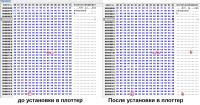
- Наверх of the page up there ^
-
0
| Сообщение #56
Отправлено 19 апреля 2018 — 09:49
indigo99
kirsim, там намного больше ячеек изменилось, чем вы пометили. Смотрите внимательно.
- Наверх of the page up there ^
-
0
| Сообщение #57
Отправлено 19 апреля 2018 — 20:48
Spaun
DeadMau9, Не подойдет, я сначала неправильно понял пост palmoman, поэтому отписался
Kit2006, Она работает, когда голова отходила заложенный ресурс и плоттер просит заменить головку «по пробегу». Это как чип на картридже прошить.
У меня проблема в другом(писал выше) и прошивка не помогла.
kirsim, Вы пробовали, как писал palmoman, зайти в сервис меню и там проверить серийник? там какраз с 670 подобное было.
- Наверх of the page up there ^
-
0
| Сообщение #58
Отправлено 25 апреля 2018 — 18:40
kirsim
Цитата
Вы пробовали, как писал palmoman, зайти в сервис меню и там проверить серийник? там какраз с 670 подобное было.
Пробовал(Service-Display-Head). Не помогает. Что ещё посоветуете?
- Наверх of the page up there ^
-
0
| Сообщение #59
Отправлено 26 апреля 2018 — 18:21
Spaun
kirsim, посоветую вот это: тут про 650 но вс же.. у меня на 750 не помогло… прошивка тут кстати для pf-04 рабочая, я оживил одну голову, которую плоттер не принимал, она стала писать нулевой пробег и сервисном запечатала, но на моем аппарате в обычном режиме всеравно выдает «прочистите головку…»
- Наверх of the page up there ^
-
0
| Сообщение #60
Отправлено 27 апреля 2018 — 08:54
kirsim
У меня после установки головки выскакивает ошибка «не удаётся найти головку…»
- Наверх of the page up there ^
-
0
- ← Предыдущая тема
- iPF500, iPF600, iPF605, iPF610, iPF700, iPF710, iPF755, iPF6100, iPF8100
- Следующая тема →
- Вы не можете создать новую тему
- Вы не можете ответить в тему
1 человек читают эту тему
0 пользователей, 1 гостей, 0 скрытых пользователей
Check printing results
Call for service.
Call for service.
The memory is full.
The memory is full.
The memory is full.
The parameter is out of range.
This command is not supported.
Delete unwanted data
Now printing without saving data.
Prepare to replace the ink.
Prepare to replace the ink.
Prepare to replace the ink.
Prepare to replace the ink.
Prepare to replace the ink.
Replace the ink tank.
Replace the ink tank.
Replace the ink tank.
Replace the ink tank.
Replace the ink tank.
Check ink tank.
Check ink tank.
Check ink tank.
Check ink tank.
Check ink tank.
Delete unwanted data.
Delete unneeded jobs stored on the hard disk.
Press Online to clear error.
Lift the release lever and reload the paper.
Lift the release lever and align leading edge with orange line.
Lift the release lever and reload the paper.
Lift the release lever and reload the paper.
Check the paper type.
Press Online to clear the error and readjust printhead.
Clean the printhead.
Press Online to clear the error and readjust printhead.
Clean the printhead.
Lift the release lever and replace paper with A4/ LTR (vertical) or larger.
Lift the release lever and replace paper with A3/ Ledger (vertical) or larger.
Lift the release lever and replace roll with 10 in. wide or larger roll.
Remove paper and press Load/Eject.
Lift the release lever and reload paper.
Check supported paper sizes.
Check supported paper sizes.
Press Online to clear the error.
Lift the release lever.
Reload paper.
Press Load/Eject and reload the paper.
Lift the release lever and reload the paper.
Press Online to clear the error.
Press Load/Eject and load sheets.
Press OK, remove the sheets, and load a roll.
Press Load/Eject and load a roll.
Turn printer off and install roll feed unit.
Lift the release lever and replace the roll.
Press Load/Eject and reload the paper.
Press Load/Eject and remove the roll.
03130031-2E23
Turn off printer, wait, then turn on again.
03130031-2E14
Turn off printer, wait, then turn on again.
03130031-2E16
Turn off printer, wait, then turn on again.
03130031-2E17
Turn off printer, wait, then turn on again.
03130031-2E20
Turn off printer, wait, then turn on again.
03130031-2E22
Turn off printer, wait, then turn on again.
03130031-2E23
Turn off printer, wait, then turn on again.
03130031-2E25
Turn off printer, wait, then turn on again.
03130031-2E26
Turn off printer, wait, then turn on again.
03130031-2E27
Turn off printer, wait, then turn on again.
03130031-2E1F
Turn off printer, wait, then turn on again.
03130031-2E2A
Turn off printer, wait, then turn on again.
03130031-2E29
Turn off printer, wait, then turn on again.
03130031-2E2E
Turn off printer, wait, then turn on again.
03130031-4027
Turn off printer, wait, then turn on again.
03130031-2E13
Turn off printer, wait, then turn on again.
03130031-2F32
Turn off printer, wait, then turn on again.
Replace the multi sensor unit.
03130031-2F3A
Turn off printer, wait, then turn on again.
03130031-2F3B
Turn off printer, wait, then turn on again.
03130031-260E
Turn off printer, wait, then turn on again.
03130031-2618
Turn off printer, wait, then turn on again.
03130031-260F
Turn off printer, wait, then turn on again.
Turn off printer and check roll feed unit
Turn off printer, wait a while, then turn it on again.
Turn off printer, wait a while, then turn it on again.
03130031-2F2B
Turn off printer, wait, then turn on again.
Open top cover and replace the printhead.
Open top cover and replace the right printhead.
Open top cover and replace the right printhead.
03800500-2F2F
Turn off printer, wait, then turn on again.
Replace the head management sensor unit
Replace the printhead
03800500-2F30
Turn off printer, wait, then turn on again.
Replace the head management sensor unit
Replace the printhead
Press OK and replace ink tank.
Press OK and replace ink tank.
Press OK and replace ink tank.
Press OK and replace ink tank.
Press OK and replace ink tank.
Press OK and replace ink tank.
Press OK and replace ink tank.
Press OK and replace ink tank.
Press OK and replace ink tank.
Press OK and replace ink tank.
Press OK and replace ink tank.
Press OK and replace ink tank.
Press OK and replace ink tank.
Press OK and replace ink tank.
Press OK and replace ink tank.
Press OK and replace ink tank.
Press OK and replace ink tank.
Press OK and replace ink tank.
Press OK and replace ink tank.
Press OK and replace ink tank.
Press OK and replace ink tank.
Press OK and replace ink tank.
Press OK and check ink tank.
Press OK and check ink tank.
Press OK and check ink tank.
Press OK and check ink tank.
Press OK and check ink tank.
Press OK and check ink tank.
Turn off printer, wait a while, and turn it on again.
Turn off printer, wait a while, and turn it on again.
Replace the maintenance cartridge.
Cartridge capacity.
Replace the maintenance cartridge.
Replace the maintenance cartridge.
Replace the maintenance cartridge.
Check roll position.
Online: Print Load/Eject:
Change Paper
Check paper size setting.
Online: Print
Load/Eject: Change Paper
Online: Print
Stop: Stop Printing
Load/Eject: Change Paper
Lift the release lever and reload the paper.
Press Online to clear the error.
Check the head management sensor.
Online: Print
Stop: Stop Printing
Load/Eject: Change Paper
Delete unwanted data on your computer to resume printing.
Press Stop to cancel printing.
Cannot save. Delete unwanted data on your computer to resume printing.
Press Stop to cancel printing.
Press OK to reformat
Turn off printer, wait a while, and turn it on again.
Invalid files will be deleted.
Turn off printer, wait, then turn on again.
Turn off printer, wait, then turn on again.
Install printhead.
Check the maintenance cartridge.
Lift the release lever and reload the paper.
Manually rewind roll all the way and press OK.
Confirm usage cond. of the paper.
Модераторы: KOT, Женька 116

 Rexvil » Пн мар 29, 2021 9:32 am


 Моги бы ли вы конкретнее описать возникающую ошибку?
Судя по сервисмануалу их несколько
-Maintenance cartridge full.Replace the maintenance cartridge./03841001-2819 /Maintenance cartridge full/ Renew the maintenance cartridge.
-No Maintenance Cartridge capacity.Replace the maintenance cartridge./
03841001-281B/ Not enough space in the maintenance cartridge prior to cleaning/Replace the maintenance cartridge.
-No maintenance cartridge.Check the maintenance cartridge./03841101-2818/ Maintenance cartridge not installed. Install the maintenance cartridge.
-Maintenance cartridge problem.Replace the maintenance cartridge./03841201-2816/ Maintenance cartridge EEPROM error/ Renew the maintenance cartridge.
-Maintenance cartridge problem.Replace the maintenance cartridge./03841201-2817/ Maintenance cartridge ID error /Renew the maintenance cartridge.
<сохрани себя>*<save yourself>
-

Rexvil
- Заправщик
-

- Персональный альбом



Rexvil » Вт мар 30, 2021 1:49 pm
Почему-то в вашем случае не принимает. Может это связано с измененной производителем логикой определения. Если бы поставили от 770-го, может и принял бы? не знаю.
В service mode вы входите через [Load] и [Navigate] key? И всё равно выскакивает ошибка? Тогда войдите повторно. Ибо сказано:
* Service mode is added to the [Set./Adj. Menu]. Service mode can be entered even when an error occurs (an error message is displayed) by turning off the power once and then pressing the above keys.
<сохрани себя>*<save yourself>
-
Rexvil
- Заправщик
-
- Персональный альбом
-
-
Canon G1010 series, G2010 series, G3010 series, G4010 series
Verter в форуме Файлообменник
- 0
- 3318
Verter

Ср авг 19, 2020 12:00 pm
-
Canon G1010 series, G2010 series, G3010 series, G4010 series
-
-
Canon IR 2018 выдает ошибку «out of toner change toner»
Sveterkom в форуме Принтеры, МФУ, копиры формата A3
- 11
- 9660
Goldwater
Чт окт 08, 2020 11:29 pm
-
Canon IR 2018 выдает ошибку «out of toner change toner»
-
-
Canon G1000 series, G2000 series, G3000 series Service Manua
Verter в форуме Файлообменник
- 10
- 5523
Azelus
Пт июн 12, 2020 4:46 am
-
Canon G1000 series, G2000 series, G3000 series Service Manua
-
-
Canon IR 3225 «засыпает»
johnnybravo в форуме Принтеры, МФУ, копиры формата A3
- 4
- 6998
johnnybravo
Пн июл 23, 2012 1:32 pm
-
Canon IR 3225 «засыпает»
-
-
Canon mf3010 сразу мигает «о»
Sveterkom в форуме Принтеры, МФУ, факсы, копиры формата A4
- 2
- 1737
Сергей Владимиров
Пт янв 21, 2022 2:04 pm
-
Canon mf3010 сразу мигает «о»

Вернуться в Плоттеры
Кто сейчас на форуме
Сейчас этот форум просматривают: нет зарегистрированных пользователей и гости: 2
Chapter 8
Code
03810101-2501
03810102-2502
03810103-2503
03810106-2506
03810106-2507
03830104-2520
03830101-2521
03830102-2522
03830103-2523
03830106-2526
03830106-2527
03830204-2540
03830201-2541
03830202-2542
03830203-2543
03830206-2546
03830206-2547
03830304-2560
03830301-2561
03830302-2562
03830303-2563
03830306-2566
03830306-2567
03810204-2580
03810201-2581
03810202-2582
03810203-2583
03810206-2586
03810206-2587
03800100-2800
03800200-2802
03800400-2803
03800300-2801
03800500-280C
03841201-2816
03841201-2817
03841101-2818
03841001-2819
01841001-281A
03010000-2820
03010000-2821
8-4
Status
No ink (Y)
No ink (M)
No ink (C)
No ink (MBK)
No ink (MBK2)
Ink tank not installed (BK)
Ink tank not installed (Y)
Ink tank not installed (M)
Ink tank not installed (C)
Ink tank not installed (MBK)
Ink tank not installed (MBK2)
Ink tank ID error (BK)
Ink tank ID error (Y)
Ink tank ID error (M)
Ink tank ID error (C)
Ink tank ID error (MBK)
Ink tank ID error (MBK2)
Ink tank EEPROM error (BK)
Ink tank EEPROM error (Y)
Ink tank EEPROM error (M)
Ink tank EEPROM error (C)
Ink tank EEPROM error (MBK)
Ink tank EEPROM error (MBK2)
Remaining ink low (BK)
Remaining ink low (Y)
Remaining ink low (M)
Remaining ink low (C)
Remaining ink low (MBK)
Remaining ink low (MBK2)
No printhead
Incorrect printhead was installed
Printhead EEPROM error
Unable to correct printhead DI
Many nozzles on printhead did not inject ink
Maintenance cartridge EEPROM error
Maintenance cartridge ID error
Maintenance cartridge not installed
Maintenance cartridge tank full
Remaining capacity of maintenance cartridge is insufficient to execute each
cleaning
Unable to adjust printhead registration
Unable to adjust band
Chapter 8
8-5
03830202-2542
Ink tank ID error (M)
03830203-2543
Ink tank ID error (C)
03830204-2540
Ink tank ID error (BK)
03830206-2546
Ink tank ID error (MBK)
03830206-2547
Ink tank ID error (MBK2)
03830301-2561
Ink tank EEPROM error (Y)
03830302-2562
Ink tank EEPROM error (M)
03830303-2563
Ink tank EEPROM error (C)
03830303-2572
Remaining ink low (M)
03830304-2560
Ink tank EEPROM error (BK)
03830304-2570
Remaining ink low (BK)
03830306-2566
Ink tank EEPROM error (MBK)
03830306-2567
Ink tank EEPROM error (MBK2)
03830306-2576
Remaining ink low (MBK)
03830306-2577
Remaining ink low (MBK2)
03830312-2571
Remaining ink low (Y)
03830313-2573
Remaining ink low (C)
03841001-2819
Maintenance cartridge tank full
03841001-281B
Empty capacity of the maintenance cartridge when cleaning it various is insufficient.
03841101-2818
Maintenance cartridge not installed
03841201-2816
Maintenance cartridge EEPROM error
03841201-2817
Maintenance cartridge ID error
03860002-2E02
The cut sheet is not set though the data of the cut sheet specification was received.
03860002-2E0A
Manually fed cut sheet was already loaded even though received data indicated roll
media
03860002-2E0C
When the roll paper was loaded, the data of the cut sheet specification was received.
03861001-2405
The form set position is unsuitable to the print of edge none.
03861001-2406
Data is unsuitable to the print of edge none.
03862000-2E09
Roll paper running out
03870001-2015
Cutting failure
03900001-4042
MIT data transfer failure
03900001-4049
Forwarding ROM data machine kind difference
E194-4034
Sensor calibration error(not generated in the use mode.)
Code*
Description